Normal view

There are new articles available, click to refresh the page.
Before yesterdayMain stream

PLA Mold To Plaster Bust, No Silicone Needed

23 January 2026 at 16:00
[Denny] removing a plaster bust from a microwave-softened mold

3D printing is wonderful, but sometimes you just don’t want to look at a plastic peice. Beethoven’s bust wouldn’t look quite right in front of your secret door if it was bright orange PLA, after all. [Denny] over at “Shake the Future” on YouTube is taking a break from metal casting to show off a quick-and-easy plaster casting method— but don’t worry, he still uses a microwave.

Most people, when they’re casting something non-metallic from a 3D print are going to reach for castable silicone and create a mold, first. It works for chocolate just as easily as it does plaster, and it does work well. The problem is that it’s an extra step and extra materials, and who can afford the time and money that takes these days?

[Denny]’s proposal is simple: make the mold out of PLA. He’s using a resin slicer to get the negative shape for the mold, and exporting the STL to slice in PrusaSlicer, but Blender, Meshmixer and we’re pretty sure Cura should all work as well. [Denny] takes care when arranging his print to avoid needing supports inside the mold, but that’s not strictly necessary as long as you’re willing to clean them out. After that, it’s just a matter of mixing up the plaster, pouring it into the PLA, mold, and waiting.

Waiting, but not too long. Rather than let the plaster fully set up, [Denny] only waits about an hour. The mold is still quite ‘wet’ at this point, but that’s a good thing. When [Denny] tosses it in his beloved microwave, the moisture remaining in the plaster gets everything hot, softening the PLA so it can be easily cut with scissors and peeled off.

Yeah, this technique is single-use as presented, which might be one advantage to silicone, if you need multiple copies of a cast. Reusing silicone molds is often doable with a little forethought. On the other hand, by removing the plaster half-cured, smoothing out layer lines becomes a simple matter of buffing with a wet rag, which is certainly an advantage to this technique.

Some of you may be going “well, duh,” so check out [Denny]’s cast-iron benchy if his plasterwork doesn’t impress. We’ve long been impressed with the microwave crucibles shown off on “Shake the Future”, but it’s great to have options. Maybe metal is the material, or perhaps plain plastic is perfect– but if not, perchance Plaster of Paris can play a part in your play.


Can Skynet Be a Statesman?

21 January 2026 at 04:00

There’s been a lot of virtual ink spilled about LLMs and their coding ability. Some people swear by the vibes, while others, like the  FreeBSD devs have sworn them off completely. What we don’t often think about is the bigger picture: What does AI do to our civilization? That’s the thrust of a recent paper from the Boston University School of Law, “How AI Destroys Institutions”. Yes, Betteridge strikes again.

We’ve talked before about LLMs and coding productivity, but [Harzog] and [Sibly] from the school of law take a different approach. They don’t care how well Claude or Gemini can code; they care what having them around is doing to the sinews of civilization. As you can guess from the title, it’s nothing good.

"A computer must never make a management decision."
Somehow the tl;dr was written decades before the paper was.

The paper a bit of a slog, but worth reading in full, even if the language is slightly laywer-y. To summarize in brief, the authors try and identify the key things that make our institutions work, and then show one by one how each of these pillars is subtly corroded by use of LLMs. The argument isn’t that your local government clerk using ChatGPT is going to immediately result in anarchy; rather it will facilitate a slow transformation of the democratic structures we in the West take for granted. There’s also a jeremiad about LLMs ruining higher education buried in there, a problem we’ve talked about before.

If you agree with the paper, you may find yourself wishing we could launch the clankers into orbit… and turn off the downlink. If not, you’ll probably let us know in the comments. Please keep the flaming limited to below gas mark 2.

RAM Prices Got You Down? Try DDR3. Seriously!

20 January 2026 at 19:00

DDR3 seemed plenty fast when it first showed up 19 years ago. Who could say no to 6400 Mb/s transfer speeds? Of course compared to the modern DDR5 that’s glacially slow, but given that RAM is worth its weight in gold these days– with even DDR4 spiking in price– some people, like [Gheeotine], are asking “can you game on DDR3“? The answer is a shocking yes.

[Gheeotine] builds two budget-friendly PCs for this video, using some of the newest DD3-supporting motherboards available. That’s not exactly new: we’re talking 12 to 15 years old, but hey, not old enough to drive. We certainly didn’t expect to hear about an x79 motherboard hosting an Ivy Bridge processor in 2026, but needs must when the devil dances. The only concession to modernity is the graphics cards: the x79 mobo got an RX6600XT 8GB, and the other build, using a z97 motherboard got an NVIDIA RTX 4060. The z97 motherboard allowed a slightly newer processor, as well, an i7 4790, with the new and exciting Haswell architecture you may have heard of. Both boards are maxed out on RAM, because at less than one USD/GB, why not?

[Gheeotine] puts a few new titles through their paces on these boxen, and while the results aren’t amazing, everything he tries comes out playable, which is amazing in and of itself. Well, playable unless you’re one of those people who can’t stand playing at resolutions under 4K or FPS under 100. Those of who spent their formative years with 29.7 FPS or 25 FPS in NTSC or PAL regions aren’t going to complain too loudly if frame rates dip down into the 30s playing at 1080p for some of the more demanding titles. Ironically, one of those was the five-year-old Crysis Remastered. Given the age of some of this hardware “Can it Run Crysis” is a perfectly reasonable question, and the answer is still yes.

If you want modern games, you’re much better off with a z97 chipset motherboard if you chose to go the DDR3 route, since you won’t run into issues related to the AVX2 instruction, which first appeared with the Haswell microarchitecture. Here at Hackaday our preferred solution to the rampocalypse is software optimization, Since holding your breath for that would probably be fatal, cost-optimizing PC builds is probably a good plan, even if some might balk at going all the way back to DDR3.

Of course if you’re going to use nearly-retro hardware like DDR3, you might as well go all-out on retro vibes with a nostalgic 80s-style, or even 50s-style case. 

The Cutest Weather Forecast on E-Ink and ESP32

17 January 2026 at 19:00
A photo of the cats and the generated image

There’s a famous book that starts: “It is a truth universally acknowledged that a man in possession of a good e-ink display, must be in want of a weather station.” — or something like that, anyway. We’re not English majors. We are, however, major fans of this feline-based e-ink weather display by [Jesse Ward-Bond]. It’s got everything: e-ink, cats, and AI.

The generated image needs a little massaging to look nice on the Spectra6 e-ink display.

AI? Well, it might seem a bit gratuitous for a simple weather display, but [Jesse] wanted something a little more personalized and dynamic than just icons. With that in the design brief, he turned to Google’s Nano Banana API, feeding it the forecast and a description of his cats to automatically generate a cute scene to match the day’s weather.

That turned out to not be enough variety for the old monkey brain, so the superiority of silicon — specifically Gemini–was called upon to write unique daily prompts for Nano Banana using a random style from a list presumably generated by TinyLlama running on a C64. Okay, no, [Jesse] wrote the prompt for Gemini himself. It can’t be LLM’s all the way down, after all. Gemini is also picking the foreground, background, and activity the cats will be doing for maximum neophilia.

Aside from the parts that are obviously on Google servers, this is all integrated in [Jesse]’s Home Assistant server. That server stores the generated image until the ESP32 fetches it. He’s using a reTerminal board from SeedStudio that includes an ESP32-S3 and a Spectra6 colour e-ink display. That display leaves something to be desired in coloration, so on top of dithering the image to match the palette of the display, he’s also got a bit of color-correction in place to make it really pop.

If you’re interested in replicating this feline forecast, [Jesse] has shared the code on GitHub, but it comes with a warning: cuteness isn’t free. That is to say, the tokens for the API calls to generate these images aren’t free; [Jesse] estimates that when the sign-up bonus is used up, it should cost about fourteen cents a pop at current rates. Worth it? That’s a personal choice. Some might prefer saving their pennies and checking the forecast on something more physical, while others might prefer the retro touch only a CRT can provide. 

Jam like It’s the 1980s With A Mini-IBM PC

16 January 2026 at 16:00
The Mini PC. Without a banana for scale, you might be fooled.

A lot of retrocomputer enthusiasts have a favourite system, to the point of keeping up 40 year old flame wars over which system was “best”.   In spite of the serious, boring nature of the PC/AT and its descendants, those early IBMs have a certain style that Compaq and the Clones never quite matched. Somehow, we live in a world where there are people nostalgic for Big Blue. That’s why [AnneBarela] built a miniature IBM PC using an Adafruit Fruit Jam board.

If you haven’t seen it before, the Fruit Jam board is an RP2350 dev board created specifically to make minicomputers, with its two USB host sockets, DVI-out and 3.5mm jack. [Anne] loaded a PC emulator by [Daft-Freak] called PACE-32 than can emulate an IBM compatible PC with an 80386 and up-to 8 MB of RAM on this particular board. The video is VGA, 640×480 — as god intended– piped to a 5″ LCD [Anne] picked up from AliExpress.

That display is mounted inside a replica monitor designed by [giobbino], and is sitting on top of a replica case. Both are available on Thingiverse, though some modification was required to provide proper mounting for the Fruit Jam board. [giobbino] designed it to house a FabGL ESP32 module– which has us wondering, if an RP2350 can be a 386, what level of PC might the ESP32-P4 be capable of? We’ve seen it pretend to be a Quadra, so a 486 should be possible. It wasn’t that long ago that mini builds of this nature required a Raspberry Pi, after all.

Speculation aside, this diminutive IBM build leaves us but with but one question: if you played Links386 on it, would it count as miniature golf?

A PSOne In the Palm of Your Hand

16 January 2026 at 04:00

Sony’s original Playstation wasn’t huge, and they did shrink it for re-release later as the PSOne, but even that wasn’t small enough for [Secret Hobbyist]. You may have seen the teaser video a while back where his palm-size Playstation went viral, but now he’s begun a series of videos on how he redesigned the vintage console.

Luckily for [Secret Hobbyist], the late-revision PSOne he started with is only a two-layer PCB, which made reverse engineering the traces a lot easier. Between probing everything under the microscope and cleaning the board off to follow all the traces in copper, [Hobbyist] was able to reproduce the circuit in KiCAD. (Reverse engineering starts at about 1:18 in the vid.)

With a schematic in hand, drafting a smaller PCB than Sony built is made easier by the availability of multi-layer PCBs. In this case [Hobbyist] was able to get away with a four-layer board. He was also able to ditch one of the ICs from the donor mainboard, which he called a “sub-CPU” as its functionality was recreated on the “PSIO” board that’s replacing the original optical drive. The PSIO is a commercial product that has been around for years now, allowing Playstations to run from SD cards– but it’s not meant for the PSOne so just getting it working here is something of a hack. He’s also added on a new DAC for VGA output, but otherwise the silicon is all original SONY.

This is the first of a series about this build, so if you’re into retro consoles you might want to keep an eye on [Secret Hobbyist] on YouTube to learn all the details as they are released.


Dad Makes Kid’s Balance Bike Into Electric Snow Trike Like a Boss

14 January 2026 at 19:00

The balance bikes toddlers are rocking these days look like great fun, but not so great in the snow. Rather than see his kid’s favourite toy relegated to shed until spring, [John Boss] added electric power, and an extra wheel to make one fun-looking snow trike. Like a boss, you might say.

Physically, the trike is a delta configuration: two rear wheels and one front, though as you can see the front wheel has been turned into a ski. That’s not the most stable configuration, but by shifting the foot pegs to the front wheel and keeping the electronics down low, [John] is able to maintain a safe center of gravity. He’s also limiting the throttle so kiddo can’t go dangerously fast– indeed, the throttle control is in the rear electronics component. The kid just has a big green “go” button.

Bit-banging the throttle, combined with the weight of the kiddo up front, creates a strong tendency towards wheel-spin, but [John] fixes that with a some cleverly printed TPU paddles zip-tied to the harbor-freight wheels and tires he’s hacked into use. Those wheels are fixed to a solid axle that’s mounted to flat plate [John] had made up to attach to the bike frame. It’s all surprisingly solid, given that [John] is able to demonstrate the safety factor by going for a spin of his own. We would have done the same.

We particularly like the use of a tool battery for hot-swappable power. This isn’t the first time we’ve seen a kid’s toy get the tool battery treatment, but you aren’t limited to mobile uses. We’ve seen the ubiquitous 18V power packs in everything from fume extractors to a portable powerpack that can even charge a Tesla.

ESP32-P4 Powers Retro Handheld after a Transplant

14 January 2026 at 11:30

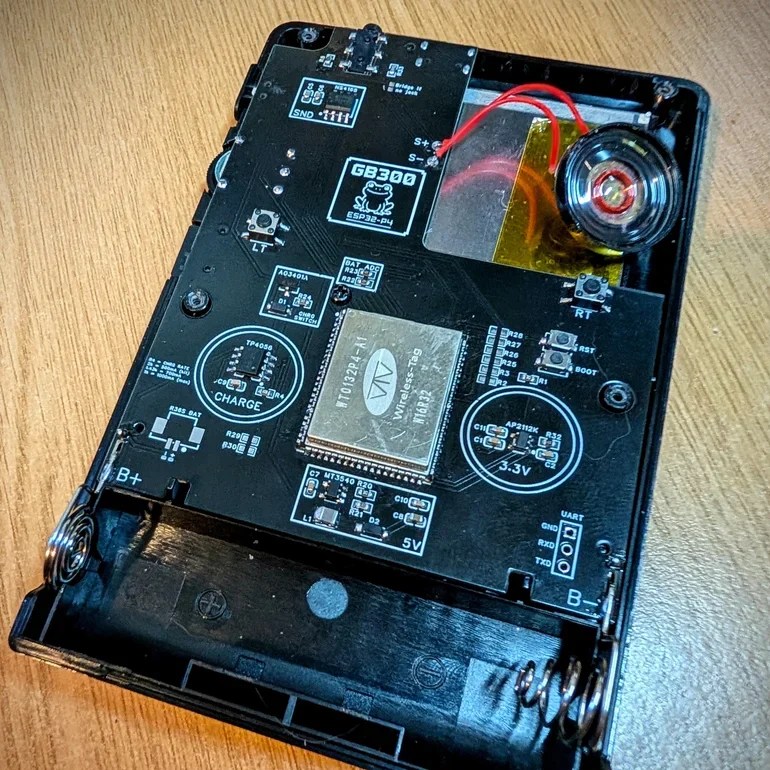
The ESP32-P4 is the new hotness on the microcontroller market. With RISC-V architecture and two cores running 400 MHz, to ears of a certain vintage it sounds more like the heart of a Unix workstation than a traditional MCU. Time’s a funny thing like that. [DynaMight] was looking for an excuse to play with this powerful new system on a chip, so put together what he calls the GB300-P4: a commercial handheld game console with an Expressif brain transplant.

Older ESP32 chips weren’t quite up to 16-bit emulation, but that hadn’t stopped people trying; the RetroGo project by [ducalex] already has an SNES and Genesis/Mega Drive emulation mode, along with all the 8-bit you could ask for. But the higher-tech consoles can run a bit slow in emulation on other ESP32 chips. [DynaMight] wanted to see if the P4 performed better, and to no ones surprise, it did.

If the build quality on this handheld looks suspiciously professional, that’s because it is: [DynaMight] started with a GB300, a commercial emulator platform. Since the ESP32-P4 is replacing a MIPS chip clocked at 914 MHz in the original — which sounds even more like the heart of a Unix workstation, come to think of it — the machine probably doesn’t have better performance than it did from factory unless its code was terribly un-optimized. In this case, performance was not the point. The point was to have a handheld running RetroGo on this specific chip, which the project has evidently accomplished with flying colours. If you’ve got a GB300 you’d rather put an “Expressif Inside” sticker on, the project is on github. Otherwise you can check out the demo video below. (DOOM starts at 1:29, because of course it runs DOOM.)

The last P4 project we featured was a Quadra emulator; we expect to see a lot of projects with this chip in the new year, and they’re not all going to be retrocomputer-related, we’re sure. If you’re cooking up something using the new ESP32, or know someone who is, you know what to do.

An SD Card of Your Own For Microcontroller Projects

13 January 2026 at 07:00

If you’ve wiring up a microcontroller and need some kind of storage, it’s likely you’ll reach for an SD card. Compared to other ways of holding data on your project, SD cards are just so much cheaper, resilient to physical and magnetic shocks, and simpler to work with from both a hardware and software perspective. On the other hand, it might seem silly to put a SD card slot on a board that’s never going to see a replacement card. [DIY GUY Chris] wants to advertise a solution for that: a cardless SD card chip by XTX that can act as a drop-in replacement for your projects. 

The XTXD0*G series are NAND flash chips of precisely the sort you’d find in an SD card, except without the SD card. That means you can use your usual SD card access libraries to speed prototyping, but skip the BOM cost of an actual card reader. In his Instructable and the video embedded below [Chris] shows how he used the 4 Gbit version, the XTSD04GLGEAG to make a custom SD-compatible breakout board that is equally happy in your laptop’s card reader or on a breadboard.

To get it plugged into the breadboard, [Chris] is using the standard 2.54 mm headers you can get anywhere; to get it plugged into a card reader, he’s just relying on the PCB being cut to shape. [Chris] notes that you’ll want to have the board built at 0.6 mm thickness if you’re going to plug it in like a micro SD card.

Of course once you’ve gotten used to the little NAND chips, there’s no need to put them on breakouts but this looks like a fun way to test ’em out. You don’t need to keep your flash chip on an SD-card sized PCB, either; we saw something similar used to make modern game cartridges. If you insist on using a standard SD card and don’t want to buy a slot, you can certainly DIY that instead. 

Optimizing a Desktop, 3D Printed Wind Tunnel

12 January 2026 at 19:00
The best-practice wind tunnel (above) vs a compact version (below)

You’ve heard of wind tunnels– get some airflow going over a thingy, put some some smoke on, and voila! Flow visualization. How hard could it be? Well, as always, the devil is in the details and [toast] is down in there with him with this Hot-Wheels sized wind tunnel video.

To get good, laminar flow inside of a wind tunnel, there are important ratios to be followed– the inlet and outlet diameters must relate to the interior size to get the correct slope on the contraction and exhaust cones. You need a flow straightener on both ends. All of it can be easily 3D printed, as [toast] shows, but you have to know those design rules and pay attention to, which [toast] does… this time. One of his “don’t do this” examples in this video is previous build of his where he did not follow all the rules, and the difference is clear.

Now, unless you’re hooked on flow visualizations —guilty— or are a Hot-Wheels aficionado, since that’s what this wind tunnel is sized for, you probably won’t rush to gumroad to buy [toast]’s STLs. On the other hand, if you pay attention to the lessons [toast] has learned in this video you can apply them to wind tunnels of whatever size and construction technique you need, be it cardboard or junk box plastic and get a more stable result.

Smart Home? Make It Smart Quarters With This LCARS Dashboard

11 January 2026 at 19:00

At the risk of starting a controversy: is there anyone who goes to the effort of setting up Home Assistant who wouldn’t really rather be living on the Enterprise-D? If such a person exists, it’s not [steve-gibbs5], who has not only put together a convincing LCARS dashboard on an Android tablet, but has also put together an easy-to-follow Instructable so you can too.

In case you’ve been monkishly avoiding television since the mid-1980s, LCARS is the high-tech touchscreen interface used on Star Trek: The Next Generation and its sequels. It’s an iconic, instantly-recognizable aesthetic, and we think [Steve] nailed it, even if he was taking design cues from Voyager, which is… not everyone’s favorite trek, to put it mildly. Though perhaps the haters are looking back on it a bit more fondly when compared to some more modern adaptations. Check it out in action in the video embedded below.

The secret to getting your Android tablet looking like a 24th-century terminal is an application called “Total Launcher“, which allows one to customize one’s homescreen to a very high degree. [Steve] shows us how he styled Total Launcher, but that custom home screen isn’t enough on its own. Those futuristic buttons need to do something, which is where a second app called Tasker comes in. Tasks in Tasker are linked to the LCARS interface and the smart home features — in [Steve]’s case, Amazon Alexa, but it looks like Google’s spyware or the open-source Home Assistant are equally viable options.

We saw Star Trek style on Raspberry Pi back in the day, but nothing says your smart home has to be Trek-themed. You could even control it via a dumb terminal if that’s more your style.

M8SBC-86 is an FPGA-Based “Kinda PC Compatible” 486 SBC

8 January 2026 at 19:00

Given the technical specs of the FPGAs available to hobbyists these days, it really shouldn’t be a shock that you can implement a relatively-modern chipset on one, like one for a 486 system. In spite of knowing that in the technical sense, we were still caught off guard by [maniek-86]’s M8SBC project that does just that– the proas both CPU and BIOSducing a 486 FPGA chipset with a motherboard to boot.

Boot what? Linux 2.2.6, MS-DOS 6.22 or FreeDOS all work. It can run DOOM, of course, along with Wolfenstien 3D, Prince of Persia, and even the famous Second Reality demo– though that last without sound. [maniek-86]’s implementation is lacking direct memory access, so sound card support is right out. There are a few other bugs that are slowly being squished, too, according to the latest Reddit thread.
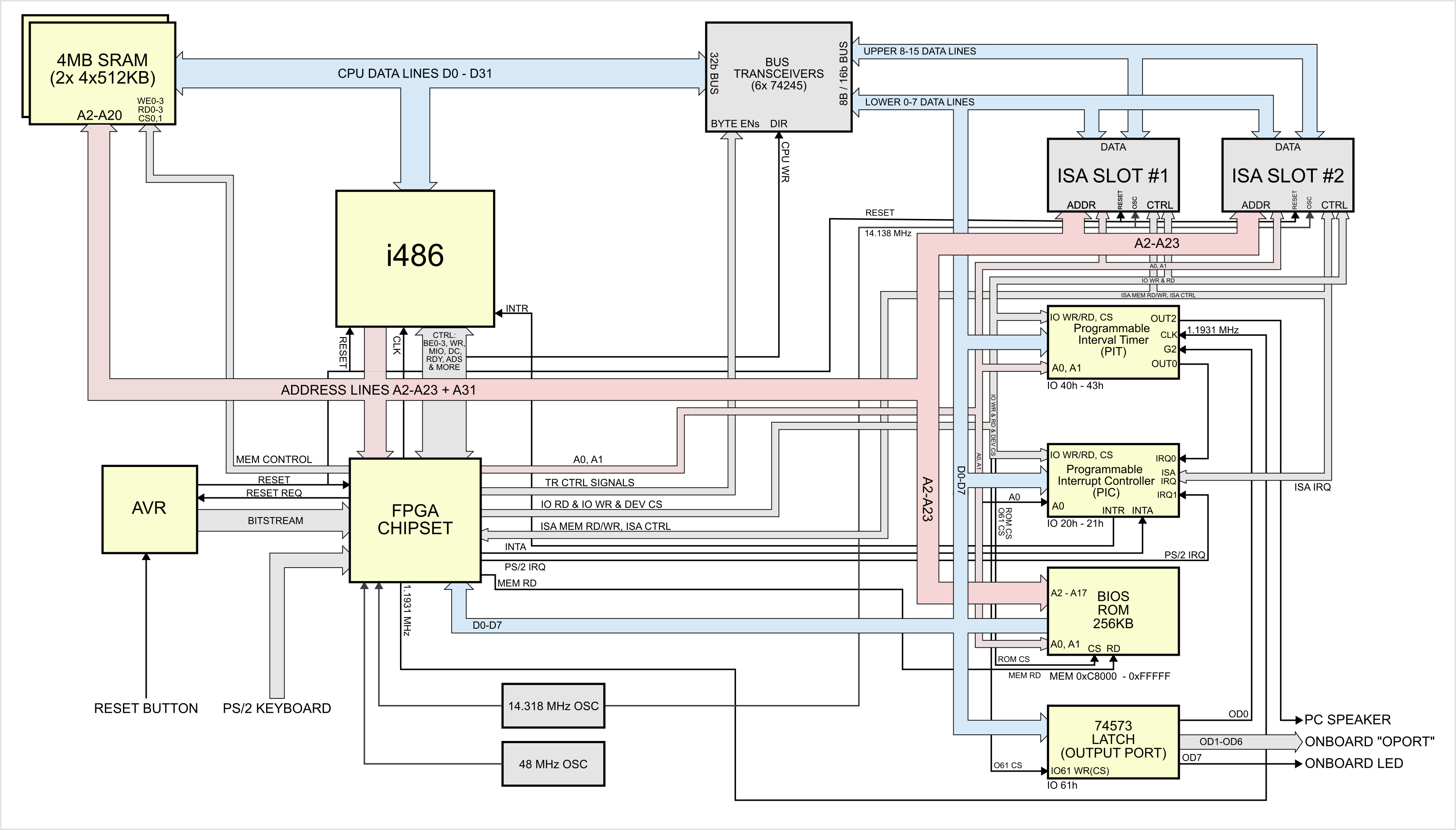
The heart of the system is a Xilinx Spartan II XC2S100 FPGA, which serves the motherboard chipset, codnamed “Hamster I”. The CPU is a vintage i486, running at a configurable 24MHz.  The BIOS code is based on an open-source project by [b-demitri1] that’s also on GitHub, if you happen to need a PC BIOS.  The FPGA isn’t doing everything: graphics is, as right and proper for a PC-compatible of this vintage, provided by an ISA card. [maniek] has tested several VGA cards and all apparently worked equally well, so that aspect of the system is apparently well in hand. The 4MB of system RAM seems pretty reasonable for a 486 build, as does restricting peripherals to PS/2 and the aforementioned ISA bus. We might have gone for a faster clock default than 24MHz, but that’s well within historical territory. Only a few bugs and the pesky lack of a DMA controller keep this from being a true PC-Compatible build, and that’s pretty amazing for one human’s hobby project.

There’s no video of it operating, but there is a very readable hardware diagram. (Click to enlarge).

Eventually, as stocks dwindle, reproducing retrocomputers in FPGA– as was recently done with the MSX standard–may be the only way to enjoy them. That’s probably least true of the 486, which lived on for decades in industrial hardware, but that doesn’t take away from how impressive this build is.

Thanks to [sven] for the tip! Remember: if you see something, say something, because Big Hacker isn’t always watching. (We leave that to the tech giants.)

Electric Snowblower Clears the Way With Hobby Parts

8 January 2026 at 16:00
The blower and a smaller motor than what's actually driving it.

If you live in snow country and own a home, you either have a snowblower or wish you did. The alternatives are either an expensive and potentially unreliable plow service, or back-breaking (and heart-attack inducing) shoveling. [RCLifeOn] was one of those people in the second category, until he decided to do something about it: electrifying a scrap snowblower with a blown engine. 

The usual brushless DC motors and electronic speed controllers [RCLifeOn] has on hand to get his R/C life on with don’t quite have enough oomph to handle both functions of a snowblower. For those of you cursed to live in warmer climes, the modern snowblower is both self-propelled via its twin wheels, and generally has a two-stage powered snow-removal “blower” consisting of an auger to break up the snow and an impeller to blast it out of the machine and many meters off the driveway. On the traditional gas-powered models, these are both powered via belts off the same motor, but that wasn’t going to work.

He kept the belts, and simply used a pair of motors, each with their own ESCs that are controlled via oversized thumb wheels on the handles. The belts couple to the motors with 3D printed pulleys. Belt tension is achieved in the case of the wheels through a simple and sensible shimming arrangement. In the case of the blower motor, he uses a 3D printed adjustable mount to get the appropriate tension. To help it hold long-term (given the issues with creep in 3D prints) he’s got a bearing on a second mount opposite the motor.  It holds up for his demo, which consists of clearing a driveway of 10cm of snow and then plowing through a pile larger than the mouth of the machine. In other words: it works.

The build, as unfortunately common on YouTube, is shy on specific details– but in this case that’s fine. Even if he’d open-sourced everything and posted STEP or STL files, it wouldn’t save much time since you’d pretty well have to re-engineer the build to fit your own snowblower, if you were so inclined. As with many hacks of this nature, the point of sharing it is to show how easy it is and provide the inspiration. As the cartoons used to say, “knowing is half the battle.”

If one was to re-implement this hack, we could not encourage you strongly enough to put in the standard dead-man’s switch, a feature commercial snowblowers share with things like lawnmowers. As annoying as it is to hang onto with frozen fingers, that safety feature is there for a reason.

If your driveway is short, you can save on gas and fuel costs with an extension cord. Or you could just stay inside and do the job by remote control, but that comes with its own pitfalls.

Drive 1024×600 Pixels via I2C with an ATtiny85

8 January 2026 at 07:00
The clock demo on display

If you need to drive a big screen for a project, it’s fair to say your first thought isn’t going to be to use the ATtiny85. With just 512 bytes of RAM and 8 kilobytes of flash memory, the 8-bit micro seems a little cramped to drive, say, a 10″ screen. Yet that’s exactly what [ToSStudio] is doing with TinyTFT_LT7683: 1024 x 600 pixels of TFT goodness, over I2C no less.

With the right TFT controller, this little micro-controller can do magic.

The name kind of gives away the secret: it won’t work on just any TFT display. It’s using properties of the LT7683 display driver, though if you don’t have one of those, the RA8875 is also compatible. Those drivers can take more than just a pixel stream– a good thing, since you’d be hard pressed to get that many pixels streaming from an ATtiny. These are character/graphic display drivers, which means you can get them to draw both characters and graphics on the screen if you speak the lingo.

It’s still not blazing fast; the documentation suggests “static or moderately dynamic UIs” as the suggested use case, and a clock is of the pre-programmed examples. From that, we can surmise that you can get 1 FPS or better with this code. You’re limited both by the simple micro-controller and the bandwidth of the I2C bus, but within those limits this seems like a very powerful technique.

This isn’t the first ATtiny graphics library to blow our minds, but if you really want an impressive graphics demo from the little micro that could, you really need to race the beam.

Thanks to [Thomas Scherer] for the tip!

Tired of Burnt Fingers? Try PID Tuning the Hot Glue Gun

6 January 2026 at 16:00
The modified hot glue gun, reassembled

Hot glue guns are pretty simple beasts: there’s an on/off switch, a heating element, and a source of current, be it battery or wired. You turn it on, and the heater starts warming up; eventually you can start extruding the thermoplastic sticks we call “hot glue”. Since there’s no temperature control, the longer you run the gun, the warmer it gets until it is inevitably hotter than you actually want– either burning you or oozing thermoplastic out the tip. [Mellow_Labs] was sick of that after a marathon hot-glue session, and decided to improve on his hot glue gun with PID tuning in the video embedded below.

PID tuning is probably a familiar concept to most of you, particularly those who have 3D printers, where it’s used in exactly the same way [Mellow_Labs] puts it to work in the hot glue gun.  By varying the input (in this case the power to the heater) proportional both to the Parameter (in this case, temperature) as well as the Integral and Derivative of that value, you can have a much steadier control than more naive algorithms, like the simple “on/off” thermostat that leads to large temperature swings.

In this case [Mellow_Labs] is implementing the PID control using a thermistor that looks like it came from a 3D printer, and a MOSFET driven by an RP2040. Microcontroller gets its power via the hot glue gun’s battery fed through a buck converter. Since he has them, a small OLED screen displays temperature, which is set with a pair of push-buttons. Thus, one can set a temperature hot enough to melt the glue, but low enough to avoid oozing or third degree burns.

He does not share the code he’s running on the RP2040, but if you are inspired to replicate this project and don’t want to roll your own, there are plenty of example PID scripts out there, like the one in this lovely robot. No, PID isn’t reserved for thermostats– but if you are controlling heat, it’s not reserved for electric, either. Some intrepid soul put built a PID controller for a charcoal BBQ once.

An RPN Calculator and a Bonus VFD Clock From Casio Revival

5 January 2026 at 04:00
The clock and the rebuilt calculator from which its VFD was donated.

Have you heard the saying “the problem is the solution”? It seems to originate in the permaculture movement, but it can apply equally well to electronics. Take the problem [shiura] had: a Casio Mini CM-602 that had let out the magic smoke. The solution was a twofer: rebuild the Casio into a modern number cruncher with Reverse Polish Notation (RPN), and save the Vacuum Fluorescent Display (VFD) for a gorgeous WiFi clock.

[shiura]’s write-up includes a helpful guide for reverse engineering the pins on this sort of VFD, if you don’t happen to have the same model calculator (or VFD tube) they’re working with. If you’ve done this sort of thing, you know what to expect: power it up and kill power to the pins, one by one, to map out which segments or characters go out, thereby identifying the anodes and grid electrodes. The cathodes had already been ID’d from looking at the PCB. After that it’s just a matter of wiring the VFD to an ESP32 via a transistor array to get the voltages right, and voila! Clock. The code and case design files for this clock — including an editable .blend — are available via GitHub.

The calculator half of the project is an incredibly elegant hack that relies on the fact that the Casio’s CPU has the same pin pitch as modern micros: 2.54 mm, or 0.1″, so an RP2040 zero can sit in the footprint of the original CPU, scanning the keypads with its GPIO. Then an I2C display is separately wired up to replace the clockified VFD. Perhaps some driver circuitry for the VFD died, or [shiura] salvaged the display before deciding to save the calculator, because otherwise we see no reason why this brain transplant couldn’t be done while keeping the original display. Admittedly having two lines on the display instead of one make the “new” calculator a tad more usable. The code for that is also available on GitHub, and while the readme is in Japanese, machine translations have gotten pretty good and the code is quite readable on its own.

Longtime readers will likely be familiar with [shiura]’s work, with a number of finely crafted clocks having been featured from the Japanese maker, along with vintage pocket computer repairs. Bringing both together makes this twin hack particularly on-brand.

Reviving ReBoot With a Tape Deck Repair

5 January 2026 at 01:00
[Mark] shows off footage from a D1 master on the repaired deck

Do you remember ReBoot? If you were into early CGI, the name probably rings a bell, since when it premiered in 1994 it was the first fully computer-animated show on TV. Some time ago, a group found a pile of tapes from Mainframe Studios in Canada, the people behind ReBoot, and the computer historians amongst us were very excited… until they turned out to be digital broadcast master tapes. Exciting for fans of lost media, sure, but not quite the LTO backups of Mainframe’s SGI workstations some of us had hoped would turn up. Still, [Mark Westhaver], [Bryan Baker] and others at the “ReBoot Rewind” project have made great strides, to the point that in their latest update video they declare “We Saved ReBoot

What does it take to revive a 30-year-old television project? Well, as stated, they started with the tapes. These aren’t ordinary VHS tapes: the Sony D-1 tapes, which were also known by the moniker “4:2:2”, are a format that most people who didn’t work in the TV or film industry will have never seen, and the tape decks are rare as hen’s teeth these days. Just getting a working one, and keeping it working, was one of the biggest challenges [Mark] and Reboot Rewind faced. In the end it took three somewhat-dodgy machines long past their service lives and a miraculously located spare read/write head to get a stable scanning rate.

The uncompressed digital output of these tapes isn’t something you can just burn to a DVD, either. The 720 × 576 resolution video stream is captured raw, but there are minor editing tweaks that need to be made in addition to tape errors that have cropped up over the years, and those need to be dealt with before the video and audio data gets encoded into a modern format. The video briefly glosses [Bryan Baker]’s workflow to do just that. At least they aren’t stuck with terrible USB video capture dongles VHS lovers have to deal with. Even if you don’t care about ReBoot, this isn’t the only show that was archived on D1 tapes so that workflow might be of interest to media fans.

We covered ReBoot Rewind when they were first searching for tape decks, so it’s great to have an update. Alas, the rights holders haven’t yet decided how exactly they’re going to release this fine footage, so if like this author you have fond memories of ReBoot, you may have to wait a bit longer for a reWatch.

Sleeping Rough in Alaska with a USPS Cargo Bike

4 January 2026 at 13:00

Out of all 49 beautiful US states (plus New Jersey), the one you’d probably least want to camp outside in during the winter is arguably Alaska. If you were to spend a night camping out in the Alaskan winter, your first choice of shelter almost certainly wouldn’t be a USPS electric cargo trike, but over on YouTube [Matt Spears] shows that it’s not that hard to make a lovely little camper out of the mail bike. 

We’re not sure how much use these sorts of cargo trikes get in Alaska, but [Matt] seems to have acquired this one surplus after an entirely-predictable crash took one of the mirrors off. A delta configuration trike — single wheel in front — is tippy at the best of times, but the high center of gravity you’d get from a loading the rear with mail just makes it worse. That evidently did not deter the United States Postal Service, and it didn’t deter [Matt] either.

His conversion is rather minimal: to turn the cargo compartment into a camper, he only adds a few lights, a latch on the inside of the rear door, and a wood-burning stove for heat. Rather than have heavy insulation shrink the already-small cargo compartment, [Matt] opts to insulate himself with a pile of warm sleeping bags. Some zip-tie tire chains even let him get the bike moving (slowly) in a winter storm that he claims got his truck stuck.

While it might not be a practical winter vehicle, at least on un-plowed mountain roads, starting with an electric-assist cargo trike Uncle Sam already paid for represented a huge cost and time savings vs starting from scratch like this teardrop bike camper we featured a while back. While not as luxurious, it seems more practical for off-roading than another electric RV we’ve seen.

❌
❌