Before the modern Internet existed, there were still plenty of ways of connecting with other computer users “online”, although many of them might seem completely foreign to those of us in the modern era. One of those systems was the Bulletin Board System, or BBS, which would have been a single computer, often in someone’s home, connected to a single phone line. People accessing the BBS would log in if the line wasn’t busy, leave messages, and quickly log out since the system could only support one user at a time. While perhaps a rose-tinted view, this was a more wholesome and less angsty time than the modern algorithm-driven Internet, and it turns out these systems are making a bit of a comeback as a result.
The video by [The Retro Shack] sets up a lot of this history for context, then, towards the end, uses a modern FPGA-based recreation called the Commodore 64 Ultimate to access a BBS called The Old Net, a modern recreation of what these 80s-era BBS systems were like. This involves using a modern networking card that allows the C64 to connect to Wi-Fi access points to get online instead of an old phone modem, and then using a terminal program called CCGMS to connect to the BBS itself. Once there, users can access mail, share files, and even play a few games.
While the video is a very basic illustration of how these BBS systems worked and how to access one, it is notable in that it’s part of a trend of rejecting more modern technology and systems in favor of older ones, where the users had more control. A retro machine like a C64 or Atari is not required either; modern operating systems can access these with the right terminal program, too. A more in-depth guide to the BBS can be found here for those looking to explore, and we’ve also seen other modern BBS systems recently.
Al and I were talking about the IBM 9020 FAA Air Traffic Control computer system on the podcast. It’s a strange machine, made up of a bunch of IBM System 360 mainframes connected together to a common memory unit, with all sorts of custom peripherals to support keeping track of airplanes in the sky. Absolutely go read the in-depth article on that machine if it sparks your curiosity.
It got me thinking about how strange computers were in the early days, and how boringly similar they’ve all become. Just looking at the word sizes of old machines is a great example. Over the last, say, 40 years, things that do computing have had 4, 8, 16, 32, or even 64-bit words. You noticed the powers-of-two trend going on here, right? Basically starting with the lowly Intel 4004, it’s been round numbers ever since.
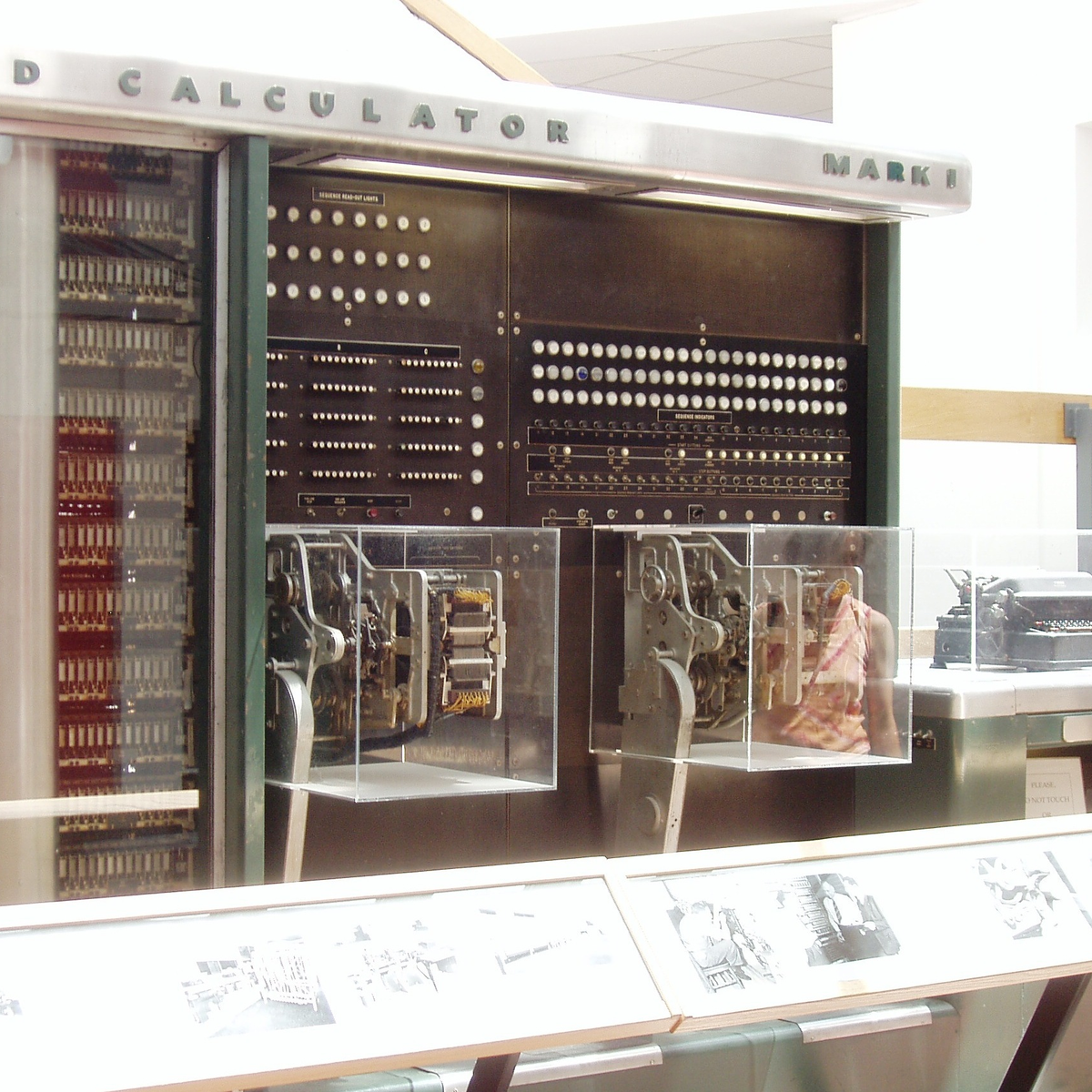
Harvard Mark I, by [Topory]On the other side of the timeline, though, you get strange beasts. The classic PDP-8 had 12-bit words, while its predecessors the PDP-6 and PDP-1 had 36 bits and 18 bits respectively. (Factors of six?) There’s a string of military guidance computers that had 27-bit words, while the Apollo Guidance computer ran 15-bit words. UNIVAC III had 25-bit words, putting the 23-bit Harvard Mark I to shame.
I wasn’t there, but it gives you the feeling that each computer is a unique, almost hand-crafted machine. Some must have made their odd architectural choices to suit particular functions, others because some designer had a clever idea. I’m not a computer historian, but I’m sure that the word lengths must tell a number of interesting stories.
On the whole, though, it gives the impression of a time when each computer was it’s own unique machine, before the convergence of everything to roughly the same architectural ideas. A much more hackery time, for lack of a better word. We still see echoes of this in the people who make their own “retro” computers these days, either virtually, on a breadboard, or emulated in the fabric of an FPGA. It’s not just nostalgia, though, but a return to a time when there was more creative freedom: a time before 64 bits took over.
This article is part of the Hackaday.com newsletter, delivered every seven days for each of the last 200+ weeks. It also includes our favorite articles from the last seven days that you can see on the web version of the newsletter.
Want this type of article to hit your inbox every Friday morning? You should sign up!
What happens when a traditional board game company decides to break into electronic gaming? Well, if it were a UK gaming company in 1978, the result would be a Waddingtons 2001 The Game Machine that you can see in the video from [Re:Enthused] below.
The “deluxe console model” had four complete games: a shooting gallery, blackjack, Code Hunter, and Grand Prix. But when you were done having fun, no worries. The machine was also a basic calculator with a very strange keyboard. We couldn’t find an original retail price on these, but we’ve read it probably sold for £20 to £40, which, in 1978, was more than it sounds like today.
Like a board game, there were paper score sheets. The main console had die-cut panels to decorate the very tiny screen (which looks like a very simple vacuum fluorescent display) and provide labels for the buttons. While it isn’t very impressive today, it was quite the thing in 1978.
This would be a fun machine to clone and quite easy, given the current state of the art in most hacker labs. A 3D-printed case, color laser-printed overlays, and just about any processor you have lying around would make this a weekend project.
It is easy to forget how wowed people were by games like this when they were new. Then again, we don’t remember any of those games having a calculator.
As a side note, Waddingtons was most famous for their special production of Monopoly games at the request of MI9 during World War II. The games contained silk maps, money, and other aids to help prisoners of war escape.
If you follow electronics history, few names were as ubiquitous as RCA, the Radio Corporation of America. Yet in modern times, the company is virtually forgotten for making large computers. [Computer History Archive Project] has a rare film from the 1970s (embedded below) explaining how RCA planned to become the number two supplier of business computers, presumably behind behemoth IBM. They had produced other large computers in the 1950s and 1960s, like the BIZMAC, the RCA 510, and the Spectra. But these new machines were their bid to eat away at IBM’s dominance in the field.
RCA had innovative ideas and arguably one of the first demand paging, virtual memory operating systems for mainframes. You can hope they were better at designing computers than they were at making commercials.
The BIZMAC was much earlier and used tubes (public domain).
In 1964, [David Sarnoff] famously said: “The computer will become the hub of a vast network of remote data stations and information banks feeding into the machine at a transmission rate of a billion or more bits of information a second … Eventually, a global communications network handling voice, data and facsimile will instantly link man to machine — or machine to machine — by land, air, underwater, and space circuits. [The computer] will affect man’s ways of thinking, his means of education, his relationship to his physical and social environment, and it will alter his ways of living. … [Before the end of this century, these forces] will coalesce into what unquestionably will become the greatest adventure of the human mind.”
He was, of course, right. Just a little early.
The machines in the video were to replace the Spectra 70 computers, seen here from an RCA brochure.
The machines were somewhat compatible with IBM computers, touted virtual memory, and had flexible options, including a lease that let you own your hardware in six years. They mention, by the way, IBM customers who were paying up to $60,000 / month to IBM. They mentioned that an IBM 360/30 with 65K was about $13,200 / month. You could upgrade with a 360/30 for an extra $3,000 / month, which would double your memory but not double your computing power. (If you watch around the 18-minute mark, you’ll find the computing power was extremely slow by today’s standards.)
RCA, of course, had a better deal. The RCA 2 had double the memory and reportedly triple the performance for only $2,000 extra per month. We don’t know what the basis for that performance number was. For $3,500 a month extra, you could have an RCA 3 with the miracle of virtual memory, providing an apparent 2 megabytes per running job.
There are more comparisons, and keep in mind, these are 1970 dollars. In 1970, a computer programmer probably made $10,000 to $20,000 a year while working on a computer that cost $158,000 in lease payments (not to count electricity and consumables). How much cloud computing could you buy in a year for $158,000 today? Want to buy one? They started at $700,000 up to over $1.6 million.
By their release, the systems were named after their Spectra 70 cousins. So, officially, they were Spectra 70/2, 70/3, 70/5, and 70/6.
Despite all the forward-looking statements, RCA had less than 10% market share and faced increasing costs to stay competitive. They decided to sell the computer business to Sperry. Sperry rebranded several RCA computers and continued to sell and support them, at least for a while.
Now, RCA is a barely remembered blip on the computer landscape. You are more likely to find someone who remembers the RCA 1800 family of CPUs than an actual RCA mainframe. Maybe they should have throw in the cat with the deal.
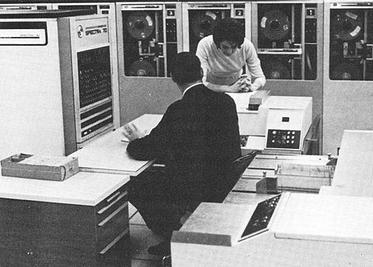
Want to see the IBM machines these competed with? Here you go. We doubt there were any RCA computers in this data center, but they’d have been right at home.
DDR3 seemed plenty fast when it first showed up 19 years ago. Who could say no to 6400 Mb/s transfer speeds? Of course compared to the modern DDR5 that’s glacially slow, but given that RAM is worth its weight in gold these days– with even DDR4 spiking in price– some people, like [Gheeotine], are asking “can you game on DDR3“? The answer is a shocking yes.
[Gheeotine] builds two budget-friendly PCs for this video, using some of the newest DD3-supporting motherboards available. That’s not exactly new: we’re talking 12 to 15 years old, but hey, not old enough to drive. We certainly didn’t expect to hear about an x79 motherboard hosting an Ivy Bridge processor in 2026, but needs must when the devil dances. The only concession to modernity is the graphics cards: the x79 mobo got an RX6600XT 8GB, and the other build, using a z97 motherboard got an NVIDIA RTX 4060. The z97 motherboard allowed a slightly newer processor, as well, an i7 4790, with the new and exciting Haswell architecture you may have heard of. Both boards are maxed out on RAM, because at less than one USD/GB, why not?
[Gheeotine] puts a few new titles through their paces on these boxen, and while the results aren’t amazing, everything he tries comes out playable, which is amazing in and of itself. Well, playable unless you’re one of those people who can’t stand playing at resolutions under 4K or FPS under 100. Those of who spent their formative years with 29.7 FPS or 25 FPS in NTSC or PAL regions aren’t going to complain too loudly if frame rates dip down into the 30s playing at 1080p for some of the more demanding titles. Ironically, one of those was the five-year-old Crysis Remastered. Given the age of some of this hardware “Can it Run Crysis” is a perfectly reasonable question, and the answer is still yes.
If you want modern games, you’re much better off with a z97 chipset motherboard if you chose to go the DDR3 route, since you won’t run into issues related to the AVX2 instruction, which first appeared with the Haswell microarchitecture. Here at Hackaday our preferred solution to the rampocalypse is software optimization, Since holding your breath for that would probably be fatal, cost-optimizing PC builds is probably a good plan, even if some might balk at going all the way back to DDR3.
Of course if you’re going to use nearly-retro hardware like DDR3, you might as well go all-out on retro vibes with a nostalgic 80s-style, or even 50s-style case.
It is a movie staple to see an overworked air traffic controller sweating over a radar display. Depending on the movie, they might realize they’ve picked the wrong week to stop some bad habit. But how does the system really work? [J. B. Crawford] has a meticulously detailed post about the origins of the computerized air traffic control system (building on an earlier post which is also interesting).
Like many early computer systems, the FAA started out with the Air Force SAGE defense system. It makes sense. SAGE had to identify and track radar targets. The 1959 SATIN (SAGE Air Traffic Integration) program was the result. Meanwhile, different parts of the air traffic system were installing computers piecemeal.
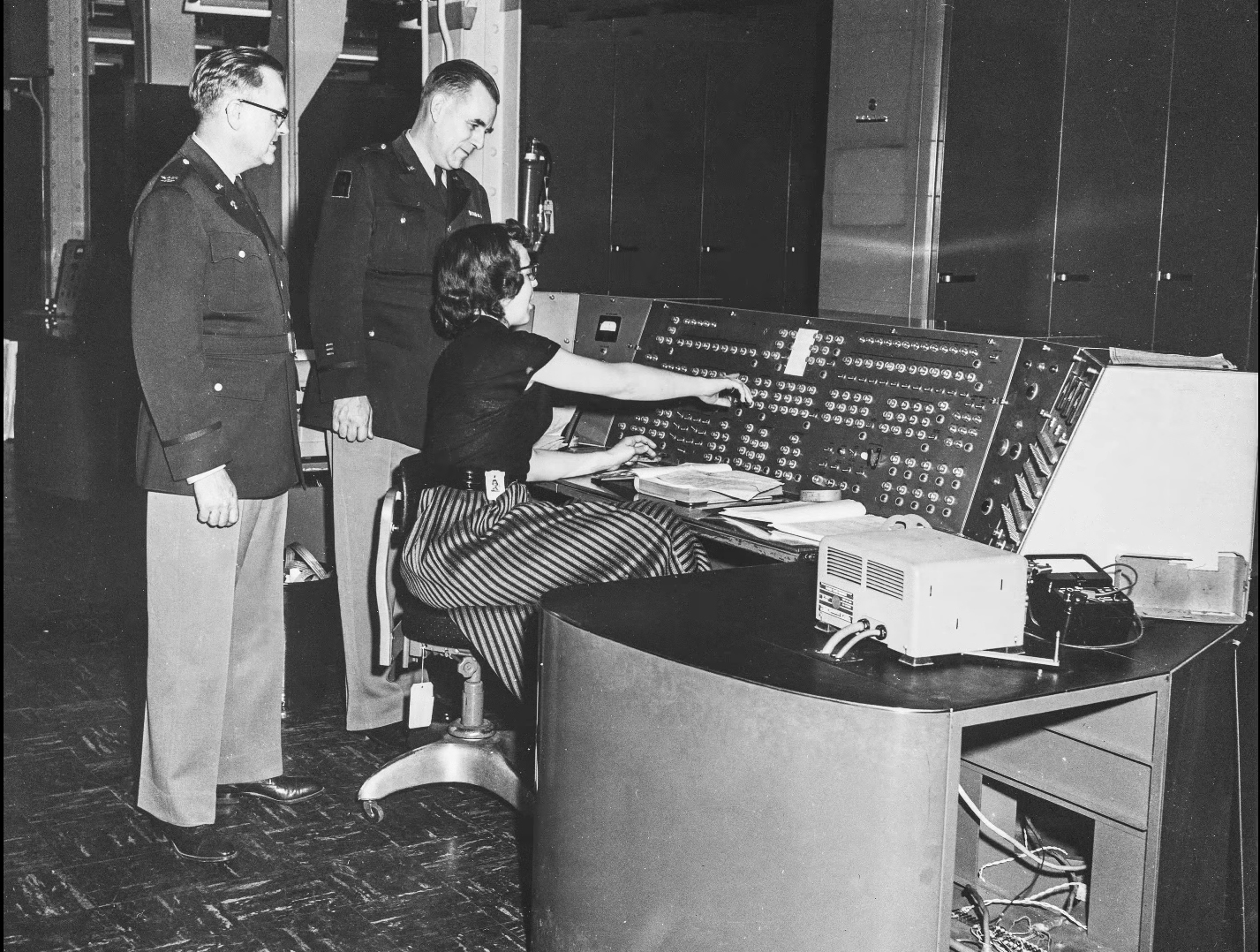
SAGE and its successors had many parents: MIT, MITRE, RAND, and IBM. When it was time to put together a single national air traffic system the FAA went straight to IBM, who glued together a handful of System 360 computers to form the IBM 9020. The computers had a common memory bus and formed redundant sets of computer elements to process the tremendous amount of data fed to the system. The shared memory devices were practically computers in their own right. Each main computing element had a private area of memory but could also allocate in the large shared pool.
The 9200 ran the skies for quite a while until IBM replaced it with the IBM 3083. The software was mostly the same, as were the display units. But the computer hardware, unsurprisingly, received many updates.
If you’re thinking that there’s no need to read the original post now that you’ve got the highlights from us, we’d urge you to click the link anyway. The post has a tremendous amount of detail and research. We’ve only scratched the surface.
We are always amused that we can run emulations or virtual copies of yesterday’s computers on our modern computers. In fact, there is so much power at your command now that you can run, say, a DOS emulator on a Windows virtual machine under Linux, even though the resulting DOS prompt would probably still perform better than an old 4.77 MHz PC. Remember when you could get calculators that ran BASIC? Well, [Calculator Clique] shows off BASIC running on a decidedly modern HP Prime calculator. The trick? It’s running under Python. Check it out in the video below.
Think about it. The HP Prime has an ARM processor inside. In addition to its normal programming system, it has Micropython as an option. So that’s one interpreter. Then PyBasic has a nice classic Basic interpreter that runs on Python. We’ve even ported it to one or two of the Hackaday Superconference badges.
If you have a Prime, this is a great way to make it even easier to belt out a simple algorithm. Of course, depending on your age, you might prefer to stick with Python. Fair enough, but don’t forget the many classic games available for Basic. Adventure and Hunt the Wumpus are two of the sample programs included.
Beauty truly is in the eye of the beholder. (Credit: MattKC, YouTube)
What’s it like to use a 2002-era Apple eMac all-in-one in 2025? That’s what [MattKC] asked himself after obtaining one of these systems from a seller who ominously mentioned that it had been ‘left outside for years’.
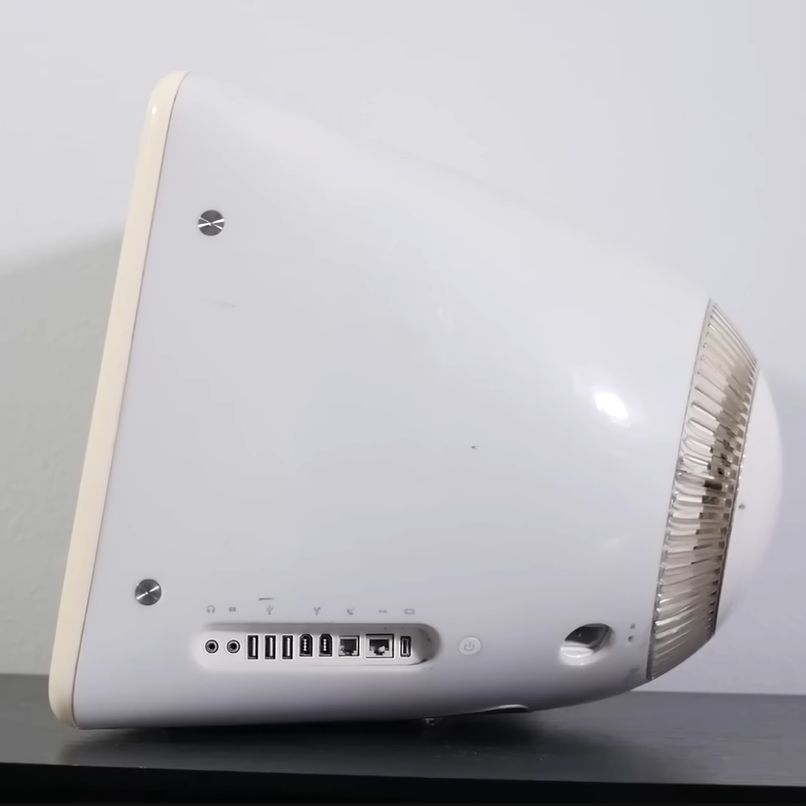
The Apple iMac is a bit of a cult symbol, whether you’re talking about the iconic fruity iMac G3 or the desk lamp-like iMac G4, but few reminisce or actively collect the Apple eMac. Manufactured from 2002 to 2006, it featured the PowerPC 7450 (G4e) CPU with clock speeds ranging from 700 MHz to 1.42 GHz, as well as a 17″ CRT. In terms of design it was basically a bland iMac G3 that was firmly targeting the education markets to try and regain market share after Windows PCs had begun to eat its lunch there.
As for the model that [MattKC] purchased, it was this earliest model, featuring a 700 MHz PowerPC G4 CPU in addition to 640 MB SDRAM. Despite the seller’s description it seems to be in good nick with it firing right up, and even a glance inside after beating the challenge of 2.5 mm hex screws showed it to be in relatively good condition.
Unlike the iMac G3, you can play the Mac port of Halo on it, but the Minecraft port is very much not performant. With generally multimedia and gaming working well, it does show why the eMac was released, as it’s quite capable relative to an iMac G3 which would have struggled with the educational software of the era. We definitely hope that [MattKC] restores it to its full glory instead of ripping out its innards, as the neglected status of the eMac makes it much more likely to go extinct than PowerPC-based iMacs.
A lot of retrocomputer enthusiasts have a favourite system, to the point of keeping up 40 year old flame wars over which system was “best”. In spite of the serious, boring nature of the PC/AT and its descendants, those early IBMs have a certain style that Compaq and the Clones never quite matched. Somehow, we live in a world where there are people nostalgic for Big Blue. That’s why [AnneBarela] built a miniature IBM PC using an Adafruit Fruit Jam board.
If you haven’t seen it before, the Fruit Jam board is an RP2350 dev board created specifically to make minicomputers, with its two USB host sockets, DVI-out and 3.5mm jack. [Anne] loaded a PC emulator by [Daft-Freak] called PACE-32 than can emulate an IBM compatible PC with an 80386 and up-to 8 MB of RAM on this particular board. The video is VGA, 640×480 — as god intended– piped to a 5″ LCD [Anne] picked up from AliExpress.
That display is mounted inside a replica monitor designed by [giobbino], and is sitting on top of a replica case. Both are available on Thingiverse, though some modification was required to provide proper mounting for the Fruit Jam board. [giobbino] designed it to house a FabGL ESP32 module– which has us wondering, if an RP2350 can be a 386, what level of PC might the ESP32-P4 be capable of? We’ve seen it pretend to be a Quadra, so a 486 should be possible. It wasn’t that long ago that mini builds of this nature required a Raspberry Pi, after all.
Speculation aside, this diminutive IBM build leaves us but with but one question: if you played Links386 on it, would it count as miniature golf?
Sony’s original Playstation wasn’t huge, and they did shrink it for re-release later as the PSOne, but even that wasn’t small enough for [Secret Hobbyist]. You may have seen the teaser video a while back where his palm-size Playstation went viral, but now he’s begun a series of videos on how he redesigned the vintage console.
Luckily for [Secret Hobbyist], the late-revision PSOne he started with is only a two-layer PCB, which made reverse engineering the traces a lot easier. Between probing everything under the microscope and cleaning the board off to follow all the traces in copper, [Hobbyist] was able to reproduce the circuit in KiCAD. (Reverse engineering starts at about 1:18 in the vid.)
With a schematic in hand, drafting a smaller PCB than Sony built is made easier by the availability of multi-layer PCBs. In this case [Hobbyist] was able to get away with a four-layer board. He was also able to ditch one of the ICs from the donor mainboard, which he called a “sub-CPU” as its functionality was recreated on the “PSIO” board that’s replacing the original optical drive. The PSIO is a commercial product that has been around for years now, allowing Playstations to run from SD cards– but it’s not meant for the PSOne so just getting it working here is something of a hack. He’s also added on a new DAC for VGA output, but otherwise the silicon is all original SONY.
This is the first of a series about this build, so if you’re into retro consoles you might want to keep an eye on [Secret Hobbyist] on YouTube to learn all the details as they are released.
If you search the Internet for “Clone Wars,” you’ll get a lot of Star Wars-related pages. But the original Clone Wars took place a long time ago in a galaxy much nearer to ours, and it has a lot to do with the computer you are probably using right now to read this. (Well, unless it is a Mac, something ARM-based, or an old retro-rig. I did say probably!)
IBM is a name that, for many years, was synonymous with computers, especially big mainframe computers. However, it didn’t start out that way. IBM originally made mechanical calculators and tabulating machines. That changed in 1952 with the IBM 701, IBM’s first computer that you’d recognize as a computer.
If you weren’t there, it is hard to understand how IBM dominated the computer market in the 1960s and 1970s. Sure, there were others like Univac, Honeywell, and Burroughs. But especially in the United States, IBM was the biggest fish in the pond. At one point, the computer market’s estimated worth was a bit more than $11 billion, and IBM’s five biggest competitors accounted for about $2 billion, with almost all of the rest going to IBM.
So it was somewhat surprising that IBM didn’t roll out the personal computer first, or at least very early. Even companies that made “small” computers for the day, like Digital Equipment Corporation or Data General, weren’t really expecting the truly personal computer. That push came from companies no one had heard of at the time, like MITS, SWTP, IMSAI, and Commodore.
The IBM PC
The story — and this is another story — goes that IBM spun up a team to make the IBM PC, expecting it to sell very little and use up some old keyboards previously earmarked for a failed word processor project. Instead, when the IBM PC showed up in 1981, it was a surprise hit. By 1983, there was the “XT” which was a PC with some extras, including a hard drive. In 1984, the “AT” showed up with a (gasp!) 16-bit 80286.
The personal computer market had been healthy but small. Now the PC was selling huge volumes, perhaps thanks to commercials like the one below, and decimating other companies in the market. Naturally, others wanted a piece of the pie.
Send in the Clones
Anyone could make a PC-like computer, because IBM had used off-the-shelf parts for nearly everything. There were two things that really set the PC/XT/AT family apart. First, there was a bus for plugging in cards with video outputs, serial ports, memory, and other peripherals. You could start a fine business just making add-on cards, and IBM gave you all the details. This wasn’t unlike the S-100 bus created by the Altair, but the volume of PC-class machines far outstripped the S-100 market very quickly.
In reality, there were really two buses. The PC/XT had an 8-bit bus, later named the ISA bus. The AT added an extra connector for the extra bits. You could plug an 8-bit card into part of a 16-bit slot. You probably couldn’t plug a 16-bit card into an 8-bit slot, though, unless it was made to work that way.
The other thing you needed to create a working PC was the BIOS — a ROM chip that handled starting the system with all the I/O devices set up and loading an operating system: MS-DOS, CP/M-86, or, later, OS/2.
Protection
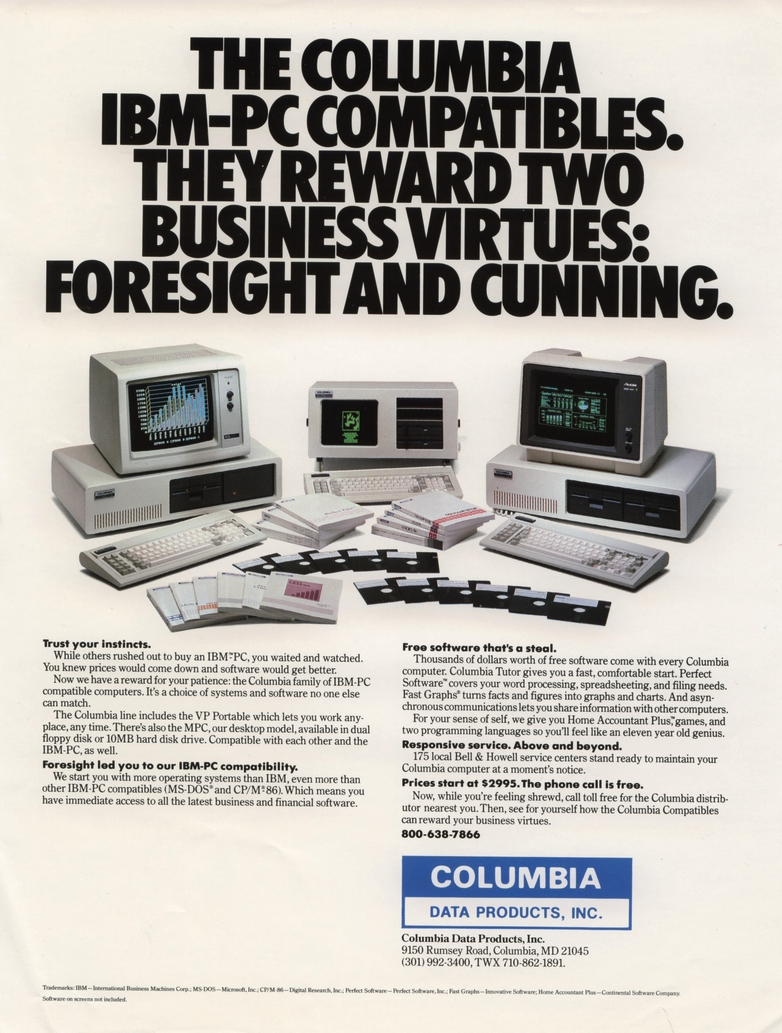
An ad for a Columbia PC clone.
IBM didn’t think the PC would amount to much so they didn’t do anything to hide or protect the bus, in contrast to Apple, which had patents on key parts of its computer. They did, however, have a copyright on the BIOS. In theory, creating a clone IBM PC would require the design of an Intel-CPU motherboard with memory and I/O devices at the right addresses, a compatible bus, and a compatible BIOS chip.
But IBM gave the world enough documentation to write software for the machine and to make plug-in cards. So, figuring out the other side of it wasn’t particularly difficult. Probably the first clone maker was Columbia Data Products in 1982, although they were perceived to have compatibility and quality issues. (They are still around as a software company.)
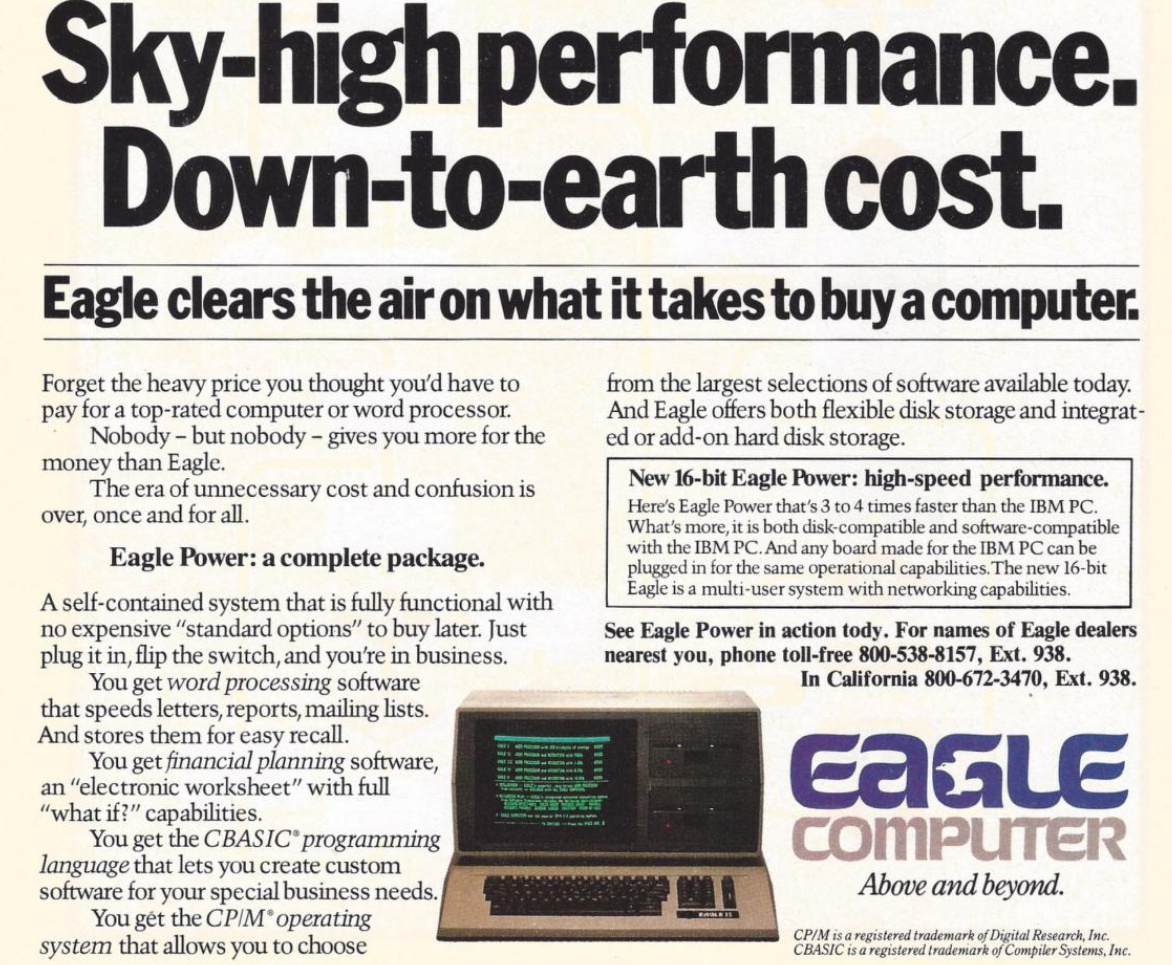
Eagle Computer was another early player that originally made CP/M computers. Their computers were not exact clones, but they were the first to use a true 16-bit CPU and the first to have hard drives. There were some compatibility issues with Eagle versus a “true” PC. You can hear their unusual story in the video below.
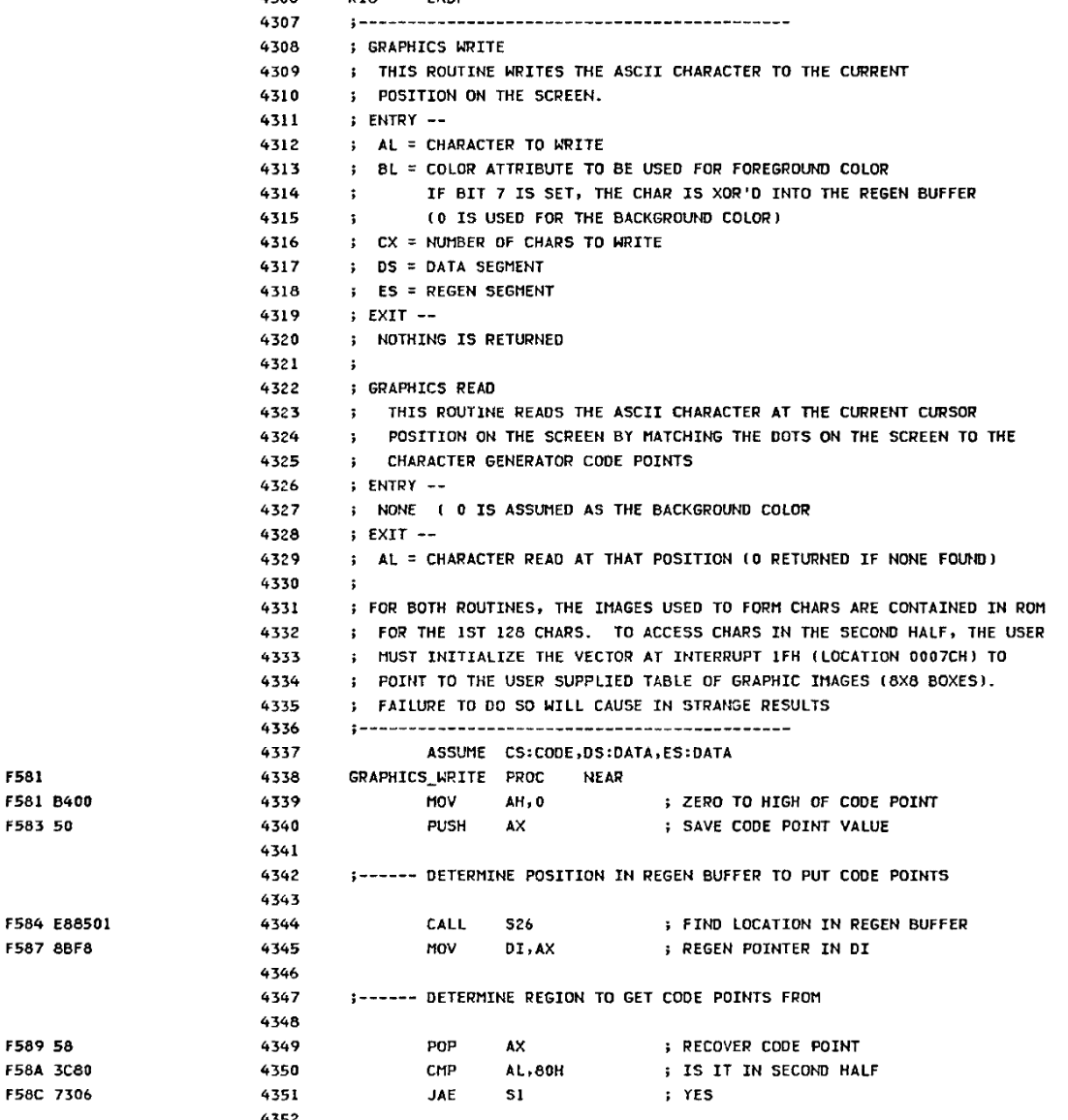
The PC Reference manual had schematics and helpfully commented BIOS source code
One of the first companies to find real success cloning the PC was Compaq Computers, formed by some former Texas Instruments employees who were, at first, going to open Mexican restaurants, but decided computers would be better. Unlike some future clone makers, Compaq was dedicated to building better computers, not cheaper.
Compaq’s first entry into the market was a “luggable” (think of a laptop with a real CRT in a suitcase that only ran when plugged into the wall; see the video below). They reportedly spent $1,000,000 to duplicate the IBM BIOS without peeking inside (which would have caused legal problems). However, it is possible that some clone makers simply copied the IBM BIOS directly or indirectly. This was particularly easy because IBM included the BIOS source code in an appendix of the PC’s technical reference manual.
Between 1982 and 1983, Compaq, Columbia Data Products, Eagle Computers, Leading Edge, and Kaypro all threw their hats into the ring. Part of what made this sustainable over the long term was Phoenix Technologies.
Rise of the Phoenix
Phoenix was a software producer that realized the value of having a non-IBM BIOS. They put together a team to study the BIOS using only public documentation. They produced a specification and handed it to another programmer. That programmer then produced a “clean room” piece of code that did the same things as the BIOS.
An Eagle ad from 1983
This was important because, inevitably, IBM sued Phoenix but lost, as they were able to provide credible documentation that they didn’t copy IBM’s code. They were ready to license their BIOS in 1984, and companies like Hewlett-Packard, Tandy, and AT&T were happy to pay the $290,000 license fee. That fee also included insurance from The Hartford to indemnify against any copyright-infringement lawsuits.
Clones were attractive because they were often far cheaper than a “real” PC. They would also often feature innovations. For example, almost all clones had a “turbo” mode to increase the clock speed a little. Many had ports or other features as standard that a PC had to pay extra for (and consume card slots). Compaq, Columbia, and Kaypro made luggable PCs. In addition, supply didn’t always match demand. Dealers often could sell more PCs than they could get in stock, and the clones offered them a way to close more business.
Issues
Not all clone makers got everything right. It wasn’t odd for a strange machine to have different interrupt handling than an IBM machine or different timers. Another favorite place to err involved AT/PC compatibility.
In a base-model IBM PC, the address bus only went from A0 to A19. So if you hit address (hex) FFFFF+1, it would wrap around to 00000. Memory being at a premium, apparently, some programs depended on that behavior.
With the AT, there were more address lines. Rather than breaking backward compatibility, those machines have an “A20 gate.” By default, the A20 line is disabled; you must enable it to use it. However, there were several variations in how that worked.
Intel, for example, had the InBoard/386 that let you plug a 386 into a PC or AT to upgrade it. However, the InBoard A20 gating differed from that of a real AT. Most people never noticed. Software that used the BIOS still worked because the InBoard’s BIOS knew the correct procedure. Most software didn’t care either way. But there was always that one program that would need a fix.
The point is that there were many subtle features on a real IBM computer, and the clone makers didn’t always get it right. If you read ads from those days, they often tout how compatible they are.
Total War!
IBM started a series of legal battles against… well… everybody. Compaq, Corona Data Systems, Handwell, Phoenix, AMD, and anyone who managed to put anything on the market that competed with “big blue” (one of IBM’s nicknames).
IBM didn’t win anything significant, although most companies settled out of court. Then they just used the Phoenix BIOS, which was provably “clean.” So IBM decided to take a different approach.
In 1987, IBM decided they should have paid more attention to the PC design, so they redid it as the PS/2. IBM spent a lot of money telling people how much better the PS/2 was. They had really thought about it this time. So scrap those awful PCs and buy a PS/2 instead.
Of course, the PS/2 wasn’t compatible with anything. It was made to run OS/2. It used the MCA bus, which was incompatible with the ISA bus, and didn’t have many cards available. All of it, of course, was expensive. This time, clone makers had to pay a license fee to IBM to use the new bus, so no more cheap cards, either.
You probably don’t need a business degree to predict how that turned out. The market yawned and continued buying PC “clones” which were now the only game in town if you wanted a PC/XT/AT-style machine, especially since Compaq beat IBM to market with an 80386 PC by about a year.
Not all software was compatible with all clones. But most software would run on anything and, as clones got more prevalent, software got smarter about what to expect. At about the same time, people were thinking more about buying applications and less about the computer they ran on, a trend that had started even earlier, but was continuing to grow. Ordinary people didn’t care what was in the computer as long as it ran their spreadsheet, or accounting program, or whatever it was they were using.
Dozens of companies made something that resembled a PC, including big names like Olivetti, Zenith, Hewlett-Packard, Texas Instruments, Digital Equipment Corporation, and Tandy. Then there were the companies you might remember for other reasons, like Sanyo or TeleVideo. There were also many that simply came and went with little name recognition. Michael Dell started PC Limited in 1984 in his college dorm room, and by 1985, he was selling an $800 turbo PC. A few years later, the name changed to Dell, and now it is a giant in the industry.
Looking Back
It is interesting to play “what if” with this time in history. If IBM had not opened their architecture, they might have made more money. Or, they might have sold 1,000 PCs and lost interest. Then we’d all be using something different. Microsoft retaining the right to sell MS-DOS to other people was also a key enabler.
IBM stayed in the laptop business (ThinkPad) until they sold to Lenovo in 2005. They would also sell them their server business in 2014.
Things have changed, of course. There hasn’t been an ISA card slot on a motherboard in ages. Boot processes are more complex, and there are many BIOS options. Don’t even get us started on EMS and XMS. But at the core, your PC-compatible computer still wakes up and follows the same steps as an old school PC to get started. Like the Ship of Theseus, is it still an “IBM-compatible PC?” If it matters, we think the answer is yes.
If you want to relive those days, we recently saw some new machines sporting 8088s and 80386s. Or, there’s always emulation.
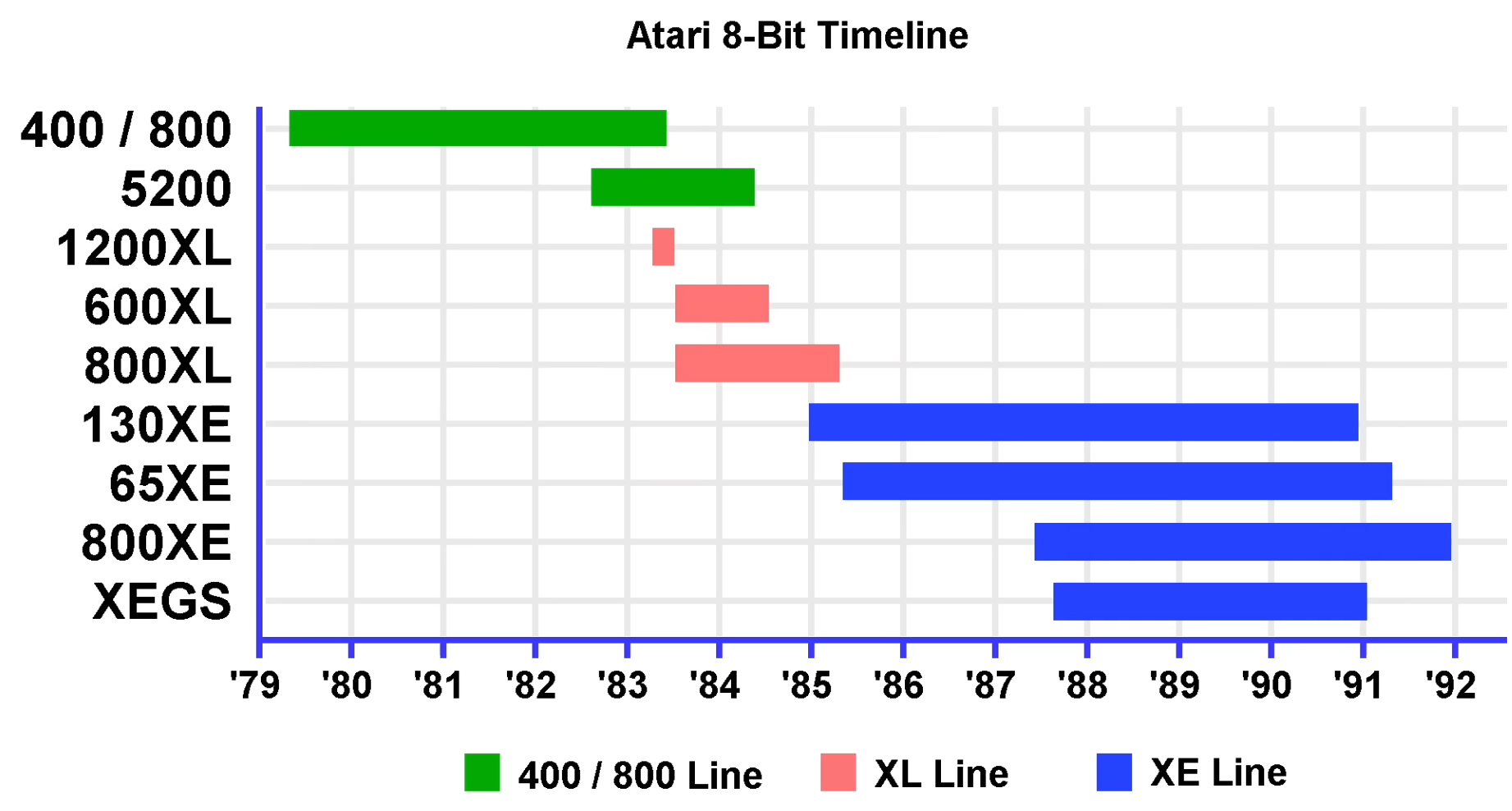
The first Atari came out in 1977, it was originally called the Atari Video Computer System. It was followed two years later, in 1979, by the Atari 400 and Atari 800. The Atari 800 had a music synthesizer, bit-mapped graphics, and sprites which compared favorably to the capabilities of the other systems of the day, known as the Trinity of 1977, being the Apple II, Commodore PET, and TRS-80. [The 8-Bit Guy] says the only real competition in terms of features came from the TI-99/4 which was released around the same time.
The main way to load software into the early Atari 400 and 800 computers was to plug in cartridges. The Atari 400 supported one cartridge and the Atari 800 supported two. The built-in keyboards were pretty terrible by today’s standards, but as [The 8-Bit Guy] points out there wasn’t really any expectations around keyboards back in the late 1970s because everything was new and not many precedents had been set.
[The 8-Bit Guy] goes into the hardware that was used, how the video system works, how the audio system works, and what peripheral hardware was supported, including cassette drives and floppy disk drives. He covers briefly all ten of the 8-bit systems from Atari starting in 1979 through 1992.
While a revolutionary storage system for their time, floppy disks are not terribly useful these days. Though high failure rates and slow speeds are an issue, for this project, the key issue is capacity. That’s because [DocJade’s] goal is playing the video game Factorio off floppy disks.
Storing several gigabytes of data on floppy disks is a rather daunting challenge. But instead of using a RAID array, only a single reader and a custom file system is deployed in this setup. A single disk is dedicated to storing pool information allowing for caching of file locations, reducing disk swaps. The file system can also store single files across multiple disks for storage of larger files. Everything mounts in fuse and is loosely POSIX compliment, but lacks some features like permissions and links.
With the data stored across thousands of disks, the user is prompted to insert a new disk when needed. This ends up being the limiting factor in read and write speeds, rather than the famously slow speeds of floppies. In fact, it takes about a week to load all of Factorio in this manner, even after optimizations to reduce disk swaps. Factorio is also one of the few games that could be installed in this manner, as it loads most of the game into memory at launch. Many other games that dynamically load textures and world maps would simply crash when a chunk is not immediately available.
ARCTURUS was a research computer system developed on a shoestring budget at Sydney University in the 1960s, and was in service until 1975. Particularly the system was developed by [David Wong] as a part of his PhD thesis: The design and construction of the digital computers snocom, nimbus and arcturus (PDF). [David] worked in collaboration with [Kevin R. Rosolen] who is interviewed in the video.
The machine is described as a fixed-point, binary, parallel, single address, general-purpose digital computer using packaged diode-transistor circuits. Ferrite-core memory was used instead of drum memory because drum memory was too slow and performance was a high priority feature. For the same reason parallel features were implemented where serial might have been done more simply, if it hadn’t been so slow. In addition to the ferrite-core there were paper-tape peripherals and control panels.
The machine supported 32 distinct instructions and had a 13-bit address space allowing it to directly address 8,192 words, each word comprising 20-bits. Those word bits were one sign bit and nineteen magnitude bits for fixed-point two’s complement binary numbers.
We covered The Computer History of Australia by [State of Electronics] back when they released their 5th video in the series, Australia’s Silliac Computer, if you’re interested in more history of computing in Australia.
Emulating older computers on microcontrollers has been a staple of retrocomputing for many years now, with most 8-bit and some 16-bit machines available on Atmel, ARM, or ESP32 platforms. But there’s always been a horsepower limit, a point beyond which a microcontroller is no longer enough, and a “proper” computer is needed. One of those barriers now appears to have been broken, as microcontroller-based emulation moves into the 32-bit era. [Amcchord] has the Basilisk II emulator ported to the ESP32-P4 platform, providing a 68040 Mac able to run OS8.1. This early-1990s-spec machine might not seem like much in 2026, but it represents a major step forward.
The hardware it uses is the M5Stack Tab5, and it provides an emulated Mac with up to 16 MB of memory. Remember, in 1992 this would have been a high-spec machine. It manages a 15 frames per second refresh rate, which is adequate for productivity applications. The emulator uses the Tab5’s touchscreen to emulate the Mac mouse alongside support for USB input devices. To 1990 hackers, it’s almost the Mac tablet you didn’t know you would want in the future.
We like this project, both because it’s advancing the art of emulation on microcontrollers, and also because it delivers a computer that’s useful for some of the things you might have done with a Mac in 1992 and could even do today. Pulling this out on the train back then would have blown people’s minds. There’s even a chance that MacOS on something like this would turn a few heads in 2026. It’s certainly not the first emulated Mac we’ve seen though.
Today in programming language hacks we have string art rendered in BASIC. String art — also known as pin and thread art, or filography — is an art form where images are invoked by thread woven between pins on the border of an image. In this case the thread and the pins are virtual and there is a simple 67 line BASIC program which generates and renders them.
Of course BASIC, the Beginner’s All-purpose Symbolic Instruction Code, isn’t just one thing and was a bit of a moving target over the years. Invented in 1964 at Dartmouth College by John Kemeny and Thomas Kurtz it turned into a family of languages as a dynamic array of implementations added, removed, and changed implementation details as the future unrolled.
We remember GW-BASIC and QuickBASIC, but the landscape was much broader than that. Implementations of QuickBASIC came with a “compiler”, qb45.exe, which worked by bundling the BASIC script as p-code into an executable along with the runtime binary, which we used back in the day to make “real applications”, not mere scripts.
Using UV resin as glue for new case clips. (Credit: More Fun Making It, YouTube)
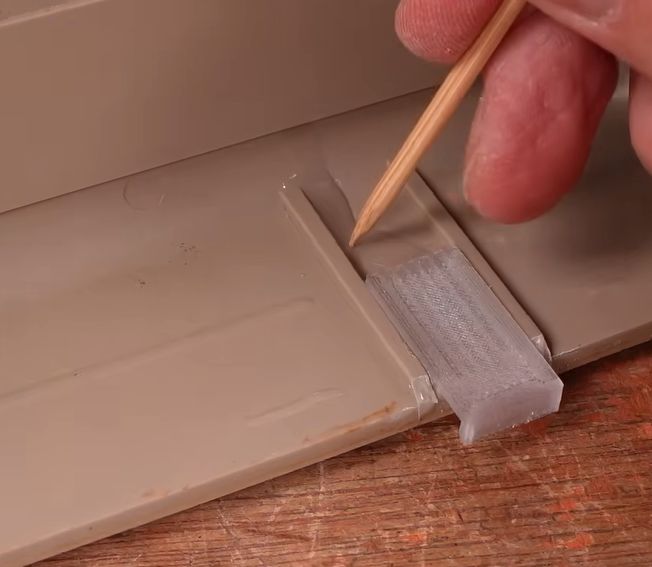
As computers like the venerable breadbox Commodore 64 age, their plastic doesn’t just turn increasing shades of yellow and brown, the ABS plastic also tends to get brittle. This is a problem that seems to plague many plastic cases and enclosures, but fortunately there are some ways to halt or even reverse the heavy toll of time, with the [More Fun Making It] YouTube channel exploring a number of methods, including UV-curable resin, PETG 3D-printed clips and silicone molds.
Aside from large-scale damage, screw posts tend to snap off a lot, either during shipping or when merely trying to open the case. The same is true for the clips around the edge of the C64 case, which rarely survive that long. Gluing a case clip back on with epoxy or such somewhat works, but is messy and not that durable.
Instead UV resin is used, together with newly printed clips in translucent PETG. The remnants of the old clips are removed, followed by the application of the resin. The clips are actually a modified version of a VIC-20 case clip design by [Ken Mills]. With the UV resin as glue, curing is almost instant with a UV lamp unlike the tedious process with epoxy.
In the case of screw posts the alternative to just re-gluing was initially clear tape as a mold and UV resin, but this got improved with making a mold of an intact post from kitchen-style silicone and corn flour. This mold is placed around the busted post and resin poured in before curing. A new thread can then be created in a drilled-out hole with liquid resin around a screw, though we imagine that one could of course try running a tap through the cured resin as well.
A big challenge for the mold was to create an entire screw post from scratch, which required poring in many layers of resin and curing them, which is probably more tedious than 3D printing a new one. That said, it does seem to work, and it’s not that dissimilar from the resin used with SLA 3D printers, all of which are photopolymers. Without a clear idea of what exact photopolymer is inside the bottle, results may obviously vary.
Finally, resin was also used to try and glue part of the enclosure back together, and a viewer appears to have repaired a terminal whose case got shattered by the tender care of the parcel system using UV resin with good results. Of course, if your system’s case has been basically pulverized as in the case of [LGR]’s laptop, then printing a new case might be the more sensible option.
Given the technical specs of the FPGAs available to hobbyists these days, it really shouldn’t be a shock that you can implement a relatively-modern chipset on one, like one for a 486 system. In spite of knowing that in the technical sense, we were still caught off guard by [maniek-86]’s M8SBC project that does just that– the proas both CPU and BIOSducing a 486 FPGA chipset with a motherboard to boot.
Boot what? Linux 2.2.6, MS-DOS 6.22 or FreeDOS all work. It can run DOOM, of course, along with Wolfenstien 3D, Prince of Persia, and even the famous Second Reality demo– though that last without sound. [maniek-86]’s implementation is lacking direct memory access, so sound card support is right out. There are a few other bugs that are slowly being squished, too, according to the latest Reddit thread.
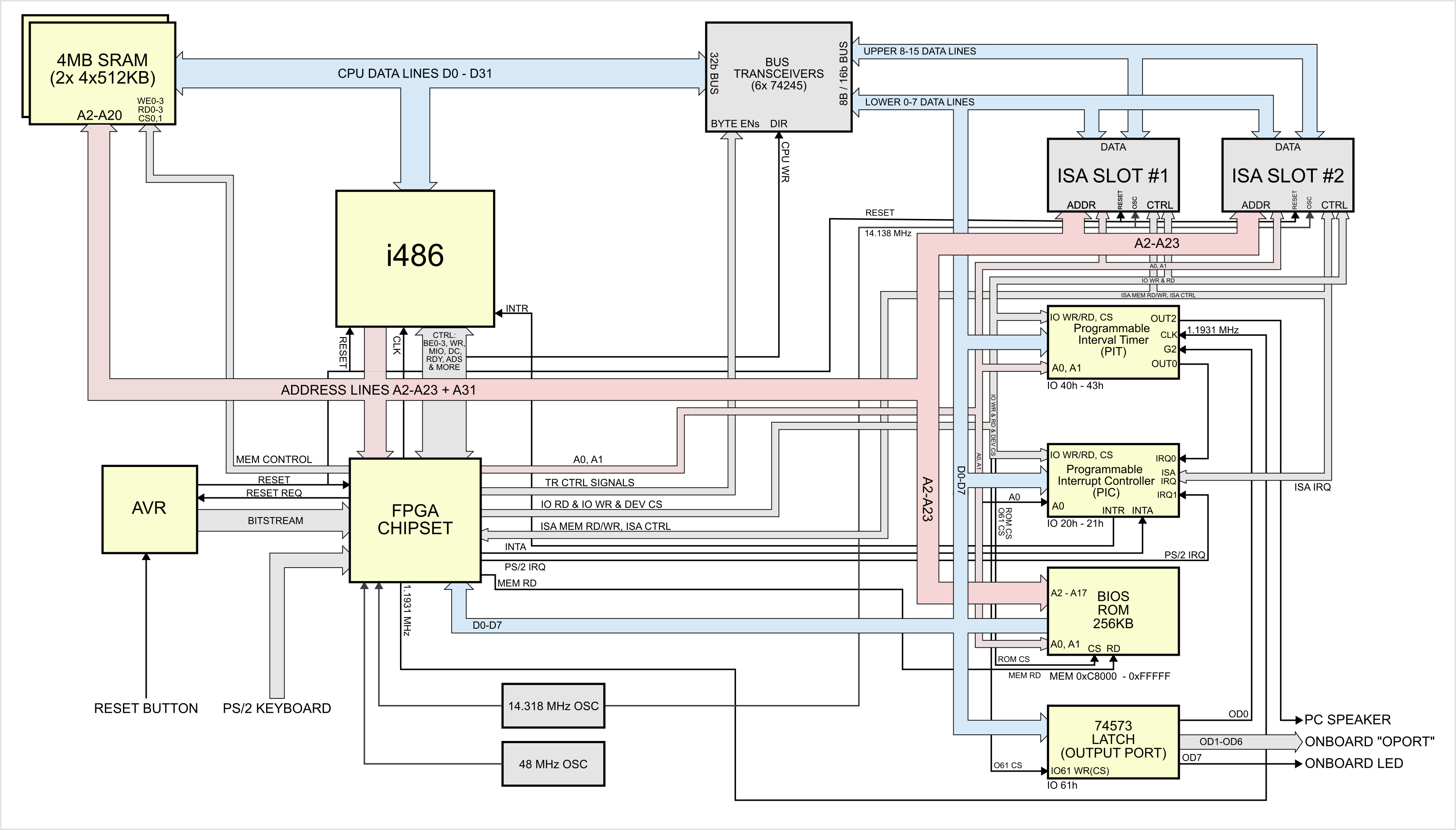
The heart of the system is a Xilinx Spartan II XC2S100 FPGA, which serves the motherboard chipset, codnamed “Hamster I”. The CPU is a vintage i486, running at a configurable 24MHz. The BIOS code is based on an open-source project by [b-demitri1] that’s also on GitHub, if you happen to need a PC BIOS. The FPGA isn’t doing everything: graphics is, as right and proper for a PC-compatible of this vintage, provided by an ISA card. [maniek] has tested several VGA cards and all apparently worked equally well, so that aspect of the system is apparently well in hand. The 4MB of system RAM seems pretty reasonable for a 486 build, as does restricting peripherals to PS/2 and the aforementioned ISA bus. We might have gone for a faster clock default than 24MHz, but that’s well within historical territory. Only a few bugs and the pesky lack of a DMA controller keep this from being a true PC-Compatible build, and that’s pretty amazing for one human’s hobby project.
There’s no video of it operating, but there is a very readable hardware diagram. (Click to enlarge).
Eventually, as stocks dwindle, reproducing retrocomputers in FPGA– as was recently done with the MSX standard–may be the only way to enjoy them. That’s probably least true of the 486, which lived on for decades in industrial hardware, but that doesn’t take away from how impressive this build is.
Thanks to [sven] for the tip! Remember: if you see something, say something, because Big Hacker isn’t always watching. (We leave that to the tech giants.)
The Trinity of 1977 which started the personal computer revolution were the Apple II, the Commodore PET, and the TRS-80. In this project it’s a failing Commodore PET which is being restored.
In the video below the break you can see [Ken Shirriff] and [CuriousMarc] team up to crack this tough nut. Resolving the various issues required a whole heap of software and equipment. Most notably a Keysight DSOX3104T oscilloscope, a Retro Chip Tester Pro, an old Agilent 1670G logic analyzer (this thing is rocking a 3.5″ floppy disk drive!), an old Agilent 54622A oscilloscope (also rocking a floppy drive!), a Data I/O 29B Universal Programmer With UniPak 2 insert, and the disassembly software Ghidra.
In the end there were 6 (and a half) bad chips which needed to be discovered and then replaced. This project is a reminder that it’s nice to have the right tools for the job!
[AmiCube] has announced their new PiStorm68K special edition MiniMig accelerator board. This board was developed to replace the 68000 CPU in a MiniMig — a recreation of the original Amiga chipset in an FPGA allowing a real genuine 68000 CPU to operate.
The PiStorm68K itself can host a real genuine 68000 CPU but it can also host various Raspberry Pi models which can do emulation of a 68000. So if you combine a PiStorm68K with a MiniMig you can, at your option, boot into an emulated environment with massively increased performance, or you can boot into an original environment, with its reliable and charming sluggishness.
In the introduction video below, [AmiCube] uses the SYSINFO utility software to compare the CPU speed when using emulation (1531 MIPS) versus the original (4.47 MIPS), where MIPS means Millions of Instructions Per Second. As you can see the 68000 emulated by the Raspberry Pi is way faster than the original. The Raspberry Pi also emulates a floating-point unit (FPU) which the original doesn’t include and a memory management unit (MMU) which isn’t used.

 Login
Login