
❌

Normal view

There are new articles available, click to refresh the page.
Before yesterdayMain stream

The Cutest Weather Forecast on E-Ink and ESP32

17 January 2026 at 19:00
A photo of the cats and the generated image

There’s a famous book that starts: β€œIt is a truth universally acknowledged that a man in possession of a good e-ink display, must be in want of a weather station.” β€” or something like that, anyway. We’re not English majors. We are, however, major fans of this feline-based e-ink weather display by [Jesse Ward-Bond]. It’s got everything: e-ink, cats, and AI.
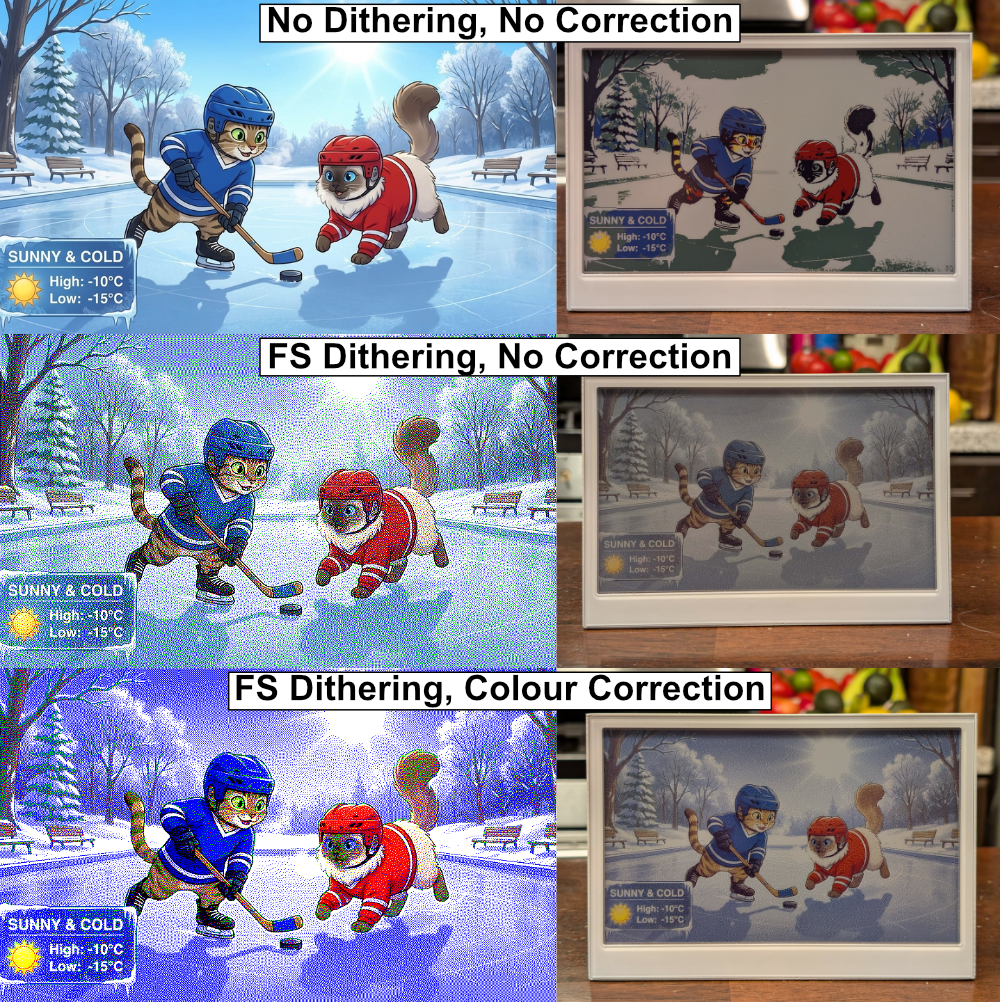
The generated image needs a little massaging to look nice on the Spectra6 e-ink display.

AI? Well, it might seem a bit gratuitous for a simple weather display, but [Jesse] wanted something a little more personalized and dynamic than just icons. With that in the design brief, he turned to Google’s Nano Banana API, feeding it the forecast and a description of his cats to automatically generate a cute scene to match the day’s weather.

That turned out to not be enough variety for the old monkey brain, so the superiority of silicon β€” specifically Gemini–was called upon to write unique daily prompts for Nano Banana using a random style from a list presumably generated by TinyLlama running on a C64. Okay, no, [Jesse] wrote the prompt for Gemini himself. It can’t be LLM’s all the way down, after all. Gemini is also picking the foreground, background, and activity the cats will be doing for maximum neophilia.

Aside from the parts that are obviously on Google servers, this is all integrated in [Jesse]’s Home Assistant server. That server stores the generated image until the ESP32 fetches it. He’s using a reTerminal board from SeedStudio that includes an ESP32-S3 and a Spectra6 colour e-ink display. That display leaves something to be desired in coloration, so on top of dithering the image to match the palette of the display, he’s also got a bit of color-correction in place to make it really pop.

If you’re interested in replicating this feline forecast, [Jesse] has shared the code on GitHub, but it comes with a warning: cuteness isn’t free. That is to say, the tokens for the API calls to generate these images aren’t free; [Jesse] estimates that when the sign-up bonus is used up, it should cost about fourteen cents a pop at current rates. Worth it? That’s a personal choice. Some might prefer saving their pennies and checking the forecast on something more physical, while others might prefer the retro touch only a CRT can provide.Β 

The Best Robot Mop System: Flat, Spinning, or Roller?

17 January 2026 at 13:00

When it comes to designing a mopping robot, there are a number of approaches you can pick from, including just having the movement of the robot push the soggy mop over the floor, having spinning pads, or even a big spinning roller. But what difference does it make? Recently the [Vacuum Wars] channel ran a comparison to find out the answer.

The two spinning pad design is interesting, because it allows for the bot to move closer to objects or walls, and the base station doesn’t need the active scrubber that the simple static pad requires. The weakness of both types of flat mop design is that they are quickly saturated with dirt and moisture, after which they’ll happily smear it over the floor.

The spinning roller is the most complex, with the robot having its own onboard water tank, and a way to extract the dirty water from the mop and store it for disposal in the base station. Theoretically this would be the clear winner, with basically all of them having features like avoiding carpet.

Taking the test data from 150 different mopping robots that were made to clean up dried-up coffee stains, the results weren’t as clear-cut as one might perhaps expect due to the very limited scope of the test. But the comments to the video are perhaps more revealing. After all, most people don’t briefly run their robot mop over a few dried-up stains, but are faced with more severe real-life scenarios.

One commentator mentions their dogs dragging in a lot of mud on rainy days, in which case the spinning pads robot would end up spreading a thin film of mud across the floor. After upgrading to a spinning roller version this issue was resolved, though it’s readily admitted to be the more expensive system, with a much larger base station.

When in the video you see the details of what each approach involves on the side of the robot, the base station and the human caretaker, trade-offs are clear. Having the fixed flat pad is simple, but moves all complexity to the base station, with the spinning pads removing at least the need to motorize the base station. If you have small children or pets with muddy paws around, neither option works well, so you either have to whip out the human-powered mop or shell out for the high-end robotic solution.

Of course, you can also build your own super-charged robot mop, or a very thorough one, but definitely avoid mopping robots that are too cheap to actually work.

High-Tech Trailer Brings Water Home

12 January 2026 at 07:00

Living without standard utility hookups like electricity, Internet, water, and sewer comes with a whole host of challenges, all of which are most commonly solved by spending lots of money. For electricity, a solar array or a generator is fairly common. The Internet can similarly be accessed via a satellite link if wires aren’t available. For water, most people will drill a well, but that gets similarly expensive. [Cranktown City] recently bought an off-grid home and needed a way to get water to it on a budget, so he built this water trailer instead.

The trailer started off as a standard single-axle utility trailer. The weight rating was probably around 3,500 pounds or 1588 kg. A few support structures were welded in. The supports serve double duty as a frame for two IBC totes, which can hold about 550 gallons or 2082 liters of water. The trailer also got upgraded wiring, including some extra wires to support a backup camera. The two totes were then plumbed together with a ball valve for an outlet. That valve was mated to a motor that can be remotely activated from within a truck to dump the water out into a cistern.

On the cistern side, [Cranktown City] welded up a door with a linear actuator and a remote control. When he’s ready to dump the water into the cistern, he can easily back up the trailer using the backup camera, open the door to the cistern remotely, and then activate the ball valve on the trailer to start filling the reservoir. It’s a clever solution to bringing water to his off-grid property at a fraction of the cost of a drilled well. We’ve seen some other unique ways to live off-grid as well,Β  like this hydroelectric generator, which might offset the cost of an expensive solar array.

Smart Home? Make It Smart Quarters With This LCARS Dashboard

11 January 2026 at 19:00

At the risk of starting a controversy: is there anyone who goes to the effort of setting up Home Assistant who wouldn’t really rather be living on the Enterprise-D? If such a person exists, it’s not [steve-gibbs5], who has not only put together a convincing LCARS dashboard on an Android tablet, but has also put together an easy-to-follow Instructable so you can too.

In case you’ve been monkishly avoiding television since the mid-1980s, LCARS is the high-tech touchscreen interface used on Star Trek: The Next Generation and its sequels. It’s an iconic, instantly-recognizable aesthetic, and we think [Steve] nailed it, even if he was taking design cues from Voyager,Β which is… not everyone’s favorite trek, to put it mildly. Though perhaps the haters are looking back on it a bit more fondly when compared to some more modern adaptations. Check it out in action in the video embedded below.

The secret to getting your Android tablet looking like a 24th-century terminal is an application called β€œTotal Launcherβ€œ, which allows one to customize one’s homescreen to a very high degree. [Steve] shows us how he styled Total Launcher, but that custom home screen isn’t enough on its own. Those futuristic buttons need to do something, which is where a second app called Tasker comes in. Tasks in Tasker are linked to the LCARS interface and the smart home features β€” in [Steve]’s case, Amazon Alexa, but it looks like Google’s spyware or the open-source Home Assistant are equally viable options.

We saw Star Trek style on Raspberry Pi back in the day, but nothing says your smart home has to be Trek-themed. You could even control it via a dumb terminal if that’s more your style.

Quote Printer Keeps Receipts

By: Lewin Day
4 January 2026 at 01:00

In the world of social media, β€œkeeping receipts” refers to the practice of storing evidence that may come in handy for a callout post at a later date. For [Teddy Warner], though, it’s more applicable to a little printer he whipped up to record the very best banter from his cadre of friends.

[Teddy’s] idea was simple. He hoped to capture amusing or interesting quotes his friends made in his apartment, and store them in a more permanent form. He also wanted to allow his friends to do the same. To that end, he whipped up a small locally-hosted web interface which his friends could use to record quotes, along with proper attribution. Hosted on a Raspberry Pi 5, the web interface can then truck those quotes out to an 80 mm thermal receipt printer. The anecdote, epithet, or witticism is then spat out with a timestamp in a format roughly approximating a receipt you might get from your local gas station. What’s neat is that [Teddy] was also able to install the entire system within the housing of the Miemieyo receipt printer, by 3D printing a custom base that could house the Pi and a suitable power supply.

Beyond being fun, this system also serves a critical purpose. It creates a paper trail, such that in-jokes, rumors, and insults alike can be traced back to their originating source. No more can Crazy Terry claim to have invented β€œthe Malaga bit,” because the server and the receipt clearly log that Gerald dropped it first at the Boxing Day do.

We’ve seen similar projects before, too. There’s just something neat about holding a bit of paper in your hand.

❌
❌