 Login
LoginX copies Bluesky with a ‘Starterpacks’ feature that helps you find who to follow
21 January 2026 at 17:33
X says the new feature, similar to Bluesky's Starter Packs, will arrive in the coming weeks.

Older adults tend to do well at identifying falsehoods in experiments, but they’re also likelier than younger adults to like and share misinformation online.
That paradox was at the heart of a recent lecture as part of the Misinformation Speaker Series at the Shorenstein Center on Media, Politics and Public Policy.
Summary
● Stanford’s Social Media Lab is developing interventions to improve digital and AI literacy among diverse communities.
● Specific educational tools, such as video tutorials on lateral reading, have proven effective in improving digital literacy and can be adapted for AI education.
● Building community trust is essential for the success of interventions, as it fosters resilience against misinformation and enhances user engagement.


Editor’s note: This series profiles six of the Seattle region’s “Uncommon Thinkers”: inventors, scientists, technologists and entrepreneurs transforming industries and driving positive change in the world. They will be recognized Dec. 11 at the GeekWire Gala. Uncommon Thinkers is presented in partnership with Greater Seattle Partners.
Jay Graber, CEO of the Bluesky social network, moved to Seattle during the pandemic, attracted to the region in part by the trademark gray skies, ironically. She doesn’t feel bad about staying inside and reading, writing or working on drizzly winter days.
But she also loves the outdoors. Her proudest Pacific Northwest moment: finding a matsutake mushroom under a fir tree, a species so prized that locations are treated like trade secrets.
Graber, in other words, is someone who values extraordinary things and the environments that allow them to thrive. This comes through in the tech ecosystem she oversees.
Most social networks today are walled gardens, where one company runs the servers, owns the data, and sets the rules. The AT Protocol (which Graber pronounces “at”) is an open technical standard for social media that Bluesky’s team built as the foundation for its network. Bluesky is just one app on top of it, and in theory you could move your posts and followers to another app or server with different moderation or algorithms without losing your social graph.
“The hope is that whatever happens with Bluesky — however big it makes itself — the protocol is something we hope to endure a really long time,” Graber said in a recent interview, “because it becomes foundational to not just Bluesky but a lot of apps and a lot of use cases.”
However big it makes itself. The phrase stands out in a world of tech startup leaders intent on scaling their creations toward billion-dollar exits through force of will.
Graber instead sees Bluesky as “a collective organism,” brought to life by users, grounded in the decentralized protocol like soil on the forest floor. “I did not anticipate what Bluesky became when I started this, and so that very much makes it feel like it’s something that’s growing, that I’m overseeing, but also has a life of its own,” she said.
Katelyn Donnelly, founder and managing partner of Avalanche, an early investor in Bluesky, first met Graber in 2022 at a small gathering of technologists, investors, and academics. What struck her: Graber was the only one in the room focused on building, not just talking. While others discussed big ideas, Graber was working through the details of how to make them real.
Later, after Bluesky’s launch, Donnelly attended a meetup in Seattle’s Capitol Hill neighborhood. Graber stayed for hours, meeting with early users, gathering feedback, and listening.
Donnelly calls Graber “incredibly low-ego for being so young and successful.” At the same time, she isn’t afraid to be provocative, like when she wore a shirt that read, “Mundus sine caesaribus” (“a world without Caesars”) at SXSW in 2025 — styled exactly like Mark Zuckerberg’s “Aut Zuck aut nihil” (“Zuck or nothing”) shirt from a Meta event.
“You can just tell immediately that she’s never going to give up. If Bluesky failed, she’d probably build something similar again.” That’s the definition of “life’s work,” Donnelly said: everything Graber has done to date has led her to this point.
Graber was born in Tulsa, Okla., to a math teacher father and a mother who had emigrated from China. Graber’s given first name, Lantian, means “blue sky” in Mandarin. It’s a pure coincidence, given that Twitter founder Jack Dorsey would later choose the name Bluesky as a project inside the social network long before Graber was involved.
Her mom chose the name to symbolize freedom and boundless possibility, reflecting opportunities that she didn’t have growing up in China.
Those themes emerged early for Graber. Around age five, she resisted her mother’s structured attempts to teach her to read, running around the backyard instead. Her dad took a different approach: he brought her to the library and asked what interested her. She discovered Robin Hood, and read every version the library had, from children’s books to arcane Old English editions. The story captivated her: renegades pushing back against centralized authority.
As she continued to read, she was drawn to stories of scientific discovery, and eventually to writers who imagined new ways society could work, such as Ursula K. Le Guin.
Later, as a student at the University of Pennsylvania, Graber studied Science, Technology, and Society, an interdisciplinary major that let her explore technology from a humanistic perspective while taking computer science classes.
After graduating in 2013, she worked as a digital rights activist, moved to San Francisco, enrolled in coding bootcamp, and worked at a blockchain startup. Later she found her way to a cryptocurrency mining operation in a former ammunition factory in rural Washington state — what she calls her “cocoon period” — where she spent long hours studying code in isolation.
She went on to work at a privacy-focused cryptocurrency company, founded an event planning startup called Happening, and kept searching for the right environment for her own ambitions.
Then, in December 2019, Dorsey announced that Twitter would fund a project to develop an open, decentralized protocol for social media. He called it Bluesky.
Twitter is funding a small independent team of up to five open source architects, engineers, and designers to develop an open and decentralized standard for social media. The goal is for Twitter to ultimately be a client of this standard. 🧵
— jack (@jack) December 11, 2019
Graber saw the thread and felt the pull.
As detailed in an April 2025 New Yorker story, Dorsey’s team had set up a group chat to explore the idea. Graber joined and noticed the conversation was scattered — people would pop in, make suggestions, and disappear. No broader vision was coalescing.
Graber started doing the work: gathering research, writing an overview of existing decentralized protocols, trying to provide some signal amid the noise.
By early 2021, Dorsey and then-Twitter CTO Parag Agrawal were interviewing candidates to lead the project. Graber stood out in part because she didn’t just tell them what they wanted to hear. She accepted, on one condition: Bluesky would be legally independent from Twitter.
It was a prescient demand. That November, Dorsey resigned as Twitter’s CEO. The following spring, Elon Musk began buying up shares. By October 2022, he owned the company, and promptly cut ties with Bluesky, canceling a $13 million service agreement.
Graber was on her own. But that was the point.
“You can’t build a decentralized protocol that lots of parties are going to adopt if it’s very much owned and within one of the existing players,” she told Forbes in 2023.
Today, Bluesky has more than 40 million users and a team of around 30 employees. The company has no official headquarters — fitting for a decentralized social network — though Graber and several employees work out of a co-working space in Seattle.
The platform is still far smaller than X, which reports more than 500 million monthly active users, and Meta’s Threads, which has around 300 million. Mastodon, another decentralized alternative, has about 10 million registered users. But Bluesky has grown steadily, and its open protocol gives it a different ambition — not just a destination, but the infrastructure on which others build.
Graber runs the company with what she calls a “high agency, low ego” philosophy.
“Everyone on the team exercises a lot of agency in how they do their job, and what they think the right direction is,” she said. “They try to pick up stuff that needs to be done whether or not it’s in their job description — that’s the low ego part.”
Overall, she said, this has made for a very effective small team, although she acknowledges the trade-off: “Sometimes people have strong opinions and wander off in their own directions.” So getting people back in alignment, she said, is a big part of her job.
She describes her leadership style as collaborative rather than top-down. “I try to cultivate people’s strengths on the team and bring together a synthesis of that,” she said.
Dorsey, who sat on Bluesky’s board in the early years, is no longer involved. Ultimately, he and Graber saw things differently: Dorsey wanted Bluesky to be more purist about decentralization. Graber wanted to “catch the moment” and bring people into something accessible, even if it was somewhat centralized at the start.
Embed from Getty Images“When we disagreed, he ended up just going his own way, as opposed to trying to force me to do a thing,” she said. Based on her experience, Graber said, Dorsey would hold his position and disagree, but not use his power to mandate a specific direction.
Mike Masnick, the TechDirt founder and writer whose essay “Protocols, Not Platforms” helped inspire the project, now holds Dorsey’s board seat.
Graber describes herself as a “pragmatic idealist.” Pure idealists, she said, pursue visions that can’t work in the real world. Pure pragmatists never produce meaningful change. The key is holding both: a vision of how things could be, and the practical steps to get there.
Graber sees the same dynamics playing out with artificial intelligence. The question, she said, isn’t whether AI is good or bad — it’s who controls it.
“If AI ends up controlled by only one company whose goal is power or profit maximization, I think we can anticipate that will lead to bad outcomes for a lot of people,” she said. On the other hand, if AI tools are widely available and open source, “you have this broader experimentation” — with all the chaos that entails, but also the potential for solutions that serve users rather than platforms.
She imagines a future where people might bring their own AI agents to a social network, the way Bluesky already lets users choose their own algorithms and moderation services.
“Maybe you can even run this at home in your closet,” she said. “Then you have your own AI agent that protects your own privacy, doing things for you — that’s a human empowering technology that’s working in your interest, not in the interest of a company that does not have your welfare at heart.”
She thinks a lot about historical trajectories. The printing press, she noted, ushered in a period of chaos — new technology disrupting society — followed by the construction of new institutions that made use of widespread literacy, such as universities, academic journals, and peer review.
“We’re in another period of chaos around new technologies,” she said. “We have to build new institutions that make use of everyone having access to the internet.”
The AT Protocol, in her view, could be something like that. Bluesky the company might rise or fall, narrow into a niche, or lose relevance with a new generation. But if the protocol takes hold, it becomes the foundation for something larger than any single app or company.
“If the protocol becomes widely adopted, that’s a huge success,” she said. “If people rethink how social works, and Bluesky becomes the origin point for social media to change, that’s a success.”
However big it makes itself.
How can society police the global spread of online far-right extremism while still protecting free speech? That’s a question policymakers and watchdog organizations confronted as early as the 1980s and ’90s – and it hasn’t gone away.
When you visit almost any website, you’ll see a pop-up asking you to accept, decline, or customize the cookies it collects. Sometimes, it just tells you that cookies are in use by default. We randomly checked 647 websites, and 563 of them displayed cookie notifications. Most of the time, users don’t even pause to think about what’s really behind the banner asking them to accept or decline cookies.
We owe cookie warnings to the adoption of new laws and regulations, such as GDPR, that govern the collection of user information and protection of personal data. By adjusting your cookie settings, you can minimize the amount of information collected about your online activity. For example, you can decline to collect and store third-party cookies. These often aren’t necessary for a website to function and are mainly used for marketing and analytics. This article explains what cookies are, the different types, how they work, and why websites need to warn you about them. We’ll also dive into sensitive cookies that hold the Session ID, the types of attacks that target them, and ways for both developers and users to protect themselves.
Cookies are text files with bits of data that a web server sends to your browser when you visit a website. The browser saves this data on your device and sends it back to the server with every future request you make to that site. This is how the website identifies you and makes your experience smoother.
Let’s take a closer look at what kind of data can end up in a cookie.
First, there’s information about your actions on the site and session parameters: clicks, pages you’ve visited, how long you were on the site, your language, region, items you’ve added to your shopping cart, profile settings (like a theme), and more. This also includes data about your device: the model, operating system, and browser type.
Your sign-in credentials and security tokens are also collected to identify you and make it easier for you to sign in. Although it’s not recommended to store this kind of information in cookies, it can happen, for example, when you check the “Remember me” box. Security tokens can become vulnerable if they are placed in cookies that are accessible to JS scripts.
Another important type of information stored in cookies that can be dangerous if it falls into the wrong hands is the Session ID: a unique code assigned to you when you visit a website. This is the main target of session hijacking attacks because it allows an attacker to impersonate the user. We’ll talk more about this type of attack later. It’s worth noting that a Session ID can be stored in cookies, or it can even be written directly into the URL of the page if the user has disabled cookies.

Example of a Session ID as displayed in the Firefox browser’s developer panel
Example of a Session ID as seen in a URL address: example.org/?account.php?osCsid=dawnodpasb<...>abdisoa.
Besides the information mentioned above, cookies can also hold some of your primary personal data, such as your phone number, address, or even bank card details. They can also inadvertently store confidential company information that you’ve entered on a website, including client details, project information, and internal documents.
Many of these data types are considered sensitive. This means if they are exposed to the wrong people, they could harm you or your organization. While things like your device type and what pages you visited aren’t typically considered confidential, they still create a detailed profile of you. This information could be used by attackers for phishing scams or even blackmail.
Cookies are generally classified based on how long they are stored. They come in two main varieties: temporary and persistent.
Temporary, or session cookies, are used during a visit to a website and deleted as soon as you leave. They save you from having to sign in every time you navigate to a new page on the same site or to re-select your language and region settings. During a single session, these values are stored in a cookie because they ensure uninterrupted access to your account and proper functioning of the site’s features for registered users. Additionally, temporary cookies include things like entries in order forms and pages you visited. This information can end up in persistent cookies if you select options like “Remember my choice” or “Save settings”. It’s important to note that session cookies won’t get deleted if you have your browser set to automatically restore your previous session (load previously opened tabs). In this case, the system considers all your activity on that site as one session.
Persistent cookies, unlike temporary ones, stick around even after you leave the site. The website owner sets an expiration date for them, typically up to a year. You can, however, delete them at any time by clearing your browser’s cookies. These cookies are often used to store sign-in credentials, phone numbers, addresses, or payment details. They’re also used for advertising to determine your preferences. Sensitive persistent cookies often have a special attribute HttpOnly. This prevents your browser from accessing their contents, so the data is sent directly to the server every time you visit the site.
Notably, depending on your actions on the website, credentials may be stored in either temporary or persistent cookies. For example, when you simply navigate a site, your username and password might be stored in session cookies. But if you check the “Remember me” box, those same details will be saved in persistent cookies instead.
Based on the source, cookies are either first-party or third-party. The former are created and stored by the website, and the latter, by other websites. Let’s take a closer look at these cookie types.
First-party cookies are generally used to make the site function properly and to identify you as a user. However, they can also perform an analytics or marketing function. When this is the case, they are often considered optional – more on this later – unless their purpose is to track your behavior during a specific session.
Third-party cookies are created by websites that the one you’re visiting is talking to. The most common use for these is advertising banners. For example, a company that places a banner ad on the site can use a third-party cookie to track your behavior: how many times you click on the ad and so on. These cookies are also used by analytics services like Google Analytics or Yandex Metrica.
Social media cookies are another type of cookies that fits into this category. These are set by widgets and buttons, such as “Share” or “Like”. They handle any interactions with social media platforms, so they might store your sign-in credentials and user settings to make those interactions faster.
Another way to categorize cookies is by dividing them into required and optional.
Required or essential cookies are necessary for the website’s basic functions or to provide the service you’ve specifically asked for. This includes temporary cookies that track your activity during a single visit. It also includes security cookies, such as identification cookies, which the website uses to recognize you and spot any fraudulent activity. Notably, cookies that store your consent to save cookies may also be considered essential if determined by the website owner, since they are necessary to ensure the resource complies with your chosen privacy settings.
The need to use essential cookies is primarily relevant for websites that have a complex structure and a variety of widgets. Think of an e-commerce site that needs a shopping cart and a payment system, or a photo app that has to save images to your device.
A key piece of data stored in required cookies is the above-mentioned Session ID, which helps the site identify you. If you don’t allow this ID to be saved in a cookie, some websites will put it directly in the page’s URL instead. This is a much riskier practice because URLs aren’t encrypted. They’re also visible to analytics services, tracking tools, and even other users on the same network as you, which makes them vulnerable to cross-site scripting (XSS) attacks. This is a major reason why many sites won’t let you disable required cookies for your own security.
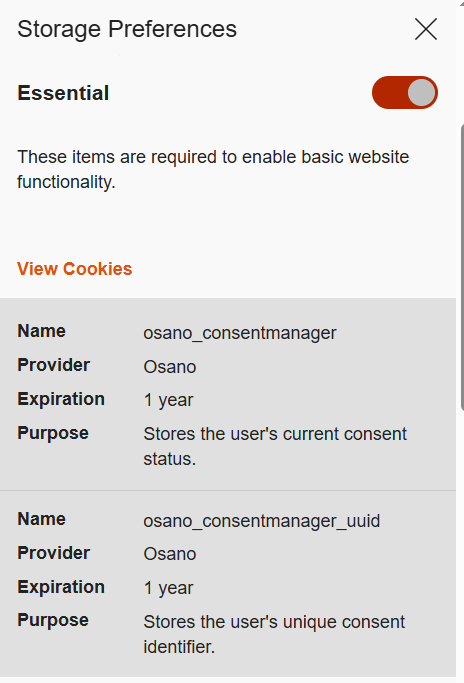
Example of required cookies on the Osano CMP website
Optional cookies are the ones that track your online behavior for marketing, analytics, and performance. This category includes third-party cookies created by social media platforms, as well as performance cookies that help the website run faster and balance the load across servers. For instance, these cookies can track broken links to improve a website’s overall speed and reliability.
Essentially, most optional cookies are third-party cookies that aren’t critical for the site to function. However, the category can also include some first-party cookies for things like site analytics or collecting information about your preferences to show you personalized content.
While these cookies generally don’t store your personal information in readable form, the data they collect can still be used by analytics tools to build a detailed profile of you with enough identifying information. For example, by analyzing which sites you visit, companies can make educated guesses about your age, health, location, and much more.
A major concern is that optional cookies can sometimes capture sensitive information from autofill forms, such as your name, home address, or even bank card details. This is exactly why many websites now give you the choice to accept or decline the collection of this data.
Let’s also highlight special subtypes of cookies managed with the help of two similar technologies that enable non-standard storage and retrieval methods.
A supercookie is a tracking technology that embeds cookies into website headers and stores them in non-standard locations, such as HTML5 local storage, browser plugin storage, or browser cache. Because they’re not in the usual spot, simply clearing your browser’s history and cookies won’t get rid of them.
Supercookies are used for personalizing ads and collecting analytical data about the user (for example, by internet service providers). From a privacy standpoint, supercookies are a major concern. They’re a persistent and hard-to-control tracking mechanism that can monitor your activity without your consent, which makes it tough to opt out.
Another unusual tracking method is Evercookie, a type of zombie cookie. Evercookies can be recovered with JavaScript even after being deleted. The recovery process relies on the unique user identifier (if available), as well as traces of cookies stored across all possible browser storage locations.
The collection and management of cookies are governed by different laws around the world. Let’s review the key standards from global practices.
In Russia, website owners must inform users about the use of technical cookies, but they don’t need to get consent to collect this information. For all other types of cookies, user consent is required. Often, the user gives this consent automatically when they first visit the site, as it’s stated in the default cookie warning.
Some sites use a banner or a pop-up window to ask for consent, and some even let users choose exactly which cookies they’re willing to store on their device.
Beyond these laws, website owners create their own rules for using first-party cookies. Similarly, third-party cookies are managed by the owners of third-party services, such as Google Analytics. These parties decide what kind of information goes into the cookies and how it’s formatted. They also determine the cookies’ lifespan and security settings. To understand why these settings are so important, let’s look at a few ways malicious actors can attack one of the most critical types of cookies: those that contain a Session ID.
As discussed above, cookies containing a Session ID are extremely sensitive. They are a prime target for cybercriminals. In real-world attacks, different methods for stealing a Session ID have been documented. This is a practice known as session hijacking. Below, we’ll look at a few types of session hijacking.
One method for stealing cookies with a Session ID is session sniffing, which involves intercepting traffic between the user and the website. This threat is a concern for websites that use the open HTTP protocol instead of HTTPS, which encrypts traffic. With HTTP, cookies are transmitted in plain text within the headers of HTTP requests, which makes them vulnerable to interception.
Attacks targeting unencrypted HTTP traffic mostly happen on public Wi-Fi networks, especially those without a password and strong security protocols like WPA2 or WPA3. These protocols use AES encryption to protect traffic on Wi-Fi networks, with WPA3 currently being the most secure version. While WPA2/WPA3 protection limits the ability to intercept HTTP traffic, only implementing HTTPS can truly protect against session sniffing.
This method of stealing Session ID cookies is fairly rare today, as most websites now use HTTPS encryption. The popularity of this type of attack, however, was a major reason for the mass shift to using HTTPS for all connections during a user’s session, known as HTTPS everywhere.
Cross-site scripting (XSS) exploits vulnerabilities in a website’s code to inject a malicious script, often written in JavaScript, onto its webpages. This script then runs whenever a victim visits the site. Here’s how an XSS attack works: an attacker finds a vulnerability in the source code of the target website that allows them to inject a malicious script. For example, the script might be hidden in a URL parameter or a comment on the page. When the user opens the infected page, the script executes in their browser and gains access to the site’s data, including the cookies that contain the Session ID.
In a session fixation attack, the attacker tricks your browser into using a pre-determined Session ID. Thus, the attacker prepares the ground for intercepting session data after the victim visits the website and performs authentication.
Here’s how it goes down. The attacker visits a website and gets a valid, but unauthenticated, Session ID from the server. They then trick you into using that specific Session ID. A common way to do this is by sending you a link with the Session ID already embedded in the URL, like this: http://example.com/?SESSIONID=ATTACKER_ID. When you click the link and sign in, the website links the attacker’s Session ID to your authenticated session. The attacker can then use the hijacked Session ID to take over your account.
Modern, well-configured websites are much less vulnerable to session fixation than XSS-like attacks because most current web frameworks automatically change the user’s Session ID after they sign in. However, the very existence of this Session ID exploitation attack highlights how crucial it is for websites to securely manage the entire lifecycle of the user session, especially at the moment of sign-in.
Unlike session fixation or sniffing attacks, cross-site request forgery (CSRF or XSRF) leverages the website’s trust in your browser. The attacker forces your browser, without your knowledge, to perform an unwanted action on a website where you’re signed in – like changing your password or deleting data.
For this type of attack, the attacker creates a malicious webpage or an email message with a harmful link, piece of HTML code, or script. This code contains a request to a vulnerable website. You open the page or email message, and your browser automatically sends the hidden request to the target site. The request includes the malicious action and all the necessary (for example, temporary) cookies for that site. Because the website sees the valid cookies, it treats the request as a legitimate one and executes it.
A man-in-the-middle (MitM) attack is when a cybercriminal not only snoops on but also redirects all the victim’s traffic through their own systems, thus gaining the ability to both read and alter the data being transmitted. Examples of these attacks include DNS spoofing or the creation of fake Wi-Fi hotspots that look legitimate. In an MitM attack, the attacker becomes the middleman between you and the website, which gives them the ability to intercept data, such as cookies containing the Session ID.
Websites using the older HTTP protocol are especially vulnerable to MitM attacks. However, sites using the more secure HTTPS protocol are not entirely safe either. Malicious actors can try to trick your browser with a fake SSL/TLS certificate. Your browser is designed to warn you about suspicious invalid certificates, but if you ignore that warning, the attacker can decrypt your traffic. Cybercriminals can also use a technique called SSL stripping to force your connection to switch from HTTPS to HTTP.
Cybercriminals don’t always have to steal your Session ID – sometimes they can just guess it. They can figure out your Session ID if it’s created according to a predictable pattern with weak, non-cryptographic characters. For example, a Session ID may contain your IP address or consecutive numbers, and a weak algorithm that uses easily predictable random sequences may be used to generate it.
To carry out this type of attack, the malicious actor will collect a sufficient number of Session ID examples. They analyze the pattern to figure out the algorithm used to create the IDs, then apply that knowledge to predicting your current or next Session ID.
This attack method exploits the browser’s handling of cookies set by subdomains of a single domain. If a malicious actor takes control of a subdomain, they can try to manipulate higher-level cookies, in particular the Session ID. For example, if a cookie is set for sub.domain.com with the Domain attribute set to .domain.com, that cookie will also be valid for the entire domain.
This lets the attacker “toss” their own malicious cookies with the same names as the main domain’s cookies, such as Session_id. When your browser sends a request to the main server, it includes all the relevant cookies it has. The server might mistakenly process the hacker’s Session ID, giving them access to your user session. This can work even if you never visited the compromised subdomain yourself. In some cases, sending invalid cookies can also cause errors on the server.
The primary responsibility for cookie security rests with website developers. Modern ready-made web frameworks generally provide built-in defenses, but every developer should understand the specifics of cookie configuration and the risks of a careless approach. To counter the threats we’ve discussed, here are some key recommendations.
All traffic between the client and server must be encrypted at the network connection and data exchange level. We strongly recommend using HTTPS and enforcing automatic redirect from HTTP to HTTPS. For an extra layer of protection, developers should use the HTTP Strict Transport Security (HSTS) header, which forces the browser to always use HTTPS. This makes it much harder, and sometimes impossible, for attackers to slip into your traffic to perform session sniffing, MitM, or cookie tossing attacks.
It must be mentioned that the use of HTTPS is insufficient protection against XSS attacks. HTTPS encrypts data during transmission, while an XSS script executes directly in the user’s browser within the HTTPS session. So, it’s up to the website owner to implement protection against XSS attacks. To stop malicious scripts from getting in, developers need to follow secure coding practices:
HttpOnly flag to protect cookie files from being accessed by the browser.For attacks like session fixation, a key defense is to force the server to generate a new Session ID right after the user successfully signs in. The website developer must invalidate the old, potentially compromised Session ID and create a new one that the attacker doesn’t know.
An extra layer of protection involves checking cookie attributes. To ensure protection, it is necessary to check for the presence of specific flags (and set them if they are missing): Secure and HttpOnly. The Secure flag ensures that cookies are transmitted over an HTTPS connection, while HttpOnly prevents access to them from the browser, for example through scripts, helping protect sensitive data from malicious code. Having these attributes can help protect against session sniffing, MitM, cookie tossing, and XSS.
Pay attention to another security attribute, SameSite, which can restrict cookie transmission. Set it to Lax or Strict for all cookies to ensure they are sent only to trusted web addresses during cross-site requests and to protect against CSRF attacks. Another common strategy against CSRF attacks is to use a unique, randomly generated CSRF token for each user session. This token is sent to the user’s browser and must be included in every HTTP request that performs an action on your site. The site then checks to make sure the token is present and correct. If it’s missing or doesn’t match the expected value, the request is rejected as a potential threat. This is important because if the Session ID is compromised, the attacker may attempt to replace the CSRF token.
To protect against an attack where a cybercriminal tries to guess the user’s Session ID, you need to make sure these IDs are truly random and impossible to predict. We recommend using a cryptographically secure random number generator that utilizes powerful algorithms to create hard-to-predict IDs. Additional protection for the Session ID can be ensured by forcing its regeneration after the user authenticates on the web resource.
The most effective way to prevent a cookie tossing attack is to use cookies with the __Host- prefix. These cookies can only be set on the same domain that the request originates from and cannot have a Domain attribute specified. This guarantees that a cookie set by the main domain can’t be overwritten by a subdomain.
Finally, it’s crucial to perform regular security checks on all your subdomains. This includes monitoring for inactive or outdated DNS records that could be hijacked by an attacker. We also recommend ensuring that any user-generated content is securely isolated on its own subdomain. User-generated data must be stored and managed in a way that prevents it from compromising the security of the main domain.
As mentioned above, if cookies are disabled, the Session ID can sometimes get exposed in the website URL. To prevent this, website developers must embed this ID into essential cookies that cannot be declined.
Many modern web development frameworks have built-in security features that can stop most of the attack types described above. These features make managing cookies much safer and easier for developers. Some of the best practices include regular rotation of the Session ID after the user signs in, use of the Secure and HttpOnly flags, limiting the session lifetime, binding it to the client’s IP address, User-Agent string, and other parameters, as well as generating unique CSRF tokens.
There are other ways to store user data that are both more secure and better for performance than cookies.
Depending on the website’s needs, developers can use different tools, like the Web Storage API (which includes localStorage and sessionStorage), IndexedDB, and other options. When using an API, data isn’t sent to the server with every single request, which saves resources and makes the website perform better.
Another exciting alternative is the server-side approach. With this method, only the Session ID is stored on the client side, while all the other data stays on the server. This is even more secure than storing data with the help of APIs because private information is never exposed on the client side.
Staying vigilant and attentive is a big part of protecting yourself from cookie hijacking and other malicious manipulations.
Always make sure the website you are visiting is using HTTPS. You can check this by looking at the beginning of the website address in the browser address bar. Some browsers let the user view additional website security details. For example, in Google Chrome, you can click the icon right before the address.
This will show you if the “Connection is secure” and the “Certificate is valid”. If these details are missing or data is being sent over HTTP, we recommend maximum caution when visiting the website and, whenever possible, avoiding entering any personal information, as the site does not meet basic security standards.
When browsing the web, always pay attention to any security warnings your browser gives you, especially about suspicious or invalid certificates. Seeing one of these warnings might be a sign of an MitM attack. If you see a security warning, it’s best to stop what you’re doing and leave that website right away. Many browsers implement certificate verification and other security features, so it is important to install browser updates promptly – this replaces outdated and compromised certificates.
We also recommend regularly clearing your browser data (cookies and cache). This can help get rid of outdated or potentially compromised Session IDs.
Always use two-factor authentication wherever it’s available. This makes it much harder for a malicious actor to access your account, even if your Session ID is exposed.
When a site asks for your consent to use cookies, the safest option is to refuse all non-essential ones, but we’ll reiterate that sometimes, clicking “Reject cookies” only means declining the optional ones. If this option is unavailable, we recommend reviewing the settings to only accept the strictly necessary cookies. Some websites offer this directly in the pop-up cookie consent notification, while others provide it in advanced settings.
The universal recommendation to avoid clicking suspicious links is especially relevant in the context of preventing Session ID theft. As mentioned above, suspicious links can be used in what’s known as session fixation attacks. Carefully check the URL: if it contains parameters you do not understand, we recommend copying the link into the address bar manually and removing the parameters before loading the page. Long strings of characters in the parameters of a legitimate URL may turn out to be an attacker’s Session ID. Deleting it renders the link safe. While you’re at it, always check the domain name to make sure you’re not falling for a phishing scam.
In addition, we advise extreme caution when connecting to public Wi-Fi networks. Man-in-the-middle attacks often happen through open networks or rogue Wi-Fi hotspots. If you need to use a public network, never do it without a virtual private network (VPN), which encrypts your data and makes it nearly impossible for anyone to snoop on your activity.
