The U.S. Army has completed the retirement of its legacy aerial intelligence, surveillance, and reconnaissance turboprop fleet, ending more than five decades of continuous service as it pivots toward a jet-based future built around the High Accuracy Detection and Exploitation System, or HADES. For more than 50 years, aircraft such as Guardrail, Airborne Reconnaissance Low-Multifunction […]
CoinShares has released its 2026 outlook titled “The Year Utility Wins,” positioning next year as the moment when digital assets transition from speculation to practical adoption.
The report introduces Hybrid Finance as the central framework where traditional financial institutions and blockchain infrastructure converge into a unified system serving real economic purposes.
Stablecoins evolved into genuine settlement infrastructure, tokenization scaled beyond experimental pilots, and blockchain applications began generating consistent revenues.
The report emphasizes that “crypto is entering a value-accrual era” as platforms distribute earnings to token holders through systematic buybacks.
CoinShares Analyst Predicts Bitcoin to $170K
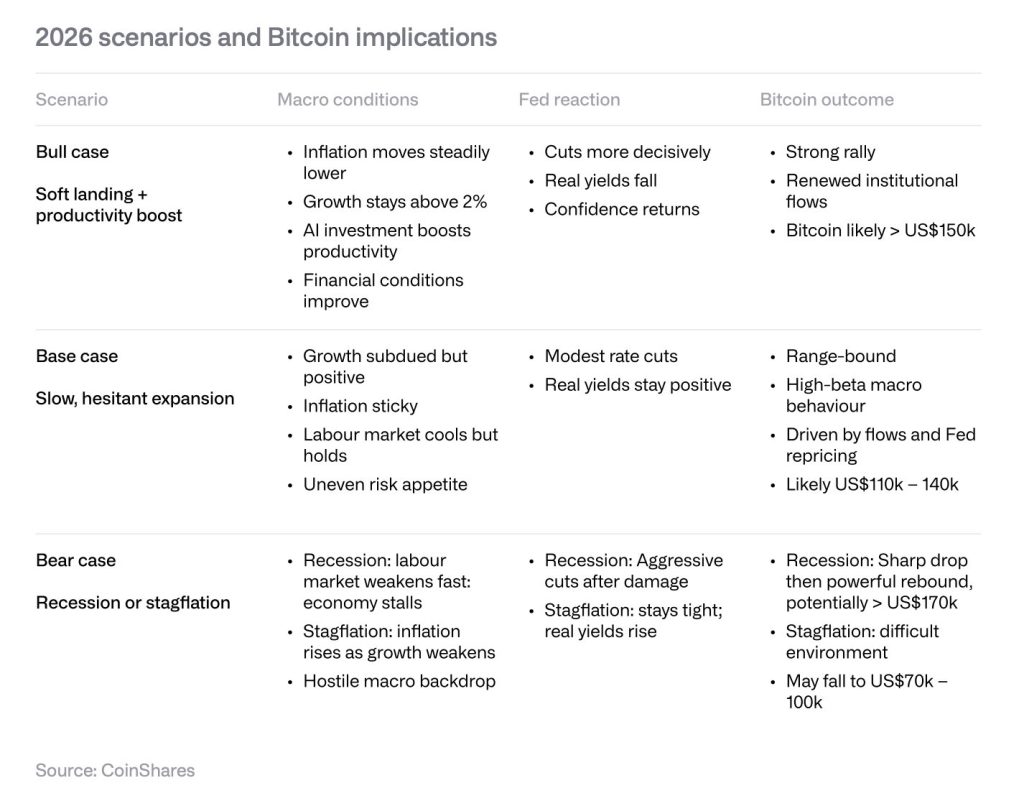
CoinShares projects three distinct scenarios for Bitcoin in 2026. The optimistic case, driven by productivity gains and steady disinflation, could push Bitcoin beyond $150,000.
The base case anticipates a trading range of $110,000 to $140,000, driven by ETF flows and expectations for the Federal Reserve.
The bear case splits between recession, where aggressive monetary easing could support prices above $170,000, and stagflation, which might compress valuations toward $70,000 to $100,000.
Source: CoinShares Report
The report notes that “the Fed feels fundamentally uncomfortable: wanting to ease, but constantly second-guessing how fragile the disinflation trend really is,” creating an environment demanding fundamental justification for asset appreciation.
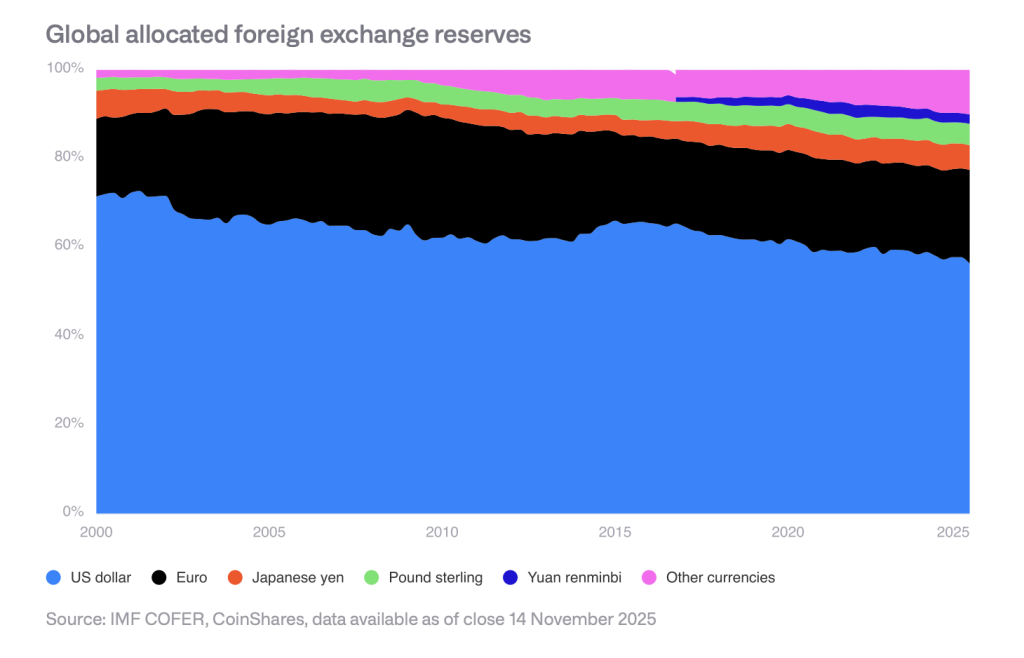
This backdrop reflects the erosion of dollar dominance, with the dollar’s global reserve share at mid-fifties, down from roughly 70% at the start of the millennium.
Corporate Bitcoin holdings have grown substantially, with publicly-listed companies increasing from 44 in January 2024 to 190 by November 2025.
Total holdings nearly quadrupled from 265,709 BTC to 1,048,520 BTC, with total value increasing roughly ninefold from $11.7 billion to $90.7 billion.
Strategy (MSTR) dominates this landscape, accounting for 61% of publicly-listed firms’ Bitcoin holdings after growing its stack from 189,150 BTC to 650,000 BTC.
The company holds approximately $70 billion in assets against $8.2 billion in debt, having secured $13.9 billion through convertible bonds. The top 10 corporate holders control 84% of the supply, while the top 20 hold 91%.
The company carries $6.6 billion in perpetual preferred stocks and $3.2 billion in interest-bearing debt, with annual cash flows totaling nearly $680 million.
As the modified net asset value approaches parity, new shares lose appeal, while refinancing risk looms with the nearest debt maturity in September 2028.
The report warns that eroding financing power could trigger a vicious cycle in which plunging prices force Bitcoin sales to cover obligations.
While CoinShares does not expect this to unfold in 2026, hundreds of thousands of coins could eventually flood the market.
Institutional Adoption Advances Through Multiple Channels
Two years after the US spot Bitcoin ETF approval in 2024, these products have attracted more than $90 billion in assets.
CoinShares anticipates the four major US wirehouses will formally enable discretionary Bitcoin ETF allocations in 2026, with at least one major 401(k) provider incorporating cryptocurrency options.
The report projects 13F filers will collectively hold over one-third of spot Bitcoin ETF assets by year-end 2026.
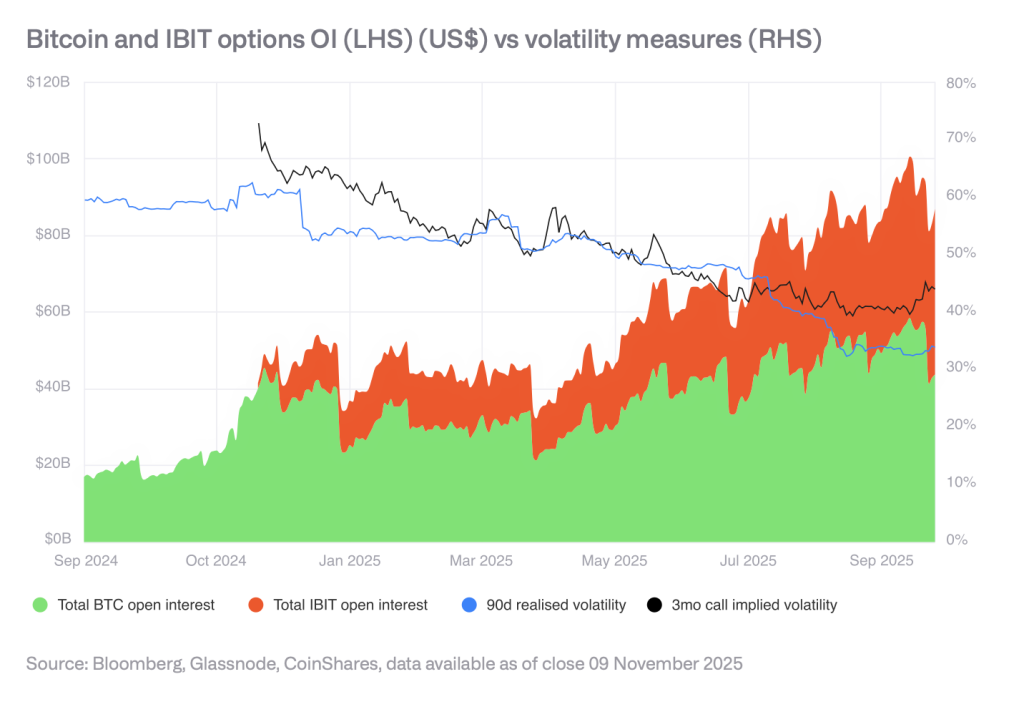
Options market development continues to reduce volatility as open interest expands.
Source: CoinShares Report
Measurements over 30 days showed instances in 2025 when Bitcoin volatility fell below that of traditional assets, marking a significant shift from historical patterns.
Stablecoin and Tokenization Growth Accelerates
The stablecoin sector has reached $300 billion, with USDT commanding $185 billion and USDC holding $75 billion. Decentralized exchange volumes exceed $600 billion monthly.
However, CoinShares notes that if rates decline to 3% by year-end 2026, stablecoin supply would need to grow by $88.7 billion to maintain current interest revenue for issuers, though Treasury Secretary Scott Bessent projects market expansion to $3 trillion by 2030.
Source: CoinShares Report
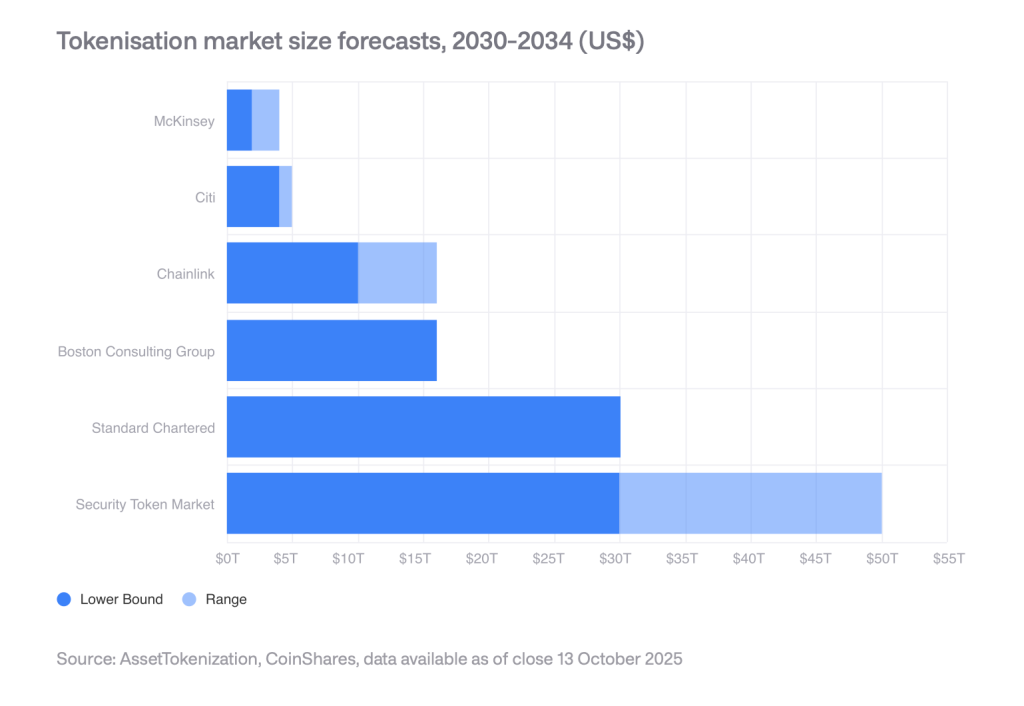
The tokenized asset market doubled during 2025, expanding from $15 billion to over $35 billion. Private credit grew from $9.85 billion to $18.58 billion, while tokenized Treasuries increased from $3.91 billion to $8.68 billion.
Digital asset investment products recorded a second consecutive week of inflows, totalling $716M, showing improving sentiment across institutional and retail investors after a volatile period in crypto markets, according to the latest report from CoinShares.
CoinShares reports total assets under management rose 7.9% from their November lows to $180B, though this figure remains below the all-time high of $264B. Daily flow data indicated minor outflows toward the end of the week, which analysts believe reflected macroeconomic uncertainty and market reactions to U.S. inflation-related data.
Despite those short-term jitters, the week’s net performance highlights renewed confidence in digital asset exposure through exchange-traded products.
A notable trend was the geographic spread of inflows, suggesting renewed interest globally rather than activity concentrated in a single region. The United States led with $483M in inflows, followed by Germany at $96.9M and Canada at $80.7M, demonstrating that institutional re-engagement with crypto markets is widening across regulated investment platforms.
Bitcoin Leads Inflows While Short Products Reverse
Bitcoin remained the primary focus for investors, recording $352M in inflows last week, contributing to year-to-date (YTD) inflows of $27.1B. This remains below the record $41.6B seen in 2024; however, continued inflows suggest persistent appetite for exposure despite reduced volatility and slower price momentum compared to previous cycles.
In contrast, short-Bitcoin investment products saw outflows of $18.7M — the largest since March 2025. Analysts note that the previous occurrence coincided with price lows and later recovery, hinting that current negative sentiment may have exhausted itself, with investors positioning for a more favourable outlook.
The reversal in short-Bitcoin demand could be interpreted as a tactical shift, where investors are less confident in prolonged downside risk and increasingly reassessing the potential for stabilization or upside in digital asset markets.
XRP Sees Strong Momentum as Institutional Interest Accelerates
XRP continued to draw attention, with $245M flowing into ETPs last week, bringing YTD inflows to $3.1B — a dramatic increase compared to $608M in 2024. The surge reflects heightened institutional engagement following greater clarity around its legal and regulatory landscape, which has broadened access and improved sentiment.
The continued rise in XRP ETP demand marks one of the strongest comparative growth stories in the digital asset space this year, suggesting that investors may now be reassessing exposure beyond Bitcoin and Ethereum as the market diversifies.
Chainlink Records Largest Inflows on Record
Chainlink registered $52.8M in weekly inflows, representing over 54% of its total assets under management — the largest on record for the token. The surge highlights growing institutional and developer interest in the tokenized asset and oracle infrastructure ecosystem that Chainlink underpins.
As tokenization of real-world assets expands and demand for reliable data connectivity increases across blockchains, Chainlink’s growth may indicate a long-term thematic trend rather than short-term speculation.
Digital asset ETPs saw US$716m in weekly inflows, lifting total AuM to US$180bn, though still well below the US$264bn all-time high. Bitcoin attracted US$352m while XRP (US$245m) and Chainlink (US$52.8m) also saw strong demand. Short-Bitcoin products saw outflows of US$18.7m, the…
Systems for
enterprise resource planning are now the foundation of contemporary corporate
operations. But having an ERP configuration is only the first step. The program changes
from a basic tool into the ideal digital partner for your company during
configuration, which is when the true magic happens. Businesses can maximize
their technology investment for long-term operational excellence and prevent
expensive errors by grasping configuration fundamentals.
1.Recognizing Your Company's Needs First
A
comprehensive business analysis is the first step toward a successful ERP
configuration. Businesses need to clearly define their future objectives,
pinpoint their pain areas, and map out their present procedures. This
foundation avoids the frequent error of making business procedures conform to
software constraints. Get feedback from management teams, end users, and
department leaders. Make sure that nothing crucial is missed during setup by
meticulously recording everything, from client communication preferences to
inventory tracking techniques.
2.Setting Up User Access Controls Properly
Appropriate
user permission hierarchies are critical to efficiency and security. Only the
modules and information pertinent to their duties should be accessible to each
employee. To make management easier, create role-based access groups rather
than individual permits. The finance teams need varied lenses as compared to
the warehouse staff or sales personnel. Test these permissions every now and
then as workers acquire new positions or duties. Access control is well-planned
to provide employees with more time to work faster without data breaches and
information loss because it presents only the relevant information.
3.Customizing Workflows Without Overcomplicating
Although ERP
systems are incredibly flexible, over-customization leads to maintenance
nightmares. Instead than concentrating on nice-to-have features, concentrate on
configurations that meet actual business demands. While customisation should
focus on really unique organizational requirements, standard elements typically
function well for common operations. Every configuration change should be well
documented with justification. Strike a balance between system simplicity and
customisation, keeping in mind that when systems depart too much from
conventional setups, future updates become more difficult. Understanding when
simplicity is preferable to complexity is a key component of smart configuration.
4.Integration Planning With Existing Systems
Rarely do
modern businesses use independent software. Customer relationship management
platforms, e-commerce websites, and specialist industry apps are examples of
solutions that your ERP must seamlessly integrate with. Instead of handling
integration points as an afterthought, thoroughly plan them during
configuration. Think about error handling protocols, update frequencies, and
data flow directions. Before launching, properly test integrations. In order to
improve decision-making, seamless system connectivity decreases errors, gets
rid of redundant data entry, and offers a unified view across all business
functions.
5.Testing Configuration Before Full Deployment
Regardless of
deadline constraints, never skip the testing stage. Construct realistic test
scenarios that include both commonplace daily operations and uncommon edge
cases. When testing, involve real end users as well as technical teams. They
identify real-world problems that developers might overlook. Verify the
accuracy of data migration, report creation, transaction processing, and system
load performance. Instead of waiting for issues to go away on their own, deal
with them right away. Extensive testing may appear time-consuming, but it
avoids costly disruptions when problems become much more difficult to repair
after launch.
Conclusion
Long-term
digital success depends on proper ERP configuration, yet doing it manually
frequently results in delays, and inconsistencies, in addition to increased
expenses. This is the point at which Opkey
changes everything. Opkey streamlines
ERP configuration, customization, and ongoing validation as the first Agentic
AI-powered business app lifecycle optimization platform in the sector. Faster, risk-free updates are ensured by its
sophisticated impact analysis, which promptly detects impacted test cases
following each change. Opkey enables
businesses to modernize with confidence by cutting down on manual labor, and
lowering maintenance expenses, along with speeding up implementation
times. Businesses may now finally
realize the ROI that their ERP investments promise thanks to Opkey's dependable
AI and in-depth domain knowledge.
One
of the trickiest initiatives a business may embark on is the implementation of
a large Cloud-based finance or human resource management system. The procedure
takes a long time, needs a lot of data conversions, and calls for setting up
the system to fit the particular procedures of the company. This complex
configuration is often tested manually, slowly, and hurriedly towards the end.
This reactive strategy ensures instability. Workday implementation challengesare often caused by
inadequate testing of the setup against real-world conditions rather than
configuration errors. Proactive automated testing that ensures dependability
right now is the answer. The problem is that automation turns testing from a
necessary evil into a tool that speeds up projects. Let's examine the five ways
it gets over typical implementation obstacles:
Verifying Role Permissions and Complex Security
Setting
up the system's visibility and functionality is perhaps the most important yet
challenging setup activity. The thousands of potential roles and security group
combinations are difficult for manual testing to validate. Full matrix testing
is carried out via automation, which immediately lowers compliance risk by
guaranteeing that all user roles—from payroll specialists to expenditure
approvers—can only carry out the exact operations and access the precise data
they are allowed to.
Guaranteeing the Integrity and Accuracy of Data
Conversion
Errors
often occur while transferring historical data from a legacy system into the
new application, such as ledger balances, personnel records, or salary
information. By employing pre-established criteria to check the data entered
into the new system with the source data, automation performs high-volume
reconciliation that would be impossible for human auditors to do in a timely
manner. Before going live, this ensures data integrity and fosters user
confidence.
Quickening the Validation of Business Processes from
Start to Finish
"Hire
to Retire" and "Order to Cash," two examples of core operations,
span several modules and need both human and system phases. These long,
interconnected operations are laborious and prone to errors when carried out by
hand. Automation is performed quickly and consistently between these endpoint
scenarios, and the process is detected in areas such as multi-step approval
chains or managers' self-service before the operations are influenced.
Quickly Identifying and Fixing Configuration Problems
Every
day throughout the construction process, several configuration changes take
place. Manual teams spend hours determining if the issue is with the script,
the data, or the configuration when a test fails. By pinpointing the particular
workflow step where the system departed from the intended result, automated
testing offers accurate, repeatable proof of failure and significantly
accelerates the remedy cycle for internal teams and consultants.
5. Ensuring Preparedness for Concurrent Payroll Operations
Payroll
is the last stress test for any system related to finance and human resources.
Although it is not negotiable, parallel payroll—using the old and new systems
at the same time—is often hurried. The last level of assurance required to
confidently shut down the old system is provided by automated testing of the
whole payroll calculation cycle, which guarantees that each and every pay
element and deduction is handled accurately in the new environment.
Conclusion
To
guarantee a dependable and effective Workday implementation, proactive
automated testing is crucial. Every phase of the enterprise application
journey, from configuration and Workday
automated testing to training and support, is streamlined by Opkey, the first
end-to-end agentic AI-native platform. Opkey finds process inefficiencies and
suggests enhancements, as well as adjustments on its own thanks to a
purpose-built AI model and more than 30,000 pre-built test cases. While
self-healing scripts minimize maintenance by up to 80% and security controls
lower exposure risk by over 90%, enhancing compliance along with decreasing
downtime, its AI-based Impact Analysis identifies impacted tests.
Almost everyone and everything is documented in today’s digital world. From social media to public records, there are countless examples of records and data freely available. But collecting, piecing together, and analyzing data with any real effectiveness requires special and often complex tools and techniques. The OSINT Framework is designed to help with this challenge. It offers a structured approach to collecting open-source intelligence, offers support and guidance to members of a range of professions, and enables them to rapidly locate reliable data within their fields of focus. These fields are often complex and require advanced software to parse large data sets and search a range of databases, including e.g. social media and other public forums.
What is OSINT?
Open-Source Intelligence is the practice of collecting, and analyzing data, and information available and legally free on the open web and other public domains. These data and records can be collected from social media, government databases, open forums, and other routes. The information must be. The practice must be within the bounds of the law, and other regulations must not be violated.
Conceptually, OSINT can be used in other various professions. In cybersecurity, OSINT can help track and pinpoint location of malicious actions, and activity. In the fields of journalism, it can help source verification. OSINT also has value to businesses, as it provides insight into market analysis and data on competitor activity.
Getting to Know the OSINT Framework
Rather than being a single piece of software, the OSINT Framework is a properly structured directory of tools, methods, and resources employed in open-source investigations. It sorts different OSINT resources into varying categories, enabling users to choose the appropriate tools for their needs.
Often, the framework is visually represented in the form of a tree, where every branch leads to specialized OSINT tools. This approach increases user-friendliness, even for beginners. Rather than undertaking general purpose internet searches, investigators can use tools in the framework that have undergone targeted categorization and deal with specific tasks like social media accounts, domain information, and image analysis, or email lookups.
Advantages of the OSINT Framework
The framework increases efficiency. Instead of general purpose searches, which can take considerable time, the framework quickly narrows the search to the relevant tools.
The OSINT Framework also has a wide coverage. It spans various categories, such as usernames, emails, IP addresses, and phone numbers.
Most of the tools contained within the framework are cost-free and simple to access, which speaks to the framework’s accessibility.
Many OSINT resources are of established credibility and, therefore, reliable. This limits the probability of false data.
The framework also maintains Ethical Standards in data collection by ensuring that the information is legally accessible and publicly available.
Most Important Parts of the OSINT Framework
1. Analyzing Social Media
Large amounts of data can be collected from social media platforms such as Facebook, Twitter, Instagram, and LinkedIn. The OSINT Framework assists in analyzing user profiles, posts, connections, and social interaction patterns. This is specifically beneficial in the area of digital investigations and monitoring threats.
2. Domain and IP Research
OSINT tools allow investigators to look up the registration, hosting, and IP history of a suspicious website. This is instrumental in cybersecurity when tracking harmful websites, identifying phishing domains, and other cases of phishing.
3. Monitoring Email and Username Accounts
The OSINT Framework helps to determine the risk of compromised accounts through data exposure as well as potential identity theft through email or username checks.
4. Analyzing Images and Videos
Fact-checking in journalism is made much easier when the tools used to determine the origin of a picture or video through a reverse image search and the examination of video metadata is available.
Geolocation and Mapping
Investigators can utilize tools provided in the OSINT Framework to examine maps, satellite imagery, and other location based tools or services. This is very beneficial in locating missing persons, tracking crimes, or in disaster response.Benefits for Cybersecurity and Investigations
OSINT Framework remains invaluable for cybersecurity professionals as they identify and track potential cyber attacks, track and monitor hackers, and identify and follow harmful domains. For law enforcement, they can follow leads without resorting to sophisticated and invasive monitoring techniques. Organizations can track and monitor brand health and identify fraudulent activities, which is yet another way to help businesses.
Ethical hackers are other OSINT users, finding system exploits before malicious hackers can. Organizations incorporate additional security measures to deal with the potentially harmful OSINT.
Challenges of Using OSINT
OSINT is accompanied by unique challenges as well.
Information Overload – Having an abundance of data can make filtering the actionable insights almost impossible.
False Information – Not every piece of data is useful and accurate, and thus needs to be verified before being acted on.
Privacy Concerns – Respecting the law, especially regarding data privacy, is of utmost importance.
Tool Limitations – Geography and jurisdiction can render investigative tools useless, and tools can also have limitations.
Best Practices for Using the OSINT Framework
Always start with a specific investigative objective.
Cross-reference all data with a different source.
Regularly check for updates on the framework tools.
Follow the law and the ethics of the investigation.
Document the investigation findings for future use.
Conclusions
The users of OSINT can find guidance from the OSINT Framework. From accurate and ethical information gathering in journalism and cybersecurity, OSINT will make accurate and ethical information gathering possible. OSINT, if approached from the right angles, will uncover information of immense value and insights hidden in plain sight.
HackersKing’s mission is to equip people with strategies and the understanding needed to work safely in the online environment. As a reputable provider of information technology and news, we have a commitment to awareness and education in cybersecurity, particularly in the practice of OSINT, to assist people and businesses.
Today, folks who love streaming films and shows tend to reach for their phones and tablets first. Filmywap is one of the names people keep mentioning, and for a good reason: it’s got movies and web shows in every language, from Tollywood to Hollywood and even regional gems like Punjabi hits. The sight of a fresh release banner is like a magnet for anyone who wants the latest blockbuster—no wallet needed. Yet, along with those eye-popping selections comes a storm of controversy.
Filmywap: The Instant Library
At its heart, Filmywap is a giant online library that costs you—well, nothing at all. The homepage changes every week as new titles drop, and the latest web series or that new rom-com pops up before the official streaming sites even get it. You can pick a flick in Hindi, English, or any regional language and hit play in seconds. Sure, that skips any pricey subscriptions, and the buzz isn’t hard to find.
Tap the “download” button, and you’ve got the option to pick from zip-it credits and torrents to keep your data and storage happy. The tool shines here: quick downloads mean you can stash a film for the rail commute, resize it for a phone screen, and hardly notice the data siren.
Worth a Click... or Not
That’s the glossy side. The rough truth is that most of the library is pirated. Filmywap hosts fresh releases overnight, and studios didn’t sign the licensing papers. Because of this, the site lives in a legal grey area—often black. Streaming or downloading pirated titles in places like India can lead to big fines, site blocks, and even police visits.
And the impact isn't just legal. Piracy like Filmywap shaves the box office dollars that help studios bankroll the next big action flick or heartwarming series. When a blockbuster is available for free, actual ticket sales slump. That’s why many streaming and production houses keep banging their heads against the wall, trying to pull titles from the site and pursuing legal action that can take years.
Quick Take
Filmywap offers an immediate choice for anyone who wants to stream for free, but it’s a choice that’s both risky and unfair to the people behind the screen. You can save on subscription costs right now, but that free download comes with legal headaches and the sinking feeling that the next big release might not get made. The next time you see that bright download button, ask yourself: is this really worth the price I can’t see?
Why Filmywap Gained Massive Popularity
So, how did Filmywap become the go-to site for so many movie lovers? It boils down to a few key reasons:
Free Movies – When you see a new movie for free on Filmywap, it’s a tempting choice next to paid apps like Netflix or Disney+.
Easy to Use – Anyone can navigate the clean, simple layout of the site without instructions, from kids to grandparents.
Huge Library – Whether you need a black-and-white classic or the latest superhero hit, Filmywap’s library seems limitless and covers many Indian languages.
Downloads Available – Want to watch a movie on the subway? Filmywap lets you download it first, and you can pick the video quality to save data.
Worldwide Access – Type in the URL anywhere on the globe, and you’re in. That makes it a favorite for students on campus or anyone traveling abroad.
Why You Should Think Twice About Using Filmywap
Popularity doesn’t mean a site is safe. Here’s what you can lose when using Filmywap:
Legal Trouble – Streaming or saving stolen movies can lead to serious fines and even a court date in most countries.
Viral Threats – Malware and pop-up ads often share the same download button. Clicking the wrong thing could hijack your phone or computer and your passwords.
Poor Quality Content – When you watch a pirated movie, the video and sound often lag behind what you get on paid platforms. It’s a gamble that leads to fuzzy pictures and muffled sound instead of the crisp, clear experience you deserve.
Impact on the Entertainment Industry
Beyond just the sound and picture, piracy costs the folks behind the cameras a lot. Producers, cinematographers, and actors all depend on box office earnings, and every illegal view cuts deep into their earnings.
The Impact of Filmywap on the Entertainment Industry
Sites like Filmywap have taken movie watching from cinemas to small screens, but the cost isn’t just awkward visuals. Many films, already shown to select audiences, pop up on Filmywap within hours of their premiere. Ticket sales drop faster than a newly released trailer views. To fight back, studios now drop films on OTT platforms instead of waiting for a theater run and ramp up anti-piracy laws. Audiences, too, have a role to play and many campaigns this year show the real cost of choosing free over fair.
Legal Alternatives to Filmywap
Before clicking on that tempting Filmywap link, remember that there are affordable and safe ways to stream. Give these platforms a try:
Netflix: Packed with hit series, films, and content from around the world.
Amazon Prime Video: Features the latest films, series, and not-to-miss originals.
Disney+ Hotstar: Your go-to for Disney classics, Marvel superheroes, and top Indian films.
More Legal Streamers You Can Trust
Personalize your binge with regional content and live sports by checking out Sony LIV. If movies and Indian shows are your go-to, Zee5 has a library that won’t disappoint.
Minor detail: both platforms might ask you to pay a small monthly fee. But that money buys you smooth streaming, secure platforms, and a chance to support the people who make your favorite shows happen.
Why Skip the Free Pirated Sites?
We get tempted by sites that promise free movies, but **Filmywap** and its cousins come with serious hidden costs. Free doesn’t mean safe. Downloading a “free” movie often means downloading malware that can steal your passwords. Plus, the downloads are often low quality and riddled with ads.
Stick to the legal sites. They give you high-def streams, no fear of viruses, and a steady paycheck to the filmmakers who made that movie you can’t stop talking about.
The Bottom Line
Filmywap feels appealing, but the risks—legal fees, security headaches, and a damaged film industry—outweigh the perks. Move to legal streaming and you’ll get crystal-clear content, a secure viewing environment, and a chance to cheer the creators who put in the hard work.
Want to keep tabs on the latest tech and security news? Hackersking has your back, serving real updates in a fast-changing online world.
PowerHuntShares is design to automatically inventory, analyze, and report excessive privilege assigned to SMB shares on Active Directory domain joined computers. It is intented to help IAM and other blue teams gain a better understand of their SMB Share attack surface and provides data insights to help naturally group related share to help stream line remediation efforts at scale.
It supports functionality to:
Authenticate using the current user context, a credential, or clear text user/password.
Discover accessible systems associated with an Active Directory domain automatically. It will also filter Active Directory computers based on available open ports.
Target a single computer, list of computers, or discovered Active Directory computers (default).
Collect SMB share ACL information from target computers using PowerShell.
Analyze collected Share ACL data.
Report summary reports and excessive privilege details in HTML and CSV file formats.
Excessive SMB share ACLs are a systemic problem and an attack surface that all organizations struggle with. The goal of this project is to provide a proof concept that will work towards building a better share collection and data insight engine that can help inform and priorititize remediation efforts.
Bonus Features:
Generate directory listing dump for configurable depth
PowerHuntShares will inventory SMB share ACLs configured with "excessive privileges" and highlight "high risk" ACLs. Below is how those are defined in this context.
Excessive Privileges Excessive read and write share permissions have been defined as any network share ACL containing an explicit ACE (Access Control Entry) for the "Everyone", "Authenticated Users", "BUILTIN\Users", "Domain Users", or "Domain Computers" groups. All provide domain users access to the affected shares due to privilege inheritance issues. Note there is a parameter that allow operators to add their own target groups. Below is some additional background:
Everyone is a direct reference that applies to both unauthenticated and authenticated users. Typically only a null session is required to access those resources.
BUILTIN\Users contains Authenticated Users
Authenticated Users contains Domain Users on domain joined systems. That's why Domain Users can access a share when the share permissions have been assigned to "BUILTIN\Users".
Domain Users is a direct reference
Domain Users can also create up to 10 computer accounts by default that get placed in the Domain Computers group
Domain Users that have local administrative access to a domain joined computer can also impersonate the computer account.
Please Note: Share permissions can be overruled by NTFS permissions. Also, be aware that testing excluded share names containing the following keywords:
print$, prnproc$, printer, netlogon,and sysvol
High Risk Shares In the context of this report, high risk shares have been defined as shares that provide unauthorized remote access to a system or application. By default, that includes the shares
wwwroot, inetpub, c$, and admin$
However, additional exposures may exist that are not called out beyond that.
Setup Commands
Below is a list of commands that can be used to load PowerHuntShares into your current PowerShell session. Please note that one of these will have to be run each time you run PowerShell is run. It is not persistent.
# Bypass execution policy restrictions
Set-ExecutionPolicy -Scope Process Bypass

# Import module that exists in the current directory
Import-Module .\PowerHuntShares.psm1

or

# Reduce SSL operating level to support connection to github
[System.Net.ServicePointManager]::ServerCertificateValidationCallback = {$true}
[Net.ServicePointManager]::SecurityProtocol =[Net.SecurityProtocolType]::Tls12

# Download and load PowerHuntShares.psm1 into memory
IEX(New-Object System.Net.WebClient).DownloadString("https://raw.githubusercontent.com/NetSPI/PowerHuntShares/main/PowerHuntShares.psm1")
Example Commands
Important Note: All commands should be run as an unprivileged domain user.
.EXAMPLE 1: Run from a domain computer. Performs Active Directory computer discovery by default.
PS C:\temp\test> Invoke-HuntSMBShares -Threads 100 -OutputDirectory c:\temp\test

.EXAMPLE 2: Run from a domain computer with alternative domain credentials. Performs Active Directory computer discovery by default.
PS C:\temp\test> Invoke-HuntSMBShares -Threads 100 -OutputDirectory c:\temp\test -Credentials domain\user

.EXAMPLE 3: Run from a domain computer as current user. Target hosts in a file. One per line.
PS C:\temp\test> Invoke-HuntSMBShares -Threads 100 -OutputDirectory c:\temp\test  -HostList c:\temp\hosts.txt

.EXAMPLE 4: Run from a non-domain computer with credential. Performs Active Directory computer discovery by default.
C:\temp\test> runas /netonly /user:domain\user PowerShell.exe
PS C:\temp\test> Import-Module Invoke-HuntSMBShares.ps1
PS C:\temp\test> Invoke-HuntSMBShares -Threads 100 -Run   SpaceTimeOut 10 -OutputDirectory c:\folder\ -DomainController 10.1.1.1 -Credential domain\user

===============================================================
PowerHuntShares
===============================================================
 This function automates the following tasks:

 o Determine current computer's domain
 o Enumerate domain computers
 o Filter for computers that respond to ping reqeusts
 o Filter for computers that have TCP 445 open and accessible
 o Enumerate SMB shares
 o Enumerate SMB share permissions
 o Identify shares with potentially excessive privielges
 o Identify shares that provide reads & write access
 o Identify shares thare are high risk
 o Identify common share owners, names, & directory listings
 o Generate creation, last written, & last accessed timelines
 o Generate html summary report and detailed csv files

 Note: This can take hours to run in large environments.
---------------------------------------------------------------
|||||||||||||||||||||||||||||||||||||||||||||||||||||||||||||||
---------------------------------------------------------------
SHARE DISCOVERY
---------------------------------------------------------------
[*][03/01/2021 09:35] Scan Start
[*][03/01/2021 09:35] Output Directory: c:\temp\smbshares\SmbShareHunt-03012021093504
[*][03/01/2021 09:35] Successful connection to domain controller: dc1.demo.local
[*][03/01/2021 09:35] Performing LDAP query for computers associated with the demo.local domain
[*][03/01/2021 09:35] - 245 computers found
[*][03/01/2021 09:35] Pinging 245 computers
[*][03/01/2021 09:35] - 55 computers responded to ping requests.
[*][03/01/2021 09:35] Checking if TCP Port 445 is open on 55 computers
[*][03/01/2021 09:36] - 49 computers have TCP port 445 open.
   [*][03/01/2021 09:36] Getting a list of SMB shares from 49 computers
[*][03/01/2021 09:36] - 217 SMB shares were found.
[*][03/01/2021 09:36] Getting share permissions from 217 SMB shares
[*][03/01/2021 09:37] - 374 share permissions were enumerated.
[*][03/01/2021 09:37] Getting directory listings from 33 SMB shares
[*][03/01/2021 09:37] - Targeting up to 3 nested directory levels
[*][03/01/2021 09:37] - 563 files and folders were enumerated.
[*][03/01/2021 09:37] Identifying potentially excessive share permissions
[*][03/01/2021 09:37] - 33 potentially excessive privileges were found across 12 systems..
[*][03/01/2021 09:37] Scan Complete
---------------------------------------------------------------
SHARE ANALYSIS
---------------------------------------------------------------
[*][03/01/2021 09:37] Analysis Start
[*][03/01/2021 09:37] - 14 shares can be read across 12 systems.
[*][03/01/2021 09:37] - 1 shares can    be written to across 1 systems.
[*][03/01/2021 09:37] - 46 shares are considered non-default across 32 systems.
[*][03/01/2021 09:37] - 0 shares are considered high risk across 0 systems
[*][03/01/2021 09:37] - Identified top 5 owners of excessive shares.
[*][03/01/2021 09:37] - Identified top 5 share groups.
[*][03/01/2021 09:37] - Identified top 5 share names.
[*][03/01/2021 09:37] - Identified shares created in last 90 days.
[*][03/01/2021 09:37] - Identified shares accessed in last 90 days.
[*][03/01/2021 09:37] - Identified shares modified in last 90 days.
[*][03/01/2021 09:37] Analysis Complete
---------------------------------------------------------------
SHARE REPORT SUMMARY
---------------------------------------------------------------
[*][03/01/2021 09:37] Domain: demo.local
[*][03/01/2021 09:37] Start time: 03/01/2021 09:35:04
[*][03/01/2021 09:37] End time: 03/01/2021 09:37:27
[*][03/01/2021 09:37] R   un time: 00:02:23.2759086
[*][03/01/2021 09:37]
[*][03/01/2021 09:37] COMPUTER SUMMARY
[*][03/01/2021 09:37] - 245 domain computers found.
[*][03/01/2021 09:37] - 55 (22.45%) domain computers responded to ping.
[*][03/01/2021 09:37] - 49 (20.00%) domain computers had TCP port 445 accessible.
[*][03/01/2021 09:37] - 32 (13.06%) domain computers had shares that were non-default.
[*][03/01/2021 09:37] - 12 (4.90%) domain computers had shares with potentially excessive privileges.
[*][03/01/2021 09:37] - 12 (4.90%) domain computers had shares that allowed READ access.
[*][03/01/2021 09:37] - 1 (0.41%) domain computers had shares that allowed WRITE access.
[*][03/01/2021 09:37] - 0 (0.00%) domain computers had shares that are HIGH RISK.
[*][03/01/2021 09:37]
[*][03/01/2021 09:37] SHARE SUMMARY
[*][03/01/2021 09:37] - 217 shares were found. We expect a minimum of 98 shares
[*][03/01/2021 09:37]   because 49 systems had open ports a   nd there are typically two default shares.
[*][03/01/2021 09:37] - 46 (21.20%) shares across 32 systems were non-default.
[*][03/01/2021 09:37] - 14 (6.45%) shares across 12 systems are configured with 33 potentially excessive ACLs.
[*][03/01/2021 09:37] - 14 (6.45%) shares across 12 systems allowed READ access.
[*][03/01/2021 09:37] - 1 (0.46%) shares across 1 systems allowed WRITE access.
[*][03/01/2021 09:37] - 0 (0.00%) shares across 0 systems are considered HIGH RISK.
[*][03/01/2021 09:37]
[*][03/01/2021 09:37] SHARE ACL SUMMARY
[*][03/01/2021 09:37] - 374 ACLs were found.
[*][03/01/2021 09:37] - 374 (100.00%) ACLs were associated with non-default shares.
[*][03/01/2021 09:37] - 33 (8.82%) ACLs were found to be potentially excessive.
[*][03/01/2021 09:37] - 32 (8.56%) ACLs were found that allowed READ access.
[*][03/01/2021 09:37] - 1 (0.27%) ACLs were found that allowed WRITE access.
[*][03/01/2021 09:37] - 0 (0.00%) ACLs we   re found that are associated with HIGH RISK share names.
[*][03/01/2021 09:37]
[*][03/01/2021 09:37] - The 5 most common share names are:
[*][03/01/2021 09:37] - 9 of 14 (64.29%) discovered shares are associated with the top 5 share names.
[*][03/01/2021 09:37]   - 4 backup
[*][03/01/2021 09:37]   - 2 ssms
[*][03/01/2021 09:37]   - 1 test2
[*][03/01/2021 09:37]   - 1 test1
[*][03/01/2021 09:37]   - 1 users
[*] -----------------------------------------------
HTML Report Examples
Credits
Author Scott Sutherland (@_nullbind)
Open-Source Code Used These individuals wrote open source code that was used as part of this project. A big thank you goes out them and their work!
ACLs associated with Builtin\Users sometimes shows up as LocalSystem under undefined conditions, and as a result, doesnt show up in the Excessive Privileges export. - Thanks Sam!
Pending Features
Add ability to specify additional groups to target
Add directory listing to insights page.
Add ability to grab system OS information for data insights.
Add visualization: Visual squares with coloring mapped to share volume density by subnet or ip?.
Add file type search. (half coded) + add to data insights. Don't forget things like *.aws, *.azure *.gcp directories that store cloud credentials.
Add file content search.
Add DontExcludePrintShares option
Add auto targeting of groups that contain a large % of the user population; over 70% (make configurable). Add as option.
Add configuration fid: netlogon and sysvol you may get access denied when using windows 10 unless the setting below is configured. Automat a check for this, and attempt to modify if privs are at correct level. gpedit.msc, go to Computer -> Administrative Templates -> Network -> Network Provider -> Hardened UNC Paths, enable the policy and click "Show" button. Enter your server name (* for all servers) into "Value name" and enter the folowing text "RequireMutualAuthentication=0,RequireIntegrity=0,RequirePrivacy=0" wihtout quotes into the "Value" field.
Add an interesting shares based on names to data insights. example: sql, backup, password, etc.
Add active sessions data to help identify potential owners/users of share.
Pull spns and computer description/spn account descriptions to help identify owner/business unit.
Research to identify additional high risk share names based on common technology
Add better support for IPv6
Dynamic identification of spikes in high risk share creation/common groupings, need to better summarize supporting detail beyond just the timeline. For each of the data insights, add average number of shares created for insight grouping by year/month (for folder hash / name etc), and the increase the month/year it spikes. (attempt to provide some historical context); maybe even list the most common non default directories being used by each of those. Potentially adding "first seen date" as well.
add showing share permissions (along with the already displayed NTFS permissions) and resultant access (most restrictive wins)
Server Message Block (SMB), also known as Common Internet File System (CIFS), is a network protocol mainly used for providing shared access to files, printers, serial ports and miscellaneous communications between nodes on a network.
Ransomware operators now have a new weapon called "AXLocker" in
their already impressive arsenal. According to researchers at
Cyble, this ransomware isn't particularly sophisticated beyond the fact that it is
good at stealing Discord tokens from a victim's machine.
After infecting the machine, it starts encrypting essential files and then
sends the victim's sensitive information such as Computer name,
Username, Machine IP address, System UUID, and
Discord tokens to the operator's server. It then displays a
ransom note like the one shown below.
"This ransomware uses the AES encryption algorithm to encrypt files".
"We observed that the ransomware does not change the file name or extension
after the encryption," researchers said in a
blog post.
PowerHuntShares is design to automatically inventory, analyze, and report excessive privilege assigned to SMB shares on Active Directory domain joined computers. It is intented to help IAM and other blue teams gain a better understand of their SMB Share attack surface and provides data insights to help naturally group related share to help stream line remediation efforts at scale.
It supports functionality to:
Authenticate using the current user context, a credential, or clear text user/password.
Discover accessible systems associated with an Active Directory domain automatically. It will also filter Active Directory computers based on available open ports.
Target a single computer, list of computers, or discovered Active Directory computers (default).
Collect SMB share ACL information from target computers using PowerShell.
Analyze collected Share ACL data.
Report summary reports and excessive privilege details in HTML and CSV file formats.
Excessive SMB share ACLs are a systemic problem and an attack surface that all organizations struggle with. The goal of this project is to provide a proof concept that will work towards building a better share collection and data insight engine that can help inform and priorititize remediation efforts.
Bonus Features:
Generate directory listing dump for configurable depth
PowerHuntShares will inventory SMB share ACLs configured with "excessive privileges" and highlight "high risk" ACLs. Below is how those are defined in this context.
Excessive Privileges Excessive read and write share permissions have been defined as any network share ACL containing an explicit ACE (Access Control Entry) for the "Everyone", "Authenticated Users", "BUILTIN\Users", "Domain Users", or "Domain Computers" groups. All provide domain users access to the affected shares due to privilege inheritance issues. Note there is a parameter that allow operators to add their own target groups. Below is some additional background:
Everyone is a direct reference that applies to both unauthenticated and authenticated users. Typically only a null session is required to access those resources.
BUILTIN\Users contains Authenticated Users
Authenticated Users contains Domain Users on domain joined systems. That's why Domain Users can access a share when the share permissions have been assigned to "BUILTIN\Users".
Domain Users is a direct reference
Domain Users can also create up to 10 computer accounts by default that get placed in the Domain Computers group
Domain Users that have local administrative access to a domain joined computer can also impersonate the computer account.
Please Note: Share permissions can be overruled by NTFS permissions. Also, be aware that testing excluded share names containing the following keywords:
print$, prnproc$, printer, netlogon,and sysvol
High Risk Shares In the context of this report, high risk shares have been defined as shares that provide unauthorized remote access to a system or application. By default, that includes the shares
wwwroot, inetpub, c$, and admin$
However, additional exposures may exist that are not called out beyond that.
Setup Commands
Below is a list of commands that can be used to load PowerHuntShares into your current PowerShell session. Please note that one of these will have to be run each time you run PowerShell is run. It is not persistent.
# Bypass execution policy restrictions
Set-ExecutionPolicy -Scope Process Bypass

# Import module that exists in the current directory
Import-Module .\PowerHuntShares.psm1

or

# Reduce SSL operating level to support connection to github
[System.Net.ServicePointManager]::ServerCertificateValidationCallback = {$true}
[Net.ServicePointManager]::SecurityProtocol =[Net.SecurityProtocolType]::Tls12

# Download and load PowerHuntShares.psm1 into memory
IEX(New-Object System.Net.WebClient).DownloadString("https://raw.githubusercontent.com/NetSPI/PowerHuntShares/main/PowerHuntShares.psm1")
Example Commands
Important Note: All commands should be run as an unprivileged domain user.
.EXAMPLE 1: Run from a domain computer. Performs Active Directory computer discovery by default.
PS C:\temp\test> Invoke-HuntSMBShares -Threads 100 -OutputDirectory c:\temp\test

.EXAMPLE 2: Run from a domain computer with alternative domain credentials. Performs Active Directory computer discovery by default.
PS C:\temp\test> Invoke-HuntSMBShares -Threads 100 -OutputDirectory c:\temp\test -Credentials domain\user

.EXAMPLE 3: Run from a domain computer as current user. Target hosts in a file. One per line.
PS C:\temp\test> Invoke-HuntSMBShares -Threads 100 -OutputDirectory c:\temp\test  -HostList c:\temp\hosts.txt

.EXAMPLE 4: Run from a non-domain computer with credential. Performs Active Directory computer discovery by default.
C:\temp\test> runas /netonly /user:domain\user PowerShell.exe
PS C:\temp\test> Import-Module Invoke-HuntSMBShares.ps1
PS C:\temp\test> Invoke-HuntSMBShares -Threads 100 -Run   SpaceTimeOut 10 -OutputDirectory c:\folder\ -DomainController 10.1.1.1 -Credential domain\user

===============================================================
PowerHuntShares
===============================================================
 This function automates the following tasks:

 o Determine current computer's domain
 o Enumerate domain computers
 o Filter for computers that respond to ping reqeusts
 o Filter for computers that have TCP 445 open and accessible
 o Enumerate SMB shares
 o Enumerate SMB share permissions
 o Identify shares with potentially excessive privielges
 o Identify shares that provide reads & write access
 o Identify shares thare are high risk
 o Identify common share owners, names, & directory listings
 o Generate creation, last written, & last accessed timelines
 o Generate html summary report and detailed csv files

 Note: This can take hours to run in large environments.
---------------------------------------------------------------
|||||||||||||||||||||||||||||||||||||||||||||||||||||||||||||||
---------------------------------------------------------------
SHARE DISCOVERY
---------------------------------------------------------------
[*][03/01/2021 09:35] Scan Start
[*][03/01/2021 09:35] Output Directory: c:\temp\smbshares\SmbShareHunt-03012021093504
[*][03/01/2021 09:35] Successful connection to domain controller: dc1.demo.local
[*][03/01/2021 09:35] Performing LDAP query for computers associated with the demo.local domain
[*][03/01/2021 09:35] - 245 computers found
[*][03/01/2021 09:35] Pinging 245 computers
[*][03/01/2021 09:35] - 55 computers responded to ping requests.
[*][03/01/2021 09:35] Checking if TCP Port 445 is open on 55 computers
[*][03/01/2021 09:36] - 49 computers have TCP port 445 open.
   [*][03/01/2021 09:36] Getting a list of SMB shares from 49 computers
[*][03/01/2021 09:36] - 217 SMB shares were found.
[*][03/01/2021 09:36] Getting share permissions from 217 SMB shares
[*][03/01/2021 09:37] - 374 share permissions were enumerated.
[*][03/01/2021 09:37] Getting directory listings from 33 SMB shares
[*][03/01/2021 09:37] - Targeting up to 3 nested directory levels
[*][03/01/2021 09:37] - 563 files and folders were enumerated.
[*][03/01/2021 09:37] Identifying potentially excessive share permissions
[*][03/01/2021 09:37] - 33 potentially excessive privileges were found across 12 systems..
[*][03/01/2021 09:37] Scan Complete
---------------------------------------------------------------
SHARE ANALYSIS
---------------------------------------------------------------
[*][03/01/2021 09:37] Analysis Start
[*][03/01/2021 09:37] - 14 shares can be read across 12 systems.
[*][03/01/2021 09:37] - 1 shares can    be written to across 1 systems.
[*][03/01/2021 09:37] - 46 shares are considered non-default across 32 systems.
[*][03/01/2021 09:37] - 0 shares are considered high risk across 0 systems
[*][03/01/2021 09:37] - Identified top 5 owners of excessive shares.
[*][03/01/2021 09:37] - Identified top 5 share groups.
[*][03/01/2021 09:37] - Identified top 5 share names.
[*][03/01/2021 09:37] - Identified shares created in last 90 days.
[*][03/01/2021 09:37] - Identified shares accessed in last 90 days.
[*][03/01/2021 09:37] - Identified shares modified in last 90 days.
[*][03/01/2021 09:37] Analysis Complete
---------------------------------------------------------------
SHARE REPORT SUMMARY
---------------------------------------------------------------
[*][03/01/2021 09:37] Domain: demo.local
[*][03/01/2021 09:37] Start time: 03/01/2021 09:35:04
[*][03/01/2021 09:37] End time: 03/01/2021 09:37:27
[*][03/01/2021 09:37] R   un time: 00:02:23.2759086
[*][03/01/2021 09:37]
[*][03/01/2021 09:37] COMPUTER SUMMARY
[*][03/01/2021 09:37] - 245 domain computers found.
[*][03/01/2021 09:37] - 55 (22.45%) domain computers responded to ping.
[*][03/01/2021 09:37] - 49 (20.00%) domain computers had TCP port 445 accessible.
[*][03/01/2021 09:37] - 32 (13.06%) domain computers had shares that were non-default.
[*][03/01/2021 09:37] - 12 (4.90%) domain computers had shares with potentially excessive privileges.
[*][03/01/2021 09:37] - 12 (4.90%) domain computers had shares that allowed READ access.
[*][03/01/2021 09:37] - 1 (0.41%) domain computers had shares that allowed WRITE access.
[*][03/01/2021 09:37] - 0 (0.00%) domain computers had shares that are HIGH RISK.
[*][03/01/2021 09:37]
[*][03/01/2021 09:37] SHARE SUMMARY
[*][03/01/2021 09:37] - 217 shares were found. We expect a minimum of 98 shares
[*][03/01/2021 09:37]   because 49 systems had open ports a   nd there are typically two default shares.
[*][03/01/2021 09:37] - 46 (21.20%) shares across 32 systems were non-default.
[*][03/01/2021 09:37] - 14 (6.45%) shares across 12 systems are configured with 33 potentially excessive ACLs.
[*][03/01/2021 09:37] - 14 (6.45%) shares across 12 systems allowed READ access.
[*][03/01/2021 09:37] - 1 (0.46%) shares across 1 systems allowed WRITE access.
[*][03/01/2021 09:37] - 0 (0.00%) shares across 0 systems are considered HIGH RISK.
[*][03/01/2021 09:37]
[*][03/01/2021 09:37] SHARE ACL SUMMARY
[*][03/01/2021 09:37] - 374 ACLs were found.
[*][03/01/2021 09:37] - 374 (100.00%) ACLs were associated with non-default shares.
[*][03/01/2021 09:37] - 33 (8.82%) ACLs were found to be potentially excessive.
[*][03/01/2021 09:37] - 32 (8.56%) ACLs were found that allowed READ access.
[*][03/01/2021 09:37] - 1 (0.27%) ACLs were found that allowed WRITE access.
[*][03/01/2021 09:37] - 0 (0.00%) ACLs we   re found that are associated with HIGH RISK share names.
[*][03/01/2021 09:37]
[*][03/01/2021 09:37] - The 5 most common share names are:
[*][03/01/2021 09:37] - 9 of 14 (64.29%) discovered shares are associated with the top 5 share names.
[*][03/01/2021 09:37]   - 4 backup
[*][03/01/2021 09:37]   - 2 ssms
[*][03/01/2021 09:37]   - 1 test2
[*][03/01/2021 09:37]   - 1 test1
[*][03/01/2021 09:37]   - 1 users
[*] -----------------------------------------------
HTML Report Examples
Credits
Author Scott Sutherland (@_nullbind)
Open-Source Code Used These individuals wrote open source code that was used as part of this project. A big thank you goes out them and their work!
ACLs associated with Builtin\Users sometimes shows up as LocalSystem under undefined conditions, and as a result, doesnt show up in the Excessive Privileges export. - Thanks Sam!
Pending Features
Add ability to specify additional groups to target
Add directory listing to insights page.
Add ability to grab system OS information for data insights.
Add visualization: Visual squares with coloring mapped to share volume density by subnet or ip?.
Add file type search. (half coded) + add to data insights. Don't forget things like *.aws, *.azure *.gcp directories that store cloud credentials.
Add file content search.
Add DontExcludePrintShares option
Add auto targeting of groups that contain a large % of the user population; over 70% (make configurable). Add as option.
Add configuration fid: netlogon and sysvol you may get access denied when using windows 10 unless the setting below is configured. Automat a check for this, and attempt to modify if privs are at correct level. gpedit.msc, go to Computer -> Administrative Templates -> Network -> Network Provider -> Hardened UNC Paths, enable the policy and click "Show" button. Enter your server name (* for all servers) into "Value name" and enter the folowing text "RequireMutualAuthentication=0,RequireIntegrity=0,RequirePrivacy=0" wihtout quotes into the "Value" field.
Add an interesting shares based on names to data insights. example: sql, backup, password, etc.
Add active sessions data to help identify potential owners/users of share.
Pull spns and computer description/spn account descriptions to help identify owner/business unit.
Research to identify additional high risk share names based on common technology
Add better support for IPv6
Dynamic identification of spikes in high risk share creation/common groupings, need to better summarize supporting detail beyond just the timeline. For each of the data insights, add average number of shares created for insight grouping by year/month (for folder hash / name etc), and the increase the month/year it spikes. (attempt to provide some historical context); maybe even list the most common non default directories being used by each of those. Potentially adding "first seen date" as well.
add showing share permissions (along with the already displayed NTFS permissions) and resultant access (most restrictive wins)

 Login
Login
 The U.S. Army has completed the retirement of its legacy aerial intelligence, surveillance, and reconnaissance turboprop fleet, ending more than five decades of continuous service as it pivots toward a jet-based future built around the High Accuracy Detection and Exploitation System, or HADES. For more than 50 years, aircraft such as Guardrail, Airborne Reconnaissance Low-Multifunction […]