Making a truly flat surface is a modern engineering feat, and not a small one. Even making something straight without reference tools that are already straight is a challenge. However, the ancient Egyptians apparently made very straight, very flat stone work. How did they do it? Probably not alien-supplied CNC machines. [IntoTheMap] explains why it is important and how they may have done it in a recent video you can see below.
The first step is to define flatness, and modern mechanical engineers have taken care of that. If you use 3D printers, you know how hard it is to even get your bed and nozzle “flat” with respect to each other. You’ll almost always have at least a 100 micron variation in the bed distances. The video shows how different levels of flatness require different measurement techniques.
The Great Pyramid’s casing stones have joints measuring 0.5 mm, which is incredible to achieve on such large stones with no modern tools. A stone box in the Pyramid of Seostris II is especially well done and extremely flat, although we can make things flatter today.
The main problem with creating a flat surface is that to do a good job, you need some flat things to start with. However, there is a method from the 19th century that uses three plates and multiple lapping steps to create three very flat plates. In modern times, we use a blue material to indicate raised areas, much as a dentist makes you chomp on a piece of paper to place a crown. There are traces of red ochre on Egyptian stonework that probably served the same purpose.
Lapping large pieces is still a challenge, but moving giant stones at scale appears to have been a solved problem for the Egyptians. Was this the method they used? We don’t know, of course. But it certainly makes sense.
If there is one thing we took from [azwankhairul345’s] environmental monitor project, it is this: sensors and computing power for such a project are a solved problem. What’s left is how to package it. The solution, in this case, was using recycled plastic containers, and it looks surprisingly effective.
A Raspberry Pi Pico W has the processing capability and connectivity for a project like this. A large power bank battery provides the power. Off-the-shelf sensors for magnetic field (to measure anemometer spins), air quality, temperature, and humidity are easy to acquire. The plastic tub that protects everything also has PVC pipe and plastic covers for the sensors. Those covers look suspiciously like the tops of drink bottles.
We noted that the battery bank inside the instrument doesn’t have a provision for recharging. That means the device will go about two days before needing some sort of maintenance. Depending on your needs, this could be workable, or you might have to come up with an alternative power supply.
This probably won’t perform as well as a Hoffman box-style container, and we’ve seen those crop up, too. There are a number of ways of sealing things against the elements.
Hackaday Editors Elliot Williams and Al Williams took a break to talk about their favorite hacks last week. You can drop in to hear about articulated mirrors, triacs, and even continuous 3D-printing modifications.
Flying on an airplane this weekend? Maybe wait until you get back to read about how the air traffic control works. Back home, you can order a pizza on a Wii or run classic Basic games on a calculator.
For the can’t miss articles, the guys talked about very low Earth orbit satellites and talked about readers who dumpster dive.
Check out the links below if you want to follow along, and don’t be shy. Tell us what you think about this episode in the comments!
We miss the slide rule. It isn’t so much that we liked getting an inexact answer using a physical moving object. But to successfully use a slide rule, you need to be able to roughly estimate the order of magnitude of your result. The slide rule’s computation of 2.2 divided by 8 is the same as it is for 22/8 or 220/0.08. You have to interpret the answer based on your sense of where the true answer lies. If you’ve ever had some kid at a fast food place enter the wrong numbers into a register and then hand you a ridiculous amount of change, you know what we mean.
Recent press reports highlighted a paper from Nvidia that claimed a data center consuming a gigawatt of power could require half a million tons of copper. If you aren’t an expert on datacenter power distribution and copper, you could take that number at face value. But as [Adam Button] reports, you should probably be suspicious of this number. It is almost certainly a typo. We wouldn’t be surprised if you click on the link and find it fixed, but it caused a big news splash before anyone noticed.
Thought Process
Best estimates of the total copper on the entire planet are about 6.3 billion metric tons. We’ve actually only found a fraction of that and mined even less. Of the 700 million metric tons of copper we actually have in circulation, there is a demand for about 28 million tons a year (some of which is met with recycling, so even less new copper is produced annually).
Simple math tells us that a single data center could, in a year, consume 1.7% of the global copper output. While that could be true, it seems suspicious on its face.
Digging further in, you’ll find the paper mentions 200kg per megawatt. So a gigawatt should be 200,000kg, which is, actually, only 200 metric tons. That’s a far cry from 500,000 tons. We suspect they were rounding up from the 440,000 pounds in 200 metric tons to “up to a half a million pounds,” and then flipped pounds to tons.
Glass Houses
We get it. We are infamous for making typos. It is inevitable with any sort of writing at scale and on a tight schedule. After all, the Lincoln Memorial has a typo set in stone, and Webster’s dictionary misprinted an editor’s note that “D or d” could stand for density, and coined a new word: dord.
So we aren’t here to shame Nvidia. People in glass houses, and all that. But it is amazing that so much of the press took the numbers without any critical thinking about whether they made sense.
Innumeracy
We’ve noticed many people glaze over numbers and take them at face value. The same goes for charts. We once saw a chart that was basically a straight line except for one point, which was way out of line. No one bothered to ask for a long time. Finally, someone spoke up and asked. Turns out it was a major issue, but no one wanted to be the one to ask “the dumb question.”
You don’t have to look far to find examples of innumeracy: a phrase coined by [Douglas Hofstadter] and made famous by [John Allen Paulos]. One of our favorites is when a hamburger chain rolled out a “1/3 pound hamburger,” which flopped because customers thought that since three is less than four, they were getting more meat with a “1/4 pound hamburger” at the competitor’s restaurant.
This is all part of the same issue. If you are an electronics or computer person, you probably have a good command of math. You may just not realize how much better your math is than the average person’s.
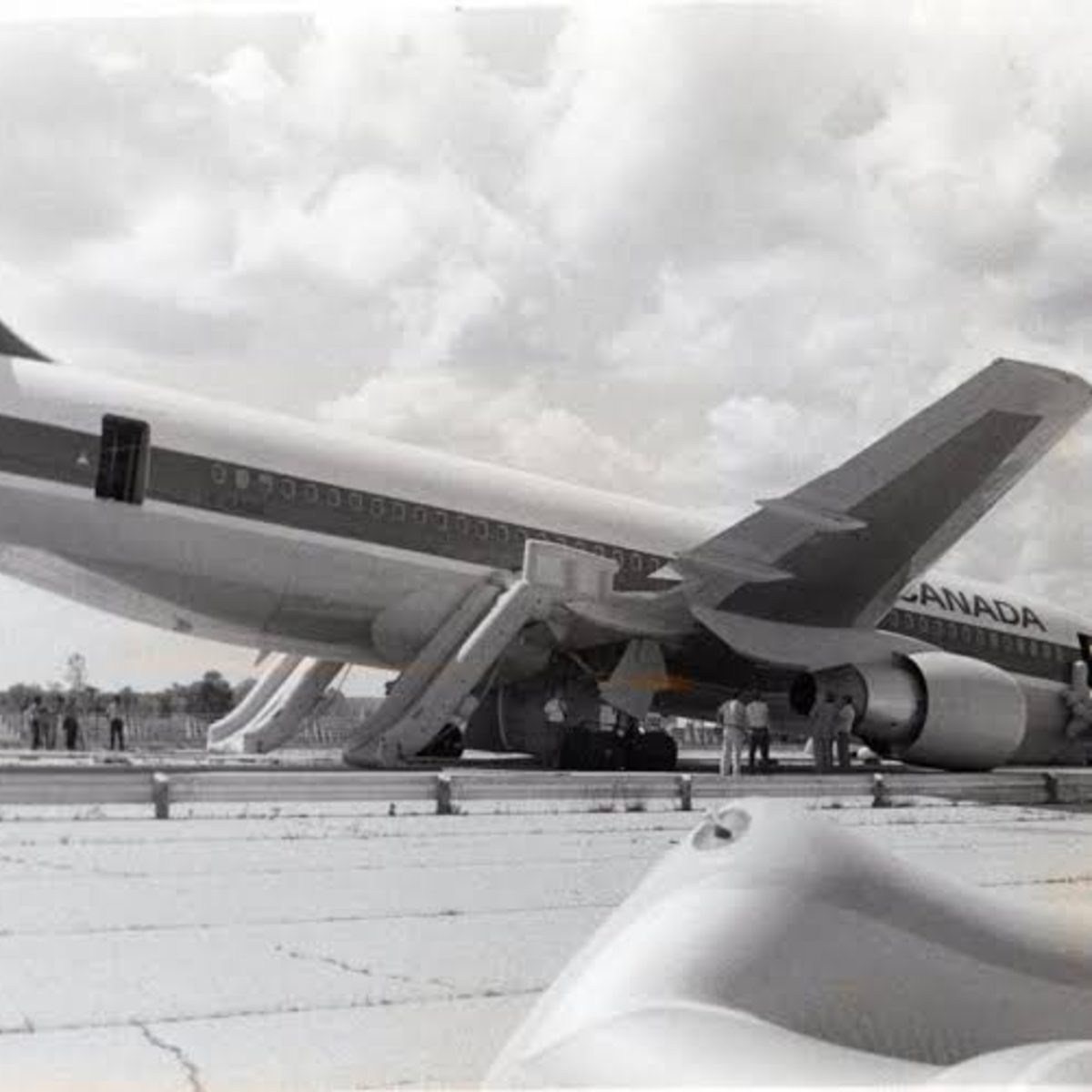
Even so, people who should know better still make mistakes with units and scale. NASA has had at least one famous case of unit issues losing an unmanned probe. In another famous incident, an Air Canada flight ran out of fuel in 1983. Why?
The plane’s fuel sensors were inoperative, so the ground crew manually checked the fuel load with a dipstick. The dipstick read in centimeters. The navigation computer expected fuel to be in kg. Unfortunately, the fuel’s datasheet posted density in pounds/liter. This incorrect conversion happened twice.
Unsurprisingly, the plane was out of fuel and had to glide to an emergency landing on a racetrack that had once been a Royal Canadian Air Force training base. Luckily, Captain Pearson was an experienced glider pilot. With reduced control and few instruments, the Captain brought the 767 down as if it were a huge glider with 61 people onboard. Although the landing gear collapsed and caused some damage, no one on the plane or the ground were seriously hurt.
What’s the Answer?
Sadly, math answers are much easier to get than social answers. Kids routinely complain that they’ll never need math once they leave school. (OK, not kids like we were, but normal kids.) But we all know that is simply not true. Even if your job doesn’t directly involve math, understanding your own finances, making decisions about purchases, or even evaluating political positions often requires that you can see through math nonsense, both intentional and unintentional.
[Antoine de Saint-Exupéry] was a French author, and his 1948 book Citadelle has an interesting passage that may hold part of the answer. If you translate the French directly, it is a bit wordy, but the quote is commonly paraphrased: “If you want to build a ship, don’t herd people together to collect wood and don’t assign them tasks and work, but rather teach them to long for the endless immensity of the sea.”
We learned math because we understood it was the key to building radios, or rockets, or computer games, or whatever it was that you longed to build. We need to teach kids math in a way that makes them anxious to learn the math that will enable their dreams.
How do we do that? We don’t know. Great teachers help. Inspiring technology like moon landings helps. What do you think? Tell us in the comments. Now with 285% more comment goodness. Honest.
We still think slide rules made you better at math. Just like not having GPS made you better at navigation.
Today’s PCs are locked up with Trusted Platform Module (TPM) devices so much so that modern Windows versions insist on having a recent TPM to even install. These have become so prevalent that even larger embedded boards now have TPM and, of course, if you are repurposing consumer hardware, you’ll have to deal with it, too. [Sigma Star] has just the primer for you. It explains what TPM does, how it applies to embedded devices, and where the pitfalls are.
The TPM is sometimes a chip or sometimes secure firmware that is difficult to tamper with. They provide secret storage and can store boot signatures to detect if something has changed how a computer starts up. The TPM can also “sign off” that the system configuration is the same to a remote entity. This allows, for example, a network to prevent a hacked or rogue computer from communicating with other computers.
Embedded systems, usually, aren’t like PCs. A weather station at a remote location may have strangers poking at it without anyone noticing. Also, that remote computer might be expected to be working for many more years than a typical laptop or desktop computer.
This leads to a variety of security concerns that TPM 2.0 attempts to mitigate. For example, it is unreasonable to think a typical attacker might connect a logic analyzer to your PC, but for an embedded system, it is easier to imagine. There is a session-based encryption to protect against someone simply snooping traffic off the communication bus. According to the post, not all implementations use this encryption, however.
What happens when a traditional board game company decides to break into electronic gaming? Well, if it were a UK gaming company in 1978, the result would be a Waddingtons 2001 The Game Machine that you can see in the video from [Re:Enthused] below.
The “deluxe console model” had four complete games: a shooting gallery, blackjack, Code Hunter, and Grand Prix. But when you were done having fun, no worries. The machine was also a basic calculator with a very strange keyboard. We couldn’t find an original retail price on these, but we’ve read it probably sold for £20 to £40, which, in 1978, was more than it sounds like today.
Like a board game, there were paper score sheets. The main console had die-cut panels to decorate the very tiny screen (which looks like a very simple vacuum fluorescent display) and provide labels for the buttons. While it isn’t very impressive today, it was quite the thing in 1978.
This would be a fun machine to clone and quite easy, given the current state of the art in most hacker labs. A 3D-printed case, color laser-printed overlays, and just about any processor you have lying around would make this a weekend project.
It is easy to forget how wowed people were by games like this when they were new. Then again, we don’t remember any of those games having a calculator.
As a side note, Waddingtons was most famous for their special production of Monopoly games at the request of MI9 during World War II. The games contained silk maps, money, and other aids to help prisoners of war escape.
[Clough42] created a 3D print for a lathe tool and designed in some support to hold the piece on the bed while printing. It worked, but removing the support left unsightly blemishes on the part. A commenter mentioned that the support doesn’t have to exactly touch the part to support it. You can see the results of trying that method in the video below.
In this case [Cloug42] uses Fusion, but the idea would be the same regardless of how you design your parts. Originally, the support piece was built as a single piece along with the target object. However, he changed it to make the object separate from the support structure. That’s only the first step, though. If you import both pieces and print, the result will be the same.
Instead, he split the part into the original two objects that touch but don’t blend together. The result looks good.
We couldn’t help but notice that we do this by mistake when we use alternate materials for support (for example, PETG mixed with PLA or PLA with COPE). Turns out, maybe you don’t have to switch filament to get good results.
[Kevin] admits that FreeCAD may not be the ideal tool for editing STL files. But it is possible, and he shares some practical advice in the video below. If you want to get the most out of your 3D printer, it pays to be able to create new parts, and FreeCAD is a fine option for that. However, sometimes you download an STL from the Internet, and it just isn’t quite what you need.
Unlike native CAD formats, STLs are meshes of triangles, so you get very large numbers of items, which can be unwieldy. The first trick is to get the object exactly centered. That’s easy if you know how, but not easy if you are just eyeballing it.
If you use the correct workbench, FreeCAD can analyze and fix mesh problems like non-manifold parts, flipped normals, and other issues. The example is a wheel with just over 6,000 faces, which is manageable. But complex objects may make FreeCAD slow. [Kevin] says you should be fine until the number of faces goes above 100,000. In that case, you can decimate the number of faces with, of course, a corresponding loss in resolution.
Once you are satisfied with the mesh, you can create a real FreeCAD shape from the mesh. The resulting object will be hollow, so the next step will be to convert the shape to a solid.
That still leaves many triangles when you really want flat surfaces to be, well, flat. The trick is to make a copy and use the “refine shape” option for the copy. Once you have a FreeCAD solid, you can do anything you can do in FreeCAD.
We’ve run our share of FreeCAD tips if you want more. There are other ways to tweak STLs, too.
One of the good things about simulating circuits is that you can easily change component values trivially. In the real world, you might use a potentiometer or a pot to provide an adjustable value. However, as [Ralph] discovered, there’s no pot component in LTSpice. At first, he cobbled up a fake pot with two resistors, one representing the top terminal to the wiper, and the other one representing the wiper to the bottom terminal. Check it out in the video below.
At first, [Ralph] just set values for the two halves manually, making sure not to set either resistor to zero so as not to merge the nets. However, as you might guess, you can make the values parameters and then step them.
By using .step you can alter one of the resistor values. Then you can use a formula to compute the other resistor since the sum of the two resistors has to add up to the pot’s total value. That is, a 10K pot will have the two resistors always add up to 10K.
Of course, you could do this without the .step and simply change one value to automatically compute both resistors if you prefer.
If you follow electronics history, few names were as ubiquitous as RCA, the Radio Corporation of America. Yet in modern times, the company is virtually forgotten for making large computers. [Computer History Archive Project] has a rare film from the 1970s (embedded below) explaining how RCA planned to become the number two supplier of business computers, presumably behind behemoth IBM. They had produced other large computers in the 1950s and 1960s, like the BIZMAC, the RCA 510, and the Spectra. But these new machines were their bid to eat away at IBM’s dominance in the field.
RCA had innovative ideas and arguably one of the first demand paging, virtual memory operating systems for mainframes. You can hope they were better at designing computers than they were at making commercials.
The BIZMAC was much earlier and used tubes (public domain).
In 1964, [David Sarnoff] famously said: “The computer will become the hub of a vast network of remote data stations and information banks feeding into the machine at a transmission rate of a billion or more bits of information a second … Eventually, a global communications network handling voice, data and facsimile will instantly link man to machine — or machine to machine — by land, air, underwater, and space circuits. [The computer] will affect man’s ways of thinking, his means of education, his relationship to his physical and social environment, and it will alter his ways of living. … [Before the end of this century, these forces] will coalesce into what unquestionably will become the greatest adventure of the human mind.”
He was, of course, right. Just a little early.
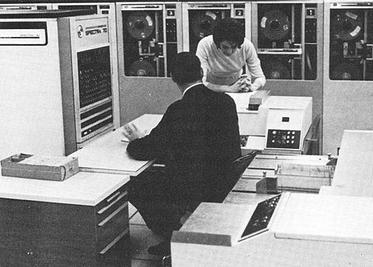
The machines in the video were to replace the Spectra 70 computers, seen here from an RCA brochure.
The machines were somewhat compatible with IBM computers, touted virtual memory, and had flexible options, including a lease that let you own your hardware in six years. They mention, by the way, IBM customers who were paying up to $60,000 / month to IBM. They mentioned that an IBM 360/30 with 65K was about $13,200 / month. You could upgrade with a 360/30 for an extra $3,000 / month, which would double your memory but not double your computing power. (If you watch around the 18-minute mark, you’ll find the computing power was extremely slow by today’s standards.)
RCA, of course, had a better deal. The RCA 2 had double the memory and reportedly triple the performance for only $2,000 extra per month. We don’t know what the basis for that performance number was. For $3,500 a month extra, you could have an RCA 3 with the miracle of virtual memory, providing an apparent 2 megabytes per running job.
There are more comparisons, and keep in mind, these are 1970 dollars. In 1970, a computer programmer probably made $10,000 to $20,000 a year while working on a computer that cost $158,000 in lease payments (not to count electricity and consumables). How much cloud computing could you buy in a year for $158,000 today? Want to buy one? They started at $700,000 up to over $1.6 million.
By their release, the systems were named after their Spectra 70 cousins. So, officially, they were Spectra 70/2, 70/3, 70/5, and 70/6.
Despite all the forward-looking statements, RCA had less than 10% market share and faced increasing costs to stay competitive. They decided to sell the computer business to Sperry. Sperry rebranded several RCA computers and continued to sell and support them, at least for a while.
Now, RCA is a barely remembered blip on the computer landscape. You are more likely to find someone who remembers the RCA 1800 family of CPUs than an actual RCA mainframe. Maybe they should have throw in the cat with the deal.
Want to see the IBM machines these competed with? Here you go. We doubt there were any RCA computers in this data center, but they’d have been right at home.
There was a time when wise older people warned you to check your tire pressure regularly. We never did, and would eventually wind up with a flat or, worse, a blowout. These days, your car will probably warn you when your tires are low. That’s because of a class of devices known as tire pressure monitoring systems (TPMS).
If you are like us, you see some piece of tech like this, and you immediately guess how it probably works. In this case, the obvious guess is sometimes, but not always, correct. There are two different styles that are common, and only one works in the most obvious way.
Obvious Guess
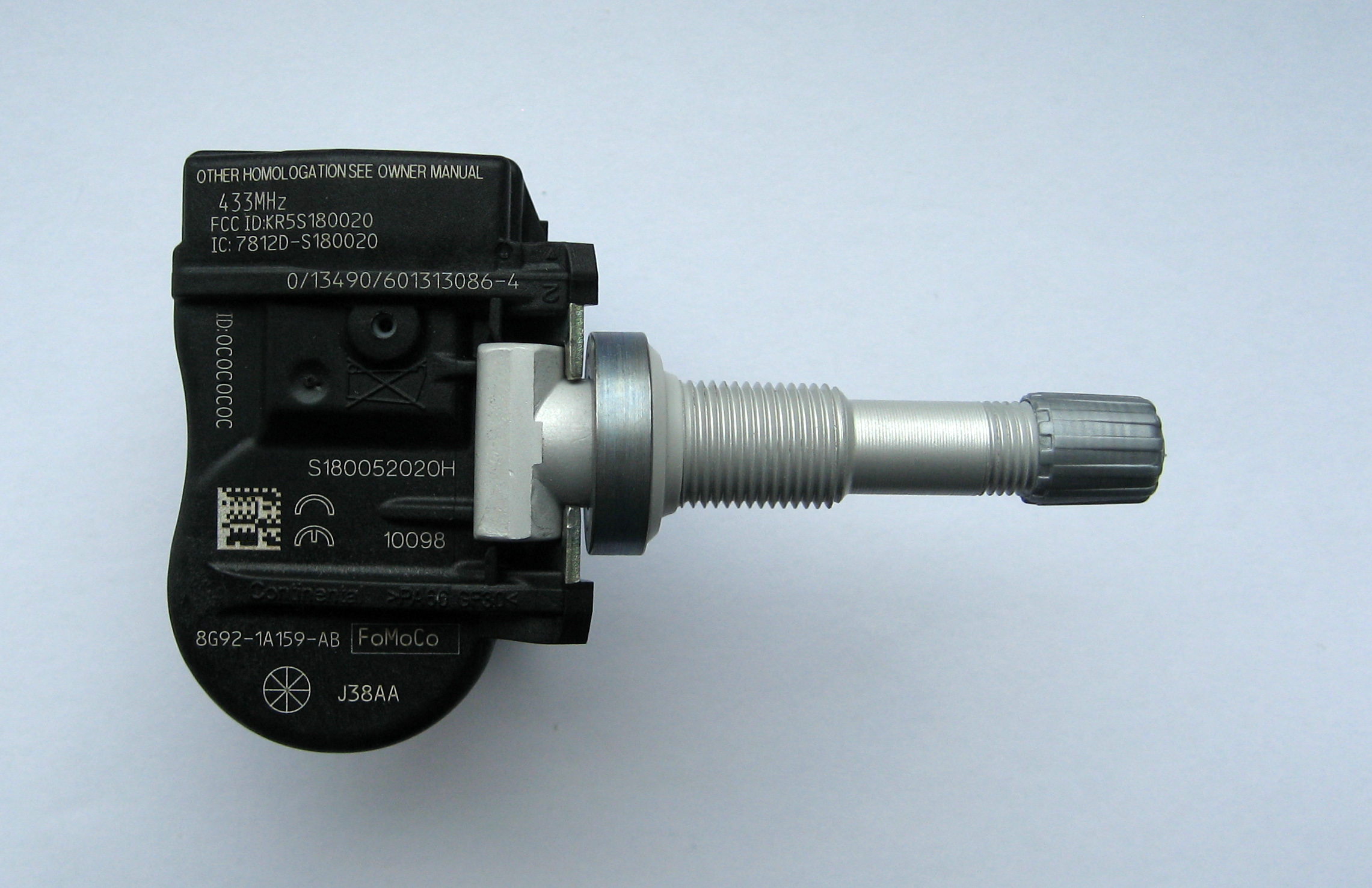
We’d guess that the tire would have a little pressure sensor attached to it that would then wirelessly transmit data. In fact, some do work this way, and that’s known as dTPMS where the “d” stands for direct.
Of course, such a system needs power, and that’s usually in the form of batteries, although there are some that get power wirelessly using an RFID-like system. Anything wireless has to be able to penetrate the steel and rubber in the tire, of course.
But this isn’t always how dTPMS systems worked. In days of old, they used a finicky system involving a coil and a pressure-sensitive diaphragm — more on that later.
TPMS sensor (by [Lumu] CC BY-SA 3.0Many modern systems use iTPMS (indirect). These systems typically work on the idea that a properly inflated tire will have a characteristic rolling radius. Fusing data from the wheel speed sensor, the electronic steering control, and some fancy signal processing, they can deduce if a tire’s radius is off-nominal. Not all systems work exactly the same, but the key idea is that they use non-pressure data to infer the tire’s pressure.
This is cheap and requires no batteries in the tire. However, it isn’t without its problems. It is purely a relative measurement. In practice, you have to inflate your tires, tell the system to calibrate, and then drive around for half an hour or more to let it learn how your tires react to different roads, speeds, and driving styles.
Changes in temperature, like the first cold snap of winter, are notorious for causing these sensors to read flat. If the weather changes and you suddenly have four flat tires, that’s probably what happened. The tires really do lose some pressure as temperatures drop, but because all four change together, the indirect system can’t tell which one is at fault, if any.
History
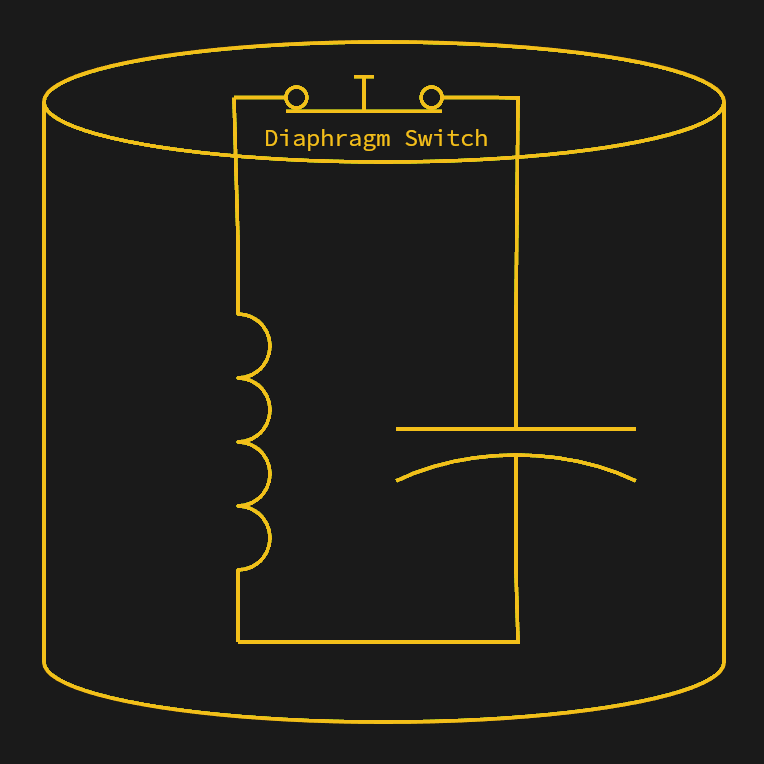
When the diaphragm senses correct pressure, the sensor forms an LC circuit. Low air pressure causes the diaphragm to open the switch, breaking the circuit.
The first passenger vehicle to offer TPMS was the 1986 Porsche 959. Two sensors made from a diaphragm and a coil are mounted between the wheel and the wheel’s hub. The sensors were on opposite sides of the tire. With sufficient pressure on the diaphragm, an electrical contact was made, changing the coil value, and a stationary coil would detect the sensor as it passed. If the pressure drops, the electrical contact opens, and the coil no longer sees the normal two pulses per rotation. The technique was similar to a grid dip meter measuring an LC resonant circuit. The diaphragm switch would change the LC circuit’s frequency, and the sensing coil could detect that.
If one or two pulses were absent despite the ABS system noting wheel rotation, the car would report low tire pressure. There were some cases of centrifugal force opening the diaphragms at high speed, causing false positives, but for the most part, the system worked. This isn’t exactly iTPMS, but it isn’t quite dTPMS either. The diaphragm does measure pressure in a binary way, but it doesn’t send pressure data in the way a normal dTPMS system does.
Of course, as you can see in the video, the 959 was decidedly a luxury car. It would be 1991 before the US-made Corvette acquired TPMS. The Renault Laguna II in 2000 was the first high-volume car to have similar sensors.
Now They’re Everywhere
In many places, laws were put in place to require TPMS in vehicles. It was also critical for cars that used “run flat” tires. The theory is that you might not notice your run flat tires were actually flat, and while they are, as their name implies, made to run flat, they also require you to limit speed and distance when they are flat.
Old cars or other vehicles that don’t have TPMS can still add it. There are systems that can measure tire pressure and report to a smartphone app. These are, of course, a type of dTPMS.
Problems
Of course, there are always problems. An iTPMS system isn’t really reading the tire pressure, so it can easily get out of calibration. Direct systems need battery changing, which usually means removing the tire, and a good bit of work — watch the video below. That means there is a big tradeoff between sending data with enough power to go through the tire and burning through batteries too fast.
Another issue with dTPMS is that you are broadcasting. That means you have to reject interference from other cars that may also transmit. Because of this, most sensors have a unique ID. This raises privacy concerns, too, since you are sending a uniquely identifiable code.
Of course, your car is probably also beaming Bluetooth signals and who knows what else. Not to even mention what the phone in your car is screaming to the ether. So, in practice, TPMS attacks are probably not a big problem for anyone with normal levels of paranoia.
An iTPMS sensor won’t work on a tire that isn’t moving, so monitoring your spare tire is out. Even dTPMS sensors often stop transmitting when they are not moving to save battery, and that also makes it difficult to monitor the spare tire.
The (Half Right) Obvious Answer
Sometimes, when you think of the “obvious” way something works, you are wrong. In this case, you are half right. TPMS reduces tire wear, prevents accidents that might happen during tire failure, and even saves fuel.
Thanks to this technology, you don’t have to remember to check your tire pressure before a trip. You should, however, probably check the tread.
Your new project really could use a block device for Linux. File systems are easy to do with FUSE, but that’s sometimes too high-level. But a block driver can be tough to write and debug, especially since bugs in the kernel’s space can be catastrophic. [Jiri Pospisil] suggestsUblk, a framework for writing block devices in user space. This works using the io_uring facility in recent kernels.
This opens the block device field up. You can use any language you want (we’ve seen FUSE used with some very strange languages). You can use libraries that would not work in the kernel. Debugging is simple, and crashing is a minor inconvenience.
Another advantage? Your driver won’t depend on the kernel code. There is a kernel driver, of course, named ublk_drv, but that’s not your code. That’s what your code talks to.
The driver maintains the block devices and relays I/O and ioctl requests to your code for servicing. There are several possible use cases for this. For example, you could dream up some exotic RAID scheme and expose it as a block device that multiplexes many devices. The example in the post, for example, exposes a block device that is made up of many discrete files on a different file system.
Do you need this? Probably not. But if you do, it is a great way to push out a block driver in a hurry. Is it high-performance? Probably not, just like FUSE isn’t as performant as a “real” file system. But for many cases, that’s not a problem.
Space telescopes are all the rage, and rightfully so. The images they take are spectacular, and they’ve greatly increased what we know about the universe. Surely, any picture taken of, say, the Andromeda galaxy before space telescopes would be little more than a smudge compared to modern photos, right? Maybe not.
One of the most famous pictures of our galactic neighbor was taken in — no kidding — 1888. The astronomer/photographer was Isaac Roberts, a Welsh engineer with a keen interest in astrophotography. Around 1878, he began using a 180 mm refracting telescope for observations, and in 1883, he began taking photographs.
He was so pleased with the results that he ordered a reflecting telescope with a 510 mm first-surface mirror and built an observatory around it in 1885. Photography and optics back then weren’t what they are now, so adding more mirrors to the setup made it more challenging to take pictures. Roberts instead mounted the photographic plates directly at the prime focus of the mirror.
Andromeda
This image, captured with the NASA/ESA Hubble Space Telescope, is the largest and sharpest image ever taken of the Andromeda galaxy — otherwise known as M31. This is a cropped version of the full image and has 1.5 billion pixels. You would need more than 600 HD television screens to display the whole image. It is the biggest Hubble image ever released and shows over 100 million stars and thousands of star clusters embedded in a section of the galaxy’s pancake-shaped disc stretching across over 40 000 light-years. This image is too large to be easily displayed at full resolution.
Because it took hours to capture good images, he developed techniques to keep the camera moving in sync with the telescope to track objects in the night sky. On December 29th, 1888 he used his 510 mm scope to take a long exposure of Andromeda (or M31, if you prefer). His photos showed the galaxy had a spiral structure, which was news in 1888.
Of course, it’s not as good as the Hubble’s shots. In all fairness, though, the Hubble’s is hard to appreciate without the interactive zoom tool. And 100 years of technological progress separate the two.
Roberts also invented a machine that could engrave stellar positions on copper plates. The Science Museum in London has the telescope in its collection.
Your Turn
Roberts did a great job with very modest equipment. These days, at least half of astrophotography is in post-processing, which you can learn. Want time on a big telescope? Consider taking an online class. You might not match the James Webb or the Hubble, but neither did Roberts, yet we still look at his plates with admiration.
It is a movie staple to see an overworked air traffic controller sweating over a radar display. Depending on the movie, they might realize they’ve picked the wrong week to stop some bad habit. But how does the system really work? [J. B. Crawford] has a meticulously detailed post about the origins of the computerized air traffic control system (building on an earlier post which is also interesting).
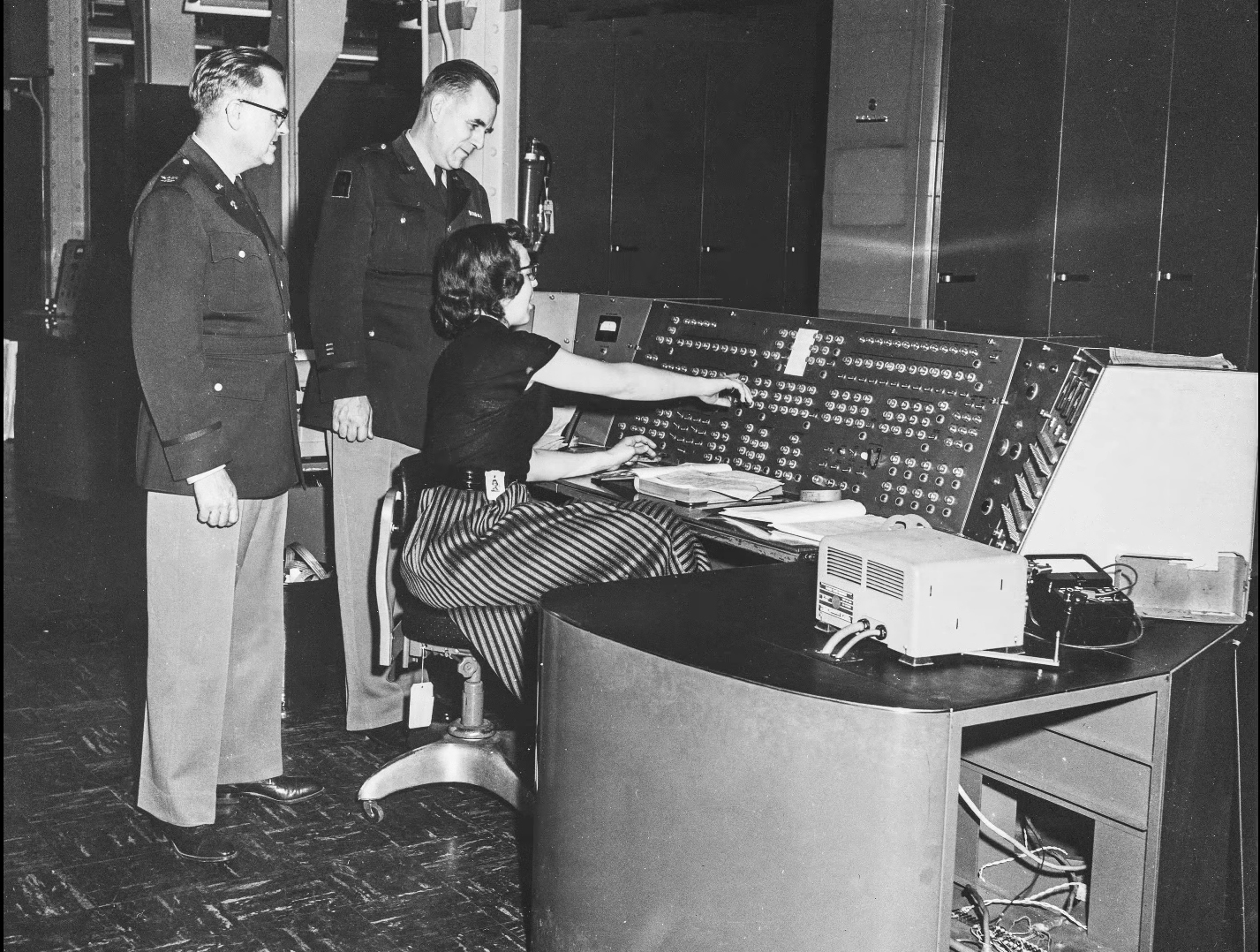
Like many early computer systems, the FAA started out with the Air Force SAGE defense system. It makes sense. SAGE had to identify and track radar targets. The 1959 SATIN (SAGE Air Traffic Integration) program was the result. Meanwhile, different parts of the air traffic system were installing computers piecemeal.
SAGE and its successors had many parents: MIT, MITRE, RAND, and IBM. When it was time to put together a single national air traffic system the FAA went straight to IBM, who glued together a handful of System 360 computers to form the IBM 9020. The computers had a common memory bus and formed redundant sets of computer elements to process the tremendous amount of data fed to the system. The shared memory devices were practically computers in their own right. Each main computing element had a private area of memory but could also allocate in the large shared pool.
The 9200 ran the skies for quite a while until IBM replaced it with the IBM 3083. The software was mostly the same, as were the display units. But the computer hardware, unsurprisingly, received many updates.
If you’re thinking that there’s no need to read the original post now that you’ve got the highlights from us, we’d urge you to click the link anyway. The post has a tremendous amount of detail and research. We’ve only scratched the surface.
We are always amused that we can run emulations or virtual copies of yesterday’s computers on our modern computers. In fact, there is so much power at your command now that you can run, say, a DOS emulator on a Windows virtual machine under Linux, even though the resulting DOS prompt would probably still perform better than an old 4.77 MHz PC. Remember when you could get calculators that ran BASIC? Well, [Calculator Clique] shows off BASIC running on a decidedly modern HP Prime calculator. The trick? It’s running under Python. Check it out in the video below.
Think about it. The HP Prime has an ARM processor inside. In addition to its normal programming system, it has Micropython as an option. So that’s one interpreter. Then PyBasic has a nice classic Basic interpreter that runs on Python. We’ve even ported it to one or two of the Hackaday Superconference badges.
If you have a Prime, this is a great way to make it even easier to belt out a simple algorithm. Of course, depending on your age, you might prefer to stick with Python. Fair enough, but don’t forget the many classic games available for Basic. Adventure and Hunt the Wumpus are two of the sample programs included.
If you ever built a line following robot, you’ll be nostalgic about [Jeremy’s] light-seeking robot. It is a very simple build since there is no CPU and, therefore, also no software.
The trick, of course, is a pair of photo-sensitive resistors. A pair of motors turns the robot until one of the sensors detects light, then moves it forward.
This is a classic beginner project made even easier with a 3D printer and PCB to hold the components. You might consider using an adjustable resistor to let you tune the sensitivity more easily. In addition, we’ve found that black tubes around the light sensors in this sort of application give you a better directional reading, which can help.
The robot only has two wheels, but a third skid holds the thing up. A freely-rotating wheel might work better, but for a simple demonstration like this, the skid plate is perfectly fine.
This is a good reminder that not every project has to be fantastically complex or require an RTOS and high-speed multi-core CPUs. You can do a lot with just a handful of simple components.
If you want to follow a line, the basic idea is usually the same, with perhaps some different sensors. Usually, but not always.
The Internet has spoiled us. You assume network packets either show up pretty quickly or they are never going to show up. Even if you are using WiFi in a crowded sports stadium or LTE on the side of a deserted highway, you probably either have no connection or a fairly robust, although perhaps intermittent, network. But it hasn’t always been that way. Radio networks, especially, used to be very hit or miss and, in some cases, still are.
Perhaps the least reliable network today is one connecting things in deep space. That’s why NASA has a keen interest in Delay Tolerant Networking (DTN). Note that this is the name of a protocol, not just a wish for a certain quality in your network. DTN has been around a while, seen real use, and is available for you to use, too.
Think about it. On Earth, a long ping time might be 400 ms, and most of that is in equipment, not physical distance. Add a geostationary orbital relay, and you get 600 ms to 800 ms. The moon? The delay is 1.3 sec. Mars? Somewhere between 3 min and 22 min, depending on how far away it is at the moment. Voyager 1? Nearly a two-day round trip. That’s latency!
So how do you network at these scales? NASA’s answer is DTN. It assumes the network will not be present, and when it is, it will be intermittent and slow to respond.
This is a big change from TCP. TCP assumes that if packets don’t show up, they are lost and does special algorithms to account for the usual cause of lost TCP packets: congestion. That means, typically, they wait longer and longer to retry. But if your packets are not going through because the receiver is behind a planet, this isn’t the right approach.
Upside Down
DTN nodes operate like a mesh. If you hear something, you may have to act as a relay point even if the message isn’t for you. Unlike most store-and-forward networks, though, a DTN node may store a message for hours or even days. Unlike most Earthbound network nodes, a DTN node may be moving. In fact, all of them might be moving. So you can’t depend on any given node being able to hear another node, even if they have heard each other in the past.
Is this new? Hardly. Email is store-and-forward, even if it doesn’t seem much like it these days. UUCP and Fidonet had the same basic ideas. If you are a ham radio operator with packet (AX.25) experience, you may see some similarities there, too. But DTN forms a modern and robust network for general purposes and not just a way to send particular types of messages or files.
The Bundle Protocol
While the underlying transport layer might use small packets — think TCP — DTN uses bundles, which are large self-contained messages with a good bit of metadata attached. Bundles don’t care if they move over TCP, UDP, or some wacky RF protocol. The metadata explains where the data is going, how urgent it is, and at what point you can just give up and discard it. The bundle’s header has other data, too, such as the length and whether the current bundle is just a fragment of a larger bundle. There are also flags forbidding the fragmentation of a bundle.
In Practice
DTN isn’t just a theory. It has been used on the International Space Station and is likely to show up in future missions aimed at the moon and beyond.
But even better, DTN implementations exist and are available for anyone to use. NASA’s reference implementation is ION (Interplanetary Overlay Network), and it is made for NASA-level safety. It will, though, run on a Raspberry Pi. You can see a training video about ION and DTN in the video below.
There are some more community-minded implementations like DTN2 and DTN7. If you want to experiment, we’d suggest starting with DTN7. The video below can help you get started.
Why?
We hear you. As much as you might like to, you aren’t sending anything to Mars this week. But DTN is useful anywhere you have unreliable crummy networking. Disaster recovery? Low-power tracking transmitters that die until the sun hits their solar cells? Weak signal links in hostile terrain. All of these use cases could benefit from DTN.
We are always surprised that we don’t see more DTN in regular applications. It isn’t magic, and it doesn’t make radios defy the laws of physics. What it does is prevent your network from suffering fatally from those laws when the going gets tough.
Sure. You can do this all on your own. No NASA pun intended, but it isn’t rocket science. For specialized cases, you might even be able to do better. After all, UUCP dates back to the late 1970s and shares many of the same features. Remember UUCP schedules that determined when one machine would call another? DTN has contact plans that serve a similar purpose, except that instead of waiting for low long-distance rates, the contact plan is probably waiting for a predicted acquisition of signal time.
UUCP Redux
But otherwise? You knew UUCP wasn’t immediate. Routing decisions were often due to expectations of the future. Indefinite storage was all part of the system. Usenet, of course, rode on top of UUCP. So you could think of Usenet as almost a planetary-scale DTN network with messages instead of bundles.
A Usenet post might take days to show up at a remote site. It might arrive out of order, or twice. DTN has all of these same features. So while some would say DTN is the way of the future, at least in deep space networking, we would submit that DTN is a rediscovery of some very old techniques when networking on Earth was as tenuous as today’s space networks.
Security
We’re sure that by modern standards, UUCP had some security flaws. DTN can suffer from some security issues, too. A rogue node can accept bundles and silently kill them, for example. Or flood the network with garbage bundles.
Then again, TCP DoS or man-in-the-middle attacks are possible, too. You simply have to be careful and think through what you are doing, if it is possible someone will attack your network.
Your Turn
So next time your project needs a rough-and-tumble network that survives even when you aren’t connected to the gigabit LAN, maybe try DTN. It has come a long way, literally and figuratively, since 2008. Well, actually, since 1997, as you can see in the video below. Whatever you come up with, be sure to send us a tip.
When we first heard the term “random laser,” we did a double-take. After all, most ordinary sources of light are random. One defining characteristic of a traditional laser is that it emits coherent light. By coherent, in this context, that usually includes temporal coherence and spatial coherence. It is anything but random. It turns out, though, that random laser is a bit of a misnomer. The random part of the name refers to how the device generates the laser emission. It is true that random lasers may produce output that is not coherent over long time scales or between different emission points, but individually, the outputs are coherent. In other words, locally coherent, but not always globally so.
That is to say that a random laser might emit light from four different areas for a few brief moments. A particular emission will be coherent. But not all the areas may be coherent with respect to each other. The same thing happens over time. The output now may not be coherent with the output in a few seconds.
Baseline
A conventional laser works by forming a mirrored cavity, including a mirror that is only partially reflective. Pumping energy into the gain medium — the gas, semiconductor, or whatever — produces more photons that further stimulate emission. Only cavity modes that satisfy the design resonance conditions and experience gain persist, allowing them to escape through the partially reflecting mirror.
The laser generates many photons, but the cavity and gain medium favor only a narrow set of modes. This results in a beam that is of a very narrow band of frequencies, and the photons are highly collimated. Sure, they can spread over a long distance, but they don’t spread out in all directions like an ordinary light source.
So, How does a Random Laser Work?
Random lasers also depend on gain, but they have no mirrors. Instead, the gain medium is within or contains some material that highly scatters photons. For example, rough crystals or nanoparticles may act as scattering media to form random lasers.
The scattering has photons bounce around at random. Some of the photons will follow long paths, and if the gain exceeds the losses along those paths, laser emission occurs. Incoherent random lasers that use powder (to scatter) or a dye (as gain medium) tend to have broadband output. However, coherent random lasers produce sharp spectral lines much like a conventional laser. They are, though, more difficult to design and control.
Random lasers are relatively new, but they are very simple to construct. Since the whole thing depends on randomness, defects are rarely fatal. The downside is that it is difficult to predict exactly what they will emit.
There are some practical use cases, including speckle-free illumination or creating light sources with specific fingerprints for identification.
It’s Alive!
Biological tissue often can provide scattering for random lasers. Researchers have used peacock feathers, for example. Attempts to make cells emit laser light are often motivated by their use as cellular tags or to monitor changes in the laser light to infer changes in the cell itself.
The video below isn’t clearly using a random laser, but it gives a good overview of why researchers want your cells to emit laser light.
You may be thinking: “Isn’t this just amplified spontaneous emission?” While random lasers can resemble amplified spontaneous emission (ASE), true random lasing exhibits a distinct turn-on threshold and, in some cases, well-defined spectral modes. ASE will exhibit a smooth increase in output as the pump energy increases. A random laser will look like ASE until you reach a threshold pump energy. Then a sharp rise will occur as the laser modes suddenly dominate.
We glossed over a lot about conventional lasers, population inversion, and related topics. If you want to know more, we can help.
We’ve been aware of projects like Cosmopolitan that allow you to crank out a single executable that will run on different operating systems. [Kamila] noticed that the idea was sound, but that the executables were large and there were some limitations. So she produced a 13K file that will run under Windows, Linux, or even in a Web browser. The program itself is a simple snake game.
There seems to be little sharing between the three versions. Instead, each version is compressed and stitched together so that each platform sees what it wants to see. To accommodate Windows, the file has to start with a PE header. However, there is enough flexibility in the header that part of the stub forms a valid shell script that skips over the Windows code when running under Linux.
So, essentially, Windows skips the “garbage” in the header, which is the part that makes Linux skip the “garbage” in the front of the file.
That leaves the browser. Browsers will throw away everything before an <HTML> tag, so that’s the easy part.
Should you do this? Probably not. But if you needed to make this happen, this is a clear template for how to do it. If you want to go back to [Kamila’s] inspiration, we’ve covered Cosmopolitan and its APE format before.
[Anthony Francis-Jones], like us, has a soft spot for the educational electronic kits from days gone by. In a recent video you can see below, he shows the insides of a Philips EE08 two-transistor radio kit. This is the same kit he built a few months ago (see the second video, below).
Electronics sure look different these days. No surface mount here or even printed circuit boards. The kit had paper cards to guide the construction since the kit could be made into different circuits.
The first few minutes of the video recap how AM modulation works. If you skip to about the ten-minute mark, you can see the classic instruction books for the EE08 and EE20 kits (download a copy in your favorite language), which were very educational.
There were several radios in the manual, but the one [Anthony] covers is the two-transistor version with a PNP transistor as a reflex receiver with a diode detector with a second transistor as an audio power amplifier.

 Login
Login