Normal view

There are new articles available, click to refresh the page.
Today — 11 December 2025Hackaday

Creating User-Friendly Installers Across Operating Systems

11 December 2025 at 10:00

After you have written the code for some awesome application, you of course want other people to be able to use it. Although simply directing them to the source code on GitHub or similar is an option, not every project lends itself to the traditional configure && make && make install, with often dependencies being the sticking point.

Asking the user to install dependencies and set up any filesystem links is an option, but having an installer of some type tackle all this is of course significantly easier. Typically this would contain the precompiled binaries, along with any other required files which the installer can then copy to their final location before tackling any remaining tasks, like updating configuration files, tweaking a registry, setting up filesystem links and so on.

As simple as this sounds, it comes with a lot of gotchas, with Linux distributions in particular being a tough nut. Whereas on MacOS, Windows, Haiku and many other OSes you can provide a single installer file for the respective platform, for Linux things get interesting.

Windows As Easy Mode

For all the flak directed at Windows, it is hard to deny that it is a stupidly easy platform to target with a binary installer, with equally flexible options available on the side of the end-user. Although Microsoft has nailed down some options over the years, such as enforcing the user’s home folder for application data, it’s still among the easiest to install an application on.

While working on the NymphCast project, I found myself looking at a pleasant installer to wrap the binaries into, initially opting to use the NSIS (Nullsoft Scriptable Install System) installer as I had seen it around a lot. While this works decently enough, you do notice that it’s a bit crusty and especially the more advanced features can be rather cumbersome.

This is where a friend who was helping out with the project suggested using the more modern Inno Setup instead, which is rather like the well-known InstallShield utility, except OSS and thus significantly more accessible. Thus the pipeline on Windows became the following:

  1. Install dependencies using vcpkg.
  2. Compile project using NMake and the MSVC toolchain.
  3. Run the Inno Setup script to build the .exe based installer.

Installing applications on Windows is helped massively both by having a lot of freedom where to install the application, including on a partition or disk of choice, and by having the start menu structure be just a series of folders with shortcuts in them.

The Qt-based NymphCast Player application’s .iss file covers essentially such a basic installation process, while the one for NymphCast Server also adds the option to download a pack of wallpaper images, and asks for the type of server configuration to use.

Uninstalling such an application basically reverses the process, with the uninstaller installed alongside the application and registered in the Windows registry together with the application’s details.

MacOS As Proprietary Mode

Things get a bit weird with MacOS, with many application installers coming inside a DMG image or PKG file. The former is just a disk image that can be used for distributing applications, and the user is generally provided with a way to drag the application into the Applications folder. The PKG file is more of a typical installer as on Windows.

Of course, the problem with anything MacOS is that Apple really doesn’t want you to do anything with MacOS if you’re not running MacOS already. This can be worked around, but just getting to the point of compiling for MacOS without running XCode on MacOS on real Apple hardware is a bit of a fool’s errand. Not to mention Apple’s insistence on signing these packages, if you don’t want the end-user to have to jump through hoops.

Although I have built both iOS and OS X/MacOS applications in the past – mostly for commercial projects – I decided to not bother with compiling or testing my projects like NymphCast for Apple platforms without easy access to an Apple system. Of course, something like Homebrew can be a viable alternative to the One True Apple Way™ if you merely want to get OSS o MacOS. I did add basic support for Homebrew in NymphCast, but without a MacOS system to test it on, who knows whether it works.

Anything But Linux

The world of desktop systems is larger than just Windows, MacOS and Linux, of course. Even mobile OSes like iOS and Android can be considered to be ‘desktop OSes’ with the way that they’re being used these days, also since many smartphones and tablets can be hooked up to to a larger display, keyboard and mouse.

How to bootstrap Android development, and how to develop native Android applications has been covered before, including putting APK files together. These are the typical Android installation files, akin to other package manager packages. Of course, if you wish to publish to something like the Google Play Store, you’ll be forced into using app bundles, as well as various ways to signing the resulting package.

The idea of using a package for a built-in package manager instead of an executable installer is a common one on many platforms, with iOS and kin being similar. On FreeBSD, which also got a NymphCast port, you’d create a bundle for the pkg package manager, although you can also whip up an installer. In the case of NymphCast there is a ‘universal installer’ built into the Makefile after compilation via the fully automated setup.sh shell script, using the fact that OSes like Linux, FreeBSD and even Haiku are quite similar on a folder level.

That said, the Haiku port of NymphCast is still as much of a Beta as Haiku itself, as detailed in the write-up which I did on the topic. Once Haiku is advanced enough I’ll be creating packages for its pkgman package manager as well.

The Linux Chaos Vortex

There is a simple, universal way to distribute software across Linux distributions, and it’s called the ‘tar.gz method’, referring to the time-honored method of distributing source as a tarball, for local compilation. If this is not what you want, then there is the universal RPM installation format which died along with the Linux Standard Base. Fortunately many people in the Linux ecosystem have worked tirelessly to create new standards which will definitely, absolutely, totally resolve the annoying issue of having to package your applications into RPMs, DEBs, Snaps, Flatpaks, ZSTs, TBZ2s, DNFs, YUMs, and other easily remembered standards.

It is this complete and utter chaos with Linux distros which has made me not even try to create packages for these, and instead offer only the universal .tar.gz installation method. After un-tar-ing the server code, simply run setup.sh and lean back while it compiles the thing. After that, run install_linux.sh and presto, the whole shebang is installed without further ado. I also provided an uninstall_linux.sh script to complete the experience.

That said, at least one Linux distro has picked up NymphCast and its dependencies like Libnymphcast and NymphRPC into their repository: Alpine Linux. Incidentally FreeBSD also has an up to date package of NymphCast in its repository. I’m much obliged to these maintainers for providing this service.

Perhaps the lesson here is that if you want to get your neatly compiled and packaged application on all Linux distributions, you just need to make it popular enough that people want to use it, so that it ends up getting picked up by package repository contributors?

Wrapping Up

With so many details to cover, there’s also the easily forgotten topic that was so prevalent in the Windows installer section: integration with the desktop environment. On Windows, the Start menu is populated via simple shortcut files, while one sort-of standard on Linux (and FreeBSD as corollary) are Freedesktop’s XDC Desktop Entry files. Or .desktop files for short, which purportedly should give you a similar effect.

Only that’s not how anything works with the Linux ecosystem, as every single desktop environment has its own ideas on how these files should be interpreted, where they should be located, or whether to ignore them completely. My own experiences there are that relying on them for more advanced features, such as auto-starting a graphical application on boot (which cannot be done with Systemd, natch) without something throwing an XDG error or not finding a display is basically a fool’s errand. Perhaps that things are better here if you use KDE Plasma as DE, but this was an installer thing that I failed to solve after months of trial and error.

Long story short, OSes like Windows are pretty darn easy to install applications on, MacOS is okay as long as you have bought into the Apple ecosystem and don’t mind hanging out there, while FreeBSD is pretty simple until it touches the Linux chaos via X11 and graphical desktops. Meanwhile I’d strongly advise to only distribute software on Linux as a tarball, for your sanity’s sake.
Iteration3D is Parametric Python in the Cloud

11 December 2025 at 07:00

It’s happened to all of us: you find the perfect model for your needs — a bracket, a box, a cable clip, but it only comes in STL, and doesn’t quite fit. That problem will never happen if you’re using Iteration3D to get your models, because every single thing on the site is fully-parametric, thanks to an open-source toolchain leveraging 123Dbuilds and Blender.

Blender gives you preview renderings, including colors where the models are set up for multi-material printing. Build123D is the CAD behind the curtain — if you haven’t heard of it, think OpenSCAD but in Python, but with chamfers and fillets. It actually leverages the same OpenCascade that’s behind everyone’s other favorite open-source CAD suite, FreeCAD. Anything you can do in FreeCAD, you can do in Build123D, but with code. Except you don’t need to learn the code if the model is on Iteration3D; you just set the parameters and push a button to get an STL of your exact specifications.

The downside is that, as of now, you are limited to the hard-coded templates provided by Iteration3D. You can modify their parameters to get the configuration and dimensions you need, but not the pythonic Build123D script that generates them. Nor can you currently upload your own models to be shared and parametrically altered, like Thingiverse had with their OpenSCAD-based customizer. That said, we were told that user-uploads are in the pipeline, which is great news and may well turn Iteration3D into our new favorite.

Right now, if you’re looking for a box or a pipe hanger or a bracket, plugging your numbers into Iteration3D’s model generator is going to be a lot faster than rolling your own, weather that rolling be done in OpenSCAD, FreeCAD, or one of those bits of software people insist on paying for. There’s a good variety of templates — 18 so far — so it’s worth checking out. Iteration3D is still new, having started in early 2025, so we will watch their career with great interest.

Going back to the problem in the introduction, if Iteration3D doesn’t have what you need and you still have an STL you need to change the dimensions of, we can help you with that. 

Thanks to [Sylvain] for the tip!

Building Rust Apps For Cheap Hackable Handheld Console

11 December 2025 at 04:00

The age of cheap and powerful devices is upon us. How about a 20 EUR handheld game console intended for retro game emulation, that runs Linux under the hood? [Luiz Ferreira] kicks the tires of a R36S, a very popular and often cloned device running a quad-core RK3326 with an Ubuntu-based OS, and shows us how to write and cross-compile a simple app for it using Rust – even if you daily drive Windows.

Since a fair bit of the underlying Linux OS is exposed, you can quickly build even text applications and have them run on the console. For instance, [Luiz]’s app uses ratatui to scan then print button and joystick states to the screen. Perhaps the most important thing about this app is that it’s a detailed tutorial on cross-compiling Rust apps for a Linux target, and it runs wonders using WSL, too.

Installing your app is simple, too: SSH into it, username ark and password ark. Looking for a Linux-powered device with a bright screen, WiFi, a fair few rugged buttons, and an OS open for exploration? This one is quite reassuring in the age of usual portables like smartphones getting more and more closed-off to tinkering. And, if the store-bought hackable Linux consoles still aren’t enough, you can always step it up and build your own, reusing Joycons for your input needs while at it.

Reverse Sundial Still Tells Time

11 December 2025 at 01:00

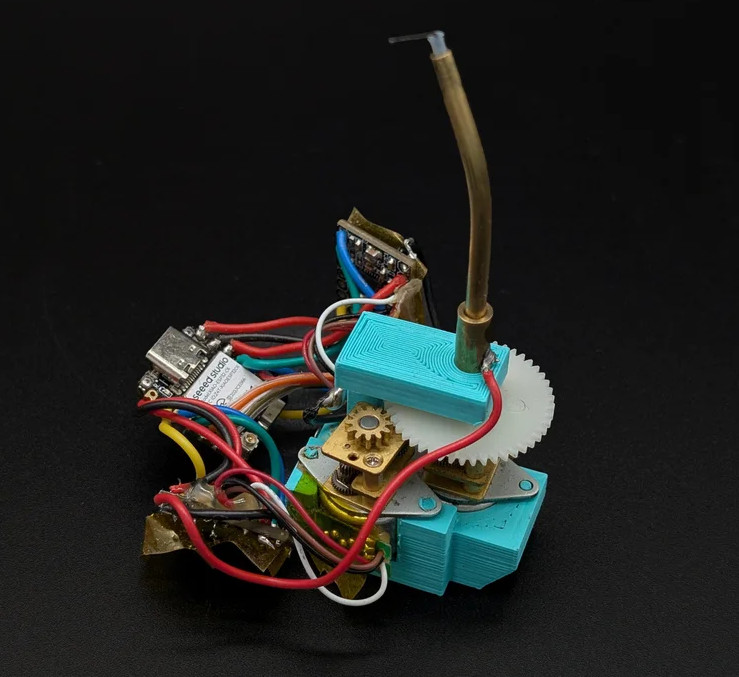
The Dutch word for sundial, zonnewijzer, can be literally translated into “Sun Pointer” according to [illusionmanager] — and he took that literal translation literally, building a reverse sundial so he would always know the precise location of our local star, even when it is occluded by clouds or the rest of the planet.

The electronics aren’t hugely complicated: an ESP32 dev board, an RTC board, and a couple of steppers. But the craftsmanship is, as usual for [illusionmanager], impeccable. You might guess that one motor controls the altitude and the other the azimuth of the LED-filament pointer (a neat find from AliExpress), but you’d be wrong.

This is more like an equatorial mount, in that the shaft the arrow spins upon is bent at a 23.5 degree angle. Through that hollow shaft a spring-steel wire connects the arrow to one stepper, to drive it through the day. The second stepper turns the shaft to keep the axis pointed correctly as Earth orbits the sun.

Either way you can get an arrow that always points at the sun, but this is lot more elegant than an alt-az mount would have been, at the expense of a fiddlier build.  Given the existence of the orrery clock we featured from him previously, it’s safe to say that [illusionmanager] is not afraid of a fiddly build. Doing it this way also lets you read the ticks on the base just as you would a real sundial, which takes this from discussion piece to (semi) usable clock.

Yesterday — 10 December 2025Hackaday

Your Supercomputer Arrives in the Cloud

10 December 2025 at 22:00

For as long as there have been supercomputers, people like us have seen the announcements and said, “Boy! I’d love to get some time on that computer.” But now that most of us have computers and phones that greatly outpace a Cray 2, what are we doing with them? Of course, a supercomputer today is still bigger than your PC by a long shot, and if you actually have a use case for one, [Stephen Wolfram] shows you how you can easily scale up your processing by borrowing resources from the Wolfram Compute Services. It isn’t free, but you pay with Wolfram service credits, which are not terribly expensive, especially compared to buying a supercomputer.

[Stephen] says he has about 200 cores of local processing at his house, and he still sometimes has programs that run overnight. If your program already uses a Wolfram language and uses parallelism — something easy to do with that toolbox — you can simply submit a remote batch job.

What constitutes a supercomputer? You get to pick. You can just offload your local machine using a single-core 8GB virtual machine — still a supercomputer by 1980s standards.  Or you get machines with up to 1.5TB of RAM and 192 cores. Not enough for your mad science? No worries, you can map a computation across more than one machine, too.

As an example, [Stephen] shows a simple program that tiles pentagons:

When the number of pentagons gets large, a single line of code sends it off to the cloud:

RemoteBatchSubmit[PentagonTiling[500]]

The basic machine class did the work in six minutes and 30 seconds for a cost of 5.39 credits. He also shows a meatier problem running on a 192-core 384GB machine. That job took less than two hours and cost a little under 11,000 credits (credit cost from just over $4/1000 to $6/1000, depending on how many you buy, so this job cost about $55 to run). If two hours is too much, you can map the same job across many small machines, get the answer in a few minutes, and spend fewer credits in the process.

Supercomputers today are both very different from old supercomputers and yet still somewhat the same. If you really want that time on the Cray you always wanted, you might think about simulation.

Volumetric Display With Lasers and Bubbly Glass

10 December 2025 at 19:00
King Tut, with less resolution than he's had since Deluxe Paint

There’s a type of dust-collector that’s been popular since the 1990s, where a cube of acrylic or glass is laser-etched in a three-dimensional pattern. Some people call them bubblegrams. While it could be argued that bubblegrams are a sort of 3D display, they’re more like a photograph than a TV. [Ancient] had the brainwave that since these objects work by scattering light, he could use them as a proper 3D video display by controlling the light scattered from an appropriately-designed bubblegram.

Appropriately designed, in this case, means a point cloud, which is not exactly exciting to look at on its own. It’s when [Ancient] adds the colour laser scanning projector that things get exciting. Well, after some very careful alignment. We imagine if this was to go on to become more than a demonstrator some sort of machine-vision auto-aligning would be desirable, but [Ancient] is able to conquer three-dimensional keystoning manually for this demonstration. Considering he is, in effect, projection-mapping onto the tiny bubbles in the crystal, that’s impressive work. Check out the video embedded below.

With only around 38,000 points, the resolution isn’t exactly high-def, but it is enough for a very impressive proof-of-concept. It’s also not nearly as creepy as the Selectric-inspired mouth-ball that was the last [Ancient] project we featured. It’s also a lot less likely to take your fingers off than the POV-based volumetric display [Ancient] was playing DOOM on a while back.

For the record, this one runs the same DOOM port, too– it’s using the same basic code as [Ancient]’s other displays, which you can find on GitHub under an MIT license.

Thanks to [Hari Wiguna] for the tip.

Production KiCad Template Covers All Your Bases

10 December 2025 at 16:00

Ever think about all the moving parts involving a big KiCad project going into production? You need to provide manufacturer documentation, assembly instructions and renders for them to reference, every output file they could want, and all of it has to always stay up to date. [Vincent Nguyen] has a software pipeline to create all the files and documentation you could ever want upon release – with an extensive installation and usage guide, helping you turn your KiCad projects truly production-grade.

This KiBot-based project template has no shortage of features. It generates assembly documents with custom processing for a number of production scenarios like DNPs, stackup and drill tables, fab notes, it adds features like table of contents and 3D renders into KiCad-produced documents as compared to KiCad’s spartan defaults, and it autogenerates all the outputs you could want – from Gerbers, .step and BOM files, to ERC/DRC reports and visual diffs.

This pipeline is Github-tailored, but it can also be run locally, and it works wonderfully for those moments when you need to release a PCB into the wild, while making sure that the least amount of things possible can go wrong during production. With all the features, it might take a bit to get used to. Don’t need fully-featured, just some GitHub page images? Use this simple plugin to auto-add render images in your KiCad repositories, then.

We thank [Jaac] for sharing this with us!

FLOSS Weekly Episode 858: YottaDB: Sometimes the Solution is Bigger Servers

10 December 2025 at 14:30

This week Jonathan chats with K. S. Bhaskar about YottaDB. This very high performance database has some unique tricks! How does YottaDB run across multiple processes without a daemon? Why is it licensed AGPL, and how does that work with commercial deployments? Watch to find out!

Did you know you can watch the live recording of the show right on our YouTube Channel? Have someone you’d like us to interview? Let us know, or have the guest contact us! Take a look at the schedule here.

Direct Download in DRM-free MP3.

If you’d rather read along, here’s the transcript for this week’s episode.

Places to follow the FLOSS Weekly Podcast:


Theme music: “Newer Wave” Kevin MacLeod (incompetech.com)

Licensed under Creative Commons: By Attribution 4.0 License

Why LLMs are Less Intelligent than Crows

10 December 2025 at 13:00

The basic concept of human intelligence entails self-awareness alongside the ability to reason and apply logic to one’s actions and daily life. Despite the very fuzzy definition of ‘human intelligence‘, and despite many aspects of said human intelligence (HI) also being observed among other animals, like crows and orcas, humans over the ages have always known that their brains are more special than those of other animals.

Currently the Cattell-Horn-Carroll (CHC) theory of intelligence is the most widely accepted model, defining distinct types of abilities that range from memory and processing speed to reasoning ability. While admittedly not perfect, it gives us a baseline to work with when we think of the term ‘intelligence’, whether biological or artificial.

This raises the question of how in the context of artificial intelligence (AI) the CHC model translate to the technologies which we see in use today. When can we expect to subject an artificial intelligence entity to an IQ test and have it handily outperform a human on all metrics?

Types Of Intelligence

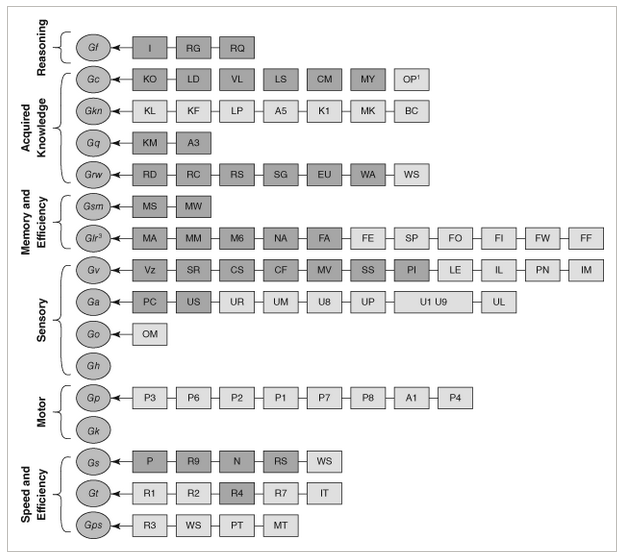
While the basic CHC model contains ten items, the full model is even more expansive, as can be seen in the graphic below. Most important are the overarching categories and the reasoning for the individual items in them, as detailed in the 2014 paper by Flanagan and McGrew. Of these, reasoning (Gf, for fluid intelligence), acquired knowledge and memory (long and short term) are arguably the most relevant when it comes to ‘general intelligence’.

Current and expanded CHC theory of cognitive abilities. Source: Flanagan & McGrew (1997).

Fluid intelligence (Gf), or reasoning, entails the ability to discover the nature of the problem or construction, to use a provided context to fill in the subsequent steps, and to handle abstract concepts like mathematics. Crystallized intelligence (Gc) can be condensed to ‘basic skills’ and general knowledge, including the ability to communicate with others using a natural language.

The basic memory abilities pertain to short-term (Gsm) and long-term recall (Glr) abilities, in particular attention span, working memory and the ability to recall long-term memories and associations within these memories.

Beyond these basic types of intelligence and abilities we can see that many more are defined, but these mostly expand on these basic four, such as visual memory (Gv), various visual tasks, speed of memory operations, reaction time, reading and writing skills and various domain specific knowledge abilities. Thus it makes sense to initially limit evaluating both HI and AI within this constrained framework.

Are Humans Intelligent?

North American Common Raven (Corvus corax principalis) in flight at Muir Beach in Northern California (Credit: Copetersen)

It’s generally considered a foregone conclusion that because humans as a species possesses intelligence, ergo facto every human being possesses HI. However, within the CHC model there is a lot of wriggle room to tone down this simplification. A big part of IQ tests is to test these specific forms of intelligence and skills, after all, creating a mosaic that’s then boringly reduced to a much less meaningful number.

The main discovery over the past decades is that the human brain is far less exceptional than we had assumed. For example crows and their fellow corvids easily keep up with humans in a range of skills and abilities. As far as fluid intelligence is concerned, they clearly display inductive and sequential reasoning, as they can solve puzzles and create tools on the spot. Similarly, corvids regularly display the ability to count and estimate volumes, demonstrating quantitative reasoning. They have regularly demonstrated understanding water volume, density of objects and the relation between these.

In Japanese parks, crows have been spotted manipulating the public faucets for drinking and bathing, adjusting the flow to either a trickle or a strong flow depending on what they want. Corvids score high on the Gf part of the CHC model, though it should be said that the Japanese crow in the article did not turn the faucet back off again, which might just be because they do not care if it keeps running.

When it comes to crystallized intelligence (Gc) and the memory-related Gsm and Glr abilities, corvids score pretty high as well. They have been reported to remember human faces, to learn from other crows by observing them, and are excellent at mimicking the sounds that other birds make. There is evidence that corvids and other avian dinosaur species (‘birds’) are capable of learning to understand human language, and even communicating with humans using these learned words.

The key here is whether the animal understands the meaning of the vocalization and what vocalizing it is meant to achieve when interacting with a human. Both parrots and crows show signs of being able to learn significant vocabularies of hundreds of words and conceivably a basic understanding of their meaning, or at least what they achieve when uttered, especially when it comes to food.

Whether non-human animals are capable of complex human speech remains a highly controversial topic, of course, though we are breathlessly awaiting the day that the first crow looks up at a human and tells the hairless monkey what they really think of them and their species as a whole.

The Bears

The bear-proof garbage bins at Yosemite National Park. (Credit: detourtravelblog)

Meanwhile there’s a veritable war of intellects going on in US National Parks between humans and bears, involving keeping the latter out of food lockers and trash bins while the humans begin to struggle the moment the bear-proof mechanism requires more than two hand motions. This sometimes escalates to the point where bears are culled when they defeat mechanisms using brute force.

Over the decades bears have learned that human food is easier to obtain and fills much better than all-natural food sources, yet humans are no longer willing to share. The result is an arms race where bears are more than happy to use any means necessary to obtain tasty food. Ergo we can put the Gf, Gc and memory-related scores for bears also at a level that suggests highly capable intellects, with a clear ability to learn, remember, and defeat obstacles through intellect. Sadly, the bear body doesn’t lend itself well to creating and using tools like a corvid can.

Despite the flaws of the CHC model and the weaknesses inherent in the associated IQ test scores, it does provide some rough idea of how these assessed capabilities are distributed across a population, leading to a distinct Bell curve for IQ scores among humans and conceivably for other species if we could test them. Effectively this means that there is likely significant overlap between the less intelligent humans and smarter non-human animals.

Although H. sapiens is undeniably an intelligent species, the reality is that it wasn’t some gods-gifted power, but rather an evolutionary quirk that it shares with many other lifeforms. This does however make it infinitely more likely that we can replicate it with a machine and/or computer system.

Making Machines Intelligent

Artificial Intelligence Projects for the Commodore 64, by Timothy J. O'Malley
Artificial Intelligence Projects for the Commodore 64, by Timothy J. O’Malley

The conclusion we have thus reached after assessing HI is that if we want to make machines intelligent, they need to acquire at least the Gf, Gc, Gsm and Glr capabilities, and at a level that puts them above that of a human toddler, or a raven if you wish.

Exactly how to do this has been the subject of much research and study the past millennia, with automatons (‘robots’) being one way to pour human intellect into a form that alleviates manual labor. Of course, this is effectively merely on par with creating tools, not an independent form of intelligence. For that we need to make machines capable of learning.

So far this has proved very difficult. What we are capable of so far is to condense existing knowledge that has been annotated by humans into a statistical model, with large language models (LLMs) as the pinnacle of the current AI hype bubble. These are effectively massively scaled up language models following the same basic architecture as those that hobbyists were playing with back in the 1980s on their home computers.

With that knowledge in mind, it’s not so surprising that LLMs do not even really register on the CHC model. In terms of Gf there’s not even a blip of reasoning, especially not inductively, but then you would not expect this from a statistical model.

As far as Gc is concerned, here the fundamental flaw of a statistical model is what it does not know. It cannot know what it doesn’t know, nor does it understand anything about what is stored in the weights of the statistical model. This is because it’s a statistical model that’s just as fixed in its functioning as an industrial robot. Chalk up another hard fail here.

Although the context window of LLMs can be considered to be some kind of short-term memory, it is very limited in its functionality. Immediate recall of a series of elements may work depending on the front-end, but cognitive operations invariably fail, even very basic ones such as adding two numbers. This makes Gsm iffy at best, and more realistically a complete fail.

Finally, Glr should be a lot easier, as LLMs are statistical models that can compress immense amounts of data for easy recall. But this associative memory is an artefact of human annotation of training data, and is fixed at the time of training the model. After that, it does not remember outside of its context window, and its ability to associate text is limited to the previous statistical analysis of which words are most likely to occur in a sequence. This fact alone makes the entire Glr ability set a complete fail as well.

Piecemeal Abilities

Although an LLM is not intelligent by any measure and has no capacity to ever achieve intelligence, as a tool it’s still exceedingly useful. Technologies such as artificial neurons and large language models have enabled feats such as machine vision that can identify objects in a scene with an accuracy depending on the training data, and by training an LLM on very specific data sets the resulting model can be a helpful statistical tool, as it’s a statistical model.

These are all small fragments of what an intelligent creature is capable of, condensed into tool form. Much like hand tools, computers and robots, these are all tools that we humans have crafted to make certain tasks easier or possible. Like a corvid bending some wire into shape to open a lock or timing the dropping of nuts with a traffic light to safely scoop up fresh car-crushed nuts, the only intelligence so far is still found in our biological brains.

All of which may change as soon as we figure out a way to replicate abstract aspects such as reasoning and understanding, but that’s still a whole kettle of theoretical fish at this point in time, and the subject of future articles.


Cheap 10x10cm Hotplate Punches Above Its Weight

10 December 2025 at 11:30

For less than $30 USD, you can get a 10×10 centimeter hotplate with 350 Watts of power. Sounds mighty fine to us, so surely there must be a catch? Maybe not, as [Stefan Nikolaj]’s review of this AliExpress hotplate details, it seems to be just fine enough.

At this price, you’d expect some shoddy electronics inside, or maybe outright fiery design decisions, in the vein of other reviews for similar cheap heat-producing tech that we’ve seen over the years. Nope – the control circuitry seems to be more than well-built for our standards, with isolation and separation where it matters, the input being fused away, and the chassis firmly earthed. [Stefan] highlights just two possible problem areas: a wire nut that could potentially be dodgy, and lack of a thermal fuse. Both can be remedied easily enough after you get one of these, and for the price, it’s a no-brainer. Apart from the review, there’s also general usage recommendations from [Stefan] in the end of the blog post.

While we’re happy to see folks designing their own PCB hotplates or modifying old waffle irons, the availability of cheap turn-key options like this means there’s less of a reason to go the DIY route. Now, if you’re in the market for even more build volume, you can get one of the classic reflow ovens, and maybe do a controller upgrade while you’re at it.

Ask Hackaday: Solutions, or Distractions?

10 December 2025 at 10:00

The “Long Dark” is upon us, at least for those who live north of the equator, and while it’s all pre-holiday bustle, pretty lights, and the magical first snow of the season now, soon the harsh reality of slushy feet, filthy cars, and not seeing the sun for weeks on end will set in. And when it does, it pays to have something to occupy idle mind and hands alike, a project that’s complicated enough to make completing even part of it feel like an accomplishment.

But this time of year, when daylight lasts barely as long as a good night’s sleep, you’ve got to pick your projects carefully, lest your winter project remain incomplete when the weather finally warms and thoughts turn to other matters. For me, at least, that means being realistic about inevitabilities such as competition from the day job, family stuff, and the dreaded “scope creep.”

It’s that last one that I’m particularly concerned with this year, because it has the greatest potential to delay this project into spring or even — forbid it! — summer. And that means I need to be on the ball about what the project actually is, and to avoid the temptation to fall into any rabbit holes that, while potentially interesting and perhaps even profitable, will only make it harder to get things done.

Pushing My Buttons

For my winter project this year, I chose something I’ve been itching to try for a while: an auto-starter for my generator. Currently, my solar PV system automatically charges its battery bank when the state of charge (SOC) drops below 50%, which it does with alarming frequency during these short, dark days. But rather than relying on shore power, I want my generator to kick on to top off the batteries, then turn itself off when the charge is complete.

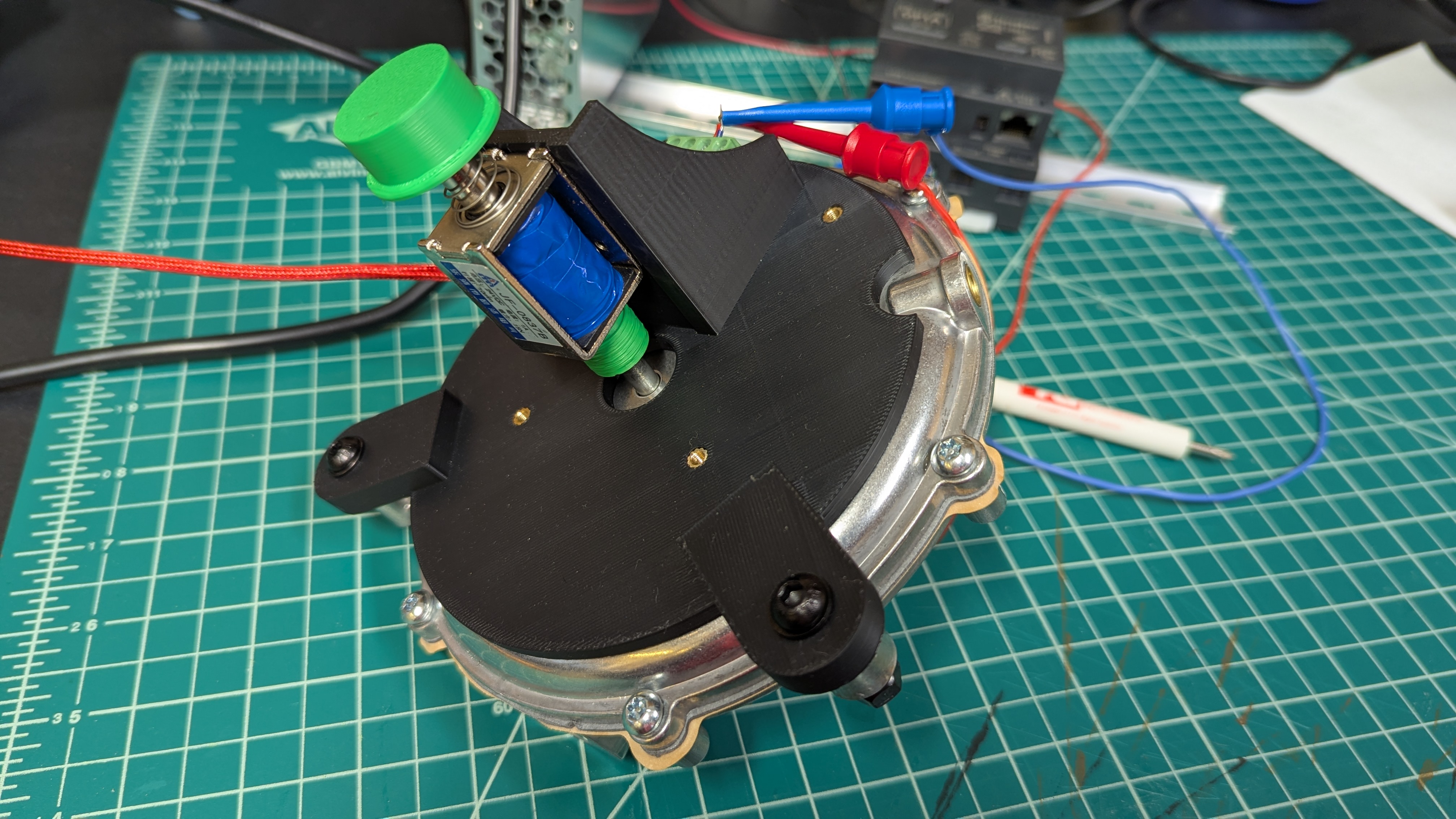
Primer assembly for the generator auto-start. The silver part is the regulator; the solenoid pushes the primer button when it fires. All the parts needed to be custom-made.

In concept, it’s a simple project, since the inverter panel I chose has dry contacts that can trigger based on SOC. It seems like a pretty easy job, just a microcontroller to sense when the inverter is calling for a charge and some relays to kick the generator on. It’s a little — OK, a lot — more complicated than that when you think about it, since you have to make sure the generator actually cranks over, you’ve got to include fail-safes so the generator doesn’t just keep cranking endlessly if it doesn’t catch, and you have to make everything work robustly in an electrically and mechanically noisy environment.

However, in my case, the most challenging aspect is dealing with the mechatronics of the project. My generator is fueled by propane, which means there’s a low-pressure regulator that needs to be primed before cranking the starter. When cranking the generator manually, you just push the primer button a few times to get enough propane into the fuel intake and turn the key. Automating this process, though, is another matter, one that will surely require custom parts, and the easiest path to that would be 3D printing.

But, up until a couple of weeks ago, I didn’t own a 3D printer. I know, it’s hard to believe someone who writes for Hackaday for a living wouldn’t own one of the essential bits of hacker kit, but there it is. To be fair to myself, I did dip my toe into additive manufacturing about six or seven years ago, but that printer was pretty awful and never really turned out great prints. It seemed like this project, with its potential need for many custom parts, was the perfect excuse to finally get a “big boy” printer.

Pick Your Project

And that’s where I came upon the first potential rabbit hole: should I buy an out-of-the-box solution, or should I take on a side-quest project? I was sorely tempted to take the latter course by getting one of those used Enders returned to Amazon, having heard that they’re about half the price of new and often need very little work to get them going. But then again, sometimes these printers have gone through a lot in the short time they were in a customer’s hands, to the point where they need quite a bit of work to get them back in good order.

While I like the idea of a cheap printer, and I wouldn’t mind tinkering with one to get it going again, I decided against the return route. I really didn’t like my odds, given that our Editor in Chief, Elliot Williams, says that of the two returned printers he’s purchased, one worked basically out of the box, while the other needed more work to get in shape. I wanted to unbox the printer and start making parts right away, to get this project going. So, I took the plunge and bought a Bambu P1S on a pre-Black Friday sale that was much less than list price, but much more than what I would have paid for a returned Ender.

Now, I’m not going to turn this into a printer review — that’s not really the point of this article. What I want to get across is that I decided to buy a solution rather than take on a new hobby. I got the Bambu up and running in about an hour and was cranking out prototype parts for my project later that afternoon. Yes, I might have had the same experience with a returned printer at about half the price of the Bambu, but I felt like the perceived value of a new printer was worth the premium price, at least in this case.

I think this is a pretty common choice that hackers face up and down the equipment spectrum. Take machine tools, for instance. Those of us who dream of one day owning a shop full of metalworking tools often trawl through Facebook Marketplace in search of a nice old South Bend lathe or a beautiful Bridgeport milling machine, available for a song compared to what such a machine would cost new. But with the difficulty and expense of getting it home and the potential for serious mechanical problems like worn ways or broken gears that need to be sorted before putting the machine to use, the value proposition could start to shift back toward buying a brand new machine. Expensive, yes, but at least you stand a chance of making parts sooner.

Your Turn

Don’t get me wrong; I’d love to find a nice old lathe to lovingly restore, and I just may do that someday. It’s like buying a rusty old classic car; you’re not doing it to end up with a daily driver, but rather for the joy of restoring a fine piece of engineering to its former glory. In projects like that, the journey is the point, not the destination. But if I need to make parts right away, a new lathe — or mill, or CNC router, or 3D printer — seems like the smarter choice.

I’ll turn things over to you at this point. Have you come up against this kind of decision before? If so, which path did you choose? Has anyone had a satisfying out-of-the-box experience with returned printers? Was I unnecessarily pessimistic about my chances in that market? What about your experience with large machine tools, like lathes and mills? Is it possible to buy used and not have the machine itself become the project? Sound off in the comments below.

Failed 3D Printed Part Brings Down Small Plane

10 December 2025 at 07:00

Back in March, a small aircraft in the UK lost engine power while coming in for a landing and crashed. The aircraft was a total loss, but thankfully, the pilot suffered only minor injuries. According to the recently released report by the Air Accidents Investigation Branch, we now know a failed 3D printed part is to blame.

The part in question is a plastic air induction elbow — a curved duct that forms part of the engine’s air intake system. The collapsed part you see in the image above had an air filter attached to its front (towards the left in the image), which had detached and fallen off. Heat from the engine caused the part to soften and collapse, which in turn greatly reduced intake airflow, and therefore available power.

Serious injury was avoided, but the aircraft was destroyed.

While the cause of the incident is evident enough, there are still some unknowns regarding the part itself. The fact that it was 3D printed isn’t an issue. Additive manufacturing is used effectively in the aviation industry all the time, and it seems the owner of the aircraft purchased the part at an airshow in the USA with no reason to believe anything was awry. So what happened?

The part in question is normally made from laminated fiberglass and epoxy, with a glass transition of 84° C. Glass transition is the temperature at which a material begins to soften, and is usually far below the material’s actual melting point.

When a part is heated at or beyond its glass transition, it doesn’t melt but is no longer “solid” in the normal sense, and may not even be able to support its own weight. It’s the reason some folks pack parts in powdered salt to support them before annealing.

The printed part the owner purchased and installed was understood to be made from CF-ABS, or ABS with carbon fiber. ABS has a glass transition of around 100° C, which should have been plenty for this application. However, the investigation tested two samples taken from the failed part and measured the glass temperature at 52.8°C and 54.0°C, respectively. That’s a far cry from what was expected, and led to part failure from the heat of the engine.

The actual composition of the part in question has not been confirmed, but it sure seems likely that whatever it was made from, it wasn’t ABS. The Light Aircraft Association (LAA) plans to circulate an alert to inspectors regarding 3D printed parts, and the possibility they aren’t made from what they claim to be.

A Musically-Reactive LED Christmas Tree

By: Lewin Day
10 December 2025 at 04:00

Regular Christmas trees don’t emit light, nor do they react to music. If you want both things in a holiday decoration, consider this build from [dbmaking]. 

An ESP32-D1 mini runs the show here. It’s hooked up to a strip of WS2812B addressable LEDs. The LED strip is placed on a wooden frame resembling the shape of a traditional Christmas tree. Ping-pong balls are then stacked inside the wooden frame such that they act as a light diffuser for the LEDs behind. The microcontroller is also hooked up to an INMP441 omnidirectional MEMS microphone module. This allows the ESP32 to detect sound and flash the LEDs in time, creating a colorful display that reacts to music. This is achieved by using the WLED web installer to set the display up in a sound reactive mode.

It’s a fun build, and we’d love to tinker around with coding more advanced visualizer effects for a build like this. We’ve seen builds that go the other way, too, by toning down excessive blinkiness in Christmas decorations.


Putting KDE On Raspberry Pi OS Simpler Than Expected

10 December 2025 at 01:00

Raspberry Pi boards are no longer constrained – these days, you can get a quad-core board with 8 or 16GB of RAM to go around, equip it with a heatsink, and get a decently comfortable shop/desk/kitchen computer with GPIOs, cameras, speedy networking, maybe even NVMe, and all the wireless you’d expect.

Raspberry OS, however, remains lightweight with its pre-installed LXDE environment – and, in many cases, it feels quite constrained. In case you ever idly wondered about giving your speedy Pi a better UI, [Luc]/[lucstechblog] wants to remind you that setting up KDE on your Raspberry OS install is dead simple and requires only about a dozen commandline steps.

[Luc] walks you through these dozen steps, from installation to switching the default DE, and the few hangups you might expect after the switch; if you want to free up some disk space afterwards, [Luc] shows how to get rid of the original LXDE packages. Got the latest Trixie-based Pi OS? There’s an update post detailing the few necessary changes, as well as talking about others’ experiences with the switch.

All in all, [Luc] demonstrates that KDE will have a fair bit of graphical and UX advantages, while operating only a little slower, and if you weren’t really using your powerful Pi to the fullest, it’s a worthwhile visual and usability upgrade. For the regular desktop users, KDE has recently released their own distro, and our own [Jenny] has taken a look at it.

Before yesterdayHackaday

MagQuest: Measuring Earth’s Magnetic Field with Space-Based Quantum Sensors

9 December 2025 at 22:00

Recently the MagQuest competition on improving the measuring of the Earth’s magnetic field announced that the contestants in the final phase have now moved on to launching their satellites within the near future. The goal here is to create a much improved World Magnetic Model (WMM), which is used by the World Geodetic System (WGS). The WGS is an integral part of cartography, geodesy and satellite-based navigation, which includes every sat nav, smartphone and similar with built-in GNSS capabilities.

Although in this age of sat navs and similar it can seem quaint to see anyone bother with using the Earth’s magnetic field with a compass, there is a very good reason why e.g. your Android smartphone has an API for estimating the Earth’s magnetic field at the current location. After your sat nav or smartphone uses its magnetometer, the measurements are then corrected so that ‘north’ really is ‘north’. Since this uses the WMM, it’s pertinent that this model is kept as up to date as possible, with serious shifts in 2019 necessitating an early update outside of the usual five-year cycle.

Goal of the MagQuest competition is thus to find a method that enables much faster, even real-time updates. The three candidate satellites feature three different types of magnetometers: a scalar-vector magnetometer (COSMO), a nitrogen-vacancy (NV) quantum sensor, and the Io-1 satellite containing both a vector fluxgate and atomic scalar magnetometer.

The NV quantum magnetometer is quite possibly the most interesting one, featuring a new, quantum-level approach for magnetic sensing. This effectively uses a flaw in a diamond’s carbon matrix to create a quantum spin state that interacts with magnetic fields and can subsequently be read out. The advantage of this method is its extreme sensitivity, which makes it an interesting sensor for many other applications where measuring the Earth’s magnetic field is essential.

Making Glasses That Detect Smartglasses

9 December 2025 at 19:00

[NullPxl]’s Ban-Rays concept is a wearable that detects when one is in the presence of camera-bearing smartglasses, such as Meta’s line of Ray-Bans. A project in progress, it’s currently focused on how to reliably perform detection without resorting to using a camera itself. Right now, it plays a well-known audio cue whenever it gets a hit.

Once software is nailed down, the device aims to be small enough to fit into glasses.

Currently, [NullPxl] is exploring two main methods of detection. The first takes advantage of the fact that image sensors in cameras act as tiny reflectors for IR. That means camera-toting smartglasses have an identifying feature, which can be sensed and measured. You can see a sample such reflection in the header image, up above.

As mentioned, Ban-Rays eschews the idea of using a camera to perform this. [NullPxl] understandably feels that putting a camera on glasses in order to detect glasses with cameras doesn’t hold much water, conceptually.

The alternate approach is to project IR in a variety of wavelengths while sensing reflections with a photodiode. Initial tests show that scanning a pair of Meta smartglasses in this way does indeed look different from regular eyeglasses, but probably not enough to be conclusive on its own at the moment. That brings us to the second method being used: wireless activity.

Characterizing a device by its wireless activity turned out to be trickier than expected. At first, [NullPxl] aimed to simply watch for BLE (Bluetooth Low-Energy) advertisements coming from smartglasses, but these only seem to happen during pairing and power-up, and sometimes when the glasses are removed from the storage case. Clearly a bit more is going to be needed, but since these devices rely heavily on wireless communications there might yet be some way to actively query or otherwise characterize their activity.

This kind of project is something that is getting some interest. Here’s another smartglasses detector that seems to depend entirely on sniffing OUIs (Organizationally Unique Identifiers); an approach [NullPxl] suspects isn’t scalable due to address randomization in BLE. Clearly, a reliable approach is still in the works.

The increasing numbers of smartglasses raises questions about the impact of normalizing tech companies turning people into always-on recording devices. Of course, the average person is already being subtly recorded by a staggering number of hidden cameras. But at least it’s fairly obvious when an individual is recording you with a personal device like their phone. That may not be the case for much longer.

G4 iMac Becomes a Monitor with a MagSafe Secret

9 December 2025 at 16:00
A computer monitor which was formerly an iMac G4 with a hemispherical white base sits on a table. The table and wall are likely white, but pink light is washing the scene making them and the monitor base appear pink. An iPhone sits above a piece of rounded plastic jutting out from the monitor base.

The G4 iMac is one of the more popular computers in the restomodding scene given its charm and unparalleled ergonomics. Most modern machines that people squeeze in don’t have a disc drive anymore though, so [EasternBloc Engineering] has fitted a retractable MagSafe charger into the drive bay of the machine.

In this example, the iMac has become simply a monitor, instead of an entire all-in-one computer, and the original 15″ display has been replaced with a lightweight 22″ monitor on a 3D printed VESA mount. The narrow confines of the iMac neck meant [EasternBloc Engineering] had to sever the connectors from the HDMI and power cable before reconnecting them once they were fed through.

The really novel part of this restomod is the engineering of the retractable MagSafe charger mount that pops out of the drive bay. [EasternBloc Engineering] started by looking at repurposing an original disc drive, but quickly turned to a bespoke 3D printed solution. Using a LEGO motor and gears for the drive, the system can stick its tongue out at you in a more modern way. A straight in-and-out mechanism like on an original disc drive would’ve been easier to implement, but we appreciate the extra time for angling the phone that respects the ergonomics of the machine. We hope the files will become available soon for this part of the mod since electromechanical components are more interesting than the VESA mount.

We’ve taken a look at how to implement MagSafe (or Qi2) into your own projects and also a few different G4 iMac restomods whether you prefer Apple Silicon or a PC-based approach.

A Deep Drive Deep Dive Into a Twin-Rotor Motor

9 December 2025 at 14:30

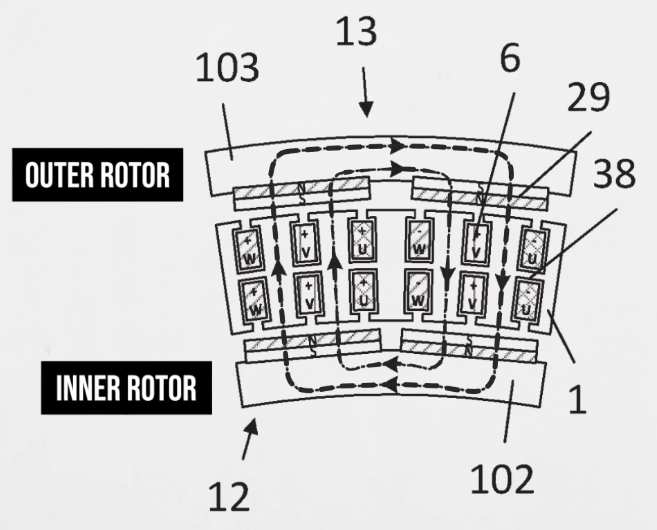
Compromise is key to keeping a team humming along. Say one person wants an inrunner electric motor, and the other prefers outrunner. What to do? Well, if you work at [Deep Drive], the compromise position is a dual-rotor setup that they claim can be up to 20% more efficient than standard designs. In a recent video, [Ziroth] provides a deep dive into Deep Drive’s Twin-Rotor Motor. 

This is specifically a radial flux permanent magnet motor, like most used in electric vehicles today — and don’t let talk of inrunners and outrunners fool you, that’s the size of motor we’re talking about here. This has been done before with axial flux motors, but it’s a new concept for team radial. As the names imply, the difference is the direction the magnetic field is orientated: axial flux motors have all the magnetism oriented along the axis, which leads to the short wide profile that inspired the nickname “pancake motors”. For various reasons, you’re more likely to see those on a PCB than in an electric car.

In a radial flux motor, the flux goes out the radius, so the coils and magnets are aligned around the shaft of the motor.  Usually, the coils are held by an iron armature that directs their magnetic flux inwards (or outwards) at the permanent magnets in the rotor, but not here. By deleting the metal armature from their design and putting magnets on both sides of the stator coil, Deep Drive claims to have built a motor that is lighter and provides more torque, while also being more energy-efficient.

Of course you can’t use magnet wire if your coil is self-supporting, so instead they’re using hefty chunks of copper that could moonlight as busbars. In spite of needing magnets on both inner and outer rotors, the company says they require no more rare-earths than their competitors. We’re not sure if that is true for the copper content, though. To make the torque, those windings are beefy.

Still, its inspiring to see engineers continue to innovate in a space that many would have written off as fully-optimized. We look forward to seeing these motors in upcoming electric cars, but more than that, hope they sell a smaller unit for an air compressor so after going on a Deep Drive deep dive we can inflate our rubber raft with their twin rotor motor boater bloater. If it works as well as advertised, we might have to become twin-rotor motor boater bloater gloaters!

Thanks to [Keith Olson] for the tip.

Keebin’ with Kristina: the One with the C64 Keyboard

9 December 2025 at 13:00
Illustrated Kristina with an IBM Model M keyboard floating between her hands.

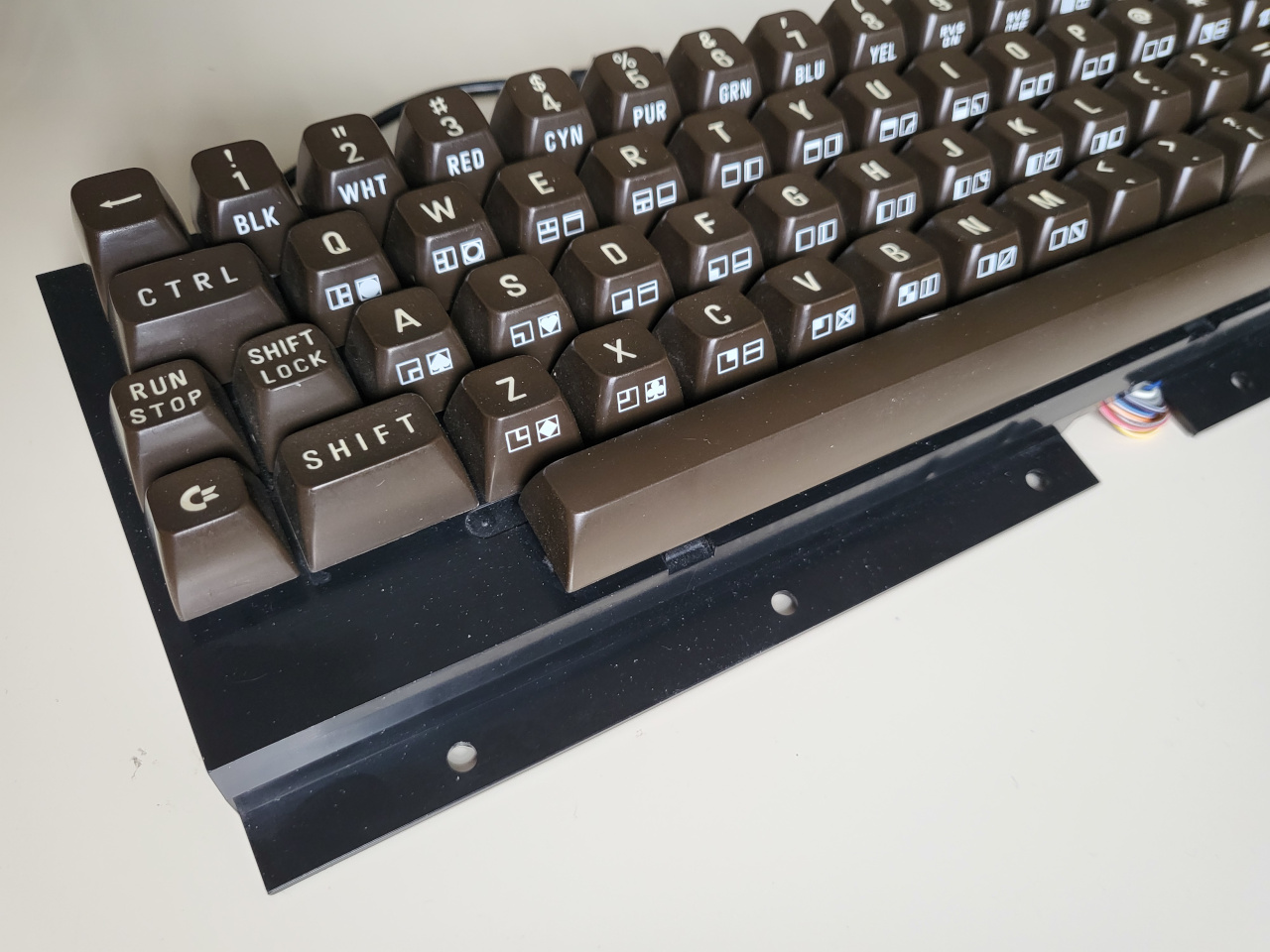
[Jean] wrote into the tips line (the system works!) to let all of us know about his hacked and hand-wired C64 keyboard, a thing of beauty in its chocolate-brown and 9u space bar-havin’ glory.

A C64 keyboard without the surrounding C64.
Image by [Jean] via GitHub
This Arduino Pro Micro-based brain transplant began as a sketch, and [Jean] reports it now has proper code in QMK. But how is a person supposed to use it in 2025, almost 2026, especially as a programmer or just plain serious computer user?

The big news here is that [Jean] added support for missing characters using the left and right Shift keys, and even added mouse controls and Function keys that are accessed on a layer via the Shift Lock key. You can see the key maps over on GitHub.

I’ll admit, [Jean]’s project has got me eyeing that C64 I picked up for $12 at a thrift store which I doubt still works as intended. But don’t worry, I will test it first.

Fortunately, it looks like [Jean] has thought of everything when it comes to reproducing this hack, including the requisite C64-to-Arduino pinout. So, what are you waiting for?

ArcBoard MK20 Proves That Nothing Is Ever Finished

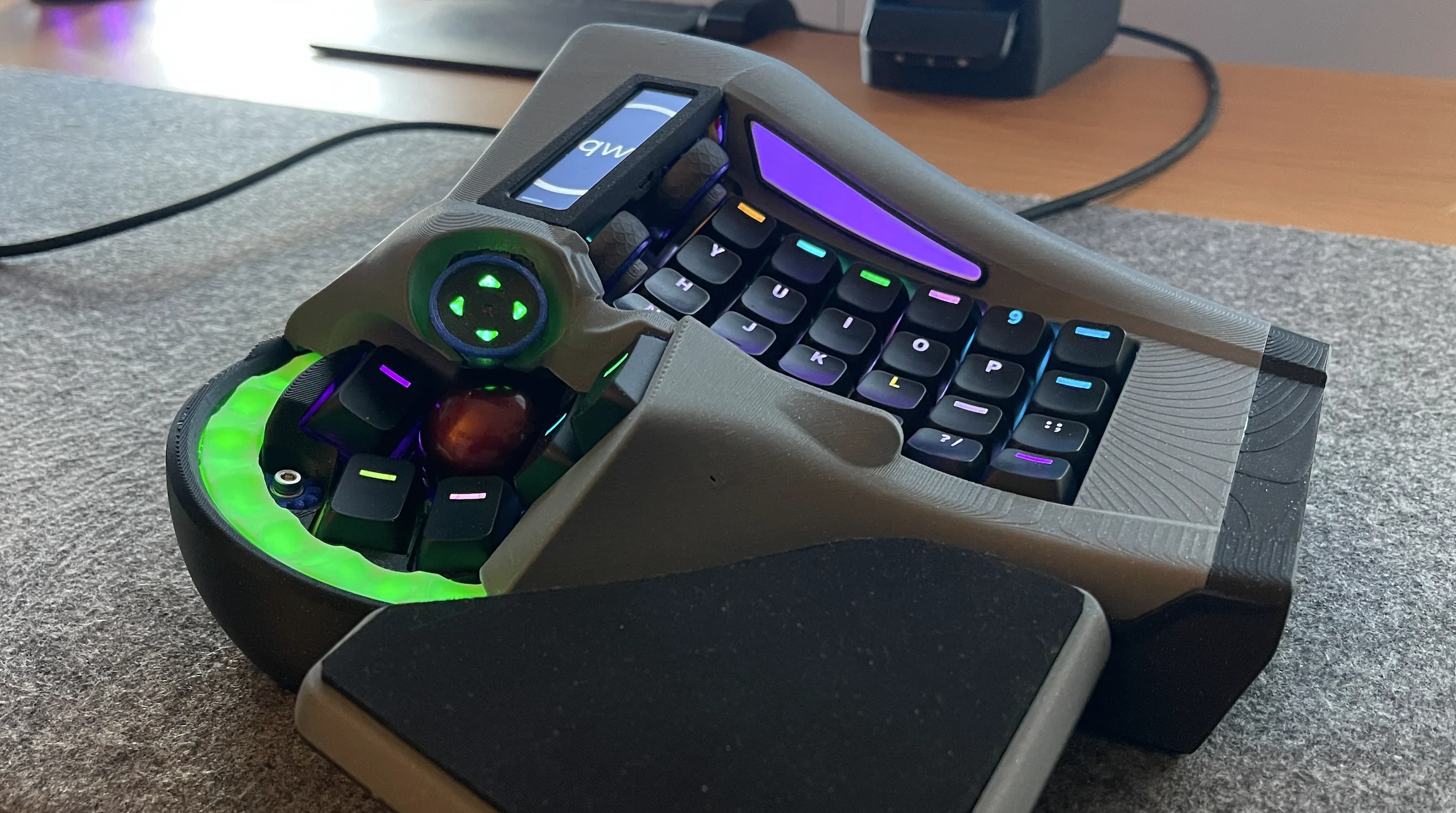
I find it so satisfying that [crazymittens-r] is never quite satisfied with his ArcBoard, which is now in its 20th revision.

The right half of a split keyboard with integrated mouse control out the wazoo.
Image by [crazymittens-r] via reddit
When asked ‘WTF am I looking at?’, [crazymittens-r] responded thusly: ‘my interpretation of how you might use a keyboard and trackball without moving your hands.’ Well, there you have it.

This is one of those times where the longer you look, the crazier it gets. Notice the thumb trackball, d-pad thingy, and the green glowy bit, all of which move. Then there are those wheels up by the YHN column.

A bit of background: [crazymittens-r] needed something to help him keep on working, and you know I can relate to that 100%. There’s even a pair of pedals that go with it, and you’ll see those in the gallery.

You may remember previous ArcBoards, and if not, know this: it’s actually gotten a lot smaller since mk. 19 which I featured here in May 2024. It still looks pretty bonkers in the best possible way, though, and I’m here for it.

Via reddit

The Centerfold: KaSe

Image by [harrael] via reddit
So I have become fond of finding fuller-figured centerfolds for you such as KaSe by [harrael]. As the top commenter put it, KaSe gives off nice Esrille NISSE vibes. Boy howdy. And I think that’s probably just enough thumb keys for me.

[harrael] had noble goals for this project, namely learning more about ESP32-S3s, USB/BLE HID, and firmware design, but the most admirable of all is sharing it with the rest of us. (So, if you can’t afford a NISSE…)

Do you rock a sweet set of peripherals on a screamin’ desk pad? Send me a picture along with your handle and all the gory details, and you could be featured here!

Historical Clackers: Typewriter Tom’s Typewriter Throng

I’m going to take a brief detour from the normal parade of old typewriters to feature Typewriter Tom, who has so many machines lying around that Hollywood regularly comes knocking to borrow his clacking stock.

Image via The Atlanta-Journal Constitution

And how many is that? Around 1,000 — or six storage units full. Tom received a call once. The caller needed six working IBM Selectrics ASAP. Of course, Tom could deliver, though he admits he’s probably the one person in all of Georgia who could.

Another thing Tom delivers is creativity in the form of machines he sells to artists and students. He also co-founded the Atlanta Typewriter Club, who have been known to hold typewriter petting zoo events where people can come and — you guessed it — put their hands on a typewriter or two.

Go for the story and stay for the lovely pictures, or do things the other way around if you prefer. But Typewriter Tom deserves a visit from you, even if he already got one from Tom Hanks once.

Finally, PropType AR Can Turn Anything Into a Keyboard

Yes, literally anything with enough real estate can now become a keyboard, or at least it would seem from TechExplore and the short video embedded below. Watch as various drinking vessels and other things become (split!) keyboards, provided you have your AR goggles handy to make the magic happen.

A split keyboard is projected onto a water bottle.
Image by [PropType] via YouTube
While this setup would be immensely helpful to have around given the right circumstances, the chances that you’re going to have your AR goggles on you while running or running around the mall seem somewhat slim.

But the point here is that for augmented reality users, typing is notoriously difficult and causes something known as ‘gorilla arm’ from extended use. So in all seriousness, this is pretty cool from a problem-solving standpoint.

So how does it work? Basically you set the keyboard up first using the PropType editing tool to customize layouts and apply various effects, like the one you’ll see in the video. Be sure to stick around for the demo of the editing tool, which is cool in and of itself. I particularly like the layout on the soda can, although it might be difficult to actually use without spilling.


Got a hot tip that has like, anything to do with keyboards? Help me out by sending in a link or two. Don’t want all the Hackaday scribes to see it? Feel free to email me directly.

Super Simple Deadbuggable Bluetooth Chip

9 December 2025 at 11:30

We’re all used to Bluetooth chips coming in QFN and BGA formats, at a minimum of 30-40 pins, sometimes even a hundred. What about ten pins, with 1.27 mm pitch? [deqing] from Hackaday.io shows us a chip from WCH, CH571K, in what’s essentially a SO-10 package (ESSOP10). This chip has a RISC-V core, requires only three components to run, and can work Bluetooth through a simple wire antenna.

This chip is a RISC-V MCU with a Bluetooth peripheral built in, and comes from the CH57x family of WCH chips that resemble the nRF series we’re all used to. You get a fair few peripherals: UART, SPI, and ADC, and of course, Bluetooth 4 with Low Energy support to communicate with a smart device of your choice. For extra hacker cred, [deqing] deadbugs it, gluing all components and a 2.54 mm header for FTDI comms onto the chip, and shows us a demo using webBluetooth to toggle an LED through a button in the browser.

You need not be afraid of SDKs with this one. There’s Arduino IDE support (currently done through a fork of arduino_core_ch32) and a fair few external tools, including at least two programming tools, one official and one third-party. The chip is under a dollar on LCSC, even less if you buy multiple, so it’s worth throwing a few into your shopping cart. What could you do with it once received? Well, you could retrofit your smoke alarms with Bluetooth, create your own tire pressure monitors, or just build a smartphone-connected business card!

❌
❌