Normal view

There are new articles available, click to refresh the page.
Today — 8 December 2025Hackaday

Trace Line Clock Does It With Magnets

8 December 2025 at 14:30

We love a good clock project, and [byeh_ in] has one with a design concept we don’t believe we have seen before. The Trace Line Clock has smooth lines and a clean presentation, with no sockets or visible mechanical fixtures.

Reading the clock is quite straightforward once one knows what is going on. At its heart, the unmarked face is much like any other analog clock face, and on the inside is a pretty normal clock movement. The inner recessed track on the face represents hours, and the outer is minutes. The blue line connects the two, drawing a constantly changing line.

Sped-up footage shows how the line moves.

To make the blue segment move without breaking the lines of the clock, [byeh_ in] uses magnets. The inside end moves around the inner ring with the hour hand, while the rest of the blue segment follows the minute hand. Since the length between these two points is not constant, [byeh_ in] cleverly designed one of the magnets to be floating. By keeping the magnet captive in a channel on the underside of the blue segment, the whole thing moves smoothly, no matter how the two ‘hands’ align.

Speaking of smooth, it’s important for the parts to move together with minimal friction. To achieve this [byeh_ in] uses something we think is under-utilized in 3D printed parts: candle wax. Wax is non-greasy, sticks well to 3D printed parts simply by rubbing, slides easily, and doesn’t make a mess. Directions and 3D models are available should you wish to try making your own.

We’re always delighted by the amazingly different ways people can re-imagine a clock. From clocks with hands but void of a face to clocks made out of clocks, we love to see ’em so if you’ve got a favorite, drop us a tip!

Linux Fu: The SSD Super Cache

8 December 2025 at 13:00

NVMe solid state disk drives have become inexpensive unless you want the very largest sizes. But how do you get the most out of one? There are two basic strategies: you can use the drive as a fast drive for things you use a lot, or you can use it to cache a slower drive.

Each method has advantages and disadvantages. If you have an existing system, moving high-traffic directories over to SSD requires a bind mount or, at least, a symbolic link. If your main filesystem uses RAID, for example, then those files are no longer protected.

Caching sounds good, in theory, but there are at least two issues. You generally have to choose whether your cache “writes through”, which means that writes will be slow because you have to write to the cache and the underlying disk each time, or whether you will “write back”, allowing the cache to flush to disk occasionally. The problem is, if the system crashes or the cache fails between writes, you will lose data.

Compromise

For some time, I’ve adopted a hybrid approach. I have an LVM cache for most of my SSD that hides the terrible performance of my root drive’s RAID array. However, I have some selected high-traffic, low-importance files in specific SSD directories that I either bind-mount or symlink into the main directory tree. In addition, I have as much as I can in tmpfs, a RAM drive, so things like /tmp don’t hit the disks at all.

There are plenty of ways to get SSD caching on Linux, and I won’t explain any particular one. I’ve used several, but I’ve wound up on the LVM caching because it requires the least odd stuff and seems to work well enough.

This arrangement worked just fine and gives you the best of both worlds. Things like /var/log and /var/spool are super fast and don’t bog down the main disk. Yet the main disk is secure and much faster thanks to the cache setup. That’s been going on for a number of years until recently.

The Upgrade Issue

I recently decided to give up using KDE Neon on my main desktop computer and switch to OpenSUSE Tumbleweed, which is a story in itself. The hybrid caching scheme seemed to work, but in reality, it was subtly broken. The reason? SELinux.

Tumbleweed uses SELinux as a second level of access protection. On vanilla Linux, you have a user and a group. Files have permissions for a specific user, a specific group, and everyone else. Permission, in general, means if a given user or group member can read, write, or execute the file.

SELinux adds much more granularity to protection. You can create rules that, for example, allow certain processes to write to a directory but not read from it. This post, though, isn’t about SELinux fundamentals. If you want a detailed deep dive from Red Hat, check out the video below.

The Problem

The problem is that when you put files in SSD and then overlay them, they live in two different places. If you tell SELinux to “relabel” files — that is, put them back to their system-defined permissions, there is a chance it will see something like /SSD/var/log/syslog and not realize that this is really the same file as /var/log. Once you get the wrong label on a system file like that, bad, unpredictable things happen.

There is a way to set up an “equivalence rule” in SELinux, but there’s a catch. At first, I had the SSD mounted at /usr/local/FAST. So, for example, I would have /usr/local/FAST/var/log. When you try to equate /usr/local/FAST/var to /usr/var, you run into a problem. There is already a rule that /usr and /usr/local are the same. So you have difficulties getting it to understand that throws a wrench in the works.

There are probably several ways to solve this, but I took the easy way out: I remounted to /FAST. Then it was easy enough to create rules for /var/log to /FAST/var/log, and so on. To create an equivalence, you enter:


semanage fcontext -a -e /var/log /FAST/var/log

The Final Answer

So what did I wind up with? Here’s my current /etc/fstab:


UUID=6baad408-2979-2222-1010-9e65151e07be /              ext4    defaults,lazytime,commit=300 0 1
tmpfs                                     /tmp           tmpfs   mode=1777,nosuid,nodev 0 0
UUID=cec30235-3a3a-4705-885e-a699e9ed3064 /boot          ext4    defaults,lazytime,commit=300,inode_readahead_blks=64 0 2
UUID=ABE5-BDA4                            /boot/efi      vfat    defaults,lazytime 0 2
tmpfs                                       /var/tmp    tmpfs  rw,nosuid,nodev,noexec,mode=1777 0 0

<h1>NVMe fast tiers</h1>

UUID=c71ad166-c251-47dd-804a-05feb57e37f1 /FAST  ext4  defaults,noatime,lazytime  0  2
/FAST/var/log /var/log  none  bind,x-systemd.requires-mounts-for=/FAST 0 0
/FAST/usr/lib/sysimage/rpm /usr/lib/sysimage/rpm none bind,x-systemd.requires-mounts-for=/FAST 0 0
/FAST/var/spool /var/spool  none  bind,x-systemd.requires-mounts-for=/FAST 0 0

As for the SELinux rules:


/FAST/var/log = /var/log
/FAST/var/spool = /var/spool
/FAST/alw/.cache = /home/alw/.cache
/FAST/usr/lib/sysimage/rpm = /usr/lib/sysimage/rpm
/FAST/alw/.config = /home/alw/.config
/FAST/alw/.zen = /home/alw/.zen

Note that some of these don’t appear in /etc/fstab because they are symlinks.

A good rule of thumb is that if you ask SELinux to relabel the tree in the “real” location, it shouldn’t change anything (once everything is set up). If you see many changes, you probably have a problem:


restorecon -Rv /FAST/var/log

Worth It?

Was it worth it? I can certainly feel the difference in the system when I don’t have this setup, especially without the cache. The noisy drives quiet down nicely when most of the normal working set is wholly enclosed in the cache.

This setup has worked well for many years, and the only really big issue was the introduction of SELinux. Of course, for my purposes, I could probably just disable SELinux. But it does make sense to keep it on if you can manage it.

If you have recently switched on SELinux, it is useful to keep an eye on:


ausearch -m AVC -ts recent

That shows you if SELinux denied any access recently. Another useful command:


systemctl status setroubleshootd.service

Another good systemdstupid trick.” Often, any mysterious issues will show up in one of those two places. If you are on a single-user desktop, it isn’t a bad idea to retry any strange anomalies with SELinux turned off as a test: setenforce 0. If the problem goes away, it is a sure bet that something is wrong with the SELinux system.

Of course, every situation is different. If you don’t need RAID or a huge amount of storage, maybe just use an SSD as your root system and be done with it. That would certainly be easier. But, in typical Linux fashion, you can make of it whatever you want. We like that.

Cheap And Aggressive DRAM Chip Tester

8 December 2025 at 11:30

People enjoy retrocomputing for a wide variety of reasons – sometimes it’s about having a computer you could fully learn, or nostalgia for chips that played a part in your childhood. There’s definitely some credit to give for the fuzzy feeling you get booting up a computer you built out of chips. Old technology does deteriorate fast, however, and RAM chip failures are especially frustrating. What if you got a few hundred DRAM chips to go through? Here’s a DRAM chip tester by [Andreas]/[tops4u] – optimized for scanning speed, useful for computers like the ZX Spectrum or Oric, and built around an ATMega328P, which you surely still have in one of your drawers.

The tester is aimed at DIP16/18/20 and ZIP style DRAM chips – [Andreas] claims support for 4164, 41256, 6416, 6464, 514256, and 44100 series RAM chips. The tester is extremely easy to operate, cheap to build, ruthlessly optimized for testing speed, sports a low footprint, and is fully open-source. If you’re ever stuck with a heap of RAM chips you want to quickly test one by one, putting together one of these testers is definitely the path to take, instead of trying to boot up your well-aged machine with a bunch of chips that’d take a while to test or, at worst, could even fry it.

[Andreas] includes KiCad PCB and Arduino source files, all under GPL. They also provide adapter PCBs for chips like the 4116. What’s more, there are PCB files to build this tester in full DIP, in case that’s more your style! It’s far from the first chip tester in the scene, of course, there are quite a few to go around, including some seriously featureful units that even work in-circuit. Not only will they save you from chips that failed, but they’ll also alert you to fake chips that are oh so easy to accidentally buy online!

Belting out the Audio

8 December 2025 at 10:00

Today, it is hard to imagine a world without recorded audio, and for the most part that started with Edison’s invention of the phonograph. However, for most of its history, the phonograph was a one-way medium. Although early phonographs could record with a separate needle cutting into foil or wax, most record players play only records made somewhere else. The problem is, this cuts down on what you can do with them. When offices were full of typists and secretaries, there was the constant problem of telling the typist what to type. Whole industries developed around that problem, including the Dictaphone company.

The issue is that most people can talk faster than others can write or type. As a result, taking dictation is frustrating as you have to stop, slow down, repeat yourself, or clarify dubious words. Shorthand was one way to equip a secretary to write as fast as the boss can talk. Steno machines were another way. But the dream was always a way to just speak naturally, at your convenience, and somehow have it show up on a typewritten page. That’s where the Dictaphone company started.

History of the Dictaphone

Unsurprisingly, Dictaphone’s founder was the famous Alexander Graham Bell. Although Edison invented the phonograph, Bell made many early improvements to the machine, including the use of wax instead of foil as a recording medium. He actually started the Volta Graphophone Company, which merged with the American Graphophone Company that would eventually become Columbia Records.

In 1907, the Columbia Phonograph Company trademarked the term Dictaphone. While drum-based machines were out of style in other realms, having been replaced by platters, the company wanted to sell drum-based machines that let executives record audio that would be played back by typists. By 1923, the company spun off on its own.

Edison, of course, also created dictation machines. There were many other companies that made some kind of dictation machine, but Dictaphone became the standard term for any such device, sort of like Xerox became a familiar term for any copier.

Dictaphones were an everyday item in early twentieth-century offices for dictation, phone recording, and other audio applications. Not to mention a few other novel uses. In 1932, a vigilante organization used a Dictaphone to bug a lawyer’s office suspected of being part of a kidnapping.

Some machines could record and playback. Others, usually reserved for typists, were playback-only. In addition, some machines could “shave” wax cylinders to erase a cylinder for future use. Of course, eventually you’d shave it down to the core, and then it was done.

The Computer History Archives has some period commercials and films from Dictaphone, and you can see them in the videos below.

As mentioned, Dictaphone wasn’t the only game in town. Edison was an obvious early competitor. We were amused that the Edison devices had a switch that allowed them to operate on AC or DC current.

Later, other companies like IBM would join in. Some, like the Gray Audograph and the SoundScriber used record-like disks instead of belts or drums. Of course, eventually, magnetic tape cassettes were feasible, too, and many people made recorders that could be used for dictation and many other recording duties.

The Dictabelt

For the first half of the twentieth century, Dictaphones used wax cylinders. However, in 1947, they began making machines that pressed a groove into a Lexan belt — a “Dictabelt,” at first called a “Memobelt.” These were semi-permanent and, since you couldn’t easily melt over some of the wax, difficult to tamper with, which helped make them admissible in court. Apparently, you could play a Dictabelt back about 20 times before it would be too beat up to play.

These belts found many uses. For one, Dictaphone was a major provider to police departments and other similar services, recording radio traffic and telephone calls. In the late 1970s, the House Select Committee on Assassinations used Dictaphone belts from the Dallas police department recording in 1963 to do audio analysis on the Kennedy assassination. Many Dictaphones found homes in courtrooms, too.

As you can see in the commercials in the video, Dictabelts would fit in an envelope: they are about 3.5 in x  12 in or 89 mm x 300 mm. The “portable” machine promised to let you dictate from anywhere, keep meeting minutes, and more. A single belt held 15 minutes of audio, and the color gives you an idea of when the belt was made.

Magnetic Personality

Of course, Dictaphone wasn’t the only game in town for machines like this. IBM released one that used a magnetic belt called a “Magnabelt’ that you could edit. Dictaphone followed suit. These, of course, were erasable.

Even as late as 1977, you could find Dictaphones in “word processing operations” like the one in the video with the catchy tune, below. Of course, computers butted into both word processing and dictation with products like Via Voice or DragonDictate. Oddly, DragonDictate is from Nuance, which bought what was left of Dictaphone.

Insides

Since this is Hackaday, of course, you want to see the insides of some of these machines. A video from [databits] gives us a peek below.

Offices have certainly changed. Most people do their own typing now. Your phone can record many hours of crystal-clear audio. Computers can even take your dictation now, if you insist.

Should you ever find a Dictabelt and want to digitize it for posterity, you might find the video below from [archeophone] useful. They make a modern playback unit for old cylinders and belts.

We’d love to see a homebrew Dictabelt recorder player using more modern tech. If you make one, be sure to let us know. People recorded on the darndest things. Tape caught on primarily because of World War II Germany and Bing Crosby.

How Big is Your Video Again? Square vs Rectangular Pixels

8 December 2025 at 07:00

[Alexwlchan] noticed something funny. He knew that not putting a size for a video embedded in a web page would cause his page to jump around after the video loaded. So he put the right numbers in. But with some videos, the page would still refresh its layout. He learned that not all video sizes are equal and not all pixels are square.

For a variety of reasons, some videos have pixels that are rectangular, and it is up to your software to take this into account. For example, when he put one of the suspect videos into QuickTime Player, it showed the resolution was 1920×1080 (1350×1080). That’s the non-square pixel.

So just pulling the size out of a video isn’t always sufficient to get a real idea of how it looks. [Alex] shows his old Python code that returns the incorrect number and how he managed to make it right. The mediainfo library seems promising, but suffers from some rounding issues. Instead, he calls out to ffprobe, an external program that ships with ffmpeg. So even if you don’t use Python, you can do the same trick, or you could go read the ffprobe source code.

[Alex] admits that there are not many videos that have rectangular pixels, but they do show up.

If you like playing with ffmpeg and videos, try this in your browser. Think rectangular pixels are radical? There has been work for variable-shaped pixels.

Off-Axis Rotation For Amiga-Themed Levitating Lamp

8 December 2025 at 04:00

Do you remember those levitating lamps that were all the rage some years ago? Floating light bulbs, globes, you name it. After the initial craze of expensive desk toys, a wave of cheap kits became available from the usual suspects. [RobSmithDev] wanted to make a commemorative lamp for the Amiga’s 40th anniversary, but… it was missing something. Sure, the levitating red-and-white “boing” ball looked good, but in the famous demo, the ball is spinning at a jaunty angle. You can’t do that with mag-lev… not without a hack, anyway.

The hack [RobSmith] decided on is quite simple: the levitator is working in the usual manner, but rather than mount his “boing ball” directly to the magnet, the magnet is glued to a Dalek-lookalike plinth. The plinth holds a small motor, which is mounted at an angle to the base. Since the base stays vertical, the motor’s shaft provides the jaunty angle for the 3D-printed boing ball’s rotation. The motor is powered by the same coil that came with the kit to power the LEDs– indeed, the original LEDs are reused. An interesting twist is that the inductor alone was not able to provide enough power to run even the motor by itself: [Rob] had to add a capacitor to tune the LC circuit to the ~100 kHz frequency of the base coil. While needing to tune an antenna shouldn’t be any sort of surprise, neither we nor [Rob] were thinking of this as an antenna, so it was a neat detail to learn.

With the hard drive-inspired base — which eschews insets for self-tapping screws — the resulting lamp makes a lovely homage to the Amiga Computer in its 40th year.

We’ve seen these mag-lev modules before, but the effect is always mesmerizing.  Of course, if you want to skip the magnets, you can still pretend to levitate a lamp with tensegrity.

A Touchscreen MIDI Controller For The DIY Set

By: Lewin Day
8 December 2025 at 01:00

MIDI controllers are easy to come by these days. Many modern keyboards have USB functionality in this regard, and there are all kinds of pads and gadgets that will spit out MIDI, too. But you might also like to build your own, like this touchscreen design from [Nick Culbertson].

The build takes advantage of a device colloquially called the Cheap Yellow Display. It consists of a 320 x 240 TFT touchscreen combined with a built-in ESP32-WROOM-32, available under the part number ESP32-2432S028R.

[Nick] took this all-in-one device and turned it into a versatile MIDI controller platform. It spits out MIDI data over Bluetooth and has lots of fun modes. There’s a straightforward keyboard, which works just like you’d expect, and a nifty beat sequencer too. There are more creative ideas, too, like the bouncing-ball Zen mode, a physics-based note generator, and an RNG mode. If you liked Electroplankton on the Nintendo DS, you’d probably dig some of these. Files are on GitHub if you want to replicate the build.

These days, off-the-shelf hardware is super capable, so you can whip up a simple MIDI controller really quickly. Video after the break.

Yesterday — 7 December 2025Hackaday

Wavebird Controller Soars Once More with Open Source Adapter

7 December 2025 at 22:00
Computer rendering of a DIY, purple Nintendo Wavebird controller adapter

After scouring the second-hand shops and the endless pages of eBay for original video game hardware, a pattern emerges. The size of the accessory matters. If a relatively big controller originally came with a tiny wireless dongle, after twenty years, only the controller will survive. It’s almost as if these game controllers used to be owned by a bunch of irresponsible children who lose things (wink). Such is the case today when searching for a Nintendo Wavebird controller, and [James] published a wireless receiver design to make sure that the original hardware can be resurrected.

The project bears the name Wave Phoenix. The goal was to bring new life to a legendary controller by utilizing inexpensive, readily available parts. Central to the design is the RF-BM-BG22C3 Bluetooth module. Its low power draw and diminutive footprint made it a great fit for the limited controller port space of a Nintendo GameCube. The module itself is smaller than the GameCube’s proprietary controller connector.  Luckily for projects like this, there are plenty of third-party connector options available.

When it comes to assembly, [James] insists it is possible to wire everything up by hand. He included an optional custom PCB design for those of us who aren’t point-to-point soldering masters. The PCB nestles cleanly into the 3D-printed outer casing seen in the image above in the iconic GameCube purple. Once the custom firmware for the Bluetooth module is flashed, pairing is as simple as pressing the Wave Phoenix adapter pairing button, followed by pressing X and Y simultaneously on the Wavebird controller. The two devices should stay paired as long as the controller’s wireless channel dial remains on the same channel. Better yet, any future firmware updates can be transferred wirelessly over Bluetooth.

Those who have chosen to build their own Wave Phoenix adapter have been pleased with the performance. The video below from Retrostalgia on YouTube shows that input responsiveness seems to be on par with the original Nintendo adapter. Mix in a variety of 3D printed shell color options, and this project goes a long way to upcycle Wavebird controllers that may have been doomed to end up in a dumpster. So it might be time to fire up a round of Kirby Air Ride and mash the A button unencumbered by a ten-foot cord.

There are even more open source video game controller designs out there like this previous post about the Alpakka controller by Dave.

Hackaday Links: December 7, 2025

7 December 2025 at 19:00
Hackaday Links Column Banner

We stumbled upon a story this week that really raised our eyebrows and made us wonder if we were missing something. The gist of the story is that U.S. Secretary of Energy Chris Wright, who has degrees in both electrical and mechanical engineering, has floated the idea of using the nation’s fleet of emergency backup generators to reduce the need to build the dozens of new power plants needed to fuel the AI data center building binge. The full story looks to be a Bloomberg exclusive and thus behind a paywall — hey, you don’t get to be a centibillionaire by giving stuff away, you know — so we might be missing some vital details, but this sounds pretty stupid to us.

First of all, saying that 35 gigawatts of generation capacity sits behind the big diesel and natural gas-powered generators tucked behind every Home Depot and Walmart in the land might be technically true, but it seems to ignore the fact that backup generators aren’t engineered to run continuously. In our experience, even the best backup generators are only good for a week or two of continuous operation before something — usually the brushes — gives up the ghost. That’s perfectly acceptable for something that is designed to be operated only a few times a year, and maybe for three or four days tops before grid power is restored. Asking these units to run continuously to provide the base load needed to run a data center is a recipe for rapid failure. And even if these generators could be operated continuously, there’s still the issue of commandeering private property for common use, as well as the fact that you’d be depriving vital facilities like hospitals and fire stations of their backup power. But at least we’d have chatbots.

Well, that won’t buff right out. Roscosmos, the Russian space agency, suffered a serious setback last week when it damaged the launchpad at Site 31/6 during a Soyuz launch. This is bad news because that facility is currently the only one in the world capable of launching Soyuz and Progress, both crucial launch vehicles for the continued operation of the International Space Station. As usual, the best coverage of the accident comes from Scott Manley, who has all the gory details. His sources inform him that the “service cabin,” a 20-ton platform that slides into position under the rocket once it has been erected, is currently situated inside the flame trench rather than being safely tucked into a niche in the wall. He conjectures that the service cabin somehow got sucked into the flame trench during launch, presumably by the negative pressure zone created by the passage of all that high-velocity rocket exhaust. Whatever the cause of the accident, it causes some problems for the Russians and the broader international space community. An uncrewed Progress launch to resupply the ISS was scheduled for December 20, and a crewed Soyuz mission is scheduled for July 2026. But without that service cabin, neither mission seems likely. Hopefully, the Russians will be able to get things tidied up quickly, but it might not matter anyway since there’s currently a bit of a traffic jam at the ISS.

We saw a really nice write-up over at Make: Magazine by Dom Dominici about his impressions from his first Supercon visit. Spoiler alert: he really liked it! He describes it as “an intimate, hands-on gathering that feels more like a hacker summer camp than a tech expo,” and that’s about the best summary of the experience that we’ve seen yet. His reaction to trying to find what he assumed would be a large convention center, but only finding a little hole-in-the-wall behind a pizza place off the main drag in Pasadena, is priceless; yes, that mystery elevator actually goes somewhere. For those of you who still haven’t made the pilgrimage to Pasadena, the article is a great look at what you’re missing.

And finally, we know we were a little rough on the Russians a couple of weeks back for their drunk-walking robot demo hell, but it really served to demonstrate just how hard it is to mimic human walking with a mechanical system. After all, it takes the better part of two years for a new human to even get the basics, and a hell of a lot longer than that to get past the random face-plant stage. But still, some humanoid robots are better than others, to the point that there’s now a Guinness Book of World Records category for longest walk by a humanoid robot. The current record was set last August, with a robot from Shanghai-based Agibot Innovations going on a 106-km walkabout without falling or (apparently) recharging. The journey took place in temperatures approaching 40°C and took 24 hours to complete, which means the robot kept up a pretty brisk walking pace over the course, which we suppose didn’t have any of the usual obstacles.

USB Video Capture Devices: Wow! They’re All Bad!!

7 December 2025 at 16:00

[VWestlife] purchased all kinds of USB video capture devices — many of them from the early 2000s — and put them through their paces in trying to digitize VHS classics like Instant Fireplace and Buying an Auxiliary Sailboat. The results were actually quite varied, but almost universally bad. They all worked, but they also brought unpleasant artifacts and side effects when it came to the final results. Sure, the analog source isn’t always the highest quality, but could it really be this hard to digitize a VHS tape?

The best results for digitizing VHS came from an old Sony device that was remarkably easy to use on a more modern machine.

It turns out there’s an exception to all the disappointment: the Sony Digital Video Media Converter (DVMC) is a piece of vintage hardware released in 1998 that completely outperformed the other devices [VWestlife] tested. There is a catch, but it’s a small one. More on that in a moment.

Unlike many other capture methods, the DVMC has a built-in time base corrector that stabilizes analog video signals by buffering them and correcting any timing errors that would cause problems like jitter or drift. This is a feature one wouldn’t normally find on budget capture devices, but [VWestlife] says the Sony DVMC can be found floating around on eBay for as low as 20 USD. It even has composite and S-Video inputs.

For an old device, [VWestlife] says using the DVMC was remarkably smooth. It needed no special drivers, defaults to analog input mode, and can be powered over USB. That last one may sound trivial, but it means there’s no worry about lacking some proprietary wall adapter with an oddball output voltage.

The catch? It isn’t really a USB device, and requires a FireWire (IEEE-1394) port in order to work. But if that’s not a deal-breaker, it does a fantastic job.

So if you’re looking to digitize older analog media, [VWestlife] says it might be worth heading to eBay and digging up a used Sony DVMC. But if one wants to get really serious about archiving analog media, capturing RF signals direct from the tape head is where it’s at.

Thanks to [Keith Olson] for the tip!

Neat Techniques To Make Interactive Light Sculptures

By: Lewin Day
7 December 2025 at 13:00

[Voria Labs] has created a whole bunch of artworks referred to as Lumanoi Interactive Light Sculptures. A new video explains the hardware behind these beautiful glowing pieces, as well as the magic that makes their interactivity work.

The basic architecture of the Lumanoi pieces starts with a custom main control board, based around the ESP-32-S3-WROOM-2. It’s got two I2C buses onboard, as well as an extension port with some GPIO breakouts. The controller also has lots of protection features and can shut down the whole sculpture if needed. The main control board works in turn with a series of daisy-chained “cell” boards attached via a 20-pin ribbon cable. The cable carries 24-volt power, a bunch of grounds, and LED and UART data that can be passed from cell to cell. The cells are responsible for spitting out data to addressable LEDs that light the sculpture, and also have their own microcontrollers and photodiodes, allowing them to do all kinds of neat tricks.

As for interactivity, simple sensors provide ways for the viewer to interact with the glowing artwork. Ambient light sensors connected via I2C can pick up the brightness of the room as well as respond to passing shadows, while touch controls give a more direct interface to those interacting with the art.

[Voria Labs] has provided a great primer on building hardcore LED sculptures in a smart, robust manner. We love a good art piece here, from the mechanical to the purely illuminatory. Video after the break.

Anatomy Of A Minimalist Home Computer

7 December 2025 at 10:00

There are plenty of well-known models among the 8-bit machines of the 1980s, and most readers could rattle them off without a thought. They were merely the stars among a plethora of others, and even for a seasoned follower of the retrocomputing world, there are fresh models from foreign markets that continue to surprise and delight. [Dave Collins] is treating us to an in-depth look at the VTech VZ-200, a budget machine that did particularly well in Asian markets. On the way, we learn a lot about a very cleverly designed machine.

The meat of the design centres not around the Z80 microprocessor or the 6847 video chip, but the three 74LS chips handling both address decoding and timing for video RAM access. That they managed this with only three devices is the exceptionally clever part. While there are some compromises similar to other minimalist machines in what memory ranges can be addressed, they are not sufficient to derail the experience.

Perhaps the most ingenuity comes in using not just the logic functions of the chips, but their timings. The designers of this circuit really knew the devices and used them to their full potential. Here in 2025, this is something novice designers using FPGAs have to learn; back then, it was learned the hard way on the breadboard.

All in all, it’s a fascinating read from a digital logic perspective as much as a retrocomputing one. If you want more, it seems this isn’t the only hacker-friendly VTech machine.

John Dalton, CC BY-SA 3.0.

The Key to Plotting

7 December 2025 at 07:00

Plotters aren’t as common as they once were. Today, many printers can get high enough resolution with dots that drawing things with a pen isn’t as necessary as it once was. But certainly you’ve at least seen or heard of machines that would draw graphics using a pen. Most of them were conceptually like a 3D printer with a pen instead of a hotend and no real Z-axis. But as [biosrhythm] reminds us, some plotters were suspiciously like typewriters fitted with pens.

Instead of type bars, type balls, or daisy wheels, machines like the Panasonic Penwriter used a pen to draw your text on the page, as you can see in the video below. Some models had direct computer control via a serial port, if you wanted to plot using software. At least one model included a white pen so you could cover up any mistakes.

If you didn’t have a computer, the machine had its own way to input data for graphs. How did that work? Read for yourself.

Panasonic wasn’t the only game in town, either. Silver Reed — a familiar name in old printers — had a similar model that could connect via a parallel port. Other familiar names are Smith Corona, Brother, Sharp, and Sears.

Since all the machines take the same pens, they probably have very similar insides. According to the post, Alps was the actual manufacturer of the internal plotting mechanism, at least.

The video doesn’t show it, but the machines would draw little letters just as well as graphics. Maybe better since you could change font sizes and shapes without switching a ball. They could even “type” vertically or at an angle, at least with external software.

Since plotters are, at heart, close to 3D printers, it is pretty easy to build one these days. If plotting from keystrokes is too mundane for you, try voice control.

The ZX Spectrum Finally Got An FPS

By: Lewin Day
7 December 2025 at 04:00

The ZX Spectrum is known for a lot of things, but it’s not really known for a rich and deep library of FPS titles. However, there is finally such a game for the platform, thanks to [Jakub Trznadel]—and it’s called World of Spells.

Like so many other games of this type, it was inspired by the 3D raycasting techniques made so popular by Wolfenstein 3D back in the day. For that reason, it has a very similar look in some regards, but a very different look in others—the latter mostly due to the characteristic palette available on the ZX Spectrum. A playable FPS is quite a feat to achieve on such limited hardware, but [Jakub] pulled it off well, with the engine able to reach up to 80 frames per second.

The game is available for download, and you can even order it on tape if you so desire. You might also like to check out the walkthrough on YouTube, where the game is played on an emulator. Don’t worry, though—the game works on real ZX Spectrum 48k hardware just fine.

The Speccy retains a diehard fanbase to this day. You can even build a brand new one thanks to a buoyant supply of aftermarket parts.

[thanks to losr for the tip!]


F1 Light Box Helps You Know the Current Race Status

7 December 2025 at 01:00
A dynamic light box for F1 events, built like the F1 logo.

[joppedc] wrote in to let us know that the Formula 1® season is coming to an end, and that the final race should be bangin’. To get ready, he built this ultra-sleek logo light box last week that does more than just sit there looking good, although it does that pretty well. This light box reacts to live race events, flashing yellow for safety cars, red for red flags, and green for, well, green flags.

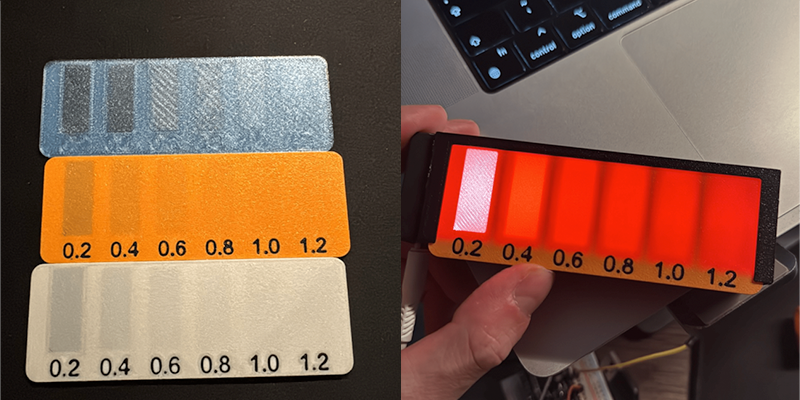
The excellent light box itself was modeled in Fusion 360, and the files are available on MakerWorld. The design is split into four parts — the main body, a backplate to mount the LEDs, the translucent front plate, and an enclosure for an ESP32.

Doing it this way allowed [joppedc] to not only print in manageable pieces, it also allowed him to use different materials. Getting the front panel to diffuse light correctly took some experimenting to find the right thickness. Eventually, [joppedc] landed on 0.4 mm (two layers) of matte white PLA.

There isn’t much in the way of brains behind this beauty, just an ESP32, a strip of WS2812B addressable LEDs, and a USB-C port for power. But it’s the software stack that ties everything together. The ESP32 has WLED, Home Assistant runs the show, and of course, there is the F1 sensor integration to get live race data.

If you’re looking for more of an F1 dashboard, then we’ve got you covered.

Before yesterdayHackaday

Standalone USB-PD Stack For All Your Sink Needs

6 December 2025 at 22:00

USB PD is a fun protocol to explore, but it can be a bit complex to fully implement. It makes sense we’re seeing new stacks pop up all the time, and today’s stack is a cool one as far as code reusability goes. [Vitaly] over on Hackaday.io brings us pdsink – a C++ based PD stack with no platform dependencies, and fully-featured sink capabilities.

This stack can do SPR (5/9/15/20V) just like you’d expect, but it also does PPS without breaking a sweat – perfect for your Lithium Ion battery charging or any other current-limited shenanigans. What’s more, it can do EPR (28V and up) – for all your high-power needs. For reference, the SPR/PPS/EPR combination is all you could need from a PD stack intended for fully taking advantage of any USB-PD charger’s capabilities. The stack is currently tailored to the classic FUSB302, but [Vitaly] says it wouldn’t be hard to add support for a PD PHY chip of your choice.

It’s nice to have a choice in how you want your PD interactions to go – we’ve covered a few stacks before, and each of them has strong and weak sides. Now, if you have the CPU bandwidth, you could go seriously low-tech and talk PD with just a few resistors, transistors, and GPIOs! Need to debug a particular USB-C edge case? Don’t forget a logger.

Lessons Learned After Trying MeshCore for Off-grid Text Messaging

6 December 2025 at 19:00

[Michael Lynch] recently decided to delve into the world of off-grid, decentralized communications with MeshCore, because being able to communicate wirelessly with others in a way that does not depend on traditional communication infrastructure is pretty compelling. After getting his hands on a variety of hardware and trying things out, he wrote up his thoughts from the perspective of a hardware-curious software developer.

He ends up testing a variety of things: MeshCore firmware installed on a Heltec V3 board (used via an app over Bluetooth), a similar standalone device with antenna and battery built in (SenseCAP T-1000e, left in the header image), and a Lilygo T-Deck+ (right in the header image above). These all use MeshCore, which is built on and reportedly compatible with Meshtastic, a framework we have featured in the past.

The cheapest way to get started is with a board like the Heltec v3, pictured here. It handles the LoRa wireless communications part, and one interfaces to it over Bluetooth.

The first two devices are essentially MeshCore gateways, to which the user connects over Bluetooth. The T-Deck is a standalone device that resembles a Blackberry, complete with screen and keypad. [Michael] dove into what it was like to get them up and running.

Probably his most significant takeaway was that the whole process of onboarding seemed a lot more difficult and much less clear than it could be. This is an experience many of us can relate to: the fragmented documentation that exists seems written both by and for people who are already intimately familiar with the project in its entirety.

Another thing he learned was that while LoRa is a fantastic technology capable of communicating wirelessly over great distances with low power, those results require good antennas and line of sight. In a typical urban-ish environment, range is going to be much more limited. [Michael] was able to get a maximum range of about five blocks between two devices. Range could be improved by purchasing and installing repeaters or by having more devices online and in range of one another, but that’s where [Michael] drew the line. He felt he had gotten a pretty good idea of the state of things by then, and not being a radio expert, he declined to purchase repeater hardware without any real sense of where he should put them, or what performance gains he could expect by doing so.

Probably the most surprising discovery was that MeshCore is not entirely open source, which seems odd for an off-grid decentralized communications framework. Some parts are open, but the official clients (the mobile apps, web app, and T-Deck firmware) are not. [Michael] found this out when, being primarily a software developer, he took a look at the code to see if there was anything he could do to improve the poor user experience on the T-Deck and found that the firmware was proprietary.

[Michael]’s big takeaway as a hardware-curious software developer is that the concept is great and accessible (hardware is not expensive and there is no licensing requirement for LoRa), but it’s not really there yet in terms of whether it’s practical for someone to buy a few to distribute among friends for use in an emergency. Not without getting into setting up enough repeaters to ensure connectivity, anyway.

Bridging RTL-433 To Home Assistant

By: Lewin Day
6 December 2025 at 16:00

If you’ve got an RTL-SDR compatible receiver, you’ve probably used it for picking up signals from all kinds of weird things. Now, [Jaron McDaniel] has built a tool to integrate many such devices into the world of Home Assistant.

It’s called RTL-HAOS, and it’s intended to act as a bridge. Whatever you can pick up using the RTL_433 tool, you can set up with Home Assistant using RTL-HAOS. If you’re unfamiliar with RTL_433, it’s a multitalented data receiver for picking up all sorts of stuff on a range of bands using RTL-SDR receivers, as well as a range of other hardware. While it’s most closely associated with products that communicate in the 433 MHz band, it can also work with products that talk in 868 MHz, 315 MHz, 345 MHz, and 915 MHz, assuming your hardware supports it. Out of the box, it’s capable of working with everything from keyless entry systems to thermostats, weather stations, and energy monitors. You can even use it to listen to the tire pressure monitors in your Fiat Abarth 124 Spider, if you’re so inclined.

[Jaron’s] tool integrates these devices nicely into Home Assistant, where they’ll appear automatically thanks to MQTT discovery. It also offers nice signal metrics like RSSI and SNR, so you can determine whether a given link is stable. You can even use multiple RTL-SDR dongles if you’re so inclined. If you’re eager to pull some existing environmental sensors into your smart home, this may prove a very easy way to do it.

The cool thing about Home Assistant is that hackers are always working to integrate more gear into the ecosystem. Oftentimes, they’re far faster and more efficient at doing this than big-name corporations. Meanwhile, if you’re working on your own hacks for this popular smart home platform, we’d probably like to know about it. Be sure to hit up the tips line in due time.

Emulate ROMs at 12MHz With Pico2 PIO

6 December 2025 at 13:00

Nothing lasts forever, and that includes the ROMs required to make a retrocomputer run. Even worse, what if you’re rolling your own firmware? Period-appropriate EPROMs and their programmers aren’t always cheap or easy to get a hold of these days. [Kyo-ta04] had that problem, and thanks to them, we now all have a solution: Pico2ROMEmu, a ROM emulator based on, you guessed it, the Raspberry Pi Pico2.

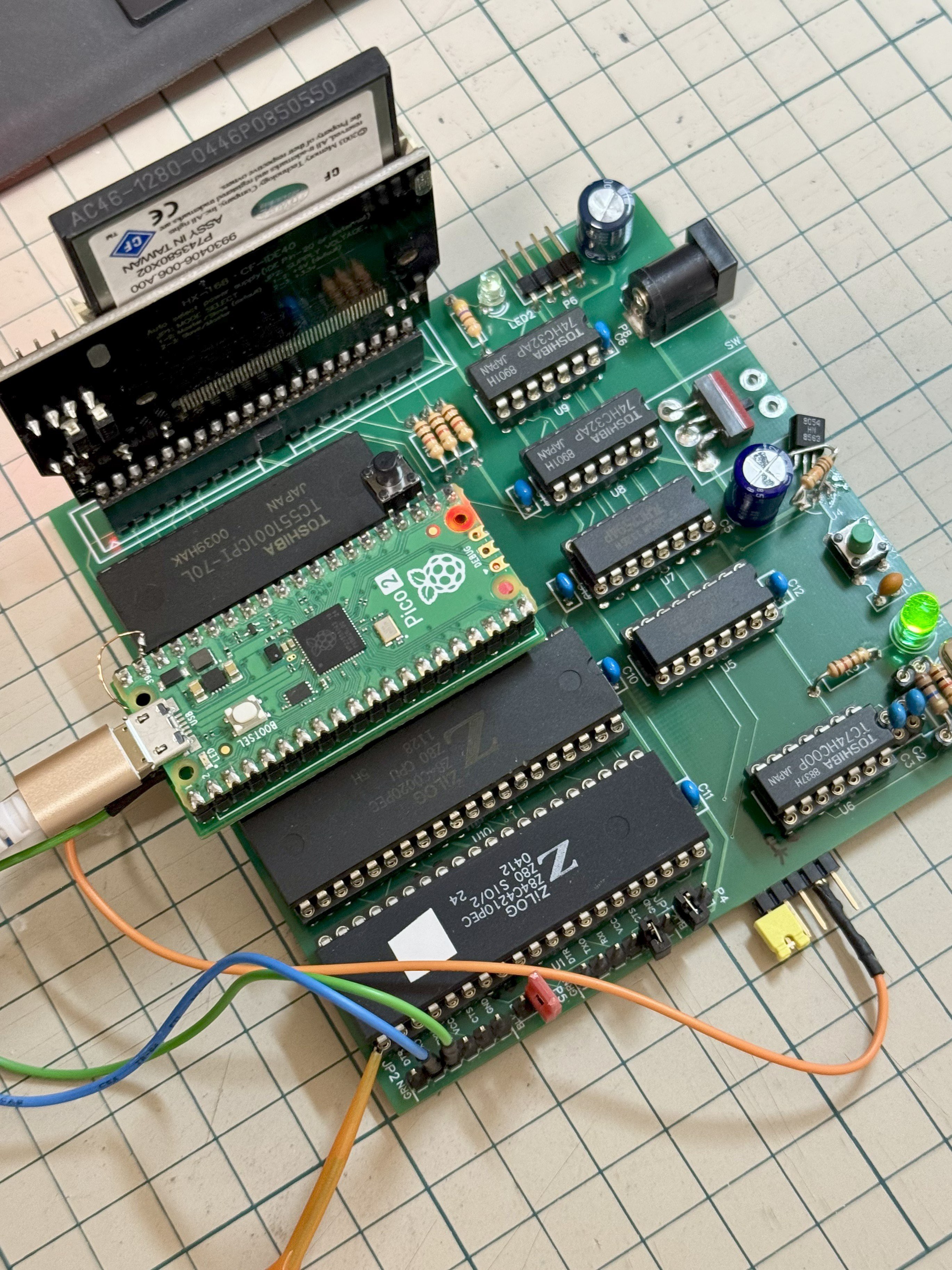
The Pico2ROMEmu in its natural habitat on a Z80 SBC.

The ROM emulator has been tested at 10MHz with a Z80 processor and 12MHz with an MC68000. An interesting detail here is that rather than use the RP2350’s RISC-V or ARM cores, [kyo-ta04] is doing all the work using the chip’s powerful PIO. PIO means “programmable I/O,” and if you need a primer, check this out. Using PIO means the main core of the microcontroller needn’t be involved — and in this context, a faster ROM emulator.

We’ve seen ROM emulators before, of course — the OneROM comes to mind, which can also use the RP2350 and its PIOs. That project hasn’t been chasing these sorts of speeds as it is focused on older, slower machines. That may change in the newest revision. It’s great to see another contender in this space, though, especially one to serve slightly higher-performance retrocomputers.  Code and Gerbers for the Pico2RomeEMU are available on GitHub under an MIT license.

Thanks to [kyo-ta04] for the tip.


Something New Every Day, Something Relevant Every Week?

6 December 2025 at 10:00

The site is called Hackaday, and has been for 21 years. But it was only for maybe the first half-year that it was literally a hack a day. By the 2010s, we were putting out four or more per day, and in the later 20-teens, we settled into our current cadence of eight hacks per day, plus some original pieces over the top. That’s a lot of hacks per day! (But “Eight-to-Ten-Hacks-a-Day” just isn’t as catchy.)

With that many posts daily, we also tend to reach out to a broader array of interests. Quite simply, not every hack is necessarily going to be just exactly what you are looking for, but we wouldn’t be writing it up if we didn’t think that someone was looking for it. Maybe you don’t like CAN bus hacks, but you’re into biohacking, or retrocomputing. Our broad group of writers helps to make sure that we’ll get you covered sooner or later.

What’s still surprising to me, though, is that a couple of times per week, there is a hack that is actually relevant to a particular project that I’m currently working on. It’s one thing to learn something new every day, and I’d bet that I do, but it’s entirely another to learn something new and relevant.

So I shouldn’t have been shocked when Tom and I were going over the week’s hacks on the podcast, and he picked an investigation of injecting spray foam into 3D prints. I liked that one too, but for me it was just “learn something new”. Tom has been working on an underwater ROV, and it perfectly scratched an itch that he has – how to keep the top of the vehicle more buoyant, while keeping the whole thing waterproof.

That kind of experience is why I’ve been reading Hackaday for 21 years now, and it’s all of our hope that you get some of that too from time to time. There is a lot of “new” on the Internet, and that’s a wonderful thing. But the combination of new and relevant just can’t be beat! So if you’ve got anything you want to hear more about, let us know.

This article is part of the Hackaday.com newsletter, delivered every seven days for each of the last 200+ weeks. It also includes our favorite articles from the last seven days that you can see on the web version of the newsletter. Want this type of article to hit your inbox every Friday morning? You should sign up!
❌
❌