
Normal view

There are new articles available, click to refresh the page.
Before yesterdayMain stream

Old tech, new vulnerabilities: NTLM abuse, ongoing exploitation in 2025

26 November 2025 at 05:00

Just like the 2000s

Flip phones grew popular, Windows XP debuted on personal computers, Apple introduced the iPod, peer-to-peer file sharing via torrents was taking off, and MSN Messenger dominated online chat. That was the tech scene in 2001, the same year when Sir Dystic of Cult of the Dead Cow published SMBRelay, a proof-of-concept that brought NTLM relay attacks out of theory and into practice, demonstrating a powerful new class of authentication relay exploits.

Ever since that distant 2001, the weaknesses of the NTLM authentication protocol have been clearly exposed. In the years that followed, new vulnerabilities and increasingly sophisticated attack methods continued to shape the security landscape. Microsoft took up the challenge, introducing mitigations and gradually developing NTLM’s successor, Kerberos. Yet more than two decades later, NTLM remains embedded in modern operating systems, lingering across enterprise networks, legacy applications, and internal infrastructures that still rely on its outdated mechanisms for authentication.

Although Microsoft has announced its intention to retire NTLM, the protocol remains present, leaving an open door for attackers who keep exploiting both long-standing and newly discovered flaws.

In this blog post, we take a closer look at the growing number of NTLM-related vulnerabilities uncovered over the past year, as well as the cybercriminal campaigns that have actively weaponized them across different regions of the world.

How NTLM authentication works

NTLM (New Technology LAN Manager) is a suite of security protocols offered by Microsoft and intended to provide authentication, integrity, and confidentiality to users.

In terms of authentication, NTLM is a challenge-response-based protocol used in Windows environments to authenticate clients and servers. Such protocols depend on a shared secret, typically the client’s password, to verify identity. NTLM is integrated into several application protocols, including HTTP, MSSQL, SMB, and SMTP, where user authentication is required. It employs a three-way handshake between the client and server to complete the authentication process. In some instances, a fourth message is added to ensure data integrity.

The full authentication process appears as follows:

  1. The client sends a NEGOTIATE_MESSAGE to advertise its capabilities.
  2. The server responds with a CHALLENGE_MESSAGE to verify the client’s identity.
  3. The client encrypts the challenge using its secret and responds with an AUTHENTICATE_MESSAGE that includes the encrypted challenge, the username, the hostname, and the domain name.
  4. The server verifies the encrypted challenge using the client’s password hash and confirms its identity. The client is then authenticated and establishes a valid session with the server. Depending on the application layer protocol, an authentication confirmation (or failure) message may be sent by the server.
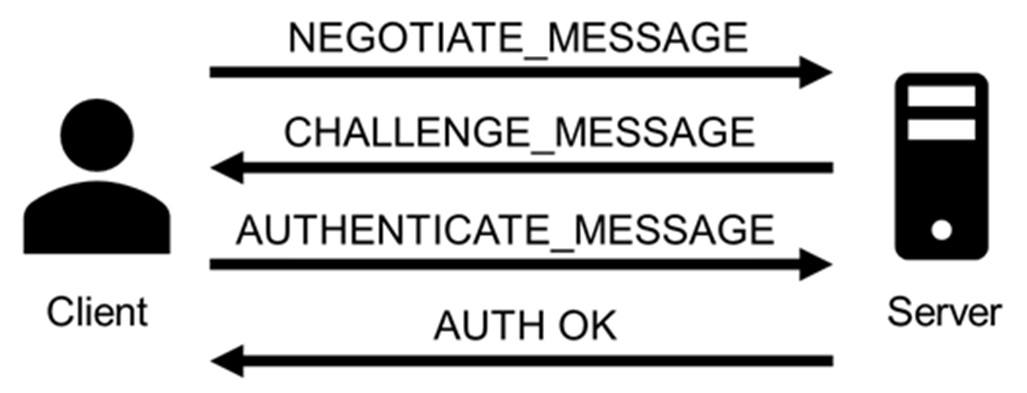
Importantly, the client’s secret never travels across the network during this process.

NTLM is dead — long live NTLM

Despite being a legacy protocol with well-documented weaknesses, NTLM continues to be used in Windows systems and hence actively exploited in modern threat campaigns. Microsoft has announced plans to phase out NTLM authentication entirely, with its deprecation slated to begin with Windows 11 24H2 and Windows Server 2025 (1, 2, 3), where NTLMv1 is removed completely, and NTLMv2 disabled by default in certain scenarios. Despite at least three major public notices since 2022 and increased documentation and migration guidance, the protocol persists, often due to compatibility requirements, legacy applications, or misconfigurations in hybrid infrastructures.

As recent disclosures show, attackers continue to find creative ways to leverage NTLM in relay and spoofing attacks, including new vulnerabilities. Moreover, they introduce alternative attack vectors inherent to the protocol, which will be further explored in the post, specifically in the context of automatic downloads and malware execution via WebDAV following NTLM authentication attempts.

Persistent threats in NTLM-based authentication

NTLM presents a broad threat landscape, with multiple attack vectors stemming from its inherent design limitations. These include credential forwarding, coercion-based attacks, hash interception, and various man-in-the-middle techniques, all of them exploiting the protocol’s lack of modern safeguards such as channel binding and mutual authentication. Prior to examining the current exploitation campaigns, it is essential to review the primary attack techniques involved.

Hash leakage

Hash leakage refers to the unintended exposure of NTLM authentication hashes, typically caused by crafted files, malicious network paths, or phishing techniques. This is a passive technique that doesn’t require any attacker actions on the target system. A common scenario involving this attack vector starts with a phishing attempt that includes (or links to) a file designed to exploit native Windows behaviors. These behaviors automatically initiate NTLM authentication toward resources controlled by the attacker. Leakage often occurs through minimal user interaction, such as previewing a file, clicking on a remote link, or accessing a shared network resource. Once attackers have the hashes, they can reuse them in a credential forwarding attack.

Coercion-based attacks

In coercion-based attacks, the attacker actively forces the target system to authenticate to an attacker-controlled service. No user interaction is needed for this type of attack. For example, tools like PetitPotam or PrinterBug are commonly used to trigger authentication attempts over protocols such as MS-EFSRPC or MS-RPRN. Once the victim system begins the NTLM handshake, the attacker can intercept the authentication hash or relay it to a separate target, effectively impersonating the victim on another system. The latter case is especially impactful, allowing immediate access to file shares, remote management interfaces, or even Active Directory Certificate Services, where attackers can request valid authentication certificates.

Credential forwarding

Credential forwarding refers to the unauthorized reuse of previously captured NTLM authentication tokens, typically hashes, to impersonate a user on a different system or service. In environments where NTLM authentication is still enabled, attackers can leverage previously obtained credentials (via hash leakage or coercion-based attacks) without cracking passwords. This is commonly executed through Pass-the-Hash (PtH) or token impersonation techniques. In networks where NTLM is still in use, especially in conjunction with misconfigured single sign-on (SSO) or inter-domain trust relationships, credential forwarding may provide extensive access across multiple systems.

This technique is often used to facilitate lateral movement and privilege escalation, particularly when high-privilege credentials are exposed. Tools like Mimikatz allow extraction and injection of NTLM hashes directly into memory, while Impacket’s wmiexec.py, PsExec.py, and secretsdump.py can be used to perform remote execution or credential extraction using forwarded hashes.

Man-in-the-Middle (MitM) attacks

An attacker positioned between a client and a server can intercept, relay, or manipulate authentication traffic to capture NTLM hashes or inject malicious payloads during the session negotiation. In environments where safeguards such as digital signing or channel binding tokens are missing, these attacks are not only possible but frequently easy to execute.

Among MitM attacks, NTLM relay remains the most enduring and impactful method, so much so that it has remained relevant for over two decades. Originally demonstrated in 2001 through the SMBRelay tool by Sir Dystic (member of Cult of the Dead Cow), NTLM relay continues to be actively used to compromise Active Directory environments in real-world scenarios. Commonly used tools include Responder, Impacket’s NTLMRelayX, and Inveigh. When NTLM relay occurs within the same machine from which the hash was obtained, it is also referred to as NTLM reflexion attack.

NTLM exploitation in 2025

Over the past year, multiple vulnerabilities have been identified in Windows environments where NTLM remains enabled implicitly. This section highlights the most relevant CVEs reported throughout the year, along with key attack vectors observed in real-world campaigns.

CVE-2024‑43451

CVE-2024‑43451 is a vulnerability in Microsoft Windows that enables the leakage of NTLMv2 password hashes with minimal or no user interaction, potentially resulting in credential compromise.

The vulnerability exists thanks to the continued presence of the MSHTML engine, a legacy component originally developed for Internet Explorer. Although Internet Explorer has been officially deprecated, MSHTML remains embedded in modern Windows systems for backward compatibility, particularly with applications and interfaces that still rely on its rendering or link-handling capabilities. This dependency allows .url files to silently invoke NTLM authentication processes through crafted links without necessarily being open. While directly opening the malicious .url file reliably triggers the exploit, the vulnerability may also be activated through alternative user actions such as right clicking, deleting, single-clicking, or just moving the file to a different folder.

Attackers can exploit this flaw by initiating NTLM authentication over SMB to a remote server they control (specifying a URL in UNC path format), thereby capturing the user’s hash. By obtaining the NTLMv2 hash, an attacker can execute a pass-the-hash attack (e.g. by using tools like WMIExec or PSExec) to gain network access by impersonating a valid user, without the need to know the user’s actual credentials.

A particular case of this vulnerability occurs when attackers use WebDAV servers, a set of extensions to the HTTP protocol, which enables collaboration on files hosted on web servers. In this case, a minimal interaction with the malicious file, such as a single click or a right click, triggers automatic connection to the server, file download, and execution. The attackers use this flaw to deliver malware or other payloads to the target system. They also may combine this with hash leaking, for example, by installing a malicious tool on the victim system and using the captured hashes to perform lateral movement through that tool.

The vulnerability was addressed by Microsoft in its November 2024 security updates. In patched environments, motion, deletion, right-clicking the crafted .url file, etc. won’t trigger a connection to a malicious server. However, when the user opens the exploit, it will still work.

After the disclosure, the number of attacks exploiting the vulnerability grew exponentially. By July this year, we had detected around 600 suspicious .url files that contain the necessary characteristics for the exploitation of the vulnerability and could represent a potential threat.

BlindEagle campaign delivering Remcos RAT via CVE-2024-43451

BlindEagle is an APT threat actor targeting Latin American entities, which is known for their versatile campaigns that mix espionage and financial attacks. In late November 2024, the group started a new attack targeting Colombian entities, using the Windows vulnerability CVE-2024-43451 to distribute Remcos RAT. BlindEagle created .url files as a novel initial dropper. These files were delivered through phishing emails impersonating Colombian government and judicial entities and using alleged legal issues as a lure. Once the recipients were convinced to download the malicious file, simply interacting with it would trigger a request to a WebDAV server controlled by the attackers, from which a modified version of Remcos RAT was downloaded and executed. This version contained a module dedicated to stealing cryptocurrency wallet credentials.

The attackers executed the malware automatically by specifying port 80 in the UNC path. This allowed the connection to be made directly using the WebDAV protocol over HTTP, thereby bypassing an SMB connection. This type of connection also leaks NTLM hashes. However, we haven’t seen any subsequent usage of these hashes.

Following this campaign and throughout 2025, the group persisted in launching multiple attacks using the same initial attack vector (.url files) and continued to distribute Remcos RAT.

We detected more than 60 .url files used as initial droppers in BlindEagle campaigns. These were sent in emails impersonating Colombian judicial authorities. All of them communicated via WebDAV with servers controlled by the group and initiated the attack chain that used ShadowLadder or Smoke Loader to finally load Remcos RAT in memory.

Head Mare campaigns against Russian targets abusing CVE-2024-43451

Another attack detected after the Microsoft disclosure involves the hacktivist group Head Mare. This group is known for perpetrating attacks against Russian and Belarusian targets.

In past campaigns, Head Mare exploited various vulnerabilities as part of its techniques to gain initial access to its victims’ infrastructure. This time, they used CVE 2024-43451. The group distributed a ZIP file via phishing emails under the name “Договор на предоставление услуг №2024-34291” (“Service Agreement No. 2024-34291”). This had a .url file named “Сопроводительное письмо.docx” (translated as “Cover letter.docx”).

The .url file connected to a remote SMB server controlled by the group under the domain:

document-file[.]ru/files/documents/zakupki/MicrosoftWord.exe

The domain resolved to the IP address 45.87.246.40 belonging to the ASN 212165, used by the group in the campaigns previously reported by our team.

According to our telemetry data, the ZIP file was distributed to more than a hundred users, 50% of whom belong to the manufacturing sector, 35% to education and science, and 5% to government entities, among other sectors. Some of the targets interacted with the .url file.

To achieve their goals at the targeted companies, Head Mare used a number of publicly available tools, including open-source software, to perform lateral movement and privilege escalation, forwarding the leaked hashes. Among these tools detected in previous attacks are Mimikatz, Secretsdump, WMIExec, and SMBExec, with the last three being part of the Impacket suite tool.

In this campaign, we detected attempts to exploit the vulnerability CVE-2023-38831 in WinRAR, used as an initial access in a campaign that we had reported previously, and in two others, we found attempts to use tools related to Impacket and SMBMap.

The attack, in addition to collecting NTLM hashes, involved the distribution of the PhantomCore malware, part of the group’s arsenal.

CVE-2025-24054/CVE-2025-24071

CVE-2025-24071 and CVE-2025-24054, initially registered as two different vulnerabilities, but later consolidated under the second CVE, is an NTLM hash leak vulnerability affecting multiple Windows versions, including Windows 11 and Windows Server. The vulnerability is primarily exploited through specially crafted files, such as .library-ms files, which cause the system to initiate NTLM authentication requests to attacker-controlled servers.

This exploitation is similar to CVE-2024-43451 and requires little to no user interaction (such as previewing a file), enabling attackers to capture NTLMv2 hashes and gain unauthorized access or escalate privileges within the network. The most common and widespread exploitation of this vulnerability occurs with .library-ms files inside ZIP/RAR archives, as it is easy to trick users into opening or previewing them. In most incidents we observed, the attackers used ZIP archives as the distribution vector.

Trojan distribution in Russia via CVE-2025-24054

In Russia, we identified a campaign distributing malicious ZIP archives with the subject line “акт_выполненных_работ_апрель” (certificate of work completed April). These files inside the archives masqueraded as .xls spreadsheets but were in fact .library-ms files that automatically initiated a connection to servers controlled by the attackers. The malicious files contained the same embedded server IP address 185.227.82.72.

When the vulnerability was exploited, the file automatically connected to that server, which also hosted versions of the AveMaria Trojan (also known as Warzone) for distribution. AveMaria is a remote access Trojan (RAT) that gives attackers remote control to execute commands, exfiltrate files, perform keylogging, and maintain persistence.

CVE-2025-33073

CVE-2025-33073 is a high-severity NTLM reflection vulnerability in the Windows SMB client’s access control. An authenticated attacker within the network can manipulate SMB authentication, particularly via local relay, to coerce a victim’s system into authenticating back to itself as SYSTEM. This allows the attacker to escalate privileges and execute code at the highest level.

The vulnerability relies on a flaw in how Windows determines whether a connection is local or remote. By crafting a specific DNS hostname that partially overlaps with the machine’s own name, an attacker can trick the system into believing the authentication request originates from the same host. When this happens, Windows switches into a “local authentication” mode, which bypasses the normal NTLM challenge-response exchange and directly injects the user’s token into the host’s security subsystem. If the attacker has coerced the victim into connecting to the crafted hostname, the token provided is essentially the machine’s own, granting the attacker privileged access on the host itself.

This behavior emerges because the NTLM protocol sets a special flag and context ID whenever it assumes the client and server are the same entity. The attacker’s manipulation causes the operating system to treat an external request as internal, so the injected token is handled as if it were trusted. This self-reflection opens the door for the adversary to act with SYSTEM-level privileges on the target machine.

Suspicious activity in Uzbekistan involving CVE-2025-33073

We have detected suspicious activity exploiting the vulnerability on a target belonging to the financial sector in Uzbekistan.

We have obtained a traffic dump related to this activity, and identified multiple strings within this dump that correspond to fragments related to NTLM authentication over SMB. The dump contains authentication negotiations showing SMB dialects, NTLMSSP messages, hostnames, and domains. In particular, the indicators:

  • The hostname localhost1UWhRCAAAAAAAAAAAAAAAAAAAAAAAAAAAAwbEAYBAAAA, a manipulated hostname used to trick Windows into treating the authentication as local
  • The presence of the IPC$ resource share, common in NTLM relay/reflection attacks, because it allows an attacker to initiate authentication and then perform actions reusing that authenticated session

The incident began with exploitation of the NTLM reflection vulnerability. The attacker used a crafted DNS record to coerce the host into authenticating against itself and obtain a SYSTEM token. After that, the attacker checked whether they had sufficient privileges to execute code using batch files that ran simple commands such as whoami:

%COMSPEC% /Q /c echo whoami ^> %SYSTEMROOT%\Temp\__output > %TEMP%\execute.bat & %COMSPEC% /Q /c %TEMP%\execute.bat & del %TEMP%\execute.bat

Persistence was then established by creating a suspicious service entry in the registry under:

reg:\\REGISTRY\MACHINE\SYSTEM\ControlSet001\Services\YlHXQbXO

With SYSTEM privileges, the attacker attempted several methods to dump LSASS (Local Security Authority Subsystem Service) memory:

  1. Using rundll32.exe:
    C:\Windows\system32\cmd.exe /Q /c CMD.exe /Q /c for /f "tokens=1,2 delims= " ^%A in ('"tasklist /fi "Imagename eq lsass.exe" | find "lsass""') do rundll32.exe C:\windows\System32\comsvcs.dll, #+0000^24 ^%B \Windows\Temp\vdpk2Y.sav full
    The command locates the lsass.exe process, which holds credentials in memory, extracts its PID, and invokes an internal function of comsvcs.dll to dump LSASS memory and save it. This technique is commonly used in post-exploitation (e.g., Mimikatz or other “living off the land” tools).
  2. Loading a temporary DLL (BDjnNmiX.dll):
    C:\Windows\system32\cmd.exe /Q /c cMd.exE /Q /c for /f "tokens=1,2 delims= " ^%A in ('"tAsKLISt /fi "Imagename eq lSAss.ex*" | find "lsass""') do rundll32.exe C:\Windows\Temp\BDjnNmiX.dll #+0000^24 ^%B \Windows\Temp\sFp3bL291.tar.log full
    The command tries to dump the LSASS memory again, but this time using a custom DLL.
  3. Running a PowerShell script (Base64-encoded):
    The script leverages MiniDumpWriteDump via reflection. It uses the Out-Minidump function that writes a process dump with all process memory to disk, similar to running procdump.exe.

Several minutes later, the attacker attempted lateral movement by writing to the administrative share of another host, but the attempt failed. We didn’t see any evidence of further activity.

Protection and recommendations

Disable/Limit NTLM

As long as NTLM remains enabled, attackers can exploit vulnerabilities in legacy authentication methods. Disabling NTLM, or at the very least limiting its use to specific, critical systems, significantly reduces the attack surface. This change should be paired with strict auditing to identify any systems or applications still dependent on NTLM, helping ensure a secure and seamless transition.

Implement message signing

NTLM works as an authentication layer over application protocols such as SMB, LDAP, and HTTP. Many of these protocols offer the ability to add signing to their communications. One of the most effective ways to mitigate NTLM relay attacks is by enabling SMB and LDAP signing. These security features ensure that all messages between the client and server are digitally signed, preventing attackers from tampering with or relaying authentication traffic. Without signing, NTLM credentials can be intercepted and reused by attackers to gain unauthorized access to network resources.

Enable Extended Protection for Authentication (EPA)

EPA ties NTLM authentication to the underlying TLS or SSL session, ensuring that captured credentials cannot be reused in unauthorized contexts. This added validation can be applied to services such as web servers and LDAP, significantly complicating the execution of NTLM relay attacks.

Monitor and audit NTLM traffic and authentication logs

Regularly reviewing NTLM authentication logs can help identify abnormal patterns, such as unusual source IP addresses or an excessive number of authentication failures, which may indicate potential attacks. Using SIEM tools and network monitoring to track suspicious NTLM traffic enhances early threat detection and enables a faster response.

Conclusions

In 2025, NTLM remains deeply entrenched in Windows environments, continuing to offer cybercriminals opportunities to exploit its long-known weaknesses. While Microsoft has announced plans to phase it out, the protocol’s pervasive presence across legacy systems and enterprise networks keeps it relevant and vulnerable. Threat actors are actively leveraging newly disclosed flaws to refine credential relay attacks, escalate privileges, and move laterally within networks, underscoring that NTLM still represents a major security liability.

The surge of NTLM-focused incidents observed throughout 2025 illustrates the growing risks of depending on outdated authentication mechanisms. To mitigate these threats, organizations must accelerate deprecation efforts, enforce regular patching, and adopt more robust identity protection frameworks. Otherwise, NTLM will remain a convenient and recurring entry point for attackers.

Cookies and how to bake them: what they are for, associated risks, and what session hijacking has to do with it

2 September 2025 at 06:00

When you visit almost any website, you’ll see a pop-up asking you to accept, decline, or customize the cookies it collects. Sometimes, it just tells you that cookies are in use by default. We randomly checked 647 websites, and 563 of them displayed cookie notifications. Most of the time, users don’t even pause to think about what’s really behind the banner asking them to accept or decline cookies.

We owe cookie warnings to the adoption of new laws and regulations, such as GDPR, that govern the collection of user information and protection of personal data. By adjusting your cookie settings, you can minimize the amount of information collected about your online activity. For example, you can decline to collect and store third-party cookies. These often aren’t necessary for a website to function and are mainly used for marketing and analytics. This article explains what cookies are, the different types, how they work, and why websites need to warn you about them. We’ll also dive into sensitive cookies that hold the Session ID, the types of attacks that target them, and ways for both developers and users to protect themselves.

What are browser cookies?

Cookies are text files with bits of data that a web server sends to your browser when you visit a website. The browser saves this data on your device and sends it back to the server with every future request you make to that site. This is how the website identifies you and makes your experience smoother.

Let’s take a closer look at what kind of data can end up in a cookie.

First, there’s information about your actions on the site and session parameters: clicks, pages you’ve visited, how long you were on the site, your language, region, items you’ve added to your shopping cart, profile settings (like a theme), and more. This also includes data about your device: the model, operating system, and browser type.

Your sign-in credentials and security tokens are also collected to identify you and make it easier for you to sign in. Although it’s not recommended to store this kind of information in cookies, it can happen, for example, when you check the “Remember me” box. Security tokens can become vulnerable if they are placed in cookies that are accessible to JS scripts.

Another important type of information stored in cookies that can be dangerous if it falls into the wrong hands is the Session ID: a unique code assigned to you when you visit a website. This is the main target of session hijacking attacks because it allows an attacker to impersonate the user. We’ll talk more about this type of attack later. It’s worth noting that a Session ID can be stored in cookies, or it can even be written directly into the URL of the page if the user has disabled cookies.

Example of a Session ID as displayed in the Firefox browser's developer panel

Example of a Session ID as displayed in the Firefox browser’s developer panel

Example of a Session ID as seen in a URL address: example.org/?account.php?osCsid=dawnodpasb<...>abdisoa.

Besides the information mentioned above, cookies can also hold some of your primary personal data, such as your phone number, address, or even bank card details. They can also inadvertently store confidential company information that you’ve entered on a website, including client details, project information, and internal documents.

Many of these data types are considered sensitive. This means if they are exposed to the wrong people, they could harm you or your organization. While things like your device type and what pages you visited aren’t typically considered confidential, they still create a detailed profile of you. This information could be used by attackers for phishing scams or even blackmail.

Main types of cookies

Cookies by storage time

Cookies are generally classified based on how long they are stored. They come in two main varieties: temporary and persistent.

Temporary, or session cookies, are used during a visit to a website and deleted as soon as you leave. They save you from having to sign in every time you navigate to a new page on the same site or to re-select your language and region settings. During a single session, these values are stored in a cookie because they ensure uninterrupted access to your account and proper functioning of the site’s features for registered users. Additionally, temporary cookies include things like entries in order forms and pages you visited. This information can end up in persistent cookies if you select options like “Remember my choice” or “Save settings”. It’s important to note that session cookies won’t get deleted if you have your browser set to automatically restore your previous session (load previously opened tabs). In this case, the system considers all your activity on that site as one session.

Persistent cookies, unlike temporary ones, stick around even after you leave the site. The website owner sets an expiration date for them, typically up to a year. You can, however, delete them at any time by clearing your browser’s cookies. These cookies are often used to store sign-in credentials, phone numbers, addresses, or payment details. They’re also used for advertising to determine your preferences. Sensitive persistent cookies often have a special attribute HttpOnly. This prevents your browser from accessing their contents, so the data is sent directly to the server every time you visit the site.

Notably, depending on your actions on the website, credentials may be stored in either temporary or persistent cookies. For example, when you simply navigate a site, your username and password might be stored in session cookies. But if you check the “Remember me” box, those same details will be saved in persistent cookies instead.

Cookies by source

Based on the source, cookies are either first-party or third-party. The former are created and stored by the website, and the latter, by other websites. Let’s take a closer look at these cookie types.

First-party cookies are generally used to make the site function properly and to identify you as a user. However, they can also perform an analytics or marketing function. When this is the case, they are often considered optional – more on this later – unless their purpose is to track your behavior during a specific session.

Third-party cookies are created by websites that the one you’re visiting is talking to. The most common use for these is advertising banners. For example, a company that places a banner ad on the site can use a third-party cookie to track your behavior: how many times you click on the ad and so on. These cookies are also used by analytics services like Google Analytics or Yandex Metrica.

Social media cookies are another type of cookies that fits into this category. These are set by widgets and buttons, such as “Share” or “Like”. They handle any interactions with social media platforms, so they might store your sign-in credentials and user settings to make those interactions faster.

Cookies by importance

Another way to categorize cookies is by dividing them into required and optional.

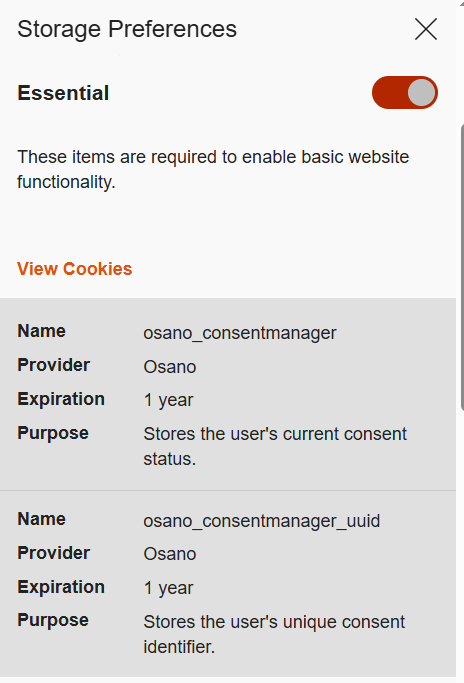
Required or essential cookies are necessary for the website’s basic functions or to provide the service you’ve specifically asked for. This includes temporary cookies that track your activity during a single visit. It also includes security cookies, such as identification cookies, which the website uses to recognize you and spot any fraudulent activity. Notably, cookies that store your consent to save cookies may also be considered essential if determined by the website owner, since they are necessary to ensure the resource complies with your chosen privacy settings.

The need to use essential cookies is primarily relevant for websites that have a complex structure and a variety of widgets. Think of an e-commerce site that needs a shopping cart and a payment system, or a photo app that has to save images to your device.

A key piece of data stored in required cookies is the above-mentioned Session ID, which helps the site identify you. If you don’t allow this ID to be saved in a cookie, some websites will put it directly in the page’s URL instead. This is a much riskier practice because URLs aren’t encrypted. They’re also visible to analytics services, tracking tools, and even other users on the same network as you, which makes them vulnerable to cross-site scripting (XSS) attacks. This is a major reason why many sites won’t let you disable required cookies for your own security.

Example of required cookies on the Osano CMP website

Example of required cookies on the Osano CMP website

Optional cookies are the ones that track your online behavior for marketing, analytics, and performance. This category includes third-party cookies created by social media platforms, as well as performance cookies that help the website run faster and balance the load across servers. For instance, these cookies can track broken links to improve a website’s overall speed and reliability.

Essentially, most optional cookies are third-party cookies that aren’t critical for the site to function. However, the category can also include some first-party cookies for things like site analytics or collecting information about your preferences to show you personalized content.

While these cookies generally don’t store your personal information in readable form, the data they collect can still be used by analytics tools to build a detailed profile of you with enough identifying information. For example, by analyzing which sites you visit, companies can make educated guesses about your age, health, location, and much more.

A major concern is that optional cookies can sometimes capture sensitive information from autofill forms, such as your name, home address, or even bank card details. This is exactly why many websites now give you the choice to accept or decline the collection of this data.

Special types of cookies

Let’s also highlight special subtypes of cookies managed with the help of two similar technologies that enable non-standard storage and retrieval methods.

A supercookie is a tracking technology that embeds cookies into website headers and stores them in non-standard locations, such as HTML5 local storage, browser plugin storage, or browser cache. Because they’re not in the usual spot, simply clearing your browser’s history and cookies won’t get rid of them.

Supercookies are used for personalizing ads and collecting analytical data about the user (for example, by internet service providers). From a privacy standpoint, supercookies are a major concern. They’re a persistent and hard-to-control tracking mechanism that can monitor your activity without your consent, which makes it tough to opt out.

Another unusual tracking method is Evercookie, a type of zombie cookie. Evercookies can be recovered with JavaScript even after being deleted. The recovery process relies on the unique user identifier (if available), as well as traces of cookies stored across all possible browser storage locations.

How cookie use is regulated

The collection and management of cookies are governed by different laws around the world. Let’s review the key standards from global practices.

  1. General Data Protection Regulation (GDPR) and ePrivacy Directive (Cookie Law) in the European Union.
    Under EU law, essential cookies don’t require user consent. This has created a loophole for some websites. You might click “Reject All”, but that button might only refuse non-essential cookies, allowing others to still be collected.
  2. Lei Geral de Proteção de Dados Pessoais (LGPD) in Brazil.
    This law regulates the collection, processing, and storage of user data within Brazil. It is largely inspired by the principles of GDPR and, similarly, requires free, unequivocal, and clear consent from users for the use of their personal data. However, LGPD classifies a broader range of information as personal data, including biometric and genetic data. It is important to note that compliance with GDPR does not automatically mean compliance with LGPD, and vice versa.
  3. California Consumer Privacy Act (CCPA) in the United States.
    The CCPA considers cookies a form of personal information. This means their collection and storage must follow certain rules. For example, any California resident has the right to stop cross-site cookie tracking to prevent their personal data from being sold. Service providers are required to give users choices about what data is collected and how it’s used.
  4. The UK’s Privacy and Electronic Communications Regulations (PECR, or EC Directive) are similar to the Cookie Law.
    PECR states that websites and apps can only save information on a user’s device in two situations: when it’s absolutely necessary for the site to work or provide a service, or when the user has given their explicit consent to this.
  5. Federal Law No. 152-FZ “On Personal Data” in Russia.
    The law broadly defines personal data as any information that directly or indirectly relates to an individual. Since cookies can fall under this definition, they can be regulated by this law. This means websites must get explicit consent from users to process their data.

In Russia, website owners must inform users about the use of technical cookies, but they don’t need to get consent to collect this information. For all other types of cookies, user consent is required. Often, the user gives this consent automatically when they first visit the site, as it’s stated in the default cookie warning.

Some sites use a banner or a pop-up window to ask for consent, and some even let users choose exactly which cookies they’re willing to store on their device.

Beyond these laws, website owners create their own rules for using first-party cookies. Similarly, third-party cookies are managed by the owners of third-party services, such as Google Analytics. These parties decide what kind of information goes into the cookies and how it’s formatted. They also determine the cookies’ lifespan and security settings. To understand why these settings are so important, let’s look at a few ways malicious actors can attack one of the most critical types of cookies: those that contain a Session ID.

Session hijacking methods

As discussed above, cookies containing a Session ID are extremely sensitive. They are a prime target for cybercriminals. In real-world attacks, different methods for stealing a Session ID have been documented. This is a practice known as session hijacking. Below, we’ll look at a few types of session hijacking.

Session sniffing

One method for stealing cookies with a Session ID is session sniffing, which involves intercepting traffic between the user and the website. This threat is a concern for websites that use the open HTTP protocol instead of HTTPS, which encrypts traffic. With HTTP, cookies are transmitted in plain text within the headers of HTTP requests, which makes them vulnerable to interception.

Attacks targeting unencrypted HTTP traffic mostly happen on public Wi-Fi networks, especially those without a password and strong security protocols like WPA2 or WPA3. These protocols use AES encryption to protect traffic on Wi-Fi networks, with WPA3 currently being the most secure version. While WPA2/WPA3 protection limits the ability to intercept HTTP traffic, only implementing HTTPS can truly protect against session sniffing.

This method of stealing Session ID cookies is fairly rare today, as most websites now use HTTPS encryption. The popularity of this type of attack, however, was a major reason for the mass shift to using HTTPS for all connections during a user’s session, known as HTTPS everywhere.

Cross-site scripting (XSS)

Cross-site scripting (XSS) exploits vulnerabilities in a website’s code to inject a malicious script, often written in JavaScript, onto its webpages. This script then runs whenever a victim visits the site. Here’s how an XSS attack works: an attacker finds a vulnerability in the source code of the target website that allows them to inject a malicious script. For example, the script might be hidden in a URL parameter or a comment on the page. When the user opens the infected page, the script executes in their browser and gains access to the site’s data, including the cookies that contain the Session ID.

Session fixation

In a session fixation attack, the attacker tricks your browser into using a pre-determined Session ID. Thus, the attacker prepares the ground for intercepting session data after the victim visits the website and performs authentication.

Here’s how it goes down. The attacker visits a website and gets a valid, but unauthenticated, Session ID from the server. They then trick you into using that specific Session ID. A common way to do this is by sending you a link with the Session ID already embedded in the URL, like this: http://example.com/?SESSIONID=ATTACKER_ID. When you click the link and sign in, the website links the attacker’s Session ID to your authenticated session. The attacker can then use the hijacked Session ID to take over your account.

Modern, well-configured websites are much less vulnerable to session fixation than XSS-like attacks because most current web frameworks automatically change the user’s Session ID after they sign in. However, the very existence of this Session ID exploitation attack highlights how crucial it is for websites to securely manage the entire lifecycle of the user session, especially at the moment of sign-in.

Cross-site request forgery (CSRF)

Unlike session fixation or sniffing attacks, cross-site request forgery (CSRF or XSRF) leverages the website’s trust in your browser. The attacker forces your browser, without your knowledge, to perform an unwanted action on a website where you’re signed in – like changing your password or deleting data.

For this type of attack, the attacker creates a malicious webpage or an email message with a harmful link, piece of HTML code, or script. This code contains a request to a vulnerable website. You open the page or email message, and your browser automatically sends the hidden request to the target site. The request includes the malicious action and all the necessary (for example, temporary) cookies for that site. Because the website sees the valid cookies, it treats the request as a legitimate one and executes it.

Variants of the man-in-the-middle (MitM) attack

A man-in-the-middle (MitM) attack is when a cybercriminal not only snoops on but also redirects all the victim’s traffic through their own systems, thus gaining the ability to both read and alter the data being transmitted. Examples of these attacks include DNS spoofing or the creation of fake Wi-Fi hotspots that look legitimate. In an MitM attack, the attacker becomes the middleman between you and the website, which gives them the ability to intercept data, such as cookies containing the Session ID.

Websites using the older HTTP protocol are especially vulnerable to MitM attacks. However, sites using the more secure HTTPS protocol are not entirely safe either. Malicious actors can try to trick your browser with a fake SSL/TLS certificate. Your browser is designed to warn you about suspicious invalid certificates, but if you ignore that warning, the attacker can decrypt your traffic. Cybercriminals can also use a technique called SSL stripping to force your connection to switch from HTTPS to HTTP.

Predictable Session IDs

Cybercriminals don’t always have to steal your Session ID – sometimes they can just guess it. They can figure out your Session ID if it’s created according to a predictable pattern with weak, non-cryptographic characters. For example, a Session ID may contain your IP address or consecutive numbers, and a weak algorithm that uses easily predictable random sequences may be used to generate it.

To carry out this type of attack, the malicious actor will collect a sufficient number of Session ID examples. They analyze the pattern to figure out the algorithm used to create the IDs, then apply that knowledge to predicting your current or next Session ID.

Cookie tossing

This attack method exploits the browser’s handling of cookies set by subdomains of a single domain. If a malicious actor takes control of a subdomain, they can try to manipulate higher-level cookies, in particular the Session ID. For example, if a cookie is set for sub.domain.com with the Domain attribute set to .domain.com, that cookie will also be valid for the entire domain.

This lets the attacker “toss” their own malicious cookies with the same names as the main domain’s cookies, such as Session_id. When your browser sends a request to the main server, it includes all the relevant cookies it has. The server might mistakenly process the hacker’s Session ID, giving them access to your user session. This can work even if you never visited the compromised subdomain yourself. In some cases, sending invalid cookies can also cause errors on the server.

How to protect yourself and your users

The primary responsibility for cookie security rests with website developers. Modern ready-made web frameworks generally provide built-in defenses, but every developer should understand the specifics of cookie configuration and the risks of a careless approach. To counter the threats we’ve discussed, here are some key recommendations.

Recommendations for web developers

All traffic between the client and server must be encrypted at the network connection and data exchange level. We strongly recommend using HTTPS and enforcing automatic redirect from HTTP to HTTPS. For an extra layer of protection, developers should use the HTTP Strict Transport Security (HSTS) header, which forces the browser to always use HTTPS. This makes it much harder, and sometimes impossible, for attackers to slip into your traffic to perform session sniffing, MitM, or cookie tossing attacks.

It must be mentioned that the use of HTTPS is insufficient protection against XSS attacks. HTTPS encrypts data during transmission, while an XSS script executes directly in the user’s browser within the HTTPS session. So, it’s up to the website owner to implement protection against XSS attacks. To stop malicious scripts from getting in, developers need to follow secure coding practices:

  • Validate and sanitize user input data.
  • Implement mandatory data encoding (escaping) when rendering content on the page – this way, the browser will not interpret malicious code as part of the page and will not execute it.
  • Use the HttpOnly flag to protect cookie files from being accessed by the browser.
  • Use the Content Security Policy (CSP) standard to control code sources. It allows monitoring which scripts and other content sources are permitted to execute and load on the website.

For attacks like session fixation, a key defense is to force the server to generate a new Session ID right after the user successfully signs in. The website developer must invalidate the old, potentially compromised Session ID and create a new one that the attacker doesn’t know.

An extra layer of protection involves checking cookie attributes. To ensure protection, it is necessary to check for the presence of specific flags (and set them if they are missing): Secure and HttpOnly. The Secure flag ensures that cookies are transmitted over an HTTPS connection, while HttpOnly prevents access to them from the browser, for example through scripts, helping protect sensitive data from malicious code. Having these attributes can help protect against session sniffing, MitM, cookie tossing, and XSS.

Pay attention to another security attribute, SameSite, which can restrict cookie transmission. Set it to Lax or Strict for all cookies to ensure they are sent only to trusted web addresses during cross-site requests and to protect against CSRF attacks. Another common strategy against CSRF attacks is to use a unique, randomly generated CSRF token for each user session. This token is sent to the user’s browser and must be included in every HTTP request that performs an action on your site. The site then checks to make sure the token is present and correct. If it’s missing or doesn’t match the expected value, the request is rejected as a potential threat. This is important because if the Session ID is compromised, the attacker may attempt to replace the CSRF token.

To protect against an attack where a cybercriminal tries to guess the user’s Session ID, you need to make sure these IDs are truly random and impossible to predict. We recommend using a cryptographically secure random number generator that utilizes powerful algorithms to create hard-to-predict IDs. Additional protection for the Session ID can be ensured by forcing its regeneration after the user authenticates on the web resource.

The most effective way to prevent a cookie tossing attack is to use cookies with the __Host- prefix. These cookies can only be set on the same domain that the request originates from and cannot have a Domain attribute specified. This guarantees that a cookie set by the main domain can’t be overwritten by a subdomain.

Finally, it’s crucial to perform regular security checks on all your subdomains. This includes monitoring for inactive or outdated DNS records that could be hijacked by an attacker. We also recommend ensuring that any user-generated content is securely isolated on its own subdomain. User-generated data must be stored and managed in a way that prevents it from compromising the security of the main domain.

As mentioned above, if cookies are disabled, the Session ID can sometimes get exposed in the website URL. To prevent this, website developers must embed this ID into essential cookies that cannot be declined.

Many modern web development frameworks have built-in security features that can stop most of the attack types described above. These features make managing cookies much safer and easier for developers. Some of the best practices include regular rotation of the Session ID after the user signs in, use of the Secure and HttpOnly flags, limiting the session lifetime, binding it to the client’s IP address, User-Agent string, and other parameters, as well as generating unique CSRF tokens.

There are other ways to store user data that are both more secure and better for performance than cookies.

Depending on the website’s needs, developers can use different tools, like the Web Storage API (which includes localStorage and sessionStorage), IndexedDB, and other options. When using an API, data isn’t sent to the server with every single request, which saves resources and makes the website perform better.

Another exciting alternative is the server-side approach. With this method, only the Session ID is stored on the client side, while all the other data stays on the server. This is even more secure than storing data with the help of APIs because private information is never exposed on the client side.

Tips for users

Staying vigilant and attentive is a big part of protecting yourself from cookie hijacking and other malicious manipulations.

Always make sure the website you are visiting is using HTTPS. You can check this by looking at the beginning of the website address in the browser address bar. Some browsers let the user view additional website security details. For example, in Google Chrome, you can click the icon right before the address.

This will show you if the “Connection is secure” and the “Certificate is valid”. If these details are missing or data is being sent over HTTP, we recommend maximum caution when visiting the website and, whenever possible, avoiding entering any personal information, as the site does not meet basic security standards.

When browsing the web, always pay attention to any security warnings your browser gives you, especially about suspicious or invalid certificates. Seeing one of these warnings might be a sign of an MitM attack. If you see a security warning, it’s best to stop what you’re doing and leave that website right away. Many browsers implement certificate verification and other security features, so it is important to install browser updates promptly – this replaces outdated and compromised certificates.

We also recommend regularly clearing your browser data (cookies and cache). This can help get rid of outdated or potentially compromised Session IDs.

Always use two-factor authentication wherever it’s available. This makes it much harder for a malicious actor to access your account, even if your Session ID is exposed.

When a site asks for your consent to use cookies, the safest option is to refuse all non-essential ones, but we’ll reiterate that sometimes, clicking “Reject cookies” only means declining the optional ones. If this option is unavailable, we recommend reviewing the settings to only accept the strictly necessary cookies. Some websites offer this directly in the pop-up cookie consent notification, while others provide it in advanced settings.

The universal recommendation to avoid clicking suspicious links is especially relevant in the context of preventing Session ID theft. As mentioned above, suspicious links can be used in what’s known as session fixation attacks. Carefully check the URL: if it contains parameters you do not understand, we recommend copying the link into the address bar manually and removing the parameters before loading the page. Long strings of characters in the parameters of a legitimate URL may turn out to be an attacker’s Session ID. Deleting it renders the link safe. While you’re at it, always check the domain name to make sure you’re not falling for a phishing scam.

In addition, we advise extreme caution when connecting to public Wi-Fi networks. Man-in-the-middle attacks often happen through open networks or rogue Wi-Fi hotspots. If you need to use a public network, never do it without a virtual private network (VPN), which encrypts your data and makes it nearly impossible for anyone to snoop on your activity.

MiTM Attack: Sniffing Images In a Network

9 October 2022 at 00:02

Hello aspiring ethical hackers. In this article you will learn how to sniff images in a network using MiTM attack. In our previous article, readers have learnt how plaintext credentials passing through the network can easily be captured by attackers using Wireshark. In this article, readers will learn about a different type of sniffing. i.e […]

The post MiTM Attack: Sniffing Images In a Network appeared first on Hackercool Magazine.

❌
❌