It’s fair to say that there are many people in our community who just love to dunk on Microsoft Windows. It’s an easy win, after all, the dominant player in the PC operating system market has a long history of dunking on free software, and let’s face it, today’s Windows doesn’t offer a good experience. But what might the future hold? [Mason] has an unexpected prediction: that Microsoft will eventually move towards offering a Windows-themed Linux distro instead of a descendant of today’s Windows.
The very idea is sure to cause mirth, but on a little sober reflection, it’s not such a crazy one. Windows 11 is slow and unfriendly, and increasingly it’s losing the position once enjoyed by its ancestors. The desktop (or laptop) PC is no longer the default computing experience, and what to do about that must be a big headache for the Redmond company. Even gaming, once a stronghold for Windows, is being lost to competitors such as Valve’s Steam OS, so it wouldn’t be outlandish for them to wonder whether the old embrace-and-extend strategy could be tried on the Linux desktop.
We do not possess a working crystal ball here at Hackaday, so we’ll hold off hailing a Microsoft desktop Linux. But we have to admit it’s not an impossible future, having seen Apple reinvent their OS in the past using BSD, and even Microsoft bring out a cloud Linux distro. If you can’t wait, you’ll have to make do with a Windows skin, WINE, and the .NET runtime on your current Linux box.
Äike were an Estonian scooter company, which sadly went bust last year. [Rasmus Moorats] has one, and since the app and cloud service the scooter depends on have lost functionality, he decided to reverse engineer it. Along the way he achieved his goal, but found a vulnerability that unlocks all Äike scooters.
The write-up is a tale of app and Bluetooth reverse engineering, ending with the startling revelation of a hardcoded key that’s simply “ffffffffffffffff”. From that he can unlock and interact with any Äike scooter, except for a subset that were used as hire scooters and didn’t have Bluetooth. Perhaps of more legitimate use is the reverse engineering of the scooter functionality.
What do you do when you find a vulnerability in a product whose manufacturer has gone? He reported to the vendor of the IoT module inside the scooter, who responded that the key was a default value that should have been changed by the Äike developers. Good luck, should you own one of these machines.
If you were asked to pick the most annoying of the various Microsoft Windows interfaces that have appeared over the years, there’s a reasonable chance that Windows 8’s Metro start screen and interface design language would make it your choice. In 2012 the software company abandoned their tried-and-tested desktop whose roots extended back to Windows 95 in favor of the colorful blocks it had created for its line of music players and mobile phones.
Consumers weren’t impressed and it was quickly shelved in subsequent versions, but should you wish to revisit Metro you can now get the experience on Linux. [er-bharat] has created Win8DE, a shell for Wayland window managers that brings the Metro interface — or something very like it — to the open source operating system.
We have to admire his chutzpah in bringing the most Microsoft of things to Linux, and for doing so with such a universally despised interface. But once the jibes about Windows 8 have stopped, we can oddly see a point here. The trouble with Metro was that it wasn’t a bad interface for a computer at all, in fact it was a truly great one. Unfortunately the computers it was and is great for are handheld and touchscreen devices where its large and easy to click blocks are an asset. Microsoft’s mistake was to assume that also made it great for a desktop machine, where it was anything but.
We can see that this desktop environment for Linux could really come into its own where the original did, such as for tablets or other touch interfaces. Sadly we expect the Windows 8 connection to kill it before it has a chance to catch on. Perhaps someone will install it on a machine with the Linux version of .net installed, and make a better Windows 8 than Windows 8 itself.
One of the joys of writing for Hackaday comes in following the world of new semiconductor devices, spotting interesting ones while they are still just entries on manufacturer websites, and then waiting for commonly-available dev boards. With Chinese parts there’s always a period in which Chinese manufacturers and nobody else has them, and then they quietly appear on AliExpress.
All of which brings us to the WCH CH32M030, a chip that’s been on the radar for a while and has finally broken cover. It’s the CH32 RISC-V microcontroller you may be familiar with, but with a set of four half-bridge drivers on board for running motors. A handy, cheap, and very smart motor controller, if you will.
There’s been at least one Chinese CH32M030 dev board (Chinese language) online for a while now, but the one listed on AliExpress appears to be a different design. At the time of writing the most popular one is still showing fewer than 20 sales, so we’re getting in at the ground floor here.
We think this chip is of interest because it has the potential to be used in low price robotic projects, replacing as it does a couple of parts or modules in one go. If you use it, we’d like to hear from you!
An audio amplifier was once a fairly simple analogue device, but in recent decades a typical home entertainment amplifier will have expanded to include many digital functions. When these break they are often proprietary and not easy to repair, as was the case with a broken Pioneer surround-sound device given to [Boz]. It sat on the shelf for a few years until he had the idea of a jukebox for his ripped CDs, and his returning it to life with a new main board is something to behold.
Internally it’s a surprisingly modular design, meaning that the front panel with its VFD display and driver were intact and working, as were the class AB amplifier and its power supply. He had the service manual so reverse engineering was straightforward, thus out came the main board in favor of a replacement. He took the original connectors and a few other components, then designed a PCB to take them and a Raspberry Pi Pico and DAC. With appropriate MMBASIC firmware it looks as though it was originally made this way, a sense heightened by a look at the motherboard inside (ignoring a couple of bodges).
A joy of covering the world of the European hackerspace community is that it offers the chance for train travel across the continent using the ever-good-value Interrail pass. For a British traveler such a journey inevitably starts with a Eurostar train that whisks you in comfort through the Channel Tunnel, so a report of an AI vulnerability on the Eurostar website from [Ross Donald] particularly caught our eye. What it reveals goes beyond the train company, and tells us some interesting tidbits about how safeguards in AI chatbots can be circumvented.
The bot sits on the Eurostar website, and is a simple HTML and JavaScript client that talks to the LLM back-end itself through an API. The API queries contain the whole conversation, because as AI toy manufacturers whose products have been persuaded to spout adult context will tell you, large language models (LLM)s as commonly implemented do not have a context memory for the conversation in hand.
The Eurostar developers had not made a bot without guardrails, but the vulnerability lay in those guardrails only being applied to the most recent message. Thus an innocuous or empty message could be sent, with a payload concealed in a previous message in the conversation. He demonstrates the bot returning system information about itself, and embedding injected HTML and JavaScript in its responses.
He notes that the target of the resulting output could only be himself and that he was unable to access any data from other customers, so perhaps in this case the train operator was fortunately spared the risk of a breach. From his description though, we agree they could have responded to the disclosure in a better manner.
One of the most widely recognised product brands in the world is probably Coca-Cola, and its formula is famously kept a secret through precautions that probably rival those of many nation states. There are other colas, and there are many amateurs who have tried to copy Coke’s flavour, but in well over a century, nobody has managed it. Why does [LabCoatz] think his attempt will be successful where others failed? He has friends with their own mass spectrometers.
‘The video below the break is a nearly half-hour exploration into food chemistry and the flavour profile of the well-known soft drink. It’s easy to name many of the ingredients, but some, such as acetic acid, are unexpected. Replicating the contribution from Coke’s de-cocainised coca leaf extract requires the purchase of some of the constituent chemicals in pure form. Its value lies in showing us how flavour profiles are built up, and the analytical methods used in their decoding.
He makes the point that Coke has never patented the formula because to do so would reveal it, but perhaps in that lies the real point. The value in a secret formula for brands such as Coke lies not in the secret itself, as it’s not difficult to make a refreshing cola drink. Instead, it’s the mystique of their product having a secret recipe that matters. Since this isn’t the recipe itself but something that’s supposed to taste a lot like it, that mystique stays intact. He’s not positioning his Lab-Cola as the real thing, so while we might have used a different label colour and font just to make sure, we’re guessing he’s safe from the lawyers. If you’re interested in the legal grey areas surrounding perceived infringement, though, it’s a topic we’ve looked at before.
Emulating older computers on microcontrollers has been a staple of retrocomputing for many years now, with most 8-bit and some 16-bit machines available on Atmel, ARM, or ESP32 platforms. But there’s always been a horsepower limit, a point beyond which a microcontroller is no longer enough, and a “proper” computer is needed. One of those barriers now appears to have been broken, as microcontroller-based emulation moves into the 32-bit era. [Amcchord] has the Basilisk II emulator ported to the ESP32-P4 platform, providing a 68040 Mac able to run OS8.1. This early-1990s-spec machine might not seem like much in 2026, but it represents a major step forward.
The hardware it uses is the M5Stack Tab5, and it provides an emulated Mac with up to 16 MB of memory. Remember, in 1992 this would have been a high-spec machine. It manages a 15 frames per second refresh rate, which is adequate for productivity applications. The emulator uses the Tab5’s touchscreen to emulate the Mac mouse alongside support for USB input devices. To 1990 hackers, it’s almost the Mac tablet you didn’t know you would want in the future.
We like this project, both because it’s advancing the art of emulation on microcontrollers, and also because it delivers a computer that’s useful for some of the things you might have done with a Mac in 1992 and could even do today. Pulling this out on the train back then would have blown people’s minds. There’s even a chance that MacOS on something like this would turn a few heads in 2026. It’s certainly not the first emulated Mac we’ve seen though.
A Vector Network Analyser, or VNA, is the ultimate multi-tool of RF test equipment. They can now be had in not very capable form for almost pocket money prices, but the professional-grade ones cost eye-watering sums. Enough to make an older VNA for a few hundred on eBay a steal, and [W3AXL] has just such a device in an HP 8714C. It’s the height of 1990s tech with a floppy drive and a green-screen CRT, but he’s homing right in on the VGA monitor port on the back. Time for a colour LCD upgrade!
There are two videos below the break, posted a year apart, because as we’re sure many of you will know, events have a habit of getting in the way of projects. In the first, we see the removal of the CRT module and safe extraction of its electronics, followed by the crafting of a display bezel for the LCD. Meanwhile, the second video deals with the VNA itself, extracting the VGA signal and routing it forward to the new module.
We’re struck not for the first time by the high quality of the construction in this piece of test equipment; it’s not only substantial but well designed for maintenance and disassembly. [W3AXL] sensibly leaves the RF part alone, but both CRT and mainboard modules slide out with minimal screw removals and few problems in reassembly.
He goes the extra mile with a second iteration of the display mount and a curved print to fit the CRT shape in the front panel. The result is a colour display on the instrument, and we’re guessing, a much lighter device, too.
There’s an old adage in photography that the best camera in the world is the one in your hand when the shot presents itself, but there’s no doubt that a better camera makes a difference to the quality of the final image. Among decent quality cameras the Leica rangefinder models have near cult-like status, but the problem is for would-be Leica owners that they carry eye-watering prices. [Cristian Băluță] approached this problem in s special way, by crafting a Leica-style body for a Panasonic Lumix camera. Given the technology relationship between the Japanese and German companies, we can see the appeal.
While the aesthetics of a Leica are an important consideration, the ergonomics such as the position of the lens on the body dictated the design choices. He was fortunate that the internal design of the Lumix gave plenty of scope for re-arrangement of parts, given that cameras are often extremely packed internally. Some rather bold surgery to the Lumix mainboard and a set of redesigned flex PCBs result in all the parts fitting in the CNC machined case, and the resulting camera certainly looks the part.
The write-up is in part a journey through discovering the process of getting parts manufactured, but it contains a lot of impressive work. Does the performance of the final result match up to its looks? We’ll leave you to be the judge of that. Meanwhile, take a look at another Leica clone.
Many projects on these pages do clever things with video. Whether it’s digital or analogue, it’s certain our community can push a humble microcontroller to the limit of its capability. But sometimes the terminology is a little casually applied, and in particular with video there’s an obvious example. We say “PAL”, or “NTSC” to refer to any composite video signal, and perhaps it’s time to delve beyond that into the colour systems those letters convey.
Know Your Sub-carriers From Your Sync Pulses
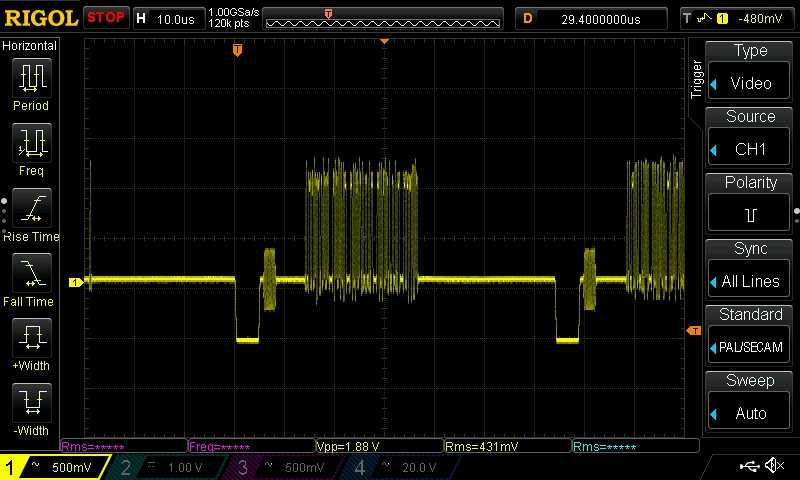
A close-up on a single line of composite video from a Raspberry Pi.
A video system of the type we’re used to is dot-sequential. It splits an image into pixels and transmits them sequentially, pixel by pixel and line by line. This is the same for an analogue video system as it is for many digital bitmap formats. In the case of a fully analogue TV system there is no individual pixel counting, instead the camera scans across each line in a continuous movement to generate an analogue waveform representing the intensity of light. If you add in a synchronisation pulse at the end of each line and another at the end of each frame you have a video signal.
But crucially it’s not a composite video signal, because it contains only luminance information. It’s a black-and-white image. The first broadcast TV systems as for example the British 405 line and American 525 line systems worked in exactly this way, with the addition of a separate carrier for their accompanying sound.
The story of the NTSC colour TV standard’s gestation in the late 1940s is well known, and the scale of their achievement remains impressive today. NTSC, and PAL after it, are both compatible standards, which means they transmit the colour information alongside that black-and-white video, such that it doesn’t interfere with the experience of a viewer watching on a black-and-white receiver. They do this by adding a sub-carrier modulated with the colour information, at a frequency high enough to minimise its visibility on-screen. for NTSC this is 3.578MHz, while for PAL it’s 4.433MHz. These frequencies are chosen to fall between harmonics of the line frequency. It’s this combined signal which can justifiably be called composite video, and in the past we’ve descended into some of the complexities of its waveform.
It’s Your SDR’s I and Q, But Sixty Years Earlier
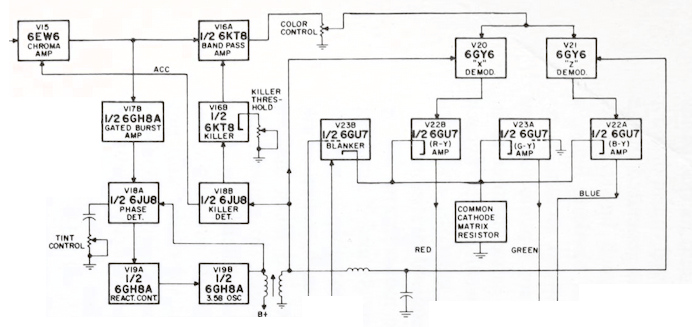
Block diagram of an NTSC colour decoder as found in a typical 1960s American TV set. Color TV Servicing, Buchsbaum, Walter H, 1968.
An analogue colour TV camera produces three video signals, one for each of the red, green, and blue components of the picture. Should you combine all three you arrive at that black-and-white video waveform, referred to as the luminance, or as Y. The colour information is then reduced to two further signals by computing the difference between the red and the luminance, or R-Y, and the blue and the luminance, or B-Y. These are then phase modulated as I-Q vectors onto the colour sub-carrier in the same way as happens in a software-defined radio.
At the receiver end, the decoder isolates the sub-carrier, I-Q demodulates it, and then rebuilds the R, G, and B, with a summing matrix. To successfully I-Q demodulate the sub-carrier it’s necessary to have a phase synchronised crystal oscillator, this synchronisation is achieved by sending out a short burst of the colour sub-carrier on its own at the start of the line. The decoder has a phase-locked-loop in order to perform the synchronisation.
So, Why The PAL Delay Line?
A PAL decoder module from a 1970s ITT TV. The blue component in the middle is the delay line. Mister rf, CC BY-SA 4.0.
There in a few paragraphs, is the essence of NTSC colour television. How is PAL different? In essence, PAL is NTSC, with some improvements to correct phase errors in the resulting picture. PAL stands for Phase Alternate Line, and means that the phase of those I and Q modulated signals swaps every line. The decoder is similar to an NTSC one and indeed an NTSC decoder set to that 4.433MHz sub-carrier could do a job of decoding it, but a fully-kitted out PAL decoder includes a one-line delay line to cancel out phase differences between adjacent lines. Nowadays the whole thing is done in the digital domain in an integrated circuit that probably also decodes other standards such as the French SECAM, but back in the day a PAL decoder was a foot-square analogue board covered in juicy parts highly prized by the teenage me. Since it was under a Telefunken patent there were manufacturers, in particular those from Japan, who would try to make decoders that didn’t infringe on that IP. Their usual approach was to create two NTSC decoders, one for each phase-swapped line.
So if you use “NTSC” to mean “525-line” and “PAL” to mean “625-line”, then everyone will understand what you mean. But make sure you’re including that colour sub-carrier, or you might be misleading someone.
We are all familiar enough by now with the succession of boards that have come from Raspberry Pi in Cambridge over the years, and when a new one comes out we’ve got a pretty good idea what to expect. The “classic” Pi model B+ form factor has been copied widely by other manufacturers as has their current Compute Module. If you buy the real Raspberry Pi you know you’ll get a solid board with exceptionally good software support.
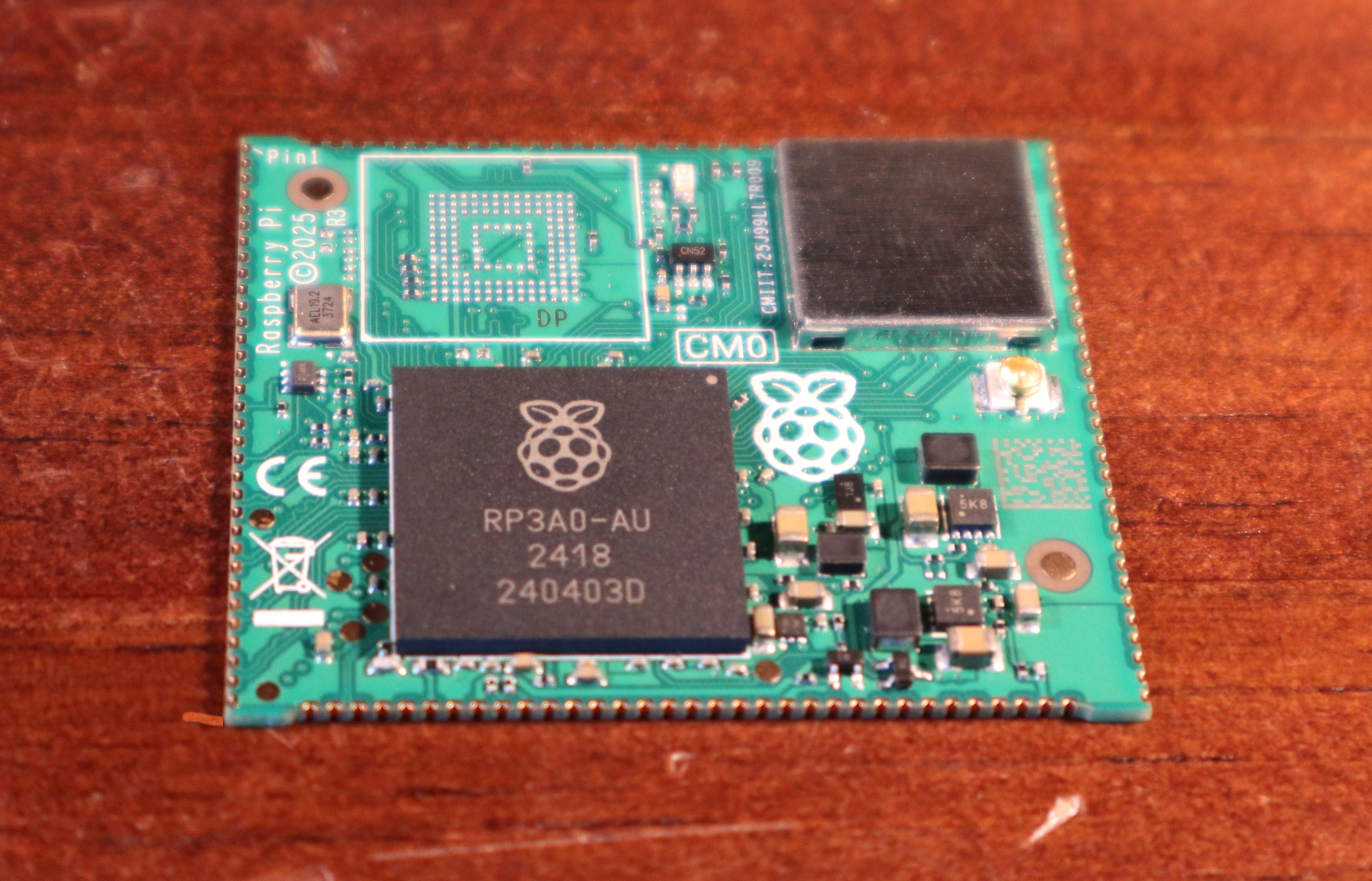
Every now and then though, they surprise us, with a board that follows a completely different path, which brings us to the one on our bench today. The Compute Module Zero packs the same quad-core RP3 system-on-chip (SoC) and Wi-Fi module as the Pi Zero 2 W with 512 MB of SDRAM onto a tiny 39 mm by 33 mm postage-stamp module. It’s a Pi, but not as you know it, so what is it useful for?
A Pi Zero 2 As You Haven’t Seen It Before
If you don’t mint the wait for shipping from China, LCSC have stock.
The first clue as to where this module sits in the Pi range comes from how it came to me. I have a bare module and the dev kit on loan from a friend who’s evaluating them with the idea of incorporating into a product. Instead of buying it from a store here in Europe he had to have it shipped from LCSC in China. It’s Chinese-made and distributed, and it’s not a consumer part in the way your Pi 5 is. Instead it’s an OEM part, and one which appears from where we’re sitting to be tailored specifically to the needs of OEMs manufacturing in China. Would you like a Linux computer with useful software updates and support built into your product? Look no further.
I put up a quick video showing it in detail which you can see at the bottom of the page. Physically it appears to carry the same parts we’re used to from the Zero 2, with the addition of an eMMC storage chip and with an antenna socket in place of the PCB antenna on the Zero. All the available interfaces are brought out to the edge of the board including some not seen on the Zero. The module is available with a variety of different storage options, including the version with no eMMC which my friend has. He’s also bought one with the storage on the dev board, so you can see both types.
The bottom-end CM0 has no onboard eMMC.
The dev board is similar to a Pi model A+ in size, with a bit of extra PCB at the bottom for the USB and HDMI connectors. Like the Zero it has Micro-USB connectors for power and USB, but it carries a full-size HDMI socket. There are connectors for an LCD display, a camera, a micro SD card if you’re using the version without eMMC, and 40-pin GPIO header.
In addition, there’s an extrnal stick-on antenna in the box. Electrically it’s nothing you won’t have seen before, after all it’s little more than a Pi Zero 2 on a different board, and with less memory. This one is fresh from the box and doesn’t have an OS installed, but since we all already know how well a Pi Zero 2 runs and the likely implications of 512 MB of memory I’ve left it that way for my friend.
What Can This Board Do For Us?
The idea of a bottom-end Raspberry Pi as a component module for your Chinese assembly house is a good one. It has to be the RP3 on board, because as we’ve noted, the earlier Pi architecture is heading into the sunset and that is now their lowest-power 64-bit silicon. It could use more memory, but 512 MB is enough for many undemanding Linux applications and more than appears on many SoCs.
For tiny little computer applications, it’s an attractive component, but it’s a little bit expensive. Depending on the version, and whether it comes with the dev board, it ranges from about $25 to $38, and we can imagine that even with a quantity price break that may be too much for many manufacturers. A Chinese SoC, albeit with worse long-term Linux support, can be had for much less. If this SBC form factor catches on, we’d expect to see knockoff boards appear for a more reasonable price in due course.
Perhaps as the price of memory eventually comes down they will increase the spec a little, but we’d hazard a guess that a lower price would mean more success. A low power, plug-innable computer for $20 would be interesting for a number of projects where size really matters. Only time will tell, but meanwhile if you’re designing a product you have a new Linux option for it, and for the rest of us it’s time to look out for these modules appearing in things we buy.

 Login
Login