Normal view

There are new articles available, click to refresh the page.
Today — 12 December 2025Main stream

Review: Cherry G84-4100 Keyboard

12 December 2025 at 13:00

The choice of a good keyboard is something which consumes a lot of time for many Hackaday readers, judging by the number of custom input device projects which make it to these pages. I live by my keyboard as a writer, but I have to admit that I’ve never joined in on the special keyboard front; for me it’s been a peripheral rather than an obsession. But I’m hard on keyboards, I type enough that I wear them out. For the last five years my Hackaday articles have come via a USB Thinkpad keyboard complete with the little red stick pointing device, but its keys have started parting company with their switches so it’s time for a replacement.

I Don’t Want The Blackpool Illuminations

A picture of the Blackpool illuminations at night against a dark sky.
Is it a gamer’s keyboard, or the Blackpool seafront at night? I can’t tell any more. Mark S Jobling, Public domain.

For a non keyboard savant peering over the edge, this can be a confusing choice. There’s much obsessing about different types of mechanical switch, and for some reason I can’t quite fathom, an unreasonable number of LEDs.

I don’t want my keyboard to look like the Blackpool Illuminations (translation for Americans: Las Vegas strip), I just want to type on the damn thing. More to the point, many of these “special” keyboards carry prices out of proportion to their utility, and it’s hard to escape the feeling that like the thousand quid stereo the spotty kid puts in his Opel Corsa, you’re being asked to pay just for bragging rights.

Narrowing down my needs then, I don’t need any gimmicks, I just need a small footprint keyboard that’s mechanically robust enough to survive years of my bashing out Hackaday articles on it. I’m prepared to pay good money for that.

The ‘board I settled upon is probably one of the most unglamorous decent quality keyboards on the market. The Cherry G84-4100 is sold to people in industry who need a keyboard that fits in a small space, and I’ve used one to the deafening roar of a cooling system in a data centre rack. It’s promising territory for a Hackaday scribe. I ordered mine from the Cherry website, and it cost me just under £70 (about $93), with the postage being extra. It’s available with a range of different keymaps, and I ordered the UK one. In due course the package arrived, a slim cardboard box devoid of consumer branding, inside of which was the keyboard, a USB-to-PS/2 adaptor, and a folded paper manual. I’m using it on a USB machine so the adaptor went in my hoard, but I’m pleased to be able to use this with older machines when necessary.

Hello My Old Data Centre Friend

The 1, 2, and 3 keys on a UK keyboard.
It’s not shift-3 for the £ sign that’s important, but shift-2 for the quote. You have no idea how annoying not having that is on an international layout.

For my money, I got a keyboard described as “compact”, or 75%. It’s 282 by 132 by 26 mm in size, which means it takes up a little less space than the Thinkpad one it replaces, something of a win to my mind. It doesn’t have a numeric keypad, but I don’t need that. The switches are Cherry mechanical ones rather than the knock-offs you’ll find on so many competitors, and they have something of the mechanical sound but not the racket of an IBM buckled spring key switch. Cherry claim they’re good for 20 million activations, so even I shouldn’t wear them out.

The keymap is of course the standard UK one I’m used to, but what makes or breaks a ‘board like this one is how they arrange the other keys. I really like that their control key is in the bottom left hand corner rather than as in so many others, the function key, but I am taking a little while to get used to the insert and delete keys being to the left of the arrow keys in the bottom right hand corner. Otherwise my muscle memory isn’t being taxed too much by it.

There are a couple of little feet at the back underneath that can be flipped up to raise the ‘board at an angle. Since after years of typing the heel of my hand becomes inflamed if I rest it on the surface I elevate my wrist by about an inch with a rest, thus I use the keyboard tilt. I’ve been typing with the Cherry for a few weeks now, and it remains comfortable.

The Cherry G84-4100 then. It’s not a “special” keyboard in any way, in fact its about as utilitarian as it gets in a peripheral. But for me a keyboard is a tool, and just like my Vernier caliper or my screwdrivers I demand that it does its job repeatably and flawlessly for many years to come. So its unglamorous nature is its strength, because I’ve paid for the engineering which underlies it rather than the bells and whistles that adorn some others. Without realising it you’ll be seeing a lot of this peripheral in my work over the coming years.

Yesterday — 11 December 2025Main stream

Jenny’s Daily Drivers: Haiku R1/beta5

11 December 2025 at 13:00

Back in the mid 1990s, the release of Microsoft’s Windows 95 operating system cemented the Redmond software company’s dominance over most of the desktop operating system space. Apple were still in their period in the doldrums waiting for Steve Jobs to return with his NeXT, while other would-be challengers such as IBM’s OS/2 or Commodore’s Amiga were sinking into obscurity.

Into this unpromising marketplace came Be inc, with their BeBox computer and its very nice BeOS operating system. To try it out as we did at a trade show some time in the late ’90s was to step into a very polished multitasking multimedia OS, but sadly one which failed to gather sufficient traction to survive. The story ended in the early 2000s as Be were swallowed by Palm, and a dedicated band of BeOS enthusiasts set about implementing a free successor OS. This has become Haiku, and while it’s not BeOS it retains API compatibility with and certainly feels a lot like its inspiration. It’s been on my list for a Daily Drivers article for a while now, so it’s time to download the ISO and give it a go. I’m using the AMD64 version.

A Joy To Use, After A Few Snags

Hackaday, in WebPositive, on Haiku
If you ignore the odd font substitution in WebPositive, it’s a competent browser.

This isn’t the first time I’ve given Haiku a go in an attempt to write about it for this series, and I have found it consistently isn’t happy with my array of crusty old test laptops. So this time I pulled out something newer, my spare Lenovo Thinkpad X280. I was pleased to see that the Haiku installation USB volume booted and ran fine on this machine, and I was soon at the end of the install and ready to start my Haiku journey.

Here I hit my first snag, because sadly the OS hadn’t quite managed to set up its UEFI booting correctly. I thus found myself unexpectedly in a GRUB prompt, as the open source bootloader was left in place from a previous Linux install. Fixing this wasn’t too onerous as I was able to copy the relevant Haiku file to my UEFI partition, but it was a little unexpected. On with the show then, and in to Haiku.

In use, this operating system is a joy. Its desktop look and feel is polished, in a late-90s sense. There was nothing jarring or unintuitive, and though I had never used Haiku before I was never left searching for what I needed. It feels stable too, I was expecting the occasional crash or freeze, but none came. When I had to use the terminal to move the UEFI file it felt familiar to me as a Linux user, and all my settings were easy to get right.

Never Mind My Network Card

The Haiku network setup dialog
If only the network setup on my Thinkpad was as nice as the one in the VM.

I hit a problem when it came to network setup though, I found its wireless networking to be intermittent. I could connect to my network, but while DHCP would give it an IP address it failed to pick up the gateway and thus wasn’t a useful external connection. I could fix this by going to a fixed IP address and entering the gateway and DNS myself, and that gave me a connection, but not a reliable one. I would have it for a minute or two, and then it would be gone. Enough time for a quick software update and to load Hackaday on its WebPositive web browser, but not enough time to do any work. We’re tantalisingly close to a useful OS here, and I don’t want this review to end on that note.

The point of this series has been to try each OS in as real a situation as possible, to do my everyday Hackaday work of writing articles and manipulating graphics. I have used real hardware to achieve this, a motley array of older PCs and laptops. As I’ve described in previous paragraphs I’ve reached the limits of what I can do on real hardware due to the network issue, but I still want to give this one a fair evaluation. I have thus here for the first time used a test subject in a VM rather than on real hardware. What follows then is courtesy of Gnome Boxes on my everyday Linux powerhouse, so please excuse the obvious VM screenshots.

This One Is A True Daily Driver

The HaikuDepot software library.
There’s plenty of well-ported software, but nothing too esoteric.

With a Haiku install having a working network connection, it becomes an easy task to install software updates, and install new software. The library has fairly up-to-date versions of many popular packages, so I was easily able to install GIMP and LibreOffice. WebPositive is WebKit-based and up-to-date enough that the normally-picky Hackaday back-end doesn’t complain at me, so it more than fulfils my Daily Drivers  requirement for an everyday OS I can do my work on. In fact, the ’90s look-and-feel and the Wi-Fi issues notwithstanding, this OS feels stable and solid in a way that many of the other minority OSes I’ve tried do not. I could use this day-to-day, and the Haiku Thinkpad could accompany me on the road.

There is a snag though, and it’s not the fault of the Haiku folks but probably a function of the size of their community; this is a really great OS, but sadly there are software packages it simply doesn’t have available for it. They’ve concentrated on multimedia, the web, games, and productivity in their choice of software to port, and some of the more esoteric or engineering-specific stuff I use is unsurprisingly not there. I can not fault them for this given the obvious work that’s gone into this OS, but it’s something to consider if your needs are complex.

Haiku then, it’s a very nice desktop operating system that’s polished, stable, and a joy to use. Excuse it a few setup issues and take care to ensure your Wi-Fi card is on its nice list, and you can use it day-to-day. It will always have something of the late ’90s about it, but think of that as not a curse but the operating system some of us wished we could have back in the real late ’90s. I’ll be finding a machine to hang onto a Haiku install, this one bears further experimentation.

Before yesterdayMain stream

The EFF Nails It: What’s Wrong With UK Digital ID

9 December 2025 at 07:00

It sometimes seems as though we are in a constant tussle over privacy between governments and the governed, with each year bringing fresh attempts to extend surveillance, and consequent battles. For Brits the big news at the moment comes in a new digital ID scheme, something that will be required for anyone wishing to work in the country, as well as for certain government services. It’s something that has attracted a lot of opposition, and now the EFF have produced an analysis  of why they think it won’t work.

From the perspective of a British writer it would be easy to write screeds about the flaws in the scheme, the way it over-reaches, and about the historical distrust of Brits for their government’s bureaucracy. With the parliamentary petition opposing it approaching three million signatures, there’s no shortage of people who don’t support it. Perhaps the most obvious thing for most of us is how unnecessary it is for its stated aim of preventing illegal immigrants from seeking employment, it neglects that we already have to show proof of right to work before being hired, and that if crooked employers ignore that they will surely also ignore the digital ID.

If you’re reading this elsewhere in the world from where this is being written then it’s still of relevance, because governments like to point to other countries to justify these measures. Follow the EFF on this matter, and take note.


Art: British Passport SVG by Swapnil1101, Public Domain

Anatomy Of A Minimalist Home Computer

7 December 2025 at 10:00

There are plenty of well-known models among the 8-bit machines of the 1980s, and most readers could rattle them off without a thought. They were merely the stars among a plethora of others, and even for a seasoned follower of the retrocomputing world, there are fresh models from foreign markets that continue to surprise and delight. [Dave Collins] is treating us to an in-depth look at the VTech VZ-200, a budget machine that did particularly well in Asian markets. On the way, we learn a lot about a very cleverly designed machine.

The meat of the design centres not around the Z80 microprocessor or the 6847 video chip, but the three 74LS chips handling both address decoding and timing for video RAM access. That they managed this with only three devices is the exceptionally clever part. While there are some compromises similar to other minimalist machines in what memory ranges can be addressed, they are not sufficient to derail the experience.

Perhaps the most ingenuity comes in using not just the logic functions of the chips, but their timings. The designers of this circuit really knew the devices and used them to their full potential. Here in 2025, this is something novice designers using FPGAs have to learn; back then, it was learned the hard way on the breadboard.

All in all, it’s a fascinating read from a digital logic perspective as much as a retrocomputing one. If you want more, it seems this isn’t the only hacker-friendly VTech machine.

John Dalton, CC BY-SA 3.0.

Mac System 7 On a G4? Why Not!

5 December 2025 at 11:00

Over the many years Apple Computer have been in operation, they have made a success of nearly-seamlessly transitioning multiple times between both operating systems and their underlying architecture. There have been many overlapping versions, but there’s always a point at which a certain OS won’t run on newer hardware. Now [Jubadub] has pushed one of those a little further than Apple intended, by persuading classic Mac System 7 to run on a G4.

System 7 was the OS your Mac would have run some time in the mid ’90s, whether it was a later 68000 machine or a first-gen PowerMac. In its day it gave Windows 3.x and even 95 a run for their money, but it relied on an older Mac ROM architecture than the one found on a G4. The hack here lies in leaked ROMS, hidden backwards compatibility, and an unreleased but preserved System 7 version originally designed for the ’90s Mac clone programme axed by Steve Jobs.  It’s not perfect, but they achieved the impossible.

As to why, it seems there’s a significant amount of software that needs 7 to run, something mirrored in the non-Mac retrocomputing world. Even this hack isn’t the most surprising System 7 one we’ve seen recently, as an example someone even made a version for x86 machines.


Thumbnail Image Art: Apple PowerMac G4 by baku13, CC BY-SA 3.0

Biogas Production For Surprisingly Little Effort

5 December 2025 at 01:00

Probably most people know that when organic matter such as kitchen waste rots, it can produce flammable methane. As a source of free energy it’s attractive, but making a biogas plant sounds difficult, doesn’t it? Along comes [My engines] with a well-thought-out biogas plant that seems within the reach of most of us.

It’s based around a set of plastic barrels and plastic waste pipe, and he shows us the arrangement of feed pipe and residue pipe to ensure a flow through the system. The gas produced has CO2 and H2s as undesirable by-products, both of which can be removed with some surprisingly straightforward chemistry. The home-made gas holder meanwhile comes courtesy of a pair of plastic drums one inside the other.

Perhaps the greatest surprise is that the whole thing can produce a reasonable supply of gas from as little as 2 KG of organic kitchen waste daily. We can see that this is a set-up for someone with the space and also the ability to handle methane safely, but you have to admit from watching the video below, that it’s an attractive idea. Who knows, if the world faces environmental collapse, you might just need it.

Raising a GM EV1 from the Dead

4 December 2025 at 14:30

Probably the biggest story in the world of old cars over the past couple of weeks has been the surfacing of a GM EV1 electric car for sale from an auto salvage yard. This was the famous electric car produced in small numbers by the automaker in the 1990s, then only made available for lease before being recalled. The vast majority were controversially crushed with a few units being donated to museums and universities in a non-functional state.

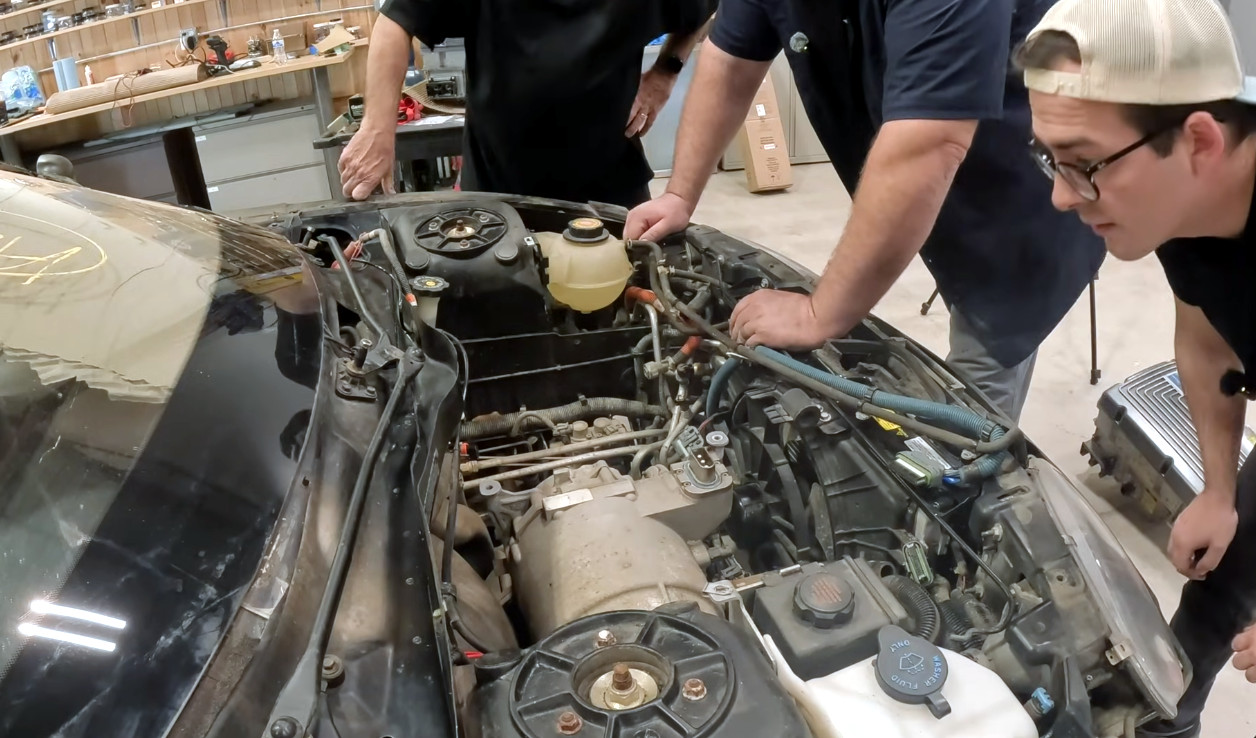
Finding an old car isn’t really a Hackaday story in itself, but now it’s landed in [The Questionable Garage]. It’s being subjected to a teardown as a prelude to its restoration, offering a unique opportunity to look at the state of the art in 1990s electric automotive technology.

The special thing about this car is that by a murky chain of events it ended up as an abandoned vehicle. GM’s legal net covers the rest of the surviving cars, but buying this car as an abandoned vehicle gives the owner legal title over it and frees him from their restrictions. The video is long, but well worth a watch as we see pieces of automotive tech never before shown in public. As we understand it the intention is to bring it to life using parts from GM’s contemporary S10 electric pickup truck — itself a rare vehicle — so we learn quite a bit about those machines too.

Along the way they find an EV1 charger hiding among a stock of pickup chargers, take us through the vehicle electronics, and find some galvanic corrosion in the car’s structure due to water ingress. The windscreen has a huge hole, which they cover with a plastic wrap in order to 3D scan so they can create a replacement.

This car will undoubtedly become a star of the automotive show circuit due to its unique status, so there will be plenty of chances to look at it from the outside in future. Seeing it this close up in parts though is as unique an opportunity as the car itself. We’ve certainly seen far more crusty conventional cars restored to the road, but without the challenge of zero parts availability and no donor cars. Keep an eye out as they bring it closer to the road.

That Power Bank Isn’t Quite So Sweet

3 December 2025 at 11:30

An unlikely hit of the last few months’ consumer hardware has been a power bank branded by the German confectionery company Haribo. It first gained attention in backpacking circles because of its high capacity for a reasonable weight, and since then has been selling like the proverbial hot cakes. Now Amazon have withdrawn it from their store over “A potential safety or quality issue”. The industrial imaging company Lumafield have taken a look at the power bank with a CT scanner, to find out why.

As you might imagine, the power bank is all battery inside, with pouch type lithium ion cells taking up all of the space. Immediately a clue appears as to why Amazon withdrew them, as the individual layers of the cells are misaligned, laying open a risk of failure. They also take a look at a set of earbuds from the same source and find something even more concerning — torn electrodes. Thus neither device can be regarded as safe, and the backpackers will have to haul around a little bit more in the future.

You’ll not find the Wrencher on a power bank, but you can be sure if you did, we’d make sure there was an element of quality control at play. Meanwhile we feel slightly sorry for the branding executive responsible at Haribo, who we are guessing has had a bad day. We’ve featured Lumafield’s work here before quite a few times, most recently looking at similar defects in 18650 cells.

The New Pebble: Now 100% Open Source

1 December 2025 at 07:00

The Pebble was the smartwatch darling of the early 2010s, a glimpse of the future in the form of a microcontroller and screen strapped to your wrist. It was snapped up by Fitbit and canned, which might have been the end of it all were it not for the dedication of the Pebble community. Google open-sourced the OS back in January this year, and since then a new set of Pebble products have appeared under the guidance of Pebble creator [Eric Migicovsky]. Now he’s announced the full open-sourcing of the current Pebble hardware and software stack. As he puts it, “Yesterday, Pebble watch software was ~95% open source. Today, it’s 100% open source”.

If you’re curious it can all be found in repositories under the Core Devices GitHub account. Building your own Pebble clone sounds cool, but perhaps the real value lies instead in giving the new Pebbles something the original never had, an assured future. If you buy one of the new watches then you’ll know that it will remain fixable, and since you have the full set of files you can create new parts for it, or update its software. We think that’s the right way to keep a personal electronic device relevant.

If you want a new Pebble they have a store, meanwhile read some of our previous coverage of its launch.

All Handheld Antennas Are Not Born The Same

1 December 2025 at 01:00

If you own a handheld transceiver of any type then the chances are it will come with a “rubber duck” style antenna. These flexible rubber-coated antennas are a compromise in performance, being significantly smaller than a wavelength at their frequency of operation. [OM40ET] has an interesting video in which he investigates this by tearing down a cheap rubber duck antenna and an even cheaper fake.

These antennas usually have a flexible upper section and a bulge at the bottom over the connector. The fake one has nothing in the bulge except the antenna wire and thus has a very high SWR, while the “real” one has a loading coil. This coil is an interesting design, because it’s designed such that the antenna has two resonant points at the 2 metre and 70 centimetre amateur bands. On paper it’s a tapped coil fed at the tap through a capacitor for matching, but a more detailed appraisal will tell you that the two halves of the coil are designed to return those two resonances. It’s still a not-very-good antenna, but the fact that it works at all is something.

If you want something better at VHF and haven’t got much space, all is not lost. We recently featured a VHF magnetic loop.

Has Steampunk Delivered the Hoverboard?

30 November 2025 at 01:00

The hoverboard, one of the teen crazes of the last decade, is both a marvel of technology and a source of hacker parts that have appeared in so many projects on these pages. It contains an accelerometer or similar, along with a microcontroller and a pair of motor controllers to drive its in-wheel motors. That recipe is open to interpretation of course and we’ve seen a few in our time, but perhaps not quite like this steampunk design from [Skrubis]. It claims a hoverboard design with no modern electronics, only relays, mercury switches, and neon bulbs.

The idea is that it’s a hoverboard from 1884 using parts available in that era, hence there’s talk of telegraph relays and galvanomic piles. The write-up is presented in steampunk-style language which if we’re honest makes our brain hurt, but the premise is intriguing enough to persevere. As far as we can see it uses a pair of relays and a transformer to make an oscillator, from which can be derived the drive for a 3-phase motor. This drive is sent to the motors by further relays operating under the influence of mercury tilt switches.

There are a full set of hardware designs once you wade past the language, but as yet it has no evidence of a prototype. We admit we kinda want it to work because the idea is preposterous enough to be cool if it ran, but we’d be lying if we said we didn’t harbor some doubts. Perhaps you our readers can deliver a verdict, after all presenting you with entertainment is what it’s all about. If a working prototype surfaces we’ll definitely be featuring it, after all it would be cool as heck.

Oddly this isn’t the first non-computerized balance transport we’ve seen.


Header: Simakovarik, CC BY-SA 4.0.

A Flexible Light Inspired by IKEA

29 November 2025 at 16:00

The IKEA SMÅSNÖRE is a flexible silicone rod with an embedded LED strip, attached at each end to a base. It’s eye-catching enough, and it has the useful property of providing a diffuse light from multiple angles that makes it a promising candidate for a work lamp. That’s enough for [Daniel James] to create his own lamp on a similar vein.

The electronics of his lamp are straightforward enough: a 12 volt LED strip whose brightness is controlled by a Pi Pico in response to a potentiometer as a brightness control. It’s not quite stiff enough to form the arch itself, so he’s created a 3D printed chain that forms the structure of the lamp. Similar to a bicycle chain in the way it’s constructed, it has individual links that slot together and pivot. The electronics are in the printed base at one end.

We like this lamp a lot, for the light it gives on the bench and for the ingenuity of the printed chain. We might even make one for ourselves.

So Long Firefox, Hello Vivaldi

25 November 2025 at 10:00

It’s been twenty-three years since the day Phoenix was released, the web browser that eventually became Firefox. I downloaded it on the first day and installed it on my trusty HP Omnibook 800 laptop, and until this year I’ve used it ever since. Yet after all this time, I’m ready to abandon it for another browser. In the previous article in this series I went into my concerns over the direction being taken by Mozilla with respect to their inclusion of AI features and my worries about privacy in Firefox, and I explained why a plurality of browser engines is important for the Web. Now it’s time to follow me on my search for a replacement, and you may be surprised by one aspect of my eventual choice.

Where Do I Go From Here?

Hackaday in the Ladybird browser
It’s Hackaday, in Ladybird! (Ooof, that font.)

Happily for my own purposes, there are a range of Firefox alternatives which fulfill my browser needs without AI cruft and while allowing me to be a little more at peace with my data security and privacy. There’s Chromium of course even if it’s still way too close to Google for my liking, and there are a host of open-source WebKit and Blink based browsers too numerous to name here.

In the Gecko world that should be an easier jump for a Firefox escapee there are also several choices, for example LibreWolf, and Waterfox. In terms of other browser engines there’s the extremely promising but still early in development Ladybird, and the more mature Servo, which though it is available as a no-frills browser, bills itself as an embedded browser engine. I have not considered some other projects that are either lightweight browser engines, or ones not under significant active development.

A screenshot of Hackaday in the servo browser engine.
It’s Hackaday, in Servo!

Over this summer and autumn then I have tried a huge number of different browsers. Every month or so I build the latest Ladybird and Servo; while I am hugely pleased to see progress they’re both still too buggy for my purposes. Servo is lightning-fast but sometimes likes to get stuck in mobile view, while Ladybird is really showing what it’s going to be but remains for now slow-as-treacle. These are ones to watch, and support.

I gave LibreWolf and Waterfox the most attention over the summer, both of which after the experience I’d describe as like Firefox but with mildly annoying bugs. The inability to video conference reliably is a show-stopper in my line of work, and since my eyesight is no longer what it once was I like my browsers to remember when I have zoomed in on a tab. Meanwhile Waterfox on Android is a great mobile browser, right up until it needs to open a link in another app, and fails. I’m used to the quirks of open-source software after 30+ years experimenting with Linux, but when it comes to productivity I can’t let my software disrupt the flow of Hackaday articles.

The Unexpected Choice

A screenshot of Hackaday, in the Vivaldi browser.
It’s Hackaday, in Vivaldi!

It might surprise you after all this open-source enthusiasm then, to see the browser I’ve ended up comfortable with. Vivaldi may be driven by the open-source Blink engine from Chromium and Chrome, but its proprietary front end doesn’t have an open-source licence.

It’s freeware, or free-as-in-beer, and I think the only such software I use. Why, I hear you ask? It’s an effort to produce a browser like Opera used to be in the old days, it’s European which is a significant consideration when it comes to data protection law, and it has (so far) maintained a commitment to privacy while not being evil in the Google motto sense.

It’s quick, I like its interface once the garish coloured default theme has been turned off, and above all, it Just Works. I have my browser back, and I can get on with writing. Should they turn evil I can dump them without a second thought, and hope by then Ladybird has matured enough to suit my needs.

It may not be a trend many of us particularly like, but here in 2025 there’s a sense that the browser has reduced our computers almost to the status of a terminal. It’s thus perhaps the most important piece of software on the device, and in that light I hope you can understand some of the concerns levelled in this series. If you’re reading this from Firefox HQ I’d implore you to follow my advice and go back to what made Firefox so great back in the day, but for the rest of you I’d like to canvass your views on my choice of a worthy replacement. As always, the comments are waiting.

A Couple Of New DOS PCs Appear

23 November 2025 at 22:00

An interesting trend over the last year or two has been the emergence of modern retrocomputer PCs, recreations of classic PC hardware from back in the day taking advantage of modern parts alongside the venerable processors. These machines are usually very well specified for a PC from the 1980s, and represent a credible way to run your DOS or early Windows software on something close to the original. [CNX Software] has news of a couple of new ones from the same manufacturer in China, one sporting a 386sx and the other claiming it can take either an 8088 or an 8086.

Both machines use the same see-through plastic case, screen, and keyboard, and there are plenty of pictures to examine the motherboard. There are even downloadable design files, which is an interesting development. They come with a removable though proprietary looking VGA card bearing a Tseng Labs ET4000, a CF card interface, a USB port which claims to support disk drives, a sound card, the usual array of ports, and an ISA expansion for which a dock is sold separately. The battery appears to be a LiPo pouch cell of some kind.

If you would like one they can be found through the usual channels for a not-outrageous price compared to similar machines. We can see the attraction, though maybe we’ll stick with an emulator for now. If you’d like to check out alternatives we’ve reported in the past on similar 8088 and 386sx computers.

It’s Hard to Make a (Good) Oscillator

22 November 2025 at 04:00

There’s more to making an oscillator than meets the eye, and [lcamtuf] is here with a good primer on the subject. It starts with the old joke that if you need an oscillator it’s best to try to make an amplifier instead, but of course the real point here is to learn how to make not just a mere oscillator, but a good oscillator.

He does this by taking the oscillator back to first principles and explaining positive feedback on an amplifier, before introducing the Schmitt trigger, an RC circuit to induce a delay, and then phase shift. These oscillators are not complex circuits by any means, so understanding their principles should allow you to unlock the secrets of oscillation in a less haphazard way than just plugging in values and hoping.

Oscillation is a subject we’ve taken a deep dive into ourselves here at Hackaday, should you wish to learn any more. Meanshile [lcamtuf] is someone we’ve heard from here before, with a comparative review of inexpensive printed circuit board manufacturers.

Remember XBMC? It’s Back!

21 November 2025 at 07:00

The original Xbox was different from the consoles that had gone before, in that its hardware shared much with a PC of the day. It was found to be hackable, and one of the most successful projects to take advantage of it was a media centre. You know it as Kodi, but its previous name was XBMC, for Xbox Media Centre. The last version that still ran on an original Xbox saw the light of day in 2016, so it’s definitely a surprise that a new version has appeared.

XBMC version 4.0 brings a host of new features to the venerable platform, including the Estuary user interface that will be famniliar to users of more recent Kodi versions, a better games library,, and more. The plugin system has been revamped too, and while it retains the Python 2 version from back in the day it’s promised that a Python 3 update is in the works. That’s right, it sounds as though there will be more releases. Get them from the GitHub repository.

We’re not sure how many of you have early Xbox hardware along with the inclination to use it as a media centre, after all Kodi runs so well on a lot of very accessible hardware. But we’re impressed that the developers of this release have managed so much within the confines of a machine with a 2000s-era spec, and have released it at all.

If you’re curious about Xbox hacking, take a look at some of its early history.

So Long, Firefox, Part One

20 November 2025 at 13:00

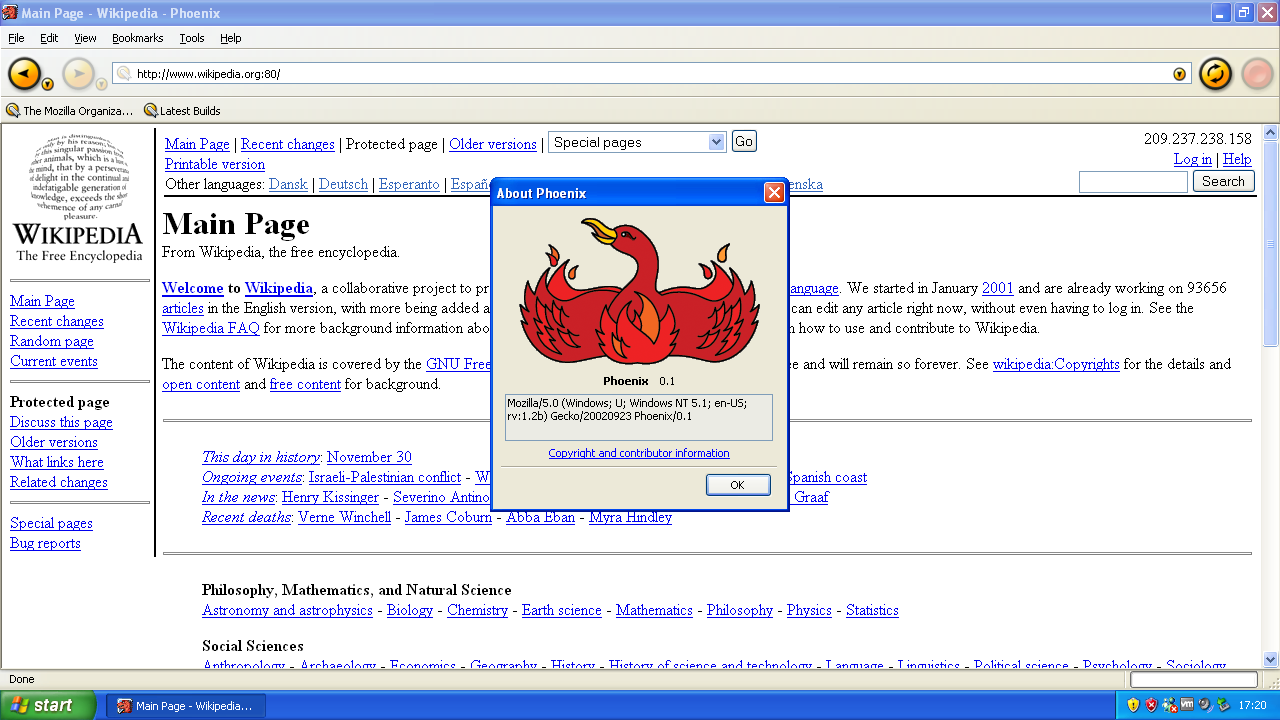
It’s likely that Hackaday readers have among them a greater than average number of people who can name one special thing they did on September 23rd, 2002. On that day a new web browser was released, Phoenix version 0.1, and it was a lightweight browser-only derivative of the hugely bloated Mozilla suite. Renamed a few times to become Firefox, it rose to challenge the once-mighty Microsoft Internet Explorer, only to in turn be overtaken by Google’s Chrome.

Now in 2025 it’s a minority browser with an estimated market share just over 2%, and it’s safe to say that Mozilla’s take on AI and the use of advertising data has put them at odds with many of us who’ve kept the faith since that September day 23 years ago. Over the last few months I’ve been actively chasing alternatives, and it’s with sadness that in November 2025, I can finally say I’m Firefox-free.

Just What Went Wrong?

A graph of market share. On the left in 2009 MSIE has over 50% and Firefox around 30%, while today on the right, Chrome has nearly 70% with everything else in the weeds.
Browser market share, 2009 to 2025. Statcounter, CC BY-SA 3.0.

It was perhaps inevitable that Firefox would lose market share when faced with a challenger from a player with the economic muscle of Google. Chrome is everywhere, it’s the default browser in Android and ChromeOS, and when stacked up against the Internet Explorer of fifteen years or so ago it’s not difficult to see why it made for an easy switch. Chrome is good, it’s fast and responsive, it’s friendly, and the majority of end users either don’t care or don’t know enough to care that it’s Google’s way in to your data. When it first appeared, they still had the “Don’t be evil” aura to them, even if perhaps behind the warm and fuzzy feeling it had already worn away in the company itself.

If Firefox were destined to become a minority player then it could still be a successful one; after all, 2% of the global browser market still represents a huge number of users whose referrals to search engines return a decent income. But the key to being a success in any business is to know your customers, and sitting in front of this particular screen it’s difficult to escape the conclusion that Mozilla have lost touch with theirs. To understand this it’s necessary for all of us to look in the mirror and think for a moment about who uses Firefox.

Somewhere, A Group Of Users Are Being Ignored

A screenshot of the first Phoenix browser in Windows XP.
Blink, and its name will change: Phoenix version 0.1. Mozilla Foundation; Microsoft, Inc., CC BY-SA 4.0.

A quick straw poll in my hackerspace revealed a majority of Firefox users, while the same straw poll among another group of my non-hackerspace friends revealed none. The former used Firefox because of open-source vibes, while the latter used Edge or Safari because it came with their computer, or Chrome on their phone and on their desktop because of Google services. Hackaday is not a global polling organisation, but we think it’s likely that the same trend would reveal itself more widely. If you’re in the technology space you might use Firefox, but if you aren’t you may not even have heard of it in 2025. It’s difficult to see that changing any time soon, to imagine some killer feature that would make those Chrome, Safari, and Edge users care enough to switch to Firefox.

To service and retain this loyal userbase then, you might imagine that Mozilla would address their needs and concerns with what made Phoenix a great first version back in 2002. A lightweight and versatile standards-compliant and open-source web browser with acceptable privacy standards, and without any other non-browser features attached to it. Just a browser, only a browser, and above all, a fast browser.

Instead, Mozilla appear to be following a course calculated to alarm rather than retain these users. Making themselves an AI-focused organisation, neglecting their once-unbeatable developer network, and trying to sneak data gathering into their products. They appear now to think of themselves as a fad-driven Valley startup rather than the custodians of a valuable open-source package, and unsurprisingly this is concerning to those of us who know something about what a browser does behind the scenes.

Why Is This Important?

A nasty piece of code to open different incompatible AJAX requests in different 2000s-era browsers.
If you have ever had to write code like this, you will know. Bret Taylor, CC-BY 2.5.

It is likely that I am preaching to the choir here, but it’s important that there be a plurality of browsers in the world. And by that I mean not just a plurality of front-ends, but a plurality of browser engines. One of the reasons Phoenix appeared all those years ago was to challenge the dominance of Microsoft Internet Explorer, the tool by which the Redmond software company were trying to shape the online world to their tune. If you remember the browser wars of that era, you’ll have tales of incompatibilities seemingly baked in on purpose to break the chances of an open Web, and we were all poorer for it. Writing Javascript with a range of sections to deal with the quirks of different browser families is now largely a thing of the past, and for that you have the people who stuck with Firefox in the 2000s to thank.

The fear is that here in 2025 we are in an analogous situation to the early 2000s, with Google replacing Microsoft. Such is the dominance of Google Chrome and the WebKit-derived Blink engine which powers it, that in effect, Google have immense power to shape the Web just as Microsoft did back in the day. Do you trust them to live up to their now-retired mission statement and not be evil? We can’t say we do. Thus Firefox’s Gecko browser engine is of crucial importance, representing as it does the only any-way serious challenger to Blink and WebKit’s near-monopoly. That it is now tied to a Mozilla leadership treating it in so cavalier a manner does not bode well for the future of the Web.

So I’ve set out my stand here, that after twenty-three years, I’m ready to abandon Firefox. It’s not a decision that has been easy, because it’s important for all of us that there be a plurality of browsers, but such is the direction being taken by Mozilla that I am not anxious to sit idly by and constantly keep an eye out for new hidden privacy and AI features to turn off with obscure checkboxes. In the following piece I’ll take a look at my hunt for alternatives, and you may be surprised by the one I eventually picked.

❌
❌