❌

Normal view

There are new articles available, click to refresh the page.
Yesterday β€” 5 December 2025Main stream

The best laptops for gaming and schoolwork in 2025

5 December 2025 at 05:01

Balancing schoolwork with gaming usually means finding a laptop that can do a little bit of everything. The best gaming laptops aren’t just built for high frame rates. They also need to handle long days of writing papers, running productivity apps and streaming lectures without slowing down. A good machine should feel reliable during class and powerful enough to jump into your favorite games once homework is out of the way.

There’s a wide range of options depending on how much performance you need. Some students prefer a slim, lightweight model that’s easy to carry to school, while others want a new gaming laptop with enough GPU power to handle AAA titles. If you’re watching your budget, there are plenty of solid choices that qualify as a budget gaming laptop without cutting too many corners.

It’s also worth looking at features that help with everyday use. A bright display makes long study sessions easier on the eyes, and a comfortable keyboard is essential if you type a lot. USB-C ports, decent battery life and a responsive trackpad can make a big difference during the school day. We’ve rounded up the best laptops that strike the right mix of performance, portability and value for both gaming and schoolwork.

Table of contents

Best laptops for gaming and school in 2025

Best laptop for gaming and schoolwork FAQs

Are gaming laptops good for school?

As we’ve mentioned, gaming laptops are especially helpful if you're doing any demanding work. Their big promise is powerful graphics performance, which isn't just limited to PC gaming. Video editing and 3D rendering programs can also tap into their GPUs to handle laborious tasks. While you can find decent GPUs on some productivity machines, like Dell's XPS 15, you can sometimes find better deals on gaming laptops. My general advice for any new workhorse: Pay attention to the specs; get at least 16GB of RAM and the largest solid state drive you can find (ideally 1TB or more). Those components are both typically hard to upgrade down the line, so it’s worth investing what you can up front to get the most out of your PC gaming experience long term. Also, don’t forget the basics like a webcam, which will likely be necessary for the schoolwork portion of your activities.

The one big downside to choosing a gaming notebook is portability. For the most part, we'd recommend 15-inch models to get the best balance of size and price. Those typically weigh in around 4.5 pounds, which is significantly more than a three-pound ultraportable. Today's gaming notebooks are still far lighter than older models, though, so at least you won't be lugging around a 10-pound brick. If you’re looking for something lighter, there are plenty of 14-inch options these days. And if you're not into LED lights and other gamer-centric bling, keep an eye out for more understated models that still feature essentials like a webcam (or make sure you know how to turn those lights off).

Do gaming laptops last longer than standard laptops?

Not necessarily β€” it really depends on how you define "last longer." In terms of raw performance, gaming laptops tend to pack more powerful components than standard laptops, which means they can stay relevant for longer when it comes to handling demanding software or modern games. That makes them a solid choice if you need a system that won’t feel outdated in a couple of years, especially for students or creators who also game in their downtime.

But there’s a trade-off. All that power generates heat, and gaming laptops often run hotter and put more strain on internal components than typical ultraportables. If they’re not properly cooled or regularly maintained (think dust buildup and thermal paste), that wear and tear can shorten their lifespan. They’re also usually bulkier and have shorter battery life, which can impact long-term usability depending on your daily needs.

Gaming laptops can last longer performance-wise, but only if you take good care of them. If your needs are light β€” browsing, writing papers and streaming β€” a standard laptop may actually last longer simply because it’s under less stress day-to-day.

What is the role of GPU in a computer for gaming and school?

The GPU plays a big role in how your laptop handles visuals β€” and it’s especially important if you’re using your computer for both gaming and school.

For gaming, the GPU is essential. It’s responsible for rendering graphics, textures, lighting and all the visual effects that make your favorite titles look smooth and realistic. A more powerful GPU means better frame rates, higher resolutions and the ability to play modern games without lag or stuttering.

For schoolwork, the GPU matters too β€” but its importance depends on what you're doing. If your school tasks mostly involve writing papers, browsing the web or using productivity tools like Google Docs or Microsoft Office, you don’t need a high-end GPU. But if you’re working with graphic design, video editing, 3D modeling or anything else that’s visually demanding, a good GPU can speed things up significantly and improve your workflow.

Georgie Peru contributed to this report.

This article originally appeared on Engadget at https://www.engadget.com/computing/laptops/best-laptops-for-gaming-and-school-132207352.html?src=rss

Β©

Β© Engadget

The best laptops for gaming and schoolwork
Before yesterdayMain stream

I tested over a dozen laptops in 2025, and these are my top picks for Black Friday

28 November 2025 at 21:59

Best Buy is currently offering two of Asus' best laptops at an irresistible discount. One of them is a feather-light MacBook Air rival, while the other one is gaming laptop royalty.

The post I tested over a dozen laptops in 2025, and these are my top picks for Black Friday appeared first on Digital Trends.

How to know if your Asus router is one of thousands hacked by China-state hackers

21 November 2025 at 17:05

Thousands of Asus routers have been hacked and are under the control of a suspected China-state group that has yet to reveal its intentions for the mass compromise, researchers said.

The hacking spree is either primarily or exclusively targeting seven models of Asus routers, all of which are no longer supported by the manufacturer, meaning they no longer receive security patches, researchers from SecurityScorecard said. So far, it’s unclear what the attackers do after gaining control of the devices. SecurityScorecard has named the operation WrtHug.

Staying off the radar

SecurityScorecard said it suspects the compromised devices are being used similarly to those found in ORB (operational relay box) networks, which hackers primarily use to conduct espionage to conceal their identity.

Read full article

Comments

Β© Olly Curtis/MacFormat Magazine/Future via Getty Images

Over 50,000 Asus Routers Hacked in β€˜Operation WrtHug’

20 November 2025 at 08:30

A Chinese threat actor is exploiting known vulnerabilities in discontinued Asus devices in an Operational Relay Box (ORB) facilitation campaign.

The post Over 50,000 Asus Routers Hacked in β€˜Operation WrtHug’ appeared first on SecurityWeek.

How I Fried and Fixed Zephyrus M16 while applying PTM7950 on CPU and GPU

By: Dr-Hack
9 September 2024 at 09:30

I stumbled on PTM7950 listing on AliExpress and thought to try it out. My Laptops and PC were working fine in my opinion until I checked out that I had the following Temps :

Relevant PC Specs :
CPU – AMD Ryzen 9 3900X 12-Core Processor [CPU Max : 83 ]
GPU – AMD Radeon RX 5700 XT [GPU Max : 89 / Hot Spot 100]
Laptop Specs [Asus M16]:
CPU – 11th Gen Intel Core i9-11900H [CPU Max : 100]
GPU – NVIDIA GeForce RTX 3060 Laptop GPU [GPU Max : 75 / Hotspot 80]

Decision to Use PTM7950

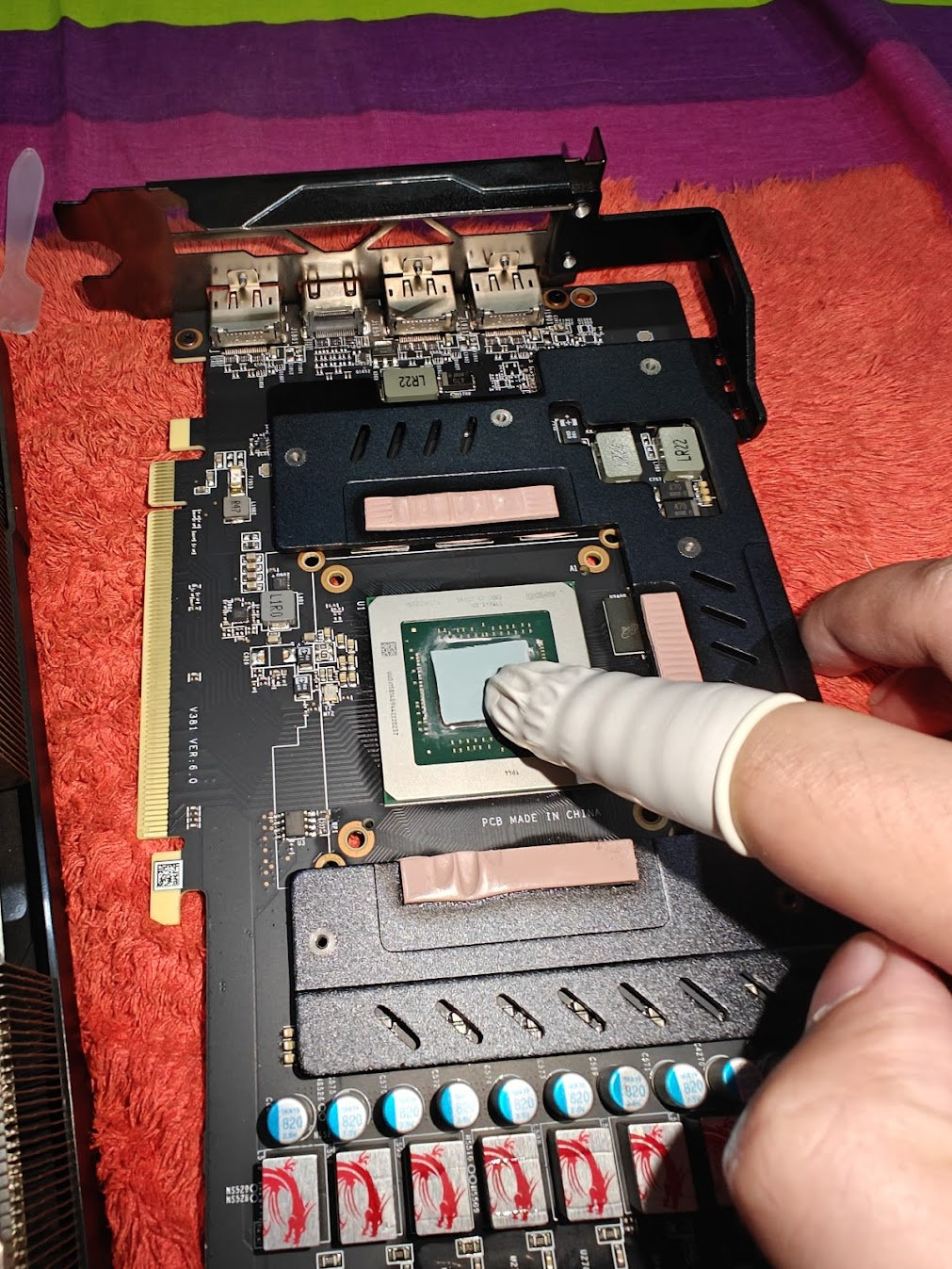
The above mentioned temps on PC GPU and Laptop CPU made it clear to me that I need to apply PTM7950 and I while the process of repasting of PTM on GPU for PC was very uneventful.

Applying PTM ON Radeon RX 5700 XT

Things were bit different for the Asus Zephyrus M16. I could always respread the LM , but didn’t because the way it was spread all over the place and as I already opened the machine up , thought to apply PTM on both CPU and GPU.

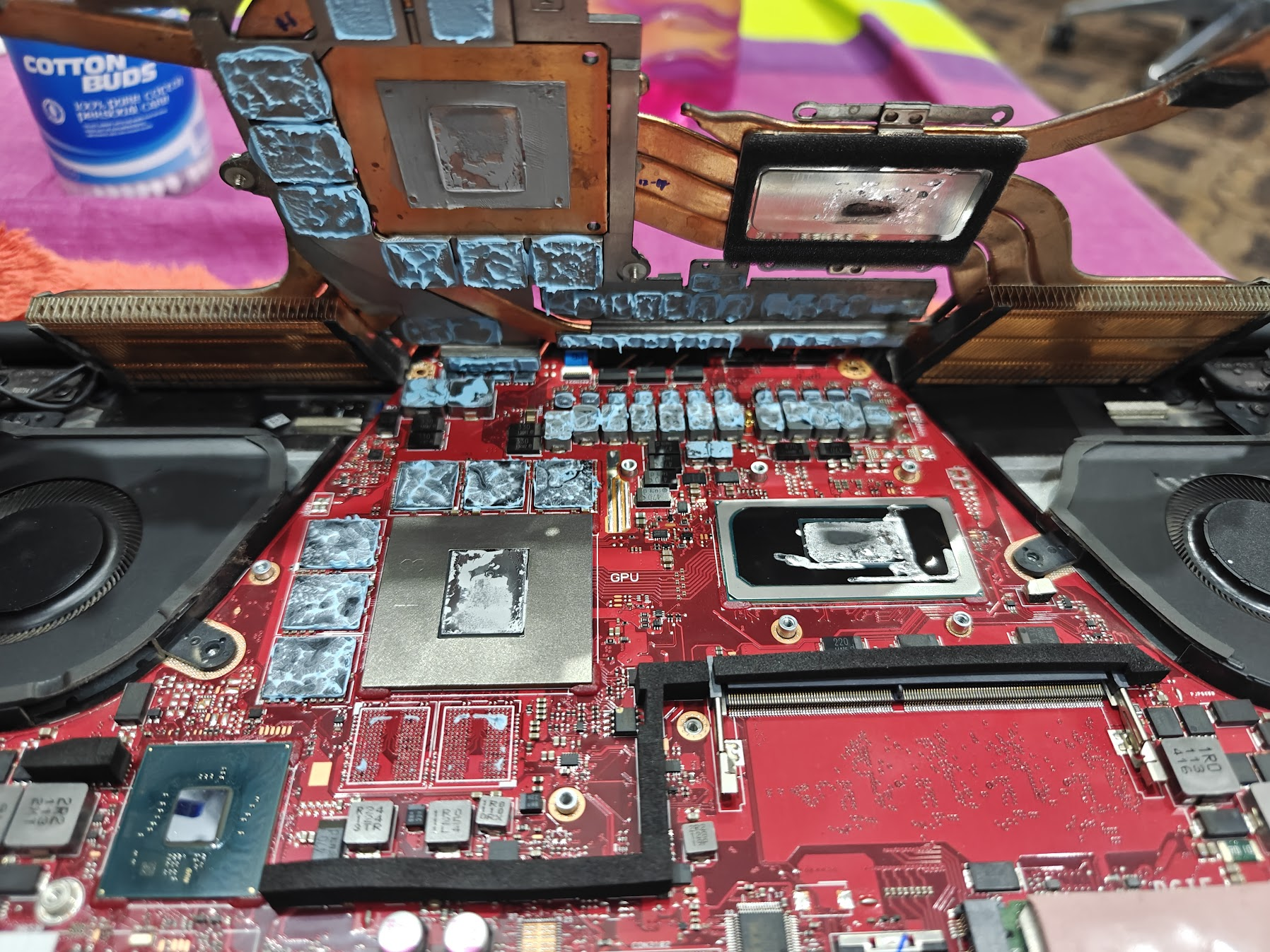
Asus Zehpyrus M16 CPU and GPU Thermal Paste and Liquid Metal

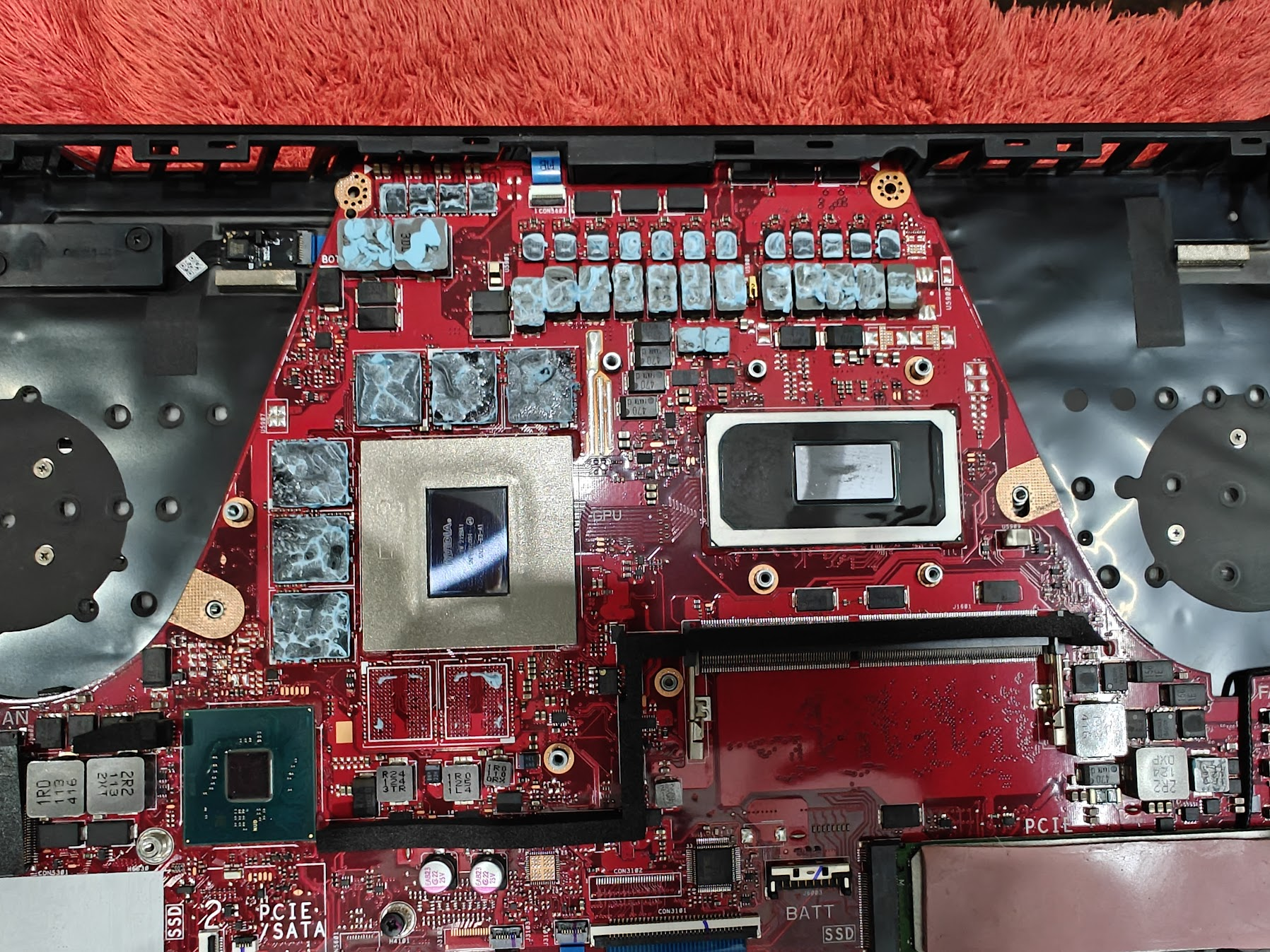
While opening was relatively straight forward, I did get a surprise of Liquid Metal on the CPU , cleaning the LM was cumbersome, cleaned it up carefully and to the best of my ability.

After removing Liquid Metal and Thermal Paste from Asus M16

After closing up the laptop and turning the power button I was presented with :

  • Blank Screen / No POST
  • Power light constant ON
  • Battery light would blink twice and then give a gap and repeat
  • Keyboard backlit in red
  • Fans not spinning

I started googling and searching and the unanimous reddit verdict on such a condition was β€œLM is conductive and you didn’t do a good job and it has fried the circuits” a.k.a Motherboard dead.

Additional Remedies

Going to page 2 and 3 of google (indicates how desperate I was) revealed more ways to find out the problem, none worked, but it included:

  • Removing the battery, pressing the power button for 45-60 second and connecting battery again before trying
  • Drain it’s battery and then turn it on
  • Let it run for 10 minutes
  • Connect adapter and then turn it on after doing a power reset
  • Ensuring the display cable didn’t break or is properly seated and connecting external display [but as the system was not POST so never tried that]

While I gave up thinking the motherboard is fried, One YouTube video mentioned that the Error code of β€œbattery light blinking twice and then repeating after gap” means a corrupt bios and you will need to remove the bios chip and put it in a programmer to get it sorted (video did not show where is the bios chip)

Hope and Revival of Asus Zephyrus M16

The above mentioned video made me think maybe it’s not a dead motherboard. While the method which I tried (and worked for me) was mentioned in different asus related queries but not with something where fans wouldn’t work and the keyboard would be red lit.

How It Was Revived

You can follow the steps mentioned below to get your laptop back to working if you are facing similar symptoms:-

  1. Open up the back case
  2. Remove the battery connecter
  3. Press power button for 10 odd seconds
  4. Remove Ram
  5. Connect battery connecter
  6. Rest the laptop on its screen with keyboard in the air, and press the power button
  7. Laptop did POST and went to windows [a bit slow as running only on mounted ram]
  8. Turn off laptop
  9. Repeat Step 2 and 3
  10. Insert Ram removed in step 4
  11. Turn on Laptop , it works fine
  12. Turn Off Laptop
  13. Put the back case back and screw them up

Conclusion

Congrats if you got your machine to work.

Just thought to share it ,as it was really frustrating thinking that I burned the motherboard, even while being so careful with the removal of LM as that is mostly the defaulter … If you got some queries you can get in touch over X @Hackology.

While I reduced PC GPU temps by 20 degrees, the impact on laptop wasn’t profound , although I am glad it’s still running and might wait a few days before reapplying as reseating the conductors over and again might ruin the PTM.

The post How I Fried and Fixed Zephyrus M16 while applying PTM7950 on CPU and GPU first appeared on Internet Security Blog - Hackology.

❌
❌