Arizona is the latest state to sue Temu and its parent company PDD Holdings over allegations that the Chinese online retailer is stealing customers’ data.
Learn the top strategies to secure customer data when expanding internationally, from MFA and encryption to compliance, SIEM, and scalable security partners.
The development of intelligently integrated, cloud-based management solutions has been a rising trend across major industries for many years. By centralising the collection, analysis and organisation of actionable data within remote-accessible, unified environments, leaders can streamline a wide variety of core processes and positively impact productivity metrics.
These fundamental benefits underline the popularity of X-as-a-Service (XaaS) business models, with around 55% of IT professionals believed to have invested in one or more of these services in recent years. While many businesses may already be well-acquainted with some iterations of XaaS, subscription-based video security plans are a more recent trend.
Reports indicate the Video Surveillance-as-a-Service (VSaaS) market will grow at a CAGR of 18.5% between now and 2028, suggesting many business leaders are at least interested in the potential benefits of VSaaS plans. But is this approach to commercial security really more effective than traditional native video security operations? In some cases, it might be.
What Is Video Surveillance-As-A-Service?
At its core, Video Surveillance-as-a-Service offers businesses the ability to store, access and manage surveillance footage on a secure cloud-based server. The main advantage of such solutions is that internal teams can freely access live and historic surveillance data from any location and at any time. This provides businesses great flexibility in security management.
Business video surveillance usually includes additional security features and integrations, including automated video recording, real-time alerts, cybersecurity tools and integrations with security alarm systems. In essence, if a business requires a flexible approach to commercial security, and lacks the resources to develop native management platforms, VSaaS can be a great solution.
How Does VSaaS Work?
In operation, VSaaS plans work similarly to subscription-based cloud data storage solutions. Cameras installed on the property are linked to an off-site cloud storage and management platform, removing the need for on-premises physical storage devices. Data is streamed to the provider for reporting and monitoring, with internal teams able to access feeds remotely.
VSaaS vendors also handle all maintenance, management and software update processes, affording businesses peace of mind that their security systems will remain free from novel vulnerabilities. Additionally, the cloud-based foundation of VSaaS packages allows for simple scalability, enabling SMEs to expand or reduce operations in line with evolving requirements.
Factors Influencing The Growth Of VSaaS
The growing demand for VSaaS solutions can be directly linked to the increasing adoption of cloud-based services across commercial enterprises as a whole. Data suggests as many as 94% of all organisations on a global scale currently use some form of cloud software, a 14% increase when compared to figures published in 2020. While adoption rates may have been influenced to some extent by the pandemic, leaders remain committed to cloud technologies.
It’s believed large enterprises aspire to move around 60% of their commercial environments to the cloud by 2025. For many, this will likely include existing commercial security solutions. This rising demand for cloud services has not gone unnoticed by providers, with companies like Google and Amazon developing novel cloud zones and infrastructure across the globe.
Entertaining a switch to VSaaS also aligns with many organisations’ needs for cost-efficient and scalable essential services among economic uncertainty. With no requirement to create expensive on-site servers and management systems, and the ability to scale operations as and when needed, VSaaS affords many leaders the flexibility they require in modern times.
The Benefits Of VSaaS For SMEs
The transition from traditional on-premises security management systems to novel VSaaS solutions can bring a number of significant benefits to organisations of all sizes. For SMEs, VSaaS plans may be entertained to reduce workloads shouldered by limited internal teams.
When broken down, the key benefits of VSaaS for SMEs include:
Optimised data storage – Surveillance systems collect vast amounts of data on a continuous basis, the organisation and management of which can be incredibly time and resource intensive. VSaaS solutions ensure these tasks are performed to a high standard by the service provider, reducing workloads for internal management teams
Streamlined compliance – Navigating strict data privacy and security management regulations requires constant vigilance from knowledgeable professionals. Under a VSaaS deployment, service providers will ensure all systems maintain HIPAA, FIPS and NDAA compliance, suggesting adjustments if guidelines are expected to change
Simple scalability – Taking on the expense of developing on-premises surveillance management solutions may be unwise for SMEs planning to scale, with adjustments made to physical systems incurring costs and avoidable downtime. VSaaS solutions can instead be adjusted by providers in direct response to changing business needs
Remote accessibility – With all surveillance and wider security data automatically stored, managed and made available on a cloud-based platform, stakeholders can access required information from anywhere and at any time. Teams can monitor live security feeds 24/7 from any secure smart device to ensure continuous protection
Physical security will likely always remain a top priority for any business operating out of a physical location. The ability to both monitor key locations and review historical security data forms the backbone of commercial security best practices. However, developing, maintaining and adjusting on-premises security solutions can be incredibly costly and time-consuming.
With many leaders continuing to explore the development of cloud-based business solutions, it’s only natural that security operations have been considered for migration. With the ability to streamline the management, operation and scalability of essential surveillance solutions, VSaaS deployments are only expected to become more popular among global businesses.
I think I could count on one hand the people I know who have NOT had their email hacked. Maybe they found a four-leaf clover when they were kids! Email hacking is one of the very unfortunate downsides of living in our connected, digital world. And it usually occurs as a result of a data breach – a situation that even the savviest tech experts find themselves in.
What is a data breach?
In simple terms, a data breach happens when personal information is accessed, disclosed without permission, or lost. Companies, organisations, and government departments of any size can be affected. Data stolen can include customer login details (email addresses and passwords), credit card numbers, identifying IDs of customers e.g. driver’s license numbers and/or passport numbers, confidential customer information, company strategy, or even matters of national security.
Data breaches have made headlines, particularly over the last few years. When the Optus and Medibank data breaches hit the news in 2022 affecting almost 10 million Aussies apiece, we were all shaken. But then when Aussie finance company Latitude was affected in 2023 with a whopping 14 million people from both Australia and New Zealand, it almost felt inevitable that by now, most of us would have been impacted.
The reality is that data breaches have been happening for years. In fact, the largest data breach in Australian history happened in 2019 to the online design site Canva which affected 139 million users globally. In short, it can happen to anyone, and the chances are you may have already been affected.
Your email is more valuable than you think
The sole objective of a hacker is to get their hands on your data. Any information that you share in your email account can be very valuable to them. Why do they want your data, you ask? It’s simple really – so they can cash in!
Some will keep the juicy stuff for themselves – passwords or logins to government departments or large companies they may want to ’target’ with the aim of extracting valuable data and/or funds. The more sophisticated ones will sell your details including name, telephone, email address, and credit card details to cash in on the dark web. They often do this in batches. Some experts believe they can get as much as AU$250 for a full set of details including credit cards. So, you can see why they’d be interested in you.
The other reason why hackers will be interested in your email address and password is that many of us re-use our login details across our other online accounts. Once they’ve got their hands on your email credentials, they may be able to access your online banking and investment accounts, if you use the same credentials everywhere. So, you can see why I harp on about using a unique password for every online account!
How big is the problem?
There is a plethora of statistics on just how big this issue is – all of them concerning. According to the Australian Institute of Criminology, of all the country’s cybercrime reports in 2024, about 21.9% involved identity theft and misuse. The Australian Bureau of Statistics adds that the identity theft victimisation rate has steadily increased from 0.8% to 1.2% from 2021 to 2024, respectively.
Meanwhile, The Australian Government revealed that at least one cybercrime is reported every 6 minutes, with business email compromise alone costing the national economy up to $84 million in losses. Regardless of which statistic you choose to focus on, we have a big issue on our hands.
How does an email account get hacked?
Hackers use a range of techniques—some highly sophisticated, others deceptively simple—to gain access. It is important to know how these attacks happen so you can stay ahead and prevent them.
Phishing scams: These are deceptive emails that trick you into entering your login details on a fake website that looks legitimate.
Data breaches: If a website where you used your email and password gets breached, criminals can use those leaked credentials to try and access your email account.
Weak or reused passwords: Using simple, easy-to-guess passwords or the same password across multiple sites makes it easy for hackers to gain access.
Malware: Malicious software like keyloggers can be installed on your computer without your knowledge, capturing everything you type, including passwords.
Unsecure Wi-Fi networks: Using public Wi-Fi without a VPN can expose your data to criminals monitoring the network.
From email hack to identity theft
Yes, absolutely. An email account is often the central hub of your digital life. Once a cybercriminal controls it, they can initiate password resets for your other online accounts, including banking, shopping, and social media. They can intercept sensitive information sent to you, such as financial statements or medical records.
With enough information gathered from your emails, they can commit identity theft, apply for credit in your name, or access other sensitive services. If you suspect your email was hacked, it’s crucial to monitor your financial statements and consider placing a fraud alert with credit bureaus.
Signs that your email has been hacked
You can no longer log in. The most obvious sign of an email hack is when your password suddenly stops working. Cybercriminals often change the password immediately to lock you out.
Friends receive strange messages from you. If your contacts report receiving spam or phishing emails from your address that you didn’t send, it’s a major red flag that someone else has control of your account.
Unusual activity in your folders. Check your “Sent” folder for messages you don’t recognize. Hackers might also set up forwarding rules to send copies of your incoming emails to their own address, so check your settings for any unfamiliar forwarding addresses.
Password reset emails you didn’t request. Receiving unexpected password reset emails for other services (like your bank or social media) is a sign that a hacker is using your email to try and take over your other online accounts.
Security alerts from your provider. Pay attention to notifications about new sign-ins from unfamiliar devices, locations, or IP addresses. These are often the first warnings that your account has been compromised.
Steps to email recovery
If you find yourself a victim of email hacking, these are a few very important steps you need to take. Fast.
Change your password
Using a separate, clean device, this is the very first thing you must do to ensure the hacker can’t get back into your account. It is essential that your new password is complex and totally unrelated to previous passwords. Always use random words and characters, a passphrase with a variety of upper and lower cases, and throw in some symbols and numbers.
I really like the idea of a crazy, nonsensical sentence – easier to remember and harder to crack! But, better still, get yourself a password manager that will create a password that no human would be capable of creating. If you find the hacker has locked you out of your account by changing your password, you will need to reset the password by clicking on the ‘Forgot My Password’ link.
Update other accounts that use the same password
This is time-consuming, but essential. Ensure you change any other accounts that use the same username and password as your compromised email. Hackers love the fact that many people use the same logins for multiple accounts, so it is guaranteed they will try your info in other email applications and sites such as PayPal, Amazon, Netflix – you name it!
Once the dust has settled, review your password strategy for all your online accounts. A best practice is to ensure every online account has its own unique and complex password.
Sign out of all devices
Most email services have a security feature that lets you remotely log out of all active sessions. Once you’ve changed your password, signing out from your email account also signs out the hacker and forces them to log-in with the new password, which fortunately they do not know. These, combined with two- or multi-factor authentication, will help you to regain control of your account and prevent further compromise.
Inform your email contacts
A big part of the hacker’s strategy is to get their claws into your address book to hook others as well. Send a message to all your email contacts as soon as possible so they know to avoid opening any emails—most likely loaded with malware—that have come from you.
Commit to multi-factor authentication
Two-factor or multi-factor authentication may seem like an additional, inconvenient step to your login, but it also adds another layer of protection. Enabling this means you will need a special one-time-use code to log in, aside from your password. This is sent to your mobile phone or generated via an authenticator app. So worthwhile!
Check your email settings
It is common for hackers to modify your email settings so that a copy of every email you receive is automatically forwarded to them. Not only can they monitor your logins to other sites; they can also keep a watchful eye on any particularly juicy personal information. So, check your mail forwarding settings to ensure no unexpected email addresses have been added.
Also, ensure your ‘reply to’ email address is actually yours. Hackers have been known to create an email address that looks similar to yours, so that when someone replies, it will go straight to their account, not yours.
Don’t forget to check your email signature to ensure nothing spammy has been added, as well as your recovery phone number and alternate email address. Hackers also change these to maintain control. Update them to your own secure details.
Scan your computer for malware and viruses
Regularly scanning your devices for unwanted invaders is essential. If you find anything, please ensure it is addressed, and then change your email password again. If you don’t have antivirus software, please invest in it.
Comprehensive security software will provide you with a digital shield for your online life, protecting all your devices – including your smartphone – from viruses and malware. Some services also include a password manager to help you generate and store unique passwords for all your accounts.
Consider creating a new email address
If you have been hacked several times and your email provider isn’t mitigating the amount of spam you are receiving, consider starting afresh. Do not, however, delete your old email address because email providers are known to recycle old email addresses. This means a hacker could spam every site they can find with a ‘forgot my password’ request and try to impersonate you and steal your identity.
Your email is an important part of your online identity so being vigilant and addressing any fallout from hacking is essential for your digital reputation. Even though it may feel that getting hacked is inevitable, you can definitely reduce your risk by installing some good-quality security software on all your devices.
Trusted and reliable comprehensive security software will alert you when visiting risky websites, warn you when a download looks dodgy, and block annoying and dangerous emails with anti-spam technology. It makes sense really – if you don’t receive the dodgy phishing email – you can’t click on it. Smart!
Finally, don’t forget that hackers love social media – particularly those of us who overshare on it. So, before you post details of your adorable new kitten, remember it may just provide the perfect clue for a hacker trying to guess your email password!
Report the incident
Reporting an email hack is a crucial step to create a necessary paper trail for disputes with banks or credit agencies. When reporting, gather evidence such as screenshots of suspicious activity, unrecognized login locations and times, and any phishing emails you received. This information can be vital for the investigation.
Your email provider: Use their official support or recovery channels immediately. They can help you investigate and regain control of your account. Do not use links from suspicious emails claiming to be from support.
Financial institutions: If you’ve disclosed sensitive financial information or use the email for banking, contact your bank and credit card companies immediately. Alert them to potential fraud and monitor your statements.
Friends, family, and contacts: Send a message to your contacts warning them that your account was compromised. Advise them not to open suspicious messages or click on links sent from your address during that time.
Your employer: If it’s a work email, or if your personal email is used for work purposes, notify your IT department immediately. They need to take steps to protect company data and systems.
Relevant authorities: For financial loss or identity theft, you can report the incident to authorities like the FBI’s Internet Crime Complaint Center or Action Fraud in the UK. This creates an official record and aids in wider law enforcement efforts.
Check if online accounts linked to your email were compromised
Prioritize critical accounts: Immediately check your online banking, financial, and government-related accounts. Review recent activity for any unauthorized transactions or changes.
Review social media and shopping sites: Check your social media for posts or messages you didn’t send. Review your online shopping accounts like Amazon for any purchases or address changes you don’t recognize.
Enable alerts: Turn on login and transaction alerts for your sensitive accounts. This will give you real-time notifications of any suspicious activity in the future.
Should you delete your hacked email account?
Generally, no. Deleting the account can cause more problems than it solves. Many online services are linked to that email, and deleting it means you lose the ability to receive password reset links and security notifications for those accounts.
More importantly, some email providers recycle deleted addresses, meaning a hacker could potentially re-register your old email address and use it to impersonate you and take over your linked accounts.
The better course of action is to regain control, thoroughly secure the account with a new password and multi-factor authentication, and clean up any damage. Only consider migrating to a new email address after you have fully secured the old one.
Future-proof your email after reclaiming control
Run a full security scan: Before doing anything else, run a comprehensive scan with a trusted antivirus program on all your devices to ensure no malware or keyloggers remain.
Double-check security settings: Confirm that your recovery email and phone number are correct and that multi-factor authentication is enabled, preferably using an authenticator app rather than SMS.
Review account permissions: Check which third-party apps and websites have access to your email account. Revoke access for any service you don’t recognize or no longer use.
Set periodic reminders: Make it a habit to review your account’s security logs and settings every few months to catch any potential issues early.
Learn to spot phishing: Be skeptical of unsolicited emails asking for personal information or creating a sense of urgency. Check the sender’s address and hover over links before clicking.
Keep software updated:Regularly update your operating system, web browser, and security software to protect against the latest vulnerabilities.
Secure your devices: Use comprehensive security software like McAfee+ on all your devices—computers, tablets, and smartphones—to protect against malware, viruses, and risky websites.
Provider-specific email recovery
Each email provider has a specific, structured process for account recovery. It is vital to only use the official recovery pages provided by the service and be wary of scam websites or third-party services that claim they can recover your account for a fee. Below are the official steps of the major providers that you can follow.
Enter your email address and follow the on-screen prompts. You will be asked questions to confirm your identity, such as previous passwords or details from your recovery phone number or email.
Once you regain access, you will be prompted to create a new password.
Immediately visit the Google Security Checkup to review recent activity, remove unfamiliar devices, check third-party app access, and enable 2-step verification.
You’ll need to provide your email, phone, or Skype name, and verify your identity using the security information linked to your account.
If you cannot access your recovery methods, you will be directed to an account recovery form where you must provide as much information as possible to prove ownership.
After resetting your password, visit your Microsoft account security dashboard to review sign-in activity, check connected devices, and enable two-step verification.
Final thoughts
Your email account is the master key to your digital kingdom, and protecting it is more critical than ever since many of your other accounts are connected with your email. Realizing “my email has been hacked” is a stressful experience, but taking swift and correct action can significantly limit the damage.
By following the recovery steps and adopting strong, ongoing security habits like using a password manager and enabling multi-factor authentication, you can turn a potential crisis into a lesson in digital resilience. Stay vigilant, stay proactive, and keep your digital front door securely locked.
To add another wall of defense, consider investing in a trusted and reliable comprehensive security software like McAfee+. Our solution will help you dodge hacking attempts by alerting you when visiting risky websites, or downloading questionable apps, and blocking malicious emails with anti-spam technology.
If you’re an IT or Security leader, you know the struggle. Your technology stack looks like a jigsaw puzzle with missing pieces. Manual processes eat up your team’s valuable time. Budget pressures keep mounting while security threats lurk in the shadows of your SaaS ecosystem. Sound familiar?
You’re not alone. Modern IT departments are drowning in complexity, managing an average of 254 SaaS applications while trying to maintain security, control costs, and keep employees productive. The old ways of managing IT infrastructure simply don’t scale in today’s hybrid work environment.
That’s exactly why Lumos is pulling back the curtain on what’s coming next.
The Future of IT Management
On September 19 at 11 AM PT / 2 PM ET, the Lumos product team is hosting an exclusive roadmap session that every IT leader should attend. This isn’t your typical product demo, it’s a strategic look at how cutting-edge technology will transform the way you manage your IT environment in the second half of 2025.
What’s On the Horizon? Four Game-Changing Innovations
Automated SaaS Management That Actually Works –Imagine never having to manually track SaaS subscriptions again. Lumos is developing sophisticated automation that handles app lifecycle management and off-boarding at enterprise scale. No more forgotten licenses. No more security gaps from dormant accounts.
AI-Driven Access Governance Security doesn’t have to slow down productivity –The new Lumos platform leverages artificial intelligence to make access decisions smarter, faster, and more accurate. Think of it as having a security expert embedded in every access request, working 24/7 to keep your organisation safe.
License Optimisation That Pays for Itself –Stop throwing money at unused software licenses. Lumos’s upcoming features use real-time usage data to identify optimisation opportunities, automatically right-sizing your SaaS spend.
Security That Enhances (Not Hinders) Employee Experience –The best security is invisible security. Lumos is designing solutions that strengthen your security posture while making life easier for employees. No more friction between doing the right thing and getting work done.
Why This Matters Now
The landscape is changing rapidly. Remote work is permanent. SaaS sprawl continues accelerating. Regulatory requirements are tightening. The organisations that thrive will be those that embrace intelligent automation and AI-driven insights.
Early adopters of Lumos innovations are already seeing results improvement in security compliance scores, and significant cost savings that often exceed the platform investment.
This roadmap session is limited to ensure an interactive experience. You’ll have the opportunity to ask questions directly to the Lumos product team and see live demonstrations of features that could transform your IT operations.
Whether you’re struggling with SaaS management, looking to enhance security, or seeking ways to optimise your IT budget, this session will provide concrete insights you can implement immediately.
Register now for the September 19 session and be among the first to see where IT management is heading. Your future self and your IT budget will thank you.
Data Security’s New Frontier: How Generative AI is Rewriting the Cybersecurity Playbook Semantic Intelligence™ utilizes context-aware AI to discover structured and unstructured data across cloud and on-prem environments. The “Content...
The Silent Threat: Why Your AI Could Be Your Biggest Security Vulnerability Imagine a digital Trojan horse sitting right in the heart of your organization’s most valuable asset – your...
When you visit almost any website, you’ll see a pop-up asking you to accept, decline, or customize the cookies it collects. Sometimes, it just tells you that cookies are in use by default. We randomly checked 647 websites, and 563 of them displayed cookie notifications. Most of the time, users don’t even pause to think about what’s really behind the banner asking them to accept or decline cookies.
We owe cookie warnings to the adoption of new laws and regulations, such as GDPR, that govern the collection of user information and protection of personal data. By adjusting your cookie settings, you can minimize the amount of information collected about your online activity. For example, you can decline to collect and store third-party cookies. These often aren’t necessary for a website to function and are mainly used for marketing and analytics. This article explains what cookies are, the different types, how they work, and why websites need to warn you about them. We’ll also dive into sensitive cookies that hold the Session ID, the types of attacks that target them, and ways for both developers and users to protect themselves.
What are browser cookies?
Cookies are text files with bits of data that a web server sends to your browser when you visit a website. The browser saves this data on your device and sends it back to the server with every future request you make to that site. This is how the website identifies you and makes your experience smoother.
Let’s take a closer look at what kind of data can end up in a cookie.
First, there’s information about your actions on the site and session parameters: clicks, pages you’ve visited, how long you were on the site, your language, region, items you’ve added to your shopping cart, profile settings (like a theme), and more. This also includes data about your device: the model, operating system, and browser type.
Your sign-in credentials and security tokens are also collected to identify you and make it easier for you to sign in. Although it’s not recommended to store this kind of information in cookies, it can happen, for example, when you check the “Remember me” box. Security tokens can become vulnerable if they are placed in cookies that are accessible to JS scripts.
Another important type of information stored in cookies that can be dangerous if it falls into the wrong hands is the Session ID: a unique code assigned to you when you visit a website. This is the main target of session hijacking attacks because it allows an attacker to impersonate the user. We’ll talk more about this type of attack later. It’s worth noting that a Session ID can be stored in cookies, or it can even be written directly into the URL of the page if the user has disabled cookies.
Example of a Session ID as displayed in the Firefox browser’s developer panel
Example of a Session ID as seen in a URL address: example.org/?account.php?osCsid=dawnodpasb<...>abdisoa.
Besides the information mentioned above, cookies can also hold some of your primary personal data, such as your phone number, address, or even bank card details. They can also inadvertently store confidential company information that you’ve entered on a website, including client details, project information, and internal documents.
Many of these data types are considered sensitive. This means if they are exposed to the wrong people, they could harm you or your organization. While things like your device type and what pages you visited aren’t typically considered confidential, they still create a detailed profile of you. This information could be used by attackers for phishing scams or even blackmail.
Main types of cookies
Cookies by storage time
Cookies are generally classified based on how long they are stored. They come in two main varieties: temporary and persistent.
Temporary, or session cookies, are used during a visit to a website and deleted as soon as you leave. They save you from having to sign in every time you navigate to a new page on the same site or to re-select your language and region settings. During a single session, these values are stored in a cookie because they ensure uninterrupted access to your account and proper functioning of the site’s features for registered users. Additionally, temporary cookies include things like entries in order forms and pages you visited. This information can end up in persistent cookies if you select options like “Remember my choice” or “Save settings”. It’s important to note that session cookies won’t get deleted if you have your browser set to automatically restore your previous session (load previously opened tabs). In this case, the system considers all your activity on that site as one session.
Persistent cookies, unlike temporary ones, stick around even after you leave the site. The website owner sets an expiration date for them, typically up to a year. You can, however, delete them at any time by clearing your browser’s cookies. These cookies are often used to store sign-in credentials, phone numbers, addresses, or payment details. They’re also used for advertising to determine your preferences. Sensitive persistent cookies often have a special attribute HttpOnly. This prevents your browser from accessing their contents, so the data is sent directly to the server every time you visit the site.
Notably, depending on your actions on the website, credentials may be stored in either temporary or persistent cookies. For example, when you simply navigate a site, your username and password might be stored in session cookies. But if you check the “Remember me” box, those same details will be saved in persistent cookies instead.
Cookies by source
Based on the source, cookies are either first-party or third-party. The former are created and stored by the website, and the latter, by other websites. Let’s take a closer look at these cookie types.
First-party cookies are generally used to make the site function properly and to identify you as a user. However, they can also perform an analytics or marketing function. When this is the case, they are often considered optional – more on this later – unless their purpose is to track your behavior during a specific session.
Third-party cookies are created by websites that the one you’re visiting is talking to. The most common use for these is advertising banners. For example, a company that places a banner ad on the site can use a third-party cookie to track your behavior: how many times you click on the ad and so on. These cookies are also used by analytics services like Google Analytics or Yandex Metrica.
Social media cookies are another type of cookies that fits into this category. These are set by widgets and buttons, such as “Share” or “Like”. They handle any interactions with social media platforms, so they might store your sign-in credentials and user settings to make those interactions faster.
Cookies by importance
Another way to categorize cookies is by dividing them into required and optional.
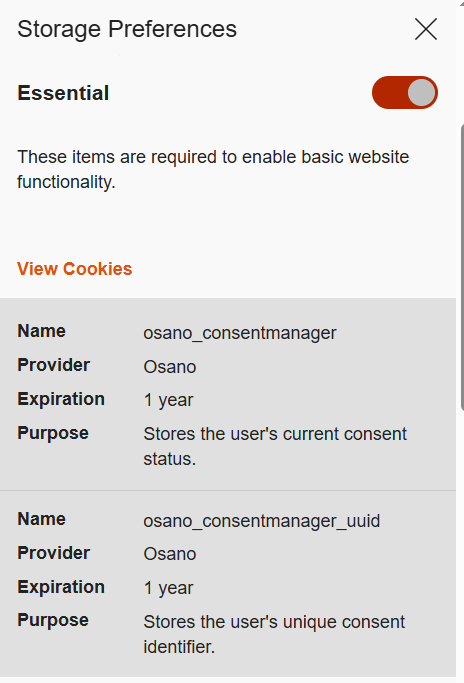
Required or essential cookies are necessary for the website’s basic functions or to provide the service you’ve specifically asked for. This includes temporary cookies that track your activity during a single visit. It also includes security cookies, such as identification cookies, which the website uses to recognize you and spot any fraudulent activity. Notably, cookies that store your consent to save cookies may also be considered essential if determined by the website owner, since they are necessary to ensure the resource complies with your chosen privacy settings.
The need to use essential cookies is primarily relevant for websites that have a complex structure and a variety of widgets. Think of an e-commerce site that needs a shopping cart and a payment system, or a photo app that has to save images to your device.
A key piece of data stored in required cookies is the above-mentioned Session ID, which helps the site identify you. If you don’t allow this ID to be saved in a cookie, some websites will put it directly in the page’s URL instead. This is a much riskier practice because URLs aren’t encrypted. They’re also visible to analytics services, tracking tools, and even other users on the same network as you, which makes them vulnerable to cross-site scripting (XSS) attacks. This is a major reason why many sites won’t let you disable required cookies for your own security.
Example of required cookies on the Osano CMP website
Optional cookies are the ones that track your online behavior for marketing, analytics, and performance. This category includes third-party cookies created by social media platforms, as well as performance cookies that help the website run faster and balance the load across servers. For instance, these cookies can track broken links to improve a website’s overall speed and reliability.
Essentially, most optional cookies are third-party cookies that aren’t critical for the site to function. However, the category can also include some first-party cookies for things like site analytics or collecting information about your preferences to show you personalized content.
While these cookies generally don’t store your personal information in readable form, the data they collect can still be used by analytics tools to build a detailed profile of you with enough identifying information. For example, by analyzing which sites you visit, companies can make educated guesses about your age, health, location, and much more.
A major concern is that optional cookies can sometimes capture sensitive information from autofill forms, such as your name, home address, or even bank card details. This is exactly why many websites now give you the choice to accept or decline the collection of this data.
Special types of cookies
Let’s also highlight special subtypes of cookies managed with the help of two similar technologies that enable non-standard storage and retrieval methods.
A supercookie is a tracking technology that embeds cookies into website headers and stores them in non-standard locations, such as HTML5 local storage, browser plugin storage, or browser cache. Because they’re not in the usual spot, simply clearing your browser’s history and cookies won’t get rid of them.
Supercookies are used for personalizing ads and collecting analytical data about the user (for example, by internet service providers). From a privacy standpoint, supercookies are a major concern. They’re a persistent and hard-to-control tracking mechanism that can monitor your activity without your consent, which makes it tough to opt out.
Another unusual tracking method is Evercookie, a type of zombie cookie. Evercookies can be recovered with JavaScript even after being deleted. The recovery process relies on the unique user identifier (if available), as well as traces of cookies stored across all possible browser storage locations.
How cookie use is regulated
The collection and management of cookies are governed by different laws around the world. Let’s review the key standards from global practices.
General Data Protection Regulation (GDPR) and ePrivacy Directive (Cookie Law) in the European Union.
Under EU law, essential cookies don’t require user consent. This has created a loophole for some websites. You might click “Reject All”, but that button might only refuse non-essential cookies, allowing others to still be collected.
Lei Geral de Proteção de Dados Pessoais (LGPD) in Brazil.
This law regulates the collection, processing, and storage of user data within Brazil. It is largely inspired by the principles of GDPR and, similarly, requires free, unequivocal, and clear consent from users for the use of their personal data. However, LGPD classifies a broader range of information as personal data, including biometric and genetic data. It is important to note that compliance with GDPR does not automatically mean compliance with LGPD, and vice versa.
California Consumer Privacy Act (CCPA) in the United States.
The CCPA considers cookies a form of personal information. This means their collection and storage must follow certain rules. For example, any California resident has the right to stop cross-site cookie tracking to prevent their personal data from being sold. Service providers are required to give users choices about what data is collected and how it’s used.
The UK’s Privacy and Electronic Communications Regulations (PECR, or EC Directive) are similar to the Cookie Law.
PECR states that websites and apps can only save information on a user’s device in two situations: when it’s absolutely necessary for the site to work or provide a service, or when the user has given their explicit consent to this.
Federal Law No. 152-FZ “On Personal Data” in Russia.
The law broadly defines personal data as any information that directly or indirectly relates to an individual. Since cookies can fall under this definition, they can be regulated by this law. This means websites must get explicit consent from users to process their data.
In Russia, website owners must inform users about the use of technical cookies, but they don’t need to get consent to collect this information. For all other types of cookies, user consent is required. Often, the user gives this consent automatically when they first visit the site, as it’s stated in the default cookie warning.
Some sites use a banner or a pop-up window to ask for consent, and some even let users choose exactly which cookies they’re willing to store on their device.
Beyond these laws, website owners create their own rules for using first-party cookies. Similarly, third-party cookies are managed by the owners of third-party services, such as Google Analytics. These parties decide what kind of information goes into the cookies and how it’s formatted. They also determine the cookies’ lifespan and security settings. To understand why these settings are so important, let’s look at a few ways malicious actors can attack one of the most critical types of cookies: those that contain a Session ID.
Session hijacking methods
As discussed above, cookies containing a Session ID are extremely sensitive. They are a prime target for cybercriminals. In real-world attacks, different methods for stealing a Session ID have been documented. This is a practice known as session hijacking. Below, we’ll look at a few types of session hijacking.
Session sniffing
One method for stealing cookies with a Session ID is session sniffing, which involves intercepting traffic between the user and the website. This threat is a concern for websites that use the open HTTP protocol instead of HTTPS, which encrypts traffic. With HTTP, cookies are transmitted in plain text within the headers of HTTP requests, which makes them vulnerable to interception.
Attacks targeting unencrypted HTTP traffic mostly happen on public Wi-Fi networks, especially those without a password and strong security protocols like WPA2 or WPA3. These protocols use AES encryption to protect traffic on Wi-Fi networks, with WPA3 currently being the most secure version. While WPA2/WPA3 protection limits the ability to intercept HTTP traffic, only implementing HTTPS can truly protect against session sniffing.
This method of stealing Session ID cookies is fairly rare today, as most websites now use HTTPS encryption. The popularity of this type of attack, however, was a major reason for the mass shift to using HTTPS for all connections during a user’s session, known as HTTPS everywhere.
Cross-site scripting (XSS)
Cross-site scripting (XSS) exploits vulnerabilities in a website’s code to inject a malicious script, often written in JavaScript, onto its webpages. This script then runs whenever a victim visits the site. Here’s how an XSS attack works: an attacker finds a vulnerability in the source code of the target website that allows them to inject a malicious script. For example, the script might be hidden in a URL parameter or a comment on the page. When the user opens the infected page, the script executes in their browser and gains access to the site’s data, including the cookies that contain the Session ID.
Session fixation
In a session fixation attack, the attacker tricks your browser into using a pre-determined Session ID. Thus, the attacker prepares the ground for intercepting session data after the victim visits the website and performs authentication.
Here’s how it goes down. The attacker visits a website and gets a valid, but unauthenticated, Session ID from the server. They then trick you into using that specific Session ID. A common way to do this is by sending you a link with the Session ID already embedded in the URL, like this: http://example.com/?SESSIONID=ATTACKER_ID. When you click the link and sign in, the website links the attacker’s Session ID to your authenticated session. The attacker can then use the hijacked Session ID to take over your account.
Modern, well-configured websites are much less vulnerable to session fixation than XSS-like attacks because most current web frameworks automatically change the user’s Session ID after they sign in. However, the very existence of this Session ID exploitation attack highlights how crucial it is for websites to securely manage the entire lifecycle of the user session, especially at the moment of sign-in.
Cross-site request forgery (CSRF)
Unlike session fixation or sniffing attacks, cross-site request forgery (CSRF or XSRF) leverages the website’s trust in your browser. The attacker forces your browser, without your knowledge, to perform an unwanted action on a website where you’re signed in – like changing your password or deleting data.
For this type of attack, the attacker creates a malicious webpage or an email message with a harmful link, piece of HTML code, or script. This code contains a request to a vulnerable website. You open the page or email message, and your browser automatically sends the hidden request to the target site. The request includes the malicious action and all the necessary (for example, temporary) cookies for that site. Because the website sees the valid cookies, it treats the request as a legitimate one and executes it.
Variants of the man-in-the-middle (MitM) attack
A man-in-the-middle (MitM) attack is when a cybercriminal not only snoops on but also redirects all the victim’s traffic through their own systems, thus gaining the ability to both read and alter the data being transmitted. Examples of these attacks include DNS spoofing or the creation of fake Wi-Fi hotspots that look legitimate. In an MitM attack, the attacker becomes the middleman between you and the website, which gives them the ability to intercept data, such as cookies containing the Session ID.
Websites using the older HTTP protocol are especially vulnerable to MitM attacks. However, sites using the more secure HTTPS protocol are not entirely safe either. Malicious actors can try to trick your browser with a fake SSL/TLS certificate. Your browser is designed to warn you about suspicious invalid certificates, but if you ignore that warning, the attacker can decrypt your traffic. Cybercriminals can also use a technique called SSL stripping to force your connection to switch from HTTPS to HTTP.
Predictable Session IDs
Cybercriminals don’t always have to steal your Session ID – sometimes they can just guess it. They can figure out your Session ID if it’s created according to a predictable pattern with weak, non-cryptographic characters. For example, a Session ID may contain your IP address or consecutive numbers, and a weak algorithm that uses easily predictable random sequences may be used to generate it.
To carry out this type of attack, the malicious actor will collect a sufficient number of Session ID examples. They analyze the pattern to figure out the algorithm used to create the IDs, then apply that knowledge to predicting your current or next Session ID.
Cookie tossing
This attack method exploits the browser’s handling of cookies set by subdomains of a single domain. If a malicious actor takes control of a subdomain, they can try to manipulate higher-level cookies, in particular the Session ID. For example, if a cookie is set for sub.domain.com with the Domain attribute set to .domain.com, that cookie will also be valid for the entire domain.
This lets the attacker “toss” their own malicious cookies with the same names as the main domain’s cookies, such as Session_id. When your browser sends a request to the main server, it includes all the relevant cookies it has. The server might mistakenly process the hacker’s Session ID, giving them access to your user session. This can work even if you never visited the compromised subdomain yourself. In some cases, sending invalid cookies can also cause errors on the server.
How to protect yourself and your users
The primary responsibility for cookie security rests with website developers. Modern ready-made web frameworks generally provide built-in defenses, but every developer should understand the specifics of cookie configuration and the risks of a careless approach. To counter the threats we’ve discussed, here are some key recommendations.
Recommendations for web developers
All traffic between the client and server must be encrypted at the network connection and data exchange level. We strongly recommend using HTTPS and enforcing automatic redirect from HTTP to HTTPS. For an extra layer of protection, developers should use the HTTP Strict Transport Security (HSTS) header, which forces the browser to always use HTTPS. This makes it much harder, and sometimes impossible, for attackers to slip into your traffic to perform session sniffing, MitM, or cookie tossing attacks.
It must be mentioned that the use of HTTPS is insufficient protection against XSS attacks. HTTPS encrypts data during transmission, while an XSS script executes directly in the user’s browser within the HTTPS session. So, it’s up to the website owner to implement protection against XSS attacks. To stop malicious scripts from getting in, developers need to follow secure coding practices:
Validate and sanitize user input data.
Implement mandatory data encoding (escaping) when rendering content on the page – this way, the browser will not interpret malicious code as part of the page and will not execute it.
Use the HttpOnly flag to protect cookie files from being accessed by the browser.
Use the Content Security Policy (CSP) standard to control code sources. It allows monitoring which scripts and other content sources are permitted to execute and load on the website.
For attacks like session fixation, a key defense is to force the server to generate a new Session ID right after the user successfully signs in. The website developer must invalidate the old, potentially compromised Session ID and create a new one that the attacker doesn’t know.
An extra layer of protection involves checking cookie attributes. To ensure protection, it is necessary to check for the presence of specific flags (and set them if they are missing): Secure and HttpOnly. The Secure flag ensures that cookies are transmitted over an HTTPS connection, while HttpOnly prevents access to them from the browser, for example through scripts, helping protect sensitive data from malicious code. Having these attributes can help protect against session sniffing, MitM, cookie tossing, and XSS.
Pay attention to another security attribute, SameSite, which can restrict cookie transmission. Set it to Lax or Strict for all cookies to ensure they are sent only to trusted web addresses during cross-site requests and to protect against CSRF attacks. Another common strategy against CSRF attacks is to use a unique, randomly generated CSRF token for each user session. This token is sent to the user’s browser and must be included in every HTTP request that performs an action on your site. The site then checks to make sure the token is present and correct. If it’s missing or doesn’t match the expected value, the request is rejected as a potential threat. This is important because if the Session ID is compromised, the attacker may attempt to replace the CSRF token.
To protect against an attack where a cybercriminal tries to guess the user’s Session ID, you need to make sure these IDs are truly random and impossible to predict. We recommend using a cryptographically secure random number generator that utilizes powerful algorithms to create hard-to-predict IDs. Additional protection for the Session ID can be ensured by forcing its regeneration after the user authenticates on the web resource.
The most effective way to prevent a cookie tossing attack is to use cookies with the __Host- prefix. These cookies can only be set on the same domain that the request originates from and cannot have a Domain attribute specified. This guarantees that a cookie set by the main domain can’t be overwritten by a subdomain.
Finally, it’s crucial to perform regular security checks on all your subdomains. This includes monitoring for inactive or outdated DNS records that could be hijacked by an attacker. We also recommend ensuring that any user-generated content is securely isolated on its own subdomain. User-generated data must be stored and managed in a way that prevents it from compromising the security of the main domain.
As mentioned above, if cookies are disabled, the Session ID can sometimes get exposed in the website URL. To prevent this, website developers must embed this ID into essential cookies that cannot be declined.
Many modern web development frameworks have built-in security features that can stop most of the attack types described above. These features make managing cookies much safer and easier for developers. Some of the best practices include regular rotation of the Session ID after the user signs in, use of the Secure and HttpOnly flags, limiting the session lifetime, binding it to the client’s IP address, User-Agent string, and other parameters, as well as generating unique CSRF tokens.
There are other ways to store user data that are both more secure and better for performance than cookies.
Depending on the website’s needs, developers can use different tools, like the Web Storage API (which includes localStorage and sessionStorage), IndexedDB, and other options. When using an API, data isn’t sent to the server with every single request, which saves resources and makes the website perform better.
Another exciting alternative is the server-side approach. With this method, only the Session ID is stored on the client side, while all the other data stays on the server. This is even more secure than storing data with the help of APIs because private information is never exposed on the client side.
Tips for users
Staying vigilant and attentive is a big part of protecting yourself from cookie hijacking and other malicious manipulations.
Always make sure the website you are visiting is using HTTPS. You can check this by looking at the beginning of the website address in the browser address bar. Some browsers let the user view additional website security details. For example, in Google Chrome, you can click the icon right before the address.
This will show you if the “Connection is secure” and the “Certificate is valid”. If these details are missing or data is being sent over HTTP, we recommend maximum caution when visiting the website and, whenever possible, avoiding entering any personal information, as the site does not meet basic security standards.
When browsing the web, always pay attention to any security warnings your browser gives you, especially about suspicious or invalid certificates. Seeing one of these warnings might be a sign of an MitM attack. If you see a security warning, it’s best to stop what you’re doing and leave that website right away. Many browsers implement certificate verification and other security features, so it is important to install browser updates promptly – this replaces outdated and compromised certificates.
We also recommend regularly clearing your browser data (cookies and cache). This can help get rid of outdated or potentially compromised Session IDs.
Always use two-factor authentication wherever it’s available. This makes it much harder for a malicious actor to access your account, even if your Session ID is exposed.
When a site asks for your consent to use cookies, the safest option is to refuse all non-essential ones, but we’ll reiterate that sometimes, clicking “Reject cookies” only means declining the optional ones. If this option is unavailable, we recommend reviewing the settings to only accept the strictly necessary cookies. Some websites offer this directly in the pop-up cookie consent notification, while others provide it in advanced settings.
The universal recommendation to avoid clicking suspicious links is especially relevant in the context of preventing Session ID theft. As mentioned above, suspicious links can be used in what’s known as session fixation attacks. Carefully check the URL: if it contains parameters you do not understand, we recommend copying the link into the address bar manually and removing the parameters before loading the page. Long strings of characters in the parameters of a legitimate URL may turn out to be an attacker’s Session ID. Deleting it renders the link safe. While you’re at it, always check the domain name to make sure you’re not falling for a phishing scam.
In addition, we advise extreme caution when connecting to public Wi-Fi networks. Man-in-the-middle attacks often happen through open networks or rogue Wi-Fi hotspots. If you need to use a public network, never do it without a virtual private network (VPN), which encrypts your data and makes it nearly impossible for anyone to snoop on your activity.
The week of August 4th, I had the opportunity to attend two exciting conferences in the cybersecurity world: Black Hat USA 2025 and Squadcon which were held in Las Vegas....
Tax season isn’t just busy for taxpayers—it’s prime time for scammers, too. As you gather your W-2s, 1099s, and other tax documents, cybercriminals are gearing up to exploit the flood of personal and financial data in circulation. From phishing emails posing as the IRS to fake tax preparers looking to steal your refund, these scams can lead to identity theft, fraudulent tax returns, and serious financial headaches.
The good news? IRS scams follow predictable patterns, and with a little awareness, you can spot the warning signs before falling victim. Let’s break down the most common tax scams and how you can safeguard your personal information this filing season.
Impersonation Schemes
A commonly used tactic involves hackers posing as collectors from the IRS, as tax preparers, or government bureaus. This tactic is pretty effective due to Americans’ concerns about misfiling their taxes or accidentally running into trouble with the IRS. Scammers take advantage of this fear, manipulating innocent users into providing sensitive information or money over the phone or by email. And in extreme cases, hackers may be able to infect computers with malware via malicious links or attachments sent through IRS email scams.
Robocalls
Another tactic used to take advantage of taxpayers is the canceled social security number scam. Hackers use robocalls claiming that law enforcement will suspend or cancel the victim’s Social Security number in response to taxes owed. Often, victims are scared into calling the fraudulent numbers back and persuaded into transferring assets to accounts that the scammer controls. Users need to remember that the IRS will only contact taxpayers through snail mail or in person, not over the phone.
Emails
Another scam criminals use involves emails impersonating the IRS. Victims receive a phishing email claiming to be from the IRS, reminding them to file their taxes or offering them information about their tax refund via malicious links. If a victim clicks on the link, they will be redirected to a spoofed site that collects the victim’s personal data, facilitating identity theft. What’s more, a victim’s computer can become infected with malware if they click on a link with malicious code, allowing fraudsters to steal more data.
Phony CPAs
Scammers also take advantage of the fact that many users seek out the help of a tax preparer or CPA during this time. These criminals will often pose as professionals, accepting money to complete a user’s taxes but won’t sign the return. This makes it look like the user completed the return themselves. However, these ghost tax preparers often lie on the return to make the user qualify for credits they haven’t earned or apply changes that will get them in trouble. Since the scammers don’t sign, the victim will then be responsible for any errors. This could lead to the user having to repay money owed, or potentially lead to an audit.
While these types of scams can occur at any time of the year, they are especially prevalent leading up to the April tax filing due date. Consumers need to be on their toes during tax season to protect their personal information and keep their finances secure. To avoid being spoofed by scammers and identity thieves, follow these tips:
File before cybercriminals do it for you. The easiest defense you can take against tax seasons schemes is to get your hands on your W-2 and file as soon as possible. The more prompt you are to file, the less likely your data will be raked in by a cybercriminal.
Keep an eye on your credit and your identity. Keeping tabs on your credit report and knowing if your personal information has been compromised in some way can help prevent tax fraud. Together, they can let you know if someone has stolen your identity or if you have personal info on the dark web that could lead to identity theft.
Our credit monitoring servicecan keep an eye on changes to your credit score, report, and accounts with timely notifications and guidance so you can take action to tackle identity theft.
Our identity monitoring servicechecks the dark web for your personal info, including email, government IDs, credit card and bank account info, and more—then provides alerts if your data is found on the dark web, an average of 10 months ahead of similar services.
Beware of phishing attempts. It’s clear that phishing is the primary tactic crooks are leveraging this tax season, so it’s crucial you stay vigilant around your inbox. This means if any unfamiliar or remotely suspicious emails come through requesting tax data, double check their legitimacy with a manager or the security department before you respond. Remember: the IRS will not initiate contact with taxpayers by email, text messages, or social media channels to request personal or financial info. So someone contacts you that way, ignore the message.
Watch out for spoofed websites. Scammers have extremely sophisticated tools that help disguise phony web addresses for DIY tax software, such as stolen company logos and site designs. To avoid falling for this, go directly to the source. Type the address of a website directly into the address bar of your browser instead of following a link from an email or internet search. If you receive any suspicious links in your email, investigating the domain is usually a good way to tell if the source is legitimate or not.
Use a VPN, especially in public. Also known as a virtual private network, a VPN helps protect your vital personal info and other data with bank-grade encryption. The VPN encrypts your internet connection to keep your online activity private on any network, even public networks. Using a public network without a VPN can increase your risk because others on the network can potentially spy on your browsing and activity. If you’re new to the notion of using a VPN, check out this article on VPNs and how to choose one so that you can get the best protection and privacy possible. (Our McAfee+ plans offer a VPN as part of your subscription.)
Protect yourself from scam messages. Scammers also send links to scam sites via texts, social media messages, and email. Text Scam Detector can help you spot if the message you got is a fake. It uses AI technology that automatically detects links to scam URLs. If you accidentally click, don’t worry, it can block risky sites if you do.
Consider an identity theft protection solution. If for some reason your personal data does become compromised, be sure to use an identity theft solution such as McAfee Identity Theft Protection, which allows users to take a proactive approach to protect their identities with personal and financial monitoring and recovery tools to help keep their identities personal and secured.
McAfee threat researchers have identified several consumer brands and product categories most frequently used by cybercriminals to trick consumers into clicking on malicious links in the first weeks of this holiday shopping season. As holiday excitement peaks and shoppers hunt for the perfect gifts and amazing deals, scammers are taking advantage of the buzz. The National Retail Federation projects holiday spending will reach between $979.5 and $989 billion this year, and cybercriminals are capitalizing by creating scams that mimic the trusted brands and categories consumers trust. From October 1 to November 12, 2024, McAfee safeguarded its customers from 624,346 malicious or suspicious URLs tied to popular consumer brand names – a clear indication that bad actors are exploiting trusted brand names to deceive holiday shoppers.
McAfee’s threat research also reveals a 33.82% spike in malicious URLs targeting consumers with these brands’ names in the run-up to Black Friday and Cyber Monday. This rise in fraudulent activity aligns with holiday shopping patterns during a time when consumers may be more susceptible to clicking on offers from well-known brands like Apple, Yeezy, and Louis Vuitton, especially when deals seem too good to be true – pointing to the need for consumers to stay vigilant, especially with offers that seem unusually generous or come from unverified sources.
McAfee threat researchers have identified a surge in counterfeit sites and phishing scams that use popular luxury brands and tech products to lure consumers into “deals” on fake e-commerce sites designed to appear as official brand pages. While footwear and handbags were identified as the top two product categories exploited by cybercrooks during this festive time, the list of most exploited brands extends beyond those borders:
Top Product Categories and Brands Targeted by Holiday Hustlers
Product categories: Handbags and footwear were the two most common product categories for bad actors. Yeezy (shoes) and Louis Vuitton (luxury handbags) were the most common brands that trick consumers into engaging with malicious/suspicious sites.
Footwear: Adidas, especially the Yeezy line, was a top target, with counterfeit sites posing as official Adidas or Yeezy outlets.
Luxury goods and handbags: Louis Vuitton emerged as a frequent target, particularly its handbag line. Cybercrooks frequently set up fake sites advertising high-demand luxury items like Louis Vuitton bags and apparel.
Watches: Rolex was one of the most frequently counterfeited brands, with fraudulent sites openly selling counterfeit versions of the brand’s coveted watches.
Technology: Scammers frequently used the Apple brand to trick consumers, including fake customer service websites and stores selling counterfeit Apple items alongside unrelated brands.
By mimicking trusted brands like these, offering unbelievable deals, or posing as legitimate customer service channels, cybercrooks create convincing traps designed to steal personal information or money. Here are some of the most common tactics scammers are using this holiday season:
Fake e-commerce sites: Scammers often set up fake shopping websites mimicking official brand sites. These sites use URLs similar to those of the real brand and offer too-good-to-be-true deals to attract bargain hunters.
Phishing sites with customer service bait: Particularly with tech brands like Apple, some scam sites impersonate official customer service channels to lure customers into revealing personal information.
Knockoff and counterfeit products: Some scam sites advertise counterfeit items as if they are real; there is often no indication that they are not legitimate products. This tactic was common for scammers leveraging the Rolex and Louis Vuitton brands, which appeal to consumers seeking luxury goods.
With holiday shopping in full swing, it’s essential for consumers to stay one step ahead of scammers. By understanding the tactics cybercriminals use and taking a few precautionary measures, shoppers can protect themselves from falling victim to fraud. Here are some practical tips for safe shopping this season:
Smart Shopping Tips to Outsmart Holiday Scammers
Stay alert, particularly during shopping scam season: The increase in malicious URLs during October and November is a strong indicator that scammers capitalize on holiday shopping behaviors. Consumers should be especially vigilant during this period and continue to exercise caution throughout the holiday shopping season.
Wear a skeptic’s hat: To stay safe, consumers should verify URLs, look for signs of secure websites (like https://), and be wary of any sites offering discounts that seem too good to be true.
Exercise additional caution: Adidas, Yeezy, Louis Vuitton, Apple, and Rolex are brand names frequently used by cybercrooks looking to scam consumers, so sticking with trusted sources is particularly important when shopping for these items online.
Research Methodology
McAfee’s threat research team analyzed malicious or suspicious URLs that McAfee’s web reputation technology identified as targeting customers, by using a list of key company and product brand names—based on insights from a Potter Clarkson report on frequently faked brands—to query the URLs. This methodology captures instances where users either clicked on or were directed to dangerous sites mimicking trusted brands. Additionally, the team queried anonymized user activity from October 1st through November 12th.
Examples:
The image below is a screenshot of a fake / malicious / scam site: Yeezy is a popular product brand formerly from Adidas found in multiple Malicious/Suspicious URLs. Often, they present themselves as official Yeezy and/or Adidas shopping sites.
The image below is a screenshot of a fake / malicious / scam site: The Apple brand was a popular target for scammers. Many sites were either knock offs, scams, or in this case, a fake customer service page designed to lure users into a scam.
The image below is a screenshot of a fake / malicious / scam site: This particular (fake) Apple sales site used Apple within its URL and name to appear more official. Oddly, this site also sells Samsung Android phones.
The image below is a screenshot of a fake / malicious / scam site: This site, now taken down, is a scamsite purporting to sell Nike shoes.
The image below is a screenshot of a fake / malicious / scam site: Louis Vuitton is a popular brand for counterfeit and scams. Particularly their handbags. Here is one site that was entirely focused on Louis Vuitton Handbags.
The image below is a screenshot of a fake / malicious / scam site: This site presents itself as the official Louis Vuitton site selling handbags and clothes.
The image below is a screenshot of a fake / malicious / scam site: This site uses too-good-to-be-true deals on branded items including this Louis Vuitton Bomber jacket.
The image below is a screenshot of a fake / malicious / scam site: Rolex is a popular watch brand for counterfeits and scams. This site acknowledges it sells counterfeits and makes no effort to indicate this on the product.
Two-step verification, two-factor authentication, multi-factor authentication…whatever your social media platform calls it, it’s an excellent way to protect your accounts.
There’s a good chance you’re already using multi-factor verification with your other accounts — for your bank, your finances, your credit card, and any number of things. The way it requires an extra one-time code in addition to your login and password makes life far tougher for hackers.
It’s increasingly common to see nowadays, where all manner of online services only allow access to your accounts after you’ve provided a one-time passcode sent to your email or smartphone. That’s where two-step verification comes in. You get sent a code as part of your usual login process (usually a six-digit number), and then you enter that along with your username and password.
Some online services also offer the option to use an authenticator app, which sends the code to a secure app rather than via email or your smartphone. Authenticator apps work much in the same way, yet they offer three unique features:
They keep the authentication code local to your device, rather than sending it unencrypted over email or text.
This makes it more secure than email- and text-based authentication because they can be intercepted.
It can also provide codes for multiple accounts, not just your social media account.
Google, Microsoft, and others offer authenticator apps if you want to go that route. You can get a good list of options by checking out the “editor’s picks” at your app store or in trusted tech publications.
Whichever form of authentication you use, always keep that secure code to yourself. It’s yours and yours alone. Anyone who asks for that code, say someone masquerading as a customer service rep, is trying to scam you. With that code, and your username/password combo, they can get into your account.
Before we talk about multi-factor verification, let’s talk about passwords
Passwords and two-step verification work hand-in-hand to keep you safer. Yet not any old password will do. You’ll want a strong, unique password. Here’s how that breaks down:
Strong: A combination of at least 12 uppercase letters, lowercase letters, symbols, and numbers. Hacking tools look for word and number patterns. By mixing the types of characters, you break the pattern and keep your account safe.
Unique: Every one of your accounts should have its own password. Yes, all. And if that sounds like a lot of work, a password manager can do the work for you. It creates strong, unique passwords and stores them securely.
Now, with strong passwords in place, you can get to setting up multi-factor verification on your social media accounts.
Multi-factor authentication for Facebook
Click on your profile picture in the top right, then click Settings and Privacy.
Click Settings.
Click Accounts Center, then click Password and Security.
Click Two-factor authentication, then click on the account that you’d like to update.
Choose the security method you want to add and follow the on-screen instructions.
When you set up two-factor authentication on Facebook, you’ll be asked to choose one of three security methods:
Tapping your security key on a compatible device.
Login codes from a third-party authentication app.
Click More in the bottom left, then click Settings.
Click See more in Accounts Center, then click Password and Security.
Click Two-factor authentication, then select an account.
Choose the security method you want to add and follow the on-screen instructions.
When you set up two-factor authentication on Instagram, you’ll be asked to choose one of three security methods: an authentication app, text message, or WhatsApp.
Tap Account > Two-step verification > Turn on or Set up PIN.
Enter a six-digit PIN of your choice and confirm it.
Provide an email address you can access or tap Skip if you don’t want to add an email address. (Adding an email address lets you reset two-step verification as needed, which further protects your account.
1. TapProfileat the bottom of the screen.
2. Tap the Menu button at the top.
3. Tap Settings and Privacy, then Security.
4. Tap 2-step verification and choose at least two verification methods: SMS (text), email, and authenticator app.
5. Tap Turn on to confirm.
By Manuel Rodriguez. With more than 15 years of experience in cyber security, Manuel Rodriguez is currently the Security Engineering Manager for the North of Latin America at Check Point Software Technologies, where he leads a team of high-level professionals whose objective is to help organizations and businesses meet cyber security needs. Manuel joined Check Point in 2015 and initially worked as a Security Engineer, covering Central America, where he participated in the development of important projects for multiple clients in the region. He had previously served in leadership roles for various cyber security solution providers in Colombia.
Technology evolves very quickly. We often see innovations that are groundbreaking and have the potential to change the way we live and do business. Although artificial intelligence is not necessarily new, in November of 2022 ChatGPT was released, giving the general public access to a technology we know as Generative Artificial Intelligence (GenAI). It was in a short time from then to the point where people and organizations realized it could help them gain a competitive advantage.
Over the past year, organizational adoption of GenAI has nearly doubled, showing the growing interest in embracing this kind of technology. This surge isn’t a temporary trend; it is a clear indication of the impact GenAI is already having and that it will continue to have in the coming years across various industry sectors.
The surge in adoption
Recent data reveals that 65% of organizations are now regularly using generative AI, with overall AI adoption jumping to 72% this year. This rapid increase shows the growing recognition of GenAI’s potential to drive innovation and efficiency. One analyst firm predicts that by 2026, over 80% of enterprises will be utilizing GenAI APIs or applications, highlighting the importance that businesses are giving to integrating this technology into their strategic frameworks.
Building trust and addressing concerns
Although adoption is increasing very fast in organizations, the percentage of the workforce with access to this kind of technology still relatively low. In a recent survey by Deloitte, it was found that 46% of organizations provide approved Generative AI access to 20% or less of their workforce. When asked for the reason behind this, the main answer was around risk and reward. Aligned with that, 92% of business leaders see moderate to high-risk concerns with GenAI.
As organizations scale their GenAI deployments, concerns increase around data security, quality, and explainability. Addressing these issues is essential to generate confidence among stakeholders and ensure the responsible use of AI technologies.
Data security
The adoption of Generative AI (GenAI) in organizations comes with various data security risks. One of the primary concerns is the unauthorized use of GenAI tools, which can lead to data integrity issues and potential breaches. Shadow GenAI, where employees use unapproved GenAI applications, can lead to data leaks, privacy issues and compliance violations.
Clearly defining the GenAI policy in the organization and having appropriate visibility and control over the shared information through these applications will help organizations mitigate this risk and maintain compliance with security regulations. Additionally, real-time user coaching and training has proven effective in altering user actions and reducing data risks.
Compliance and regulations
Compliance with data privacy regulations is a critical aspect of GenAI adoption. Non-compliance can lead to significant legal and financial repercussions. Organizations must ensure that their GenAI tools and practices adhere to relevant regulations, such as GDPR, HIPPA, CCPA and others.
Visibility, monitoring and reporting are essential for compliance, as they provide the necessary oversight to ensure that GenAI applications are used appropriately. Unauthorized or improper use of GenAI tools can lead to regulatory breaches, making it imperative to have clear policies and governance structures in place. Intellectual property challenges also arise from generating infringing content, which can further complicate compliance efforts.
To address these challenges, organizations should establish a robust framework for GenAI governance. This includes developing a comprehensive AI ethics policy that defines acceptable use cases and categorizes data usage based on organizational roles and functions. Monitoring systems are essential for detecting unauthorized GenAI activities and ensuring compliance with regulations.
Specific regulations for GenAI
Several specific regulations and guidelines have been developed or are in the works to address the unique challenges posed by GenAI. Some of those are more focused on the development of new AI tools while others as the California GenAI Guidelines focused on purchase and use. Examples include:
EU AI Act: This landmark regulation aims to ensure the safe and trustworthy use of AI, including GenAI. It includes provisions for risk assessments, technical documentation standards, and bans on certain high-risk AI applications.
U.S. Executive Order on AI: Issued in October of 2023, this order focuses on the safe, secure, and trustworthy development and use of AI technologies. It mandates that federal agencies implement robust risk management and governance frameworks for AI.
California GenAI Guidelines: The state of California has issued guidelines for the public sector’s procurement and use of GenAI. These guidelines emphasize the importance of training, risk assessment, and compliance with existing data privacy laws.
Department of Energy GenAI Reference Guide: This guide provides best practices for the responsible development and use of GenAI, reflecting the latest federal guidance and executive orders.
Recommendations
To effectively manage the risks associated with GenAI adoption, organizations should consider the following recommendations:
Establish clear policies and training: Develop and enforce clear policies on the approved use of GenAI. Provide comprehensive training sessions on ethical considerations and data protection to ensure that all employees understand the importance of responsible AI usage.
Continuously reassess strategies: Regularly reassess strategies and practices to keep up with technological advancements. This includes updating security measures, conducting comprehensive risk assessments, and evaluating third-party vendors.
Implement advanced GenAI security solutions: Deploy advanced GenAI solutions to ensure data security while maintaining comprehensive visibility into GenAI usage. Traditional DLP solutions based on keywords and patterns are not enough. GenAI solutions should give proper visibility by understanding the context without the need to define complicated data-types. This approach not only protects sensitive information, but also allows for real-time monitoring and control, ensuring that all GenAI activities are transparent and compliant with organizational and regulatory requirements.
Foster a culture of responsible AI usage: Encourage a culture that prioritizes ethical AI practices. Promote cross-department collaboration between IT, legal, and compliance teams to ensure a unified approach to GenAI governance.
Maintain transparency and compliance: Ensure transparency in AI processes and maintain compliance with data privacy regulations. This involves continuous monitoring and reporting, as well as developing incident response plans that account for AI-specific challenges.
By following these recommendations, organizations can make good use and take advantage of the benefits of GenAI while effectively managing the associated data security and compliance risks.
With the cost of data breaches at an all-time high, organizations are working to proactively identify areas of risk on the network. Using pentesters to conduct penetration (pen) testing is becoming more common. To protect themselves, businesses must know their risk areas before hackers find vulnerabilities. Organizations can lower their attack risk by protecting against weaknesses or eliminating them.
The 2022 IBM Cost of a Data Breach found that data breaches cost an average of $4.35 million per breach, an increase of 12.7% from 2020. For many businesses, breaches are becoming a “when”, not an “if” proposition. Of the organizations participating in the study, 83% have experienced more than one data breach — and only 17% said it was their first time.
As a result, many organizations are turning to pen testing to improve their overall security.
What is Penetration Testing?
During pen testing, pentesters determine how secure an app or network is by trying to break into it. Pentesters often use black box testing, where the tester does not know the underlying infrastructure, apps or code. The process allows pentesters to conduct the tests from the perspective of an outside hacker and uses automated processes to test vulnerabilities.
Other forms of pen testing can be used as well. White box pen testing relies on the tester’s knowledge of the infrastructure to quickly test security using specialized tools. Gray box testing blends white box and black box testing as the tester uses personal knowledge of the infrastructure and both manual and automated tools to exploit weaknesses.
Pen testing provides numerous benefits to companies, including infrastructure knowledge and fewer errors. While some companies balk at the initial price, the approach saves significant costs by reducing risk and the likelihood of a breach. Companies regulated by compliance guidelines often turn to pen testing as part of their compliance process.
While penetration testing is similar to ethical hacking, some differences exist. Mainly, penetration testing focuses on breaching specific systems to take over the environment. Ethical hacking, on the other hand, uses all hacking techniques. Ethical hackers are usually not company employees, although some companies hire ethical hackers as full-time employees. Bug bounty programs are a bit similar, but they’re more focused on all types of bugs instead of just breaching a system. Because bug bounty programs are open to the cybersecurity community, external hackers typically participate as well as the occasional internal employee.
Responsibilities of a Pentester
Pentesters who work as contractors are typically responsible for following testing protocols designed by the hiring agency or organization. Full-time pentesters usually start with a goal and then determine which tools and methods will best help them reach it. After completing their tests, pentesters write documentation detailing the results to help make security changes.
In addition to technical skills, pentesters need good written and verbal communication skills. Pentesters often need to collaborate with the IT department to help create solutions based on the results of the tests. Because of the types of attacks happening in the real world and the technology used by cyber criminals, pentesters need to stay on top of the latest trends in the cybersecurity industry.
Pursuing a Career as a Pentester
Some companies require pentesters to have a computer science degree or cybersecurity certificate. However, many others accept on-the-job experience — especially experience in the cybersecurity industry. While some companies may require a bachelor’s degree, others look for candidates with digital badges or certifications.
Some companies hire internal pentesters, especially for white box pen testing. However, contract pentesters hired for specific projects typically conduct black box pen testing to ensure they don’t have prior knowledge of the infrastructure. If you are looking for a job as a pentester, consider looking for both full-time employment and contract gigs.
Pentesters looking for full-time employment often find jobs at non-technical companies that want to ensure their infrastructure is secure. Other testers work for cybersecurity firms that offer services to other companies. With IT spending on cybersecurity increasing as risks escalate, the demand for pentesters will also likely continue to climb.
Overall, pen testing is a great entry-level career for tech workers or people who want to enter the cybersecurity field. While some technical knowledge is needed, many of the tools and techniques are learned on the job.
The U.S. Cybersecurity & Infrastructure Security Agency (CISA) has released new cybersecurity advice that details recent tactics, methods, and procedures (TTPs) associated with North Korean ransomware attacks against public health and other critical infrastructure sectors. The report was produced jointly by the NSA, FBI, CISA, U.S. HHS, and the National Intelligence Service and Defense Security […]
The digital age is engulfed with the issue of data privacy. With more personal data exchanged online, organizations need to have a plan in place to protect sensitive data. In this article, we’ll outline the steps that organizations can take to plan and implement data privacy measures. It’s important to note that data privacy is […]

 Login
Login