
Normal view

There are new articles available, click to refresh the page.
Yesterday — 24 January 2026Main stream

Reviewing Tweezers for Microsoldering and SMD Work

24 January 2026 at 13:00
[nanofix] and his assortment of tweezers

Attributed to Picasso was the notion that when art critics get together they talk about content, style, trend, and meaning; but that when painters get together they talk about where to get the best turpentine. We can extend that sentiment into the digital age by saying that when philosophers get together they talk about ideas, theory, and meaning; but when hackers get together they talk about where to get the best tweezers.

In this video [nanofix] runs us through his collection of tweezers talking about what he likes and doesn’t like for each. If you’re just getting into microsoldering this video will have some tips about where you should start, and if you’ve been soldering tiny stuff for a while you might find some ideas for a helpful new bit of kit, or two.

If you’re interested in tweezers and novel applications you might want to check out “smart” tweezers, which can read capacitance and resistance values on the fly. Or read about a suction based SMD tool, which can securely hold SMD components with less risk of them flying across the bench and disappearing forever into the carpet on the floor.
Before yesterdayMain stream

Nic Barker Explains ASCII, Unicode, and UTF-8

22 January 2026 at 22:00
UTF-8 brain lifting weights

Over on YouTube [Nic Barker] gives us: UTF-8, Explained Simply.

If you’re gonna be a hacker eventually you’re gonna have to write software to process and generate text data. And when you deal with text data, in this day and age, there are really only two main things you need to know: 7-bit ASCII and UTF-8. In this video [Nic] explains 7-bit ASCII and Unicode, and then explains UTF-8 and how it relates to Unicode and ASCII. [Nic] goes into detail about some of the clever features of Unicode and UTF-8 such as self-synchronization, single-byte ASCII, multi-byte codepoints, leading bytes, continuation bytes, and grapheme clusters.

[Nic] mentions about UTF-16, but UTF-16 turned out to be a really bad idea. UTF-16 combines all of the disadvantages of UTF-8 with all of the disadvantages of UTF-32. In UTF-16 there are things known as “surrogate pairs”, which means a single Unicode codepoint might require two UTF-16 “characters” to describe it. Also the Byte Order Marks (BOM) introduced with UTF-16 proved to be problematic. Particularly if you cat files together you can end up with stray BOM indicators randomly embedded in your new file. They say that null was a billion dollar mistake, well, UTF-16 was the other billion dollar mistake.

tl;dr: don’t use UTF-16, but do use 7-bit ASCII and UTF-8.

Oh, and as we’re here, and talking about Unicode, did you know that you can support The Unicode Consortium with Unicode Adopt-a-Character? You send money to sponsor a character and they put your name up in lights! Win, win! (We noticed while doing the research for this post that Jeroen Frijters of IKVM fame has sponsored #, a nod to C#.)

If you’re interested in learning more about Unicode check out Understanding And Using Unicode and Building Up Unicode Characters One Bit At A Time.

Review and Demo of the Zoyi ZT-QB9 Smart Clamp Meter

19 January 2026 at 01:00
A hand holding the Zoyi ZT-QB9 Smart Clamp meter

Over on YouTube [Kiss Analog] reviews the New Zoyi ZT-QB9 Smart Clamp meter.

If you’re putting together an electronics lab from scratch you absolutely must get a multimeter to start. A typical multimeter will be able to do current measurements but it will require you to break the circuit you’re measuring and interface it to your meter using its mechanical probes.

A good choice for your second, or third, multimeter is a clamp-based one. Many of the clamp meters have the clamp probe available for current measurements while still allowing you to use the standard 4mm banana jack probes for other measurements, particularly voltage and resistance.

If you’re curious to know more about how clamp meters work the answer is that they rely on some physics called the Hall Effect, as explained by the good people at Fluke.

In the video the following clamp meters are seen: Zoyi ZT-QB9, PROVA 11, and Hioki CM4375. If you’re in the market for a clamp meter you might also like to consider the EEVblog BM036 or a clamp meter from Fluke.

We have of course posted about clamp meters before. Check out Frnisi DMC-100: A Clamp Meter Worth Cracking Open or ESP32 Powers DIY Smart Energy Meter if you’d like to know more. Have your own trusty clamp meter? Don’t need no stinkin’ clamp meter? Let us know in the comments!

Calculating the Capacitance and ESR Specifications for the Output Capacitor in Your Switching-Mode Power Supply

18 January 2026 at 07:00
[Dr Ali Shirsavar] drawing schematics and equations on the whiteboard

[Dr Ali Shirsavar] from Biricha Digital runs us through How to Select the Perfect Output Capacitor for Your Power Supply. Your switching-mode power supply (SMPS) will require an output capacitor both to iron out voltage swings due to loading and to attenuate ripple caused by switching. In this video we learn how to calculate the required capacitance, and when necessary the ESR, for your output capacitor.

To begin [Dr Ali] shows us that in order to calculate the minimum capacitance to mitigate voltage swings we need values for Δi, Δv, and Ts. Using these we can calculate the minimum output capacitance. We then need to calculate another minimum capacitance for our circuit given that we need to attenuate ripple. To calculate this second minimum we need to change our approach depending on the type of capacitor we are using, such as ceramic, or electrolytic, or something else.

When our circuit calls for an electrolytic capacitor the equivalent series resistance (ESR) becomes relevant and we need to take it into account. The ESR is so predominant that in our calculations for the minimum capacitance to mitigate ripple we can ignore the capacitance and use the ESR only as it is the feature which dominates. [Dr Ali] goes into detail for both examples using ceramic capacitors and electrolytic capacitors. Armed with the minimum capacitance (in Farads) and maximum ESR (in Ohms) you can then go shopping to find a capacitor which meets the requirements.

If you’re interested in capacitors and capacitance you might enjoy reading about Measuring Capacitance Against Voltage and Getting A Handle On ESR With A Couple Of DIY Meters.

Building an Escape Room Lockbox with the ESP32 Cheap Yellow Display (CYD)

15 January 2026 at 16:00
A hand operating a numeric touch pad

Here’s something fun from [Chad Kapper] over on HackMakeMod: Escape Room Lockbox with the Cheap Yellow Display.

You may have heard of the “cheap yellow display” (CYD), so-called due to the board’s typical color. It’s a dodgy cheapo board with, among other things, TFT display, touchscreen, and ESP32 built-in. You can learn more about the CYD over here: Getting Started with ESP32 Cheap Yellow Display Board – CYD (ESP32-2432S028R).

In this build eight AA batteries are used to deliver 12 volts to operate a solenoid controlling a latch and 5 volts for the microcontroller. The encasing is clear in order to entice players in an escape-room style sitting. The custom software is included down the bottom of the project page and it is also available from arduino.cc, if that’s your bag.

Of course we’ve done plenty of other ESP32 TFT projects before, such as Piko – Your ESP32 Powered Fitness Buddy and ESP32 Brings New Features To Classic Geiger Circuit.

Atari Brings the Computer Age Home

14 January 2026 at 01:00
The Atari 800

[The 8-Bit Guy] tells us how 8-bit Atari computers work.

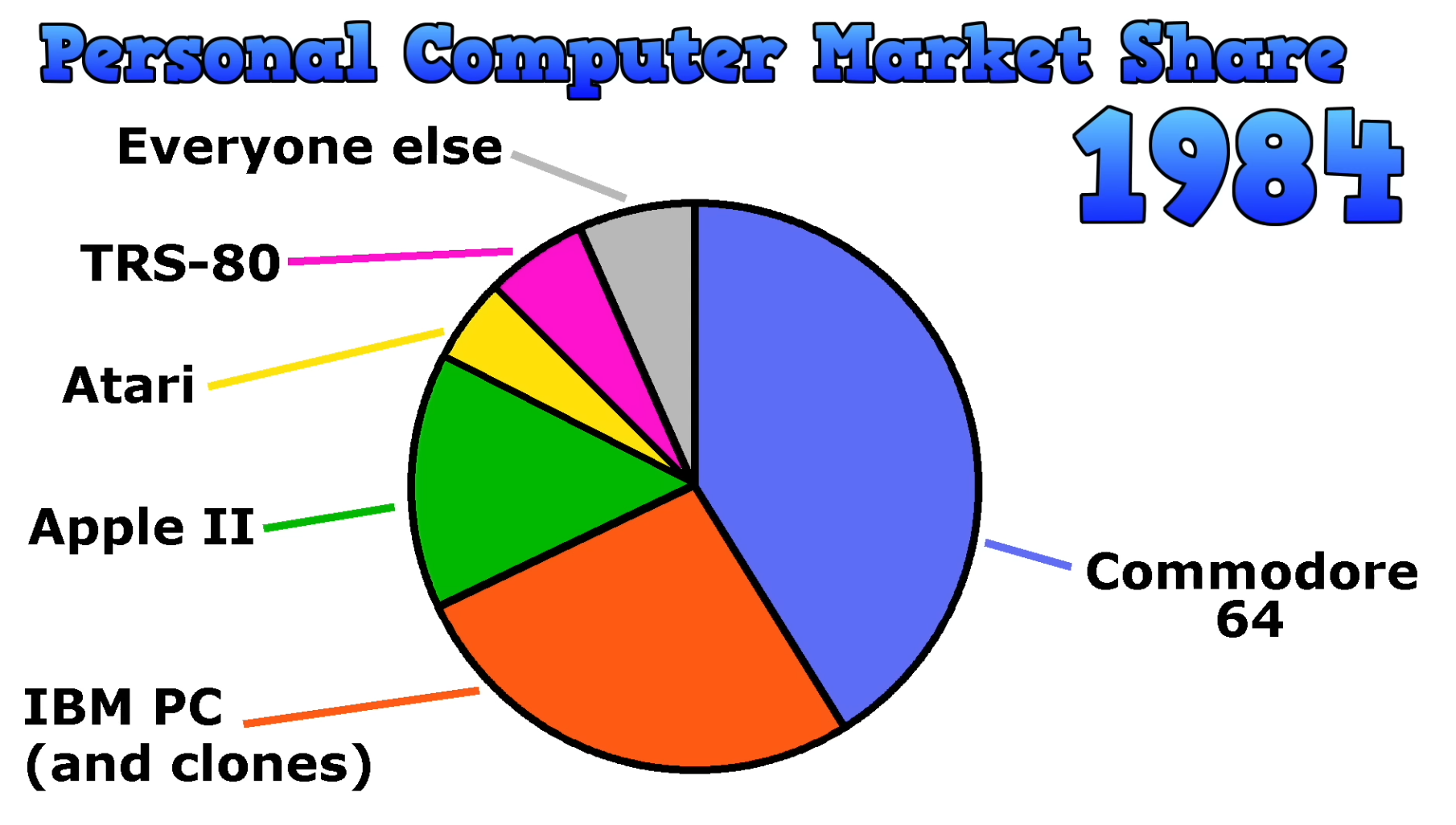
Personal Computer Market Share in 1984The first Atari came out in 1977, it was originally called the Atari Video Computer System. It was followed two years later, in 1979, by the Atari 400 and Atari 800. The Atari 800 had a music synthesizer, bit-mapped graphics, and sprites which compared favorably to the capabilities of the other systems of the day, known as the Trinity of 1977, being the Apple II, Commodore PET, and TRS-80. [The 8-Bit Guy] says the only real competition in terms of features came from the TI-99/4 which was released around the same time.

The main way to load software into the early Atari 400 and 800 computers was to plug in cartridges. The Atari 400 supported one cartridge and the Atari 800 supported two. The built-in keyboards were pretty terrible by today’s standards, but as [The 8-Bit Guy] points out there wasn’t really any expectations around keyboards back in the late 1970s because everything was new and not many precedents had been set.

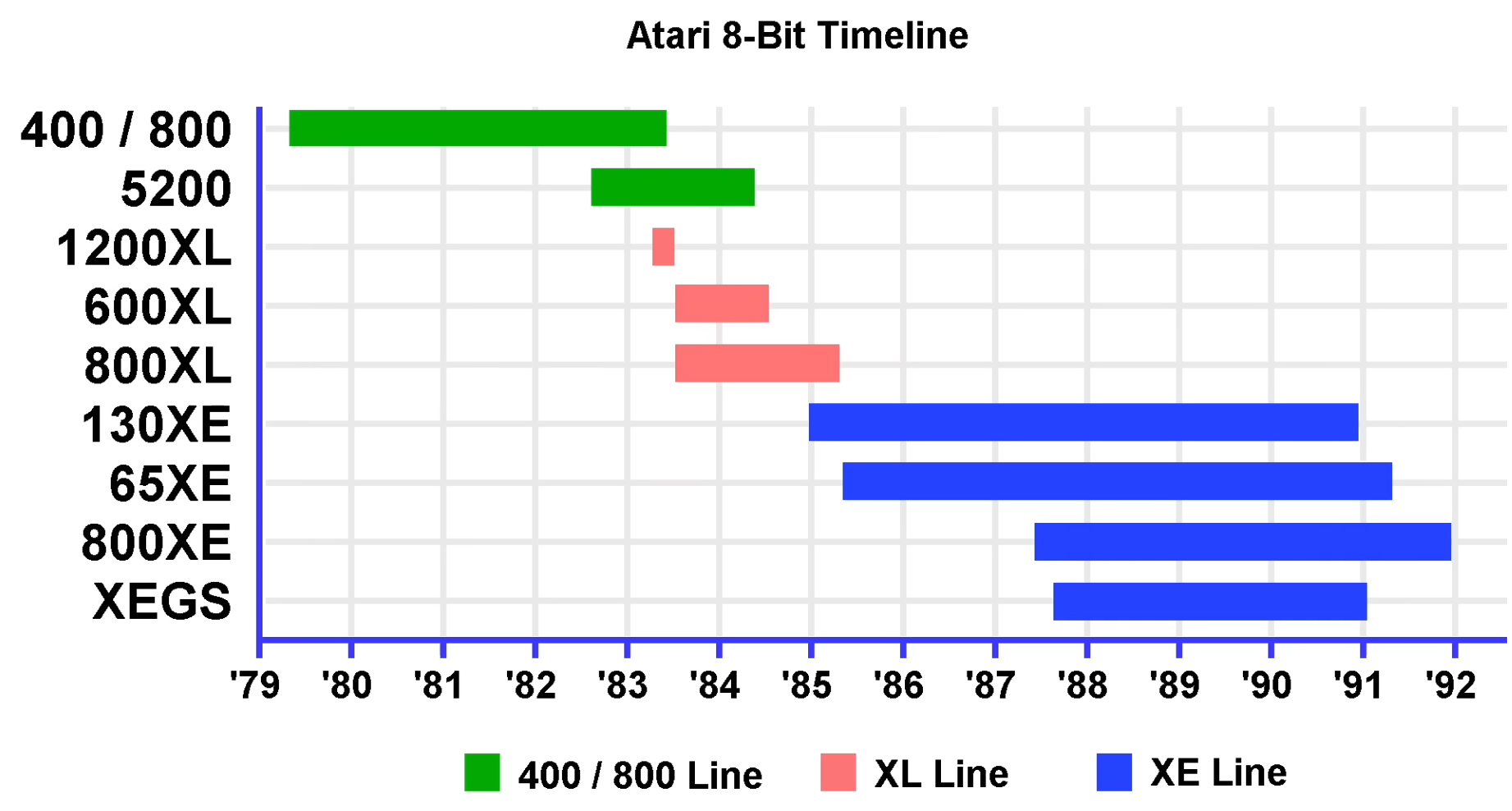
Atari 8-bit timeline[The 8-Bit Guy] goes into the hardware that was used, how the video system works, how the audio system works, and what peripheral hardware was supported, including cassette drives and floppy disk drives. He covers briefly all ten of the 8-bit systems from Atari starting in 1979 through 1992.

If you’re interested in Atari nostalgia you might like to read Electromechanical Atari Is A Steampunk Meccano Masterpiece or Randomly Generating Atari Games.

The ARCTURUS Computer Developed at Sydney University in the 1960s

13 January 2026 at 01:00
ARCTURUS control panel

[State of Electronics] have released their latest video about ARCTURUS, the 14th video in their series The Computer History of Australia.

ARCTURUS was a research computer system developed on a shoestring budget at Sydney University in the 1960s, and was in service until 1975. Particularly the system was developed by [David Wong] as a part of his PhD thesis: The design and construction of the digital computers snocom, nimbus and arcturus (PDF). [David] worked in collaboration with [Kevin R. Rosolen] who is interviewed in the video.

The machine is described as a fixed-point, binary, parallel, single address, general-purpose digital computer using packaged diode-transistor circuits. Ferrite-core memory was used instead of drum memory because drum memory was too slow and performance was a high priority feature. For the same reason parallel features were implemented where serial might have been done more simply, if it hadn’t been so slow. In addition to the ferrite-core there were paper-tape peripherals and control panels.

The machine supported 32 distinct instructions and had a 13-bit address space allowing it to directly address 8,192 words, each word comprising 20-bits. Those word bits were one sign bit and nineteen magnitude bits for fixed-point two’s complement binary numbers.

We covered The Computer History of Australia by [State of Electronics] back when they released their 5th video in the series, Australia’s Silliac Computer, if you’re interested in more history of computing in Australia.

Texas Instruments Explain Low-Dropout Linear Voltage Regulators

10 January 2026 at 07:00
An LDO schematic and some notes about their features

Today in power electronics, the folks over at Texas Instruments have put together a video covering low-dropout (LDO) linear regulators.

For a hacker, power is pretty fundamental, so it behooves us to know a little bit about what our options are when it comes time to regulate power to our projects. In this video [Alex Hanson] from Texas Instruments runs us through the linear voltage regulators known as low-dropout regulators (LDOs). It turns out that LDOs are often a poor choice for voltage regulation because they are inefficient when compared to switching regulator alternatives and can be more expensive too.

So when might you use an LDO? In very low power situations where heat and efficiency doesn’t matter very much. LDOs operate best when the input voltage is very near the output voltage and when current demands are low (roughly speaking less than ~50 mA is okay, ~500 mA is maximum, and some applications will support 1 to 3 A, although not with great efficiency and in this case thermal emissions — or magic smoke! — will become an issue).

What LDOs bring to the table is relatively clean and low-noise voltage as well as low dropout voltage (the minimum difference between the input and output voltage needed for regulation), which is their defining feature. What’s more with an appropriate output capacitor they can react quickly to load changes and they usually emit minimal EMI. LDOs are not about efficiency, they are about quality, simplicity, and control.

You might like to read more about when linear regulators might be the right choice or what your other options are.

BASIC Programming With No Strings Attached

10 January 2026 at 01:00
String art rendering of a face

Today in programming language hacks we have string art rendered in BASIC. String art — also known as pin and thread art, or filography — is an art form where images are invoked by thread woven between pins on the border of an image. In this case the thread and the pins are virtual and there is a simple 67 line BASIC program which generates and renders them.

Of course BASIC, the Beginner’s All-purpose Symbolic Instruction Code, isn’t just one thing and was a bit of a moving target over the years. Invented in 1964 at Dartmouth College by John Kemeny and Thomas Kurtz it turned into a family of languages as a dynamic array of implementations added, removed, and changed implementation details as the future unrolled.

We remember GW-BASIC and QuickBASIC, but the landscape was much broader than that. Implementations of QuickBASIC came with a “compiler”, qb45.exe, which worked by bundling the BASIC script as p-code into an executable along with the runtime binary, which we used back in the day to make “real applications”, not mere scripts.

Thanks to [Keith Olson] for writing in to let us know about this one. If you’re interested in seeing what the state of the art in string art is, be sure to check out String Art Build Uses CNC To Make Stringy Art and CNC Router Frame Repurposed For Colorful String Art Bot. The best string art is in the real world, not software!

HORUS Framework: A Rust Robotics Library

9 January 2026 at 04:00
Detail of Horus's face, from a statue of Horus and Set placing the crown of Upper Egypt on the head of Ramesses III. Twentieth Dynasty, early 12th century BC.

[neos-builder] wrote in to let us know about their innovation: the HORUS Framework — Hybrid Optimized Robotics Unified System — a production-grade robotics framework built in Rust for real-time performance and memory safety.

This is a batteries included system which aims to have everything you might need available out of the box. [neos-builder] said their vision is to create a robotics framework that is “thick” as a whole (we can’t avoid this as the tools, drivers, etc. make it impossible to be slim and fit everyone’s needs), but modular by choice.

[neos-builder] goes on to say that HORUS aims to provide developers an interface where they can focus on writing algorithms and logic, not on setting up their environments and solving configuration issues and resolving DLL hell. With HORUS instead of writing one monolithic program, you build independent nodes, connected by topics, which are run by a scheduler. If you’d like to know more the documentation is extensive.

The list of features is far too long for us to repeat here, but one cool feature in addition to the real-time performance and modular design that jumped out at us was this system’s ability to process six million messages per second, sustained. That’s a lot of messages! Another neat feature is the system’s ability to “freeze” the environment, thereby assuring everyone on the team is using the same version of included components, no more “but it works on my machine!” And we should probably let you know that Python integration is a feature, connected by shared-memory inter-process communication (IPC).

If you’re interested in robotics and/or real-time systems you should definitely be aware of HORUS. Thanks to [neos-builder] for writing in about it. If you’re interested in real-time systems you might like to read Real-Time BART In A Box Smaller Than Your Coffee Mug and Real-Time Beamforming With Software-Defined Radio.

The Staggering Complexity and Subtlety of Concurrency

8 January 2026 at 22:00
Two threads running concurrently

If you’re gonna be a hacker eventually you’re gonna have to write code. And if you write code eventually you’re gonna have to deal with concurrency. Concurrency is what we call it when parts of our program run at the same time. That could be because of something fairly straightforward, like multiple threads, or multiple processes; or something a little more complicated such as event loops, asynchronous or non-blocking I/O, interrupts and signal handlers, re-entrancy, co-routines / fibers / green threads, job queues, DMA and hardware level concurrency, speculative or out-of-order execution at CPU-level, time-sharing on single-core systems, or parallel execution on multi-core systems. There are just so many ways to get tied up with concurrency.

In this video from [Core Dumped] we learn about The ’80s Algorithm to Avoid Race Conditions (and Why It Failed). This video explains what a race condition looks like and talks through what the critical section is and approaches to protecting it. This video introduces an old approach to protect the critical section first invented in 1981 known as Peterson’s solution, but then goes on to explain how Peterson’s solution is no longer reliable as much has changed since the 1980s, particularly compilers will reorganize instructions and CPUs may run code out of order. So there is no free lunch and if you have to deal with concurrency you’re going to want some kind of support for a mutex of some type. Your programming language and its standard library probably have various types of locks available and if not you can use something like flock (also available as a syscall, to complement the POSIX fnctl), which may be available on your platform.

If you’re interested in contemporary takes on concurrency you might like to read Amiga, Interrupted: A Fresh Take On Amiga OS or The Linux Scheduler And How It Handles More Cores.

The Unreasonable Effectiveness of the Fourier Transform

8 January 2026 at 01:00
The Fourier transform

A talk, The Unreasonable Effectiveness of the Fourier Transform, was presented by [Joshua Wise] at Teardown 2025 in June last year. Click-through for the notes or check out the video below the break for the one hour talk itself.

The talk is about Orthogonal Frequency Division Multiplexing (OFDM) which is the backbone for radio telecommunications these days. [Joshua] tries to take an intuitive view (rather than a mathematical view) of working in the frequency domain, and trying to figure out how to “get” what OFDM is (and why it’s so important). [Joshua] sent his talk in to us in the hope that it would be useful for all skill levels, both folks who are new to radio and signal processing, and folks who are well experienced in working in the frequency domain.

If you think you’ve seen “The Unreasonable Effectiveness of $TOPIC” before, that’s because hacker’s can’t help but riff on the original The Unreasonable Effectiveness of Mathematics in the Natural Sciences, wherein a scientist wonders why it is that mathematical methods work at all. They seem to, but how? Or why? Will they always continue to work? It’s a mystery.

Hidden away in the notes and at the end of his presentation, [Joshua] notes that every year he watches The Fast Fourier Transform (FFT): Most Ingenious Algorithm Ever? and every year he understands a little more.

If you’re interested in OFDM be sure to check out AI Listens To Radio.

Build a 2K Resolution MSLA 3D Resin Printer for Cheap

7 January 2026 at 11:30
A photo of the various parts for this MSLA 3D printer

Have an old Android device collecting dust somewhere that you’d like to put to better use? [Electronoobs] shows us how to make a Masked Stereolithography Apparatus (MSLA) printer for cheap using screens salvaged from old Android phones or tablets.

[Electronoobs] wanted to revisit his earlier printer with all the benefits of hindsight, and this is the result. The tricky bit, which is covered in depth in the video below the break, is slicing up the model into graphics for each layer, so that these layers can be rendered by the LCD for each layer during the print.

The next tricky bit, once your layer graphics are in hand, is getting them to the device. This build does that by installing a custom Android app which connects to a web app hosted on the ESP32 microcontroller controlling the print, and the app has a backchannel via a USB OTG adapter installed in the device. [Electronoobs] notes that there are different and potentially better ways by which this full-duplex communication can be achieved, but he is happy to have something that works.

If you’re interested in resin printer tech, be sure to check out Continuous Printing On LCD Resin Printer: No More Wasted Time On Peeling? Is It Possible? and Resin Printer Temperature Mods And Continuous IPA Filtration.

This 8-Bit Commodore PET Was Hard to Fix

7 January 2026 at 01:00
Ken Shirriff working on the Commodore PET

Over on [Ken Shirriff]’s blog is a tricky Commodore PET repair: tracking down 6 1/2 bad chips. WARNING: contains 8-bit assembly code.

The Trinity of 1977 which started the personal computer revolution were the Apple II, the Commodore PET, and the TRS-80. In this project it’s a failing Commodore PET which is being restored.

In the video below the break you can see [Ken Shirriff] and [CuriousMarc] team up to crack this tough nut. Resolving the various issues required a whole heap of software and equipment. Most notably a Keysight DSOX3104T oscilloscope, a Retro Chip Tester Pro, an old Agilent 1670G logic analyzer (this thing is rocking a 3.5″ floppy disk drive!), an old Agilent 54622A oscilloscope (also rocking a floppy drive!), a Data I/O 29B Universal Programmer With UniPak 2 insert, and the disassembly software Ghidra.

In the end there were 6 (and a half) bad chips which needed to be discovered and then replaced. This project is a reminder that it’s nice to have the right tools for the job!

If you’re interested in the Commodore PET you might like to read A Tricky Commodore PET Repair And A Lesson About Assumptions or Tracking Satellites With A Commodore PET.

PiStorm68K Offers Supercharged Retro Amiga Experience

6 January 2026 at 14:30
A photo of the PiStorm68K circuit board

[AmiCube] has announced their new PiStorm68K special edition MiniMig accelerator board. This board was developed to replace the 68000 CPU in a MiniMig — a recreation of the original Amiga chipset in an FPGA allowing a real genuine 68000 CPU to operate.

The PiStorm68K itself can host a real genuine 68000 CPU but it can also host various Raspberry Pi models which can do emulation of a 68000. So if you combine a PiStorm68K with a MiniMig you can, at your option, boot into an emulated environment with massively increased performance, or you can boot into an original environment, with its reliable and charming sluggishness.

In the introduction video below, [AmiCube] uses the SYSINFO utility software to compare the CPU speed when using emulation (1531 MIPS) versus the original (4.47 MIPS), where MIPS means Millions of Instructions Per Second. As you can see the 68000 emulated by the Raspberry Pi is way faster than the original. The Raspberry Pi also emulates a floating-point unit (FPU) which the original doesn’t include and a memory management unit (MMU) which isn’t used.

If you’re interested in old Amiga tech you might also like to read about Chip Swap Fixes A Dead Amiga 600 or The Many-Sprites Interpretation Of Amiga Mechanics.

Popular Science Experiments in Sound During the 19th-Century

5 January 2026 at 11:30
Illustration of Chladni's technique for producing his figures, from John Tyndall's Sound (1869)

Check one, two; check one, two; is this thing on? Over on The Public Domain Review [Lucas Thompson] takes us for a spin through sound, as it was in Britain around and through the 1800s.

The article begins by introducing the Father of Acoustics, German physicist Ernst Chladni. After placing grains of sand on a thin metal plate and drawing a violin bow along one edge Chladni figures appear, making manifest that which previously could only be heard, that is, sound waves.

It’s fun to think that it wasn’t so long ago that the physics of sound was avant-garde. Middle class Victorian society was encouraged to reproduce cutting edge experiments with equipment in their own homes, participating in a popular science which was at the same time part entertainment and part instruction, for young and old alike. Throughout the rest of his article [Lucas] lists a number of popular science books from the period and talks a little about what was to be found within.

See the video below the break for a demonstration of Chladni figures from The Royal Institution. Of course the present state of the art regarding sonics is well advanced as compared with that of the 19th century. If you’re interested to know more check out Building A Wall-Mounted Sound Visualizer and Seeing Sound For Under $200.

Are We Ready for AR Smart Glasses Yet?

4 January 2026 at 04:00

In a recent article from IEEE Spectrum, [Alfred Poor] asks the question what do consumers really want in smart glasses? And are you finally ready to hang a computer screen on your face?

[Alfred] says that since Google Glass was introduced in 2012, smart glasses haven’t yet found their compelling use-case. Apparently it looks like while virtual reality (VR) might be out, augmented reality (AR) might be in. And of course now we have higher levels of “AI” in the mix, whatever that means.

According to the article in the present day there are two competing visions of what smart glasses might be: we have One Pro from Xreal in Beijing, and AI Glasses from Halliday in Singapore, each representing different design concepts evolving in today’s market. The article goes into further detail. The video below the break is promotional material from Halliday showing people’s reactions to their AI Glasses product.

[Alfred] talks with Louis Rosenberg, CEO and chief scientist of Unanimous AI, who says he believes “that within five years, immersive AI-powered glasses will replace the smartphone as the primary mobile device in our digital lives.” Predicting the future is hard, but what do you think? Sound off in the comments!

All in all smart glasses remain a hot topic. If you’d like to read more check out our recent articles Making Glasses That Detect Smartglasses and Mentra Brings Open Smart Glasses OS With Cross-Compat.

❌
❌