If you are torrenting without the use of a VPN, you are inviting trouble for yourself. That being said, there is a lot of misleading and incorrect information available on the World Wide Web regarding the free VPN for torrenting. There are many so-called freeVPN that leaks the very information they are designed to protect. […]
SoundCloud confirms a breach affecting an estimated 20% of users, resulting in stolen email addresses. The company is dealing with follow-up DoS attacks by unnamed attackers while media reports allege involvement of ShinyHunters.
Many of you enjoyed our earlier lessons on Volatility, so today we will continue that journey with another practical case. It is always great to see your curiosity growing stronger. This time we will walk through the memory analysis of a Windows machine that was infected with a stealer, which posed as a VPN app. The system communicated quietly with a Command and Control server operated by a hacker, and it managed to bypass the network intrusion detection system by sending its traffic through a SOCKS proxy. This trick allowed it to speak to a malicious server without raising alarms. You are about to learn exactly how we uncovered it.
What Is a NIDS ?
Before we jump into memory analysis, let’s briefly talk about NIDS, which stands for Network Intrusion Detection System. A NIDS watches the network traffic that flows through your environment and looks for patterns that match known attacks or suspicious behavior. If a user suddenly connects to a dangerous IP address or sends strange data, the NIDS can raise an alert. However, attackers often try to hide their communication. One common method is to use a SOCKS proxy, which allows the malware to make its malicious connection indirectly. Because the traffic appears to come from a trusted or unknown third party instead of the real attacker’s server, the NIDS may fail to flag it.
Memory Analysis
Now that we understand the background, we can begin our memory investigation.
Evidence
In this case we received a memory dump that was captured with FTK Imager. This is the only piece of evidence available to us, so everything we discover must come from this single snapshot of system memory.
Volatility Setup
If you followed the first part of our Volatility guide, you already know how to install Volatility in its own Python 3 environment. Whenever you need it, simply activate it:
bash$ > source ~/venvs/vol3/bin/activate
Malfind
Volatility includes a helpful plugin called malfind. In Volatility 3, malfind examines memory regions inside processes and highlights areas that look suspicious. Attackers often inject malicious code into legitimate processes, and malfind is designed to catch these injected sections. Volatility has already announced that this module will be replaced in 2026 by a new version called windows.malware.malfind, but for now it still works the same way.
The output shows references to a VPN, and several processes stand out as malicious. One in particular catches our attention: oneetx.exe. To understand its role, we need to explore the related processes. We can do that with pslist:
We see that oneetx.exe launched rundll32.exe. This is a classic behavior in malware. Rundll32.exe is a legitimate Windows utility that loads and executes DLL files. Hackers love using it because it allows their malicious code to blend in with normal system behavior. If the malware hides inside a DLL, rundll32.exe can be used to run it without attracting much attention.
We have confirmed the malicious process, so now we will extract it from memory.
Analyzing the Malware
To analyze the malware more deeply, we need the actual executable. We use dumpfile and provide the process ID:
Volatility will extract all files tied to the process. To quickly locate the executable, we search for files ending in .exe:
bash$ > ls *exe*
Once we find the file, we calculate its hash so that we can look it up on VirusTotal:
bash$ > md5sum file.0x….oneetx.exe.img
The malware is small, only 865 KB. This tells us it is a lightweight implant with limited features. A full-featured, multi-purpose implant such as a Sliver payload is usually much larger, sometimes around sixteen megabytes. Our sample steals information and sends it back to the hacker.
Viewing its behavior reveals several MITRE ATT&CK techniques, and from that we understand it is a stealer focused on capturing user input and collecting stolen browser cookies.
Next, we want to know which user launched this malware. We can use filescan for that:
It turns out the user was Tammam, who accidentally downloaded and executed the malware.
Memory Protection
Before we continue, it is worth discussing memory protection. Operating systems apply different permissions to memory regions, such as read, write, or execute. Malware often marks its injected code regions as PAGE_EXECUTE_READWRITE, meaning the memory is readable, writable, and executable at the same time. This combination is suspicious because normal applications usually do not need this level of freedom. In our malfind results, we saw that the malicious code was stored in memory regions with these unsafe permissions.
Process Tree
Next, we review the complete process tree to understand what else was happening when the malware ran:
bash$ > vol -f MemoryDump.mem windows.pstree
Two processes draw our attention: Outline.exe and tun2socks.exe. From their PIDs and PPIDs, we see that Outline.exe is the parent process.
Tun2socks.exe is commonly used to forward traffic from a VPN or proxy through a SOCKS interface. In normal security tools it is used to route traffic securely. However, attackers sometimes take advantage of it because it allows them to hide communication inside what looks like normal proxy traffic.
To understand how Outline.exe started, we trace its PID and PPID back to the original parent. In this case, explorer.exe launched multiple applications, including this one.
Normally we would extract these executables and check their hashes as well, but since we have already demonstrated this process earlier, we can skip repeating it here.
Network Connections
Malware usually communicates with a Command and Control server so the hacker can control the infected system, steal data, or run remote commands. Some malware families, such as ransomware, do not rely heavily on network communication, but stealers typically do.
We check the network connections from our suspicious processes:
Tun2socks connected to 38.121.43.65, while oneetx.exe communicated with 77.91.124.20. After checking their reputations, we see that one of the IPs is malicious and the other is clean. This strongly suggests that the attacker used a proxy chain to hide their real C2 address behind an innocent-looking server.
The malicious IP is listed on tracker.viriback.com, which identifies the malware family as Amadey. Amadey is known for stealing data and providing remote access to infected machines. It usually spreads through phishing and fake downloads, and it often hides behind ordinary-looking websites to avoid suspicion.
The tracker even captured an HTTP login page for the C2 panel. The interface is entirely in Russian, so it is reasonable to assume a Russian-speaking origin.
Strings Analysis
Now that we understand the basic nature of the infection, we search for strings in the memory dump that mention the word “stealer”:
bash$ > strings MemoryDump.mem | grep -ai stealer
We find references to RedLine Stealer, a well-known and widely sold malware. RedLine is commonly bought on underground markets. It comes either as a one-time purchase or as a monthly subscription. This malware collects browser passwords, auto-fill data, credit card information, and sometimes even cryptocurrency wallets. It also takes an inventory of the system, gathering information about hardware, software, security tools, and user details. More advanced versions can upload or download files, run commands, and report regularly to the attacker.
We can also use strings to search for URLs where the malware may have uploaded stolen data.
Several directories appear, and these could be the locations where the stolen credentials were being stored.
Timeline
Tammam wanted to download a VPN tool and came across what looked like an installer. When he launched it, the application behaved strangely, but by then the infection had already begun. The malware injected malicious code, and used rundll32.exe to run parts of its payload. Tun2socks.exe and Outline.exe helped the malware hide its communication by routing traffic through a SOCKS proxy, which allowed it to connect safely to the attacker’s C2 server at 77.91.124.20. From there, the stealer collected browser data, captured user inputs, and prepared to upload stolen credentials to remote directories. The entire activity was visible inside the memory dump we analyzed.
Summary
Stealers are small but very dangerous pieces of malware designed to quietly collect passwords, cookies, autofill data, and other personal information. Instead of causing loud damage, they focus on moving fast and staying hidden. Many rely on trusted Windows processes or proxy tools to disguise their activity, and they often store most of their traces only in memory, which is why memory forensics is so important when investigating them. Most popular stealers, like RedLine or Amadey, are sold on underground markets as ready-made kits, complete with simple dashboards and subscription models. Their goal is always the same.
An Australian man who used fake “evil‑twin” Wi‑Fi networks at airports and on flights to steal travellers’ data has been jailed for 7 years and 4 months.
After allowing password sharing for years, Netflix has recently changed its policy. The password sharing is now only allowed for a single physical household. However, we also have multiple methods to bypass Netflix household. Want to know more? Make sure to read till the end. Let’s being!
Since its initial years, Netflix encouraged password sharing with your friends and family, which allowed them to generate a strong user base. After they were done with this, Netflix unexpectedly started to impose a BAN on password sharing. This helped them surpass the expected revenue in Q4 of 2023, due to an overflow of new subscriptions.
Current Netflix Password-sharing Policy
Netflix only allows account sharing under a single, physical household. In simple terms, Netflix will only allow sharing your account with those who stream from the same internet as yours (the main account), preferably your family members.
However, to beat this, we first need to understand the concept of a single physical household.
Enforcement of the Policy
The policy is not enforced on smartphones because it is natural for mobile phones to be active outside of Netflix household. Currently, Password-sharing under single household policy is enforced for TVs, smart TV boxes, PCs, and all other similar devices.
What is a Single Physical Household?
As soon as the Netflix restrictions will move to your region, you will start getting monitored for your activity. On the basis of this activity, Netflix will automatically determine a “primary location” where your account is used the most. If your account is used by other devices, using the same internet, as you are using at your primary location, all the devices, including yours, will considered to be under a single physical household, known as Netflix Household. If you trying logging into an account which has a different Netflix Household you will be presented by an error message “your TV isn’t part of the Netflix household for this account” followed by an explanation that why you can not access Netflix.
Since we have looked at what is Netflix Household, and what the restrictions for it are, let’s just move to our main topic on how to bypass Netflix Household.
How to Bypass Netflix Household
It must be clear by now, that to bypass Netflix household, we must make Netflix think that all the users sharing the account are living in the same “physical household” or the same “primary location”. As Netflix determines the location by the IP of the primary device, we can do so by simply routing the traffic of all the additional devices from one primary device.
To make it clear, imagine you and your 4 friends plan to share the same Netflix account. You own the account and you run it in your house, on the TV. So the primary location is the IP address of your home internet router. Now, if all your friends route their Netflix traffic from your IP address while physically being on different locations, Netflix will think all of you 5 are in the same physical household, and you must not have an issue sharing the same account.
But if any of your friend is not in the same physical household i.e. Netflix Household , they will get a message “your TV isn’t part of the Netflix household for this account” while he tries to access Netflix.
Now let’s dwell into the methods on how we can bypass Netflix Household so that you can access Netflix even if you are not sharing the same location or internet. Lets discover them one by one.
Method 1: Tailscale to
If thinking of a Virtual Private Network or VPN brings you the idea of a consumer VPN, like SurfShark or ProtonVPN, we are not going to use that here, since the crackdown by Netflix for consumer VPNs have begun for years. We will however, set up our very own Private Network from our primary location to route all the traffic of shared devices from our IP. Now under this, we again have a few third-party services we can use. One of the easiest and most convenient to use is “Tailscale”.
What is Tailscale VPN?
Tailscale is a free VPN which allows you to route and monitor the traffic, you are sending or receiving from your IP. We will be using it to redirect all the traffic from the devices using shared account i.e. Outside of Netflix Household, to the device running from the primary location. To get started, you will have to follow these steps.
Set up Tailscale to Bypass Netflix Household
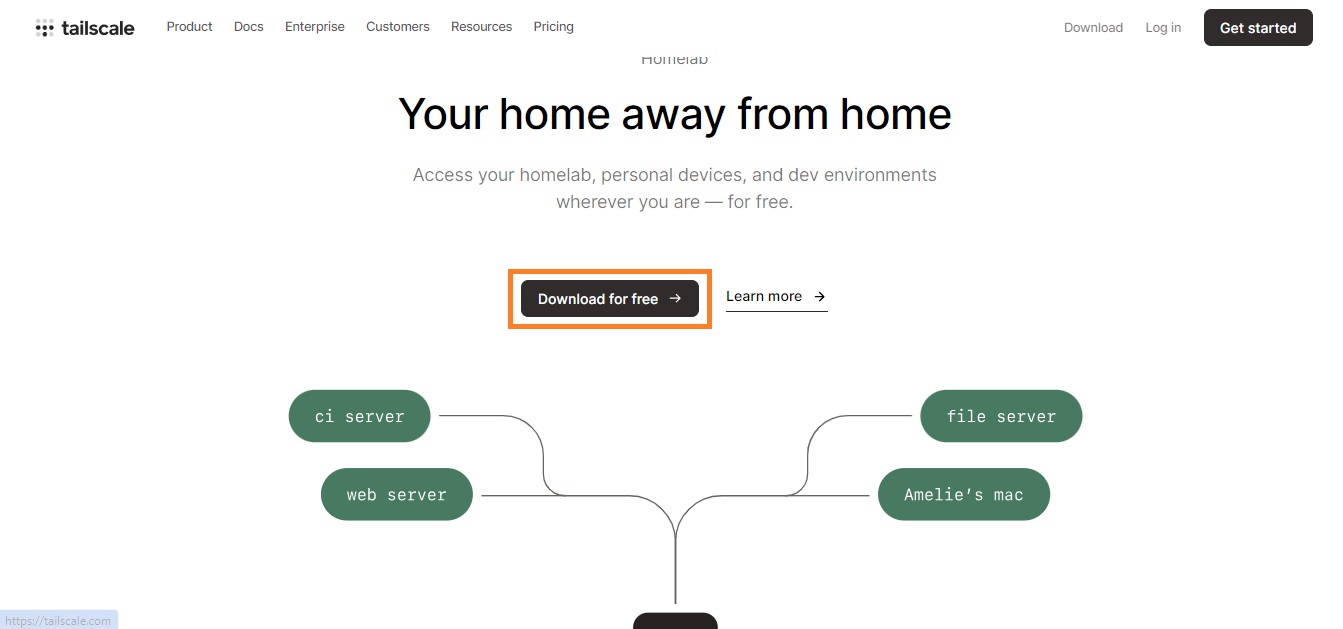
First of all, you need to download Tailscale. It’s simple and easy.
Click the button and Sign Up with the option of your choice.
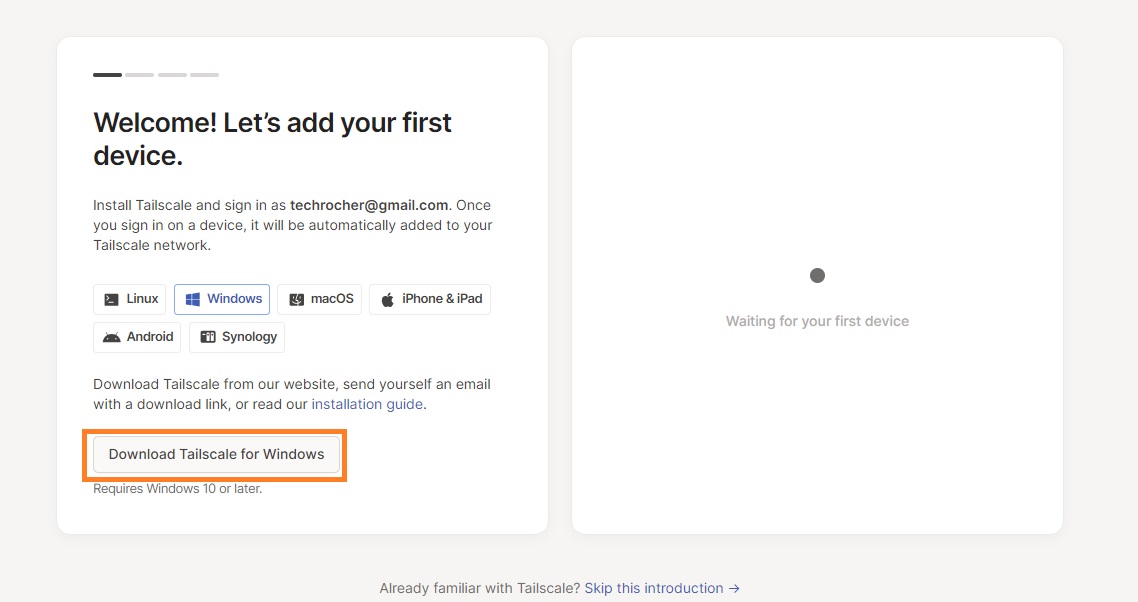
Next up, you need to select the type of your primary device.
It is important to note that your primary device needs to always be online.
You can use Windows, Raspberry Pi, or a Mac to run your Netflix account.
Select the respective option and click on “Download for Windows (in this case)”
Tailscale – Add the Primary Device
Once you have downloaded Tailscale, you will need to log in to the account you created previously. After the installation is completed, simply run the Tailscale app and link the account you just created, by signing in. This will add your device as a primary device.
Tailscale – Add Second Device
Next up, you will need to add a second device that is intended to run the same Netflix account. To add a second device, install the Tailscale VPN on that device and log in with the same account you created earlier. After you have logged in with the same account on your secondary device, simply go back to your primary device to check if the device list is updated.
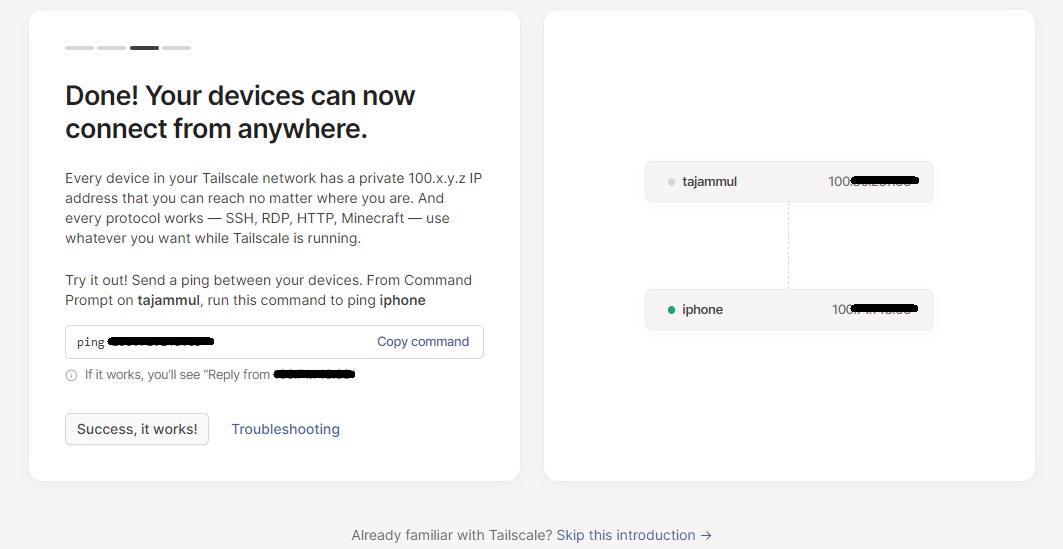
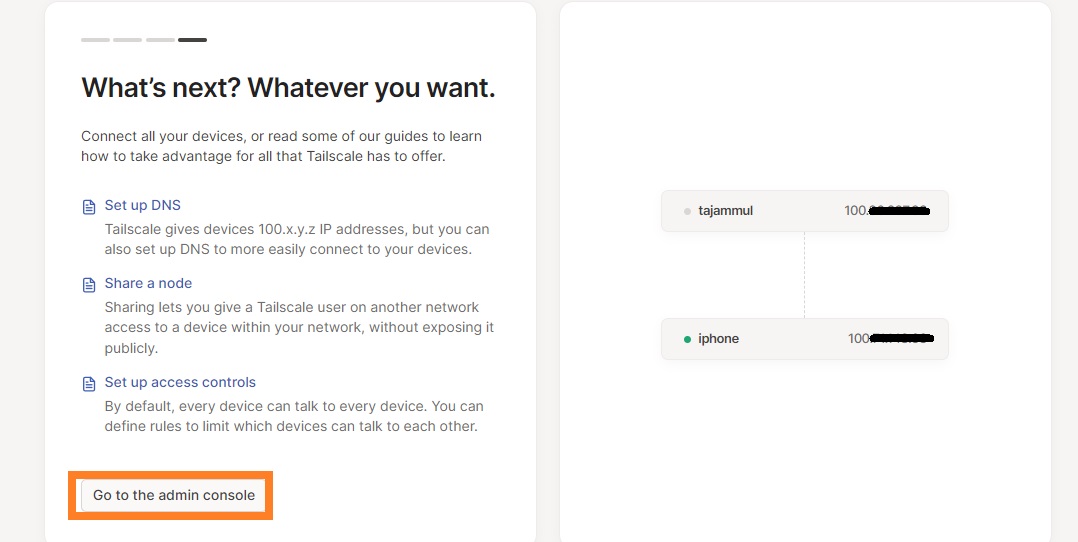
Once the device list is updated, you will see your secondary device, which in our case is “iphone”. Although the device is for testing purposes, this is to be noted, that this method will not entertain any smartphone users – moreover smartphones are not barred by Netflix Household restrictions.
Anyways, once your device list is updated, click on “Success, it works”.
Tailscale – The Admin Console
On the next screen, click on “Go to the admin console” to access full control of all the devices.
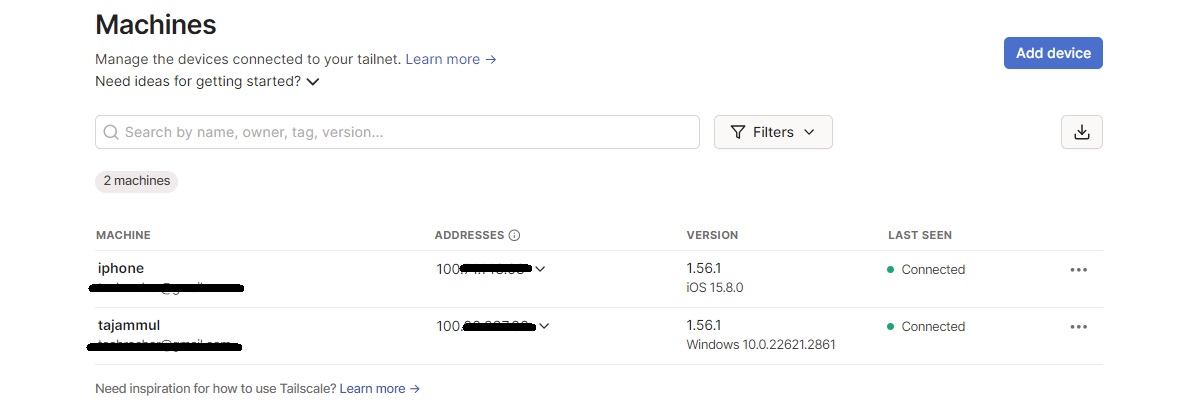
This will show all the available devices that are currently connected to current account.
Now it’s time to set up our main server, which will route all the traffic from other devices. It will be our primary device which will be online all the time. And as we have decided already, this is going to be our Windows machine. Let’s set it up as an exit node (server).
Tailscale – Specify Primary Device as Exit Node
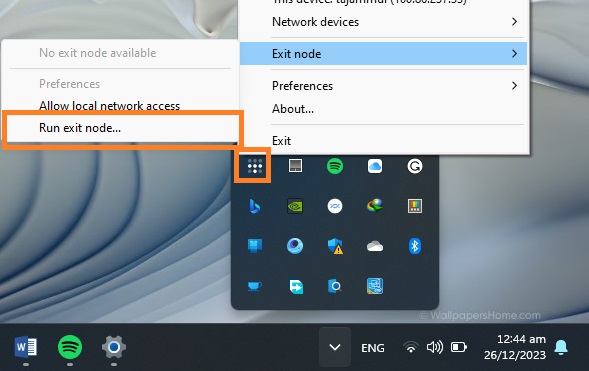
Go to little windows tray in taskbar and right click on Tailscale icon. Under “Exit Node” click on “Run exit node” and confirm it by clicking “Yes” for the pop-up.
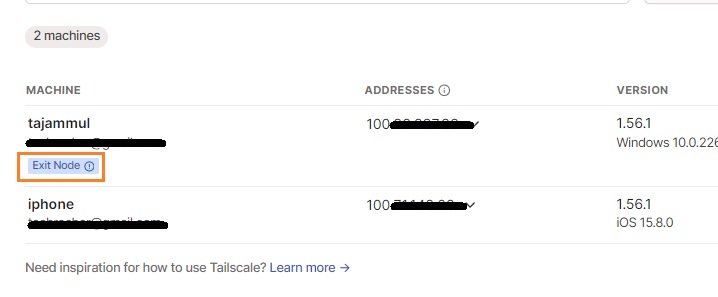
As soon as the exit node will be reflected on the application, a little badge will appear under the device name, indicating it is acting as exit node.
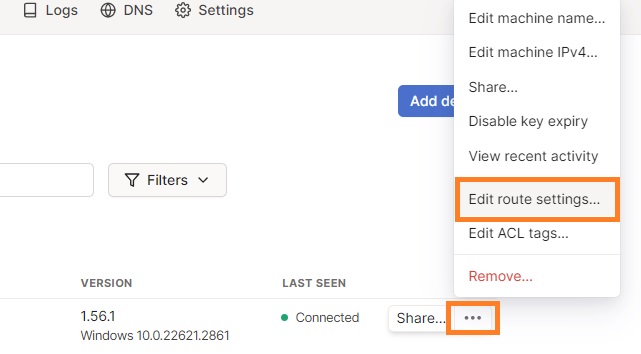
We will also need to approve this change from the admin console. For that, click on three dots against the name of the machine and click on “Edit route settings”.
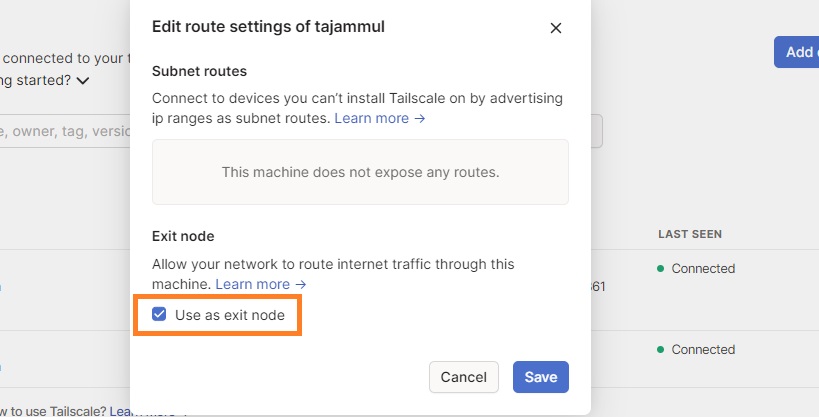
Under this window, check the box before “Use as exit node” and click “Save”.
Now we have verified that we want our Windows machine to act as our server or exit node.
Tailscale – Disable Key Expiry
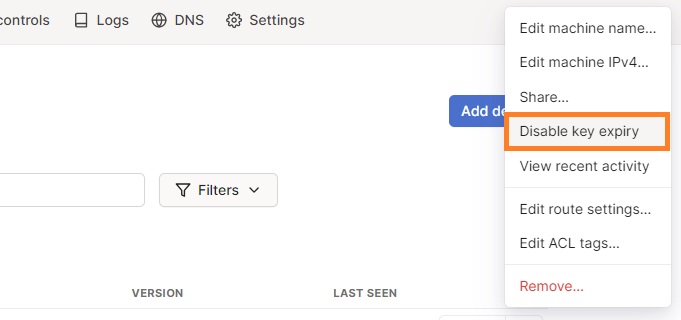
Another thing we have to do is, to disable expiry, that is, we have to authenticate all the devices periodically if the expiry is enabled. We can turn that off by click on three dots against our Windows machine name and click on “Disable Expiry”.
Tailscale – Make Primary Device a Service
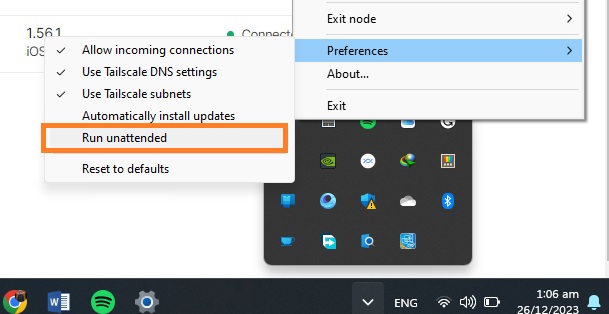
Now, we want our machine to act as a service, so even if no device is connected, it still functions as a server. For that, simply click on the little tray icon and right-click on the Talescale icon. Go to Preferences and enable “Run unattended”. Confirm by clicking “Yes” for the pop-up that appears.
Now we are done with our Windows machine. For the next step, we need to go to the Talescale app in our client device, and select our Windows machine as exit node. Once done, all our internet traffic will go through our primary device.
This was it for the first method. We can run Netflix on all of our devices and it will be good to go. As all internet traffic will go through the Talescale server we created above which is residing in the Netflix Household and Netflix will consider your outside session to be coming from the same location / IP thus allowing you to view Netflix.
Tailscale Alternative Services
Tailscale is not only the VPN offering this solution. We can use some other fantastic VPNs that do the same thing:
SoftEther VPN
WireGuard VPN
PiVPN (for single-board computer and Linux)
Method 2: Meshnet by NordVPN to Bypass Netflix Household
If the previous method seems too technical or time-consuming to you, here is an alternate method for you. Although this method is relatively simple and easy, it comes with a question of reliability. Still there is nothing bad with giving it a shot. So let’s jump straight into it.
We will use NordVPN’s Meshnet service for this method. Meshnet is primarily aimed to provide a LAN network which can help route the traffic from a single device, transfer files in a network, and link multiple devices. We will, however, use this feature to bypass Netflix household restrictions. This method is easy, simple, and totally free of cost. For that, you will have to follow these steps:
Meshnet – Set up NordVPN
First of all, download and install NordVPNin your primary device, which is again Windows machine in our case. (Setting up MeshNet is Free, however you can use this referral to get upto 3 months additional for free if you opt to buy)
Sign Up or log in to your account
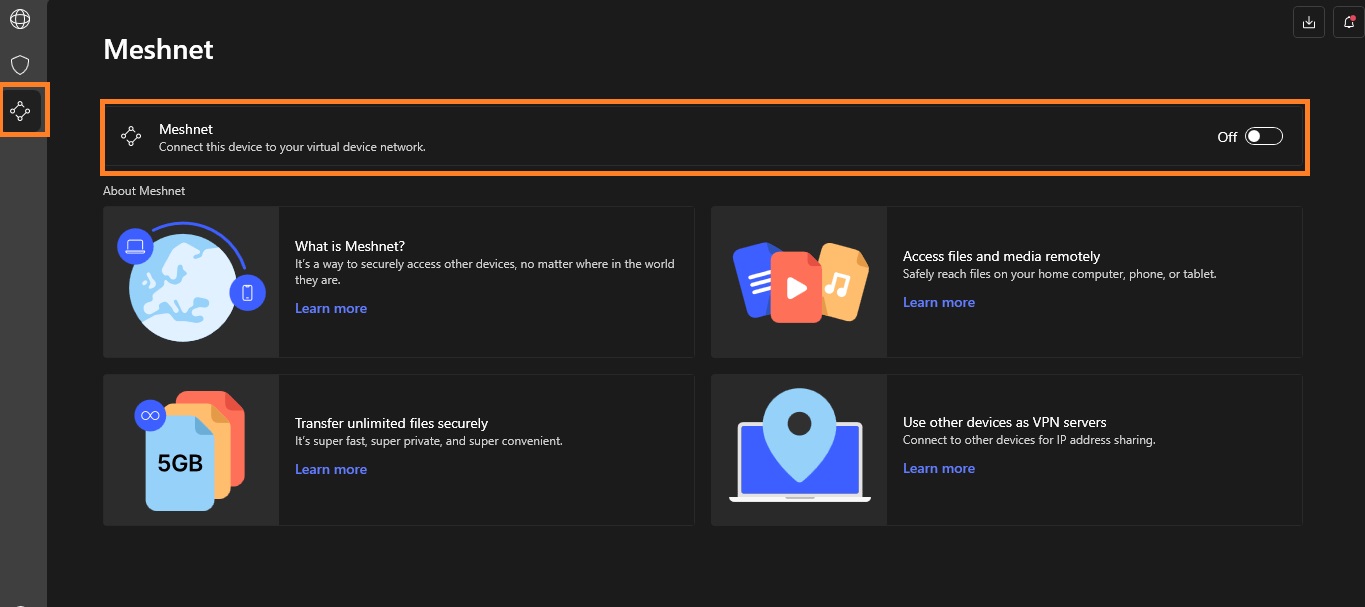
Click at the third button from the top, at upper left corner and turn on Meshnet.
Meshnet – Set up Meshnet on Client Device
On the client device, install NordVPN and log in with the same account.
Turn on Meshnet.
Come back to your host device (Windows PC) and check, the device list must be updated by then.
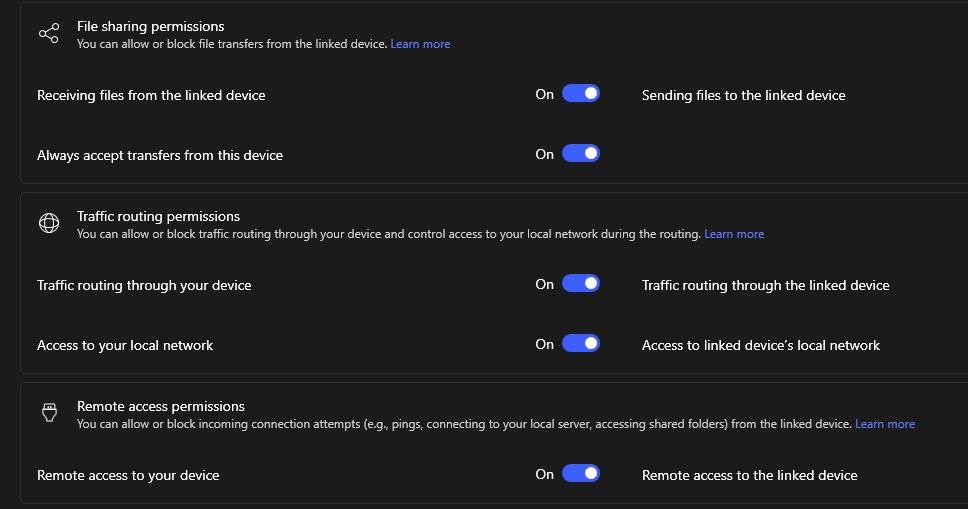
Click on the 3 dot icon in front of the client device name and click “manage device”.
Make sure all the options shown below are turned on.
Now come back to your client device, and click on the Route Traffic option.
You should see the host device.
Simply click on “Route all Traffic”.
Repeat the process for all the devices you want to add to the same network.
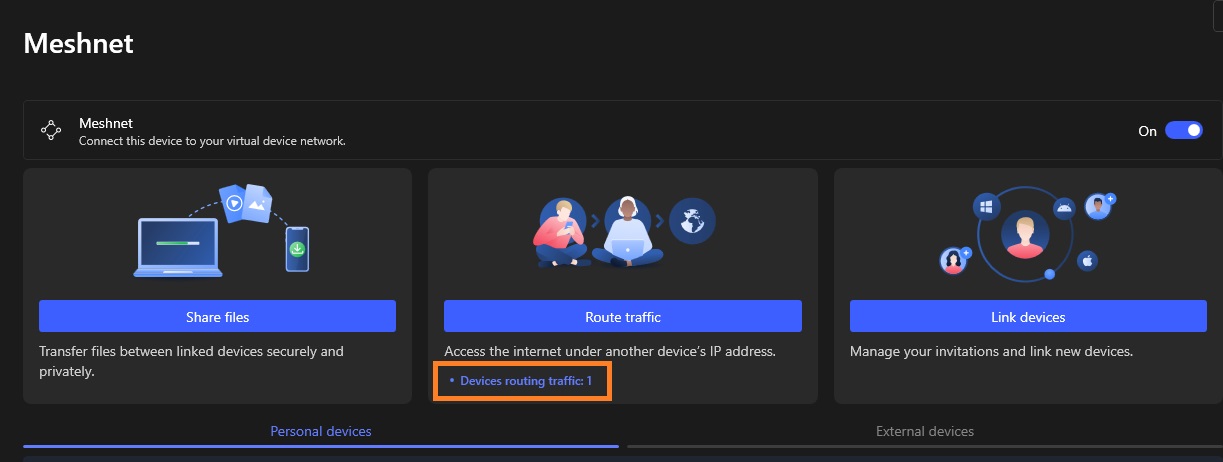
Once done, you will see the number of the devices on your host device that are routing their traffic from your device.
And that was it! Now all the devices are running under the same IP and you will be able to successfully bypass Netflix household restrictions.
Cautions and Restrictions
Although these bypass methods will let you enjoy the same Netflix account for all your buddies, here are a few cautions and restrictions you should be aware of.
Security Risks
The biggest caution for this method is the security. When you are routing all the traffic from multiple devices to a single device, it simply means you are allowing all the devices to access each other exposing your cyber footprint. And that any of your private information is easily visible to other devices connected to the same network.
So it is important to share your account and server with only the people you truly trust. While NordVPN Meshnet will regard your data security / privacy the Tailscale will give you more flexibility but lesser security protection.
Internet Speed
For the first method, Tailscale VPN informs its users that their services are not yet fully optimized for Windows devices. This means users can experience a lower internet speed compared to normal streaming.
This is also worth noting, that as the primary device is routing the internet for multiple devices, it must have a faster internet connection for a smooth Netflix experience.
Occasional Practices
As mentioned earlier, Netflix automatically determines a user’s primary location by analyzing it’s log data, we must take some measures to make Netflix determine our desired location i.e., as primary location.
Netflix usually checks for the household every 30 days. So to keep enjoying your streams, you must perform this routing practice at least within 30 days. However, the more frequently you perform the practice, the lesser the chances of you getting barred with this Netflix Household restriction will be. Ideally, a one or two week gap would be the best to make things going as desired.
Conclusion
After allowing password sharing for years, it seems like Netflix is now focusing on making some money. Netflix recently imposed a password-sharing ban to bring more users under their subscription model. Currently, they only offer “Password Sharing in Household”. This means, only people in the same physical household are allowed to share their passwords.
We can, however, use several methods to bypass Netflix household, allowing multiple devices to run physically on different locations, and virtually, under same IP. This is what this guide exactly talks about.
VyprVPN based in Switzerland and owned byGolden Frog was developed in 2009. It has two versions designed for various purposes. One is designed for ‘fast and highly secure personal VPN service’, while the other is designed for ‘security in business connections’.
In that sense, Golden Frog is a global service provider which is committed to preserving an open and secure internet experience. Besides VyprVPN, they are also the owners of OUTFOX which is an optimized gaming network; designed to reduce lag and lower pings
Features of VyprVPN
Below are my reviewed features mentioned by the company;
Split Tunneling
DNS Leak Protection
No-Log VPN
Kill Switch
Public Wi-Fi Protection
24/7 Customer Support
10 Simultaneous Connections
Access to Restricted Content
Split Tunneling
After years of writing reviews on VPNs, I didn’t think I would be surprised anymore when it comes to this feature, but VyprVPN surprisingly accomplished this.
Their split tunneling is unique, in the sense that, it splits your internet traffic when you stream with your device. It is more like having multiple accounts for a website, but in this case, you don’t go through the process of personally creating them.
DNS Leak Protection
Well, what is a VPN without privacy/security? This is what this function is all about. It fortifies your data, making sure that none of it is leaked to any unknown party.
No-Log VPN
Thankfully, unlike most VPN companies who lie about their no-log policy, VyprVPN didn’t lie about theirs. Their main server is based in Switzerland, which means that they aren’t part of the Eyes Alliance.
So unless they purposely leaked or shared your data, you have no reason to doubt their no-log policy.
Kill Switch
This feature automatically blocks all internet access as soon as the software detects that your device is disconnected. The feature is useful in cases of device/software malfunction.
Public Wi-Fi Protection
Forgot to switch on VyprVPN when connecting to Wi-Fi? No worries, cause the software automatically turns on as soon as it detects your device connecting to a Wi-Fi network. Making such forgetful instances are rare.
24/7 Customer Support
Surprisingly VyprVPN has an active customer support. And if you’ve used VPNs from various companies, you’ll find out that most of them don’t have a stable customer support service. Some don’t even have one at all.
10 Simultaneous Connections
Most VPN companies lie about this feature, where they mention having an unlimited number of connections, whereas they may only have 6. Although there are VPNs that can connect to an unlimited number of devices using one account, it’s rare.
And VyprVPN sadly is one of those liars. After reviewing the VPN, the number of devices that I discovered can be used at once is 5. Though unless you’re connecting the devices of the whole family or company, 5 should be enough for a person right?
Access to Restricted Content
One of the main reasons why we use a VPN besides security and privacy, isn’t it all about unrestricted access? And VyprVPN does this job perfectly. Whether it’s access to censored or blocked internet content, VyprVPN does a good job in this regard.
Pricing
When it comes to pricing, VyprVPN made theirs simple. With a monthly plan of $10, and a yearly plan of $60 at $5 per month. And a 30-day free trial, after which you can cancel the subscription and get your money back. Their means of payment is in dollars.
Devices and Platforms
VyprVPN is supported on Windows, macOS, Android OS, iOS, Linux, Chrome OS, Amazon OS, and QNAP. It also runs on any device running OpenELEC/Kodi on OpenELEC. Along with Routers that run on Tomato Firmware, DD-WRT Firmware, OpenEWRT, AsusWRT, and AsusWRT-Merlin.
Regions
I confirmed that VyprVPN has about 700 individual servers in over 70+ countries. I know, it isn’t much, but for the areas that do have a server, it’s quite fast.
Torrenting (Does it Work? Is it Safe?)
Yes, VyprVPN is secure enough, so using it for torrenting isn’t an issue.
Does VyprVPN Offer a Free Trial?
Yes, it does, though it’s only a 30-day free trial that is active after subscribing to a plan. You can cancel the subscription within 30 days of payment and get back your money.
Protocols Used in VyprVPN?
The protocols used in VyprVPN include WireGuard, IPSec, OpenVPN, and Chameleon.
Netflix
The VPN unexpectedly doesn’t limit you when streaming on Netflix. And because of the split tunneling feature, almost all libraries are accessible. Amazing right?
Let’s compare NordVPN and ExpressVPN along with VyprVPN and see which is better.
Let’s startup with NordVPN.
We all know about this VPN or have at least heard a thing or two about it. This is one of the best VPNs in the VPN industry, because of its privacy and trusted policies.
In terms of similarity, they both offer great privacy features. Though ExpressVPN is best used on computers, while VyprVPN is best for phones.
NordVPN gives the users more detailed profile settings and configuration, it also has more servers (5246) as compared to VyprVPN (700).
But in terms of streaming (i.e Netflix), VyprVPN grants its users access to more country libraries than NordVPN.
NordVPN has more bandwidth than VyprVPN (meaning that NordVPN is faster).
And lastly, NordVPN has a more expensive and complicated subscription plan as compared to VyprVPN. Click here to view NordVPN subscription plans cause it’s way too long to type (or I just happen to be lazy).
In conclusion, they’re both similar in terms of security and privacy. But if you want a VPN that can be used on the go (i.e phones, or tablets), then go for VyprVPN. If you want one for productivity and speed, choose NordVPN.
ExpressVPN on the other hand.
Is a great VPN which is based in the British Virgin Islands, which also isn’t part of the eyes alliance. Making the security and no-log policy of the VPN at the same level as NordVPN and VyprVPN.
Although their security levels are on par with each other, there will always be some differences.
ExpressVPN has about 3000+ servers in 94 countries, although it isn’t as much as NordVPN (5246), it’s better than VyprVPN (700).
The speed test which I initiated both in the UK and the US, showed that their bandwidth is quite similar to each other. The highest being 301.63 Mbps and the lowest being 196.38 Mbps.
ExpressVPN is more user-friendly, in the sense that it offers its users more features that make their experience using the software better.
The pricing is less complicated than NordVPN but more expensive than VyprVPN. With a monthly subscription of $12.95; 6 months at $59.94 charged at 9.99 per month, and yearly at $80.04 at $6.67 per month. Although you get extra free 3 months on the yearly subscription.
In conclusion, besides the pricing and the number of servers owned by the companies, they’re almost similar in other areas.
Pros & Cons
You know what they say, everything has both pros and cons aspect in them, so why not a VPN?
Pro Aspect
VyprVPN offers great security, and has yet to have a bad reputation to its name. And its no-log policy give its users peace of mind when using the software. In general, it’s a stable normal VPN with no distinctive feature about it.
Con Aspect
There is no specific bad aspect about the VPN that will disqualify it from being recommended to the pubic. Besides the fact that they lied about their 10 simultaneous connection (which ended up being 6), it makes you wonder what else they lied about.
Frequently Asked Questions
Ø Is VyprVPN Safe?
Yes, it is. The safety is comparable with ExpressVPN.
Ø Can VyprVPN Unblock Netflix?
Yes, it can. It also gives you access to more countries’ libraries than NordVPN.
Ø Is VyprVPN Good For Torrenting?
Yes, it is.
Ø Is VyprVPN Good For Gaming?
Yes, the bandwidth (internet speed) is fast enough to support 4k gaming.
Conclusion
It’s a great VPN for the most part. Great security and privacy policies. My only issue with the VPN is in regard to the number of servers, only 700? Really?
Since the emergence of the COVID 19 pandemic, most businesses and individuals have embraced remote working. However, with more people working from home, the issue of online privacy has taken precedence. Now more than ever, everyone is concerned about their privacy on online platforms like Whatsapp and Facebook. In this article, we explore solutions to […]
Los Angeles Unified School District, or LAUSD — the second largest district in the U.S. with more than 1,000 schools and 600,000 students — confirmed this week that it was hit by a cyberattack over the weekend, disrupting access to its IT systems. Details about the incident, described as “criminal in nature” and later confirmed […]
One of the most active and notorious data-stealing ransomware groups, Maze, says it is “officially closed.”
The announcement came as a waffling statement, riddled with spelling mistakes and published on its website on the dark web, which for the past year has published vast troves of stolen internal documents and files from the companies it targeted, including Cognizant, cybersecurity insurance firm Chubb, pharmaceutical giant ExecuPharm, Tesla and SpaceX parts supplier Visser and defense contractor Kimchuk.
Where typical ransomware groups would infect a victim with file-encrypting malware and hold the files for a ransom, Maze gained notoriety for first exfiltrating a victim’s data and threatening to publish the stolen files unless the ransom was paid.
It quickly became the preferred tactic of ransomware groups, which set up websites — often on the dark web — to leak the files it stole if the victim refused to pay up.
Maze initially used exploit kits and spam campaigns to infect its victims, but later began using known security vulnerabilities to specifically target big-name companies. Maze was known to use vulnerable virtual private network (VPN) and remote desktop (RDP) servers to launch targeted attacks against its victim’s network.
Some of the demanded ransoms reached into the millions of dollars. Maze reportedly demanded $6 million from one Georgia-based wire and cable manufacturer, and $15 million from one unnamed organization after the group encrypted its network. But after COVID-19 was declared a pandemic in March, Maze — as well as other ransomware groups — promised to not target hospitals and medical facilities.
But security experts aren’t celebrating just yet. After all, ransomware gangs are still criminal enterprises, many of which are driven by profit.
A statement by the Maze ransomware group, claiming it has shut down. Screenshot: TechCrunch
“Obviously, Maze’s claims should be taken with a very, very small pinch of salt,” said Brett Callow, a ransomware expert and threat analyst at security firm Emsisoft. “It’s certainly possible that the group feels they have made enough money to be able to close shop and sail off into the sunset. However, it’s also possible — and probably more likely — that they’ve decided to rebrand.”
Callow said the group’s apparent disbanding leaves open questions about the Maze group’s connections and involvement with other groups. “As Maze was an affiliate operation, their partners in crime are unlikely to retire and will instead simply align themselves with another group,” he said.
Maze denied that it was a “cartel” of ransomware groups in its statement, but experts disagree. Steve Ragan, a security researcher at Akamai, said Maze was known to post on its website data from other ransomware, like Ragnar Locker and the LockBit ransomware-for-hire.
“For them to pretend now that there was no team-up or cartel is just plain backwards. Clearly these groups were working together on many levels,” said Ragan.
“The downside to this, and the other significant element, is that nothing will change, Ransomware is still going to be out there,” said Ragan. “Criminals are still targeting open access, exposed RDP [remote desktop protocol] and VPN portals, and still sending malicious emails with malicious attachments in the hope of infecting unsuspecting victims on the internet,” he said.
Jeremy Kennelly at FireEye’s Mandiant threat intelligence unit said that while the Maze brand may be dead, its operators are likely not gone for good.
“We assess with high confidence that many of the individuals and groups that collaborated to enable the Maze ransomware service will likely continue to engage in similar operations — either working to support existing ransomware services or supporting novel operations in the future,” said Kennelly.

 Login
Login