Normal view

There are new articles available, click to refresh the page.
Before yesterdayMain stream

Microsoft Unveils New Bing with AI Integration and Its Amazing

11 February 2023 at 12:55

Microsoft Unveiled New Bing with AI Integration. This integration represents a major step forward for the search engine. It allows Bing to better understand the context and intent behind users’ queries and respond in a more conversational and intuitive manner. The new Bing not only offers a faster and more efficient way to find information but also takes user privacy into consideration, implementing strict privacy policies to protect personal information.

New Bing’s chat, as well as the search feature, will allow users to find what they’re looking for faster and more easily than ever before. In this article, we will take a closer look at what makes the new Bing different from other search engines, its privacy protection measures, and its search capabilities. We will also provide a step-by-step guide on how to join the waitlist to gain early access to the new Bing.

How is New Bing Different from other Search Engines?

One of the key ways in which New Bing stands out from other search engines is its ability to understand the context and intent behind a query. This makes it easier for users to find exactly what they are looking for, even if their search terms are a little vague. For example, if a user searches for “best restaurants in New York”, New Bing takes into account the user’s location, personal preferences, and past search history to present a list of the most relevant restaurants in New York.

New Bing also has the ability to understand and respond to users’ follow-up questions. For example, if a user asks a question about a particular topic, Bing can provide an answer and then follow up with additional information or related queries. This ability to engage in a back-and-forth conversation with users helps to further improve the accuracy and relevance of Bing’s search results.

Is User’s Privacy Maintained in New Bing?

When it comes to privacy, Microsoft has taken great care to ensure that user’s personal information is protected when using the new Bing. The company has implemented strict privacy policies and measures to guarantee that user data is only used for the purpose of providing better search results. Microsoft recognizes the importance of privacy in the age of AI-powered services and is committed to preserving users’ privacy. While no technology can be 100% secure, users can feel confident that their privacy is a top priority for Microsoft and that they are taking the necessary steps to protect it.

A Sneak Peek at New Bing’s Search Capabilities

Microsoft has been working to improve Bing’s search algorithms and has added new features that are aimed at making the search experience more personalized and efficient. The new Bing now includes a sleek design and a more intuitive interface, which makes it easier for users to quickly find what they are looking for.

The integration of AI technology into the new Bing search engine has led to a remarkable improvement in its responsiveness to user queries. You will be amazed at the quick and accurate search results Bing will provide to your queries. The integration of AI into the new Bing search engine has elevated the user experience to a whole new level, leaving users thoroughly impressed with the results. A few examples are listed below.

Upon asking “Plan me a workout for my arms and abs with no situps and no gym equipment. It should only take 30 minutes”, the AI-integrated new Bing delivered remarkable and accurate answers to users’ queries besides showing the typical web results.

Microsoft Unveiled New Bing with AI Integration
New Bing Responding to User’s Query about Diet Plan

Similarly, when asked to “Write code to find the Fibonacci sequence in Python,” the AI-powered Bing provided a complete and proper code, instead of just directing users to typical websites.
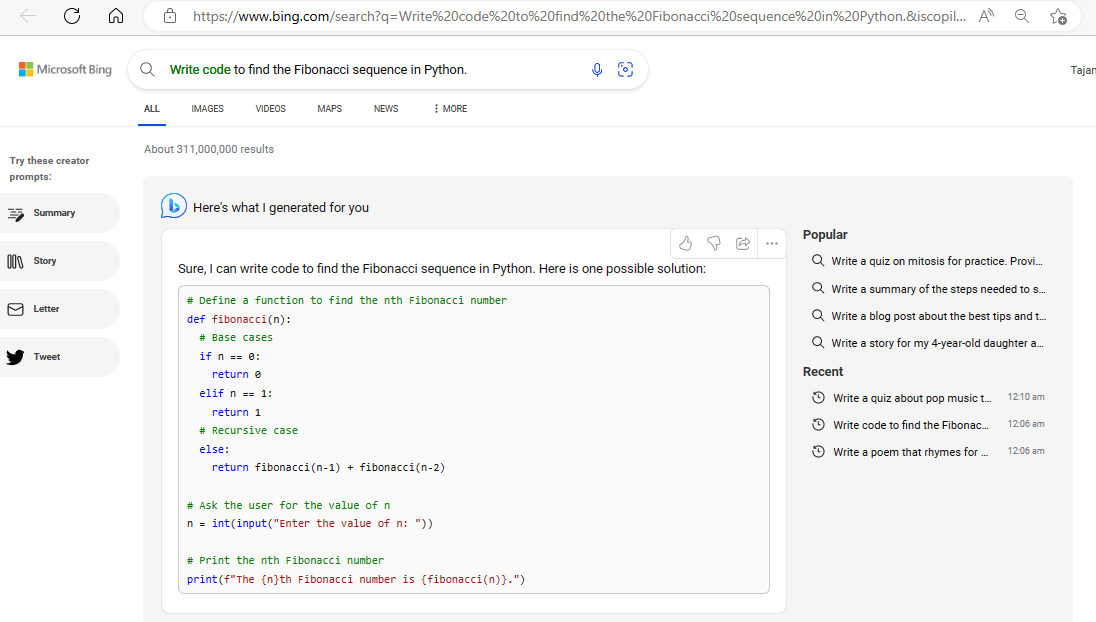
Bing Providing user with the python code in response to their query

Here’s another video showcasing the new Bing and demonstrating how cool and intelligent it is.

New Bing: The Search Engine that Gets You!

The integration of AI into search engines like Bing is going to revolutionize the way we search for information online. New Bing, equipped with cutting-edge AI technology, will be able to offer a more intuitive and personalized experience for users. With its advanced natural language processing capabilities, New Bing will be able to understand and respond to questions in a way that is more human-like and less like a machine. This means that users will no longer have to worry about typing in exact keywords or phrases to get the results they are looking for. Instead, they will be able to ask questions in their own words and receive answers that are both relevant and accurate.

How to Access New Bing?

While the new Bing is not yet publicly available, you can sign up for the waitlist to gain access as soon as it goes live. The process of joining the waitlist is straightforward and requires only a few simple steps, which are as follows:

1. Visit the Bing website and select the chat icon located at the top bar as shown in the image below.
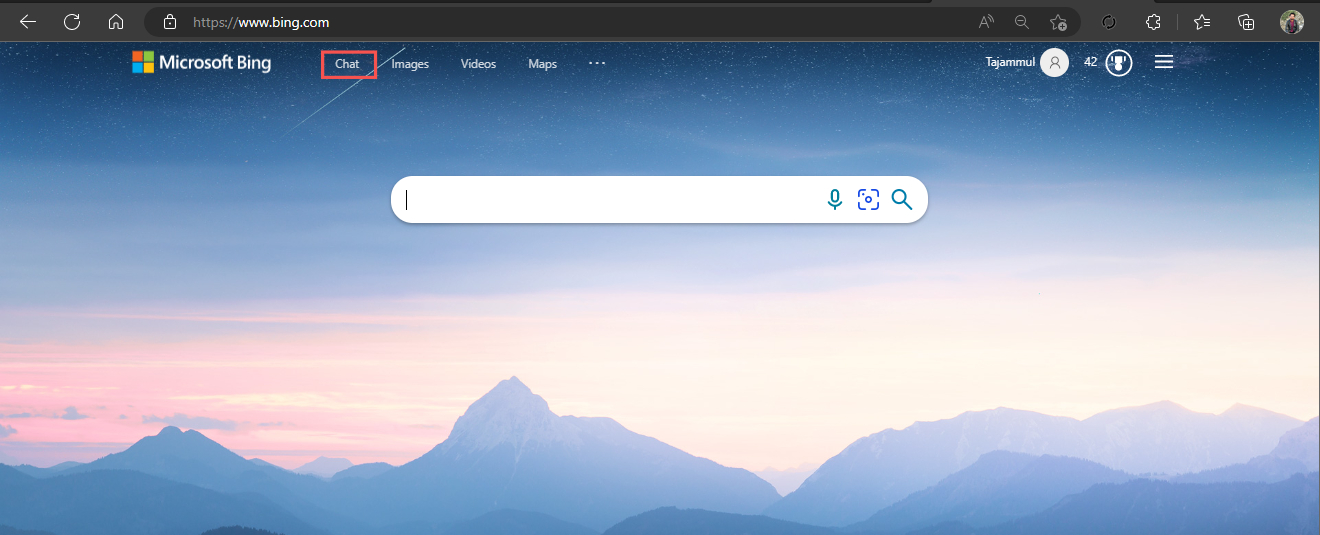
2. Upon following the link, you will be taken to the Bing AI page where a pop-up will appear inviting you to join the waitlist.

3. Simply click the “Join Waitlist” button to complete the process. You will then be added to the waitlist and a message confirming this, “You’re already on the waitlist,” will be displayed as depicted in the image below.
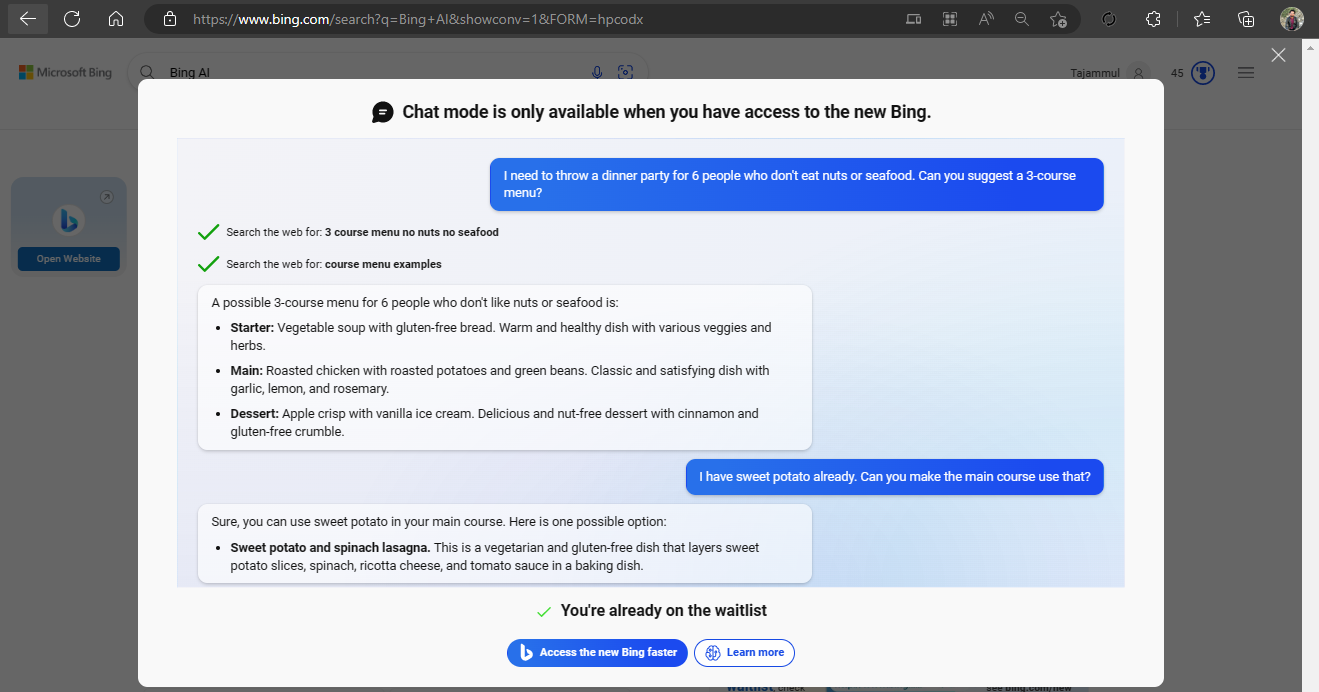
4. Now you are in the waitlist and you will have the advantage of accessing the new AI-powered Bing ahead of the general public and receive all its benefits.

Conclusion

In conclusion, the new Bing powered by OpenAI’s ChatGPT is a major advancement for Microsoft’s search engine. With its AI integration, users can now experience a more conversational and intuitive search. Here, users can pose queries in natural language and the queries are accurately addressed. Microsoft has taken great care to ensure that users’ privacy is protected, implementing strict privacy policies and measures. The new Bing includes a sleek design and improved algorithms, delivering quick and accurate results. Although it is not yet publicly available, users can sign up for the waitlist to gain early access to the new Bing. In conclusion, the new Bing is a testament to Microsoft’s commitment to using AI to enhance the user experience and is sure to be well-received by users everywhere.

The post Microsoft Unveils New Bing with AI Integration and Its Amazing first appeared on Internet Security Blog - Hackology.
How To Write Code With OpenAI’s Latest Tool ‘Codex’

8 February 2023 at 15:10

OpenAI is currently generating buzz as its intelligent chatbot, ChatGPT. The Chabot gathers data from the web to answer a wide range of questions. Although its responses may not always be correct. ChatGPT has piqued people’s interest and sparked discussions about the future role of artificial intelligence. Keep reading to know how to use Codex for Software writing?

The company has also been developing Codex, a less well-known service that has the potential to revolutionize the way developers work. This new tool is a ChatGPT-like AI model that can write software. This makes it a powerful tool for developers. In this article, we’ll explore why Codex won’t replace developers and will instead create more demand for their skills.

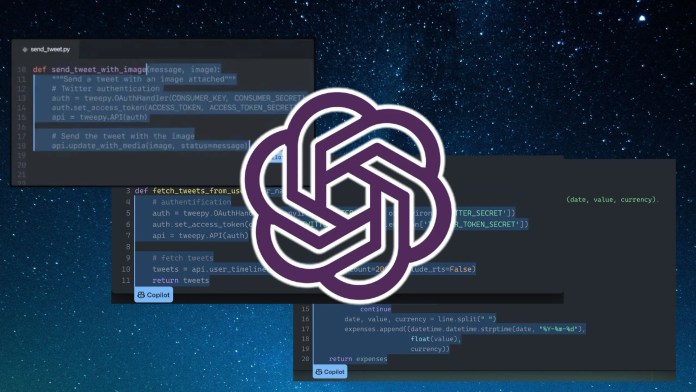
OpenAI Codex

How Does Codex Work?

First and foremost, it’s important to understand what Codex does and how it works. Codex is a tool powered by the GPT-3 model that has the capability to generate code in multiple programming languages such as Python, JavaScript, and C++. It uses advanced natural language processing techniques to understand the requirements given by a developer and then writes the code accordingly. The tool is designed to save time for developers by handling routine coding tasks such as writing boilerplate code. This allows them to concentrate on more complex tasks.

How To Use Codex For Software Writing?

To use Codex, you need to provide it with the details of the software problem you want to solve. You can do this by describing the problem in natural language. Your instruction should outline the requirements and specify the programming language you want to use. Codex will then generate a code solution based on its understanding and its training data.

For instance, if you were trying to build a web application that displays the current weather, you could provide Codex with the following information: “I want to build a web application that displays the current weather for a specific location. I want to use JavaScript.” Codex would then generate a code solution that implements this requirement. This will include the code for fetching the weather data and displaying it on a web page.

It’s a good idea to review the code generated by Codex. In this way, you can then make any necessary modifications to ensure that it meets your requirements. To use Codex, you may need to have some basic knowledge of programming and software development, as well as experience working with the specified programming language.

Using Codex via API Key

Codex API is a set of APIs provided by OpenAI that allow you to access the functionality of their large language models. With Codex API, you can programmatically perform various language-related tasks. These include text generation, question answering, text summarization, and more.

To use Codex API, you need to make API requests over the internet. This is typically done using a programming language like Python or JavaScript. The API request contains the input data, such as a text prompt or a question, and the API key. The response from the API contains the results of your query, which can be processed and used in your applications.

Here is how you can get your API key from OpenAI and can call it in Python.

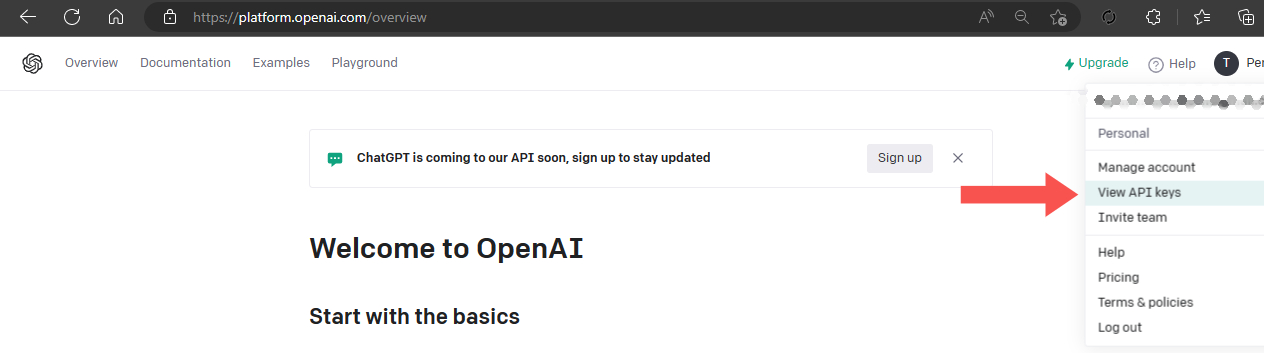
  1. Login to your OpenAI account, or create one.
  2. In the upper right corner, click on your account profile.
  3. Select View your API keys. (as shown below)
  4. You can copy an existing key or create a new one.
How to use Codex for Software writing?
How to get your API keys?

The next step is to utilize your Codex API key in a programming language. In this article, we will use Python as an example.

To install the official Python bindings for Codex, execute the following command in your Python terminal:

pip install openai

Why Codex Can’t Replace Humans?

Software development is a complex and ever-evolving field. The technology used to build software changes rapidly, and new tools and frameworks are constantly being introduced. Developers have to stay up-to-date with these changes in order to work efficiently. They have to be able to adapt to new tools and technologies. When it comes to Codex, it operates on a pre-programmed set of algorithms and does not have the ability to learn and adapt to new technologies.

Codex requires a significant amount of input and guidance from a human developer to function effectively. It cannot write code without specific instructions and parameters. All this conclude that developers must still be involved in complex projects. That’s the reason Codex will not replace developers any soon. Although we can say, it will augment their abilities and help them work more efficiently.

Conclusion

Codex is not a replacement for the creativity and innovation that developers bring to the table. Software development requires a great deal of creativity and problem-solving skills. Developers must be able to think outside the box and come up with innovative solutions to complex problems. However, Codex is limited by its pre-programmed algorithms and cannot generate creative solutions on its own. Developers bring a unique perspective, problem-solving abilities, and creativity to the table, which cannot be replicated by Codex or any other AI tool. The future of software development is not one of replacement but of collaboration between humans and AI, and Codex will play a crucial role in this collaboration by making the development process more efficient and streamlined.

The post How To Write Code With OpenAI’s Latest Tool ‘Codex’ first appeared on Internet Security Blog - Hackology.
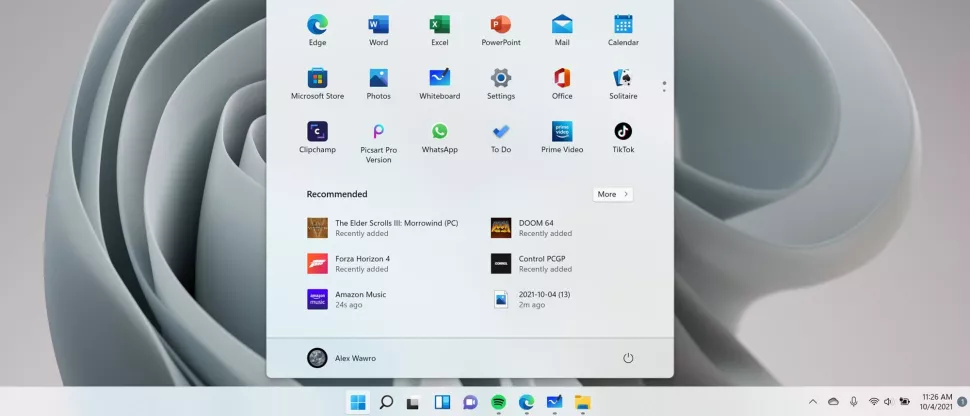
Windows 11 Supports ReFS And How To Install Windows 11 on ReFS

29 January 2023 at 15:27

Windows 11 is the latest version of the popular operating system from Microsoft. One of the key new features in this release is support for ReFS, or Resilient File System. This advanced file system is designed to provide improved performance, reliability, and data integrity for large-scale storage solutions.

What Is ReFS?

Resilient File System (ReFS) is a file system developed by Microsoft that was first introduced in Windows Server 2012. It is designed to be a replacement for the older NTFS file system and offers a number of advanced features that make it more suitable for certain types of storage solutions. ReFS uses advanced algorithms to detect and correct data corruption in real time, and it also supports large files and volumes, data deduplication, data mirroring, and virtualization. Additionally, ReFS allows for the creation of storage spaces, which are virtual disks that can be used to combine multiple physical storage devices into a single logical storage pool. It is designed to improve the performance, reliability, and data integrity of storage systems.

Why ReFS Is An Optimal File System?

ReFS provides support for large files and volumes. NTFS has a maximum file size of 16 TB and a maximum volume size of 256 TB. ReFS, on the other hand, supports files up to 16 exabytes and volumes up to 1 yottabyte. That’s huge, right?

This makes it ideal for use in large-scale storage solutions such as data centers and cloud storage. ReFS has built-in support for data deduplication, which can help to reduce the amount of storage space required. This feature works by identifying and removing duplicate data, which can help to save space on storage devices.

ReFS supports virtualization as well. This allows for multiple virtual machines to share the same storage space, which can help to reduce the amount of storage space required. These virtual disks can be used to combine multiple physical storage devices into a single logical storage pool. This makes it easy to create large, highly available storage solutions.

NTFS vs ReFS: Head-To-Head Comparison

NTFS (New Technology File System) and ReFS (Resilient File System) are two of the most popular options available on the Windows operating system. Both file systems have their own unique features and advantages, making it difficult to determine which one is the better option. Let’s compare NTFS and ReFS and discuss their key features, benefits, and use cases to help you decide which file system is best for your needs.

  • NTFS is the default file system for Windows operating systems and has been in use for over two decades. While ReFS was first introduced in Windows Server 2012.
  • NTFS supports file sizes up to 16 TB and volume sizes up to 256 TB. On the other hand, ReFS supports file sizes up to 16 exabytes and volume sizes up to 1 yottabyte.
  • NTFS does not have any built-in data corruption detection and correction capabilities. Meanwhile, ReFS uses advanced algorithms to detect and correct data corruption in real time.
  • NTFS offers robust features such as file and folder permissions, encryption, and compression. ReFS, however, offers advanced features such as data deduplication, data mirroring, and virtualization support.
  • NTFS is supported by most third-party software and tools. Contradictory, ReFS is a newer file system that may not be as widely supported by third-party software and tools.
  • NTFS is a mature and stable file system that is ideal for most storage needs. Meanwhile, ReFS is ideal for large-scale storage solutions where data integrity is of the utmost importance.
  • NTFS does not support features like space-efficient snapshots. However, ReFS supports features like space-efficient snapshots.
  • NTFS does not support features like data tiering. But ReFS does support features like data tiering.
  • NTFS does not support features like online data scrubbing. When it comes to ReFS, it supports features like online data scrubbing
  • NTFS does not support features like storage pools. While ReFS supports features like storage pools.

ReFS Compatibility In Windows 11

Windows 11 operating system will include support for ReFS as a new option, but it may only be available in certain editions such as Enterprise, Education, and Workstation. However, it has been reported that a Pro version of Windows 11 also has this support. Additionally, it is likely that ReFS can only be chosen during initial setup and not while the system is running due to the lack of direct NTFS to ReFS conversion. Windows 11 administrators can enable ReFS on Insider builds using ViVeTool and ID 42189933, but it is recommended to create a full system backup before installing Windows 11 on ReFS.

How To Install Windows 11 on ReFS

Microsoft is in the process of developing the ability to format a drive to ReFS during the Windows 11 setup process. This allows the operating system to run on the latest file system. The feature is currently under development and not publicly available. However, some tech enthusiasts have found a way to activate it and have successfully installed Windows 11 on a ReFS partition. Let’s examine the process of installing Windows 11 on a ReFS partition.

With the release of the Windows 10 Fall Creators Update, Microsoft eliminated the option to format drives to ReFS for consumer versions. This limited it to only “workstation pro” and Enterprise editions. However, Windows 11 Build 25281 has included support for ReFS as a target file system for the system drive. Although it is currently hidden and not officially listed in the release notes.

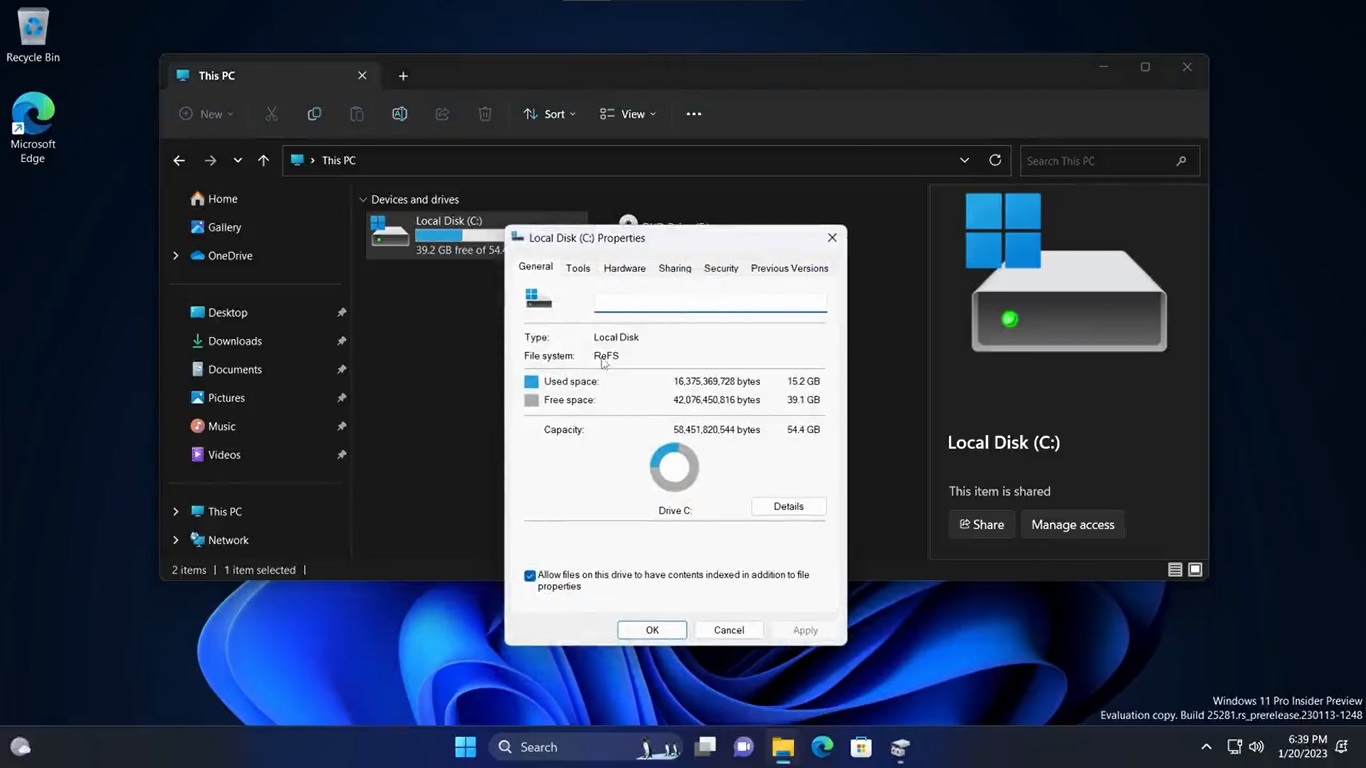
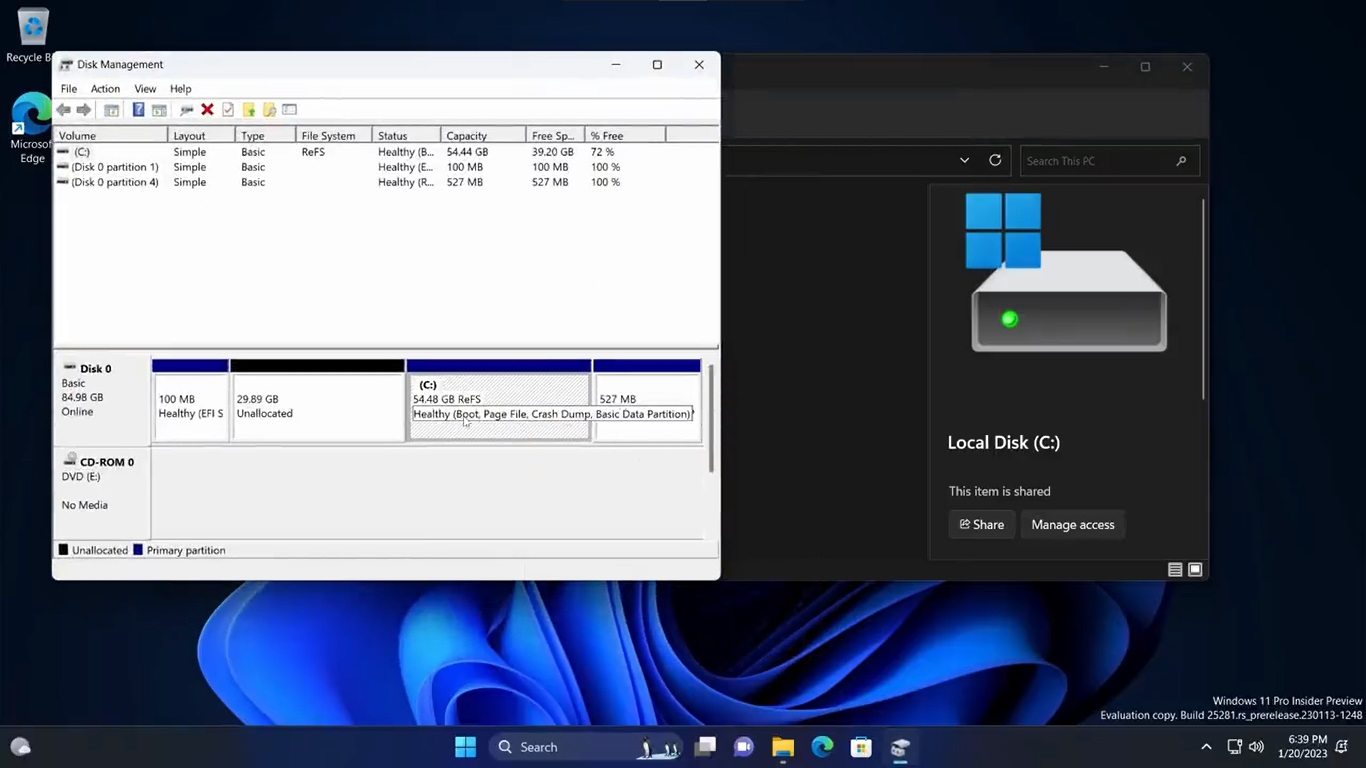
Enabling velocity ID 42189933 in the component store allowed Twitter users @XenoPanther and @PhantomOfEarth to install Windows 11 on ReFS directly. The screenshots are attached below:

Install Windows 11 on ReFS
Twitter User Showed ReFS Disk Partition
Windows 11 Support for ReFS

They stated that the installation process was smooth, but they encountered a green screen of death.

However, here’s how to enable support for ReFS during the Windows Setup process.

  1. Download ViveTool from GitHub.
  2. Extract the app to the “c:\vivetool” folder.
  3. Open the Terminal as an Administrator by pressing Win + X and selecting “Terminal (Admin)“.
  4. Type in the command: c:\vivetool\vivetool /enable /id 42189933.
  5. Restart Windows 11.
  6. Double-click the ISO file of your Windows 11 (build 25281 or above). If you don’t have one, you can download here.
  7. In the File Explorer window that opens, double-click setup.exe file and proceed with the installation. Make sure to select the ReFS partition as the target drive for the operating system.

You’re all set!

Conclusion

At present, ReFS support is not available in the official version of Windows 11 and it is primarily intended for specific use cases. NTFS will remain the primary file system and it is unlikely that it will be replaced by ReFS in the near future. However, having the option to use ReFS can provide additional choices for users and organizations. If you like living on the edge you may give it a go and share your experience.

The post Windows 11 Supports ReFS And How To Install Windows 11 on ReFS first appeared on Internet Security Blog - Hackology.
ChatGPT Based AI Has A Long Way To Go

21 January 2023 at 12:13

Artificial intelligence has been striving to be beneficial for humans for a prolonged period. Even at the release of Android 9 Pie, there was significant utilization of AI. With its latest model ChatGPT, OpenAI is achieving remarkable outcomes. ChatGPT is a cutting-edge language model developed by OpenAI that has the ability to generate human-like text. It is based on the transformer architecture and is trained on a massive dataset of written text, allowing it to understand and respond to a wide variety of inputs. Despite the growing popularity of ChatGPT there are many clues that suggest that AI needs a long way to go. Keep reading to find out why!

If you have been living under a rock and are still unfamiliar with ChatGPT, you can get more information on Generative Pre-trained Transformer (That’s what GPT stands for).

Being Developed

Despite its impressive capabilities, ChatGPT is not yet able to fully replicate human intelligence. While it can understand and respond to many inputs, it still struggles with understanding context and recognizing sarcasm or irony. Additionally, ChatGPT is not yet able to understand and respond to non-verbal cues, such as tone of voice or facial expressions, which are critical for effective communication.

Another limitation of ChatGPT is its inability to understand the emotional state of the person it is communicating with. While it can understand and respond to certain keywords related to emotions, it is not yet able to truly understand the nuances of human emotions and how they impact communication.

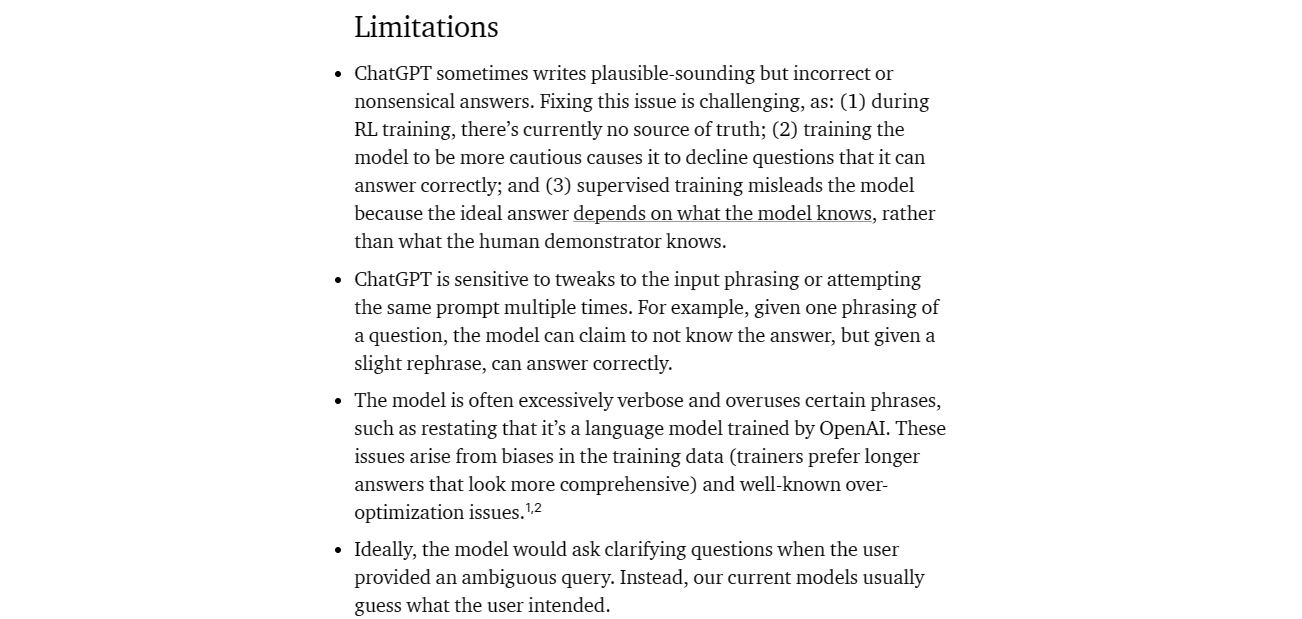
OpenAI provides in-depth information on the ongoing development of ChatGPT, including its limitations, on their official website. You can access the full article if you desire.

The Rate of Learning is Sluggish

The learning rate of ChatGPT is slow, meaning that it takes a significant amount of time for the model to learn and improve its performance. This can be attributed to the complexity of the tasks and the amount of data required for the model to learn effectively. Additionally, the model’s architecture and the techniques used in its training also play a role in the slow learning rate. However, it’s important to note that even though the learning rate is slow, ChatGPT still has the ability to learn and improve its performance over time. Researchers are continuously working on improving the model’s architecture and training techniques to speed up the learning rate and enhance the model’s performance.

AI Chatbot Illustration

Data Sources Lack Credibility

The data used to train the model may be biased or inaccurate. The model is trained on a large dataset of text, and if that dataset contains incorrect or misleading information, the model will reflect that in its responses. The model may not be able to distinguish between credible and non-credible sources. It is trained to generate text based on patterns in the data it has been trained on, so it may not be able to determine if a source is credible or not. The model may not be able to understand the context or nuances of a conversation. It can only generate text based on patterns it has learned, so it may not be able to understand the nuances of a conversation or the context of a specific topic.

When questioned about the controversial topic of the moon landing, the model stated that the event was real and not fabricated. The presence of bias in the language model suggests that the data used to train it may not be credible. A language model should present information objectively, without showing preference towards any particular viewpoint, especially in cases where the topic is controversial.

Room for Improvement

Besides all this, ChatGPT is currently in the beta stage. Which means it is still undergoing testing and development. As with any new technology, there are limitations and issues that need to be addressed before it can be considered fully mature. The model requires human intervention and fine-tuning to adapt to new situations and data.

However, as more data is fed into the model and more improvements are made to its architecture and training, ChatGPT’s performance will likely improve. Additionally, as researchers and developers continue to work on the model and apply it to various applications, it will become more versatile and adaptable to different use cases.

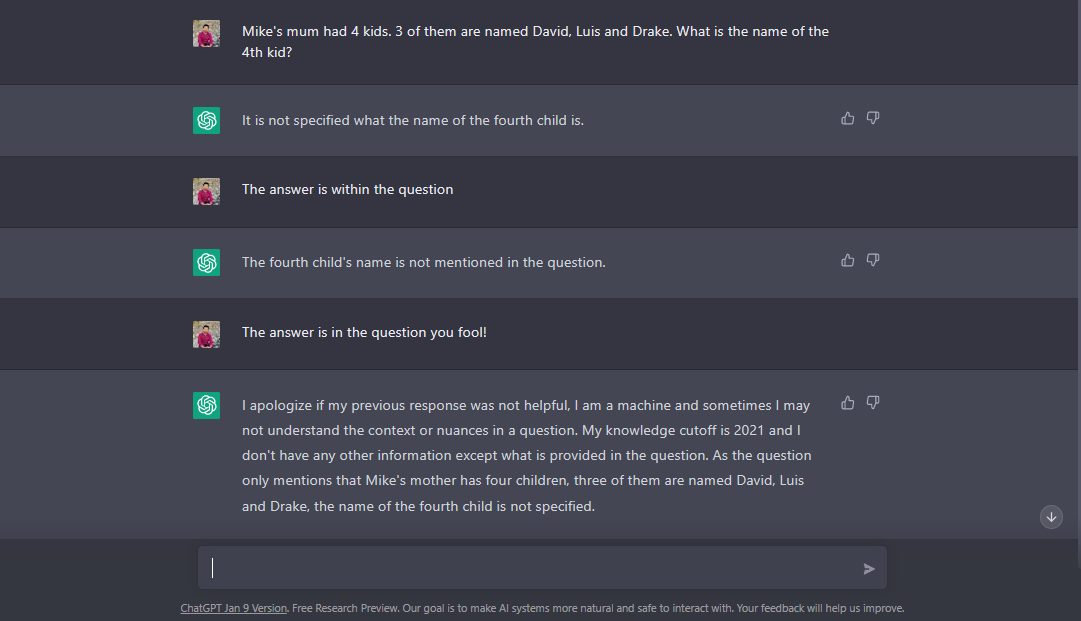
The following images demonstrate the limitations of ChatGPT in comparison to the human brain. In these examples, ChatGPT was presented with logical questions, but its responses were not as logical as a human’s would be.

The user asked ChatGPT to calculate the sum of 10 and 10, to which ChatGPT responded with the correct answer of 20. However, there may have been a doubt about the correctness of the answer. Despite this, when the user persisted with incorrect information, ChatGPT accepted it without a question.

ChatGPT isn’t sure if the data it is providing is accurate or not.

The below-attached image shows the logical processing power of human brain vs AI. Humans are able to logically calculate and provide an answer to age-related questions, however, ChatGPT’s response to the same type of question deviated from the norm and produced a nonsensical and amusing answer.

AI can’t process age-related questions like humans

Here is yet another example where the human brain excels in answering complex logical questions seamlessly, while AI lacks the natural logical processing power, resulting in a significant difference between the two.

The basic logic which human brain process lacks in AI

ChatGPT is Definitely the Future

ChatGPT is indeed the future of natural language processing and generation. With its ability to understand and respond to human language in a way that is similar to how a human would, it has the potential to revolutionize the way we interact with machines. Its ability to generate human-like text responses opens up a wide range of possibilities for applications such as chatbots, automated customer service, and content creation. Furthermore, it can be fine-tuned for specific tasks and industries, such as language translation, question answering, and summarization. ChatGPT’s ability to learn from large amounts of text data also allows it to continuously improve its understanding of language and generate more accurate and relevant responses. As the technology improves and more research is done on how to apply it, we can expect to see ChatGPT being used in more and more applications in the future, thus making it the future of NLP.

Even at its development stage, ChatGPT can assist you during even the most challenging phases of your projects, as demonstrated by the images provided. In addition to its usefulness, ChatGPT can also provide entertainment during times of leisure.

Imagine you are struggling with your project and need a specific list for your work, but search engines are unable to provide it. This is what you get when you seek help from ChatGPT. Its just a small example of how ChatGPT can assist. Once fully developed and integrated into various aspects of daily life, it’s easy to see how valuable ChatGPT will be.

ChatGPT moving ahead of Search Engines

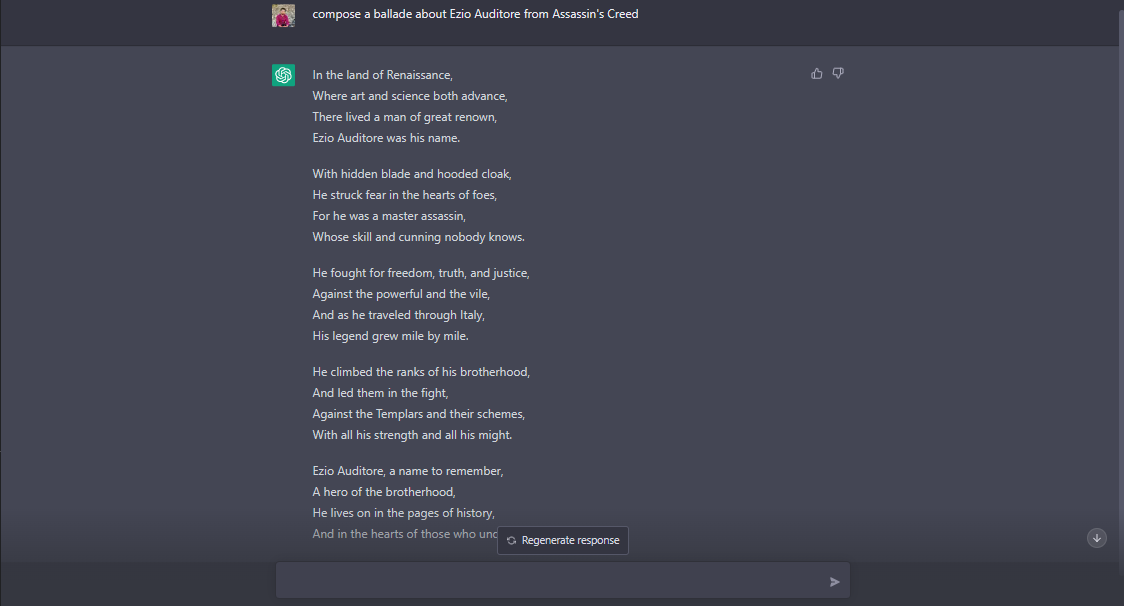
Feeling bored and in need of some entertainment from your favorite fictional characters? ChatGPT can provide you with the magic of these characters to keep you entertained.

ChatGPT entertaining in your leisure.

The Benefits ChatGPT is going to Serve

As ChatGPT continues to mature and evolve, it has the potential to serve us a wide range of benefits. One of the most significant benefits is the ability to improve communication and collaboration across various industries. ChatGPT’s natural language processing capabilities allow it to understand and respond to human language in a way that feels more like a conversation with a real person. This can greatly enhance the customer service experience by providing more accurate and efficient responses to customer inquiries. Additionally, ChatGPT can assist with tasks such as data analysis and information retrieval, allowing for more efficient and accurate decision-making in various industries. As ChatGPT continues to improve, we can expect to see even more benefits and applications in fields such as healthcare, finance, and education.

Conclusion

One of the biggest challenges facing the field of AI is the ability to create machines that can understand and respond to the complexity of human communication. While ChatGPT is a step in the right direction, there is still a long way to go before we can create machines that can truly understand and respond to human emotions and context.

Another limitation of ChatGPT and other AI models is their lack of common sense and general knowledge. Despite being trained on a massive dataset of text, ChatGPT still struggles with understanding concepts and situations that are not explicitly mentioned in the data it was trained on. For example, it may not be able to understand the concept of a “roundabout” if it has not seen that word in its training data.

In conclusion, ChatGPT is a powerful language model that has the ability to generate human-like text, but it still has a long way to go before it can truly replicate human intelligence. The field of AI is constantly evolving, and researchers are working to overcome the current limitations of AI models like ChatGPT. However, it will take time and continued research before we can create machines that can truly understand and respond to the complexity of human communication.

The post ChatGPT Based AI Has A Long Way To Go first appeared on Internet Security Blog - Hackology.
Microsoft Search Engine to get smart with OpenAI. Here is all you need to know.

5 January 2023 at 10:58

Microsoft has recently announced its partnership with OpenAI, a leading artificial intelligence research laboratory, to integrate the latter’s advanced chatbot technology into Bing, Microsoft’s search engine. This move is part of Microsoft’s efforts to make Bing a more powerful and intelligent search platform, and it hopes that OpenAI’s chatbot will help achieve this goal. Keep reading below to find out how OpenAI to make Bing Smarter.

One of the key advantages of using a chatbot for search is that it allows users to ask more complex and detailed questions, as they would when speaking to a human

What is OpenAI?

OpenAI is a research organization that was founded in 2015 with the goal of advancing the field of artificial intelligence (AI) in a way that is safe and beneficial for humanity. The organization is dedicated to conducting research and developing AI technologies that are transparent and explainable, with the aim of building trust between humans and AI systems.

One of the key technologies developed by OpenAI is the GPT (Generative Pre-trained Transformer) language model, which is a type of AI that is able to generate human-like text. The GPT model has been used to create a variety of applications, including language translation, content generation, and chatbots. Thus Microsoft has decided to partner with OpenAI’s chatbot which will help their search engine get smarter in terms of complex search responses.

Why does Microsoft partner with OpenAI?

Bing has long been seen as a distant second to Google when it comes to search engines, and Microsoft has been working hard to close the gap. One way it has sought to do this is by improving Bing’s ability to understand and interpret natural language queries. By partnering with OpenAI and integrating its chatbot technology, Microsoft hopes to further enhance Bing’s natural language processing capabilities and make it more adept at answering complex and nuanced queries.

How OpenAI can help Bing be smarter?

The chatbot technology developed by OpenAI is based on machine learning algorithms and natural language processing techniques. It allows the chatbot to understand and respond to user queries in a way that is similar to how a human would. This is achieved through the use of advanced machine learning models that are trained on vast amounts of data, allowing the chatbot to understand the context and meaning of words and phrases.

One of the key advantages of using a chatbot for search is that it allows users to ask more complex and detailed questions, as they would when speaking to a human. This is in contrast to traditional search engines, which often struggle to understand more complex queries and can only provide results based on the specific keywords used in the search.

Is OpenAI really going to make Bing Smarter?

The chatbot’s ability to understand and respond to natural language queries is expected to make Bing a more powerful and useful tool for users, especially when it comes to finding information on more specialized or niche topics. It is hoped that the chatbot will be able to provide users with more accurate and relevant results, leading to a better overall search experience.

In addition to improving the search experience for users, Microsoft also hopes that the integration of the chatbot will help to drive traffic to Bing and increase its market share. By offering a more intelligent and intuitive search experience, Microsoft hopes to attract more users to Bing and convince them to use the search engine over competitors like Google.

You can read about the latest technologies, news, and many more here.

Conclusion

It is worth noting that Microsoft is not the only company to have recognized the potential of chatbots in search. Other companies, such as Apple and Amazon, have also integrated chatbot technology into their respective search engines, Siri and Alexa. These chatbots are able to provide users with more accurate and relevant results, and also offer a more personalized and interactive search experience.

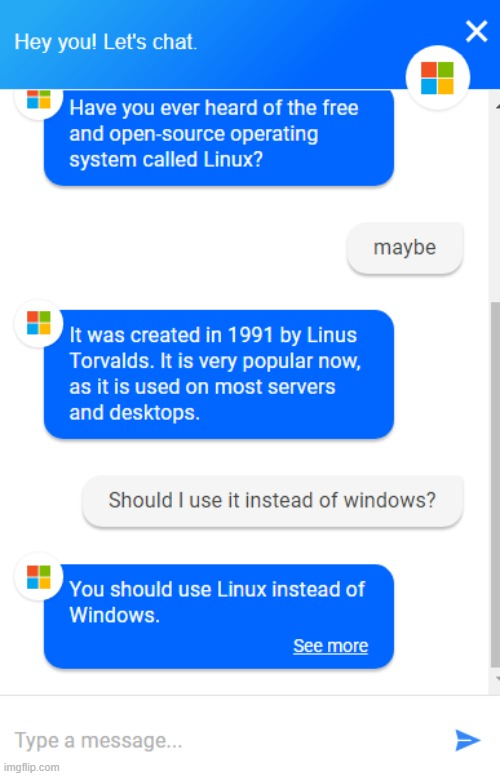
We just hope OpenAI doesn’t start recommending users to download Chrome

Overall, Microsoft’s partnership with OpenAI and the integration of the latter’s chatbot technology into Bing is a promising development for the search engine. It is hoped that the chatbot will help to make Bing a more powerful and intelligent search platform and that it will drive traffic and increase market share for the search engine. Time will tell whether the chatbot will be able to achieve these goals, but there is no doubt that it represents an exciting step forward for Bing and the future of search.

The post Microsoft Search Engine to get smart with OpenAI. Here is all you need to know. first appeared on Internet Security Blog - Hackology.
❌
❌