❌

Normal view

There are new articles available, click to refresh the page.
Before yesterdayMain stream

Preventing a Mess with the Weller WDC Solder Containment Pocket

4 December 2025 at 19:00

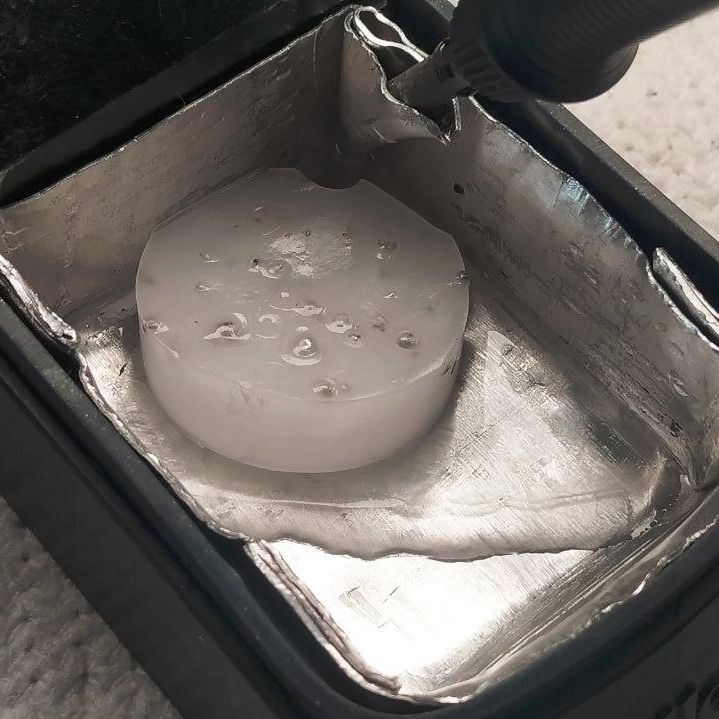
Resetting the paraffin trap. (Credit: MisterHW)

Have you ever tipped all the stray bits of solder out of your tip cleaner by mistake? [MisterHW] is here with a bit of paraffin wax to save the day.

Hand soldering can be a messy business, especially when you wipe the soldering iron tip on those common brass wool bundles that have largely come to replace moist sponges. The Weller Dry Cleaner (WDC) is one of such holders for brass wool, but the large tray in front of the opening with the brass wool has confused many as to its exact purposes. In short, it’s there so that you can slap the iron against the side to flick contaminants and excess solder off the tip.

Along with catching some of the bits of mostly solder that fly off during cleaning in the brass wool section, quite a lot of debris can be collected this way. Yet as many can attest to, it’s quite easy to flip over brass wool holders and have these bits go flying everywhere.
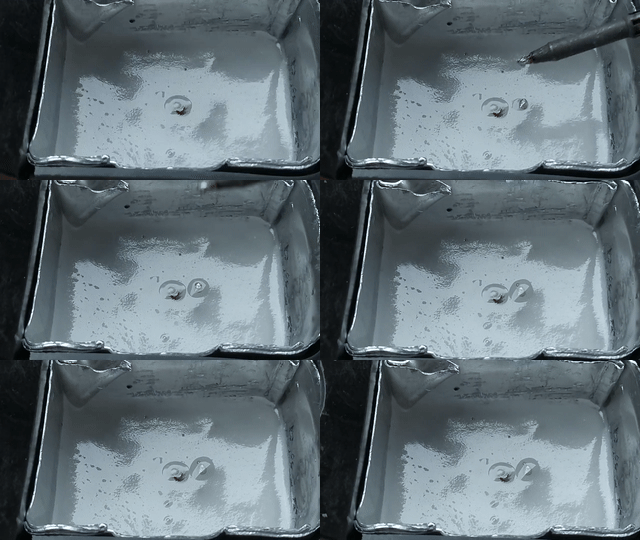
The trap in action. (Credit: MisterHW)

That’s where [MisterHW]’s pit of particulate holding comes into play, using folded sheet metal and some wax (e.g. paraffin) to create a trap that serves to catch any debris that enters it and smother it in the wax. To reset the trap, simply heat it up with e.g. the iron and you’ll regain a nice fresh surface to capture the next batch of crud.

As the wax is cold when in use, even if you were to tip the holder over, it should not go careening all over your ESD-safe work surface and any parts on it, and the wax can be filtered if needed to remove the particulates. When using leaded solder alloys, thisΒ  setup also helps to prevent lead-contamination of the area and generally eases clean-up as bumping or tipping a soldering iron stand no longer means weeks, months or years of accumulations scooting off everywhere.
Retrotechtacular: Learning the Slide Rule the New Old Fashioned Way

2 December 2025 at 14:30

Learning something on YouTube seems kind of modern. But if you are watching a 1957 instructional film about slide rules, it also seems old-fashioned. But Encyclopædia Britannica has a complete 30-minute training film, which, what it lacks in glitz, it makes up for in mathematical rigor.

We appreciated that it started out talking about numbers and significant figures instead of jumping right into the slide rule. One thing about the slide rule is that you have to sort of understand roughly what the answer is. So, on a rule, 2Γ—3, 20Γ—30, 20Γ—3, and 0.2Γ—300 are all the same operation.

You don’t actually get to the slide rule part for about seven minutes, but it is a good idea to watch the introductory part. The lecturer, [Dr. Havery E. White] shows a fifty-cent plastic rule and some larger ones, including a classroom demonstration model. We were a bit surprised that the prestigious Britannica wouldn’t have a bit better production values, but it is clear. Perhaps we are just spoiled by modern productions.

We love our slide rules. Maybe we are ready for the collapse of civilization and the need for advanced math with no computers. If you prefer reading something more modern, try this post. Our favorites, though, are the cylindrical ones that work the same, but have more digits.

Portable Plasma Cutter Removes Rust, Packs a (Reasonable) Punch

29 November 2025 at 04:00

[Metal Massacre Fab Shop] has aΒ review of a portable plasma cutter that ends up being a very good demonstration of exactly what these tools are capable of. If you’re unfamiliar with this kind of work, you might find the short video (about ten minutes, embedded below) to be just the right level of educational.

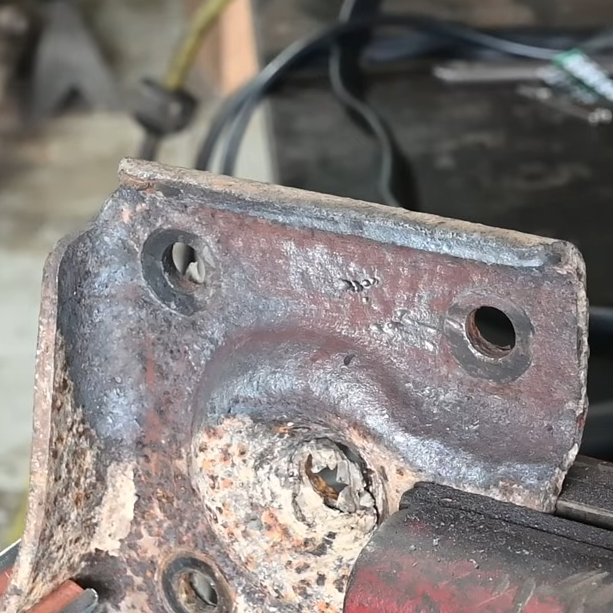
The rust removal function has an effect not unlike sandblasting.

Plasma cutters work by forcing compressed air through a small nozzle, and ionizing it with a high voltage. This process converts the gas into a very maneuverable stream of electrically-conductive, high-temperature plasma which can do useful work, like cutting through metal. The particular unit demonstrated also has a rust removal function. By operating at a much lower level, the same plasma stream can be used to give an effect not unlike sandblasting.

Of course, an economical way to cut metal is to just wield a grinder. But grinders are slow and not very maneuverable. That’s where a plasma cutter shines, as [Metal Massacre Fab Shop] demonstrates by cutting troublesome locations and shapes. He seems a lot more satisfied with this unit than he was with the cheapest possible (and misspelled!) plasma cutter he tried last year.

And should you want a plasma cutter, and aren’t afraid to salvage components? Consider building your own.

Build Your Own Compact Temp Gun

By: Lewin Day
28 November 2025 at 16:00

Sometimes you need to know what temperature something is, but you don’t quite want to touch it. At times like these, you might want a temp gun on hand to get a good reading, like the one [Arnov Sharma] built.

The build is a relatively simple one, and is based around an Waveshare ESP32 C6 development module that comes with a small LCD screen out of the box. The microcontroller is set up to read an MLX90614 infrared temperature sensor. This device picks up the infrared energy that is emitted by objects relative to their temperature. The sensor has a great rangeβ€”from -70 C to 380 C. The readouts from this sensor are then displayed on the screen. Battery power is from a small 600 mAh LiPo cell, which is managed by a IP5306 charge module.

It’s worth noting that these infrared temperature sensors aren’t infallible devices. The temperature they perceive is based on certain assumptions about factors like an objects emissivity. Thus, they don’t always give accurate readings on metallic or shiny objects, for example. It’s also important to understand the sensor’s field of view. Despite many commercial versions featuring a laser pointer for aiming, many of these infrared temperature sensors tend to average their reading over a small spot that gets larger the farther away they are from the object being measured.

Tools like portable temp guns are pretty cheap, but sometimes it’s just fun to build your own. Plus, you usually learn something along the way. Video after the break.

Stack n’ Rack Your Hardware With the HomeRacker Project

27 November 2025 at 10:00

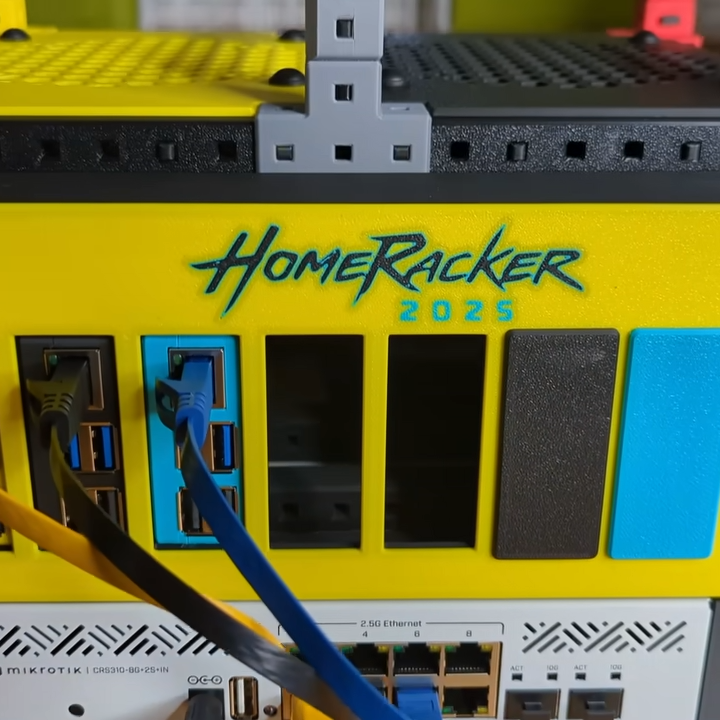
Things are cooler when rack-mounted, and [KellerLab] aims to make that all far more accessible with the HomeRacker, a modular and 3D-printable rack building system designed to let you rack-mount to your heart’s content. While it can handle big things, it seems especially applicable to tasks like mounting one’s home network equipment and Raspberry Pi machines.

A rack is a great place for those Raspberry Pi servers and home networking equipment, but it can also handle bigger jobs.

The basic system (or core) consists of three different parts: supports, connectors, and lock pins. The supports are the main structural bars, the connectors mostly go at the corners, and the lock pins ensure everything stays put. The nominal sizing is a 15 mm x 15 mm profile for the supports, with lengths being a multiple of 15 mm.

All is designed with 3D printing in mind, and requires no tools to assemble or disassemble. There are design elements we really appreciate, like how parts are printed at an angle, which improves strength while eliminating the need for supports. The lock pins (and the slots into which they go) are designed so that they are effective and will neither rattle nor fall out.

But the core system is just the foundation. There’s plenty of modularity and expansions to handle whatever one may need, from Gridfinity shelves and drawers to various faceplates and other modules. There are some example applications available from [KellerLab]’s HomeRacker models page, like CD shelf, under-desk drawer, or filament rack.

[KellerLab] welcomes any collaboration, so check out the GitHub repository for CAD references and design files.

One last point to make about the value of printing objects like this at an angle: not only can the resulting layer lines provide better strength and reduce or eliminate the need for supports, but printing at an angle can help hide layer lines.

Ultrasonic Cutting on the Cheap

24 November 2025 at 16:00

When you think of ultrasonics,Β  you probably think of a cleaner or maybe a toothbrush. If you are a Star Trek fan, maybe you think of knocking out crew members or showers. But there is another practical use of ultrasonics: cutting. By vibrating a blade at 40 kHz or so, you can get clean, precise cuts in a variety of materials. The problem? Commercial units are quite expensive. So [Electronoobs] decided to roll his own. Check it out in the video below.

There are dreams and then there’s reality. Originally, the plan was for a handheld unit, but this turned out not to be very practical. Coil actuators were too slow. Piezo elements made more sense, but to move the blade significantly, you need a larger element.

Taking apart an ultrasonic cleaner revealed a very large element, but mounting it to a small blade would be a problem. The next stop was an ultrasonic toothbrush. Inside was a dual piezo element with an interesting trick. The elements were mounted in a horn that acts like an ultrasonic megaphone, if you will.

These horns are available, and he found an off-the-shelf solution with four piezos and a large horn that seemed promising. Driving the elements, though, requires a 40 kHz 100 VAC signal. His original board didn’t work β€” but he’s not giving up. But, for now, he used a simple circuit on a breadboard. However, it didn’t make a strong vibration, even with a larger horn.

Comparison with ultrasonic cleaners showed that his output voltage wasn’t enough. The expedient answer was to buy an ultrasonic cleaner kit (who knew they came as kits?) and use the boards from it to drive the horn and the blade. That worked very well.

His current thinking is that the cleaner driver may be too large, since the blade and horn get hot in use. But he still encased it with a 3D printed case and wound up with a usable tool. His next version should be portable and maybe run a little cooler.

Ultrasonic sensors are, of course, super useful. Or you can always levitate tiny things with it.

Fixing a Milltronics ML15 CNC Lathe Despite the Manufacturer’s Best Efforts

20 November 2025 at 14:30

When you’re like [Wes] fromΒ Watch Wes Work fame, you don’t have a CNC machine hoarding issue, you just have a healthy interest in going down CNC machine repair rabbit holes. Such too was the case with a recently acquired 2001 Milltronics ML15 lathe, that at first glance appeared to be in pristine condition. Yet despite – or because of – living a cushy life at a college’s workshop, it had a number of serious issues, with a busted Z-axis drive board being the first to be tackled.

The Glentek servo board that caused so much grief. (Credit: Watch Wes Work, YouTube)

The identical servo control board next to it worked fine, so it had to be an issue on the board itself.Β  A quick test showed that the H-bridge IGBTs had suffered the typical fate that IGBTs suffer, violently taking out another IC along with them. Enjoyably, this board by one Glentek Inc. did the rebranding thing of components like said IGBTs, which made tracking down suitable replacements an utter pain that was eased only by the desperate communications on forums which provided some clues. Of course, desoldering and testing one of the good IGBTs on the second board showed the exact type of IGBT to get.

After replacing said IGBTs, as well as an optocoupler and other bits and pieces, the servo board was good as new. Next, the CNC lathe also had a busted optical encoder, an unusable tool post and a number of other smaller and larger issues that required addressing. Along the way the term β€˜pin-to-pin compatible’ for a replacement driver IC was also found to mean that you still have to read the full datasheet.

Of the whole ordeal, the Glentek servo board definitely caused the most trouble, with the manufacturer providing incomplete schematics, rebranding parts to make generic replacements very hard to find and overall just going for a design that’s interesting but hard to diagnose and fix. To help out anyone else who got cursed with a Glentek servo board like this, [Wes] has made the board files and related info available in a GitHub repository.

❌
❌