Security and developer teams are scrambling to address a highly critical security flaw in frameworks tied to the popular React JavaScript library. Not only is the vulnerability, which also is in the Next.js framework, easy to exploit, but React is widely used, including in 39% of cloud environments.
Cybersecurity startup Aisle discovered a subtle but dangerous coding error in a Firefox WebAssembly implementation sat undetected for six months despite being shipped with a regression testing capability created by Mozilla to find such a problem.
In the first part, we covered the fundamentals, including processes, dumps, DLLs, handles, and services, using Volatility as our primary tool. We created this series to give you more clarity and help you build confidence in handling memory analysis cases. Digital forensics is a fascinating area of cybersecurity and earning a certification in it can open many doors for you. Once you grasp the key concepts, you’ll find it easier to navigate the field. Ultimately, it all comes down to mastering a core set of commands, along with persistence and curiosity. Governments, companies, law enforcement and federal agencies are all in need of skilled professionals As cyberattacks become more frequent and sophisticated, often with the help of AI, opportunities for digital forensics analysts will only continue to grow.
Now, in part two, we’re building on that to explore more areas that help uncover hidden threats. We’ll look at network info to see connections, registry keys for system changes, files in memory, and some scans like malfind and Yara rules to find malware. Plus, as promised, there are bonuses at the end for quick ways to pull out extra details
Network Information
As a beginner analyst, you’d run network commands to check for sneaky connections, like if malware is phoning home to hackers. For example, imagine investigating a company’s network after a data breach, these tools could reveal a hidden link to a foreign server stealing customer info, helping you trace the attacker.
‘Netscan‘ scans for all network artifacts, including TCP/UDP. ‘Netstat‘ lists active connections and sockets. In Vol 2, XP/2003-specific ones like ‘connscan‘ and ‘connections‘ focus on TCP, ‘sockscan‘ and ‘sockets‘ on sockets, but they’re old and not present in Vol 3.
This output shows network connections with protocols, addresses, and PIDs. Perfect for spotting unusual traffic.
bash$ > vol -f Windows7.vmem windows.netstat
Here, you’ll get a list of active sockets and states, like listening or established links.
Note, the XP/2003 specific plugins are deprecated and therefore not available in Volatility 3, although are still common in the poorly financed government sector.
Registry
Hive List
You’d use hive list commands to find registry hives in memory, which store system settings malware often tweaks these for persistence. Say you’re checking a home computer after suspicious pop-ups. This could show changes to startup keys that launch bad software every boot.
‘hivescan‘ scans for hive structures. ‘hivelist‘ lists them with virtual and physical addresses.
The scan output highlights hive locations in memory.
Printkey
Printkey is handy for viewing specific registry keys and values, like checking for malware-added entries. For instance, in a ransomware case, you might look at keys that control file associations to see if they’ve been hijacked.
Without a key, it shows defaults, while -K or –key targets a certain path.
Here, it focuses on the specified key, showing subkeys and values.
Files
File Scan
Filescan helps list files cached in memory, even deleted ones, great for finding malware files that were run but erased from disk. This can uncover temporary files from the infection.
Both versions scan for file objects in memory pools.
This output lists file paths, offsets, and access types.
File Dump
You’d dump files to extract them from memory for closer checks, like pulling a suspicious script. In a corporate espionage probe, dumping a hidden document could reveal leaked secrets.
Without options, it dumps all. With offsets or PID, it targets specific ones. Vol 3 uses virtual or physical addresses.
This highlights suspicious memory regions with details.
Yara Scan
Yara scan uses rules to hunt for malware patterns across memory. It’s like a custom detector. For example, during a widespread attack like WannaCry, a Yara rule could quickly find infected processes.
As you can see we found the malware and all related processes to it with the help of the rule
Bonus
Using the strings command, you can quickly uncover additional useful details, such as IP addresses, email addresses, and remnants from PowerShell or command prompt activities.
By now you should feel comfortable with all the network analysis, file dumps, hives and registries we had to go through. As you practice, your confidence will grow fast. The commands covered here will help you solve most of the cases as they are fundamental. Also, don’t forget that Volatility has a lot more different plugins that you may want to explore. Feel free to come back to this guide anytime you want. Part 1 will remind you how to approach a memory dump, while Part 2 has the commands you need. In this part, we’ve expanded your Volatility toolkit with network scans to track connections, registry tools to check settings, file commands to extract cached items, and miscellaneous scans like malfind for injections and Yara for pattern matching. Together they give you a solid set of steps.
If you want to turn this into a career, our digital forensics courses are built to get you there. Many students use this training to prepare for industry certifications and job interviews. Our focus is on the practical skills that hiring teams look for.
Alan reflects on a turbulent year in DevSecOps, highlighting the rise of AI-driven security, the maturing of hybrid work culture, the growing influence of platform engineering, and the incredible strength of the DevSecOps community — while calling out the talent crunch, tool sprawl and security theater the industry must still overcome.
A new iteration of the Shai-Hulud malware that ran through npm repositories in September is faster, more dangerous, and more destructive, creating huge numbers of malicious repositories, compromised scripts, and GitHub users attacked, creating one of the most significant supply chain attacks this year.
SitusAMC, a services provider with clients like JP MorganChase and Citi, said its systems were hacked and the data of clients and their customers possibly compromised, sending banks and other firms scrambling. The data breach illustrates the growth in the number of such attacks on third-party providers in the financial services sector.
An attack on the app of CRM platform-provider Gainsight led to the data of hundreds of Salesforce customers being compromised, highlighting the ongoing threats posed by third-party software in SaaS environments and illustrating how one data breach can lead to others, cybersecurity pros say.
Behavioral detection allows defenders to recognize activity patterns like privilege escalation, credential theft, and lateral movement—often ahead of encryption or data exfiltration.
When it comes to digital forensics, AmCache plays a vital role in identifying malicious activities in Windows systems. This artifact allows the identification of the execution of both benign and malicious software on a machine. It is managed by the operating system, and at the time of writing this article, there is no known way to modify or remove AmCache data. Thus, in an incident response scenario, it could be the key to identifying lost artifacts (e.g., ransomware that auto-deletes itself), allowing analysts to search for patterns left by the attacker, such as file names and paths. Furthermore, AmCache stores the SHA-1 hashes of executed files, which allows DFIR professionals to search public threat intelligence feeds — such as OpenTIP and VirusTotal — and generate rules for blocking this same file on other systems across the network.
This article presents a comprehensive analysis of the AmCache artifact, allowing readers to better understand its inner workings. In addition, we present a new tool named “AmCache-EvilHunter“, which can be used by any professional to easily parse the Amcache.hve file and extract IOCs. The tool is also able to query the aforementioned intelligence feeds to check for malicious file detections, this level of built-in automation reduces manual effort and speeds up threat detection, which is of significant value for analysts and responders.
The importance of evidence of execution
Evidence of execution is fundamentally important in digital forensics and incident response, since it helps investigators reconstruct how the system was used during an intrusion. Artifacts such as Prefetch, ShimCache, and UserAssist offer clues about what was executed. AmCache is also a robust artifact for evidencing execution, preserving metadata that indicates a file’s presence and execution, even if the file has been deleted or modified. An advantage of AmCache over other Windows artifacts is that unlike them, it stores the file hash, which is immensely useful for analysts, as it can be used to hunt malicious files across the network, increasing the likelihood of fully identifying, containing, and eradicating the threat.
Introduction to AmCache
Application Activity Cache (AmCache) was first introduced in Windows 7 and fully leveraged in Windows 8 and beyond. Its purpose is to replace the older RecentFileCache.bcf in newer systems. Unlike its predecessor, AmCache includes valuable forensic information about program execution, executed binaries and loaded drivers.
This artifact is stored as a registry hive file named Amcache.hve in the directory C:\Windows\AppCompat\Programs. The metadata stored in this file includes file paths, publisher data, compilation timestamps, file sizes, and SHA-1 hashes.
It is important to highlight that the AmCache format does not depend on the operating system version, but rather on the version of the libraries (DLLs) responsible for filling the cache. In this way, even Windows systems with different patch levels could have small differences in the structure of the AmCache files. The known libraries used for filling this cache are stored under %WinDir%\System32 with the following names:
aecache.dll
aeevts.dll
aeinv.dll
aelupsvc.dll
aepdu.dll
aepic.dll
It is worth noting that this artifact has its peculiarities and limitations. The AmCache computes the SHA-1 hash over only the first 31,457,280 bytes (≈31 MB) of each executable, so comparing its stored hash online can fail for files exceeding this size. Furthermore, Amcache.hve is not a true execution log: it records files in directories scanned by the Microsoft Compatibility Appraiser, executables and drivers copied during program execution, and GUI applications that required compatibility shimming. Only the last category reliably indicates actual execution. Items in the first two groups simply confirm file presence on the system, with no data on whether or when they ran.
In the same directory, we can find additional LOG files used to ensure Amcache.hve consistency and recovery operations:
C:\Windows\AppCompat\Programs\Amcache.hve.*LOG1
C:\Windows\AppCompat\Programs\Amcache.hve.*LOG2
The Amcache.hve file can be collected from a system for forensic analysis using tools like Aralez, Velociraptor, or Kape.
Amcache.hve structure
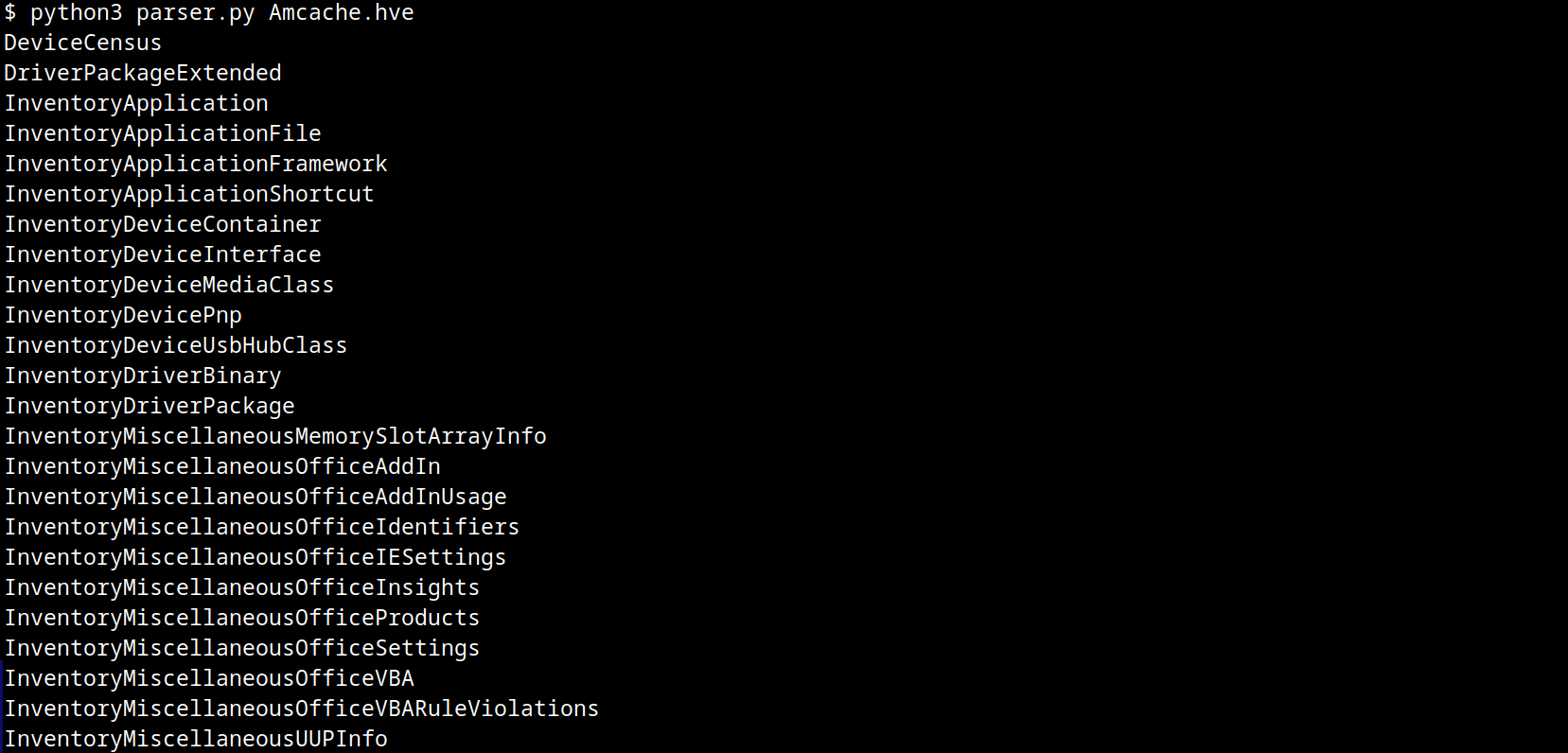
The Amcache.hve file is a Windows Registry hive in REGF format; it contains multiple subkeys that store distinct classes of data. A simple Python parser can be implemented to iterate through Amcache.hve and present its keys:
#!/usr/bin/env python3

import sys
from Registry.Registry import Registry

hive = Registry(str(sys.argv[1]))
root = hive.open("Root")

for rec in root.subkeys():
    print(rec.name())
The result of this parser when executed is:
AmCache keys
From a DFIR perspective, the keys that are of the most interest to us are InventoryApplicationFile, InventoryApplication, InventoryDriverBinary, and InventoryApplicationShortcut, which are described in detail in the following subsections.
InventoryApplicationFile
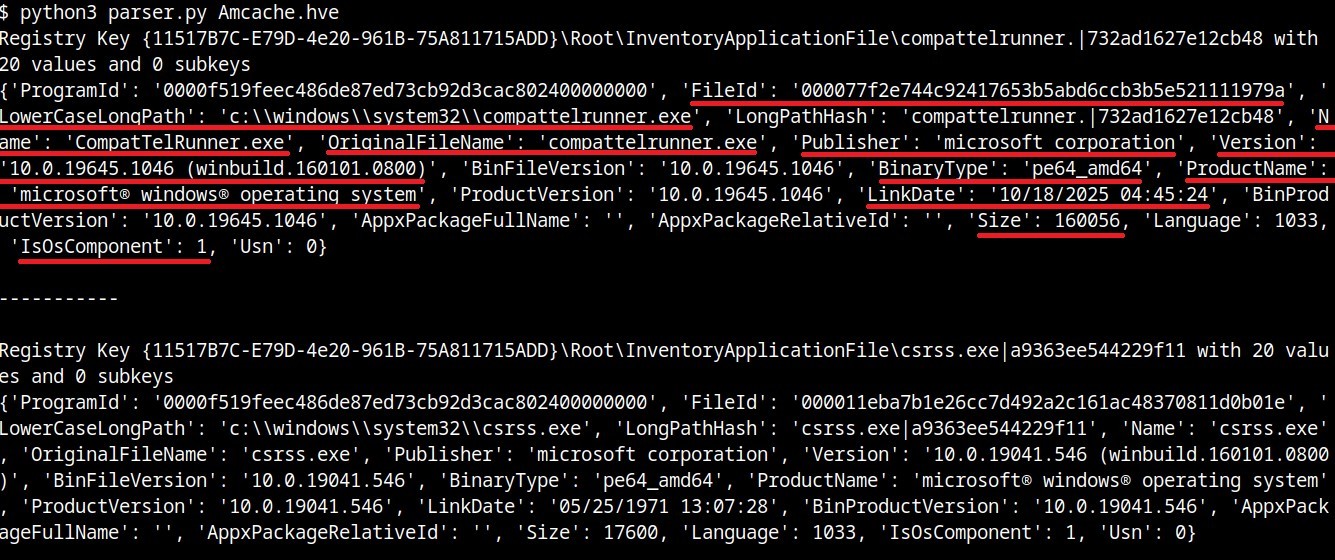
The InventoryApplicationFile key is essential for tracking every executable discovered on the system. Under this key, each executable is represented by its own uniquely named subkey, which stores the following main metadata:
ProgramId: a unique hash generated from the binary name, version, publisher, and language, with some zeroes appended to the beginning of the hash
FileID: the SHA-1 hash of the file, with four zeroes appended to the beginning of the hash
LowerCaseLongPath: the full lowercase path to the executable
Name: the file base name without the path information
OriginalFileName: the original filename as specified in the PE header’s version resource, indicating the name assigned by the developer at build time
Publisher: often used to verify if the source of the binary is legitimate. For malware, this subkey is usually empty
Version: the specific build or release version of the executable
BinaryType: indicates whether the executable is a 32-bit or 64-bit binary
ProductName: the ProductName field from the version resource, describing the broader software product or suite to which the executable belongs
LinkDate: the compilation timestamp extracted from the PE header
Size: the file size in bytes
IsOsComponent: a boolean flag that specifies whether the executable is a built-in OS component or a third-party application/library
With some tweaks to our original Python parser, we can read the information stored within this key:
#!/usr/bin/env python3

import sys
from Registry.Registry import Registry

hive = Registry(sys.argv[1])
root = hive.open("Root")

subs = {k.name(): k for k in root.subkeys()}
parent = subs.get("InventoryApplicationFile")

for rec in parent.subkeys():
   vals = {v.name(): v.value() for v in rec.values()}
   print("{}\n{}\n\n-----------\n".format(rec, vals))
InventoryApplicationFile subkeys
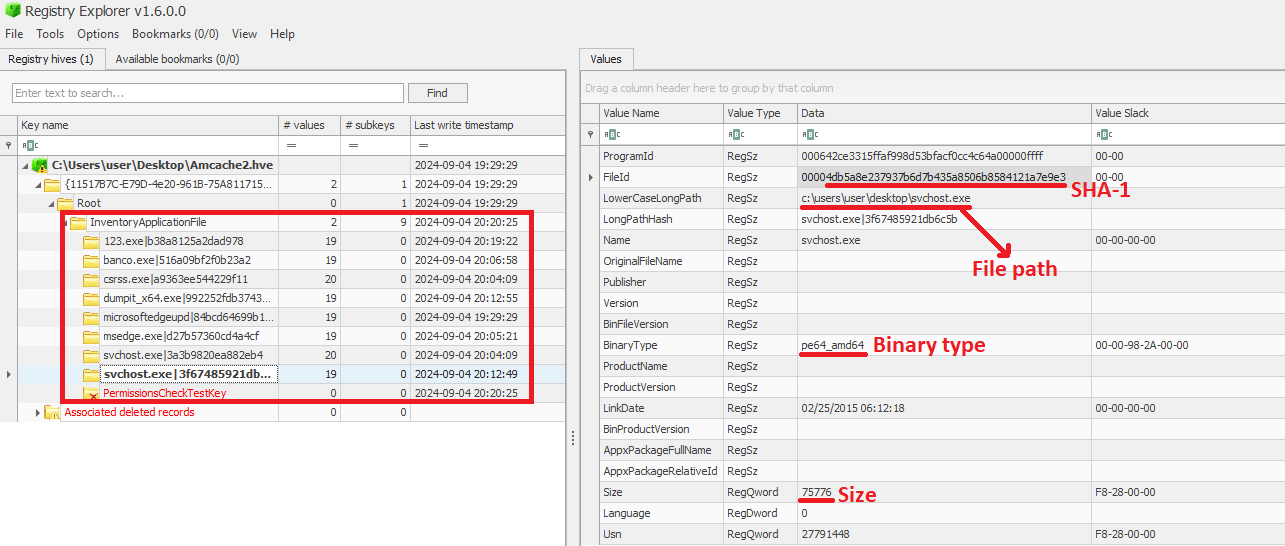
We can also use tools like Registry Explorer to see the same data in a graphical way:
InventoryApplicationFile inspected through Registry Explorer
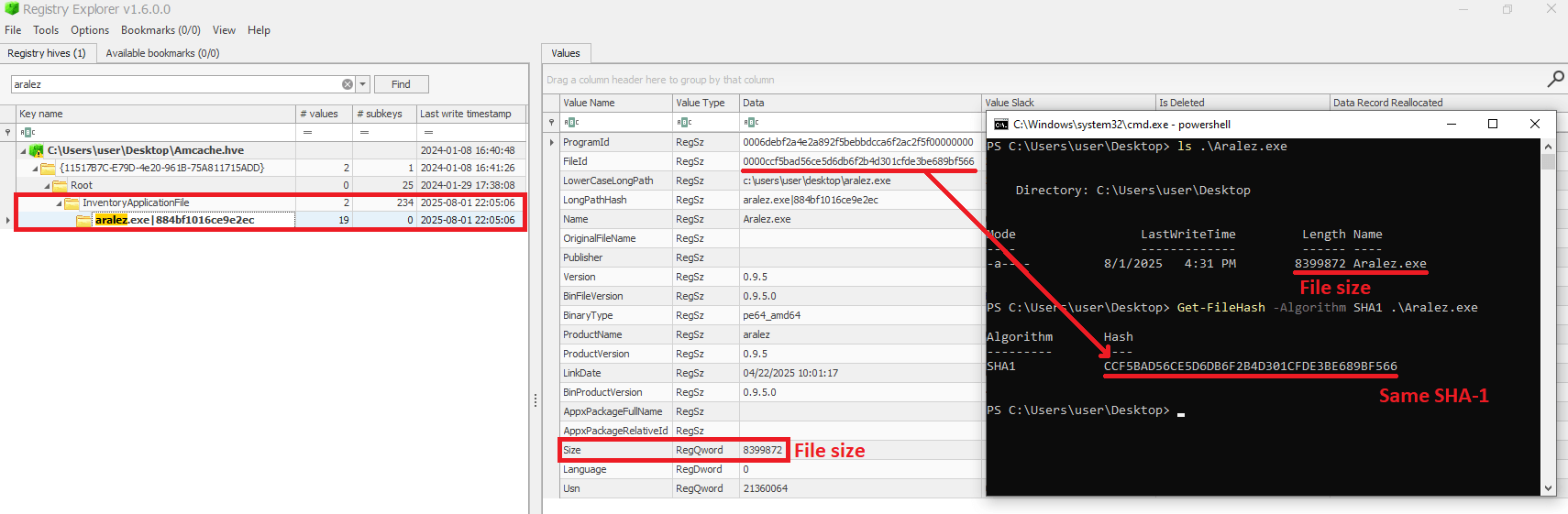
As mentioned before, AmCache computes the SHA-1 hash over only the first 31,457,280 bytes (≈31 MB). To prove this, we did a small experiment, during which we got a binary smaller than 31 MB (Aralez) and one larger than this value (a custom version of Velociraptor). For the first case, the SHA-1 hash of the entire binary was stored in AmCache.
First AmCache SHA-1 storage scenario
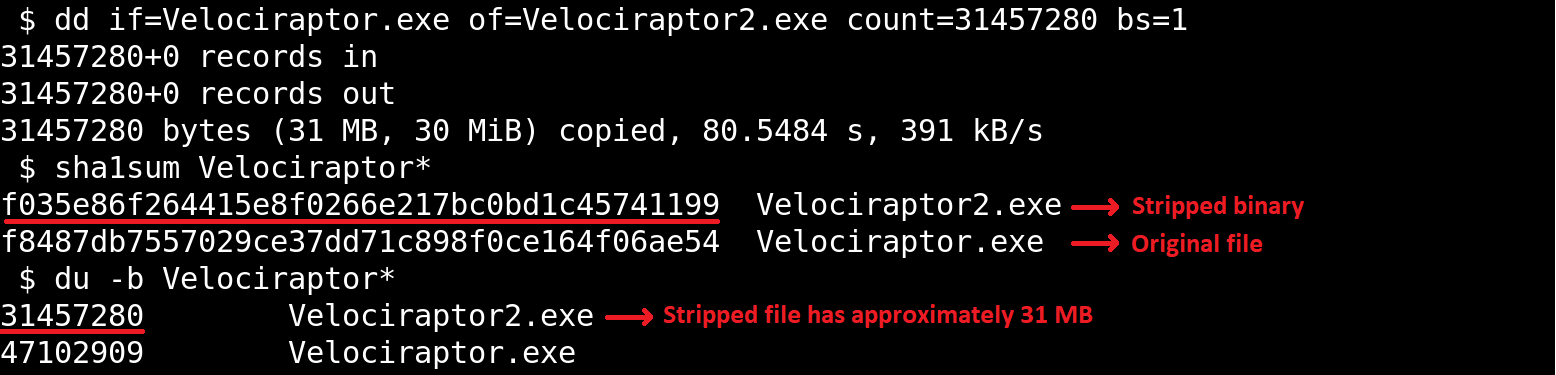
For the second scenario, we used the dd utility to extract the first 31 MB of the Velociraptor binary:
Stripped binary
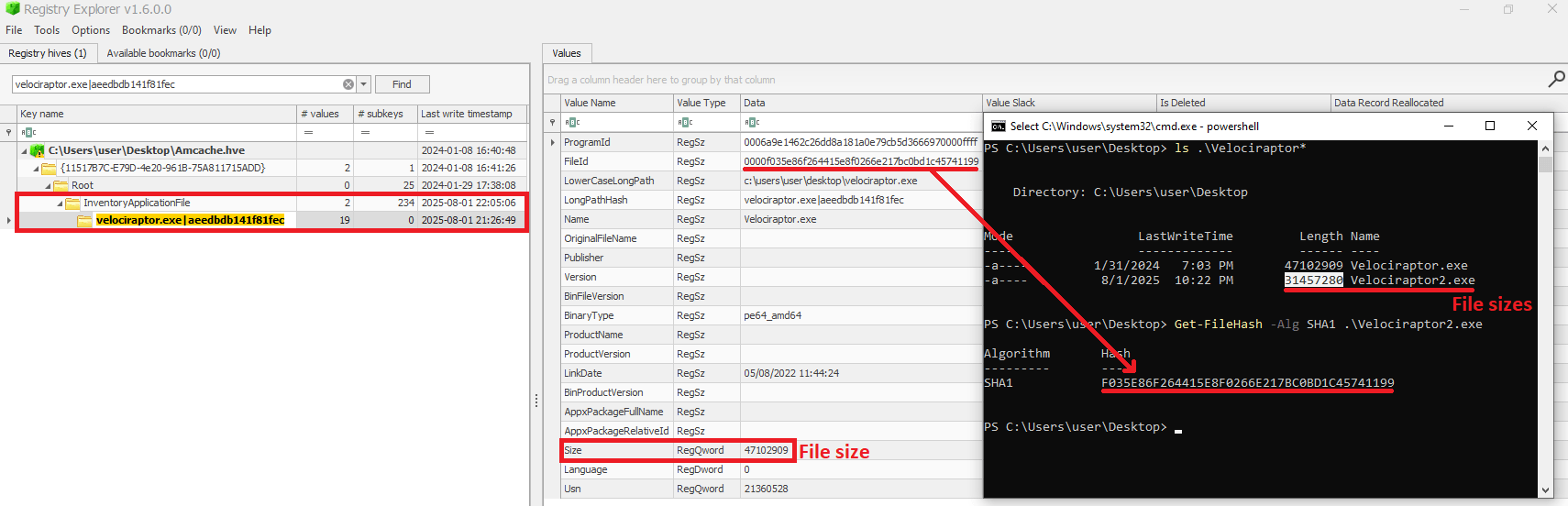
When checking the Velociraptor entry on AmCache, we found that it indeed stored the SHA-1 hash calculated only for the first 31,457,280 bytes of the binary. Interestingly enough, the Size value represented the actual size of the original file. Thus, relying only on the file hash stored on AmCache for querying threat intelligence portals may be not enough when dealing with large files. So, we need to check if the file size in the record is bigger than 31,457,280 bytes before searching threat intelligence portals.
Second AmCache SHA-1 storage scenario
Additionally, attackers may take advantage of this characteristic to purposely generate large malicious binaries. In this way, even if investigators find that a malware was executed/present on a Windows system, the actual SHA-1 hash of the binary will still be unknown, making it difficult to track it across the network and gathering it from public databases like VirusTotal.
InventoryApplicationFile – use case example: finding a deleted tool that was used
Let’s suppose you are searching for a possible insider threat. The user denies having run any suspicious programs, and any suspicious software was securely erased from disk. But in the InventoryApplicationFile, you find a record of winscp.exe being present in the user’s Downloads folder. Even though the file is gone, this tells you the tool was on the machine and it was likely used to transfer files before being deleted. In our incident response practice, we have seen similar cases, where this key proved useful.
InventoryApplication
The InventoryApplication key records details about applications that were previously installed on the system. Unlike InventoryApplicationFile, which logs every executable encountered, InventoryApplication focuses on those with installation records. Each entry is named by its unique ProgramId, allowing straightforward linkage back to the corresponding InventoryApplicationFile key. Additionally, InventoryApplication has the following subkeys of interest:
InstallDate: a date‑time string indicating when the OS first recorded or recognized the application
MsiInstallDate: present only if installed via Windows Installer (MSI); shows the exact time the MSI package was applied, sourced directly from the MSI metadata
UninstallString: the exact command line used to remove the application
Language: numeric locale identifier set by the developer (LCID)
Publisher: the name of the software publisher or vendor
ManifestPath: the file path to the installation manifest used by UWP or AppX/MSIX apps
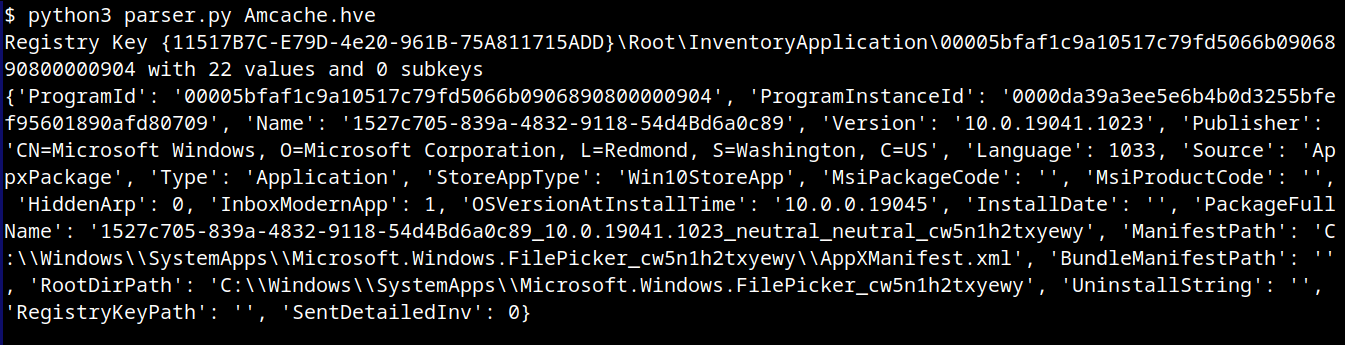
With a simple change to our parser, we can check the data contained in this key:
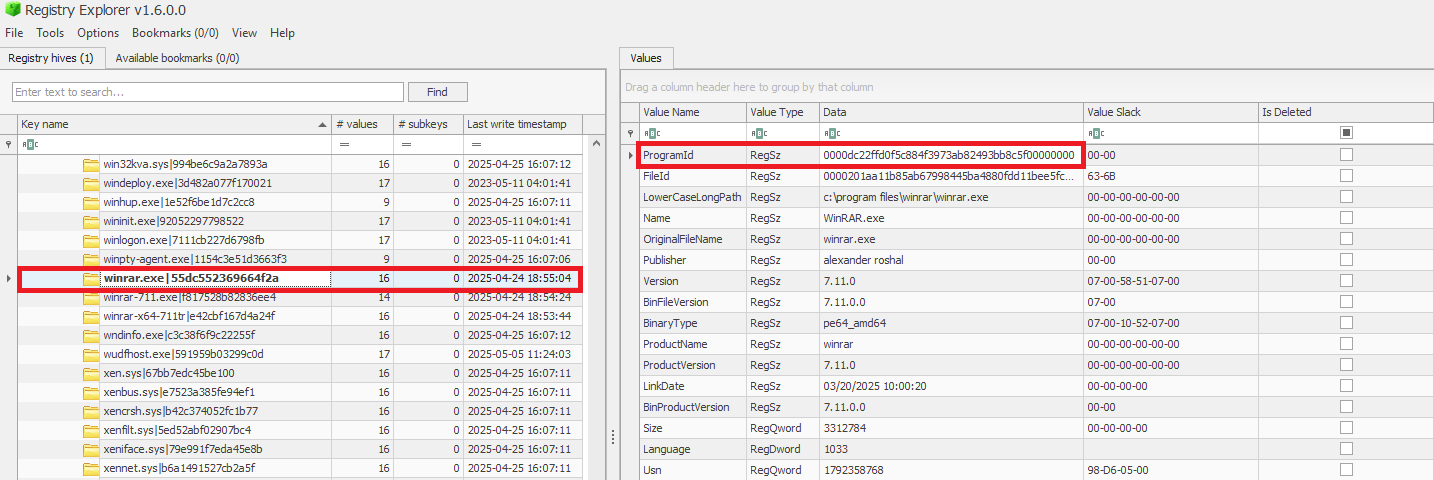
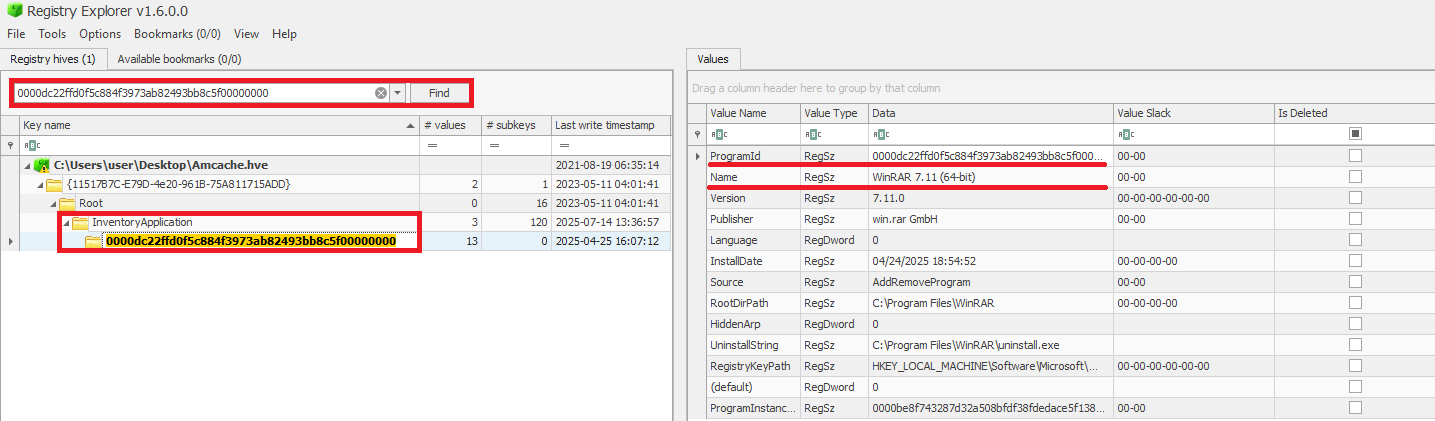
When a ProgramId appears both here and under InventoryApplicationFile, it confirms that the executable is not merely present or executed, but was formally installed. This distinction helps us separate ad-hoc copies or transient executions from installed software. The following figure shows the ProgramId of the WinRAR software under InventoryApplicationFile.
When searching for the ProgramId, we find an exact match under InventoryApplication. This confirms that WinRAR was indeed installed on the system.
Another interesting detail about InventoryApplication is that it contains a subkey named LastScanTime, which is stored separately from ProgramIds and holds a value representing the last time the Microsoft Compatibility Appraiser ran. This is a scheduled task that launches the compattelrunner.exe binary, and the information in this key should only be updated when that task executes. As a result, software installed since the last run of the Appraiser may not appear here. The LastScanTime value is stored in Windows FileTime format.
InventoryApplication LastScanTime information
InventoryApplication – use case example: spotting remote access software
Suppose that during an incident response engagement, you find an entry for AnyDesk in the InventoryApplication key (although the application is not installed anymore). This means that the attacker likely used it for remote access and then removed it to cover their tracks. Even if wiped from disk, this key proves it was present. We have seen this scenario in real-world cases more than once.
InventoryDriverBinary
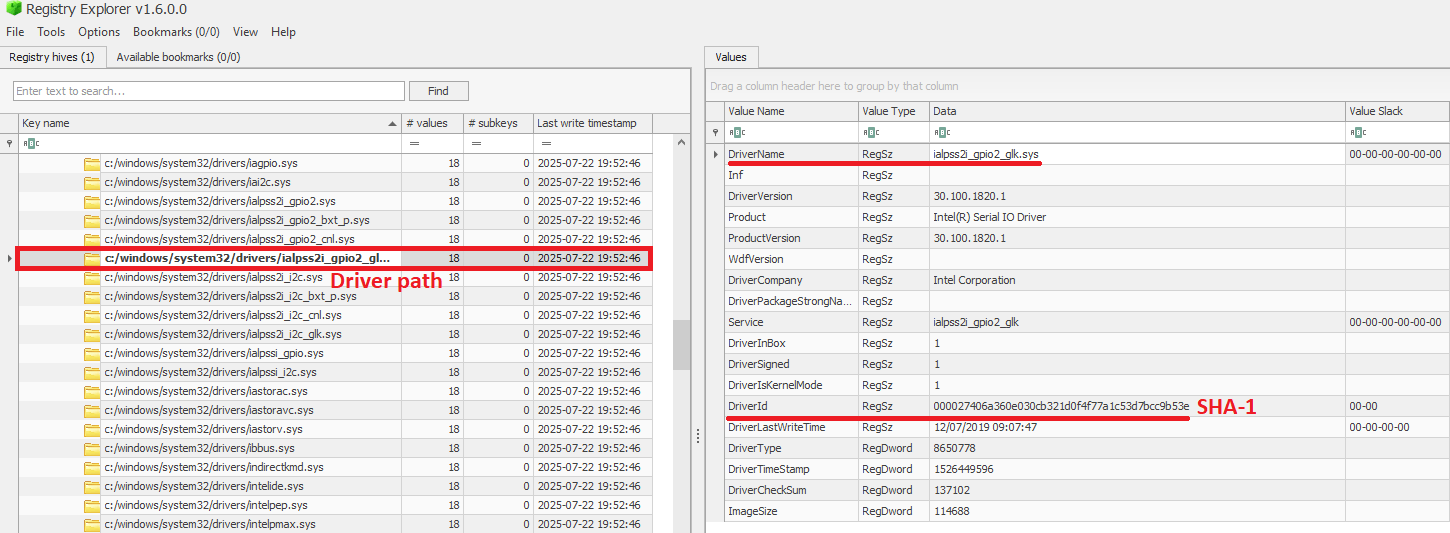
The InventoryDriverBinary key records every kernel-mode driver that the system has loaded, providing the essential metadata needed to spot suspicious or malicious drivers. Under this key, each driver is captured in its own uniquely named subkey and includes:
FileID: the SHA-1 hash of the driver binary, with four zeroes appended to the beginning of the hash
LowerCaseLongPath: the full lowercase file path to the driver on disk
DigitalSignature: the code-signing certificate details. A valid, trusted signature helps confirm the driver’s authenticity
LastModified: the file’s last modification timestamp from the filesystem metadata, revealing when the driver binary was most recently altered on disk
Because Windows drivers run at the highest privilege level, they are frequently exploited by malware. For example, a previous study conducted by Kaspersky shows that attackers are exploiting vulnerable drivers for killing EDR processes. When dealing with a cybersecurity incident, investigators correlate each driver’s cryptographic hash, file path, signature status, and modification timestamp. That can help in verifying if the binary matches a known, signed version, detecting any tampering by spotting unexpected modification dates, and flagging unsigned or anomalously named drivers for deeper analysis. Projects like LOLDrivers help identify vulnerable drivers in use by attackers in the wild.
InventoryDriverBinary inspection
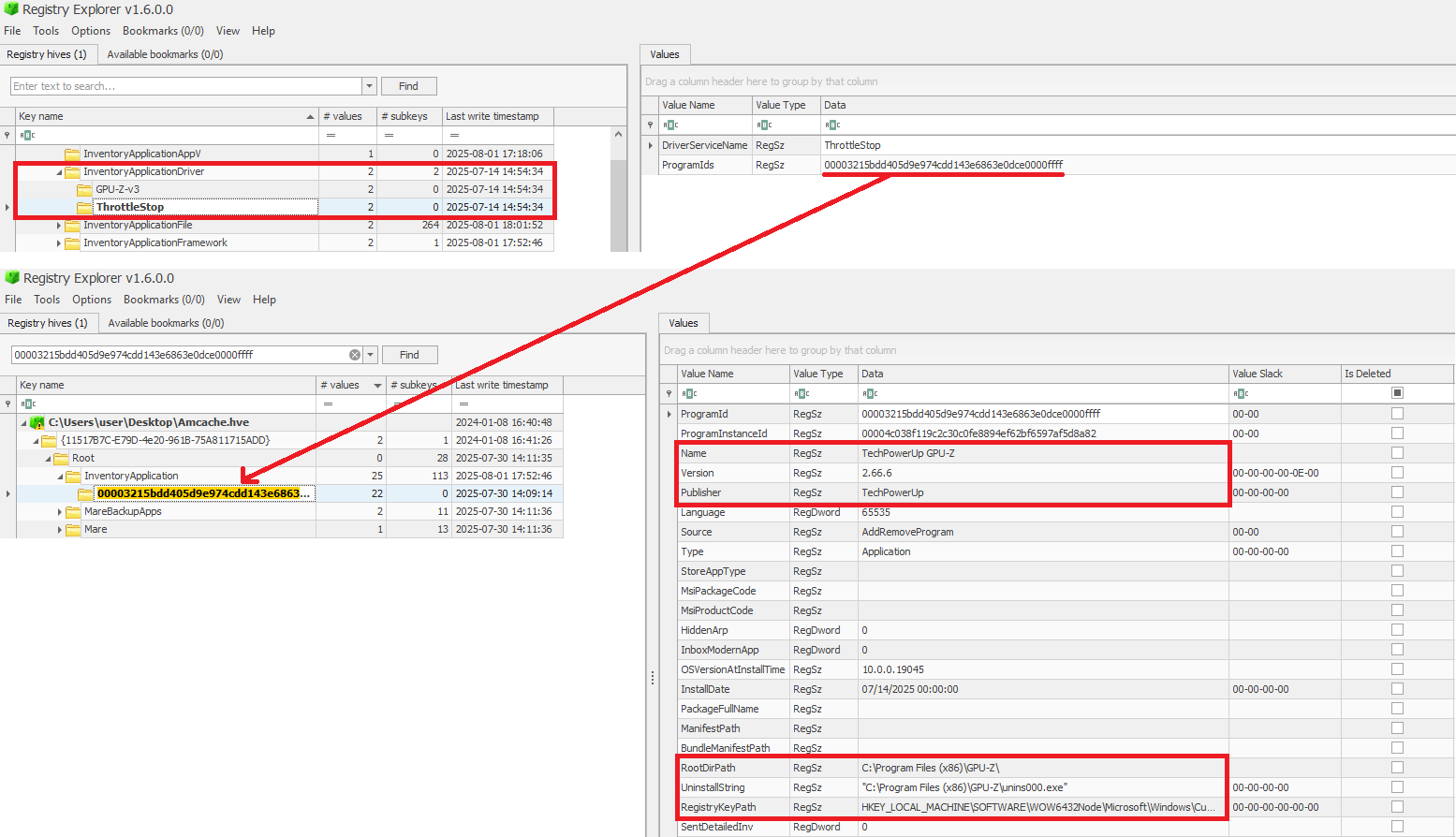
In addition to the InventoryDriverBinary, AmCache also provides the InventoryApplicationDriver key, which keeps track of all drivers that have been installed by specific applications. It includes two entries:
DriverServiceName, which identifies the name of the service linked to the installed driver; and
ProgramIds, which lists the program identifiers (corresponding to the key names under InventoryApplication) that were responsible for installing the driver.
As shown in the figure below, the ProgramIds key can be used to track the associated program that uses this driver:
Checking program information by ProgramIds
InventoryDriverBinary – use case example: catching a bad driver
If the system was compromised through the abuse of a known vulnerable or malicious driver, you can use the InventoryDriverBinary registry key to confirm its presence. Even if the driver has been removed or hidden, remnants in this key can reveal that it was once loaded, which helps identify kernel-level compromises and supporting timeline reconstruction during the investigation. This is exactly how the AV Killer malware was discovered.
InventoryApplicationShortcut
This key contains entries for .lnk (shortcut) files that were present in folders like each user’s Start Menu or Desktop. Within each shortcut key, the ShortcutPath provides the absolute path to the LNK file at the moment of discovery. The ShortcutTargetPath shows where the shortcut pointed. We can also search for the ProgramId entry within the InventoryApplication key using the ShortcutProgramId (similar to what we did for drivers).
InventoryApplicationShortcut key
InventoryApplicationShortcut – use case example: confirming use of a removed app
You find that a suspicious program was deleted from the computer, but the user claims they never ran it. The InventoryApplicationShortcut key shows a shortcut to that program was on their desktop and was accessed recently. With supplementary evidence, such as that from Prefetch analysis, you can confirm the execution of the software.
AmCache key comparison
The table below summarizes the information presented in the previous subsections, highlighting the main information about each AmCache key.
Key
Contains
Indicates execution?
InventoryApplicationFile
Metadata for all executables seen on the system.
Possibly (presence = likely executed)
InventoryApplication
Metadata about formally installed software.
No (indicates installation, not necessarily execution)
InventoryDriverBinary
Metadata about loaded kernel-mode drivers.
Yes (driver was loaded into memory)
InventoryApplicationShortcut
Information about .lnk files.
Possibly (combine with other data for confirmation)
AmCache-EvilHunter
Undoubtedly Amcache.hve is a very important forensic artifact. However, we could not find any tool that effectively parses its contents while providing threat intelligence for the analyst. With this in mind, we developed AmCache-EvilHunter a command-line tool to parse and analyze Windows Amcache.hve registry hives, identify evidence of execution, suspicious executables, and integrate Kaspersky OpenTIP and VirusTotal lookups for enhanced threat intelligence.
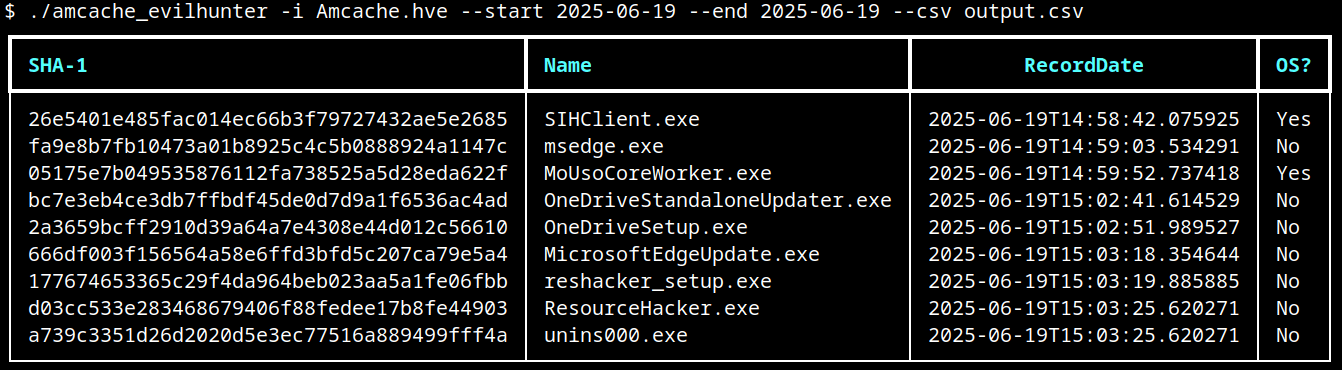
AmCache-EvilHunter is capable of processing the Amcache.hve file and filter records by date range (with the options --start and --end). It is also possible to search records using keywords (--search), which is useful for searching for known naming conventions adopted by attackers. The results can be saved in CSV (--csv) or JSON (--json) formats.
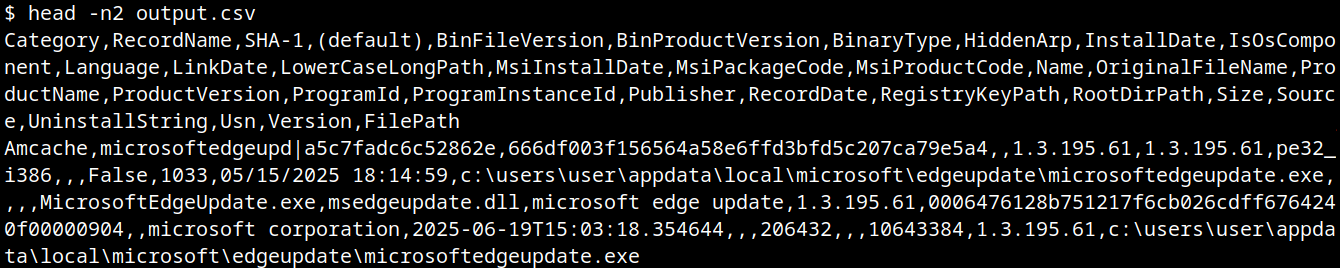
The image below shows an example of execution of AmCache-EvilHunter with these basic options, by using the following command:
The output contains all applications that were present on the machine on June 19, 2025. The last column contains information whether the file is an operating system component, or not.
Basic usage of AmCache-EvilHunter
CSV result
Analysts are often faced with a large volume of executables and artifacts. To narrow down the scope and reduce noise, the tool is able to search for known suspicious binaries with the --find-suspicious option. The patterns used by the tool include common malware names, Windows processes containing small typos (e.g., scvhost.exe), legitimate executables usually found in use during incidents, one-letter/one-digit file names (such as 1.exe, a.exe), or random hex strings. The figure below shows the results obtained by using this option; as highlighted, one svchost.exe file is part of the operating system and the other is not, making it a good candidate for collection and analysis if not deleted.
Suspicious files identification
Malicious files usually do not include any publisher information and are definitely not part of the default operating system. For this reason, AmCache-EvilHunter also ships with the --missing-publisher and --exclude-os options. These parameters allow for easy filtering of suspicious binaries and also allow fast threat intelligence gathering, which is crucial during an incident.
Another important feature that distinguishes our tool from other proposed approaches is that AmCache-EvilHunter can query Kaspersky OpenTIP (--opentip ) and VirusTotal (--vt) for hashes it identifies. In this way, analysts can rapidly gain insights into samples to decide whether they are going to proceed with a full analysis of the artifact or not.
Threat intel lookup
Binaries of the tool are available on our GitHub page for both Linux and Windows systems.
Conclusion
Amcache.hve is a cornerstone of Windows forensics, capturing rich metadata, such as full paths, SHA-1 hashes, compilation timestamps, publisher and version details, for every executable that appears on a system. While it does not serve as a definitive execution log, its strength lies in documenting file presence and paths, making it invaluable for spotting anomalous binaries, verifying trustworthiness via hash lookups against threat‐intelligence feeds, and correlating LinkDate values with known attack campaigns.
To extract its full investigative potential, analysts should merge AmCache data with other artifacts (e.g., Prefetch, ShimCache, and Windows event logs) to confirm actual execution and build accurate timelines. Comparing InventoryApplicationFile entries against InventoryApplication reveals whether a file was merely dropped or formally installed, and identifying unexpected driver records can expose stealthy rootkits and persistence mechanisms. Leveraging parsers like AmCache-EvilHunter and cross-referencing against VirusTotal or proprietary threat databases allows IOC generation and robust incident response, making AmCache analysis a fundamental DFIR skill.
The Digital Fortress: How APIs Are Reshaping Cybersecurity in the Age of AI Cybersecurity isn’t just about protecting networks. It’s about understanding the intricate digital highways that connect our most...
Today, we continue our exploration of digital forensics with a hands-on case study. So far, we have laid the groundwork for understanding forensic principles, but now it’s time to put theory into practice. Today we will analyze a malicious USB drive, a common vector for delivering payloads, and walk through how forensic analysts dissect its components to uncover potential threats.
USB drives remain a popular attack vector because they exploit human curiosity and trust. Often, the most challenging stage of the cyber kill chain is delivering the payload to the target. Many users are cautious about downloading unknown files from the internet, but physical media like USB drives can bypass that hesitation. Who wouldn’t be happy with a free USB? As illustrated in Mr. Robot, an attacker may drop USB drives in a public place, hoping someone curious will pick them up and plug them in. Once connected, the payload can execute automatically or rely on the victim opening a document. While this is a simple strategy, curiosity remains a powerful motivator, which hackers exploit consistently.
Forensic investigation of such incidents is important. When a USB drive is plugged into a system, changes may happen immediately, sometimes leaving traces that are difficult to detect or revert. Understanding the exact mechanics of these changes helps us reconstruct events, assess damage, and develop mitigation strategies. Today, we’ll see how an autorun-enabled USB and a malicious PDF can compromise a system, and how analysts dissect such threats.
Analyzing USB Files
Our investigation begins by extracting the files from the USB drive. While there are multiple methods for acquiring data from a device in digital forensics, this case uses a straightforward approach for demonstration purposes.
After extraction, we identify two key files: a PDF document and an autorun configuration file. Let’s learn something about each.
Autorun
The autorun file represents a legacy technique, often used as a fallback mechanism for older systems. Windows versions prior to Windows 7 frequently executed instructions embedded in autorun files automatically. In this case, the file defines which document to open and even sets an icon to make the file appear legitimate.
On modern Windows systems, autorun functionality is disabled by default, but the attacker likely counted on human curiosity to ensure the document would still be opened. Although outdated, this method remains effective in environments where older systems persist, which are common in government and corporate networks with strict financial or operational constraints. Even today, autorun files can serve as a backup plan to increase the likelihood of infection.
PDF Analysis
Next, we analyze the PDF. Before opening the file, it is important to verify that it is indeed a PDF and not a disguised executable. Magic bytes, which are unique identifiers at the beginning of a file, help us confirm its type. Although these bytes can be manipulated, altering them may break the functionality of the file. This technique is often seen in webshell uploads, where attackers attempt to bypass file type filters.
To inspect the magic bytes:
bash$ > xxd README.pdf | head
In this case, the file is a valid PDF. Opening it appears benign initially, allowing us to read its contents without immediate suspicion. However, a forensic investigation cannot stop at surface-level observation. We will proceed with checking the MD5 hash of it against malware databases:
bash$ > md5sum README.pdf
VirusTotal and similar services confirm the file contains malware. At this stage, a non-specialist might consider the investigation complete, but forensic analysts need a deeper understanding of the file’s behavior once executed.
Dynamic Behavior Analysis
Forensic laboratories provide tools to safely observe malware behavior. Platforms like AnyRun allow analysts to simulate the malware execution and capture detailed reports, including screenshots, spawned processes, and network activity.
Key observations in this case include multiple instances of msiexec.exe. While this could indicate an Adobe Acrobat update or repair routine, we need to analyze this more thoroughly. Malicious PDFs often exploit vulnerabilities in Acrobat to execute additional code.
Next we go to AnyRun and get the behavior graph. We can see child processes such as rdrcef.exe spawned immediately upon opening.
Hybrid Analysis reveals that the PDF contains an embedded JavaScript stream utilizing this.exportDataObject(...). This function allows the document to silently extract and save embedded files. The file also defines a /Launch action referencing Windows command execution and system paths, including cmd /C and environment variables such as %HOMEDRIVE%%HOMEPATH%.
The script attempts to navigate into multiple user directories in both English and Spanish, such as Desktop, My Documents, Documents, Escritorio, Mis Documentos, before executing the payload README.pdf. Such malware could be designed to operate across North and South American systems. At this stage the malware acts as a dropper duplicating itself.
Summary
In our case study we demonstrated how effective USB drives can be to deliver malware. Despite modern mitigations such as disabled autorun functionality, human behavior, especially curiosity and greed remain a key vulnerability. Attackers adapt by combining old strategies with new mechanisms such as embedded JavaScript and environment-specific paths. Dynamic behavior analysis, supported by platforms like AnyRun, allows us to visualize these threats in action and understand their system-level impact.
To stay safe, be careful with unknown USB drives and view unfamiliar PDF files in a browser or in the cloud with JavaScript blocked in settings. Dynamic behavior analysis from platforms like AnyRun, VirusTotal and Hybrid Analysis helps us to visualize these threats in action and understand their system-level impact.
If you need forensic assistance, we offer professional services to help investigate and mitigate incidents. Additionally, we provide classes on digital forensics for those looking to expand their skills and understanding in this field.
Welcome to the new Digital Forensics module. In this guide we introduce digital forensics, outline the main phases of a forensic investigation, and survey a large set of tools you’ll commonly meet. Think of this as a practical map: the article briefly covers the process and analysis stages and points to tools you can use depending on your objectives. Later in the course we’ll dig deeper into Windows and Linux artifacts and show how to apply the most common tools to real cases.
Digital forensics is growing fast because cyber incidents are happening every day. Budget limits, legacy systems, and weak segmentation leave many organizations exposed. AI and automation make attacks easier and fasterю. Human mistakes, especially successful phishing, remain a top cause of breaches. When prevention fails, digital forensics helps answer what happened, how it happened, and what to do next. It’s a mix of technical skills, careful procedure, and clear reporting.
What is Digital Forensics?
Digital forensics (also called computer forensics or cyber forensics) is the discipline of collecting, preserving, analyzing, and presenting digital evidence from computers, servers, mobile devices, networks, and storage media. It grew from early law-enforcement needs in the 1980s into a mature field in the 1990s and beyond, as cybercrime increased and investigators developed repeatable methods.
Digital forensics supports incident response, fraud investigations, data recovery, and threat hunting. The goals are to reconstruct timelines, identify malicious activity, measure impact, and produce evidence suitable for legal, regulatory, or incident-response use.
Main Fields Inside Digital Forensics
Digital forensics branches into several focused areas. Each requires different tools and approaches.
Computer forensics
Focuses on artifacts from a single machine: RAM, disk images, the Windows registry, system logs, file metadata, deleted files, and local application data. The aim is to recreate what a user or a piece of malware did on that host.
Network forensics
Covers packet captures, flow records, and logs from routers, firewalls and proxies. Analysts use network data to trace communications, find command-and-control channels, spot data exfiltration, and follow attacker movement across infrastructure.
Forensic data analysis
Deals with parsing and interpreting files, database contents, and binary data left after an intrusion. It includes reverse engineering malware fragments, reconstructing corrupted files, and extracting meaningful information from raw or partially damaged data.
Mobile device forensics
Targets smartphones and tablets. Android and iOS store data differently from desktops, so investigators use specialized methods to extract messages, app data, calling records, and geolocation artifacts.
Hardware forensics
The most specialized area: low-level analysis of firmware, microcontrollers, and embedded devices. This work may involve extracting firmware from chips, analyzing device internals, or studying custom hardware behavior (for example, the firmware of an IoT transmitter or a skimmer installed on an ATM).
Methods and approaches
Digital forensics work generally falls into two modes: static (offline) analysis and live (in-place) analysis. Both are valid. The choice depends on goals and constraints.
Static analysis
The traditional workflow. Investigators take the device offline, build a bit-for-bit forensic image, and analyze copies in a lab. Static analysis is ideal for deep disk work: carving deleted files, examining file system metadata, and creating a defensible chain of custody for evidence.
Live analysis
Used when volatile data matters or when the system cannot be taken offline. Live techniques capture RAM contents, running processes, open network connections, and credentials kept in memory. Live collection gives access to transient artifacts that vanish on reboot, but it requires careful documentation to avoid altering evidence.
Live vs Static
Static work preserves the exact state of disk data and is easier to reproduce. Live work captures volatile evidence that static imaging cannot. Modern incidents often need both. They start with live capture to preserve RAM and active state, then create static images for deeper analysis.
The forensic process
1. Create a forensic image
Make a bit-for-bit copy of storage or memory. Work on the copy. Never change the original.
2. Document the system’s state
Record running processes, network connections, logged-in users, system time, and any other volatile details before power-down.
3. Identify and preserve evidence
Locate files, logs, configurations, memory dumps, and external devices. Preserve them with hashes and a clear chain of custody.
4. Analyze the evidence
Use appropriate tools to inspect logs, binaries, file systems, and memory. Look for malware artifacts, unauthorized accounts, and modified system components.
5. Timeline analysis
Correlate timestamps across artifacts to reconstruct the sequence of events and show how an incident unfolded.
6. Identify indicators of compromise (IOCs)
Extract file hashes, IP addresses, domains, registry keys, and behavioral signatures that indicate malicious activity.
7. Report and document
Produce a clear, well-documented report describing methods, findings, conclusions, and recommended next steps.
Toolset Overview
Below is a compact reference to common tools grouped by purpose. Later modules will show hands-on use for Windows and Linux artifacts.
Imaging and acquisition
FTK Imager — Windows tool for creating forensic copies and basic preview.
dc3dd / dcfldd — Forensic versions of dd with improved logging and hashing.
Live RAM Capturer — For memory collection from live systems.
Image mounting and processing
Imagemounter — Mount images for read-only analysis.
Libewf — Support for EnCase Evidence File format.
Xmount — Convert and remap image formats for flexible analysis.
File and binary analysis
HxD / wxHexEditor / Synalyze It! — Hex editors for direct file and binary inspection.
Bstrings — Search binary images with regex for hidden strings.
Bulk_extractor — Extract emails, credit card numbers, and artifacts from disk images.
PhotoRec — File carving and deleted file recovery.
Memory and process analysis
Volatility / Rekall — Industry standard frameworks for memory analysis and artifact extraction.
Memoryze — RAM analysis, including swap and process memory.
KeeFarce — Extracts KeePass data from memory snapshots.
Network and browser forensics
Wireshark — Packet capture and deep protocol analysis.
SiLK — Scalable flow collection and analysis for large networks.
NetworkMiner — Passive network forensics that rebuilds sessions and files.
Hindsight / chrome-url-dumper — Recover browser history and user activity from Chrome artifacts.
Mail and messaging analysis
PST/OST/EDB Viewers — Tools to inspect Exchange and Outlook data files offline.
Mail Viewer — Supports multiple mailstore formats for quick inspection.
Disk and filesystem utilities
The Sleuth Kit / Autopsy — Open-source forensic platform for disk analysis and timeline creation.
Digital Forensics Framework — Modular platform for file and system analysis.
Specialized extraction and searching
FastIR Collector — Collects live forensic artifacts from Windows hosts quickly.
FRED — Registry analysis and parsing.
NTFS USN Journal Parser / RecuperaBit — Recover change history and reconstruct deleted/changed files.
Evidence processing and reporting
EnCase — Commercial suite for imaging, analysis, and court-ready reporting.
Oxygen Forensic Detective — Strong platform for mobile device extraction and cloud artifact analysis.
Practical notes and best practices
a) Preserve original evidence. Always work with verified copies and record cryptographic hashes.
b) Capture volatile data early. RAM and live state can vanish on reboot. Prioritize their collection when necessary.
c) Keep clear records. Document every action, including tools and versions, timestamps, and the chain of custody.
d) Match tools to goals. Use lightweight tools for quick triage and more powerful suites for deep dives.
e) Plan for scalability. Network forensics can generate huge data sets. Prepare storage and filtering strategies ahead of time.
Summary
We introduced digital forensics and laid out the main concepts you’ll need to start practical work: the different forensic disciplines, the distinction between live and static analysis, a concise process checklist, and a broad toolset organized by purpose. Digital forensics sits at the intersection of incident response, threat intelligence, and legal evidence collection. The methods and tools presented here form a foundation. In later lessons we’ll work through hands-on examples for Windows and Linux artifacts, demonstrate key tools in action, and show how to build timelines and extract actionable IOCs.
Keep in mind that good forensic work is disciplined, repeatable, and well documented. That’s what makes the evidence useful and the investigation reliable.
If you need forensic assistance, we offer professional services to help investigate and mitigate incidents. Additionally, we provide classes on digital forensics for those looking to expand their skills and understanding in this field.
Identity’s New Frontier: How CISOs Can Navigate the Complex Landscape of Modern Access Management The cybersecurity battlefield has shifted. No longer are perimeter defenses and traditional identity management sufficient to...
Network Visibility: The Silent Guardian of Cybersecurity Network complexity is killing enterprise security teams. Buried under mountains of configuration data, manual processes, and endless troubleshooting, cybersecurity professionals are drowning in...
The week of August 4th, I had the opportunity to attend two exciting conferences in the cybersecurity world: Black Hat USA 2025 and Squadcon which were held in Las Vegas....
By Gary Miliefsky, Publisher of Cyber Defense Magazine Black Hat, the cybersecurity industry’s most established and in-depth security event series, has once again proven why it remains the go-to gathering...
As members of the Global Emergency Response Team (GERT), we work with forensic artifacts on a daily basis to conduct investigations, and one of the most valuable artifacts is UserAssist. It contains useful execution information that helps us determine and track adversarial activities, and reveal malware samples. However, UserAssist has not been extensively examined, leaving knowledge gaps regarding its data interpretation, logging conditions and triggers, among other things. This article provides an in-depth analysis of the UserAssist artifact, clarifying any ambiguity in its data representation. We’ll discuss the creation and updating of artifact workflow, the UEME_CTLSESSION value structure and its role in logging the UserAssist data. We’ll also introduce the UserAssist data structure that was previously unknown.
UserAssist artifact recap
In the forensics community, UserAssist is a well-known Windows artifact used to register the execution of GUI programs. This artifact stores various data about every GUI application that’s run on a machine:
Program name: full program path.
Run count: number of times the program was executed.
Focus count: number of times the program was set in focus, either by switching to it from other applications, or by otherwise making it active in the foreground.
Focus time: total time the program was in focus.
Last execution time: date and time of the last program execution.
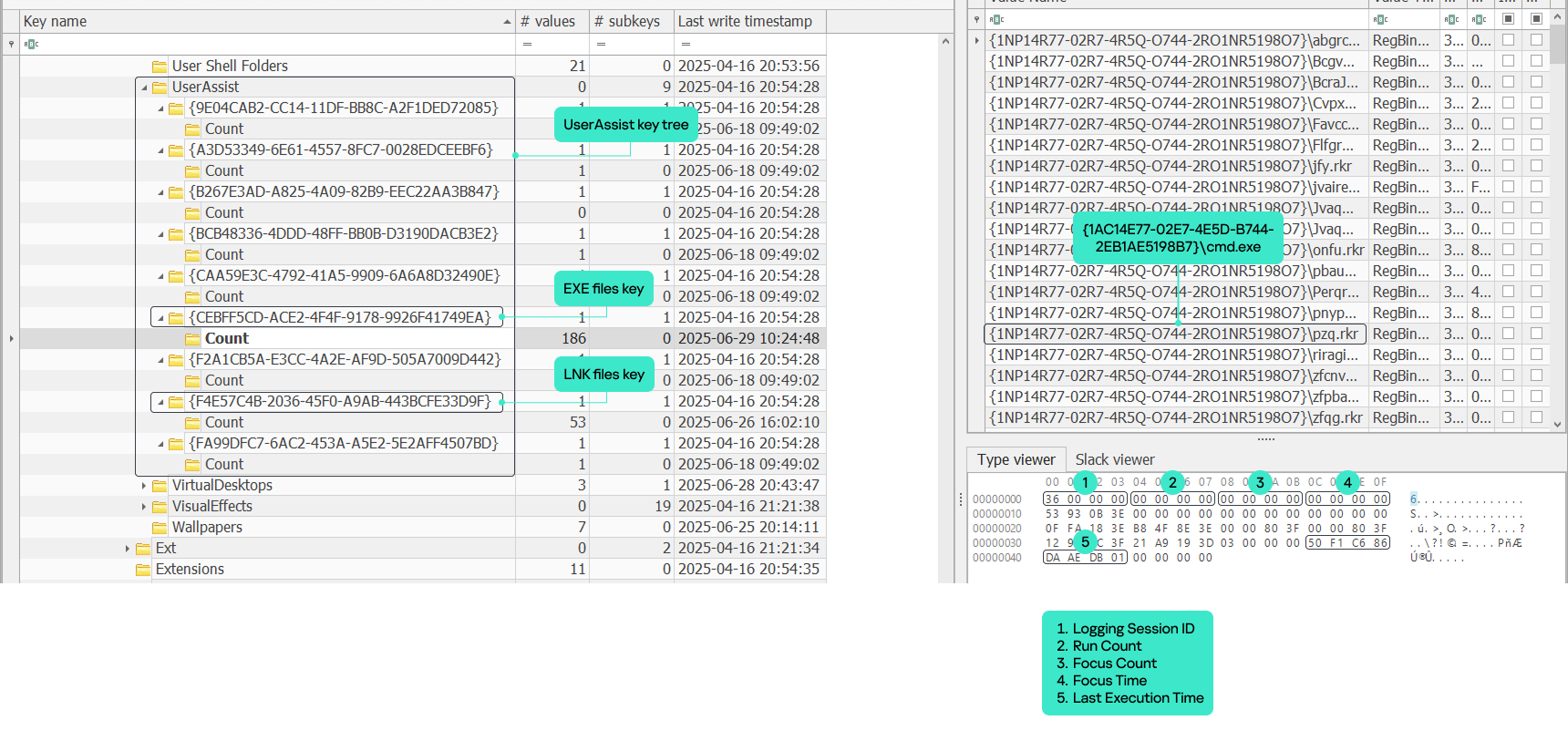
The UserAssist artifact is a registry key under each NTUSER.DAT hive located at Software\Microsoft\Windows\CurrentVersion\Explorer\UserAssist\. The key consists of subkeys named with GUIDs. The two most important GUID subkeys are:
Each subkey has its own subkey named “Count”. It contains values that represent the executed programs. The value names are the program paths encrypted using the ROT-13 cipher.
The values contain structured binary data that includes the run count, focus count, focus time and last execution time of the respective application. This structure is well-known and represents the CUACount object. The bytes between focus time and last execution time have never been described or analyzed publicly, but we managed to determine what they are and will explain this later in the article. The last four bytes are unknown and contained a zero in all the datasets we analyzed.
UserAssist artifact
Data inconsistency
Over the course of many investigations, the UserAssist data was found to be inconsistent. Some values included all of the parameters described above, while others, for instance, included only run count and last execution time. Overall, we observed five combinations of UserAssist data inconsistency.
Cases
Run Count
Focus Count
Focus Time
Last Execution Time
1
✓
✓
✓
✓
2
✓
✕
✕
✓
3
✕
✓
✓
✕
4
✓
✕
✓
✓
5
✕
✕
✓
✕
Workflow analysis
Deep dive into Shell32 functions
To understand the reasons behind the inconsistency, we must examine the component responsible for registering and updating the UserAssist data. Our analysis revealed that the component in question is shell32.dll, more specifically, a function called FireEvent that belongs to the CUserAssist class.
virtual long CUserAssist::FireEvent(struct _GUID const *, enum tagUAEVENT, unsigned short const *, unsigned long)
The FireEvent arguments are as follows:
Argument 1: GUID that is a subkey of the UserAssist registry key containing the registered data. This argument most often takes the value {CEBFF5CD-ACE2-4F4F-9178-9926F41749EA} because executed programs are mostly EXE files.
Argument 2: integer enumeration value that defines which counters and data should be updated.
Value 0: updates the run count and last execution time
Value 1: updates the focus count
Value 2: updates the focus time
Value 3: unknown
Value 4: unknown (we assume it is used to delete the entry).
Argument 3: full executable path that has been executed, focused on, or closed.
Argument 4: focus time spent on the executable in milliseconds. This argument only contains a value if argument 2 has a value of 2; otherwise, it equals zero.
Furthermore, the FireEvent function relies heavily on two other shell32.dll functions: s_Read and s_Write. These functions are responsible for reading and writing the binary value data of UserAssist from and to the registry whenever a particular application is updated:
static long CUADBLog::s_Read(void *, unsigned long, struct NRWINFO *)
static long CUADBLog::s_Write(void *, unsigned long, struct NRWINFO *)
The s_Read function reads the binary value of the UserAssist data from the registry to memory, whereas s_Write writes the binary value of the UserAssist data to the registry from the memory. Both functions have the same arguments, which are as follows:
Argument 1: pointer to the memory buffer (the CUACount struct) that receives or contains the UserAssist binary data.
Argument 2: size of the UserAssist binary data in bytes to be read from or written to registry.
Argument 3: undocumented structure containing two pointers.
The CUADBLog instance pointer at the 0x0 offset
Full executable path in plain text that the associated UserAssist binary data needs to be read from or written to the registry.
When a program is executed for the first time and there is no respective entry for it in the UserAssist records, the s_Read function reads the UEME_CTLCUACount:ctor value, which serves as a template for the UserAssist binary data structure (CUACount). We’ll describe this value later in the article.
It should be noted that the s_Read and s_Write functions are also responsible for encrypting the value names with the ROT-13 cipher.
UserAssist data update workflow
Any interaction with a program that displays a GUI is a triggering event that results in a call to the CUserAssist::FireEvent function. There are four types of triggering events:
Program executed.
Program set in focus.
Program set out of focus.
Program closed.
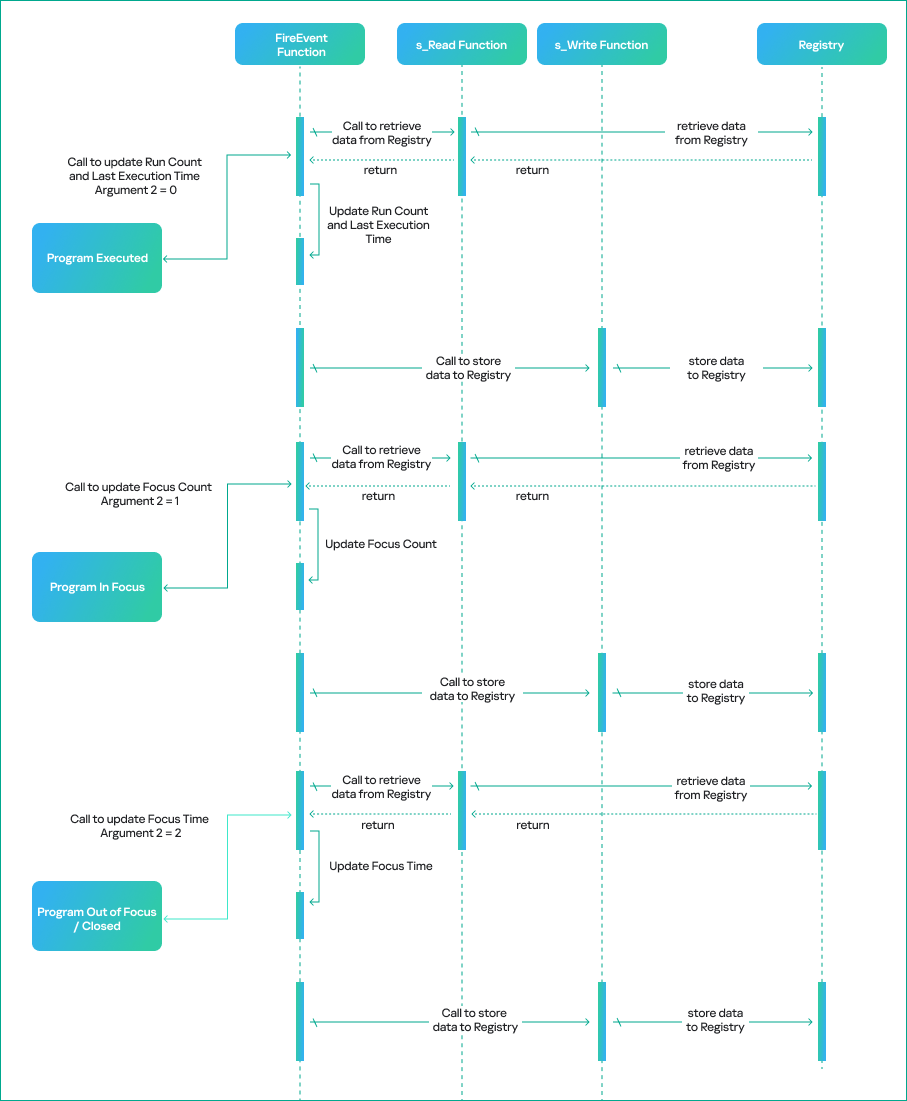
The triggering event determines the execution workflow of the CUserAssist::FireEvent function. The workflow is based on the enumeration value that is passed as the second argument to FireEvent and defines which counters and data should be updated in the UserAssist binary data.
The CUserAssist::FireEvent function calls the CUADBLog::s_Read function to read the binary data from registry to memory. The CUserAssist::FireEvent function then updates the respective counters and data before calling CUADBLog::s_Write to store the data back to the registry.
The diagram below illustrates the workflow of the UserAssist data update process depending on the interaction with a program.
UserAssist data update workflow
The functions that call the FireEvent function vary depending on the specific triggering event caused by interaction with a program. The table below shows the call stack for each triggering event, along with the modules of the functions.
Triggering event
Module
Call Stack Functions
Details
Program executed (double click)
SHELL32
CUserAssist::FireEvent
This call chain updates the run count and last execution time. It is only triggered when the executable is double-clicked, whether it is a CLI or GUI in File Explorer.
Windows.storage
UAFireEvent
Windows.storage
NotifyUserAssistOfLaunch
Windows.storage
CInvokeCreateProcessVerb::
_OnCreatedProcess
Program in focus
SHELL32
CUserAssist::FireEvent
This call chain updates the focus count and only applies to GUI executables.
This call chain updates the focus time and applies to GUI and CLI executables. However, CLI executables are only updated if the program was executed via a double click or if conhost was spawned as a child process.
As previously mentioned, we observed five combinations of UserAssist data. Our thorough analysis shows that these inconsistencies arise from interactions with a program and various functions that call the FireEvent function. Now, let’s examine the triggering events that cause these inconsistencies in more detail.
1. All data
The first combination is all four parameters registered in the UserAssist record: run count, focus count, focus time, and last execution time. In this scenario, the program usually follows the normal execution flow, has a GUI and is executed by double-clicking in Windows Explorer.
When the program is executed, the FireEvent function is called to update the run count and last execution time.
When it is set in focus, the FireEvent function is called to update the focus count.
When it is set out of focus or closed, the FireEvent function is called to update focus time.
2. Run count and last execution time
The second combination occurs when the record only contains run count and last execution time. In this scenario, the program is run by double-clicking in Windows Explorer, but the GUI that appears belongs to another program. Examples of this scenario include launching an application with an LNK shortcut or using an installer that runs a different GUI program, which switches the focus to the other program file.
During our test, a copy of calc.exe was executed in Windows Explorer using the double-click method. However, the GUI program that popped up was the UWP app for the calculator Microsoft.WindowsCalculator_8wekyb3d8bbwe!App.
There is a record of the calc.exe desktop copy in UserAssist, but it contains only the run count and last execution time. However, both focus count and focus time are recorded under the UWP calculator Microsoft.WindowsCalculator_8wekyb3d8bbwe!App UserAssist entry.
3. Focus count and focus time
The third combination is a record that only includes focus count and focus time. In this scenario, the program has a GUI, but is executed by means other than a double click in Windows Explorer, for example, via a command line interface.
During our test, a copy of Process Explorer from the Sysinternals Suite was executed through cmd and recorded in UserAssist with focus count and focus time only.
4. Run count, last execution time and focus time
The fourth combination is when the record contains run count, last execution time and focus time. This scenario only applies to CLI programs that are run by double-clicking and then immediately closed. The double-click execution leads to the run count and last execution time being registered. Next, the program close event will call the FireEvent function to update the focus time, which is triggered by the lambda function (5b4995a8d0f55408566e10b459ba2cbe).
During our test, a copy of whoami.exe was executed by a double click, which opened a console GUI for a split second before closing.
5. Focus time
The fifth combination is a record with only focus time registered. This scenario only applies to CLI programs executed by means other than a double click, which opens a console GUI for a split second before it is immediately closed.
During our test, a copy of whoami.exe was executed using PsExec instead of cmd. PsExec executed whoami as its own child process, resulting in whoami spawning a conhost.exe process. This condition must be met for the CLI program to be registered in UserAssist in this scenario.
We summed up all five combinations with their respective interpretations in the table below.
Inconsistency combination
Interpretation
Triggering events
All Data
GUI program executed by double
click and closed normally.
· Program Executed
· Program In Focus
· Program Out of Focus
· Program Closed
Run Count and Last Execution Time
GUI program executed by double
click but focus switched to another
program.
· Program Executed
Focus Count and Focus Time
GUI program executed by other means.
· Program In Focus
· Program Out of Focus
· Program Closed
Run Count, Last Execution Time and Focus Time
CLI program executed by double
click and then closed.
· Program Executed
· Program Closed
Focus Time
CLI program executed by other
means than double click, spawned
conhost process and then closed.
· Program Closed
CUASession and UEME_CTLSESSION
Now that we have addressed the inconsistency of the UserAssist artifact, the second part of this research will explain another aspect of UserAssist: the CUASession class and the UEME_CTLSESSION value.
The UserAssist database contains value names for every executed program, but there is an unknown value: UEME_CTLSESSION. Unlike the binary data that is recorded for every program, this value contains larger binary data: 1612 bytes, whereas the regular size of values for executed programs is 72 bytes.
CUASession is a class within shell32.dll that is responsible for maintaining statistics of the entire UserAssist logging session for all programs. These statistics include total run count, total focus count, total focus time and the three top program entries, known as NMax entries, which we will describe below. The UEME_CTLSESSION value contains the properties of the CUASession object. Below are some functions of the CUASession class:
In the context of CUASession and UEME_CTLSESSION, we will refer to run count as launches, focus count as switches, and focus time as user time when discussing the parameters of all executed programs in a logging session as opposed to the data of a single program.
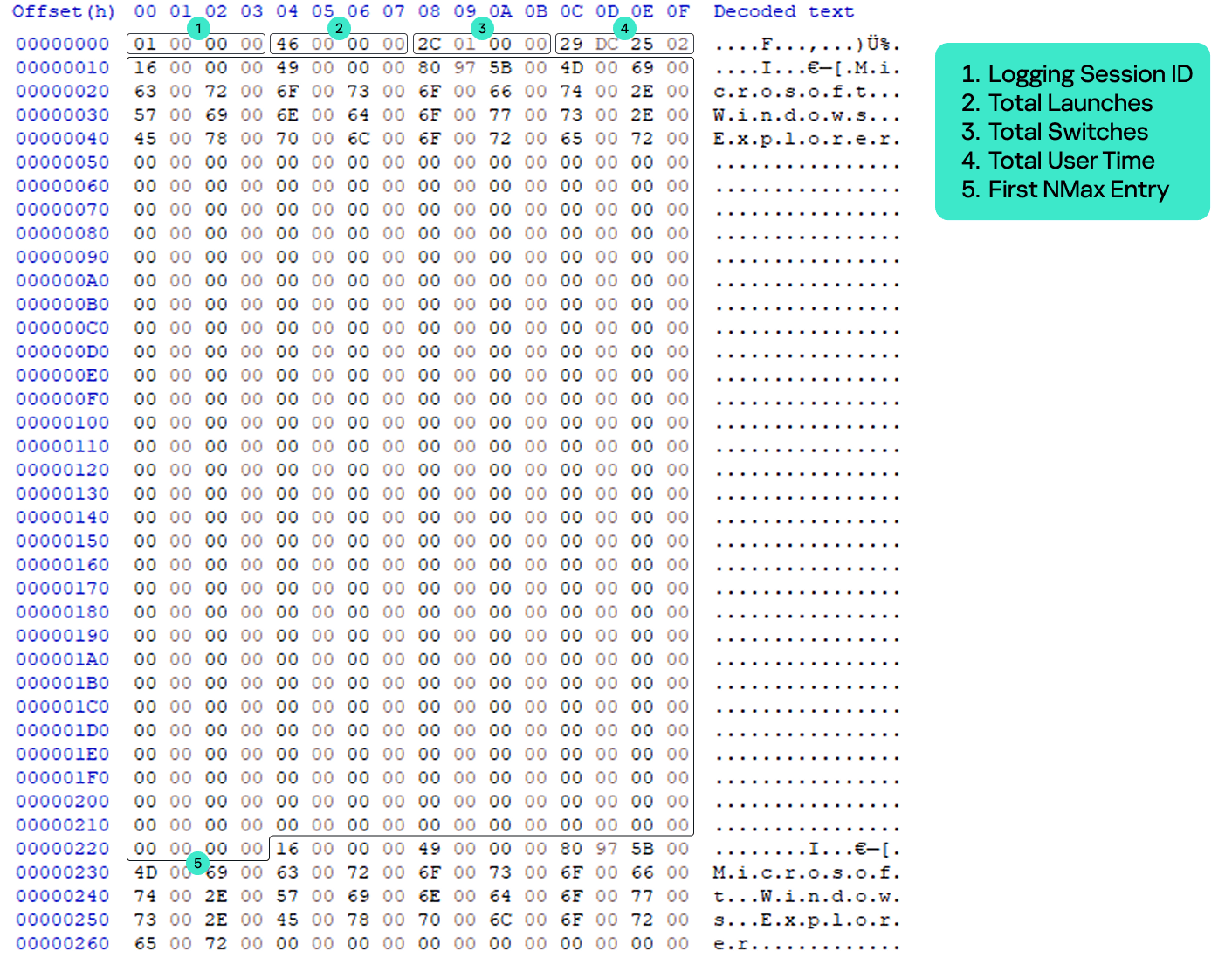
The UEME_CTLSESSION value has the following specific data structure:
0x0 offset: general total statistics (16 bytes)
0x0: logging session ID (4 bytes)
0x4: total launches (4 bytes)
0x8: total switches (4 bytes)
0xC: total user time in milliseconds (4 bytes)
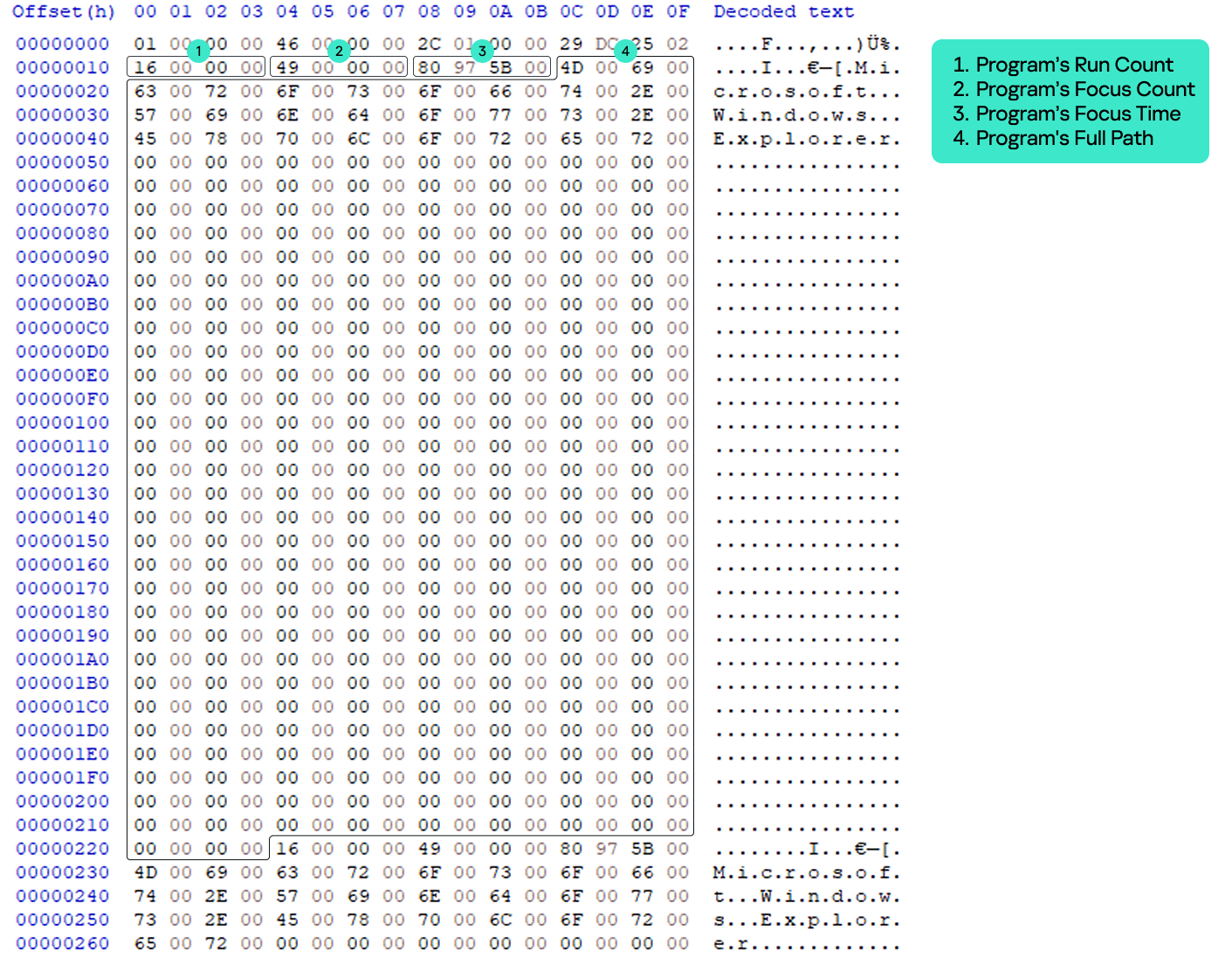
0x10 offset: three NMax entries (1596 bytes)
0x10: first NMax entry (532 bytes)
0x224: second NMax entry (532 bytes)
0x438: third NMax entry (532 bytes)
UEME_CTLSESSION structure
Every time the FireEvent function is called to update program data, CUASession updates its own properties and saves them to UEME_CTLSESSION.
When FireEvent is called to update the program’s run count, CUASession increments Total Launches in UEME_CTLSESSION.
When FireEvent is called to update the program’s focus count, CUASession increments Total Switches.
When FireEvent is called to update the program’s focus time, CUASession updates Total User Time.
NMax entries
The NMax entry is a portion of the UserAssist data for the specific program that contains the program’s run count, focus count, focus time, and full path. NMax entries are part of the UEME_CTLSESSION value. Each NMax entry has the following data structure:
0x0 offset: program’s run count (4 bytes)
0x4 offset: program’s focus count (4 bytes)
0x8 offset: program’s focus time in milliseconds (4 bytes)
0xc offset: program’s name/full path in Unicode (520 bytes, the maximum Windows path length multiplied by two)
NMax entry structure
The NMax entries track the programs that are executed, switched, and used most frequently. Whenever the FireEvent function is called to update a program, the CUADBLog::_CheckUpdateNMax function is called to check and update the NMax entries accordingly.
The first NMax entry stores the data of the most frequently executed program based on run count. If two programs (the program whose data was previously saved in the NMax entry and the program that triggered the FireEvent for update) have an equal run count, the entry is updated based on the higher calculated value between the two programs, which is called the N value. The N value equation is as follows:
N value = Program’s Run Count*(Total User Time/Total Launches) + Program’s Focus Time + Program’s Focus Count*(Total User Time/Total Switches)
The second NMax entry stores the data of the program with the most switches, based on its focus count. If two programs have an equal focus count, the entry is updated based on the highest calculated N value.
The third NMax entry stores the data of the program that has been used the most, based on the highest N value.
The parsed UEME_CTLSESSION structure with NMax entries is shown below.
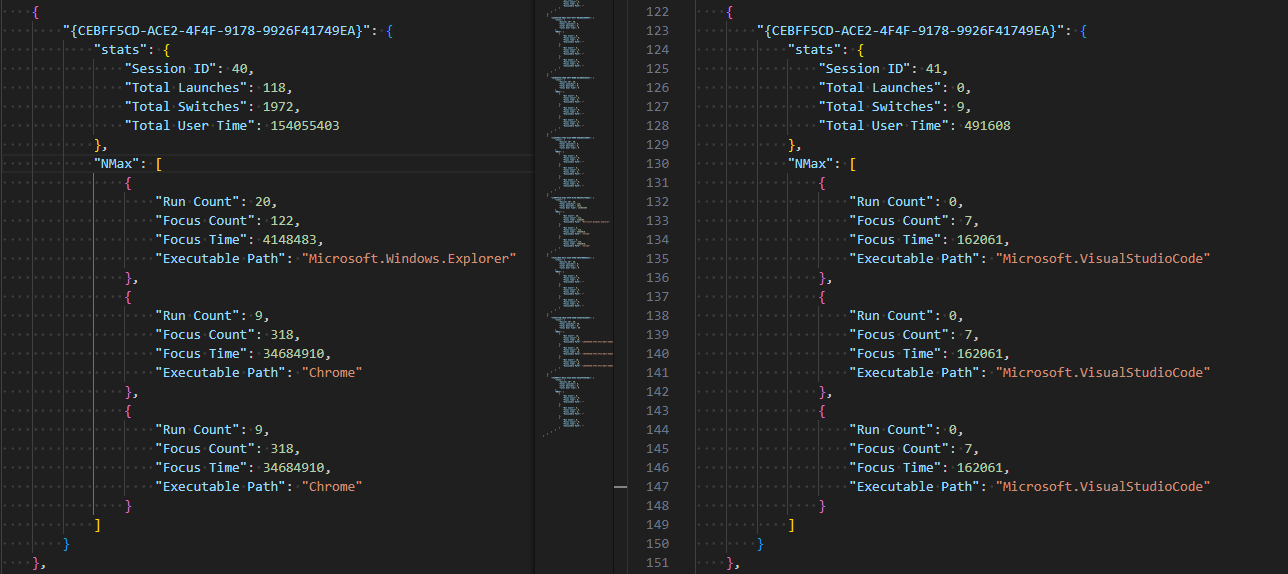
UEME_CTLSESSION will persist even after logging off or restarting. However, when it reaches the threshold of two days in its total user time, i.e., when the total focus time of all executed programs of the current user equals two days, the logging session is terminated and almost all UserAssist data, including the UEME_CTLSESSION value, is reset.
The UEME_CTLSESSION value is reset with almost all its data, including total launches, total switches, total user time, and NMax entries. However, the session ID is incremented and a new logging session begins.
UEME_CTLSESSION comparison before and after reset
The newly incremented session ID is copied to offset 0x0 of each program’s UserAssist data. Besides UEME_CTLSESSION, other UserAssist data for each program is also reset including run count, focus count, focus time, and the last four bytes, which are still unknown and always contain zero. The only parameter that is not reset is the last execution time. However, all this data is saved in the form of a usage percentage before resetting.
Usage percentage and counters
We analyzed the UserAssist data of various programs to determine the unknown bytes between the focus time and last execution time sections. We found that they represent a list of a program’s usage percentage relative to the most used program at that session, as well as the rewrite counter (the index of the usage percentage last written to the list) for the last 10 sessions. Given our findings, we can now revise the structure of the program’s UserAssist binary data and fully describe all of its components.
UserAssist revised structure
0x0: logging session ID (4 bytes).
0x4: run count (4 bytes).
0x8: focus count (4 bytes).
0xc: focus time (4 bytes).
0x10: element in usage percentage list [0] (4 bytes).
0x14: element in usage percentage list [1] (4 bytes).
0x18: element in usage percentage list [2] (4 bytes).
0x1c: element in usage percentage list [3] (4 bytes).
0x20: element in usage percentage list [4] (4 bytes).
0x24: element in usage percentage list [5] (4 bytes).
0x28: element in usage percentage list [6] (4 bytes).
0x2c: element in usage percentage list [7] (4 bytes).
0x30: element in usage percentage list [8] (4 bytes).
0x34: element in usage percentage list [9] (4 bytes).
0x38: index of last element written in the usage percentage list (4 bytes).
0x3c: last execution time (Windows FILETIME structure) (8 bytes).
0x44: unknown value (4 bytes).
The values from 0x10 to 0x37 are the usage percentage values that are called r0 values and calculated based on the following equation.
r0 value [Index] = N Value of the Program / N Value of the Most Used Program in the session (NMax entry 3)
If the program is run for the first time within an ongoing logging session, its r0 values equal -1, which is not a calculated value, but a placeholder.
The offset 0x38 is the index of the last element written to the list, and is incremented whenever UEME_CTLSESSION is reset. The index is bounded between zero and nine because the list only contains the r0 values of the last 10 sessions.
The last four bytes equal zero, but their purpose remains unknown. We have not observed them being used other than being reset after the session expires.
The table below shows a sample of the UserAssist data broken down by component after parsing.
UserAssist revised data structure parsed
Forensic value
The r0 values are a goldmine of valuable information about a specific user’s application and program usage. These values provide useful information for incident investigations, such as the following:
Programs with many 1 values in the r0 values list are the programs most frequently used by the user.
Programs with many 0 values in the r0 values list are the programs that are least used or abandoned by the user, which could be useful for threat hunting and lead to the discovery of malware or legitimate software used by adversaries.
Programs with many -1 values in the r0 values list are relatively new programs with data that has not been reset within two days of the user interactive session.
UserAssist data template
As mentioned above, when the program is first executed and doesn’t yet have its own UserAssist record (CUACount object), a new entry is created with the UEME_CTLCUACount:ctor value. This value serves as a template for the program’s UserAssist binary data with the following values:
Logging session ID = -1 (0xffffffff). However, this value is copied to the UserAssist entry from the current UEME_CTLSESSION session.
Run count = 0.
Focus count = 0.
Focus time = 0.
Usage percentage list [0-9] = -1 (0xbf800000) because these values are float numbers.
Usage percentage index (counter) = -1 (0xffffffff).
Last execution time = 0.
Last four bytes = 0.
UEME_CTLCUACount:ctor data
New parser
Based on the findings of this research, we created a new parser built on an open source parser. Our new tool parses and saves all UEME_CTLSESSION values as a JSON file. It also parses UserAssist data with the newly discovered r0 value structure and saves it as a CSV file.
Conclusion
We closely examined the UserAssist artifact and how its data is structured. Our thorough analysis helped identify data inconsistencies. The FireEvent function in shell32.dll is primarily responsible for updating the UserAssist data. Various interactions with programs trigger calls to the FireEvent function and they are the main reason for the inconsistencies in the UserAssist data.
We also studied the UEME_CTLSESSION value. It is mainly responsible for coordinating the UserAssist logging session that expires once the accumulated focus time of all programs reaches two days. Further investigation of UEME_CTLSESSION revealed the purpose of previously undocumented UserAssist binary data values, which turned out to be the usage percentage list of programs and the value rewrite counter.
The UserAssist artifact is a valuable tool for incident response activities, and our research can help make the most of the data it contains.
Ransomware’s transformation from a targeted cybercrime to a significant threat to national security has increasingly drawn attention at international forums like the Counter Ransomware Initiative (CRI) Summit. The 2023 Summit, which brought together representatives from 50 countries, signifies a growing, yet cautious, acknowledgment of the need for collaborative strategies in tackling this complex issue.
In this post, we discuss the key findings emerging from the Summit, shedding light on the collective approach adopted by nations to combat the surge in ransomware attacks. We’ll delve into the role of advancing technologies such as Artificial Intelligence (AI) in fortifying cybersecurity measures, the pivotal role of information sharing in preempting attacks, and the strategic policy initiatives aimed at undermining the operational frameworks of ransomware syndicates.
Furthermore, we’ll reflect on the real-world challenges in countering adaptive cyber threats and highlight the recent law enforcement breakthroughs against notable ransomware groups. This post explores the steps being taken at an international level to address the ransomware menace and the ongoing efforts to shape a more resilient global cybersecurity infrastructure.
Building Collective Resilience Against Ransomware
Member countries gathered in Washington D.C. on October 31 to November 1 to reinforce the need for a global front against the escalating ransomware crisis. Some of the key areas of discussion to emerge were:
Strengthening International Cooperation to Undermine Ransomware Operations:
The Summit emphasized the importance of unified efforts across nations. Recognizing that ransomware networks often transcend borders, it called for enhanced cross-border law enforcement collaboration.
Delegates discussed the standardization of legal frameworks and law enforcement protocols to ensure swift and coordinated action against ransomware syndicates.
The Summit also highlighted the need for streamlined processes for sharing intelligence and cyber forensics across countries to facilitate faster identification and neutralization of ransomware threats.
Tackling the Financial Underpinnings of the Ransomware Ecosystem:
A lot of discussion centered on disrupting the financial networks that fuel ransomware operations.
Experts and policymakers deliberated on strategies to trace and block the flow of ransom payments, which often involve cryptocurrencies and unregulated digital payment platforms.
There was a consensus on increasing collaboration with financial institutions and regulatory bodies to monitor and report suspicious transactions linked to ransomware activities.
Enhancing Public-Private Partnerships to Combat Ransomware Threats:
Recognizing the critical role of the private sector, particularly technology and cybersecurity firms, the Summit pushed for stronger partnerships between governments and private entities.
Discussions were held on creating frameworks for regular information exchange and threat intelligence sharing between public agencies and private companies.
The Summit also saw proposals for joint initiatives in developing advanced cybersecurity technologies, focusing on AI and machine learning, to stay ahead of ransomware tactics.
The Summit’s approach to building collective resilience against ransomware was multi-dimensional, acknowledging that tackling such a complex issue requires a blend of legal, financial, technological, and cooperative strategies. Concerted effort is needed to create a more robust and unified defense against the burgeoning threat of ransomware, which continues to challenge global security and economic stability.
The Evolving Role of AI in Cybersecurity
During the event, a significant spotlight was cast on using Artificial Intelligence (AI) and Machine Learning (ML) in the fight against ransomware. This focus underscores a broader shift in cybersecurity tactics, moving towards more proactive and adaptive defense mechanisms.
AI and ML: Enhancing Threat Detection and Response
Advanced Threat Detection:AI and ML algorithms can sift through vast data, identifying patterns and anomalies that may indicate a cybersecurity threat. This allows for early detection of potential ransomware attacks, even before they fully manifest.
Automated Response Systems: Integrating AI into cybersecurity systems creates the potential for automated responses to detected threats. This not only speeds up the reaction time but also helps mitigate the impact of attacks, especially in scenarios where every second counts.
Adapting to Evolving Threats: The dynamic nature of cyber threats, particularly ransomware, requires tools that can adapt and evolve. AI systems, with their learning capabilities, are well-positioned to meet this need. However, the effectiveness of these AI models in real-world applications is a continuous journey of refinement and improvement, given the ever-advancing tactics of cybercriminals.
Sharing Information | Building a Proactive Defense Network
The CRI Summit also underscored the importance of information sharing in building a collective defense against ransomware.
Rapid Exchange of Threat Data
International Information Sharing Platforms: The establishment of platforms for quick and efficient sharing of threat intelligence among CRI members is a step towards a more unified global response to cyber threats.
Enhancing Anticipatory Capabilities: With timely access to shared intelligence, countries and organizations can better anticipate and prepare for potential ransomware attacks.
Real-World Application: The true test of these information-sharing initiatives lies in their implementation and effectiveness in diverse real-world scenarios. Ensuring these platforms are accessible, efficient, and secure will be crucial in maximizing their impact.
Policy Initiatives and Ransomware Financing | Striking at the Core
A key outcome of the Summit was the formulation of decisive policy initiatives aimed at disrupting the financial lifeline of ransomware operations.
Disincentivizing Ransom Payments
No Ransom Payments: The CRI’s collective stance against paying ransoms aims to weaken the financial incentive for cybercriminals. This policy needs global support and enforcement to be effective.
Tracking Illicit Financial Transactions: The U.S. Treasury’s commitment to monitor and share information on illicit financial transactions is a strategic move to disrupt the economic foundations of ransomware operations.
Global Enforcement Challenges: Implementing these policies on a global scale presents challenges, particularly in jurisdictions with varying levels of cybercrime laws and enforcement capabilities. The effectiveness of these initiatives hinges on the cooperative efforts and compliance of all member states of the CRI.
Discussions highlighted the need for collective effort against ransomware, underscored the importance of AI in cybersecurity, the power of shared intelligence, and the need for robust policy measures. As these strategies are implemented, their real-world effectiveness and adaptability will play a crucial role in shaping the global response to the ransomware threat.
Conclusion
The 2023 Counter Ransomware Initiative (CRI) Summit marks a step in the right direction towards global collaboration against cyber threats. However, the reality remains that many organizations and critical infrastructures are still vulnerable, continuing to fuel the ransomware industry. Despite the advancements and strategic discussions at the Summit, the prevalence of these threats highlights the urgent need for comprehensive and proactive measures.
At SentinelOne, we have been harnessing the power of AI and machine learning for over a decade, staying ahead in the cybersecurity landscape. These technologies, crucial in the fight against ransomware, must be complemented by a stronger alliance between private and public sector leaders. Setting a new standard in cybersecurity and working towards eliminating ransomware as a viable attack method requires a unified effort that transcends individual strategies and recommendations.
If you are ready to experience the advanced protection that SentinelOne offers, our dedicated team is here to assist you. Request a demo and see firsthand how our solutions can safeguard your digital landscape against the evolving cyber threats of today and tomorrow.
SentinelOne Singularity XDR
Supercharge. Fortify. Automate. Extend protection with unfettered visibility, proven protection, and unparalleled response.

 Login
Login