Reading view

There are new articles available, click to refresh the page.

‘Wildly productive weekend’: Former Amazon exec’s vibe coding post sparks debate over viral AI tools

Former Amazon and Flexport executive Dave Clark is the founder and CEO of Auger, a supply chain technology startup. (Auger Photo)

Dave Clark didn’t just get some chores done this weekend. He built an entire end-to-end customer prototype, reworked a deck, and created a custom CRM.

“Wildly productive weekend … Three things that used to take months happened in 72 hours,” Clark, the former Amazon Worldwide Consumer CEO and one-time Flexport CEO, wrote on LinkedIn. He added: “Crazy what new tools can do to expand your surface area and personal productivity.”

Clark, who is now CEO of Seattle-area logistics startup Auger, said that configuring a traditional CRM proved more painful than starting from scratch. He described how his team abandoned off-the-shelf software in favor of building exactly what was needed.

His post comes amid ongoing hype and attention on so-called “vibe coding” tools such as Claude Code, Cursor, and GitHub Copilot that enable the rapid building and iteration of software.

Responding to a comment on his post, Clark explained that he wasn’t incentivized by cost-savings with his weekend projects. “I did it because I couldn’t see the data I wanted, the communication pipeline wasn’t manageable at the level of detail I expected and it was going to hurt our ability to scale to meet customer needs if it wasn’t fixed,” he said. “So I fixed it. I also got to go deeper on using the tools that will define the future. They were hours well spent.”

Clark’s post drew some skepticism from commenters online. Longtime entrepreneur Steven Cohn, who has sold four startups, asked Clark “why you vibe coded and didn’t just use any of the open source products that are out there and fully developed and completely customizable.”

Clark responded: “Of course I’ve used tons of open sourced. In this case for an internal use app I liked the custom build as the right tool for the job. Others might choose differently. I was struck by how fast and easy it was.”

The post made its way to X, where some wondered about how the weekend project would scale or what resources would be needed to fix bugs.

Well, alrighty then….The skepticism in the comments just shows how wide the gap is between the observers and the builders. Software is a new world every few weeks now. If you aren't getting your hands dirty and experimenting your way through the skepticism, you aren't seeing… https://t.co/nnoHbYygWh

— Dave Clark (@davehclark) January 20, 2026

As we reported last week, Anthropic’s Claude Code in particular has caught fire in recent months, impressing software engineers with its ability to handle longer, more complex workflows. Claude Code is “one of a new generation of AI coding tools that represent a sudden capability leap in AI in the past month or so,” wrote Ethan Mollick, a Wharton professor and AI researcher, in a Jan. 7 blog post.

Anthropic also just released Claude Cowork, a version of Claude Code that is built for everyday knowledge work instead of just programming. The company said it used Claude Code to build Claude Cowork itself.

But whether vibe-coding tools completely change the way businesses build software still remains to be seen.

“Vibe coding and AI code generation certainly make it easier to build software, but the technical barriers to coding have not been the drivers of software moats for some time,” analysts with William Blair wrote in a report last week. “For the most successful and scaled software companies, determining what to build next and how it should function within a broader system is fundamentally more important and more challenging than the technical act of building and coding it.”

After a 23-year tenure at Amazon, Clark launched Auger in 2024 with $100 million in Series A funding. The company plans to offer an AI-powered system for supply chain operations that unifies data, targets inefficiencies, provides real-time insights and automation.

10 things I learned from burning myself out with AI coding agents

If you've ever used a 3D printer, you may recall the wondrous feeling when you first printed something you could have never sculpted or built yourself. Download a model file, load some plastic filament, push a button, and almost like magic, a three-dimensional object appears. But the result isn't polished and ready for mass production, and creating a novel shape requires more skills than just pushing a button. Interestingly, today's AI coding agents feel much the same way.

Since November, I have used Claude Code and Claude Opus 4.5 through a personal Claude Max account to extensively experiment with AI-assisted software development (I have also used OpenAI's Codex in a similar way, though not as frequently). Fifty projects later, I'll be frank: I have not had this much fun with a computer since I learned BASIC on my Apple II Plus when I was 9 years old. This opinion comes not as an endorsement but as personal experience: I voluntarily undertook this project, and I paid out of pocket for both OpenAI and Anthropic's premium AI plans.

Throughout my life, I have dabbled in programming as a utilitarian coder, writing small tools or scripts when needed. In my web development career, I wrote some small tools from scratch, but I primarily modified other people's code for my needs. Since 1990, I've programmed in BASIC, C, Visual Basic, PHP, ASP, Perl, Python, Ruby, MUSHcode, and some others. I am not an expert in any of these languages—I learned just enough to get the job done. I have developed my own hobby games over the years using BASIC, Torque Game Engine, and Godot, so I have some idea of what makes a good architecture for a modular program that can be expanded over time.

Read full article

Comments

© Aurich Lawson | Getty Images

‘A new era of software development’: Claude Code has Seattle engineers buzzing as AI coding hits new phase

Caleb John (left), an investor with Pioneer Square Labs, and Lucas Dickey, a longtime entrepreneur, helped host the Claude Code Meetup in Seattle on Thursday. (GeekWire Photos / Taylor Soper)

Claude Code has become one of the hottest AI tools in recent months — and software engineers in Seattle are taking notice.

More than 150 techies packed the house at a Claude Code meetup event in Seattle on Thursday evening, eager to trade use cases and share how they’re using Anthropic’s fast-growing technology.

Claude Code is a specialized AI tool that acts like a supercharged pair-programmer for software developers. Interest in Claude Code has surged alongside improvements to Anthropic’s underlying models that let Claude handle longer, more complex workflows.

“The biggest thing is closing the feedback loop — it can take actions on its own and look at the results of those actions, and then take the next action,” explained Carly Rector, a product engineer at Pioneer Square Labs, the Seattle startup studio that organized Thursday’s event at Thinkspace.

Software development has emerged as the first profession to be thoroughly reshaped by large language models, as AI systems move beyond answering questions to actively doing the work. Last summer GeekWire reported on a similar event in Seattle focused on Cursor, another AI coding tool that developers described as a major productivity booster.

Claude Code is “one of a new generation of AI coding tools that represent a sudden capability leap in AI in the past month or so,” wrote Ethan Mollick, a Wharton professor and AI researcher, in a Jan. 7 blog post.

Mollick notes that these tools are better at self-correcting their own errors and now have “agentic harness” that helps them work around long-standing AI limitations, including context-window constraints that affect how much information models can remember.

On stage at Thursday’s event, Rector demoed an app that automatically fixed front-end bugs by having Claude Code control a browser. Johnny Leung, a software engineer at Stripe, said Claude Code has changed how he thinks about being a developer. “It’s kind of evolving the mentality from just writing code to becoming like an architect, almost like a product manager,” he said on stage during his demo.

Johnny Leung, a software engineer at Stripe, demos Claude Code and shows a tweet from Boris Cherny, the Anthropic engineering leader who created Claude Code.

R. Conner Howell, a software engineer in Seattle, showed how Claude Code can act as a personal cycling coach, querying performance data from databases and generating custom training plans — an example of the tool’s impact extending beyond traditional software development.

Earlier this week Anthropic — which is reportedly raising another $10 billion at a $350 billion valuation — released Claude Cowork, essentially Claude Code’s non-developer cousin that is built for everyday knowledge work instead of just programming. Anthropic on Friday expanded access to Cowork.

AI coding tools are energizing longtime software developers like Damon Cortesi, who co-founded Seattle startup Simply Measured in 2010 and is now an engineer at Airbnb. He said Thursday’s event was the first tech meetup he’s attended in more than five years.

“There’s no limit to what I can think about and put out there and actually make real,” he said.

In a post titled “How Claude Reset the AI Race,” New York Magazine columnist John Herrman noted the growing concern around coding automation and job displacement. “If you work in software development, the future feels incredibly uncertain,” he wrote.

Anthropic, which opened an office in Seattle in 2024, said it used Claude Code to build Claude Cowork itself. However, analysts at William Blair issued a report this week expressing skepticism that other businesses will simply start building their own software with these new AI tools.

“Vibe coding and AI code generation certainly make it easier to build software, but the technical barriers to coding have not been the drivers of software moats for some time,” they wrote. “For the most successful and scaled software companies, determining what to build next and how it should function within a broader system is fundamentally more important and more challenging than the technical act of building and coding it.”

For now, Claude Code is being rapidly adopted. The tool reached a $1 billion run rate six months after launch in May. OpenAI’s Codex and Google’s Antigravity offer similar capabilities.

“We’re excited to see all the cool things you do with Claude Code,” Caleb John, a Seattle entrepreneur working at Pioneer Square Labs, told the crowd. “It’s really a new era of software development.”

Editor’s note: This story has been updated to reflect that the report cited was from William Blair.

Even Linus Torvalds is trying his hand at vibe coding (but just a little)

Linux and Git creator Linus Torvalds' latest project contains code that was "basically written by vibe coding," but you shouldn't read that to mean that Torvalds is embracing that approach for anything and everything.

Torvalds sometimes works on small hobby projects over holiday breaks. Last year, he made guitar pedals. This year, he did some work on AudioNoise, which he calls "another silly guitar-pedal-related repo." It creates random digital audio effects.

Torvalds revealed that he had used an AI coding tool in the README for the repo:

Read full article

Comments

© Krd

Print Pixel Art to a Floppy Disk

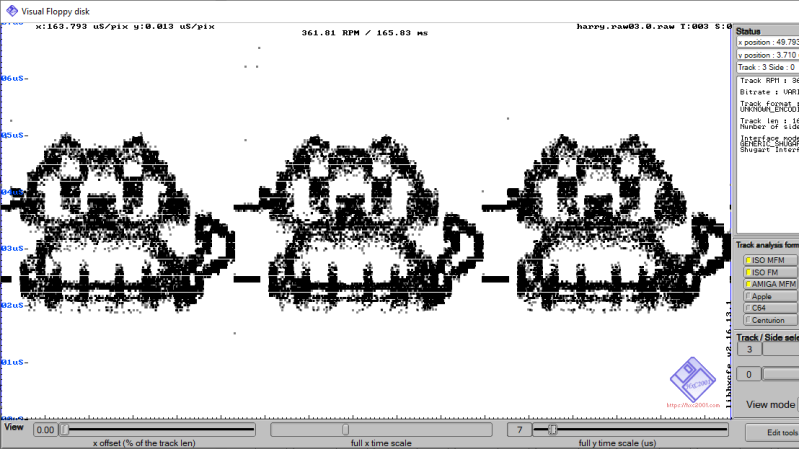
Here at Hackaday we love floppy disks. While they are by no means a practical or useful means of storing data in the age of solid state storage, there is something special about the little floppy disc of magnetic film inside that iconic plastic case. That’s why we were so excited to see the tool [dbalsom] developed for printing pixel art in a floppy’s track timing diagrams!

Floppy timing diagrams are usually used to analyze the quality of an individual disk. It represents flux transitions within a single floppy tack as a 2D graph. But it’s also perfectly possible to “paint” images on a floppy this way. Granted, you can’t see these images without printing out a timing diagram, but if you’re painting images onto a floppy, that’s probably the point.

This is where pbm2track comes in handy! It takes bitmap images and encodes them onto floppy emulators, or actual floppies. The results are quite excellent, with near-perfect recreation in floppy graphical views. The results on real floppies are also recognizable as the original image. The concept is similar to a previous tool [dbalsom] created, PNG2disk

If you, too, love the nearly forgotten physical likeness of the save button, make sure to check out this modern Linux on a floppy hack next!

Thanks [gloriouscow] for the tip!

A reality check on AI engineering: Lessons from the trenches of an early stage startup

(BigStock Image)

Like most tech leaders, I’ve spent the last year swimming in the hype: AI will replace developers. Anyone can build an app with AI. Shipping products should take weeks, not months.

The pressure to use AI to rapidly ship products and features is real. I’ve lost track of how many times I’ve been asked something to the effect of, “Can’t you just build it with AI?” But the reality on the ground is much different.

AI isn’t replacing engineers. It’s replacing slow engineering.

At Replify, we’ve built our product with a small team of exceptional full-stack engineers using AI as their copilot. It has transformed how we plan, design, architect, and build, but it’s all far more nuanced than the narrative suggests.

What AI is great at today

It can turn some unacceptable timelines into a same-day release. One of our engineers estimated a change to our voice AI orchestrator would take three days. I sanity-checked the idea with ChatGPT, had it generate a Cursor prompt, and Cursor implemented the change correctly on the first try. We shipped the whole thing in one hour: defined, coded, reviewed, tested, and deployed.

Getting it right on the first try is rare, but that kind of speed is now often possible.

It’s better than humans at repo-wide, difficult debugging. We had a tricky user-reported bug that one of our developers spent two days chasing. With one poorly written prompt, Cursor found the culprit in minutes and generated the fix. We pushed a hot fix to prod in under 30 minutes.

Architecture decisions are faster and better. What used to take months and endless meetings in enterprise environments now takes a few focused hours. We’ll dump ramblings of business requirements into an LLM, ask it to stress-test ideas, co-write the documentation, and iterate through architectural options with pros, cons, and failure points. It surfaces scenarios and ideas instantly that we didn’t think of and produces clean artifacts for the team.

The judgment and most ideas are still ours, but the speed and completeness of the thinking is on a completely different level.

Good-enough UI and documentation come for free. When you don’t need a design award, AI can generate a good, clean use interface quickly. Same with documentation: rambling notes in, polished documentation out.

Prototype speed is now a commodity. In early days, AI lets you get to “something that works” shockingly fast. Technology is rarely the competitive moat anymore, it’s having things like distribution, customers, and operational excellence.

Where AI still falls flat

It confidently gives wrong answers. We spent an entire day trying to get ChatGPT and Gemini to solve complex AWS Amplify redirect needs. Both insisted they had the solution. Both were absolutely wrong. Reading the docs and solving “the old-fashioned way” took two hours and revealed the LLMs’ approaches weren’t even possible.

Two wasted engineers, one lost day.

You still need to prompt carefully and review everything. AI is spectacular at introducing subtle regressions if you’re not explicit about constraints and testing. It will also rewrite perfectly fine code if you tell it something is broken (and you’re wrong).

It accelerates good engineering judgment. It also accelerates bad direction.

Infra, security, and scaling require real expertise. Models can talk about architecture and infrastructure, but coding assistants still struggle to produce secure, scalable infrastructure-as-code. They don’t always see downstream consequences like cost spikes or exposure risks without a knowledgeable prompter. 

Experts still determine the best robust solution.

Speed shifts the bottlenecks. Engineering moves faster with AI, so product, UI/UX, architecture, QA, and release must move faster, too. 

One bonus non-AI win helping us here: Loom videos for instant ticket creation (as opposed to laborious requirement documentation) result in faster handoffs, fewer misunderstandings, more accurate output, and better async velocity.

So what does this mean for startups?

  • AI lets great engineers become superhuman: Small teams can now ship at speeds that used to require entire departments.
  • The bar for engineers goes up, not down: Fewer people, but they must be excellent.
  • Technology alone is no longer a reliable moat: Everyone has AI. Your defensibility is things like distribution, network, brand, operational excellence.
  • AI won’t 10x everything: Some parts will fly. Others still depend on time, people, and judgment.
  • Leaders must be hands-on with AI and technical strategy: Without that, AI only introduces new bottlenecks and issues.

The reality check

AI isn’t replacing engineers. It’s replacing slow feedback loops, tedious work, and barriers to execution.

We’re not living in a world where AI writes, deploys, and scales your entire product (yet). But we are living in a world where a three-person team can compete with a 30-person team — if they know how to wield AI well.

What is Vibe Coding? A Comprehensive Guide

Vibe coding is emerging as a transformative shift in how developers write software. It’s not just a buzzword—it reflects a new, more natural way of interacting with code. At its core, vibe coding means working alongside AI to turn ideas into software through simple, intuitive prompts. You focus on what you want to build, and the AI helps figure out how.

This change is already well underway. According to the 2024 Stack Overflow Developer Survey, 82% of developers who use AI tools rely on them primarily to write code. That’s a massive endorsement of how AI is being integrated into everyday workflows. Vibe coding tools like GitHub Copilot, ChatGPT, Replit, and Cursor are leading the charge—helping developers stay in the zone, generate code faster, and reduce mental overhead.

These tools do more than autocomplete—they understand context, learn from your style, and adapt to your intent. Instead of switching tabs to search for syntax or boilerplate, you stay in flow. This is what vibe coding is all about: building software in a way that feels more like thinking out loud than writing line-by-line instructions.

As the pressure to ship faster and innovate grows, vibe coding is quickly becoming more than just a developer convenience—it’s a competitive advantage. In this guide, we’ll explore how it works, where it fits in real-world workflows, and why it’s shaping the future of development.

What Is Vibe Coding?

Vibe coding is a modern way of programming where you describe what you want to build in plain language, and A tool helps turn those ideas into working code. It shifts the focus from memorizing syntax to simply communicating your intent.

At the heart of vibe coding are AI agents powered by Large Language Models (LLMs) like GPT-4. These agents can understand context, suggest code, debug errors, and even make architectural decisions based on what you’re trying to do.

Instead of writing every line by hand, you might say, “Build a login page with email and password inputs,” and the AI will generate the layout and logic behind it. You’re not losing control and just coding at a higher level, faster and with fewer distractions.

This approach is redefining software development. By putting intention first and letting AI handle the heavy lifting, vibe coding allows you to focus more on solving problems and less on fighting with syntax.

Origin of the Term “Vibe Coding”


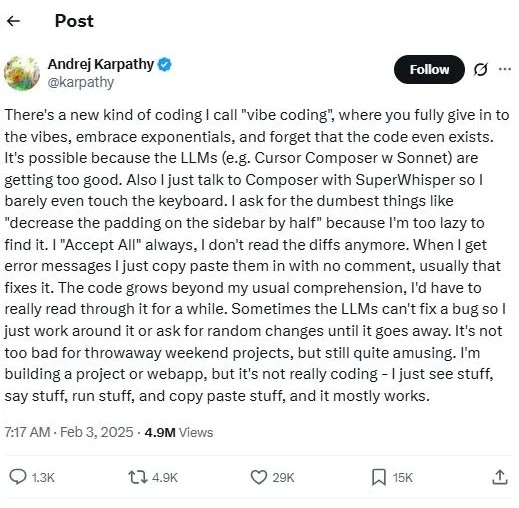
The term vibe coding was first coined by Andrej Karpathy, a prominent AI researcher and former director of AI at Tesla. He mentioned it casually on social media, but the phrase quickly gained traction among developers experimenting with AI-assisted workflows.

Karpathy used vibe coding to describe a new style of programming—one where you don’t sweat every detail of syntax. Instead, you describe your goals, and AI helps fill in the gaps. It’s about coding in a flow state, where you and the machine work together almost like a creative partnership.
Origin of the Term “Vibe Coding”

This concept took off with the rise of tools like GPT, Replit, and Cursor. These platforms let developers prompt in plain language, get structured output, and stay in momentum without switching contexts.

In that sense, vibe coding isn’t just a phrase—it reflects a shift in how we think about building software with AI as an active collaborator.

How Vibe Coding Works (Step-by-Step Breakdown)
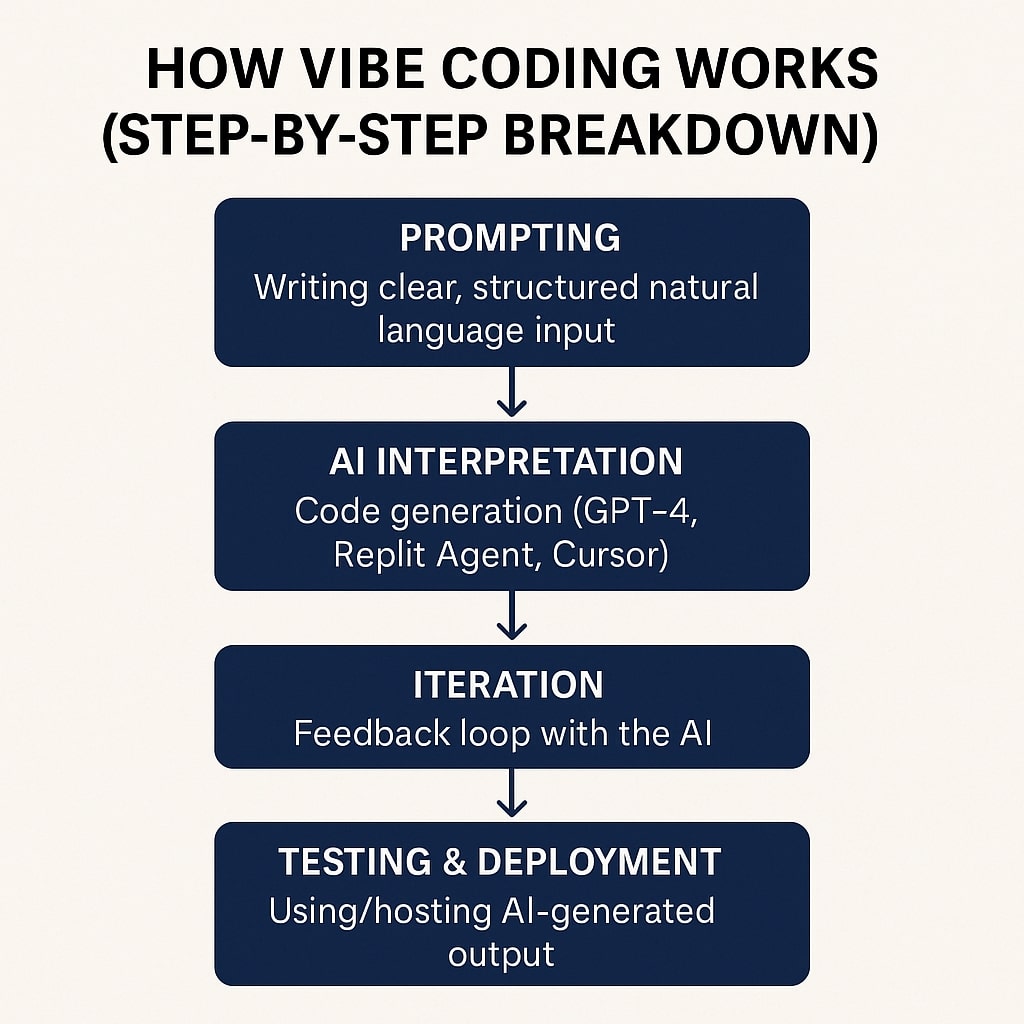
How Vibe Coding Works

Vibe coding isn’t just about letting AI write code—it’s about guiding it with your ideas. You give the direction, and the AI helps build from there. The process is simple, intuitive, and keeps you in control. Here’s how it works, step by step.

Step 1: Start with a prompt

Vibe coding begins with you describing what you want to build. You don’t write raw code at first. Instead, you use plain, structured language. For example, you might say, “Create a landing page with a signup form and responsive layout.” The key is being clear and direct.

Step 2: AI interprets your intent

Once you submit your prompt, an AI agent—like GPT-4, Replit’s AI, or Cursor—steps in. It reads your input, understands the context, and generates the base code. This code isn’t random. It’s often clean, modular, and aligned with modern best practices.

Step 3: You review and iterate

After the first draft, you read through the output. If something’s off or missing, you give feedback in natural language. You can say, “Add error handling,” or “Make the layout mobile-friendly.” The AI updates the code instantly. It becomes a back-and-forth conversation, like working with a real teammate.

Step 4: Test and deploy

Once the code looks good, you can run tests right inside platforms like Replit. These environments often support live previews, version control, and easy deployment. From prototype to production, vibe coding supports the full workflow.

Throughout the process, you’re not digging through documentation or chasing syntax errors. You’re focused on solving problems and building—fast.

What are the benefits of vibe coding
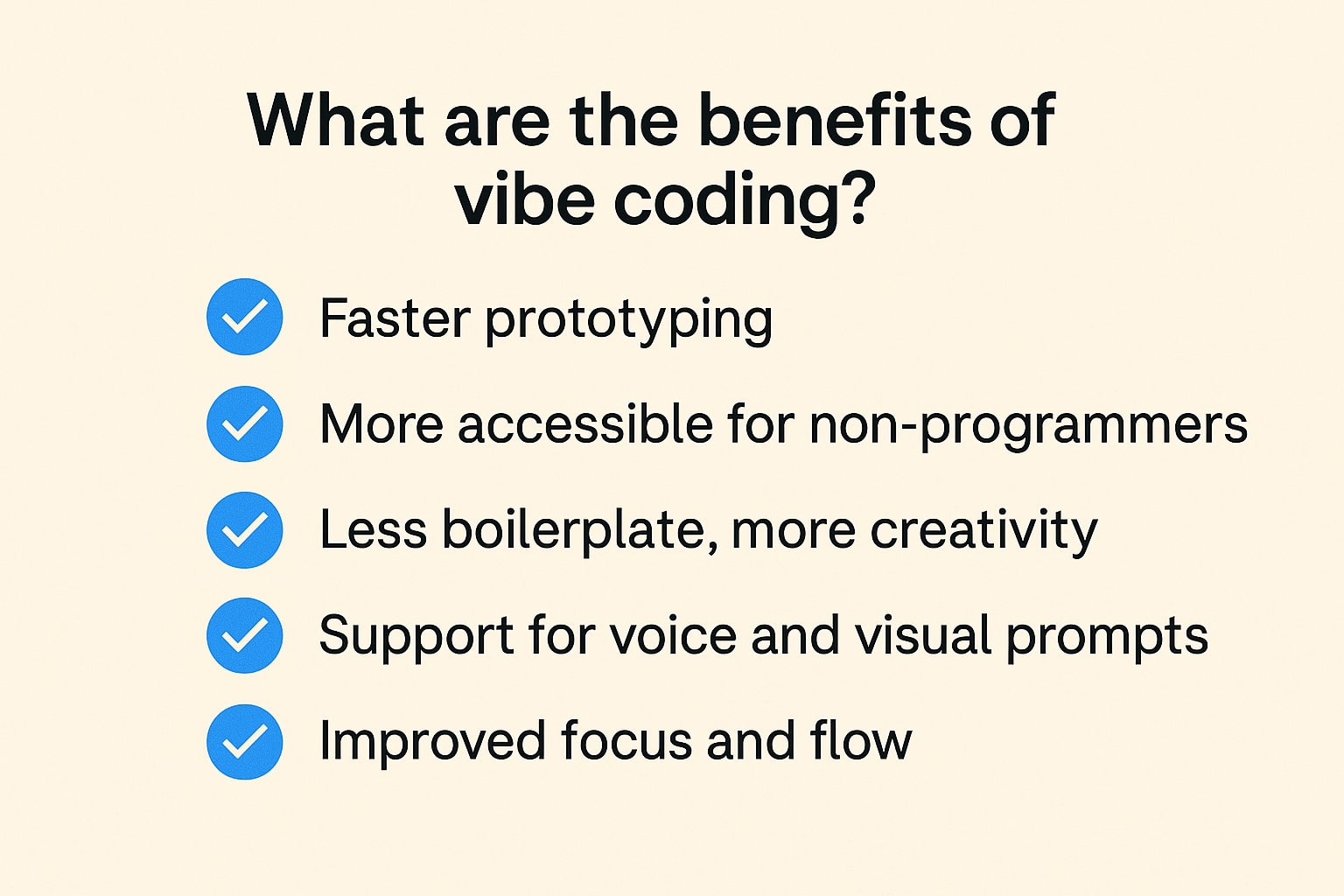
What are the benefits of vibe coding

Vibe coding isn’t just faster—it’s smarter. It helps you build more with less effort and unlocks creativity at every step. Whether you’re a seasoned developer or just starting out, the advantages are real and immediate. Let’s break down what makes it so powerful.

Faster prototyping

Vibe coding helps you move from idea to working prototype in minutes. You don’t get bogged down in setup or boilerplate. Just describe what you want, and the AI builds a solid starting point. It’s perfect for testing concepts quickly.

More accessible for non-programmers

You don’t need to be a coding expert to use vibe coding. With natural language inputs, even designers, marketers, or founders can contribute to building tools and apps. This lowers the barrier and opens up software creation to more people.

Less boilerplate, more creativity

AI agents handle repetitive code patterns like form setup, input validation, and file structures. That frees up your brain for the fun parts—like design, user experience, and problem-solving. It shifts coding from a technical chore to a creative process.

Support for voice and visual prompts

Tools like Superwhisper are taking vibe coding even further. You can speak your ideas out loud, and the system will understand and respond. Some tools are also exploring visual prompting, where you sketch or describe layouts instead of typing everything.

Improved focus and flow

By reducing friction in the process, vibe coding helps you stay in a creative rhythm. You’re not constantly switching between tabs or looking up syntax. You just build—and the AI keeps pace with you.

Tools That Enable Vibe Coding

Vibe coding wouldn’t be possible without the right tools. These platforms bring the concept to life by turning natural language into usable code. Whether you’re typing, clicking, or even speaking your prompts, these tools help you stay in flow. Here are some of the most powerful ones leading the way.

Replit Ghostwriter and Replit AI Agent

Replit Ghostwriter is an AI pair programmer built directly into the Replit IDE. It suggests code, explains concepts, and helps debug in real time. With the introduction of the Replit AI Agent, developers now have an even smarter assistant. The agent can execute tasks, refactor code, and answer questions using plain language. This combo allows you to code faster without switching contexts.

Cursor

Cursor is a code editor built from the ground up with AI in mind. It integrates with GPT-4 and allows for conversational coding directly within your files. You can highlight sections of code, ask questions, or give instructions like “optimize this function.” Cursor tracks your intent and makes targeted edits, reducing the back-and-forth typical of traditional IDEs. It’s designed for deep workflow integration.

Superwhisper

Superwhisper brings voice-to-code functionality into the mix. It uses Whisper (by OpenAI) and integrates with your editor, allowing you to speak your coding prompts. This tool is especially helpful for hands-free coding or for users who prefer talking through their logic. It adds an entirely new dimension to vibe coding by combining speech recognition with intent-driven generation.

Quick comparison

Replit is great for all-in-one workflows with built-in hosting. Cursor is ideal for local, power-user setups with deep file integration. Superwhisper adds a voice layer on top of your existing tools. Together, they form a flexible toolkit for different styles of vibe coding.

Real-World Use Cases of Vibe Coding

Vibe coding isn’t just a cool concept—it’s already changing how people build. From solo creators to startups and enterprise teams, developers are using it to work smarter and faster. These real-world examples show how flexible and practical this approach can be across different goals and skill levels.

Personal project prototypes

Vibe coding is perfect for turning your ideas into working projects without writing every line from scratch. Whether it’s a portfolio site, a game, or a passion app, you can build faster by prompting AI in natural language. This lets you focus on creativity instead of getting stuck on boilerplate code.

Rapid MVP for startups

Early-stage startups often need to move fast with limited resources. Vibe coding helps founders and small teams create minimum viable products (MVPs) in days instead of weeks. You can describe features like “build a user dashboard with analytics” and have a functioning version ready for testing almost immediately.

Educational coding experiences

For students and beginners, vibe coding lowers the intimidation barrier. Instead of memorizing syntax, they can learn by doing—asking the AI questions, experimenting, and seeing code come to life. It’s also great for teachers who want to make programming more interactive and less overwhelming.

Corporate internal tools or automations

Software development companies can use vibe coding to quickly build internal dashboards, workflows, and automation scripts. Tasks like “create a form to collect team feedback and send it to Slack” can be executed with just a prompt. It cuts down development time and allows non-engineering teams to contribute to tool-building.

Best Practices for Effective Vibe Coding

To get the most out of vibe coding, it’s not enough to rely on AI alone. You still need to guide the process with intention and clarity. These best practices will help you write better prompts, clean up AI-generated code, and keep everything running smoothly. Think of them as your cheat sheet for coding with flow.

Write better prompts

The quality of your input shapes the quality of the output. Be specific and clear when describing what you want. Instead of saying “build a form,” try “create a contact form with name, email, message fields, and a submit button.” The more context you give, the better the AI performs.

Structure output for maintainability

AI-generated code can be quick, but it’s your job to keep it clean. Ask the AI to organize the code into functions or modules. Use consistent naming, add comments, and refactor where needed. Clean code is easier to maintain, debug, and scale later on.

Validate and test the results

Never assume the AI’s code is perfect. Test everything. Run unit tests, check edge cases, and verify outputs manually. AI can make small mistakes that break your app or cause security issues. Always review before shipping.

Keep a human in the loop

Vibe coding is powerful, but it’s not fully autonomous. You’re still the decision-maker. Use the AI as a creative assistant, not a replacement. Stay involved, guide the output, and step in when the code needs human judgment or domain knowledge.

Vibe Coding vs Traditional Coding

Vibe coding isn’t here to replace traditional coding—it’s here to complement it. Each approach has its strengths depending on the context, goals, and complexity of the project. Understanding the key differences can help you choose the right tool for the job and work more effectively. Let’s break it down.

Side-by-side comparison table

Here’s a quick breakdown of how vibe coding differs from traditional coding in key areas:

Feature/Aspect Vibe Coding Traditional Coding
Input Style Natural language prompts Strict syntax-based code
Speed Fast prototyping and iteration Slower due to manual structure
Learning Curve Lower—good for beginners and non-coders Steep—requires strong technical knowledge
Creativity Encourages experimentation More constrained by syntax and structure
Tooling AI agents, LLMs (GPT-4, Replit, Cursor) Text editors, IDEs, compilers
Collaboration Supports natural teamwork and voice/visual inputs Often technical and siloed

When to use each approach

Use vibe coding when speed, flexibility, or idea exploration matters—like MVPs, internal tools, or learning environments. It’s ideal for early-phase development or when working with non-technical teammates. Use traditional coding for performance-heavy apps, systems programming, or when full control over every detail is critical—like in large-scale enterprise or infrastructure projects.

Developer roles in a vibe-first workflow

In vibe coding, developers act more like product designers and strategists. They define features, guide AI agents, and review outputs. Senior devs may focus on system architecture and validating AI-generated code. Junior devs can contribute faster by learning from real-time feedback and prompt-based interactions. Non-developers (like designers or PMs) can even join the build process, giving input in plain language that the AI can understand.

Conclusion

Vibe coding is more than just a new way to write code—it’s a shift in how we think about building software. By using natural language, AI agents, and large language models, developers can move faster, stay focused, and spend more time solving real problems.

Throughout this guide, we’ve explored what vibe coding is, how it works, and where it fits into modern workflows. We looked at tools like Replit, Cursor, and Superwhisper, and saw how developers—from beginners to pros—are using them to prototype, learn, and launch real projects.

If you’re curious about vibe coding, the best way to understand it is to try it. Open a tool like Replit or Cursor and start prompting. Don’t worry about getting it perfect. Just experiment, explore, and build something.

The future of coding is more intuitive, collaborative, and creative. Stay ahead by embracing this new way of thinking—and see where it takes you.

The post What is Vibe Coding? A Comprehensive Guide appeared first on TopDevelopers.co.

Bash for Hackers

Bash Scripting, often termed as one of the essential skills when you want to become Hacker. Often the guides are comprehensive, I am outlining bare minimum skills or topics we should understand regarding bash. This article like many other is a progressive one, that is will be updated with more related contents.This article was last […]

The post Bash for Hackers appeared first on Ethical Hacking Tutorials.

❌