Having the right GPS watch on your wrist whether you’re going for your first ever run or your umpteenth run can make all the difference. The best GPS running watches not only keep track of how far you’ve run, but they track pace and other real-time metrics, advanced training features to help you hit your goals and, of course, precise distance measurements. Some models even provide offline maps for navigation, sleep tracking, recovery insights, and smart features that “regular” smartwatches do.
For those who need extra durability and lasting battery life, higher-end sport watches — like some of the best Garmin watches — are built to handle intense workouts, harsh weather and long runs. If you're training for a marathon, triathlon or just want a multisport option that can keep up with your lifestyle, these watches have the tech to support you.
With so many options available, from entry-level models to the best running watches packed with advanced running metrics, it can be tricky to find the right fit. That’s why we’ve rounded up our top picks to help you choose the perfect GPS watch for your training needs.
Best GPS running watches for 2026
Other GPS running watches we tested
Polar Pacer Pro
The Polar Pacer Pro looked and felt quite similar to our top pick, and it mapped my outdoor runs accurately. However, Polar’s companion app is leagues behind Garmin’s with a confusing interface and a design that feels very much stuck in the past. It’s also $100 more expensive than our top pick.
Amazfit Cheetah Pro
The Amazfit Cheetah Pro tracked my outdoor runs accurately and Zepp’s companion app has a coaching feature much like Garmin’s adaptive training plans that can outline a routine for you to complete in preparation for a race or to achieve a specific goal. My biggest issue with it was that its touchscreen wasn’t very responsive — it took multiple hard taps on the display to wake it, and often the raise-to-wake feature didn’t work, leaving me staring at a dark screen.
What to consider before buying a GPS running watch
GPS speed and accuracy
The most important thing for a GPS running watch to have is fast, accurate GPS tracking. That might seem obvious, but it’s quite easy to get distracted by all of the other smart features most of these devices have. Since most of them can be worn all day long as standard sport watches, there’s a lot of (possibly unnecessary) fluff that looks good on paper but won’t mean much if the core purpose if the device is left unfulfilled. To that end, I paid particular attention to how long it took each device’s built-in GPS tracking to grab my location before a run, if it ever lost my spot and the accuracy of the generated maps. Also, the device should be smart enough to let you start tracking a run while the GPS looks for your location.
Workout profiles and trackable metrics
You may not be able to suss out GPS accuracy just by looking at a spec sheet (that’s where this guide can help), but you can check for features like supported workout profiles. That’s something you’ll want to look into, even if your one and only activity is running. Check to make sure the best running watches you’re considering support all the kinds of running activities you like to do (outdoor runs, treadmill runs, etc) and any other workouts you may want to track with it.
Most fitness wearables today aren’t one-trick ponies; you’ll find a healthy number of trackable exercise modes on any sport watch worth its salt. That said, the number of workout profiles can be directly proportional to a device’s price: the higher-end the product, chances are the more specific, precise workouts it can monitor.
In a similar vein, you’ll want to check the trackable metrics of any watch you’re considering before you buy. Since we’re talking about the best GPS running watches, most will be able to track the basics like distance, heart rate and pace, and those are bare minimums. Some watches can monitor additional stats like speed, cadence, stride length, advanced running dynamics, aerobic and anaerobic training effect, intensity minutes and more. If you’re already a serious runner who trains for multiple races each year, or if you're a trail runner who needs elevation and navigation features, you’ll want to dig into the spec sheet of the watch you’re considering to make sure it can track all of your most necessary metrics.
Size and weight
It’s worth checking out a watch’s case size and weight before going all-in on one. GPS running watches, and standard smartwatches as well, can have a few different sizes to choose from so you’ll want to make sure you’re getting the best fit for your wrist. I have a smaller wrist, so I tend to avoid extra-large cases (anything over 42mm or so), especially if I intend on wearing the device all day long as my main timepiece. Weight, on the other hand, is a little less controllable, but typically smaller case sizes will save you a few grams in overall weight.
For those who need durability, particularly trail runners or those tackling extreme conditions, devices like Garmin watches offer rugged builds that can handle rough terrain, impact, and extreme weather.
Battery life
Unlike regular smartwatches, GPS running watches have two types of battery life you’ll need to consider: with GPS turned on and in “smartwatch” mode. The former is more important than the latter because most GPS running watches have stellar battery life when used just as a smart timepiece. You can expect to get multiple days on a single charge, with some surviving more than two weeks (with all day and night wear) before they need a recharge.
Battery life with GPS turned on will be much shorter by comparison, but any GPS running watch worth its salt should give you at least 10-15 hours of life with the GPS being used continuously. The more you’re willing to spend, the higher that number typically gets, with some GPS running watches lasting for 40 hours while tracking your location.
This article originally appeared on Engadget at https://www.engadget.com/wearables/best-gps-running-watch-141513957.html?src=rss
If you're looking to get fit, sleep better or just keep a closer eye on your health, a fitness wearable is a great place to start. Whether you're into intense workouts or just want to hit your step goal each day, the best fitness trackers available today can offer loads of helpful features, from sleep tracking and resting heart rate monitoring to built-in GPS and stress tracking. Some are even subtle enough to wear 24/7, like smart rings, while others double as stylish smartwatches.
There are great options out there for beginners as well as more advanced users, and the variety of features means there’s something for every lifestyle and budget. In this guide, we’ll walk you through the best fitness trackers you can buy right now, and explain who each one is best suited for.
Best fitness trackers for 2026
What do fitness trackers do best?
The answer seems simple: Fitness wearables are best at monitoring exercise, be it a 10-minute walk around the block or that half marathon you’ve been diligently training for. Obviously, smartwatches can help you reach your fitness goals too, but there are some areas where fitness bands and smart rings have proven to be the best buy: focus, design, better battery life, durability and price.
When I say “focus,” I’m alluding to the fact that fitness trackers are made to track activity well; anything else is extra. They often don’t have the bells and whistles that smartwatches do, which could distract from their advanced health tracking abilities — things like all-day resting heart rate monitoring, stress tracking, and even detailed sleep tracker insights. They also tend to have fewer sensors and internal components, which keeps them smaller and lighter. Fitness trackers are also a better option for those who just want a less conspicuous gadget on their wrists all day.
Battery life tends to be better on fitness trackers, too. While most smartwatches last one to two days on a single charge, fitness bands offer between five and seven days of battery life — and that’s with all-day and all-night use even with sleep tracking features enabled. Many fitness trackers also slot nicely into your existing ecosystem, syncing seamlessly with your smartphone, other fitness apps and cloud storage to keep all your data in one place.
When it comes to price point, there’s no competition. Most worthwhile smartwatches start at $175 to $200, but you can get a solid smart band starting at $70. That makes them a great entry point for beginners who want to track their progress without committing to a full smartwatch. Yes, more expensive bands and smart rings exist (and we recommend a few here), but you’ll find more options under $150 in the fitness tracker space than in the smartwatch space.
When to get a smartwatch instead
If you need a bit more from your wearable and don’t want to be limited to a fitness or activity tracker, a smartwatch may be the best buy for you. There are things like on-watch apps, alerts and even more robust fitness features that smartwatches have and the best fitness trackers don’t. You can use one to control smart home appliances, set timers and reminders, check weather reports and more. Some smartwatches let you choose which apps you want to receive alerts from, and the options go beyond just call and text notifications. Just make sure your smartwatch is compatible with your Android or iPhone, however, before purchasing, as not all of them work with both operating systems.
But the extra fitness features are arguably the most important thing to think about when deciding between a fitness tracker and a smartwatch. The latter devices tend to be larger, giving them more space for things like GPS, barometers, onboard music storage and more. While you can find built-in GPS on select fitness trackers, it’s not common.
If you’re someone who’s seriously training — say for a race or an endurance challenge — a dedicated running watch may be worth considering. These often provide more in-depth cardio analytics, recovery insights, and real-time pace data that go beyond what standard trackers can deliver.
Other fitness trackers we've tested
Fitbit Inspire 3
The Fitbit Inspire 3 strips out all the luxury features from the Charge 6 and keeps only the essential tracking features. You won’t get built-in GPS tracking or Fitbit Pay or Spotify control but you do get solid activity tracking, automatic workout detection, smartphone alerts and plenty more. The updated version has a sleeker design and includes a color touch display and connected GPS, the latter of which lets you track pace and distance while you run or bike outside while you have your phone with you. When compared to the Charge 6, the Inspire 3 is more fashionable, too. Its interchangeable bands let you switch up the look and feel of your tracker whenever you want, and it’s slim enough to blend in with other jewelry you might be wearing. We were also impressed by its multi-day battery life: Fitbit promises up to 10 days on a single charge, and that checked out for us. After four days of round-the-clock use, the Inspire 3 still had 66 percent battery left to go.
Fitness tracker FAQs
How long do fitness tracker batteries last?
The battery life of fitness trackers can vary depending on the model and its features. On average, most fitness trackers last between five to seven days on a single charge. Basic models with limited features could stretch up to 10 days or more. However, more advanced trackers with features like continuous heart rate monitoring, GPS, or always-on displays may need recharging after one to three days. If you're using GPS or streaming music through your fitness tracker, you'll find that this drains the battery faster. By using these features less, or turning them off, you'll extend battery life.
This article originally appeared on Engadget at https://www.engadget.com/wearables/best-fitness-trackers-133053484.html?src=rss
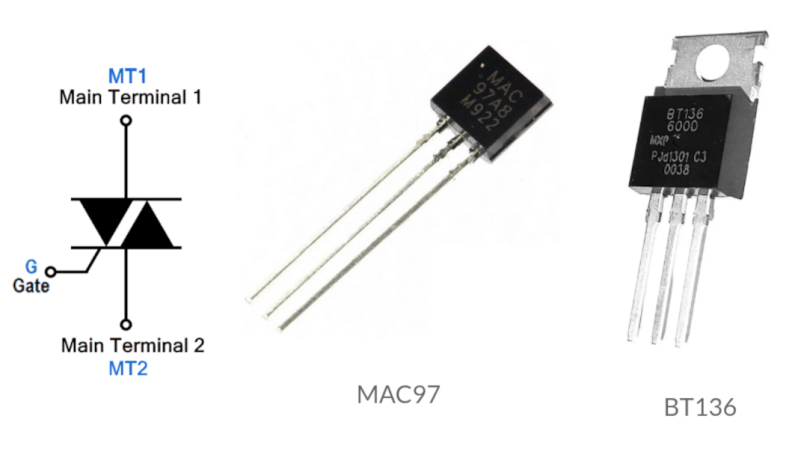
For switching high-powered loads from a microcontroller, or for switching AC loads in general, most of us will reach into the parts bin and pull out a generic relay of some sort. Relays are fundamental, proven technologies to safely switch all kinds of loads. They do have their downsides, though, so if you need silent operation, precise timing, or the ability to operate orders of magnitude more times you might want to look at a triac instead. These solid state devices can switch AC loads unlike other transistor-based devices and [Ray] at OpenSprinkler is here to give us an overview on how to use them.
The key to switching an AC load is bi-directional conductivity. A normal transistor or diode can only conduct in one direction, so if you try to switch an AC load with one of these you’ll end up with what essentially amounts to a bad rectifier. Triacs do have a “gate” analogous to the base of a bipolar junction transistor, but the gate will trigger the triac when current flows in either direction as well. The amount of current needed to trigger the triac does depend on the state of the switched waveform, so it can be more complex to configure than a relay or transistor in some situations.
After going through some of the theory around these devices, [Ray] demonstrates how to use them with an irrigation system, which are almost always operating on a 24VAC system thanks to various historical quirks. This involves providing the triacs with a low voltage source to provide gate current as well as a few other steps. But with that out of the way, switching AC loads with triacs can become second nature. If you prefer a DC setup for your sprinklers, though, [vinthewrench] has demonstrated how to convert these sprinkler systems instead.
Gone are the days in which you needed to spend a fortune to get a good smartphone. In 2026, features once exclusive to high-end smartphones – big batteries, multi-camera arrays, high refresh rate OLED displays and more – have made their way down to more affordable models. Yes, you’ll still need to buy a flagship smartphone to get the best camera or fastest processor, but you don't have to make nearly as many compromises as you once did if you have a strict budget to adhere to when you go shopping for your next smartphone. If you have less than $600 to spend, let us help you figure out what features to prioritize when trying to find the best midrange smartphone.
While the term frequently appears in articles and videos, there isn’t an agreed-upon definition for “midrange” beyond a phone that isn’t a flagship or an entry-level option. Most of our recommendations cost between $400 and $600 — any less and you should expect significant compromises. If you have more to spend, you might as well consider flagships like the Apple iPhone 17 and the Samsung Galaxy S25 if you want the best smartphone experience. Devices like Pixel phones often sit in this price range too, offering some of the best value for Android buyers.
What to consider before buying a midrange smartphone
Buying a new device can be intimidating, but a few questions can help guide you through the process. First: what platform do you want to use? If the answer is iOS, that narrows your options down to exactly one phone. (Thankfully, it’s great.) And if you’re an Android fan, there’s no shortage of compelling options. Both platforms have their strengths, so you shouldn’t rule either out.
Of course, also consider how much you’re comfortable spending. Even increasing your budget by $100 more can get you a dramatically better product. Moreover, manufacturers tend to support their more expensive devices for longer with software updates and security updates, so it’s worth buying something toward the top limit of what you can afford.
Having an idea of your priorities will help inform your budget. Do you want a long battery life or fast charging? Do you value speedy performance above all else? Or would you like the best possible cameras with high megapixel counts? While they continue to improve every year, even the best midrange smartphones still demand some compromises, and knowing what’s important to you will make choosing one easier.
What won’t you get from a midrange smartphone?
Every year, the line between midrange and flagship phones blurs as more upmarket features and functions trickle down to more affordable models. When Engadget first published this guide in 2020, it was tricky to find a $500 phone with waterproofing and 5G. In 2026, the biggest thing you might miss out on is wireless charging – and even then, that’s becoming less true.
One thing your new phone probably won’t come with is a power adapter; many companies have stopped including chargers with all of their smartphones. Performance has improved in recent years, but can still be hit or miss as most midrange phones use slower processors that can struggle with multitasking. Thankfully, their camera systems have improved dramatically, and you can typically expect at least a dual-lens system on most midrange smartphones below $600 with decent camera quality, selfie performance and software support to keep things running smoothly for years to come..
Midrange smartphone FAQs
How long do midrange phones get software updates?
Support varies by brand, but most midrange phones receive around three to five years of software and security updates. Apple tends to support iPhones longer while companies like Google and Samsung now promise several years of Android and security patches for their midrange models. Budget-focused brands might offer less so it’s worth checking the update policy before you buy.
Are midrange phones good for gaming?
Yes, many midrange phones handle gaming well, especially popular titles like Fortnite, Genshin Impact and Call of Duty Mobile. They usually include capable processors, though you won’t always get the smoothest performance in the most demanding mobile games or at max settings. If you play casually or stick to less graphically intensive titles a midrange phone will feel more than adequate.
Georgie Peru contributed to this report.
This article originally appeared on Engadget at https://www.engadget.com/mobile/smartphones/best-midrange-smartphone-183006463.html?src=rss
The first time a test destroyed my “perfect” smart contract, it wasn’t a hacker. It was my own dev environment. I had just finished an AI‑assisted Solidity contract. Clean code. No compiler warnings. A few happy‑path tests passing.
Then I switched frameworks, hit one command… and watched a fuzz test tear it apart. Same contract. Same logic. Different tools.
That’s when it clicked:
How you develop and test your contracts (Hardhat, Foundry, static analyzers) matters almost as much as what you write. This is Day 31 of the 60‑Day Web3 journey.
Why Dev Tools Matter More Now
By now in this series, you’ve:
Written and deployed simple contracts.
Seen how bugs like reentrancy can drain real money.
Watched AI generate “working” Solidity that still hides security traps.
The current reality:
Smart contract exploits still cost users hundreds of millions each year.
Security standards like the OWASP Smart Contract Top 10 and audit firm guides push for tests, fuzzing, and static analysis, not just “it compiles.”
Most serious teams use some mix of:
A dev framework (Hardhat / Foundry)
Automated tests (unit, integration, fuzz)
Static analysis tools (Slither, Aderyn)
So if you’re learning Web3 today, you’re not just learning Solidity syntax. You’re learning a workflow.
Hardhat — The JavaScript Sidekick
Hardhat has been one of the default Ethereum dev tools for years, and it’s still heavily used.
Think of Hardhat as your full‑stack dev companion:
You write tests and scripts in JavaScript or TypeScript.
You deploy contracts, fork mainnet, run tasks, and hook into frontend tooling.
You get a big plugin ecosystem (Ethers.js, OpenZeppelin, gas reporters, coverage, etc.).
Why beginners and product teams love it:
If you come from web2 or React, JS/TS tests feel natural.
It plays nicely with infra like MetaMask, Alchemy, and Infura.
You can simulate real user flows using mainnet forking in local tests.
Weak spots:
Tests live in JS/TS while contracts live in Solidity. That context switch makes some people slower.
Fuzzing and advanced testing are usually plugin‑based rather than built‑in.
Hardhat shines when:
You’re building a dApp with a frontend.
You want rich tooling and integrations.
You think in “product flows” as much as “raw Solidity.”
Foundry — The Solidity‑Native Power Tool
Foundry has quickly become a favorite for Solidity‑heavy and security‑minded work.
Think of Foundry as your high‑performance testing and security rig:
You write tests directly in Solidity.
You run them with forge test.
You get built‑in fuzzing, invariant tests, cheatcodes, and very fast compile times.
Key advantages:
Speed: Benchmarks show Foundry compiling and running tests several times faster than traditional JS‑based setups.
Solidity‑first: No JS/TS layer; your tests are contracts. You stay in one language and think like the EVM.
Security‑friendly: Fuzzing and invariants are first‑class, which is exactly what modern security guides recommend.
Why this matters after your last articles:
When you’re reviewing AI‑generated contracts, fuzz tests can hit weird inputs you would never think of.
When you’re worried about reentrancy or logic bugs, invariants help you say: “No matter what inputs the fuzzer tries, total balances never go negative.”
Foundry shines when:
You care deeply about Solidity correctness and security.
You’re okay living mostly in Solidity.
You want to iterate on tests and contracts fast.
So… Hardhat or Foundry?
For most builders, the honest answer is often: both, depending on the job.
Fast compile/test loop, Solidity tests, built‑in fuzzing & invariants.
You don’t have to marry one tool forever.
You can prototype and test core logic with Foundry.
Then use Hardhat for deployment scripts, mainnet forks, and frontend integration.
For this 60‑day journey:
If you’re just getting comfortable with Solidity, starting with Foundry tests can actually teach you more Solidity faster.
If you’re more comfortable in JS/TS, Hardhat is a gentle on‑ramp into smart contracts.
The real mistake isn’t picking the “wrong” framework. It’s not using any framework seriously and relying only on Remix + hope.
Where Slither and Aderyn Fit:
On the last article, A medium follower, MihaiHng commented:
“Besides manual review checking for the CEI pattern to be respected, there are some static analysis tools that are very helpful, like Slither, Aderyn.”
He’s absolutely right.
Manual review + CEI is important… …but modern security culture assumes you will miss things.
That’s where static analyzers come in:
Slither (by Trail of Bits)
One of the most widely used Solidity static analysis tools.
Detects common vulnerabilities (including reentrancy, access control issues, and dangerous patterns) quickly.
Integrates nicely into CI and with both Hardhat and Foundry projects.
Aderyn (by Cyfrin)
A modern static analyzer focused on Solidity projects.
Has first‑class support for Foundry and Hardhat layouts.
Can generate reports in JSON/Markdown/SARIF and plugs into VS Code for in‑editor feedback.
In a realistic workflow:
You write tests in Hardhat or Foundry.
You run fuzzing/invariants for deeper coverage.
You also run Slither/Aderyn to catch patterns humans and tests might miss.
A Dev Workflow You Can Copy
Here’s a lightweight process you can actually run on your next contract:
Prototype
Use AI (carefully) plus your own edits to draft the Solidity.
Keep contracts small and focused.
Pick a framework
If you’re in JS land: Hardhat project, JS/TS tests.
If you’re in Solidity land: Foundry project, Solidity tests.
Write basic tests
Happy‑path unit tests: deposits, withdrawals, state changes.
A few “annoying user” cases (zero values, big values, repeated calls).
Add fuzzing / invariants
In Foundry: use built‑in fuzz tests and invariants.
In Hardhat: add fuzzing via plugins or external tools if needed.
Run static analysis
Slither: quick scan for known bug patterns.
Aderyn: extra detectors plus better integration with modern stacks.
Only then think about testnet / mainnet
After tests + fuzzing + static analysis are green, deploy to a testnet (like Sepolia).
Share the address with your community for more eyes.
This is the kind of workflow audit firms and serious teams expect now.
Key Takeaway
The question isn’t “Hardhat or Foundry?” It’s:
“How many layers of safety am I putting between my code and mainnet?”
Hardhat gives you rich JS/TS tooling and real‑world flows. Foundry gives you speed, Solidity‑native tests, fuzzing, and invariants. Slither and Aderyn give you automated eyes that never get tired.
Use whichever mix helps you:
Ship faster and safer.
Catch AI‑introduced bugs before attackers do.
Build the habits real Web3 teams already expect from a developer or DevRel.
Because in the end, no one will remember which framework you used.
They’ll remember whether your contracts stayed safe when it mattered.
What’s Coming Next
Today’s article zoomed out and asked:
“How do real‑world teams actually develop and test smart contracts?”
Tomorrow, the plan is to zoom back in and do this end‑to‑end on a real contract:
Take a small AI‑generated Solidity contract.
Wrap it in a Foundry project.
Add a handful of tests, then fuzzing and an invariant.
Run Slither or Aderyn once and see what they catch before any testnet deploy.
Think of today as the map of the territory.
Tomorrow, we’ll walk a full path through it together, step by step.
Resources to Go Deeper
🔗 Solidity Docs — Security Considerations Official language docs explaining why external calls are dangerous and how to structure state changes safely.
🔗 ConsenSys Diligence — Smart Contract Best Practices Classic reference for the attack pattern, checks‑effects‑interactions, and common pitfalls.
🔗 OpenZeppelin Contracts — ReentrancyGuard The de‑facto standard implementation of a reentrancy lock; perfect for understanding how to actually use the pattern.
🔗 Foundry Documentation Complete guide to installing, testing with fuzz, invariants, and cheatcodes.
 Login
Login