
❌

Reading view

There are new articles available, click to refresh the page.

Drone Hacking: Build Your Own Hacking Drone, Part 1

Welcome back, aspiring cyberwarriors!

I want you to imagine a scene for a moment. You are sitting at your keyboard on one of the upper floors of a secure building in the middle of a restricted area. There is a tall fence topped with electrified barbed wire. Cameras cover every angle. Security guards patrol with confidence. You feel untouchable. Then you hear it. It’s a faint buzzing sound outside the window. You glance over for just a moment, wondering what it is. That tiny distraction is enough. In those few seconds, a small device silently installs a backdoor on your workstation. Somewhere 20 kilometers away, a hacker now has a path into the corporate network.Β 

That may sound like something out of a movie, but it is not science fiction. In this series, we are going to walk through the process of building a drone that can perform wireless attacks such as EAP attacks, MouseJack, Kismet reconnaissance, and similar operations. A drone is an incredibly powerful tool in the hands of a malicious actor because it can carry roughly a third of its own weight as payload. But β€œhacking through the air” is not easy. A proper hacker drone must be autonomous, controllable over a secure channel at long distances, and resilient to jamming or suppression systems. Today we will talk through how such drones are designed and how they can be built from readily available components.

Most wireless attacks require the attacker to be physically near the target. The problem is that you can’t reach every building, every fenced facility, and every rooftop. A drone changes the entire equation. It can fly under windows, slip through partially open spaces, or even be transported inside a parcel. As a boxed payload moves through residential or office buildings, it can quietly perform wireless attacks without anyone ever suspecting what is inside. And yes, drones are used this way in the real world, including military and intelligence operations. On June 1, 2025, over 100 FPV drones that were smuggled into Russia, were concealed in modified wooden cabins on trucks, and remotely launched from positions near multiple Russian airbases. These drones conducted precision strikes on parked aircraft at bases including Belaya, Dyagilevo, Ivanovo Severny, Olenya, and Ukrainka, reportedly damaging or destroying more than 40 strategic bombers and other high-value assets.

SBU operation against the russian strategic bombers using drones
Operation Spiderweb by Security Service of Ukraine

The FPV drones were equipped with mobile modems using Russian SIM cards to connect to local 3G/4G cellular networks inside Russia. This setup enabled remote operators in Ukraine to receive real-time high-resolution video feeds and telemetry, as well as maintain manual control over the drones via software like ArduPilot Mission Planner. The cellular connection allowed precise piloting from thousands of kilometers away, bypassing traditional radio frequency limitations and Russian electronic warfare jamming in some cases. In Part 2 we will show you how this type of connection can be established.

Drones are everywhere. They are affordable. They are also flexible. But what can they really do for a hacker? The key strength of a drone is that it can carry almost anything lightweight. This instantly increases the operational range of wireless attacks, allowing equipment to quickly and silently reach places a human cannot. A drone can scale fences, reach high-rise windows, hover near targets, and potentially enter buildings. All while remaining difficult to trace. That is an enormous advantage.

Let’s start learning how the platform works.

Implementation

Most drones are radio-controlled, but the exact communication method varies. One channel is used to receive operator commands (RX) and another to transmit video and telemetry back to the operator (TX). Different drones use different communication combinations, such as dedicated radio systems like FRSKY, ELRS, or TBS for control, and either analog or digital channels for video. Some consumer drones use Wi-Fi for telemetry or even control both ways.

For a hacker, the drone is first and foremost a transport platform. It must be reliable and durable. When you are performing attacks near buildings, lamp posts, tight corridors, or window frames, high speed becomes far less important than protecting the propellers. This is why Cinewhoop-style drones with protective frames are such a strong choice. If the drone brushes a wall, the frame absorbs the impact and keeps it flying. You can find the 3D models of it here

Cinewhoop drone model

The drone also needs enough lifting power to carry your hacking gear. Ideally at least one-third of its own weight. That allows you to attach devices such as Wi-Fi attack platforms, SDR tools, or compact computers without stressing the motors. Because distance matters, Wi-Fi-controlled drones are usually not ideal. Wi-Fi range is typically around 50–100 meters before responsiveness begins to degrade. Professional long-range drones that use dedicated control radios like FRSKY, ELRS, or TBS are a better fit. Under good conditions, these systems can maintain control several kilometers away. Since attackers typically operate near structures, precise control is critical. FPV drones are especially useful here. They allow the pilot to β€œsee” through the drone’s camera in real time, which is essential when maneuvering near buildings or through tight openings. Open-source flight controller platforms such as Betaflight are really attractive. They are flexible, modifiable, and easy to service. If the frame is damaged in a crash, most of the core components can be reused.

In truth, the specific drone model is less important than the pilot’s skill. Good piloting matters. Before we look at attacks, we need to understand how control can be improved and how it can be extended beyond visual range.

Control via 4G

Flying a drone among urban buildings introduces challenges like concrete and steel obstruct radio signals, limiting line-of-sight range. Even if your drone has a long-range radio system, once it disappears behind a building, control becomes unreliable. But what if you could control the drone over mobile networks instead? Modern 4G cellular networks now offer reliable data coverage even inside many urban structures. If we can use cellular data as a control channel, the drone’s reachable range becomes limited only by its battery life, not by line-of-sight. Today’s 4G networks can provide sufficient bandwidth for both control signals and video feeds. Although the latency and responsiveness are not as good as dedicated radio links, they are quite usable for piloting a drone in many scenarios. Considering that drones can reach speeds up to 200 km/h and have flight times measured in tens of minutes, an attacker theoretically could operate a drone more than 20 km away from the controller using 4G connectivity.

4G > Wi-Fi Gateway > Drone

The simplest way to use 4G connectivity is to bridge it to the drone’s Wi-Fi interface. Most consumer drones broadcast a Wi-Fi access point that a mobile phone connects to for control. Commands are sent over UDP packets, and video is streamed back as an RTSP feed. In this setup, the drone already acts like a networked device. If you attach a small computing device with a 4G modem, you could connect to it over a VPN from anywhere, and relay commands to the drone. But this approach has major drawbacks. The control protocol is often closed and proprietary, making it difficult to reverse-engineer and properly relay. Additionally, these protocols send frequent packets to maintain responsiveness, which would saturate your 4G channel and compete with video transmission.

4G > Video Gateway > Drone

A much cleaner alternative is to use a video gateway approach. Instead of trying to tunnel the drone’s native protocol over the cellular link, you attach a small smartphone to the drone and connect it to the drone’s Wi-Fi. The phone itself becomes a bridge. It controls the drone locally and receives video. From the remote operator’s perspective, you are simply remoting into the phone, much like remote controlling any computer. The phone’s screen shows the drone’s video feed, and the operator interacts with the virtual sticks via remote desktop software. The phone app already handles control packet encoding, so there’s no need to reverse-engineer proprietary protocols.

makeshift drone model blueprint

This clever hack solves multiple problems at once. The phone maintains a strong local Wi-Fi link to the drone, which is hard to jam at such short range. The operator sees a video feed that survives 4G network variations better than high-bandwidth native streams. And because the app handles stick input, the operator doesn’t need to worry about throttle, roll, pitch, or yaw encoding.

connecting to the phone via anydesk
Connecting to the phone via AnyDesk

You can connect to the phone over 4G from any device using remote-access software like AnyDesk. With simple GUI automation tools, you can bind keyboard keys to virtual controller actions on the phone screen.

control bash script

Here is the Bash script that will help with it. You can find the link to it here

This Bash script allows you to control virtual joysticks once you connect via AnyDesk to the phone. You will use the keyboard to simulate mouse actions. When launched, the script identifies the emulator window (using xwininfo, which requires you to click on the window once), calculates the centers of the left and right virtual sticks based on fixed offsets from the window’s corner, and then enters a loop waiting for single key presses.

For each key (A/B for throttle, W/S/A/D for pitch and roll, Q/E for yaw), the script uses xdotool to move the cursor to the virtual stick, simulate a short swipe in the desired direction, and release. This effectively mimics a touchscreen joystick movement. The script runs on Linux with X11 (Xorg), requires xdotool and x11-utils, and gives a simple keyboard-based alternative for drone control when a physical gamepad isn’t available. Although Kali Linux is not suitable here, many other distros such as Debian Stable, antiX, Devuan, Linux Mint, openSUSE, Zorin OS, or Peppermint OS work well. So while Kali is often the go-to for security work, there’s still a list of usable operating systems.

Telemetry data is also available to the remote operator.

showing how telemetry information is displayed on the screen
Telemetry example

In the system we describe, another script monitors screen regions where telemetry values are displayed, uses OCR (optical character recognition) to extract numbers, and can then process them.

telemetry bash script

Here is another bash script that will help us with this. It will repeatedly screenshot a selected drone ground control window, crop out the battery and altitude display areas, use OCR to extract the numeric values, print them to the terminal, and speak a β€œlow battery” warning if the percentage drops below 10%..

Find it on our GitHub here

With control and telemetry automated, full 4G-based drone operation becomes extremely flexible. This method is easy to implement and immediately gives you both control and status feedback. However, it does introduce an extra link, which is the Wi-Fi phone. The phone’s Wi-Fi signal may interfere with the drone’s normal operation, and the drone must carry some extra weight (about 50 grams) for this setup. In Part 2, we will go further. We will move from 4G > Wi-Fi > Drone to 4G > UART > Drone, using a custom VPN and SIM. That means the phone disappears completely, and commands are sent directly to the flight controller and motor control hardware. This will give us more flexibility.

That brings us to the end of Part 1.

Summary

Drones are rapidly transforming from hobby toys into serious tools across warfare, policing, intelligence, and hacking. A drone can slip past fences, scale buildings, hover near windows, and quietly deliver wireless attack platforms into places humans cannot reach. It opens doors to an enormous spectrum of radio-based attacks, from Wi-Fi exploitation to Bluetooth hijacking and beyond. For attackers, it means unprecedented reach.Β 

See you in Part 2 where we begin preparing the drone for real-world offensive operations

The post Drone Hacking: Build Your Own Hacking Drone, Part 1 first appeared on Hackers Arise.
PowerHuntShares - Audit Script Designed In Inventory, Analyze, And Report Excessive Privileges Configured On Active Directory Domains

By: Unknown


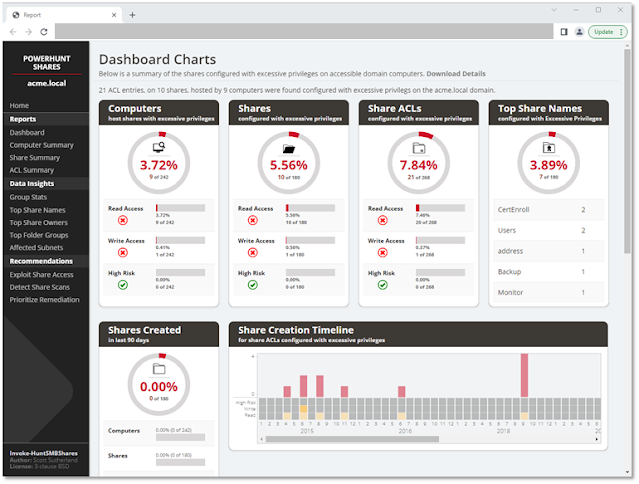
PowerHuntShares is design to automatically inventory, analyze, and report excessive privilege assigned to SMB shares on Active Directory domain joined computers.
It is intented to help IAM and other blue teams gain a better understand of their SMB Share attack surface and provides data insights to help naturally group related share to help stream line remediation efforts at scale.


It supports functionality to:

  • Authenticate using the current user context, a credential, or clear text user/password.
  • Discover accessible systems associated with an Active Directory domain automatically. It will also filter Active Directory computers based on available open ports.
  • Target a single computer, list of computers, or discovered Active Directory computers (default).
  • Collect SMB share ACL information from target computers using PowerShell.
  • Analyze collected Share ACL data.
  • Report summary reports and excessive privilege details in HTML and CSV file formats.

Excessive SMB share ACLs are a systemic problem and an attack surface that all organizations struggle with. The goal of this project is to provide a proof concept that will work towards building a better share collection and data insight engine that can help inform and priorititize remediation efforts.

Bonus Features:

  • Generate directory listing dump for configurable depth
  • Search for file types across discovered shares

I've also put together a short presentation outlining some of the common misconfigurations and strategies for prioritizing remediation here: https://www.slideshare.net/nullbind/into-the-abyss-evaluating-active-directory-smb-shares-on-scale-secure360-251762721

Vocabulary

PowerHuntShares will inventory SMB share ACLs configured with "excessive privileges" and highlight "high risk" ACLs. Below is how those are defined in this context.

Excessive Privileges
Excessive read and write share permissions have been defined as any network share ACL containing an explicit ACE (Access Control Entry) for the "Everyone", "Authenticated Users", "BUILTIN\Users", "Domain Users", or "Domain Computers" groups. All provide domain users access to the affected shares due to privilege inheritance issues. Note there is a parameter that allow operators to add their own target groups.
Below is some additional background:

  • Everyone is a direct reference that applies to both unauthenticated and authenticated users. Typically only a null session is required to access those resources.
  • BUILTIN\Users contains Authenticated Users
  • Authenticated Users contains Domain Users on domain joined systems. That's why Domain Users can access a share when the share permissions have been assigned to "BUILTIN\Users".
  • Domain Users is a direct reference
  • Domain Users can also create up to 10 computer accounts by default that get placed in the Domain Computers group
  • Domain Users that have local administrative access to a domain joined computer can also impersonate the computer account.

Please Note: Share permissions can be overruled by NTFS permissions. Also, be aware that testing excluded share names containing the following keywords:

print$, prnproc$, printer, netlogon,and sysvol

High Risk Shares
In the context of this report, high risk shares have been defined as shares that provide unauthorized remote access to a system or application. By default, that includes the shares

 wwwroot, inetpub, c$, and admin$   
However, additional exposures may exist that are not called out beyond that.

Setup Commands

Below is a list of commands that can be used to load PowerHuntShares into your current PowerShell session. Please note that one of these will have to be run each time you run PowerShell is run. It is not persistent.

# Bypass execution policy restrictions
Set-ExecutionPolicy -Scope Process Bypass

# Import module that exists in the current directory
Import-Module .\PowerHuntShares.psm1

or

# Reduce SSL operating level to support connection to github
[System.Net.ServicePointManager]::ServerCertificateValidationCallback = {$true}
[Net.ServicePointManager]::SecurityProtocol =[Net.SecurityProtocolType]::Tls12

# Download and load PowerHuntShares.psm1 into memory
IEX(New-Object System.Net.WebClient).DownloadString("https://raw.githubusercontent.com/NetSPI/PowerHuntShares/main/PowerHuntShares.psm1")

Example Commands

Important Note: All commands should be run as an unprivileged domain user.

.EXAMPLE 1: Run from a domain computer. Performs Active Directory computer discovery by default.
PS C:\temp\test> Invoke-HuntSMBShares -Threads 100 -OutputDirectory c:\temp\test

.EXAMPLE 2: Run from a domain computer with alternative domain credentials. Performs Active Directory computer discovery by default.
PS C:\temp\test> Invoke-HuntSMBShares -Threads 100 -OutputDirectory c:\temp\test -Credentials domain\user

.EXAMPLE 3: Run from a domain computer as current user. Target hosts in a file. One per line.
PS C:\temp\test> Invoke-HuntSMBShares -Threads 100 -OutputDirectory c:\temp\test -HostList c:\temp\hosts.txt

.EXAMPLE 4: Run from a non-domain computer with credential. Performs Active Directory computer discovery by default.
C:\temp\test> runas /netonly /user:domain\user PowerShell.exe
PS C:\temp\test> Import-Module Invoke-HuntSMBShares.ps1
PS C:\temp\test> Invoke-HuntSMBShares -Threads 100 -Run SpaceTimeOut 10 -OutputDirectory c:\folder\ -DomainController 10.1.1.1 -Credential domain\user

===============================================================
PowerHuntShares
===============================================================
This function automates the following tasks:

o Determine current computer's domain
o Enumerate domain computers
o Filter for computers that respond to ping reqeusts
o Filter for computers that have TCP 445 open and accessible
o Enumerate SMB shares
o Enumerate SMB share permissions
o Identify shares with potentially excessive privielges
o Identify shares that provide reads & write access
o Identify shares thare are high risk
o Identify common share owners, names, & directory listings
o Generate creation, last written, & last accessed timelines
o Generate html summary report and detailed csv files

Note: This can take hours to run in large environments.
---------------------------------------------------------------
|||||||||||||||||||||||||||||||||||||||||||||||||||||||||||||||
---------------------------------------------------------------
SHARE DISCOVERY
---------------------------------------------------------------
[*][03/01/2021 09:35] Scan Start
[*][03/01/2021 09:35] Output Directory: c:\temp\smbshares\SmbShareHunt-03012021093504
[*][03/01/2021 09:35] Successful connection to domain controller: dc1.demo.local
[*][03/01/2021 09:35] Performing LDAP query for computers associated with the demo.local domain
[*][03/01/2021 09:35] - 245 computers found
[*][03/01/2021 09:35] Pinging 245 computers
[*][03/01/2021 09:35] - 55 computers responded to ping requests.
[*][03/01/2021 09:35] Checking if TCP Port 445 is open on 55 computers
[*][03/01/2021 09:36] - 49 computers have TCP port 445 open.
[*][03/01/2021 09:36] Getting a list of SMB shares from 49 computers
[*][03/01/2021 09:36] - 217 SMB shares were found.
[*][03/01/2021 09:36] Getting share permissions from 217 SMB shares
[*][03/01/2021 09:37] - 374 share permissions were enumerated.
[*][03/01/2021 09:37] Getting directory listings from 33 SMB shares
[*][03/01/2021 09:37] - Targeting up to 3 nested directory levels
[*][03/01/2021 09:37] - 563 files and folders were enumerated.
[*][03/01/2021 09:37] Identifying potentially excessive share permissions
[*][03/01/2021 09:37] - 33 potentially excessive privileges were found across 12 systems..
[*][03/01/2021 09:37] Scan Complete
---------------------------------------------------------------
SHARE ANALYSIS
---------------------------------------------------------------
[*][03/01/2021 09:37] Analysis Start
[*][03/01/2021 09:37] - 14 shares can be read across 12 systems.
[*][03/01/2021 09:37] - 1 shares can be written to across 1 systems.
[*][03/01/2021 09:37] - 46 shares are considered non-default across 32 systems.
[*][03/01/2021 09:37] - 0 shares are considered high risk across 0 systems
[*][03/01/2021 09:37] - Identified top 5 owners of excessive shares.
[*][03/01/2021 09:37] - Identified top 5 share groups.
[*][03/01/2021 09:37] - Identified top 5 share names.
[*][03/01/2021 09:37] - Identified shares created in last 90 days.
[*][03/01/2021 09:37] - Identified shares accessed in last 90 days.
[*][03/01/2021 09:37] - Identified shares modified in last 90 days.
[*][03/01/2021 09:37] Analysis Complete
---------------------------------------------------------------
SHARE REPORT SUMMARY
---------------------------------------------------------------
[*][03/01/2021 09:37] Domain: demo.local
[*][03/01/2021 09:37] Start time: 03/01/2021 09:35:04
[*][03/01/2021 09:37] End time: 03/01/2021 09:37:27
[*][03/01/2021 09:37] R un time: 00:02:23.2759086
[*][03/01/2021 09:37]
[*][03/01/2021 09:37] COMPUTER SUMMARY
[*][03/01/2021 09:37] - 245 domain computers found.
[*][03/01/2021 09:37] - 55 (22.45%) domain computers responded to ping.
[*][03/01/2021 09:37] - 49 (20.00%) domain computers had TCP port 445 accessible.
[*][03/01/2021 09:37] - 32 (13.06%) domain computers had shares that were non-default.
[*][03/01/2021 09:37] - 12 (4.90%) domain computers had shares with potentially excessive privileges.
[*][03/01/2021 09:37] - 12 (4.90%) domain computers had shares that allowed READ access.
[*][03/01/2021 09:37] - 1 (0.41%) domain computers had shares that allowed WRITE access.
[*][03/01/2021 09:37] - 0 (0.00%) domain computers had shares that are HIGH RISK.
[*][03/01/2021 09:37]
[*][03/01/2021 09:37] SHARE SUMMARY
[*][03/01/2021 09:37] - 217 shares were found. We expect a minimum of 98 shares
[*][03/01/2021 09:37] because 49 systems had open ports a nd there are typically two default shares.
[*][03/01/2021 09:37] - 46 (21.20%) shares across 32 systems were non-default.
[*][03/01/2021 09:37] - 14 (6.45%) shares across 12 systems are configured with 33 potentially excessive ACLs.
[*][03/01/2021 09:37] - 14 (6.45%) shares across 12 systems allowed READ access.
[*][03/01/2021 09:37] - 1 (0.46%) shares across 1 systems allowed WRITE access.
[*][03/01/2021 09:37] - 0 (0.00%) shares across 0 systems are considered HIGH RISK.
[*][03/01/2021 09:37]
[*][03/01/2021 09:37] SHARE ACL SUMMARY
[*][03/01/2021 09:37] - 374 ACLs were found.
[*][03/01/2021 09:37] - 374 (100.00%) ACLs were associated with non-default shares.
[*][03/01/2021 09:37] - 33 (8.82%) ACLs were found to be potentially excessive.
[*][03/01/2021 09:37] - 32 (8.56%) ACLs were found that allowed READ access.
[*][03/01/2021 09:37] - 1 (0.27%) ACLs were found that allowed WRITE access.
[*][03/01/2021 09:37] - 0 (0.00%) ACLs we re found that are associated with HIGH RISK share names.
[*][03/01/2021 09:37]
[*][03/01/2021 09:37] - The 5 most common share names are:
[*][03/01/2021 09:37] - 9 of 14 (64.29%) discovered shares are associated with the top 5 share names.
[*][03/01/2021 09:37] - 4 backup
[*][03/01/2021 09:37] - 2 ssms
[*][03/01/2021 09:37] - 1 test2
[*][03/01/2021 09:37] - 1 test1
[*][03/01/2021 09:37] - 1 users
[*] -----------------------------------------------

HTML Report Examples

Credits

Author
Scott Sutherland (@_nullbind)

Open-Source Code Used
These individuals wrote open source code that was used as part of this project. A big thank you goes out them and their work!

Name Site
Will Schroeder (@harmj0y) https://github.com/PowerShellMafia/PowerSploit/blob/master/Recon/PowerView.ps1
Warren F (@pscookiemonster) https://github.com/RamblingCookieMonster/Invoke-Parallel
Luben Kirov http://www.gi-architects.co.uk/2016/02/powershell-check-if-ip-or-subnet-matchesfits/

License
BSD 3-Clause

Todos

Pending Fixes/Bugs

  • Update code to avoid defender
  • Fix file listing formating on data insight pages
  • IPv6 addresses dont show up in subnets summary
  • ACLs associated with Builtin\Users sometimes shows up as LocalSystem under undefined conditions, and as a result, doesnt show up in the Excessive Privileges export. - Thanks Sam!

Pending Features

  • Add ability to specify additional groups to target
  • Add directory listing to insights page.
  • Add ability to grab system OS information for data insights.
  • Add visualization: Visual squares with coloring mapped to share volume density by subnet or ip?.
  • Add file type search. (half coded) + add to data insights. Don't forget things like *.aws, *.azure *.gcp directories that store cloud credentials.
  • Add file content search.
  • Add DontExcludePrintShares option
  • Add auto targeting of groups that contain a large % of the user population; over 70% (make configurable). Add as option.
  • Add configuration fid: netlogon and sysvol you may get access denied when using windows 10 unless the setting below is configured. Automat a check for this, and attempt to modify if privs are at correct level. gpedit.msc, go to Computer -> Administrative Templates -> Network -> Network Provider -> Hardened UNC Paths, enable the policy and click "Show" button. Enter your server name (* for all servers) into "Value name" and enter the folowing text "RequireMutualAuthentication=0,RequireIntegrity=0,RequirePrivacy=0" wihtout quotes into the "Value" field.
  • Add an interesting shares based on names to data insights. example: sql, backup, password, etc.
  • Add active sessions data to help identify potential owners/users of share.
  • Pull spns and computer description/spn account descriptions to help identify owner/business unit.
  • Create bloodhound import file / edge (highrisk share)
  • Research to identify additional high risk share names based on common technology
  • Add better support for IPv6
  • Dynamic identification of spikes in high risk share creation/common groupings, need to better summarize supporting detail beyond just the timeline. For each of the data insights, add average number of shares created for insight grouping by year/month (for folder hash / name etc), and the increase the month/year it spikes. (attempt to provide some historical context); maybe even list the most common non default directories being used by each of those. Potentially adding "first seen date" as well.
  • add showing share permissions (along with the already displayed NTFS permissions) and resultant access (most restrictive wins)


PowerHuntShares - Audit Script Designed In Inventory, Analyze, And Report Excessive Privileges Configured On Active Directory Domains

By: Unknown


PowerHuntShares is design to automatically inventory, analyze, and report excessive privilege assigned to SMB shares on Active Directory domain joined computers.
It is intented to help IAM and other blue teams gain a better understand of their SMB Share attack surface and provides data insights to help naturally group related share to help stream line remediation efforts at scale.


It supports functionality to:

  • Authenticate using the current user context, a credential, or clear text user/password.
  • Discover accessible systems associated with an Active Directory domain automatically. It will also filter Active Directory computers based on available open ports.
  • Target a single computer, list of computers, or discovered Active Directory computers (default).
  • Collect SMB share ACL information from target computers using PowerShell.
  • Analyze collected Share ACL data.
  • Report summary reports and excessive privilege details in HTML and CSV file formats.

Excessive SMB share ACLs are a systemic problem and an attack surface that all organizations struggle with. The goal of this project is to provide a proof concept that will work towards building a better share collection and data insight engine that can help inform and priorititize remediation efforts.

Bonus Features:

  • Generate directory listing dump for configurable depth
  • Search for file types across discovered shares

I've also put together a short presentation outlining some of the common misconfigurations and strategies for prioritizing remediation here: https://www.slideshare.net/nullbind/into-the-abyss-evaluating-active-directory-smb-shares-on-scale-secure360-251762721

Vocabulary

PowerHuntShares will inventory SMB share ACLs configured with "excessive privileges" and highlight "high risk" ACLs. Below is how those are defined in this context.

Excessive Privileges
Excessive read and write share permissions have been defined as any network share ACL containing an explicit ACE (Access Control Entry) for the "Everyone", "Authenticated Users", "BUILTIN\Users", "Domain Users", or "Domain Computers" groups. All provide domain users access to the affected shares due to privilege inheritance issues. Note there is a parameter that allow operators to add their own target groups.
Below is some additional background:

  • Everyone is a direct reference that applies to both unauthenticated and authenticated users. Typically only a null session is required to access those resources.
  • BUILTIN\Users contains Authenticated Users
  • Authenticated Users contains Domain Users on domain joined systems. That's why Domain Users can access a share when the share permissions have been assigned to "BUILTIN\Users".
  • Domain Users is a direct reference
  • Domain Users can also create up to 10 computer accounts by default that get placed in the Domain Computers group
  • Domain Users that have local administrative access to a domain joined computer can also impersonate the computer account.

Please Note: Share permissions can be overruled by NTFS permissions. Also, be aware that testing excluded share names containing the following keywords:

print$, prnproc$, printer, netlogon,and sysvol

High Risk Shares
In the context of this report, high risk shares have been defined as shares that provide unauthorized remote access to a system or application. By default, that includes the shares

 wwwroot, inetpub, c$, and admin$   
However, additional exposures may exist that are not called out beyond that.

Setup Commands

Below is a list of commands that can be used to load PowerHuntShares into your current PowerShell session. Please note that one of these will have to be run each time you run PowerShell is run. It is not persistent.

# Bypass execution policy restrictions
Set-ExecutionPolicy -Scope Process Bypass

# Import module that exists in the current directory
Import-Module .\PowerHuntShares.psm1

or

# Reduce SSL operating level to support connection to github
[System.Net.ServicePointManager]::ServerCertificateValidationCallback = {$true}
[Net.ServicePointManager]::SecurityProtocol =[Net.SecurityProtocolType]::Tls12

# Download and load PowerHuntShares.psm1 into memory
IEX(New-Object System.Net.WebClient).DownloadString("https://raw.githubusercontent.com/NetSPI/PowerHuntShares/main/PowerHuntShares.psm1")

Example Commands

Important Note: All commands should be run as an unprivileged domain user.

.EXAMPLE 1: Run from a domain computer. Performs Active Directory computer discovery by default.
PS C:\temp\test> Invoke-HuntSMBShares -Threads 100 -OutputDirectory c:\temp\test

.EXAMPLE 2: Run from a domain computer with alternative domain credentials. Performs Active Directory computer discovery by default.
PS C:\temp\test> Invoke-HuntSMBShares -Threads 100 -OutputDirectory c:\temp\test -Credentials domain\user

.EXAMPLE 3: Run from a domain computer as current user. Target hosts in a file. One per line.
PS C:\temp\test> Invoke-HuntSMBShares -Threads 100 -OutputDirectory c:\temp\test -HostList c:\temp\hosts.txt

.EXAMPLE 4: Run from a non-domain computer with credential. Performs Active Directory computer discovery by default.
C:\temp\test> runas /netonly /user:domain\user PowerShell.exe
PS C:\temp\test> Import-Module Invoke-HuntSMBShares.ps1
PS C:\temp\test> Invoke-HuntSMBShares -Threads 100 -Run SpaceTimeOut 10 -OutputDirectory c:\folder\ -DomainController 10.1.1.1 -Credential domain\user

===============================================================
PowerHuntShares
===============================================================
This function automates the following tasks:

o Determine current computer's domain
o Enumerate domain computers
o Filter for computers that respond to ping reqeusts
o Filter for computers that have TCP 445 open and accessible
o Enumerate SMB shares
o Enumerate SMB share permissions
o Identify shares with potentially excessive privielges
o Identify shares that provide reads & write access
o Identify shares thare are high risk
o Identify common share owners, names, & directory listings
o Generate creation, last written, & last accessed timelines
o Generate html summary report and detailed csv files

Note: This can take hours to run in large environments.
---------------------------------------------------------------
|||||||||||||||||||||||||||||||||||||||||||||||||||||||||||||||
---------------------------------------------------------------
SHARE DISCOVERY
---------------------------------------------------------------
[*][03/01/2021 09:35] Scan Start
[*][03/01/2021 09:35] Output Directory: c:\temp\smbshares\SmbShareHunt-03012021093504
[*][03/01/2021 09:35] Successful connection to domain controller: dc1.demo.local
[*][03/01/2021 09:35] Performing LDAP query for computers associated with the demo.local domain
[*][03/01/2021 09:35] - 245 computers found
[*][03/01/2021 09:35] Pinging 245 computers
[*][03/01/2021 09:35] - 55 computers responded to ping requests.
[*][03/01/2021 09:35] Checking if TCP Port 445 is open on 55 computers
[*][03/01/2021 09:36] - 49 computers have TCP port 445 open.
[*][03/01/2021 09:36] Getting a list of SMB shares from 49 computers
[*][03/01/2021 09:36] - 217 SMB shares were found.
[*][03/01/2021 09:36] Getting share permissions from 217 SMB shares
[*][03/01/2021 09:37] - 374 share permissions were enumerated.
[*][03/01/2021 09:37] Getting directory listings from 33 SMB shares
[*][03/01/2021 09:37] - Targeting up to 3 nested directory levels
[*][03/01/2021 09:37] - 563 files and folders were enumerated.
[*][03/01/2021 09:37] Identifying potentially excessive share permissions
[*][03/01/2021 09:37] - 33 potentially excessive privileges were found across 12 systems..
[*][03/01/2021 09:37] Scan Complete
---------------------------------------------------------------
SHARE ANALYSIS
---------------------------------------------------------------
[*][03/01/2021 09:37] Analysis Start
[*][03/01/2021 09:37] - 14 shares can be read across 12 systems.
[*][03/01/2021 09:37] - 1 shares can be written to across 1 systems.
[*][03/01/2021 09:37] - 46 shares are considered non-default across 32 systems.
[*][03/01/2021 09:37] - 0 shares are considered high risk across 0 systems
[*][03/01/2021 09:37] - Identified top 5 owners of excessive shares.
[*][03/01/2021 09:37] - Identified top 5 share groups.
[*][03/01/2021 09:37] - Identified top 5 share names.
[*][03/01/2021 09:37] - Identified shares created in last 90 days.
[*][03/01/2021 09:37] - Identified shares accessed in last 90 days.
[*][03/01/2021 09:37] - Identified shares modified in last 90 days.
[*][03/01/2021 09:37] Analysis Complete
---------------------------------------------------------------
SHARE REPORT SUMMARY
---------------------------------------------------------------
[*][03/01/2021 09:37] Domain: demo.local
[*][03/01/2021 09:37] Start time: 03/01/2021 09:35:04
[*][03/01/2021 09:37] End time: 03/01/2021 09:37:27
[*][03/01/2021 09:37] R un time: 00:02:23.2759086
[*][03/01/2021 09:37]
[*][03/01/2021 09:37] COMPUTER SUMMARY
[*][03/01/2021 09:37] - 245 domain computers found.
[*][03/01/2021 09:37] - 55 (22.45%) domain computers responded to ping.
[*][03/01/2021 09:37] - 49 (20.00%) domain computers had TCP port 445 accessible.
[*][03/01/2021 09:37] - 32 (13.06%) domain computers had shares that were non-default.
[*][03/01/2021 09:37] - 12 (4.90%) domain computers had shares with potentially excessive privileges.
[*][03/01/2021 09:37] - 12 (4.90%) domain computers had shares that allowed READ access.
[*][03/01/2021 09:37] - 1 (0.41%) domain computers had shares that allowed WRITE access.
[*][03/01/2021 09:37] - 0 (0.00%) domain computers had shares that are HIGH RISK.
[*][03/01/2021 09:37]
[*][03/01/2021 09:37] SHARE SUMMARY
[*][03/01/2021 09:37] - 217 shares were found. We expect a minimum of 98 shares
[*][03/01/2021 09:37] because 49 systems had open ports a nd there are typically two default shares.
[*][03/01/2021 09:37] - 46 (21.20%) shares across 32 systems were non-default.
[*][03/01/2021 09:37] - 14 (6.45%) shares across 12 systems are configured with 33 potentially excessive ACLs.
[*][03/01/2021 09:37] - 14 (6.45%) shares across 12 systems allowed READ access.
[*][03/01/2021 09:37] - 1 (0.46%) shares across 1 systems allowed WRITE access.
[*][03/01/2021 09:37] - 0 (0.00%) shares across 0 systems are considered HIGH RISK.
[*][03/01/2021 09:37]
[*][03/01/2021 09:37] SHARE ACL SUMMARY
[*][03/01/2021 09:37] - 374 ACLs were found.
[*][03/01/2021 09:37] - 374 (100.00%) ACLs were associated with non-default shares.
[*][03/01/2021 09:37] - 33 (8.82%) ACLs were found to be potentially excessive.
[*][03/01/2021 09:37] - 32 (8.56%) ACLs were found that allowed READ access.
[*][03/01/2021 09:37] - 1 (0.27%) ACLs were found that allowed WRITE access.
[*][03/01/2021 09:37] - 0 (0.00%) ACLs we re found that are associated with HIGH RISK share names.
[*][03/01/2021 09:37]
[*][03/01/2021 09:37] - The 5 most common share names are:
[*][03/01/2021 09:37] - 9 of 14 (64.29%) discovered shares are associated with the top 5 share names.
[*][03/01/2021 09:37] - 4 backup
[*][03/01/2021 09:37] - 2 ssms
[*][03/01/2021 09:37] - 1 test2
[*][03/01/2021 09:37] - 1 test1
[*][03/01/2021 09:37] - 1 users
[*] -----------------------------------------------

HTML Report Examples

Credits

Author
Scott Sutherland (@_nullbind)

Open-Source Code Used
These individuals wrote open source code that was used as part of this project. A big thank you goes out them and their work!

Name Site
Will Schroeder (@harmj0y) https://github.com/PowerShellMafia/PowerSploit/blob/master/Recon/PowerView.ps1
Warren F (@pscookiemonster) https://github.com/RamblingCookieMonster/Invoke-Parallel
Luben Kirov http://www.gi-architects.co.uk/2016/02/powershell-check-if-ip-or-subnet-matchesfits/

License
BSD 3-Clause

Todos

Pending Fixes/Bugs

  • Update code to avoid defender
  • Fix file listing formating on data insight pages
  • IPv6 addresses dont show up in subnets summary
  • ACLs associated with Builtin\Users sometimes shows up as LocalSystem under undefined conditions, and as a result, doesnt show up in the Excessive Privileges export. - Thanks Sam!

Pending Features

  • Add ability to specify additional groups to target
  • Add directory listing to insights page.
  • Add ability to grab system OS information for data insights.
  • Add visualization: Visual squares with coloring mapped to share volume density by subnet or ip?.
  • Add file type search. (half coded) + add to data insights. Don't forget things like *.aws, *.azure *.gcp directories that store cloud credentials.
  • Add file content search.
  • Add DontExcludePrintShares option
  • Add auto targeting of groups that contain a large % of the user population; over 70% (make configurable). Add as option.
  • Add configuration fid: netlogon and sysvol you may get access denied when using windows 10 unless the setting below is configured. Automat a check for this, and attempt to modify if privs are at correct level. gpedit.msc, go to Computer -> Administrative Templates -> Network -> Network Provider -> Hardened UNC Paths, enable the policy and click "Show" button. Enter your server name (* for all servers) into "Value name" and enter the folowing text "RequireMutualAuthentication=0,RequireIntegrity=0,RequirePrivacy=0" wihtout quotes into the "Value" field.
  • Add an interesting shares based on names to data insights. example: sql, backup, password, etc.
  • Add active sessions data to help identify potential owners/users of share.
  • Pull spns and computer description/spn account descriptions to help identify owner/business unit.
  • Create bloodhound import file / edge (highrisk share)
  • Research to identify additional high risk share names based on common technology
  • Add better support for IPv6
  • Dynamic identification of spikes in high risk share creation/common groupings, need to better summarize supporting detail beyond just the timeline. For each of the data insights, add average number of shares created for insight grouping by year/month (for folder hash / name etc), and the increase the month/year it spikes. (attempt to provide some historical context); maybe even list the most common non default directories being used by each of those. Potentially adding "first seen date" as well.
  • add showing share permissions (along with the already displayed NTFS permissions) and resultant access (most restrictive wins)


❌