Äike were an Estonian scooter company, which sadly went bust last year. [Rasmus Moorats] has one, and since the app and cloud service the scooter depends on have lost functionality, he decided to reverse engineer it. Along the way he achieved his goal, but found a vulnerability that unlocks all Äike scooters.
The write-up is a tale of app and Bluetooth reverse engineering, ending with the startling revelation of a hardcoded key that’s simply “ffffffffffffffff”. From that he can unlock and interact with any Äike scooter, except for a subset that were used as hire scooters and didn’t have Bluetooth. Perhaps of more legitimate use is the reverse engineering of the scooter functionality.
What do you do when you find a vulnerability in a product whose manufacturer has gone? He reported to the vendor of the IoT module inside the scooter, who responded that the key was a default value that should have been changed by the Äike developers. Good luck, should you own one of these machines.
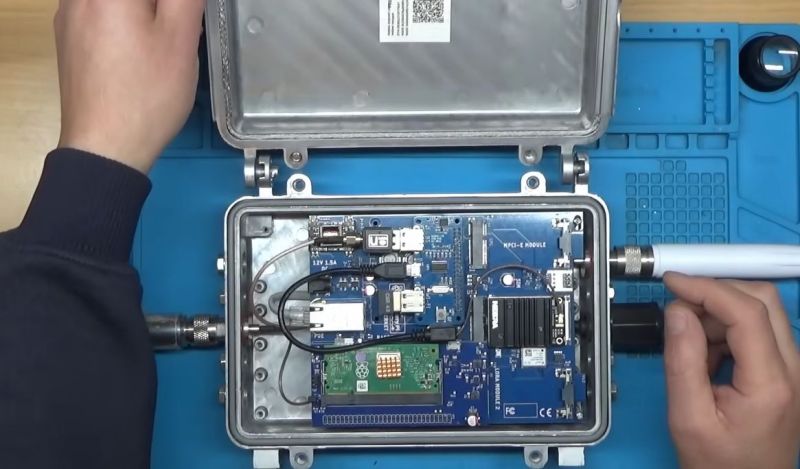
After the swivel by Helium Inc. towards simply running distributed WiFi hotspots after for years pushing LoRaWAN nodes, much of the associated hardware became effectively obsolete. This led to quite a few of these Nebra LoRa Miners getting sold off, with the [Buy it Fix it] channel being one of those who sought to give these chunks of IP-67-rated computing hardware a new life.
Originally designed to be part of the Helium Network Token (HNT) cryptocurrency mining operation, with users getting rewarded by having these devices operating, they contain fairly off-the-shelf hardware. As can be glanced from e.g. the Sparkfun product page, it’s basically a Raspberry Pi Compute Module 3+ on a breakout board with a RAK 2287 LoRa module. The idea in the video was to convert it into a Meshcore repeater, which ought to be fairly straightforward, one might think.
Unfortunately the unit came with a dead eMMC chip on the compute module, the LoRa module wasn’t compatible with Meshcore, and the Nebra breakout board only covers the first 24 pins of the standard RPi header on its pin header.
The solutions involved using a µSD card for the firmware instead of the eMMC, and doing some creative routing on the bottom of the breakout board to connect the unconnected pins on the breakout’s RPi header to the pins on the compute module’s connector. This way a compatible LoRa module could be placed on this header.
Rather than buying an off-the-shelf LoRa module for the RPi and waiting for delivery, a custom module was assembled from an eByte E22 LoRa module and some stripboard to test whether the contraption would work at all. Fortunately a test of the system as a Meshcore repeater showed that it works as intended, serving as a pretty decent proof-of-concept of how to repurpose those systems from a defunct crypto mining scheme into a typical LoRa repeater, whether Meshcore or equivalent.
Well there’s your problem. (Credit: Mark Funeaux, YouTube)
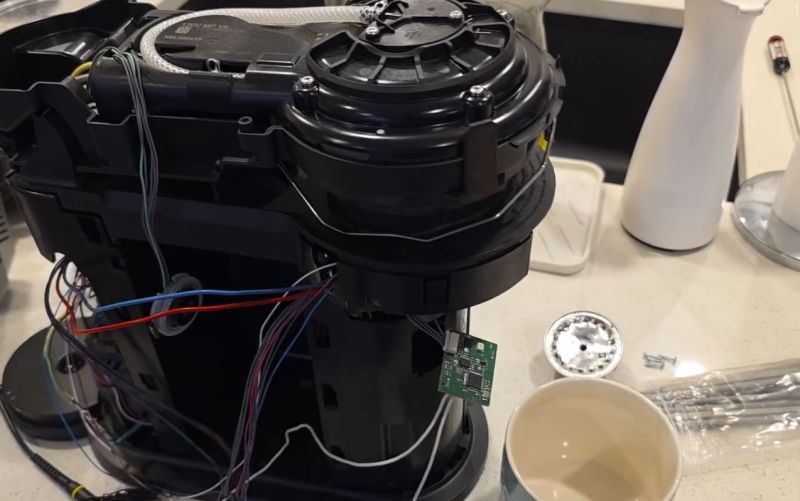
Akin to the razor-and-blades model, capsule-based coffee machines are an endless grind of overpriced pods and cheaply made machines that you’re supposed to throw out and buy a new one of, just so that you don’t waste all the proprietary pods you still have at home. What this also means is a seemingly endless supply of free broken capsule coffee makers that might be repairable. This is roughly how [Mark Furneaux] got into the habit of obtaining various Nespresso VertuoLine machines for attempted repairs.
The VirtuoLine machines feature the capsule with a bar code printed on the bottom of the lip, requiring the capsule to be spun around so that it can be read by the optical reader. Upon successful reading, the code is passed to the MCU after which the brewing process is either commenced or cruelly halted if the code fails. Two of the Vertuo Next machines that [Mark] got had such capsule reading errors, leading to a full teardown of the first after the scanner board turned out to work fine.
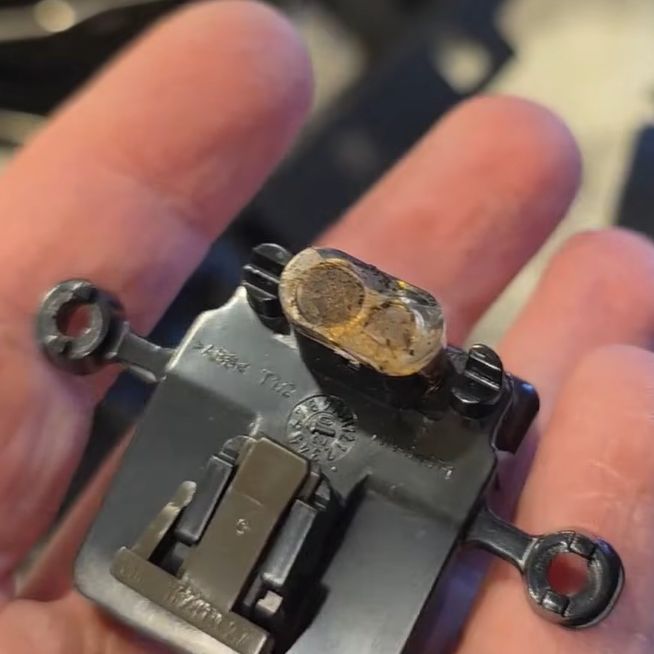
Long story short and many hours of scrubbed footage later, one machine was apparently missing the lens assembly on top of the photo diode and IR LED, while the other simply had these lenses gunked up with spilled coffee. Of course, getting to this lens assembly still required a full machine teardown, making cleaning it an arduous task.
Unfortunately the machine that had the missing lens assembly turned out to have another fault which even after hours of debugging remained elusive, but at least there was one working coffee machine afterwards to make a cup of joe to make [Mark] feel slightly better about his life choices. As for why the lens assembly was missing, it’s quite possible that someone else tried to repair the original fault, didn’t find it, and reassembled the machine without the lens before passing the problem on to the next victim.
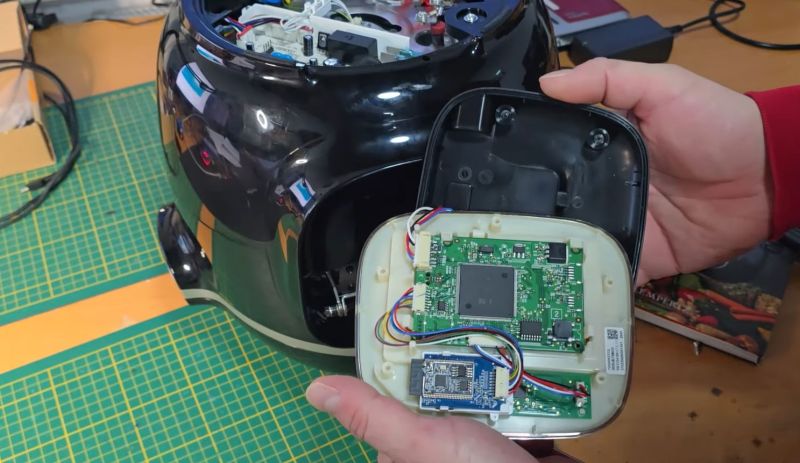
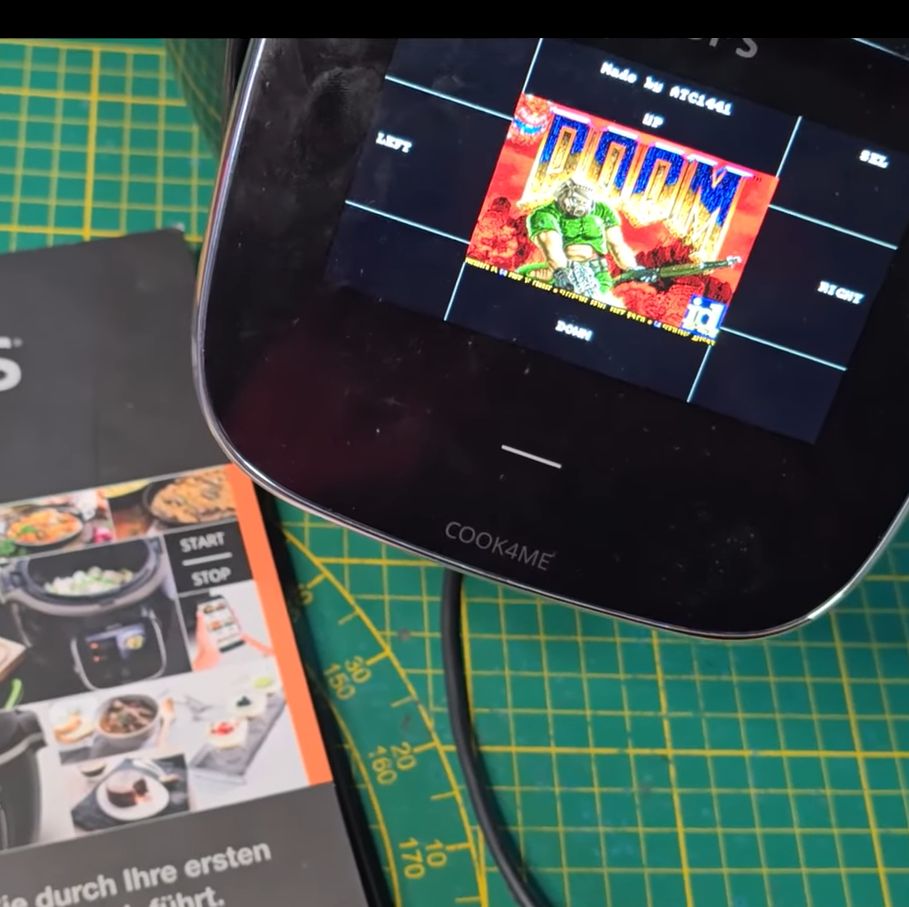
With more and more kitchen utilities gaining touch screens and capable microcontrollers it’d be inconceivable that they do not get put to other uses as well. To this end [Aaron Christophel] is back with another briefly Doom-less device in the form of the Krups Cook4Me pressure cooking pot with its rather sizeable touch screen and proclaimed smarts in addition to WiFi and an associated smartphone app.
Inside is an ESP32 module for the WiFi side, with the brains of the whole operation being a Renesas R7S721031VC SoC with a single 400 MHz Cortex-A9. This is backed by 128 MB of Flash and 128 MB of RAM. The lower touch interface is handled by a separate Microchip PIC MCU to apparently enable for low standby power usage until woken up by touch.
The developers were nice enough to make it easy to dump the firmware on the SoC via SWD, allowing for convenient reverse-engineering and porting of Doom. With the touch screen used as the human input device it was actually quite playable, and considering the fairly beefy SoC, Doom runs like a dream. Sadly, due to the rarity of this device, [Aaron] is not releasing project files for it.
As for why a simple cooking pot needs all of this hardware, the answer is probably along the lines of ‘because we can’.
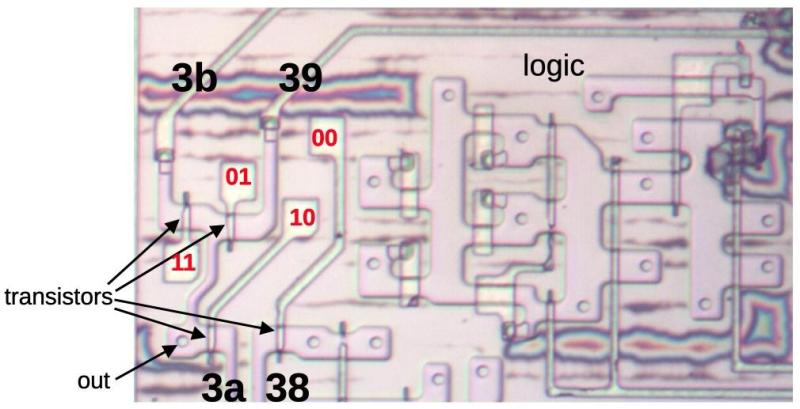
Continuing his reverse-engineering of the Intel 8087, [Ken Shirriff] covers the conditional tests that are implemented in the microcode of this floating point processing unit (FPU). This microcode contains the details on how to perform the many types of specialized instructions, like cos and arctan, all of which decode into many microcode ops. These micro ops are executed by the microcode engine, which [Ken] will cover in more detail in an upcoming article, but which is effectively its own CPU.
Conditional instructions are implemented in hardware, integrating the states of various functional blocks across the die, ranging from the instruction decoder to a register. Here, the evaluation is performed as close as possible to the source of said parameter to save on wiring.
Implementing this circuitry are multiplexers, with an example shown in the top die shot image. Depending on the local conditions, any of four pass transistors is energized, passing through that input. Not shown in the die shot image are the inverters or buffers that are required with the use of pass transistors to amplify the signal, since pass transistors do not provide that feature.
Despite how firmly obsolete the 8087 is today, it still provides an amazing learning opportunity for anyone interested in ASIC design, which is why it’s so great that [Ken] and his fellow reverse-engineering enthusiasts keep plugging away at recovering all this knowledge.
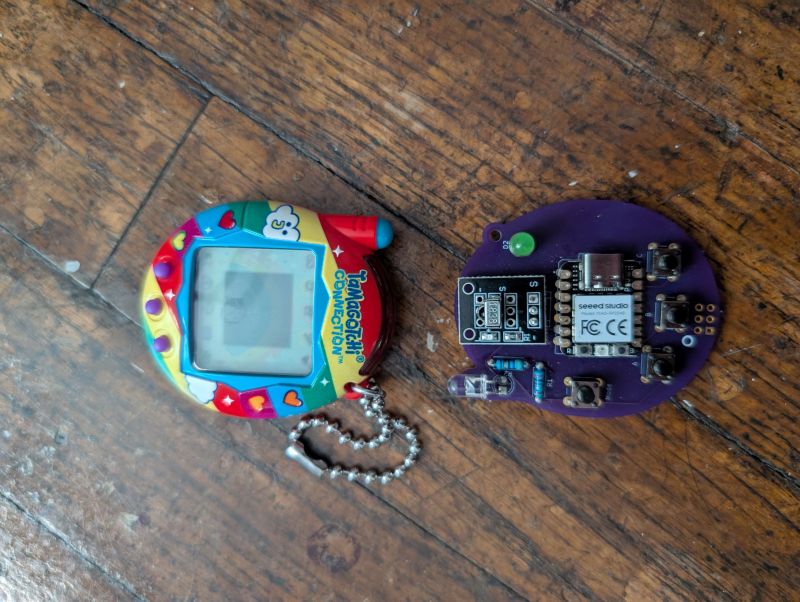
The Tamagotchi Connection is a series of Tamagotchi toys that took the original portable pet concept and mixed things up with a wireless connection, which allowed you to interact with the pets of other proud Tamagotchi owners. This wireless connection is implemented using an infrared transceiver, somewhat like IrDA, but as [Zach Resmer] discovered while reverse-engineering this connection, it’s actually what is called ‘Nearly NEC’ by [Natalie Silvanovich], who has a GitHub repository full of related Tamagotchi hacking tools and ROM dumps.
With the protocol figured out, creating a transceiver for low-bitrate infrared communication isn’t particularly hard. In this case, it was implemented using an RP2040 MCU and an appropriate IR LED and receiver pair. This Tamagometer project was also implemented as an app for the Flipper Zero, and a custom PCB called the Pico TamaBadge by [Daniel Weidman].
There’s a web application associated with [Zach]’s project using a Web Serial-enabled browser (i.e. Chrome). The serial protocol is somewhat documented in the patent for the device’s connection feature, which makes it relatively easy to implement yourself.
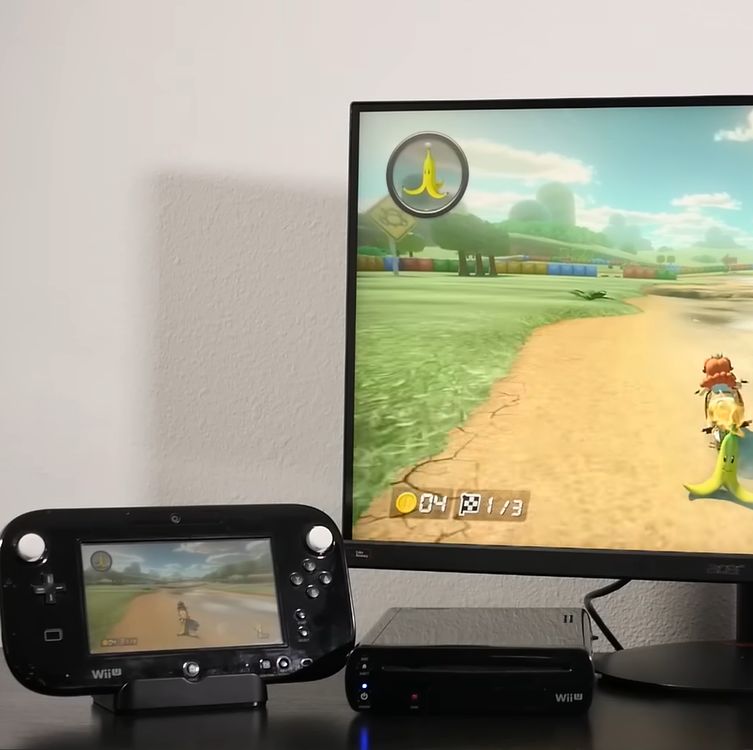
The Wii U running Mario Kart with the Gamepad duplicating the main screen. (Credit: MattKC, YouTube)
How hard would it be to clone the Wii U gamepad, the quirky controller with its unique embedded screen? This is the question that [MattKC] faced as he noticed the complete lack of Wii U gamepad replacements from either Nintendo or third-parties, leading him down the rabbit hole of answering said question.
Although unloved and even despised in compared to the Nintendo Wii, the Wii U was a solid system in its own right. One of its interesting additions was the gamepad controller, whose screen games used for features like a private screen during multiplayer and 3DS-like map screens. Its main weakness is however that the Wii U gamepad was considered an irreplaceable part of the console, which is obviously not fun if your gamepad breaks and your console along with it.
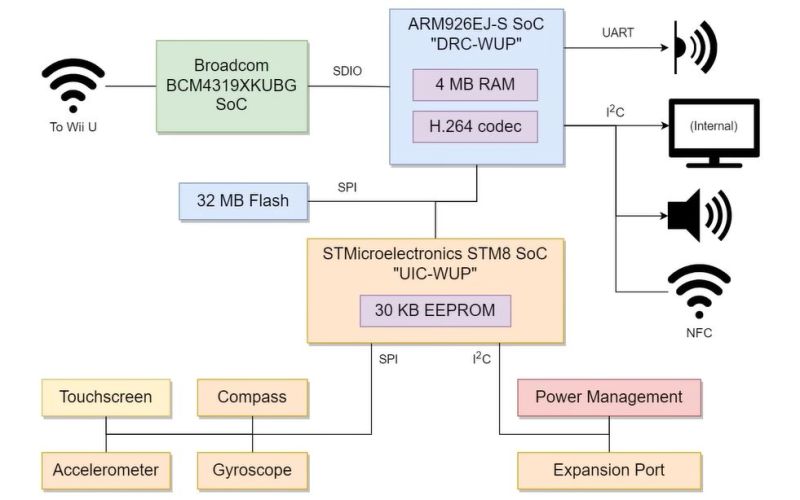
The Wii U console and gamepad communicate via 5 GHz 802.11n WiFi, but in order to deter other parties from simply hopping onto the access point, Nintendo slightly obfuscated this WiFi standard. Specifically the WPA authentication was modified by a byte swap in the PTK, rendering every existing WiFi stack incompatible with the Wii U.
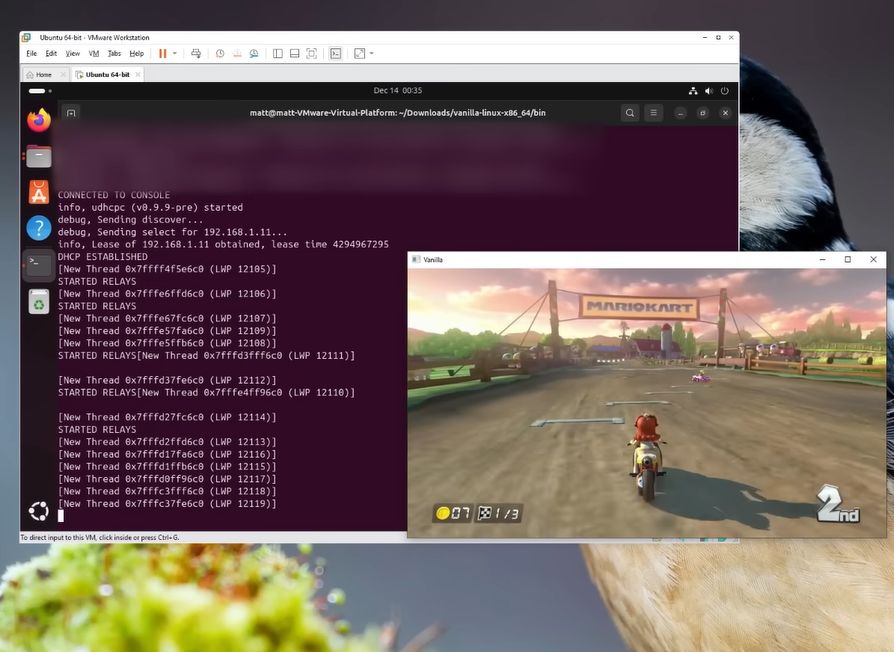
Vanilla Wii U running on Windows 10 with the network pipe in a Linux VM. (Credit: MattKC, YouTube)
Knowing this, the key is to use a platform that allows one to pre-break WPA in a similar fashion, such as is possible on e.g. Linux and BSD. Along with the use of the hilariously insecure WPS that is triggered when the gamepad’s sync button is pressed, this enables one to connect a modified Linux system to a Wii U console. After this the console starts sending h.264 (AVC) encoded video to the ‘gamepad’, and a binary packet can be sent back with the controller inputs.
Suffice it to say that this finding was immediately turned into a GitHub project called Vanilla Wii U, that enables a Steam Deck to be used as a gamepad, as well as any Linux – and presumably BSD – system with a compatible WiFi adapter. This latter point is key, as the non-standard authentication method has to be bypassed in software. This means for example that an un-modded Nintendo Switch cannot be used either.
The technical challenges combined with the systems relatively low popularity explain why third-party gamepads never appeared. However, now that the Wii U is a retro console, these efforts are essential for keeping these consoles working. We’d love to see the PlayStation Portal get modded into being a Wii U gamepad, since it’s basically a more limited clone of the same concept.
The Trinity of 1977 which started the personal computer revolution were the Apple II, the Commodore PET, and the TRS-80. In this project it’s a failing Commodore PET which is being restored.
In the video below the break you can see [Ken Shirriff] and [CuriousMarc] team up to crack this tough nut. Resolving the various issues required a whole heap of software and equipment. Most notably a Keysight DSOX3104T oscilloscope, a Retro Chip Tester Pro, an old Agilent 1670G logic analyzer (this thing is rocking a 3.5″ floppy disk drive!), an old Agilent 54622A oscilloscope (also rocking a floppy drive!), a Data I/O 29B Universal Programmer With UniPak 2 insert, and the disassembly software Ghidra.
In the end there were 6 (and a half) bad chips which needed to be discovered and then replaced. This project is a reminder that it’s nice to have the right tools for the job!
By Gary Miliefsky, Publisher of Cyber Defense Magazine Black Hat, the cybersecurity industry’s most established and in-depth security event series, has once again proven why it remains the go-to gathering...
Black Hat USA 2025 was nothing short of groundbreaking. The show floor and conference tracks were buzzing with innovation, but one theme stood above all others – the rapid advancement...
Framework for Automating Fuzzable Target Discovery with Static Analysis.
Introduction
Vulnerability researchers conducting security assessments on software will often harness the capabilities of coverage-guided fuzzing through powerful tools like AFL++ and libFuzzer. This is important as it automates the bughunting process and reveals exploitable conditions in targets quickly. However, when encountering large and complex codebases or closed-source binaries, researchers have to painstakingly dedicate time to manually audit and reverse engineer them to identify functions where fuzzing-based exploration can be useful.
Fuzzable is a framework that integrates both with C/C++ source code and binaries to assist vulnerability researchers in identifying function targets that are viable for fuzzing. This is done by applying several static analysis-based heuristics to pinpoint risky behaviors in the software and the functions that executes them. Researchers can then utilize the framework to generate basic harness templates, which can then be used to hunt for vulnerabilities, or to be integrated as part of a continuous fuzzing pipeline, such as Google's oss-fuzz project.
In addition to running as a standalone tool, Fuzzable is also integrated as a plugin for the Binary Ninja disassembler, with support for other disassembly backends being developed.
Check out the original blog post detailing the tool here, which highlights the technical specifications of the static analysis heuristics and how this tool came about. This tool is also featured at Black Hat Arsenal USA 2022.
Run static analysis both as a standalone CLI tool or a Binary Ninja plugin.
Harness generation to ramp up on creating fuzzing campaigns quickly.
Installation
Some binary targets may require some sanitizing (ie. signature matching, or identifying functions from inlining), and therefore fuzzable primarily uses Binary Ninja as a disassembly backend because of it's ability to effectively solve these problems. Therefore, it can be utilized both as a standalone tool and plugin.
Since Binary Ninja isn't accessible to all and there may be a demand to utilize for security assessments and potentially scaling up in the cloud, an angrfallback backend is also supported. I anticipate to incorporate other disassemblers down the road as well (priority: Ghidra).
Command Line (Standalone)
If you have Binary Ninja Commercial, be sure to install the API for standalone headless usage:
# with poetry for a development virtualenv $ poetry shell
You can now analyze binaries and/or source code with the tool!
# analyzing a single shared object library binary
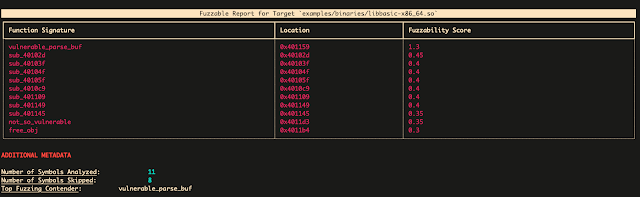
$ fuzzable analyze examples/binaries/libbasic.so

# analyzing a single C source file
$ fuzzable analyze examples/source/libbasic.c

# analyzing a workspace with multiple C/C++ files and headers
$ fuzzable analyze examples/source/source_bundle/
Binary Ninja Plugin
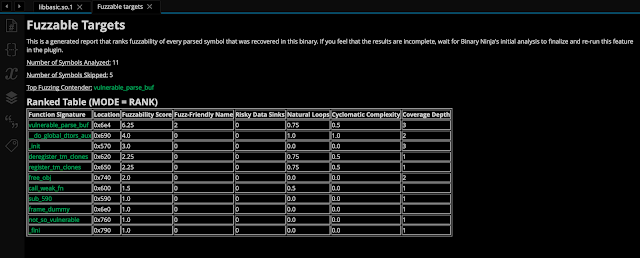
fuzzable can be easily installed through the Binary Ninja plugin marketplace by going to Binary Ninja > Manage Plugins and searching for it. Here is an example of the fuzzable plugin running, accuracy identifying targets for fuzzing and further vulnerability assessment:
Usage
fuzzable comes with various options to help better tune your analysis. More will be supported in future plans and any feature requests made.
Static Analysis Heuristics
To determine fuzzability, fuzzable utilize several heuristics to determine which targets are the most viable to target for dynamic analysis. These heuristics are all weighted differently using the scikit-criteria library, which utilizes multi-criteria decision analysis to determine the best candidates. These metrics and are there weights can be seen here:
Heuristic
Description
Weight
Fuzz Friendly Name
Symbol name implies behavior that ingests file/buffer input
0.3
Risky Sinks
Arguments that flow into risky calls (ie memcpy)
0.3
Natural Loops
Number of loops detected with the dominance frontier
0.05
Cyclomatic Complexity
Complexity of function target based on edges + nodes
0.05
Coverage Depth
Number of callees the target traverses into
0.3
As mentioned, check out the technical blog post for a more in-depth look into why and how these metrics are utilized.
Every targets you want to analyze is diverse, and fuzzable will not be able to account for every edge case behavior in the program target. Thus, it may be important during analysis to tune these weights appropriately to see if different results make more sense for your use case. To tune these weights in the CLI, simply specify the --score-weights argument:
By default, fuzzable will filter out function targets based on the following criteria:
Top-level entry calls - functions that aren't called by any other calls in the target. These are ideal entry points that have potentially very high coverage.
Static calls - (source only) functions that are static and aren't exposed through headers.
Imports - (binary only) other library dependencies being used by the target's implementations.
To see calls that got filtered out by fuzzable, set the --list_ignored flag:
$ fuzzable analyze --list-ignored <TARGET>
In Binary Ninja, you can turn this setting in Settings > Fuzzable > List Ignored Calls.
In the case that fuzzable falsely filters out important calls that should be analyzed, it is recommended to use --include-* arguments to include them during the run:
# include ALL non top-level calls that were filtered out
$ fuzzable analyze --include-nontop <TARGET>

# include specific symbols that were filtered out
$ fuzzable analyze --include-sym <SYM> <TARGET>
In Binary Ninja, this is supported through Settings > Fuzzable > Include non-top level calls and Symbols to Exclude.
Harness Generation
Now that you have found your ideal candidates to fuzz, fuzzable will also help you generate fuzzing harnesses that are (almost) ready to instrument and compile for use with either a file-based fuzzer (ie. AFL++, Honggfuzz) or in-memory fuzzer (libFuzzer). To do so in the CLI:
If the target is a binary, the generic black-box template will be used, which ideally can be used with a fuzzing emulation mode like AFL-QEMU. A copy of the binary will also be created as a shared object if the symbol isn't exported directly to be dlopened using LIEF.
At the moment, this feature is quite rudimentary, as it simply will create a standalone C++ harness populated with the appropriate parameters, and will not auto-generate code that is needed for any runtime behaviors (ie. instantiating and freeing structures). However, the templates created for fuzzable should get still get you running quickly. Here are some ambitious features I would like to implement down the road:
Full harness synthesis - harnesses will work directly with absolutely no manual changes needed.
Synthesis from potential unit tests using the DeepState framework (Source only).
Immediate deployment to a managed continuous fuzzing fleet.
Exporting Reports
fuzzable supports generating reports in various formats. The current ones that are supported are JSON, CSV and Markdown. This can be useful if you are utilizing this as part of automation where you would like to ingest the output in a serializable format.
In the CLI, simply pass the --export argument with a filename with the appropriate extension:
$ fuzzable analyze --export=report.json <TARGET>
In Binary Ninja, go to Plugins > Fuzzable > Export Fuzzability Report > ... and select the format you want to export to and the path you want to write it to.
Contributing
This tool will be continuously developed, and any help from external mantainers are appreciated!
Create an issue for feature requests or bugs that you have come across.
Submit a pull request for fixes and enhancements that you would like to see contributed to this tool.
Framework for Automating Fuzzable Target Discovery with Static Analysis.
Introduction
Vulnerability researchers conducting security assessments on software will often harness the capabilities of coverage-guided fuzzing through powerful tools like AFL++ and libFuzzer. This is important as it automates the bughunting process and reveals exploitable conditions in targets quickly. However, when encountering large and complex codebases or closed-source binaries, researchers have to painstakingly dedicate time to manually audit and reverse engineer them to identify functions where fuzzing-based exploration can be useful.
Fuzzable is a framework that integrates both with C/C++ source code and binaries to assist vulnerability researchers in identifying function targets that are viable for fuzzing. This is done by applying several static analysis-based heuristics to pinpoint risky behaviors in the software and the functions that executes them. Researchers can then utilize the framework to generate basic harness templates, which can then be used to hunt for vulnerabilities, or to be integrated as part of a continuous fuzzing pipeline, such as Google's oss-fuzz project.
In addition to running as a standalone tool, Fuzzable is also integrated as a plugin for the Binary Ninja disassembler, with support for other disassembly backends being developed.
Check out the original blog post detailing the tool here, which highlights the technical specifications of the static analysis heuristics and how this tool came about. This tool is also featured at Black Hat Arsenal USA 2022.
Run static analysis both as a standalone CLI tool or a Binary Ninja plugin.
Harness generation to ramp up on creating fuzzing campaigns quickly.
Installation
Some binary targets may require some sanitizing (ie. signature matching, or identifying functions from inlining), and therefore fuzzable primarily uses Binary Ninja as a disassembly backend because of it's ability to effectively solve these problems. Therefore, it can be utilized both as a standalone tool and plugin.
Since Binary Ninja isn't accessible to all and there may be a demand to utilize for security assessments and potentially scaling up in the cloud, an angrfallback backend is also supported. I anticipate to incorporate other disassemblers down the road as well (priority: Ghidra).
Command Line (Standalone)
If you have Binary Ninja Commercial, be sure to install the API for standalone headless usage:
# with poetry for a development virtualenv $ poetry shell
You can now analyze binaries and/or source code with the tool!
# analyzing a single shared object library binary
$ fuzzable analyze examples/binaries/libbasic.so

# analyzing a single C source file
$ fuzzable analyze examples/source/libbasic.c

# analyzing a workspace with multiple C/C++ files and headers
$ fuzzable analyze examples/source/source_bundle/
Binary Ninja Plugin
fuzzable can be easily installed through the Binary Ninja plugin marketplace by going to Binary Ninja > Manage Plugins and searching for it. Here is an example of the fuzzable plugin running, accuracy identifying targets for fuzzing and further vulnerability assessment:
Usage
fuzzable comes with various options to help better tune your analysis. More will be supported in future plans and any feature requests made.
Static Analysis Heuristics
To determine fuzzability, fuzzable utilize several heuristics to determine which targets are the most viable to target for dynamic analysis. These heuristics are all weighted differently using the scikit-criteria library, which utilizes multi-criteria decision analysis to determine the best candidates. These metrics and are there weights can be seen here:
Heuristic
Description
Weight
Fuzz Friendly Name
Symbol name implies behavior that ingests file/buffer input
0.3
Risky Sinks
Arguments that flow into risky calls (ie memcpy)
0.3
Natural Loops
Number of loops detected with the dominance frontier
0.05
Cyclomatic Complexity
Complexity of function target based on edges + nodes
0.05
Coverage Depth
Number of callees the target traverses into
0.3
As mentioned, check out the technical blog post for a more in-depth look into why and how these metrics are utilized.
Every targets you want to analyze is diverse, and fuzzable will not be able to account for every edge case behavior in the program target. Thus, it may be important during analysis to tune these weights appropriately to see if different results make more sense for your use case. To tune these weights in the CLI, simply specify the --score-weights argument:
By default, fuzzable will filter out function targets based on the following criteria:
Top-level entry calls - functions that aren't called by any other calls in the target. These are ideal entry points that have potentially very high coverage.
Static calls - (source only) functions that are static and aren't exposed through headers.
Imports - (binary only) other library dependencies being used by the target's implementations.
To see calls that got filtered out by fuzzable, set the --list_ignored flag:
$ fuzzable analyze --list-ignored <TARGET>
In Binary Ninja, you can turn this setting in Settings > Fuzzable > List Ignored Calls.
In the case that fuzzable falsely filters out important calls that should be analyzed, it is recommended to use --include-* arguments to include them during the run:
# include ALL non top-level calls that were filtered out
$ fuzzable analyze --include-nontop <TARGET>

# include specific symbols that were filtered out
$ fuzzable analyze --include-sym <SYM> <TARGET>
In Binary Ninja, this is supported through Settings > Fuzzable > Include non-top level calls and Symbols to Exclude.
Harness Generation
Now that you have found your ideal candidates to fuzz, fuzzable will also help you generate fuzzing harnesses that are (almost) ready to instrument and compile for use with either a file-based fuzzer (ie. AFL++, Honggfuzz) or in-memory fuzzer (libFuzzer). To do so in the CLI:
If the target is a binary, the generic black-box template will be used, which ideally can be used with a fuzzing emulation mode like AFL-QEMU. A copy of the binary will also be created as a shared object if the symbol isn't exported directly to be dlopened using LIEF.
At the moment, this feature is quite rudimentary, as it simply will create a standalone C++ harness populated with the appropriate parameters, and will not auto-generate code that is needed for any runtime behaviors (ie. instantiating and freeing structures). However, the templates created for fuzzable should get still get you running quickly. Here are some ambitious features I would like to implement down the road:
Full harness synthesis - harnesses will work directly with absolutely no manual changes needed.
Synthesis from potential unit tests using the DeepState framework (Source only).
Immediate deployment to a managed continuous fuzzing fleet.
Exporting Reports
fuzzable supports generating reports in various formats. The current ones that are supported are JSON, CSV and Markdown. This can be useful if you are utilizing this as part of automation where you would like to ingest the output in a serializable format.
In the CLI, simply pass the --export argument with a filename with the appropriate extension:
$ fuzzable analyze --export=report.json <TARGET>
In Binary Ninja, go to Plugins > Fuzzable > Export Fuzzability Report > ... and select the format you want to export to and the path you want to write it to.
Contributing
This tool will be continuously developed, and any help from external mantainers are appreciated!
Create an issue for feature requests or bugs that you have come across.
Submit a pull request for fixes and enhancements that you would like to see contributed to this tool.

 Login
Login