They can intercept user credentials while providing real-time context that helps attackers convince victims to approve MFA challenges during phone calls..
The U.S. Department of Justice is intensifying its efforts on crypto-related fraud as it escalates to execute what the authorities refer to as an “America First” enforcement agenda in response to a surge of digital asset-related frauds driven more by artificial intelligence.
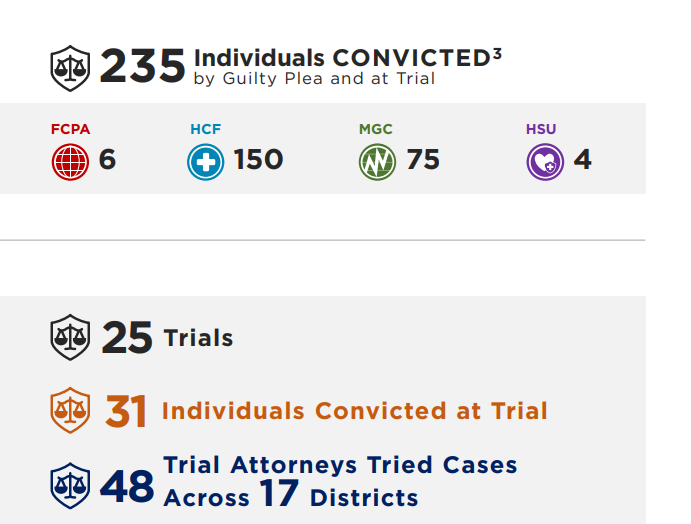
The shift was outlined in the DOJ Criminal Division Fraud Section 2025 Year in Review, published on Thursday, indicating prosecutors accused 265 defendants with a cumulative alleged loss on fraud cases of over $16 billion, nearly twice the amount reported the previous year.
Although the cases were in medical care, consumer protection, corporate fraud, and market manipulation, the DOJ said that cryptocurrency was increasingly becoming a type of payment rail, laundering, or asset category due to illicit funds.
In some significant cases, authorities seized crypto alongside cash, real estate, and luxury goods, showing the strong integration of digital assets into conventional fraudulent actions.
DOJ Health Care Fraud Crackdowns Lead to Major Crypto Seizures
One of the most prominent cases cited involved a $1 billion amniotic wound allograft fraud scheme that allegedly generated more than $600 million in improper Medicare payments.
Prosecutors charged Tyler Kontos, Joel Kupetz, and Jorge Kinds with targeting elderly and terminally ill patients for medically unnecessary procedures.
As part of the investigation, law enforcement seized more than $7.2 million in assets, including bank accounts and cryptocurrency.
The DOJ also highlighted the National Health Care Fraud Takedown carried out last year, the largest in the department’s history.
That operation charged 324 individuals across 50 federal districts for schemes involving more than $14.6 billion in intended losses.
Authorities confiscated more than $245 million in assets in the sweep, including significant amounts of cryptocurrency.
Simultaneously, the regulators prevented over $4 billion of fraudulent Medicare payments prior to their disbursement, indicating a more active, data-driven enforcement strategy.
Behind these cases is the DOJ Fraud Section, which operates through four specialized units that increasingly intersect with crypto-related crime.
Its units include foreign bribery, market and consumer fraud, healthcare fraud, and health and safety crimes, areas where digital assets and blockchain-based laundering are now frequently involved.
In 2025, blockchain analytics firms reported that average scam payments rose more than 250%, while AI-assisted scams have surged by more than 450%, as criminals deployed deepfake audio, synthetic identities, and automated phishing at scale.
In response, the DOJ and other agencies have launched coordinated initiatives aimed at transnational fraud networks, particularly so-called “pig butchering” scams linked to criminal groups operating in Southeast Asia.
A multi-agency strike force announced late last year has already seized and forfeited more than $401 million in cryptocurrency, including the largest bitcoin seizure in U.S. history.
Separately, the FBI’s Operation Level Up has notified thousands of potential victims and helped prevent hundreds of millions of dollars in additional losses.
They can intercept user credentials while providing real-time context that helps attackers convince victims to approve MFA challenges during phone calls..
After an Instagram impersonation, Alan Shimel reveals how Meta’s AI moderation dismissed a clear security threat—showing why identity protection is broken.
South Korean prosecutors are investigating the disappearance of a significant amount of Bitcoin that had been confiscated as criminal proceeds, after an internal audit suggested the assets may have vanished while under state custody.
The Gwangju District Prosecutors’ Office believes the loss likely occurred during the management period last year and is treating the incident as a suspected phishing attack, raising fresh concerns over how seized digital assets are stored and safeguarded.
According to a senior prosecution source cited by local media, preliminary internal assessments suggest the missing Bitcoin was worth roughly 70 billion won, or about $48 million, at the time of the loss.
Seized Bitcoin Lost After Wallet Password Exposure, Officials Say
An official at the prosecutor’s office stated that the investigators are striving to establish the locations of the seized properties, but they could not verify any additional information at the moment.
Local news states that the bitcoin was linked to an illegal gambling situation and that it was being seized as an illegal piece of property when it was lost.
The estimates reported in the domestic media indicate that the value might be in tens of billions of won, which would translate to several million dollars, but those numbers have not been verified by prosecutors.
The early evidence indicates that the bitcoin was stored in a portable USB, as opposed to a more durable custody system.
The wallet password was also reported to have been revealed to a third party during a regular examination of confiscated items, which provided an opportunity to illegally access it and transfer money.
The case is one of the most recent high-profile cases of stolen cryptocurrency being re-stolen by law enforcement via social engineering instead of technical merits.
Phishing attacks are deceptive, not technical, as they take advantage of a trusting party. In a more institutionalized environment, they usually prosper through human error and poor internal controls as opposed to blockchain weaknesses.
South Korea’s Expanding Authority Over Seized Digital Assets
The Gwangju District Prosecutors’ Office is no stranger to large crypto seizure cases. In March 2024, it pursued the recovery of roughly 170 billion won, or about $127 million at the time, in Bitcoin linked to another illegal gambling operation.
South Korea's Supreme Court rules Bitcoin on exchanges can be legally seized under Criminal Procedure Act, establishing precedent as regulators expand asset freeze powers and AML enforcement.#SouthKorea#Bitcoinhttps://t.co/3fa5PxHMMG
Such a legal basis was initially established in 2018, when the Supreme Court decided that cryptocurrencies are intangible assets and have economic value and thus can be seized in case they are linked to a crime.
Later judicial decisions have further broadened the power of the seizure, and a December case verified that the bitcoin kept on domestic exchanges like Upbit and Bithumb may also be confiscated.
The recent case arrived on the day when the South Korean regulators are busy increasing control over the crypto industry.
A worrying pattern has formed in the crypto sector. Reports say that about four in five projects hit by major hacks do not fully recover. Money is lost, yes. But the deeper damage is often to trust — and that can be fatal.
Trust Erodes Fast
When a breach is found, users pull funds quickly. Partners step back. Liquidity dries up. Industry experts, including Immunefi CEO Mitchell Amador, warn that slow or unclear responses can push entire communities away.
Some projects try to fix code quietly. That can fail. Silence is sometimes treated as hiding. Panic spreads. Confidence drops.
“Nearly 80% of projects that suffer a hack never fully recover,” Amador pointed out. The primary reason, he said, is not the initial loss of funds, but the “breakdown of operations and trust during the response.”
How Teams Respond Can Decide Fate
Reports note that incident plans are rare and that the absence of a clear playbook hurts more than the bug itself. A quick, honest update can calm people. A slow, confused reaction makes things worse.
In many cases, even after the technical flaw is fixed, the project stays damaged because users left and did not return. Some teams are rebuilt under new names. Others never regain attention. The human side of recovery matters a lot.
Amador said many protocols freeze once an exploit comes to light. According to him, teams often underestimate how exposed they are and lack the operational readiness needed to handle a serious security breach.
Security Problems Are Changing
The attacks are not all the same. Smart contract bugs remain a big cause. But now simple human errors, like leaked keys or social tricks, are also common.
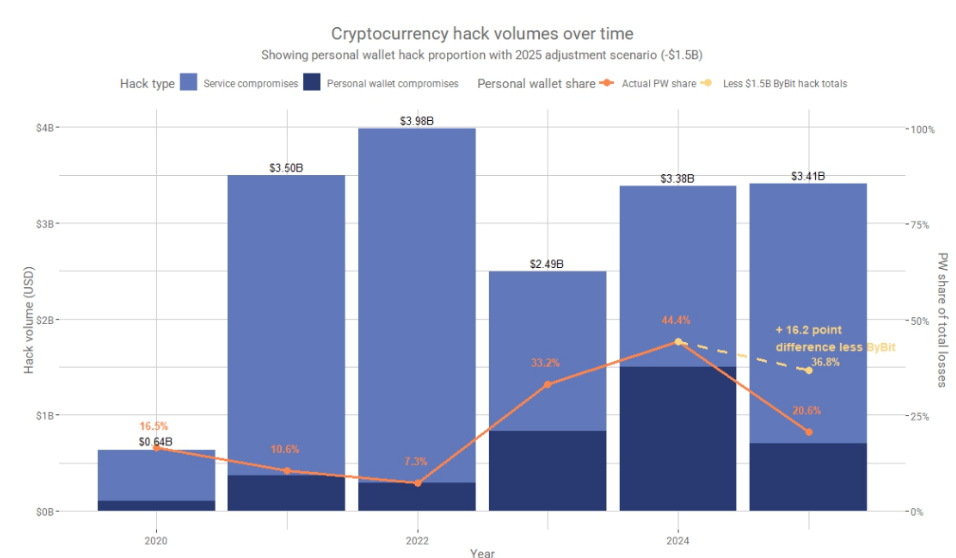
Reports say that losses in recent years have grown into the billions, with one figure around $3.4 billion lost in a single year. That number shows the scale of the risk.
Community Reaction Shapes Outcomes
A project can be technically repaired. But the people who used it may have moved on. Communities are fragile. Some founders try to refund users or set up funds to cover losses.
That can help. Other teams decide to close down the service and focus on other work. The decision is sometimes made for them when liquidity vanishes and partners cut ties. Recovery is often not just a technical task; it is a rebuild of trust and reputation.
Huge Damage
Crypto hacks jumped sharply in 2025 as attackers hit both large platforms and private wallets. Based on reports, total losses reached $3.4 billion, the biggest annual figure since 2022.
Just three breaches were responsible for nearly 70% of that damage by early December, with the $1.4 billion Bybit exploit standing out as the largest.
Featured image from Unsplash, chart from TradingView
A sophisticated phishing campaign impersonating WhatsApp Web uses fake meeting links and QR codes to hijack accounts and enable real-time surveillance.
A sophisticated phishing campaign impersonating WhatsApp Web uses fake meeting links and QR codes to hijack accounts and enable real-time surveillance.
For years, the Food and Drug Administration provided an informational webpage for parents warning them of the dangers of bogus autism treatments, some promoted by anti-vaccine activists and "wellness" companies. The page cited specifics scams and the "significant health risks" they pose.
But, under anti-vaccine Health Secretary Robert F. Kennedy Jr.—who has numerous ties to the wellness industry—that FDA information webpage is now gone. It was quietly deleted at the end of last year, the Department of Health and Human Services confirmed to Ars Technica.
The defunct webpage, titled "Be Aware of Potentially Dangerous Products and Therapies that Claim to Treat Autism," provided parents and other consumers with an overview of the problem. It began with a short description of autism and some evidence-based, FDA-approved medications that can help manage autism symptoms. Then, the regulatory agency provided a list of some false claims and unproven, potentially dangerous treatments it had been working to combat. "Some of these so-called therapies carry significant health risks," the FDA wrote.
The malware landscape is growing more complex and costly by the minute, as indicated by the rising number of cyberattacks that grow each year. According to the Federal Bureau of Investigation, in 2024, approximately $1.4 million in losses were reported due to malware. Meanwhile, complaints of ransomware, a type of malware that locks your files until a ransom is paid to release them, rose by 9% from the year prior, with losses totaling nearly $12.5 million.
With the continued growth of e-commerce, online banking, and artificial intelligence, we can count on even more new cyber threats for all kinds of devices—be it Android, iPhone, PC, or Mac. No device under your family’s roof is immune to cyberattacks. As we speak, one or more of your devices may have already been infected. But would you know it?
In this blog, we’ll dive into the types of viruses and malware that infiltrate devices and their indications, the ways you can remove them, and tips to protect your phones moving forward.
What is malware?
Malware is malicious software designed to harm your device, steal your personal information, or disrupt your digital life. On mobile devices, malware can take many forms—from apps that secretly collect your data to programs that bombard you with unwanted ads or even lock your device for ransom.
No mobile device is impervious to cyber threats
Mobile devices, including smartphones and tablets, can be infected with malware and other digital threats, even when their operating systems have built-in security features. How does this happen? Your phone can catch viruses and malware in several ways:
Malicious apps from unofficial sources. This is the most common way your device could be infected by malware or viruses. Downloading unofficial apps from unvetted third-party websites or app stores significantly increases your device’s risk of being infected with malware that steals your personal information or damages your device.
Phishing links. Cybercriminals send deceptive text messages, emails, or social media direct messages that have malicious links. When you tap on these links, they can automatically download malware to your device or redirect you to fake websites that capture your login credentials.
Drive-by downloads. This happens when you visit compromised websites that automatically install malware onto your device without your consent or knowledge. Similarly, malicious advertisements on legitimate websites can contain embedded code that infects your device even when just viewed.
Unsecured Wi-Fi networks. Through public Wi-Fi, cybercriminals can create fake networks, monitor traffic on legitimate ones, intercept data, or push malicious content to your device.
Outdated operating systems and apps. When you delay or disregard system or software updates, you weaken your security and leave it vulnerable to hackers. Enable automatic updates whenever possible, and regularly check for system and app updates manually, as these include security patches.
Signs of malware or a virus
Malware doesn’t always announce itself with a big flashing sign. On the contrary, it slips quietly into your devices and starts causing trouble behind the scenes. Before long, you will see noticeable changes in its behavior. Here are five key signs of malware or a virus to watch for and catch the problem early, before the damage spreads:
Your device is hot to the touch. When you accidentally download malware, your device’s internal components work harder to support the malware or virus that has been embedded. This may cause your device to feel hot to the touch or even overheat.
Everything feels off. A digital virus can impact every area of a device’s performance, such as causing websites to load more slowly, apps to crash, or your battery to drain more quickly. Overall performance will be sluggish no matter how many times you reboot or delete large files.
More random pop-ups and unfamiliar apps. You may notice an increase in random pop-ups. And if you take a closer look at your app library, you may even see apps you never downloaded.
Fraudulent links sent from your accounts. It’s common for malware to gain access to your phone and then send messages to your contacts to spread the malware. This can happen via email, text, and even social media accounts. You could even see unexpected charges in your phone bill for premium services.
You have unauthorized charges. If you notice unauthorized charges on your credit card or bank statement, a malicious app or malware may have accessed your personal information to make fraudulent purchases or subscriptions.
Browser redirects or changed search settings. Your web searches redirect to unfamiliar sites, or your default search engine changes without your input. Search malware may have hijacked your browser to generate ad revenue or expose you to harmful websites that can compromise your browsing privacy.
Unknown accessibility services running. Your phone’s accessibility settings show services you didn’t enable. These could have generic names or be disguised as system apps to monitor your activity, capture passwords, and control your device.
Excessive data usage spikes. A dramatic increase in your monthly data consumption while your device usage habits are the same often indicates malware is transmitting your personal information, downloading additional malicious content, or participating in botnet activities using your cellular data.
Viruses and malware that infect mobile devices
As our phones and tablets become extensions of our daily lives, cybercriminals have developed sophisticated malware explicitly designed to infiltrate them, such as:
Adware. This is unwanted software that displays intrusive pop-up ads on your device, invading your privacy by tracking your browsing habits and significantly slowing down your device.
Spyware and Stalkerware. These types of malware secretly monitor your activities, including messages, calls, and location data, risking your personal safety and privacy and potentially enabling harassment or abuse.
Banking Trojans. These target your financial information by mimicking legitimate banking apps or intercepting login credentials, then access your bank accounts, steal your money, or make payments using your accounts.
Ransomware. Here, the malware encrypts and locks your personal files, then demands payment before restoring your access to your own data. Whether or not you pay, you could lose important photos, documents, and files.
SMS Trojans. These apps send premium-rate text messages or make unauthorized calls without your knowledge, racking up unexpected charges on your phone bill that can accumulate quickly.
Fleeceware. These apps appear legitimate but charge excessive subscription fees after a short trial period, often making cancellation difficult. The frustrating thing is that you face ongoing financial charges for apps that provide no value.
Rogue configuration profiles. Unauthorized settings will be installed on your device, enabling cybercriminals to gain access and monitor your activities.
Find the proof of a virus or malware
Sometimes the warning signs are obvious, but at other times, malware operates quietly in the background, stealing data or draining resources without drawing attention. Find out for sure if your device has a virus or malware by following these steps:
Check battery usage statistics. To check this on Android, navigate to Settings > Battery to see which apps are consuming the most power. On iPhone, check Settings > Battery > Battery Usage by App. Look for unfamiliar apps that use excessive power or apps you rarely use that appear at the top of the list.
Inspect your data usage. Review your data consumption on Android by going to Settings > Network & Internet > Data Usage. For iPhone, head to Settings > Cellular. Look for apps that use more data than expected or unfamiliar apps that consume significant amounts.
Look for apps you didn’t download. Review your app list regularly for unfamiliar applications by going to Android’s Settings > Apps, or check your app drawer. On iPhone, swipe through your home screens and check your App Library. Remove apps you didn’t install, especially those with generic names or no clear purpose.
Review app permissions. Malware sometimes modifies app permissions to access your personal information. On Android, go to Settings > Privacy > Permission Manager to seeAdmin Apps to view which apps have access to your camera, microphone, location, and contacts. On iPhone, check Settings > Privacy & Security. Revoke permissions for apps that don’t need them.
Look deeper into security warnings. Both Android and iOS will alert you to potential security threats. Don’t ignore notifications about potentially harmful apps, suspicious activity, or unknown device logins. Take these alerts seriously and investigate immediately.
Run comprehensive scans with reputable security tools. Use trusted antivirus software to perform full system scans on your mobile devices. Many device manufacturers also provide built-in security scanning features, such as Windows Defender on PCs or Google Play Protect on Android devices.
Review account security alerts and login activity. Major platforms provide account activity logs showing recent logins and locations. Check your email, social media, and banking accounts for alerts about suspicious login attempts or password changes you didn’t initiate.
Here are more specific measures to ascertain the presence of a virus or malware, based on your mobile device’s operating system:
Android phones and tablets
Test your device in Safe Mode. Restart your Android device. As it boots up, tap and hold “Power off” until you see “Reboot to safe mode.” In this mode, only pre-installed apps will run. If your device performs normally here but has issues in regular mode, a downloaded app is likely the culprit.
Review device admin and accessibility services. Go to Settings > Security > Device admin apps to see which apps have administrative privileges. Remove any unfamiliar apps immediately. Also, check Settings > Accessibility for services you haven’t enabled and prevent malware from controlling your device.
Run a Google Play Protect scan. Open Google Play Store, tap your profile picture, then select “Play Protect.” Tap the gear icon and ensure that “Scan apps with Play Protect” is enabled. Then, run a manual scan to check for harmful apps.
iPhone or iPad
Check for unexpected configuration profiles. Go to Settings > General > VPN & Device Management (or Profiles & Device Management). If you see vaguely named profiles that you didn’t install, they could be the culprit. Legitimate profiles from your workplace, school, and services will have clear, recognizable names.
Look for unknown enterprise certificates. Navigate to Settings > General > About > Certificate Trust Settings. Any certificates you don’t recognize, particularly those enabled for full trust, warrant investigation.
Review installed apps and web clips. Check your home screen and App Library for applications you didn’t download. Also, examine Settings > Screen Time > See All Activity to identify apps that consume unusual amounts of time or data. Web clips—website shortcuts that mimic apps—from unknown sources could indicate a compromise.
Examine Safari settings changes. Open Settings > Safari and verify your search engine hasn’t been changed. Also, under Settings > Safari > Extensions, check if new content blockers or extensions have been installed. Unexpected changes to your default search engine or new extensions could redirect your browsing activity and compromise your privacy.
Watch for account compromise indicators. Be alert for unexpected password reset emails, new device logins, or changes to your Apple ID settings that you didn’t make. Check Settings > [Your Name] > Sign-In & Security for any unrecognized devices or suspicious activity.
Action plan to remove viruses from your mobile device
If you discover malicious apps and profiles in your phone, a clear, step-by-step action plan will help you remove them and restore your device to a secure state. Here’s how to tackle mobile malware confidently and get your device back to normal:
Isolate your device immediately. Turn on airplane mode to stop malware from communicating with external servers while you clean your phone. You can still access your device’s settings and installed apps in airplane mode.
Remove suspicious apps and configuration profiles. On Android, go to Settings > Apps and look for unfamiliar applications, especially those requesting excessive permissions. On iPhone, check Settings > General > VPN & Device Management for unknown configuration profiles. Uninstall any apps you didn’t download from official stores and remove suspicious profiles immediately. Pay attention to apps that appeared recently or have names similar to legitimate apps.
Clear your cache. Open your browser settings and clear all browsing data, including history, cookies, cached files, and saved passwords to remove potentially malicious scripts and tracking elements. On Android Chrome, go to Settings > Privacy and Security > Clear browsing data. On iPhone Safari, go to Settings > Safari > Clear History and Website Data.
Revoke risky app permissions. Revoke unnecessary permissions for all apps, especially those that access your camera, microphone, location, or contacts. On Android, go to Settings > Apps > App Permissions. On iPhone, check Settings > Privacy & Security. Take note, particularly for recently installed or suspicious applications.
Update your operating system and all apps. Install all available system updates through Settings > System Update (Android) or Settings > General > Software Update (iPhone). Download apps only through the Google Play Store or Apple App Store.
Run a comprehensive security scan. Use a reputable mobile security app to scan your device thoroughly for malware, potentially unwanted programs, and security vulnerabilities. To know if you have McAfee on your phone, search “McAfee” in your device settings.
Restore from a clean backup if necessary. If the infection persists or causes significant damage, consider restoring your device from a backup that was created before the infection occurred. Both Android and iPhone offer cloud backup services via Google Drive/iCloud that let you restore your data while starting fresh. Ensure the backup version isn’t infected by checking when symptoms first appeared versus when the backup was created.
Escalate to professionals if issues persist. Contact cybersecurity professionals or your device manufacturer if your browser continues to redirect to suspicious websites or if you see evidence of credential or financial theft.
Best digital habits to safeguard your family devices
With a few smart habits and simple tools, you can create a safer digital environment for your family members. Here are some practical ways to safeguard family devices and keep threats at bay.
Stay on top of updates. Aside from installing comprehensive security software, be sure to update your device’s security features to have the latest protection from specific attacks.
Use strong, unique passwords. Every family device should have a strong password and a unique username. This means changing your factory settings immediately and getting your family on a schedule to change passwords.
Enable two-factor authentication (2FA). Double the security to your important accounts by requiring a second form of verification. 2FA significantly reduces the likelihood of unauthorized access, even if your password is stolen.
Know your apps. Avoid third-party apps and download apps only from trusted sources. Research the app’s safeguards and read reviews before installing. A best practice is to stick to apps from the officially verified app stores.
Don’t click that link. Slow down and note your digital surroundings. Does that link or attachment look dubious? Malware and viruses are usually loaded onto your devices through unsolicited emails and text messages, or via trusted social media circles.
Lock settings and limit app permissions. A great way to block malware is to make all accounts private and limit app permissions. Instead of keeping an app’s permissions “always-on,” change the setting so it asks permission every time. Decline an app’s request to access your contacts or connect to other apps in your digital ecosystem.
Clear browsing history. Go through your history and data to check for suspicious links. Clear browsing history regularly by going to your browser, clicking on the three dots in the upper right corner, and clicking “delete browsing data.”
Avoid public Wi-Fi or use a secure VPN. Public networks are often unsecured and can expose your data to cybercriminals. If you must connect while in public, consider using a virtual private network or your mobile data hotspot instead.
Final thoughts
While the threat of malware and viruses continues to evolve, you now have the knowledge and tools to stay digitally protected. The signs we’ve discussed—from unexpected device behavior to suspicious pop-ups—serve as warnings, helping you catch problems before they escalate into major security incidents.
Your best defense combines proactive security measures and vigilant behavior. Applying simple, solid digital habits such as updating software, using strong passwords, and staying alert to suspicious activity will thwart the vast majority of common threats. By incorporating these practices into your routine, along with the right online security tools, you are building a robust defense that works around the clock.
Google is rolling out a way to add a new Gmail address without losing data, with a strict limit, and new phishing risks as scammers exploit the change.
Google is rolling out a way to add a new Gmail address without losing data, with a strict limit, and new phishing risks as scammers exploit the change.
Users should be particularly wary of holiday-themed scams over the next few weeks, according to researchers at Malwarebytes.
“Mobile-first shopping has become second nature, and during the holidays, it’s faster and more frantic than ever,” Malwarebytes says. “Fifty-five percent of people get a scam text message weekly, while 27% are targeted daily.
A large phishing campaign is using phony seasonal party invites to trick users into installing remote management and monitoring (RMM) tools, according to researchers at Symantec.

 Login
Login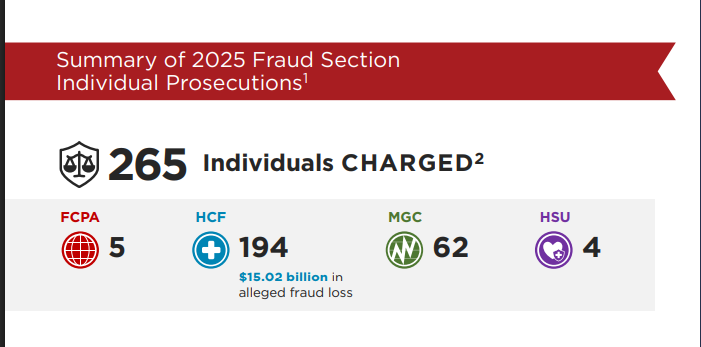
 The FBI recorded $9.3 billion losses spread across various crypto-related investment scams, extortion, ATM and kiosks, among others, in 2024.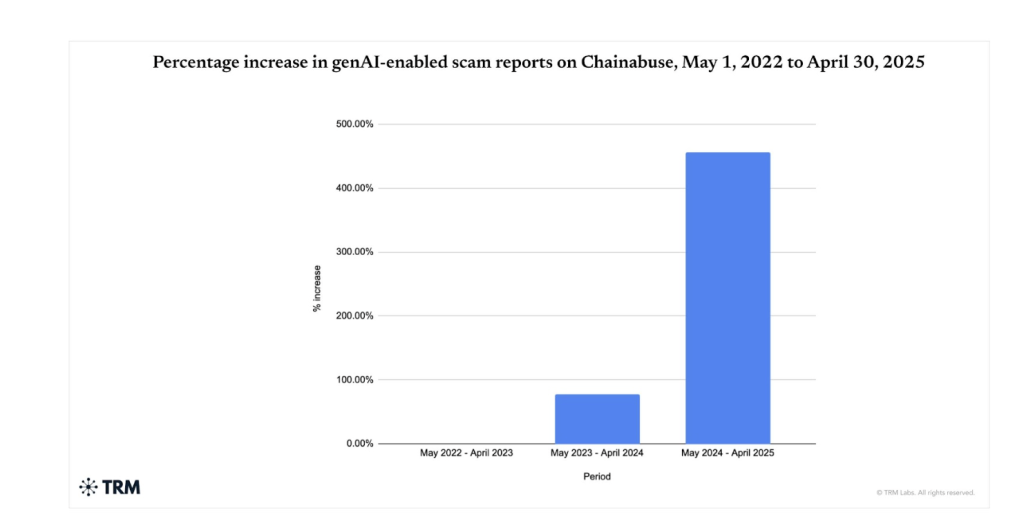



 South Korea's Supreme Court rules Bitcoin on exchanges can be legally seized under Criminal Procedure Act, establishing precedent as regulators expand asset freeze powers and AML enforcement.