Reading view

There are new articles available, click to refresh the page.

Ethereum Foundation Maps Path To zkEVM Proofs On Mainnet L1

The Ethereum Foundation has published a step-by-step plan to let Ethereum’s main chain validate blocks using zkEVM proofs, reducing the need for validators to re-run every computation themselves. The proposal, shared via X on Jan. 15 by Tomasz K. Stańczak, Co-Executive Director at the Ethereum Foundation, lays out the engineering work needed across Ethereum’s execution and consensus clients, plus new proving infrastructure and security processes.

zkEVM on L1 – the planhttps://t.co/KLz7PoH6q9

— Tomasz K. Stańczak (@tkstanczak) January 15, 2026

Ethereum L1 Moves Toward zk Proof-Based Validation

Already in July last year, the Ethereum Foundation announced its “zk-first” approach. Today, Ethereum’s validators typically check a block by re-executing the transactions and comparing results. The plan proposes an alternative: validators could verify a cryptographic proof that the block’s execution was correct.

The document summarizes the intended pipeline in plain terms: an execution client produces a compact “witness” package for a block, a standardized zkEVM program uses that package to generate a proof of correct execution, and consensus clients verify that proof during block validation.

The first milestone is creating an “ExecutionWitness,” a per-block data structure containing the information needed to validate execution without re-running it. The plan calls for a formal witness format in Ethereum’s execution specifications, conformance tests, and a standardized RPC endpoint. It notes that the current debug_executionWitness endpoint is already “being used in production by Optimism’s Kona,” while suggesting a more zk-friendly endpoint may be needed.

A key dependency is adding better tracking of which parts of state a block touches, via Block Level Access Lists (BALs). The document says that as of November 2025, this work was not treated as urgent enough to be backported to earlier forks.

The next milestone is a “zkEVM guest program,” described as stateless validation logic that checks whether a block produces a valid state transition when combined with its witness. The plan emphasizes reproducible builds and compiling to standardized targets so assumptions are explicit and verifiable.

Beyond Ethereum-specific code, the plan aims to standardize the interface between zkVMs and the guest program: common targets, common ways to access precompiles and I/O, and agreed assumptions about how programs are loaded and executed.

On the consensus side, the roadmap calls for changes so consensus clients can accept zk proofs as part of beacon block validation, with accompanying specifications, test vectors, and an internal rollout plan. The document also flags execution payload availability as important, including an approach that could involve “putting the block in blobs.”

The proposal treats proof generation as an operational problem as much as a protocol one. It includes milestones to integrate zkVMs into EF tooling such as Ethproofs and Ere, test GPU setups (including “zkboost”), and track reliability and bottlenecks.

Benchmarking is framed as ongoing work, with explicit goals like measuring witness generation time, proof creation and verification time, and the network impact of proof propagation. Those measurements could feed into future gas repricing proposals for zk-heavy workloads.

Security is also marked as perpetual, with plans for formal specs, monitoring, supply-chain controls like reproducible builds and artifact signing, and a documented trust and threat model. The document proposes a “go/no-go framework” for deciding when proof systems are mature enough for broader use.

One external dependency stands out: ePBS, which the document describes as necessary to give provers more time. Without it, the plan says the prover has “1–2 seconds” to create a proof; with it, “6–9 seconds.” The document adds a two-sentence framing that captures the urgency: “This is not a project that we are working on. However, it is an optimization that we need.” It expects ePBS to be deployed in “Glamsterdam,” targeted for mid-2026.

If these milestones land, Ethereum would be moving toward proof-based validation as a practical option on L1, while the timing and operational complexity of proving remain the gating factors.

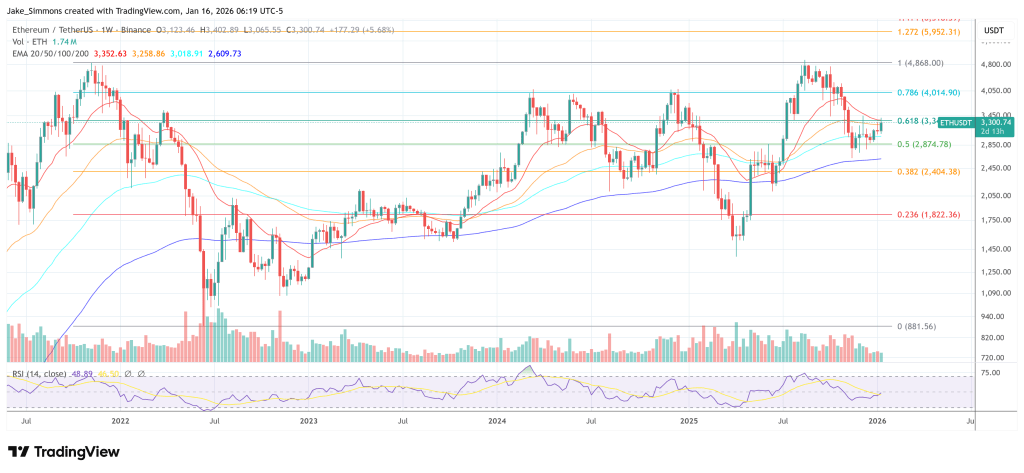
At press time, ETH traded at $3,300.

Ethereum price chart

Build Your Own Token Creator: Integrating @escapehub/token-creator SDK with React, Vue, and Svelte

By: EscapeHub

Creating ERC20 tokens has traditionally required deep Solidity knowledge and complex deployment scripts. The @escapehub/token-creator SDK changes that by providing a simple, framework-agnostic JavaScript library for deploying feature-rich tokens across 40+ EVM chains.

This guide shows you how to integrate the SDK into React, Vue, and Svelte applications — complete with wallet connections, vanity address mining, and multi-step token configuration wizards.

What is @escapehub/token-creator?

The @escapehub/token-creator SDK is a TypeScript library that handles:

  • Token deployment to 40+ EVM-compatible blockchains
  • Vanity address mining — generate custom token addresses (e.g., starting with 0xCAFE...)
  • Configurable token features — burns, fees, limits, security options
  • Chain configuration — built-in factory addresses, RPCs, and explorers for all supported networks

Supported Chains

The SDK supports major networks including:

  • Ethereum & Sepolia
  • Base & Base Sepolia
  • BNB Smart Chain & BSC Testnet
  • Polygon & Polygon Amoy
  • Arbitrum One & Arbitrum Sepolia
  • Avalanche, Fantom, Optimism, and 30+ more

Live Examples

Before diving into code, check out these production implementations:

Core SDK Usage

The SDK is framework-agnostic. Here’s the core pattern used across all frameworks:

Installation

npm install @escapehub/token-creator ethers

Token Deployment

import { deployToken, createDefaultConfig, getChainConfig } from '@escapehub/token-creator';
import { BrowserProvider } from 'ethers';
// Get ethers signer from your wallet provider
const provider = new BrowserProvider(walletClient, walletClient.chain.id);
const signer = await provider.getSigner();
// Build token configuration
const config = createDefaultConfig('My Token', 'MTK', '1000000', ownerAddress, {
burnEnabled: true,
feesEnabled: true,
buyFeeBps: 300, // 3% buy fee
sellFeeBps: 300, // 3% sell fee
// ... more options
});
// Get chain config (factory address, RPC, explorer, etc.)
const chainConfig = getChainConfig(chainId);
// Deploy the token
const result = await deployToken(signer, config, chainConfig, salt);
console.log('Token deployed:', result.tokenAddress);

Vanity Address Mining

Want your token address to start with 0xDEAD or 0xCAFE? The SDK includes async vanity mining:

import {
generateSaltAsync,
getImplementation,
getMinimalProxyInitCodeHash,
getChainConfig,
} from '@escapehub/token-creator';
const chainConfig = getChainConfig(chainId);
const implementation = await getImplementation(provider, chainConfig.factoryAddress);
const initCodeHash = getMinimalProxyInitCodeHash(implementation);
const result = await generateSaltAsync(chainConfig.factoryAddress, initCodeHash, {
pattern: 'CAFE',
mode: 'prefix', // or 'suffix', 'contains'
maxAttempts: 10_000_000,
onProgress: (attempts, hashRate) => {
console.log(`Mining: ${attempts} attempts at ${hashRate} H/s`);
},
});
if (result) {
console.log('Found address:', result.address);
console.log('Use this salt:', result.salt);
}

Framework Integrations

Now let’s see how to wrap the SDK for each framework. The core logic is identical — only the state management differs.

React Integration

Tech Stack: React 18, TypeScript, wagmi v2, Reown AppKit, Tailwind CSS

Create a custom hook for deployment:

// hooks/useTokenDeploy.ts
import { useState } from 'react';
import { deployToken, createDefaultConfig, getChainConfig } from '@escapehub/token-creator';
import { BrowserProvider } from 'ethers';
export function useTokenDeploy() {
const [status, setStatus] = useState<'idle' | 'confirming' | 'deploying' | 'success' | 'error'>('idle');
const [tokenAddress, setTokenAddress] = useState<string | null>(null);
const [error, setError] = useState<Error | null>(null);
  async function deploy(walletClient: any, formData: TokenFormData, salt?: string) {
setStatus('confirming');
try {
const provider = new BrowserProvider(walletClient, walletClient.chain.id);
const signer = await provider.getSigner();
      const config = createDefaultConfig(
formData.name,
formData.symbol,
formData.supply,
formData.owner,
formData.options
);
      const chainConfig = getChainConfig(walletClient.chain.id);
setStatus('deploying');
      const result = await deployToken(signer, config, chainConfig, salt);
setTokenAddress(result.tokenAddress);
setStatus('success');
return result;
} catch (e) {
setError(e as Error);
setStatus('error');
throw e;
}
}
  return { deploy, status, tokenAddress, error };
}

Usage in a component:

function TokenCreator() {
const { deploy, status, tokenAddress } = useTokenDeploy();
  return (
<div>
{status === 'confirming' && <p>Confirm in your wallet...</p>}
{status === 'deploying' && <p>Deploying token...</p>}
{status === 'success' && <p>Deployed at: {tokenAddress}</p>}
<button onClick={() => deploy(walletClient, formData)}>
Deploy Token
</button>
</div>
);
}

Full demo: github.com/escapehub-ai/token-creator-react

Vue Integration

Tech Stack: Vue 3.5 (Composition API), TypeScript, wagmi v2, Reown AppKit, Tailwind CSS

Create a composable for deployment:

// composables/useTokenDeploy.ts
import { ref } from 'vue';
import { deployToken, createDefaultConfig, getChainConfig } from '@escapehub/token-creator';
import { BrowserProvider } from 'ethers';
export function useTokenDeploy() {
const status = ref<'idle' | 'confirming' | 'deploying' | 'success' | 'error'>('idle');
const tokenAddress = ref<string | null>(null);
const error = ref<Error | null>(null);
  async function deploy(walletClient: any, formData: TokenFormData, salt?: string) {
status.value = 'confirming';
try {
const provider = new BrowserProvider(walletClient, walletClient.chain.id);
const signer = await provider.getSigner();
      const config = createDefaultConfig(
formData.name,
formData.symbol,
formData.supply,
formData.owner,
formData.options
);
      const chainConfig = getChainConfig(walletClient.chain.id);
status.value = 'deploying';
      const result = await deployToken(signer, config, chainConfig, salt);
tokenAddress.value = result.tokenAddress;
status.value = 'success';
return result;
} catch (e) {
error.value = e as Error;
status.value = 'error';
throw e;
}
}
  return { deploy, status, tokenAddress, error };
}

Usage in a component:

<script setup lang="ts">
import { useTokenDeploy } from '@/composables/useTokenDeploy';
import { useVanityMining } from '@/composables/useVanityMining';
const { deploy, status, tokenAddress } = useTokenDeploy();
const { mine, salt, mining, progress } = useVanityMining({
chainId: 11155111,
pattern: 'CAFE',
mode: 'prefix',
});
async function handleDeploy() {
await deploy(walletClient, formData, salt.value);
}
</script>
<template>
<div>
<p v-if="status === 'confirming'">Confirm in your wallet...</p>
<p v-else-if="status === 'success'">Deployed at: {{ tokenAddress }}</p>
<button @click="handleDeploy">Deploy Token</button>
</div>
</template>

Full demo: github.com/escapehub-ai/token-creator-vue

Svelte Integration

Tech Stack: SvelteKit 2, Svelte 5 (with runes), TypeScript, @wagmi/core v2, Reown AppKit, Tailwind CSS

Create a store for deployment:

// stores/deploy.ts
import { writable, derived } from 'svelte/store';
import { deployToken, createDefaultConfig, getChainConfig } from '@escapehub/token-creator';
import { BrowserProvider } from 'ethers';
function createDeployStore() {
const status = writable<'idle' | 'confirming' | 'deploying' | 'success' | 'error'>('idle');
const tokenAddress = writable<string | null>(null);
const error = writable<Error | null>(null);
  async function deploy(walletClient: any, formData: TokenFormData, salt?: string) {
status.set('confirming');
try {
const provider = new BrowserProvider(walletClient, walletClient.chain.id);
const signer = await provider.getSigner();
      const config = createDefaultConfig(
formData.name,
formData.symbol,
formData.supply,
formData.owner,
formData.options
);
      const chainConfig = getChainConfig(walletClient.chain.id);
status.set('deploying');
      const result = await deployToken(signer, config, chainConfig, salt);
tokenAddress.set(result.tokenAddress);
status.set('success');
return result;
} catch (e) {
error.set(e as Error);
status.set('error');
throw e;
}
}
  return { deploy, status, tokenAddress, error };
}
export const deployStore = createDeployStore();

Usage in a component:

<script lang="ts">
import { deployStore } from '$lib/stores/deploy';
import { vanityStore, vanitySalt } from '$lib/stores/vanity';
  const { status, tokenAddress } = deployStore;
  async function handleDeploy() {
await deployStore.deploy(walletClient, formData, $vanitySalt);
}
</script>
{#if $status === 'confirming'}
<p>Confirm in your wallet...</p>
{:else if $status === 'success'}
<p>Deployed at: {$tokenAddress}</p>
{/if}
<button on:click={handleDeploy}>Deploy Token</button>

Full demo: github.com/escapehub-ai/token-creator-svelte

Project Structure

All three demos follow a similar architecture:

src/
├── components/
│ ├── steps/ # Multi-step wizard
│ │ ├── BasicsStep # Name, symbol, supply
│ │ ├── FeaturesStep # Burns, fees, etc.
│ │ ├── FeesStep # Buy/sell fee configuration
│ │ ├── LimitsStep # Max wallet, max tx
│ │ ├── SecurityStep # Anti-bot, blacklist
│ │ ├── AdvancedStep # Custom options
│ │ ├── VanityStep # Vanity address mining
│ │ └── ReviewStep # Final review & deploy
│ └── ui/ # Reusable components
├── [hooks|composables|stores]/
│ ├── useTokenDeploy # Deployment logic
│ └── useVanityMining # Vanity mining logic
├── config/
│ └── web3.ts # Wallet configuration
└── types.ts # TypeScript definitions

Token Features

The SDK supports extensive token customization:

Burn: Allow token holders to burn their tokens

Fees: Configure buy/sell fees (in basis points)

Limits: Max wallet balance, max transaction size

Security: Anti-bot protection, blacklist functionality

Ownership: Renounce or transfer ownership

Prerequisites

To run any of the demos:

  1. Node.js 18+
  2. Reown Project ID — Get one free at cloud.reown.com
# Clone any demo
git clone https://github.com/escapehub-ai/token-creator-react
cd token-creator-react
# Install dependencies
npm install
# Configure environment
cp .env.example .env
# Add your VITE_REOWN_PROJECT_ID to .env
# Start dev server
npm run dev

Resources

Conclusion

The @escapehub/token-creator SDK abstracts away the complexity of ERC20 token deployment while giving you full control over token features. Whether you're building with React, Vue, or Svelte, the integration pattern is straightforward:

  1. Install the SDK
  2. Create a wrapper (hook/composable/store) for state management
  3. Use createDefaultConfig() to build your token config
  4. Call deployToken() with an ethers signer

The demos provide production-ready starting points with wallet connections, multi-step wizards, and vanity mining already implemented.

Happy building!

Tags: ethereum, erc20, token, web3, react, vue, svelte, blockchain, smart-contracts, typescript


Build Your Own Token Creator: Integrating @escapehub/token-creator SDK with React, Vue, and Svelte was originally published in Coinmonks on Medium, where people are continuing the conversation by highlighting and responding to this story.

Whonix for KVM

By: hoek

As I moved my virtual machines and labs from VirtualBox to Virt-Manager, I shared some tips about my new configuration. Maybe they will be useful for someone else who is also migrating. If you are looking for Windows 11 tips, you can also check out the article Windows 11 virtual machine on

Auto resize X screen for Kali on KVM

By: hoek

Some time ago I started migrating my virtual machines from Virtual Box to Virt-Manager. Mainly because of performance, the fact that sometimes things don’t work in Virtual Box as I would like them to, and of course KVM is harder to configure so I’m going to be a real pro h4ck3r and advanced user (ehh…). As is always the case in the world of

❌