Reading view

There are new articles available, click to refresh the page.

PLA Mold To Plaster Bust, No Silicone Needed

[Denny] removing a plaster bust from a microwave-softened mold

3D printing is wonderful, but sometimes you just don’t want to look at a plastic peice. Beethoven’s bust wouldn’t look quite right in front of your secret door if it was bright orange PLA, after all. [Denny] over at “Shake the Future” on YouTube is taking a break from metal casting to show off a quick-and-easy plaster casting method— but don’t worry, he still uses a microwave.

Most people, when they’re casting something non-metallic from a 3D print are going to reach for castable silicone and create a mold, first. It works for chocolate just as easily as it does plaster, and it does work well. The problem is that it’s an extra step and extra materials, and who can afford the time and money that takes these days?

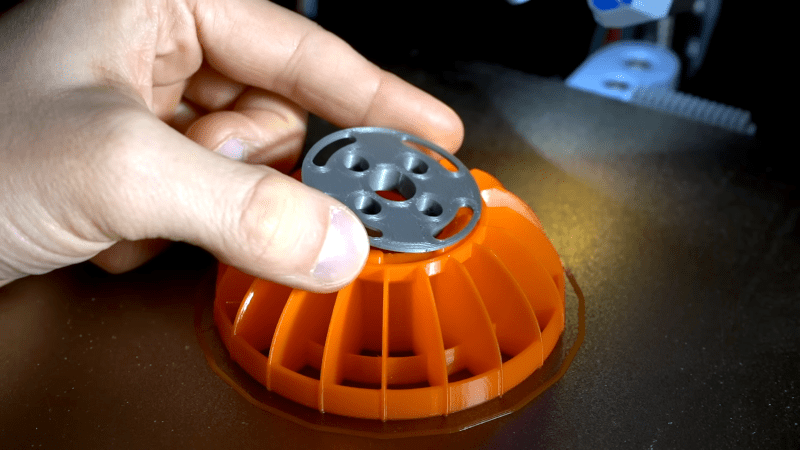
[Denny]’s proposal is simple: make the mold out of PLA. He’s using a resin slicer to get the negative shape for the mold, and exporting the STL to slice in PrusaSlicer, but Blender, Meshmixer and we’re pretty sure Cura should all work as well. [Denny] takes care when arranging his print to avoid needing supports inside the mold, but that’s not strictly necessary as long as you’re willing to clean them out. After that, it’s just a matter of mixing up the plaster, pouring it into the PLA, mold, and waiting.

Waiting, but not too long. Rather than let the plaster fully set up, [Denny] only waits about an hour. The mold is still quite ‘wet’ at this point, but that’s a good thing. When [Denny] tosses it in his beloved microwave, the moisture remaining in the plaster gets everything hot, softening the PLA so it can be easily cut with scissors and peeled off.

Yeah, this technique is single-use as presented, which might be one advantage to silicone, if you need multiple copies of a cast. Reusing silicone molds is often doable with a little forethought. On the other hand, by removing the plaster half-cured, smoothing out layer lines becomes a simple matter of buffing with a wet rag, which is certainly an advantage to this technique.

Some of you may be going “well, duh,” so check out [Denny]’s cast-iron benchy if his plasterwork doesn’t impress. We’ve long been impressed with the microwave crucibles shown off on “Shake the Future”, but it’s great to have options. Maybe metal is the material, or perhaps plain plastic is perfect– but if not, perchance Plaster of Paris can play a part in your play.
Silica Gel Makes For Better 3D Prints

By: Lewin Day

It’s possible to improve your 3D prints in all kinds of ways. You can tune your printer’s motion, buy better filament, or tinker endlessly with any number of slicer settings. Or, as [Dirt-E-Bikes] explains, you could grab yourself some silica gel.

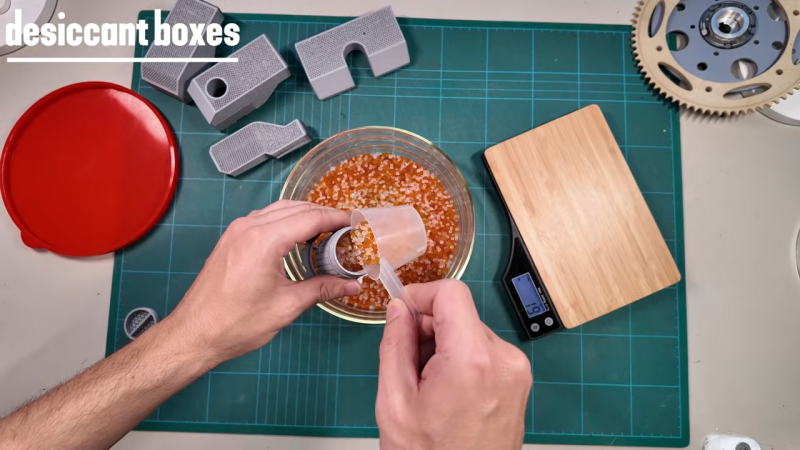
If you’re unfamiliar with silica gel, it’s that stuff that comes in the “DO NOT EAT” packet when you buy a new pair of shoes. It’s key feature is that it’s hygroscopic—which means it likes to suck up moisture from the atmosphere. When it comes to 3D printing, this is a highly useful property—specifically because it can help keep filament dry. Over time, plastic filament tends to pick up some moisture on its own from the atmosphere, and this tends to interfere with print quality. This can be avoided by storing filament in a sealed or semi-seaeled environment with silica gel. The gel will tend to suck up most of the moisture from the air in the sealed container, helping to keep the filament drier.

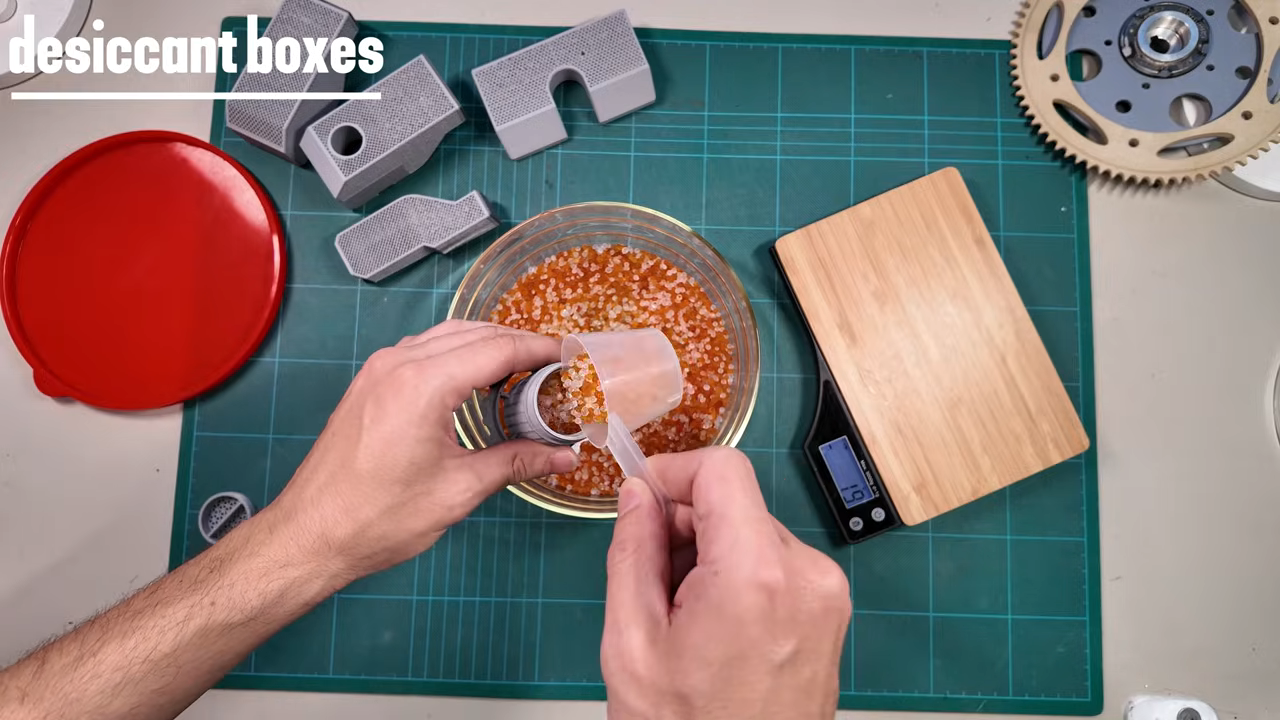
[Dirt-E-Bikes] does a great job of explaining how best to integrate silica gel with your filament spools and automatic material changer (if you have one). He also explains the value of color changing silica gel which indicates when the material is saturated with water, as well as how to dry it out for reuse. You can even combine some of the color changing beads with the more common plain white beads recycled from your shoe boxes, since you only need a few colored beads to get an idea of the water content.

We’ve explored other filament drying solutions before, too. Video after the break.

[Thanks to Keith Olson for the tip!]

Touchless Support Leaves No Mark

[Clough42] created a 3D print for a lathe tool and designed in some support to hold the piece on the bed while printing. It worked, but removing the support left unsightly blemishes on the part. A commenter mentioned that the support doesn’t have to exactly touch the part to support it. You can see the results of trying that method in the video below.

In this case [Cloug42] uses Fusion, but the idea would be the same regardless of how you design your parts. Originally, the support piece was built as a single piece along with the target object. However, he changed it to make the object separate from the support structure. That’s only the first step, though. If you import both pieces and print, the result will be the same.

Instead, he split the part into the original two objects that touch but don’t blend together. The result looks good.

We couldn’t help but notice that we do this by mistake when we use alternate materials for support (for example, PETG mixed with PLA or PLA with COPE). Turns out, maybe you don’t have to switch filament to get good results.

Washington State Bill Seeks to Add Firearms Detection to 3D Printers

Washington State’s House Bill 2321 is currently causing a bit of an uproar, as it seeks to add blocking technologies to 3D printers, in order to prevent them from printing “a firearm or illegal firearm parts”, as per the full text. Sponsored by a sizeable number of House members, it’s currently in committee, so the likelihood of it being put to a floor vote in the House is still remote, never mind it passing the Senate. Regardless, it is another chapter in the story of homemade firearms, which increasingly focuses on private 3D printers.

Also called ‘ghost guns‘ in the US, these can be assembled from spare parts, from kits, from home-made components, or a combination of these. While the most important parts of a firearm, like the barrel, have to be made out of something like metal, the rest can feature significant amounts of plastic parts, though the exact amount varies wildly among current 3D-printed weapons.

Since legally the receiver and frame are considered to be ‘firearms’, these are the focus of this proposed bill, which covers both additive and subtractive technology. The proposal is that a special firearms detection algorithm has to give the okay for the design files to be passed on to the machine.

This blocking feature would have to be standard for all machines sold or transferred in the state, with a special ‘preprint authentication’ handshake protocol required. The attorney general is here expected to create and maintain a database of the no longer legal firearm and parts designs for those without a requisite license.

Putting aside for a moment the ridiculousness of implementing such a scanning feature, even if it wouldn’t be child’s play to circumvent, it also barks up the wrong tree. Although in the most recent ruling pertaining to this topic in Bondi v. VanDerStok it was acknowledged that advances in 3D printing have made this worth considering from a legislative context, the main issue with ‘ghost guns’ comes still by far from kits and similar sources.

Based on this, it seems highly unlikely that HB 2321 will be put up for a vote, never mind get signed into law. Although 3D printed designs like the 9 mm x1 9 mm cartridge Urutau bullpup are apparently quite functional, it’s notable that its manufacturing involves many steps, many DIY store parts, and a bolt carrier manufactured from steel bar stock, not to mention a significant time investment. Trying to detect ‘firearm parts’ at any of these steps would seem to be a fool’s errand, even if privacy considerations were not an issue.

Testing a Continuous Printing Mod for the Bambu Lab A1 Mini

There are a few types of continuous 3D printing with FDM printers, with a conveyer belt and automatic build plate swapping the most common types. The advantage of build plate swapping is that it automates the bit where normally a human would have to come in to remove finished parts from the build plate. A recent entry here is the Chitu PlateCycler C1M which the [Aurora Tech] YouTube channel had over for a review. This kit bolts onto the Bambu Lab A1 Mini FDM printer and comes with four extra PEI build plates for a not unreasonable $79 (€69).

As also noted in the review video, this is effectively a clone of the original swapmod A1m kit, but a big difference is that the Chitu kit comes with all of the parts and doesn’t require you to print anything yourself.

The different plates are prepared using a special tool that inserts G-code between the plate changes. Moving the bed in a specific way triggers the switch that lifts the finished plate off the magnetic bed by the plastic grip on the plate and loads a fresh plate from the stack. Here it was found that a small tolerance issue prevented the last plate from being used, but some sandpaper fixed this. Other than that it was a fairly painless experience, and for e.g. multi-color prints with separated colors – as demonstrated – it would seem to be a great way to churn out the entire model without manual intervention or a lot of wasted filament.

Perhaps the main issue that is central to all of these build plate swap mods is where the plates go after they’re pulled off the magnetic bed: the padded box is a great idea for the first one or two plates, but after that you get your PEI build plates with parts on them crashing on top of each other.

This is where perhaps something like a passive roller conveyer system could provide a nice gentle off-ramp, though this too would increase the footprint of the system. Regardless, the overall system seems to work well enough, allowing one to stack fresh plates in the chute and if you turn on build plate detection in the A1 you can even prevent the printer from trying to print on the magnetic bed.

Michelson Interferometer Comes Home Cheap

We suspect there are three kinds of people in the world. People who have access to a Michelson Interferometer and are glad, those who don’t have one and don’t know what one is, and a very small number of people who want one but don’t have one. But since [Longest Path Search] built one using 3D printing, maybe the third group will dwindle down to nothing.

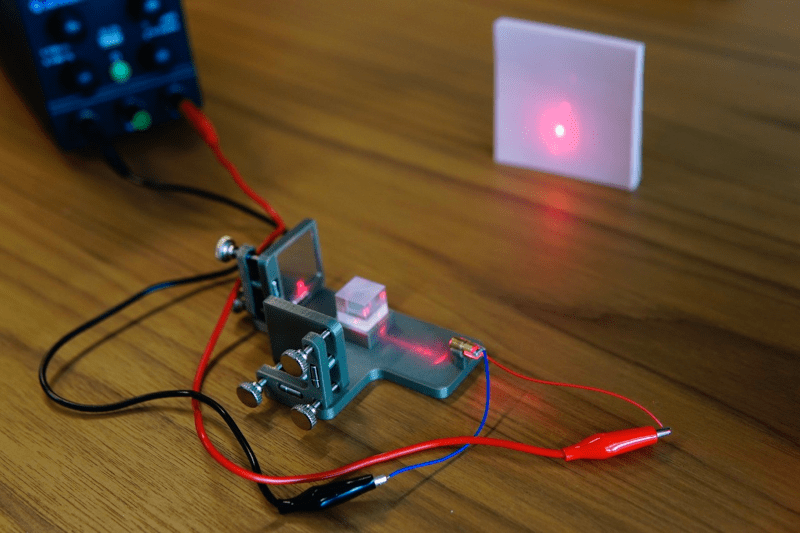
If you are in the second camp, a Michelson interferometer is a device for measuring very small changes in the length of optical paths (oversimplifying, a distance). It does this by splitting a laser into two parts. One part reflects off a mirror at a fixed distance from the splitter. The other reflects off another, often movable, mirror. The beam splitter also recombines the two beams when they reflect back, producing an interference pattern that varies with differences in the path length between the splitter and the mirror. For example, if the air between the splitter and one mirror changes temperature, the change in the refraction index will cause a minute difference in the beam, which will show up using this instrument.

The device has been used to detect gravitational waves, study the sun and the upper atmosphere, and also helped disprove the theory that light is transmitted through a medium known as luminiferous aether.

The tolerances for such a device are tight, but within the capability of modern 3D printers. The CAD files are online. The key was the mirror mounts, which use springs and thumbscrews. So you do need some hardware and, oh yeah, a laser, although that’s not as hard to obtain as it once was. You obviously can’t 3D print the mirrors or the beam splitter either.

The post claims the device is cheap because the bill of materials was roughly $3, although that didn’t include the beamsplitter, which would bring the cost up to maybe $20. The device, in theory, could detect distance changes as small as one wavelength of the laser, which is around 650nm. Not bad for a few bucks.

Not all Michelsons use lasers. The man behind the Michelson instrument also worked out how to do Fourier analysis with a mechanical computer.

EnderSpark: Convert Your Broken Creality FDM Printer Into An EDM machine!

EDM (Electrical Discharge Machining) is one of those specialised manufacturing processes that are traditionally expensive and therefore somewhat underrepresented in the DIY and hacker scenes. It’s with great delight that we present EnderSpark, a solution to not one but two problems. The first problem is how to perform CNC operations on hard-to-machine materials such as hardened metals (without breaking the bank). The second problem is what to do with all those broken and forgotten previous-generation Creality Ender 3D printers we know you have stashed away.

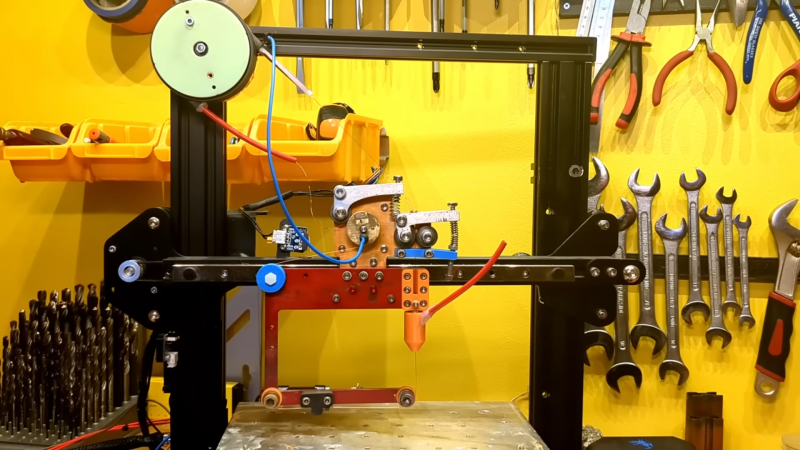
To be honest, there isn’t much to a cheap 3D printer, and once you ditch the bed and extruder assembly, you aren’t left with a lot. Anyway, the first job was to add a 51:1 reduction gearbox between the NEMA 17 motors and the drive pullies, giving the much-needed boost to positional accuracy. Next, the X and Y axes were beefed up with a pair of inexpensive MGN12H linear rails to help them cope with the weight of the water bath.

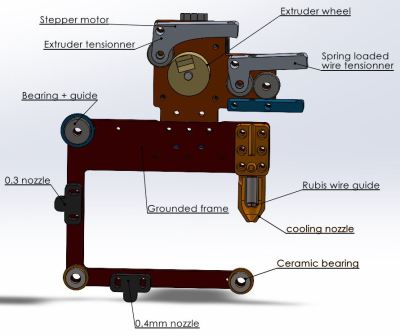
The majority of the work is in the wire feeder assembly, which was constructed around a custom-machined aluminium plate. It’s not lost on us how the original RepRap bootstrapping concept could be applied here: a basic frame made externally in a low-cost material, then using the machine to cut a much thicker, stronger copy for its own upgrade. The main guide nozzle is an off-the-shelf ruby part surrounded by a 3D printed water-cooling jacket. To maximise power transfer from the wire into the electrically conductive workpiece material, the top part of the wire feeder, including the wire itself, is one electrode, and the entire bottom part of the frame is electrically isolated from it. The bottom part pulls the ‘consumed’ stock wire through the nozzle above and keeps it under tension, sending it onward to the waste spool.
Electrically speaking, the project is based on stock Ender electronics, with an additional power driver stage to send capacitor-discharge-derived pulses down the wire from the 48V power supply, up to 10A, generating the needed tiny sparks as the wire is advanced into the electrically grounded workpiece. Industrial machines operate around twice this voltage, but safety is a big issue with a DIY machine. Not to mention 48V and water don’t make the best of friends. Speaking of water, it needs to be de-ionised to reduce dielectric loss, but ionic contamination will build up over time, so it needs to be regularly changed.

Software-wise, the machine is running on G-code, so all that is needed is a custom plugin for Fusion 360 to turn the extracted toolpath (they’re using the Wazer water cutter profile as a basis) into G-code, with knowledge of the material. There aren’t too many variables to play with there.

In the future, a few things are being considered. Adding closed-loop control of the pulse energy would be straightforward, but controlling the horizontal feed rate would be a little trickier to implement with a pure G-code approach. We’ll keep an eye on the project and report back any advances!

If you’re thinking you’ve seen this sort of thing before, you’re right. Here’s another DIY EDM machine, and another, and finally, a Kickstarter we covered a while back that converts any 3D printer into a wire EDM.

Thanks [irox] for the tip!

Multi-material Parts the Easy Way

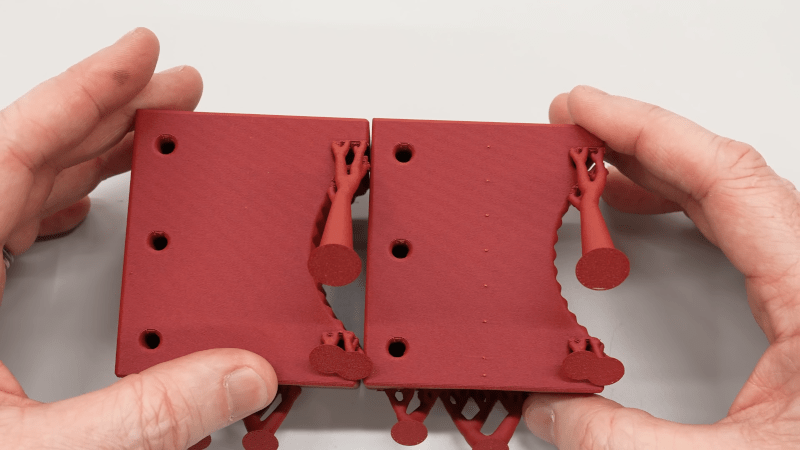
You have a part that needs different colors or different material properties — with a multi-color 3D printer, no problem. You can also laboriously switch filaments on a single-color printer. But [anonymous kiwi] points out a different way, which is surprisingly obvious once you think about it. You simply add a previously made part to another one.

If you’ve ever experimented with adding a nut or a magnet into a print in the middle, the idea is exactly the same: you print one piece and then print a second piece, pausing in the middle to insert the completed first piece. The video example shows TPU robot wheels with PLA hubs. Of course, the same idea could apply to using different colors or even multiple materials or parts. You could imagine a hub with a steel nut embedded in it, then further being embedded in a TPU wheel, for example.

With multi-material printers becoming more commonplace, this technique might seem antiquated. But even if you have one of such a printer, this technique could save time and reduce waste. Not every part would work out this cleanly, but it is something to remember for the times when it does.

Co-Extrusion Carbon Fiber FDM Filament Investigated

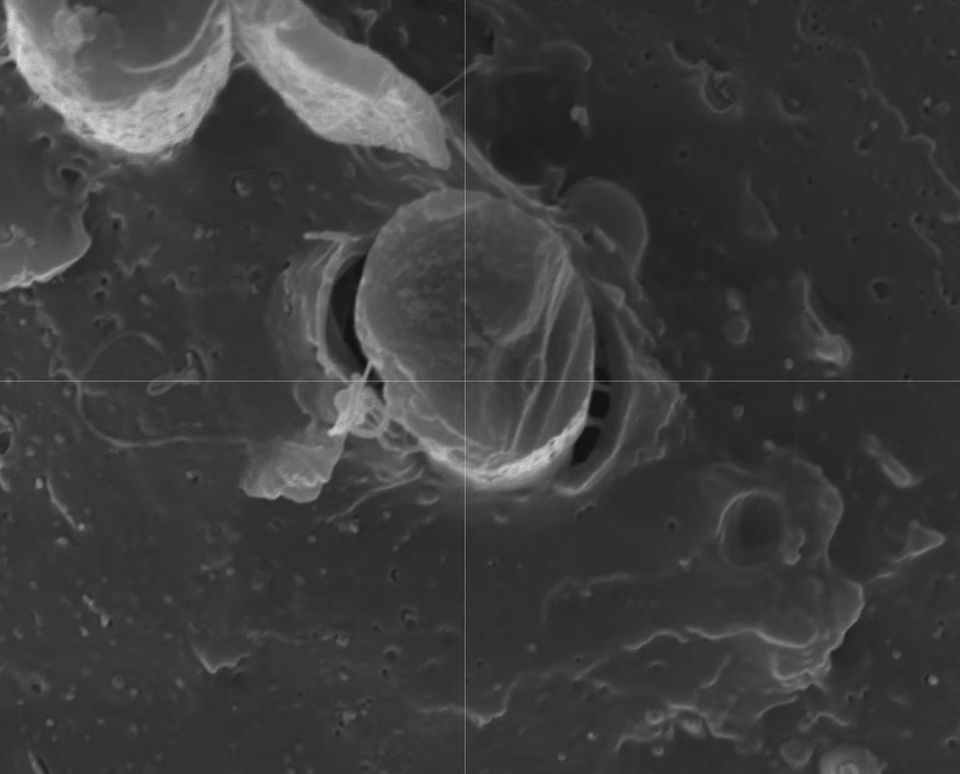
After previously putting carbon fiber-reinforced PLA filament under the (electron) microscope, the [I built a thing] bloke is back with a new video involving PLA-CF, this time involving co-extrusion rather than regular dispersed chopped CF. This features a continuous CF core that is enveloped by PLA, with a sample filament spool sent over by BIQU in the form of their CarbonCore25 filament.

In the previous video chopped CF in PLA turned out to be essentially a contaminant, creating voids and with no integration of the CF into the polymer matrix. Having the CF covered by PLA makes the filament less abrasive to print, which is a definitely advantage, but does it help with the final print’s properties? Of note is that this is still chopped CF, just with a longer fiber length (0.3-0.5 mm).

Samples of the BIQU filament were printed on a Bambu Lab H2D printer with AMS. In order to create a clean fracture surface, a sample was frozen in liquid nitrogen to make it easy to snap. After this it was coated with gold using a gold sputtering system to prepare it for the SEM.

Carbon fiber in PLA after FDM printing, showing clear voids. (Credit: I built a thing, YouTube)

Compared to the finer chopped CF PLA-CF, what is notable here is that CF is not present between the layers, which is a good thing as this degrades layer adhesion significantly. Less good is that the same lack of polymer matrix integration is visible here, with the PLA clearly detaching from the CF and leaving behind voids.

This shows that BIQU’s PLA-CF filament fails to address the fundamental problem with PLA-CF of extremely poor matrix integration. To verify this, an undisturbed sample was put into the Micro CT scanner.

Fascinating about the Micro CT findings was that there is carbon black in the filament, which is ironically highly abrasive.

Also in the images were again what looked like air bubbles, much like in the previous video’s results. These  bubbles turned out to be always linked to a CF strand, which could be due to how the PLA-CF mixture cools with the mismatch between the solid CF inside the still liquid PLA.

After a series of mechanical tests on the printed samples, the conclusion is that the part is stiffer by about 15% and due to the CF contaminant not intruding between layers it’s also better than typical PLA-CF. Of course, regular PLA outperforms both types of PLA-CF in most tests by a considerable margin, so most people are probably still better off with regular PLA.

Build a 2K Resolution MSLA 3D Resin Printer for Cheap

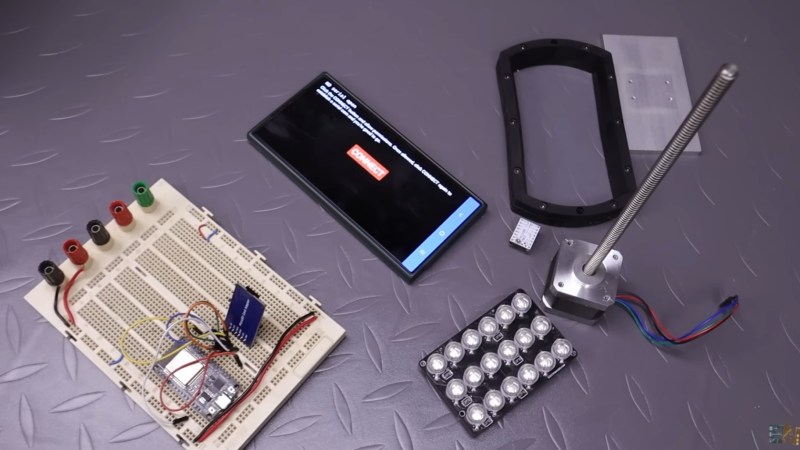
A photo of the various parts for this MSLA 3D printer

Have an old Android device collecting dust somewhere that you’d like to put to better use? [Electronoobs] shows us how to make a Masked Stereolithography Apparatus (MSLA) printer for cheap using screens salvaged from old Android phones or tablets.

[Electronoobs] wanted to revisit his earlier printer with all the benefits of hindsight, and this is the result. The tricky bit, which is covered in depth in the video below the break, is slicing up the model into graphics for each layer, so that these layers can be rendered by the LCD for each layer during the print.

The next tricky bit, once your layer graphics are in hand, is getting them to the device. This build does that by installing a custom Android app which connects to a web app hosted on the ESP32 microcontroller controlling the print, and the app has a backchannel via a USB OTG adapter installed in the device. [Electronoobs] notes that there are different and potentially better ways by which this full-duplex communication can be achieved, but he is happy to have something that works.

If you’re interested in resin printer tech, be sure to check out Continuous Printing On LCD Resin Printer: No More Wasted Time On Peeling? Is It Possible? and Resin Printer Temperature Mods And Continuous IPA Filtration.

Printing in Metal with DIY SLM

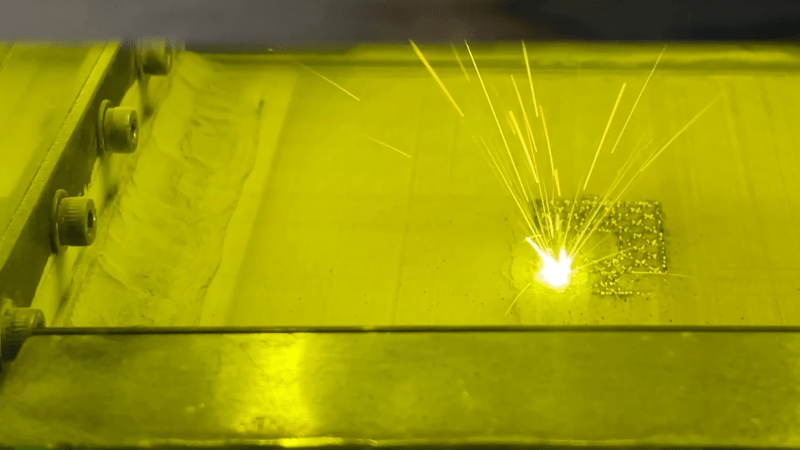
A bed of metal powder is visible through a green-tinted window. A fused metal pattern, roughly square, is visible, with one corner glowing white and throwing up sparks.

An accessible 3D printer for metals has been the holy grail of amateur printer builders since at least the beginning of the RepRap project, but as tends to be the case with holy grails, it’s proven stubbornly elusive. If you have the resources to build it, though, it’s possible to replicate the professional approach with a selective laser melting (SLM) printer, such as the one [Travis Mitchell] built (this is a playlist of nine videos, but if you want to see the final results, the last video is embedded below).

Most of the playlist shows the process of physically constructing the machine, with only the last two videos getting into testing. The heart of the printer is a 500 Watt fiber laser and a galvo scan head, which account for most of the cost of the final machine. The print chamber has to be purged of oxygen with shielding gas, so [Travis] minimized the volume to reduce the amount of argon needed. The scan head therefore isn’t located in the chamber, but shines down into it through a window in the chamber’s roof. A set of repurposed industrial servo motors raises and lowers the two pistons which form the build plate and powder dispenser, and another servo drives the recoater blade which smooths on another layer of metal powder after each layer.

As with any 3D printer, getting good first-layer adhesion proved troublesome, since too much power caused the powder to melt and clump together, and too little could result in incomplete fusion. Making sure the laser was in focus improved things significantly, though heat management and consequent warping remained a challenge. The recoater blade was originally made out of printed plastic, with a silicone cord along the edge. Scraping along hot fused metal in the early tests damaged it, so [Travis] replaced it with a stainless steel blade, which gave much more consistent performance. The final results looked extremely promising, though [Travis] notes that there is still room for redesign and improvement.

This printer joins the very few other DIY SLM machines we’ve seen, though there is an amazingly broad range of other creative ideas for homemade metal printers, from electrochemical printers to those that use precise powder placement.

❌