Secure connections are the backbone of the modern web, but a certificate is only as trustworthy as the validation process and issuance practices behind it. Recently, the Chrome Root Program and the CA/Browser Forum have taken decisive steps toward a more secure internet by adopting new security requirements for HTTPS certificate issuers.
These initiatives, driven by Ballots SC-080, SC-090, and SC-091, will sunset 11 legacy methods for Domain Control Validation. By retiring these outdated practices, which rely on weaker verification signals like physical mail, phone calls, or emails, we are closing potential loopholes for attackers and pushing the ecosystem toward automated, cryptographically verifiable security.
To allow affected website operators to transition smoothly, the deprecation will be phased in, with its full security value realized by March 2028.
This effort is a key part of our public roadmap, “Moving Forward, Together,” launched in 2022. Our vision is to improve security by modernizing infrastructure and promoting agility through automation. While "Moving Forward, Together" sets the aspirational direction, the recent updates to the TLS Baseline Requirements turn that vision into policy. This builds on our momentum from earlier this year, including the successful advocacy for the adoption of other security enhancing initiatives as industry-wide standards.
What’s Domain Control Validation?
Domain Control Validation is a security-critical process designed to ensure certificates are only issued to the legitimate domain operator. This prevents unauthorized entities from obtaining a certificate for a domain they do not control. Without this check, an attacker could obtain a valid certificate for a legitimate website and use it to impersonate that site or intercept web traffic.
Before issuing a certificate, a Certification Authority (CA) must verify that the requestor legitimately controls the domain. Most modern validation relies on “challenge-response” mechanisms, for example, a CA might provide a random value for the requestor to place in a specific location, like a DNS TXT record, which the CA then verifies.
Historically, other methods validated control through indirect means, such as looking up contact information in WHOIS records or sending an email to a domain contact. These methods have been proven vulnerable (example) and the recent efforts retire these weaker checks in favor of robust, automated alternatives.
Raising the floor of security
The recently passed CA/Browser Forum Server Certificate Working Group Ballots introduce a phased sunset of the following Domain Control Validation methods. Alternative existing methods offer stronger security assurances against attackers trying to obtain fraudulent certificates – and the alternative methods are getting stronger over time, too.
For everyday users, these changes are invisible - and that’s the point. But, behind the scenes, they make it harder for attackers to trick a CA into issuing a certificate for a domain they don’t control. This reduces the risk that stale or indirect signals, (like outdated WHOIS data, complex phone and email ecosystems, or inherited infrastructure) can be abused. These changes push the ecosystem toward standardized (e.g., ACME), modern, and auditable Domain Control Validation methods. They increase agility and resilience by encouraging site owners to transition to modern Domain Control Validation methods, creating opportunities for faster and more efficient certificate lifecycle management through automation.
These initiatives remove weak links in how trust is established on the internet. That leads to a safer browsing experience for everyone, not just users of a single browser, platform, or website.
Chrome has been advancing the web’s security for well over 15 years, and we’re committed to meeting new challenges and opportunities with AI. Billions of people trust Chrome to keep them safe by default, and this is a responsibility we take seriously. Following the recent launch of Gemini in Chrome and the preview of agentic capabilities, we want to share our approach and some new innovations to improve the safety of agentic browsing.
The primary new threat facing all agentic browsers is indirect prompt injection. It can appear in malicious sites, third-party content in iframes, or from user-generated content like user reviews, and can cause the agent to take unwanted actions such as initiating financial transactions or exfiltrating sensitive data. Given this open challenge, we are investing in a layered defense that includes both deterministic and probabilistic defenses to make it difficult and costly for attackers to cause harm.
Designing safe agentic browsing for Chrome has involved deep collaboration of security experts across Google. We built on Gemini's existing protections and agent security principles and have implemented several new layers for Chrome.
We’re introducing a user alignment critic where the agent’s actions are vetted by a separate model that is isolated from untrusted content. We’re also extending Chrome’s origin-isolation capabilities to constrain what origins the agent can interact with, to just those that are relevant to the task. Our layered defense also includes user confirmations for critical steps, real-time detection of threats, and red-teaming and response. We’ll step through these layers below.
Checking agent outputs with User Alignment Critic
The main planning model for Gemini uses page content shared in Chrome to decide what action to take next. Exposure to untrusted web content means it is inherently vulnerable to indirect prompt injection. We use techniques like spotlighting that direct the model to strongly prefer following user and system instructions over what’s on the page, and we’ve upstreamed known attacks to train the Gemini model to avoid falling for them.
To further bolster model alignment beyond spotlighting, we’re introducing the User Alignment Critic — a separate model built with Gemini that acts as a high-trust system component. This architecture is inspired partially by the dual-LLM pattern as well as CaMeL research from Google DeepMind.
A flow chart that depicts the User Alignment Critic: a trusted component that vets each action before it reaches the browser.
The User Alignment Critic runs after the planning is complete to double-check each proposed action. Its primary focus is task alignment: determining whether the proposed action serves the user’s stated goal. If the action is misaligned, the Alignment Critic will veto it. This component is architected to see only metadata about the proposed action and not any unfiltered untrustworthy web content, thus ensuring it cannot be poisoned directly from the web. It has less context, but it also has a simpler job — just approve or reject an action.
This is a powerful, extra layer of defense against both goal-hijacking and data exfiltration within the action step. When an action is rejected, the Critic provides feedback to the planning model to re-formulate its plan, and the planner can return control to the user if there are repeated failures.
Enforcing stronger security boundaries with Origin Sets
Site Isolation and the same-origin policy are fundamental boundaries in Chrome’s security model and we’re carrying forward these concepts into the agentic world. By their nature, agents must operate across websites (e.g. collecting ingredients on one site and filling a shopping cart on another). But if an unrestricted agent is compromised and can interact with arbitrary sites, it can create what is effectively a Site Isolation bypass. That can have a severe impact when the agent operates on a local browser like Chrome, with logged-in sites vulnerable to data exfiltration. To address this, we’re extending those principles with Agent Origin Sets. Our design architecturally limits the agent to only access data from origins that are related to the task at hand, or data that the user has chosen to share with the agent. This prevents a compromised agent from acting arbitrarily on unrelated origins.
For each task on the web, a trustworthy gating function decides which origins proposed by the planner are relevant to the task. The design is to separate these into two sets, tracked for each session:
Read-only origins are those from which Gemini is permitted to consume content. If an iframe’s origin isn’t on the list, the model will not see that content.
Read-writable origins are those on which the agent is allowed to actuate (e.g., click, type) in addition to reading from.
This delineation enforces that only data from a limited set of origins is available to the agent, and this data can only be passed on to the writable origins. This bounds the threat vector of cross-origin data leaks. This also gives the browser the ability to enforce some of that separation, such as by not even sending to the model data that is outside the readable set. This reduces the model’s exposure to unnecessary cross-site data. Like the Alignment Critic, the gating functions that calculate these origin sets are not exposed to untrusted web content. The planner can also use context from pages the user explicitly shared in that session, but it cannot add new origins without the gating function’s approval. Outside of web origins, the planning model may ingest other non-web content such as from tool calls, so we also delineate those into read-vs-write calls and similarly check that those calls are appropriate for the task.
Iframes from origins that aren’t related to the user’s task are not shown to the model.
Page navigations can happen in several ways: If the planner decides to navigate to a new origin that isn’t yet in the readable set, that origin is checked for relevancy by a variant of the User Alignment critic before Chrome adds it and starts the navigation. And since model-generated URLs could exfiltrate private information, we have a deterministic check to restrict them to known, public URLs. If a page in Chrome navigates on its own to a new origin, it’ll get vetted by the same critic.
Getting the balance right on the first iteration is hard without seeing how users’ tasks interact with these guardrails. We’ve initially implemented a simpler version of origin gating that just tracks the read-writeable set. We will tune the gating functions and other aspects of this system to reduce unnecessary friction while improving security. We think this architecture will provide a powerful security primitive that can be audited and reasoned about within the client, as it provides guardrails against cross-origin sensitive data exfiltration and unwanted actions.
Transparency and control for sensitive actions
We designed the agentic capabilities in Chrome to give the user both transparency and control when they need it most. As the agent works in a tab, it details each step in a work log, allowing the user to observe the agent's actions as they happen. The user can pause to take over or stop a task at any time.
This transparency is paired with several layers of deterministic and model-based checks to trigger user confirmations before the agent takes an impactful action. These serve as guardrails against both model mistakes and adversarial input by putting the user in the loop at key moments.
First, the agent will require a user confirmation before it navigates to certain sensitive sites, such as those dealing with banking transactions or personal medical information. This is based on a deterministic check against a list of sensitive sites. Second, it’ll confirm before allowing Chrome to sign-in to a site via Google Password Manager – the model does not have direct access to stored passwords. Lastly, before any sensitive web actions like completing a purchase or payment, sending messages, or other consequential actions, the agent will try to pause and either get permission from the user before proceeding or ask the user to complete the next step. Like our other safety classifiers, we’re constantly working to improve the accuracy to catch edge cases and grey areas.
Illustrative example of when the agent gets to a payment page, it stops and asks the user to complete the final step.
Detecting “social engineering” of agents
In addition to the structural defenses of alignment checks, origin gating, and confirmations, we have several processes to detect and respond to threats. While the agent is active, it checks every page it sees for indirect prompt injection. This is in addition to Chrome’s real-time scanning with Safe Browsing and on-device AI that detect more traditional scams. This prompt-injection classifier runs in parallel to the planning model’s inference, and will prevent actions from being taken based on content that the classifier determined has intentionally targeted the model to do something unaligned with the user’s goal. While it cannot flag everything that might influence the model with malicious intent, it is a valuable layer in our defense-in-depth.
Continuous auditing, monitoring, response
To validate the security of this set of layered defenses, we’ve built automated red-teaming systems to generate malicious sandboxed sites that try to derail the agent in Chrome. We start with a set of diverse attacks crafted by security researchers, and expand on them using LLMs following a technique we adapted for browser agents. Our continuous testing prioritizes defenses against broad-reach vectors such as user-generated content on social media sites and content delivered via ads. We also prioritize attacks that could lead to lasting harm, such as financial transactions or the leaking of sensitive credentials. The attack success rate across these give immediate feedback to any engineering changes we make, so we can prevent regressions and target improvements. Chrome’s auto-update capabilities allow us to get fixes out to users very quickly, so we can stay ahead of attackers.
Collaborating across the community
We have a long-standing commitment to working with the broader security research community to advance security together, and this includes agentic safety. We’ve updated our Vulnerability Rewards Program (VRP) guidelines to clarify how external researchers can focus on agentic capabilities in Chrome. We want to hear about any serious vulnerabilities in this system, and will pay up to $20,000 for those that demonstrate breaches in the security boundaries. The full details are available in VRP rules.
Looking forward
The upcoming introduction of agentic capabilities in Chrome brings new demands for browser security, and we've approached this challenge with the same rigor that has defined Chrome's security model from its inception. By extending some core principles like origin-isolation and layered defenses, and introducing a trusted-model architecture, we're building a secure foundation for Gemini’s agentic experiences in Chrome. This is an evolving space, and while we're proud of the initial protections we've implemented, we recognize that security for web agents is still an emerging domain. We remain committed to continuous innovation and collaboration with the security community to ensure Chrome users can explore this new era of the web safely.
One year from now, with the release of Chrome 154 in October 2026, we will change the default settings of Chrome to enable “Always Use Secure Connections”. This means Chrome will ask for the user's permission before the first access to any public site without HTTPS.
The “Always Use Secure Connections” setting warns users before accessing a site without HTTPS
Chrome Security's mission is to make it safe to click on links. Part of being safe means ensuring that when a user types a URL or clicks on a link, the browser ends up where the user intended. When links don't use HTTPS, an attacker can hijack the navigation and force Chrome users to load arbitrary, attacker-controlled resources, and expose the user to malware, targeted exploitation, or social engineering attacks. Attacks like this are not hypothetical—software to hijack navigations is readily available and attackers have previously used insecure HTTP to compromise user devices in a targeted attack.
Since attackers only need a single insecure navigation, they don't need to worry that many sites have adopted HTTPS—any single HTTP navigation may offer a foothold. What's worse, many plaintext HTTP connections today are entirely invisible to users, as HTTP sites may immediately redirect to HTTPS sites. That gives users no opportunity to see Chrome's "Not Secure" URL bar warnings after the risk has occurred, and no opportunity to keep themselves safe in the first place.
To address this risk, we launched the “Always Use Secure Connections” setting in 2022 as an opt-in option. In this mode, Chrome attempts every connection over HTTPS, and shows a bypassable warning to the user if HTTPS is unavailable. We also previously discussed our intent to move towards HTTPS by default. We now think the time has come to enable “Always Use Secure Connections” for all users by default.
Now is the time.
For more than a decade, Google has published the HTTPS transparency report, which tracks the percentage of navigations in Chrome that use HTTPS. For the first several years of the report, numbers saw an impressive climb, starting at around 30-45% in 2015, and ending up around the 95-99% range around 2020. Since then, progress has largely plateaued.
HTTPS adoption expressed as a percentage of main frame page loads
This rise represents a tremendous improvement to the security of the web, and demonstrates that HTTPS is now mature and widespread. This level of adoption is what makes it possible to consider stronger mitigations against the remaining insecure HTTP.
Balancing user safety with friction
While it may at first seem that 95% HTTPS means that the problem is mostly solved, the truth is that a few percentage points of HTTP navigations is still a lot of navigations. Since HTTP navigations remain a regular occurrence for most Chrome users, a naive approach to warning on all HTTP navigations would be quite disruptive. At the same time, as the plateau demonstrates, doing nothing would allow this risk to persist indefinitely. To balance these risks, we have taken steps to ensure that we can help the web move towards safer defaults, while limiting the potential annoyance warnings will cause to users.
One way we're balancing risks to users is by making sure Chrome does not warn about the same sites excessively. In all variants of the "Always Use Secure Connections" settings, so long as the user regularly visits an insecure site, Chrome will not warn the user about that site repeatedly. This means that rather than warn users about 1 out of 50 navigations, Chrome will only warn users when they visit a new (or not recently visited) site without using HTTPS.
To further address the issue, it's important to understand what sort of traffic is still using HTTP. The largest contributor to insecure HTTP by far, and the largest contributor to variation across platforms, is insecure navigations to private sites. The graph above includes both those to public sites, such as example.com, and navigations to private sites, such as local IP addresses like 192.168.0.1, single-label hostnames, and shortlinks like intranet/. While it is free and easy to get an HTTPS certificate that is trusted by Chrome for a public site, acquiring an HTTPS certificate for a private site unfortunately remains complicated. This is because private names are "non-unique"—private names can refer to different hosts on different networks. There is no single owner of 192.168.0.1 for a certification authority to validate and issue a certificate to.
HTTP navigations to private sites can still be risky, but are typically less dangerous than their public site counterparts because there are fewer ways for an attacker to take advantage of these HTTP navigations. HTTP on private sites can only be abused by an attacker also on your local network, like on your home wifi or in a corporate network.
If you exclude navigations to private sites, then the distribution becomes much tighter across platforms. In particular, Linux jumps from 84% HTTPS to nearly 97% HTTPS when limiting the analysis to public sites only. Windows increases from 95% to 98% HTTPS, and both Android and Mac increase to over 99% HTTPS.
In recognition of the reduced risk HTTP to private sites represents, last year we introduced a variant of “Always Use Secure Connections” for public sites only. For users who frequently access private sites (such as those in enterprise settings, or web developers), excluding warnings on private sites significantly reduces the volume of warnings those users will see. Simultaneously, for users who do not access private sites frequently, this mode introduces only a small reduction in protection. This is the variant we intend to enable for all users next year.
“Always Use Secure Connections,” available at chrome://settings/security
In Chrome 141, we experimented with enabling “Always Use Secure Connections” for public sites by default for a small percentage of users. We wanted to validate our expectations that this setting keeps users safer without burdening them with excessive warnings.
Analyzing the data from the experiment, we confirmed that the number of warnings seen by any users is considerably lower than 3% of navigations—in fact, the median user sees fewer than one warning per week, and the ninety-fifth percentile user sees fewer than three warnings per week..
Understanding HTTP usage
Once “Always Use Secure Connections” is the default and additional sites migrate away from HTTP, we expect the actual warning volume to be even lower than it is now. In parallel to our experiments, we have reached out to a number of companies responsible for the most HTTP navigations, and expect that they will be able to migrate away from HTTP before the change in Chrome 154. For many of these organizations, transitioning to HTTPS isn't disproportionately hard, but simply has not received attention. For example, many of these sites use HTTP only for navigations that immediately redirect to HTTPS sites—an insecure interaction which was previously completely invisible to users.
Another current use case for HTTP is to avoid mixed content blocking when accessing devices on the local network. Private addresses, as discussed above, often do not have trusted HTTPS certificates, due to the difficulties of validating ownership of a non-unique name. This means most local network traffic is over HTTP, and cannot be initiated from an HTTPS page—the HTTP traffic counts as insecure mixed content, and is blocked. One common use case for needing to access the local network is to configure a local network device, e.g. the manufacturer might host a configuration portal at config.example.com, which then sends requests to a local device to configure it.
Previously, these types of pages needed to be hosted without HTTPS to avoid mixed content blocking. However, we recently introduced a local network access permission, which both prevents sites from accessing the user’s local network without consent, but also allows an HTTPS site to bypass mixed content checks for the local network once the permission has been granted. This can unblock migrating these domains to HTTPS.
Changes in Chrome
We will enable the "Always Use Secure Connections" setting in its public-sites variant by default in October 2026, with the release of Chrome 154. Prior to enabling it by default for all users, in Chrome 147, releasing in April 2026, we will enable Always Use Secure Connections in its public-sites variant for the over 1 billion users who have opted-in to Enhanced Safe Browsing protections in Chrome.
While it is our hope and expectation that this transition will be relatively painless for most users, users will still be able to disable the warnings by disabling the "Always Use Secure Connections" setting.
If you are a website developer or IT professional, and you have users who may be impacted by this feature, we very strongly recommend enabling the "Always Use Secure Connections" setting today to help identify sites that you may need to work to migrate. IT professionals may find it useful to read our additional resources to better understand the circumstances where warnings will be shown, how to mitigate them, and how organizations that manage Chrome clients (like enterprises or educational institutions) can ensure that Chrome shows the right warnings to meet those organizations' needs.
Looking Forward
While we believe that warning on insecure public sites represents a significant step forward for the security of the web, there is still more work to be done. In the future, we hope to work to further reduce barriers to adoption of HTTPS, especially for local network sites. This work will hopefully enable even more robust HTTP protections down the road.
Posted by Chris Thompson, Mustafa Emre Acer, Serena Chen, Joe DeBlasio, Emily Stark and David Adrian, Chrome Security Team
Posted by David Adrian, Javier Castro & Peter Kotwicz, Chrome Security Team
Android recently announced Advanced Protection, which extends Google’s Advanced Protection Program to a device-level security setting for Android users that need heightened security—such as journalists, elected officials, and public figures. Advanced Protection gives you the ability to activate Google’s strongest security for mobile devices, providing greater peace of mind that you’re better protected against the most sophisticated threats.
Advanced Protection acts as a single control point for at-risk users on Android that enables important security settings across applications, including many of your favorite Google apps, including Chrome. In this post, we’d like to do a deep dive into the Chrome features that are integrated with Advanced Protection, and how enterprises and users outside of Advanced Protection can leverage them.
Android Advanced Protection integrates with Chrome on Android in three main ways:
Enables the “Always Use Secure Connections” setting for both public and private sites, so that users are protected from attackers reading confidential data or injecting malicious content into insecure plaintext HTTP connections. Insecure HTTP represents less than 1% of page loads for Chrome on Android.
Enables full Site Isolation on mobile deviceswith 4GB+ RAM, so that potentially malicious sites are never loaded in the same process as legitimate websites. Desktop Chrome clients already have full Site Isolation.
Reduces attack surface by disabling Javascript optimizations, so that Chrome has a smaller attack surface and is harder to exploit.
Let’s take a look at all three, learn what they do, and how they can be controlled outside of Advanced Protection.
Always Use Secure Connections
“Always Use Secure Connections” (also known as HTTPS-First Mode in blog posts and HTTPS-Only Mode in the enterprise policy) is a Chrome setting that forces HTTPS wherever possible, and asks for explicit permission from you before connecting to a site insecurely. There may be attackers attempting to interpose on connections on any network, whether that network is a coffee shop, airport, or an Internet backbone. This setting protects users from these attackers reading confidential data and injecting malicious content into otherwise innocuous webpages. This is particularly useful for Advanced Protection users, since in 2023, plaintext HTTP was used as an exploitation vector during the Egyptian election.
Beyond Advanced Protection, we previously posted about how our goal is to eventually enable “Always Use Secure Connections” by default for all Chrome users. As we work towards this goal, in the last two years we have quietly been enabling it in more places beyond Advanced Protection, to help protect more users in risky situations, while limiting the number of warnings users might click through:
We added a new variant of the setting that only warns on public sites, and doesn’t warn on local networks or single-label hostnames (e.g. 192.168.0.1, shortlink/, 10.0.0.1). These names often cannot be issued a publicly-trusted HTTPS certificate. This variant protects against most threats—accessing a public website insecurely—but still allows for users to access local sites, which may be on a more trusted network, without seeing a warning.
We’ve automatically enabled “Always Use Secure Connections” for public sites in Incognito Mode for the last year, since Chrome 127 in June 2024.
We automatically prevent downgrades from HTTPS to plaintext HTTP on sites that Chrome knows you typically access over HTTPS (a heuristic version of the HSTS header), since Chrome 133 in January 2025.
Always Use Secure Connections has two modes—warn on insecure public sites, and warn on any insecure site.
Any user can enable “Always Use Secure Connections” in the Chrome Privacy and Security settings, regardless of if they’re using Advanced Protection. Users can choose if they would like to warn on any insecure site, or only insecure public sites. Enterprises can opt their fleet into either mode, and set exceptions using the HTTPSOnlyMode and HTTPAllowlist policies, respectively. Website operators should protect their users' confidentiality, ensure their content is delivered exactly as they intended, and avoid warnings, by deploying HTTPS.
Full Site Isolation
Site Isolation is a security feature in Chrome that isolates each website into its own rendering OS process. This means that different websites, even if loaded in a single tab of the same browser window, are kept completely separate from each other in memory. This isolation prevents a malicious website from accessing data or code from another website, even if that malicious website manages to exploit a vulnerability in Chrome’s renderer—a second bug to escape the renderer sandbox is required to access other sites. Site isolation improves security, but requires extra memory to have one process per site. Chrome Desktop isolates all sites by default. However, Android is particularly sensitive to memory usage, so for mobile Android form factors, when Advanced Protection is off, Chrome will only isolate a site if a user logs into that site, or if the user submits a form on that site. On Android devices with 4GB+ RAM in Advanced Protection (and on all desktop clients), Chrome will isolate all sites. Full Site Isolation significantly reduces the risk of cross-site data leakage for Advanced Protection users.
JavaScript Optimizations and Security
Advanced Protection reduces the attack surface of Chrome by disabling the higher-level optimizing Javascript compilers inside V8. V8 is Chrome’s high-performance Javascript and WebAssembly engine. The optimizing compilers in V8 make certain websites run faster, however they historically also have been a source of known exploitation of Chrome. Of all the patched security bugs in V8 with known exploitation, disabling the optimizers would have mitigated ~50%. However, the optimizers are why Chrome scores the highest on industry-wide benchmarks such as Speedometer. Disabling the optimizers blocks a large class of exploits, at the cost of causing performance issues for some websites.
Javascript optimizers can be disabled outside of Advanced Protection Mode via the “Javascript optimization & security” Site Setting. The Site Setting also enables users to disable/enable Javascript optimizers on a per-site basis. Disabling these optimizing compilers is not limited to Advanced Protection. Since Chrome 133, we’ve exposed this as a Site Setting that allows users to enable or disable the higher-level optimizing compilers on a per-site basis, as well as change the default.
Settings -> Privacy and Security -> Javascript optimization and security
This setting can be controlled by the DefaultJavaScriptOptimizerSetting enterprise policy, alongside JavaScriptOptimizerAllowedForSites and JavaScriptOptimizerBlockedForSites for managing the allowlist and denylist. Enterprises can use this policy to block access to the optimizer, while still allowlisting1 the SaaS vendors their employees use on a daily basis. It’s available on Android and desktop platforms
Chrome aims for the default configuration to be secure for all its users, and we’re continuing to raise the bar for V8 security in the default configuration by rolling out the V8 sandbox.
Protecting All Users
Billions of people use Chrome and Android, and not all of them have the same risk profile. Less sophisticated attacks by commodity malware can be very lucrative for attackers when done at scale, but so can sophisticated attacks on targeted users. This means that we cannot expect the security tradeoffs we make for the default configuration of Chrome to be suitable for everyone.
Advanced Protection, and the security settings associated with it, are a way for users with varying risk profiles to tailor Chrome to their security needs, either as an individual at-risk user. Enterprises with a fleet of managed Chrome installations can also enable the underlying settings now. Advanced Protection is available on Android 16 in Chrome 137+.
We additionally recommend at-risk users join the Advanced Protection Program with their Google accounts, which will require the account to use phishing-resistant multi-factor authentication methods and enable Advanced Protection on any of the user’s Android devices. We also recommend users enable automatic updates and always keep their Android phones and web browsers up to date.
Notes
Allowlisting only works on platforms capable of full site isolation—any desktop platform and Android devices with 2GB+ RAM. This is because internally allowlisting is dependent on origin isolation. ↩
Posted by Jasika Bawa, Andy Lim, and Xinghui Lu, Google Chrome Security
Tech support scams are an increasingly prevalent form of cybercrime, characterized by deceptive tactics aimed at extorting money or gaining unauthorized access to sensitive data. In a tech support scam, the goal of the scammer is to trick you into believing your computer has a serious problem, such as a virus or malware infection, and then convince you to pay for unnecessary services, software, or grant them remote access to your device. Tech support scams on the web often employ alarming pop-up warnings mimicking legitimate security alerts. We've also observed them to use full-screen takeovers and disable keyboard and mouse input to create a sense of crisis.
Chrome has always worked with Google Safe Browsing to help keep you safe online. Now, with this week's launch of Chrome 137, Chrome will offer an additional layer of protection using the on-device Gemini Nano large language model (LLM). This new feature will leverage the LLM to generate signals that will be used by Safe Browsing in order to deliver higher confidence verdicts about potentially dangerous sites like tech support scams.
Initial research using LLMs has shown that they are relatively effective at understanding and classifying the varied, complex nature of websites. As such, we believe we can leverage LLMs to help detect scams at scale and adapt to new tactics more quickly. But why on-device? Leveraging LLMs on-device allows us to see threats when users see them. We’ve found that the average malicious site exists for less than 10 minutes, so on-device protection allows us to detect and block attacks that haven't been crawled before. The on-device approach also empowers us to see threats the way users see them. Sites can render themselves differently for different users, often for legitimate purposes (e.g. to account for device differences, offer personalization, provide time-sensitive content), but sometimes for illegitimate purposes (e.g. to evade security crawlers) – as such, having visibility into how sites are presenting themselves to real users enhances our ability to assess the web.
How it works
At a high level, here's how this new layer of protection works.
Overview of how on-device LLM assistance in mitigating scams works
When a user navigates to a potentially dangerous page, specific triggers that are characteristic of tech support scams (for example, the use of the keyboard lock API) will cause Chrome to evaluate the page using the on-device Gemini Nano LLM. Chrome provides the LLM with the contents of the page that the user is on and queries it to extract security signals, such as the intent of the page. This information is then sent to Safe Browsing for a final verdict. If Safe Browsing determines that the page is likely to be a scam based on the LLM output it receives from the client, in addition to other intelligence and metadata about the site, Chrome will show a warning interstitial.
This is all done in a way that preserves performance and privacy. In addition to ensuring that the LLM is only triggered sparingly and run locally on the device, we carefully manage resource consumption by considering the number of tokens used, running the process asynchronously to avoid interrupting browser activity, and implementing throttling and quota enforcement mechanisms to limit GPU usage. LLM-summarized security signals are only sent to Safe Browsing for users who have opted-in to the Enhanced Protection mode of Safe Browsing in Chrome, giving them protection against threats Google may not have seen before. Standard Protection users will also benefit indirectly from this feature as we add newly discovered dangerous sites to blocklists.
Future considerations
The scam landscape continues to evolve, with bad actors constantly adapting their tactics. Beyond tech support scams, in the future we plan to use the capabilities described in this post to help detect other popular scam types, such as package tracking scams and unpaid toll scams. We also plan to utilize the growing power of Gemini to extract additional signals from website content, which will further enhance our detection capabilities. To protect even more users from scams, we are working on rolling out this feature to Chrome on Android later this year. And finally, we are collaborating with our research counterparts to explore solutions to potential exploits such as prompt injection in content and timing bypass.
Posted by Chrome Root Program, Chrome Security Team
The Chrome Root Program launched in 2022 as part of Google’s ongoing commitment to upholding secure and reliable network connections in Chrome. We previously described how the Chrome Root Program keeps users safe, and described how the program is focused on promoting technologies and practices that strengthen the underlying security assurances provided by Transport Layer Security (TLS). Many of these initiatives are described on our forward looking, public roadmap named “Moving Forward, Together.”
At a high-level, “Moving Forward, Together” is our vision of the future. It is non-normative and considered distinct from the requirements detailed in the Chrome Root Program Policy. It’s focused on themes that we feel are essential to further improving the Web PKI ecosystem going forward, complementing Chrome’s core principles of speed, security, stability, and simplicity. These themes include:
Encouraging modern infrastructures and agility
Focusing on simplicity
Promoting automation
Reducing mis-issuance
Increasing accountability and ecosystem integrity
Streamlining and improving domain validation practices
Preparing for a "post-quantum" world
Earlier this month, two “Moving Forward, Together” initiatives became required practices in the CA/Browser Forum Baseline Requirements (BRs). The CA/Browser Forum is a cross-industry group that works together to develop minimum requirements for TLS certificates. Ultimately, these new initiatives represent an improvement to the security and agility of every TLS connection relied upon by Chrome users.
If you’re unfamiliar with HTTPS and certificates, see the “Introduction” of this blog post for a high-level overview.
Multi-Perspective Issuance Corroboration
Before issuing a certificate to a website, a Certification Authority (CA) must verify the requestor legitimately controls the domain whose name will be represented in the certificate. This process is referred to as "domain control validation" and there are several well-defined methods that can be used. For example, a CA can specify a random value to be placed on a website, and then perform a check to verify the value’s presence has been published by the certificate requestor.
Despite the existing domain control validation requirements defined by the CA/Browser Forum, peer-reviewed research authored by the Center for Information Technology Policy (CITP) of Princeton University and others highlightedtherisk of Border Gateway Protocol (BGP) attacks and prefix-hijacking resulting in fraudulently issued certificates. This risk was not merely theoretical, as it was demonstrated that attackers successfully exploited this vulnerability on numerous occasions, with just one of these attacks resulting in approximately $2 million dollars of direct losses.
Multi-Perspective Issuance Corroboration (referred to as "MPIC") enhances existing domain control validation methods by reducing the likelihood that routing attacks can result in fraudulently issued certificates. Rather than performing domain control validation and authorization from a single geographic or routing vantage point, which an adversary could influence as demonstrated by security researchers, MPIC implementations perform the same validation from multiple geographic locations and/or Internet Service Providers. This has been observed as an effective countermeasure against ethically conducted, real-world BGP hijacks.
The Chrome Root Program led a work team of ecosystem participants, which culminated in a CA/Browser Forum Ballot to require adoption of MPIC via Ballot SC-067. The ballot received unanimous support from organizations who participated in voting. Beginning March 15, 2025, CAs issuing publicly-trusted certificates must now rely on MPIC as part of their certificate issuance process. Some of these CAs are relying on the Open MPIC Project to ensure their implementations are robust and consistent with ecosystem expectations.
We’d especially like to thank Henry Birge-Lee, Grace Cimaszewski, Liang Wang, Cyrill Krähenbühl, Mihir Kshirsagar, Prateek Mittal, Jennifer Rexford, and others from Princeton University for their sustained efforts in promoting meaningful web security improvements and ongoing partnership.
Linting
Linting refers to the automated process of analyzing X.509 certificates to detect and prevent errors, inconsistencies, and non-compliance with requirements and industry standards. Linting ensures certificates are well-formatted and include the necessary data for their intended use, such as website authentication.
Linting can expose the use of weak or obsolete cryptographic algorithms and other known insecure practices, improving overall security. Linting improves interoperability and helps CAs reduce the risk of non-compliance with industry standards (e.g., CA/Browser Forum TLS Baseline Requirements). Non-compliance can result in certificates being "mis-issued". Detecting these issues before a certificate is in use by a site operator reduces the negative impact associated with having to correct a mis-issued certificate.
There are numerous open-source linting projects in existence (e.g., certlint, pkilint, x509lint, and zlint), in addition to numerous custom linting projects maintained by members of the Web PKI ecosystem. “Meta” linters, like pkimetal, combine multiple linting tools into a single solution, offering simplicity and significant performance improvements to implementers compared to implementing multiple standalone linting solutions.
Last spring, the Chrome Root Program led ecosystem-wide experiments, emphasizing the need for linting adoption due to the discovery of widespread certificate mis-issuance. We later participated in drafting CA/Browser Forum Ballot SC-075 to require adoption of certificate linting. The ballot received unanimous support from organizations who participated in voting. Beginning March 15, 2025, CAs issuing publicly-trusted certificates must now rely on linting as part of their certificate issuance process.
What’s next?
We recently landed an updated version of the Chrome Root Program Policy that further aligns with the goals outlined in “Moving Forward, Together.” The Chrome Root Program remains committed to proactive advancement of the Web PKI. This commitment was recently realized in practice through our proposal to sunsetdemonstrated weak domain control validation methods permitted by the CA/Browser Forum TLS Baseline Requirements. The weak validation methods in question are now prohibited beginning July 15, 2025.
It’s essential we all work together to continually improve the Web PKI, and reduce the opportunities for risk and abuse before measurable harm can be realized. We continue to value collaboration with web security professionals and the members of the CA/Browser Forum to realize a safer Internet. Looking forward, we’re excited to explore a reimagined Web PKI and Chrome Root Program with even stronger security assurances for the web as we navigate the transition to post-quantum cryptography. We’ll have more to say about quantum-resistant PKI later this year.
Posted by Kent Walker, President, Global Affairs & Chief Legal Officer, Google & Alphabet and Royal Hansen, Vice President of Engineering for Privacy, Safety, and Security
Should companies be responsible for cyberattacks? The U.S. government thinks so – and frankly, we agree.
Jen Easterly and Eric Goldstein of the Cybersecurity and Infrastructure Security Agency at the Department of Homeland Security planted a flag in the sand:
“The incentives for developing and selling technology have eclipsed customer safety in importance. […] Americans…have unwittingly come to accept that it is normal for new software and devices to be indefensible by design. They accept products that are released to market with dozens, hundreds, or even thousands of defects. They accept that the cybersecurity burden falls disproportionately on consumers and small organizations, which are often least aware of the threat and least capable of protecting themselves.”
We think they’re right. It’s time for companies to step up on their own and work with governments to help fix a flawed ecosystem. Just look at the growing threat of ransomware, where bad actors lock up organizations’ systems and demand payment or ransom to restore access. Ransomware affects every industry, in every corner of the globe – and it thrives on pre-existing vulnerabilities: insecure software, indefensible architectures, and inadequate security investment.
Remember that sophisticated ransomware operators have bosses and budgets too. They increase their return on investment by exploiting outdated and insecure technology systems that are too hard to defend. Alarmingly, the most significant source of compromise is through exploitation of known vulnerabilities, holes sometimes left unpatched for years. While law enforcement works to bring ransomware operators to justice, this merely treats the symptoms of the problem.
Treating the root causes will require addressing the underlying sources of digital vulnerabilities. As Easterly and Goldstein rightly point out, “secure by default” and “secure by design” should be table stakes.
The bottom line: People deserve products that are secure by default and systems that are built to withstand the growing onslaught from attackers. Safety should be fundamental: built-in, enabled out of the box, and not added on as an afterthought. In other words, we need secure products, not security products. That’s why Google has worked to build security in – often making it invisible – to our users. Many of our most significant security features, including innovations like SafeBrowsing, do their best work behind the scenes for our core consumer products.
There’s come to be an unfortunate belief that security features are cumbersome and hurt user experience. That can be true – but it doesn’t need to be. We can make the safe path the easiest, most helpful path for people using our products. Our approach to multi-factor authentication – one of the most important controls to defend against phishing attacks – provides a great example. Since 2021, we’ve turned on 2-Step Verification (2SV) by default for hundreds of millions of people to add an additional layer of security across their online accounts. If we had simply announced 2SV as an available option for people to enroll in, it would have failed like so many other security add-ons. Instead, we pioneered an approach using in-app notifications that was so seamless and integrated, many of the millions of people we auto-enrolled never noticed they adopted 2SV. We’ve taken this approach even further by building the “second factor” right into phones – giving people the strongest form of account security as soon as they have their device.
As for secure by design: We all have to shift our focus from reactive incident response to upstream software development. That will demand a completely new approach to how companies build products and services. We’ve learned a lot in the past decade about reengineering security architectures, and actively apply those learnings to keep people safe online every day. Ensuring technology is secure by design should be like balancing budgets — a part of business as usual. However, it isn’t easy to cut-and-paste solutions here: developers need to think deeply about the threats their products will face, and design them from the ground up to withstand those attacks. And the same principles are true for securing the development process as they are for users: the secure engineering choice must also be the easiest and most helpful one.
Building security into every stage of the software development process takes work, but recent innovations, like our SLSA framework for secure software supply chains, and new general purpose memory-safe languages, are making it easier. Perhaps most significantly, adopting modern cloud architectures makes it easier to define and enforce secure software development policies.
Persistentcollaboration between private and public sector partners is essential.No company can solve the cybersecurity challenge on its own. It’s a collective action problem that demands a collective solution, including international coordination and collaboration. Many public and private initiatives — threat sharing, incident response, law enforcement cooperation — are valuable, but address only symptoms, not root causes. We can do better than just holding attackers to account after the fact.
As Easterly and Goldstein write, “Americans need a new model, one they can trust to ensure the safety and integrity of the technology that they use every hour of every day.” Again, we agree, but in this case we’d take it a step further. Building this model and ensuring it can scale calls for close cooperation between tech companies, standards bodies, and government agencies. But since technologies and companies cross borders, we also need to take a global view: Cybersecurity is a team sport, and international coordination is essential to avoid conflicting requirements that unintentionally make it harder to secure software. Broad regulatory cooperation on cybersecurity will promote secure-by-default principles for everyone. This approach holds enormous promise, and not just for technologically advanced nations. Raising the security benchmark for basic consumer and enterprise technologies that all nations rely on offers far more bang for the buck. A far wider range of countries and companies can take these simple steps than can employ advanced cyber initiatives like detailed threat sharing and close operational collaboration. Given the interdependent nature of the ecosystem, we are only as strong as our weakest link. That means raising cyber standards globally will improve American resilience as well.
Of course, raising the security baseline won’t stop all bad actors, and software will likely always have flaws – but we can start by covering the basics, fixing the most egregious security risks, and coming up with new approaches that eliminate entire classes of threats. Google has made investments in the past two decades, but contributing resources is just a piece of the puzzle. It's work for all of us, but it's the responsible thing to do: The safety and security of our increasingly digitized world depends on it.
Since launching in 2016, Google's free OSS-Fuzz code testing service has helped get over 8800 vulnerabilities and 28,000 bugs fixed across 850 projects. Today, we’re happy to announce an expansion of our OSS-Fuzz Rewards Program, plus new features in OSS-Fuzz and our involvement in supporting academic fuzzing research.
Refreshed OSS-Fuzz rewards
The OSS-Fuzz project's purpose is to support the open source community in adopting fuzz testing, or fuzzing — an automated code testing technique for uncovering bugs in software. In addition to the OSS-Fuzz service, which provides a free platform for continuous fuzzing to critical open source projects, we established an OSS-Fuzz Reward Program in 2017 as part of our wider Patch Rewards Program.
We’ve operated this successfully for the past 5 years, and to date, the OSS-Fuzz Reward Program has awarded over $600,000 to over 65 different contributors for their help integrating new projects into OSS-Fuzz.
Today, we’re excited to announce that we’ve expanded the scope of the OSS-Fuzz Reward Program considerably, introducing many new types of rewards!
Integrating a new sanitizer (example) that finds two new vulnerabilities
These changes boost the total rewards possible per project integration from a maximum of $20,000 to $30,000 (depending on the criticality of the project). In addition, we’ve also established two new reward categories that reward wider improvements across all OSS-Fuzz projects, with up to $11,337 available per category.
For more details, see the fully updated rules for our dedicated OSS-Fuzz Reward Program.
OSS-Fuzz improvements
We’ve continuously made improvements to OSS-Fuzz’s infrastructure over the years and expanded our language offerings to cover C/C++, Go, Rust, Java, Python, and Swift, and have introduced support for new frameworks such as FuzzTest. Additionally, as part of an ongoing collaboration with Code Intelligence, we’ll soon have support for JavaScript fuzzing through Jazzer.js.
We’ve continued to build on this by adding new language support and better analysis, and now C/C++, Python, and Java projects integrated into OSS-Fuzz have detailed insights on how the coverage and fuzzing effectiveness for a project can be improved.
The FuzzIntrospector tool provides these insights by identifying complex code blocks that are blocked during fuzzing at runtime, as well as suggesting new fuzz targets that can be added. We’ve seen users successfully use this tool to improve the coverage of jsonnet, file, xpdf and bzip2, among others.
Anyone can use this tool to increase the coverage of a project and in turn be rewarded as part of the refreshed OSS-Fuzz rewards. See the full list of all OSS-Fuzz FuzzIntrospector reports to get started.
Fuzzing research and competition
The OSS-Fuzz team maintains FuzzBench, a service that enables security researchers in academia to test fuzzing improvements against real-world open source projects. Approaching its third anniversary in serving free benchmarking, FuzzBench is cited by over 100 papers and has been used as a platform for academic fuzzing workshops such as NDSS’22.
This year, FuzzBench has been invited to participate in the SBFT'23 workshop in ICSE, a premier research conference in the field, which for the first time is hosting a fuzzing competition. During this competition, the FuzzBench platform will be used to evaluate state-of-the-art fuzzers submitted by researchers from around the globe on both code coverage and bug-finding metrics.
Get involved!
We believe these initiatives will help scale security testing efforts across the broader open source ecosystem. We hope to accelerate the integration of critical open source projects into OSS-Fuzz by providing stronger incentives to security researchers and open source maintainers. Combined with our involvement in fuzzing research, these efforts are making OSS-Fuzz an even more powerful tool, enabling users to find more bugs, and, more critically, find them before the bad guys do!
Posted by Rex Pan, software engineer, Google Open Source Security Team
Today, we’re launching the OSV-Scanner, a free tool that gives open source developers easy access to vulnerability information relevant to their project.
Last year, we undertook an effort to improve vulnerability triage for developers and consumers of open source software. This involved publishing the Open Source Vulnerability (OSV) schema and launching the OSV.dev service, the first distributed open source vulnerability database. OSV allows all the different open source ecosystems and vulnerability databases to publish and consume information in one simple, precise, and machine readable format.
The OSV-Scanner is the next step in this effort, providing an officially supported frontend to the OSV database that connects a project’s list of dependencies with the vulnerabilities that affect them.
OSV-Scanner
Software projects are commonly built on top of a mountain of dependencies—external software libraries you incorporate into a project to add functionalities without developing them from scratch. Each dependency potentially contains existing known vulnerabilities or new vulnerabilities that could be discovered at any time. There are simply too many dependencies and versions to keep track of manually, so automation is required.
Scanners provide this automated capability by matching your code and dependencies against lists of known vulnerabilities and notifying you if patches or updates are needed. Scanners bring incredible benefits to project security, which is why the 2021 U.S. Executive Order for Cybersecurity included this type of automation as a requirement for national standards on secure software development.
The OSV-Scanner generates reliable, high-quality vulnerability information that closes the gap between a developer’s list of packages and the information in vulnerability databases. Since the OSV.dev database is open source and distributed, it has several benefits in comparison with closed source advisory databases and scanners:
Anyone can suggest improvements to advisories, resulting in a very high quality database
The OSV format unambiguously stores information about affected versions in a machine-readable format that precisely maps onto a developer’s list of packages
The above all results in fewer, more actionable vulnerability notifications, which reduces the time needed to resolve them
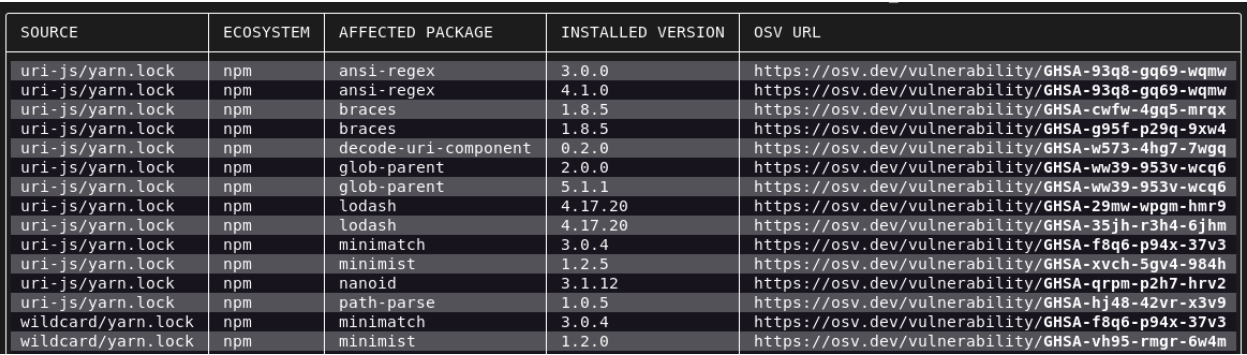
Running OSV-Scanner on your project will first find all the transitive dependencies that are being used by analyzing manifests, SBOMs, and commit hashes. The scanner then connects this information with the OSV database and displays the vulnerabilities relevant to your project.
OSV-Scanner is also integrated into the OpenSSF Scorecard’sVulnerabilities check, which will extend the analysis from a project’s direct vulnerabilities to also include vulnerabilities in all its dependencies. This means that the 1.2M projects regularly evaluated by Scorecard will have a more comprehensive measure of their project security.
What else is new for OSV?
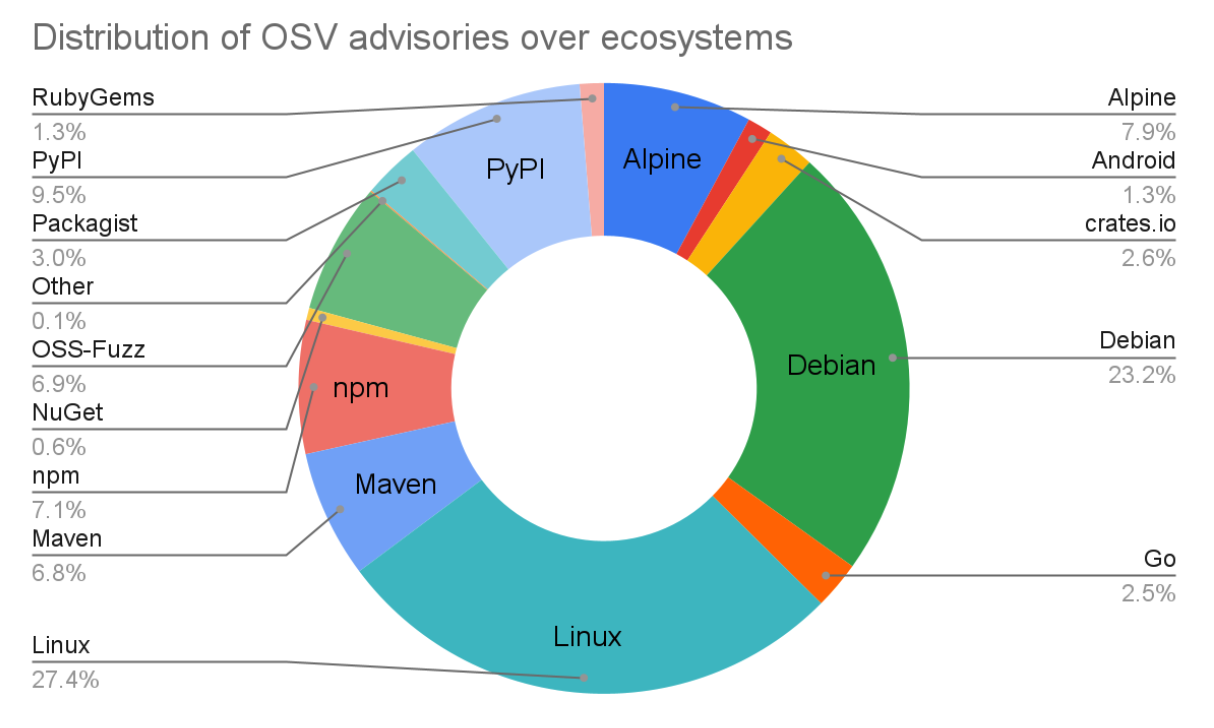
The OSV project has made lots of progress since our last post in June last year. The OSV schema has seen significant adoption from vulnerability databases such as GitHub Security Advisories and Android Security Bulletins. Altogether OSV.dev now supports 16 ecosystems, including all major language ecosystems, Linux distributions (Debian and Alpine), as well as Android, Linux Kernel, and OSS-Fuzz. This means the OSV.dev database is now the biggest open source vulnerability database of its kind, with a total of over 38,000 advisories from 15,000 advisories a year ago.
The OSV.dev website also had a complete overhaul, and now has a better UI and provides more information on each vulnerability. Prominent open source projects have also started to rely on OSV.dev, such as DependencyTrack and Flutter.
What’s next?
There’s still a lot to do! Our plan for OSV-Scanner is not just to build a simple vulnerability scanner; we want to build the best vulnerability management tool—something that will also minimize the burden of remediating known vulnerabilities. Here are some of our ideas for achieving this:
The first step is further integrating with developer workflows by offering standalone CI actions, allowing for easy setup and scheduling to keep track of new vulnerabilities.
Improve C/C++ vulnerability support: One of the toughest ecosystems for vulnerability management is C/C++, due to the lack of a canonical package manager to identify C/C++ software. OSV is filling this gap by building a high quality database of C/C++ vulnerabilities by adding precise commit level metadata to CVEs.
We are also looking to add unique features to OSV-Scanner, like the ability to utilize specific function level vulnerability information by doing call graph analysis, and to be able to automatically remediate vulnerabilities by suggesting minimal version bumps that provide the maximal impact.
VEX support: Automatically generating VEX statements using, for example, call graph analysis.
Try out OSV-Scanner today!
You can download and try out OSV-Scanner on your projects by following instructions on our new website osv.dev. Or alternatively, to automatically run OSV-Scanner on your GitHub project, try Scorecard. Please feel free to let us know what you think! You can give us feedback either by opening an issue on our Github, or through the OSV mailing list.
It is against this background that Google is seeking contributors to a new open source project called GUAC (pronounced like the dip). GUAC, or Graph for Understanding Artifact Composition, is in the early stages yet is poised to change how the industry understands software supply chains. GUAC addresses a need created by the burgeoning efforts across the ecosystem to generate software build, security, and dependency metadata. True to Google’s mission to organize and make the world’s information universally accessible and useful, GUAC is meant to democratize the availability of this security information by making it freely accessible and useful for every organization, not just those with enterprise-scale security and IT funding.
Thanks to community collaboration in groups such as OpenSSF, SLSA, SPDX, CycloneDX, and others, organizations increasingly have ready access to:
vulnerability databases that aggregate information across ecosystems and make vulnerabilities more discoverable and actionable (e.g. OSV.dev, Global Security Database (GSD)).
These data are useful on their own, but it’s difficult to combine and synthesize the information for a more comprehensive view. The documents are scattered across different databases and producers, are attached to different ecosystem entities, and cannot be easily aggregated to answer higher-level questions about an organization’s software assets.
To help address this issue we’ve teamed up with Kusari, Purdue University, and Citi to create GUAC, a free tool to bring together many different sources of software security metadata. We’re excited to share the project’s proof of concept, which lets you query a small dataset of software metadata including SLSA provenance, SBOMs, and OpenSSF Scorecards.
What is GUAC
Graph for Understanding Artifact Composition (GUAC) aggregates software security metadata into a high fidelity graph database—normalizing entity identities and mapping standard relationships between them. Querying this graph can drive higher-level organizational outcomes such as audit, policy, risk management, and even developer assistance.
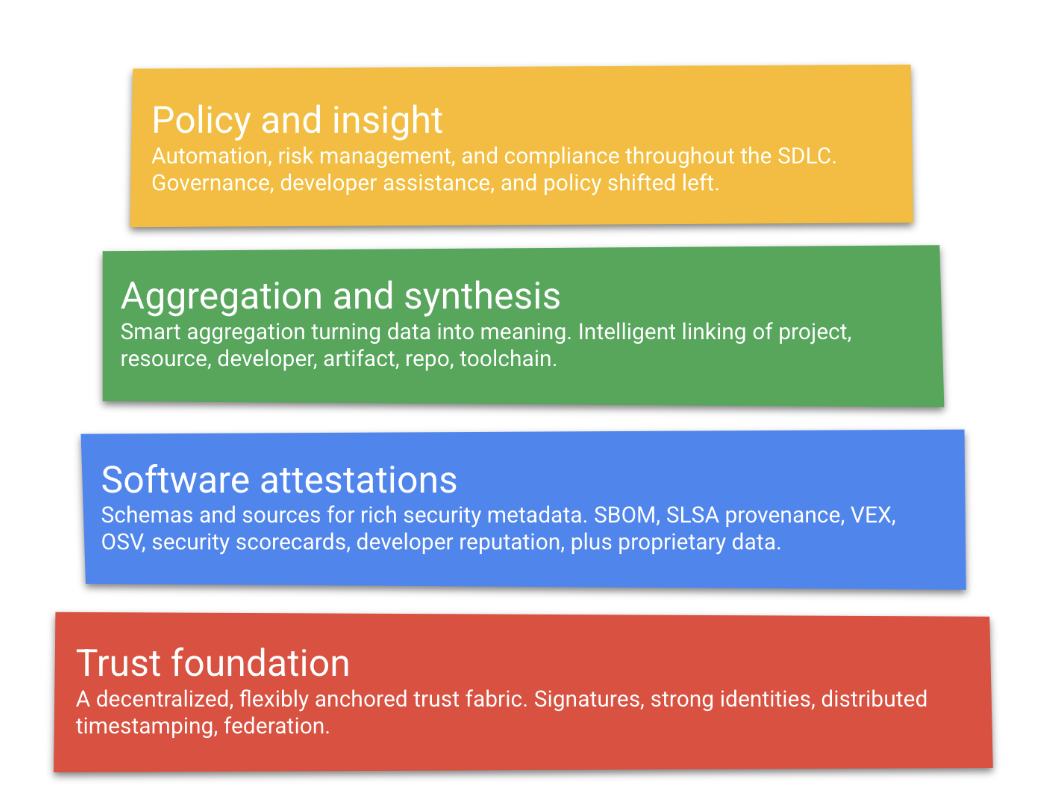
Conceptually, GUAC occupies the “aggregation and synthesis” layer of the software supply chain transparency logical model:
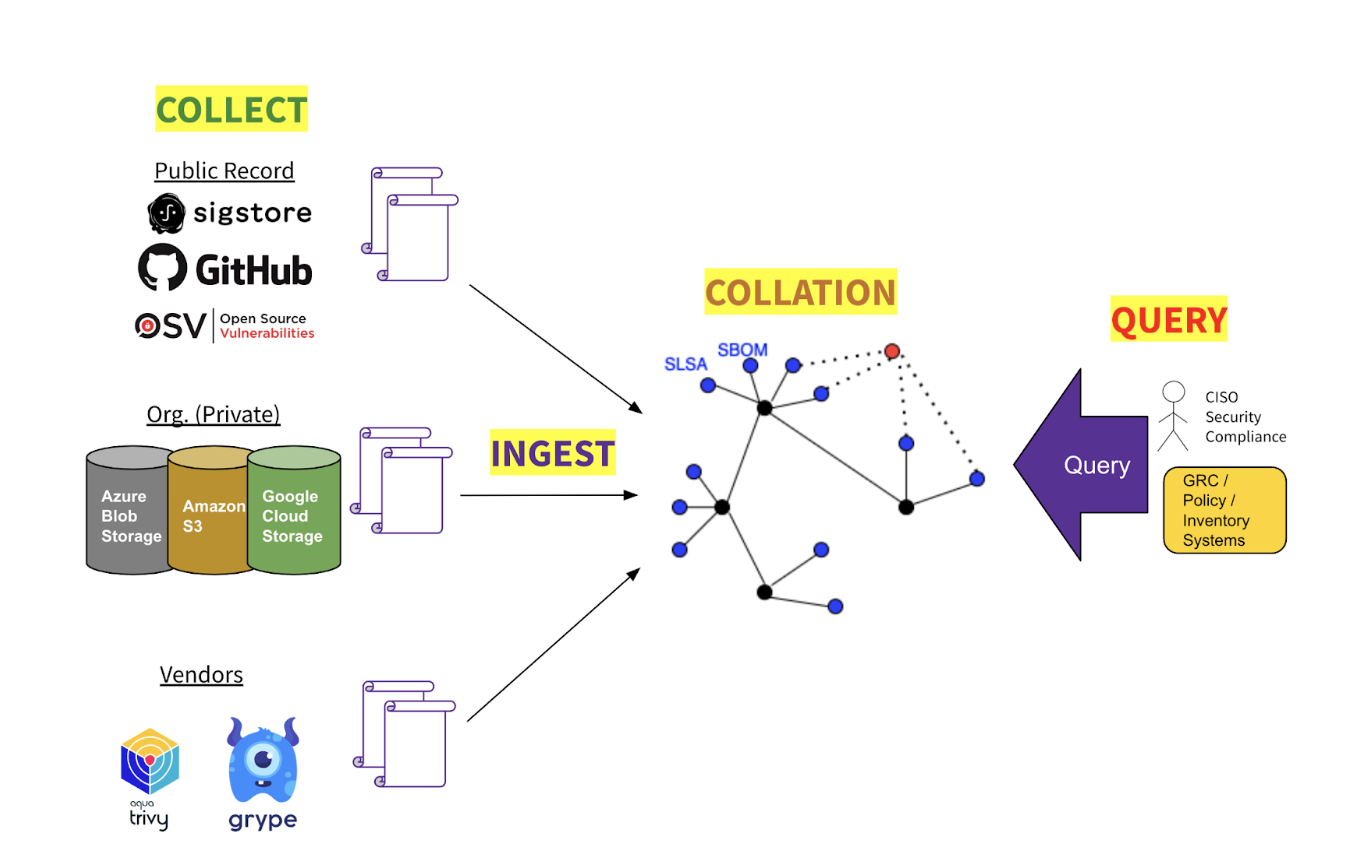
GUAC has four major areas of functionality:
Collection GUAC can be configured to connect to a variety of sources of software security metadata. Some sources may be open and public (e.g., OSV); some may be first-party (e.g., an organization’s internal repositories); some may be proprietary third-party (e.g., from data vendors).
Ingestion From its upstream data sources GUAC imports data on artifacts, projects, resources, vulnerabilities, repositories, and even developers.
Collation Having ingested raw metadata from disparate upstream sources, GUAC assembles it into a coherent graph by normalizing entity identifiers, traversing the dependency tree, and reifying implicit entity relationships, e.g., project → developer; vulnerability → software version; artifact → source repo, and so on.
Query Against an assembled graph one may query for metadata attached to, or related to, entities within the graph. Querying for a given artifact may return its SBOM, provenance, build chain, project scorecard, vulnerabilities, and recent lifecycle events — and those for its transitive dependencies.
A CISO or compliance officer in an organization wants to be able to reason about the risk of their organization. An open source organization like the Open Source Security Foundation wants to identify critical libraries to maintain and secure. Developers need richer and more trustworthy intelligence about the dependencies in their projects.
The good news is, increasingly one finds the upstream supply chain already enriched with attestations and metadata to power higher-level reasoning and insights. The bad news is that it is difficult or impossible today for software consumers, operators, and administrators to gather this data into a unified view across their software assets.
To understand something complex like the blast radius of a vulnerability, one needs to trace the relationship between a component and everything else in the portfolio—a task that could span thousands of metadata documents across hundreds of sources. In the open source ecosystem, the number of documents could reach into the millions.
GUAC aggregates and synthesizes software security metadata at scale and makes it meaningful and actionable. With GUAC in hand, we will be able to answer questions at three important stages of software supply chain security:
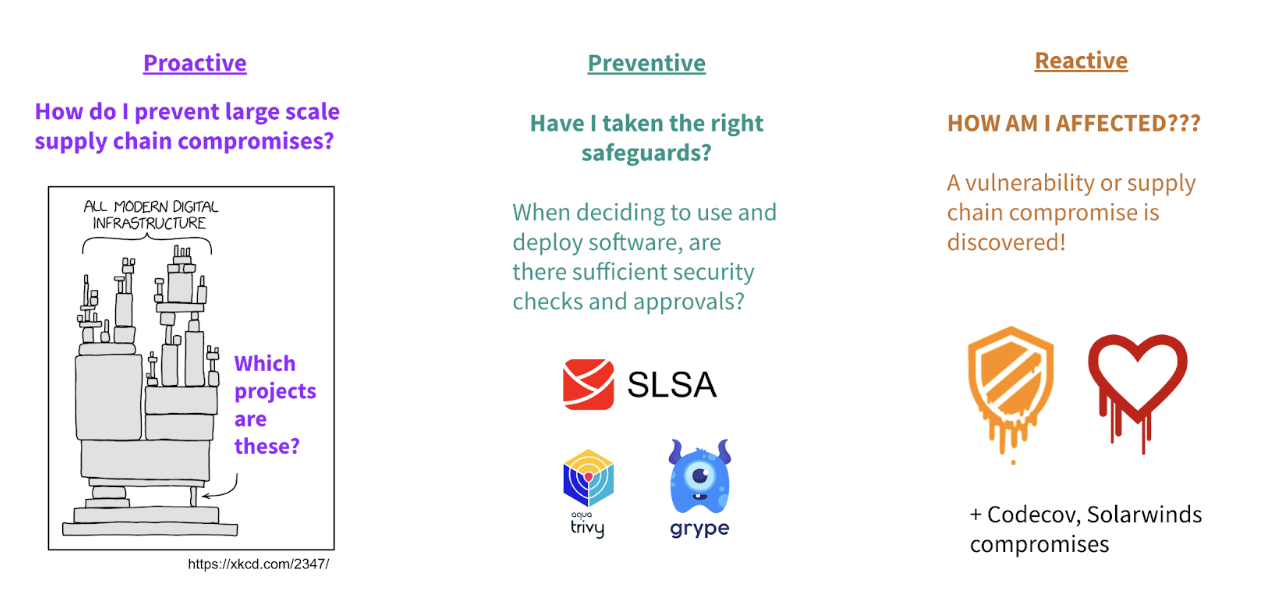
Proactive, e.g.,
What are the most used critical components in my software supply chain ecosystem?
Where are the weak points in my overall security posture?
How do I prevent supply chain compromises before they happen?
Where am I exposed to risky dependencies?
Operational, e.g.,
Is there evidence that the application I’m about to deploy meets organization policy?
Do all binaries in production trace back to a securely managed repository?
Reactive, e.g.,
Which parts of my organization’s inventory is affected by new vulnerability X?
A suspicious project lifecycle event has occurred. Where is risk introduced to my organization?
An open source project is being deprecated. How am I affected?
Get Involved
GUAC is an Open Source project on Github, and we are excited to get more folks involved and contributing (read the contributor guide to get started)! The project is still in its early stages, with a proof of concept that can ingest SLSA, SBOM, and Scorecard documents and support simple queries and exploration of software metadata. The next efforts will focus on scaling the current capabilities and adding new document types for ingestion. We welcome help and contributions of code or documentation.
Since the project will be consuming documents from many different sources and formats, we have put together a group of “Technical Advisory Members'' to help advise the project. These members include representation from companies and groups such as SPDX, CycloneDX Anchore, Aquasec, IBM, Intel, and many more. If you’re interested in participating as a contributor or advisor representing end users’ needs—or the sources of metadata GUAC consumes—you can register your interest in the relevant GitHub issue.
The GUAC team will be showcasing the project at Kubecon NA 2022 next week. Come by our session if you’ll be there and have a chat with us—we’d be happy to talk in person or virtually!
Posted by Jonathan Metzman, Dongge Liu and Oliver Chang, Google Open Source Security Team
Recently, OSS-Fuzz—our community fuzzing service that regularly checks 700 critical open source projects for bugs—detected a serious vulnerability (CVE-2022-3008): a bug in the TinyGLTF project that could have allowed attackers to execute malicious code in projects using TinyGLTF as a dependency.
The bug was soon patched, but the wider significance remains: OSS-Fuzz caught a trivially exploitable command injection vulnerability. This discovery shows that fuzzing, a type of testing once primarily known for detecting memory corruption vulnerabilities in C/C++ code, has considerable untapped potential to find broader classes of vulnerabilities. Though the TinyGLTF library is written in C++, this vulnerability is easily applicable to all programming languages and confirms that fuzzing is a beneficial and necessary testing method for all software projects.
Fuzzing as a public service
OSS-Fuzz was launched in 2016 in response to the Heartbleed vulnerability, discovered in one of the most popular open source projects for encrypting web traffic. The vulnerability had the potential to affect almost every internet user, yet was caused by a relatively simple memory buffer overflow bug that could have been detected by fuzzing—that is, by running the code on randomized inputs to intentionally cause unexpected behaviors or crashes that signal bugs. At the time, though, fuzzing was not widely used and was cumbersome for developers, requiring extensive manual effort.
Google created OSS-Fuzz to fill this gap: it's a free service that runs fuzzers for open source projects and privately alerts developers to the bugs detected. Since its launch, OSS-Fuzz has become a critical service for the open source community, helping get more than 8,000 security vulnerabilities and more than 26,000 other bugs in open source projects fixed. With time, OSS-Fuzz has grown beyond C/C++ to detect problems in memory-safe languages such as Go, Rust, and Python.
Google Cloud’s Assured Open Source Software Service, which provides organizations a secure and curated set of open source dependencies, relies on OSS-Fuzz as a foundational layer of security scanning. OSS-Fuzz is also the basis for free fuzzing tools for the community, such as ClusterFuzzLite, which gives developers a streamlined way to fuzz both open source and proprietary code before committing changes to their projects. All of these efforts are part of Google’s $10B commitment to improving cybersecurity and continued work to make open source software more secure for everyone.
New classes of vulnerabilities
Last December, OSS-Fuzz announced an effort to improve our bug detectors (known as sanitizers) to find more classes of vulnerabilities, by first showing that fuzzing can find Log4Shell. The TinyGLTF bug was found using one of those new sanitizers, SystemSan, which was developed specifically to find bugs that can be exploited to execute arbitrary commands in any programming language. This vulnerability shows that it was possible to inject backticks into the input glTF file format and allow commands to be executed during parsing.
# Craft an input that exploits the vulnerability to insert a string to poc
$ echo '{"images":[{"uri":"a`echo iamhere > poc`"}], "asset":{"version":""}}' > payload.gltf
# Execute the vulnerable program with the input
$ ./loader_exampler payload.gltf
# The string was inserted to poc, proving the vulnerability was successfully exploited
$ cat poc
iamhere
A proof of exploit in TinyGLTF, extended from the input found by OSS-Fuzz with SystemSan. The culprit was the use of the “wordexp” function to expand file paths.
SystemSan uses ptrace, and is built in a language-independent and highly extensible way to allow new bug detectors to be added easily. For example, we’ve built proofs of concept to detect issues in JavaScript and Python libraries, and an external contributor recently added support for detecting arbitrary file access (e.g. through path traversal).
OSS-Fuzz has also continued to work with Code Intelligence to improve Java fuzzing by integrating over 50 additional Java projects into OSS-Fuzz and developing sanitizers for detecting Java-specific issues such as deserialization and LDAP injection vulnerabilities. A number of these types of vulnerabilities have been found already and are pending disclosure.
Rewards for getting involved
Want to get involved with making fuzzing more widely used and get rewarded? There are two ways:
Integrate a new sanitizer into OSS-Fuzz (or fuzzing engines like Jazzer) to detect more classes of bugs. We will pay $11,337 for integrations that find at least 2 new vulnerabilities in OSS-Fuzz projects.
Integrate a new project into OSS-Fuzz. We currently support projects written in C/C++, Rust, Go, Swift, Python, and JVM-based languages; Javascript is coming soon. This is part of our existing OSS-Fuzz integration rewards.
Fuzzing still has a lot of unexplored potential in discovering more classes of vulnerabilities. Through our combined efforts we hope to take this effective testing method to the next level and enable more of the open source community to enjoy the benefits of fuzzing.
Posted by Anton Bikineev, Michael Lippautz and Hannes Payer, Chrome security team
Memory safety in Chrome is an ever-ongoing effort to protect our users. We are constantly experimenting with different technologies to stay ahead of malicious actors. In this spirit, this post is about our journey of using heap scanning technologies to improve memory safety of C++.
Let’s start at the beginning though. Throughout the lifetime of an application its state is generally represented in memory. Temporal memory safety refers to the problem of guaranteeing that memory is always accessed with the most up to date information of its structure, its type. C++ unfortunately does not provide such guarantees. While there is appetite for different languages than C++ with stronger memory safety guarantees, large codebases such as Chromium will use C++ for the foreseeable future.
auto* foo =newFoo();
delete foo;
// The memory location pointed to by foo is not representing
// a Foo object anymore, as the object has been deleted (freed).
foo->Process();
In the example above, foo is used after its memory has been returned to the underlying system. The out-of-date pointer is called a dangling pointer and any access through it results in a use-after-free (UAF) access. In the best case such errors result in well-defined crashes, in the worst case they cause subtle breakage that can be exploited by malicious actors.
UAFs are often hard to spot in larger codebases where ownership of objects is transferred between various components. The general problem is so widespread that to this date both industry and academia regularly come up with mitigation strategies. The examples are endless: C++ smart pointers of all kinds are used to better define and manage ownership on application level; static analysis in compilers is used to avoid compiling problematic code in the first place; where static analysis fails, dynamic tools such as C++ sanitizers can intercept accesses and catch problems on specific executions.
Chrome’s use of C++ is sadly no different here and the majority of high-severity security bugs are UAF issues. In order to catch issues before they reach production, all of the aforementioned techniques are used. In addition to regular tests, fuzzers ensure that there’s always new input to work with for dynamic tools. Chrome even goes further and employs a C++ garbage collector called Oilpan which deviates from regular C++ semantics but provides temporal memory safety where used. Where such deviation is unreasonable, a new kind of smart pointer called MiraclePtr was introduced recently to deterministically crash on accesses to dangling pointers when used. Oilpan, MiraclePtr, and smart-pointer-based solutions require significant adoptions of the application code.
Over the last decade, another approach has seen some success: memory quarantine. The basic idea is to put explicitly freed memory into quarantine and only make it available when a certain safety condition is reached. Microsoft has shipped versions of this mitigation in its browsers: MemoryProtector in Internet Explorer in 2014 and its successor MemGC in (pre-Chromium) Edge in 2015. In the Linux kernel a probabilistic approach was used where memory was eventually just recycled. And this approach has seen attention in academia in recent years with the MarkUs paper. The rest of this article summarizes our journey of experimenting with quarantines and heap scanning in Chrome.
(At this point, one may ask where pointer authentication fits into this picture – keep on reading!)
Quarantining and Heap Scanning, the Basics
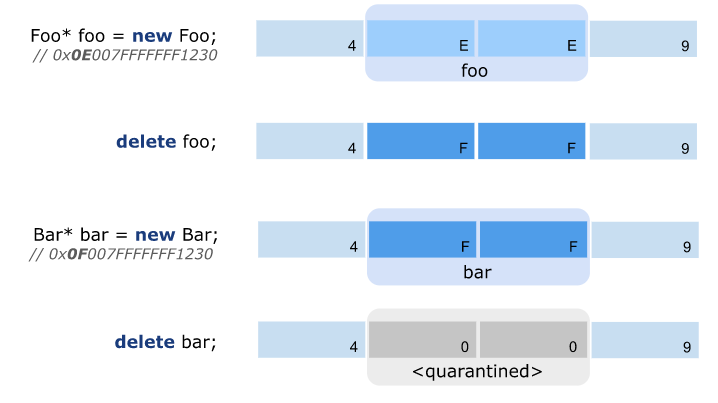
The main idea behind assuring temporal safety with quarantining and heap scanning is to avoid reusing memory until it has been proven that there are no more (dangling) pointers referring to it. To avoid changing C++ user code or its semantics, the memory allocator providing new and delete is intercepted.
Upon invoking delete, the memory is actually put in a quarantine, where it is unavailable for being reused for subsequent new calls by the application. At some point a heap scan is triggered which scans the whole heap, much like a garbage collector, to find references to quarantined memory blocks. Blocks that have no incoming references from the regular application memory are transferred back to the allocator where they can be reused for subsequent allocations.
There are various hardening options which come with a performance cost:
Overwrite the quarantined memory with special values (e.g. zero);
Stop all application threads when the scan is running or scan the heap concurrently;
Intercept memory writes (e.g. by page protection) to catch pointer updates;
Scan memory word by word for possible pointers (conservative handling) or provide descriptors for objects (precise handling);
Segregation of application memory in safe and unsafe partitions to opt-out certain objects which are either performance sensitive or can be statically proven as being safe to skip;
Scan the execution stack in addition to just scanning heap memory;
We call the collection of different versions of these algorithms StarScan [stɑː skæn], or *Scan for short.
Reality Check
We apply *Scan to the unmanaged parts of the renderer process and use Speedometer2 to evaluate the performance impact.
We have experimented with different versions of *Scan. To minimize performance overhead as much as possible though, we evaluate a configuration that uses a separate thread to scan the heap and avoids clearing of quarantined memory eagerly on delete but rather clears quarantined memory when running *Scan. We opt in all memory allocated with new and don’t discriminate between allocation sites and types for simplicity in the first implementation.
Note that the proposed version of *Scan is not complete. Concretely, a malicious actor may exploit a race condition with the scanning thread by moving a dangling pointer from an unscanned to an already scanned memory region. Fixing this race condition requires keeping track of writes into blocks of already scanned memory, by e.g. using memory protection mechanisms to intercept those accesses, or stopping all application threads in safepoints from mutating the object graph altogether. Either way, solving this issue comes at a performance cost and exhibits an interesting performance and security trade-off. Note that this kind of attack is not generic and does not work for all UAF. Problems such as depicted in the introduction would not be prone to such attacks as the dangling pointer is not copied around.
Since the security benefits really depend on the granularity of such safepoints and we want to experiment with the fastest possible version, we disabled safepoints altogether.
Running our basic version on Speedometer2 regresses the total score by 8%. Bummer…
Where does all this overhead come from? Unsurprisingly, heap scanning is memory bound and quite expensive as the entire user memory must be walked and examined for references by the scanning thread.
To reduce the regression we implemented various optimizations that improve the raw scanning speed. Naturally, the fastest way to scan memory is to not scan it at all and so we partitioned the heap into two classes: memory that can contain pointers and memory that we can statically prove to not contain pointers, e.g. strings. We avoid scanning memory that cannot contain any pointers. Note that such memory is still part of the quarantine, it is just not scanned.
We extended this mechanism to also cover allocations that serve as backing memory for other allocators, e.g., zone memory that is managed by V8 for the optimizing JavaScript compiler. Such zones are always discarded at once (c.f. region-based memory management) and temporal safety is established through other means in V8.
On top, we applied several micro optimizations to speed up and eliminate computations: we use helper tables for pointer filtering; rely on SIMD for the memory-bound scanning loop; and minimize the number of fetches and lock-prefixed instructions.
We also improve upon the initial scheduling algorithm that just starts a heap scan when reaching a certain limit by adjusting how much time we spent in scanning compared to actually executing the application code (c.f. mutator utilization in garbage collection literature).
In the end, the algorithm is still memory bound and scanning remains a noticeably expensive procedure. The optimizations helped to reduce the Speedometer2 regression from 8% down to 2%.
While we improved raw scanning time, the fact that memory sits in a quarantine increases the overall working set of a process. To further quantify this overhead, we use a selected set of Chrome’s real-world browsing benchmarks to measure memory consumption. *Scan in the renderer process regresses memory consumption by about 12%. It’s this increase of the working set that leads to more memory being paged in which is noticeable on application fast paths.
Hardware Memory Tagging to the Rescue
MTE (Memory Tagging Extension) is a new extension on the ARM v8.5A architecture that helps with detecting errors in software memory use. These errors can be spatial errors (e.g. out-of-bounds accesses) or temporal errors (use-after-free). The extension works as follows. Every 16 bytes of memory are assigned a 4-bit tag. Pointers are also assigned a 4-bit tag. The allocator is responsible for returning a pointer with the same tag as the allocated memory. The load and store instructions verify that the pointer and memory tags match. In case the tags of the memory location and the pointer do not match a hardware exception is raised.
MTE doesn't offer a deterministic protection against use-after-free. Since the number of tag bits is finite there is a chance that the tag of the memory and the pointer match due to overflow. With 4 bits, only 16 reallocations are enough to have the tags match. A malicious actor may exploit the tag bit overflow to get a use-after-free by just waiting until the tag of a dangling pointer matches (again) the memory it is pointing to.
*Scan can be used to fix this problematic corner case. On each delete call the tag for the underlying memory block gets incremented by the MTE mechanism. Most of the time the block will be available for reallocation as the tag can be incremented within the 4-bit range. Stale pointers would refer to the old tag and thus reliably crash on dereference. Upon overflowing the tag, the object is then put into quarantine and processed by *Scan. Once the scan verifies that there are no more dangling pointers to this block of memory, it is returned back to the allocator. This reduces the number of scans and their accompanying cost by ~16x.
The following picture depicts this mechanism. The pointer to foo initially has a tag of 0x0E which allows it to be incremented once again for allocating bar. Upon invoking delete for bar the tag overflows and the memory is actually put into quarantine of *Scan.
We got our hands on some actual hardware supporting MTE and redid the experiments in the renderer process. The results are promising as the regression on Speedometer was within noise and we only regressed memory footprint by around 1% on Chrome’s real-world browsing stories.
Is this some actual free lunch? Turns out that MTE comes with some cost which has already been paid for. Specifically, PartitionAlloc, which is Chrome’s underlying allocator, already performs the tag management operations for all MTE-enabled devices by default. Also, for security reasons, memory should really be zeroed eagerly. To quantify these costs, we ran experiments on an early hardware prototype that supports MTE in several configurations:
MTE disabled and without zeroing memory;
MTE disabled but with zeroing memory;
MTE enabled without *Scan;
MTE enabled with *Scan;
(We are also aware that there’s synchronous and asynchronous MTE which also affects determinism and performance. For the sake of this experiment we kept using the asynchronous mode.)
The results show that MTE and memory zeroing come with some cost which is around 2% on Speedometer2. Note that neither PartitionAlloc, nor hardware has been optimized for these scenarios yet. The experiment also shows that adding *Scan on top of MTE comes without measurable cost.
Conclusions
C++ allows for writing high-performance applications but this comes at a price, security. Hardware memory tagging may fix some security pitfalls of C++, while still allowing high performance. We are looking forward to see a more broad adoption of hardware memory tagging in the future and suggest using *Scan on top of hardware memory tagging to fix temporary memory safety for C++. Both the used MTE hardware and the implementation of *Scan are prototypes and we expect that there is still room for performance optimizations.

 Login
Login