Nifty Gateway, the marketplace that once helped bring NFT drops to a wider audience, will stop running its marketplace on February 23, 2026. The company put the site into a withdrawal-only mode the same day it made the announcement, and users were told they must move any remaining funds and NFTs off the platform before that date.
Withdrawal Window Opens
According to the company, withdrawal tools are available now. Reports note users can pull USD or ETH balances through a linked Gemini Exchange account or send funds to their bank via Stripe.
Emails with step-by-step instructions will be sent to account holders, and a shutdown notice already appears on the Nifty Gateway homepage. The aim, as described by the owner, is to let people retrieve what they own before the platform goes dark.
Today, we are announcing that the Nifty Gateway platform will be closing on February 23, 2026. Starting today, Nifty Gateway is in withdrawal-only mode.
Nifty Gateway was launched in 2020 with the vision of revolutionizing digital art. Since launching, Nifty supported dozens of…
Based on reports from Gemini, the closure is meant to let the parent firm concentrate on building one bigger app for customers. The move highlights how interest and trading activity in many NFT markets have cooled from the highs seen in earlier years.
Some collectors and artists are left scrambling to rehome items they once sold or stored on Nifty Gateway.
End Of An Early Player
Nifty Gateway helped make buying NFTs easier for people who preferred credit cards and familiar checkout flows. It launched as a high-profile marketplace and hosted major drops from well-known creators.
The platform supported hundreds of millions in sales at its peak and played a clear part in bringing NFT art into mainstream headlines. Its exit marks the end of an important chapter for that wave of marketplaces.
What Owners Must Do Now
Owners should check their inboxes for the official instructions, confirm where their tokens are stored, and move assets before the deadline. If NFTs are stored in custodial wallets on the site, they will need to be transferred out.
USD and ETH balances should be withdrawn or moved into a connected Gemini account if that option suits the owner. Waiting past the closure date will reduce options.
A Quiet Turning Point
For many collectors, this will feel like another sign that the early boom years have passed. For creators, the change raises questions about where drops and secondary sales will happen next.
Gemini says it will keep supporting NFTs through its other products, including the Gemini Wallet, but the specific ways that creators and buyers reconnect with those audiences will depend on new tools and services that arrive in the next months.
Featured image from Unsplash, chart from TradingView
The NFT market recorded $122.5 million in sales volume over the past week, surging 101.61% from the previous period. NFT buyers climbed 38.75% to 187,288, while sellers jumped 47.19% to 164,685. Transaction volume increased 7.99% to 702,526. This is happening…
Nathaniel Chastain, a former product manager at OpenSea, will not face a retrial after federal prosecutors chose to drop their re-review of his insider trading case.
Reports say the US Attorney’s Office reached a deferred prosecution agreement with Chastain that will lead to dismissal of the charges once the agreement runs its course.
What Prosecutors Decided
Prosecutors told a Manhattan federal court they would not retry Chastain following an appeals court ruling that tossed his earlier conviction.
Under the deferred prosecution deal, the government will dismiss the case about a month after notifying the court, and Chastain has agreed to forfeit roughly 15.98 ETH tied to the trades. He has already served three months in prison from his original sentence.
How The Appeals Court Changed The Case
According to the US Court of Appeals for the Second Circuit, the jury in the first trial had been given the wrong instructions about what the wire fraud law covers.
The judges said confidential information only counts as property under the statute when it has commercial value to the employer, and jurors might otherwise convict someone for behavior that is unethical but not criminal. That legal point is at the heart of the reversal.
Reports note that prosecutors had called the matter the first-ever insider trading case tied to NFTs. Now, lower courts and enforcement teams will have to think carefully before using traditional fraud laws to police activity in NFT markets.
The ruling highlights a gap between old statutes and new kinds of online goods, which may push lawmakers to give clearer rules for how to treat confidential business signals related to crypto platforms.
OpenSea: The Case’s Earlier Chapters
Chastain was first charged in mid-2022 after prosecutors said he bought certain NFTs before they were featured on OpenSea’s homepage, then sold them after prices rose.
He was convicted at trial in 2023 of wire fraud and money laundering and received a sentence that included three months behind bars. The US Attorney’s Office originally described the scheme as a novel use of insider knowledge in digital markets.
With the deferred prosecution agreement in place for OpenSea, prosecutors can close this chapter without a new trial.
Chastain’s forfeiture of crypto assets and his already served time mean the government has secured some remedy, while the appellate decision leaves open big questions about when private business information can be treated as property for federal fraud charges.
Legal teams, judges, and regulators are likely to keep a close eye on how similar cases are handled in the future.
Featured image from Getty Images, chart from TradingView
US prosecutors have formally dropped their case against former OpenSea manager Nathaniel Chastain following an appeals court reversal that dismantled what was once positioned as the first NFT insider trading prosecution in American history.
According to sources, the Justice Department announced Wednesday it would enter a one-month deferred prosecution agreement before dismissing the indictment with prejudice.
The decision closes a chapter that began in June 2022 when Chastain was arrested and charged with wire fraud and money laundering for using confidential information to purchase NFTs before they were featured on OpenSea’s homepage.
The case attracted widespread attention as prosecutors attempted to apply traditional financial crime statutes to emerging digital asset markets.
Appeals Court Ruling Undermines Prosecution’s Foundation
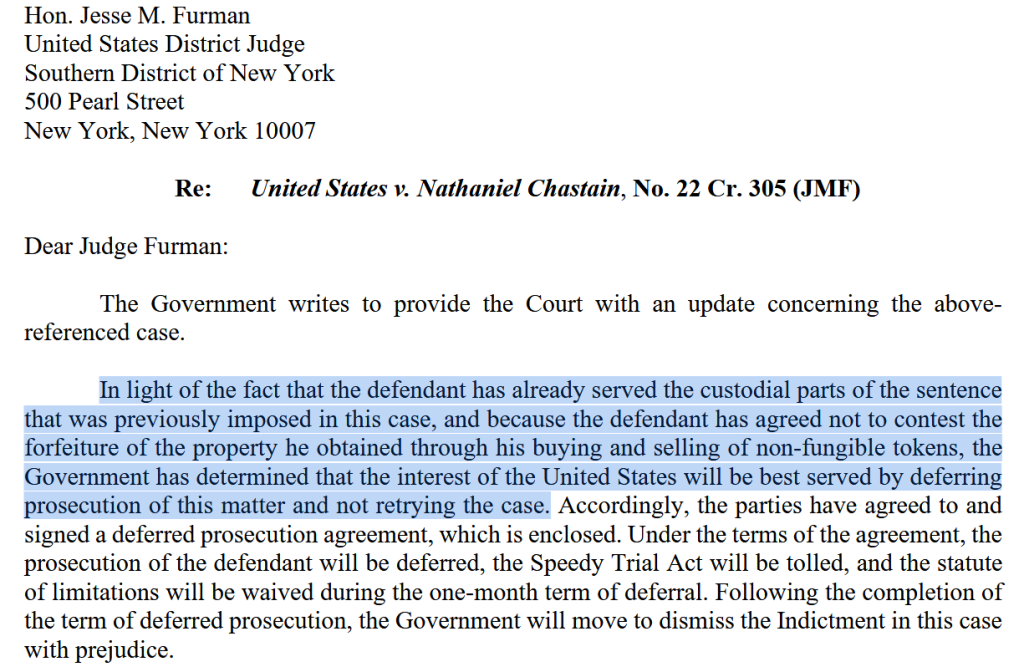
Manhattan US Attorney Jay Clayton, a former SEC chair, told the federal court that prosecutors would not retry the case given Chastain had already served three months in prison and agreed not to contest forfeiture of 15.98 ETH worth $47,330.
“The interest of the United States will be best served by deferring prosecution of this matter and not retrying the case,” Clayton wrote in the court filing.
Jay Clayton’s letter. | Source: Cointelegraph
The collapse stems from a July 2024 appeals court decision that found the trial jury received flawed instructions.
The 2nd US Circuit Court of Appeals ruled 2-1 that jurors were improperly told they could convict Chastain based solely on unethical behavior rather than actual theft of property with commercial value.
Judge Steven Menashi wrote last year August that the lower court erred by allowing conviction even if the information Chastain used lacked tangible value to OpenSea.
The appeals panel sharply criticized jury instructions that permitted conviction based on violations of “broad notions of honesty and fair play,” warning such standards could criminalize nearly any deceptive act.
The court found the featured NFT data was not monetized by OpenSea and was not treated internally as a valuable asset, making it too “ethereal” to qualify as property under federal wire fraud statutes.
Original Conviction Built on Novel Legal Theory
Chastain was convicted in May 2023 after prosecutors accused him of exploiting his role to buy dozens of NFTs shortly before they appeared on OpenSea’s homepage between June and September 2021.
After tokens were featured and prices increased, he sold them at two- to five-times profit using anonymous wallets. The government alleged he made over $57,000 through the scheme.
US Attorney Damian Williams had described the case as a warning to digital asset markets when announcing charges. “NFTs might be new, but this type of criminal scheme is not,” Williams said.
“As alleged, Nathaniel Chastain betrayed OpenSea by using its confidential business information to make money for himself.“
The conviction came after a week-long trial, with prosecutors charging wire fraud rather than securities fraud since NFTs have not been legally classified as securities.
More than 300 defense attorneys had filed letters supporting dismissal, arguing that treating confidential business information as property would “criminalize a broad swath of conduct.“
Broader Regulatory Retreat Under Trump Administration
The dropped prosecution aligns with a broader shift in federal crypto enforcement under the Trump administration.
As reported by Cryptonews earlier today, a Cornerstone Research report found the SEC initiated just 13 crypto-related actions in 2025, down 60% from 33 in 2024 and the lowest level since 2017.
The agency has dismissed multiple high-profile cases including those against Coinbase, Kraken, Consensys, and Cumberland DRW.
At that time, OpenSea founder Devin Finzer called the closure “a win for everyone who is creating and building in our space.“
For now, Chastain will not face supervision by US Pretrial Services and can seek return of the $50,000 fine and special assessment paid following his conviction.
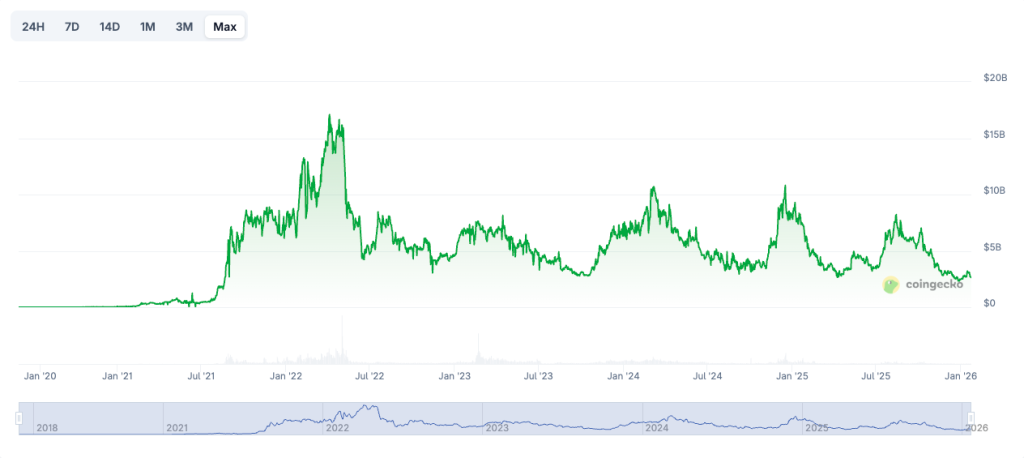
Notably, the global NFT market cap currently stands at $2.56 billion, down 6.72% in the last 24 hours with total sales volume reaching $3.68 million, according to CoinGecko data.
Source: CoinGecko
The figure represents an 84.78% decline from the market’s peak of $16.82 billion in April 2022, when digital collectibles were among the hottest assets in crypto and the Chastain case was first unfolding.
Crypto investing in 2026 feels very different from just a few years ago. The wild west phase is largely behind us. The market has matured, institutional money is deeper in the system, and regulations — while still imperfect — are clearer. Infrastructure is stronger, security is better, and data is easier to analyze.
But that also means the easy days of chasing hype and getting lucky on early trends are mostly gone. Today, building a smart crypto portfolio takes structure, patience, and a strong filter for what really matters.
This isn’t financial advice — just a framework I’ve found helpful to navigate an increasingly complex and competitive market.
How Crypto Investing Has Changed
Back in the earlier market cycles, success was often about being early, moving fast, and catching whatever narrative was flying. You could ride momentum, exit before the crash, and do pretty well.
That game doesn’t work so reliably anymore.
As the market has grown, value creation is shifting toward projects that have real adoption, viable business models, engaged developer ecosystems, and scalable infrastructure. Price action still matters, of course — but fundamentals, execution, and positioning now drive the winners.
Crypto is slowly morphing into something that looks a lot more like venture or infrastructure investing than gambling on memes. The people who succeed now are the ones who treat it that way.
How I Evaluate Crypto Projects in 2026
I’ve learned to ignore the noise and focus on a few key signals. My framework for evaluating projects in 2026 boils down to five main dimensions:
Architecture & Scalability — Does the network actually solve performance bottlenecks, and can it scale without compromising security or decentralization?
Developer Adoption — Are people building here? Strong tooling, good docs, and an active developer community are long-term survival traits.
Real Usage & On-Chain Metrics — I care more about real transactions, active wallets, and protocol revenue than flashy marketing.
Liquidity & Market Infrastructure — Deep liquidity and reliable exchanges reduce risk and make price discovery more natural over time.
Regulatory Positioning — Projects that engage with regulators early usually have a smoother path to institutional adoption.
This approach keeps me grounded when narratives go wild and helps me stay patient during quieter market phases.
Key Sectors I’m Watching in 2026
Instead of betting on individual tokens, I think in terms of themes and structural growth areas — sectors that seem destined to matter in the long run.
High-Performance Layer-1 Blockchains — The biggest gains will still come from infrastructure that can power real consumer-scale apps. Velocity and low fees matter.
Modular & Rollup Ecosystems — Layer-2 scaling and modular architecture are shaping blockchain’s backbone, giving developers flexibility and throughput.
AI + Blockchain Infrastructure — The intersection of AI and decentralization is getting real: think compute markets, on-chain data feeds, and trust-minimized inference.
Real-World Asset Tokenization (RWA) — Tokenized bonds, property, and commodities are no longer pure theory. They’re quietly becoming a bridge between TradFi and DeFi.
Consumer Web3 Applications — Gaming, digital identity, and creator tools are onboarding new users — even if the hype has cooled.
These are the areas where capital, developers, and usage are converging.
Risk Management: The Real Alpha
In my experience, risk management — not token selection — is what separates long-term winners from the rest.
A few principles guide how I size and balance positions:
Stay diversified across sectors rather than overexposed to single tokens.
Size positions based on volatility, not conviction.
Keep some stablecoin exposure for opportunistic rebalancing.
Accumulate gradually — don’t FOMO in.
This structure helps me avoid emotional decisions and keeps me liquid when others panic.
Final Thoughts
Building a crypto portfolio in 2026 is about discipline, not prediction. The best investors now focus less on “what’s next to 10x” and more on where fundamentals are quietly taking hold.
If you treat crypto like a long-term technology play rather than a casino, the opportunities are still massive. But the edge comes from structure, patience, and clarity — not luck.
How are you approaching crypto investing this year? Which sectors or metrics are shaping your thesis?
Ethereum’s main network is witnessing a dramatic surge in activity, signaling renewed confidence and accelerating momentum across the ecosystem. Aspects like transaction throughput and user engagement appear to have pushed significantly higher over the past few weeks, breaking past prior peaks.
Another Historic Moment For Ethereum Network
Since the beginning of 2026, the Ethereum network has been hitting major milestones that reflect the blockchain’s efficiency and expanding ecosystem. Even in a volatile crypto landscape, ETH’s network usage and adoption have increased sharply, as evidenced by its rapidly growing active wallet addresses.
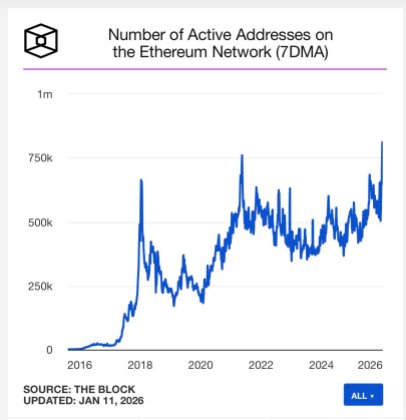
On-chain data reveals that the network has recently crossed a key threshold in terms of active wallet addresses following a sudden spike. From the report from Joseph Young, a market expert and narrator, the number of active addresses on ETH has surged to the highest level ever in its history.
This spike in user activity and interest signals more than just routine market noise and speculation. It shows growing adoption, increasing on-chain activity, and rekindled conviction in the leading ecosystem in the midst of general market instability.
After delving into the metric, the expert disclosed that the number of active 7DMA wallet addresses on Ethereum is sitting at over 811,500. As active address counts reached historic levels, the network’s fundamentals appear to have started surpassing its price performance. Should this performance hold, it is likely to play a huge role in shaping ETH’s next major move.
The blockchain’s performance extends beyond just massive active wallet addresses. Young added that Ethereum is the most proven network with more than 10 years of track record, underscoring its reliability and robust scalability.
During the period, ETH remained one of the most active and liquid crypto ecosystems by far. With several key updates over the years, such as the Fusaka Upgrade, the ETH network is now scaling faster than it ever did since its launch.
ETH Carry Out More Transactions Than Ever
Given that a significantly high level of transactions is carried out on the network, Ethereum is still showing robust strength and a growing ecosystem. On-chain Foundation head of research, Leon Waidmann, shared a report that reveals that ETH is experiencing a wave of transactions, reaching unprecedented levels.
With over 2.2 million transactions being executed per day, the network has just hit yet another all-time high. The chart shows that the previous peak was positioned at 1.89 million per day, as recorded on January 10, reflecting its rising real-world usage in a period where network fundamentals are gaining robust significance.
While transactions continue to increase, the network’s transaction costs have remained extremely low. Swapping on the blockchain now costs just $0.04, Non-Fungible Token (NFT) sales cost about $0.06, borrowing fees are $0.03, and bridging costs, which are the lowest, are around $0.01.
How to Add Marketplace-Compatible Royalty logics to Your NFT Smart Contracts Using ERC-2981 in Solidity
A Step-by-Step Guide to Implement ERC-2981 Royalty Standards in Your Solidity Smart Contracts
NFT royalties are ways for creators of NFTs to keep receiving a percentage of sales proceeds whenever their NFTs are sold in a secondary marketplace. This reward system allows creators to continue benefiting from their work even after selling it.
Before the introduction of ERC-2981, every marketplace had its own royalty system. This made tracking of royalties difficult for creators. Therefore, royalty payouts were inconsistent and sometimes completely ignored.
ERC-2981 introduced a single, interoperable, on-chain interface that automatically calculates royalty payouts and notifies the marketplace on whom to pay royalties and how much royalty they should receive.
This guide will walk you step-by-step through everything you need to implement real, marketplace-ready NFT royalty with the ERC-2981 standard in Solidity. Here is what you will learn in this post:
✅Why marketplaces need a unified royalty standard.
✅How ERC-2981 solves the royalty fragmentation problem.
✅A walk-through of setting up Hardhat.
✅How to install Openzeppelin’s contract library.
✅Extending your NFT smart contract from ERC-721 and ERC-2981.
✅Implementing the right constructor logic to allow marketplace compatibility and prevent interface conflicts errors.
✅Setting up default and per token royalties.
✅Understanding basis points.
✅How to test royalty implementation with Hardhat.
✅Smart contract deployment and verification on Etherscan.
You can get the full code for this project from my GitHub
What is ERC-2981, and how does it work in Solidity?
Before I go into proper details, listing the prerequisites that you need for this project and the general implementation of the royalty logic, I would like you to understand what ERC-2981 is, how it came about, why it was introduced, why it became the standard for royalty logics, how it works (technically), and its benefits over custom royalty logic.
ERC-2981 (Ethereum Request for Comment) is an NFT royalty standard that introduced a unified, market-friendly, standardized, and universally accepted way for NFT marketplaces to signal how royalties are distributed. It introduced a compatible way of calculating how much royalties NFT creators should receive for their work anytime it is sold in a secondary market, the address that should receive the payouts, and many more.
Before the introduction of the ERC-2981 standard, royalty logics were fragmented and inconsistent. NFT marketplaces struggled to interpret royalty information. ERC-2981 was introduced to solve this problem by:
✅ Defining a standard function that marketplaces can call to get royalty information
✅Defining a standard royalty metadata
✅Ensuring that marketplaces follow the same interface for royalty implementation.
This allows NFT marketplaces to calculate and route royalty payouts to creators, DAOs, and multi-signature wallets with ease, without implementing special logics.
With ERC-2981, smart contracts can set and adjust global royalties and token-specific royalties as required.
Creators gain a predictable royalty payout logic, which makes royalty rules transparent and consistent. Most major NFT marketplace including OpenSea and Magic Eden, rely on the ERC-2981 standard.
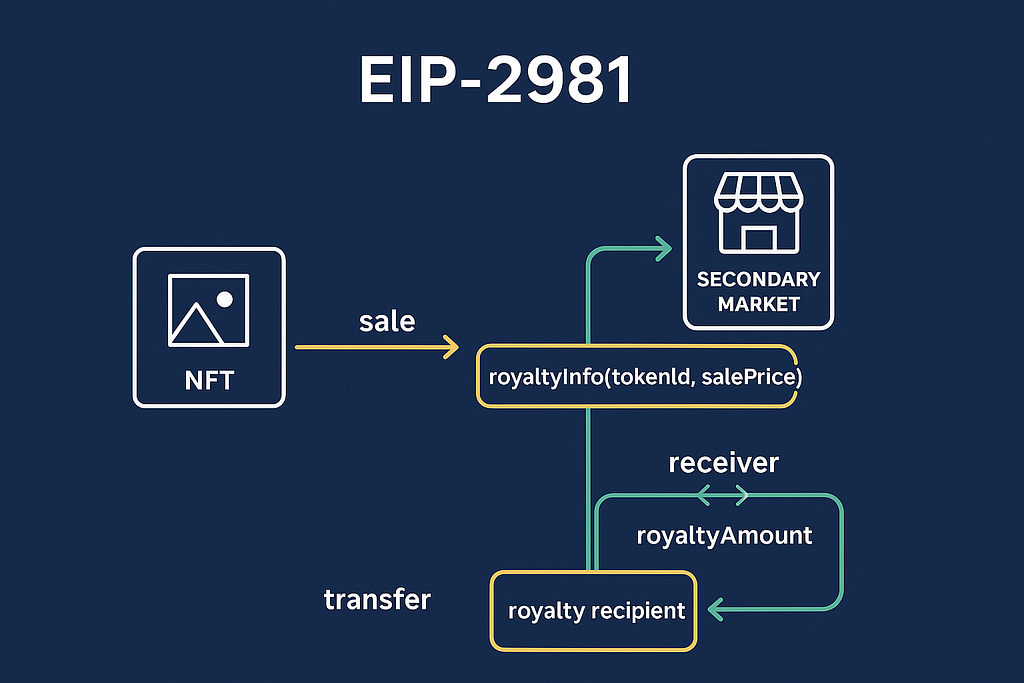
From the image above, the marketplace smart contract follows these steps to implement royalty logics with ERC-2981:
1️⃣It calls a royaltyInfo function whenever there is a resale of an NFT.
royaltyInfo(tokenId, salePrice)
This function is built in by default to allow the smart contract know how much to send and who to send it to. This is possible because the royaltyInfo function returns a receiverAddress variable and a royaltyAmount variable.
2️⃣ During resale of the NFT, the smart contract calculates the royalty percentage with basis points. Then it deducts the royalty amount from the sale’s proceeds. The remaining portion becomes the seller’s payout.
3️⃣The royalty amount is sent to the creator, while the seller’s payout gets sent to the seller of the NFT in the secondary market.
This is basically how royalty logics work with the ERC-2981 standard.
While explaining the steps involved in setting up royalty logics with ERC-2981, I mentioned basis points. This is a simple explanation of what basis points are.
Basis points (bps) are units of measurement used in expressing very small percentages. One basis point is equivalent to 0.01 percent, 100 basis points is equivalent to 1%, and so on.
Basis points are used in NFT marketplaces to calculate the percentage of the total sale’s proceeds that will be sent to the NFT’s creator as royalty. By doing something like this:
_setTokenRoyalty(newTokenId, msg.sender, 1000);
From the code above, you are asking the marketplace to set a royalty rate of 1000 bps (which is equivalent to 10% ) for this NFT.
This implies that, when the NFT sells for maybe 1ETH in the secondary market, then the creator of the nft will receive 10% of 1ETH, which should be around 0.1ETH or thereabout.
Prerequisites: Tools, Libraries, and Solidity Version
There are certain tools and libraries that you need to follow along with the context of this article. They include:
🧑💻 Code Editor: an essential tool for writing and editing code (including smart contract code). There are a good number of code editors out there with their own benefits, but over the years, I have come to love Visual Studio Code (VSCode), and I highly recommend it too.
VS Code is a good choice because of its support for Solidity and the availability of Solidity extensions and plugins that you can use.
If you don’t have VS Code, you can follow this link to download it, and then follow the setup instructions to set it up.
⚙️ Smart Contract Development Framework: I am going to make use of Hardhat in this tutorial. The reason for this is that Hardhat syntax is simple to learn and easy to teach. So it is an important plus if you already know a little Hardhat. But it is still fine if you don’t
📦Nodejs and Package managers: You also need a package manager npm/pnpm/yarn for installing Solidity tools, Hardhat plugins, and other important packages like openzeppelin/contracts
⚠️ Solidity Version Requirements: ERC-2981 was recently introduced, so you need to have a version of Solidity that supports it, and that should be at least 0.8.0 or a newer version.
We are also going to make use of royalty extensions of openzeppelin/contracts which require the same version of Solidity. I will show you how to assign the right version of Solidity to your project after setting up your project with Hardhat.
📚Libraries: Just like I mentioned earlier, we will make use of openzeppelin/contracts to access theERC721and ERC2981 standards. Openzeppelin Integrates well with major NFT marketplaces, and it will help you follow the EIP-2981 compliant guide. (EIP-2981 is the proposal document for the ERC-2981 standard)
Before we dive into the technical part of integrating the royalty logic, you need to have an understanding of:
✅ What smart contracts are and how they work.
✅ What State variables are
✅ Interface and inheritance in Solidity
Although this article will try to explain things at a beginner's level, I still need you to understand these things to follow along smoothly.
How to set up a Hardhat project
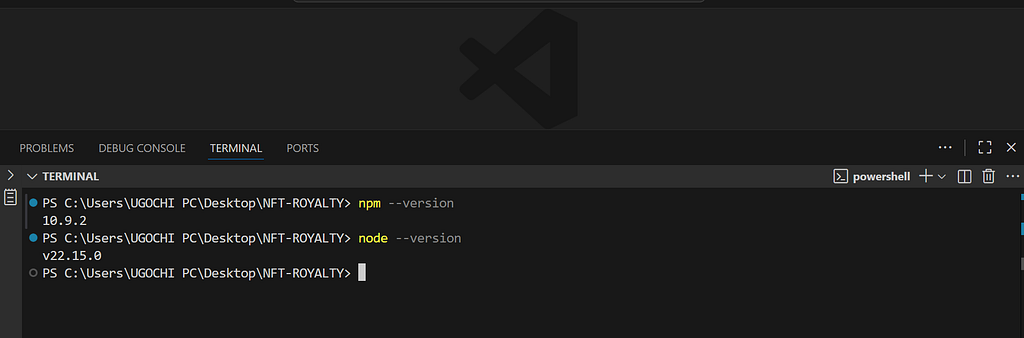
Before we begin, confirm that you have npm and node installed, by running these commands, in your command prompt or your Visual Studio Code integrated terminal.
Note: If you are using VSCode for the first time, and you want to access the integrated terminal. Click on the three horizontal dots (…) at the top left corner, locate the terminal option and select New Terminal
npm --version

node --version
These commands should return the version of npm and node that you have in your system. Or it should return an error if you do not have them in your system.
When you install node, npm Gets installed with it as well. So if you get an error, you can simply head over to the Node.js installation page and download the LTS version of nodeand follow the setup instructions to install and set up node on your computer.
After that, you will see a response like the one below when you run those commands above.
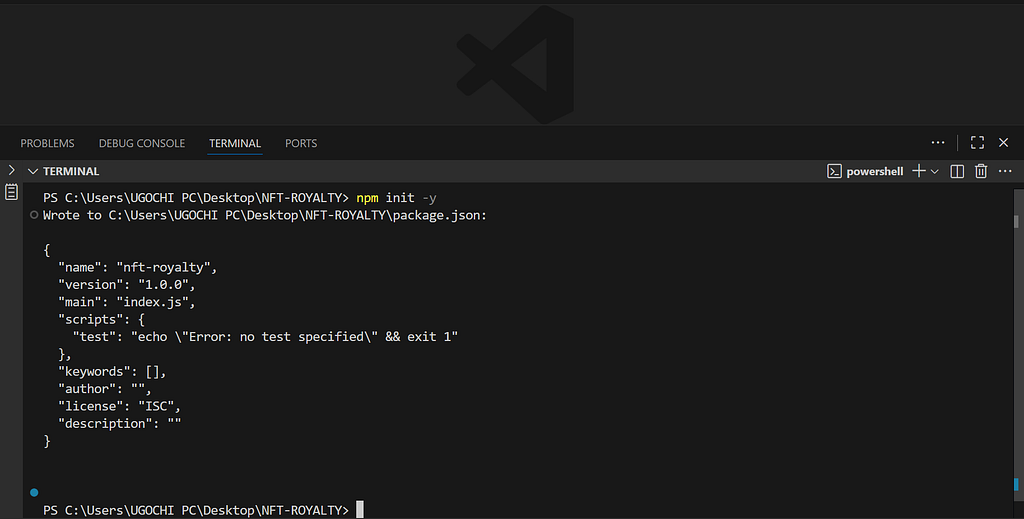
Now that you have confirmed you have node and npm installed, you need to initialize a nodejs project with a package.json file by running npm init -y
This command will create a package.json file inside your project directory, and you will get a response like the one below in your VSCode terminal:
The next step is to install Hardhat with the command below:
npm install hardhat
Anode_modules folder will be added to your project directory. This folder stores all the packages (dependencies) that your JavaScript or Node.js project needs to run. Whenever you install a package using npm (e.g., npm install express), npm downloads that package — along with any dependencies it requires — and places them inside the node_modules directory.
A package-lock.json file was also created to record the exact versions of every installed dependency so that anyone who installs the project later gets the same setup, ensuring consistency and preventing version-related bugs.
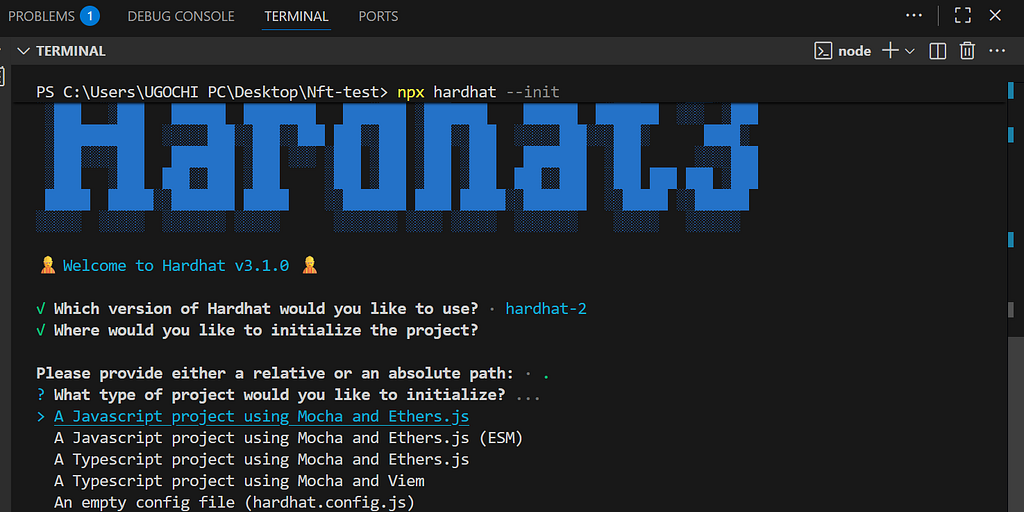
After installing Hardhat, you can now run the command below to create a Hardhat project:
npx hardhat --init
This command will start the hardhat creation dialogue in the terminal. You can choose how you want your hardhat project to be by answering the setup prompts.
First, you will be greeted with a welcome message and a prompt to choose a hardhat version for your project. You have the option between Hardhat 2 and Hardhat 3.
Hardhat 3 is still in its beta stage, and might be harder to follow along in a tutorial like this. So I suggest you go with the hardhat version 2. Move the selector to Hardhat 2 and click Enter.
It will ask you where you want your Hardhat project to be. Just click on the enter button to select your project’s folder.
You will be given a variety of options to choose the type of project you want to create.
I want us to keep this project simple, so that you can follow along (no fancy code). So, I recommend we go with A Javascript project using Mocha and Ethers.js without ESM. This will help me go straight to the point faster without the need to explain new logic.
Select the first option (A JavaScript project using Mocha and Ethers.js)
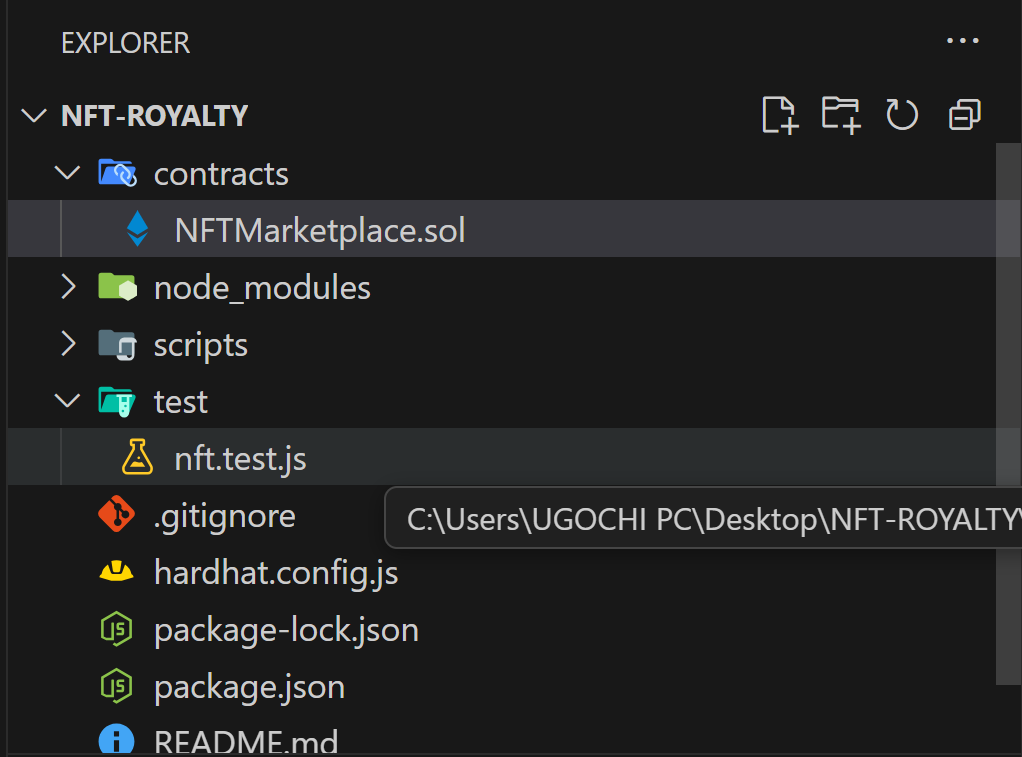
Then it will initialize your project for you and scaffold (auto-create) a Hardhat template project (you will notice that some folders were added to your project’s directory)
These are coming from Hardhat. You can see that you have a contracts folder; this is where you will create your Solidity smart contract files and write smart contract code in them.
You also have a test folder that will contain your test code for testing your smart contract. Then you can see the .gitignore file, a hardhat.config.js file, and the package.json file. You will edit most of these folders later in this tutorial.
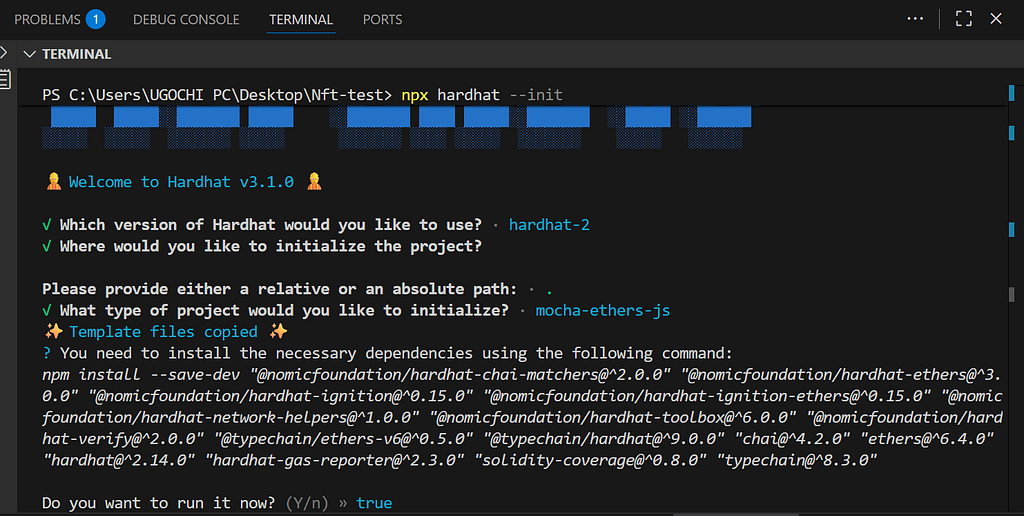
You will also notice that hardhat suggested some dependencies for you to install. Install them by clicking Enter.
These packages are important for setting up/configuring your hardhat project, setting up test and deployment scripts, and running the sample project.
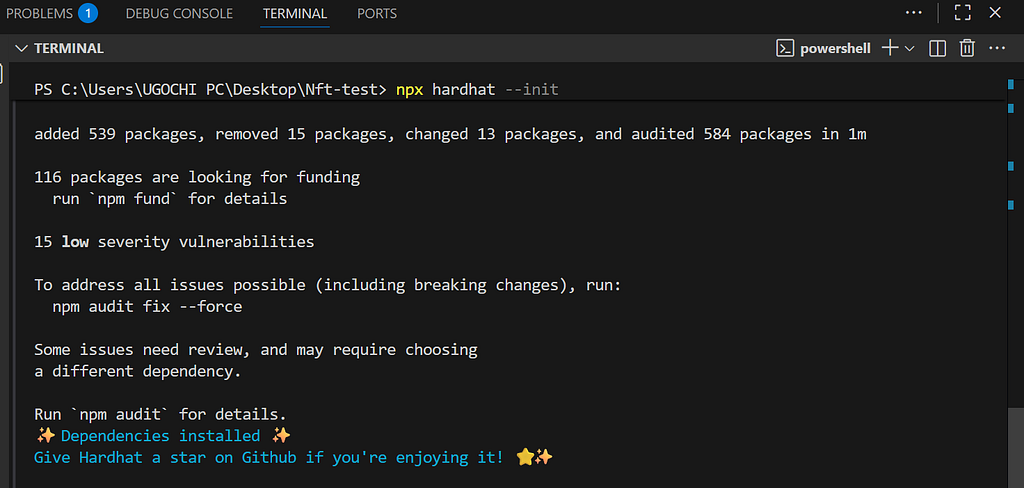
Once the installation completes, you will see a result similar to the one below:
You can confirm that you have correctly installed these packages by going under the dependencies section in your package.json file, and you will see them listed like this:
Now, you can also install the openzeppelin/contract library. by running:
npm install @openzeppelin/contracts
How to set up Default Royalty logics in NFT Marketplaces
Follow these steps to set a default royalty logic in your NFT marketplace smart contract:
1️⃣ Delete the Lock.sol file inside the contracts folder and create a new file inside the contracts folder. You can call your file whatever you want, but it should end with a .sol extension.
For instance, if you choose to call your file NFTMarketplace, then you should name your file NFTMarketplace.sol
2️⃣Now add these two lines of code at the top of your smart contract file (the file you just created)
// SPDX-License-Identifier: MIT
pragma solidity ^0.8.20;
These two lines of code contain two separate declarations. The first line
✅// SPDX-License-Identifier: MIT: is a license declaration that tells users, auditors, and tools the open-source license that your smart contract is using. There are different types of licenses, like GPL-3.0, Apache 2.0, MIT, and so on. But this contract is using the MIT license, which you can see because MIT was added to the license identifier.
This is the standard way to declare a license identifier for your Solidity smart contract. At the top of your smart contract file, you add the license identifier so that other people and platforms will know how to use your code.
On the second line, we have:
✅pragma solidity ^0.8.20; : This line tells the compiler what version of Solidity it should use. The contract must be compiled with a Solidity version within the specified range ^0.8.20. This implies that the solidity version must be equal to or higher than 0.8.20 but not upto 0.9.0 (≥ 0.8.20 < 0.9.0).
This range is enforced by the caret (^) symbol, to ensure that your contract compiles with the correct Solidity version, prevent unexpected errors from version changes, and provide some built-in features available from the specified version.
Combining these two lines of code, we now have a standard license declaration that is important for verification and legal clarity, and a compiler version range specifier, which is important to ensure safe and consistent compilation.
3️⃣ The next step is to import the necessary modules from the OpenZeppelin Contracts library, which provides secure, audited implementations of common Ethereum standards.
The first module you will import is ERC721URIStoragean OpenZeppelin extension of the standard ERC721 NFT interface that adds built-in storage for token metadata (token URIs).
Normally, ERC721 only defines whatan NFT is and how it behaves, but it does not specify how you store metadata (like the image, name, description, etc.).
ERC721URIStorage Stores token URIs that point to an NFT’s metadata on-chain in the contract’s storage by providing a helper function: _setTokenURI(tokenId, uri). This helper function lets you assign a metadata URI to a specific NFT, and save the URI inside the contract (on Ethereum or whichever chain you deploy to).
This makes each NFT’s metadata easy to manage directly in the contract. To import the ERC271URIStorage contract from OpenZeppelin, add the code below to the smart contract file:
The next module you need to import is ERC2981. This module provides utility functions for retrieving royalty details, as well as configuration functions for defining royalty settings across the entire collection.
Add the code below to your smart contract file to import it:
4️⃣ Next, you have to declare your smart contract and inherit the necessary modules:
contract MyRoyaltiesNFT is ERC721URIStorage, ERC2981{
    uint256 private _nextTokenId;
    uint256 public mintFee = 0.01 ether;
    mapping(uint256 => uint256) public tokenPrices;

    //Other smart contract codes
}
The code above:
✅Defines a smart contract called MyRoyaltiesNFT (You can choose any name you prefer) This contract inherits from ERC721URIStorage and ERC2981 which respectively provides:
✔ Storage and management of NFT metadata (token URIs)
✔ Royalty standard implementation
After defining the smart contract, you:
✅ Defined a private variable called _nextTokenId (uint256 private _nextTokenId;). This is a counter variable that will be used later in this project to assign token IDs to newly minted NFTs.
Each time a user mints an NFT, the counter (_nextTokenId) should increase by 1. This ensures that every NFT gets a unique token ID and prevents duplicates
✅Defined a public variable (mintFee) that sets the required cost (0.01 ETH) for minting an NFT.
5️⃣. The next step is to create a constructor for your smart contract and set up a default royalty logic.
This constructor will run once when the contract is deployed, and it will be responsible for initializing key contract settings like the collection’s name and symbol.
In our case, we will:
✔ Assign the NFT collection’s name and symbol
✔ Set the starting value for _nextTokenId counter
✔ Define the default royalty configuration for our marketplace.
With this constructor.
Add the code below to declare the constructor for your smart contract:
From the code above, you declared a constructor that:
✅ initializes the NFT collection with a name (MyRoyaltiesNFT), and a symbol (MRNft).
✅ sets the starting token ID to 1 so that the first minted NFT will have an ID of 1 instead of 0
✅ sets a 5% default royalty for all NFTs with the contract deployer’s address set as the receiver of the royalty payment (_setDefaultRoyalty(msg.sender, 500);)
With this, you have a default royalty logic for your marketplace, but we will override this default royalty logic with a per-token royalty configuration.
Your contract should only use the default royalty settings when the user fails to set a per-token royalty when they mint their NFTs.
Your smart contract code should look like this now:
// SPDX-License-Identifier: MIT pragma solidity ^0.8.20;
contract MyRoyaltiesNFT is ERC721URIStorage, ERC2981 { uint256 private _nextTokenId; uint256 public mintFee = 0.01 ether; // Store the mint price for each NFT mapping(uint256 => uint256) public tokenPrices;
✅ Declared a mint function that will create a new NFT whenever it's called
✅Defined three parameters that the function accepts:
✔ tokenURI — a string that points to the NFT’s metadata (stored on IPFS or another storage platform).
✔royaltyReceiver — the address that will receive royalty payments for this specific token.
✔ royaltyFeeNumerator — a value representing the royalty percentage using basis points, where 500 = 5%, 1000 = 10%, etc.
These parameters are important because they control the NFT’s metadata and its royalty configuration.
✅ Marked the function as external payable. This allows:
✔ Calls from users, dApps, and other contracts, but not from inside the contract itself. So functions within this smart contract cannot call this function.
✔ The function to receive ETH, which is required because your contract charges a minting fee.
✅ Specified a return value. The mint function will return uint256 tokenIdafter minting completes, so the line returns (uint256) ensures that this function returns the ID of the newly minted NFT.
2️⃣ Add the actual minting logic and set the per-token royalty inside the body of the mint function with the code below:
require(msg.value >= mintFee, "Not enough ETH to cover minting fee"); require(royaltyFeeNumerator <= 5000, "Royalty too high"); require(price > 0, "NFT price must be greater than 0");
if (royaltyReceiver != address(0)) { _setTokenRoyalty(tokenId, royaltyReceiver, royaltyFeeNumerator); }
return tokenId; }
From the code above, you:
✅ Added a check to ensure that the minting fee gets paid first before allowing users mint NFTs. require(msg.value >= mintFee, “Not enough ETH to cover minting fee”);. This is important to enforce payment of minting fees and allow the marketplace earn money from NFT minters.
✅ Checked the royalty percentage set by the creator. require(royaltyFeeNumerator <= 5000, “Royalty too high”); To prevent unnecessarily high royalty settings. You have to prevent creators from setting an unreasonable amount of royalties for their NFTs (this will discourage buyers). The check above ensures that the royalty percentage is below 50% (5000 bps = 50%). If the royalty percentage is more than or equal to 50%, the transaction will revert with a “Royalty too high” error
✅ Added require(price > 0) to ensure a price is set for the NFT. If the creator fails to set a price for their NFT, then the transaction will revert with the “NFT price must be greater than 0” error.
✅ Increased the _nextTokenId value by 1 and assigned its value to the tokenId variable uint256 tokenId = _nextTokenId++;. This is an important step that lets you track minted NFTs by assigning unique IDs to them.
✅ Minted the nft by calling the _mint( ) helper function from ERC721URIStorage and assigned ownership of the NFT to the mint function caller and a unique ID to the NFT (tokenId). _mint(msg.sender, tokenId);.
✅ Set the metadata URI for the NFT. _setTokenURI(tokenId, tokenURI);. This URI points to a JSON description of the NFT, which will contain its name, image, attributes, and so on.
✅ stored the price of the NFT in a tokenPrices mapping tokenPrices[tokenId] = price;
✅ Set the per-token royalty configuration for the NFT. _setTokenRoyalty(tokenId, royaltyReceiver, royaltyFeeNumerator);. This will allow the creator to define how much royalty they want to receive from this NFT’s resale. But before implementing the per-token royalty, you checked if the creator provided a valid address to receive the royalty payout. if (royaltyReceiver != address(0)).
If the creator fails to provide a valid royaltyReceiver address, then the secondary marketplace will fall back to the default royalty configuration of sending royalties to the smart contract deployer’s address.
✅ Returned the ID of the NFT that was just minted. return tokenId;
Altogether, your mint function should look like this:
function mint(string calldata tokenURI, address royaltyReceiver,uint96 royaltyFeeNumerator, uint256 price) external payable returns (uint256) { require(msg.value >= mintFee, "Not enough ETH to cover minting fee"); require(royaltyFeeNumerator <= 5000, "Royalty too high"); require(price > 0, "NFT price must be greater than 0");
if (royaltyReceiver != address(0)) { _setTokenRoyalty(tokenId, royaltyReceiver, royaltyFeeNumerator); }
return tokenId; }
How to Override supportsInterface for marketplace compatibility
To start, let me explain what supportsInterface is. supportsInterface Is a function defined by ERC165 standard. It is a way for smart contracts that implements ERC721 and ERC2981 Standards to declare the features they support, so that other marketplaces, wallets, and contracts can interact with them.
For instance, when you deploy your smart contracts, and it tries to interact with other NFT marketplaces, they do something like this:
supportsInterface(0x80ac58cd)  // ERC721 interface ID

supportsInterface(0x2a55205a)  // ERC2981 interface ID
This checks your smart contract to see if it supports ERC721 standard or ERC2981 standard respectively.
If your contract returns true to any of these checks, the marketplace, like Opensea, can interact with it accordingly.
But here is the problem: when your contract inherits ERC721URIStorage and ERC2981You have two interfaces that implement the same thing (supportsInterface).
Therefore, when other marketplaces check for features that your smart contract supports, they see twosupportsInterface, and they get confused. With this confusion, they might pick one feature over the other.
Your NFT might be available, but the royalty logic may not be fully or correctly implemented.
To avoid this error, you must override the supportsInterface and combine both the ERC721URIStorage and ERC2981 interfaces together
This is how you do it:
 function supportsInterface(bytes4 interfaceId) public view virtual override(ERC721URIStorage, ERC2981) returns (bool){
        return super.supportsInterface(interfaceId);
    }
From the code above, you used override(ERC721URIStorage, ERC2981) to tell Solidity that you want to override both ERC721URIStorage, and ERC2981. Then you combined ERC721URIStorage, and ERC2981 supportsInterface together (return super.supportsInterface(interfaceId);).
So, your complete NFT marketplace smart contract code should look like this:
// SPDX-License-Identifier: MIT pragma solidity ^0.8.20;
contract MyRoyaltiesNFT is ERC721URIStorage, ERC2981 { uint256 private _nextTokenId; uint256 public mintFee = 0.01 ether; // Store the mint price for each NFT mapping(uint256 => uint256) public tokenPrices;
if (royaltyReceiver != address(0)) { _setTokenRoyalty(tokenId, royaltyReceiver, royaltyFeeNumerator); }
return tokenId; }
function supportsInterface(bytes4 interfaceId) public view virtual override(ERC721URIStorage, ERC2981) returns (bool){ return super.supportsInterface(interfaceId); } }
Now, how do you test this out to see if the creator or the marketplace actually gets the royalty from secondary sales? Well, we can achieve this by creating a function that simulates a secondary sale of the nft:
function simulateSecondarySale(uint256 tokenId) external payable { address seller = ownerOf(tokenId); require(seller != msg.sender, "Buyer must differ");
// Always use stored sale price uint256 salePrice = tokenPrices[tokenId]; require(salePrice > 0, "NFT's price must be greater than 0");
// Buyer MUST pay exactly the NFT price require(msg.value == salePrice, "Incorrect payment amount");
// Get royalty info from ERC2981 (address royaltyReceiver, uint256 royaltyAmount) = royaltyInfo(tokenId, salePrice);
// Transfer NFT _transfer(seller, msg.sender, tokenId); }
From the code above:
1️⃣ You declared a public function called simulateSecondarySale.
✅ This function takes tokenId as a parameter so that you can use it later in the function’s body to identify the NFT that is being sold.
✅ You marked this function as payable, so that it can receive ether from the buyer.
2️⃣ Then you retrieved the address of the NFT owner: address seller = ownerOf(tokenId); And assigned this value to a seller variable. This variable will be used to track the NFT’s seller.
3️⃣ You checked the caller of this function, and you ensured that the caller is not the same person as the seller: require(seller != msg.sender, “Buyer must differ”); This will prevent NFT owners from trying to buy their NFTs again.
4️⃣ After that, you retrieved the NFT’s price that the user attached to the NFT when they called the mint function. This price was stored in a mapping called tokenPrice. Mappings are just like objects in JavaScript; they store values in key-value pairs.
5️⃣ After retrieving the NFT’s price and assigning it to a salePrice variable, you added a check to make sure that the NFT actually has a price: require(salePrice > 0, “NFT's price must be greater than 0”);. Although we previously enforced this check in the mint function (require(price > 0, “NFT price must be greater than 0”);), we still have to perform a double check, just in case the NFT’s price was accidentally omitted. This prevents accidental sales of NFTs with 0 price.
6️⃣ After that, you made sure the buyer pays exactly the amount set as the NFT’s price: require(msg.value == salePrice, “Incorrect payment amount”);. If the buyer sends less than the NFT’s price, the transaction will revert; if they send more, the transaction will also revert. This will help prevent underpayment and overpayment exploits.
7️⃣ Then you retrieved the royalty info from the smart contract with the ERC-2981 royaltyInfo( )helper function: (address royaltyReceiver, uint256 royaltyAmount) = royaltyInfo(tokenId, salePrice);. This line queries the ERC-2981 system for
✅the NFT’s ID and price: tokenId, salePrice
✅ Who should receive the royalty
Then it returns two values:
✅royaltyReceiver’s address. The address of the royalty receiver
✅royalty amount uint256 royaltyAmount. How much ether will be sent to the royalty receiver’s address based on the royalty percentage? For example, if a 5% royalty was set and the NFT’s price is 1eth, the royalty receiver will receive 0.05eth.
8️⃣ Then you calculated how much the seller will receive after deducting the royalty amount uint256 sellerAmount = salePrice — royaltyAmount;. Then you assigned this value to a variable called sellerAmount. Therefore, if the NFT sells for 1 eth in the secondary marketplace, and the royalty amount is 0.05eth for example, then the seller will receive 0.95eth after deducting the royalty amount.
9️⃣ After that, you checked if the royalty receiver’s address is set (is not 0) and the royalty amount is not 0, before you proceed to pay the royalties to the specified address.
You also added a check require(sentSeller, “Seller payment failed”); That ensures this transaction succeeds before transferring the NFT’s ownership to the buyer of the NFT in the secondary market: _transfer(seller, msg.sender, tokenId);
How to test and Compile Solidity smart contract with Hardhat?
In this section, I will teach you step-by-step how to write smart contract test scripts and compile a Solidity smart contract before deploying it to a test network like Seploia.
To test a smart contract code, you have to follow these steps:
1️⃣Your hardhat.config.js file should already have this code; if it doesn’t, edit the code in your hardhat.config.js File to the one below:
Loads Hardhat toolbox into your Hardhat project’s environment. require(“@nomicfoundation/hardhat-toolbox”);. This automatically gives you access to:
a. Mocha + Chai for testing
b. Ethers.js integration for writing test and deployment scripts
c. Etherscan verification
d. Hardhat tasks and helper functions
Think of the Hardhat toolbox as a starter kit for Ethereum development.
2. Tells the code editor (VSCode) that the object below follows the hardhat config structure with the line /** @type import(‘hardhat/config’).HardhatUserConfig */. This helps prevent configuration mistakes and provides autocomplete for Solidity code and network configuration, but it does not affect run-time behaviour in anyway, you can remove it if you want, and everything will still work very fine. It just enhancesthe development experience.
3. Exports your Hardhat configuration module.exports = {…} so that Hardhat can read it when you run the test command.
4. Sets the solidity version that Hardhat will use in compiling your smart contracts solidity: “0.8.28”. This line tells Hardhat to use version 0.8.28 to compile your smart contracts. This falls within the range you specified in your smart contract.
The next step is to write the test code inside a test file.
When you run the hardhat test command, it looks for a test folder in your project and executes the contents of the test file in it. For instance, if you have a test folder in your project, and there is a sample-test.js file in this folder, Hardhat will run the script inside this sample-test.js file when you run the hardhat test command.
You already have a test folder that was created for you when you initialized your hardhat project. What you need now is a .js file where you can write your test codes.
2️⃣ Inside the test folder, delete the Lock.js file, and create a nft.test.js file:
For this smart contract, you want to test your NFT minting, royalty, and secondary sale simulation logics. So your test structure will likely look like this:
it("deploys with correct name, symbol and default royalty", async function () { expect(await nft.name()).to.equal("MyRoyaltiesNFT"); expect(await nft.symbol()).to.equal("MRNft");
Note: This test uses Ethers v6 style, ensure that you have version 6 of ethers installed in order to follow the steps listed above
From the code above:
You imported Chai’s assertion function (expect) const { expect } = require(“chai”);. This function will help you write readable test assertions. You also imported Hardhat’s injected ethers.js instance const { ethers } = require(“hardhat”);. This will give you access to ethers.getSigners( ) get test accounts, ethers.getContractFactory( ) to deploy your smart contract instance for testing, and so on.
After that, you defined a test suite that will group all the test cases. All the test cases that you will write will be inside this test suite. describe(“MyRoyaltiesNFT”, function () {…}
You declared global variables that will be shared across each test case. You declared:
a. MyRoyaltiesNFT(let MyRoyaltiesNFT, nft;): This variable will hold the smart contract’s factory for test deployments.
b. nft (let MyRoyaltiesNFT, nft;): This variable will contain the deployed instance of the smart contract so that you can use it to interact with the smart contract within each test case.
c. owner, alice, bob, royaltyReceiver (let owner, alice, bob, royaltyReceiver;These are test accounts that you will use to call functions in the smart contract. You will assign test Ethereum accounts to these variables later so that they can act as real user accounts.
d. mintFee (const mintFee = ethers.parseEther(“0.01”);): This variable is a constant, and it holds the value of the minting fee that is expected of each user before they can mint NFTs.
4. After defining these global variables, you defined a setup that runs before each test case beforeEach(async function () {….}. This setup ensures that each test case starts with a fresh blockchain state and a clean contract instance. This prevents test errors and bugs.
Inside the test setup:
a. You assigned test Ethereum accounts to the accounts variables (owner, alice, bob, royaltyReceiver). This makes each of the accounts act as different users and interact with your smart contract.
b. You loaded the compiled smart contract MyRoyaltiesNFT = await ethers.getContractFactory(“MyRoyaltiesNFT”); and deployed it to Hardhat's local blockchain nft = await MyRoyaltiesNFT.deploy();. You waited for the deployment to complete and the transaction mined to the blockchain await nft.waitForDeployment(); before writing the test cases.
5. After deploying the smart contract instance and ensuring that the transaction was mined, you wrote your first test scenario it(“deploys with correct name, symbol and default royalty”, async function () {...}. In this test case:
a. You checked if the correct ERC721 metadata (name and symbol) for the smart contract was set correctly. expect(await nft.name()).to.equal(“MyRoyaltiesNFT”); expect(await nft.symbol()).to.equal(“MRNft”);
b. You checked if the default royalty configuration was set. You ensured that the receiver of the default royalty equals the marketplace owner expect(receiver).to.equal(owner.address); And the royalty amount is exactly 5% of the total sale.
6. Then you wrote the second test case to test the mint function it(“mints token, sets tokenURI, price and per-token royalty”, async function () {...}. This test connects Alice’s test account and uses her address to call the mint function in your smart contract. This is possible because you called the deployed instance of your smart contract await nft.connect(alice).mint(…). This test:
a. checks if Alice was assigned the owner of the NFT that she mints. expect(await nft.ownerOf(tokenId)).to.equal(alice.address);
b. checks if the token URI was set properly expect(await nft.tokenURI(tokenId)).to.equal(tokenURI);
c. checks if the token’s price was properly stored expect(await nft.tokenPrices(tokenId)).to.equal(price);
d. checks if the royalty receiver’s address was set correctly expect(rReceiver).to.equal(royaltyReceiver.address); and the royalty amount was properly configured expect(rAmount).to.equal(expectedRoyalty);
This validates the mint function.
7. After testing the mint function, you wrote another test scenario for the simulateSecondarySale function it(“simulateSecondarySale pays royalty and seller and transfers NFT”, async function () {...}. This test case:
a. checks the royalty receiver’s balance before secondary sale to know how much the account holds before receiving royalties.
b. checks if the ownership of the NFT was assigned to Bob after the secondary sale completes expect(await nft.ownerOf(tokenId)).to.equal(bob.address);
c. checks the royalty receiver’s address after the secondary sale completes. const royaltyAfter = await ethers.provider.getBalance( royaltyReceiver.address );
d. compares the royalty receiver’s address before and after secondary sale to make sure that they receive the correct amount of royalty
Notice that you have to call the mint function here again. This is an important step because each test case gets a fresh instance of the smart contract; all transactions mined to the blockchain from the previous test case won’t be available in the smart contract instance for the next test case.
Since you need to have an nft before you can simulate a sale, you have to call the mint function to mint an nft for this test.
9. Finally, you wrote the last test case that checks if the simulateSecondarySale transaction will fail if the buyer sends the wrong amount of payment for the NFT.
With this, your test suite is complete, and you can save the test file and run:
npx hardhat test
To test your NFT marketplace smart contract.
This will automatically compile your NFT marketplace smart contract file and run the test script.
When you run npx hardhat test Hardhat will:
a. Read your hardhat.config.js file
b. load the hardhat toolbox so that you can have access to testing tools, line expect from chai
c. inject ethers, expect, and matchers into your test script
d. run your test file
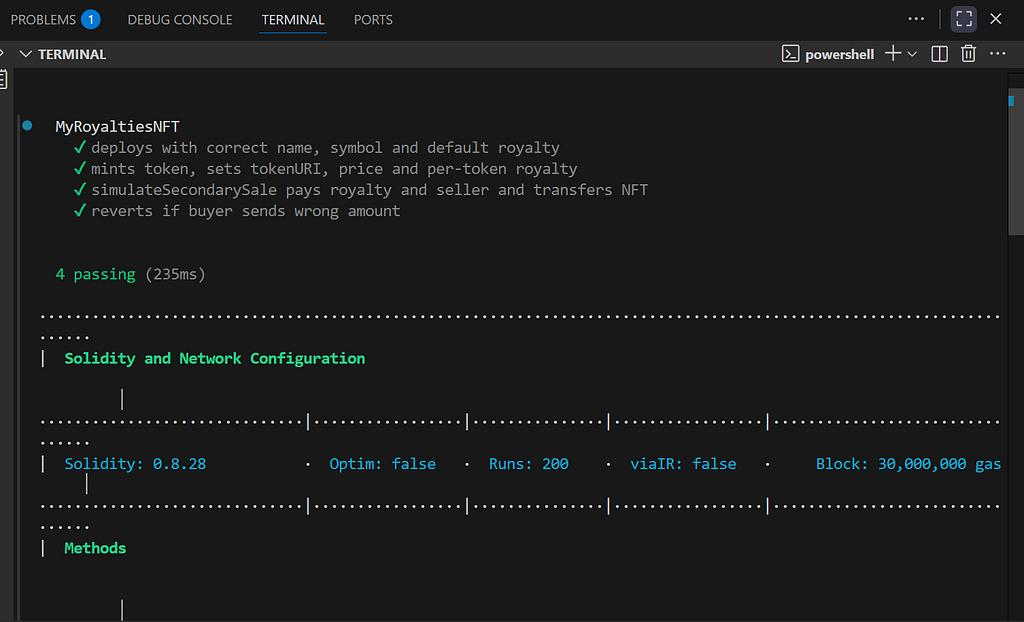
When your test runs completely, you should see a result like the one below:
This shows that your NFT smart contract is working correctly. The next step is to deploy this smart contract on the Ethereum testnet (Sepolia)
How to deploy Solidity smart contracts on the Ethereum testnet
Before deploying your Solidity smart contract, you will need a cryptocurrency wallet to cover the deployment transaction costs.
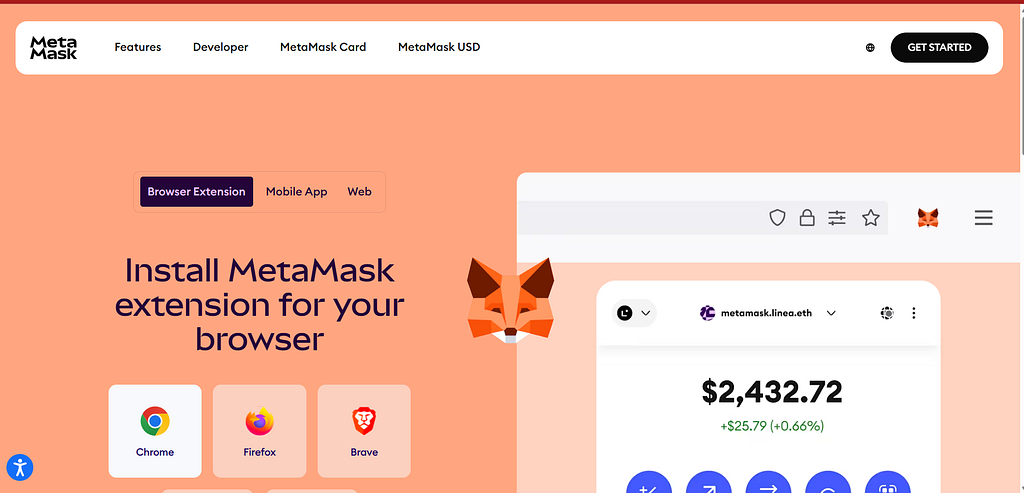
I prefer MetaMask because of its ease of use and setup. You can either install Metamask as a browser extension on your computer (this is the recommended approach for this tutorial) or you can download the Metamask mobile app on your phone.
Follow these steps to download the Metamask extension on your computer:
It will take you to the MetaMask installation page, where you can install MetaMask for your specified browser.
4. Click on the Chrome browser, and you will be taken to the Chrome extension page, where you can add the MetaMask extension to your browser
5. Click on the Add to Chrome button. This will start downloading MetaMask. After the download completes, you should see the MetaMask icon in your browser, and you will be redirected to the MetaMask onboarding page.
This is where you can choose to log in to an existing wallet or create a new wallet.
6. Click on Create a new wallet, and select Use secret Recovery Phrase
7. Provide a strong password for your account, and you will be redirected to the secret recovery phrase.
8. Copy your secret recovery phrase and keep it in a secure place where only you have access to it, then click on continue.
9. On the next page, you will be asked to provide the exact phrase that corresponds to the box that is being highlighted. For example, the image below highlights number 6, so I will provide the phrase that was in box number 6.
With these steps, you have successfully created your Metamask wallet.
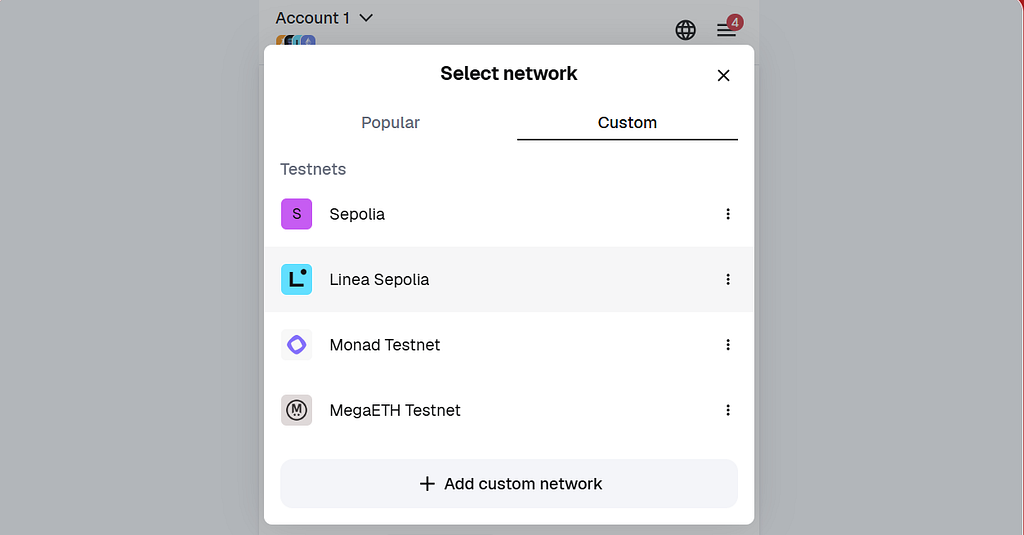
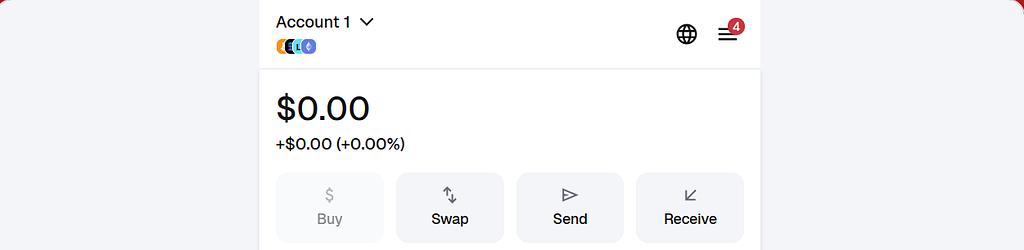
Follow these steps to switch your Metamask’s network to the Sepolia testnet and receive test ETH for deploying your smart contract to sepolia testnet:
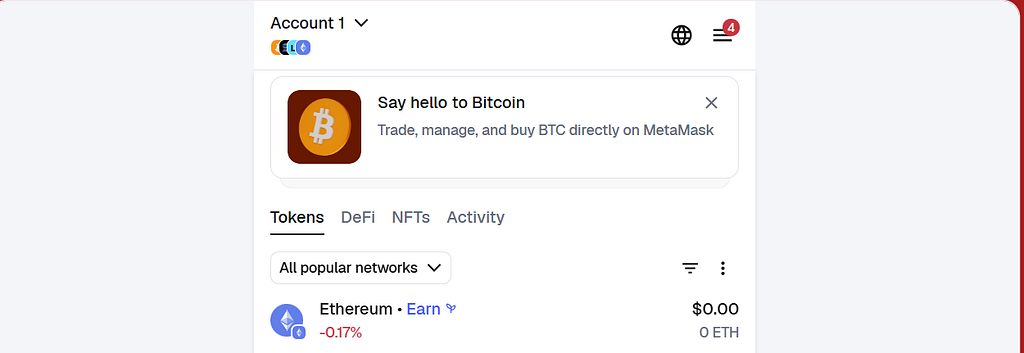
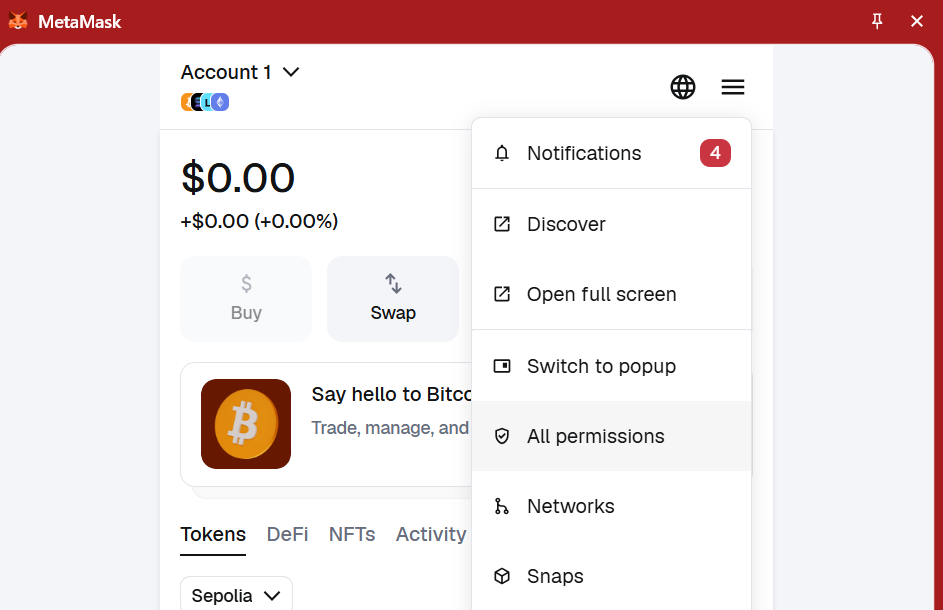
Click on the three vertical lines at the top right corner of your Metamask wallet and scroll down to accounts
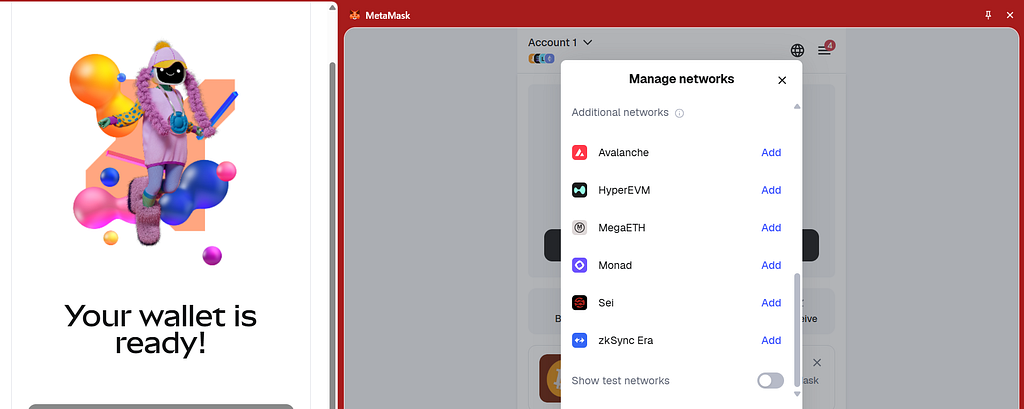
In the accounts page, scroll down to where you see show test networks and toggle it on
3. You will see the test networks listed among the main networks in the
If you don’t see sepolia network listed automatically in the network dropdown, add it manually with these details:
10. Select Ethereum Sepolia from the network selector, paste your Sepolia wallet’s address, and click on the Get Eth button to receive 0.05 Sepolia Eth for testing.
Follow these steps and configure your application so that it can access the Sepolia testnet:
Replace these values with your Metamask private key and Infura RPC_URL, respectively.
To get your Metamask private key:
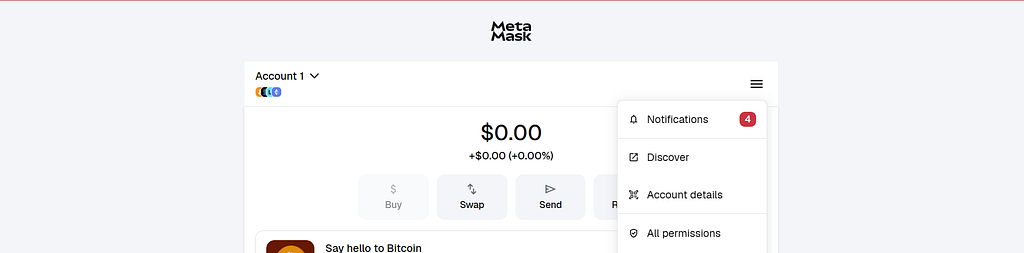
Click on the 3 vertical lines at the top right
Select Open full screen
3. Then select Accounts details
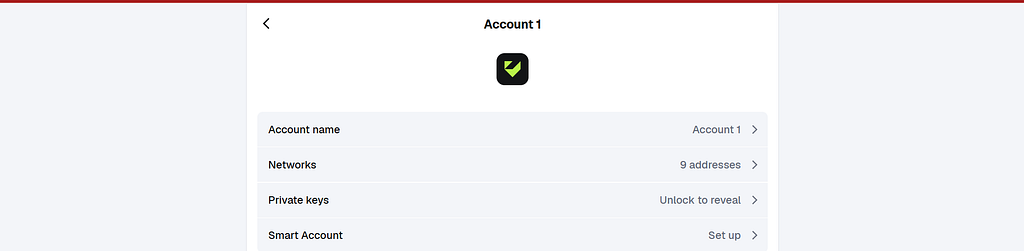
4. Click on Unlock private keys
This will take you to your private keys page. Copy the Ethereum private key and paste it as the value of your PRIVATE_KEY environment variable inside the .env file
The code above uses your wallet to deploy your smart contract to the Sepolia network and print the deployed address once it’s live.
From the code above:
You imported the Hardhat Runtime Environment (HRE) const hre = require(“hardhat”);. This will allow you do things like hre.ethrers, hre.networks, hre.run and so on
You define an async function (main) that will hold your deployment logic async function main() {…}
Within the async function’s block:
3. You defined an Ethereum account called deployer const [deployer] = await hre.ethers.getSigners();. This account will become the deployer of this smart contract, it will own this smart contract, and be the default royalty receiver. If you deploy this smart contract on Hardhat's local blockchain network, Hardhat will create a fake Ethereum account and assign it to the deployer variable, but on a testnet like Sepolia or a mainnet like the Ethereum mainnet, Hardhat will read your .env file and create a signer account from the private key variable that you provide. That signer becomes the deployer and owner of the smart contract.
4. You logged the deployer’s address console.log(“Deploying contract with account:”, deployer.address); and the deployer’s Eth balance.
This is an important step that confirms you are using the right account and you have enough ETH balance for deployment
5. Then you got the smart contract’s factory and assigned it to a variable MyRoyaltiesNFT (const MyRoyaltiesNFT = await hre.ethers.getContractFactory(“MyRoyaltiesNFT”);). Your smart contract factory is like a blueprint that carries details about the smart contract bytecode, ABI, and constructor arguments. It is what you call when you want to deploy your smart contract.
6. Then you deployed the smart contract. const nft = await MyRoyaltiesNFT.deploy();. This code sends a deployment transaction to the blockchain, calls the smart contract constructor to set the contract’s metadata, and return and unconfirmed contract instance.
7. Finally, you wait for the deployment transaction to completely mine and get added to the blockchain await nft.waitForDeployment(); before logging the deployed contract’s address console.log(“MyRoyaltiesNFT deployed to:”, await nft.getAddress());. It is important to confirm that the deploy transaction was complete before logging the deployed address, because this address will be used for so many things, like interaction with a frontend app, verification on Etherscan, and so on. So you have to make sure that the contract exists on the chain first.
If the deployment runs completely, the execution will exit neatly. .then(() => process.exit(0)), but if it catches any error, the process will log them out and exit with an error code of 1.
When you run your deployment command, Hardhat will:
Load your Hardhat Runtime Environment (HRE)
Read your hardhat.config.js file
connect to your blockchain network (Sepolia or any other network that you provide)
load your wallet details from the .env file
Deploy your smart contract.
Run the command below to test this out and deploy your smart contract to Sepolia testnet:
npx hardhat run scripts/deploy.js --network sepolia
You will see a response like the one in the image below.
This indicates that your smart contract has been deployed to Sepolia, and it shows the address where it was deployed.
Your smart contract is now live on the testnet. You can view it on Etherscan by copying and pasting its address in the etherscan’s search bar.
You can also interact with this smart contract on Remix IDE.
Conclusion
By leveraging ERC-2981 in NFT royalty implementation, you eliminate the guesswork, and inconsistency of using marketplace-specific logics. ERC-2981 allows your smart contract to expose a single standardized on-chain interface that any marketplace with royalty logics can read. This ensures fair and predictable payments of royalties.
In this guide, you learned how to implement marketplace compatible NFT royalties with ERC-2981 standard in Solidity. You also learned how to set default and per token royalties, how to use basis points for royalty calculations, how to test smarts contracts with Hardhat and how to deploy your smart contract on Ethereum.

 Login
Login


 The SEC has officially ended its investigation into NFT marketplace