Reading view

There are new articles available, click to refresh the page.

Turn me on, turn me off: Zigbee assessment in industrial environments

We all encounter IoT and home automation in some form or another, from smart speakers to automated sensors that control water pumps. These services appear simple and straightforward to us, but many devices and protocols work together under the hood to deliver them.

One of those protocols is Zigbee. Zigbee is a low-power wireless protocol (based on IEEE 802.15.4) used by many smart devices to talk to each other. It’s common in homes, but is also used in industrial environments where hundreds or thousands of sensors may coordinate to support a process.

There are many guides online about performing security assessments of Zigbee. Most focus on the Zigbee you see in home setups. They often skip the Zigbee used at industrial sites, what I call ‘non-public’ or ‘industrial’ Zigbee.

In this blog, I will take you on a journey through Zigbee assessments. I’ll explain the basics of the protocol and map the attack surface likely to be found in deployments. I’ll also walk you through two realistic attack vectors that you might see in facilities, covering the technical details and common problems that show up in assessments. Finally, I will present practical ways to address these problems.

Zigbee introduction

Protocol overview

Zigbee is a wireless communication protocol designed for low-power applications in wireless sensor networks. Based on the IEEE 802.15.4 standard, it was created for short-range and low-power communication. Zigbee supports mesh networking, meaning devices can connect through each other to extend the network range. It operates on the 2.4 GHz frequency band and is widely used in smart homes, industrial automation, energy monitoring, and many other applications.

You may be wondering why there’s a need for Zigbee when Wi-Fi is everywhere? The answer depends on the application. In most home setups, Wi-Fi works well for connecting devices. But imagine you have a battery-powered sensor that isn’t connected to your home’s electricity. If it used Wi-Fi, its battery would drain quickly – maybe in just a few days – because Wi-Fi consumes much more power. In contrast, the Zigbee protocol allows for months or even years of uninterrupted work.

Now imagine an even more extreme case. You need to place sensors in a radiation zone where humans can’t go. You drop the sensors from a helicopter and they need to operate for months without a battery replacement. In this situation, power consumption becomes the top priority. Wi-Fi wouldn’t work, but Zigbee is built exactly for this kind of scenario.

Also, Zigbee has a big advantage if the area is very large, covering thousands of square meters and requiring thousands of sensors: it supports thousands of nodes in a mesh network, while Wi-Fi is usually limited to hundreds at most.

There are lots more ins and outs, but these are the main reasons Zigbee is preferred for large-scale, low-power sensor networks.

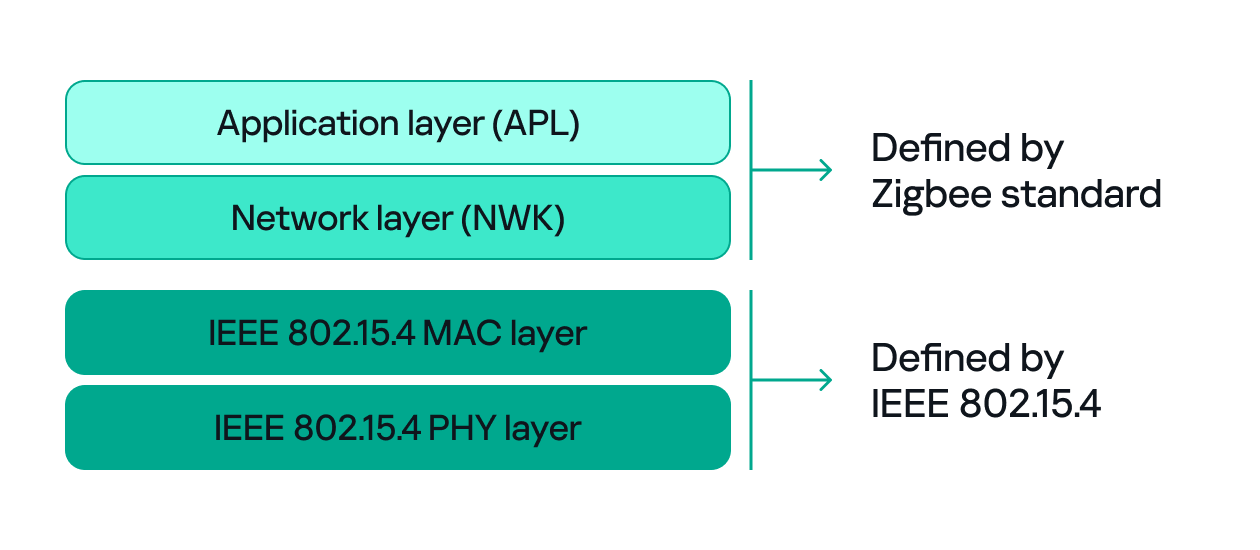
Since both Zigbee and IEEE 802.15.4 define wireless communication, many people confuse the two. The difference between them, to put it simply, concerns the layers they support. IEEE 802.15.4 defines the physical (PHY) and media access control (MAC) layers, which basically determine how devices send and receive data over the air. Zigbee (as well as other protocols like Thread, WirelessHART, 6LoWPAN, and MiWi) builds on IEEE 802.15.4 by adding the network and application layers that define how devices form a network and communicate.
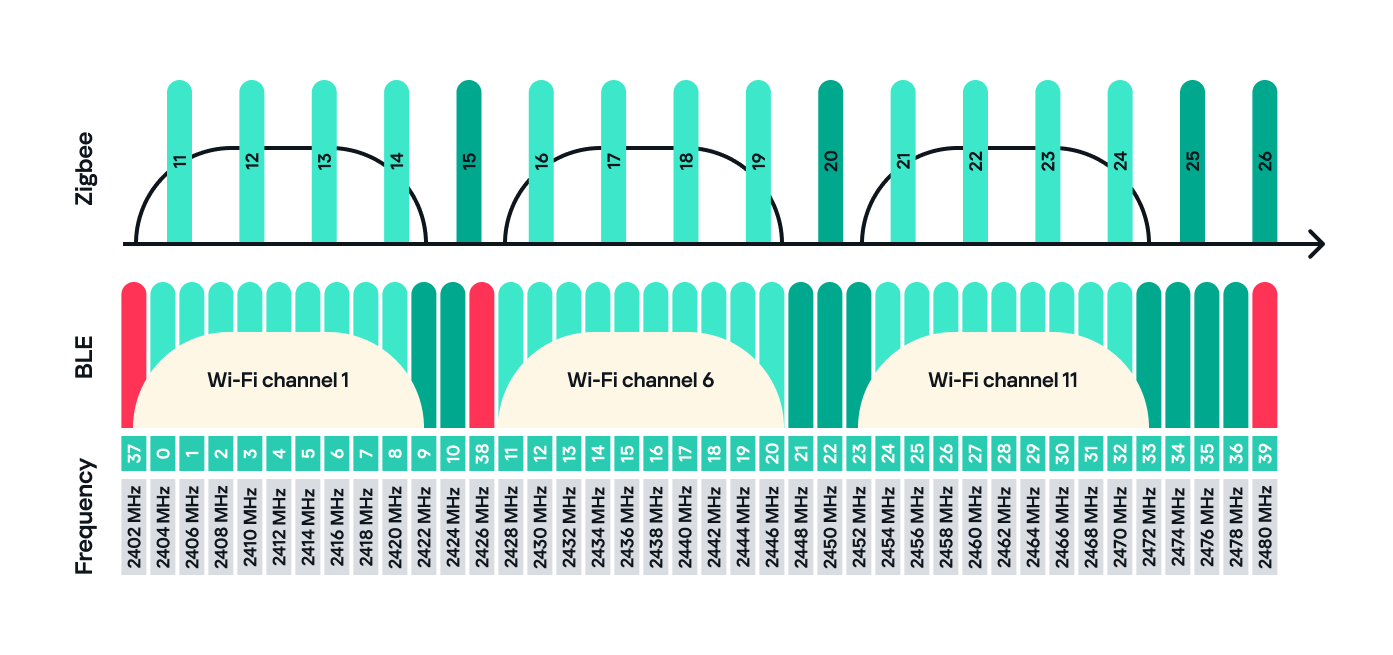
Zigbee operates in the 2.4 GHz wireless band, which it shares with Wi-Fi and Bluetooth. The Zigbee band includes 16 channels, each with a 2 MHz bandwidth and a 5 MHz gap between channels.

This shared frequency means Zigbee networks can sometimes face interference from Wi-Fi or Bluetooth devices. However, Zigbee’s low power and adaptive channel selection help minimize these conflicts.
Devices and network

There are three main types of Zigbee devices, each of which plays a different role in the network.

  1. Zigbee coordinator
    The coordinator is the brain of the Zigbee network. A Zigbee network is always started by a coordinator and can only contain one coordinator, which has the fixed address 0x0000.
    It performs several key tasks:
    • Starts and manages the Zigbee network.
    • Chooses the Zigbee channel.
    • Assigns addresses to other devices.
    • Stores network information.
    • Chooses the PAN ID: a 2-byte identifier (for example, 0x1234) that uniquely identifies the network.
    • Sets the Extended PAN ID: an 8-byte value, often an ASCII name representing the network.

    The coordinator can have child devices, which can be either Zigbee routers or Zigbee end devices.

  2. Zigbee router
    The router works just like a router in a traditional network: it forwards data between devices, extends the network range and can also accept child devices, which are usually Zigbee end devices.
    Routers are crucial for building large mesh networks because they enable communication between distant nodes by passing data through multiple hops.
  3. Zigbee end device
    The end device, also referred to as a Zigbee endpoint, is the simplest and most power-efficient type of Zigbee device. It only communicates with its parent, either a coordinator or router, and sleeps most of the time to conserve power. Common examples include sensors, remotes, and buttons.

Zigbee end devices do not accept child devices unless they are configured as both a router and an endpoint simultaneously.

Each of these device types, also known as Zigbee nodes, has two types of address:

  • Short address: two bytes long, similar to an IP address in a TCP/IP network.
  • Extended address: eight bytes long, similar to a MAC address.

Both addresses can be used in the MAC and network layers, unlike in TCP/IP, where the MAC address is used only in Layer 2 and the IP address in Layer 3.

Zigbee setup

Zigbee has many attack surfaces, such as protocol fuzzing and low-level radio attacks. In this post, however, I’ll focus on application-level attacks. Our test setup uses two attack vectors and is intentionally small to make the concepts clear.

In our setup, a Zigbee coordinator is connected to a single device that functions as both a Zigbee endpoint and a router. The coordinator also has other interfaces (Ethernet, Bluetooth, Wi-Fi, LTE), while the endpoint has a relay attached that the coordinator can switch on or off over Zigbee. This relay can be triggered by events coming from any interface, for example, a Bluetooth command or an Ethernet message.
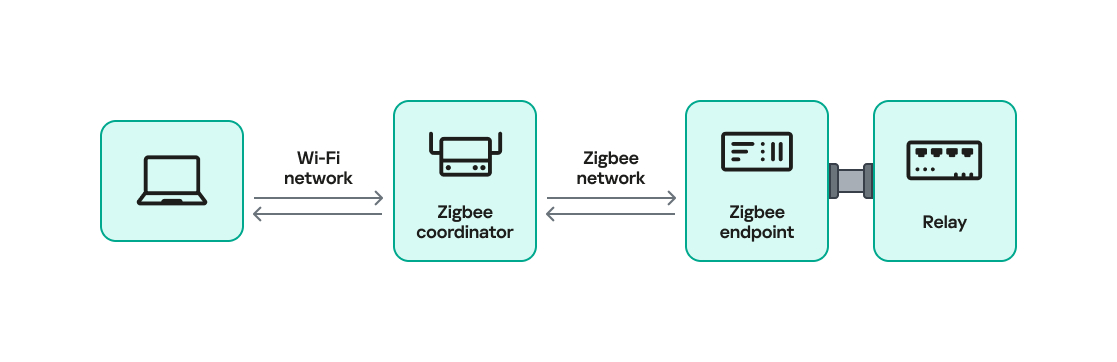
Our goal will be to take control of the relay and toggle its state (turn it off and on) using only the Zigbee interface. Because the other interfaces (Ethernet, Bluetooth, Wi-Fi, LTE) are out of scope, the attack must work by hijacking Zigbee communication.

For the purposes of this research, we will attempt to hijack the communication between the endpoint and the coordinator. The two attack vectors we will test are:

  1. Spoofed packet injection: sending forged Zigbee commands made to look like they come from the coordinator to trigger the relay.
  2. Coordinator impersonation (rejoin attack): impersonating the legitimate coordinator to trick the endpoint into joining the attacker-controlled coordinator and controlling it directly.

Spoofed packet injection

In this scenario, we assume the Zigbee network is already up and running and that both the coordinator and endpoint nodes are working normally. The coordinator has additional interfaces, such as Ethernet, and the system uses those interfaces to trigger the relay. For instance, a command comes in over Ethernet and the coordinator sends a Zigbee command to the endpoint to toggle the relay. Our goal is to toggle the relay by injecting simulated legitimate Zigbee packets, using only the Zigbee link.

Sniffing

The first step in any radio assessment is to sniff the wireless traffic so we can learn how the devices talk. For Zigbee, a common and simple tool is the nRF52840 USB dongle by Nordic Semiconductor. With the official nRF Sniffer for 802.15.4 firmware, the dongle can run in promiscuous mode to capture all 802.15.4/Zigbee traffic. Those captures can be opened in Wireshark with the appropriate dissector to inspect the frames.

How do you find the channel that’s in use?

Zigbee runs on one of the 16 channels that we mentioned earlier, so we must set the sniffer to the same channel that the network uses. One practical way to scan the channels is to change the sniffer channel manually in Wireshark and watch for Zigbee traffic. When we see traffic, we know we’ve found the right channel.

After selecting the channel, we will be able to see the communication between the endpoint and the coordinator, though it will most likely be encrypted:
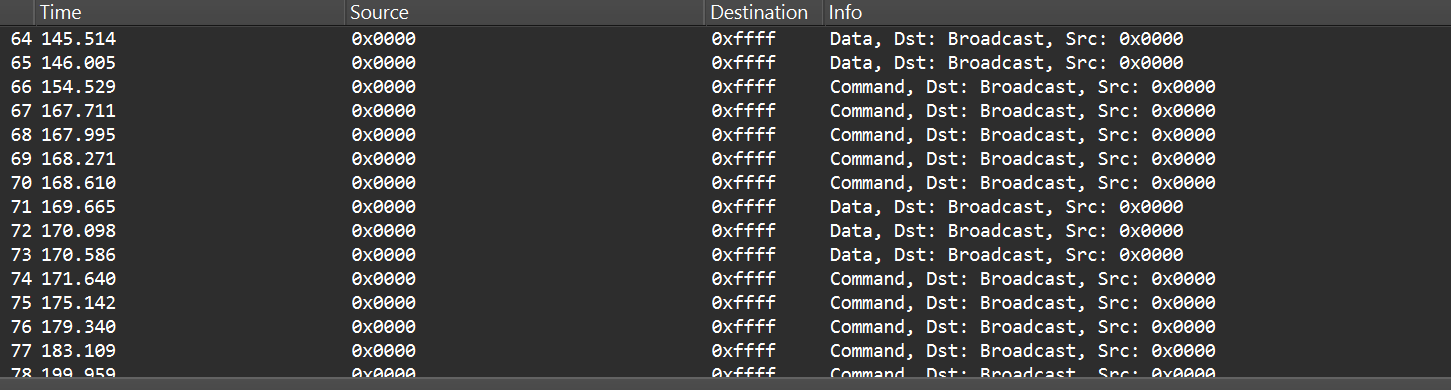
In the “Info” column, we can see that Wireshark only identifies packets as Data or Command without specifying their exact type, and that’s because the traffic is encrypted.

Even when Zigbee payloads are encrypted, the network and MAC headers remain visible. That means we can usually read things like source and destination addresses, PAN ID, short and extended MAC addresses, and frame control fields. The application payload (i.e., the actual command to toggle the relay) is typically encrypted at the Zigbee network/application layer, so we won’t see it in clear text without encryption keys. Nevertheless, we can still learn enough from the headers.

Decryption

Zigbee supports several key types and encryption models. In this post, we’ll keep it simple and look at a case involving only two security-related devices: a Zigbee coordinator and a device that is both an endpoint and a router. That way, we’ll only use a network encryption model, whereas with, say, mesh networks there can be various encryption models in use.

The network encryption model is a common concept. The traffic that we sniffed earlier is typically encrypted using the network key. This key is a symmetric AES-128 key shared by all devices in a Zigbee network. It protects network-layer packets (hop-by-hop) such as routing and broadcast packets. Because every router on the path shares the network key, this encryption method is not considered end-to-end.

Depending on the specific implementation, Zigbee can use two approaches for application payloads:

  • Network-layer encryption (hop-by-hop): the network key encrypts the Application Support Sublayer (APS) data, the sublayer of the application layer in Zigbee. In this case, each router along the route can decrypt the APS payload. This is not end-to-end encryption, so it is not recommended for transmitting sensitive data.
  • Link key (end-to-end) encryption: a link key, which is also an AES-128 key, is shared between two devices (for example, the coordinator and an endpoint).

The link key provides end-to-end protection of the APS payload between the two devices.

Because the network key could allow an attacker to read and forge many types of network traffic, it must be random and protected. Exposing the key effectively compromises the entire network.

When a new device joins, the coordinator (Trust Center) delivers the network key using a Transport Key command. That transport packet must be protected by a link key so the network key is not exposed in clear text. The link key authenticates the joining device and protects the key delivery.

The image below shows the transport packet:

There are two common ways link keys are provided:

  • Pre-installed: the device ships with an installation code or link key already set.
  • Key establishment: the device runs a key-establishment protocol.

A common historical problem is the global default Trust Center link key, “ZigBeeAlliance09”. It was included in early versions of Zigbee (pre-3.0) to facilitate testing and interoperability. However, many vendors left it enabled on consumer devices, and that has caused major security issues. If an attacker knows this key, they can join devices and read or steal the network key.

Newer versions – Zigbee 3.0 and later – introduced installation codes and procedures to derive unique link keys for each device. An installation code is usually a factory-assigned secret (often encoded on the device label) that the Trust Center uses to derive a unique link key for the device in question. This helps avoid the problems caused by a single hard-coded global key.

Unfortunately, many manufacturers still ignore these best practices. During real assessments, we often encounter devices that use default or hard-coded keys.

How can these keys be obtained?

If an endpoint has already joined the network and communicates with the coordinator using the network key, there are two main options for decrypting traffic:

  1. Guess or brute-force the network key. This is usually impractical because a properly generated network key is a random AES-128 key.
  2. Force the device to rejoin and capture the transport key. If we can make the endpoint leave the network and then rejoin, the coordinator will send the transport key. Capturing that packet can reveal the network key, but the transport key itself is protected by the link key. Therefore, we still need the link key.

To obtain the network and link keys, many approaches can be used:

  • The well-known default link key, ZigBeeAlliance09. Many legacy devices still use it.
  • Identify the device manufacturer and search for the default keys used by that vendor. We can find the manufacturer by:
    • Checking the device MAC/OUI (the first three bytes of the 64-bit extended address often map to a vendor).
    • Physically inspecting the device (label, model, chip markings).
  • Extract the firmware from the coordinator or device if we have physical access and search for hard-coded keys inside the firmware images.

Once we have the relevant keys, the decryption process is straightforward:

  1. Open the capture in Wireshark.
  2. Go to Edit -> Preferences -> Protocols -> Zigbee.
  3. Add the network key and any link keys in our possession.
  4. Wireshark will then show decrypted APS payloads and higher-level Zigbee packets.

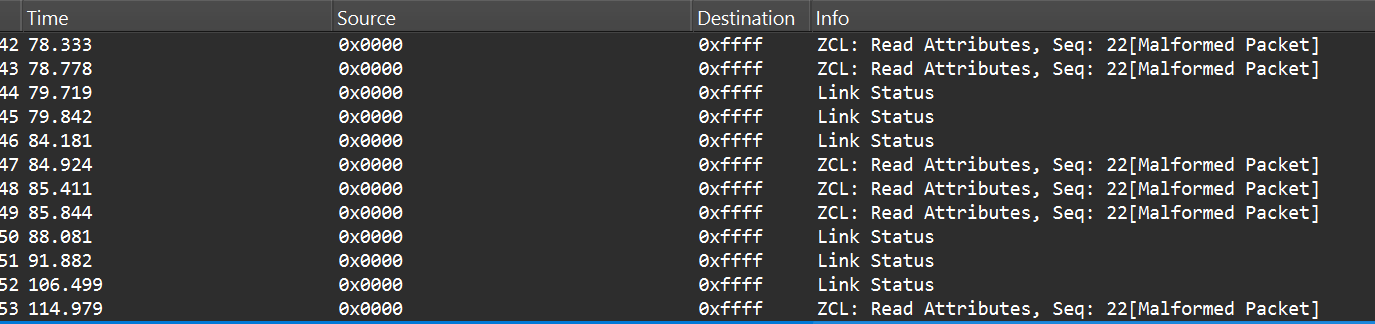
After successful decryption, packet types and readable application commands will be visible, such as Link Status or on/off cluster commands:
Choose your gadget

Now that we can read and potentially decrypt traffic, we need hardware and software to inject packets over the Zigbee link between the coordinator and the endpoint. To keep this practical and simple, I opted for cheap, widely available tools that are easy to set up.

For the hardware, I used the nRF52840 USB dongle, the same device we used for sniffing. It’s inexpensive, easy to find, and supports IEEE 802.15.4/Zigbee, so it can sniff and transmit.

The dongle runs the firmware we can use. A good firmware platform is Zephyr RTOS. Zephyr has an IEEE 802.15.4 radio API that enables the device to receive raw frames, essentially enabling sniffer mode, as well as send raw frames as seen in the snippets below.
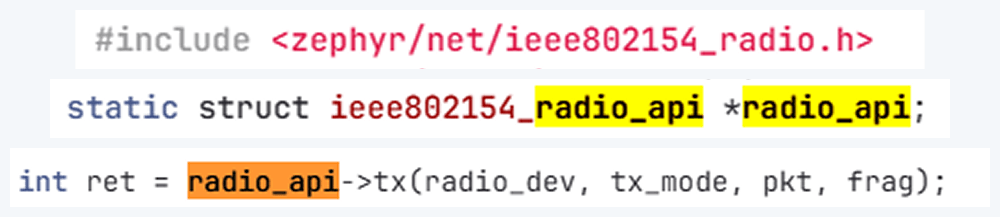
Using this API and other components, we created a transceiver implementation written in C, compiled it to firmware, and flashed it to the dongle. The firmware can expose a simple runtime interface, such as a USB serial port, which allows us to control the radio from a laptop.

At runtime, the dongle listens on the serial port (for example, /dev/ttyACM1). Using a script, we can send it raw bytes, which the firmware will pass to the radio API and transmit to the channel. The following is an example of a tiny Python script to open the serial port:

I used the Scapy tool with the 802.15.4/Zigbee extensions to build Zigbee packets. Scapy lets us assemble packets layer-by-layer – MAC → NWK → APS → ZCL – and then convert them to raw bytes to send to the dongle. We will talk about APS and ZCL in more detail later.

Here is an example of how we can use Scapy to craft an APS layer packet:

from scapy.layers.dot15d4 import Dot15d4, Dot15d4FCS, Dot15d4Data, Dot15d4Cmd, Dot15d4Beacon, Dot15d4CmdAssocResp
from scapy.layers.zigbee import ZigbeeNWK, ZigbeeAppDataPayload, ZigbeeSecurityHeader, ZigBeeBeacon, ZigbeeAppCommandPayload
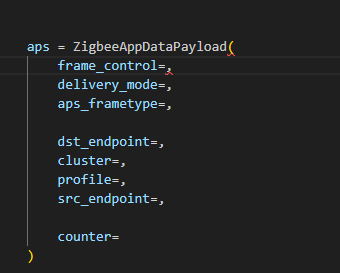
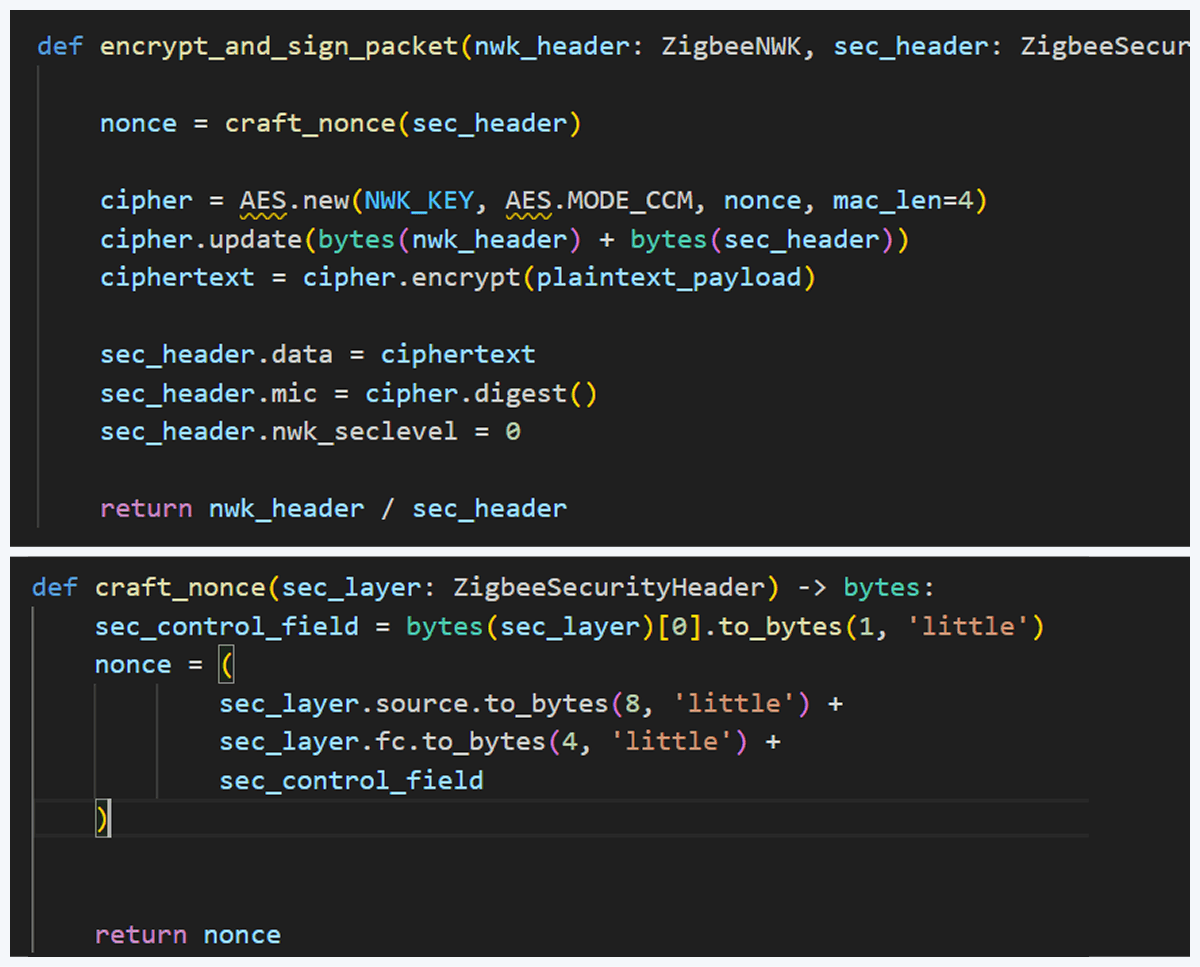
Before sending, the packet must be properly encrypted and signed so the endpoint accepts it. That means applying AES-CCM (AES-128 with MIC) using the network key (or the correct link key) and adhering to Zigbee’s rules for packet encryption and MIC calculation. This is how we implemented the encryption and MIC in Python (using a cryptographic library) after building the Scapy packet. We then sent the final bytes to the dongle.

This is how we implemented the encryption and MIC:
Crafting the packet

Now that we know how to inject packets, the next question is what to inject. To toggle the relay, we simply need to send the same type of command that the coordinator already sends. The easiest way to find that command is to sniff the traffic and read the application payload. However, when we look at captures in Wireshark, we can see many packets under ZCL marked [Malformed Packet].

A “malformed” ZCL packet usually means Wireshark could not fully interpret the packet because the application layer is non-standard or lacks details Wireshark expects. To understand why this happens, let’s look at the Zigbee application layer.

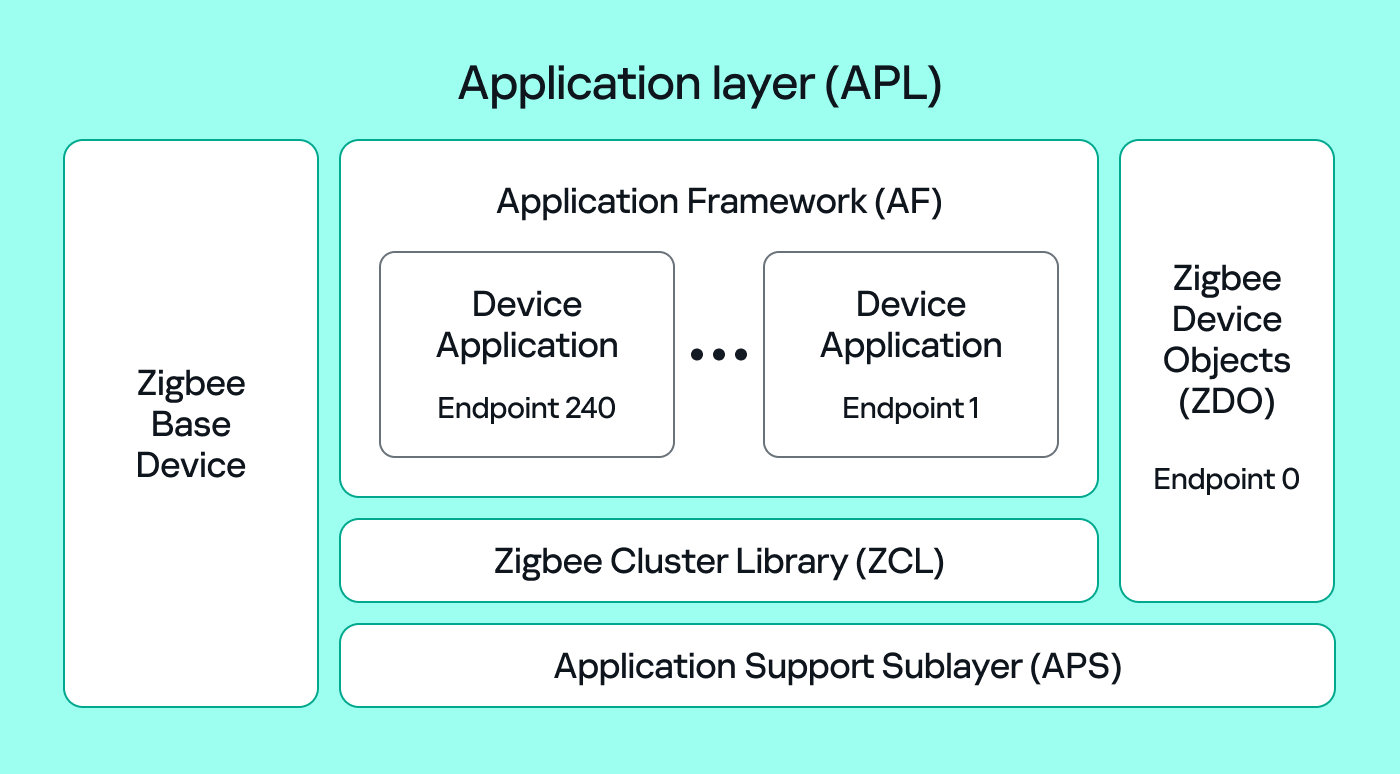
The Zigbee application layer consists of four parts:

  • Application Support Sublayer (APS): routes messages to the correct profile, endpoint, and cluster, and provides application-level security.
  • Application Framework (AF): contains the application objects that implement device functionality. These objects reside on endpoints (logical addresses 1–240) and expose clusters (sets of attributes and commands).
  • Zigbee Cluster Library (ZCL): defines standard clusters and commands so devices can interoperate.
  • Zigbee Device Object (ZDO): handles device discovery and management (out of scope for this post).
To make sense of application traffic, we must introduce three concepts:

  • Profile: a rulebook for how devices should behave for a specific use case. Public (standard) profiles are managed by the Connectivity Standards Alliance (CSA). Vendors can also create private profiles for proprietary features.
  • Cluster: a set of attributes and commands for a particular function. For example, the On/Off cluster contains On and Off commands and an OnOff attribute that displays the current state.
  • Endpoint: a logical “port” on the device where a profile and clusters reside. A device can host multiple endpoints for different functions.

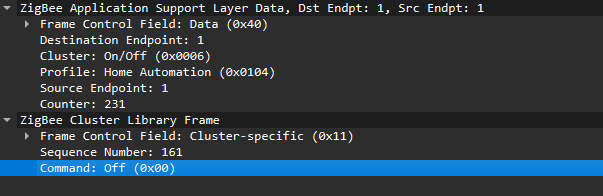
Putting all this together, in the standard home automation traffic we see APS pointing to the home automation profile, the On/Off cluster, and a destination endpoint (for example, endpoint 1). In ZCL, the byte 0x00 often means “Off”.
In many industrial setups, vendors use private profiles or custom application frameworks. That’s why Wireshark can’t decode the packets; the AF payload is custom, so the dissector doesn’t know the format.

So how do we find the right bytes to toggle the switch when the application is private? Our strategy has two phases.

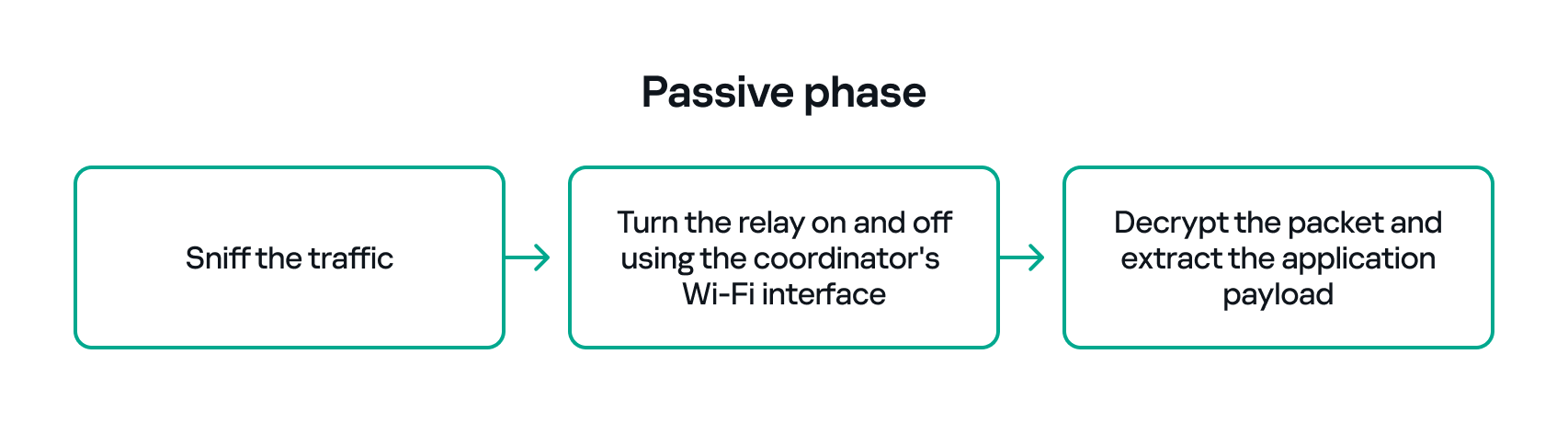
  1. Passive phase
    Sniff traffic while the system is driven legitimately. For example, trigger the relay from another interface (Ethernet or Bluetooth) and capture the Zigbee packets used to toggle the relay. If we can decrypt the captures, we can extract the application payload that correlates with the on/off action.
  2. Active phase
  3. With the legitimate payload at hand, we can now turn to creating our own packet. There are two ways to do that. First, we need to replay or duplicate the captured application payload exactly as it is. This works if there are no freshness checks like sequence numbers. Otherwise, we have to reverse-engineer the payload and adjust any counters or fields that prevent replay. For instance, many applications include an application-level counter. If the device ignores packets with a lower application counter, we must locate and increment that counter when we craft our packet.

    Another important protective measure is the frame counter inside the Zigbee security header (in the network header security fields). The frame counter prevents replay attacks; the receiver expects the frame counter to increase with each new packet, and will reject packets with a lower or repeated counter.
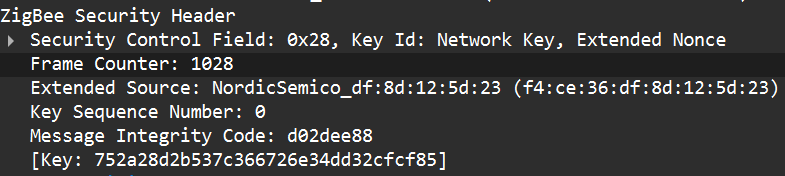
So, in the active phase, we must:

  1. Sniff the traffic until the coordinator sends a valid packet to the endpoint.
  2. Decrypt the packet, extract the counters and increase them by one.
  3. Build a packet with the correct APS/AF fields (profile, endpoint, cluster).
  4. Include a valid ZCL command or the vendor-specific payload that we identified in the passive phase.
  5. Encrypt and sign the packet with the correct network or link key.
  6. Make sure both the application counter (if used) and the Zigbee frame counter are modified so the packet is accepted.

The whole strategy for this phase will look like this:
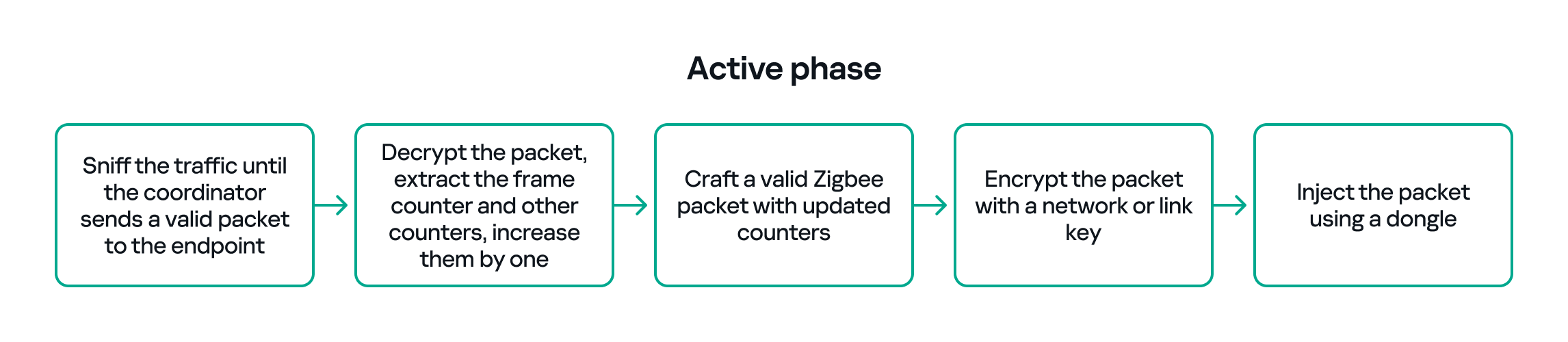
If all of the above are handled correctly, we will be able to hijack the Zigbee communication and toggle the relay (turn it off and on) using only the Zigbee link.

Coordinator impersonation (rejoin attack)

The goal of this attack vector is to force the Zigbee endpoint to leave its original coordinator’s network and join our spoofed network so that we can take control of the device. To do this, we must achieve two things:

  1. Force the endpoint to leave the original network.
  2. Spoof the original coordinator and trick the node into joining our fake coordinator.

Force leaving

To better understand how to manipulate endpoint connections, let’s first describe the concept of a beacon frame. Beacon frames are periodic announcements sent by a coordinator and by routers. They advertise the presence of a network and provide join information, such as:

  • PAN ID and Extended PAN ID
  • Coordinator address
  • Stack/profile information
  • Device capacity (for example, whether the coordinator can accept child devices)

When a device wants to join, it sends a beacon request across Zigbee channels and waits for beacon replies from nearby coordinators/routers. Even if the network is not beacon-enabled for regular synchronization, beacon frames are still used during the join/discovery process, so they are mandatory when a node tries to discover networks.

Note that beacon frames exist at both the Zigbee and IEEE 802.15.4 levels. The MAC layer carries the basic beacon structure that Zigbee then extends with network-specific fields.

Now, we can force the endpoint to leave its network by abusing how Zigbee handles PAN conflicts. If a coordinator sees beacons from another coordinator using the same PAN ID and the same channel, it may trigger a PAN ID conflict resolution. When that happens, the coordinator can instruct its nodes to change PAN ID and rejoin, which causes them to leave and then attempt to join again. That rejoin window gives us an opportunity to advertise a spoofed coordinator and capture the joining node.

In the capture shown below, packet 7 is a beacon generated by our spoofed coordinator using the same PAN ID as the real network. As a result, the endpoint with the address 0xe8fa leaves the network (see packets 14–16).

Choose me

After forcing the endpoint to leave its original network by sending a fake beacon, the next step is to make the endpoint choose our spoofed coordinator. At this point, we assume we already have the necessary keys (network and link keys) and understand how the application behaves.

To impersonate the original coordinator, our spoofed coordinator must reply to any beacon request the endpoint sends. The beacon response must include the same Extended PAN ID (and other fields) that the endpoint expects. If the endpoint deems our beacon acceptable, it may attempt to join us.

I can think of two ways to make the endpoint prefer our coordinator.

  1. Jam the real coordinator
    Use a device that reduces the real coordinator’s signal at the endpoint so that it appears weaker, forcing the endpoint to prefer our beacon. This requires extra hardware.
  2. Exploit undefined or vendor-specific behavior
    Zigbee stacks sometimes behave slightly differently across vendors. One useful field in a beacon is the Update ID field. It increments when a coordinator changes network configuration.
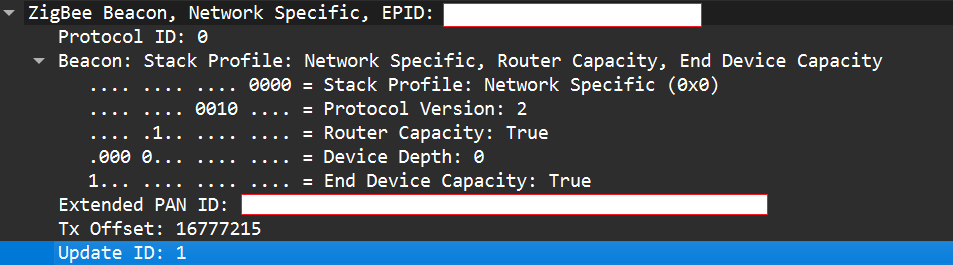
If two coordinators advertise the same Extended PAN ID but one has a higher Update ID, some stacks will prefer the beacon with the higher Update ID. This is undefined behavior across implementations; it works on some stacks but not on others. In my experience, sometimes it works and sometimes it fails. There are lots of other similar quirks we can try during an assessment.

Even if the endpoint chooses our fake coordinator, the connection may be unstable. One main reason for that is the timing. The endpoint expects ACKs for the frames it sends to the coordinator, as well as fast responses regarding connection initiation packets. If our responder is implemented in Python on a laptop that receives packets, builds responses, and forwards them to a dongle, the round trip will be too slow. The endpoint will not receive timely ACKs or packets and will drop the connection.

In short, we’re not just faking a few packets; we’re trying to reimplement parts of Zigbee and IEEE 802.15.4 that must run quickly and reliably. This is usually too slow for production stacks when done in high-level, interpreted code.

A practical fix is to run a real Zigbee coordinator stack directly on the dongle. For example, the nRF52840 dongle can act as a coordinator if flashed with the right Nordic SDK firmware (see Nordic’s network coordinator sample). That provides the correct timing and ACK behavior needed for a stable connection.

However, that simple solution has one significant disadvantage. In industrial deployments we often run into incompatibilities. In my tests I compared beacons from the real coordinator and the Nordic coordinator firmware. Notable differences were visible in stack profile headers:
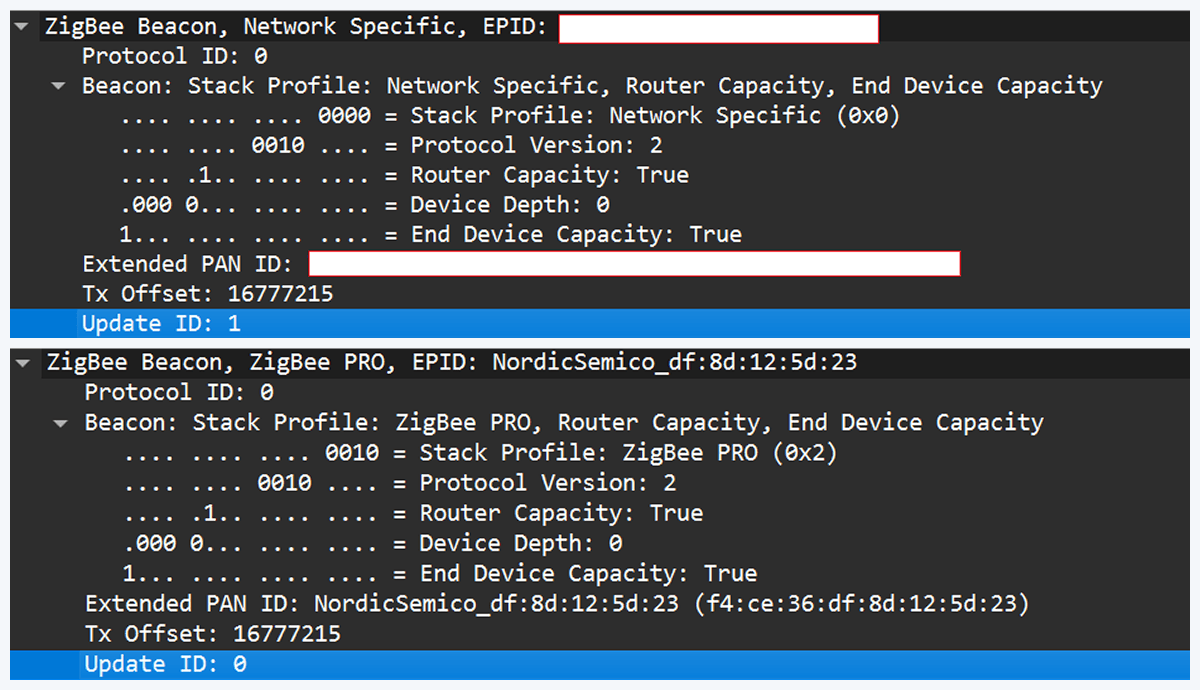
The stack profile identifies the network profile type. Common values include 0x00, which is a network-specific (private) profile, and 0x02, which is a Zigbee Pro (public) profile.

If the endpoint expects a network-specific profile (i.e., it uses a private vendor profile) and we provide Zigbee Pro, the endpoint will refuse to join. Devices that only understand private profiles will not join public-profile networks, and vice versa. In my case, I could not change the Nordic firmware to match the proprietary stack profile, so the endpoint refused to join.

Because of this discrepancy, the “flash a coordinator firmware on the dongle” fix was ineffective in that environment. This is why the standard off-the-shelf tools and firmware often fail in industrial cases, forcing us to continue working with and optimizing our custom setup instead.

Back to the roots

In our previous test setup we used a sniffer in promiscuous mode, which receives every frame on the air regardless of destination. Real Zigbee (IEEE 802.15.4) nodes do not work like that. At the MAC/802.15.4 layer, a node filters frames by PAN ID and destination address. A frame is only passed to upper layers if the PAN ID matches and the destination address is the node’s address or a broadcast address.

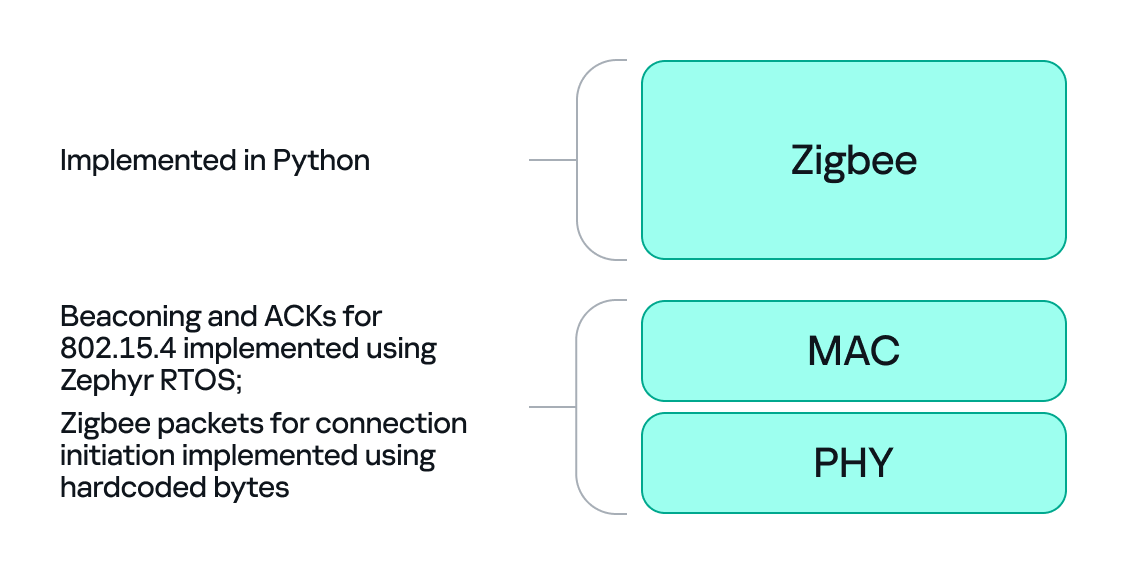
We can mimic that real behavior on the dongle by running Zephyr RTOS and making the dongle act as a basic 802.15.4 coordinator. In that role, we set a PAN ID and short network address on the dongle so that the radio only accepts frames that match those criteria. This is important because it allows the dongle to handle auto-ACKs and MAC-level timing: the dongle will immediately send ACKs at the MAC level.

With the dongle doing MAC-level work (sending ACKs and PAN filtering), we can implement the Zigbee logic in Python. Scapy helps a lot with packet construction: we can create our own beacons with the headers matching those of the original coordinator, which solves the incompatibility problem. However, we must still implement the higher-level Zigbee state machine in our code, including connection initiation, association, network key handling, APS/AF behavior, and application payload handling. That’s the hardest part.

There is one timing problem that we cannot solve in Python: the very first steps of initiating a connection require immediate packet responses. To handle this issue, we implemented the time-critical parts in C on the dongle firmware. For example, we can statically generate the packets for connection initiation in Python and hard-code them in the firmware. Then, using “if” statements, we can determine how to respond to each packet from the endpoint.

So, we let the dongle (C/Zephyr) handle MAC-level ACKs and the initial association handshake, but let Python build higher-level packets and instruct the dongle what to send next when dealing with the application level. This hybrid model reduces latency and maintains a stable connection. The final architecture looks like this:
Deliver the key

Here’s a quick recap of how joining works: a Zigbee endpoint broadcasts beacon requests across channels, waits for beacon responses, chooses a coordinator, and sends an association request, followed by a data request to identify its short address. The coordinator then sends a transport key packet containing the network key. If the endpoint has the correct link key, it can decrypt the transport key packet and obtain the network key, meaning it has now been authenticated. From that point on, network traffic is encrypted with the network key. The entire process looks like this:

The sticking point is the transport key packet. This packet is protected using the link key, a per-device key shared between the coordinator (Trust Center) and the joining endpoint. Before the link key can be used for encryption, it often needs to be processed (hashed/derived) according to Zigbee’s key derivation rules. Since there is no trivial Python implementation that implements this hashing algorithm, we may need to implement the algorithm ourselves.

I implemented the required key derivation; the code is available on our GitHub.

Now that we’ve managed to obtain the hashed link key and deliver it to the endpoint, we can successfully mimic a coordinator.

The final success

If we follow the steps above, we can get the endpoint to join our spoofed coordinator. Once the endpoint joins, it will often remain associated with our coordinator, even after we power it down (until another event causes it to re-evaluate its connection). From that point on, we can interact with the device at the application layer using Python. Getting access as a coordinator allowed us to switch the relay on and off as intended, but also provided much more functionality and control over the node.

Conclusion

In conclusion, this study demonstrates why private vendor profiles in industrial environments complicate assessments: common tools and frameworks often fail, necessitating the development of custom tools and firmware. We tested a simple two-node scenario, but with multiple nodes the attack surface changes drastically and new attack vectors emerge (for example, attacks against routing protocols).

As we saw, a misconfigured Zigbee setup can lead to a complete network compromise. To improve Zigbee security, use the latest specification’s security features, such as using installation codes to derive unique link keys for each device. Also, avoid using hard-coded or default keys. Finally, it is not recommended to use the network key encryption model. Add another layer of security in addition to the network level protection by using end-to-end encryption at the application level.

Inside the dark web job market

In 2022, we published our research examining how IT specialists look for work on the dark web. Since then, the job market has shifted, along with the expectations and requirements placed on professionals. However, recruitment and headhunting on the dark web remain active.

So, what does this job market look like today? This report examines how employment and recruitment function on the dark web, drawing on 2,225 job-related posts collected from shadow forums between January 2023 and June 2025. Our analysis shows that the dark web continues to serve as a parallel labor market with its own norms, recruitment practices and salary expectations, while also reflecting broader global economic shifts. Notably, job seekers increasingly describe prior work experience within the shadow economy, suggesting that for many, this environment is familiar and long-standing.

The majority of job seekers do not specify a professional field, with 69% expressing willingness to take any available work. At the same time, a wide range of roles are represented, particularly in IT. Developers, penetration testers and money launderers remain the most in-demand specialists, with reverse engineers commanding the highest average salaries. We also observe a significant presence of teenagers in the market, many seeking small, fast earnings and often already familiar with fraudulent schemes.

While the shadow market contrasts with legal employment in areas such as contract formality and hiring speed, there are clear parallels between the two. Both markets increasingly prioritize practical skills over formal education, conduct background checks and show synchronized fluctuations in supply and demand.

Looking ahead, we expect the average age and qualifications of dark web job seekers to rise, driven in part by global layoffs. Ultimately, the dark web job market is not isolated — it evolves alongside the legitimate labor market, influenced by the same global economic forces.

In this report, you’ll find:

  • Demographics of the dark web job seekers
  • Their job preferences
  • Top specializations on the dark web
  • Job salaries
  • Comparison between legal and shadow job markets

Get the report

APTRS - Automated Penetration Testing Reporting System

By: Unknown


APTRS (Automated Penetration Testing Reporting System) is an automated reporting tool in Python and Django. The tool allows Penetration testers to create a report directly without using the Traditional Docx file. It also provides an approach to keeping track of the projects and vulnerabilities.


Documentation

Documentation

Prerequisites

Installation

The tool has been tested using Python 3.8.10 on Kali Linux 2022.2/3, Ubuntu 20.04.5 LTS, Windows 10/11.

Windows Installation

  git clone https://github.com/Anof-cyber/APTRS.git
cd APTRS
install.bat

Linux Installation

  git clone https://github.com/Anof-cyber/APTRS.git
cd APTRS
install.sh

Running

Windows

  run.bat

Linux

  run.sh

Features

  • Demo Report
  • Managing Vulnerabilities
  • Manage All Projects in one place
  • Create a Vulnerability Database and avoid writing the same description and recommendations again
  • Easily Create PDF Reprot
  • Dynamically add POC, Description and Recommendations
  • Manage Customers and Comapany

Screenshots

Project

View Project

Project Vulnerability

Project Report

Project Add Vulnerability

Roadmap

  • Improving Report Quality
  • Bulk Instance Upload
  • Pentest Mapper Burp Suite Extension Integration
  • Allowing Multiple Project Scope
  • Improving Code, Error handling and Security
  • Docker Support
  • Implementing Rest API
  • Project and Project Retest Handler
  • Access Control and Authorization
  • Support Nessus Parsing

Authors


How Synack Scales Pentesting Without Compromising Quality

While the end of the year looms, security teams are busy closing out projects before the holiday season. One of our clients, a large multinational company, has a requirement to have a large number of assets tested annually for vulnerabilities by an external provider, adding to the end-of-year task list.  

Our client faced a situation where they had a large number of assets that needed testing in the final months of the year. In this situation, a traditional pentesting model struggles to scale. A pentester, or even a small team of pentesters, can only work so fast: All you can do is prioritize your key assets and work through the rest as quickly as you can. Or throw more money at the problem by bringing in additional pentesters, if they’re even available.

Synack’s model is different. The Synack Platform provides a scalable means for clients to prepare and manage their assessment requests, as well as to track progress on their annual compliance requirements. Our global community of skilled, vetted researchers allows our clients to scale testing on-demand to meet peaks within the business cycle. In this case, we more than doubled the number of concurrent assessments running within the space of a month. 

How We Scale Your Pentesting In a Pinch 

The Synack Platform plays a key role in enabling scaling security testing quickly and effectively. Individual subsidiaries of a company are able to request testing for specific assets by providing the relevant data through the client portal. 

At Synack, we refer to a test of one or a group of assets as an “assessment.” Once an assessment is submitted, the assets are scoped by our Security Operations Engineers to provide a clear and well-documented scope for the Synack Red Team (SRT), our community of 1,500 security researchers. Then we propose a schedule and associated Rules of Engagement, the terms SRT must follow to participate in an assessment. 

Once the client agrees to the schedule, these assessments comprise 7-10 days of testing, combining both our SmartScan technology as well as testing by SRT. Once an assessment is running, the client has the ability to pause it through the portal  as well as send messages to SRT researchers to direct their attention to key features or areas of interest. 

Remediate Vulns with the Same Speed as Testing

The portal provides users with instant access to reports on vulnerabilities uncovered by our SRT as soon as those have been reviewed and approved by our Vulnerability Operations Team. These reports can be anything from a one-page executive summary for C-suite readers to an in-depth technical walkthrough of the steps to reproduce the vulnerability as well as the measures to take to remediate it. 

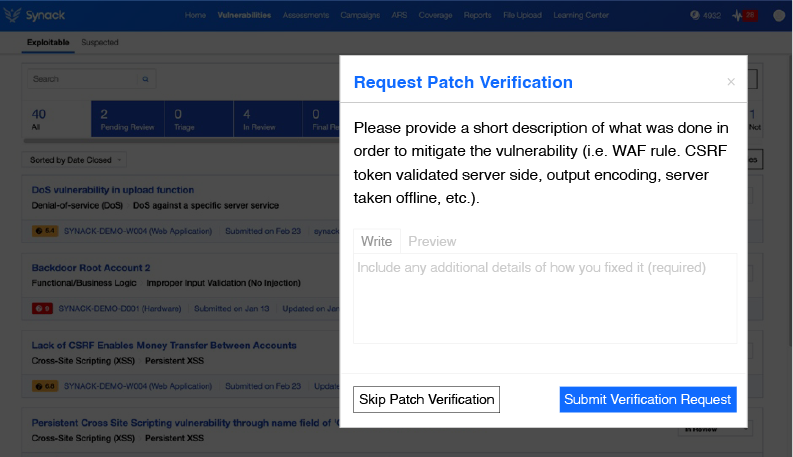
Reports are ideal for the engineering teams responsible for developing and maintaining the assets, helping them quickly understand and solve any security flaws identified. Once the development teams have fixed the vulnerabilities, the client also has the ability to request “Patch Verification” through the portal. Patch verifications will usually be conducted by the SRT member who found the vulnerability, confirming if it is fixed or if the issue persists.

To learn more about how Synack’s scalable capabilities can meet your security and compliance needs, contact us.

The post How Synack Scales Pentesting Without Compromising Quality appeared first on Synack.

What’s Wrong with Bug Bounty Programs?

By: Synack

What Is a Bug Bounty Program? 

The concept of bug bounty programs is simple. You allow a group of security researchers, also known as ethical hackers, to access your systems and applications so they can probe for security vulnerabilities – bugs in your code. And you pay them a bounty on the bugs they find. The more bugs the researcher finds, the more money he makes.

Assessing the value or success of bug bounty programs can be difficult. There is no one methodology or approach to implementing and managing a bug bounty program. For example, a program could employ a couple or hackers or several hundred. It could be run internally or with a bug bounty partner. How much does the customer pay for the program and what reward should the hacker get?

While many organizations have jumped on the bug bounty bandwagon over the last decade or so, the results have been disappointing for some. Many companies disappointed by their bug bounty experience have talked with Synack. We can group their experiences into three major categories: researcher vetting and standards, quality of results, and program control and management.

Researcher Vetting and Standards

When you implement a bug bounty program you are relying on ethical hackers, security researchers that have the skills and expertise to break into your system and root around for security vulnerabilities. Someone has to vet those hackers to ensure that they can do the job, that they have the level and diversity of experience required to provide a thorough vulnerability assessment. And how do you know that someone signing up for the program has the right skills and is trustworthy? There are no standards to go by. Some bug bounty programs are open to just about anyone.

Quality of Results

Bug bounty programs are notorious for producing quantity over quality. After all, more bugs found means more rewards. So security managers often find themselves wading through piles of low-quality and low-severity vulnerabilities that divert their attention and resources from serious, exploitable vulnerabilities.  For example, an organization with internal service-level agreements (SLAs) for remediation of vulnerabilities may be forced to spend time on low-priority patching, just to have good metrics. This isn’t always the best path to minimize risk in the organization.

Results can also be highly dependent on the group assigned to do the hacking. Small groups – we have seen some programs that have only a handful of researchers – suffer from a lack of diversity and vision. Large groups usually cast a wider net but are more difficult to manage and control. And how much your researchers get paid is an important consideration. For example, if a company pays “average” compared to other targets on a bug bounty platform, they will not get the attention of above-average researchers. Published reports from bug bounty companies state that only 6-20% of found vulnerabilities have a CVSS (Common Vulnerability Scoring System) of 7.0 or greater, which would be below the typical customer experience seen at Synack.

Program Control and Management

By far the biggest drawback to bug bounty programs is the lack of program control and management. Turning a team of hackers loose to find security bugs is only the first step. Did they demonstrably put in effort in the form of hours or broad coverage?  What happens after bugs are found? How are the results reported? Who follows up with triaging or remediation? Who verifies resolution? 

The short answer is… it depends. Every program has its own processes and procedures. The longer answer is that most bug bounty programs don’t put a lot of effort into this area. Hackers are left to go off on their own with little monitoring. They don’t see analytics that help them efficiently choose where to hack. Internal security teams may need to wade through the resulting reports, triage the found bugs, resolve or remediate the bug condition, and verify that bugs have been appropriately addressed.

An Integrated Approach to Vulnerability Testing

These are just a few of the problems associated with bug bounty programs. But even without these issues, attacking vulnerabilities with a bug bounty program is not a panacea to test your cybersecurity posture. Finding high-criticality vulnerabilities is fine, but you need to consider context when assessing vulnerabilities. You need to take an integrated approach to vulnerability testing.

Synack provides high-quality vulnerability testing through its community of 1,500+ vetted security researchers, the Synack Red Team (SRT). Not tied to a bug bounty concept, Synack manages the SRT and provides a secure platform so they can communicate and perform testing over VPN. Through the platform Synack can monitor all the researcher traffic directly, to analyze, log, throttle or halt it.

Synack researchers are all highly skilled and bug reports typically have signal-to-noise ratios approaching 100%.  High and critical vulnerabilities making up approximately 40% or more of reports is typical. Beyond simply finding bugs, researchers consider context and exploitability and recommend remediation steps. They can retest to confirm resolution or help customers find a more airtight patch.

So when you consider your next offensive security testing program, know what you’re getting with bug bounty programs. Think comprehensive pentesting with a company that can help you locate vulnerabilities that matter and address them, now and in the future.

The post What’s Wrong with Bug Bounty Programs? appeared first on Synack.

Minimize Noise With Human-Led API Pentesting

Last week, we released a new API Pentesting product that allows you to test your headless API endpoints through the Synack Platform. Before the release, we conducted more than 100 requests for headless API pentests, indicating a growing need from our customers. This new capability provides an opportunity to get human-led testing and proof-of-coverage on this critical and sprawling part of the attack surface.

Testing APIs Through Web Applications Versus Headless Testing

For years, Synack has found exploitable API vulnerabilities through web applications. However, as Gartner notes, 90% of web applications now have a larger attack surface exposed via APIs than through the user interface. Performing web app pentests is no longer adequate for securing the API attack surface, hence the need for the new headless API pentest from Synack. 

Our API pentesting product allows you to activate researchers from the Synack Red Team (SRT) to pentest your API endpoints, headless or otherwise. These researchers have proven API testing skills and will provide thorough testing coverage with less noise than automated solutions.  

The Synack Difference: Human-led Coverage and Results

Automated API scanners and testing solutions can provide many false positives and noise. With our human-led pentesting, we leverage the creativity and diverse perspectives of global researchers to provide meaningful testing coverage and find the vulnerabilities that matter. SRT researchers are compensated for completing the check and are also paid for any exploitable vulnerability findings to ensure a thorough, incentive-driven test.  

Additionally, each submitted vulnerability is vetted by an in-house team called Vulnerability Operations. This reduces noise and prevents teams from wasting time on false positives. 

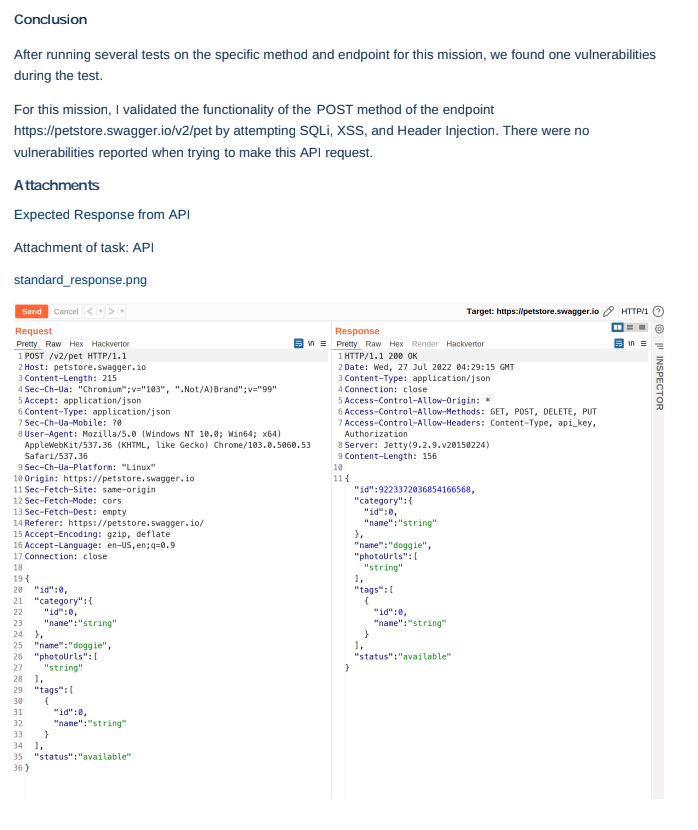
Write-ups for the testing done on each endpoint will be made available in real time and are also vetted by vulnerability operations. The reports can also be easily exported to PDFs for convenient sharing with compliance auditors or other audiences. 

These reports showcase a level of detail and thoroughness not found in automated solutions. Each API endpoint will be accompanied by descriptions of the attacks attempted, complete with screenshots of the work performed. Check out one of our sample API pentest reports.

Screenshot from exportable PDF report

How It Works

Through the Assessment Creation Wizard (ACW) found within the Synack Platform, you can now upload your API documentation (Postman, OpenAPI Spec 3.0, JSON) and create a new API assessment. 

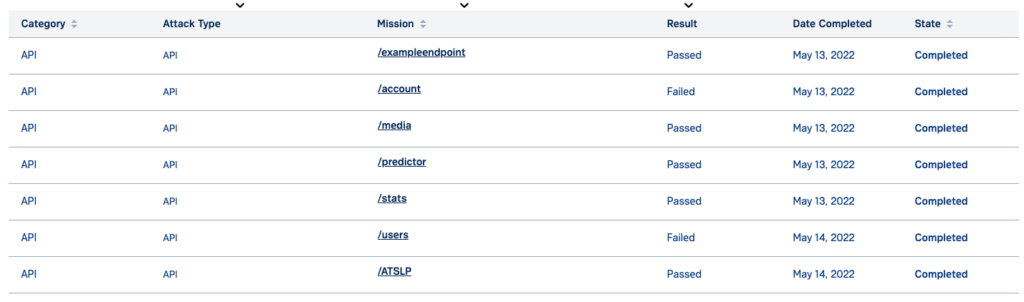
For each specified endpoint in your API, a “Mission” will be generated and sent out for claiming among those in the SRT with proven API testing experience. The “Mission” asks the researcher to check the endpoint for vulnerabilities like those listed in the OWASP API Top 10, while recording their efforts with screenshots and detailed write-ups. Vulnerabilities tested for include:

  • Broken Object Level Authorization
  • Broken User Authentication
  • Excessive Data Exposure
  • Broken Function Level Authorization
  • Mass Assignment
  • Security Misconfiguration
  • Injection

Proof-of-coverage reports, as well as exploitable vulnerability findings, will be surfaced in real-time for each endpoint within the Synack Platform.

Real-time results in platform

Through the Synack Platform, an exploitable vulnerability finding can be quickly viewed in the “vulnerabilities” tab, which rolls up finding from all of your Synack testing activities. With a given vulnerability, you can comment back and forth with the researcher who submitted the finding, as well as request patch verification to ensure patch efficacy. 

Retesting On-demand

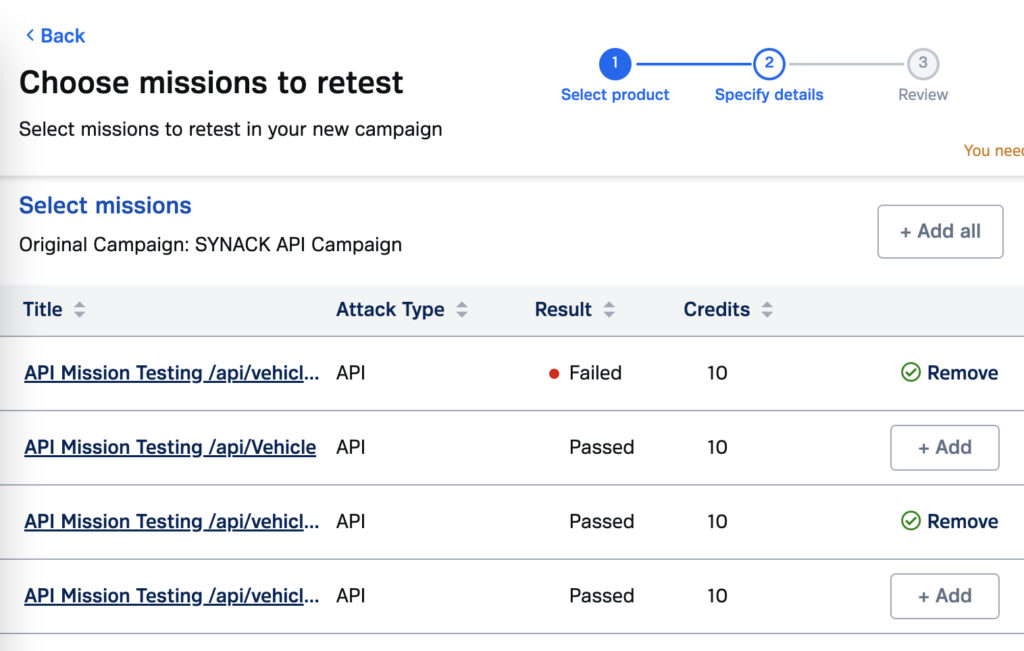
As long as you’re on the Synack Platform, you have on-demand access to the Synack Red Team. To that end, APIs previously tested can be retested at the push of a button. Simply use the convenient “retesting” workflow to select the endpoints you want to retest and press submit. This will start a new test on the specified endpoints, sending out the work once more to the SRT and producing fresh proof-of-coverage reports. This can be powerful to test after an update to an API or meet a recurring compliance requirement.

Get Started

Get started today by downloading our API pentesting data sheet.

The post Minimize Noise With Human-Led API Pentesting appeared first on Synack.

See Your Cyber Defenses with an Adversarial Perspective Using Red Teaming and Pentesting

By: Synack

The Complementary Benefits of Red Teaming and Pentesting

Deploying Complementary Cybersecurity Tools

In our previous article, we talked about the growing number of cybersecurity tools available on the market and how difficult it can be to choose which ones you need to deploy to protect your information and infrastructure from cyberattack. That article described how Asset Discovery and Management solutions work in concert with Pentesting to ensure that you are testing all of your assets. In this article, we’ll take a look at Red Teaming and how it works together with Pentesting to give you a thorough view of your cybersecurity defenses.

What is Red Teaming and How Is It Different from Pentesting?

Red Teaming and Pentesting are often confused. Red Teaming is a simulated cyberattack on your software or your organization to test your cyber defenses in a real world situation. On the surface this sounds a lot like Pentesting. They are similar and use many of the same testing techniques. But Red Teaming and Pentesting have different objectives and different testing methodologies.

Pentesting Objectives and Testing

Pentesting focuses on the organization’s total vulnerability picture. With Pentesting, the objective is to find as many cybersecurity vulnerabilities as possible, exploit them and determine their risk levels. It is performed across the entire organization, and in Synack’s case it can be done continuously throughout the year but is usually limited to a two-week period. Pentesting teams are best composed from security researchers external to the organization. Testers are provided with knowledge regarding organization assets as well as existing cybersecurity measures. 

Red Team Objectives and Testing

Red Teaming is more like an actual attack. Researchers usually have narrowed objectives, such as accessing a particular folder, exfiltrating specific data or checking vulnerabilities per a specific security guideline. The Red Team’s goal is to test the organization’s detection and response capabilities as well as to exploit defense loopholes. 

Red Teaming and Pentesting Work Together

There are a lot of articles floating around the internet describing Pentesting and Red Teaming and offering suggestions on which tool to choose for your organization. The two solutions have different objectives, but they are complementary. Pentesting provides a broad assessment of your cybersecurity defenses while Red Teaming concentrates on a narrow set of attack objectives to provide information on the depth of those defenses. So why not deploy both?  A security program that combines Red Teaming with Pentesting gives you a more complete picture of your cyber defenses than either one alone can provide. 

Traditionally, Red Teaming and Pentesting have been separate programs carried out by separate groups or teams. But Synack offers programs and solutions that combine both Pentesting and Red Teaming, all performed via one platform and carried out by the Synack Red Team, our diverse and vetted community of experienced security researchers. 

With Synack you have complete flexibility to develop a program that meets your security requirements. You can perform a Pentest to provide an overall view of your cybersecurity posture. Then conduct a Red Teaming exercise to check your defenses regarding specific company critical infrastructure or your adherence to security guidelines such as the OWASP (Open Web Application Security Project) Top 10, or the CVE (Common Vulnerabilities and Exposures) Checklist.

But don’t stop there. Your attack surface and applications are constantly changing. You need to have a long-term view of cybersecurity. Synack can help you set up continuous testing, both Pentesting and Red Teaming, to ensure that new cybersecurity gaps are detected and fixed or remediated as quickly as possible.

Learn More About Pentesting and Red Teaming

To learn more about how Synack Pentesting can work with Red Teaming to help protect your organization against cyberattack, contact us.

The post See Your Cyber Defenses with an Adversarial Perspective Using Red Teaming and Pentesting appeared first on Synack.

Accelerated Decision-making in Cybersecurity Requires Actionable Vulnerability Intelligence

Cybersecurity officers tasked with finding and mitigating vulnerabilities in government organizations are already operating at capacity—and it’s not getting any easier.

First, the constant push for fast paced, develop-test-deploy cycles continuously introduces risk of new vulnerabilities. Then there are changes in mission at the agency level, plus competing priorities to develop while simultaneously trying to secure everything (heard of DevSecOps?). Without additional capacity, it’s difficult to find exploitable critical vulnerabilities, remediate at scale and execute human-led offensive testing of the entire attack surface. 

The traditional remedy for increased security demands has been to increase penetration testing in the tried and true fashion: hire a consulting firm or a single (and usually junior) FTE to pentest the assets that are glaring red. That method worked for most agencies, through 2007 anyway. In 2022, however, traditional methodology isn’t realistic. It doesn’t address the ongoing deficiencies in security testing capacity or capability. It’s also too slow and doesn’t scale for government agencies.

So in the face of an acute cybersecurity talent shortage, what’s a mission leader’s best option if they want to improve and expand their cybersecurity testing program, discover and mitigate vulnerabilities rapidly, and incorporate findings into their overall intelligence collection management framework? 

Security leaders should ask themselves the following questions as they look to scale their offensive and vulnerability intelligence programs:

  • Do we have continuous oversight into which assets are being tested, where and how much? 
  • Are we assessing vulnerabilities based on the Cybersecurity Infrastructure Security Agency’s (CISA) Known Exploited Vulnerabilities Catalog, or are we assessing vulnerabilities using the Common Vulnerability Scoring System (CVSS) calculator
  • Are we operationalizing penetration test results by integrating them into our SIEM/SOAR and security ops workflow, so we can visualize the big picture of vulnerabilities across our various assets? 
  • Are we prioritizing and mitigating the most critical vulnerabilities to our mission expediently? 

There is a way to kick-start a better security testing experience—in a FedRAMP Moderate environment with a diverse community of security researchers that provide scale to support the largest of directorates with global footprints. The Synack Platform pairs the talents of the Synack Red Team, a group of elite bug hunters, with continuous scanning and reporting capabilities.

Together, this pairing empowers cybersecurity officers to know what’s being tested, where it’s happening, and how much testing is being done with vulnerability intelligence. Correlated with publicly available information (PAI) and threat intelligence feeds, the blend of insights can further enhance an agency’s offensive cybersecurity stance and improve risk reduction efforts.

Synack helps government agencies mitigate cybersecurity hiring hurdles and the talent gap by delivering the offensive workforce needed quickly and at scale to ensure compliance and reduce risk. And we’re trusted by dozens of government agencies. By adding Synack Red Team mission findings into workflows for vulnerability assessment, security operations teams are given the vulnerability data needed to make faster and more informed decisions.

Intrigued? Let’s set up an intelligent demo. If you’re attending the Intelligence & National Security Summit at the Gaylord in National Harbor, Md., next week, we’ll be there attending sessions and chatting with officers at Kiosk 124. We hope to see you there! 

Luke Luckett is Senior Product Marketing Manager at Synack.

The post Accelerated Decision-making in Cybersecurity Requires Actionable Vulnerability Intelligence appeared first on Synack.

Get More Out of the Synack Platform, Not Just Reports for Compliance

The Synack Platform can help you check all your compliance boxes. Need a yearly pentest? We’ve got you covered. Need reports that compliance auditors and executives can easily understand? Find them in the Platform after testing is complete. 

But when you use Synack’s capabilities only to satisfy compliance requirements, you’re missing out on the benefits of continuous offensive security testing. Synack CEO, Jay Kaplan, says it best, “You are getting scanned every day by bad actors, you just don’t receive the report.” 

As new vulnerabilities are disclosed, hackers are scanning your attack surface within 15 minutes. And with widespread, exploitable software flaws like Log4j, it will take years for security teams to find and remediate all the vulnerable instances in their networks. 

Synack’s continuous pentesting gives you the peace of mind of having your attack surface monitored year-round. Compliance checks might get you out of hot water with your auditor, but continuous coverage keeps you ahead of bad actors looking for a way into your systems. 

Deficiencies of Traditional Pentesting and Scanners

Point-in-time pentests are snapshots and don’t provide a comprehensive security assessment of dynamic environments. You need a process that will live and breathe like your organization does. If you’re sending out continuous updates to your web or mobile applications, you need continuous coverage, especially when those applications store sensitive customer data

As for scanning tools, they do provide continuous testing, but their results are limited to known vulnerabilities and produce a lot of noise or false positives. This creates a heavy burden for members of your security team, who might be feeling the effects of burnout like many others in the field. They must sift through the noise to find the vulnerabilities that are a) critical and b) can actually be exploited, which takes time and concentration. 

Instead, you could have Synack’s Red Team (SRT) and Vulnerability Operations finding, verifying and providing recommended fixes for the most critical and exploitable vulnerabilities in your system throughout the year. When it comes time for the compliance audit, you will be ready to hand over the report with evidence that the vulnerabilities found were successfully patched without a gap in coverage. And while your customers may never know that your testing program is comprehensive, they won’t see you suffering a data breach. 

Go Beyond Pentesting with the Synack Red Team & On-demand Security Tasks

The SRT can be activated for more than just open vulnerability discovery. In addition to creating reports from frameworks like the OWASP Top 10, they can check for best practice implementations with ASVS. Additionally, the Synack Platform can facilitate efficient zero day response in the wake of critical vulnerabilities like Log4j. These, in addition to other on-demand security tasks are launched through the Synack Catalog, enabled by our credits system. Watch a demo here.

Companies need agile security to keep the business safe without slowing it down. With Synack, you can quickly scale testing to your needs, receive actionable reports from the results and verify remediation of vulnerabilities. 

The post Get More Out of the Synack Platform, Not Just Reports for Compliance appeared first on Synack.

Testing Early and Often Can Reduce Flaws in App Development

Security is too often an afterthought in the software development process. It’s easy to understand why: Application and software developers are tasked with getting rid of bugs and adding in new features in updates that must meet a grueling release schedule. 

Asking to include security testing before an update is deployed can bring up problems needing to be fixed. In an already tight timeline, that creates tension between developers and the security team. 

If you’re using traditional pentesting methods, the delays and disruption are too great to burden the development team, who are likely working a continuous integration and continuous delivery process (CI/CD). Or if you’re using an automatic scanner to detect potential vulnerabilities, you’re receiving a long list of low-level vulns that obscures the most critical issues to address first. 

Instead, continuous pentesting, or even scanning for a particular CVE, can harmonize development and security teams. And it’s increasingly important. A shocking 85% of commercial apps contain at least one critical vulnerability, according to a 2021 report, while 100% use open-source software, such as the now infamous Log4j. That’s not to knock on open-source software, but rather to say that a critical vulnerability can pop up at any time and it’s more likely to happen than not. 

If a critical vulnerability is found–or worse, exploited–the potential fines or settlement from a data breach could be astronomical. In the latest data breach settlement, T-Mobile agreed to pay $350 million to customers in a class action lawsuit and invest additional $150 million in their data security operations.

This is why many companies are hiring for development security operations (DevSecOps). The people in these roles work in concert with the development team to build a secure software development process into the existing deployment schedule. But with 700,000 infosec positions sitting open in the United States, it might be hard to find the right candidate. 

If you want to improve the security of your software and app development, here are some tips from Synack customers: 

  • Highlight only the most critical vulns to the dev team. The development team has time only to address what’s most important. Sorting through an endless list of vulns that might never be exploited won’t work. Synack delivers vulnerabilities that matter by incentivizing our researchers to focus on finding severe vulnerabilities.
  • Don’t shame, celebrate. Mistakes are inevitable. Instead of shaming or blaming the development team for a security flaw, cheer on the wins. Finding and fixing vulnerabilities before an update is released is a cause for celebration. Working together to protect the company’s reputation and your customers’ data is the shared goal. 
  • Embrace the pace. CI/CD isn’t going away and the key to deploying more secure apps and software is to find ways to work with developers. When vulns are found to be fixed, document the process for next time. And if there’s enough time, try testing for specific, relevant CVEs. Synack Red Team (SRT) members document their path to finding and exploiting vulnerabilities and can verify patches were implemented successfully. SRT security researchers can also test as narrow or broad a scope as you’d like with Synack’s testing offerings and catalog of specific checks, such as CVE and zero day checks.

Security is a vital component to all companies’ IT infrastructure, but it can’t stand in the way of the business. For more information about how Synack can help you integrate security checkpoints in your dev process, request a demo.

The post Testing Early and Often Can Reduce Flaws in App Development appeared first on Synack.

What You’re Missing About Pentesting: 6 Tools That Look Like Pentesting But Aren’t

By: Synack

By Kim Crawley

Not everything that’s called “pentesting” is pentesting. There’s an abundance of different types of security testing and tools that use different methodologies for different stakeholders with differing agendas. Security testing, which includes pentesting and also vulnerability assessment, compliance auditing and other formats, is even broader. We’ll break down the differences between types of pentesting and strategies that are labeled pentesting but are fundamentally different. 

First, what are you testing for?

Are you trying to penetrate a network or computer system like a cyber threat actor, but with permission from the owner for the purposes of discovering security vulnerabilities? Then chances are what you’re doing is pentesting. If you’re using a checklist of security standards of some sort and looking for vulnerabilities without simulating cyber attacks, that’s a vulnerability assessment. It sounds obvious, but some entities try to sell vulnerability assessments by incorrectly calling them pentests. Pentests aren’t “better” than vulnerability assessments–they’re different types of security testing. Each can be the best solution for different problems.

The Flavors of Pentesting

Pentesting is having specially trained people simulate cyber attacks. They can use applications, scripts and even conduct analog activities such as social engineering and physical security pentesting. Its strength and weakness is the people doing the testing and the platform they work on. Without good testers on an efficient platform, the test may not leave the buyer with confidence. Traditional pentesting relies on only the skills of a few people and outputs a readable report, not data. Synack was founded to get the best testers on the best platform for the best pentest possible. A pentest’s output – at least Synack style – is real-time access to findings, remediation information, analytics about testing and more.

Different types of pentesting can be categorized according to which facet of a computer system is being tested. The majors are network pentesting, application pentesting, social engineering pentesting that finds vulnerabilities in people and physical pentesting that finds vulnerabilities in buildings, doors, windows, rooms and the like. 

Pentesting is also categorized according to the information available to the testers. Blackbox testing is done with little to no knowledge of a target from the perspective of an external attacker. Whitebox testing is done with in-depth target knowledge from the perspective of an internal attacker in the target’s IT department. And Greybox testing is in the middle from the perspective of a nontechnical insider. 

There are also other ways to prepare for cyber threats that are different from pentesting. Let’s explore some of them. 

Methodologies for Security Testing (That Aren’t Pentesting)

Breach and Attack Simulation (BAS) based on attack replay or scripting is a relatively recent development in security testing tech. Scripts that simulate specific exploits can be executed whenever an administrator needs to test a particular attack. This way, teams are better trained to know how to spot attack patterns and unusual log activity. When the cybersecurity community discovers new exploits, scripts can be used to simulate those exploits. Note that that takes time, so BAS may not be as current as adversarial tradecraft. The testing-like output is confirmation how many known vulnerabilities with easily scriptable exploits exist in your environment. 

BAS is best suited for testing security responses to ensure teams know how to spot attack patterns and strange attacks in their log systems. This is a great training tool for blue teams but will not result in the discovery of unknown vulnerabilities in general. This shouldn’t be viewed as a pen test replacement and usually the scripted models lag the current adversary tradecraft. 

Bug Bounty welcomes members of the general public under well defined policies to security test your software themselves and submit bug reports to your company according to the principles of responsible disclosure. If a bug can be proven and fits your company’s criteria of a prioritized vulnerability, the bug hunter could be awarded a monetary prize of anywhere from $50 to $100,500, but typical bug bounty rewards are about $200 to $1,000. The amount of money awarded for a valuable bug report is affected by several factors including the size of the company’s budget and user base and the criticality of the bug.

Dynamic Application Security Testing (DAST) is an automated technique, but it’s exclusively for testing working applications. So it’s often a tool used by application developers. DAST is used most often for web applications, but other internet-connected applications can be tested this way too. The targeted application must be running, such as a web application on the internet. The exploits that are executed are dynamic, so they may alter course depending on the progress of penetration. 

Risk assessments are sometimes called threat evaluations. In a risk assessment, your security team collaborates with what they know about your organization’s data assets and how those assets could be threatened, both by cyber attack and by non-malicious threats such as natural disasters and accidents. Risks are identified, estimated and prioritized according to their probability of occurring and the amount of harm that could result.

Static Application Security Testing (SAST) has the same goals as DAST, but for application code before being compiled, not for applications that are running in production mode. If a vulnerability is clear from source code – and not all are – it can be detected by SAST.

Tabletop exercises are mainly for incident response teams, a defensive security function. They can be a fun challenge when done well, and help your incident response group face cyber threats with greater confidence. Specific attacks are proposed in the exercise, and the team needs to figure out how they should prevent, mitigate, or contain the cyber threat. If Capture The Flag is the main educational game for the red team, tabletop is the main educational game for the blue team. The output is a more confident and prepared team. Sometimes, refinements for an organization’s threat modeling also emerge. But actual vulnerabilities will not often be found during these exercises.

These and other newer technologies (artificial intelligence and machine learning in particular) are useful tools for security leaders. Computer software acts faster and doesn’t get tired, but the most flexible thinking comes directly from human beings. 

Computer scientists know that computers can only simulate randomness, it takes a living being to actually be random. And human pentesters, like the Synack Red Team, are the best at simulating human cyber attackers and the serious exploits they regularly find.

For a deeper look at the Synack Red Team and its diverse skill set, read our latest white paper, “Solving the Cyber Talent Gap with Diverse Expertise.”

The post What You’re Missing About Pentesting: 6 Tools That Look Like Pentesting But Aren’t appeared first on Synack.

Red Teaming and Pentesting: Understanding the Differences and Values of Both

By: Synack

By Kim Crawley

As technology is becoming more complex and smarter, attackers are growing increasingly sophisticated and cunning. That’s why it’s important to take an offensive approach to security and to hunt for vulnerabilities with the same adversarial mindset, approach and tools that malicious hackers use to carry out attacks.

Two of the most common approaches to offensive security are red teaming and pentesting, disciplines in which specialists simulate real-world attacks, conduct rigorous vulnerability assessments, stress test networks with hacking tools and look for more than just the most common digital flaws.

It’s also important to understand the differences between red teaming and pentesting as well as where the Venn diagram between the two overlaps. Let’s take a look. 

Pentesting: Striking Like the Attacker To Find Vulnerabilities

A penetration test is essentially an engagement that simulates a cyberattack to find weaknesses in systems and networks. Pentesters will mimic malicious hacks to test security preparedness, patches and upgrades to systems. This can also apply to physical security, too (can a criminal break into the building?) and social engineering. 

Pentesters can be part of external, third-party vendors that an organization hires to test from an outsider’s perspective or internal employees who regularly test their employer’s network with insider knowledge. Traditional pentests often provide a small number of testers on site for two weeks once a year and testers are compensated for their hours spent on the target.  Furthermore, pentesters must respect the legal contracts they’ve signed with clients or employers and they must work within the scope defined in the contract. If breaking physical locks or running vulnerability scans on a network segment is outside of the defined scope, they won’t test those targets.

Red Teaming: Laser-Focused on Infiltrating Targets

Red teamers also conduct pentests, but they aren’t looking to find every single vulnerability or weakness. They are more focused on infiltrating intended targets, and often by any means necessary. They want to find the most effective way into an organization or system and see how much damage they could do once inside. 

Red teams will also tailor-make attack methods to their intended targets. So, red teams are often less constrained in the types of attacks they can use to breach an organization. They have more freedom to get creative and use their skills how they see fit. 

Red teams also often compete against blue teams that will run defensive operations simultaneously. Because of the depth of the red teaming exercises, these engagements tend to last much longer than pentesting. 

Synack Experts on Pentesting and Red Teaming

Ryan Rutan, Senior Director of Community for the Synack Red Team, has first-hand experience of how crucial both effective pentesting and red teaming can be when performed  effectively.

Here’s what he had to add: 

“Pentesting can uncover a large swathe of vulnerable attack surfaces at once. Once all the CVSS (Common Vulnerability Scoring System, a standard for understanding vulnerabilities) sorting pans out, you have a list of things you can fix in the next day, week or month. That is often enough time for the next pentest to roll around to start the process all over again. Maintaining that actionable cadence can be difficult, but important for DevSecOps fluidity, and, let’s face it, blue side (cyber defensive) morale.  

In my opinion, red teaming starts once many iterations of this cycle have been completed, and the target organization has made conscious countermeasures to threats identified in the pentesting results. Red teaming goes after specific critical objectives and typically has a much stricter scope or defined success criteria. The scope is often overlayed on top of past known vulnerable attack surfaces to test proper patching and mitigation.

In both cases, pentesting and red teaming, ethical hackers imitate adversaries to bolster blue side defences, but how they go about the process and to what degree makes all the difference. To sum it all up, pentesting helps tell you where you are vulnerable. Red teaming helps tell you what is safe. These two offensive security tactics work hand in hand to solidify a better defense in-depth posture that is tailored to meet the needs and capabilities for a given organization.”

Tim Lawrence, a solutions architect at Synack, describes pentesting and red teaming this way: “Penetration testing is the act of actively looking and trying to exploit vulnerabilities on authorized systems to evaluate the security of the system.

Red teaming is when an authorized team looks for weaknesses in an enterprise’s security by conducting simulated attacks against the target. The outcome is to improve the security of the enterprise by showing the impact to the business, and also to learn how to defend and alert against attacks.”

Duration, Domain and Adversary Emulation

Daniel Miessler is a well regarded expert on security testing methodologies and also how to approach cybersecurity from the defensive side. His website and podcast are definitely worth checking out. He now works as the head of vulnerability management and application security for Robinhood

When I asked him for his views on pentesting versus red teaming, he directed me to something he’s already written. In “The Difference Between a Penetration Test and a Red Team Engagement,” he summarizes the distinctions between penetration tests and red teams:

Duration: Red Team engagements should be campaigns that last weeks, months, or years. The blue team and the target’s users should always be in a state of uncertainty regarding whether a given strange behavior is the result of the Red Team or an actual adversary. You don’t get that with a one or two week assessment.

Multi-domain: While Penetration Tests can cross into multiple domains, e.g., physical, social, network, app, etc.—a good Red Team almost always does.

Adversary Emulation: The item that separates a random Penetration Test from a real Red Team engagement is that Penetration Tests generally involve throwing common tools and techniques at a target, whereas a Red Team should be hitting the organization with attacks that are very similar to what they expect to see from their adversaries. That includes constant innovation in terms of tools, techniques, and procedures, which is in strong contrast to firing up Nessus and Metasploit and throwing the kitchen sink.”

I recommend reading his entire post for more context.

The Synack Approach to Pentesting and Red Teaming

Synack knows that today’s cyberthreat landscape requires continuous pentesting for effective defense because traditional pentesting habits are frequently slow, disruptive and often can’t scale across an entire organization. 

The Synack Platform combines the best aspects of pentesting and red teaming with a pentest that harnesses the best human talent and technology and on-demand security tasks from a community of the world’s most skilled 1,500 ethical hackers. Synack focuses on finding vulnerabilities that matter, so organizations can find and fix new, exploitable vulnerabilities faster. 

Learn more about the Synack difference here: Synack365.


The post Red Teaming and Pentesting: Understanding the Differences and Values of Both appeared first on Synack.

How Synack Helps Organizations Comply with Directive 22-01

By: Synack

Government cybersecurity leaders know all too well that traditional pentesting is complex and doesn’t scale. The need to quickly resource up in order to effectively identify, triage and remediate vulnerabilities has become increasingly critical and, for most, a compliance requirement. 

Synack empowers government agencies with on-demand, continuous pentesting, pairing the platform’s vulnerability management and reporting capabilities with a diverse community of vetted and trusted researchers to find the vulnerabilities that matter. 

Synack also helps government security teams achieve the most effective vulnerability management possible to satisfy Binding Operational Directive (BOD) 22-01’s identification, evaluation and mitigation/remediation steps. The Synack approach also facilitates detailed vulnerability reporting that the agency can easily hand off to CISA if desired. 

Let’s quickly review what BOD 22-01 mandates, and how federal agencies can achieve compliance with help from Synack. 

CISA Binding Operational Directive 22-01—Reducing the Significant Risk of Known Exploited Vulnerabilities

Recent data breaches, most notably the 2020 cyber attack by Russian hackers that penetrated multiple U.S. government systems, have prompted the federal government to improve its efforts to protect the computer systems in its agencies and in third-party providers doing business with the government. As part of the process to improve the security of government systems, the Cybersecurity and Infrastructure Security Agency (CISA) issued Binding Operational Directive 22-01. 

CISA Directive 22-01 directs federal agencies and contractors to what they are required to do regarding the detection of and remediation for known exploitable vulnerabilities. The scope of this directive includes all software and hardware found on federal information systems managed on agency premises or hosted by third parties on the agency’s behalf. Required actions apply to any federal information system, including an information system used or operated by another entity on behalf of an agency, that collects, processes, stores, transmits, disseminates, or otherwise maintains agency information.

Directive 22-01 Compliance Requirements

In addition to establishing a catalog of known exploited vulnerabilities, Directive 22-01 establishes requirements for agencies to remediate these vulnerabilities. Required actions include: 

  • Establishment of 1) a process for ongoing remediation of vulnerabilities and 2) internal validation and enforcement procedures
  • Setting up of internal tracking and reporting
  • Remediation of each vulnerability within specified timelines
  • Reporting on vulnerability status to CISA

CISA’s Cybersecurity Incident & Vulnerability Response Playbooks describe a standard program for vulnerability management. The program steps are identification, evaluation, remediation and reporting.

  1. Identify reports on vulnerabilities that are actively exploited in the wild.
  2. Evaluate the system to determine if the vulnerability exists in the system, and if it does, how critical it is. If the vulnerability exists, determine if it has been exploited by said system.
  3. Mitigate and Remediate all exploited vulnerabilities in a timely manner. Mitigation refers to the steps the organization takes to stop a vulnerability from being exploited (e.g. taking systems offline, etc.) and Remediation refers to the steps taken to fix or remove the vulnerability (e.g. patch the system, etc.).
  4. Report to CISA. Reporting how vulnerabilities are being exploited can help the government understand which vulnerabilities are most critical to fix.

Evaluating Vulnerabilities with Synack

Synack finds exploitable vulnerabilities for customers through its unique blend of the best ethical hackers in the world, specialized researchers, a managed VDP, and the integration of its SmartScan product. SmartScan uses a combination of the latest tools, tactics and procedures to continuously scan your environment and watch for changes. It identifies potential vulnerabilities and engages the Synack Red Team (SRT) and Synack Operations to review suspected vulnerabilities. The SRT is a private and diverse community of vetted and trusted security researchers, bringing human ingenuity to the table and pairing it with the scalability of an automated vulnerability intelligence platform. 

If a suspected vulnerability is confirmed as exploitable, the SRT generates a detailed vulnerability report, with steps to reproduce and fix the vulnerability. Vulnerabilities are then triaged so that only actionable, exploitable vulnerabilities are presented – with severity information and priority information.

Mitigating and Remediating Vulnerabilities with Synack

Once the Synack team of researchers has verified the exploitability of the vulnerability, it leverages its expertise in understanding your applications and infrastructure. From that point, and in many cases, the SRT is able to recommend a fix with accompanying remediation guidance for addressing the vulnerability. And Synack goes one step further, verifying that the remediation, mitigation, or patch was implemented correctly and is effective.

Reporting to CISA

Synack’s detailed vulnerability reporting and analytics offer insight and coverage into the penetration testing process with clear metrics that convey vulnerability remediation and improved security posture. 

Comply with CISA Directive 22-01 with Help from Synack

CISA continues to add exploited vulnerabilities to its Known Exploited Vulnerabilities Catalog, and federal agencies are expecting urgent CVEs to pop up in the not-too-distant future. The recent rush to address the log4j vulnerability will come to mind for many. The Synack Red Team can aid organizations by rapidly responding to such situations.

To secure your agency’s attack surface and comply with the CISA Directive 22-01, a strong vulnerability management strategy is essential. The Synack solution combines the human ingenuity of the Synack Red Team (SRT) with Disclose (the Synack-managed VDP), along with the scalable nature of SmartScan, to continuously identify and triage exploitable vulnerabilities across web applications, mobile applications, and host-based infrastructure. Synack takes an adversarial approach to exploitation intelligence to show the enterprise where their most business-critical vulnerabilities are and how those vulnerabilities can be exploited by adversaries.


The post How Synack Helps Organizations Comply with Directive 22-01 appeared first on Synack.

Race Day: Making the Most of Your Penetration Test

Penetration Testing and Formula One Racing – Preparation is Key

By Nathan Jones Director, Customer Success, Synack

In Formula One, the most prepared teams have the best chances of success. Yet, preparation alone isn’t going to clinch a victory. Many factors contribute to crossing the finish line first: track conditions, weather, car setup, strategy changes and updates, as well as driver skill and decision making.

Penetration testing isn’t any different.

Following all the best practices and preparations laid out in our previous blog about getting ready for pentests like a Formula One champ is key, but you can’t truly succeed without smooth execution and deft management throughout the test.

At Synack, we’ve got you covered throughout the entire engagement on our Crowdsourced Penetration Testing Platform before and after our trusted network of security researchers go to work hunting for your vulnerabilities. 

Here’s what to expect throughout the Synack engagement:

  • It starts with high-quality, trusted researchers

Your pit team: Researchers’ skills are critically important to the success of any pentest. Because the vulnerability landscape is so broad and diverse, a single researcher — or even a small number of researchers — won’t have expertise across all vulnerability categories to fully test the assets in question. 

That’s the value of the Synack crowdsourced testing platform because we attract the best researchers with a wide variety of skills and backgrounds. This allows large numbers of researchers to bring their experience to bear across the range of vulnerability categories, enabling the most thorough test of the assets in scope.

  • Results get collected in a well-designed platform

Right car, right tools: A top-quality vulnerability management platform should underpin any pentest initiative, allowing customers to manage the full vulnerability lifecycle from initial reports, to analyst review, and then onto remediation. At Synack, the customer portal lets your team view vulnerabilities flow through a logical, easy-to-use workflow from discovery to patch to patch verification. 

In addition, our triage process ensures that vulnerability findings passed to the customer are valid, reproducible, high quality and actionable. This allows the customer to focus efforts on understanding the issues and taking appropriate action, saving considerable time and effort.

  • Control the testing environment and parameters

Know the course: Some penetration tests can be intrusive and noisy. The Synack experience has been designed to make the process as simple and seamless as possible. It is carried out in a controlled manner to mitigate any sort of impact to client’s everyday business operations. Researchers work from a known source IP to ensure proper monitoring. Customers are encouraged to monitor activity and traffic during the test but we recommend waiting for a formal vulnerability report before any patching. Patching during a test limits researchers’ ability to validate the finding and reward the researcher. 

  • Engage with researchers before and after the test

Connected to the pit crew: A testing engagement should not be a fire-and-forget activity. Customers should be looking to provide regular feedback, including information about new releases or changes, areas of scope on which researchers should focus and updates on any customer actions. 

Scope changes are a critical area of communication. A class of vulnerabilities caused by the same underlying issue should be temporarily removed from scope to prevent inundating the client with repetitive findings. We do this at Synack because it reduces noise as well as shifts the focus of researchers to other areas, thus ensuring better coverage.

  • Augment manual testing with smart automation

Change out the equipment when needed: Penetration testing harnesses human creativity to create value, but automated scanners are an important tool, as well, to help augment human efforts. Too often, however, security teams have had to accept trade offs, investing in cheap self-service scanning solutions to get broad attack surface coverage. There’s a better way. Smarter technologies built on machine learning principles can make a difference and help scale the testing effort. At Synack, SmartScan®, our vulnerability assessment solution, enables, rather than burdens, security teams by scaling security testing and accelerating their vulnerability remediation processes. SmartScan® combines industry-best scanning technology, proprietary risk identification technology, and a crowd of the world’s best security researchers, the Synack Red Team (SRT) for noiseless scanning and high-quality triage.

  • Recognize the possibility of unintended consequences 

Expect the unexpected: Every pentester and testing company seeks to avoid unwanted impact to the customer. Most issues can be avoided by having an accurate scope and researcher guidelines agreed ahead of testing. On the rare occasion that there is an incident, we have a process in place to deal with it immediately.  

  • Act on the results

Celebrate your wins, learn from your mistakes: It’s essential that clients act on findings. Just discovering vulnerabilities does not improve an organization’s risk posture. The vulnerabilities should be patched and remediated as soon as possible. Clients should look to monitor and track their risk posture over time using a risk metric such as Synack’s Attacker Resistance Score to chart improvements. 

For long-term testing engagements, clients should not wait until the pentest has completed, but should fix issues and receive confirmation from the pentester that the mitigation was successful throughout the test. 

Verifying compliance with necessary regulations is also a key part of using the results of a penetration test. Synack strongly recommends that clients opt for a testing package that includes checking compliance, including either relevant OWASP categories, PCI DSS 11.3, and NIST SP 800-53. A testing checklist provides auditable documentation for compliance-driven penetration testing requirements.

  • Keep on testing 

Always winning: In Formula One, when the race ends, the work isn’t’ over. There are always more races to run and further developments and improvements to make to stay ahead of the pack. 

The same is true in pentesting. As adversaries get more advanced, staying one step ahead in their cybersecurity is more important than ever. Regular pentesting is a key component of this. A client is only as strong as their weakest link, making appropriate pentesting against their entire attack surface critical to remaining cyber secure.

Winning looks like an overall reduction in vulnerability risk. While it’s impossible to eliminate all vulnerabilities, a healthy pentesting cadence will strengthen your security posture over time.

Nathan Jones is Director of Client Operations at Synack. He’s also a huge racing fan.

The post Race Day: Making the Most of Your Penetration Test appeared first on Synack.

APTRS - Automated Penetration Testing Reporting System

By: Unknown


APTRS (Automated Penetration Testing Reporting System) is an automated reporting tool in Python and Django. The tool allows Penetration testers to create a report directly without using the Traditional Docx file. It also provides an approach to keeping track of the projects and vulnerabilities.


Documentation

Documentation

Prerequisites

Installation

The tool has been tested using Python 3.8.10 on Kali Linux 2022.2/3, Ubuntu 20.04.5 LTS, Windows 10/11.

Windows Installation

  git clone https://github.com/Anof-cyber/APTRS.git
cd APTRS
install.bat

Linux Installation

  git clone https://github.com/Anof-cyber/APTRS.git
cd APTRS
install.sh

Running

Windows

  run.bat

Linux

  run.sh

Features

  • Demo Report
  • Managing Vulnerabilities
  • Manage All Projects in one place
  • Create a Vulnerability Database and avoid writing the same description and recommendations again
  • Easily Create PDF Reprot
  • Dynamically add POC, Description and Recommendations
  • Manage Customers and Comapany

Screenshots

Project

View Project

Project Vulnerability

Project Report

Project Add Vulnerability

Roadmap

  • Improving Report Quality
  • Bulk Instance Upload
  • Pentest Mapper Burp Suite Extension Integration
  • Allowing Multiple Project Scope
  • Improving Code, Error handling and Security
  • Docker Support
  • Implementing Rest API
  • Project and Project Retest Handler
  • Access Control and Authorization
  • Support Nessus Parsing

Authors


❌