When folks contact me about my forensic software, they typically ask the same three questions:
- "Can you detect deep fakes?" This usually goes into a detailed discussion about how they define a deep fake, but the general conclusion is "yes".
- "Can you handle audio and video?" Yes, but the evaluation process is a lot harder than pictures. Quality means everything, and a high quality video is usually lower quality than a low quality picture. So while the answer is technically "yes", the caveats multiply quickly.
- "Can you handle documents?" This is where I begin to cringe. By "documents", they almost always mean PDF. Yes, my code can evaluate PDF files and it can often identify indications of edits. However, distinguishing real from AI or identifying specific edits is significantly harder to do. (If you thought evaluating pictures and videos was hard, wait until you try PDF files.)
Over the last 30 years, I have been developing a suite of tools for evaluating PDF documents.
Last year I focused on reducing some of the complexity so they would be easier for non-programmers to use. Right now, I have a couple of commercial clients beta-testing the new PDF analyzers -- and they are thrilled! (As one of them remarked, "Christmas came early! Thank you.")
Anything But Typical
When evaluating any kind of media, a quick way to determine if something could be potentially altered or intentionally edited is to look for deviations from the typical case. If an atypical attribute only comes from an edit, then you can detect an edit. Often, you can detect that "something was edited" without viewing the visual content, like by evaluating the file structure.
For example, consider JPEG files. JPEGs have lots of encoding options, including the selection of quantization tables, Huffman encoding tables, and data storage (modes of operation).
The most common JPEG encoding mode is
baseline. Baseline includes one set of quantization and Huffman tables, converts colors from RGB to YUV, and groups them in grids. Each grid (MCU, or Minimum Coding Unit) contains one set of YUV components. The baseline method stores MCUs in a raster (left to right, top to bottom), like YUVYUVYUV (or YYYYUVYYYYUV). But these are all within the range of "normal". At FotoForensics, over 85% of JPEGs use baseline encoding.
The next most common encoding is called
progressive. It stores the image in layers, from low quality to high quality. (If you've ever seen a web page where an image first appears blurry and then gets sharper and sharper over a few seconds, that's almost certainly progressive encoding.) These account for nearly 15% of the JPEGs that FotoForensics receives; the vast majority of cameras do not use progressive mode. (If you see progressive mode, then it's not direct from a camera.)
If you read the JPEG specifications, they define 12 different encoding modes. I think I have less than a dozen examples of "Lossless JPEG" and "Non-interlaced sequential". The other eight modes appear to be completely theoretical and not used in practice.
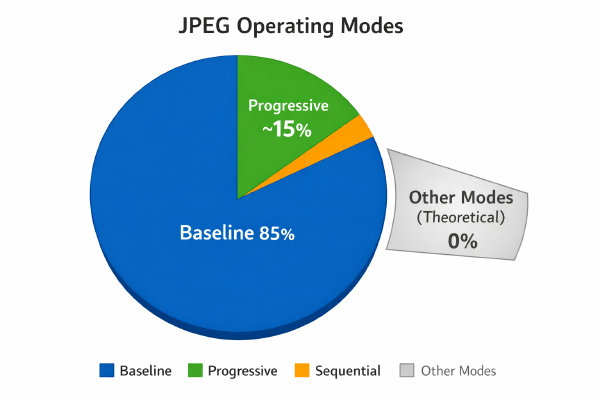
When someone talks about a "typical JPEG", they usually mean baseline, but they could mean progressive. However, if you encounter any other type of JPEG, then it's atypical and should immediately trigger a deeper investigation.
The PDF Structure
Detecting PDF edits and expectations requires understanding the required file structure. Unfortunately with PDF, almost nothing is typical, and that's the core forensic problem.
At a very high level, every PDF has some required components:
- Version. The first line is a comment with the minimum version number.
- Objects. A set of objects. Each object has a unique identifier. Objects may define content, pages, metadata, or even other objects. These are the essential building blocks for the PDF document.
- Xref. One or more cross-reference tables (xref or XRef) that identify the location of every object in the file. (These may also have references, creating a chain of cross-reference tables.)
- EOF. The last line needs to be a special "%%EOF" comment, denoting the end of the file.
- Starting Xref. Immediately before the "%%EOF" there must be a "startxref" field with an absolute offset to the top-level cross-reference table. Depending on the PDF version, this could be an older/legacy (PDF 1.0 - 1.4) "xref" object, or a newer/modern (PDF 1.5 or later) XRef object. (Even though xref tables are considered legacy structures, they are more common then the newer XRef objects, even when using newer PDF versions.)
- Starting Object. With the older xref object, there's also a "trailer" object that identifies the top-level object (root, catalog) and where it is located. With XRef, the object's dictionary contains the same type of information.
To render the PDF, the viewer checks the version, finds the "%%EOF", searches backwards for the startxref, then jumps to the cross-reference table. The initial table (xref table with trailer or XRef object) identifies where the starting object is located. (All of the random file access is very much like a
Choose Your Own Adventure book. There are even conditionals that may activate different objects.)
I have a collection of over 10,000 PDF files and nearly all have odd corner cases. You might think that being an ISO standard (
ISO 32000) would make PDF files more consistent. But in practice, very few applications adhere strictly to the standard.
As an example of PDF's many problems that impact forensic analysis, just consider the issues around versioning, edits, revised object handling, non-standard implementations, and bad pointers.
PDF Versions
With PDF files, lines beginning with a "%" are comments. (This is in general, but comments cannot appear between dictionary fields and values, or in some other parts of the PDF file.) Typically, comments can be ignored, except when they can't.

For example, the very first line of the PDF is a special comment that isn't treated like a comment: it lists the PDF version, like "%PDF-1.5". (I'm going to pick on PDF 1.5, but these problems exist with every PDF version.)
The PDF version does
not mean that the PDF complies with the PDF 1.5 version of the specification. Rather, it means that you need a PDF viewer that supports 1.5 or later. Unfortunately, many PDF generators get it wrong:
- Some files may specify a PDF version that is beyond what is really required. For example, it may say "%PDF-1.5" but contains no features found in 1.5 or later versions of the PDF spec. I have many PDF files that specify 1.5 or later, but that could easily be rendered by older viewers.
- Some files may specify the wrong minimal requirements. For example, I have some PDF files that say "%PDF-1.5" but that contain features only found in PDF 1.6 or 1.7.
If a PDF's header claims a version newer than what the viewer supports, the software may refuse to open it -- even if the contents are all completely supported by the viewer. Conversely, if the header version is too old, the viewer might attempt to render it and fail, or worse, render the contents incorrectly.
Does having a particular PDF version or mismatched version/feature indicate an edit? No. It just means the encoder didn't consider version numbers, which is typical for PDF files. This isn't suspicious or unusual.
Seeing Edits
Unfortunately, there is no "typical" or common way to edit a PDF file. When someone alters a PDF, their encoding system may:
- Append after EOF. After the "%%EOF", they may add more objects, cross-reference tables (xref or XRef), another startxref, and a final %%EOF. This results in multiple %%EOF lines: a clear indication of an edit.
- Append after startxref. Some editors remove the last %%EOF, then add in the objects, xref/XRef, startxref, and final %%EOF. This results in only one %%EOF, but multiple startxref entries.
- Replace ending. Some editors remove the final startxref and %%EOF before inserting the new objects and new ending. Seeing multiple xref/XRef tables either indicates an edit or a pipelined output system that stores objects in clusters.
- Revise objects. Revised or obsolete objects may be removed, while new objects may be inserted before rewriting the ending. Seeing unused objects or duplicate objects is an indication of an edit.
- Rewrite everything. Some PDF encoders don't keep anything from the original. They just create a new PDF file. Even with a clean rewrite, this often has artifacts that carry over, indicating that an edit took place.
If you see an edited PDF document, then it means it was clearly and intentionally altered. Right? Well, wrong. As it turns out, most PDF files contain edit residues. Just consider something like a utility bill that is saved as a PDF:
- Someone created the initial template. This could be a Doc, TeX, PDF, or other file format.
- Some process filled in the template with customer information (e.g., utility fees and previous payments).
- Maybe another process also fills in the template with more customer information (e.g., mailing address).
- Eventually a PDF is generated and sent to the end user.
- Some enterprise security gateway or "safe attachment" systems (like MS Defender for Office 365, or Proofpoint) may re-encode PDF attachments before delivering it to the user. (The re-encoding usually strips out macros and disables hyperlinks.) Older mobile devices may not download the full PDF immediately; instead, they might request a transcoded or optimized version for preview on the device. In these cases, the user may not receive the byte-per-byte identical copy of what was sent.
- Eventually the user does receive the PDF. Some users know how to save the PDF directly without any changes, but other users may use "print to PDF" or some kind of "Save" feature that re-encodes the PDF. (Don't blame the user, blame the app's usability. As an aside, I also see lots of people open the camera app and take a screenshot of the camera app's preview screen rather than pressing the big "take photo" button.)
Every step in this pipeline can leave residues that appear in the final PDF. This type of PDF step-wise generation is the norm, not the exception, and every company does it differently. There's nothing typical other than everything being atypical.
But maybe you can compare your suspect utility bill with a known-real utility bill from the same company? Nope, I've seen the same company generate different PDF formats for the exact same utility bill. This can happen if the company has multiple ways to generate a PDF file for the end customer.
Object Identifiers
The PDF file is built using nested objects. The "catalog" object references a "pages" object. The "pages" object references one or more "page" objects. Each "page" object references the contents for the page (fonts, text, images, line drawings, etc.).

(This image shows a sample of typical PDF object nesting.)
Every object has a unique identifier and a revision (generation) number. If you view the binary PDF file, you'll see text like "123 0 obj ... endobj", which identifies object #123 generation 0. If you edit a PDF and replace an object, the spec says that you should update the generation number. In practice, nearly all PDFs use generation number 0 for every object.
Seriously: of the over 10,000 sample PDF documents in my collection, 12 contain objects with non-zero generations. In contrast, it's very common to see the same object number redefined multiple times with the same generation number (123 0 ... 123 0). It may not comply with the specs, but it's typical for PDF generators to always use generation zero. (If you ever see a non-zero generation number, it's technically compliant but definitely atypical; it should set off alarms that the file was edited.)
Bad References
Adobe Acrobat is cited as the authoritative source for following the PDF standard. And that's true... until it isn't.
I have a handful of PDF files that have invalid startxref pointers, but that render fine under Acrobat. For example, there's a popular PDF generator called iText. (As iText describes it, they are the "
world's 4th most widely used PDF generator" and "the source of 8% of the world’s PDF documents.") They had a bug where they could generate a startxref file with a bad pointer. (I say "had" because it was fixed in 2011 with
version 5.1.2, but lots of people still use older buggy versions.)
Adobe has had 30 years of dealing with bad PDFs. Empirically, Acrobat appears to have special rules such as: "If the offsets are invalid and the file identifies a known generator, then search for the correct offset." As a result, Acrobat will properly render some PDF files that have bad references, but not others.
PDF viewers like Evince (Linux), Firefox, and Chrome are more forgiving. Regardless of the generator: they see the bad references and search for the correct objects. They can often display PDF files that Acrobat cannot. In general, different PDF viewers may handle the same PDF documents differently -- it all depends on the type of offset corruption and how it was auto-fixed.
EOF EOF
The problem with edit detection based on "%%EOF" markers is even more complicated. I have many PDF examples where the encoder wrote a chunk of non-renderable PDF content, dropped in a "%%EOF", then appended the rest of the document with a new "%%EOF".
To the casual eye, this might look like an edit. But in reality, it's a surprisingly common two-stage writing system. The first "%%EOF" is a red herring.
Typical Problems
All of this goes back to the problem of trying to define a typical PDF document. Between different PDF generators and different PDF creation pipelines, there's virtually no consistency. You can't say that a PDF looks suspicious because it has multiple EOF lines, multiple startxref, inconsistent object enumerations, etc.
There are a few ways to detect intentional PDF edits, like seeing reused object IDs, metadata indicating different edits, or changes more than a few seconds apart. But even then, the question becomes whether those edits are expected. For example, if you're filling out a PDF form, then we'd expect the edits (filled-out form) to happen long after the initial document was created. Seeing a clear indication of an edit may not be suspicious; you must take the context into consideration.
Over the last year, I have been hyperfocused on PDF documents in order to detect intentional edits and AI generation. I can finally detect some forms of AI-generated PDF documents. These are often used for fraud, as in, "ChatGPT, can you generate a sample PDF containing a Kansas electrical utility bill for me, for the amount of $1024.45? List the addressee as ..." or "I need a PDF dinner receipt at Martin's Steakhouse for three people last Wednesday." One crucial tell? Look for the dog that didn't bark, such as a filled-in template without an edit between the template and the personalized information. (AI systems generate the template and populate it at the same time, so there is no intermediate edit.)

(It's relatively easy to evaluate this image and determine that it is AI generated. But evaluating the associated PDF is significantly harder.)
The more complicated file formats are, the more difficult they become to evaluate. Among images, videos, audio files, and other types of media, PDF documents are certainly near the top of the difficulty level.

 Login
Login