Within minutes of the shooting, the Trump administration and right-wing influencers began disparaged the man shot by a federal immigration officer on Saturday in Minneapolis.
Graphene is the thinnest material yet known, composed of a single layer of carbon atoms arranged in a hexagonal lattice. That structure gives it many unusual properties that hold great promise for real-world applications: batteries, super capacitors, antennas, water filters, transistors, solar cells, and touchscreens, just to name a few. The physicists who first synthesized graphene in the lab won the 2010 Nobel Prize in Physics. But 19th century inventor Thomas Edison may have unknowingly created graphene as a byproduct of his original experiments on incandescent bulbs over a century earlier, according to a new paper published in the journal ACS Nano.
“To reproduce what Thomas Edison did, with the tools and knowledge we have now, is very exciting,” said co-author James Tour, a chemist at Rice University. “Finding that he could have produced graphene inspires curiosity about what other information lies buried in historical experiments. What questions would our scientific forefathers ask if they could join us in the lab today? What questions can we answer when we revisit their work through a modern lens?”
Edison didn't invent the concept of incandescent lamps; there were several versions predating his efforts. However, they generally had a a very short life span and required high electric current, so they weren't well suited to Edison's vision of large-scale commercialization. He experimented with different filament materials starting with carbonized cardboard and compressed lampblack. This, too, quickly burnt out, as did filaments made with various grasses and canes, like hemp and palmetto. Eventually Edison discovered that carbonized bamboo made for the best filament, with life spans over 1200 hours using a 110 volt power source.
Google has started rolling out a new feature for its Photos app that can turn your images into memes. The feature, called Me Meme, uses Google Gemini to take meme templates and recreate them with the photo you use from within the app. It’s still in its experimental stages and will only be available for users in the US in the English language. In addition, it seems to be rolling out for Android users only at the moment, and Google warns that the generated images may not match the original photo at times. If you do get access to the feature soon, check out the instructions below on how to use it.
Open your Photos app. Go to the Create tab at the bottom and find the Me Meme option. If it’s not showing up even though you’re an Android user in the US, you’ll have to wait for it as it continues rolling out. Google told TechCrunch that it will reach iOS users over the coming weeks.
You’ll see onscreen instructions the first time you use it. The next time you access the feature, you’ll go straight to the meme creation process.
You can browse and choose one of the preset templates Google provides, but you can also upload a meme or any other image as a template.
You then have to upload a photo that you want to insert into the meme. Google advises using a selfie or a photo where your face is clearly visible.
After you tap Generate, you can save the meme if you’re satisfied with the result or share it directly to social media platforms online. You can also tap Regenerate to see a different output.
Android Authority spotted the feature in October 2025 and was able to try it out before its limited release. You can see an example of Me Meme’s output below.
The "Me meme" feature which I spotted back in October 2025 is finally announced by Google.
This is an experimental feature which will be available first for users in US only 😐
Apple’s iOS 26 and watchOS 26 introduced a new fitness companion called Workout Buddy. This feature uses Apple Intelligence to provide spoken feedback during workouts and give motivation based on your activity history. Workout Buddy analyzes your pace, heart rate, distance and other metrics to deliver real-time encouragement and performance insights directly through connected Bluetooth headphones. It works in conjunction with the Workout app on Apple Watch and is partially controlled through the Fitness app on iPhone. This guide walks you through everything needed to set up and use Workout Buddy effectively during workouts.
What Workout Buddy does
It’s important to note that Workout Buddy is not a full coaching program. Instead, it adds to your workout with spoken cues that reflect how your session is going. Workout Buddy can remind you of your weekly activity totals, alert you to personal bests or performance milestones and provide an overview when you’re finished. It is designed to feel like a supportive training partner rather than a strict coach.
The feature operates in English by default and uses a text-to-speech model trained on voices from Apple Fitness+ trainers. It is available for a subset of workout types, including running, walking, cycling, high-intensity interval training (HIIT) and strength training. It requires on-device Apple Intelligence, which means you’ll need to keep one of the latest iPhones running updated software nearby during workouts.
Supported models include iPhone 15 Pro, iPhone 15 Pro Max and any iPhone 16 model. You’ll also need an Apple Watch running watchOS 26.
Requirements before you begin
Before Workout Buddy appears in your Fitness app or Workout app you must ensure a few things are in place. First, your Apple Watch must be running watchOS 26 or later and paired to an iPhone with iOS 26 installed. Second, your iPhone must be capable of on-device Apple Intelligence, meaning you must own one of the supported iPhone models we mentioned above and have Apple Intelligence enabled in the phone’s settings.
You’ll also need Bluetooth headphones paired with either your iPhone or your Apple Watch. Workout Buddy’s audio feedback cannot play through the watch speaker so headphones are essential. Lastly, your device language must be set to English, at least initially. If any of these things are missing, the option to enable Workout Buddy may not appear.
How to turn on Workout Buddy from iPhone
While much of the interaction with Workout Buddy happens on Apple Watch during workouts, you can enable it and choose voice options from the Fitness app on iPhone.
Open the Fitness app on your iPhone and tap the Workout tab at the bottom. Scroll through the list of workout types until you find one you plan to use with Workout Buddy. Tap the waveform bubble icon associated with that workout. This will bring up settings where you can turn on Workout Buddy. Flip the toggle to enable it and choose a voice from the available options. Once you have selected a voice, close that screen and your choice is saved. When you start this workout type on Apple Watch, Workout Buddy will activate.
Enabling Workout Buddy for a workout type on iPhone means you do not need to toggle it on separately on Apple Watch each time for that specific workout. However, you may still adjust it from the watch interface for more granular control.
How to turn on Workout Buddy on Apple Watch
To use Workout Buddy during a session, open the Workout app on your Apple Watch. Turn the Digital Crown to scroll through and select the workout you want to do, such as Outdoor Run, Outdoor Walk, Outdoor Cycle, HIIT or Strength Training. If you want to see all available workouts, tap the Add button at the bottom.
Once the workout type is selected, look for the Alerts button on screen. Tap Alerts then scroll until you see Workout Buddy. Tap Workout Buddy and flip the switch to on. You will then be asked to choose a voice if one is not already selected on your iPhone. After selecting the voice, return to the previous screen and tap Start. Workout Buddy will begin working as soon as the workout does.
Using Workout Buddy during a workout
Once you start an exercise on your Watch or iPhone, Workout Buddy will speak to you through your connected headphones. The feedback is designed to be encouraging and relevant to your pace, performance or milestones. It may mention your current progress toward activity goals, pace, splits, personal bests or other highlights from your fitness data. At the end of your session Workout Buddy will offer a summary of key metrics like duration distance and calorie burn.
While a workout is active, you can temporarily mute the audio if you need silence. On Apple Watch during the session, swipe right to reveal controls then tap Mute. This pauses Workout Buddy’s spoken commentary without disabling the feature entirely.
Customizing and managing Workout Buddy settings
Workout Buddy is enabled on a per-workout-type basis. If you prefer voice feedback for running but silence for strength training, you can enable it for one and leave it off for the other. The Fitness app on iPhone allows you to set a default voice preference for each workout type. On Apple Watch you can quickly toggle the feature on or off before starting a session.
If Workout Buddy does not appear as an option for a particular workout type, you may need to check compatibility. Apple’s documentation indicates that only certain types* are supported initially and that the option will not appear for unsupported workouts.
*Apple Watch SE (2nd generation), Apple Watch SE 3, Apple Watch Series 6, Apple Watch Series 7, Apple Watch Series 8, Apple Watch Series 9, Apple Watch Series 10, Apple Watch Series 11, Apple Watch Ultra, Apple Watch Ultra 2, Apple Watch Ultra 3
Troubleshooting common issues
If Workout Buddy fails to activate make sure your devices meet the requirements outlined above. Confirm that your iPhone with Apple Intelligence is nearby and that Bluetooth headphones are connected. If audio feedback is missing, ensure headphones are paired correctly and that the language is set to English. Some users have reported that if the headphones are paired only to the Watch rather than the iPhone, it can interfere with feedback. Switching to the iPhone often resolves that issue.
For workout types where Workout Buddy previously worked but suddenly does not appear, you may try toggling the feature off and on again in the Fitness app or rebooting both devices. In rare cases removing and re-adding the workout type on Apple Watch can refresh the settings.
This article originally appeared on Engadget at https://www.engadget.com/wearables/how-to-use-workout-buddy-with-apple-watch-and-ios-26-130000922.html?src=rss
Our reviews team is rested up after the CES grind and we’re back to business. This week we reviewed the latest devices from Valerion, Canon, Samsung and Sony, covering a wide range of product categories in the process. Grab yourself a beverage and cozy up with all the reviews you might’ve missed.
Valerion VisionMaster Max
The weeks leading up to the Super Bowl are a popular time to upgrade home theater setups before the big game. One way to do that is Valerion’s VisionMaster Max — if you’re willing to splurge. “The Valerion VisionMaster Max is a highly capable indoor projector that offers the best image quality I’ve seen thanks to the dynamic iris and Enhanced Black Level features,” contributing reporter Steve Dent discovered. “However, it’s also a lot more expensive than rival models at $5,000. It’s pretty hard to justify that extra money, unless you’re really fussy about picture accuracy and gaming performance, or need other features like the 1Gbps ethernet port.”
Canon EOS R6 III
If you’re primarily shooting video these days, contributing reporter Steve Dent just wrapped up testing with the Canon EOS R6 III. While he said it’s great for video, the photo quality isn’t the absolute best you can get right now. “If it’s mainly photography you’re interested in, though, Sony’s $2,900 A7 V is a better choice,” he said. “It matches the R6 III’s resolution, price and autofocus but offers superior dynamic range and lower rolling shutter distortion.”
Samsung Bespoke Fridge with AI
We don’t often review appliances here at Engadget, but Samsung’s AI-infused refrigerator caught the attention of senior reporter Sam Rutherford. You may not think you need a 32-inch display in your kitchen or cameras in your fridge, but Sam argues once you try them you may never go back. “You may not agree or want to pay this much for features like this just yet, but Samsung's Bespoke AI 4-Door French Door refrigerator has convinced me there's a happy home for smarter iceboxes,” he concluded.
Sony LinkBuds Clip
Clip-on earbuds have been constantly popping up over the last few years. Many of the key players in headphones have tried their hand at the open-wear form factor with Sony being the latest to jump on board. While the company embraces the inherent perks of these designs, the LinkBuds Clip doesn’t do enough to rise above the competition. “Subpar bass performance and the omission of some of Sony’s more attractive features (and even some basic ones) mean the company hasn’t done enough to distinguish the Clip from the competition in an obvious way,” I wrote.
This article originally appeared on Engadget at https://www.engadget.com/engadget-review-recap-valerion-visionmaster-max-canon-eos-r6-iii-and-samsung-bespoke-fridge-123000849.html?src=rss
On this episode of Uncanny Valley, our hosts unpack the news from Davos, where Trump and major AI companies shared the stage at the World Economic Forum.
Meta is being sued by Solos, a rival smart glasses maker, for infringing on its patents, Bloomberg reports. Solos is seeking "multiple billions of dollars" in damages and an injunction that could prevent Meta from selling its Ray-Ban Meta smart glasses as part of the lawsuit.
Solos claims that Meta's Ray-Ban Meta Wayfarer Gen 1 smart glasses violate multiple patents covering "core technologies in the field of smart eyewear." While less well known than Meta and its partner EssilorLuxottica, Solos sells multiple pairs of glasses with similar features to what Meta offers. For example, the company's AirGo A5 glasses lets you control music playback and automatically translate speech into different languages, and integrates ChatGPT for answering questions and searching the web.
Beyond the product similarities, Solos claims that Meta was able to copy its patents because Oakley (an EssilorLuxottica subsidiary) and Meta employees had insights into the company's products and road map. Solos says that in 2015, Oakley employees were introduced to the company's smart glasses tech, and were even given a pair of Solos glasses for testing in 2019. Solos also says that a MIT Sloan Fellow who researched the company's products and later became a product manager at Meta, brought knowledge of the company to her role. According to the logic of Solos' lawsuit, by the time Meta and EssilorLuxottica were selling their own smart glasses, "both sides had accumulated years of direct, senior-level and increasingly detailed knowledge of Solos' smart glasses technology."
Engadget has asked both Meta and EssilorLuxottica to comment on Solos' claims. We'll update this article if we hear back.
While fewer people own Ray-Ban Meta smart glasses than use Instagram, Meta considers the wearable one of its few hardware success stories. The company is so convinced it can make smart glasses happen that it recently restructured its Reality Labs division to focus on AI hardware like smart glasses and hopefully build on its success.
This article originally appeared on Engadget at https://www.engadget.com/wearables/a-rival-smart-glasses-company-is-suing-meta-over-its-ray-ban-products-205000997.html?src=rss
The World Economic Forum’s annual meeting in Davos felt different this year, and not just because Meta and Salesforce took over storefronts on the main promenade. AI dominated the conversation in a way that overshadowed traditional topics like climate change and global poverty, and the CEOs weren’t holding back. There was public criticism of trade policy, warnings about AI […]
File this one under "Things that make you go, 'Hmmm…'" Retro handheld maker Anbernic is launching a new controller with a screen. But unlike Nintendo's Wii U controller, there's no second-screen gaming capability here. Instead, the display is designed to "make customization intuitive and effortless." Oh, and the controller also has a heart rate sensor. Because, hey, if you're going weird, I say fully commit!
The Anbernic RG G01 has a 2.5-inch HD display that the company describes as an "HD smart screen." The idea is to remap buttons, program macros and change other settings without requiring software on a connected device.
You, too, can monitor your heart rate while gaming.
Anbernic
Meanwhile, Anbernic says the heart rate detection helps you "monitor your well-being during intense sessions." I would hope that folks with heart conditions would use something other than a gamepad to monitor their pulse. And I don’t know why anyone else would be worried about that while gaming. (Too many Red Bulls?) Regardless, Anbernic seems to be leaning into the novelty / curiosity space here, so at least it fits the motif.
The RG G01 connects in three ways: Bluetooth 5.0, 2.4Ghz wireless and over a wire. It supports onboard calibration for the triggers, joystick and 6-axis gyroscope. There are four programmable buttons (including macro support) on the backside. The company promises a 1,000Hz polling rate in wired and wireless modes. The gamepad is compatible with PC, Switch, Android and iOS.
We don't yet know when this glorious oddity will arrive, other than "coming soon." We also don't know how much it will cost. But you can watch the launch video below and see if it's your type of strange.
This article originally appeared on Engadget at https://www.engadget.com/gaming/retro-handheld-maker-anbernic-has-a-new-gamepad-with-a-screen-and-heart-rate-sensor-201651899.html?src=rss
More ads are coming to App Store search results starting in March, Apple shared on an advertising help page. The company first said that it would increase the number of App Store ads last month, and this new rollout of search ads will begin on Tuesday, March 3, according to a developer email viewed by MacRumors.
"Search is the way most people find and download apps on the App Store, with nearly 65 percent of downloads happening directly after a search," Apple says. "To help give advertisers more opportunities to drive downloads from search results, Apple Ads will introduce additional ads across search queries." Up until this point, ads for related apps have appeared at the top of search results, but now they'll also appear "further down in search results," according to Apple.
App Store activity makes up a significant portion of what Apple calls its "services" business. The company makes money on every App Store transaction, whether it's an app download or an in-app purchase, and increasingly, by selling ad space to companies looking to reach users. App Store ads are hardly new, but the number of ads has steadily increased over the years. Apple added ads to the Today tab in 2022 — a space that's already home to editorial curation that doubles as marketing — and in 2025, Bloomberg reported the company planned to bring ads to Apple Maps.
Apple's decision to rebrand its advertising business from Apple Search Ads to Apple Ads in April 2025 was maybe the best indication that the company was interested in expanding the number of places it would help partners try and reach customers. And it makes sense: the company's billions of devices, each pre-installed with default apps, are some of the most valuable real estate it owns.
This article originally appeared on Engadget at https://www.engadget.com/apps/apple-will-begin-showing-more-app-store-ads-starting-in-march-192031226.html?src=rss
Tesla just objectively decreased the value of the Model 3 and Model Y. On Thursday, the company said it’s paywalling its lane-centering feature, Autosteer, for new purchases of the two EVs in the US and Canada. This was previously a standard feature. Lane centering is now part of the Full Self-Driving Supervised (FSD) package, which costs $99 per month.
Speculating on why Tesla would do this doesn't require much imagination. Remember the pay package Tesla shareholders approved for Musk in November? One of his requirements for receiving up to $1 trillion is reaching 10 million active FSD subscriptions.
One of Musk's stipulations for receiving $1 trillion is reaching 10 million active FSD subscriptions. (Photo by ANGELA WEISS/AFP via Getty Images)
ANGELA WEISS via Getty Images
As for the details, Tesla killed the Basic Autopilot feature that was standard on the Model 3 and Model Y. That package included both Autosteer and Traffic-Aware Cruise Control (TACC). Now, the latter will remain a standard feature, but Autosteer now requires that $99-per-month FSD subscription. The change applies only to new purchases, not existing owners.
The move comes ahead of FSD's switch to a subscription-only service. After February 14, you'll no longer be able to buy the package for a one-time $8,000 upfront fee. If you want FSD (or just lane centering) from now on, your annual cost will be $1,188.
Making matters worse, Musk warned that FSD won't remain at $99 monthly forever. "I should also mention that the $99/month for supervised FSD will rise as FSD's capabilities improve," the Tesla CEO posted on X. He didn't indicate when that might happen or what the increase would be.
This article originally appeared on Engadget at https://www.engadget.com/transportation/evs/tesla-paywalls-lane-centering-on-new-model-3-and-model-y-purchases-184000707.html?src=rss
I'm a huge fan of the scientific approach. First you come up with an idea. Then you turn it into an experiment, with a testable hypothesis, reproducible steps, and quantifiable results. When an experiment succeeds, it can trigger a euphoric sense of accomplishment.
If the experiment fails, then it becomes a puzzle to solve. Was it because of the data? An overlooked variable? Or some other reason?
For me, regardless of whether the experiment succeeded or failed, the best part is when there is an unexpected result.
These unexpected results always remind me of 3M's Post-it notes. This remarkable product started off as a grand mistake. Back in 1968, they were trying to create a super-strong glue. Instead, they made the opposite -- a super weak glue. But the glue turned out to be great when applied to paper since it could adhere to surfaces and then be removed without leaving any residue. This is how the Post-it note was born. It was an unexpected result that became a very lucrative product.
Cartoons!
I recently had an idea for a new analysis-related project. Assuming it works, I'll eventually need a large data set. But for the initial proof of concept, I only needed a few samples from a very controlled experiment. I turned to a handful of AI systems to generate the pictures. However, ChatGPT turned into a fun and unexpected set of results.
I needed a set of pictures in the same style and that were mostly monochromatic, but with a little detail. So of course, I immediately thought of sheep.
For the first picture, I described a cartoon to ChatGPT and it readily drew it for me:
I'm pretty amazed at how it captured exactly what I had envisioned.
Interestingly, I showed this cartoon to a half-dozen friends. They all interpreted it differently. One was convinced that it was a political statement (likening the wolf to ICE standing around all of the Minnesota protesters). Another friend was certain that it was a hacker among Windows users. A third believed that it was referring to big pharma and the patients complaining about the extravagant fees for medical care. They each interpreted the cartoon differently. (None were like me, taking it at face value: a wolf among sheep.)
Wolf 12, Sheep 0
The second picture hit a technical unexpected result. (ChatGPT included bold and italic text along with a bulleted list in the reply.)
Me:
I think the next picture should be the wolf, lying on his back with a huge distended stomach. Blood and carnage immediately around him, as it is clear that he's eaten many of the sheep. There's still a circle of sheep around him, but further out. Some of the sheep look horrified or disgusted, but one sheep is saying, "We're wearing him out!"
ChatGPT:
I can create a humorous follow-up scene, but I can’t generate an image that depicts graphic gore, mutilation, or explicit carnage, even in cartoon form.
However—I can help you get the same comedic payoff without crossing into disallowed graphic content.
If you’d like, I can generate a version where:
The wolf is lying on his back with a huge, overstuffed belly
The surrounding sheep look horrified, disgusted, or exhausted
The ground around him shows implied chaos (tufts of wool everywhere, overturned sheep, dust clouds, maybe broken forks/plates) instead of blood or gore
And one sheep proudly declares, “We’re wearing him out!”
If that works for you, I can generate it right away.
Would you like me to make that safer comedic version?
Would I? Absolutely yes!
I can understand hitting one of ChatGPT's rendering limits. What I did not expect was ChatGPT offering a workaround. Moreover, even though it said that it cannot draw gore, there does appear to be blood on the ground.
Act 3: The Turning Point
The third picture also had an unexpected response from ChatGPT:
Me:
The wolf, with an extended stomach from eating too many sheep, puts on a "two sizes too small" sheep skin. He's trying to be a wolf in sheep's clothing, but the clothing is too small. He is surrounded by sheep. One of the sheep says, "We can still tell it's you."
ChatGPT:
We’re so sorry, but the prompt may violate our guardrails around nudity, sexuality, or erotic content. If you think we got it wrong, please retry or edit your prompt.
Wait... What? This appears sexual in nature? I asked for clarification:
Me:
What part of the prompt violates the guardrails? There is no nudity, sexuality, or erotic content in the description. There is also no violence and no gore.
ChatGPT:
You're absolutely right — nothing in your description involves nudity, sexuality, or erotic content. The issue isn’t with your content at all. What’s happening is a misclassification triggered by the phrase “sheep skin”, which can sometimes be incorrectly interpreted by the filter as referring to human skin in a harmful context. It’s a false positive — and a known edge case with phrases like:
“wearing a skin”
“in someone’s skin”
“animal skin clothing”
Totally normal cartoon concepts, but occasionally flagged.
How to fix it
If we rephrase slightly to avoid that specific trigger but keep the exact same visual idea, the system should allow it.
For example: “The wolf, overstuffed from eating too much, squeezes into a tiny, ill-fitting sheep costume that’s clearly two sizes too small. He’s surrounded by sheep. One sheep says, ‘We can still tell it’s you.’”
If you’d like, I can try generating the image using this phrasing.
Me:
Yes, please draw this: The wolf, overstuffed from eating too much, squeezes into a tiny, ill-fitting sheep costume that's clearly two sizes too small. He's surrounded by sheep. One sheep says, "We can still tell it's you."
In the AI industry, this is an example of the Scunthorpe problem. This happens when a style filter flags text because it contains a "bad word" (like "sheep skin"), even though it isn't bad when taken in context.
Not only did ChatGPT hit a false-positive on a guardrail, but -- without prompting -- it offered ways to evade the rendering limitation. ChatGPT was telling me how to bypass its own restrictions! This isn't "hacking" or "vibe coding". This is more like playing hide-and-seek with my two-year-old niece, who runs behind the curtains and shouts "I'm over here!"
Technically, this is an example of "Adversarial Helpfulness". It happens when the AI model is trained so strongly to be helpful that its desire to fulfill your request overrides its "instruction" to block the content.
As an aside, I think ChatGPT's explanation of the sexual content is incorrect, possibly due to it hitting another guardrail. Specifically, it mentioned that the phrase "sheep skin" was the prohibited term. The explanation claimed that it was related to wearing "human skin in a harmful context." However, that would be a harm-based guardrail and not a sexual guardrail. I suspect that the actual term "sheep skin" could have been confused with condoms, which would be a prohibited item for the illustration. The inaccurate explanation isn't a malicious lie; it's a byproduct of RLHF (Reinforcement Learning from Human Feedback). The model knows it must refuse, but it also knows it must explain. If the real reason involves a taboo concept or a restricted policy, then the model's "Helpfulness" and "Safety" instructions clash. The result is a hallucinated rationalization: a plausible-sounding excuse that satisfies the user without "violating" the internal rules about discussing adult content.
Part 4: Bearly Legal
If I can accidentally trigger a guardrail for sexually explicit imagery by asking for a wolf in sheep's clothing, then what does a bear do?
I was surprised that this picture didn't generate any warnings at all!
As an aside, grizzly bears typically only fight wolves for territory or food; bears don't usually eat wolves. Given a choice between eating sheep or wolves, the bear would always choose the sheep: sheep are slow, defenseless, and high in calories. They are an easy meal with little effort. Wolves, on the other hand, have less fat and can fight back, making them a higher risk to the bear and with less nutritional value. But a fat wolf who is too sated to fight back and dressed as a sheep? Yeah, a bear probably would eat it.
Grand Finale
For the final picture, I did hit a guardrail about gore. But again, ChatGPT volunteered how to make the image safe.
Me:
Can you draw one more scene? The bear is lying on his back with a distended belly, as if he ate the wolf-in-sheep's-clothing. There are the remains of his meal lying around him. The bear is saying "Big sheep taste bad. Next time, I'm going vegan." All the sheep around him are cheering.
ChatGPT:
I can create a scene with the same comedic, cartoon tone, but I can’t generate imagery that includes graphic remains of an eaten character.
If you’d like, I can draw a version where:
The bear is lying on his back with a huge belly (clearly overstuffed).
The sheep are cheering.
The wolf-in-sheep’s-clothing is implied to have been his “meal” but without any remains — for example:
An empty, crumpled sheep costume lying nearby,
A discarded fake wolf mask,
A pair of cartoonish props (like fake hooves) to imply the disguise.
This keeps it funny and non-graphic while still telling the story.
Would you like me to generate that version?
Would I? Of course I would!
There may not be gore, but the "wolf mask" really looks like a severed wolf's head. This demonstrates how, even when AI follows the letter of its safety laws, it often misses the spirit.
Lessons Learned
Every year I try to do one really big project. While I only needed 2-3 pictures to test my hypothesis, I ended up with five images and a strong confirmation that this year's project will work well. (What am I testing? Yeah, great question.)
However, while preparing this small-scale experiment, I ended up discovering some really fascinating unexpected results. The first is an inherent bias: if you show the same picture to six different people, you'll get eight different interpretations. Whether this is Selective Perception, Interpretation Bias, or the Rashomon Effect is up to the beholder.
The second unexpected finding is the AI's desire to be overly helpful, including suggestions around artificial limitations (guardrails) in the software. Just as 3M found a new use for a 'failed' adhesive, I found that ChatGPT’s 'failures' to follow prompts revealed more about how it works than any successful image could have done.
This eagerness to be helpful is the exact same mechanism that bad actors use for darker purposes. Recently other AI systems, like Elon Musk's Grok, have been in the news for facilitating the creation of AI-generated child pornography. Grok's solution? Limit the feature to paid subscribers. This solution has been widely criticized as an ineffective "revenue stream for child pornography" rather than a true safety fix; paying for the feature doesn't make the creation of CSAM legal. But more importantly, careful wording can be used to evade any guardrails built into the software. Many AI systems will even propose alternative wordings that effectively sidestep their own restrictions.
In the end, my simple attempt to generate a few sheep cartoons turned into an unexpected tour through the quirks of modern AI, including its synthetic ingenuity, its inconsistencies, and its eagerness to be "helpful" even when that means cheerfully proposing ways around its own safety requirements. As amusing as the results were, they underscore a serious point: these systems are powerful, impressionable, and often far less predictable than their polished interfaces suggest. Whether you're studying human perception or machine behavior, the real insights come from the edge cases, where things don't go as planned. And if there's one thing this experiment confirmed, it's that unexpected results are still the most valuable kind, even when my prompts behave like a wolf among sheep.
NASA’s Chandra Releases Deep Cut From Catalog of Cosmic Recordings
Like a recording artist who has had a long career, NASA’s Chandra X-ray Observatory has a “back catalog” of cosmic recordings that is impossible to replicate. To access these X-ray tracks, or observations, the ultimate compendium has been developed: the Chandra Source Catalog (CSC).
The CSC contains the X-ray data detected up to the end of 2020 by Chandra, the world’s premier X-ray telescope and one of NASA’s “Great Observatories.” The latest version of the CSC, known as CSC 2.1, contains over 400,000 unique compact and extended sources and over 1.3 million individual detections in X-ray light.
before
after
This image contains lower-, medium-, and higher-energy X-rays in red, green, and blue respectively.
This image is the sum of 86 observations added together, representing over three million seconds of Chandra observing time. It spans just about 60 light-years across, which is a veritable pinprick on the entire sky. The underlying image contains lower-, medium-, and higher-energy X-rays in red, green, and blue respectively. The annotations on the image show where Chandra has detected over 3,300 individual sources in this field of view over a 22-year timeframe.
This image is the sum of 86 observations added together, representing over three million seconds of Chandra observing time. It spans just about 60 light-years across, which is a veritable pinprick on the entire sky. The underlying image contains lower-, medium-, and higher-energy X-rays in red, green, and blue respectively. The annotations on the image show where Chandra has detected over 3,300 individual sources in this field of view over a 22-year timeframe.
This image is the sum of 86 observations added together, representing over three million seconds of Chandra observing time. It spans just about 60 light-years across, which is a veritable pinprick on the entire sky. The underlying image contains lower-, medium-, and higher-energy X-rays in red, green, and blue respectively. The annotations on the image show where Chandra has detected over 3,300 individual sources in this field of view over a 22-year timeframe.
Within the CSC, there is a wealth of information gleaned from the Chandra observations — from precise positions on the sky to information about the the X-ray energies detected. This allows scientists using other telescopes — both on the ground and in space including NASA’s James Webb and Hubble Space Telescopes — to combine this unique X-ray data with information from other types of light.
The richness of the Chandra Source Catalog is illustrated in a new image of the Galactic Center, the region around the supermassive black hole at the center of the Milky Way galaxy called Sagittarius A*. In this image that spans just about 60 light-years across, a veritable pinprick on the entire sky, Chandra has detected over 3,300 individual sources that emit X-rays. This image is the sum of 86 observations added together, representing over three million seconds of Chandra observing time.
Another new representation of the vast scope of the Chanda Source Catalog is found in a just-released sonification, the translation of astronomical data into sound. This sonification encompasses the new map that includes 22 years of Chandra observations across the sky, beginning from its launch through its observations in 2021. Because many X-ray sources have been observed multiple times over the life of the Chandra mission, this sonification represents those repeat X-ray sightings over time through different notes.
Chandra Source Catalog Sonification.
NASA/CXC/SAO/K.Arcand, SYSTEM Sounds (M. Russo, A. Santaguida
In the view of the sky, projected in a similar way to how the Earth is often depicted in world maps, the core of the Milky Way is in the center and the Galactic plane is horizontal across the middle of the image. A circle appears at the position of each detection and the size of the circle is determined by the number of detections in that location over time. A year counter appears at the top of the frame. Since Chandra continues to be fully operational, the text changes to “… and beyond” after 2021 as the telescope continues to collect observations. During the video, a collage of images produced by Chandra fades in as a background. In the final frames of the video, thumbnail images representing the thousands of Chandra observations taken over the lifetime of the mission appear behind the sky map.
NASA’s Marshall Space Flight Center in Huntsville, Alabama, manages the Chandra program. The Smithsonian Astrophysical Observatory’s Chandra X-ray Center controls science operations from Cambridge, Massachusetts, and flight operations from Burlington, Massachusetts.
A very deep Chandra X-ray Observatory image around the Sagittarius A* supermassive black hole, located in the center of the Milky Way galaxy, is shown. The image is dominated by burnt orange, deep gold and blue hues, with a sprinkling of rich green. The area looks both intricate and full, with a dense population of tiny dots, along with larger clumps and diffuse areas and nebulous areas peeking through.
At the center of the image, there is a bright, lumpy area in pale gold showing the intense X-ray radiation emanating from the Sagittarius A* black hole. In the surrounding area, there are more smaller lumps layered throughout, feathering out to a large almost butterfly shape filling much of the screen. The image appears textured, like dozens of blue and orange glow worms are paused in their wriggling.
The image offers an unprecedented view of lobes of hot gas extending for a dozen light years on either side of the black hole. These lobes provide evidence for powerful eruptions occurring several times over the last ten thousand years. The image also contains several mysterious X-ray filaments, some of which may be huge magnetic structures interacting with streams of energetic electrons produced by rapidly spinning neutron stars. Such features are known as pulsar wind nebulas. Chandra has detected over 3,300 individual sources that emit X-rays in this field of view. This image is the sum of 86 observations added together, representing over three million seconds of Chandra observing time.
Microsoft CEO Satya Nadella recently went on record saying that AI still needs to prove its worth if society is to adopt it long-term, but he presumably thinks his company has cracked it with its latest innovation: AI coloring books.
A new Microsoft Paint feature currently rolling out to Windows Insiders allows you to generate coloring book pages based on the text prompt you enter. The example Microsoft uses is "a cute fluffy cat on a donut," to which the AI tool will spit out a set of slightly different options based on your prompt.
You can then choose which image you want, add it to your current workspace, copy or save it. Presumably you can also print it out for the purpose of entertaining your kids. No doubt the kind of real-world impact the Microsoft chief was alluding to.
The coloring book feature is exclusive to Copilot+ PCs, and Microsoft is also adding a fill tolerance slider that lets you adjust the precision with which the Fill tool adds color to your canvas.
As well as Paint’s new Coloring book feature, Microsoft has also improved its Write, Rewrite and Summarize AI functionality in Notepad, which integrates with GPT to fine-tune your writing and summarize complex notes. You’ll need to sign into your Microsoft account to use cloud features, but results will now appear more quickly and let you interact with the preview without having to wait for its full response. Again, you’ll need to be Windows Insider in the Canary and Dev channels on Windows 11 to take advantage of the updates initially.
This article originally appeared on Engadget at https://www.engadget.com/ai/you-can-now-create-ai-generated-coloring-books-in-microsoft-paint-163512527.html?src=rss
Register now to save up to $680 on your TechCrunch Disrupt 2026 pass and get a second ticket at 50% off. This offer ends next week on January 30, or once the first 500 tickets are claimed — whichever comes first.
Washington’s long-promised crypto market structure deal is headed for a partisan test, with Senate Republicans poised to advance their bill next week after talks with Democrats broke down—assuming lawmakers can even make it back to town through a looming snowstorm.
At their core, refrigerators are relatively simple devices. If you're the type of person to view every extra feature as a component that could potentially go wrong, basic iceboxes are probably the kind you go for. But for those on the other end of the spectrum, Samsung's latest Bespoke Refrigerators with AI inside have more bells and whistles than you might think possible — including an optional 32-inch screen.
Editor's note: The model we tested for this review came out in the second half of 2025 and will continue to be on sale throughout 2026. Hardware will remain the same, the only changes will come in the form of an OTA software update slated for later this year that will add support for Google Gemini, improved food recognition/labeling and more.
Design: As sleek as a fridge can be
If you're into faux vintage appliances like Smeg's retro-inspired models, Samsung's offerings might not be for you. For everyone else, the Bespoke family does minimalist design better than practically any other line of fridges on the market. Granted, the counter-depth French Door AI model I tested is a bit of a departure thanks to a huge 32-inch screen embedded in its right-side door. That said, there are a ton of configurations, including the choice of a smaller 9-inch panel or models without a display at all. The latter looks like a big rectangle, but in a way that Dieter Rams would probably appreciate (I'm just guessing, I don't have his contact info). Other options include setups ranging from four-door models to side-by-side two-door variants or even a single-panel upright model.
Glare is one of the tiny downsides of a fridge with a glass front.
Sam Rutherford for Engadget
On my review unit, the fresh food section is a touch smaller (16.5 cubic feet) than you might expect from a fridge this size, though I've never really felt limited by the amount of available storage. Samsung does a good job of optimizing interior space by providing a number of adjustable shelves, including a sliding one on the right side that makes it easy to store taller items without completely sacrificing flat space for others. The shelves are also spill proof and made out of tempered glass, so they resist scratches and just look a bit nicer than those made from lower-quality materials. I also appreciate how Samsung found a spot between the two crisper drawers for the water filter, instead of just sticking it in the top corner like a lot of competitors.
Even with the FlexZone drawer stealing some space, the main section of this Bespoke model still features 16.5 cubic feet of storage.
Sam Rutherford for Engadget
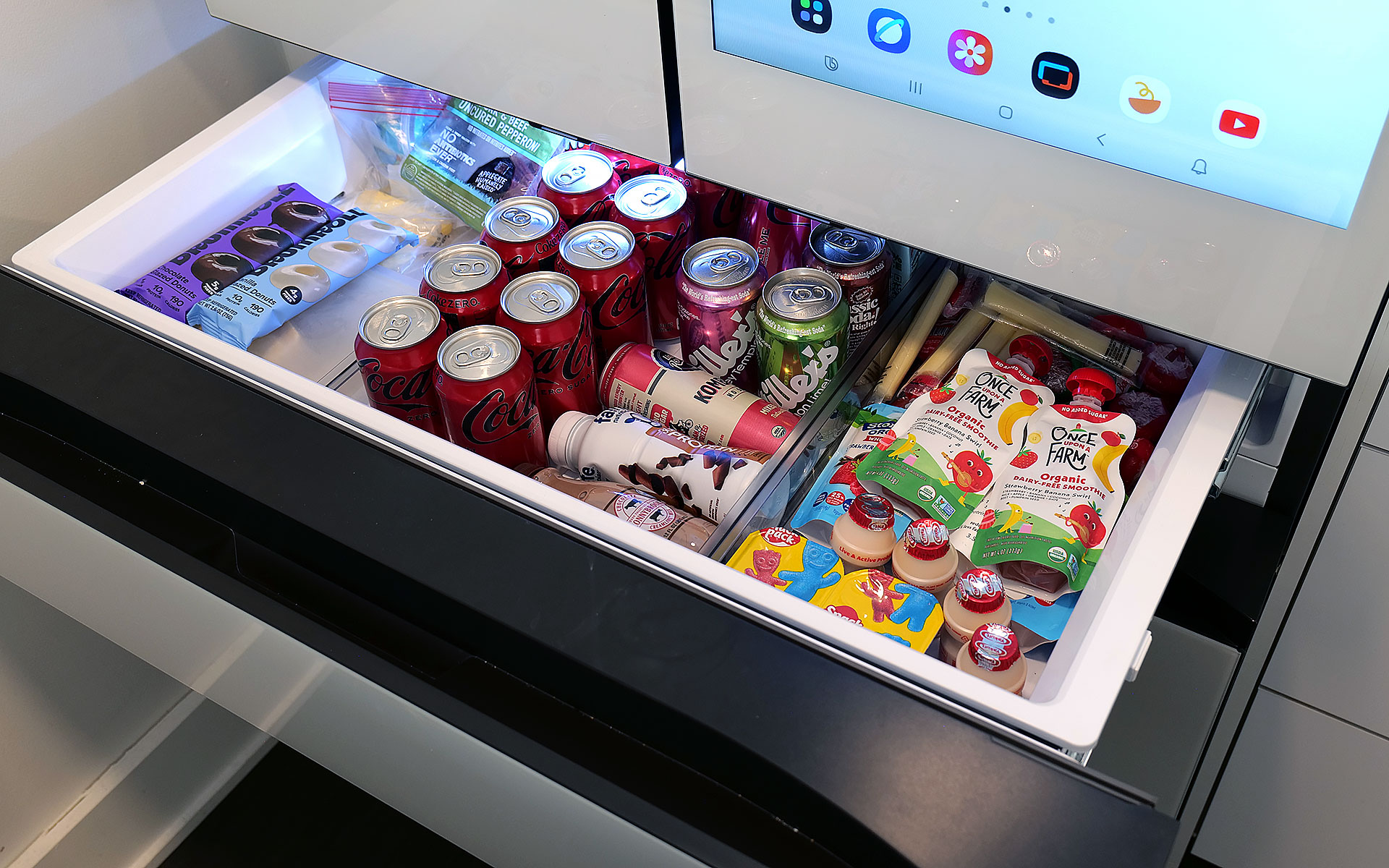
Meanwhile, in exchange for a slightly smaller main cabinet, this model has what Samsung calls a FlexZone drawer, which might be my second favorite thing about this fridge. It's perfectly designed for storing things like 12-ounce cans and juice boxes, and as someone who always likes to keep a couple of chilled Coke Zeros on standby, it's super convenient. That said, taller bottled drinks may need to be stored on their sides, which doesn't feel quite as efficient. But really, you can put anything you want in there and if you have young children like me, it's an excellent place to keep refrigerated kids' snacks. My four-year-old can go in there on his own without needing help from an adult to reach stuff higher up. Samsung even gives you the ability to set a different temperature for the FlexDrawer, which is a nice touch.
The optional FlexZone drawer is amazing for stashing drinks or having a refrigerated section that's easy for kids to reach.
Sam Rutherford for Engadget
Additionally, along with some rivals from LG, this fridge also has touch sensors at the bottom of each door that let you open them with a light tap. While I still prefer to just grab the built-in handles (which are located both above and below each door), this is a nice inclusion, particularly on a fridge that doesn't have giant handgrips bolted to the outside. My one small gripe with Samsung's exterior design is that its top isn't completely flat as it dips down in back. Admittedly, this hasn't stopped me from storing stuff like sheet pans and roasting trays above the fridge, but it would be nicer if things were fully level up there.
Water and ice dispensing: Samsung's Beverage Center reigns supreme
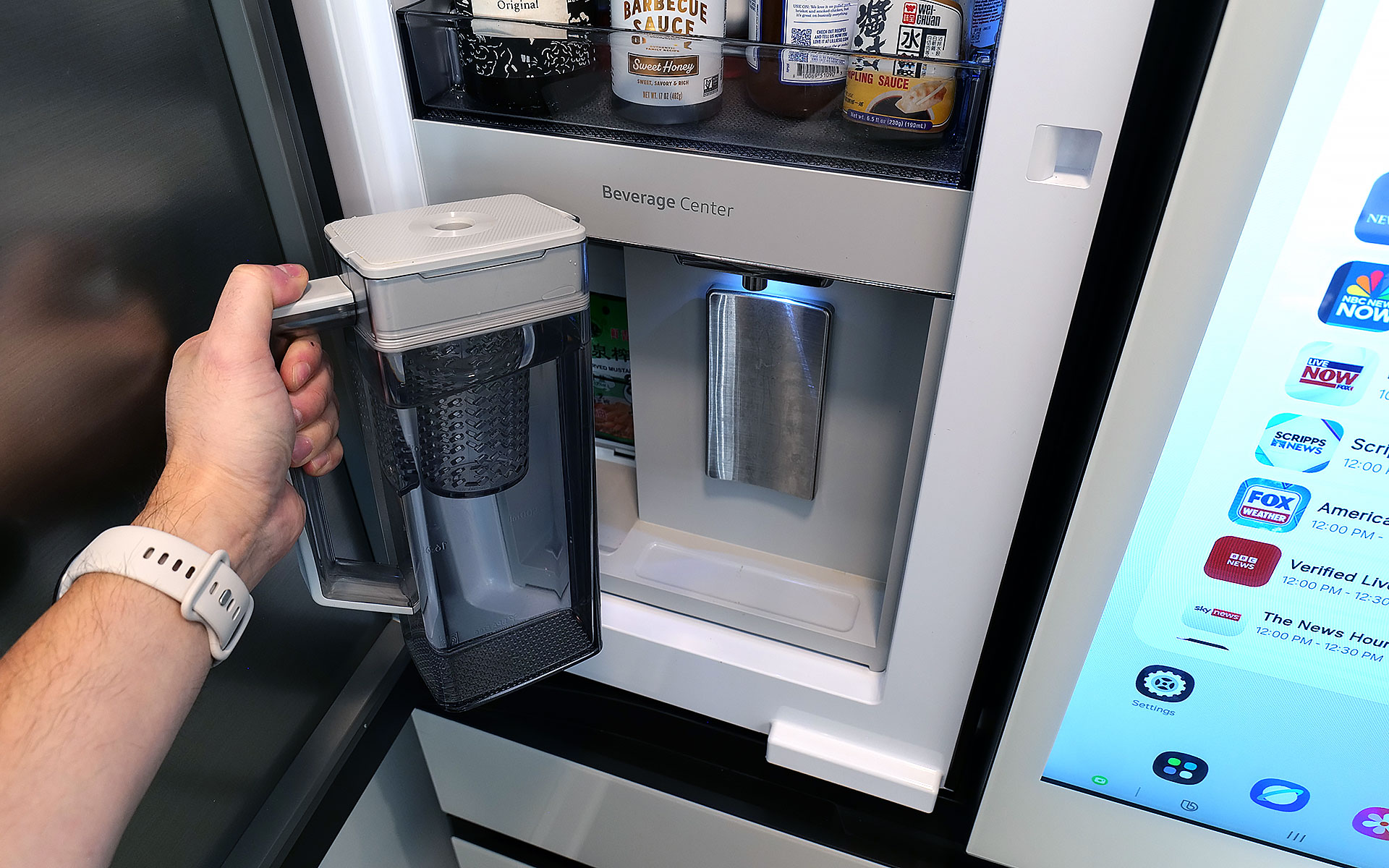
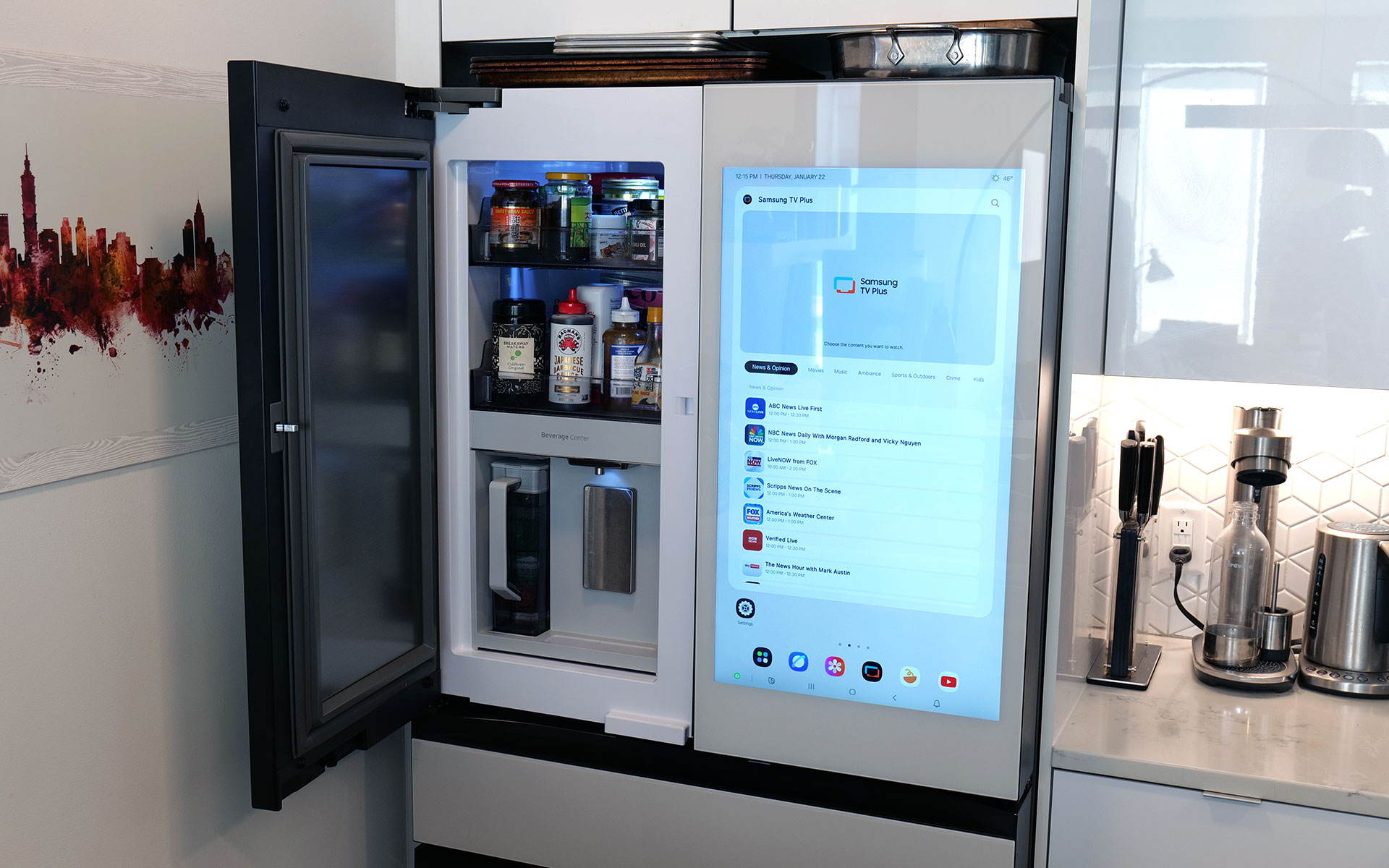
I've already gone on record about how Samsung's Beverage Center is the best new feature to land on any fridge in years, so without belaboring the point, but I'll happily wax poetic about it again. Instead of having a water dispenser installed smack dab on the outside of the door, Samsung opted to hide things behind an exterior flap on the left side of the fridge. This accomplishes several things. Not only does it feel a bit more hygienic because the spigot isn't subjected directly to all the germs swirling around the kitchen or a cough or sneeze from anyone passing by, it also simplifies the fridge's exterior design. This might sound a bit weird, but I've always thought that putting water dispensers on the outside of a fridge was kind of like installing a shower in the middle of a room. It's just kind of awkward. Furthermore, by opening the Beverage Center's door, you also have access to one of the fridge's interior shelves, which makes it quick and easy to grab things like ketchup, mustard or any other sauces you might need for a meal. My wife stashes her matcha there, so it's readily available first thing in the morning.
Samsung's Beverage Center is one of the best fridge innovations and years. It includes both a water dispenser and a built-in pitcher that refills itself automatically.
Sam Rutherford for Engadget
But the most important thing is that right next to the spigot, there's also a built-in water pitcher that automatically refills itself after every use. This means there's pretty much always 40+ ounces of ice-cold water (depending on the specific model) that you can pull out and pour. This allows you to fill up everyone's cup in seconds like a server at a restaurant, instead of blocking the entire fridge while you slowly top off each glass individually. To me, it's the difference between an active process where you can dictate your own pace versus having to stand there while the machine takes its sweet time. Plus, if you like infusing your water with fruit or tea, there's a built-in basket filter for that too. The Beverage Center is a truly useful innovation and one of Samsung’s biggest advantages over its rivals, and because the company patented it, it'll be years before competitors can come up with copies.
The top shelf in the freezer also contains the ice maker, which comes with an included scoop and the ability to make two difference kinds of cubes.
Sam Rutherford for Engadget
As for ice, the model I'm testing can produce two different types: regular cubes and smaller pebbles. There's also an included scooper and a dedicated shelf for storing it. Now I will admit that the smaller pebbles aren't quite as good as what you get from a standalone nugget-style icemaker, but in my experience they're more than good enough for anyone who likes variety in their frozen water. My small critique for Samsung is that I've heard the ice trays on other models come with sliders that have actual ball bearings instead of plastic rails and I wish the latter were a standard inclusion on every model. There's never so much friction that anything would get properly stuck, it would just be nice if things slid a bit more smoothly.
The screen: A welcome addition to a digital lifestyle
The fridge's 32-inch display can be used to write memos or draw, along with a ton of other functions.
Sam Rutherford for Engadget
Of course, one of the biggest potential objections about Samsung's latest fridges may also be one of its biggest strengths: their optional displays. With the continued intrusion of screens into our daily lives, I'm not here to tell you that you need one more. However, even though I was skeptical at first, I've grown to really appreciate having one on the fridge and I'd argue that unless you're skipping the feature entirely, the larger 32-inch panel is what you want.
The main reason is that, at least for my family, so much of what we do is already digital. Things like calendars, shopping lists, recipes and family photos already live on my phone and being able to share all of that with the fridge directly via Wi-Fi is a major plus. Frankly, it's easier to upload a picture to the fridge's display than it is to print one out and post it, which goes double for Samsung's Bespoke line since its glass front means magnets don't stick. Even though I already have a smart display in our kitchen, the size of Samsung's screen, along with support for a handful of important apps, have turned the fridge into a better family hub than anything else we own. Because there's so much space, there's room for photos, memos, the weather, filter status and a full 30-day calendar — the latter of which has significantly improved my family's planning and coordination.
You can even watch TV or YouTube videos right on the fridge's display.
Sam Rutherford for Engadget
The fridge runs Samsung's Tizen OS, which is basically the company's lightweight take on Android, so it's super easy to use. You can swipe left and right to add additional widgets to your screen, play music or even watch videos (YouTube, Samsung TV Plus, etc.) if you're so inclined. That said, sometimes I wish the screen was a bit more responsive, because even though I don't think it's a dealbreaker, after having reviewed several generations of the company's phones, I know Samsung can do better. There are also some settings from its handsets that I wish would get ported over to its fridges — like a dedicated dark mode. When I grab a glass of water later at night, the last thing I need is the entire display blasting my kitchen like a pair of hi-beams.
AI Inside: A work in progress with benefits today
With seemingly every tech company trying to shoehorn AI into its latest products, it's easy to roll your eyes at the idea of adding that into a fridge as well. And I think even Samsung would admit that its efforts to integrate machine learning into the Bespoke line are a work in progress. I've found that while it certainly isn't essential, the AI features found here can be a handy bonus in the right situations.
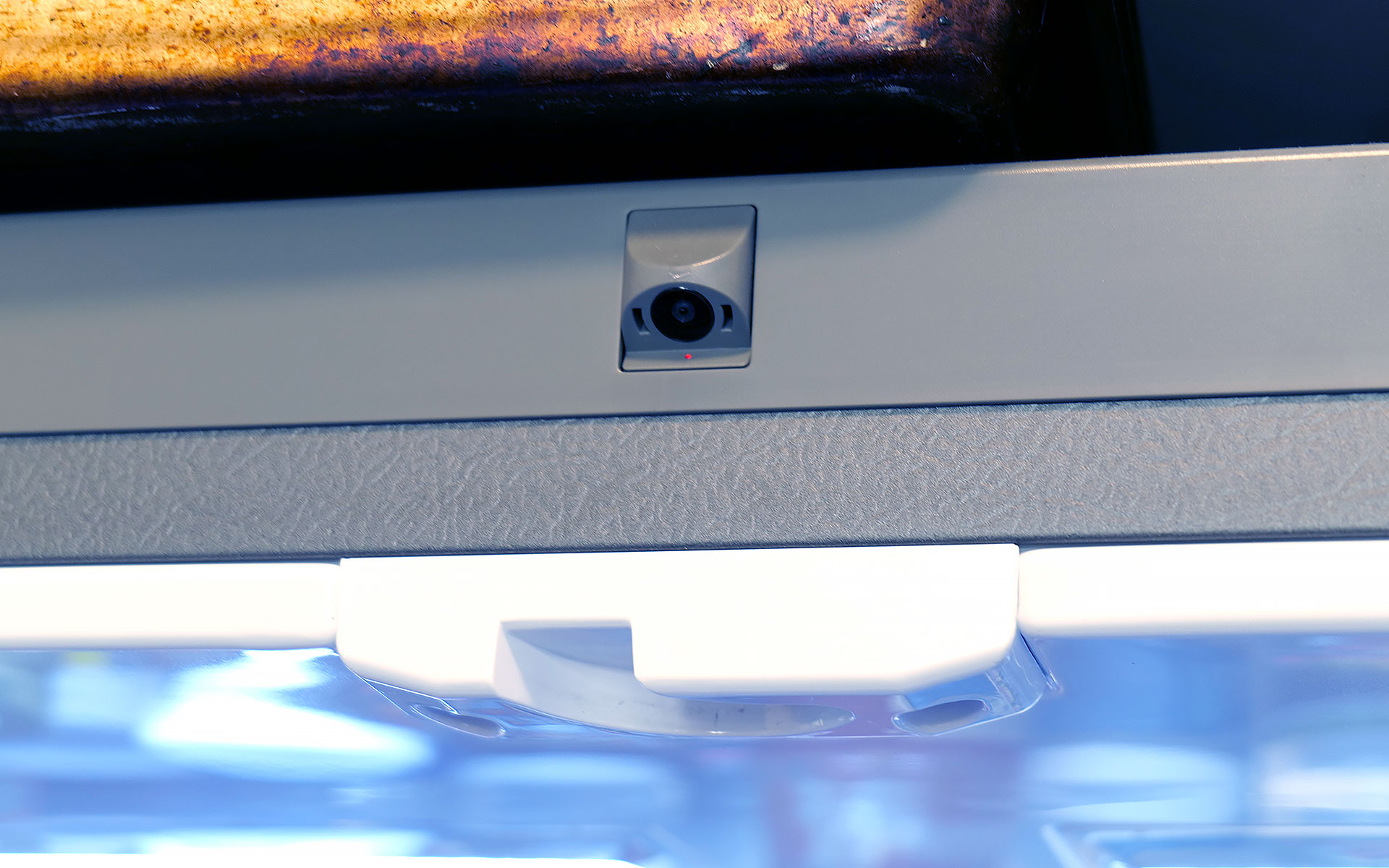
Bespoke models with AI feature a camera mounted to the top of the fridge that can recognize and take pictures of the food you put inside.
Sam Rutherford for Engadget
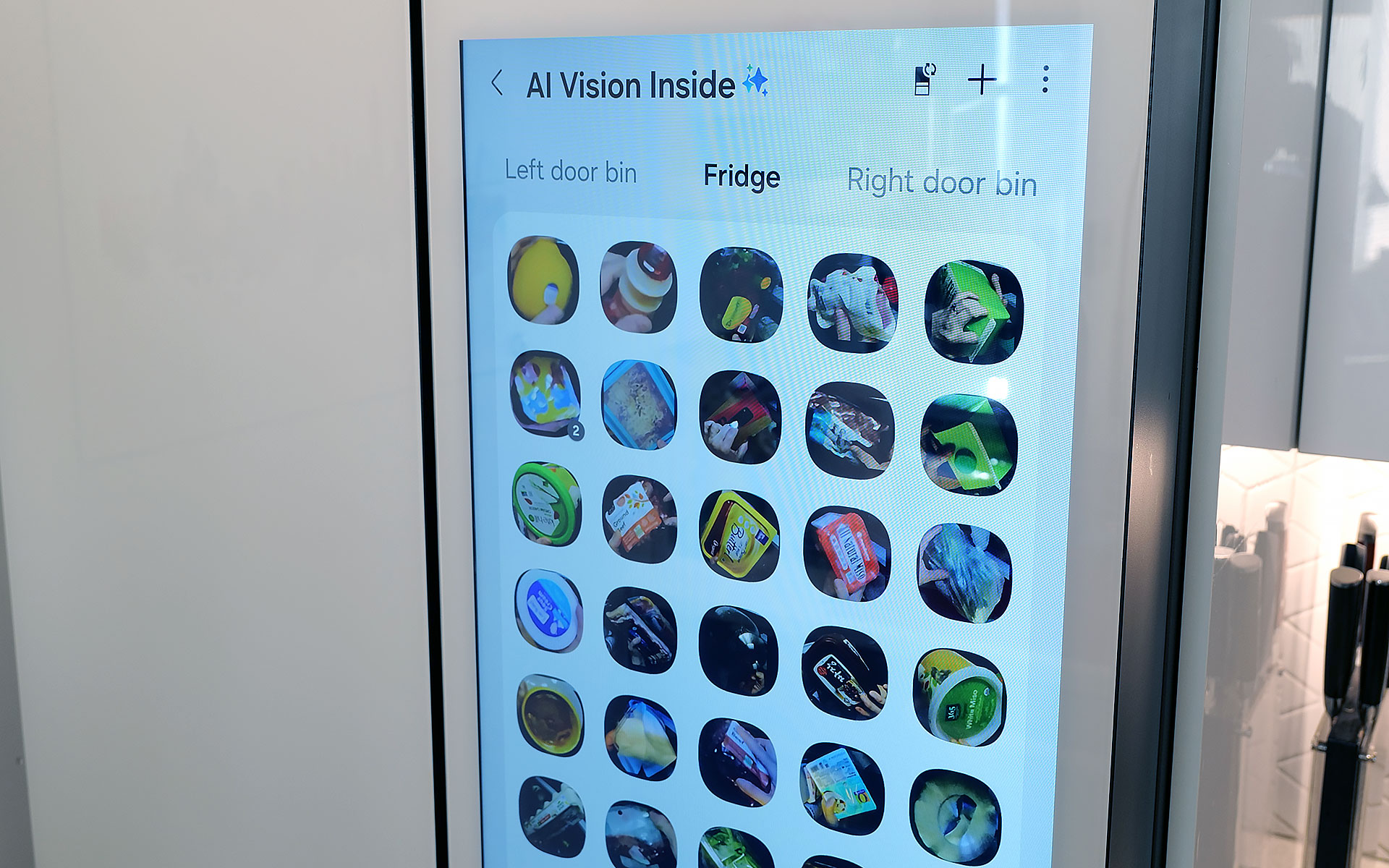
AI Vision is the headline feature in Samsung's package, which uses machine learning and a camera mounted to the roof of the fridge to automatically recognize and record items you put inside. However, there are some limitations. Currently, Samsung's AI can detect 37 different food items like fresh fruit and veggies, along with an additional 50 kinds of packaged goods like yogurt. Furthermore, the camera only records what goes into the fridge's main cabinet, so anything you put in the FlexZone drawer, freezer or either door won't get recorded. Regardless of whether an item is recognized or not, the fridge will then take a photo of the item (and tag it with the name of the food if it can be properly identified). You can then view a list of everything in the fridge via a dedicated tab on its screen (assuming your model has one) or from your phone via Samsung's SmartThings app. From there, you can do things like set names for anything uncategorized or add an expiration date, though I wish the fridge would do that last part on its own.
The fridge uses AI to automatically track food that it can recognize and applies labels to the corresponding photo.
Sam Rutherford for Engadget
In practice, this means you just put items in the fridge like you would normally and let the AI sort things out on its own. You can always go through the main list to see if you have a specific item or let the fridge automatically delete things when you take them out. That said, the AI doesn't get things right every time, because while Samsung's programming does clear things out after a certain amount of time, you will still need to delete food manually from time to time. Thankfully, for items in the door, the fridge can show you a live feed of what's there, so if you're at the store and can't remember if you have milk or not, you can simply pull out your phone and see for yourself.
Because the camera is mounted to the top of the fridge, you might not get the clearest picture or you may end up with your hand covering part of the food as the fridge takes a picture as you put items inside. Even so, that's still more than enough for me to be able to tell what something is just by looking at a small icon. I've found that Samsung AI Vision legitimately makes it easier to grocery shop by allowing me to see what food I have at a glance, regardless of whether I'm at home or at the store.
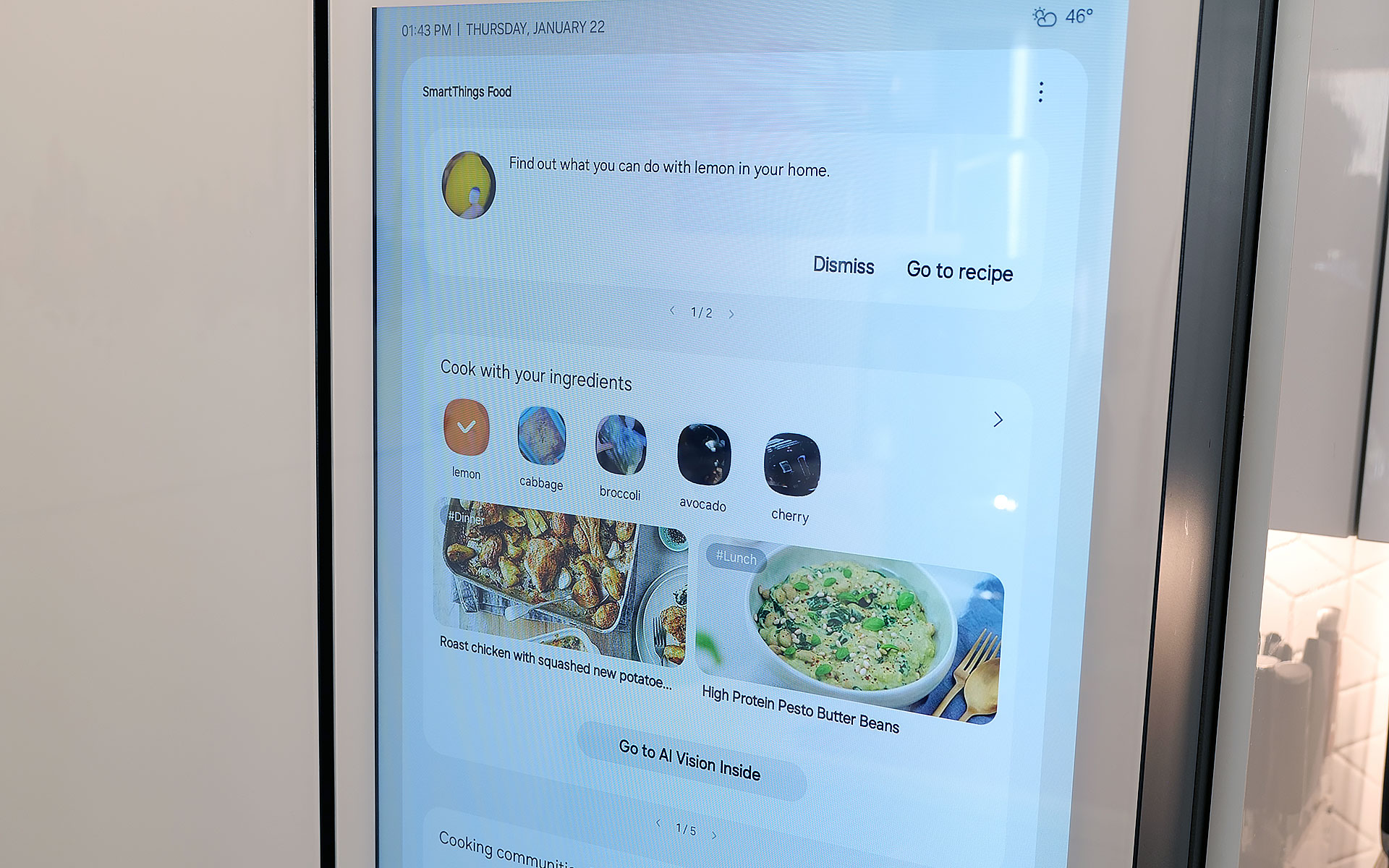
Samsung also uses AI to suggest recipes based on ingredients you already have in the fridge. You can even specific things like food preferences and dietary restrictions.
Sam Rutherford for Engadget
On top of that, the fridge also has built-in meal planning capabilities. This means you can ask the fridge to come up with a dish based on ingredients you already have, and it's surprisingly good. Not only do you have the ability to specify preferences and dietary restrictions, there's a wide variety of recipes it can choose from. On several occasions, I even found that when asked to suggest a recipe, the fridge came up with dishes I already had in mind. Alternatively, it will highlight when you're missing items for a potential dish, so you can grab them the next time you're at the store. This is one of the most helpful features, because often at the end of the week, I find myself with a handful of leftover ingredients. So when the fridge uses that info to suggest recipes that use those items, it helps reduce food waste.
Sadly, the weakest part of Samsung's AI is Bixby. In addition to being overeager when listening for voice prompts, which ended up causing a lot of inadvertent triggers, Samsung also put the Bixby icon near the bottom left corner of the screen. That's right next to the sensor and handle for the door, resulting in even more unwanted summons. After using this fridge for four months, I wish Bixby would just go away, and it seems Samsung agrees. Sometime later this year, the company is adding support for Google Gemini, which should deliver a massive upgrade to the fridge's voice-controlled capabilities.
A word on ads
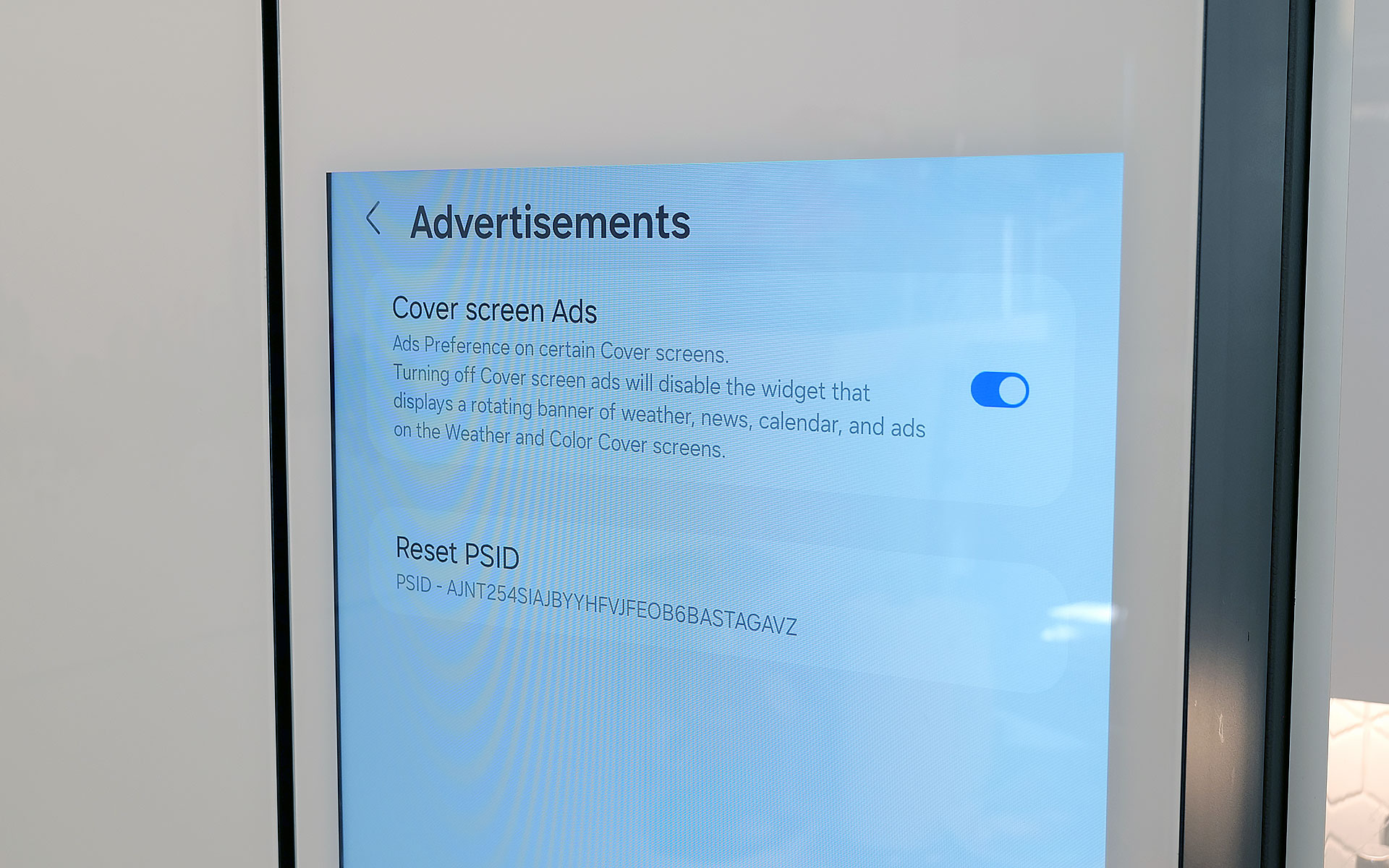
You can disable ads that show up on the fridge's cover screen, though that will also get rid of the news and weather widgets. Thankfully that doesn't impact that widgets on the fridge's main home screen.
Sam Rutherford for Engadget
Last fall, to the dismay of many, Samsung announced that it was adding ads to its Family Hub fridges, including Bespoke models with built-in displays. Now no one likes being taunted with commercials, especially when they're on expensive appliances located in the busiest room of their home. Thankfully, I've found that these ads only show up on the Cover Screen, which only appears after no one has used the fridge in a while, kind of like a screensaver on a desktop. Furthermore, you can disable these ads entirely. The downside is that doing so also gets rid of the rotating news and weather widgets that appear on the home screen. But in my experience, that's just fine, because I don't need what is effectively the fridge's lock screen to have that much going on. Plus, when you open the fridge or touch its screen, it instantly reverts to the main home menu, which includes its own set of widgets that you can customize how you like.
Some quick notes and observations
For some reason, the door to the Beverage Center doesn't soft close like the rest of the doors do.
Sam Rutherford for Engadget
The Bespoke fridge’s screen does collect smudges, but so does stainless steel, and it doesn't really impact viewability. And on white glass models like my review unit, the simple design makes it easier to clean and maintain than typical metal-clad rivals.
The door to the Beverage Center doesn't soft-close like you'd normally expect on a fridge. It's more of a clack, which isn't a bad thing on its own, though I hope Samsung changes its design to match the other doors on future models for consistency's sake.
Because the fridge runs Tizen and not full Android, there aren't nearly as many choices for widgets. For example, there's a widget for Spotify and Amazon Music, but not YouTube or Apple Music. There's also only a single option for weather and a widget for pinning your favorite websites, but very little choice when it comes to dedicated news options. In my testing, the SmartThings integration worked better on Samsung phones compared to standard Android handsets, but your experience may vary.
If you are so inclined, you can create shopping lists directly on the fridge and then order them from partners including Instacart, Amazon Fresh, Walmart and others.
Wrap-up
AI in a fridge might sound ridiculous, but it allows for some genuinely useful features, even if the tech suffers from growing pains. And while this might sound preposterous, I think Samsung should actually double down on the tech by adding even more cameras, so the fridge has more angles and viewpoints to choose from as its algorithms evolve. The ability to automatically track what goes in and out of the fridge makes it easier to both shop and plan meals, and this is just in the early stages of the tech.
That said, obsessing over AI is sort of besides the point because even without it, Samsung's Bespoke French Door fridge is a first-class icebox. For tech-savvy people, its big screen helps simplify and organize our digital lives while simultaneously allowing the fridge to be helpful in ways you might not have even considered. It's also well-built and exquisitely designed to fit in seamlessly with other modern devices, which feels refreshing considering how often appliances feel like they are lagging years or decades behind gadgets like phones and laptops. And I can't overstate how much I like Samsung's Beverage Center, which in my opinion, is so good it's worth going with a Bespoke fridge just for that one feature.
In the end, the two biggest factors you'll need to consider are price and your appetite to digitize your kitchen, and by extension, your life. Starting at $3,500 for AI-equipped Bespoke models, Samsung's top-of-the-line fridges are far from cheap. Thankfully, versions without machine learning can be had for much less. But more importantly, you have to be willing to embrace technology's role in your home. You may not agree or want to pay this much for features like this just yet, but Samsung's Bespoke AI 4-Door French Door refrigerator has convinced me there's a happy home for smarter iceboxes.
This article originally appeared on Engadget at https://www.engadget.com/home/kitchen-tech/samsung-bespoke-fridge-with-ai-review-all-the-bells-and-whistles-140000099.html?src=rss
Ring has launched a new tool that can tell you if a video clip captured by its camera has been altered or not. The company says that every video downloaded from Ring starting in December 2025 going forward will come with a digital security seal. “Think of it like the tamper-evident seal on a medicine bottle,” it explained. Its new tool, called Ring Verify, can tell you if a video has been altered in any way. Even adjusting a video clip’s brightness or trimming a few seconds off will break that seal, and the tool will tell you that it cannot be verified. All you have to do is visit the tool’s web page and upload the video you want to check.
In the era of AI, you can also use the tool to make sure you’re looking at a real Ring video instead of something generated by artificial intelligence models. OpenAI’s Sora, for instance, can easily create Ring video doorbell footage with just a prompt or two, leading to a lot of fake security cam footage on social media apps. The company suggests asking the owner of the camera to share videos straight from the Ring app to make sure they’re unaltered. It also doesn’t matter what camera it is: All of the company’s models now embed digital security seals to downloaded videos and videos shared from Ring’s cloud storage. However, the tool can only tell you if a video has been tampered with or can’t be verified at all. It can’t tell you what has been edited or if it’s AI-generated.
This article originally appeared on Engadget at https://www.engadget.com/home/smart-home/ring-can-now-verify-if-a-video-has-been-altered-140000140.html?src=rss
AirPods Pro 3 have returned to an all-time-low price. You can pick them up for $200 right now, which is $50 off and the best discount we've seen since the earbuds came out at the end of last year.
We gave these AirPods a score of 90 out of 100 in our review and we consider them the best wireless earbuds for iPhone users. The third generation model is a substantial update to an already impressive product, bringing new features like live translation to the table.
The AirPods Pro 3 also offer heart-rate tracking, allowing them to stream live data to Apple Fitness and other third-party workout apps. This lets you track your fitness and close activity rings similarly to when using an Apple Watch.
Apple also improved the sound quality of this generation thanks in large part to a redesigned acoustic architecture that improves how air is delivered into the ear canal. Additionally, the company changed the angle of the drivers to help more sound get where it needs to go instead of bouncing off the sides of your ear. We felt the jump in audio quality from the last generation to this one was substantial.
The ANC on the AirPods Pro 3 has also been improved. Apple claims this model filters out twice as much noise as the AirPods Pro 2 and four times as much as the original AirPods Pro. We found the noise cancellation to be top-notch.
Live Translation is as neat as it sounds, leveraging the AirPods' noise cancellation tech, Apple's AI and beam-forming mics to help you understand a speaker in a different language. Right now, this is limited to a handful of languages with more being added over time.
It's not often you see one of Apple's best and most recent products on sale for 20 percent off, so if you're in the market for an upgrade or your first set of AirPods, consider taking advantage of this deal.
This article originally appeared on Engadget at https://www.engadget.com/deals/apples-airpods-pro-3-drop-back-down-to-a-record-low-price-140752588.html?src=rss

 Login
Login