The PC has had its fair share of bus slots. What started with the ISA bus has culminated, so far, in PCI Express slots, M.2 slots, and a few other mechanisms to connect devices to your computer internally. But if the 8-bit ISA card is the first bus you can remember, you are missing out. There were practically as many bus slots in computers as there were computers. Perhaps the most famous bus in early home computers was the Altair 8800’s bus, retroactively termed the S-100 bus, but that wasn’t the oldest standard.
There are more buses than we can cover in a single post, but to narrow it down, we’ll assume a bus is a standard that allows uniform cards to plug into the system in some meaningful way. A typical bus will provide power and access to the computer’s data bus, or at least to its I/O system. Some bus connectors also allow access to the computer’s memory. In a way, the term is overloaded. Not all buses are created equal. Since we are talking about old bus connectors, we’ll exclude new-fangled high speed serial buses, for the most part.
Tradeoffs
There are several trade-offs to consider when designing a bus. For example, it is tempting to provide regulated power via the bus connector. However, that also may limit the amount of power-hungry electronics you can put on a card and — even worse — on all the cards at one time. That’s why the S-100 bus, for example, provided unregulated power and expected each card to regulate it.
On the other hand, later buses, such as VME, will typically have regulated power supplies available. Switching power supplies were a big driver of this. Providing, for example, 100 W of 5 V power using a linear power supply was a headache and wasteful. With a switching power supply, you can easily and efficiently deliver regulated power on demand.
Some bus standards provide access to just the CPU’s I/O space. Others allow adding memory, and, of course, some processors only allow memory-mapped I/O. Depending on the CPU and the complexity of the bus, cards may be able to interrupt the processor or engage in direct memory access independent of the CPU.
In addition to power, there are several things that tend to differentiate traditional parallel buses. Of course, power is one of them, as well as the number of bits available for data or addresses. Many bus structures are synchronous. They operate at a fixed speed, and in general, devices need to keep up. This is simple, but it can impose tight requirements on devices.
Tight timing requirements constrain the length of bus wires. Slow devices may need to insert wait states to slow the bus, which, of course, slows it for everyone.
An asynchronous bus, on the other hand, works transactionally. A transaction sends data and waits until it is acknowledged. This is good for long wires and devices with mixed speed capability, but it may also require additional complexity.
Some buses are relatively dumb — little more than wires hanging off the processor through some drivers. Then how can many devices share these wires? Open-collector logic is simple and clever, but not very good at higher speeds. Tri-state drivers are a common solution, although the fanout limitations of the drivers can limit how many devices you can connect to the bus.
If you look at any modern bus, you’ll see these limitations have driven things to serial solutions, usually with differential signaling and sophisticated arbitration built into the bus. But that’s not our topic today.
Unibus
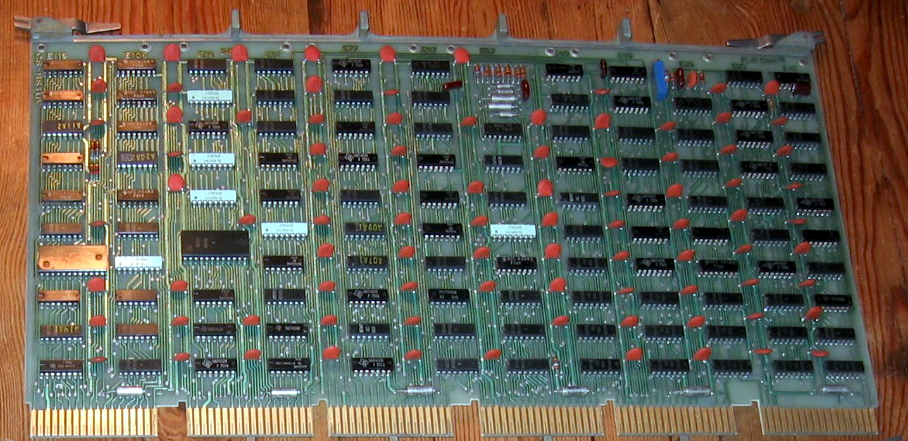
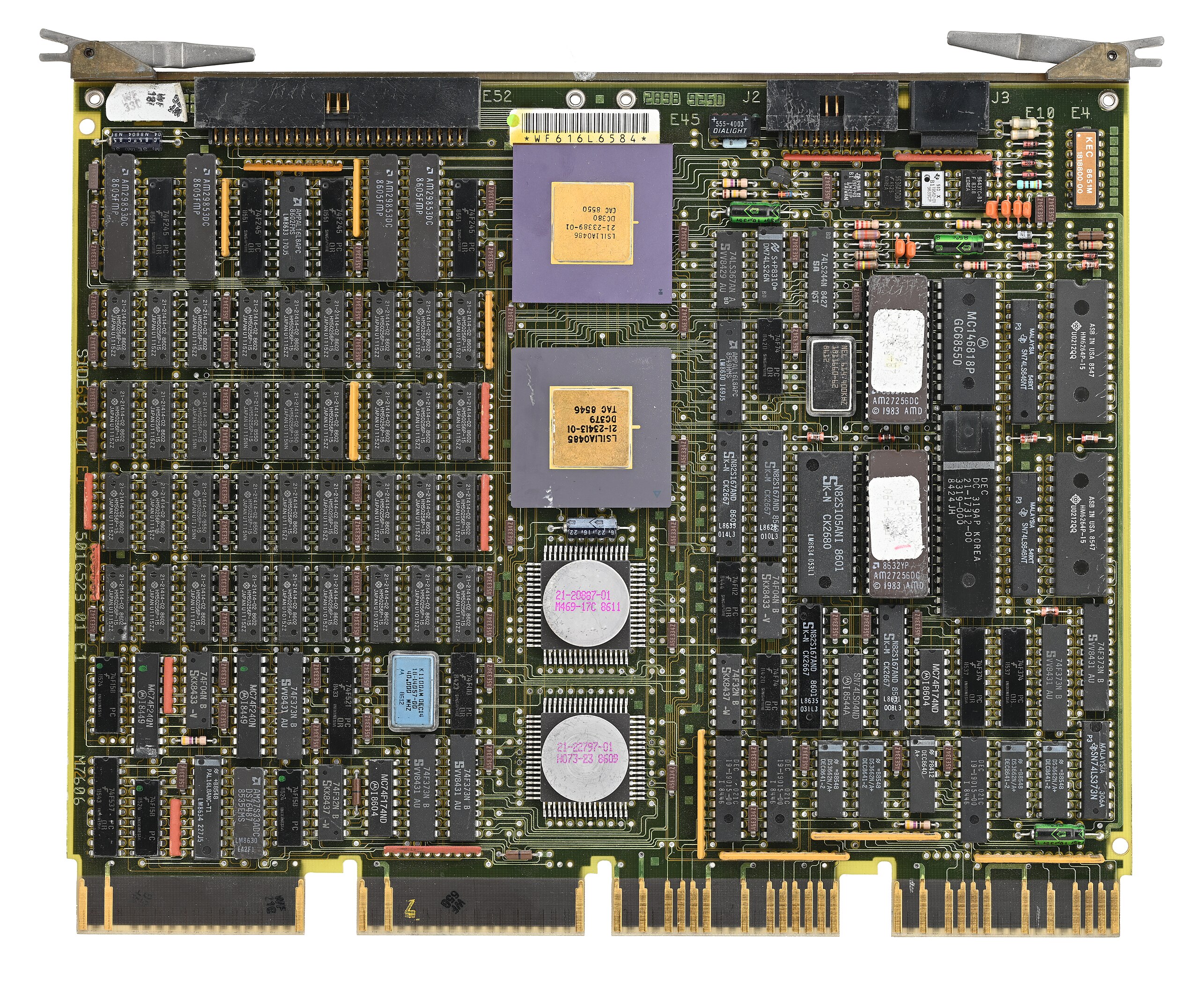
A Unibus card (public domain)
A common early bus was the Digital Equipment Corporation Unibus. In 1969, you needed a lot of board space to implement nearly anything, so Unibus cards were big. PDP-11 computers and some early VAX machines used Unibus as both the system bus for memory and I/O operations.
Unibus was asynchronous, so devices could go as fast as they could or as slow as they needed. There were two 36-pin edge connectors with 56 pins of signals and 16 pins for power and ground.
Unibus was advanced for its time. Many of the pins had pull-up resistors on the bus so that multiple cards could assert them by pulling them to ground. For example, INTR, the interrupt request line, would normally be high, with no cards asserting an interrupt. If any board pulls the line low, the processor will service the interrupt, subject to priority resolution that Unibus supported via bus requests and grants.
The grants daisy-chained from card to card. This means that empty slots required a “grant continuity card” that connected the grant lines to prevent breaking the daisy chain.
Q-Bus CPU card (CC BY-SA 4.0 by [Phiarc])The bus also had power quality lines that could inform devices when AC or DC power was low. High-performance computers might have “Fastbus,” which was two Unibuses connected but optimized to increase bandwidth. Because the boards were large, Digital would eventually adopt Q-Bus, or the LSI-11 bus. This was very similar to Unibus, but it multiplexed data and address lines, allowing boards to be smaller and cheaper to produce. Fewer wires also meant simplified backplanes and wiring, reducing costs.
Eventually, the Digital machines acquired Massbus for connecting to specific disk and tape drives. It was also an asynchronous bus, but only for data. It carried 18 bits plus a parity bit. Boards like the RH11 would connect Massbus devices to the Unibus. There would be other Digital Equipment buses like TURBOChannel.
Other computer makers, of course, had their own ideas. Sun had MBus and HP 3000 and 9000 computers, which used the HP Precision Bus and HP GSC. But the real action for people like us was with the small computers.
S-100 and Other Micros
It is easy to see that when the designers defined the Altair 8800 bus, they didn’t expect it to be a standard. There was simply a 100-pin connector that accepted cards 10 inches long by 5 inches tall. The bus was just barely more than the Intel 8080 pins brought out, along with some power. At first, the bus split the databus into an input and output bus. However, later cards used a bidirectional bus to allow for more grounds on the now unused bus bits to help reduce noise.
Through the late 1970s and early 1980s, the S-100 market was robust. Most CP/M machines using an 8080 or Z-80 had S-100 bus slots. In fact, it was popular enough that it gave birth to a real standard: IEEE 696. However, by 1994, the IBM PC had made the S-100 bus a relic, and the IEEE retired the standard.
Of course, the PC bus would go on to be dominant on x86 machines for a while; other systems had other buses. The SS-50 was sort of the S-100 for 6800 computers. The 68000 computers often used VMEbus, which was closely tied to the asynchronous bus of that CPU.
Embedded Systems
While things like S-100 were great for desktop systems, they were generally big and expensive. That led to competitors for small system use. Eurocard was a popular mechanical standard that could handle up to 96 signals. The DIN 41612 connectors had 32 pins per row, with two or three rows.
Eurocard CPU (CC BY-SA 4.0 by [SpareHeadOne])A proper Eurocard could handle batteries and had strict rules about signal fanout and input levels. Unfortunately, it wasn’t really a bus because it didn’t define all the pin assignments, so cards made by one vendor didn’t always work with cards from another vendor. The N8VEM homebrew computer (see the video below) used Eurocards. VME used a 3-row Eurocard connector, as well.
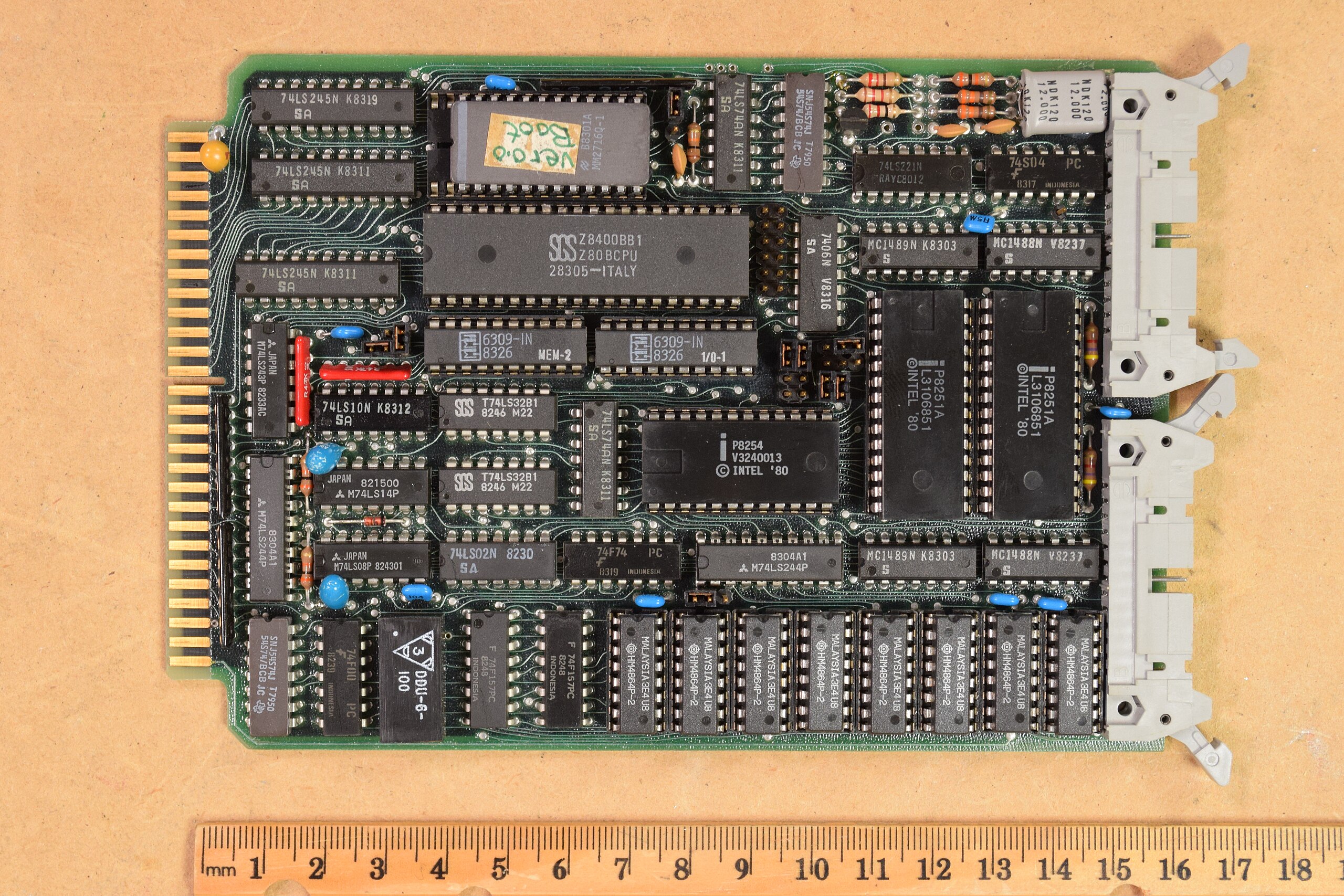
STD Bus card (CC-BY 4.0 by [AkBkukU])Another popular small system bus was the STD Bus popularized by companies like Mostek. These were small 6.5″ x 4.5″ cards with a 56-pin connector. At one time, more than 100 companies produced these cards. You can still find a few of them around, and the boards show up regularly on the surplus market. You can see more about the history of these common cards and their bus in the video below.
Catching the Bus
We don’t deal much with these kinds of buses in modern equipment. Modern busses tend to be high-speed serial and sophisticated. Besides, a hobby-level embedded system now probably uses a system-on-a-chip or, at least, a single board computer, with little need for an actual bus other than, perhaps, SPI, I2C, or USB for I/O expansion.
Airbus and Saab are in early talks to develop an unmanned combat aircraft, according to company executives who spoke with Reuters during a recent European defense industry event. The discussions reflect both the rising interest in drone systems and shifting alliances across Europe’s fragmented defense industry. The project would explore drone aircraft designed to support […]
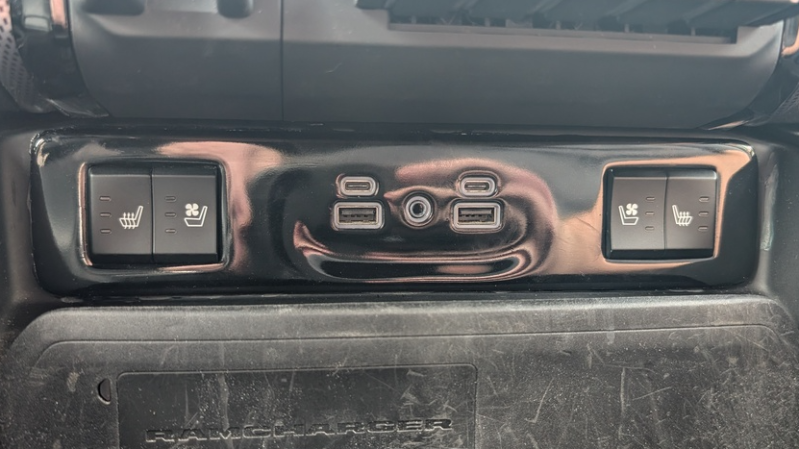
We’ve all owned something where one tiny detail drives us nuts: a blinding power LED, buttons in the wrong order, or a beep that could wake the dead. This beautifully documented project fixes exactly that kind of annoyance, only this time it’s the climate-controlled seats in a 2020 Ram 1500.
[projectsinmotion] wasn’t satisfied with adjusting seat heating and ventilation only through the truck’s touchscreen. Instead, they added real physical buttons that feel just like factory equipment. The challenge? Modern vehicles control seats through the Body Control Module (BCM) over a mix of CAN and LIN buses. To pull this off, they used an ESP32-S3 board with both CAN and LIN transceivers that sits in the middle and translates button presses into the exact messages the BCM expects.
The ESP32 also listens to the CAN bus so the new physical buttons always match whatever setting was last chosen on the touchscreen, no mismatched states, no surprises. On the mechanical side, there are 3D-printed button bezels that snap into blank switch plates that come out looking completely stock, plus a tidy enclosure for the ESP32 board itself. Wiring is fully reversible: custom adapters plug straight into the factory harness. Every pinout, every connector, and every wire color is documented with WireVis diagrams we’ve covered before, making this an easily repeatable seat-hack should you have a similar vehicle. Big thanks to [Tim] for the tip! Be sure to check out some of our other car hacks turning a mass produced item into one of a kind.
Today we introduce some of the most popular SCADA / ICS protocols that you will encounter during forensic investigations, incident response and penetration tests. Mastering SCADA forensics is an important career step for anyone focused on industrial cybersecurity. Understanding protocol behavior, engineering workflows, and device artifacts is a skill that employers in utilities, manufacturing, oil & gas, and building automation actively seek. Skilled SCADA forensic analysts can extract evidence with protocol fluency to perform analysis and translate findings into recommendations.
In our coming course in November on SCADA Forensics we will be using realistic ICS network topologies and simulated attacks on devices like PLCs and RTUs. You will reconstruct attack chains, identify indicators of compromise (IOCs) and analyze artifacts across field devices, engineering workstations, and HMI systems. All of that will make your profile unique.
Let’s learn about some popular protocols in SCADA environments.
Modbus
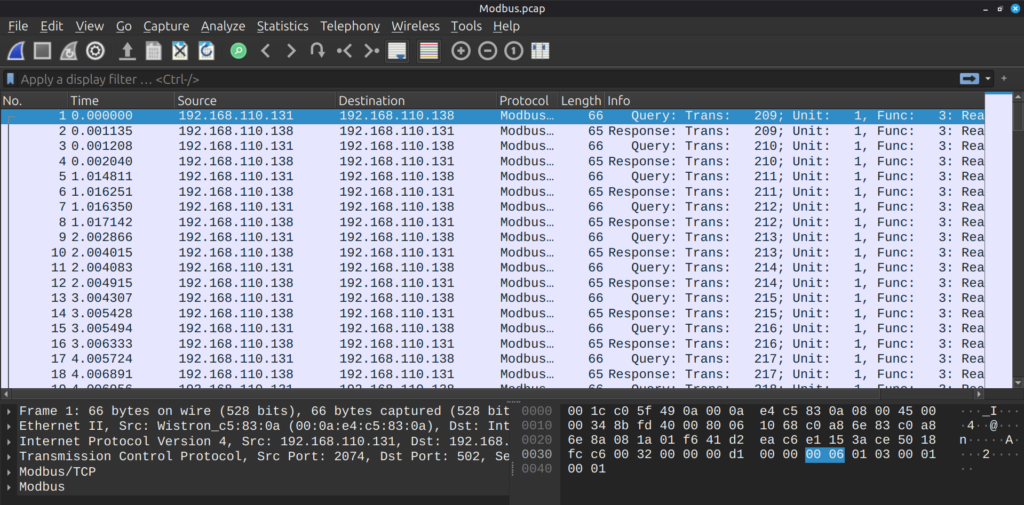
Modbus was developed in 1979 by Modicon as a simple master/slave protocol for programmable logic controllers (PLCs). It became an open standard because it was simple, publicly documented and royalty-free. Now it exists in two main flavors such as serial (Modbus RTU) and Modbus TCP. You’ll find it everywhere in legacy industrial equipment, like PLC I/O, sensors, RTUs and in small-to-medium industrial installations where simplicity and interoperability matter. Because it’s simple and widespread, Modbus is a frequent target for security research and forensic analysis.
DNP3
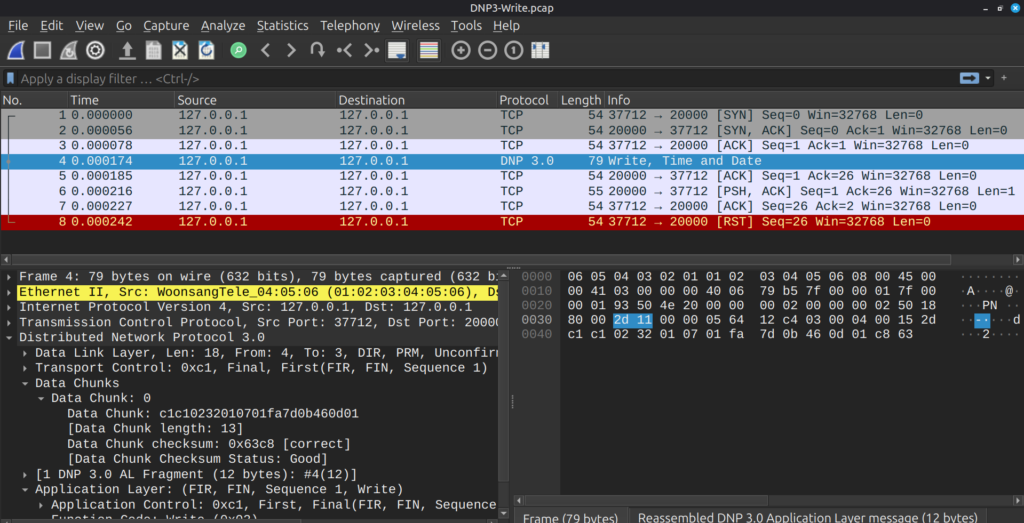
DNP3 (Distributed Network Protocol) originated in the early 1990s and was developed to meet the tougher telemetry needs of electric utilities. It was later standardized by IEEE. Today DNP3 is strong in electric, water and other utility SCADA systems. It supports features for telemetry, like timestamped events, buffered event reporting and was designed for unreliable or noisy links, which makes it ideal for remote substations and field RTUs. Modern deployments often run DNP3 over IP and may use the secure encrypted variants.
Water industry
IEC 60870 (especially IEC 60870-5-104)
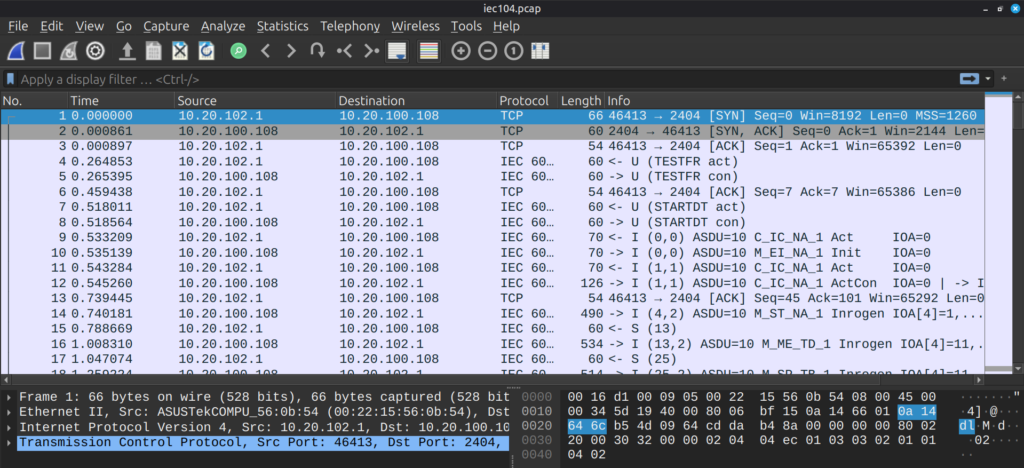
IEC 60870 is a family of telecontrol standards created for electric power system control and teleprotection. The 60870-5-104 profile (commonly called IEC 104) maps those telecontrol services onto TCP/IP. It is widely used in Europe and regions following IEC standards, so expect it in European grids and many vendor products that target telecom-grade reliability.
Malware can “speak” SCADA/ICS protocols too. For instance, Industroyer (also known as CrashOverride) that was used in the second major cyberattack on Ukraine’s power grid on December 17, 2016, by the Russian-linked Sandworm group had built-in support for multiple industrial control protocols like IEC 61850, IEC 104, OLE for Process Control Data Access (OPC DA), and DNP3. Essentially it used protocol languages to directly manipulate substations, circuit breakers, and other grid hardware without needing deeper system access.
Power grid
EtherNet/IP (EIP / ETHERNET_IP)
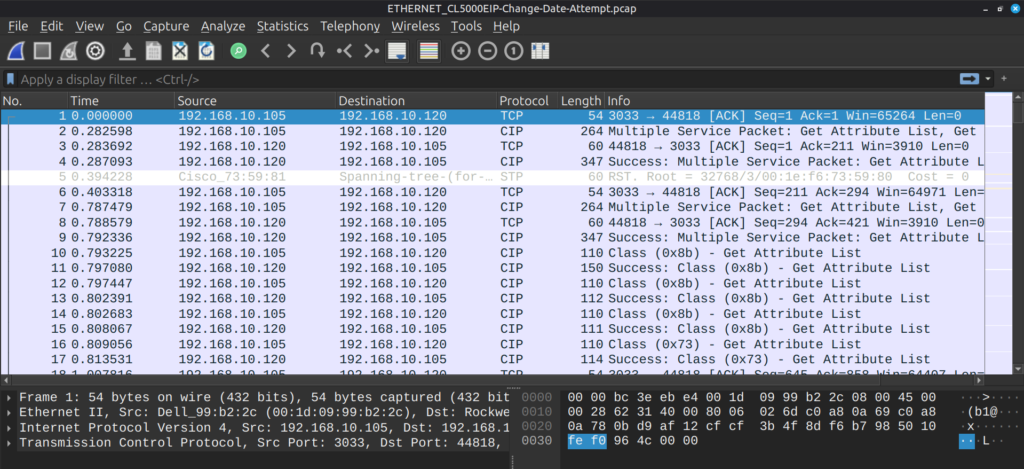
EtherNet/IP adapts the Common Industrial Protocol (CIP) to standard Ethernet. Developed in the 1990s and standardized through ODVA, it brought CIP services to TCP/UDP over Ethernet. Now it’s widespread in manufacturing and process automation, especially in North America. It supports configuration and file transfers over TCP and I/O, cyclic data over UDP, using standard ports (TCP 44818). You’ll see it on plant-floor Ethernet networks connecting PLCs, I/O modules, HMIs and drives.
S7 (Siemens S7 / S7comm)
S7comm (Step 7 communications) is Siemens’ proprietary protocol family used for the SIMATIC S7 PLC series since the 1990s. It is tightly associated with Siemens PLCs and the Step7 / TIA engineering ecosystem. Today it is extremely common where Siemens PLCs are deployed. Mainly in manufacturing, process control and utilities. S7 traffic often includes programs for device diagnostics, so that makes it high-value for both legitimate engineering and hackers. S7-based communications can run over Industrial Ethernet or other fieldbuses.
BACnet
BACnet (Building Automation and Control Network) was developed through ASHRAE and became ANSI/ASHRAE Standard 135 in the 1990s. It’s the open standard for building automation. Now BACnet is used in building management systems, such as HVAC, lighting, access control, fire systems and other building services. You’ll see BACnet on wired (BACnet/IP and BACnet MSTP) and wireless links inside commercial buildings, and it’s a key protocol to know when investigating building-level automation incidents.
HVAC
HART-IP
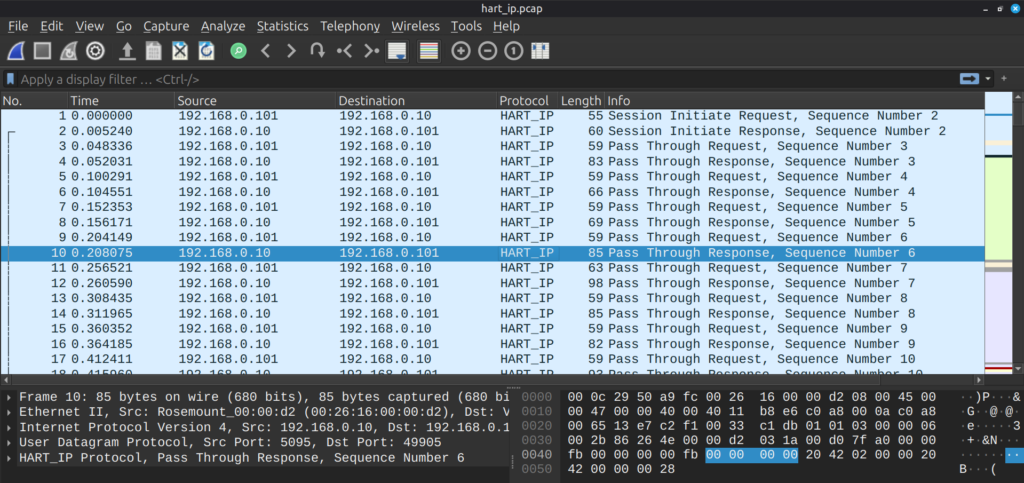
HART started as a hybrid analog/digital field instrument protocol (HART) and later evolved to include HART-IP for TCP/IP-based access to HART device data. The FieldComm Group maintains HART standards. The protocol brings process instrumentation like valves, flow meters, transmitters onto IP networks so instrument diagnostics and configuration can be accessed from enterprise or control networks. It’s common in process industries, like oil & gas, chemical and petrochemical.
Petrochemical industry
EtherCAT
EtherCAT (Ethernet for Control Automation Technology) is a real-time Ethernet protocol standardized under IEC 61158 and maintained by the EtherCAT Technology Group. It introduced “processing on the fly” for very low latency. It is frequent in motion control, robotics, and high-speed automation where deterministic, very low-latency communication is required. You’ll find it in machine tools, robotics cells and applications that require precise synchronization.
POWERLINK (Ethernet POWERLINK / EPL)
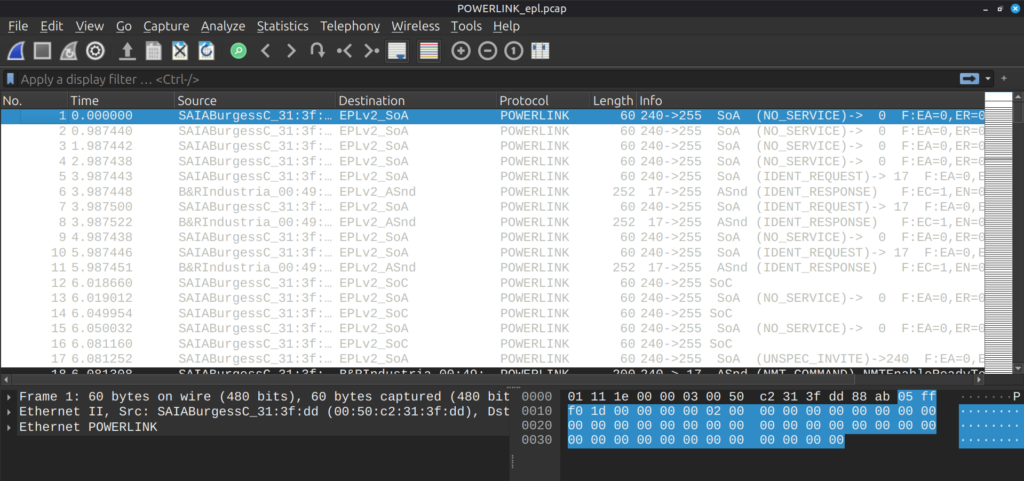
Ethernet POWERLINK emerged in the early 2000s as an open real-time Ethernet profile for deterministic communication. It’s managed historically by the EPSG and adopted by several vendors. POWERLINK provides deterministic cycles and tight synchronization for motion and automation tasks. Can be used in robotics, drives, and motion-critical machine control. It’s one of the real-time Ethernet families alongside EtherCAT, PROFINET-IRT and others.
Summary
We hope you found this introduction both clear and practical. SCADA protocols are the backbone of industrial operations and each one carries the fingerprints of how control systems communicate, fail, and recover. Understanding these protocols is important to carry out investigations. Interpreting Modbus commands, DNP3 events, or S7 traffic can help you retrace the steps of an attacker or engineer precisely.
In the upcoming SCADA Forensics course, you’ll build on this foundation and analyze artifacts across field devices, engineering workstations, and HMI systems. These skills are applicable in defensive operations, threat hunting, industrial digital forensics and industrial incident response. You will know how to explain what happened and how to prevent it. In a field where reliability and safety are everything, that kind of expertise can generate a lot of income.
Welcome back, my aspiring SCADA/ICS cyberwarriors!
SCADA (Supervisory Control and Data Acquisition) systems and the wider class of industrial control systems (ICS) run many parts of modern life, such as electricity, water, transport, factories. These systems were originally built to work in closed environments and not to be exposed to the public Internet. Over the last decade they have been connected more and more to corporate networks and remote services to improve efficiency and monitoring. That change has also made them reachable by the same attackers who target regular IT systems. When a SCADA system is hit by malware, sabotage, or human error, operators must restore service fast. At the same time investigators need trustworthy evidence to find out what happened and to support legal, regulatory, or insurance processes.
Forensics techniques from traditional IT are helpful, but they usually do not fit SCADA devices directly. Many field controllers run custom or minimal operating systems, lack detailed logs, and expose few of the standard interfaces that desktop forensics relies on. To address that gap, we are starting a focused, practical 3-day course on SCADA forensics. The course is designed to equip you with hands-on skills for collecting, preserving and analysing evidence from PLCs, RTUs, HMIs and engineering workstations.
Today we will explain how SCADA systems are built, what makes forensics in that space hard, and which practical approaches and tools investigators can use nowadays.
Background and SCADA Architecture
A SCADA environment usually has three main parts: the control center, the network that connects things, and the field devices.
The control center contains servers that run the supervisory applications, databases or historians that store measurement data, and operator screens (human-machine interfaces). These hosts look more like regular IT systems and are usually the easiest place to start a forensic investigation.
The network between control center and field devices is varied. It can include Ethernet, serial links, cellular radios, or specialized industrial buses. Protocols range from simple serial messages to industrial Ethernet and protocol stacks that are unique to vendors. That variety makes it harder to collect and interpret network traffic consistently.
Field devices sit at the edge. They include PLCs (programmable logic controllers), RTUs (remote terminal units), and other embedded controllers that handle sensors and actuators. Many of these devices run stripped-down or proprietary firmware, hold little storage, and are designed to operate continuously.
Understanding these layers helps set realistic expectations for what evidence is available and how to collect it without stopping critical operations.
Challenges in SCADA Forensics
SCADA forensics has specific challenges that change how an investigation is done.
First, some field devices are not built for forensics. They often lack detailed logs, have limited storage, and run proprietary software. That makes it hard to find recorded events or to run standard acquisition tools on the device.
Second, availability matters. Many SCADA devices must stay online to keep a plant, substation, or waterworks operating. Investigators cannot simply shut everything down to image drives. This requirement forces use of live-acquisition techniques that gather volatile data while systems keep running.
Third, timing and synchronization are difficult. Distributed devices often have different clocks and can drift. That makes correlating events across a wide system challenging unless timestamps are synchronized or corrected during analysis.
Finally, organizational and legal issues interfere. Companies often reluctant to share device details, firmware, or incident records because of safety, reputation, or legal concerns. That slows development of general-purpose tools and slows learning from real incidents.
All these challenges only increase the value of SCADA forensics specialists. Salary varies by location, experience, and roles, but can range from approximately $65,000 to over $120,000 per year.
Real-world attack chain
To understand why SCADA forensics matters, it helps to look at how real incidents unfold. The following examples show how a single compromise inside the corporate network can quickly spread into the operational side of a company. In both cases, the attack starts with the compromise of an HR employee’s workstation, which is a common low-privilege entry point. From there, the attacker begins basic domain reconnaissance, such as mapping users, groups, servers, and RDP access paths.
Case 1
In the first path, the attacker discovers that the compromised account has the right to replicate directory data, similar to a DCSync privilege. That allows the extraction of domain administrator credentials. Once the attacker holds domain admin rights, they use Group Policy to push a task or service that creates a persistent connection to their command-and-control server. From that moment, they can access nearly every machine in the domain without resistance. With such reach, pivoting into the SCADA or engineering network becomes a matter of time. In one real scenario, this setup lasted only weeks before attackers gained full control and eventually destroyed the domain.
Case 2
The second path shows a different but equally dangerous route. After gathering domain information, the attacker finds that the HR account has RDP access to a BACKUP server, which stores local administrator hashes. They use these hashes to move laterally, discovering that most domain users also have RDP access through an RDG gateway that connects to multiple workstations. From there, they hop across endpoints, including those used by engineers. Once inside engineering workstations, the attacker maps out routes to the industrial control network and starts interacting with devices by changing configurations, altering setpoints, or pushing malicious logic into PLCs.
Both cases end with full access to SCADA and industrial equipment. The common causes are poor segmentation between IT and OT, excessive privileges, and weak monitoring.
Frameworks and Methodologies
A practical framework for SCADA forensics has to preserve evidence and keep the process safe. The basic idea is to capture the most fragile, meaningful data first and leave more invasive actions for later or for offline testing.
Start with clear roles and priorities. You need to know who can order device changes, who will gather evidence, and who is responsible for restoring service. Communication between operations and security must be planned ahead of incidents.
As previously said, capture volatile and remote evidence first, then persistent local data. This includes memory contents, current register values, and anything stored only in RAM. Remote evidence includes network traffic, historian streams, and operator session logs. Persistent local data includes configuration files, firmware images, and file system contents. Capturing network traffic and historian data early preserves context without touching the device.
A common operational pattern is to use lightweight preservation agents or passive sensors that record traffic and key events in real time. These components should avoid any action that changes device behavior. Heavy analysis and pattern matching happen later on copies of captured data in a safe environment.
When device interaction is required, prefer read-only APIs, documented diagnostic ports, or vendor-supported tools. If hardware-level extraction is necessary, use controlled methods (for example JTAG reads, serial console captures, or bus sniffers) with clear test plans and safety checks. Keep detailed logs of every command and action taken during live acquisition so the evidence chain is traceable.
Automation helps, but only if it is conservative. Two-stage approaches are useful, where stage one performs simple, safe preservation and stage two runs deeper analyses offline. Any automated agent must be tested to ensure it never interferes with real-time control logic.
SCADA Network Forensics
Network captures are often the richest, least disruptive source of evidence. Packet captures and flow data show commands sent to controllers, operator actions, and any external systems that are connected to the control network.
Start by placing passive capture points in places that see control traffic without being in the critical data path, such as network mirrors or dedicated taps. Capture both raw packets and derived session logs as well as timestamps with a reliable time source.
Protocol awareness is essential. We will cover some of them in the next article. A lot more will be covered during the course. Industrial protocols like Modbus, DNP3, and vendor-specific protocols carry operational commands. Parsing these messages into readable audit records makes it much easier to spot abnormal commands, unauthorized writes to registers, or suspicious sequence patterns. Deterministic models, for example, state machines that describe allowed sequences of messages, help identify anomalies. But expect normal operations to be noisy and variable. Any model must be trained or tuned to the site’s own behavior to reduce false positives.
Network forensics also supports containment. If an anomaly is detected in real time, defenders can ramp up capture fidelity in critical segments and preserve extra context for later analysis. Because many incidents move from corporate IT into OT networks, collecting correlated data from both domains gives a bigger picture of the attacker’s path
Endpoint and Device Forensics
Field devices are the hardest but the most important forensic targets. The path to useful evidence often follows a tiered strategy, where you use non-invasive sources first, then proceed to live acquisition, and finally to hardware-level extraction only when necessary.
Non-invasive collection means pulling data from historians, backups, documented export functions, and vendor tools that allow read-only access. These sources often include configuration snapshots, logged process values, and operator commands.
Live acquisition captures runtime state without stopping the device. Where possible, use the device’s read-only interfaces or diagnostic links to get memory snapshots, register values, and program state. If a device provides a console or API that returns internal variables, collect those values along with timestamps and any available context.
If read-only or diagnostic interfaces are not available or do not contain the needed data, hardware extraction methods come next. This includes connecting to serial consoles, listening on fieldbuses, using JTAG or SWD to read memory, or intercepting firmware during upload processes. These operations require specialized hardware and procedures. It must be planned carefully to avoid accidental writes, timing interruptions, or safety hazards.
Interpreting raw dumps is often the bottleneck. Memory and storage can contain mixed content, such as configuration data, program code, encrypted blobs, and timestamps. But there are techniques that can help, including differential analysis (comparing multiple dumps from similar devices), data carving for detectable structures, and machine-assisted methods that separate low-entropy (likely structured) regions from high-entropy (likely encrypted) ones. Comparing captured firmware to a known baseline is a reliable way to detect tampering.
Where possible, create an offline test environment that emulates the device and process so investigators can replay traffic, exercise suspected malicious inputs, and validate hypotheses without touching production hardware.
SCADA Forensics Tooling
Right now the toolset is mixed. Investigators use standard forensic suites for control-center hosts, packet-capture and IDS tools extended with industrial protocol parsers for networks, and bespoke hardware tools or vendor utilities for field devices. Many useful tools exist, but most are specific to a vendor, a protocol, or a device family.
A practical roadmap for better tooling includes three points. First, create and adopt standardized formats for logging control-protocol events and for preserving packet captures with synchronized timestamps. Second, build non-disruptive acquisition primitives that work across device classes, ways to read key memory regions, configuration, and program images without stopping operation. Third, develop shared anonymized incident datasets that let researchers validate tools against realistic behaviors and edge cases.
In the meantime, it’s important to combine several approaches, such as maintaining high-quality network capture, work with vendors to understand diagnostic interfaces, prepare hardware tools and safe extraction procedures, while documenting everything. Establish and test standard operating procedures in advance so that when an incident happens the team acts quickly and consistently.
Conclusion
Attacks on critical infrastructure are rising, and SCADA forensics still trails IT forensics because field devices are often proprietary, have limited logging, and cannot be taken offline. We showed those gaps and gave practical actions. You will need to preserve network and historian data early, prefer read-only device collection, enforce strict IT/OT segmentation, reduce privileges, and rehearse incident response to protect those systems. In the next article, we will look at different protocols to give you a better idea of how everything works.
To support hands-on learning, our 3-day SCADA Forensics course starts in November that uses realistic ICS network topologies, breach simulations, and labs to teach how to reconstruct attack chains, identify IOCs, and analyze artifacts on PLCs, RTUs, engineering workstations and HMIs.
During the course you will use common forensic tools to complete exercises and focus on safe, non-disruptive procedures you can apply in production environments.
Cooking food wrapped in leaves is an age old practice followed around the world. Cabbage leaves , Grape leaves and Colocasia leaves used for wrapping and steaming are consumed along with the dish . Turmeric leaves, jackfruit leaves and screw pine are also used in steaming different kinds of kadubus which are peeled and discarded before relishing the food. Elai Adai , Idlies and Kadubus acquire a pleasant aroma and retain moisture when banana leaves are either used as wraps or cups for steaming. Here is a steamed dish wrapped in corn husk which I relished during a visit to a farmer's market . I tried out a vegan version of Mexican Tamales using freshly ground Sweet Corn paste and stir fried vegetables . Since fresh corn becomes slightly watery when ground , I have used wheat flour to adjust the consistency of the batter. Besan , Rice flour , Maize flour or any other flour of your choice can also be used .
INGREDIENTS
Fresh Corn Cobs - 2
Wheat flour - 2 tbsps or as required
Salt - 1/4 tsp
Sambar Powder - 1/4 tsp
TO PREPARE THE OUTER COVERING
1. Separate the husks , wash and keep them immersed in hot water till required.
2. Remove the corn from the cob and grind to a smooth paste adding Sambar Powder and salt.
3. Blend in the wheat flour to make a thick spreadable batter.
INGREDIENTS FOR THE FILLING
Finely chopped carrots - 1/2 cup
Finely chopped cabbage - 1/2 cup
Finely chopped capsicum - 1/2 cup
Grated ginger - 1/2 tsp
Grated garlic - 1/2 tsp
Crushed pepper - 1/2 tsp
Salt - 1/4 tsp
Sesame oil - 2 tbsps
TO PREPARE THE FILLING
1. Heat oil and add crushed pepper followed by grated ginger and garlic.
2. When it emanates a pleasant aroma add all the finely chopped vegetables.
3. Stir fry till half done .
4. Stir in salt and switch off flame.
MAKING THE TAMALES
1. Drain and pat dry the soaked corn husks.
2. Spread out a husk and grease it on the inner side.
3.Place a lump of batter and flatten it along the greased husk.
4. Spread about three table spoons of the stir fried vegetables on the batter .
5. Fold the husk bringing the tip and and base of the husk together.
6. Tuck in the folded edges underneath the Tamale and place it in a steamer with the folded edges facing downwards.
7. Line the rest of the husks with batter, fill with vegetables and fold all the Tamales similarly and steam them for fifteen minutes.
8. Relish the warm Vegan Tamales with Tomato Sauce or Green Chutney after discarding the husk.

 Login
Login
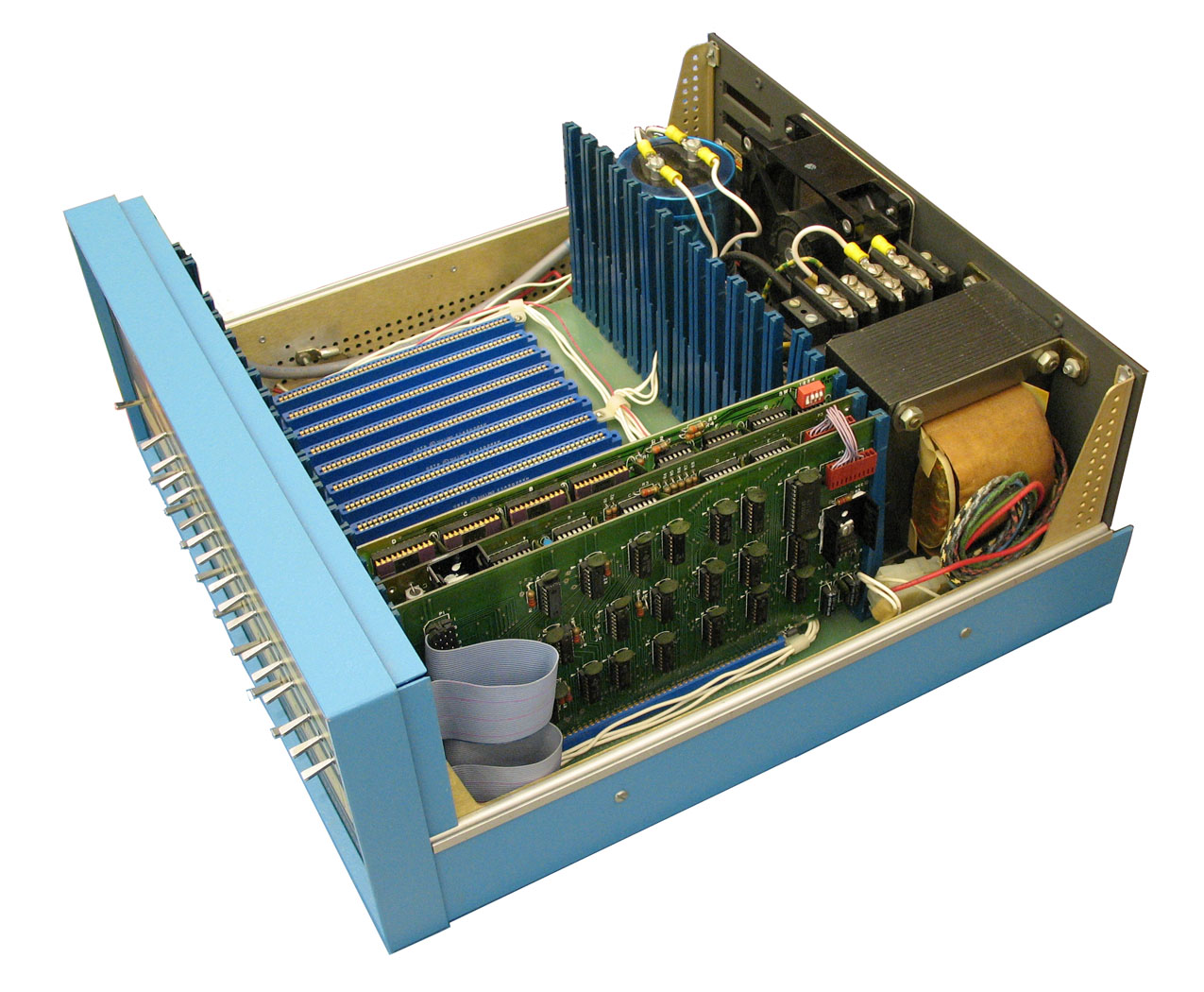 It is easy to see that when the designers defined the Altair 8800 bus, they didn’t expect it to be a standard. There was simply a 100-pin connector that accepted cards 10 inches long by 5 inches tall. The bus was just barely more than the Intel 8080 pins brought out, along with some power. At first, the bus split the databus into an input and output bus. However, later cards used a bidirectional bus to allow for more grounds on the now unused bus bits to help reduce noise.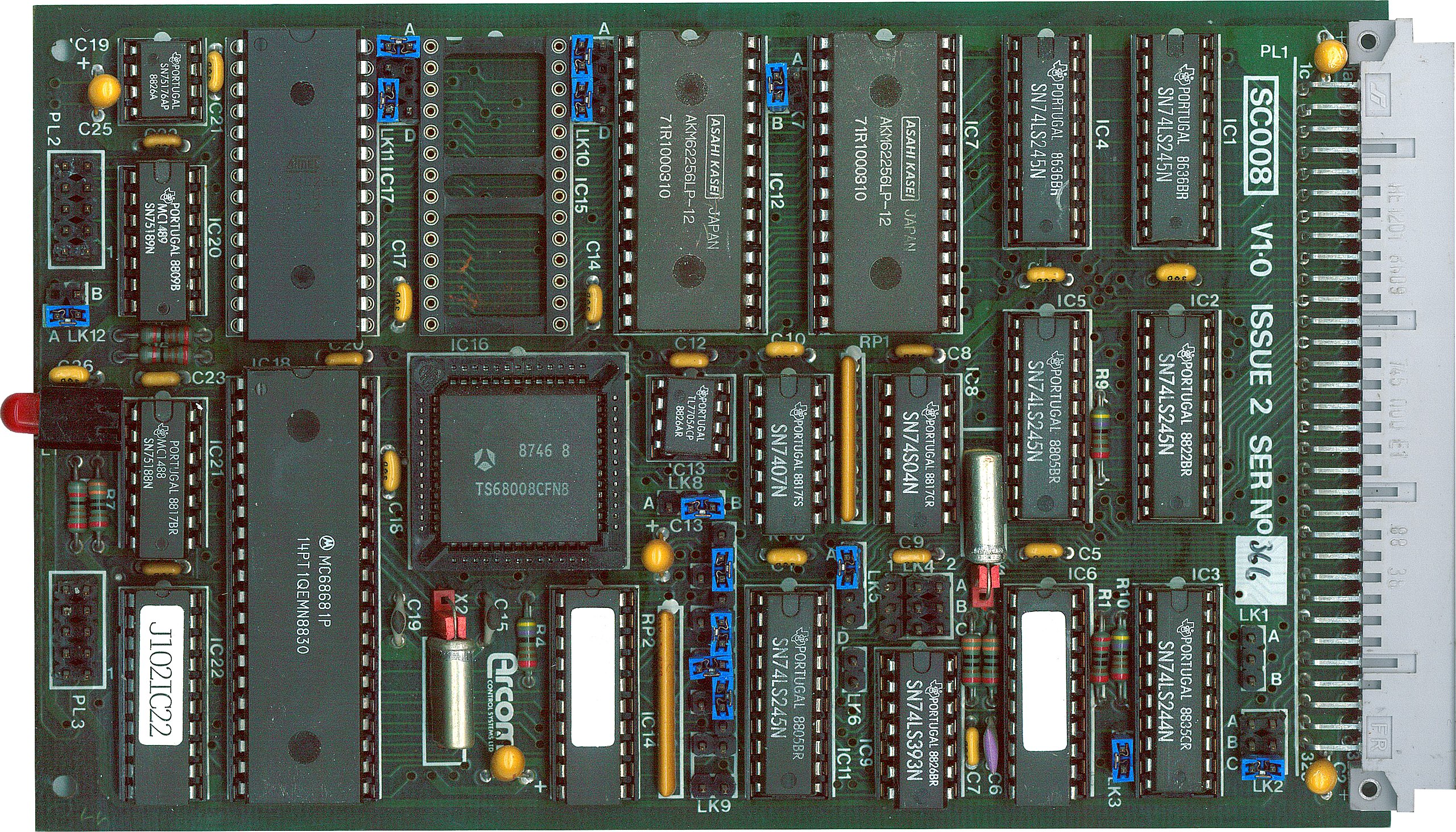
 Airbus and Saab are in early talks to develop an unmanned combat aircraft, according to company executives who spoke with Reuters during a recent European defense industry event. The discussions reflect both the rising interest in drone systems and shifting alliances across Europe’s fragmented defense industry. The project would explore drone aircraft designed to support […]