Not only are pianos beautiful musical instruments that have stood the test of many centuries of time, they’re also incredible machines. Unfortunately, all machines wear out over time, which means it’s often not feasible to restore every old piano we might come across. But a few are worth the trouble, and [Emma] had just such a unique machine roll into her shop recently.
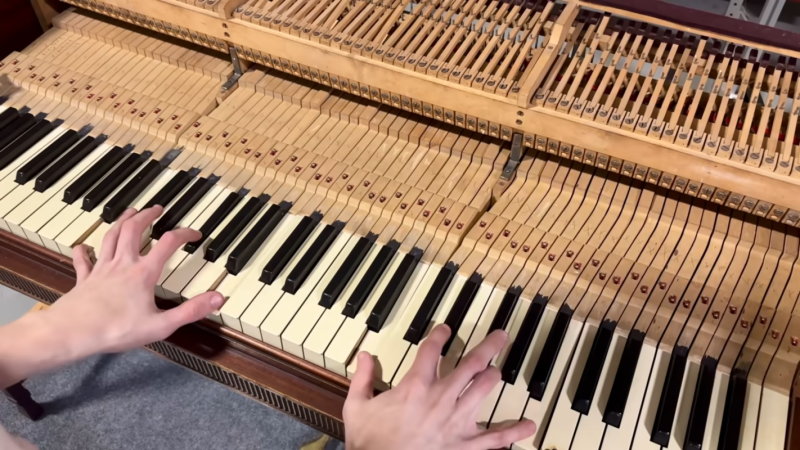
What makes this instrument so unique is that it’s among the first electric pianos to be created, and one of only three known of this particular model that survive to the present day. This is a Vivi-Tone Clavier piano which dates to the early 1930s. In an earlier video she discusses more details of its inner workings, but essentially it uses electromagnetic pickups like a guitar to detect vibrations in plucked metal reeds.
To begin the restoration, [Emma] removes the action and then lifts out all of the keys from the key bed. This instrument is almost a century old so it was quite dirty and needed to be cleaned. The key pins are lubricated, then the keys are adjusted so that they all return after being pressed. From there the keys are all adjusted so that they are square and even with each other. With the keys mostly in order, her attention turns to the action where all of the plucking mechanisms can be filed, and other adjustments made. The last step was perhaps the most tedious, which is “tuning” the piano by adjusting the pluckers so that all of the keys produce a similar amount or volume of sound, and then adding some solder to the reeds that were slightly out of tune.
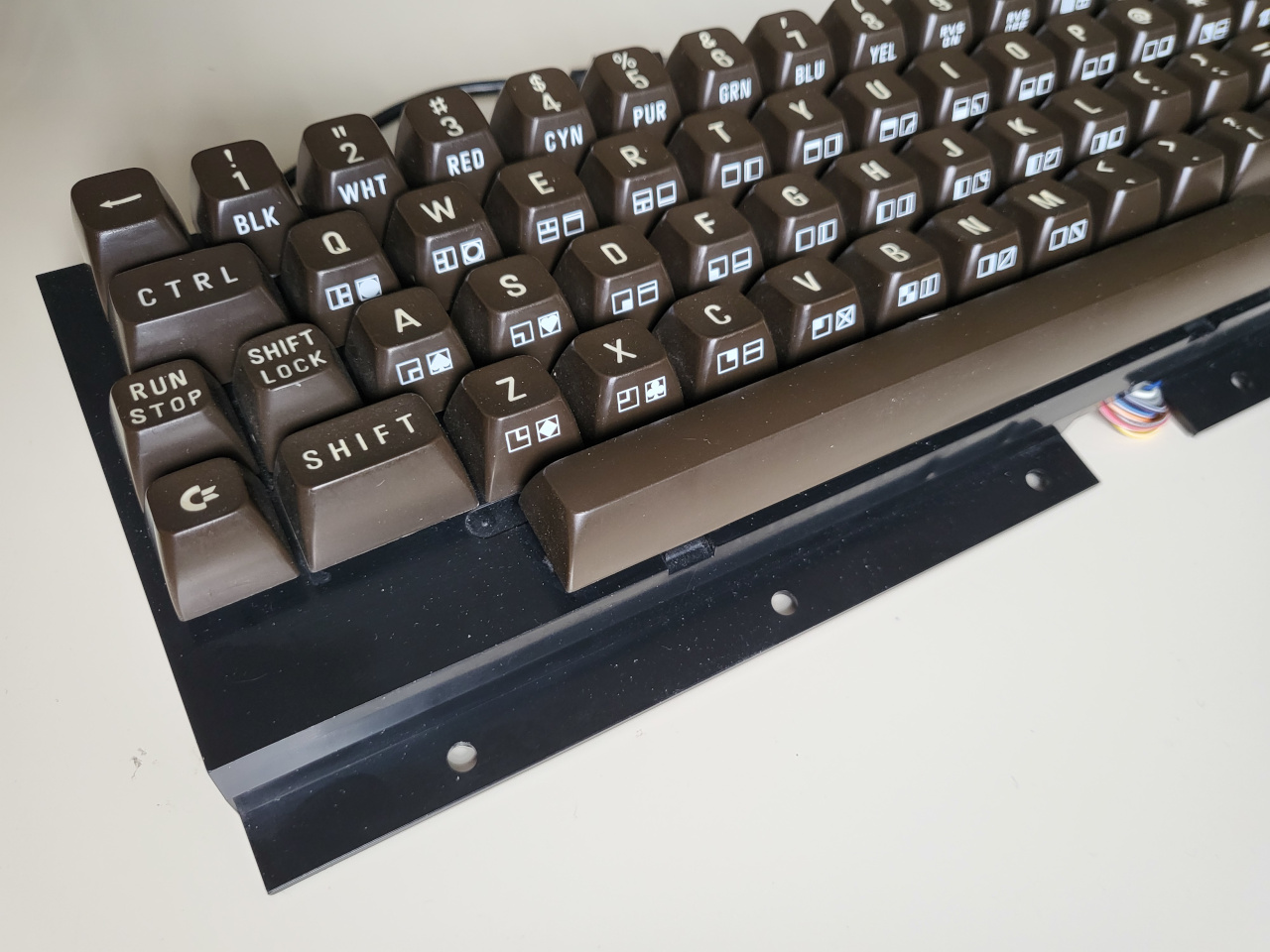
[Jean] wrote into the tips line (the system works!) to let all of us know about his hacked and hand-wired C64 keyboard, a thing of beauty in its chocolate-brown and 9u space bar-havin’ glory.
Image by [Jean] via GitHubThis Arduino Pro Micro-based brain transplant began as a sketch, and [Jean] reports it now has proper code in QMK. But how is a person supposed to use it in 2025, almost 2026, especially as a programmer or just plain serious computer user?
The big news here is that [Jean] added support for missing characters using the left and right Shift keys, and even added mouse controls and Function keys that are accessed on a layer via the Shift Lock key. You can see the key maps over on GitHub.
I’ll admit, [Jean]’s project has got me eyeing that C64 I picked up for $12 at a thrift store which I doubt still works as intended. But don’t worry, I will test it first.
Fortunately, it looks like [Jean] has thought of everything when it comes to reproducing this hack, including the requisite C64-to-Arduino pinout. So, what are you waiting for?
ArcBoard MK20 Proves That Nothing Is Ever Finished
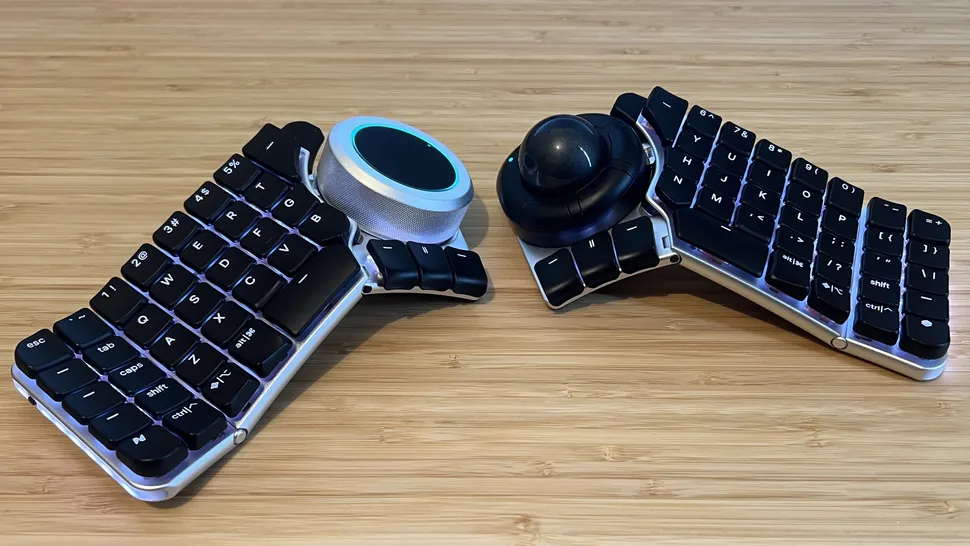
I find it so satisfying that [crazymittens-r] is never quite satisfied with his ArcBoard, which is now in its 20th revision.
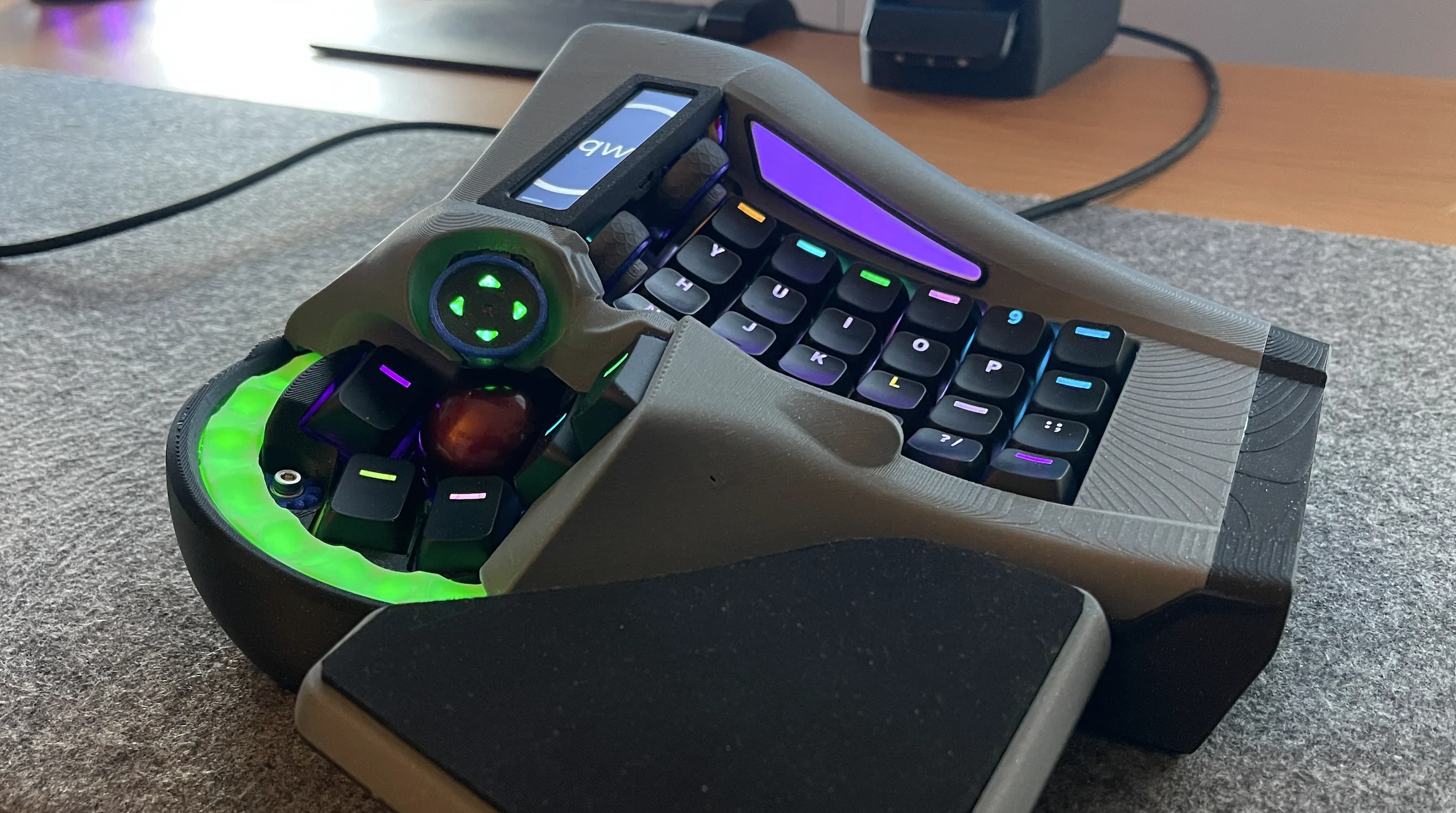
Image by [crazymittens-r] via redditWhen asked ‘WTF am I looking at?’, [crazymittens-r] responded thusly: ‘my interpretation of how you might use a keyboard and trackball without moving your hands.’ Well, there you have it.
This is one of those times where the longer you look, the crazier it gets. Notice the thumb trackball, d-pad thingy, and the green glowy bit, all of which move. Then there are those wheels up by the YHN column.
A bit of background: [crazymittens-r] needed something to help him keep on working, and you know I can relate to that 100%. There’s even a pair of pedals that go with it, and you’ll see those in the gallery.
You may remember previous ArcBoards, and if not, know this: it’s actually gotten a lot smaller since mk. 19 which I featured here in May 2024. It still looks pretty bonkers in the best possible way, though, and I’m here for it.
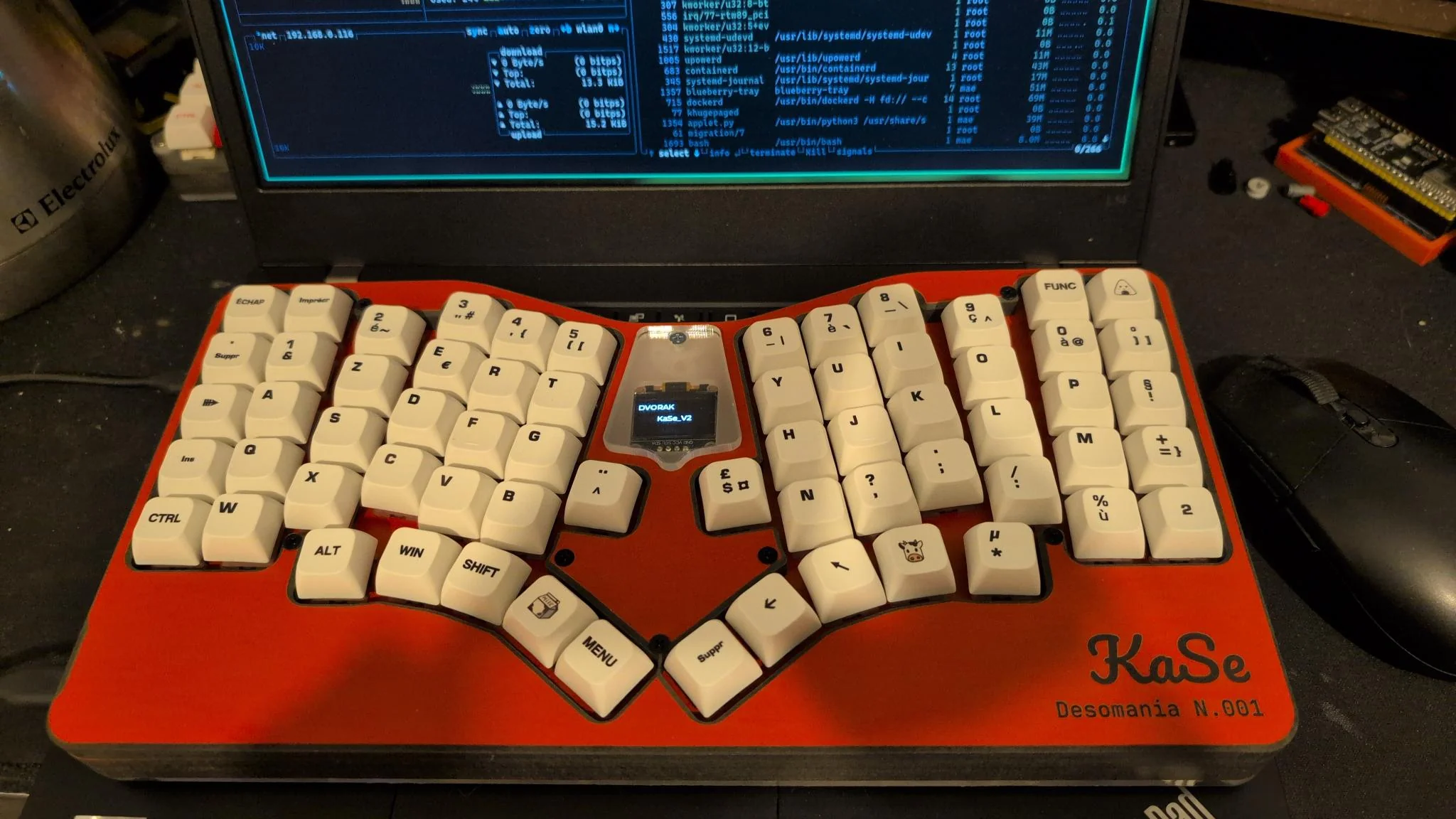
Image by [harrael] via redditSo I have become fond of finding fuller-figured centerfolds for you such as KaSe by [harrael]. As the top commenter put it, KaSe gives off nice Esrille NISSE vibes. Boy howdy. And I think that’s probably just enough thumb keys for me.
[harrael] had noble goals for this project, namely learning more about ESP32-S3s, USB/BLE HID, and firmware design, but the most admirable of all is sharing it with the rest of us. (So, if you can’t afford a NISSE…)
Do you rock a sweet set of peripherals on a screamin’ desk pad? Send me a picture along with your handle and all the gory details, and you could be featured here!
I’m going to take a brief detour from the normal parade of old typewriters to feature Typewriter Tom, who has so many machines lying around that Hollywood regularly comes knocking to borrow his clacking stock.
And how many is that? Around 1,000 — or six storage units full. Tom received a call once. The caller needed six working IBM Selectrics ASAP. Of course, Tom could deliver, though he admits he’s probably the one person in all of Georgia who could.
Another thing Tom delivers is creativity in the form of machines he sells to artists and students. He also co-founded the Atlanta Typewriter Club, who have been known to hold typewriter petting zoo events where people can come and — you guessed it — put their hands on a typewriter or two.
Go for the story and stay for the lovely pictures, or do things the other way around if you prefer. But Typewriter Tom deserves a visit from you, even if he already got one from Tom Hanks once.
Finally, PropType AR Can Turn Anything Into a Keyboard
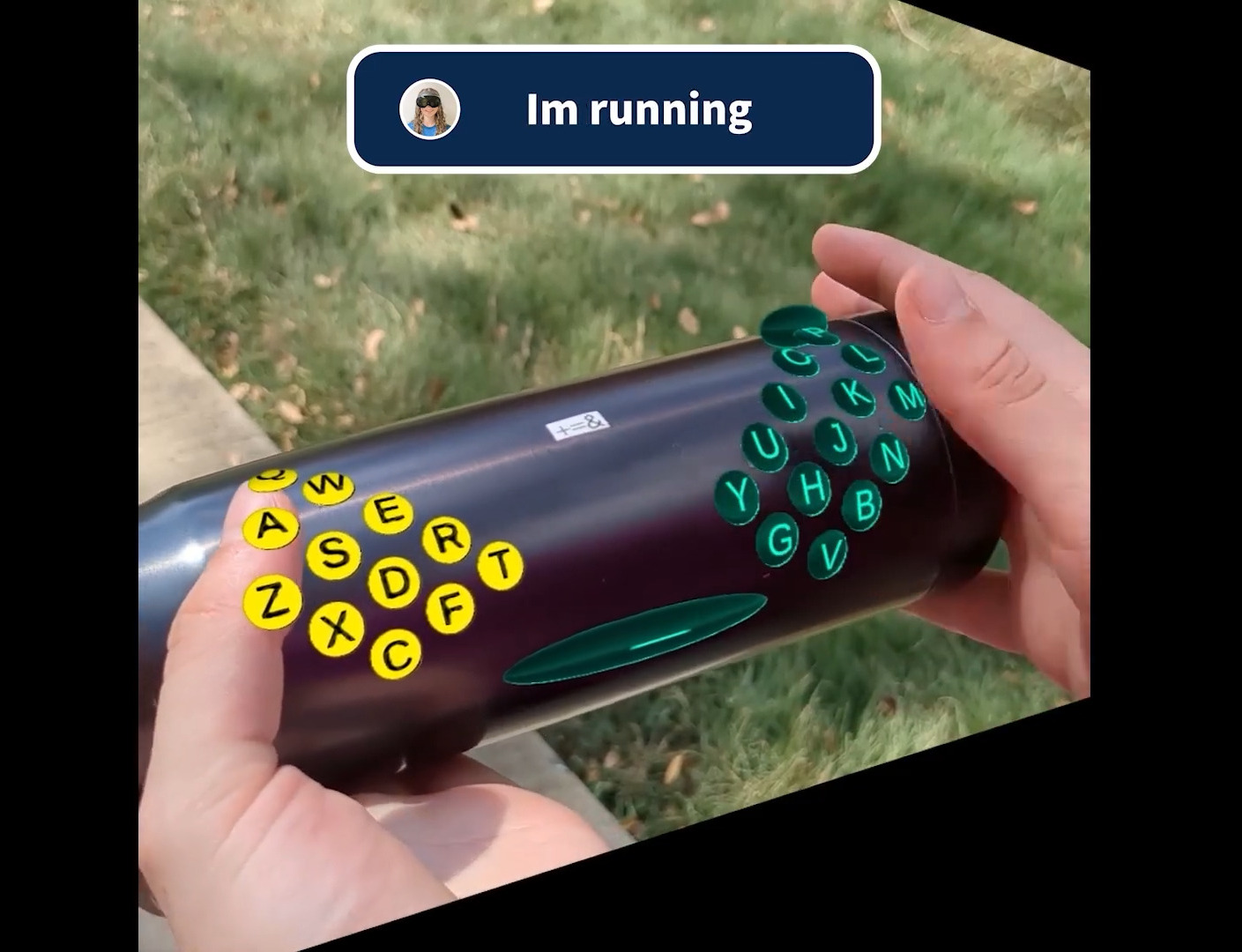
Yes, literally anything with enough real estate can now become a keyboard, or at least it would seem from TechExplore and the short video embedded below. Watch as various drinking vessels and other things become (split!) keyboards, provided you have your AR goggles handy to make the magic happen.
Image by [PropType] via YouTubeWhile this setup would be immensely helpful to have around given the right circumstances, the chances that you’re going to have your AR goggles on you while running or running around the mall seem somewhat slim.
But the point here is that for augmented reality users, typing is notoriously difficult and causes something known as ‘gorilla arm’ from extended use. So in all seriousness, this is pretty cool from a problem-solving standpoint.
So how does it work? Basically you set the keyboard up first using the PropType editing tool to customize layouts and apply various effects, like the one you’ll see in the video. Be sure to stick around for the demo of the editing tool, which is cool in and of itself. I particularly like the layout on the soda can, although it might be difficult to actually use without spilling.
Some like it flat, and there’s nothing wrong with that. What you are looking at is the first prototype of Atlas by [AsicResistor], which is still a work in progress. [AsicResistor] found the Totem to be a bit cramped, so naturally, it was time to design a keyboard from the ground up.
Image by [AsicResistor] via redditThe case is wood, if that’s not immediately obvious. This fact is easily detectable in the lovely render, but I didn’t want to show you that here.
This travel-friendly keyboard has 34 keys and dual trackpoints, one on each half. If the nubbin isn’t your thing, there’s an optional, oversized trackball, which I would totally opt for. But I would need an 8-ball instead, simply because that’s my number.
A build video is coming at some point, so watch the GitHub, I suppose, or haunt r/ergomechkeyboards.
Flat as it may be, I would totally at least give this keyboard a fair chance. There’s just something about those keycaps, for starters. (Isn’t it always the keycaps with me?) For another, I dig the pinky stagger. I’m not sure that two on each side is nearly enough thumb keys for me, however.
The Foot Roller Scroller Is Not a Crock
Sitting at a keyboard all day isn’t great for anyone, but adding in some leg and/or foot movement throughout the day is a good step in the right direction. Don’t want to just ride a bike all day under your desk? Add something useful like foot pedals.
Brain-wise, it has a wireless macro keyboard and an encoder from Ali, but [a__b] plans to upgrade it to a nice!nano in order to integrate it with a Glove80.
Although shown with a NautiCroc, [a__b] says the wheel works well with socks on, or bare feet. (Take it from me, the footfeel of pedals is much more accurate with no shoes on.) Interestingly, much of the inspiration was taken from sewing machines.
As of this writing, [a__b] has mapped all keys using BetterTouchTool for app-specific action, and is out there happily scrolling through pages, controlling the volume, and navigating YouTube videos. Links to CAD and STLs are coming soon.
The Centerfold: LEGO My Ergo
Image by [Flat-Razzmatazz-672] via redditThis here is a Silakka 54 split keyboard with a custom LEGO case available on Thingiverse. [Flat-Razzmatazz-672] says that it isn’t perfect (could have fooled me!), but it did take a hell of a lot of work to get everything to fit right.
As you might imagine and [Flat-Razzmatazz-672] can attest, 3D printing LEGO is weird. These studs are evidently >= 5% bigger than standard studs, because if you print it as is, the LEGO won’t fit right.
Do you rock a sweet set of peripherals on a screamin’ desk pad? Send me a picture along with your handle and all the gory details, and you could be featured here!
Historical Clackers: the North’s was a Striking Down-striker
Although lovely to gaze upon, the North’s typewriter was a doomed attempt at creating a visible typewriter. That is, one where a person could actually see what they were typing as they typed it.
North’s achieved this feat through the use of vertical typebars arranged in a semi-circle that would strike down onto the platen from behind, making it a rear down-striker.
In order for this arrangement to work, the paper had to be loaded, coiled into one basket, and it was fed into another, hidden basket while typing. This actually allowed the typist to view two lines at a time, although the unfortunate ribbon placement obstructed the immediate character.
The story of North’s typewriter is a fairly interesting one. For starters, it was named after Colonel John Thomas North, who wasn’t really a colonel at all. In fact, North had very little to do with the typewriter beyond bankrolling it and providing a name.
North started the company by purchasing the failed English Typewriter Company, which brought along with it a couple of inventors, who would bring the North’s to fruition. The machine was made from 1892 to 1905. In 1896, North died suddenly while eating raw oysters, though the cause of death was likely heart failure. As he was a wealthy, unpopular capitalist, conspiracy theories abounded surrounding his departure.
Finally, MoErgo Released a New Travel Keyboard, the Go60
It’s true, the MoErgo Glove80 is great for travel. And admittedly, it’s kind of big, both in and out of its (very nice) custom zipper case. But you asked, and MoErgo listened. And soon enough, there will be a new option for even sleeker travel, the Go60. Check out the full spec sheet.
You may have noticed that it’s much flatter than the Glove80, which mimics the key wells of a Kinesis Advantage quite nicely.
Don’t worry, there are removable palm rests that are a lot like the Glove80 rests. And it doesn’t have to be flat –there is 6-step magnetic tenting (6.2° – 17°), which snaps on or off in seconds. The palm rests have 7-step tenting (6°-21.5°), and they come right off, too.
Let’s talk about those trackpads. They are Cirque 40 mm Glidepoints. They aren’t multi-touch, but they are fully integrated into ZMK and thus are fully programmable, so do what you will.
Are you as concerned about battery life as I am? It’s okay — the Go60 goes fully wired with a TRRS cable between the halves, and a USB connection from the left half to the host. Although ZMK did not support this feature, MoErgo sponsored the founder, [Pete], to develop it, and now it’s just a feature of ZMK. You’re welcome.
Interested? The Go60 will be on Kickstarter first, and then it’ll be available on the MoErgo site. Pricing hasn’t quite been worked out yet, so stay tuned on that front.
Cyber Monday is one of the few times it actually makes sense to upgrade your gaming setup without feeling like you’re overpaying. Right now on Amazon, there are some genuinely strong discounts on hardware that actually changes how you play: a cheaper-than-usual PS5 Digital Edition bundle, a high-end GPU finally near a sensible price, plus […]
Some people are not merely satisfied with functionality, or even just good looks. These persnickety snoots (I am one of them) seek something elegant, a true marriage of form and function.
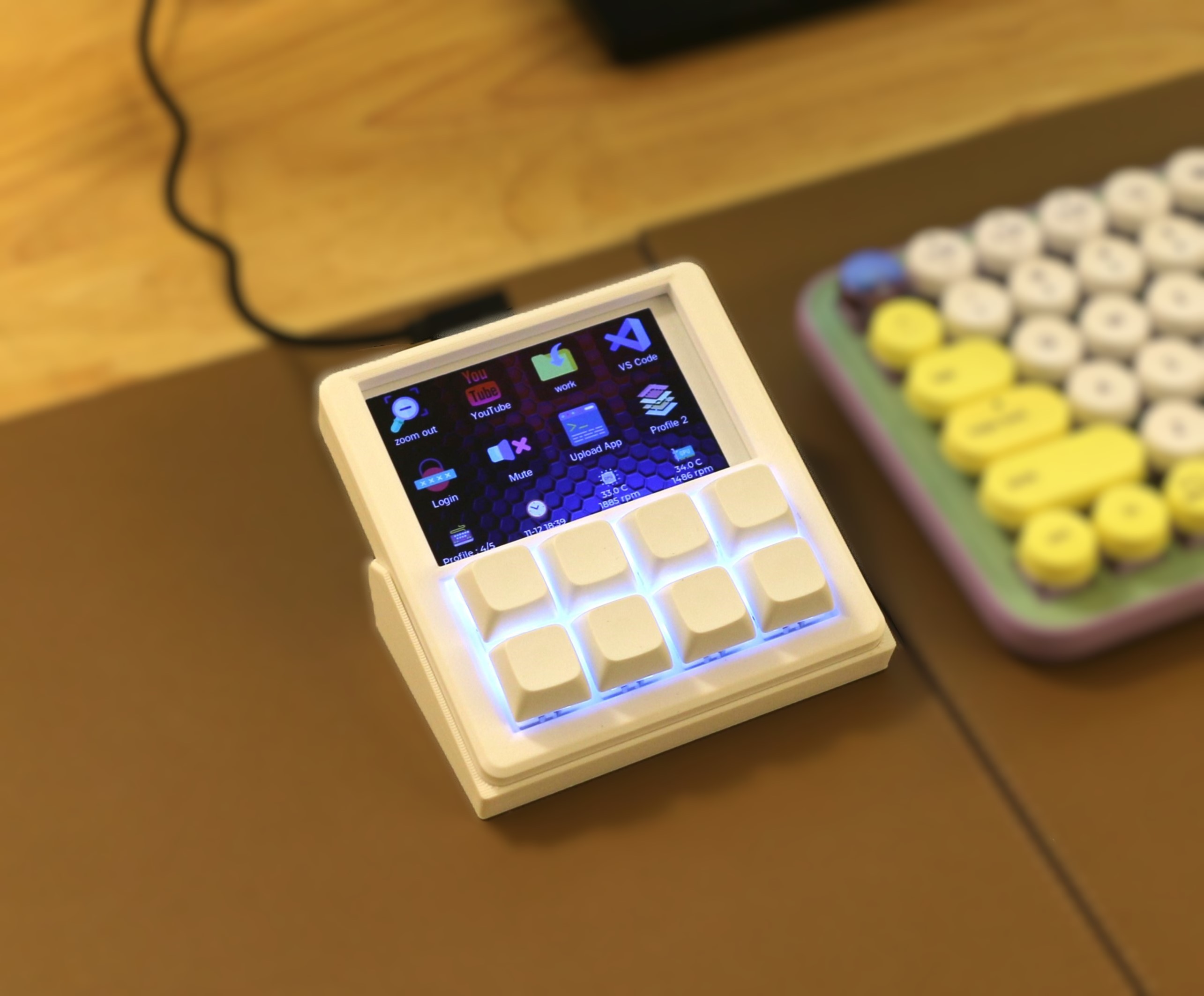
Image by [YANG SHU] via Hackaday.IOShould such a person be in the market for a macro pad (or ‘macropad’ if you prefer), that snoot should look no further than [YANG SHU]’s 8-key programmable stream deck-like device.
The main goal here was the perfect fusion of display and feel. I’m not sure that an FDM-printed, DIY macro pad can look any better than this one does. But looks are only half the story, of course. There’s also feel, and of course, functionality.
Yes those are (hot-swappable) mechanical key switches, and they are powered by an ESP32-S2. Drawn on the 3.5″ LCD are icons and text for each switch, which of course can be easily changed in the config app.
There’s a three-direction tact switch that’s used to switch between layout profiles, and I’m sure that even this is satisfying on the feel front. Does it get better than this? Besides maybe printing it in black. I ask Hackaday.
KeebDeck Keyboard Gets Two Thumbs Up
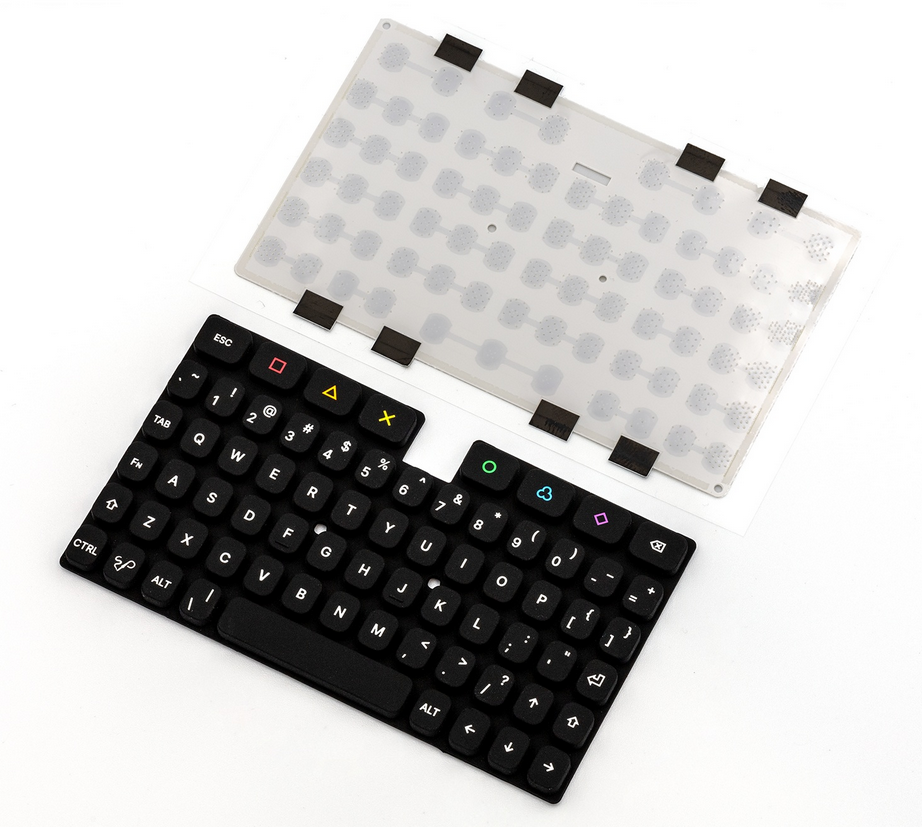
Did you make it to Supercon this year? If so, you hold a badge with a special keyboard — a custom job by Hackaday superfriend [Arturo182], aka Solder Party. Were you wondering about its backstory?
This 69-key alphanumeric silicone number has all the keys a hacker needs, plus a rainbow of extras that can be used for macros. According to [Arturo182], the keyboard has a tactile feel thanks to a snap dome sheet underneath the keys, and this makes it more comfortable for long thumb-typing sessions.
Be sure to check out the teasers at the bottom of the KeebDeck page, because there is some really exciting stuff. If you want to build one, GitHub is your friend, pal.
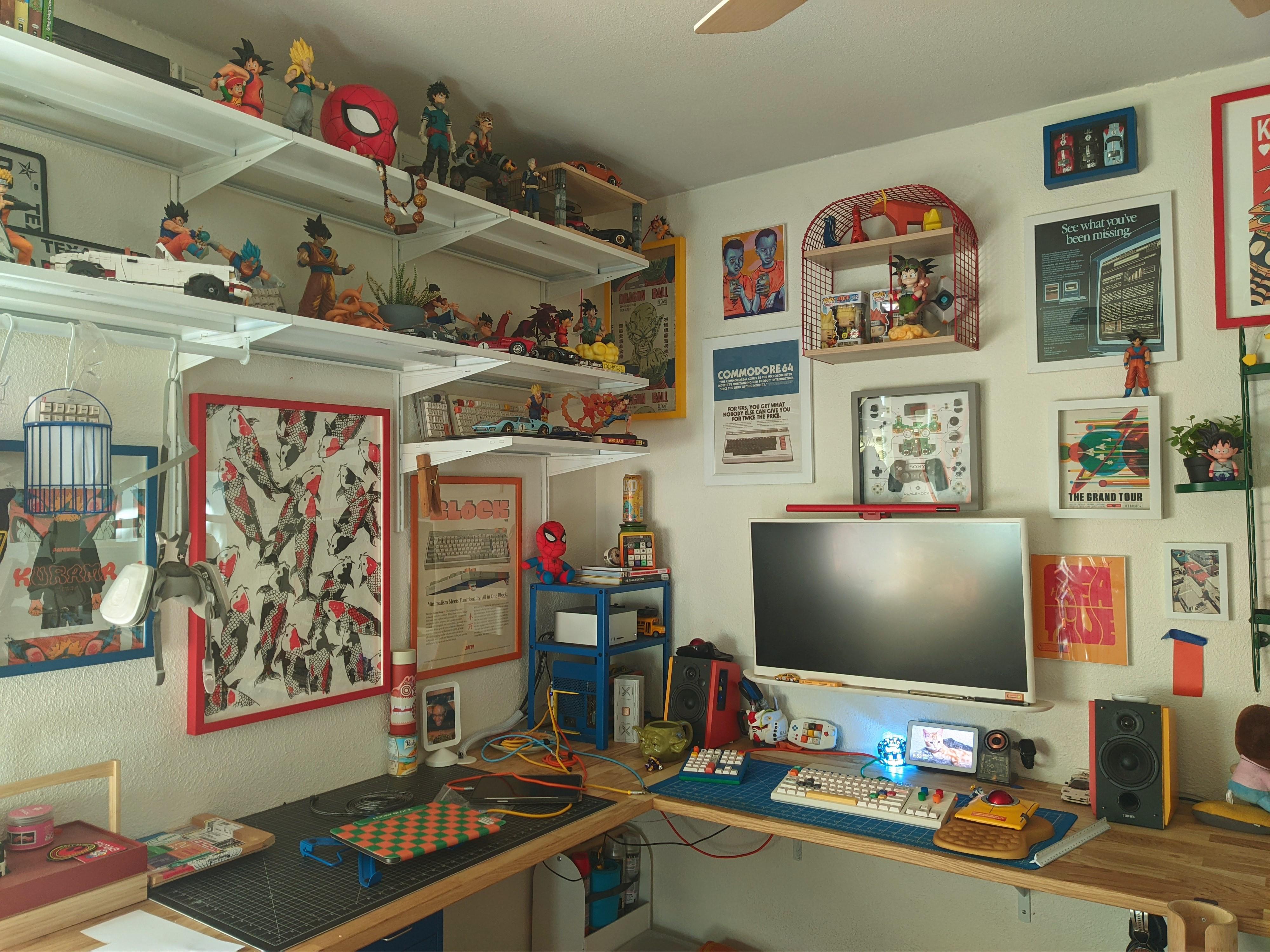
Here’s what I know: That’s a Nulea m512 mouse, the keyboard is a KBD Craft Sachiel LEGO number, and that there is a Cidoo macro pad. Best of all, [Tardigradium] hand-painted the speakers. Neat-o!
Do you rock a sweet set of peripherals on a screamin’ desk pad? Send me a picture along with your handle and all the gory details, and you could be featured here!
Historical Clackers: the Gerda Typewriter Was One of Accessibility
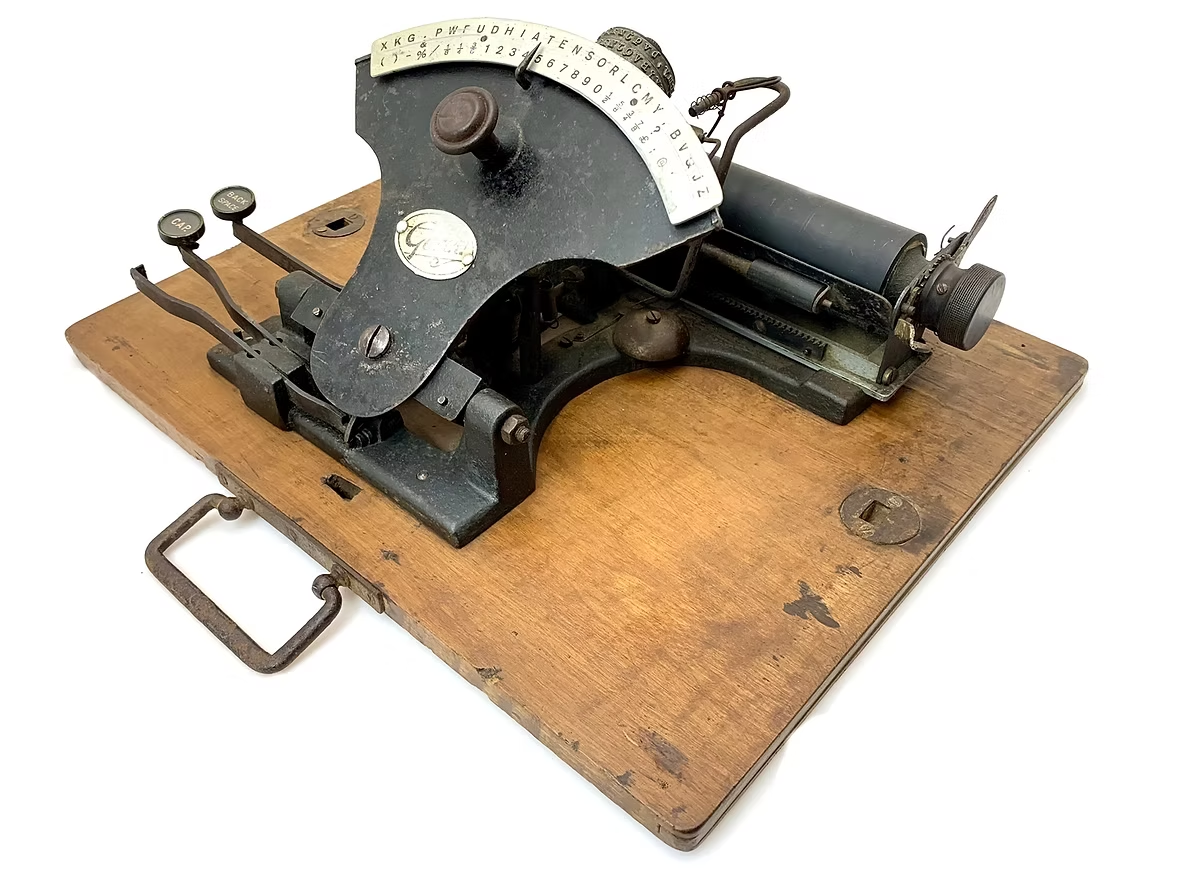
Some of us (okay, I) would have thought that most accessibility inventions are fairly recent, say, from the 1960s onward. But consider the Gerda typewriter, which was created in 1919 to enable blind and one-armed victims of WWI to become employable typists.
According to the Antikey Chop, it’s quite possible that the German government helped grease the wheels of this project so that these soldiers would have a usable typewriter with which to get on with life.
Three versions of this index typewriter were produced: a two-handed Gerda, one with a Braille index, and one with an English index. All entered the market the same year, and were produced for a total of three years.
The Gerda’s typewheel was quite like Blickensderfer, and some even had the DHIATENSOR layout. More expensive than last week’s Clacker (75 Marks), the Gerdas for blind and sighted people with two hands cost 195 Marks, and the one-handed edition was 205 Marks. Some of the two-handed models had rectangular, wooden key-tops, and others had round, glass-topped keys.
Finally, Module-Based Keyboard Is a Sensory Nightmare
I’ve been an early adopter of keyboards in the past. This is usually to bring them to your attention, either before they’re released, or just as they’ve come out. And never have I ever had this poor of an experience.
Games Radar recently reviewed a surprisingly not-failed Kickstarter keyboard that actually shipped, the Naya Create. It may not look like it, but the Create is supposed to be a gaming keyboard. What it does look like is mouse-focused, or at least mouse-forward. And that’s the point of it. Evidently.
Those big modules are interchangeable, and there are four of them so far: the Touch (a trackpad), Track (a trackball that falls out reliably), the Tune (a dial), and the Float, which is designed for space mousing around. They sound cool enough, and might actually be the best part of this whole setup.
To fully illustrate my poit I hvemt’t corrected any of the typos experieved typim this semtemve with the Naya Create while tryig to maintain my usual speed.
But according to Games Radar, the Naya Create is so not worth the $850 (!) asking price. It has ‘mushy, low-profile switches’ and clammy caps, and although the reviewer complains about the non-staggered keys, y’all know that those are my preference at this point.
And apparently, by default, Backspace is mapped to the left side. What? Of course, you can remap any key, whenever the software decides to work. Whenever the reviewer tried to save changes, the software would say that the keyboard is disconnected. Wonderful.
Despite these shortcomings, Games Radar says the keyboard is rock-solid aluminium with good hinges. So there’s that. Just, you know, swap out the switches and keycaps, and wait for software updates, I guess.

 Login
Login