Reading view

There are new articles available, click to refresh the page.

New 01Flip Ransomware Targets Both Windows and Linux Systems

Security researchers at Palo Alto Networks Unit 42 have identified a newly emerging ransomware family, 01flip, that represents a significant shift in malware development tactics. Discovered in June 2025, this sophisticated threat is entirely written in Rust a modern programming language that enables cross-platform compatibility and currently targets a limited set of victims across the […]

The post New 01Flip Ransomware Targets Both Windows and Linux Systems appeared first on GBHackers Security | #1 Globally Trusted Cyber Security News Platform.

Creating User-Friendly Installers Across Operating Systems

After you have written the code for some awesome application, you of course want other people to be able to use it. Although simply directing them to the source code on GitHub or similar is an option, not every project lends itself to the traditional configure && make && make install, with often dependencies being the sticking point.

Asking the user to install dependencies and set up any filesystem links is an option, but having an installer of some type tackle all this is of course significantly easier. Typically this would contain the precompiled binaries, along with any other required files which the installer can then copy to their final location before tackling any remaining tasks, like updating configuration files, tweaking a registry, setting up filesystem links and so on.

As simple as this sounds, it comes with a lot of gotchas, with Linux distributions in particular being a tough nut. Whereas on MacOS, Windows, Haiku and many other OSes you can provide a single installer file for the respective platform, for Linux things get interesting.

Windows As Easy Mode

For all the flak directed at Windows, it is hard to deny that it is a stupidly easy platform to target with a binary installer, with equally flexible options available on the side of the end-user. Although Microsoft has nailed down some options over the years, such as enforcing the user’s home folder for application data, it’s still among the easiest to install an application on.

While working on the NymphCast project, I found myself looking at a pleasant installer to wrap the binaries into, initially opting to use the NSIS (Nullsoft Scriptable Install System) installer as I had seen it around a lot. While this works decently enough, you do notice that it’s a bit crusty and especially the more advanced features can be rather cumbersome.

This is where a friend who was helping out with the project suggested using the more modern Inno Setup instead, which is rather like the well-known InstallShield utility, except OSS and thus significantly more accessible. Thus the pipeline on Windows became the following:

  1. Install dependencies using vcpkg.
  2. Compile project using NMake and the MSVC toolchain.
  3. Run the Inno Setup script to build the .exe based installer.

Installing applications on Windows is helped massively both by having a lot of freedom where to install the application, including on a partition or disk of choice, and by having the start menu structure be just a series of folders with shortcuts in them.

The Qt-based NymphCast Player application’s .iss file covers essentially such a basic installation process, while the one for NymphCast Server also adds the option to download a pack of wallpaper images, and asks for the type of server configuration to use.

Uninstalling such an application basically reverses the process, with the uninstaller installed alongside the application and registered in the Windows registry together with the application’s details.

MacOS As Proprietary Mode

Things get a bit weird with MacOS, with many application installers coming inside a DMG image or PKG file. The former is just a disk image that can be used for distributing applications, and the user is generally provided with a way to drag the application into the Applications folder. The PKG file is more of a typical installer as on Windows.

Of course, the problem with anything MacOS is that Apple really doesn’t want you to do anything with MacOS if you’re not running MacOS already. This can be worked around, but just getting to the point of compiling for MacOS without running XCode on MacOS on real Apple hardware is a bit of a fool’s errand. Not to mention Apple’s insistence on signing these packages, if you don’t want the end-user to have to jump through hoops.

Although I have built both iOS and OS X/MacOS applications in the past – mostly for commercial projects – I decided to not bother with compiling or testing my projects like NymphCast for Apple platforms without easy access to an Apple system. Of course, something like Homebrew can be a viable alternative to the One True Apple Way™ if you merely want to get OSS o MacOS. I did add basic support for Homebrew in NymphCast, but without a MacOS system to test it on, who knows whether it works.

Anything But Linux

The world of desktop systems is larger than just Windows, MacOS and Linux, of course. Even mobile OSes like iOS and Android can be considered to be ‘desktop OSes’ with the way that they’re being used these days, also since many smartphones and tablets can be hooked up to to a larger display, keyboard and mouse.

How to bootstrap Android development, and how to develop native Android applications has been covered before, including putting APK files together. These are the typical Android installation files, akin to other package manager packages. Of course, if you wish to publish to something like the Google Play Store, you’ll be forced into using app bundles, as well as various ways to signing the resulting package.

The idea of using a package for a built-in package manager instead of an executable installer is a common one on many platforms, with iOS and kin being similar. On FreeBSD, which also got a NymphCast port, you’d create a bundle for the pkg package manager, although you can also whip up an installer. In the case of NymphCast there is a ‘universal installer’ built into the Makefile after compilation via the fully automated setup.sh shell script, using the fact that OSes like Linux, FreeBSD and even Haiku are quite similar on a folder level.

That said, the Haiku port of NymphCast is still as much of a Beta as Haiku itself, as detailed in the write-up which I did on the topic. Once Haiku is advanced enough I’ll be creating packages for its pkgman package manager as well.

The Linux Chaos Vortex

There is a simple, universal way to distribute software across Linux distributions, and it’s called the ‘tar.gz method’, referring to the time-honored method of distributing source as a tarball, for local compilation. If this is not what you want, then there is the universal RPM installation format which died along with the Linux Standard Base. Fortunately many people in the Linux ecosystem have worked tirelessly to create new standards which will definitely, absolutely, totally resolve the annoying issue of having to package your applications into RPMs, DEBs, Snaps, Flatpaks, ZSTs, TBZ2s, DNFs, YUMs, and other easily remembered standards.

It is this complete and utter chaos with Linux distros which has made me not even try to create packages for these, and instead offer only the universal .tar.gz installation method. After un-tar-ing the server code, simply run setup.sh and lean back while it compiles the thing. After that, run install_linux.sh and presto, the whole shebang is installed without further ado. I also provided an uninstall_linux.sh script to complete the experience.

That said, at least one Linux distro has picked up NymphCast and its dependencies like Libnymphcast and NymphRPC into their repository: Alpine Linux. Incidentally FreeBSD also has an up to date package of NymphCast in its repository. I’m much obliged to these maintainers for providing this service.

Perhaps the lesson here is that if you want to get your neatly compiled and packaged application on all Linux distributions, you just need to make it popular enough that people want to use it, so that it ends up getting picked up by package repository contributors?

Wrapping Up

With so many details to cover, there’s also the easily forgotten topic that was so prevalent in the Windows installer section: integration with the desktop environment. On Windows, the Start menu is populated via simple shortcut files, while one sort-of standard on Linux (and FreeBSD as corollary) are Freedesktop’s XDC Desktop Entry files. Or .desktop files for short, which purportedly should give you a similar effect.

Only that’s not how anything works with the Linux ecosystem, as every single desktop environment has its own ideas on how these files should be interpreted, where they should be located, or whether to ignore them completely. My own experiences there are that relying on them for more advanced features, such as auto-starting a graphical application on boot (which cannot be done with Systemd, natch) without something throwing an XDG error or not finding a display is basically a fool’s errand. Perhaps that things are better here if you use KDE Plasma as DE, but this was an installer thing that I failed to solve after months of trial and error.

Long story short, OSes like Windows are pretty darn easy to install applications on, MacOS is okay as long as you have bought into the Apple ecosystem and don’t mind hanging out there, while FreeBSD is pretty simple until it touches the Linux chaos via X11 and graphical desktops. Meanwhile I’d strongly advise to only distribute software on Linux as a tarball, for your sanity’s sake.

Stop opening your browser for these 8 tasks, the terminal does them better

The terminal looks like an unassuming (sometimes intimidating) black box and feels like it’s only meant for pros or experts. It’s not as inscrutable as it seems though. Anybody can learn to use it and get stuff done. Once you get the hang of it, you’ll often find yourself launching a terminal instead of opening a new browser tab. That’s because the terminal is faster, reliable, and never shows ads.

Building Rust Apps For Cheap Hackable Handheld Console

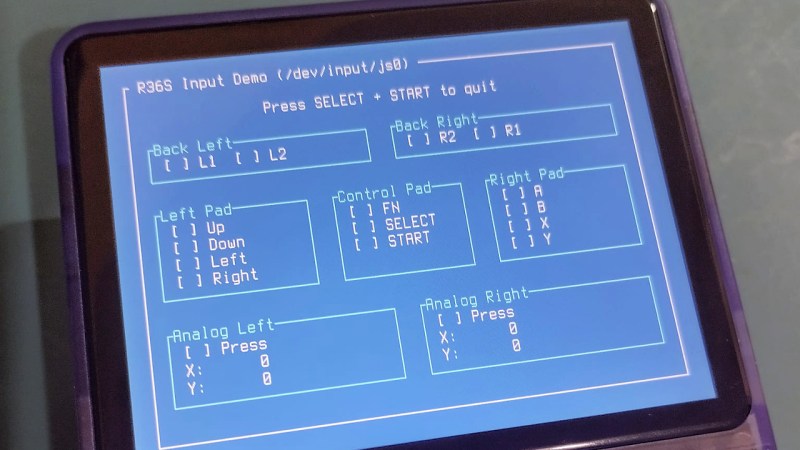
The age of cheap and powerful devices is upon us. How about a 20 EUR handheld game console intended for retro game emulation, that runs Linux under the hood? [Luiz Ferreira] kicks the tires of a R36S, a very popular and often cloned device running a quad-core RK3326 with an Ubuntu-based OS, and shows us how to write and cross-compile a simple app for it using Rust – even if you daily drive Windows.

Since a fair bit of the underlying Linux OS is exposed, you can quickly build even text applications and have them run on the console. For instance, [Luiz]’s app uses ratatui to scan then print button and joystick states to the screen. Perhaps the most important thing about this app is that it’s a detailed tutorial on cross-compiling Rust apps for a Linux target, and it runs wonders using WSL, too.

Installing your app is simple, too: SSH into it, username ark and password ark. Looking for a Linux-powered device with a bright screen, WiFi, a fair few rugged buttons, and an OS open for exploration? This one is quite reassuring in the age of usual portables like smartphones getting more and more closed-off to tinkering. And, if the store-bought hackable Linux consoles still aren’t enough, you can always step it up and build your own, reusing Joycons for your input needs while at it.

It didn’t take long: CVE-2025-55182 is now under active exploitation

On December 4, 2025, researchers published details on the critical vulnerability CVE-2025-55182, which received a CVSS score of 10.0. It has been unofficially dubbed React4Shell, as it affects React Server Components (RSC) functionality used in web applications built with the React library. RSC speeds up UI rendering by distributing tasks between the client and the server. The flaw is categorized as CWE-502 (Deserialization of Untrusted Data). It allows an attacker to execute commands, as well as read and write files in directories accessible to the web application, with the server process privileges.

Almost immediately after the exploit was published, our honeypots began registering attempts to leverage CVE-2025-55182. This post analyzes the attack patterns, the malware that threat actors are attempting to deliver to vulnerable devices, and shares recommendations for risk mitigation.

A brief technical analysis of the vulnerability

React applications are built on a component-based model. This means each part of the application or framework should operate independently and offer other components clear, simple methods for interaction. While this approach allows for flexible development and feature addition, it can require users to download large amounts of data, leading to inconsistent performance across devices. This is the challenge React Server Components were designed to address.

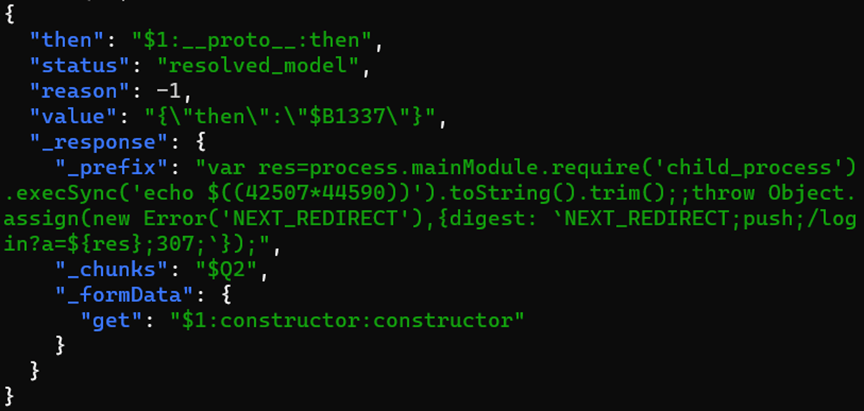
The vulnerability was found within the Server Actions component of RSC. To reach the vulnerable function, the attacker just needs to send a POST request to the server containing a serialized data payload for execution. Part of the functionality of the handler that allows for unsafe deserialization is illustrated below:

A comparison of the vulnerable (left) and patched (right) functions

A comparison of the vulnerable (left) and patched (right) functions

CVE-2025-55182 on Kaspersky honeypots

As the vulnerability is rather simple to exploit, the attackers quickly added it to their arsenal. The initial exploitation attempts were registered by Kaspersky honeypots on December 5. By Monday, December 8, the number of attempts had increased significantly and continues to rise.

The number of CVE-2025-55182 attacks targeting Kaspersky honeypots, by day (download)

Attackers first probe their target to ensure it is not a honeypot: they run whoami, perform multiplication in bash, or compute MD5 or Base64 hashes of random strings to verify their code can execute on the targeted machine.

In most cases, they then attempt to download malicious files using command-line web clients like wget or curl. Additionally, some attackers deliver a PowerShell-based Windows payload that installs XMRig, a popular Monero crypto miner.

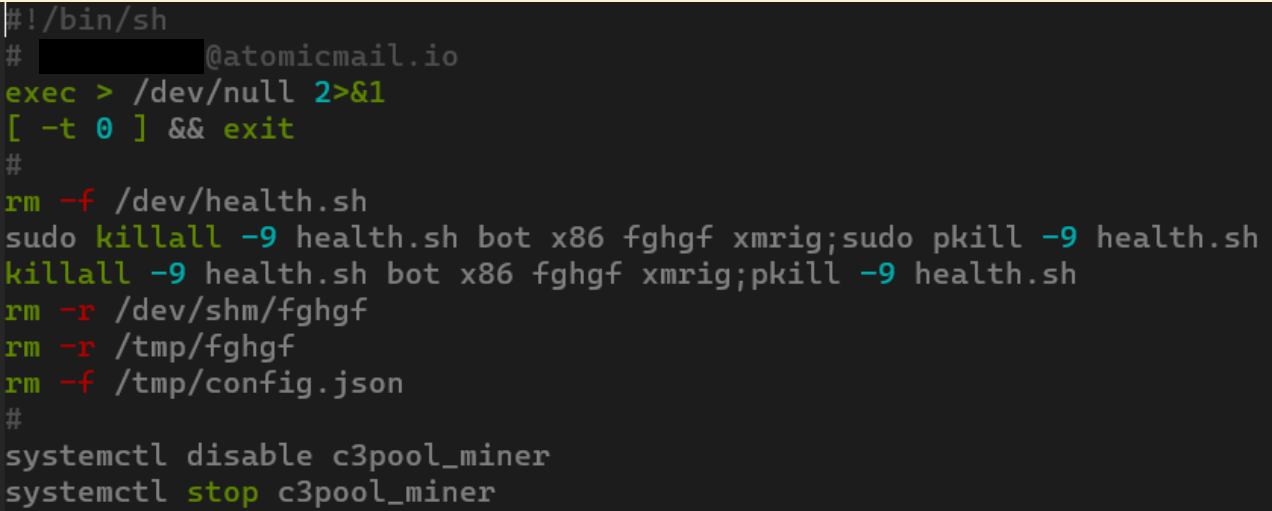
CVE-2025-55182 was quickly weaponized by numerous malware campaigns, ranging from classic Mirai/Gafgyt variants to crypto miners and the RondoDox botnet. Upon infecting a system, RondoDox wastes no time, its loader script immediately moving to eliminate competitors:

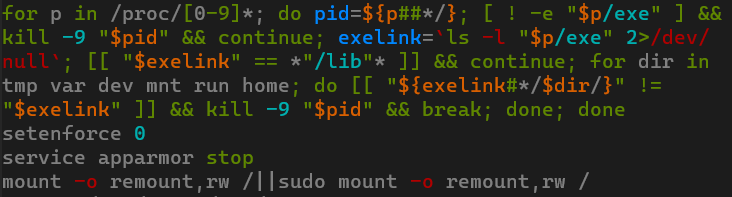
Beyond checking hardcoded paths, RondoDox also neutralizes AppArmor and SELinux security modules and employs more sophisticated methods to find and terminate processes with ELF files removed for disguise.

Only after completing these steps does the script download and execute the main payload by sequentially trying three different loaders: wget, curl, and wget from BusyBox. It also iterates through 18 different malware builds for various CPU architectures, enabling it to infect both IoT devices and standard x86_64 Linux servers.

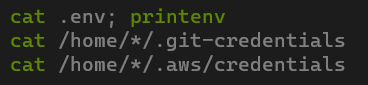
In some attacks, instead of deploying malware, the adversary attempted to steal credentials for Git and cloud environments. A successful breach could lead to cloud infrastructure compromise, software supply chain attacks, and other severe consequences.

Risk mitigation measures

We strongly recommend updating the relevant packages by applying patches released by the developers of the corresponding modules and bundles.
Vulnerable versions of React Server Components:

  • react-server-dom-webpack (19.0.0, 19.1.0, 19.1.1, 19.2.0)
  • react-server-dom-parcel (19.0.0, 19.1.0, 19.1.1, 19.2.0)
  • react-server-dom-turbopack (19.0.0, 19.1.0, 19.1.1, 19.2.0)

Bundles and modules confirmed as using React Server Components:

  • next
  • react-router
  • waku
  • @parcel/rsc
  • @vitejs/plugin-rsc
  • rwsdk

To prevent exploitation while patches are being deployed, consider blocking all POST requests containing the following keywords in parameters or the request body:

  • #constructor
  • #__proto__
  • #prototype
  • vm#runInThisContext
  • vm#runInNewContext
  • child_process#execSync
  • child_process#execFileSync
  • child_process#spawnSync
  • module#_load
  • module#createRequire
  • fs#readFileSync
  • fs#writeFileSync
  • s#appendFileSync

Conclusion

Due to the ease of exploitation and the public availability of a working PoC, threat actors have rapidly adopted CVE-2025-55182. It is highly likely that attacks will continue to grow in the near term.

We recommend immediately updating React to the latest patched version, scanning vulnerable hosts for signs of malware, and changing any credentials stored on them.

Indicators of compromise

Malware URLs
hxxp://172.237.55.180/b
hxxp://172.237.55.180/c
hxxp://176.117.107.154/bot
hxxp://193.34.213.150/nuts/bolts
hxxp://193.34.213.150/nuts/x86
hxxp://23.132.164.54/bot
hxxp://31.56.27.76/n2/x86
hxxp://31.56.27.97/scripts/4thepool_miner[.]sh
hxxp://41.231.37.153/rondo[.]aqu[.]sh
hxxp://41.231.37.153/rondo[.]arc700
hxxp://41.231.37.153/rondo[.]armeb
hxxp://41.231.37.153/rondo[.]armebhf
hxxp://41.231.37.153/rondo[.]armv4l
hxxp://41.231.37.153/rondo[.]armv5l
hxxp://41.231.37.153/rondo[.]armv6l
hxxp://41.231.37.153/rondo[.]armv7l
hxxp://41.231.37.153/rondo[.]i486
hxxp://41.231.37.153/rondo[.]i586
hxxp://41.231.37.153/rondo[.]i686
hxxp://41.231.37.153/rondo[.]m68k
hxxp://41.231.37.153/rondo[.]mips
hxxp://41.231.37.153/rondo[.]mipsel
hxxp://41.231.37.153/rondo[.]powerpc
hxxp://41.231.37.153/rondo[.]powerpc-440fp
hxxp://41.231.37.153/rondo[.]sh4
hxxp://41.231.37.153/rondo[.]sparc
hxxp://41.231.37.153/rondo[.]x86_64
hxxp://51.81.104.115/nuts/bolts
hxxp://51.81.104.115/nuts/x86
hxxp://51.91.77.94:13339/termite/51.91.77.94:13337
hxxp://59.7.217.245:7070/app2
hxxp://59.7.217.245:7070/c[.]sh
hxxp://68.142.129.4:8277/download/c[.]sh
hxxp://89.144.31.18/nuts/bolts
hxxp://89.144.31.18/nuts/x86
hxxp://gfxnick.emerald.usbx[.]me/bot
hxxp://meomeoli.mooo[.]com:8820/CLoadPXP/lix.exe?pass=PXPa9682775lckbitXPRopGIXPIL
hxxps://api.hellknight[.]xyz/js
hxxps://gist.githubusercontent[.]com/demonic-agents/39e943f4de855e2aef12f34324cbf150/raw/e767e1cef1c35738689ba4df9c6f7f29a6afba1a/setup_c3pool_miner[.]sh

MD5 hashes
0450fe19cfb91660e9874c0ce7a121e0
3ba4d5e0cf0557f03ee5a97a2de56511
622f904bb82c8118da2966a957526a2b
791f123b3aaff1b92873bd4b7a969387
c6381ebf8f0349b8d47c5e623bbcef6b
e82057e481a2d07b177d9d94463a7441

PeerBlight Linux Malware Abuses React2Shell for Proxy Tunneling

Cybersecurity researchers have uncovered a sophisticated Linux malware campaign exploiting the critical React2Shell vulnerability (CVE-2025-55182) to deploy multiple post-exploitation payloads. A newly identified backdoor dubbed “PeerBlight” that leverages the BitTorrent DHT network for resilient command-and-control communications. CVE-2025-55182, publicly disclosed on December 3, 2025, is a critical-severity unauthenticated remote code execution vulnerability affecting React Server Components […]

The post PeerBlight Linux Malware Abuses React2Shell for Proxy Tunneling appeared first on GBHackers Security | #1 Globally Trusted Cyber Security News Platform.

4 hidden Chromebook features you’re not using (but should)

It's easy to fall into the trap of thinking a Chromebook is "simple" and is only suitable for kids at school, not serious work. Yet, ChromeOS has grown into a rather mature operating system, and there are plenty of features that can supercharge your productivity or expand your options hidden under the surface of that user-friendly interface.

AI-Driven Tools Uncover GhostPenguin Backdoor Attacking Linux Servers

A sophisticated Linux backdoor named GhostPenguin has been discovered by Trend Micro Research, evading detection for over four months after its initial submission to VirusTotal in July 2025. The threat represents a new breed of stealthy malware designed to maintain a low profile while delivering comprehensive remote access and file system manipulation capabilities to threat […]

The post AI-Driven Tools Uncover GhostPenguin Backdoor Attacking Linux Servers appeared first on GBHackers Security | #1 Globally Trusted Cyber Security News Platform.

❌